多编程语言综合教程:Java、Python、C++、Go
1. 编程语言概述
编程语言是人与计算机沟通的桥梁,不同的语言设计理念和应用场景各不相同。本教程将深入探讨四种主流编程语言:Java、Python、C++和Go,帮助读者掌握它们的核心概念、应用场景和最佳实践。
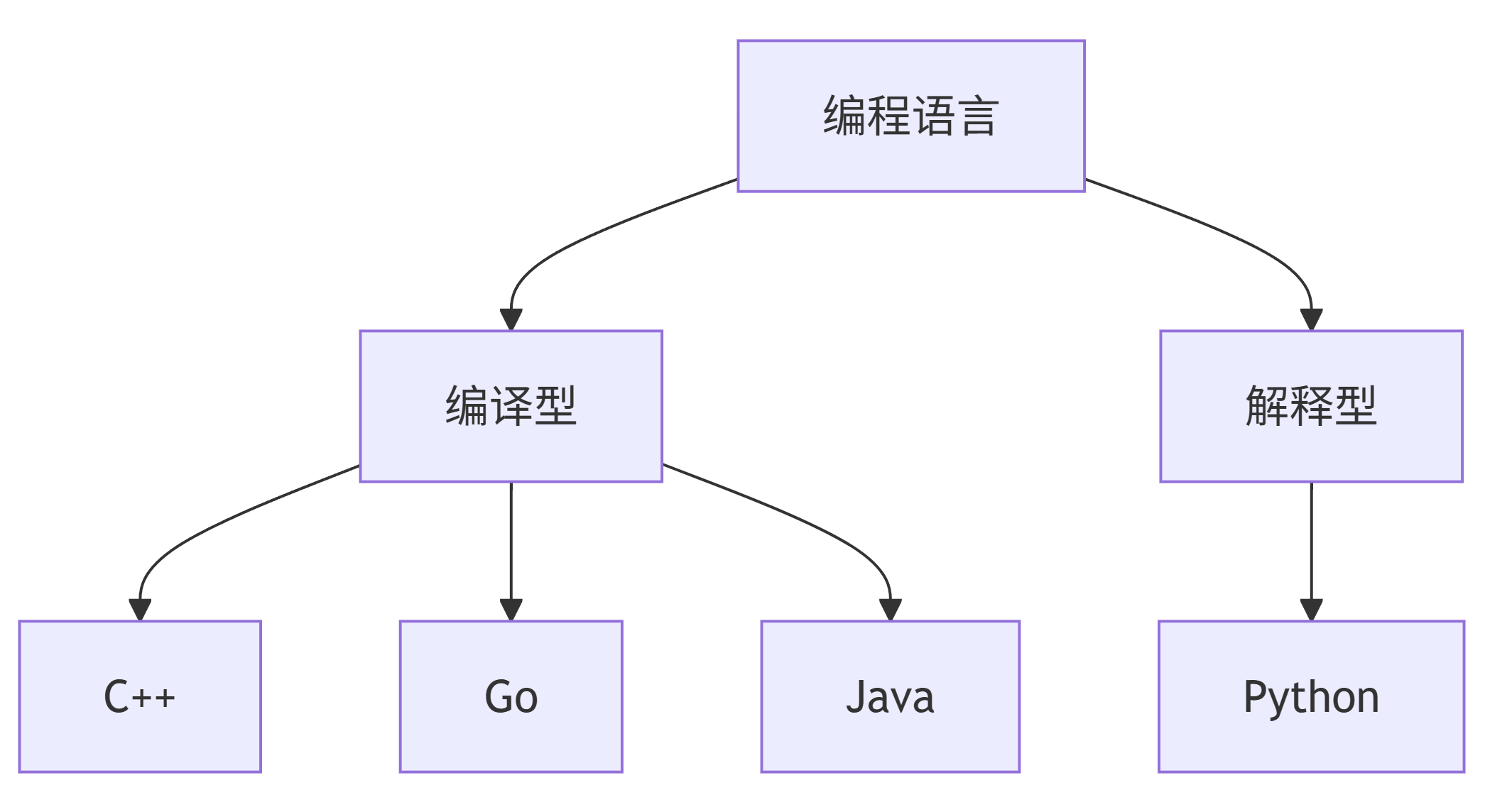
编程语言分类
graph TD
A[编程语言] --> B[编译型]
A --> C[解释型]
B --> D[C++]
B --> E[Go]
B --> F[Java]
C --> G[Python]
语言特点对比
| 特性 | Java | Python | C++ | Go |
|---|---|---|---|---|
| 类型系统 | 静态 | 动态 | 静态 | 静态 |
| 执行方式 | 编译+JVM | 解释 | 编译 | 编译 |
| 内存管理 | GC | GC | 手动/智能 | GC |
| 并发模型 | 线程 | 线程/协程 | 线程 | Goroutine |
| 学习曲线 | 中等 | 简单 | 困难 | 中等 |
| 主要应用领域 | 企业级 | 数据科学 | 系统编程 | 云原生 |
2. Java语言详解
2.1 语言简介
Java由Sun Microsystems(现Oracle)于1995年发布,是一种面向对象的、跨平台的编程语言。其"一次编写,到处运行"的理念使其成为企业级应用开发的首选。
2.2 环境搭建
- 下载JDK(Java Development Kit)
- 配置环境变量:
   # Linux/macOS
   export JAVA_HOME=/path/to/jdk
   export PATH=$JAVA_HOME/bin:$PATH

   # Windows
   set JAVA_HOME=C:\path\to\jdk
   set PATH=%JAVA_HOME%\bin;%PATH%
- 验证安装:
   java -version
   javac -version
2.3 基础语法示例
public class HelloWorld {
    public static void main(String[] args) {
        // 变量声明
        int number = 10;
        String message = "Hello, Java!";

        // 控制流
        if (number > 5) {
            System.out.println(message + " Number is greater than 5");
        }

        // 循环
        for (int i = 0; i < 3; i++) {
            System.out.println("Count: " + i);
        }
    }
}
2.4 面向对象编程
// 定义类
class Animal {
    private String name;

    public Animal(String name) {
        this.name = name;
    }

    public void makeSound() {
        System.out.println("Some sound");
    }
}

// 继承
class Dog extends Animal {
    public Dog(String name) {
        super(name);
    }

    @Override
    public void makeSound() {
        System.out.println("Woof!");
    }
}

// 使用类
public class Main {
    public static void main(String[] args) {
        Dog myDog = new Dog("Buddy");
        myDog.makeSound(); // 输出: Woof!
    }
}
2.5 集合框架
import java.util.*;

public class CollectionExample {
    public static void main(String[] args) {
        // List
        List<String> list = new ArrayList<>();
        list.add("Apple");
        list.add("Banana");

        // Map
        Map<String, Integer> map = new HashMap<>();
        map.put("Alice", 25);
        map.put("Bob", 30);

        // 遍历
        for (Map.Entry<String, Integer> entry : map.entrySet()) {
            System.out.println(entry.getKey() + ": " + entry.getValue());
        }
    }
}
2.6 多线程编程
class MyThread extends Thread {
    public void run() {
        for (int i = 0; i < 5; i++) {
            System.out.println("Thread: " + i);
            try {
                Thread.sleep(500);
            } catch (InterruptedException e) {
                e.printStackTrace();
            }
        }
    }
}

public class ThreadExample {
    public static void main(String[] args) {
        MyThread t1 = new MyThread();
        MyThread t2 = new MyThread();

        t1.start();
        t2.start();
    }
}
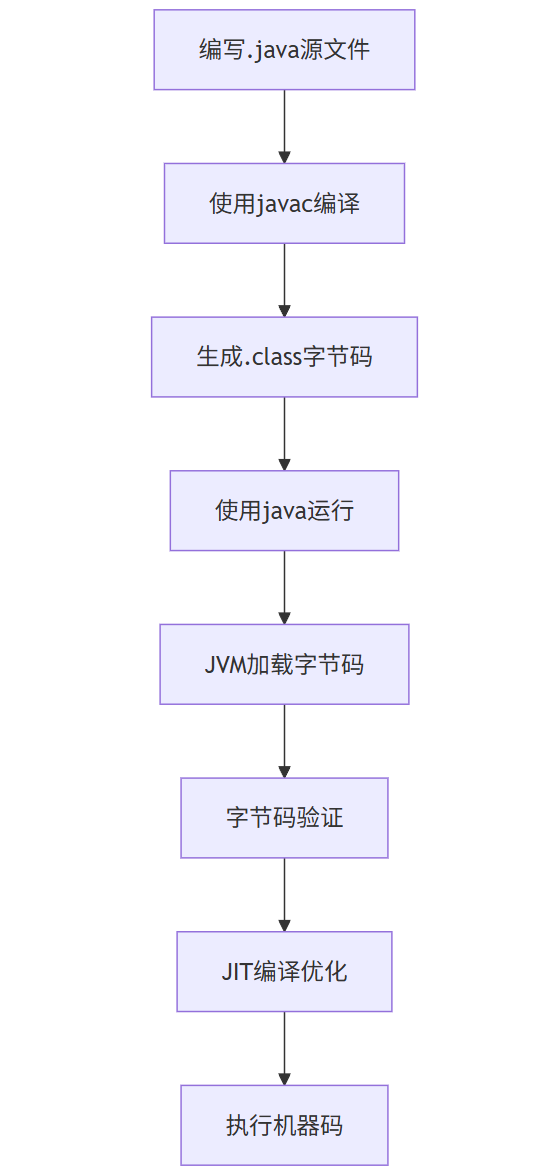
2.7 Java程序执行流程
flowchart TD
A[编写.java源文件] --> B[使用javac编译]
B --> C[生成.class字节码]
C --> D[使用java运行]
D --> E[JVM加载字节码]
E --> F[字节码验证]
F --> G[JIT编译优化]
G --> H[执行机器码]
2.8 Prompt示例
问题:如何使用Java实现一个简单的HTTP服务器?
Prompt:
请编写一个Java程序,实现一个简单的HTTP服务器,要求:
1. 监听8080端口
2. 对根路径"/"返回"Hello, Java HTTP Server!"
3. 支持处理GET请求
4. 使用Java标准库实现
解决方案:
import java.io.*;
import java.net.*;

public class SimpleHttpServer {
    public static void main(String[] args) throws IOException {
        ServerSocket serverSocket = new ServerSocket(8080);
        System.out.println("Server started on port 8080...");

        while (true) {
            Socket clientSocket = serverSocket.accept();
            handleRequest(clientSocket);
        }
    }

    private static void handleRequest(Socket clientSocket) throws IOException {
        BufferedReader in = new BufferedReader(
            new InputStreamReader(clientSocket.getInputStream()));
        PrintWriter out = new PrintWriter(clientSocket.getOutputStream());

        String requestLine = in.readLine();
        if (requestLine != null && requestLine.startsWith("GET / ")) {
            out.println("HTTP/1.1 200 OK");
            out.println("Content-Type: text/plain");
            out.println();
            out.println("Hello, Java HTTP Server!");
        } else {
            out.println("HTTP/1.1 404 Not Found");
        }

        out.close();
        in.close();
        clientSocket.close();
    }
}
3. Python语言详解
3.1 语言简介
Python由Guido van Rossum于1991年创建,是一种解释型、高级和通用的编程语言。Python强调代码可读性,使用缩进来划分代码块,广泛应用于数据科学、人工智能、Web开发和自动化脚本。
3.2 环境搭建
- 下载Python(从python.org)
- 验证安装:
   python --version
   pip --version
- 虚拟环境(推荐):
   python -m venv myenv
   source myenv/bin/activate  # Linux/macOS
   myenv\Scripts\activate     # Windows
3.3 基础语法示例
# 变量赋值
number = 10
message = "Hello, Python!"

# 控制流
if number > 5:
    print(f"{message} Number is greater than 5")

# 循环
for i in range(3):
    print(f"Count: {i}")

# 列表推导式
squares = [x**2 for x in range(10)]
3.4 函数与模块
# 定义函数
def greet(name, age=30):
    return f"Hello, {name}! You are {age} years old."

# 导入模块
import math
print(math.sqrt(16))  # 4.0

# 自定义模块
# mymodule.py
def add(a, b):
    return a + b

# main.py
from mymodule import add
print(add(3, 5))  # 8
3.5 面向对象编程
class Animal:
    def __init__(self, name):
        self.name = name

    def make_sound(self):
        print("Some sound")

class Dog(Animal):
    def make_sound(self):
        print("Woof!")

# 使用类
my_dog = Dog("Buddy")
my_dog.make_sound()  # 输出: Woof!
3.6 文件操作
# 写入文件
with open("example.txt", "w") as f:
    f.write("Hello, Python!\n")
    f.write("File handling example.")

# 读取文件
with open("example.txt", "r") as f:
    content = f.read()
    print(content)
3.7 数据处理示例(使用Pandas)
import pandas as pd

# 创建DataFrame
data = {
    'Name': ['Alice', 'Bob', 'Charlie'],
    'Age': [25, 30, 35],
    'City': ['New York', 'Los Angeles', 'Chicago']
}
df = pd.DataFrame(data)

# 数据操作
print(df[df['Age'] > 28])  # 筛选年龄大于28的记录
print(df.groupby('City')['Age'].mean())  # 按城市分组计算平均年龄
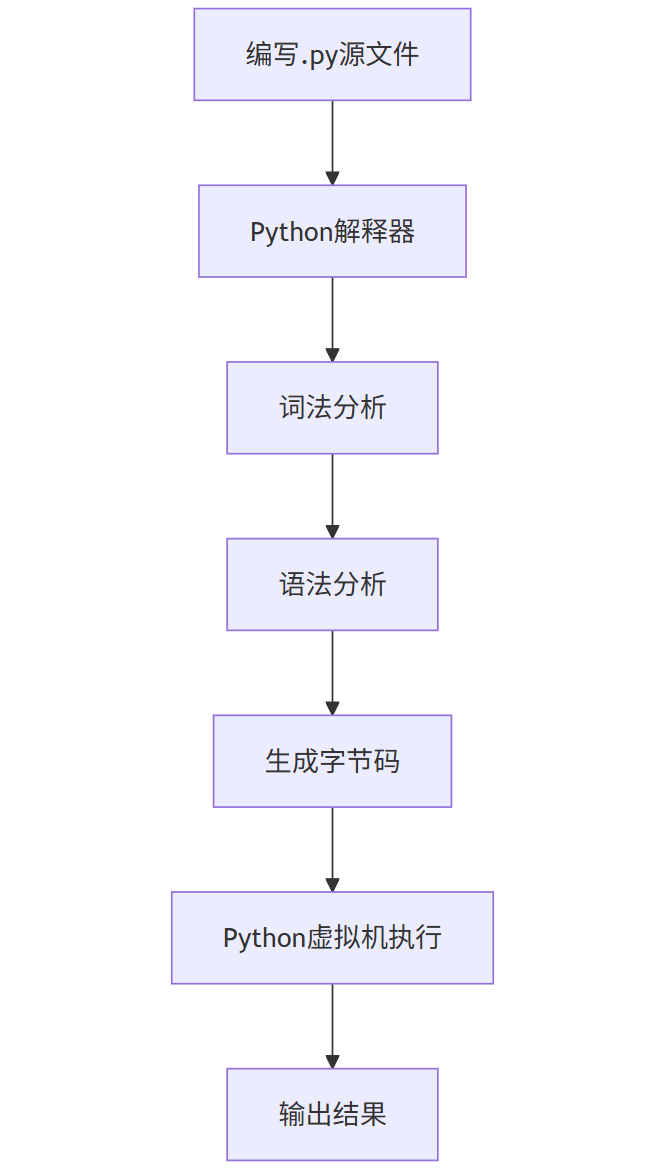
3.8 Python程序执行流程
flowchart TD
A[编写.py源文件] --> B[Python解释器]
B --> C[词法分析]
C --> D[语法分析]
D --> E[生成字节码]
E --> F[Python虚拟机执行]
F --> G[输出结果]
3.9 Prompt示例
问题:如何使用Python爬取网页标题?
Prompt:
请编写一个Python脚本,使用requests和BeautifulSoup库爬取指定网页的标题。要求:
1. 处理网络请求异常
2. 解析HTML并提取<title>标签内容
3. 输出网页标题
4. 使用函数封装主要逻辑
解决方案:
import requests
from bs4 import BeautifulSoup

def get_web_page_title(url):
    try:
        response = requests.get(url)
        response.raise_for_status()  # 检查请求是否成功

        soup = BeautifulSoup(response.text, 'html.parser')
        title = soup.title.string if soup.title else "No title found"
        return title
    except requests.exceptions.RequestException as e:
        return f"Error: {e}"

# 使用示例
url = "https://www.example.com"
print(f"Title of {url}: {get_web_page_title(url)}")
4. C++语言详解
4.1 语言简介
C++由Bjarne Stroustrup于1985年创建,是C语言的扩展,增加了面向对象、泛型编程等特性。C++是一种编译型语言,以其高性能和系统级编程能力而闻名,广泛应用于游戏开发、系统软件、嵌入式系统和高性能计算。
4.2 环境搭建
- 安装编译器:
- GCC (Linux):
sudo apt-get install build-essential - MinGW (Windows): 下载并安装
- Clang (macOS):
xcode-select --install
- GCC (Linux):
- 验证安装:
g++ --version
4.3 基础语法示例
#include <iostream>
#include <vector>
#include <string>

int main() {
    // 变量声明
    int number = 10;
    std::string message = "Hello, C++!";

    // 控制流
    if (number > 5) {
        std::cout << message << " Number is greater than 5" << std::endl;
    }

    // 循环
    for (int i = 0; i < 3; i++) {
        std::cout << "Count: " << i << std::endl;
    }

    return 0;
}
4.4 面向对象编程
#include <iostream>
#include <string>

class Animal {
private:
    std::string name;

public:
    Animal(const std::string& name) : name(name) {}

    virtual void makeSound() const {
        std::cout << "Some sound" << std::endl;
    }

    virtual ~Animal() {}
};

class Dog : public Animal {
public:
    Dog(const std::string& name) : Animal(name) {}

    void makeSound() const override {
        std::cout << "Woof!" << std::endl;
    }
};

int main() {
    Dog myDog("Buddy");
    myDog.makeSound();  // 输出: Woof!

    return 0;
}
4.5 标准模板库(STL)
#include <iostream>
#include <vector>
#include <map>
#include <algorithm>

int main() {
    // Vector
    std::vector<int> numbers = {5, 2, 8, 1, 9};
    std::sort(numbers.begin(), numbers.end());

    for (int num : numbers) {
        std::cout << num << " ";
    }
    std::cout << std::endl;

    // Map
    std::map<std::string, int> ages;
    ages["Alice"] = 25;
    ages["Bob"] = 30;

    for (const auto& pair : ages) {
        std::cout << pair.first << ": " << pair.second << std::endl;
    }

    return 0;
}
4.6 内存管理
#include <iostream>
#include <memory>

class Resource {
public:
    Resource() { std::cout << "Resource acquired\n"; }
    ~Resource() { std::cout << "Resource destroyed\n"; }
};

int main() {
    // 原始指针(需要手动释放)
    Resource* res1 = new Resource();
    delete res1;

    // 智能指针(自动管理内存)
    std::unique_ptr<Resource> res2 = std::make_unique<Resource>();

    return 0;
}
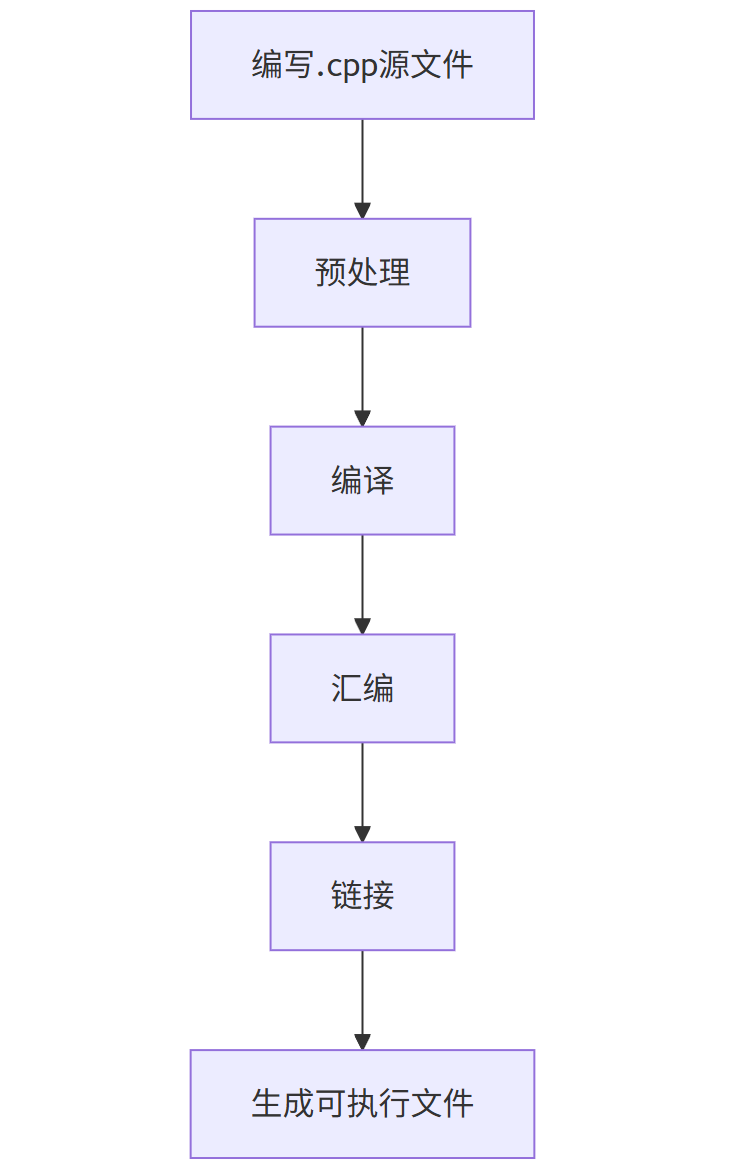
4.7 C++程序编译流程
flowchart TD
A[编写.cpp源文件] --> B[预处理]
B --> C[编译]
C --> D[汇编]
D --> E[链接]
E --> F[生成可执行文件]
4.8 Prompt示例
问题:如何使用C++实现链表?
Prompt:
请用C++实现一个单向链表,包含以下功能:
1. 在链表末尾添加节点
2. 删除指定值的节点
3. 打印链表
4. 使用模板支持不同数据类型
解决方案:
#include <iostream>

template <typename T>
class Node {
public:
    T data;
    Node* next;

    Node(T val) : data(val), next(nullptr) {}
};

template <typename T>
class LinkedList {
private:
    Node<T>* head;

public:
    LinkedList() : head(nullptr) {}

    ~LinkedList() {
        Node<T>* current = head;
        while (current != nullptr) {
            Node<T>* next = current->next;
            delete current;
            current = next;
        }
    }

    void append(T value) {
        Node<T>* newNode = new Node<T>(value);

        if (head == nullptr) {
            head = newNode;
        } else {
            Node<T>* current = head;
            while (current->next != nullptr) {
                current = current->next;
            }
            current->next = newNode;
        }
    }

    void remove(T value) {
        if (head == nullptr) return;

        if (head->data == value) {
            Node<T>* temp = head;
            head = head->next;
            delete temp;
            return;
        }

        Node<T>* current = head;
        while (current->next != nullptr && current->next->data != value) {
            current = current->next;
        }

        if (current->next != nullptr) {
            Node<T>* temp = current->next;
            current->next = temp->next;
            delete temp;
        }
    }

    void print() {
        Node<T>* current = head;
        while (current != nullptr) {
            std::cout << current->data << " -> ";
            current = current->next;
        }
        std::cout << "nullptr" << std::endl;
    }
};

int main() {
    LinkedList<int> list;
    list.append(1);
    list.append(2);
    list.append(3);
    list.print();  // 1 -> 2 -> 3 -> nullptr

    list.remove(2);
    list.print();  // 1 -> 3 -> nullptr

    return 0;
}
5. Go语言详解
5.1 语言简介
Go(又称Golang)由Google于2009年发布,是一种静态类型、编译型语言。Go设计简洁,具有高效的并发模型(goroutine和channel),适用于构建高性能网络服务和分布式系统。
5.2 环境搭建
- 下载Go(从golang.org)
- 设置环境变量:
   # Linux/macOS
   export PATH=$PATH:/usr/local/go/bin
   export GOPATH=$HOME/go

   # Windows
   set PATH=%PATH%;C:\Go\bin
   set GOPATH=%USERPROFILE%\go
- 验证安装:
go version
5.3 基础语法示例
package main

import "fmt"

func main() {
    // 变量声明
    var number int = 10
    message := "Hello, Go!"

    // 控制流
    if number > 5 {
        fmt.Printf("%s Number is greater than 5\n", message)
    }

    // 循环
    for i := 0; i < 3; i++ {
        fmt.Printf("Count: %d\n", i)
    }
}
5.4 函数与多返回值
package main

import "fmt"

// 多返回值函数
func divide(a, b float64) (float64, error) {
    if b == 0 {
        return 0, fmt.Errorf("division by zero")
    }
    return a / b, nil
}

func main() {
    result, err := divide(10, 2)
    if err != nil {
        fmt.Println("Error:", err)
    } else {
        fmt.Println("Result:", result)  // Result: 5
    }
}
5.5 结构体与方法
package main

import "fmt"

// 定义结构体
type Animal struct {
    Name string
}

// 定义方法
func (a Animal) MakeSound() {
    fmt.Println("Some sound")
}

type Dog struct {
    Animal // 嵌入
}

func (d Dog) MakeSound() {
    fmt.Println("Woof!")
}

func main() {
    myDog := Dog{Animal{Name: "Buddy"}}
    myDog.MakeSound()  // 输出: Woof!
}
5.6 并发编程
package main

import (
    "fmt"
    "time"
)

func worker(id int, jobs <-chan int, results chan<- int) {
    for j := range jobs {
        fmt.Printf("Worker %d started job %d\n", id, j)
        time.Sleep(time.Second) // 模拟工作
        results <- j * 2
        fmt.Printf("Worker %d finished job %d\n", id, j)
    }
}

func main() {
    jobs := make(chan int, 5)
    results := make(chan int, 5)

    // 启动3个worker goroutine
    for w := 1; w <= 3; w++ {
        go worker(w, jobs, results)
    }

    // 发送5个任务
    for j := 1; j <= 5; j++ {
        jobs <- j
    }
    close(jobs)

    // 收集结果
    for a := 1; a <= 5; a++ {
        <-results
    }
}
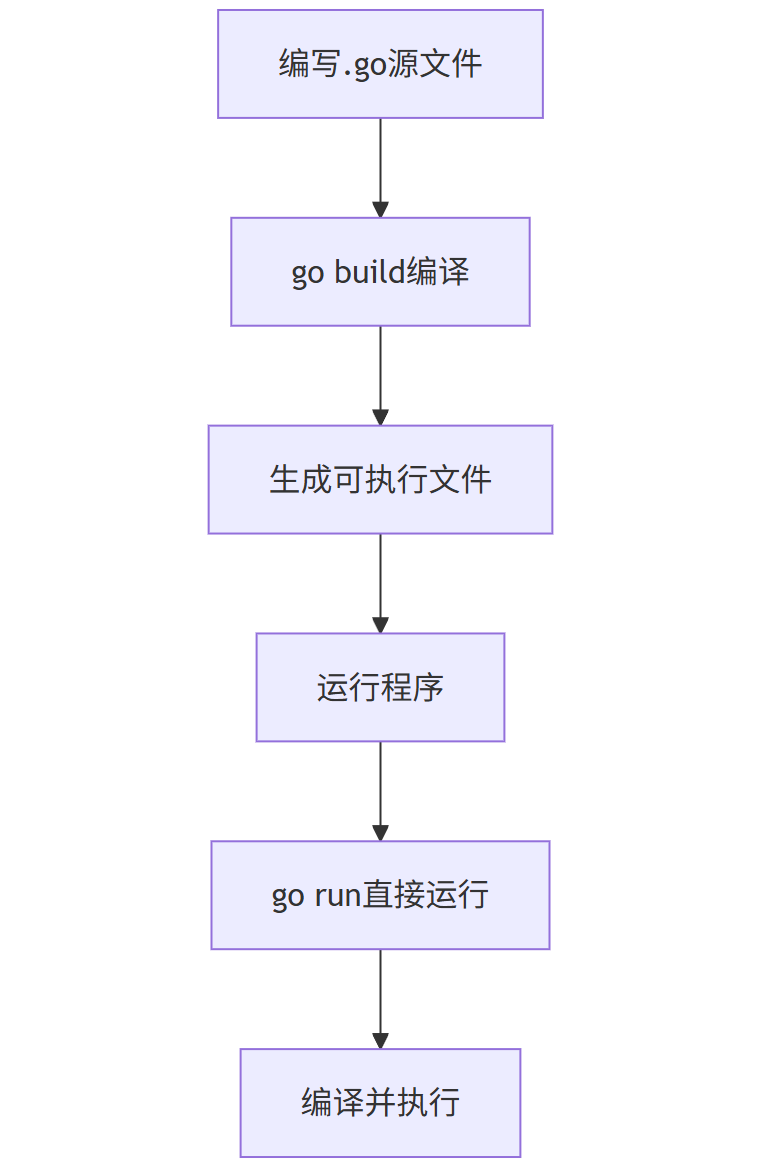
5.7 Go程序执行流程
flowchart TD
A[编写.go源文件] --> B[go build编译]
B --> C[生成可执行文件]
C --> D[运行程序]
D --> E[go run直接运行]
E --> F[编译并执行]
5.8 Prompt示例
问题:如何使用Go实现一个简单的HTTP服务器?
Prompt:
请编写一个Go程序,实现一个简单的HTTP服务器,要求:
1. 监听8080端口
2. 对根路径"/"返回"Hello, Go HTTP Server!"
3. 支持处理GET请求
4. 使用Go标准库实现
解决方案:
package main

import (
    "fmt"
    "net/http"
)

func handler(w http.ResponseWriter, r *http.Request) {
    if r.URL.Path != "/" {
        http.NotFound(w, r)
        return
    }

    if r.Method != "GET" {
        http.Error(w, "Method not allowed", http.StatusMethodNotAllowed)
        return
    }

    fmt.Fprint(w, "Hello, Go HTTP Server!")
}

func main() {
    http.HandleFunc("/", handler)
    fmt.Println("Server started on port 8080...")
    http.ListenAndServe(":8080", nil)
}
6. 语言对比与选择
6.1 性能对比
barChart
title 编程语言性能对比(相对执行时间)
x-axis 语言
y-axis 时间(秒)
series 执行时间
data
C++ 1.0
Go 1.2
Java 1.5
Python 5.0
6.2 应用场景分析
pie
title 编程语言主要应用领域
"Java" : 35
"Python" : 30
"C++" : 20
"Go" : 15
6.3 选择指南
| 场景 | 推荐语言 | 原因 |
|---|---|---|
| 企业级应用 | Java | 成熟生态系统、强大的框架支持、跨平台能力 |
| 数据科学/AI | Python | 丰富的数据科学库、简洁语法、强大的社区支持 |
| 系统编程/游戏开发 | C++ | 高性能、底层控制能力、成熟的图形库 |
| 云原生/微服务 | Go | 高效的并发模型、快速编译、内置网络支持 |
| 快速原型开发 | Python | 开发效率高、语法简洁、丰富的第三方库 |
| 高性能计算 | C++/Go | C++提供极致性能,Go提供良好的并发性能和开发效率平衡 |
6.4 学习曲线对比
lineChart
title 编程语言学习曲线
x-axis 学习时间(月)
y-axis 掌握程度(%)
series Python
series Go
series Java
series C++
data
Python 0 0, 1 40, 2 70, 3 85, 6 95
Go 0 0, 1 30, 2 60, 3 80, 6 90
Java 0 0, 1 25, 2 50, 3 70, 6 85
C++ 0 0, 1 15, 2 35, 3 55, 6 75
7. 实战项目示例
7.1 多语言实现的简单Web服务器
Java实现
import java.io.*;
import java.net.*;

public class JavaWebServer {
    public static void main(String[] args) throws IOException {
        ServerSocket server = new ServerSocket(8080);
        System.out.println("Java Server running on port 8080");

        while (true) {
            try (Socket client = server.accept();
                 BufferedReader in = new BufferedReader(
                     new InputStreamReader(client.getInputStream()));
                 PrintWriter out = new PrintWriter(client.getOutputStream())) {

                String request = in.readLine();
                if (request != null && request.startsWith("GET / ")) {
                    out.println("HTTP/1.1 200 OK");
                    out.println("Content-Type: text/plain");
                    out.println();
                    out.println("Hello from Java!");
                }
            }
        }
    }
}
Python实现
from http.server import HTTPServer, BaseHTTPRequestHandler

class PythonHandler(BaseHTTPRequestHandler):
    def do_GET(self):
        if self.path == '/':
            self.send_response(200)
            self.send_header('Content-type', 'text/plain')
            self.end_headers()
            self.wfile.write(b"Hello from Python!")

if __name__ == '__main__':
    server = HTTPServer(('localhost', 8080), PythonHandler)
    print("Python Server running on port 8080")
    server.serve_forever()
C++实现
#include <iostream>
#include <string>
#include <sys/socket.h>
#include <netinet/in.h>
#include <unistd.h>

int main() {
    int server_fd = socket(AF_INET, SOCK_STREAM, 0);
    sockaddr_in address;
    address.sin_family = AF_INET;
    address.sin_addr.s_addr = INADDR_ANY;
    address.sin_port = htons(8080);

    bind(server_fd, (sockaddr*)&address, sizeof(address));
    listen(server_fd, 3);

    std::cout << "C++ Server running on port 8080" << std::endl;

    while (true) {
        int client_fd = accept(server_fd, nullptr, nullptr);
        char buffer[1024] = {0};
        read(client_fd, buffer, 1024);

        std::string response = "HTTP/1.1 200 OK\r\n"
                              "Content-Type: text/plain\r\n\r\n"
                              "Hello from C++!";
        write(client_fd, response.c_str(), response.size());
        close(client_fd);
    }

    return 0;
}
Go实现
package main

import (
    "fmt"
    "net/http"
)

func handler(w http.ResponseWriter, r *http.Request) {
    if r.URL.Path == "/" {
        fmt.Fprint(w, "Hello from Go!")
    }
}

func main() {
    http.HandleFunc("/", handler)
    fmt.Println("Go Server running on port 8080")
    http.ListenAndServe(":8080", nil)
}
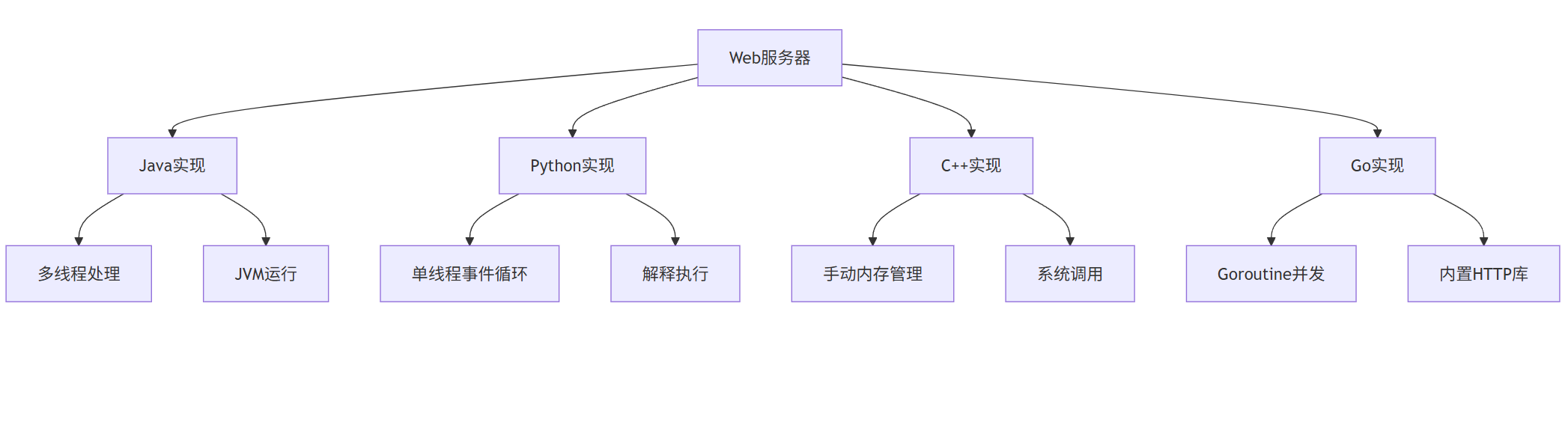
7.2 项目架构对比
graph TD
A[Web服务器] --> B[Java实现]
A --> C[Python实现]
A --> D[C++实现]
A --> E[Go实现]
B --> B1[多线程处理]
B --> B2[JVM运行]
C --> C1[单线程事件循环]
C --> C2[解释执行]
D --> D1[手动内存管理]
D --> D2[系统调用]
E --> E1[Goroutine并发]
E --> E2[内置HTTP库]
8. 学习资源推荐
8.1 在线学习平台
| 语言 | 推荐资源 |
|---|---|
| Java | Oracle官方教程、Coursera《Java编程基础》、Codecademy Java课程 |
| Python | Python官方文档、Coursera《Python for Everybody》、Real Python网站 |
| C++ | LearnCpp.com、Coursera《C++ For C Programmers》、CPPReference.com |
| Go | Go by Example、Tour of Go、Udemy《Go: The Complete Developer’s Guide》 |
8.2 书籍推荐
graph LR
A[编程书籍] --> B[Java]
A --> C[Python]
A --> D[C++]
A --> E[Go]
B --> B1[《Effective Java》]
B --> B2[《Java核心技术》]
C --> C1[《Python编程:从入门到实践》]
C --> C2[《流畅的Python》]
D --> D1[《C++ Primer》]
D --> D2[《Effective Modern C++》]
E --> E1[《Go程序设计语言》]
E --> E2[《Go语言实战》]
8.3 开发工具
| 语言 | 推荐IDE/编辑器 | 调试工具 |
|---|---|---|
| Java | IntelliJ IDEA、Eclipse | JDB、VisualVM |
| Python | PyCharm、VS Code | pdb、PyCharm调试器 |
| C++ | Visual Studio、CLion、VS Code | GDB、LLDB |
| Go | GoLand、VS Code | Delve |
8.4 社区与论坛
- Java: Stack Overflow、JavaRanch、Reddit r/java
- Python: Python Discourse、Stack Overflow、Reddit r/Python
- C++: Stack Overflow、CppForum、Reddit r/cpp
- Go: Gophers Slack、Stack Overflow、Reddit r/golang
总结
本教程全面介绍了四种主流编程语言:Java、Python、C++和Go。通过对比它们的语法特性、应用场景和性能特点,我们可以得出以下结论:
- Java适合构建大型企业级应用,具有成熟的生态系统和跨平台能力。
- Python在数据科学、AI和快速开发领域表现卓越,语法简洁易学。
- **C++**提供极致性能和底层控制能力,是系统编程和高性能计算的首选。
- Go在云原生和微服务领域崭露头角,具有出色的并发模型和开发效率。
选择编程语言应基于项目需求、团队技能和性能要求。掌握多种语言将使开发者能够根据不同场景选择最合适的工具,提高开发效率和软件质量。
无论选择哪种语言,持续学习和实践都是成为优秀开发者的关键。希望本教程能为您的编程学习之旅提供有价值的指导。

AtomGit 是由开放原子开源基金会联合 CSDN 等生态伙伴共同推出的新一代开源与人工智能协作平台。平台坚持“开放、中立、公益”的理念,把代码托管、模型共享、数据集托管、智能体开发体验和算力服务整合在一起,为开发者提供从开发、训练到部署的一站式体验。
更多推荐


 33
33 0
0- 0


 已为社区贡献23条内容

所有评论(0)