C++ STL 详解:map 与 multimap 的使用、operator[]
C++ STL 详解:map 与 multimap 的使用、operator[] 和词频统计

文章目录
- C++ STL 详解:map 与 multimap 的使用、operator[] 和词频统计
- 前言
- 一、map 是什么?
- 二、pair:把两个数据组合在一起
- 三、map 的构造方式
- 四、map 的遍历方式
- 五、insert:向 map 插入键值对
- 六、emplace 和 try_emplace
- 七、operator[]:最重要也最容易误用的接口
- 八、at、find、count 和 contains
- 九、insert_or_assign
- 十、erase 与区间查询
- 十一、自定义 key 排序规则
- 十二、map 和 multimap 的区别
- 十三、应用一:中英词典
- 十四、应用二:统计单词出现次数
- 十五、应用三:建立原结点和新结点的映射
- 十六、应用四:前 K 个高频单词
- 十七、map 与 unordered_map 怎么选?
- 十八、map 的迭代器失效
- 总结
前言
set 解决的是关键字集合问题:
某个关键字是否存在?
而实际开发中,我们经常不只是想找到一个关键字,还想找到它对应的信息。
例如:
英文单词 -> 中文解释
学号 -> 学生成绩
商品编号 -> 库存数量
用户名 -> 用户资料
文件名 -> 文件大小
这种“一个关键字对应一个值”的关系,称为映射关系。
C++ STL 中的 map 就是用来保存这种关系的有序关联式容器。
它的每个元素都由两部分组成:
key   :用于查找和排序
value :与 key 关联的数据
本文主要讲解:
map和set的关系pair与键值对map的构造和遍历- 为什么 key 不能修改,而 value 可以修改
insert、emplace和结构化绑定operator[]的插入、查找和修改行为at、find、count和containsinsert_or_assign与try_emplace- 区间查询和删除
map与multimap的区别- 字典、词频统计和结点映射等典型应用
map与unordered_map的选择
一、map 是什么?
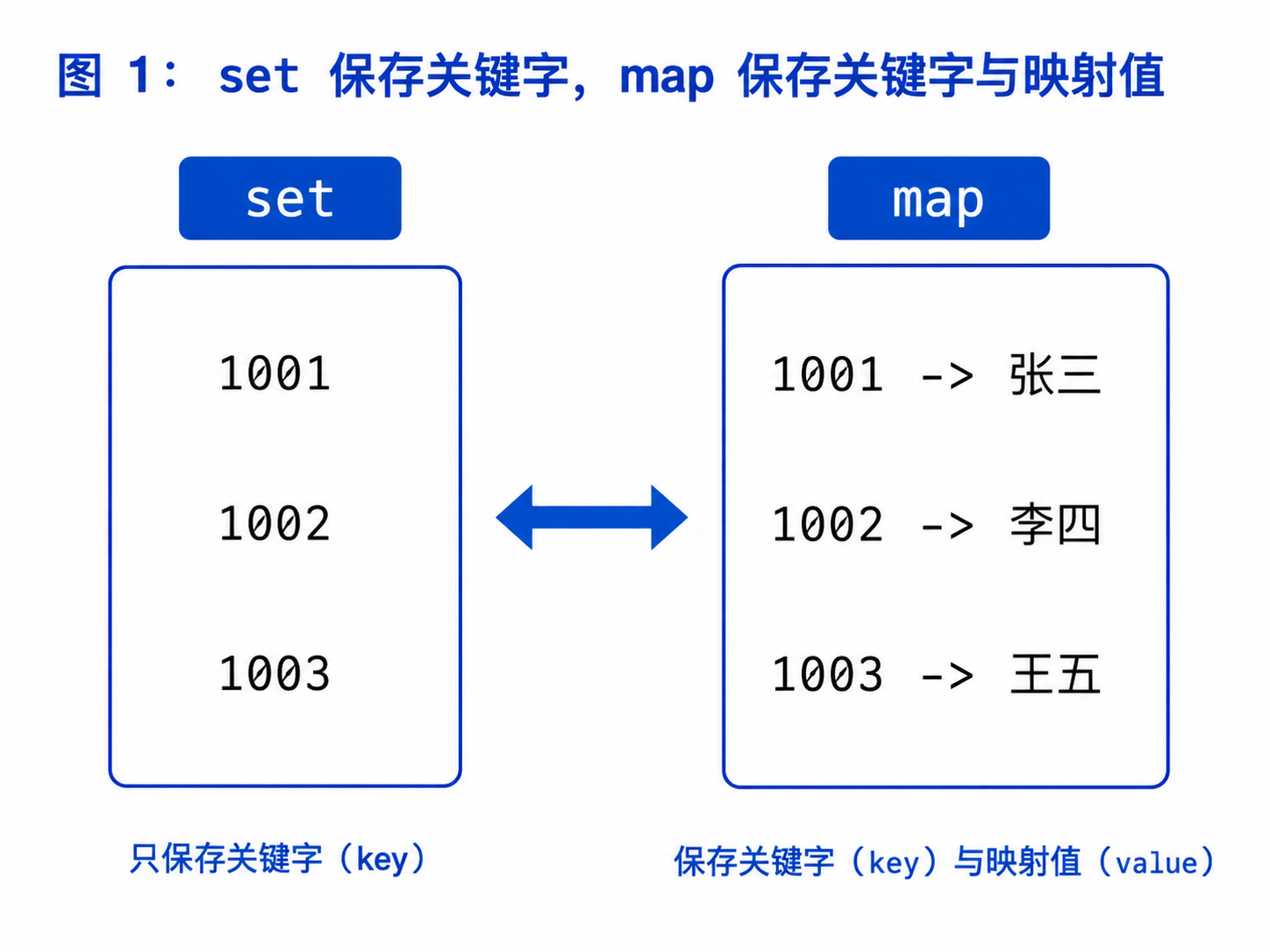
1.1 从 key 模型到 key/value 模型
set 保存的是:
key
例如:
1001
1002
1003
只能判断某个学号是否存在。
map 保存的是:
key -> value
例如:
1001 -> 张三
1002 -> 李四
1003 -> 王五
通过学号,可以找到对应姓名。
1.2 map 的基本定义
使用 map 需要包含头文件:
#include <map>
定义一个中英词典:
std::map<std::string, std::string> dictionary;
其中:
第一个模板参数:key 类型
第二个模板参数:value 类型
简化模板形式:
template<
    class Key,
    class T,
    class Compare = std::less<Key>,
    class Allocator =
        std::allocator<std::pair<const Key, T>>
>
class map;
1.3 map 的核心特点
1. 每个 key 最多出现一次
2. 元素按照 key 的比较顺序排列
3. 通过 key 查找对应 value
4. key 不能直接修改
5. value 可以修改
6. 查找、插入和删除通常为 O(log N)
7. 支持 lower_bound 和 upper_bound
二、pair:把两个数据组合在一起
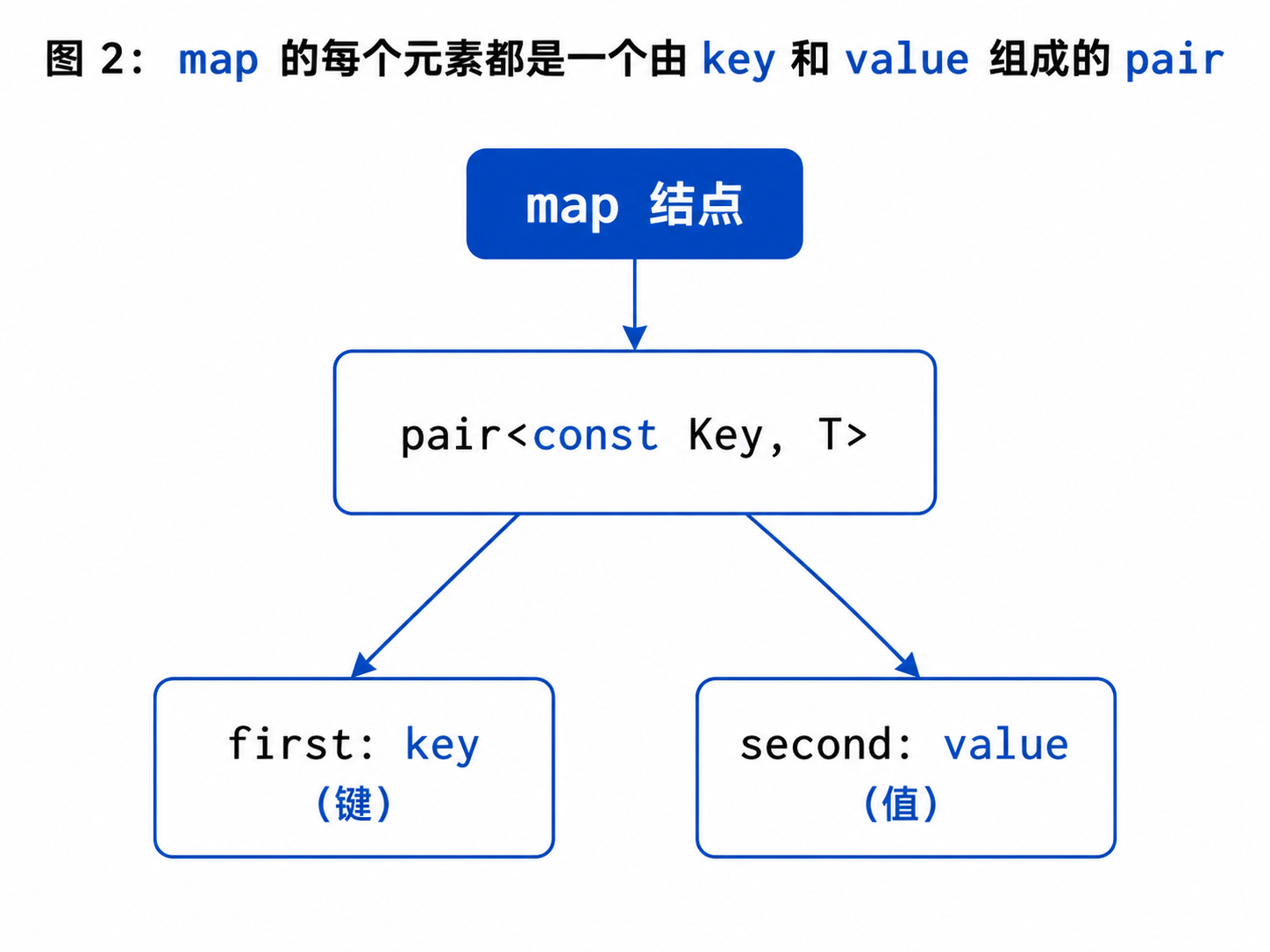
2.1 map 中的元素类型
map<Key, T> 的元素类型可以理解为:
std::pair<const Key, T>
例如:
std::map<std::string, int>
其中每个元素近似为:
std::pair<const std::string, int>
2.2 pair 的 first 和 second
std::pair<std::string, int> item{
    "apple",
    5
};
访问成员:
std::cout << item.first;
std::cout << item.second;
其中:
first  :第一个值
second :第二个值
在 map 中通常表示:
first  :key
second :mapped value
2.3 构造 pair
std::pair<std::string, int> item1(
    "apple",
    5
);
也可以使用:
auto item2 = std::make_pair(
    std::string("banana"),
    3
);
C++17 还可以直接推导:
std::pair item3{
    std::string("orange"),
    8
};
2.4 map 中的三种重要类型
对于:
std::map<std::string, int> wordCount;
可以理解为:
key_type    :std::string
mapped_type :int
value_type  :pair<const std::string, int>
注意:
mapped_type才是我们平时所说的“映射值类型”。
而 value_type 是整个键值对类型。
三、map 的构造方式
3.1 默认构造
std::map<std::string, int> wordCount;
3.2 初始化列表构造
std::map<std::string, std::string> dictionary{
    {"left", "左边"},
    {"right", "右边"},
    {"insert", "插入"},
    {"string", "字符串"}
};
3.3 迭代器区间构造
std::vector<std::pair<std::string, int>> values{
    {"apple", 3},
    {"banana", 2},
    {"orange", 5}
};

std::map<std::string, int> counts(
    values.begin(),
    values.end()
);
3.4 重复 key 的处理
std::map<std::string, int> counts{
    {"apple", 3},
    {"apple", 100}
};
map 不允许重复 key。
后续具有等价 key 的初始化元素不会形成第二个结点。
不要依赖初始化列表中重复 key 的写法决定覆盖关系,应当保证输入 key 唯一,或者使用明确的修改接口。
四、map 的遍历方式
4.1 使用迭代器
for (auto it = dictionary.begin();
     it != dictionary.end();
     ++it)
{
    std::cout << it->first
              << " -> "
              << it->second
              << '\n';
}
迭代器指向的是一个 pair。
因此:
it->first
表示 key。
it->second
表示 value。
4.2 使用范围 for
for (const auto& item : dictionary)
{
    std::cout << item.first
              << " -> "
              << item.second
              << '\n';
}
4.3 使用结构化绑定
C++17 可以写成:
for (const auto& [word, translation] : dictionary)
{
    std::cout << word
              << " -> "
              << translation
              << '\n';
}
这是遍历 map 时非常常见的写法。
4.4 修改 value
for (auto& [word, count] : wordCount)
{
    ++count;
}
这里的 count 是映射值的引用,可以修改。
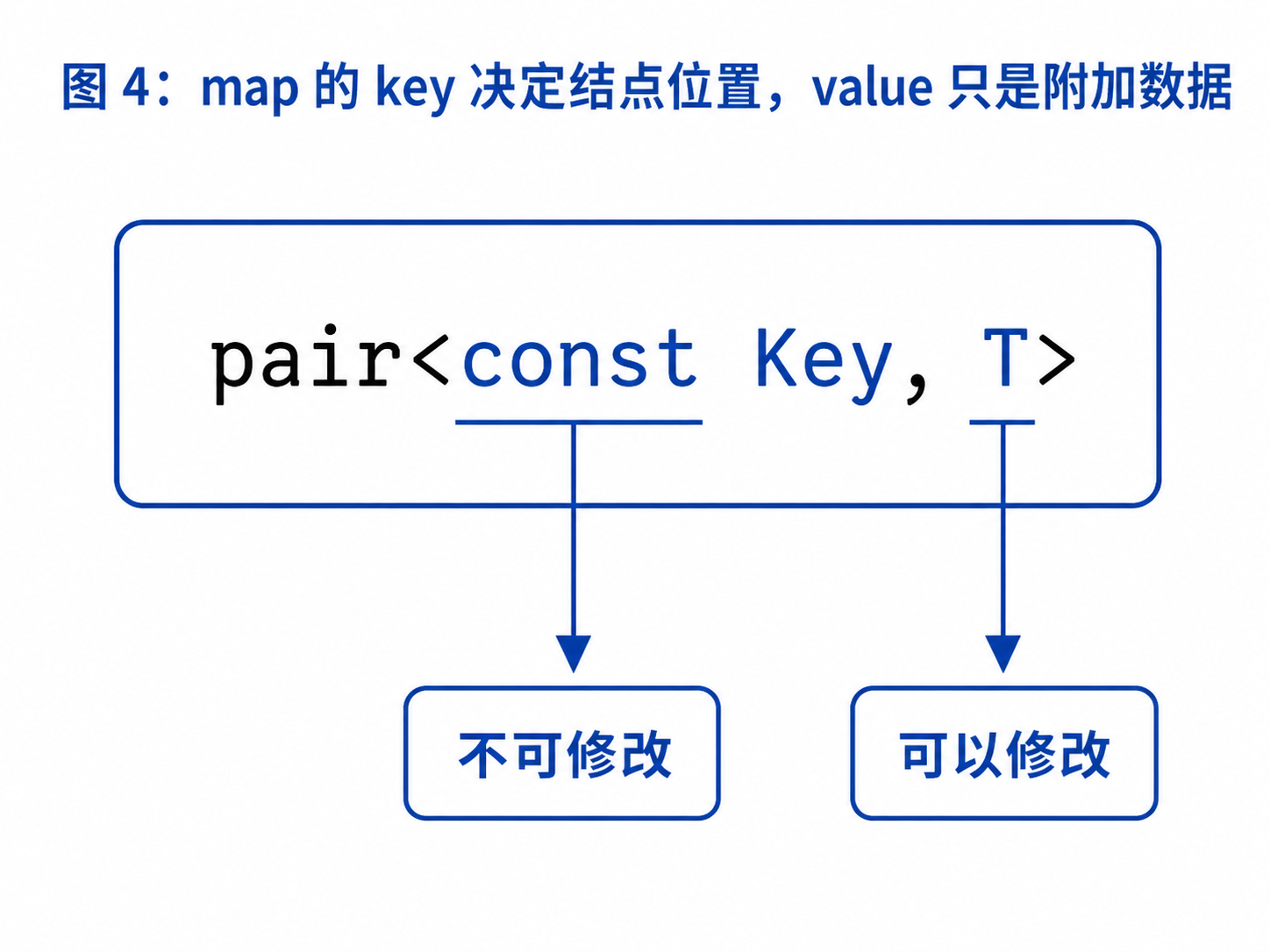
4.5 为什么不能修改 key?
map 的元素类型是:
pair<const Key, T>
其中 key 带有 const:
item.first = newKey; // 无法通过编译
原因与 set 相同。
key 决定结点在有序结构中的位置,直接修改会破坏搜索关系。
需要修改 key 时,应当:
删除原来的键值对
重新插入新的键值对
五、insert:向 map 插入键值对
5.1 使用 pair 插入
std::map<std::string, int> counts;

counts.insert(
    std::pair<std::string, int>(
        "apple",
        3
    )
);
5.2 使用 make_pair
counts.insert(
    std::make_pair("banana", 2)
);
5.3 使用初始化列表
counts.insert({"orange", 5});
这是最简洁的写法之一。
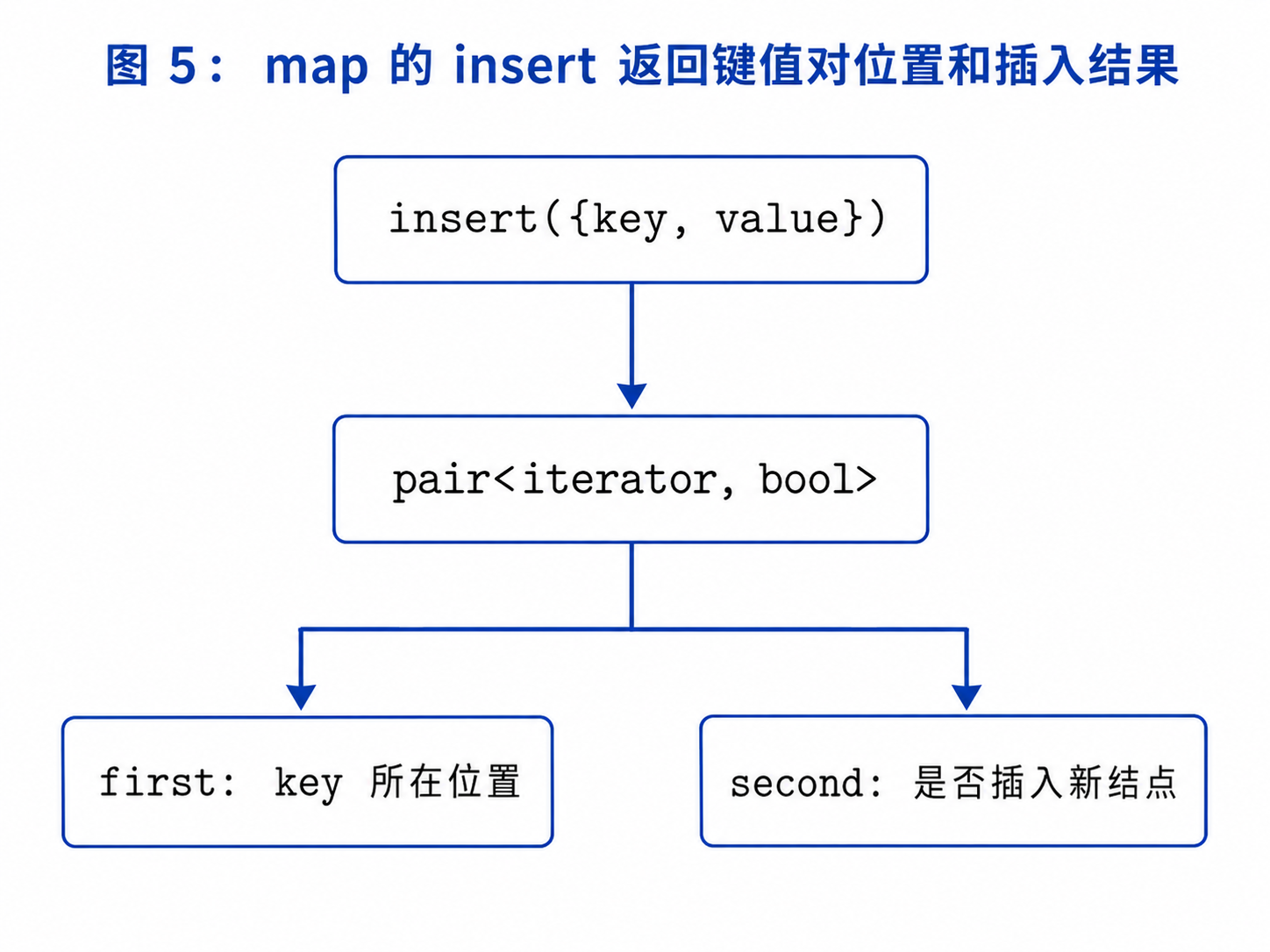
5.4 insert 的返回值
单元素插入返回:
std::pair<iterator, bool>
例如:
auto result = counts.insert({"apple", 3});
其中:
result.first  :指向 key 为 apple 的结点
result.second :是否真正插入成功
完整示例:
auto [it, inserted] =
    counts.insert({"apple", 3});

if (inserted)
{
    std::cout << "插入成功\n";
}
else
{
    std::cout << "key 已经存在,原 value 为:"
              << it->second << '\n';
}
5.5 key 已存在时不会覆盖 value
counts.insert({"apple", 3});
counts.insert({"apple", 100});
第二次插入失败。
原来的:
apple -> 3
不会自动变成:
apple -> 100
如果需要覆盖,应使用:
counts["apple"] = 100;
或者:
counts.insert_or_assign("apple", 100);
六、emplace 和 try_emplace
6.1 emplace
counts.emplace("apple", 3);
emplace 根据参数直接构造元素。
不过对于简单的 pair<string, int>,它和 insert 的可读性差异并不大。
6.2 try_emplace
C++17 提供:
counts.try_emplace("apple", 3);
如果 key 已存在,不会重新构造 mapped value。
例如:
std::map<int, std::string> students;

students.try_emplace(1001, "张三");
students.try_emplace(1001, "李四");
第二次操作不会修改原值。
最终仍是:
1001 -> 张三
6.3 try_emplace 的适用场景
当 value 的构造成本较高时,例如:
std::vector<int>
std::string
复杂业务对象
try_emplace 可以避免在 key 已存在时创建无用的临时 value。
七、operator[]:最重要也最容易误用的接口
7.1 基本使用
std::map<std::string, int> counts;

counts["apple"] = 3;
此时插入:
apple -> 3
7.2 key 已存在时
counts["apple"] = 5;
会修改原有 value:
apple -> 5
7.3 key 不存在时
执行:
counts["banana"];
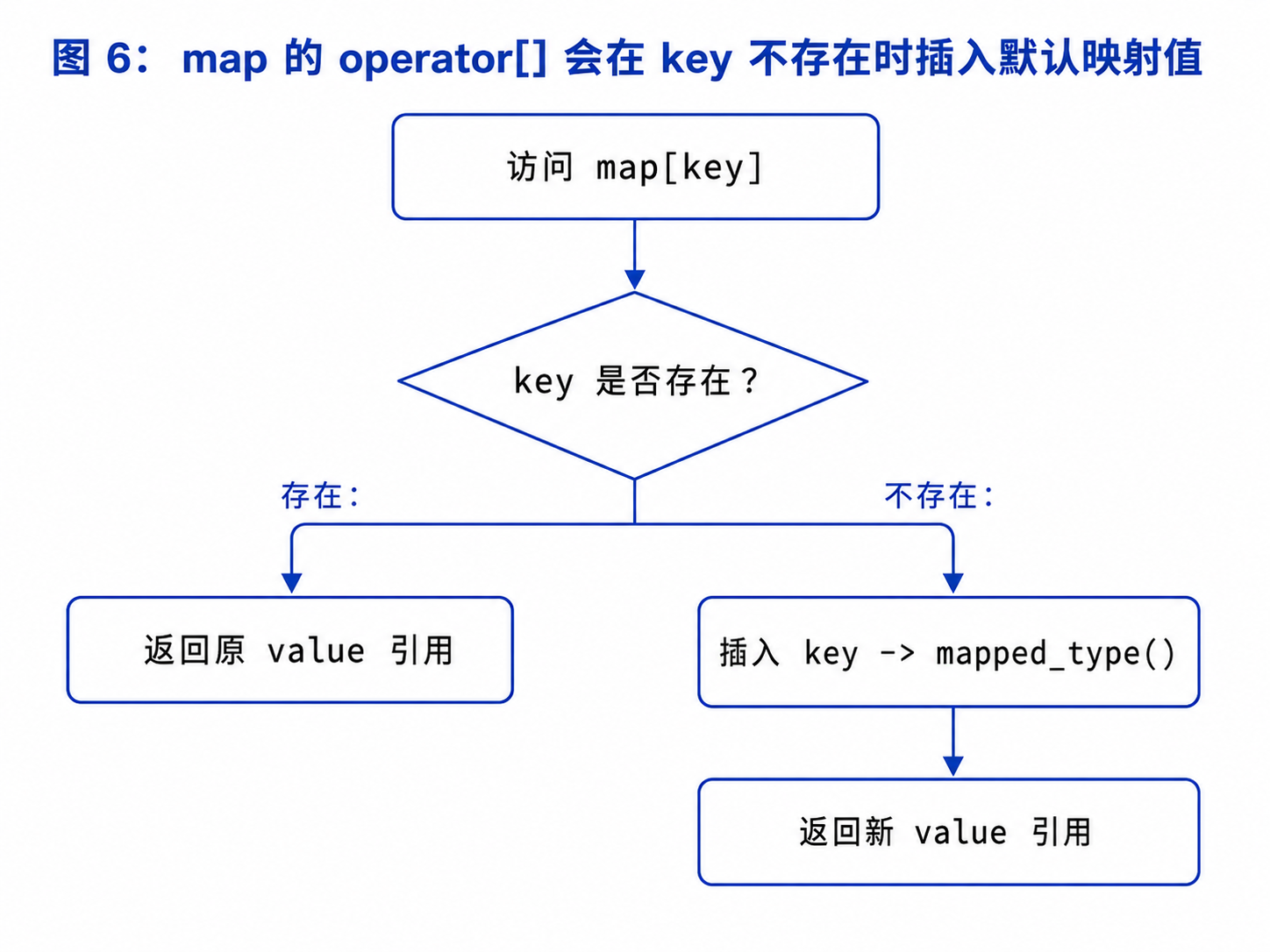
如果 banana 不存在,operator[] 会插入:
banana -> int()
int() 的默认值是:
0
所以执行后,容器中已经多了一个元素:
banana -> 0
7.4 operator[] 的逻辑
可以将它近似理解为:
mapped_type& operator[](const key_type& key)
{
    auto result = insert({
        key,
        mapped_type()
    });

    return result.first->second;
}
也就是说:
key 存在:
找到原结点并返回 value 引用

key 不存在:
插入 key 和默认 value
再返回新 value 的引用
7.5 operator[] 同时具有三种能力
查找
插入
修改
例如:
counts["apple"]++;
如果 apple 不存在:
先插入 apple -> 0
再执行 ++
得到 apple -> 1
如果已经存在:
直接将原次数加一
7.6 不要用 operator[] 单纯判断是否存在
错误思路:
if (counts["apple"] != 0)
{
}
如果 apple 不存在,这段代码会把它插入 map。
只想判断是否存在,应使用:
counts.find("apple");
counts.count("apple");
counts.contains("apple"); // C++20
八、at、find、count 和 contains
8.1 at 访问已有 key
int count = counts.at("apple");
如果 key 存在,返回 value 引用。
如果不存在,会抛出:
std::out_of_range
可以捕获异常:
try
{
    std::cout << counts.at("apple") << '\n';
}
catch (const std::out_of_range&)
{
    std::cout << "key 不存在\n";
}
8.2 operator[] 和 at 的区别
| 接口 | key 不存在时 | 是否可用于 const map |
|---|---|---|
operator[] | 插入默认 value | 不可以 |
at() | 抛出异常 | 可以 |
只读访问时,at() 的行为更明确。
8.3 find 查找键值对
auto it = counts.find("apple");

if (it != counts.end())
{
    std::cout << it->first
              << " -> "
              << it->second
              << '\n';
}
通过 find 得到迭代器后,可以修改 value:
if (it != counts.end())
{
    ++it->second;
}
但不能修改 key:
// it->first = "banana"; // 错误
8.4 count
对于 map:
counts.count("apple");
只能返回:
0 或 1
8.5 contains
C++20:
if (counts.contains("apple"))
{
    std::cout << "apple 存在\n";
}
8.6 如何选择?
只判断存在:
contains
count
还需要读取或修改 value:
find
确定 key 必须存在:
at
希望不存在时自动创建:
operator[]
九、insert_or_assign
C++17 提供:
insert_or_assign
示例:
counts.insert_or_assign("apple", 10);
行为是:
key 不存在:插入
key 已存在:覆盖原 value
返回值也是:
pair<iterator, bool>
其中:
bool == true  :插入了新结点
bool == false :修改了已有结点
示例:
auto [it, inserted] =
    counts.insert_or_assign("apple", 10);

if (inserted)
{
    std::cout << "新增 key\n";
}
else
{
    std::cout << "覆盖旧 value\n";
}
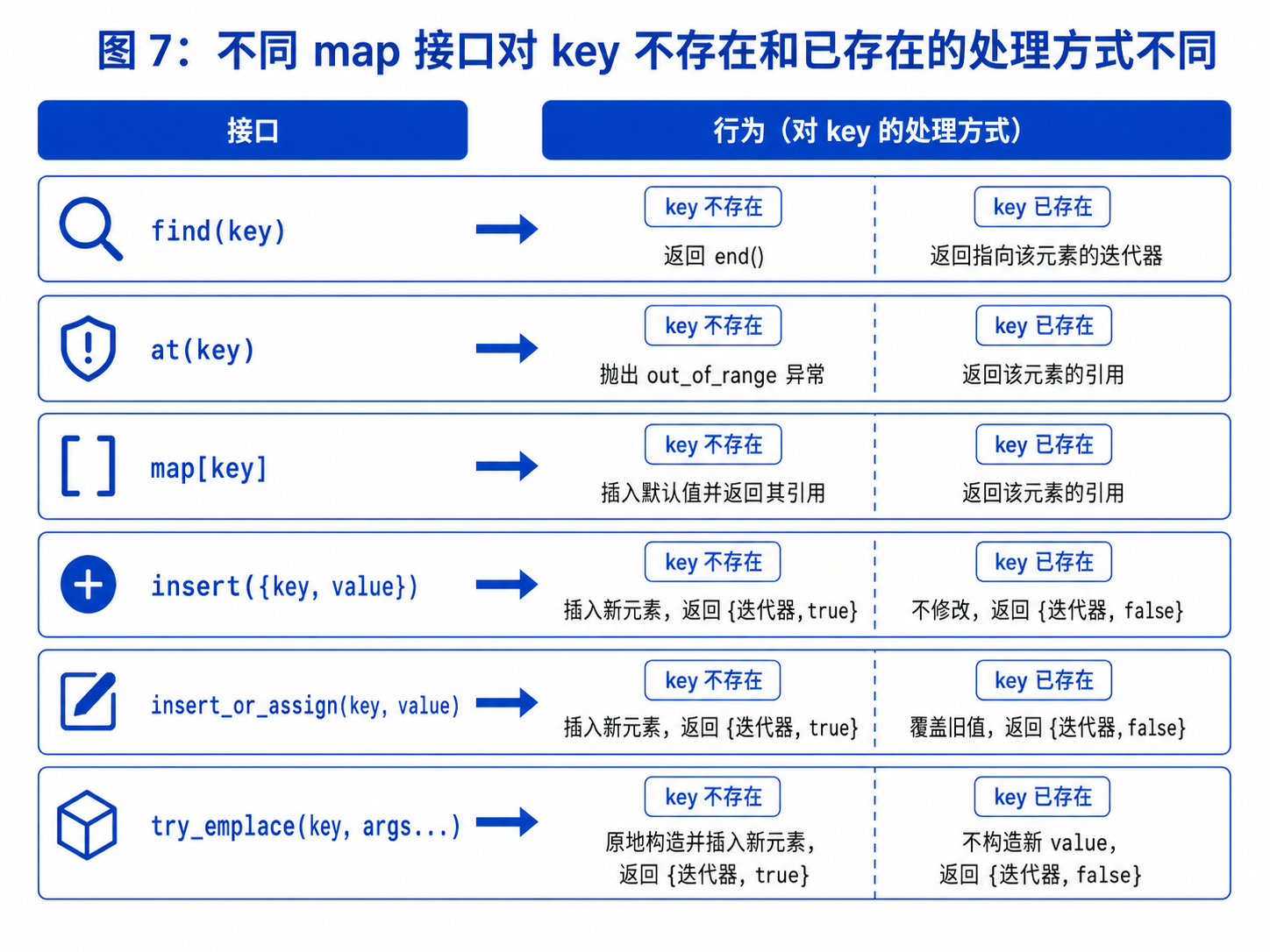
9.1 常见接口语义对比
十、erase 与区间查询
10.1 根据 key 删除
std::size_t erased = counts.erase("apple");
对于 map:
返回 1:成功删除
返回 0:key 不存在
10.2 根据迭代器删除
auto it = counts.find("apple");

if (it != counts.end())
{
    counts.erase(it);
}
10.3 遍历过程中删除
删除次数小于 3 的单词:
auto it = counts.begin();

while (it != counts.end())
{
    if (it->second < 3)
    {
        it = counts.erase(it);
    }
    else
    {
        ++it;
    }
}
10.4 lower_bound 和 upper_bound
对于:
std::map<int, std::string> students{
    {1001, "张三"},
    {1003, "李四"},
    {1005, "王五"},
    {1008, "赵六"}
};
查找第一个学号不小于 1004 的学生:
auto it = students.lower_bound(1004);
结果指向:
1005 -> 王五
查找第一个学号大于 1005 的学生:
auto it = students.upper_bound(1005);
结果指向:
1008 -> 赵六
10.5 查询 key 区间
查询学号位于:
[1003, 1005]
的学生:
auto first = students.lower_bound(1003);
auto last = students.upper_bound(1005);

for (auto it = first; it != last; ++it)
{
    std::cout << it->first
              << " -> "
              << it->second
              << '\n';
}
十一、自定义 key 排序规则
11.1 降序 map
std::map<
    int,
    std::string,
    std::greater<int>
> students;
遍历时 key 从大到小排列。
11.2 自定义结构作为 key
#include <map>
#include <string>

struct Date
{
    int year;
    int month;
    int day;
};

struct DateCompare
{
    bool operator()(const Date& left,
                    const Date& right) const
    {
        if (left.year != right.year)
        {
            return left.year < right.year;
        }

        if (left.month != right.month)
        {
            return left.month < right.month;
        }

        return left.day < right.day;
    }
};

std::map<Date, std::string, DateCompare> events;
插入:
events.insert({
    {2026, 7, 29},
    "学习 map"
});
11.3 比较器决定 key 是否等价
如果:
!compare(a, b) && !compare(b, a)
容器就认为 a 和 b 是等价 key。
因此,比较器必须完整表达你希望使用的唯一性规则。
十二、map 和 multimap 的区别
12.1 multimap 允许重复 key
std::multimap<std::string, int> scores;

scores.insert({"张三", 90});
scores.insert({"张三", 85});
scores.insert({"李四", 92});
结果中可以存在:
张三 -> 90
张三 -> 85
12.2 multimap 没有 operator[]
因为同一个 key 可能对应多个 value:
张三 -> 90
张三 -> 85
执行:
scores["张三"]
无法确定应该返回哪一个 value。
因此 multimap 不提供 operator[]。
12.3 查询一个 key 的所有 value
auto [first, last] =
    scores.equal_range("张三");

for (auto it = first; it != last; ++it)
{
    std::cout << it->first
              << " -> "
              << it->second
              << '\n';
}
12.4 count
std::cout << scores.count("张三");
返回实际键值对数量。
12.5 erase(key)
scores.erase("张三");
会删除所有 key 等价于 "张三" 的键值对。
只删除一个,需要传入迭代器:
auto it = scores.find("张三");

if (it != scores.end())
{
    scores.erase(it);
}
12.6 map 与 multimap 对比
| 对比项 | map | multimap |
|---|---|---|
| 是否允许重复 key | 不允许 | 允许 |
| 是否有序 | 是 | 是 |
是否有 operator[] | 有 | 没有 |
count | 0 或 1 | 实际数量 |
erase(key) | 最多删除一个 | 删除所有等价 key |
十三、应用一:中英词典
#include <iostream>
#include <map>
#include <string>

int main()
{
    std::map<std::string, std::string> dictionary{
        {"left", "左边"},
        {"right", "右边"},
        {"insert", "插入"},
        {"string", "字符串"}
    };

    std::string word;

    while (std::cin >> word)
    {
        auto it = dictionary.find(word);

        if (it != dictionary.end())
        {
            std::cout << word
                      << " -> "
                      << it->second
                      << '\n';
        }
        else
        {
            std::cout << "未找到该单词\n";
        }
    }

    return 0;
}
这里:
英文单词是 key
中文解释是 value
查找 key 的同时,就得到了对应 value。
十四、应用二:统计单词出现次数
14.1 使用 operator[]
#include <iostream>
#include <map>
#include <string>
#include <vector>

int main()
{
    std::vector<std::string> words{
        "apple",
        "banana",
        "apple",
        "orange",
        "banana",
        "apple"
    };

    std::map<std::string, int> counts;

    for (const std::string& word : words)
    {
        ++counts[word];
    }

    for (const auto& [word, count] : counts)
    {
        std::cout << word
                  << " -> "
                  << count
                  << '\n';
    }

    return 0;
}
运行结果:
apple -> 3
banana -> 2
orange -> 1
14.2 为什么 counts[word]++ 可以工作?
第一次遇到 "apple":
map 中不存在 apple
operator[] 插入 apple -> 0
执行 ++ 后变成 apple -> 1
后续再次遇到:
找到原有 value
直接加一
因此:
++counts[word];
是 C++ 中非常经典的词频统计写法。
十五、应用三:建立原结点和新结点的映射
在复制带随机指针的链表时,可以建立:
原结点地址 -> 拷贝结点地址
的映射:
std::map<Node*, Node*> nodeMap;
第一轮创建新结点:
Node* current = head;

while (current != nullptr)
{
    nodeMap[current] =
        new Node(current->val);

    current = current->next;
}
第二轮连接指针:
current = head;

while (current != nullptr)
{
    Node* copy = nodeMap[current];

    copy->next =
        current->next == nullptr
        ? nullptr
        : nodeMap[current->next];

    copy->random =
        current->random == nullptr
        ? nullptr
        : nodeMap[current->random];

    current = current->next;
}
这种做法把复杂的指针对应关系转换成了明确的查表问题。
十六、应用四:前 K 个高频单词
问题通常分成两步:
第一步:使用 map 统计每个单词的次数
第二步:根据次数和字典序排序
统计部分:
std::map<std::string, int> counts;

for (const std::string& word : words)
{
    ++counts[word];
}
再复制到 vector:
std::vector<std::pair<std::string, int>> values(
    counts.begin(),
    counts.end()
);
排序:
std::sort(
    values.begin(),
    values.end(),
    [](const auto& left, const auto& right)
    {
        if (left.second != right.second)
        {
            return left.second > right.second;
        }

        return left.first < right.first;
    }
);
比较规则是:
次数不同:次数大的排前面
次数相同:字典序小的排前面
十七、map 与 unordered_map 怎么选?
17.1 map
特点:
按照 key 有序
支持 lower_bound 和 upper_bound
操作通常为 O(log N)
性能较稳定
适合:
需要按照 key 有序遍历
需要范围查询
需要找不小于某个 key 的第一个元素
17.2 unordered_map
特点:
不保证遍历顺序
使用哈希规则组织数据
平均查找、插入和删除接近 O(1)
最坏情况可能退化
不支持 lower_bound 和 upper_bound
适合:
只关心 key 到 value 的快速映射
不需要有序遍历
不需要区间查询
17.3 选择原则
需要顺序或范围查询:map
只需要平均快速查找:unordered_map
允许重复 key 且需要有序:multimap
允许重复 key 且不要求有序:unordered_multimap
十八、map 的迭代器失效
map 通常以独立结点保存键值对。
因此:
插入新元素不会让已有迭代器和引用失效
删除元素只会让指向被删除元素的迭代器和引用失效
其他结点通常不受影响
遍历删除时:
auto it = counts.begin();

while (it != counts.end())
{
    if (it->second == 0)
    {
        it = counts.erase(it);
    }
    else
    {
        ++it;
    }
}
不要在删除后继续使用原来的迭代器。
总结
map 是一个保存唯一 key 与对应 value 的有序关联式容器。
需要重点掌握:
- map 保存 key/value 映射关系
- map 的元素类型是 pair<const Key, T>
- first 表示 key,second 表示 value
- map 按照 key 而不是 value 排序
- key 不能修改,value 可以修改
- insert 不会覆盖已有 key 的 value
- insert 返回 pair<iterator, bool>
- operator[] 在 key 不存在时会插入默认 value
- 不要使用 operator[] 单纯判断 key 是否存在
- at 不插入元素,key 不存在时抛出异常
- find 可以获得对应键值对的迭代器
- insert_or_assign 可以插入或覆盖
- try_emplace 可以避免无意义地构造 value
- lower_bound 和 upper_bound 支持 key 范围查询
- multimap 允许重复 key,但没有 operator[]
- 词频统计是 operator[] 的典型应用
- 需要有序和范围查询时使用 map18. 当仅需快速映射且不要求有序性时,可考虑使用 unordered_mapp

AtomGit 是由开放原子开源基金会联合 CSDN 等生态伙伴共同推出的新一代开源与人工智能协作平台。平台坚持“开放、中立、公益”的理念,把代码托管、模型共享、数据集托管、智能体开发体验和算力服务整合在一起,为开发者提供从开发、训练到部署的一站式体验。
更多推荐


 31
31 0
0- 0


 已为社区贡献27条内容

所有评论(0)