复刻Codex浏览器插件-实现篇
其实在上一版中,我已经基于 python + ts 实现了一版,这一版我讲讲踩过的一些坑。
项目结构真的非常影响效率
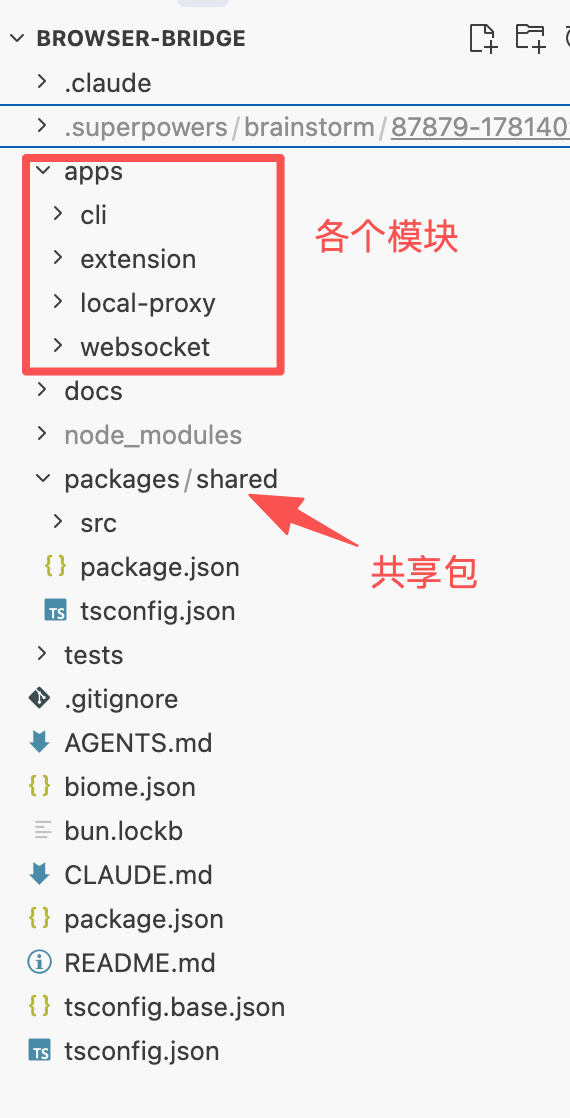
上一版中我的 python + ts 在两个不同的目录,导致调试或者编码的时候其实 Agent 也拿不到上下文,写出的代码基本不能运行。
最经典的例子就是通讯协议的设计。两边联通讯协议都不能统一,而由于在第一版中已经不统一了,修复的时候只能 case by case,就很慢。
这次,我用了 Monorepo,并且统一使用 ts 编写。把通讯协议放到共享项目目录下,这样基本不会有通讯协议的问题。(或者说在编码的时候 Agent 能直接检查出来问题,调试都不用了)
重大的功能使用 Super Power 还真不一样
并不是说 Super Power 万能。我想说的是,在项目设计初期,brainstorming 会帮助你厘清很多你自己还没想清楚的概念,检查出来你遗漏的点。
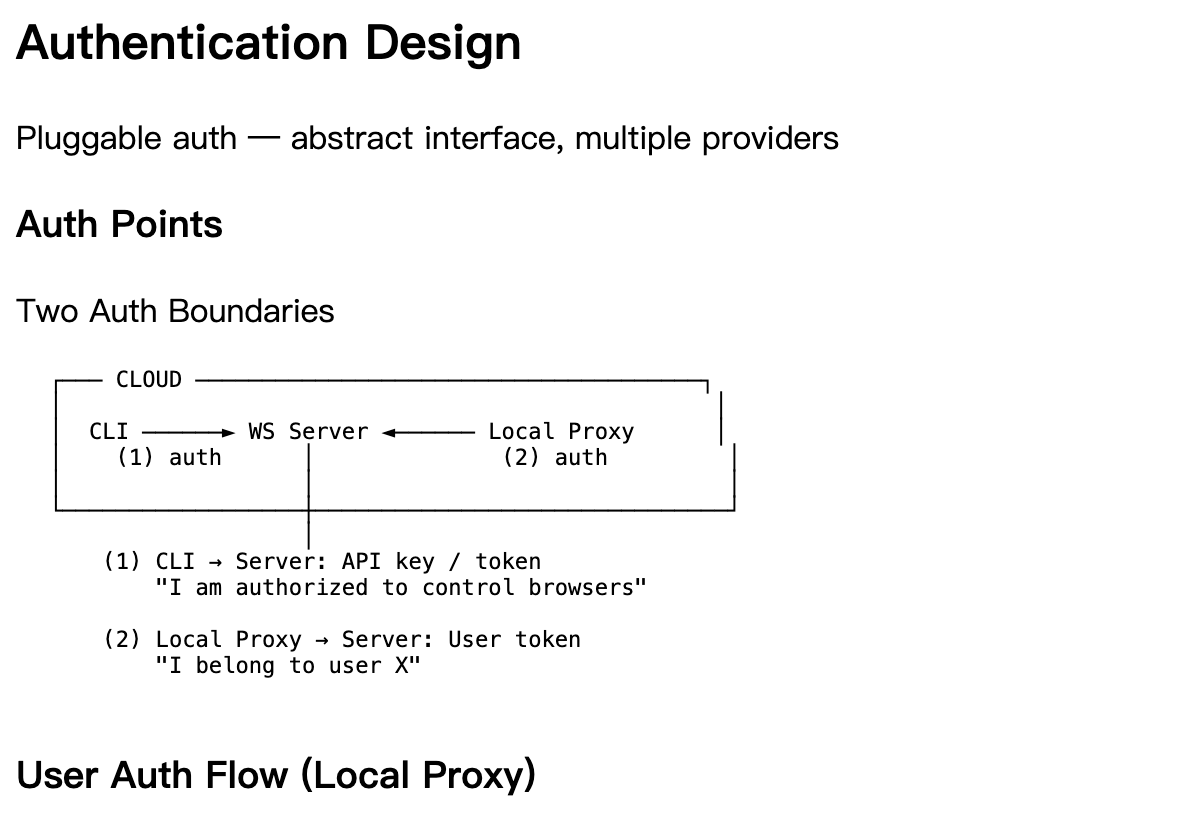
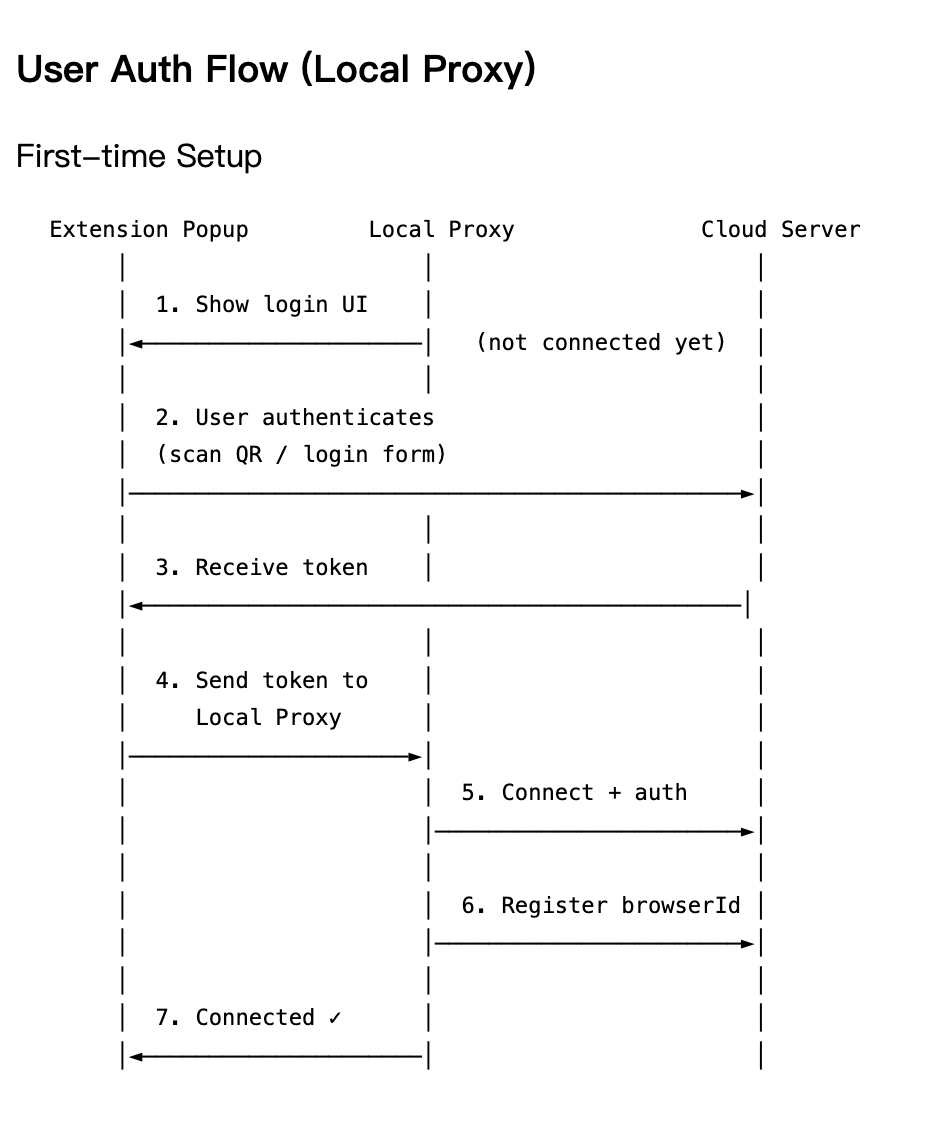
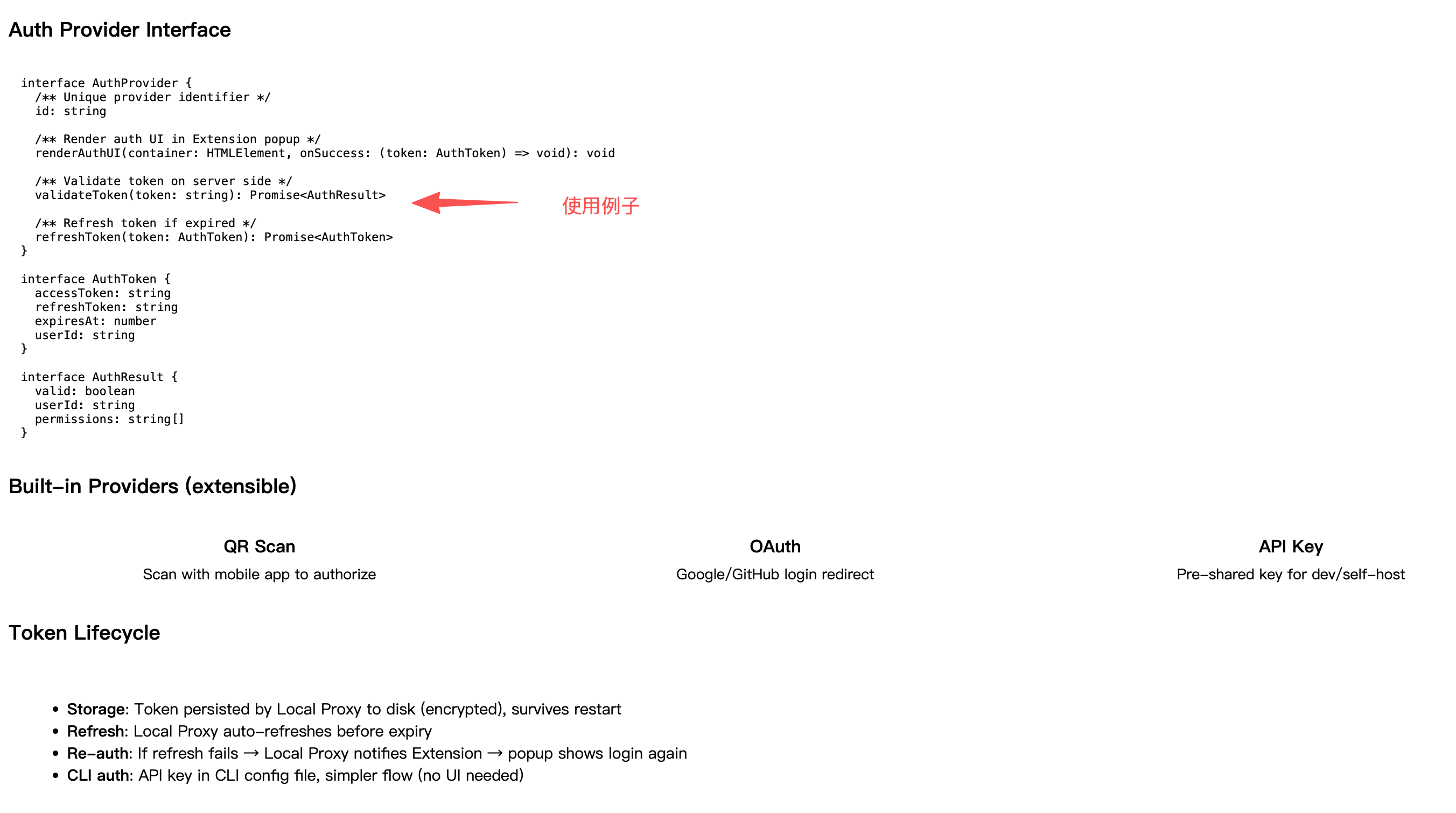
最总要的一点是,Super Power 在新版本中添加了网页端。Agent 在给你方案的时候除了给你简短的几句话之外,还会给你举例说明(通过 http://localhost:56666可以看到 不光概念,而且还有例子及重点,分的真的很清楚,很好理解)。
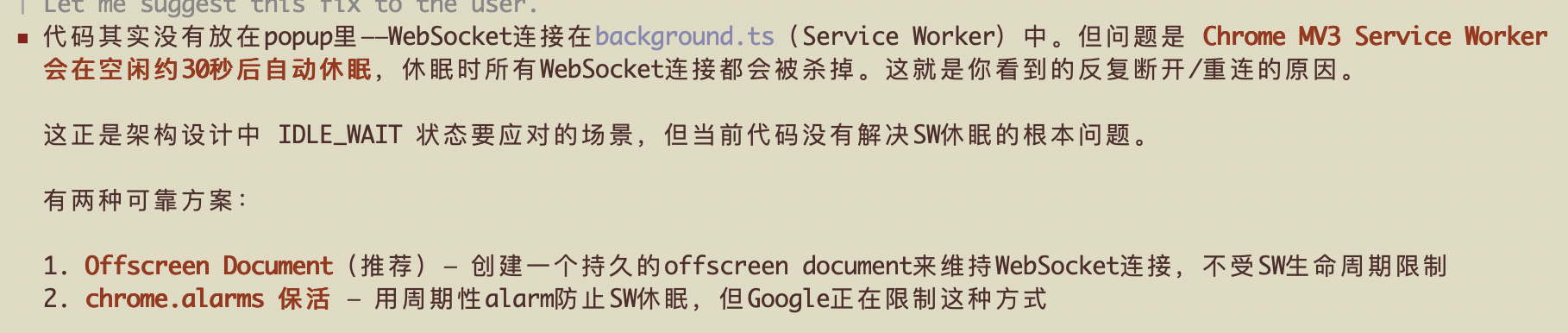
Service Worker 默认30s会进入睡眠
本来以为是老问题。chrome 插件的 popup页面里的代码会随着插件面板的打开而创建,关闭则立即销毁。之前的代码是写在 popup 里面的,导致面板一关闭就会自动断掉 ws 连接。
但今天遇到的是 Service Worker 默认30s休眠,需要单独抽离一个 offscreen.html


附录
这是我产品设计的文档,我用 GLM 5.1 出来,基本就能跑。唯一的问题就是上面的 offscreen 问题,有兴趣的可以参考下。
# Browser-Bridge System Architecture Design

Date: 2026-06-12

## Goal

A cloud-deployed CLI that lets AI Agents remotely control a user's Chrome browser. The Agent issues fine-grained atomic commands (navigate, click, type, extract text), which are routed through a WebSocket server to the user's local machine, where a Chrome Extension executes them using the user's real browser session.

## Deployment Architecture

Two deployment zones:

### Cloud
- **CLI** — AI Agent interface. Outputs structured JSON with `--json` flag.
- **WS Server** — Authenticates local proxies, routes commands by `browserId`, maintains connection registry.

### Local (user's machine)
- **Local Proxy** — Always-on binary. Maintains persistent WS connection to cloud server, exposes local WS server for the Extension, buffers commands during Service Worker sleep gaps (max 5s), authenticates once on startup.
- **Chrome Extension** — Connects to Local Proxy via `ws://localhost:PORT`. Handles tab/navigation commands directly, forwards DOM commands to content scripts.

### Data Flow

```
AI Agent → CLI → WS Server → Local Proxy → Extension → Browser
                                              ↑
                                    ws://localhost:PORT
```

## Key Design Decisions

| Decision | Choice | Rationale |
|---|---|---|
| Extension ↔ Local Proxy | Local WS (not Native Messaging) | Native Messaging is extension-initiated; Chrome may kill the host process when SW sleeps. Local WS lets the always-on proxy maintain the cloud connection independently. |
| CLI communication model | Multiplexed WS | One persistent WS connection, `--browser <id>` per command. Supports multi-browser routing without per-command connection overhead. |
| Command granularity | Fine-grained atomic operations | Each command maps to a single browser action. Orchestration is the Agent's responsibility. |
| CLI interface | CLI + `--json` (not MCP) | Zero persistent token overhead when not in use. Structured output guaranteed with `--json` flag. MCP can be added as optional wrapper later. |
| CLI → Server auth | NoopAuthProvider (same machine) | CLI and WS Server co-deploy; localhost is trusted. Interface reserved for future remote server scenarios. |

## Protocol & Routing

### Message Envelope

All messages use a unified JSON envelope:

```json
{
  "id": "uuid",
  "type": "command | response | event",
  "browserId": "b-123",
  "payload": { ... },
  "timestamp": 1718000000
}
```

- `id` correlates request → response.
- `type` distinguishes commands, responses, and async events.
- `browserId` is the routing key at the server.

### Browser Online State Machine

```
                 connect                disconnect
            ┌─────────────►  ONLINE  ──────────────┐
            │                                  Chrome closed
            │               SW sleeps               │
            │                  ▼                     │
            │             IDLE_WAIT                  │
            │            (buf: ~5s)                  │
            │                  │ timeout             │
            │                  ▼                     ▼
            └─────────────  OFFLINE  ◄──────────────┘
                     Chrome reopens
```

- **ONLINE**: Extension connected, commands execute immediately.
- **IDLE_WAIT**: Service Worker briefly asleep. Local Proxy buffers 1 command for up to 5 seconds. If SW wakes, command is delivered. If timeout, error returned to CLI.
- **OFFLINE**: Chrome closed or Extension disconnected. All commands rejected immediately. No buffering.

### Browser Registration

1. Local Proxy starts → connects to WS Server with auth token.
2. Server validates token → extracts `userId`.
3. Proxy sends `register` message with `browserId` (generated on first run, persisted to disk).
4. Server adds entry: `browserId → { userId, wsConnection, status }`.
5. Proxy reports online/offline as Extension connects/disconnects.

### Routing Flow

1. CLI sends command with `browserId` to WS Server.
2. Server looks up `browserId` in connection registry.
3. If browser is **offline** → return error immediately.
4. If browser is **online** → forward command to the Local Proxy's WS connection.
5. Local Proxy forwards to Extension.
6. Extension executes command, returns response.
7. Response travels back: Extension → Local Proxy → WS Server → CLI.

## CLI Design

### Global Flags

```
--server <url>     WS Server URL (default: from config)
--browser <id>     Target browser instance (required for most commands)
--json             Structured JSON output (for Agent consumption)
--timeout <ms>     Command timeout (default: 10000)
```

### Command Set

| Category | Commands |
|---|---|
| Navigation | `navigate <url>`, `goBack`, `goForward`, `refresh` |
| Tab Management | `tab:list`, `tab:new <url?>`, `tab:close <tabId>`, `tab:switch <tabId>` |
| DOM Interaction | `click <selector>`, `type <selector> <text>`, `select <selector> <value>`, `scroll <selector\|page> <x> <y>`, `hover <selector>` |
| Data Extraction | `gettext <selector>`, `gethtml <selector>`, `screenshot <selector?>`, `pageinfo` |
| Wait / Utility | `wait:element <selector> --timeout <ms>`, `wait:navigation --timeout <ms>` |

### Element Targeting

- **Primary**: CSS Selector — `click "button.login"`, `type "#email" "user@example.com"`
- **Fallback**: Text match — find by visible text when selector is unreliable

Agent workflow: call `gethtml` or `pageinfo` to inspect the page, then use selectors in subsequent commands.

### Output Format

Human (default):
```
$ mycli navigate https://example.com --browser b-123
Navigated to https://example.com
Title: Example Domain
```

Agent (`--json`):
```json
{
  "status": "ok",
  "url": "https://example.com",
  "title": "Example Domain"
}
```

Error (`--json`):
```json
{
  "status": "error",
  "error": "browser_offline",
  "message": "Browser b-123 is offline"
}
```

## Local Proxy Design

### Responsibilities

**Cloud-facing:**
- Maintain persistent WS connection to cloud server
- Authenticate on connect (once per session)
- Register `browserId` with server
- Report browser online/offline status
- Receive commands, forward to Extension
- Return Extension responses to cloud server

**Extension-facing:**
- Expose local WS server at `ws://localhost:3001`
- Accept Extension connections
- Forward cloud commands to Extension
- Receive Extension responses
- Detect Extension disconnect → report offline to cloud
- Short buffer for SW sleep gap (1 command, ≤5s, only in IDLE_WAIT state)

### Internal Structure

```
┌──────────── Local Proxy ────────────┐
│                                      │
│  ┌─────────────┐  ┌──────────────┐  │
│  │ CloudClient  │  │ LocalServer  │  │
│  │ WS → Cloud  │  │ WS ← Ext    │  │
│  │ Auth+Reg    │  │ Port: 3001   │  │
│  │ Auto-reconn │  │              │  │
│  └──────┬──────┘  └──────┬───────┘  │
│         ▼                ▼           │
│  ┌──────────────────────────────┐    │
│  │         Router               │    │
│  │  cloud cmd → extension       │    │
│  │  ext resp → cloud            │    │
│  │  ext disconnect → offline    │    │
│  │  ext connect → online        │    │
│  └──────────────────────────────┘    │
│         ▼                            │
│  ┌──────────────────────────────┐    │
│  │       State Manager          │    │
│  │  browserId (persisted)       │    │
│  │  online status               │    │
│  │  pending commands (≤5s buf)  │    │
│  └──────────────────────────────┘    │
└──────────────────────────────────────┘
```

### Lifecycle

1. **Start** — Load `browserId` from local config (or generate on first run). Load cached token from disk if available.
2. **Start Local Server** — Listen on `ws://localhost:3001`.
3. **Connect to Cloud** (if cached token) — WS connect → authenticate → register `browserId`. If no cached token, wait for Extension to provide one (step 4b).
4. **Wait for Extension** — Browser offline until Extension connects.
5. **Extension connects** → if no cached token, Extension provides auth token → Proxy authenticates with cloud → registers `browserId`. Report ONLINE.
6. **Extension disconnects** → report OFFLINE to cloud.
7. **Cloud WS disconnects** → auto-reconnect with backoff.

### Command Buffer Rules

- Only buffers when browser is in IDLE_WAIT state (SW briefly asleep).
- Max buffer duration: **5 seconds**.
- Max buffer size: **1 command** (not a queue).
- If SW doesn't wake within 5s → return error to cloud, discard command.
- If browser is OFFLINE → **no buffer**, immediate error.
- Rationale: avoid "ghost execution" where buffered commands run unexpectedly when the user reopens their browser.

### Deployment

- **Development**: `bun run apps/local-proxy/src/index.ts`
- **Production**: `bun compile ./src/index.ts --outfile bridge-proxy`

## Extension Design

### Component Architecture

- **Background (Service Worker)**: Connects to Local Proxy via `ws://localhost:3001`. Handles tab/navigation/screenshot commands using Chrome APIs. Forwards DOM commands to content scripts via `chrome.tabs.sendMessage`.
- **Content Script (per tab)**: Executes DOM operations (click, type, select, scroll, hover, getText, getHtml, wait:element). Uses MutationObserver for `wait:element`.
- **Popup**: Displays connection status and `browserId`.

### Command Routing

| Command | Handler | Chrome API |
|---|---|---|
| `navigate` | Background | `chrome.tabs.update` |
| `goBack/goForward` | Background | `chrome.tabs.goBack/forward` |
| `refresh` | Background | `chrome.tabs.reload` |
| `tab:*` | Background | `chrome.tabs.*` |
| `pageinfo` | Background | `chrome.tabs.get` |
| `screenshot` | Background | `chrome.tabs.captureVisibleTab` |
| `wait:navigation` | Background | `chrome.tabs.onUpdated` |
| `click/type/select/scroll/hover` | Content Script | DOM API |
| `getText/getHtml` | Content Script | DOM API |
| `wait:element` | Content Script | MutationObserver |

### Content Script Injection

1. Background receives a DOM command for a tab.
2. Ping content script via `chrome.tabs.sendMessage`.
3. If no response → inject via `chrome.scripting.executeScript`.
4. Send command via `chrome.tabs.sendMessage(tabId, command)`.
5. Content script executes and returns result.

### Manifest V3 Permissions

```json
{
  "permissions": ["tabs", "activeTab", "scripting"],
  "host_permissions": ["<all_urls>"]
}
```

## Authentication Design

### Auth Boundaries

| Boundary | Auth | Rationale |
|---|---|---|
| CLI → WS Server | NoopAuthProvider (same machine) | Localhost is trusted; interface reserved for future remote server |
| Local Proxy → WS Server | User token (AuthProvider) | Cross-public-network; must prove identity |
| Extension → Local Proxy | None | Same machine, local WS, trusted |

### User Auth Flow (First-time Setup)

1. Extension popup shows login UI (rendered by AuthProvider).
2. User authenticates (scan QR / login form / OAuth).
3. Extension receives `AuthToken` from provider.
4. Extension sends token to Local Proxy via local WS.
5. Local Proxy connects to WS Server with token.
6. Server validates token → extracts `userId`.
7. Local Proxy registers `browserId`.
8. Extension shows "Connected".

### AuthProvider Interface

```typescript
interface AuthProvider {
  id: string
  renderAuthUI(container: HTMLElement, onSuccess: (token: AuthToken) => void): void
  validateToken(token: string): Promise<AuthResult>
  refreshToken(token: AuthToken): Promise<AuthToken>
}

interface AuthToken {
  accessToken: string
  refreshToken: string
  expiresAt: number
  userId: string
}

interface AuthResult {
  valid: boolean
  userId: string
  permissions: string[]
}
```

### Built-in Providers

- **QR Scan**: Scan with mobile app to authorize.
- **OAuth**: Google/GitHub login redirect.
- **API Key**: Pre-shared key for dev/self-host.

### Token Lifecycle

- **Storage**: Persisted by Local Proxy to disk (encrypted), survives restart.
- **Refresh**: Local Proxy auto-refreshes before expiry.
- **Re-auth**: If refresh fails → notify Extension → popup shows login again.

## Security Model

### Trust Zones

1. **Cloud (same machine)**: CLI ↔ WS Server over localhost. No auth needed.
2. **Public internet**: WS Server ↔ Local Proxy over WSS (TLS + token auth).
3. **Local (same machine)**: Local Proxy ↔ Extension over localhost WS. No auth needed.

### Authorization

- Server routes commands only to `browserId`s belonging to the authenticated user.
- CLI can only access browsers its user has permission for.
- Future: per-command permission levels, audit logging, rate limiting.

## Monorepo Structure (Updated)

```
apps/
  cli/              # AI Agent CLI (Commander + --json)
  extension/        # Chrome MV3 Extension (Vite build)
  local-proxy/      # NEW: Always-on local proxy binary
  websocket/        # WS Server (Bun.serve)
packages/
  shared/           # Shared constants and types
```

New app `apps/local-proxy` to be added. `apps/websocket` currently contains both server and client; the client portion will move to `apps/local-proxy`.
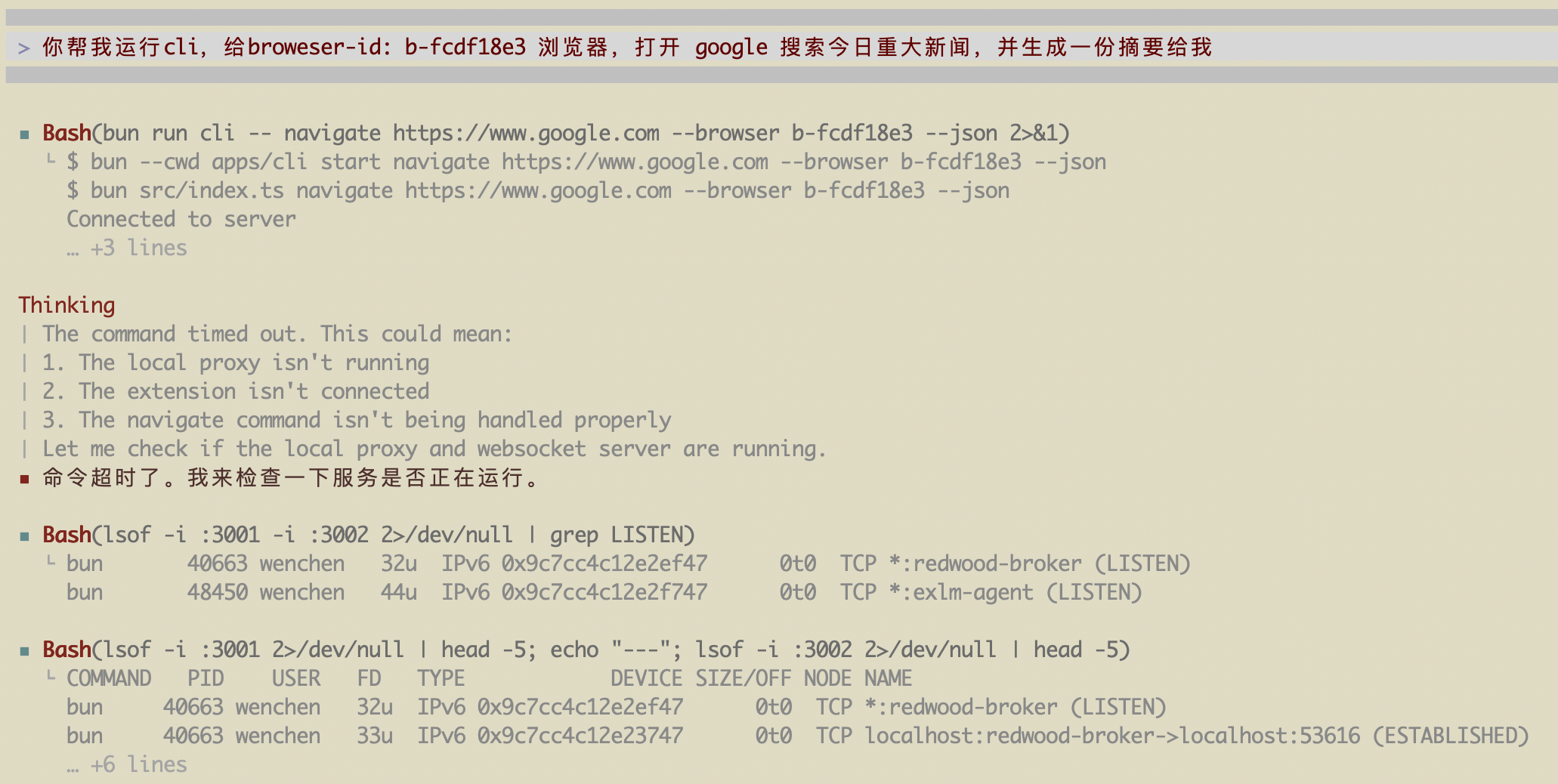
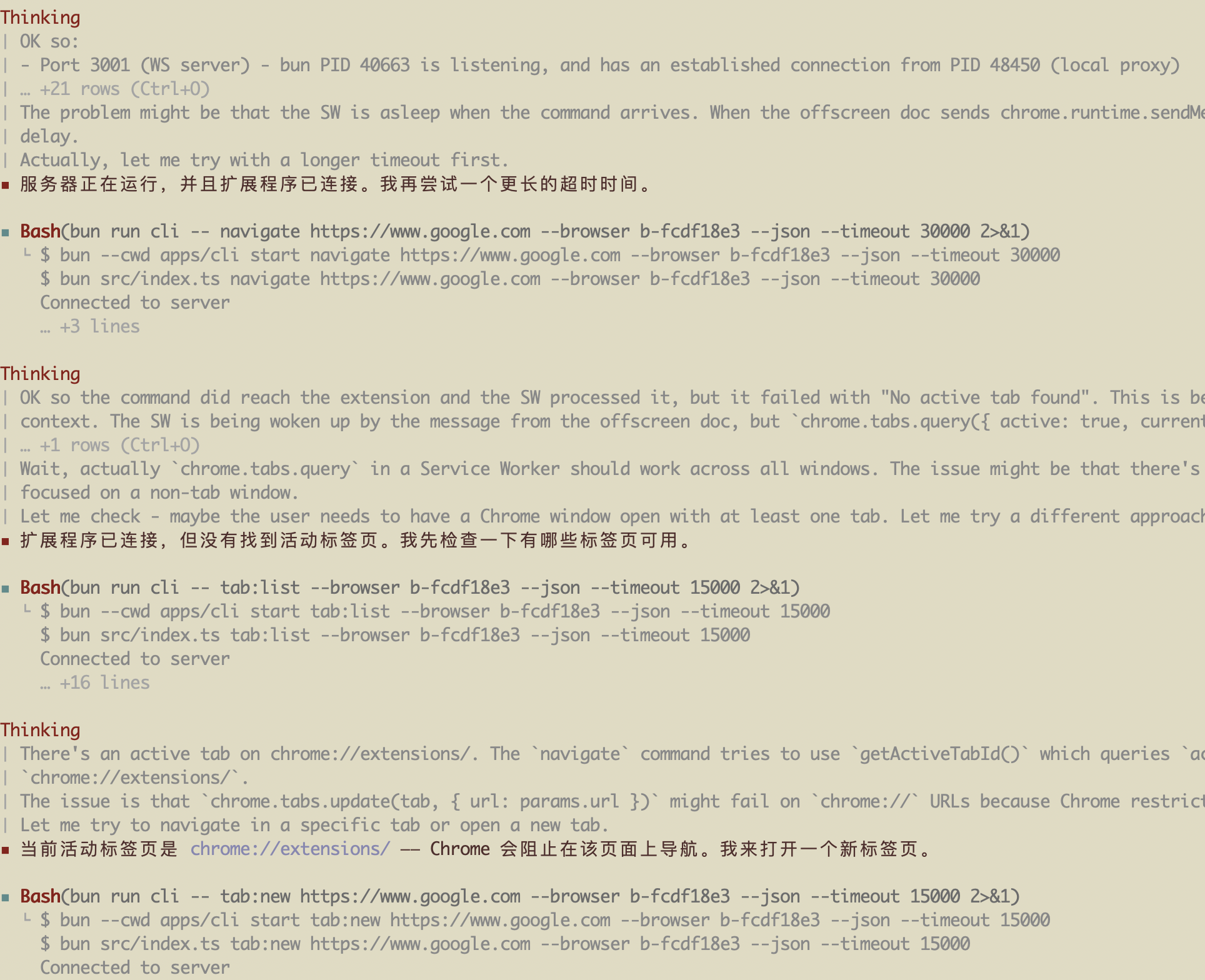
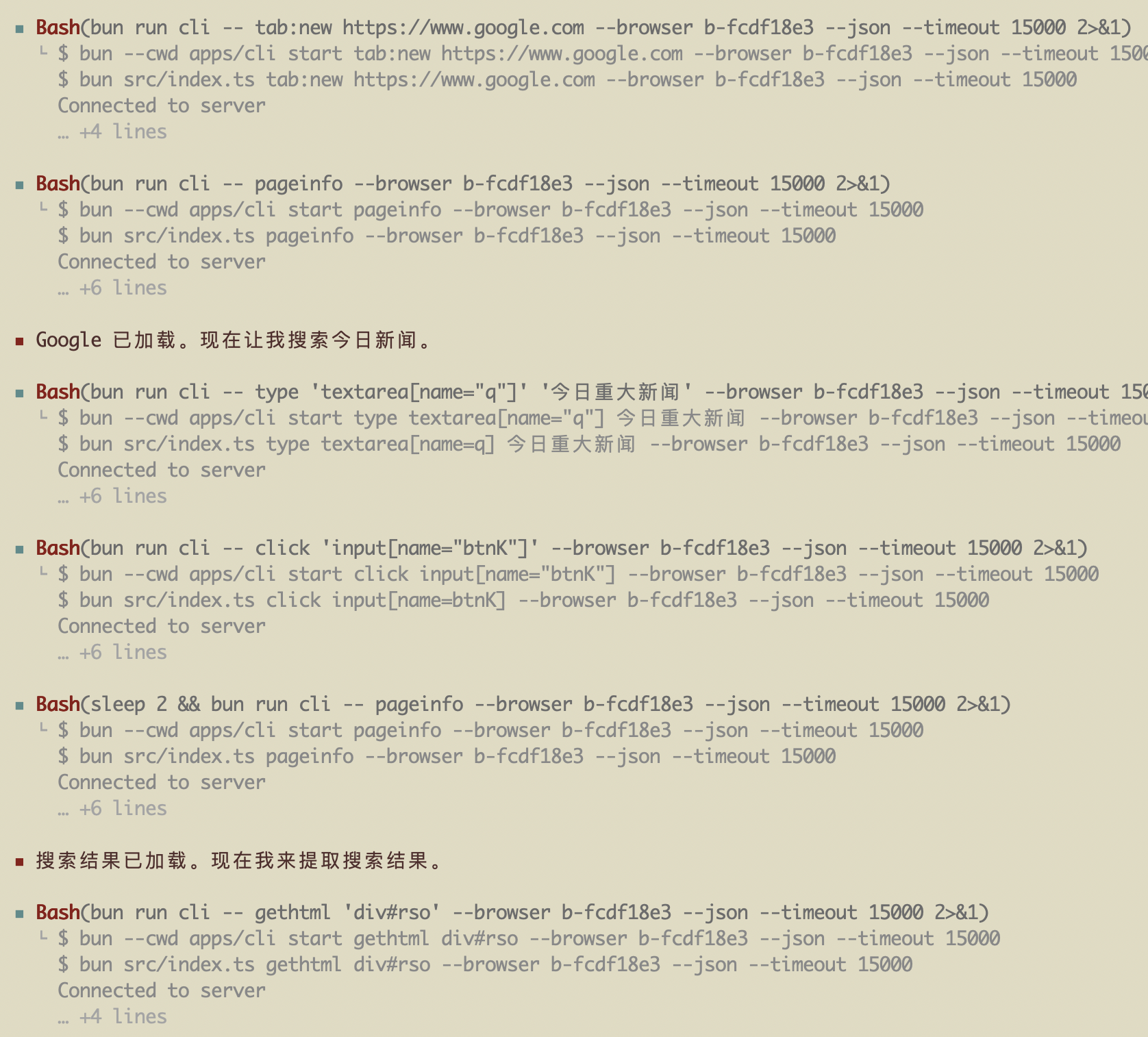
效果展示

AtomGit 是由开放原子开源基金会联合 CSDN 等生态伙伴共同推出的新一代开源与人工智能协作平台。平台坚持“开放、中立、公益”的理念,把代码托管、模型共享、数据集托管、智能体开发体验和算力服务整合在一起,为开发者提供从开发、训练到部署的一站式体验。
更多推荐
 8
8 0
0- 0


 已为社区贡献4条内容

所有评论(0)