在 VS Code 里跑一个多 Agent 团队:Hermes ACP 集成实录
背景
Hermes Agent也折腾一段时间了,加了vecmem记忆系统、对Token消耗进行了优化,还配置了一整套可以在项目中各司其职的Agent团队,到最后发现真要进行项目开发还得用IDE。
今天主要解决Hermes Agent和VS Code 集成的问题,让训练好的Agent在IDE里为你搞开发。
什么是 ACP
ACP(Agent Client Protocol)是 Zed Industries 推的一个开放协议。跟 MCP 不同,MCP 是给 Agent 挂工具的,ACP 是 IDE 跟 Agent 之间的通信协议。
Agent 通过 stdin/stdout 跑一个 JSON-RPC 服务,IDE 通过管道跟它对话。Agent 发消息、调工具、跑终端命令、展示 diff,IDE 负责渲染输出。
Hermes、Claude Code、Codex CLI、Copilot 都支持。
第一步:装 ACP 依赖
Hermes 的 ACP 适配器是单独的 extra,默认不装。
cd ~/AppData/Local/hermes/hermes-agent
source venv/Scripts/activate
pip install -e '.[acp]'
验证:
hermes acp --check
# Hermes ACP check OK
如果报 “ACP dependencies not installed”,说明 pip 装到系统 Python 了,没进 venv:
./venv/Scripts/pip3 list | grep agent-client
# agent-client-protocol  0.9.0
第二步:装 ACP Client 扩展
市场搜 “ACP Client”。或者命令行装:
code --install-extension formulahendry.acp-client
装完后左侧 Activity Bar 会出现 ACP 图标。扩展内置了 11 个 Agent 的默认配置,包括 Hermes。
第三步:配置 registryDir
扩展自带 Hermes 配置,但直接点"连接"会卡住,session/new 发出去后没回应。
原因:ACP Client 扩展需要知道 Hermes 的 registry 清单在哪。
hermes-agent/acp_registry/ 目录里有 agent.json,描述 Hermes 的 ACP 能力(协议版本、认证方式、分发方式)。扩展握手需要它。
{
  "acp.agents": {
    "Hermes Agent": {
      "command": "hermes",
      "args": ["acp"],
      "registryDir": "~\hermes\\hermes-agent\\acp_registry"
    }
  }
}
配完重启 VS Code,点 ACP 图标 → “Hermes Agent” → Connect。几秒后 chat 面板出现,Agent 能读写 workspace 文件、出 diff、跑终端命令。
第四步:多 Agent,不止是换模型
问题
hermes acp 走的是 default profile。但我有多个使用场景:
- 前端:需要 GPT5 加前端相关 skill 如 design.md
- 后端:需要 Claude Opus 加后端工具集和相关skill
- 测试:需要专门的测试 agent,用更小的模型跑回归
- 代码审查:需要 reviewer profile,带严格的 review 规则
- 需求分析:需要 researcher profile,配搜索工具和长上下文模型
每个场景需要的模型、工具集、skill 都不一样。一个 profile 装不下。
方案:每个 Agent 对应一个 Profile
ACP 不支持运行时动态切 profile。解决思路:每个 profile 启动独立的 ACP 进程,VS Code 里每个 profile 是一个 agent 条目。
每个 Hermes profile 就是一个独立 Agent:自己的模型和 provider,自己的 skills(前端 agent 装 design.md、tailwind;测试 agent 装 pytest、playwright),自己的工具集,自己的系统提示词。
配置 VS Code
hermes 已在系统 PATH 上,直接在 args 里加 -p 参数指定 profile 就行:
{
  "acp.agents": {
    "Frontend": {
      "command": "hermes",
      "args": ["-p", "coder", "acp"],
      "registryDir": "......."
    },
    "Backend": {
      "command": "hermes",
      "args": ["-p", "default", "acp"],
      "registryDir": "......."
    },
    "Tester": {
      "command": "hermes",
      "args": ["-p", "tester", "acp"],
      "registryDir": "......."
    },
    "Reviewer": {
      "command": "hermes",
      "args": ["-p", "reviewer", "acp"],
      "registryDir": "......."
    }
  }
}
每个条目用不同的 -p 参数指向不同 profile,共享同一个 registryDir。
多 Agent 协作:一个典型的工作流
ACP Client 一次只能连一个 Agent,但切换很快。
连上 Frontend,说"按这个设计稿写一个卡片组件"。它用 GLM-5.1 和前端技能,生成代码和样式。断开,连上 Backend,说"给卡片组件加一个获取数据的 API"。它用 DeepSeek V4 处理后端逻辑。再断开,连上 Tester,说"给刚才的组件和 API 写测试用例"。Tester 用轻量模型跑 pytest 和 playwright。最后连上 Reviewer 做代码审查。
每个 Agent 有自己的模型偏好、工具集和职责边界。换来换去,都在编辑器侧边栏里完成。
最终效果
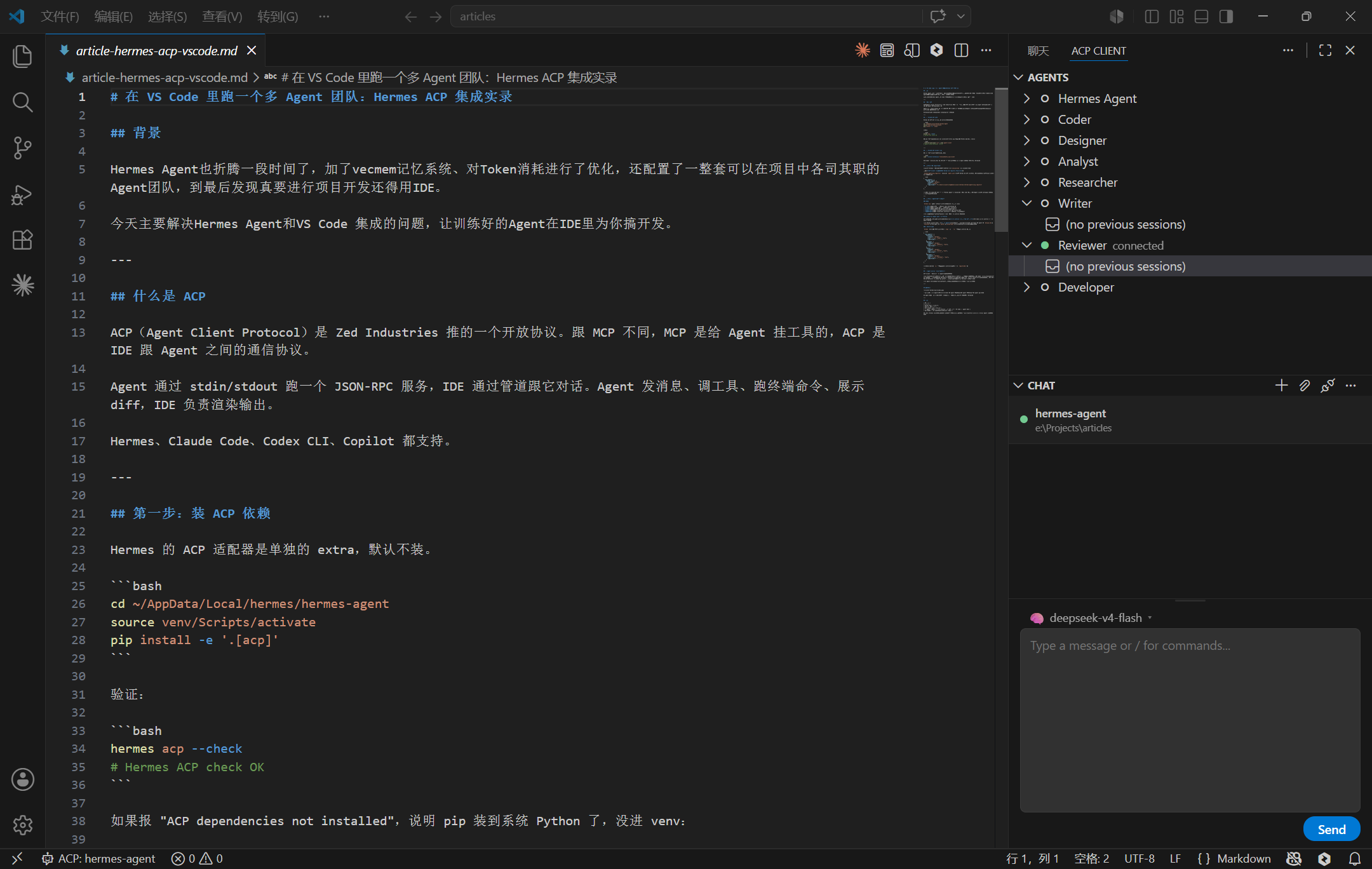
侧边栏里列出多个 Agent,点哪个连哪个。前端 agent 写组件、后端 agent 写接口、测试 agent 跑用例。
换 Agent 就断开当前连接,点另一个。不用离开编辑器,也不用改配置或重启 Hermes。
总结
| 项 | 值 |
|---|---|
| Hermes 版本 | 0.14.0 |
| ACP 协议版本 | 1 |
| ACP Client 扩展 | v0.2.0 |
| 多 Agent 实现方式 | 每个 profile 独立 ACP 进程 + VS Code 多 agent 条目 |
| 适用编辑器 | VS Code(Zed/JetBrains 同理) |
很多人用 Hermes 只当终端里的高级 CLI。ACP 集成把它拽进了编辑器侧边栏,profile 机制又让多个专业 Agent 能各干各的。

AtomGit 是由开放原子开源基金会联合 CSDN 等生态伙伴共同推出的新一代开源与人工智能协作平台。平台坚持“开放、中立、公益”的理念,把代码托管、模型共享、数据集托管、智能体开发体验和算力服务整合在一起,为开发者提供从开发、训练到部署的一站式体验。
更多推荐



 7
7 0
0- 0


 已为社区贡献9条内容

所有评论(0)