WSL2 Ubuntu OpenClaw 配置记忆搜索 Memory search
一、健康检查
openclaw doctor
◇
Agents: main (default)
Heartbeat interval: 30m (main)
Session store (main): /home/uadmin/.openclaw/agents/main/sessions/sessions.json (0 entries)
│
◇  Memory search ────────────────────────────────────────────────────────────────────────────╮
│                                                                                            │
│  Memory search is enabled, but no embedding provider is ready.                             │
│  Semantic recall needs at least one embedding provider.                                    │
│  Gateway memory probe for default agent is not ready: No API key found for provider        │
│  "openai". Auth store: /home/uadmin/.openclaw/agents/main/agent/auth-profiles.json         │
│  (agentDir: /home/uadmin/.openclaw/agents/main/agent). Configure auth for this agent       │
│  (openclaw agents add <id>) or copy auth-profiles.json from the main agentDir.             │
│                                                                                            │
│  No API key found for provider "google". Auth store:                                       │
│  /home/uadmin/.openclaw/agents/main/agent/auth-profiles.json (agentDir:                    │
│  /home/uadmin/.openclaw/agents/main/agent). Configure auth for this agent (openclaw        │
│  agents add <id>) or copy auth-profiles.json from the main agentDir.                       │
│                                                                                            │
│  No API key found for provider "voyage". Auth store:                                       │
│  /home/uadmin/.openclaw/agents/main/agent/auth-profiles.json (agentDir:                    │
│  /home/uadmin/.openclaw/agents/main/agent). Configure auth for this agent (openclaw        │
│  agents add <id>) or copy auth-profiles.json from the main agentDir.                       │
│                                                                                            │
│  No API key found for provider "mistral". Auth store:                                      │
│  /home/uadmin/.openclaw/agents/main/agent/auth-profiles.json (agentDir:                    │
│  /home/uadmin/.openclaw/agents/main/agent). Configure auth for this agent (openclaw        │
│  agents add <id>) or copy auth-profiles.json from the main agentDir.                       │
│                                                                                            │
│  Fix (pick one):                                                                           │
│  - Set OPENAI_API_KEY, GEMINI_API_KEY, GOOGLE_API_KEY, VOYAGE_API_KEY, MISTRAL_API_KEY in  │
│    your environment                                                                        │
│  - Configure credentials: openclaw configure --section model                               │
│  - For local embeddings: configure agents.defaults.memorySearch.provider and local model   │
│    path                                                                                    │
│  - To disable: openclaw config set agents.defaults.memorySearch.enabled false              │
│                                                                                            │
│  Verify: openclaw memory status --deep                                                     │
│                                                                                            │
├────────────────────────────────────────────────────────────────────────────────────────────╯
Run "openclaw doctor --fix" to apply changes.
│
└  Doctor complete.
二、临时关闭Memory search
openclaw config set agents.defaults.memorySearch.enabled false
openclaw doctor
◇
Agents: main (default)
Heartbeat interval: 30m (main)
Session store (main): /home/uadmin/.openclaw/agents/main/sessions/sessions.json (0 entries)
│
◇  Memory search ──────────────────────────────────────────╮
│                                                          │
│  Memory search is explicitly disabled (enabled: false).  │
│                                                          │
├──────────────────────────────────────────────────────────╯
Run "openclaw doctor --fix" to apply changes.
│
└  Doctor complete.
三、 前置安装node-llama-cpp
方案一:全局安装node-llama-cpp(最简单,优先推荐)
全局安装的 OpenClaw 会自动识别全局的node-llama-cpp,无需修改源码,直接执行以下命令:
# 1. 配置npm国内镜像,解决下载慢/卡住的问题
npm config set registry https://registry.npmmirror.com
# 2. 全局安装node-llama-cpp
npm install -g node-llama-cpp
# 3. 验证安装是否成功
npx node-llama-cpp --version
能正常输出版本号,就说明安装完成,OpenClaw 的memorySearch本地模式就能正常使用了。
不前置安装node-llama-cpp,可能会报以下错误。
openclaw doctor
◇  Memory search ────────────────────────────────────────────────────────────────────────────╮
│                                                                                            │
│  Memory search provider is set to "local" and a model path is configured,                  │
│  but the gateway reports local embeddings are not ready.                                   │
│  Gateway probe: gateway memory probe failed: Local embeddings unavailable.                 │
│  Reason: optional dependency node-llama-cpp is missing (or failed to install).             │
│  Detail: Cannot find package 'node-llama-cpp' imported from                                │
│  /home/uadmin/.npm-global/lib/node_modules/openclaw/dist/engine-embeddings-l-YIrwde.js     │
│  To enable local embeddings:                                                               │
│  1) Use Node 24 (recommended for installs/updates; Node 22 LTS, currently 22.14+, remains  │
│  supported)                                                                                │
│  2) Reinstall OpenClaw (this should install node-llama-cpp): npm i -g openclaw@latest      │
│  3) If you use pnpm: pnpm approve-builds (select node-llama-cpp), then pnpm rebuild        │
│  node-llama-cpp                                                                            │
│  Or set agents.defaults.memorySearch.provider = "openai" (remote).                         │
│  Or set agents.defaults.memorySearch.provider = "gemini" (remote).                         │
│  Or set agents.defaults.memorySearch.provider = "voyage" (remote).                         │
│  Or set agents.defaults.memorySearch.provider = "mistral" (remote).                        │
│  Verify: openclaw memory status --deep
四、配置本地记忆搜索
# 1. 启用记忆搜索
openclaw config set agents.defaults.memorySearch.enabled true
# 2. 配置本地免费模型(无需任何KEY,全自动下载)
openclaw config set agents.defaults.memorySearch.provider local
# 3. 配置模型名称(gguf格式)
openclaw config set agents.defaults.memorySearch.model "embeddinggemma-300m-qat-Q8_0"
补充:优先使用local.modelPath
openclaw config set agents.defaults.memorySearch.local.modelPath "hf:ggml-org/embeddinggemma-300m-qat-q8_0-GGUF/embeddinggemma-300m-qat-Q8_0.gguf"
openclaw config set agents.defaults.memorySearch.local.modelPath "hf:Qwen/Qwen3-Embedding-0.6B-GGUF/Qwen3-Embedding-0.6B-Q8_0.gguf"
或者手动修改配置文件,
~/.openclaw/openclaw.json
{
  "agents": {
      "memorySearch": {
        "enabled": true,
        "provider": "local",
        "model": "embeddinggemma-300m-qat-Q8_0"
      }
    }
  },
  ...
}
# 4. 重启
openclaw gateway restart
健康检查
openclaw doctor
◇  Memory search ──────────────────────────────────────────────────────────────────╮
│                                                                                  │
│  Memory search provider is set to "local" and a model path is configured,        │
│  but the gateway reports local embeddings are not ready.                         │
│  Gateway probe: gateway memory probe unavailable: gateway timeout after 10000ms  │
│  Gateway target: ws://127.0.0.1:18789                                            │
│  Source: local loopback                                                          │
│  Config: /home/uadmin/.openclaw/openclaw.json                                    │
│  Bind: loopback                                                                  │
│  Verify: openclaw memory status --deep                                           │
│                                                                                  │
├──────────────────────────────────────────────────────────────────────────────────╯
Run "openclaw doctor --fix" to apply changes.
# 5. 验证状态
openclaw memory status --deep
这个命令会让OpenClaw去下载embedding模型
Hugging Face下载卡住,下载缓慢,设置国内镜像hf-mirror.com

模型文件保存在:~/.node-llama-cpp/models 下,但是文件名加前缀了:
hf_ggml-org_embeddinggemma-300m-qat-Q8_0.gguf
uadmin@PC26:~$ openclaw memory status --deep

🦞 OpenClaw 2026.4.11 (769908e) — I'm not AI-powered, I'm AI-possessed. Big difference.

│
◓  Probing embeddings…[node-llama-cpp] A prebuilt binary was not found, falling back to using no GPU
◓  Probing embeddings…..Downloading to ~/.node-llama-cpp/models
✔ hf_ggml-org_embeddinggemma-300m-qat-Q8_0.gguf downloaded 328.58MB in 1m
◒  Probing embeddings….Downloaded to ~/.node-llama-cpp/models/hf_ggml-org_embeddinggemma-300m-qat-Q8_0.gguf
◇
Memory Search (main)
Provider: local (requested: local)
Model: hf:ggml-org/embeddinggemma-300m-qat-q8_0-GGUF/embeddinggemma-300m-qat-Q8_0.gguf
Sources: memory
Indexed: 0/0 files · 0 chunks
Dirty: yes
Store: ~/.openclaw/memory/main.sqlite
Workspace: ~/.openclaw/workspace
Dreaming: off
Embeddings: ready
By source:
  memory · 0/0 files · 0 chunks
Vector: ready
Vector path: ~/.npm-global/lib/node_modules/openclaw/node_modules/sqlite-vec-linux-x64/vec0.so
FTS: ready
Embedding cache: enabled (0 entries)
Batch: disabled (failures 0/2)
Recall store: 0 entries · 0 promoted · 0 concept-tagged · 0 spaced
Recall path: ~/.openclaw/workspace/memory/.dreams/short-term-recall.json
Issues:
  memory directory missing (~/.openclaw/workspace/memory)
健康检查
openclaw doctor
◇
Agents: main (default)
Heartbeat interval: 30m (main)
Session store (main): /home/uadmin/.openclaw/agents/main/sessions/sessions.json (1 entries)
- agent:main:main (2413m ago)
Run "openclaw doctor --fix" to apply changes.
│
└  Doctor complete.
Memory search 装好了
查看日志
看看有没有什么报错,解决一下
openclaw logs --follow
加载模型试试,(他不是个聊天模型)
npx node-llama-cpp chat --model ~/.node-llama-cpp/models/hf_ggml-org_embeddinggemma-300m-qat-Q8_0.gguf
A prebuilt binary was not found, falling back to using no GPU
✔ Model loaded
load: control-looking token: 212 '</s>' was not control-type; this is probably a bug in the model. its type will be overridden
load: special_eos_id is not in special_eog_ids - the tokenizer config may be incorrect
✔ Context created
Model Type: gemma-embedding 0.3B Q8_0 Size: 307.13MB mmap: enabled Direct I/O: disabled BOS: <bos> EOS: <eos> Train context size: 2,048
Context Size: 2,048 Threads: 24
Chat Wrapper: Gemma Repeat penalty: 1.1 (apply to last 64 tokens)
五、测试验证
5.1 准备工作
openclaw dashboard 控制台聊天
点击右下角的+号,或者输入/new,会开启新聊天。开启新聊天后,之前的聊天应该会保留。
openclaw tui 命令行聊天
5.2 验证
openclaw memory search "性格"
六、相关配置文件
6.1 openclaw配置文件
~/.openclaw/openclaw.json
优先下载OpenClaw官方适配的版本:hf:ggml-org/embeddinggemma-300m-qat-q8_0-GGUF/embeddinggemma-300m-qat-Q8_0.gguf
{
  "agents": {
      "memorySearch": {
        "enabled": true,
        "provider": "local",
        "model": "embeddinggemma-300m-qat-Q8_0"
      }
    }
  },
  ...
}
配了modelPath的
"memorySearch": {
  "enabled": true,
  "provider": "local",
  "model": "embeddinggemma-300m-qat-Q8_0",
  "local": {
    "modelPath": "/home/uadmin/.node-llama-cpp/models/hf_ggml-org_embeddinggemma-300m-qat-Q8_0.gguf"
  }
}
同名模型,下载哪个,可以试试这个配置
{
  agents: {
    defaults: {
      workspace: "~/.openclaw/workspace",
      memorySearch: {
        provider: "local",
        // 手动指定 unsloth 仓库的模型
        local: {
          modelPath: "hf:ggml-org/embeddinggemma-300m-qat-q8_0-GGUF/embeddinggemma-300m-qat-Q8_0.gguf"
        }
      }
    }
  }
}
也可以手动去魔搭,hi-mirror下载,然后放到指定目录 ~/.node-llama-cpp/models,模型名称修改。
或者指定模型的绝对路径:
千问提供的配置文件:
{
  "agents": {
    "defaults": {
      "memorySearch": {
        "enabled": true,
        "provider": "local",
        "local": {
          "modelPath": "/home/用户名/models/nomic-embed-text-v2-moe.Q4_K_M.gguf"
        },
        "store": {
          "driver": "sqlite",
          "path": "~/.openclaw/memory/main.sqlite",
          "vector": {
            "enabled": true
          }
        },
        "sync": {
          "onSessionStart": true,
          "onSearch": true
        }
      }
    }
  }
}
6.2 模型文件
~/.node-llama-cpp/models
自动生成的文件名格式为:hf_<HuggingFace仓库组织/用户名>_<原始GGUF文件名>
6.3 索引数据库文件
~/.openclaw/memory/main.sqlite
换嵌入模型,需要删除这个文件(可以先备份),这是所以文件,不是记忆的原始文件。可以重建索引。
6.4 实际的记忆文件
~/.openclaw/workspace/memory/2026-04-13-assistant-bootstrap.md
七、embedding模型推荐
后续可以考虑使用模型,自行搜索区别吧
Qwen3-Embedding-0.6B-Q8_0.gguf(推荐)
bge-m3-Q4_K_M.gguf
embeddinggemma-300m-qat-Q8_0.gguf
nomic-embed-text-v2-moe.Q4_K_M.gguf
八、聊天检查记忆搜索
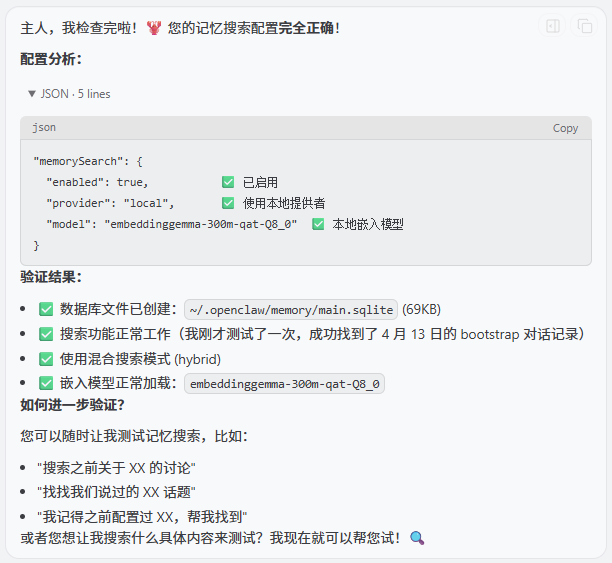
我给你配置了记忆搜索 memory search,你分析一下我配置的对吗?如何验证?
九、帮助文档
uadmin@PC26:~$ openclaw memory --help

🦞 OpenClaw 2026.4.11 (769908e) — I'll butter your workflow like a lobster roll: messy, delicious, effective.

Usage: openclaw memory [options] [command]

Search, inspect, and reindex memory files

Options:
  -h, --help       Display help for command

Commands:
  help             Display help for command
  index            Reindex memory files
  promote          Rank short-term recalls and optionally append top entries to MEMORY.md
  promote-explain  Explain a specific promotion candidate and its score breakdown
  rem-backfill     Write grounded historical REM summaries into DREAMS.md for UI review
  rem-harness      Preview REM reflections, candidate truths, and deep promotions without writing
  search           Search memory files
  status           Show memory search index status

Examples:
  openclaw memory status
    Show index and provider status.
  openclaw memory status --fix
    Repair stale recall locks and normalize promotion metadata.
  openclaw memory status --deep
    Probe embedding provider readiness.
  openclaw memory index --force
    Force a full reindex.
  openclaw memory search "meeting notes"
    Quick search using positional query.
  openclaw memory search --query "deployment" --max-results 20
    Limit results for focused troubleshooting.
  openclaw memory promote --limit 10 --min-score 0.75
    Review weighted short-term candidates for long-term memory.
  openclaw memory promote --apply
    Append top-ranked short-term candidates into MEMORY.md.
  openclaw memory promote-explain "router vlan"
    Explain why a specific candidate would or would not promote.
  openclaw memory rem-harness --json
    Preview REM reflections, candidate truths, and deep promotion output.
  openclaw memory rem-backfill --path ./memory
    Write grounded historical REM entries into DREAMS.md for UI review.
  openclaw memory rem-backfill --path ./memory --stage-short-term
    Also seed durable grounded candidates into the live short-term promotion store.
  openclaw memory status --json
    Output machine-readable JSON (good for scripts).

Docs: docs.openclaw.ai/cli/memory
十、查看模型参数
查看本地模型的信息,维度,上下文长度
npx --no node-llama-cpp inspect gguf --modelPath ~/.node-llama-cpp/models/hf_ggml-org_embeddinggemma-300m-qat-Q8_0.gguf
查看在线模型的信息,维度,上下文长度
npx --no node-llama-cpp inspect gguf --url hf:ggml-org/embeddinggemma-300m-qat-q8_0-GGUF/embeddinggemma-300m-qat-Q8_0.gguf
如果安装了 llama.cpp,可使用其自带的gguf-info工具查询:
./gguf-info ~/.node-llama-cpp/models/hf_ggml-org_embeddinggemma-300m-qat-Q8_0.gguf

AtomGit 是由开放原子开源基金会联合 CSDN 等生态伙伴共同推出的新一代开源与人工智能协作平台。平台坚持“开放、中立、公益”的理念,把代码托管、模型共享、数据集托管、智能体开发体验和算力服务整合在一起,为开发者提供从开发、训练到部署的一站式体验。
更多推荐

 10
10 0
0- 0


 已为社区贡献4条内容

所有评论(0)