AI 图片编辑 API 实测:Wan 2.7 / Qwen Image 2.0 / Seedream 4.5 三个模型对比
用 API 编辑图片,不画 mask、不框选区域,就用一句话描述"把背景换成深秋的日本庭院"——现在的模型真能做到吗?
拿了三个 2026 年新出的图片编辑模型,同一张原图、同一个 prompt,跑了换背景、换风格、改局部元素三组测试。
三个模型是什么来头
Wan 2.7 Image Edit 是阿里万相系列的最新图片编辑模型,2026 年 3 月上线。用自然语言描述编辑意图,支持 1-9 张参考图输入,输出最大 2048×2048。还有个 Pro 版本,输出分辨率更高。
Qwen Image 2.0 Edit 来自阿里通义千问团队,2026 年 2 月发布。生成和编辑用同一个模型,不用切换工具。中英文 prompt 都能用。
Seedream 4.5 Edit 是字节跳动的。主打面部特征保持——编辑图片的时候不会把人脸改变形。支持 4K 输出。
三个模型在 WaveSpeed 上都能直接调 API,不用分别注册三个平台。
API 怎么调
先装依赖:
pip install requests python-dotenv
三个模型的调用方式差不多,都是 POST 请求 + 轮询结果。区别在模型 ID 和部分参数名。
Wan 2.7 Image Edit 的代码:
import os, time, requests

os.environ["WAVESPEED_API_KEY"] = "你的key"

API_BASE = "https://api.wavespeed.ai/api/v3"
HEADERS = {
    "Content-Type": "application/json",
    "Authorization": f"Bearer {os.environ['WAVESPEED_API_KEY']}"
}

def edit_image(model_path, image_url, prompt, seed=-1):
    """通用图片编辑函数,适用于三个模型"""
    resp = requests.post(
        f"{API_BASE}/{model_path}",
        headers=HEADERS,
        json={
            "images": [image_url],
            "prompt": prompt,
            "seed": seed
        }
    )
    resp.raise_for_status()
    request_id = resp.json()["data"]["id"]

    # 轮询等待结果
    for _ in range(60):
        result = requests.get(
            f"{API_BASE}/predictions/{request_id}/result",
            headers=HEADERS
        ).json()
        status = result["data"]["status"]
        if status == "completed":
            return result["data"]["output"]["images"]
        elif status == "failed":
            raise Exception(f"生成失败: {result['data'].get('error', '未知错误')}")
        time.sleep(2)
    raise TimeoutError("等了 2 分钟还没出结果")

# 原图 URL(需要替换成你自己的图片)
source_image = "https://你的图片URL.jpg"

# 调用 Wan 2.7 Image Edit
wan_result = edit_image(
    "alibaba/wan-2.7/image-edit",
    source_image,
    "Transport this woman to a quiet Japanese temple garden in late autumn, she stands among tall maple trees with deep crimson and burnt orange leaves, soft overcast light filtering through the canopy creating dappled shadows, a stone lantern visible in the misty background, all tones muted and warm like a faded photograph, keep the woman's face, hair, clothing, and pose completely unchanged"
)
print(f"Wan 2.7 结果: {wan_result}")
Qwen Image 2.0 Edit 的调用,模型 ID 换一下就行:
qwen_result = edit_image(
    "wavespeed-ai/qwen-image-2.0/edit",
    source_image,
    "Transport this woman to a quiet Japanese temple garden in late autumn, she stands among tall maple trees with deep crimson and burnt orange leaves, soft overcast light filtering through the canopy creating dappled shadows, a stone lantern visible in the misty background, all tones muted and warm like a faded photograph, keep the woman's face, hair, clothing, and pose completely unchanged"
)
print(f"Qwen Image 2.0 结果: {qwen_result}")
Seedream 4.5 Edit:
seedream_result = edit_image(
    "bytedance/seedream-v4.5/edit",
    source_image,
    "Transport this woman to a quiet Japanese temple garden in late autumn, she stands among tall maple trees with deep crimson and burnt orange leaves, soft overcast light filtering through the canopy creating dappled shadows, a stone lantern visible in the misty background, all tones muted and warm like a faded photograph, keep the woman's face, hair, clothing, and pose completely unchanged"
)
print(f"Seedream 4.5 结果: {seedream_result}")
注意:三个模型的参数名可能有细微差别,实际调用前去 WaveSpeed API 文档确认一下。
换背景:室内搬到深秋庭院
任务:把一张室内人像照的背景换到深秋的日本庭院。
Transport this woman to a quiet Japanese temple garden in late autumn, she stands among tall maple trees with deep crimson and burnt orange leaves, soft overcast light filtering through the canopy creating dappled shadows, a stone lantern visible in the misty background, all tones muted and warm like a faded photograph, keep the woman’s face, hair, clothing, and pose completely unchanged
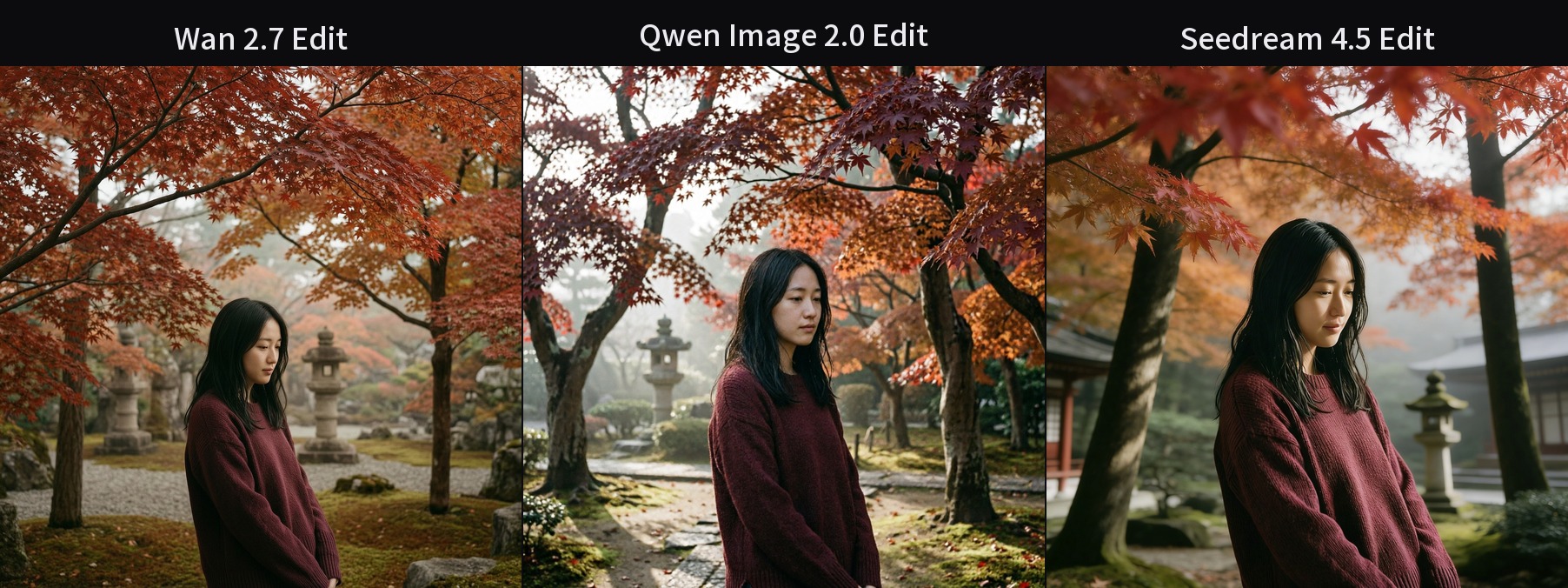
三个模型都成功把白墙室内换成了秋季日本庭院。但差异不小。
| 模型 | 背景自然度 | 人物保持 | 边缘过渡 |
|---|---|---|---|
| Wan 2.7 Edit | 雾气和枫叶氛围最好,色调统一 | 人物整体偏暗了一点 | 柔和,头发和背景融合自然 |
| Qwen Image 2.0 Edit | 元素最丰富(石灯笼、枫叶、雾气),但色调偏红偏浓 | 面部和衣服保持不错 | 过渡自然,边缘没有明显割裂 |
| Seedream 4.5 Edit | 加了寺庙建筑,构图感最强 | 面部保持最好 | 背景和人物的光线方向有点不一致 |
Wan 2.7 的氛围感最好——那层雾气让整个画面有了"深秋清晨"的感觉。Qwen 2.0 的背景细节最丰富但色调有点过了。Seedream 4.5 的人脸保持确实是它的强项,但光线融合还差一点。
换风格:照片变 Vermeer 油画
任务:把一张写实人像照转成 Vermeer 风格的油画。
Reimagine this photograph as a classical oil painting in the style of Vermeer, soft window light from the left casting a warm golden glow, visible brushstroke texture across the entire surface including skin and clothing, the color palette shifted to muted earth tones with raw sienna highlights and umber shadows, canvas weave texture showing through in darker areas, keep the composition, facial features, pose, and expression precisely unchanged
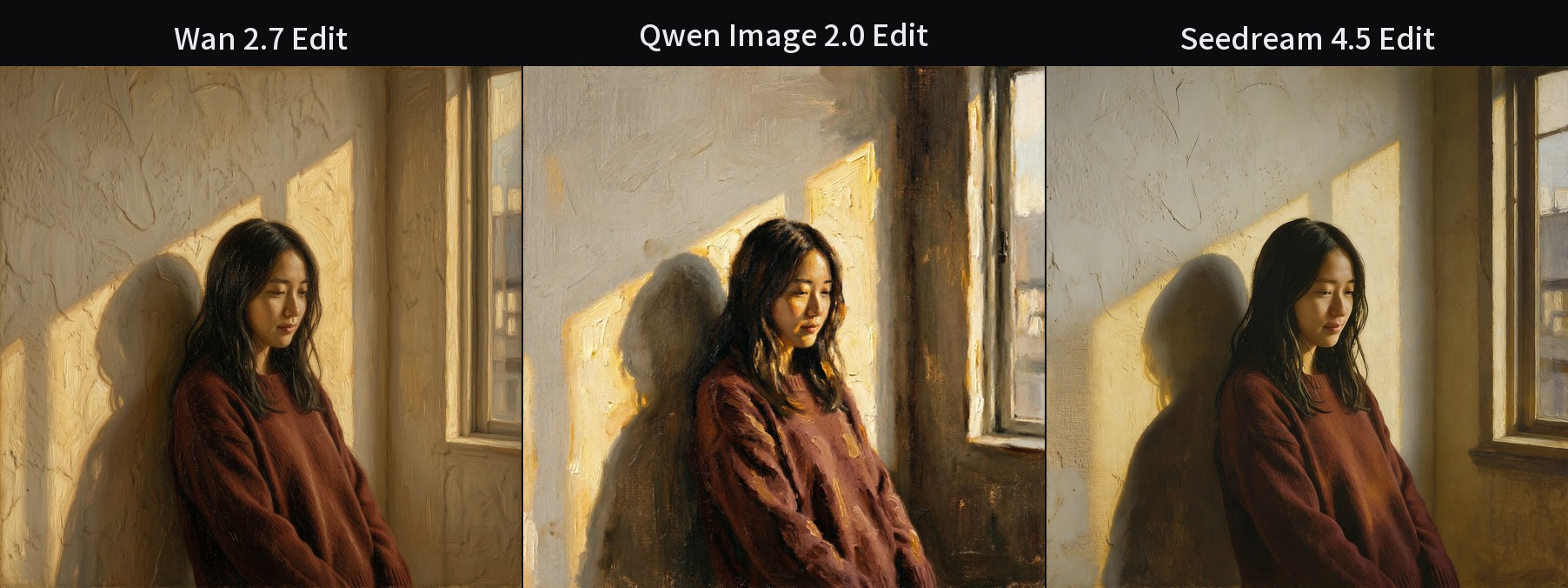
这组差异最大。
Wan 2.7 转得最彻底。笔触厚重,色调统一偏暖金,整张图看起来就是一幅油画。代价是人物面部细节损失比较多,五官有点糊。
Qwen 2.0 在"像油画"和"还能认出是谁"之间找到了一个不错的平衡。窗光的金色调很 Vermeer,笔触纹理覆盖了整个画面包括背景墙,人物辨识度也保持住了。
Seedream 4.5 最保守。更像是在原图上加了一层油画质感的滤镜。人脸最清晰,但"油画感"不够。背景墙和衣服的笔触纹理不太明显。
局部修改:只换衣服不动其他
任务:把酒红色针织毛衣改成灰绿色亚麻衬衫。
Change the burgundy knit sweater to a soft sage green linen blouse with a relaxed collar, the linen fabric should have natural wrinkles and a matte texture that catches the window light differently from the original knit, the green should be muted and dusty matching the quiet warm tone of the overall image, keep the woman’s face, hair, skin, pose, and the entire background completely unchanged
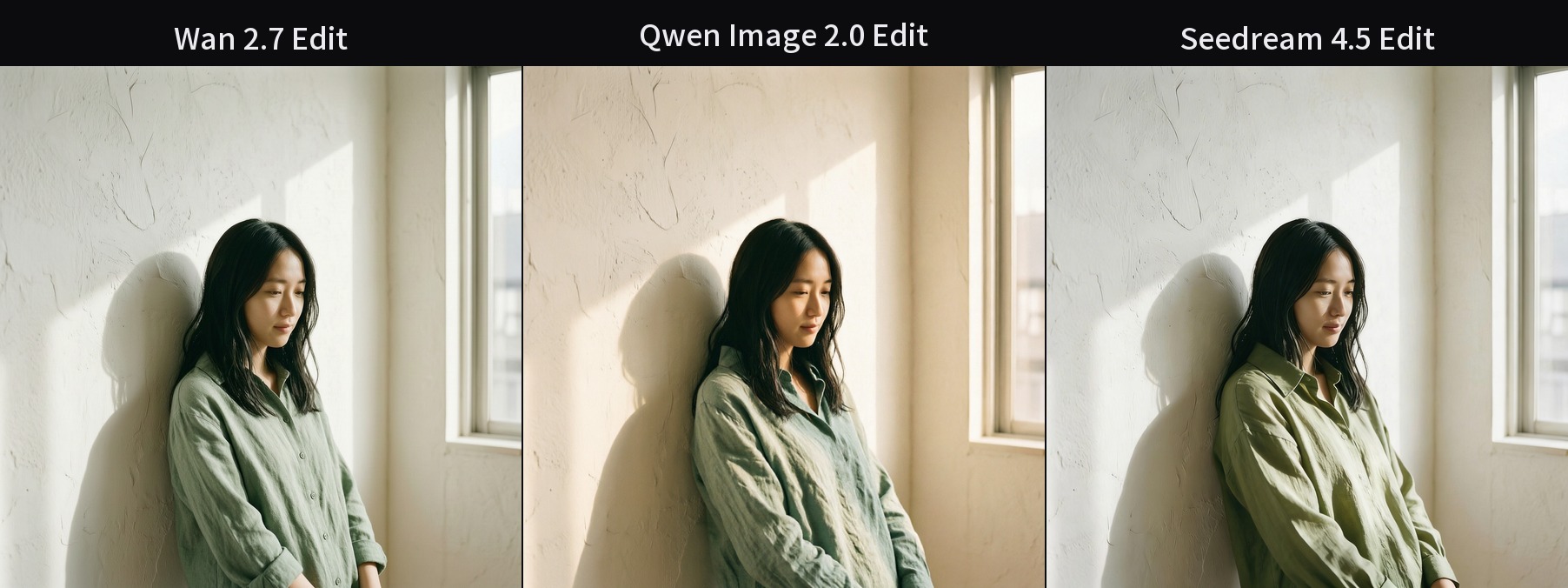
局部修改是最考验精准度的任务。只改衣服,其他一切不动。
Wan 2.7 把颜色改了,材质变化不明显。绿色偏深偏暗,像是把原来的针织毛衣染了个色。亚麻的褶皱感没出来。
Qwen 2.0 颜色和材质都有变化。绿色偏灰偏 muted,和整体暖色调协调。亚麻的自然褶皱感出来了一些。面部和背景没动。
Seedream 4.5 的 sage green 最准确。颜色就是 prompt 里要的那种灰绿。材质也有变化。不过衣服轮廓和原图有一点不同,领口形状变了。
怎么选
| 维度 | Wan 2.7 Edit | Qwen Image 2.0 Edit | Seedream 4.5 Edit |
|---|---|---|---|
| 提供商 | 阿里(万相) | 阿里(通义千问) | 字节跳动 |
| 最大输出 | 2048×2048 | 2048×2048 | 4K |
| 多图参考 | 支持(1-9 张) | 支持 | 支持 |
| 中文 prompt | 支持 | 原生支持(中英双语) | 支持 |
| 面部保持 | 一般 | 一般 | 主打 |
| Pro 版本 | 有 | 有 | 无 |
简单说:
- 要氛围感和整体风格统一 → Wan 2.7(换背景、换风格都很强,但会牺牲一些面部细节)
- 要平衡——既要效果又要保持原图辨识度 → Qwen Image 2.0(三项测试都在中间偏上,没有明显短板)
- 要人脸绝对不变 → Seedream 4.5(面部保持确实最好,但风格转换力度偏保守)
具体价格去 WaveSpeed 官网看,不同模型定价不一样。
几个要注意的地方
prompt 写法很关键。三个模型都支持自然语言,但有个共同的技巧:prompt 分两部分写,前半部分说要改什么,后半部分说要保留什么。比如 "Change the sweater to linen, keep the face and pose unchanged"。如果不写保留部分,模型可能会把不该改的地方也改了。
多图参考是 Wan 2.7 的独特能力。可以传最多 9 张图作为参考,比如传一张目标风格的图 + 原图,让模型参考风格来编辑。Qwen Image 2.0 也支持多图,但文档里没有明确说上限。
输出尺寸方面,三个模型默认都会保持原图尺寸。如果需要指定输出大小,Wan 2.7 支持 512-4096 像素(总像素不超过 2048×2048),Seedream 4.5 支持到 4K。
seed 参数建议固定。对比测试的时候,固定 seed 可以让同一个模型的输出更稳定,方便对比不同 prompt 的效果。
代码怎么批量跑
如果要批量测试多个 prompt 或多张图,可以把上面的代码封装一下:
import os, time, requests, json
from pathlib import Path

os.environ["WAVESPEED_API_KEY"] = "你的key"

API_BASE = "https://api.wavespeed.ai/api/v3"
HEADERS = {
    "Content-Type": "application/json",
    "Authorization": f"Bearer {os.environ['WAVESPEED_API_KEY']}"
}

MODELS = {
    "wan27": "alibaba/wan-2.7/image-edit",
    "qwen2": "wavespeed-ai/qwen-image-2.0/edit",
    "seedream45": "bytedance/seedream-v4.5/edit",
}

TASKS = [
    {
        "name": "bg_swap",
        "prompt": "Transport this woman to a quiet Japanese temple garden in late autumn, she stands among tall maple trees with deep crimson and burnt orange leaves, soft overcast light filtering through the canopy creating dappled shadows, a stone lantern visible in the misty background, all tones muted and warm like a faded photograph, keep the woman's face, hair, clothing, and pose completely unchanged",
    },
    {
        "name": "style_transfer",
        "prompt": "Reimagine this photograph as a classical oil painting in the style of Vermeer, soft window light from the left casting a warm golden glow, visible brushstroke texture across the entire surface including skin and clothing, the color palette shifted to muted earth tones with raw sienna highlights and umber shadows, canvas weave texture showing through in darker areas, keep the composition, facial features, pose, and expression precisely unchanged",
    },
    {
        "name": "local_edit",
        "prompt": "Change the burgundy knit sweater to a soft sage green linen blouse with a relaxed collar, the linen fabric should have natural wrinkles and a matte texture that catches the window light differently from the original knit, the green should be muted and dusty matching the quiet warm tone of the overall image, keep the woman's face, hair, skin, pose, and the entire background completely unchanged",
    },
]

def submit_and_wait(model_path, image_url, prompt, seed=42):
    resp = requests.post(
        f"{API_BASE}/{model_path}",
        headers=HEADERS,
        json={"images": [image_url], "prompt": prompt, "seed": seed}
    )
    resp.raise_for_status()
    rid = resp.json()["data"]["id"]

    for _ in range(60):
        r = requests.get(f"{API_BASE}/predictions/{rid}/result", headers=HEADERS).json()
        if r["data"]["status"] == "completed":
            return r["data"]["output"]["images"]
        elif r["data"]["status"] == "failed":
            return None
        time.sleep(2)
    return None

def run_all(source_image_url):
    results = {}
    for task in TASKS:
        for model_name, model_path in MODELS.items():
            key = f"{task['name']}_{model_name}"
            print(f"正在跑: {key}")
            imgs = submit_and_wait(model_path, source_image_url, task["prompt"])
            results[key] = imgs[0] if imgs else "失败"
            print(f"  结果: {results[key][:80] if isinstance(results[key], str) else '失败'}...")

    # 保存结果
    Path("results").mkdir(exist_ok=True)
    with open("results/edit_comparison.json", "w") as f:
        json.dump(results, f, indent=2)
    print("所有结果已保存到 results/edit_comparison.json")

if __name__ == "__main__":
    run_all("https://你的原图URL.jpg")
跑完之后 results/edit_comparison.json 里会有所有结果的 URL,可以下载下来对比。
相关链接:
WaveSpeed 官网:https://wavespeed.ai
Wan 2.7 Image Edit API 文档:https://wavespeed.ai/docs/docs-api/alibaba/alibaba-wan-2.7-image-edit
Qwen Image 2.0 Edit API 文档:https://wavespeed.ai/docs/docs-api/wavespeed-ai/qwen-image-2.0-edit
Seedream 4.5 Edit API 文档:https://wavespeed.ai/docs/docs-api/bytedance/bytedance-seedream-v4.5-edit

AtomGit 是由开放原子开源基金会联合 CSDN 等生态伙伴共同推出的新一代开源与人工智能协作平台。平台坚持“开放、中立、公益”的理念,把代码托管、模型共享、数据集托管、智能体开发体验和算力服务整合在一起,为开发者提供从开发、训练到部署的一站式体验。
更多推荐


 9
9 0
0- 0


 已为社区贡献7条内容

所有评论(0)