OpenClaw 技能开发系列:邮件发送技能
前言
邮件发送功能作为日常工作交流的必备工具,作为 OpenClaw 生态中高频刚需的基础技能,连接自动化工作流与高效信息触达,本文核心目标拆解邮件发送技能的开发逻辑、应用场景,帮助开发者快速上手实现自定义开发与落地。
第一部分:开发 OpenClaw 邮件发送技能的必要性
-
数字化场景下邮件的不可替代性:异步性、正式性、可追溯性,仍是个人通信、商业往来、系统通知的核心载体
-
OpenClaw 生态的刚需补充:原生工具缺乏 SMTP 邮件发送能力,自定义邮件技能可填补自动化闭环缺口
-
多场景落地价值:覆盖订阅推送、定时任务、监控预警等高频场景,降低人工成本,提升自动化效率
-
技能复用价值:封装为标准化模块,可快速集成到各类 OpenClaw 工作流,适配多硬件/虚拟 Agent 场景
第二部分:邮件发送技能核心应用场景详解
2.1 订阅推送场景
-
场景说明:内容平台、工具类应用的用户订阅需求(如每日 AI 简报、行业资讯、产品更新)
-
技能落地:用户订阅后自动触发邮件推送,支持批量发送、个性化内容填充,适配不同订阅偏好
-
优势:相比即时通讯,邮件可留存历史内容,用户可随时查阅,降低信息打扰
2.2 定时邮件场景
-
场景说明:周期性报告发送、定时提醒、节日问候、日程同步(如每日销售日报、每周工作汇总)
-
技能落地:结合 OpenClaw 定时触发机制,预设邮件模板、收件人列表,自动完成发送,无需人工干预
-
优势:规避人工遗忘风险,实现“一次配置,长期复用”,提升工作流程标准化水平
2.3 监控预警场景
-
场景说明:系统运行监控、硬件状态监控、业务数据异常预警(如服务器故障、设备离线、数据异常波动)
-
技能落地:触发预警条件后,自动发送包含异常详情、处理建议的邮件,及时通知相关负责人
-
优势:实现“无人值守”监控,缩短故障响应时间,降低运维/管理成本
2.4 其他延伸场景
-
事务性通知:用户注册确认、密码重置、订单状态变更等,完善服务闭环
-
批量通知:企业内部政策通知、培训安排,或外部客户活动邀约、售后提醒
第三部分:邮件发送技能开发实战
3.1 技能创建
scripts/init_skill.py email-sender2 --path skills --resources scripts3.2 SKILL.md编写
---
name: email-sender
description: Send emails via SMTP with support for text/HTML content, CC/BCC, and file attachments. Use when the user asks to send an email, compose and send a message via email, or when email communication is required. Supports any SMTP server (Gmail, Outlook, QQ Mail, enterprise mail, etc.).
---

# Email Sender

Send emails programmatically via SMTP with full support for attachments, HTML content, and multiple recipients.

## Quick Start

```bash
# Send simple text email
python scripts/send_email.py "recipient@example.com" "Subject" "Body text"

# Send HTML email
python scripts/send_email.py "recipient@example.com" "Subject" "<h1>HTML Body</h1>" --html

# Send with attachment
python scripts/send_email.py "recipient@example.com" "Report" "Please see attached" --attach ./report.pdf
```

## Configuration

### Method 1: Config File (Recommended)

Create `email_config.json` in the workspace root:

```json
{
  "smtp_host": "smtp.gmail.com",
  "smtp_port": 587,
  "smtp_user": "your_email@gmail.com",
  "smtp_password": "your_app_password",
  "from_email": "your_email@gmail.com"
}
```

**Common SMTP Settings:**

| Provider       | Host                  | Port | Notes                              |
|----------------|-----------------------|------|------------------------------------|
| Gmail          | smtp.gmail.com        | 587  | Use App Password, enable 2FA       |
| Gmail (SSL)    | smtp.gmail.com        | 465  | Set `"use_ssl": true`              |
| Outlook/Hotmail| smtp-mail.outlook.com | 587  | Use App Password                   |
| QQ Mail        | smtp.qq.com           | 465  | Set `"use_ssl": true`, use auth code |
| 163 Mail       | smtp.163.com          | 465  | Set `"use_ssl": true`, use auth code |
| Enterprise     | Ask IT admin          | Varies | May require SSL/TLS config       |

### Method 2: Environment Variables

```bash
export SMTP_HOST="smtp.gmail.com"
export SMTP_PORT="587"
export SMTP_USER="your_email@gmail.com"
export SMTP_PASSWORD="your_app_password"
export SMTP_FROM_EMAIL="your_email@gmail.com"  # Optional, defaults to SMTP_USER
```

## Sending Emails

### Basic Usage

```python
# Use in Python code
from scripts.send_email import send_email

result = send_email(
    to_emails="recipient@example.com",
    subject="Meeting Reminder",
    body="Don't forget our meeting tomorrow at 3 PM."
)

if result["success"]:
    print(result["message"])
else:
    print(f"Failed: {result['error']}")
```

### Multiple Recipients

```bash
# Comma-separated
python scripts/send_email.py "alice@example.com,bob@example.com" "Team Update" "Hello team"

# With CC and BCC
python scripts/send_email.py "recipient@example.com" "Subject" "Body" \
  --cc "cc@example.com" \
  --bcc "bcc@example.com"
```

### HTML Emails

```bash
python scripts/send_email.py "recipient@example.com" "Newsletter" \
  "<h2>Weekly Update</h2><p>Here's what happened this week...</p>" \
  --html
```

### Attachments

```bash
# Single attachment
python scripts/send_email.py "boss@company.com" "Monthly Report" \
  "Please find the monthly report attached." \
  --attach ./reports/monthly.pdf

# Multiple attachments
python scripts/send_email.py "client@example.com" "Project Files" \
  "Attached are the project files." \
  --attach ./project/report.pdf \
  --attach ./project/data.xlsx \
  --attach ./project/slides.pptx
```

## Workflow

1. **Check configuration** - Verify SMTP settings exist in `email_config.json` or environment
2. **Construct email** - Use script with subject, body, recipients
3. **Add attachments** - Use `--attach` flag for files
4. **Handle result** - Check success/error response

## Security Notes

- **Never commit passwords** - Add `email_config.json` to `.gitignore`
- **Use App Passwords** - For Gmail/Outlook, generate app-specific passwords
- **Gmail**: Enable 2FA → Account Settings → Security → App passwords
- **QQ/163**: Use authorization code (授权码), not login password

## Troubleshooting

| Error                          | Solution                                      |
|--------------------------------|-----------------------------------------------|
| "Authentication failed"        | Check password; use App Password for Gmail    |
| "Connection refused"           | Try port 465 with `"use_ssl": true`           |
| "Missing SMTP configuration"   | Create `email_config.json` or set env vars    |
| "Attachment not found"         | Verify file path is correct                   |
3.3 发送邮件
在script开发发送邮件脚本
#!/usr/bin/env python3
"""
Email sender script supporting SMTP with attachments and HTML content.
"""

import argparse
import smtplib
import os
import json
from email.mime.text import MIMEText
from email.mime.multipart import MIMEMultipart
from email.mime.base import MIMEBase
from email import encoders
from pathlib import Path


def load_config(config_path=None):
    """Load SMTP configuration from file or environment."""
    if config_path and os.path.exists(config_path):
        with open(config_path, 'r') as f:
            return json.load(f)

    # Try default location
    default_config = Path.home() / ".openclaw" / "workspace" / "email_config.json"
    if default_config.exists():
        with open(default_config, 'r') as f:
            return json.load(f)

    # Fall back to environment variables
    return {
        "smtp_host": os.getenv("SMTP_HOST"),
        "smtp_port": int(os.getenv("SMTP_PORT", "587")),
        "smtp_user": os.getenv("SMTP_USER"),
        "smtp_password": os.getenv("SMTP_PASSWORD"),
        "from_email": os.getenv("SMTP_FROM_EMAIL", os.getenv("SMTP_USER"))
    }


def send_email(
    to_emails,
    subject,
    body,
    from_email=None,
    cc=None,
    bcc=None,
    html=False,
    attachments=None,
    config=None
):
    """
    Send an email via SMTP.

    Args:
        to_emails: List of recipient email addresses (or single string)
        subject: Email subject
        body: Email body (text or HTML)
        from_email: Sender email (optional, uses config default)
        cc: List of CC recipients (optional)
        bcc: List of BCC recipients (optional)
        html: Whether body is HTML (default: False)
        attachments: List of file paths to attach (optional)
        config: SMTP config dict (optional, loads from file/env)

    Returns:
        dict with success status and message
    """
    # Load config if not provided
    if config is None:
        config = load_config()

    # Validate config
    required = ["smtp_host", "smtp_user", "smtp_password"]
    missing = [k for k in required if not config.get(k)]
    if missing:
        return {
            "success": False,
            "error": f"Missing SMTP configuration: {', '.join(missing)}"
        }

    # Normalize to_emails to list
    if isinstance(to_emails, str):
        to_emails = [e.strip() for e in to_emails.split(",")]

    # Create message
    msg = MIMEMultipart()
    msg["Subject"] = subject
    msg["From"] = from_email or config.get("from_email", config["smtp_user"])
    msg["To"] = ", ".join(to_emails)

    if cc:
        if isinstance(cc, str):
            cc = [e.strip() for e in cc.split(",")]
        msg["Cc"] = ", ".join(cc)

    # Add body
    content_type = "html" if html else "plain"
    msg.attach(MIMEText(body, content_type, "utf-8"))

    # Add attachments
    if attachments:
        for filepath in attachments:
            if not os.path.exists(filepath):
                return {
                    "success": False,
                    "error": f"Attachment not found: {filepath}"
                }

            with open(filepath, "rb") as f:
                part = MIMEBase("application", "octet-stream")
                part.set_payload(f.read())
                encoders.encode_base64(part)
                filename = os.path.basename(filepath)
                part.add_header(
                    "Content-Disposition",
                    f"attachment; filename= {filename}"
                )
                msg.attach(part)

    # Combine all recipients
    all_recipients = to_emails + (cc or []) + (bcc or [])

    # Send email
    try:
        smtp_port = config.get("smtp_port", 587)
        use_ssl = config.get("use_ssl", smtp_port == 465)

        if use_ssl:
            with smtplib.SMTP_SSL(config["smtp_host"], smtp_port) as server:
                server.login(config["smtp_user"], config["smtp_password"])
                server.sendmail(msg["From"], all_recipients, msg.as_string())
        else:
            with smtplib.SMTP(config["smtp_host"], smtp_port) as server:
                server.starttls()
                server.login(config["smtp_user"], config["smtp_password"])
                server.sendmail(msg["From"], all_recipients, msg.as_string())

        return {
            "success": True,
            "message": f"Email sent successfully to {', '.join(to_emails)}"
        }

    except Exception as e:
        return {
            "success": False,
            "error": str(e)
        }


def main():
    parser = argparse.ArgumentParser(description="Send email via SMTP")
    parser.add_argument("to", help="Recipient email address(es), comma-separated")
    parser.add_argument("subject", help="Email subject")
    parser.add_argument("body", help="Email body")
    parser.add_argument("--from", dest="from_email", help="Sender email")
    parser.add_argument("--cc", help="CC recipients, comma-separated")
    parser.add_argument("--bcc", help="BCC recipients, comma-separated")
    parser.add_argument("--html", action="store_true", help="Body is HTML")
    parser.add_argument("--attach", action="append", help="File to attach (can repeat)")
    parser.add_argument("--config", help="Path to config JSON file")

    args = parser.parse_args()

    result = send_email(
        to_emails=args.to,
        subject=args.subject,
        body=args.body,
        from_email=args.from_email,
        cc=args.cc,
        bcc=args.bcc,
        html=args.html,
        attachments=args.attach,
        config=load_config(args.config) if args.config else None
    )

    if result["success"]:
        print(f"✓ {result['message']}")
        exit(0)
    else:
        print(f"✗ Error: {result['error']}")
        exit(1)


if __name__ == "__main__":
    main()
3.4 发送配置
配置gmail作为发送邮箱,在kills/email-sender目录编辑email_config.json文件
{
  "smtp_host": "smtp.gmail.com",
  "smtp_port": 587,
  "smtp_user": "xxx@gmail.com",
  "smtp_password": "xxxxx",
  "from_email": "xxxx@gmail.com",
  "use_ssl": false,
  "_comment": "Copy this file to email_config.json and fill in your SMTP credentials. For Gmail, use App Password (not your regular password)."
}
gmail app password生成方法
Gmail要求使用App Password(应用专用密码),不能用登录密码。
解决方法:
启用2FA(如果还没开)
开启"两步验证"
生成App Password
选择"邮件" → 生成密码
复制16位密码(类似:
abcd efgh ijkl mnop)
3.5 测试发送功能
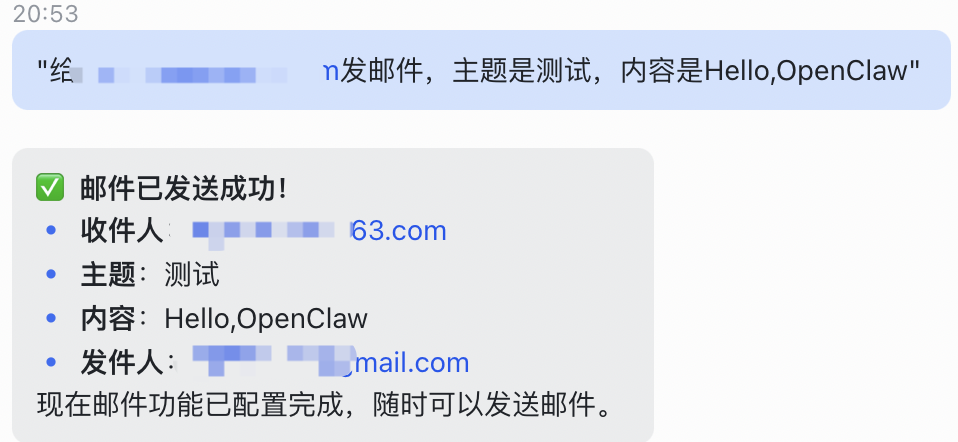
通过飞书送消息『"给 xxx@163.com发邮件,主题是测试,内容是Hello,OpenClaw"』
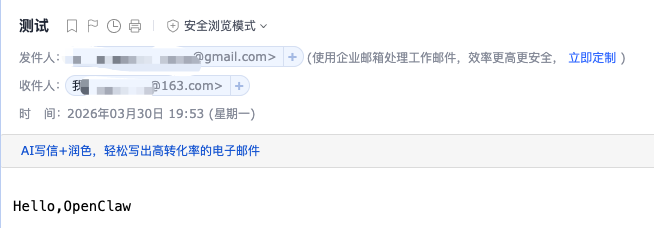
查看邮箱检查测试结果
第四部分:总结与后续展望
-
邮件发送技能核心价值回顾:填补 OpenClaw 自动化闭环缺口,适配多场景、可复用
-
开发重点提炼:掌握 SMTP 配置、技能封装、异常处理三大核心要点
-
后续拓展方向:结合 AI 能力实现邮件内容智能生成、收件人精准匹配,拓展多语言适配

AtomGit 是由开放原子开源基金会联合 CSDN 等生态伙伴共同推出的新一代开源与人工智能协作平台。平台坚持“开放、中立、公益”的理念,把代码托管、模型共享、数据集托管、智能体开发体验和算力服务整合在一起,为开发者提供从开发、训练到部署的一站式体验。
更多推荐



 6
6 0
0- 0


 已为社区贡献1条内容

所有评论(0)