imx6ull移植ncnn框架并运行yolo11目标检测模型(3)部署yolo11目标检测模型,交叉编译自己的程序
文章目录
1. 概要
在实际场景中,深度学习模型通常通过 PyTorch、TensorFlow 等框架来完成,直接通过这些模型来进行推理效率并不高,特别是对延时要求严格的线上场景。由此,经过工业界和学术界数年的探索,模型部署有了一条流行的流水线:

这一条流水线解决了模型部署中的两大难点:使用对接深度学习框架和推理引擎的中间表示,开发者不必担心如何在新环境中运行各个复杂的框架;通过中间表示的网络结构优化和推理引擎对运算的底层优化,模型的运算效率大幅提升。
本文将会讲述如何部署yolo11目标检测模型,交叉编译自己写的检测文件。
需要设备:PC宿主机(ubuntu18.04等),开发板(imx6ull)。
整体流程如下:
1.下载opencv包,交叉编译为arm版本以供开发板使用
2. 写yolo11的检测文件(Tencent官方提供的检测文件不能直接使用ultralytics工具包转换的.bin与.param文件,如果要使用官方提供的检测程序,请按照官方流程转换,即不使用onnx转换,而是用pnnx转换)
3.进行交叉编译,获得arm框架开发板(imx6ull)可使用的可执行程序
4.将程序传至imx6ull上进行目标检测
2. yolo11可执行程序的制作
2.1 下载opencv包,交叉编译为arm版本以供开发板使用
因为PC宿主机上的opencv框架是x86的,所以不能作为链接文件去够造imx6ull开发板所需要的执行文件,因此我们需要重新交叉编译,方法如下:
//编译arm版本的opencv
# 下载 OpenCV
wget https://github.com/opencv/opencv/archive/3.4.9.zip
unzip 3.4.9.zip && cd opencv-3.4.9

# 创建构建目录
mkdir build-arm && cd build-arm

# 配置交叉编译
cmake \
  -DCMAKE_TOOLCHAIN_FILE=../platforms/linux/arm-gnueabi.toolchain.cmake \
  -DCMAKE_INSTALL_PREFIX=/opt/opencv-arm \
  -DBUILD_LIST=core,highgui,imgcodecs,imgproc \
  -DWITH_GTK=OFF \
  -DWITH_JPEG=ON \
  -DWITH_PNG=ON ..

# 编译并安装
make -j$(nproc) && sudo make install
(2) 写yolo11的检测文件:
// Tencent is pleased to support the open source community by making ncnn
// available.
//
// Copyright (C) 2024 THL A29 Limited, a Tencent company. All rights reserved.
//
// Copyright (C) 2024 whyb(https://github.com/whyb). All rights reserved.
//
// Copyright (C) 2024 HexRx. All rights reserved.
//
// Licensed under the BSD 3-Clause License (the "License"); you may not use this
// file except in compliance with the License. You may obtain a copy of the
// License at
//
// https://opensource.org/licenses/BSD-3-Clause
//
// Unless required by applicable law or agreed to in writing, software
// distributed under the License is distributed on an "AS IS" BASIS, WITHOUT
// WARRANTIES OR CONDITIONS OF ANY KIND, either express or implied. See the
// License for the specific language governing permissions and limitations under
// the License.

#include <float.h>
#include <stdio.h>

#include <algorithm>
#include <memory>
#include <opencv2/core/core.hpp>
#include <opencv2/highgui/highgui.hpp>
#include <opencv2/opencv.hpp>
#include <vector>
#include <iostream>

#include "layer.h"
#include "net.h"

#define MAX_STRIDE 32

static const char *class_names[] = {"person", "bicycle", "car",
                                    "motorcycle", "airplane", "bus",
                                    "train", "truck", "boat",
                                    "traffic light", "fire hydrant", "stop sign",
                                    "parking meter", "bench", "bird",
                                    "cat", "dog", "horse",
                                    "sheep", "cow", "elephant",
                                    "bear", "zebra", "giraffe",
                                    "backpack", "umbrella", "handbag",
                                    "tie", "suitcase", "frisbee",
                                    "skis", "snowboard", "sports ball",
                                    "kite", "baseball bat", "baseball glove",
                                    "skateboard", "surfboard", "tennis racket",
                                    "bottle", "wine glass", "cup",
                                    "fork", "knife", "spoon",
                                    "bowl", "banana", "apple",
                                    "sandwich", "orange", "broccoli",
                                    "carrot", "hot dog", "pizza",
                                    "donut", "cake", "chair",
                                    "couch", "potted plant", "bed",
                                    "dining table", "toilet", "tv",
                                    "laptop", "mouse", "remote",
                                    "keyboard", "cell phone", "microwave",
                                    "oven", "toaster", "sink",
                                    "refrigerator", "book", "clock",
                                    "vase", "scissors", "teddy bear",
                                    "hair drier", "toothbrush"};

struct Object
{
    cv::Rect_<float> rect;
    int label;
    float prob;
};

static inline float intersection_area(const Object &a, const Object &b)
{
    cv::Rect_<float> inter = a.rect & b.rect;
    return inter.area();
}

static void qsort_descent_inplace(std::vector<Object> &objects, int left, int right)
{
    int i = left;
    int j = right;
    float p = objects[(left + right) / 2].prob;

    while (i <= j)
    {
        while (objects[i].prob > p)
            i++;

        while (objects[j].prob < p)
            j--;

        if (i <= j)
        {
            // swap
            std::swap(objects[i], objects[j]);

            i++;
            j--;
        }
    }

#pragma omp parallel sections
    {
#pragma omp section
        {
            if (left < j)
                qsort_descent_inplace(objects, left, j);
        }
#pragma omp section
        {
            if (i < right)
                qsort_descent_inplace(objects, i, right);
        }
    }
}

static void qsort_descent_inplace(std::vector<Object> &objects)
{
    if (objects.empty())
        return;

    qsort_descent_inplace(objects, 0, objects.size() - 1);
}

static void nms_sorted_bboxes(const std::vector<Object> &faceobjects, std::vector<int> &picked,
                              float nms_threshold, bool agnostic = false)
{
    picked.clear();

    const int n = faceobjects.size();

    std::vector<float> areas(n);
    for (int i = 0; i < n; i++)
    {
        areas[i] = faceobjects[i].rect.area();
    }

    for (int i = 0; i < n; i++)
    {
        const Object &a = faceobjects[i];

        int keep = 1;
        for (int j = 0; j < (int)picked.size(); j++)
        {
            const Object &b = faceobjects[picked[j]];

            if (!agnostic && a.label != b.label)
                continue;

            // intersection over union
            float inter_area = intersection_area(a, b);
            float union_area = areas[i] + areas[picked[j]] - inter_area;
            // float IoU = inter_area / union_area
            if (inter_area / union_area > nms_threshold)
                keep = 0;
        }

        if (keep)
            picked.push_back(i);
    }
}

static inline float sigmoid(float x) { return static_cast<float>(1.f / (1.f + exp(-x))); }

static inline float clampf(float d, float min, float max)
{
    const float t = d < min ? min : d;
    return t > max ? max : t;
}

static void parse_yolo11_detections(float *inputs, float confidence_threshold, int num_channels,
                                    int num_anchors, int num_labels, int infer_img_width,
                                    int infer_img_height, std::vector<Object> &objects)
{
    std::vector<Object> detections;
    cv::Mat output = cv::Mat((int)num_channels, (int)num_anchors, CV_32F, inputs).t();
    std::cout << "output shape: [" << output.rows << ", " << output.cols << "]" << std::endl;

    for (int i = 0; i < num_anchors; i++)
    {
        const float *row_ptr = output.row(i).ptr<float>();
        const float *bboxes_ptr = row_ptr;
        const float *scores_ptr = row_ptr + 4;
        const float *max_s_ptr = std::max_element(scores_ptr, scores_ptr + num_labels);
        float score = *max_s_ptr;
        if (score > confidence_threshold)
        {
            float x = *bboxes_ptr++;
            float y = *bboxes_ptr++;
            float w = *bboxes_ptr++;
            float h = *bboxes_ptr;

            float x0 = clampf((x - 0.5f * w), 0.f, (float)infer_img_width);
            float y0 = clampf((y - 0.5f * h), 0.f, (float)infer_img_height);
            float x1 = clampf((x + 0.5f * w), 0.f, (float)infer_img_width);
            float y1 = clampf((y + 0.5f * h), 0.f, (float)infer_img_height);

            cv::Rect_<float> bbox;
            bbox.x = x0;
            bbox.y = y0;
            bbox.width = x1 - x0;
            bbox.height = y1 - y0;
            Object object;
            object.label = max_s_ptr - scores_ptr;
            object.prob = score;
            object.rect = bbox;
            detections.push_back(object);
        }
    }
    objects = detections;
}

static int detect_yolo11(const char *param_path, const char *modelpath, const cv::Mat &bgr,
                         std::vector<Object> &objects)
{
    ncnn::Net yolo11;

    yolo11.opt.use_vulkan_compute = true; // if you want detect in hardware, then enable it

    yolo11.load_param(param_path);
    yolo11.load_model(modelpath);

    const int target_size = 640;
    const float prob_threshold = 0.25f;
    const float nms_threshold = 0.45f;

    int img_w = bgr.cols;
    int img_h = bgr.rows;

    // letterbox pad to multiple of MAX_STRIDE
    int w = img_w;
    int h = img_h;
    float scale = 1.f;
    if (w > h)
    {
        scale = (float)target_size / w;
        w = target_size;
        h = h * scale;
    }
    else
    {
        scale = (float)target_size / h;
        h = target_size;
        w = w * scale;
    }

    ncnn::Mat in =
        ncnn::Mat::from_pixels_resize(bgr.data, ncnn::Mat::PIXEL_BGR2RGB, img_w, img_h, w, h);

    int wpad = (target_size + MAX_STRIDE - 1) / MAX_STRIDE * MAX_STRIDE - w;
    int hpad = (target_size + MAX_STRIDE - 1) / MAX_STRIDE * MAX_STRIDE - h;
    ncnn::Mat in_pad;
    ncnn::copy_make_border(in, in_pad, hpad / 2, hpad - hpad / 2, wpad / 2, wpad - wpad / 2,
                           ncnn::BORDER_CONSTANT, 114.f);

    const float norm_vals[3] = {1 / 255.f, 1 / 255.f, 1 / 255.f};
    in_pad.substract_mean_normalize(0, norm_vals);

    ncnn::Extractor ex = yolo11.create_extractor();

    std::cout << "in0 Shape: ["
              << in_pad.w << ", " // 宽度(第1维度)
              << in_pad.h << ", " // 高度(第2维度)
              << in_pad.d << ", " // 深度(第3维度)
              << in_pad.c << "]"  // 通道数(第4维度)
              << std::endl;
    ex.input("in0", in_pad);

    std::vector<Object> proposals;

    // stride 32
    {
        ncnn::Mat out;
        ex.extract("out0", out);

        std::cout << "pred Shape: ["
                  << out.w << ", " // 宽度(第1维度)8400
                  << out.h << ", " // 高度(第2维度)84
                  << out.d << ", " // 深度(第3维度)1
                  << out.c << "]"  // 通道数(第4维度)1
                  << std::endl;

        std::vector<Object> objects32;
        const int num_labels = sizeof(class_names) / sizeof(class_names[0]);
        parse_yolo11_detections((float *)out.data, prob_threshold, out.h, out.w, num_labels, in_pad.w,
                                in_pad.h, objects32);
        proposals.insert(proposals.end(), objects32.begin(), objects32.end());
    }

    // sort all proposals by score from highest to lowest
    qsort_descent_inplace(proposals);

    // apply nms with nms_threshold
    std::vector<int> picked;
    nms_sorted_bboxes(proposals, picked, nms_threshold);

    int count = picked.size();

    objects.resize(count);
    for (int i = 0; i < count; i++)
    {
        objects[i] = proposals[picked[i]];

        // adjust offset to original unpadded
        float x0 = (objects[i].rect.x - (wpad / 2)) / scale;
        float y0 = (objects[i].rect.y - (hpad / 2)) / scale;
        float x1 = (objects[i].rect.x + objects[i].rect.width - (wpad / 2)) / scale;
        float y1 = (objects[i].rect.y + objects[i].rect.height - (hpad / 2)) / scale;

        // clip
        x0 = std::max(std::min(x0, (float)(img_w - 1)), 0.f);
        y0 = std::max(std::min(y0, (float)(img_h - 1)), 0.f);
        x1 = std::max(std::min(x1, (float)(img_w - 1)), 0.f);
        y1 = std::max(std::min(y1, (float)(img_h - 1)), 0.f);

        objects[i].rect.x = x0;
        objects[i].rect.y = y0;
        objects[i].rect.width = x1 - x0;
        objects[i].rect.height = y1 - y0;
    }

    return 0;
}

static void draw_objects(const cv::Mat &bgr, const std::vector<Object> &objects)
{
    static const unsigned char colors[19][3] = {
        {54, 67, 244}, {99, 30, 233}, {176, 39, 156}, {183, 58, 103}, {181, 81, 63}, {243, 150, 33}, {244, 169, 3}, {212, 188, 0}, {136, 150, 0}, {80, 175, 76}, {74, 195, 139}, {57, 220, 205}, {59, 235, 255}, {7, 193, 255}, {0, 152, 255}, {34, 87, 255}, {72, 85, 121}, {158, 158, 158}, {139, 125, 96}};

    int color_index = 0;

    cv::Mat image = bgr.clone();

    for (size_t i = 0; i < objects.size(); i++)
    {
        const Object &obj = objects[i];

        const unsigned char *color = colors[color_index % 19];
        color_index++;

        cv::Scalar cc(color[0], color[1], color[2]);

        fprintf(stderr, "%d = %.5f at %.2f %.2f %.2f x %.2f\n", obj.label, obj.prob, obj.rect.x,
                obj.rect.y, obj.rect.width, obj.rect.height);

        cv::rectangle(image, obj.rect, cc, 2);

        char text[256];
        sprintf(text, "%s %.1f%%", class_names[obj.label], obj.prob * 100);

        int baseLine = 0;
        cv::Size label_size = cv::getTextSize(text, cv::FONT_HERSHEY_SIMPLEX, 0.5, 1, &baseLine);

        int x = obj.rect.x;
        int y = obj.rect.y - label_size.height - baseLine;
        if (y < 0)
            y = 0;
        if (x + label_size.width > image.cols)
            x = image.cols - label_size.width;

        cv::rectangle(
            image, cv::Rect(cv::Point(x, y), cv::Size(label_size.width, label_size.height + baseLine)),
            cc, -1);

        cv::putText(image, text, cv::Point(x, y + label_size.height), cv::FONT_HERSHEY_SIMPLEX, 0.5,
                    cv::Scalar(255, 255, 255));
    }

    //  cv::imshow("image", image);
    bool success_img = cv::imwrite("output.jpg", image);
    if (!success_img)
    {
        std::cout << "failed to save" << std::endl;
    }
    else
    {
        std::cout << "save successfully" << std::endl;
    }
    cv::waitKey(0);
}

int main(int argc, char **argv)
{
    if (argc != 4)
    {
        fprintf(stderr, "Usage: %s [parampath] [modelpath] [imagepath]\n", argv[0]);
        return -1;
    }

    const char *parampath = argv[1];
    const char *modelpath = argv[2];
    const char *imagepath = argv[3];

    cv::Mat m = cv::imread(imagepath, 1);
    if (m.empty())
    {
        fprintf(stderr, "cv::imread %s failed\n", imagepath);
        return -1;
    }

    std::vector<Object> objects;
    detect_yolo11(parampath, modelpath, m, objects);

    draw_objects(m, objects);

    return 0;
}
(3)编译 Vulkan 后端(可选,如果有gpu的话,如果没有,跳至(4)):
wget https://sdk.lunarg.com/sdk/download/1.2.182.0/linux/vulkansdk-linux-x86_64-1.2.182.0.tar.gz
tar xvf vulkansdk-linux-x86_64-1.2.182.0.tar.gz
export VULKAN_SDK=$(pwd)/1.2.182.0/x86_64
拉取 NCNN 子模块:
cd ncnn
git submodule update --init
2.2 调用交叉编译工具链部署 NCNN 框架
(1) 100ASK-6ULL-V11 开发板添加编译配置(该开发板芯片为imx6ull)
在toolchains目录下,我们可以看到很多其它开发板的编译配置文件: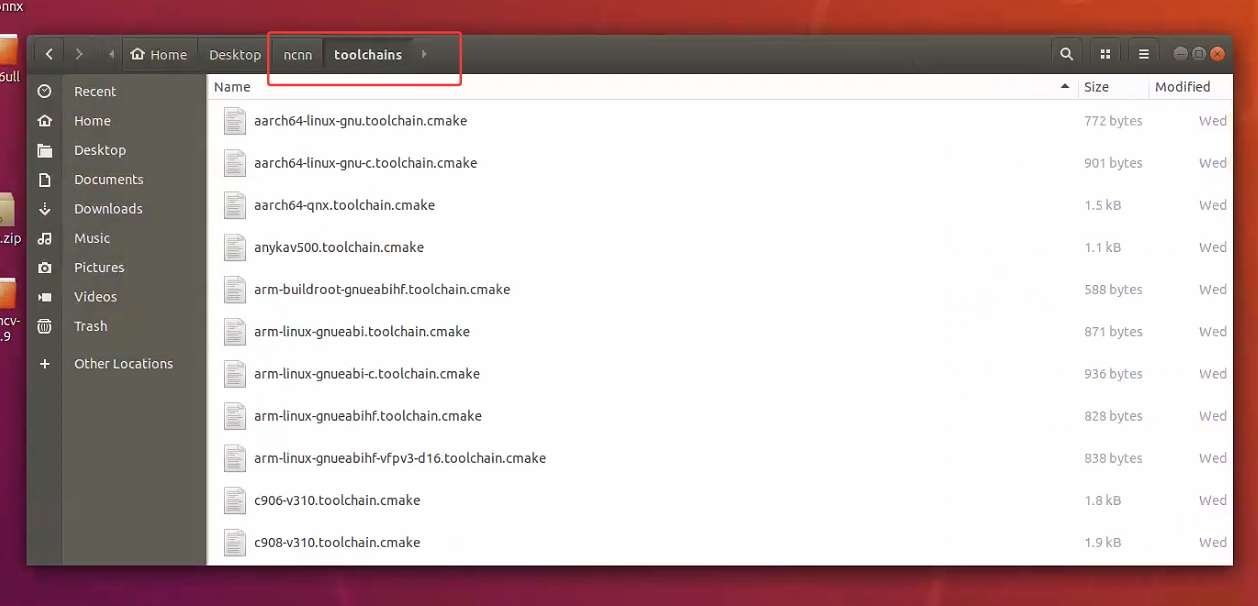
参照其它开发板的配置文件,为 100ASK-6ULL-V11 开发板添加配置文件arm-buildroot-gnueabihf.toolchain.cmake:
终端打开此页面,执行下述命令:
vi arm-buildroot-gnueabihf.toolchain.cmake
执行之后自动进入该文件,复制粘贴如下内容
set(CMAKE_SYSTEM_NAME Linux)
set(CMAKE_SYSTEM_PROCESSOR arm)

set(CMAKE_C_COMPILER "arm-buildroot-linux-gnueabihf-gcc")
set(CMAKE_CXX_COMPILER "arm-buildroot-linux-gnueabihf-g++")

set(CMAKE_FIND_ROOT_PATH_MODE_PROGRAM NEVER)
set(CMAKE_FIND_ROOT_PATH_MODE_LIBRARY ONLY)
set(CMAKE_FIND_ROOT_PATH_MODE_INCLUDE ONLY)

set(CMAKE_C_FLAGS "-march=armv7-a -mfloat-abi=hard -mfpu=neon")
set(CMAKE_CXX_FLAGS "-march=armv7-a -mfloat-abi=hard -mfpu=neon")

# cache flags
set(CMAKE_C_FLAGS "${CMAKE_C_FLAGS}" CACHE STRING "c flags")
set(CMAKE_CXX_FLAGS "${CMAKE_CXX_FLAGS}" CACHE STRING "c++ flags")
注意,你得确保你的arm的gcc,g++编译工具已存在,如下: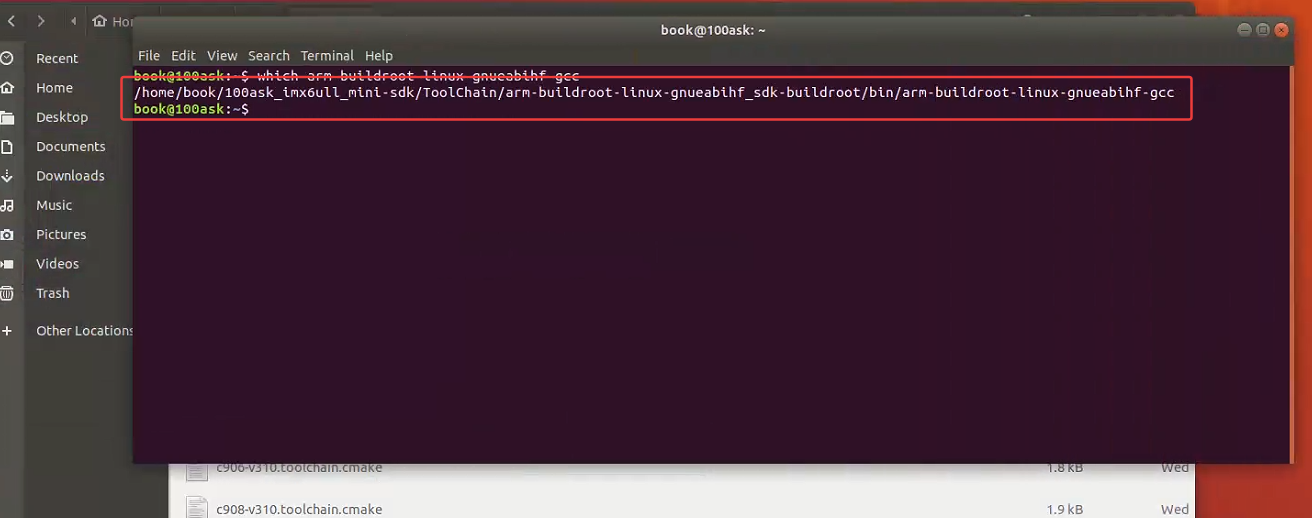
至于如何设置这个工具链,在此就不多展开了,可以看一看韦东山imx6ull的文档或者其他博主的交叉编译工具设置的文档,韦东山老师文档中通过如下命令设置,使得该交叉编译工具能被系统识别(前提是已经安装好了交叉编译工具)
2.3 进行交叉编译,获得arm框架开发板(imx6ull)可使用的可执行程序
在这里遇到了一些坑,总是找不到对应的链接文件路径等,博主本人对CMAKE造诣不深,所以实现可能比较冗余,如果有懂的人可以分享一下经验。
我们先进入到/ncnn/build-imx6ull中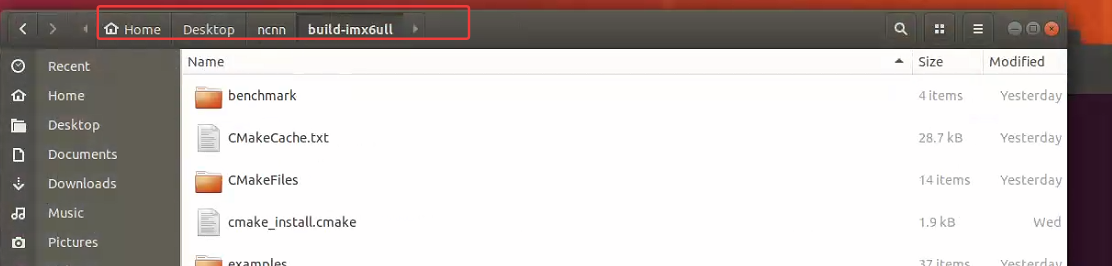
创建我们的工程文件夹:
mkdir yolo11_interference_ncnn
之后把之前生成的.bin与.param文件放置其中,创建yolo11_ultralytics.cpp, 将2.3中的代码复制到其中,之后编写Makefile
vim Makefile

#往里面粘贴如下内容
# 定义变量
CXX = arm-buildroot-linux-gnueabihf-g++
TARGET = yolo11
SRC = yolo11_ultralytics.cpp
INCLUDES = -I/opt/opencv-arm/include \
           -I/home/book/Desktop/ncnn/build-imx6ull/src \
           -I/home/book/Desktop/ncnn/src
LIBS = -L/home/book/Desktop/ncnn/build-imx6ull/src \
       -L/opt/opencv-arm/lib \
       -lopencv_core -lopencv_highgui -lopencv_imgcodecs -lopencv_imgproc \
       -lncnn -lpthread -fopenmp -lstdc++ -lm

# 编译规则
all:
	$(CXX) $(SRC) -o $(TARGET) $(INCLUDES) $(LIBS)

clean:
	rm -f $(TARGET)
现在我们的文件夹下有如下文件: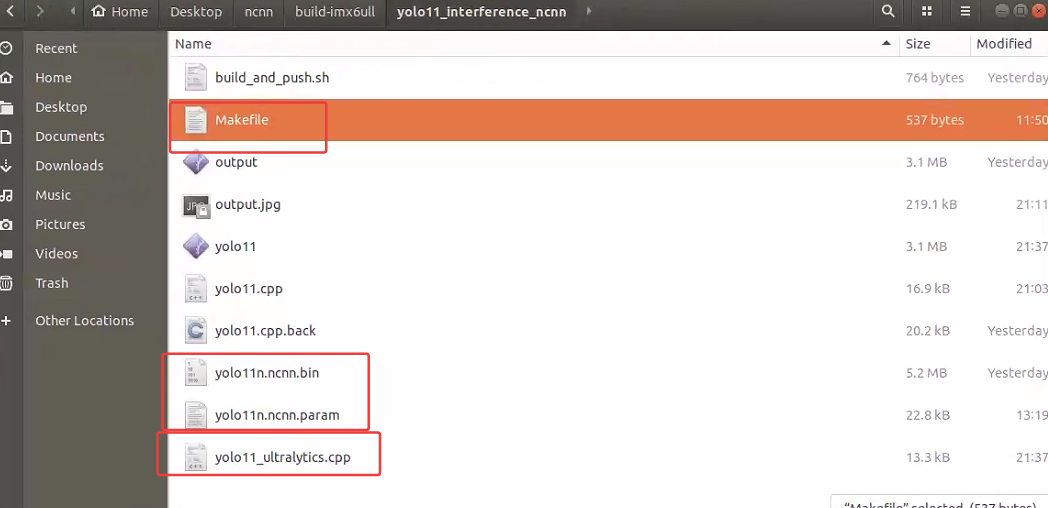
之后执行make,生成可执行文件yolo11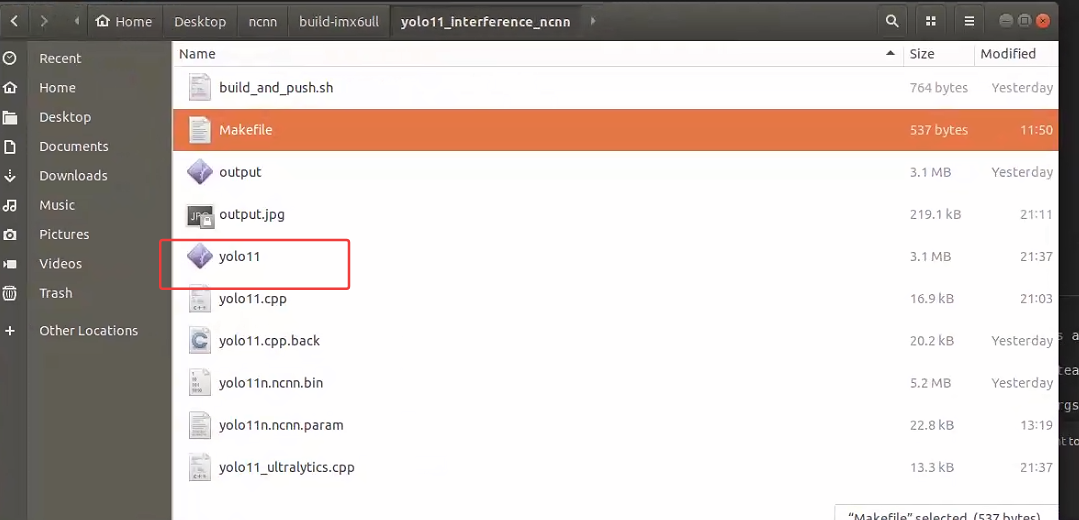
2.4 将程序传至imx6ull上进行目标检测
运行如下命令将相关文件上传至开发板
adb push yolo11* /root/ncnn/yolo11
进入开发板,可见其目录中文件如下(图片需要自己传一张)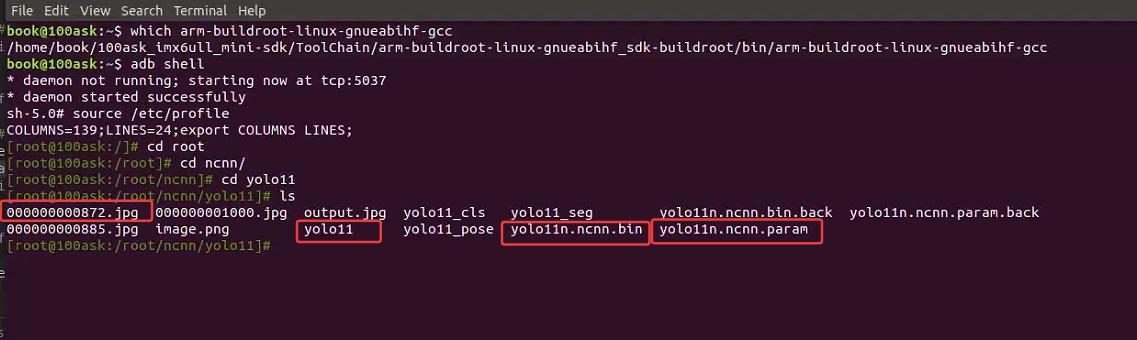
之后执行命令
./yolo11 yolo11n.ncnn.param yolo11n.ncnn.bin 000000001000.jpg
输出结果如下: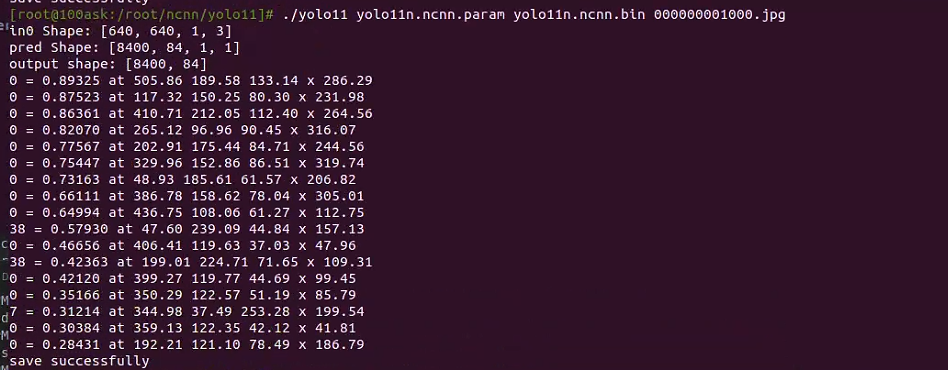
成功运行,回传至PC查看: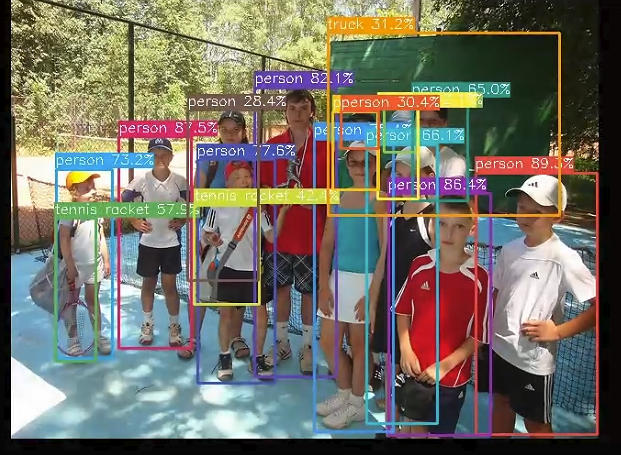
检测成功。
3.总结
本章节讲述了在移植NCNN成功的情况下如何编写自己的检测文件并编译为可执行文件。
4.参考链接
[1]在嵌入式开发板上部署深度神经网络(二):基于 I.MX6ULL 执行图像分类任务和目标检测任务
[2]嵌入式Linux入门级板卡的神经网络框架ncnn移植与测试-米尔i.MX6UL开发板
[3]yolov8seg模型转onnx转ncnn
[4]https://github.com/HexRx/ncnn-yolo11-example-cpp
5.章节

AtomGit 是由开放原子开源基金会联合 CSDN 等生态伙伴共同推出的新一代开源与人工智能协作平台。平台坚持“开放、中立、公益”的理念,把代码托管、模型共享、数据集托管、智能体开发体验和算力服务整合在一起,为开发者提供从开发、训练到部署的一站式体验。
更多推荐


 29
29 0
0- 0


 已为社区贡献2条内容

所有评论(0)