Django 个人主页网站开发实战
项目概述
本项目使用 Django 4.x 开发了一个个人主页网站,包含登录验证和个人信息展示功能。网站采用现代化的设计风格,所有数据从数据库读取,支持后台管理修改。
功能特性
- 登录验证页面:输入用户名和密码进行验证,验证失败给出提示
- 个人主页:展示个人信息(头像、姓名、性别、年龄、专业、爱好、自我介绍、联系方式)
- 后台管理:支持添加、修改、删除个人信息
- 响应式设计:美观、简洁的卡片布局
技术栈
- 后端:Django 4.x
- 数据库:SQLite
- 前端:HTML5 + CSS3 + Django 模板
项目结构
PlainText
personal_website/
├── personal/
│ ├── migrations/ # 数据
库迁移文件
│ ├── templates/ # 模板
文件
│ │ └── personal/
│ │ ├── login.html # 登录
页面
│ │ └── home.html # 个人
主页
│ ├── admin.py # 后台
管理配置
│ ├── models.py # 数据
模型
│ ├── urls.py # URL
路由
│ └── views.py # 视图
函数
├── personal_website/
│ ├── settings.py # 项目
设置
│ ├── urls.py # 项目
URL 路由
│ └── wsgi.py # WSGI
配置
├── db.sqlite3 #
SQLite 数据库
└── manage.py # 管理
脚本
核心实现
1. 数据模型设计
# personal/models.py

from django.db import models

from django.contrib.auth.models

import User

class UserProfile(models.Model):

    user = models.OneToOneField

    (User, on_delete=models.CASCADE)

    avatar = models.ImageField

    (upload_to='avatars/',

    blank=True, null=True)

    name = models.CharField

    (max_length=100)

    gender = models.CharField

    (max_length=10, choices=[('男',

    '男'), ('女', '女')])

    age = models.IntegerField()

    major = models.CharField

    (max_length=100)

    hobbies = models.TextField()

    introduction = models.TextField

    ()

    contact = models.CharField

    (max_length=200)


    def __str__(self):

        return self.name
2. 视图函数实现
# personal/views.py

from django.shortcuts import

render, redirect

from django.contrib.auth import

authenticate, login, logout

from django.contrib.auth.decorators

import login_required

from .models import UserProfile

@login_required

def home(request):

    try:

        profile = UserProfile.

        objects.get(user=request.

        user)

    except UserProfile.DoesNotExist:

        profile = None

    return render(request,

    'personal/home.html',

    {'profile': profile, 'user':

    request.user})

def user_login(request):

    if request.method == 'POST':

        username = request.POST

        ['username']

        password = request.POST

        ['password']

        user = authenticate

        (request,

        username=username,

        password=password)

        if user is not None:

            login(request, user)

            return redirect('home')

        else:

            error_message = '用户名或

            密码错误'

            return render(request,

            'personal/login.html',

            {'error_message':

            error_message})

    return render(request,

    'personal/login.html')

def user_logout(request):

    logout(request)

    return redirect('login')
3. 登录页面设计
<!DOCTYPE html>

<html lang="zh-CN">

<head>

    <meta charset="UTF-8">

    <meta name="viewport"

    content="width=device-width,

    initial-scale=1.0">

    <title>访问验证 - 个人主页</title>

    <style>

        * {

            margin: 0;

            padding: 0;

            box-sizing: border-box;

        }

        body {

            font-family: Arial,

            sans-serif;

            background-color:

            #f0f2f5;

            display: flex;

            justify-content: center;

            align-items: center;

            height: 100vh;

        }

        .login-container {

            background:

            linear-gradient(135deg,

            #667eea 0%, #764ba2

            100%);

            border-radius: 10px;

            box-shadow: 0 10px 30px

            rgba(0, 0, 0, 0.1);

            width: 100%;

            max-width: 400px;

            overflow: hidden;

        }

        .login-header {

            background-color: rgba

            (255, 255, 255, 0.1);

            padding: 20px;

            text-align: center;

        }

        .login-header h1 {

            color: white;

            font-size: 24px;

            margin: 0;

        }

        .login-body {

            padding: 40px;

            background-color: white;

        }

        .form-group {

            margin-bottom: 20px;

        }

        label {

            display: block;

            margin-bottom: 8px;

            color: #555;

            font-weight: 500;

        }

        input[type="text"],

        input[type="password"] {

            width: 100%;

            padding: 12px;

            border: 1px solid #ddd;

            border-radius: 6px;

            font-size: 16px;

            transition:

            border-color 0.3s;

        }

        input[type="text"]:focus,

        input[type="password"]

        :focus {

            outline: none;

            border-color: #667eea;

            box-shadow: 0 0 0 2px

            rgba(102, 126, 234, 0.

            2);

        }

        input[type="submit"] {

            width: 100%;

            padding: 14px;

            background-color:

            #667eea;

            color: white;

            border: none;

            border-radius: 6px;

            font-size: 16px;

            font-weight: 500;

            cursor: pointer;

            transition:

            background-color 0.3s;

            margin-top: 20px;

        }

        input[type="submit"]:hover {

            background-color:

            #5a6fd8;

        }

        .error-message {

            background-color:

            #ffebee;

            color: #c62828;

            padding: 12px;

            border-radius: 6px;

            margin-bottom: 20px;

            text-align: center;

            font-size: 14px;

        }

    </style>

</head>

<body>

    <div class="login-container">

        <div class="login-header">

            <h1>访问验证</h1>

        </div>

        <div class="login-body">

            {% if error_message %}

            <div

            class="error-message">

                {{ error_message }}

            </div>

            {% endif %}

            <form method="post">

                {% csrf_token %}

                <div

                class="form-group">

                    <label

                    for="username">

                    账号</label>

                    <input

                    type="text"

                    id="username"

                    name="username"

                    required>

                </div>

                <div

                class="form-group">

                    <label

                    for="password">

                    密码</label>

                    <input

                    type="password"

                    id="password"

                    name="password"

                    required>

                </div>

                <input

                type="submit"

                value="确认进入">

            </form>

        </div>

    </div>

</body>

</html>
4. 个人主页设计
<!DOCTYPE html>
<html lang="zh-CN">
<head>
    <meta charset="UTF-8">
    <meta name="viewport" content="width=device-width, initial-scale=1.0">
    <title>个人主页</title>
    <style>
        * {
            margin: 0;
            padding: 0;
            box-sizing: border-box;
        }
        body {
            font-family: Arial, sans-serif;
            background: linear-gradient(135deg, #667eea 0%, #764ba2 100%);
            color: #333;
            min-height: 100vh;
        }
        .header {
            background-color: rgba(255, 255, 255, 0.1);
            color: white;
            padding: 15px 20px;
            display: flex;
            justify-content: space-between;
            align-items: center;
            backdrop-filter: blur(10px);
        }
        .header h1 {
            font-size: 24px;
        }
        .user-info {
            display: flex;
            align-items: center;
        }
        .user-info span {
            margin-right: 15px;
        }
        .logout-btn {
            background-color: rgba(255, 255, 255, 0.2);
            color: white;
            border: none;
            padding: 8px 12px;
            border-radius: 4px;
            cursor: pointer;
            transition: background-color 0.3s;
        }
        .logout-btn:hover {
            background-color: rgba(255, 255, 255, 0.3);
        }
        .container {
            max-width: 1000px;
            margin: 40px auto;
            padding: 0 20px;
        }
        .profile-card {
            background-color: white;
            border-radius: 10px;
            box-shadow: 0 10px 30px rgba(0, 0, 0, 0.1);
            padding: 30px;
            display: flex;
            flex-wrap: wrap;
        }
        .avatar-section {
            flex: 1;
            min-width: 200px;
            margin-right: 30px;
            text-align: center;
        }
        .avatar {
            width: 150px;
            height: 150px;
            border-radius: 50%;
            object-fit: cover;
            margin-bottom: 20px;
            border: 4px solid #667eea;
        }
        .info-section {
            flex: 2;
            min-width: 300px;
        }
        .info-item {
            margin-bottom: 15px;
        }
        .info-item label {
            font-weight: bold;
            display: inline-block;
            width: 80px;
            color: #667eea;
        }
        .info-item p {
            display: inline-block;
            margin: 0;
        }
        .section {
            margin-top: 30px;
        }
        .section h3 {
            margin-bottom: 15px;
            color: #667eea;
            font-size: 18px;
            border-bottom: 2px solid #f0f0f0;
            padding-bottom: 10px;
        }
        .section p {
            line-height: 1.6;
            color: #555;
        }
        .card {
            background-color: #f9f9f9;
            border-radius: 8px;
            padding: 20px;
            margin-top: 15px;
            box-shadow: 0 2px 10px rgba(0, 0, 0, 0.05);
        }
        .course-item {
            background-color: #e3f2fd;
            border-left: 4px solid #2196f3;
            padding: 10px 15px;
            margin-bottom: 10px;
            border-radius: 0 4px 4px 0;
        }
        .contact {
            margin-top: 30px;
            padding-top: 20px;
            border-top: 2px solid #f0f0f0;
        }
        .contact h3 {
            margin-bottom: 10px;
            color: #667eea;
        }
        .contact p {
            line-height: 1.6;
            color: #555;
        }
        .no-profile {
            text-align: center;
            padding: 50px;
            color: #666;
        }
    </style>
</head>
<body>
    <div class="header">
        <h1>个人主页</h1>
        <div class="user-info">
            <span>欢迎,{{ user.username }}</span>
            <a href="{% url 'logout' %}"><button class="logout-btn">退出</button></a>
        </div>
    </div>
    <div class="container">
        {% if profile %}
        <div class="profile-card">
            <div class="avatar-section">
                {% if profile.avatar %}
                <img src="{{ profile.avatar.url }}" alt="头像" class="avatar">
                {% else %}
                <div class="avatar" style="background-color: #667eea; display: flex; align-items: center; justify-content: center; font-size: 60px; color: white;">{{ profile.name|first }}</div>
                {% endif %}
                <h2>{{ profile.name }}</h2>
                <p>{{ profile.major }}</p>
            </div>
            <div class="info-section">
                <div class="info-item">
                    <label>性别:</label>
                    <p>{{ profile.gender }}</p>
                </div>
                <div class="info-item">
                    <label>年龄:</label>
                    <p>{{ profile.age }}</p>
                </div>
                <div class="section">
                    <h3>个人简介</h3>
                    <div class="card">
                        <p>{{ profile.introduction }}</p>
                    </div>
                </div>
                <div class="section">
                    <h3>研究方向</h3>
                    <div class="card">
                        <p>{{ profile.hobbies }}</p>
                    </div>
                </div>
                <div class="section">
                    <h3>当前课程</h3>
                    <div class="card">
                        <div class="course-item">
                            <p>Web开发</p>
                        </div>
                        <div class="course-item">
                            <p>Python开发</p>
                        </div>
                        <div class="course-item">
                            <p>大数据可视化</p>
                        </div>
                    </div>
                </div>
                <div class="contact">
                    <h3>联系方式</h3>
                    <p>{{ profile.contact }}</p>
                </div>
            </div>
        </div>
        {% else %}
        <div class="profile-card">
            <div class="no-profile">
                <h2>暂无个人信息</h2>
                <p>请在后台管理中添加个人信息</p>
            </div>
        </div>
        {% endif %}
    </div>
</body>
</html>
项目运行
1. 安装依赖
pip install django==4.2
pip install Pillow
2. 数据库迁移
python manage.py makemigrations personal
python manage.py migrate
3. 创建超级管理员
python manage.py createsuperuser4. 启动开发服务器
python manage.py runserver5. 访问网站
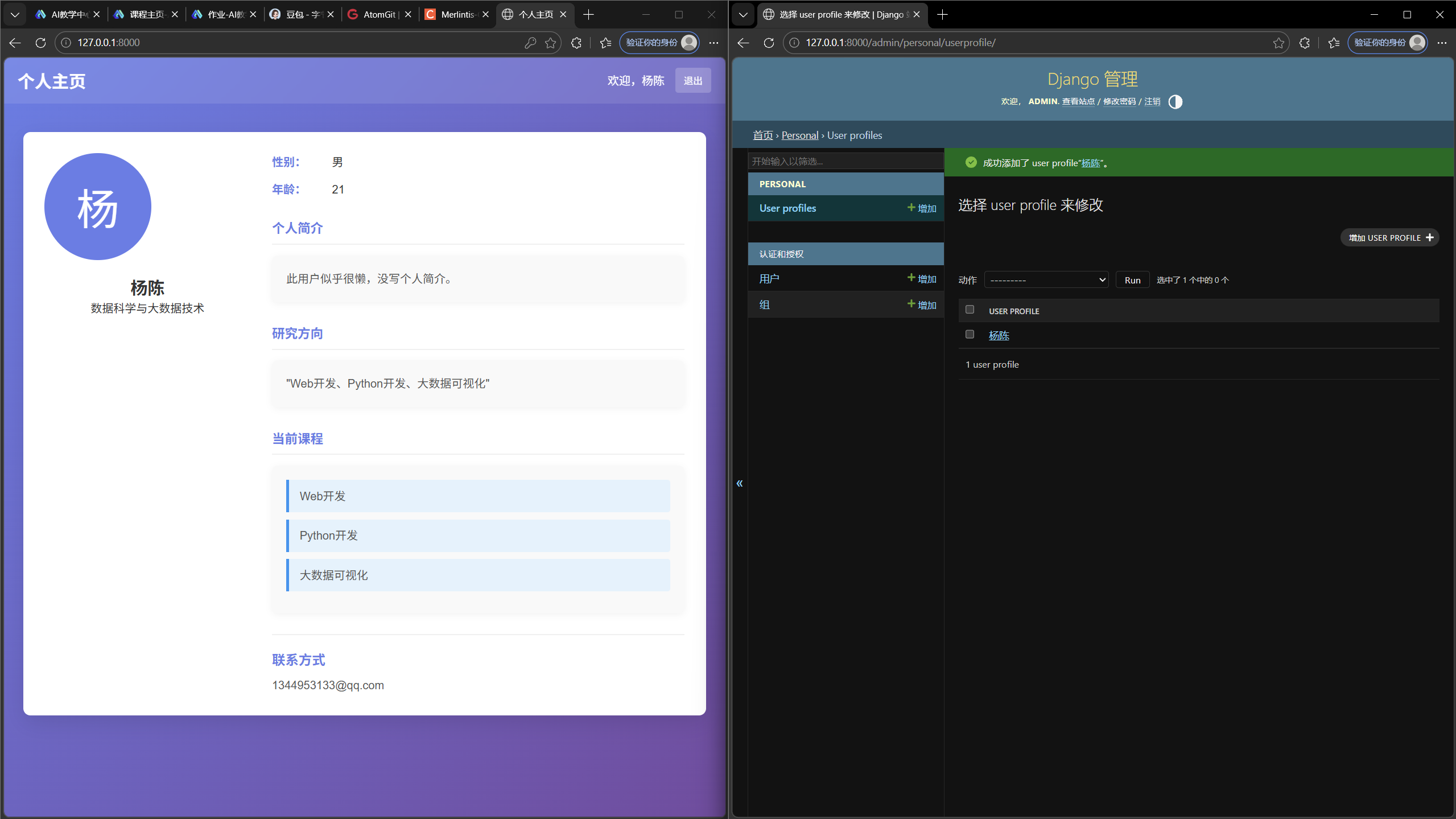
效果展示

AtomGit 是由开放原子开源基金会联合 CSDN 等生态伙伴共同推出的新一代开源与人工智能协作平台。平台坚持“开放、中立、公益”的理念,把代码托管、模型共享、数据集托管、智能体开发体验和算力服务整合在一起,为开发者提供从开发、训练到部署的一站式体验。
更多推荐

 3
3 0
0- 0


 已为社区贡献2条内容

所有评论(0)