安装 Node.js
安装 Node.js
Node.js 是一个开源、跨平台的 JavaScript 运行时环境。简单来说,Node.js 就是运行在服务器端的 JavaScript。Node.js 在浏览器之外运行 V8 JavaScript 引擎,即 Google Chrome 的核心。这使得 Node.js 的性能非常出色。
Node.js 特点
- 单线程和事件驱动架构:Node.js 使用单线程来处理请求,但通过事件驱动和非阻塞 I/O 操作的特性,能够使其更加高效地处理高并发连接,而不会阻塞线程,通常被用于构建快速、可扩展的 web 服务器。
- 异步和非阻塞 I/O:这使 Node.js 能够处理高并发的请求,非常适合 I/O 密集型应用,如文件读取、数据库操作和网络请求。
- 跨平台支持:Node.js 可以在 Windows、Linux 和 MacOS 等多个操作系统上运行。
- 庞大的生态系统:Node.js 拥有一个名为 npm(Node Package Manager)的生态系统,其中有丰富的第三方库和模块,可以用来扩展功能和加速开发。
根据上面对 Node.js 的概述,我们了解到了它功能的强大,下面我们将开始下载安装 Node.js,具体操作如下所示。
-
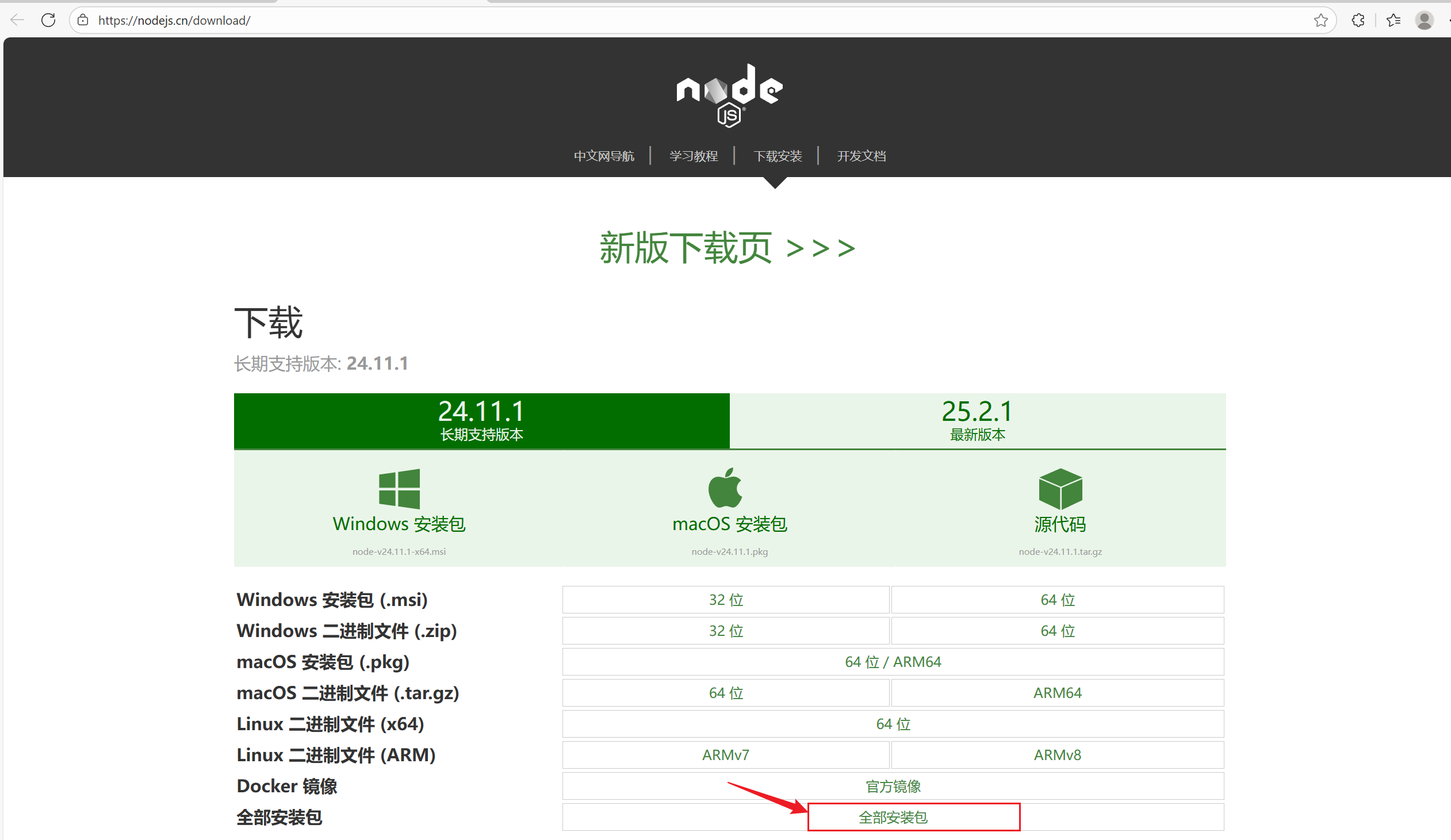
下载 Node.js (下载网址:https://nodejs.cn/download/),本文推荐下载的版本为 v16,本文下载版本为
node-v16.17.1-x64.msi,具体操作步骤如下所示。-
首先点击中文下载网址https://nodejs.cn/download/,然后点击全部安装包链接进入下载页面。
-
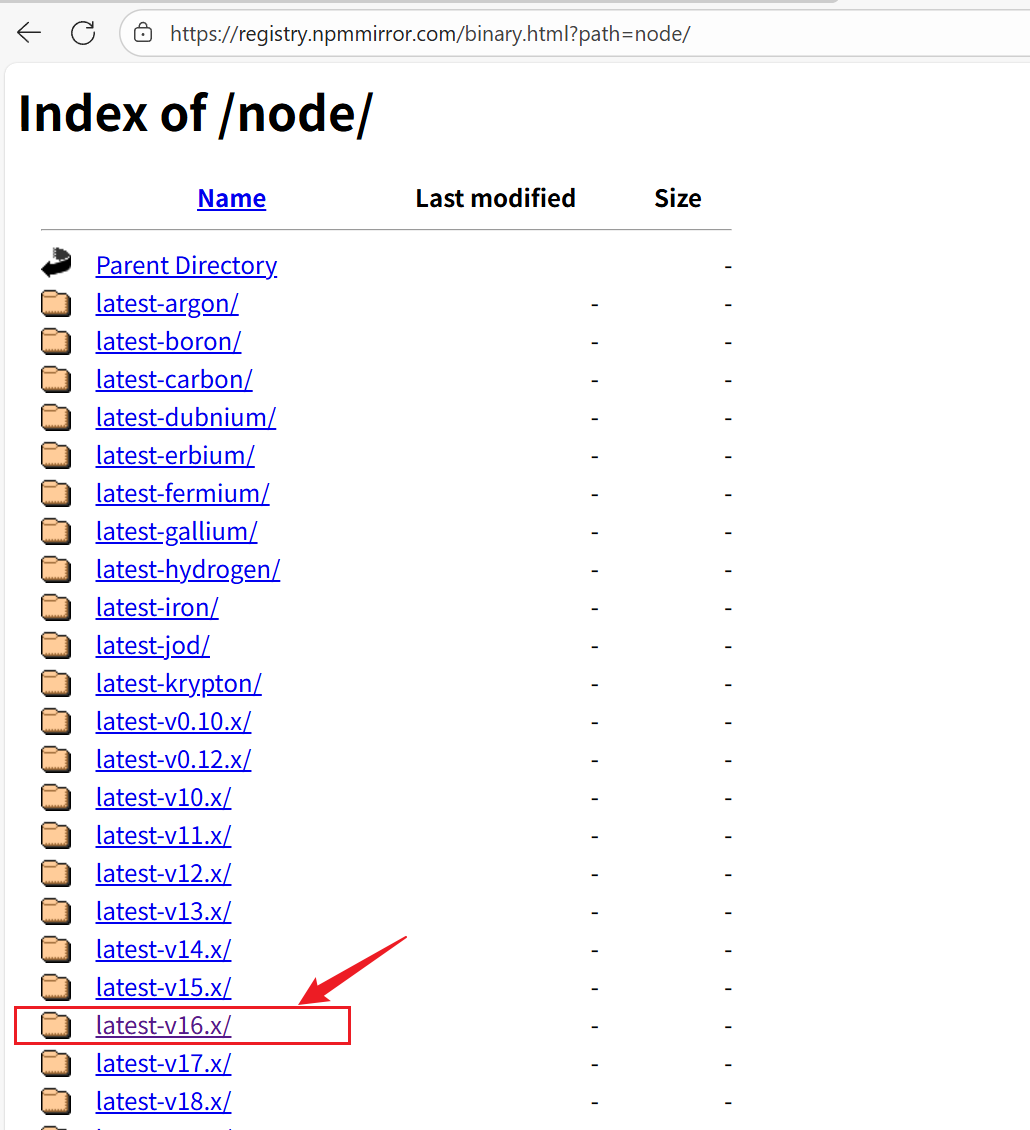
进入下载页面后点击 Parent Directory 链接进入下载父页面。

-
进入下载父页面后,你可以看见所有 Node.js 版本的下载链接,我们只需要找到 v16 版本的下载链接并点击进入即可,具体的操作如下所示。
-
进入到版本为 v16 的下载页面后,找到具体版本
node-v16.17.1-x64.msi的下载链接后,点击该链接即可开始下载 Node.js。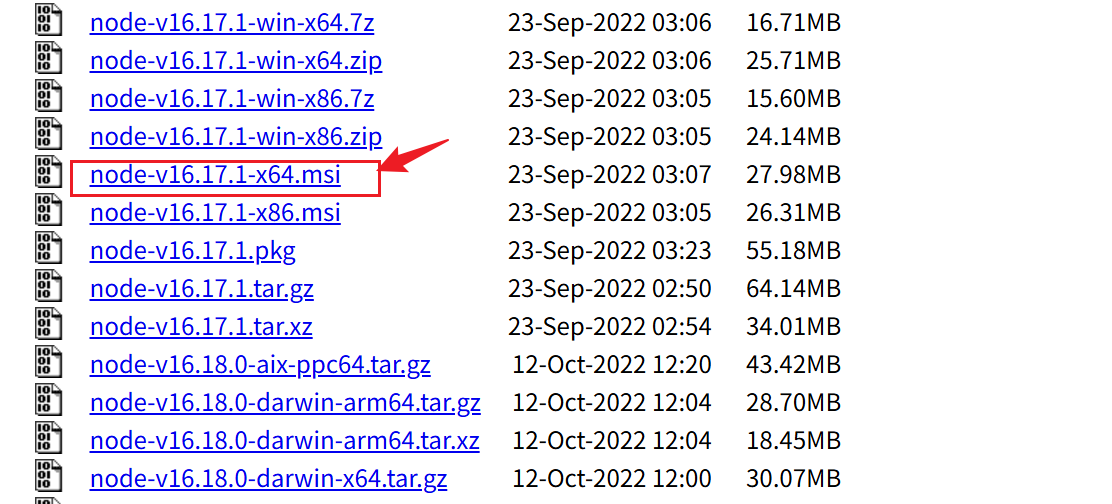
至此,Node.js 的下载操作就到此结束了。
-
-
安装 Node.js。Node.js 下载完成后,找到 Node.js 的存储位置并双击 msi 文件即可开始 Node.js 的安装操作了。本文 Node.js 的存储位置为
H:\NodeJS安装文档\node-v16.17.1-x64.msi。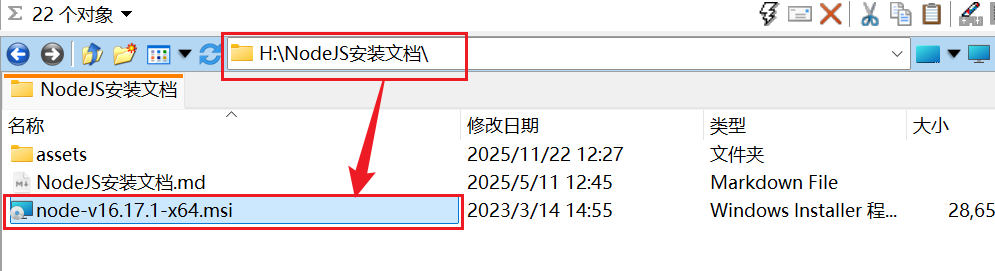
安装 Node.js 的具体操作如下所示。
-
鼠标双击 msi 安装文件
node-v16.17.1-x64.msi,弹出如下所示的界面,点击 Next 按钮进入下一步操作。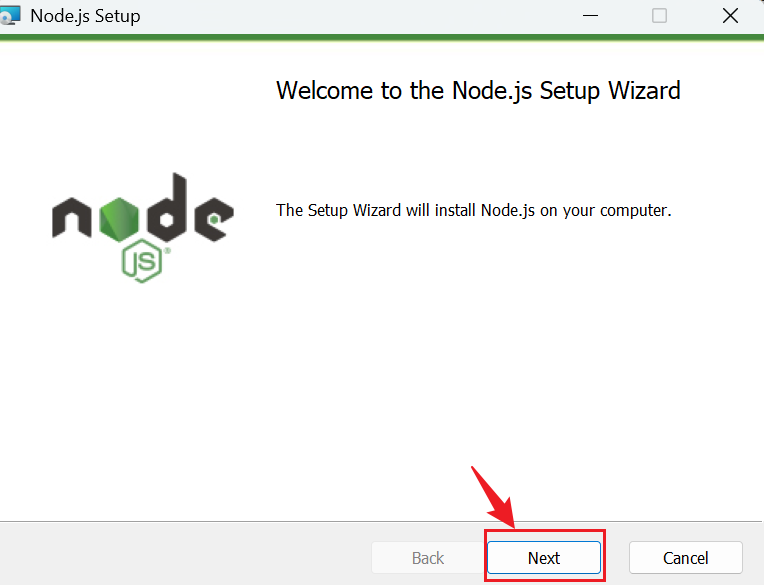
-
进入到本页面后先勾选
I accept the terms in the License Agreement文字前方的单选框,然后点击 Next 按钮。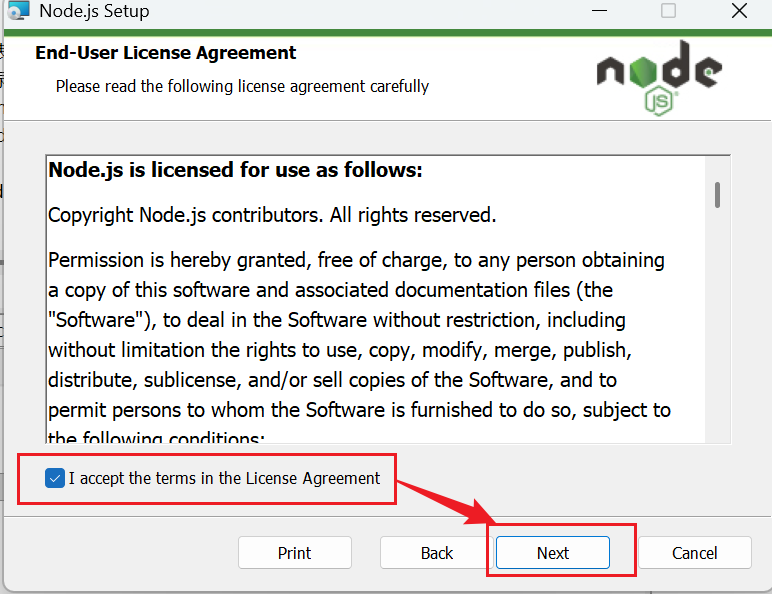
-
进入到本页面后,修改 Node.js 的安装目录,修改为
D:\opt\app\nodejs\目录,然后点击 Next 按钮。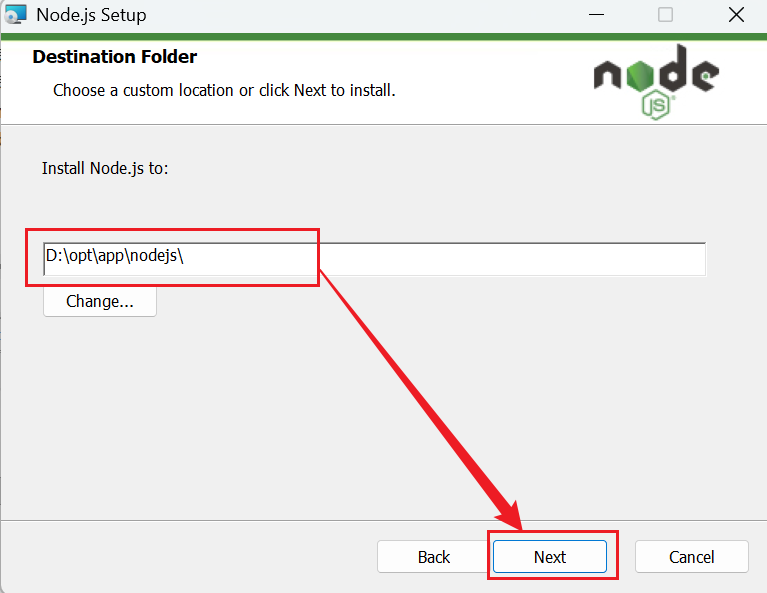
-
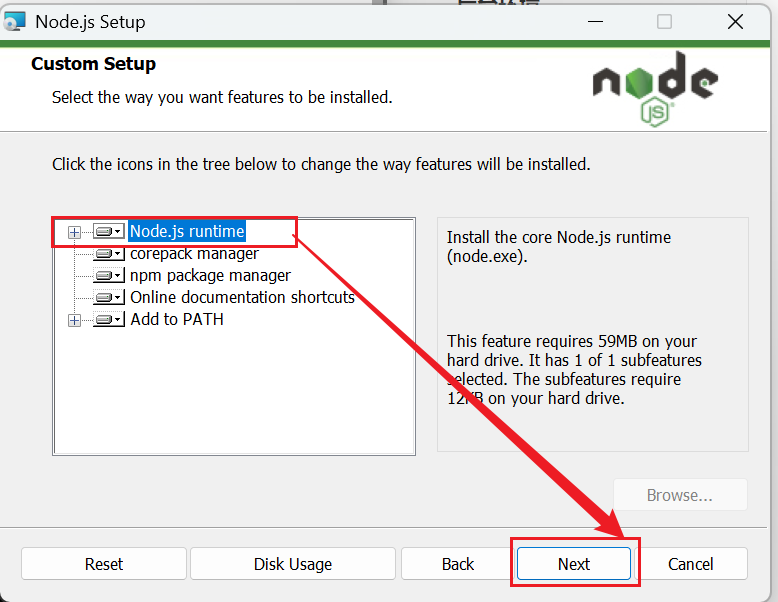
进入本页面后,不需要做任何修改,只需要点击 Next 按钮即可。
-
进入本页面后,不需要做任何修改,只需要点击 Next 按钮即可。
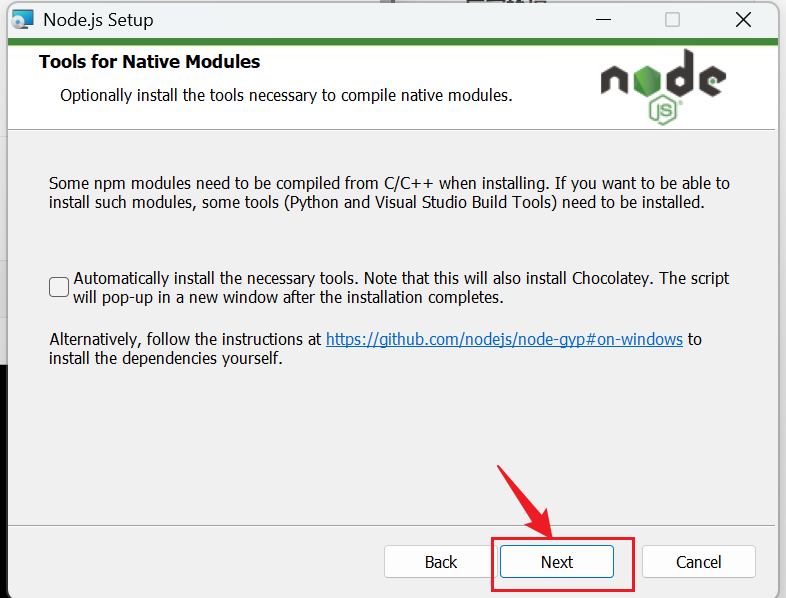
-
进入本页面后,点击 Install 按钮即可开始 Node.js 的安装操作。
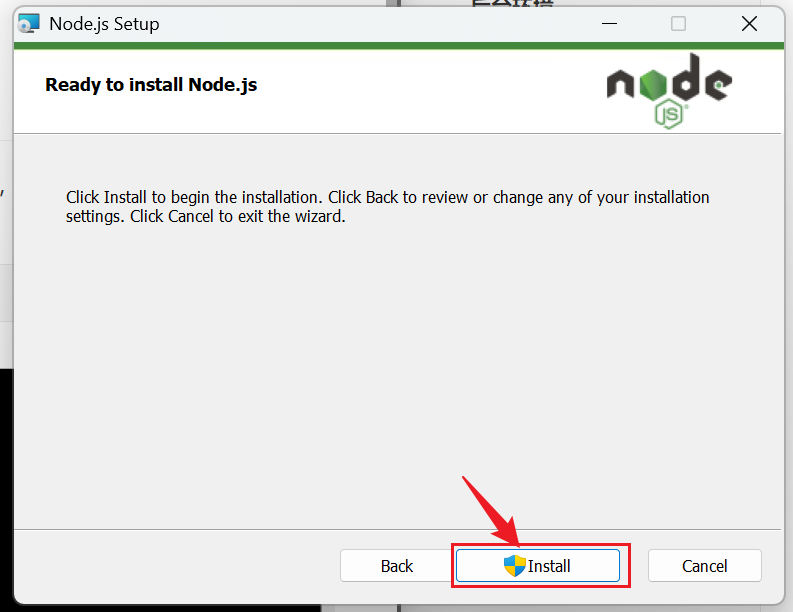
-
进入本页面后,若看到
Node.js has been successfully installed,则表示 Node.js 已经成功安装。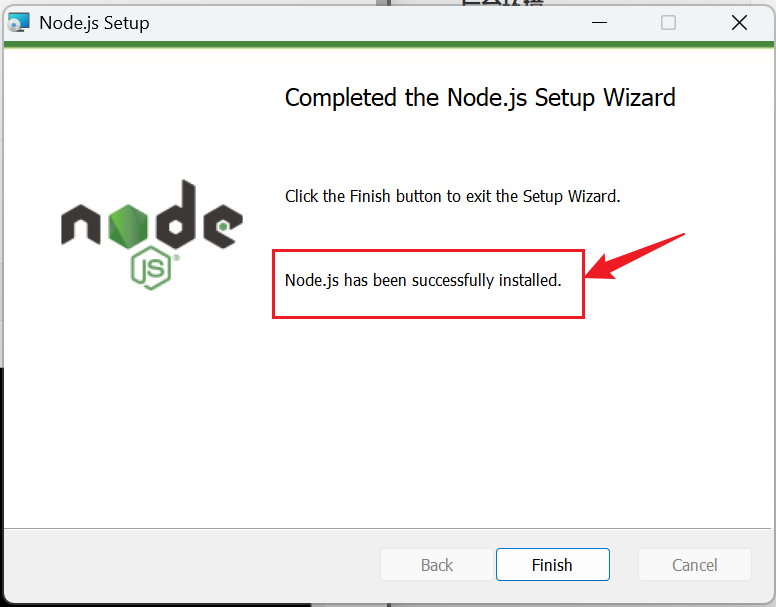
至此,Node.js 的安装操作就结束了。
-
-
配置 Node.js。Node.js 安装完成之后,就可以开始对 Node.js 进行配置,方便后期对后端管理系统的前端进行开发。具体操作如下所示。
-
安装完成 Node.js 之后,先验证一下 Node.js 的环境变量,输入命令
node -v进行验证。按住 win 键和 R 键,输入 cmd,然后就可以验证 Node.js 的环境变量了。Microsoft Windows [版本 10.0.26100.7171] (c) Microsoft Corporation。保留所有权利。 C:\Users\leolei>node -v v16.17.1 C:\Users\leolei>若屏幕输出如上所示的信息,即证明 Node.js 安装成功了。
-
经过上述操作的验证,Node.js 安装成功。然后开始配置 npm 的全局安装路径。具体操作如下所示。
同时安装 win 键和 S 键,然后输入cmd,并以管理员身份运行命令行,操作步骤如下所示。
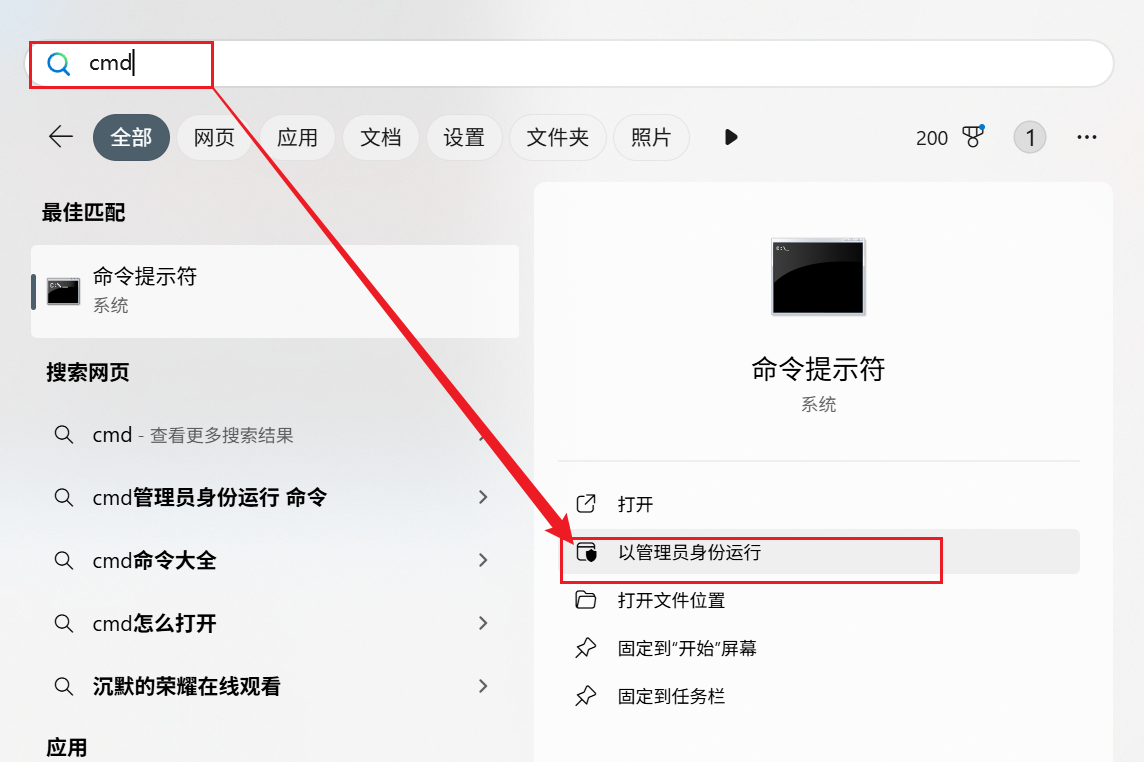
以管理员身份运行命令行后,输入命令
npm config set prefix "D:\opt\app\nodejs\"配置 npm 的全局安装路径。注意:D:\opt\app\nodejs\这个目录是 Node.js 的安装目录。Microsoft Windows [版本 10.0.26100.7171] (c) Microsoft Corporation。保留所有权利。 C:\Windows\System32>npm config set prefix "D:\opt\app\nodejs\" C:\Windows\System32>若命令行界面输入命令后屏幕下未输出任何信息,则证明 npm 的全局安装路径配置成功。
-
npm 配置全局安装路径成功后,切换 npm 的淘宝镜像,具体操作如下所示。
使用管理员身份运行命令行,在命令行中输入命令
npm config set registry https://registry.npmmirror.com/。屏幕输出如下所示的信息。C:\Windows\System32>npm config set registry https://registry.npmmirror.com/ C:\Windows\System32> -
使用管理员身份运行命令行,在命令行中输入命令
npm install -g @vue/cli,安装 vue/cli 的过程中会联网下载东西,可能会耗时几分钟,请耐心等待。C:\Windows\System32>npm install -g @vue/cli npm WARN EBADENGINE Unsupported engine { npm WARN EBADENGINE package: '@inquirer/external-editor@1.0.3', npm WARN EBADENGINE required: { node: '>=18' }, npm WARN EBADENGINE current: { node: 'v16.17.1', npm: '8.15.0' } npm WARN EBADENGINE } npm WARN deprecated urix@0.1.0: Please see https://github.com/lydell/urix#deprecated npm WARN deprecated source-map-url@0.4.1: See https://github.com/lydell/source-map-url#deprecated npm WARN deprecated resolve-url@0.2.1: https://github.com/lydell/resolve-url#deprecated npm WARN deprecated source-map-resolve@0.5.3: See https://github.com/lydell/source-map-resolve#deprecated npm WARN deprecated rimraf@2.6.3: Rimraf versions prior to v4 are no longer supported npm WARN deprecated @babel/plugin-proposal-optional-chaining@7.21.0: This proposal has been merged to the ECMAScript standard and thus this plugin is no longer maintained. Please use @babel/plugin-transform-optional-chaining instead. npm WARN deprecated @babel/plugin-proposal-nullish-coalescing-operator@7.18.6: This proposal has been merged to the ECMAScript standard and thus this plugin is no longer maintained. Please use @babel/plugin-transform-nullish-coalescing-operator instead. npm WARN deprecated @babel/plugin-proposal-class-properties@7.18.6: This proposal has been merged to the ECMAScript standard and thus this plugin is no longer maintained. Please use @babel/plugin-transform-class-properties instead. npm WARN deprecated inflight@1.0.6: This module is not supported, and leaks memory. Do not use it. Check out lru-cache if you want a good and tested way to coalesce async requests by a key value, which is much more comprehensive and powerful. npm WARN deprecated glob@7.2.3: Glob versions prior to v9 are no longer supported npm WARN deprecated rimraf@3.0.2: Rimraf versions prior to v4 are no longer supported npm WARN deprecated apollo-server-plugin-base@3.7.2: The `apollo-server-plugin-base` package is part of Apollo Server v2 and v3, which are now end-of-life (as of October 22nd 2023 and October 22nd 2024, respectively). This package's functionality is now found in the `@apollo/server` package. See https://www.apollographql.com/docs/apollo-server/previous-versions/ for more details. npm WARN deprecated apollo-server-errors@3.3.1: The `apollo-server-errors` package is part of Apollo Server v2 and v3, which are now end-of-life (as of October 22nd 2023 and October 22nd 2024, respectively). This package's functionality is now found in the `@apollo/server` package. See https://www.apollographql.com/docs/apollo-server/previous-versions/ for more details. npm WARN deprecated apollo-datasource@3.3.2: The `apollo-datasource` package is part of Apollo Server v2 and v3, which are now end-of-life (as of October 22nd 2023 and October 22nd 2024, respectively). See https://www.apollographql.com/docs/apollo-server/previous-versions/ for more details. npm WARN deprecated apollo-reporting-protobuf@3.4.0: The `apollo-reporting-protobuf` package is part of Apollo Server v2 and v3, which are now end-of-life (as of October 22nd 2023 and October 22nd 2024, respectively). This package's functionality is now found in the `@apollo/usage-reporting-protobuf` package. See https://www.apollographql.com/docs/apollo-server/previous-versions/ for more details. npm WARN deprecated apollo-server-env@4.2.1: The `apollo-server-env` package is part of Apollo Server v2 and v3, which are now end-of-life (as of October 22nd 2023 and October 22nd 2024, respectively). This package's functionality is now found in the `@apollo/utils.fetcher` package. See https://www.apollographql.com/docs/apollo-server/previous-versions/ for more details. npm WARN deprecated apollo-server-types@3.8.0: The `apollo-server-types` package is part of Apollo Server v2 and v3, which are now end-of-life (as of October 22nd 2023 and October 22nd 2024, respectively). This package's functionality is now found in the `@apollo/server` package. See https://www.apollographql.com/docs/apollo-server/previous-versions/ for more details. npm WARN deprecated subscriptions-transport-ws@0.11.0: The `subscriptions-transport-ws` package is no longer maintained. We recommend you use `graphql-ws` instead. For help migrating Apollo software to `graphql-ws`, see https://www.apollographql.com/docs/apollo-server/data/subscriptions/#switching-from-subscriptions-transport-ws For general help using `graphql-ws`, see https://github.com/enisdenjo/graphql-ws/blob/master/README.md npm WARN deprecated apollo-server-core@3.13.0: The `apollo-server-core` package is part of Apollo Server v2 and v3, which are now end-of-life (as of October 22nd 2023 and October 22nd 2024, respectively). This package's functionality is now found in the `@apollo/server` package. See https://www.apollographql.com/docs/apollo-server/previous-versions/ for more details. npm WARN deprecated apollo-server-express@3.13.0: The `apollo-server-express` package is part of Apollo Server v2 and v3, which are now end-of-life (as of October 22nd 2023 and October 22nd 2024, respectively). This package's functionality is now found in the `@apollo/server` package. See https://www.apollographql.com/docs/apollo-server/previous-versions/ for more details. npm WARN deprecated vue@2.7.16: Vue 2 has reached EOL and is no longer actively maintained. See https://v2.vuejs.org/eol/ for more details. added 843 packages in 23s若屏幕输出上述类似信息,即证明 vue/cli 安装成功。
-
若根据上述信息你不能判断 vue/cli 是否安装成功,你还可以输入命令
vue --version查看是否输出版本号,若输版本号,则证明安装成功,反之,则没有安装成功。C:\Windows\System32>vue --version @vue/cli 5.0.9根据屏幕的输出信息,可以知道 vue/cli 安装成功。
-
至此,Node.js 的安装和配置就结束了。

AtomGit 是由开放原子开源基金会联合 CSDN 等生态伙伴共同推出的新一代开源与人工智能协作平台。平台坚持“开放、中立、公益”的理念,把代码托管、模型共享、数据集托管、智能体开发体验和算力服务整合在一起,为开发者提供从开发、训练到部署的一站式体验。
更多推荐



 15
15 0
0- 0


 已为社区贡献1条内容

所有评论(0)