【科研必备】如何绘制YOLO11模型的图像热力图【附源码】
《------往期经典推荐------》
二、机器学习实战专栏【链接】,已更新31期,欢迎关注,持续更新中~~
三、深度学习【Pytorch】专栏【链接】
四、【Stable Diffusion绘画系列】专栏【链接】
五、YOLOv8改进专栏【链接】,持续更新中~~
六、YOLO性能对比专栏【链接】,持续更新中~
《------正文------》
引言
深度学习目标检测模型绘制图像热力图(Heatmap)的主要作用是直观展示模型对图像中不同区域的关注程度,从而帮助理解模型的决策依据、并增强模型的可解释性。热力图通过颜色深浅(如红色代表高激活,蓝色代表低激活)标记模型对目标位置的敏感区域。
本文主要介绍如何用自己训练好的YOLO11目标检测模型,绘制图像的热力图。
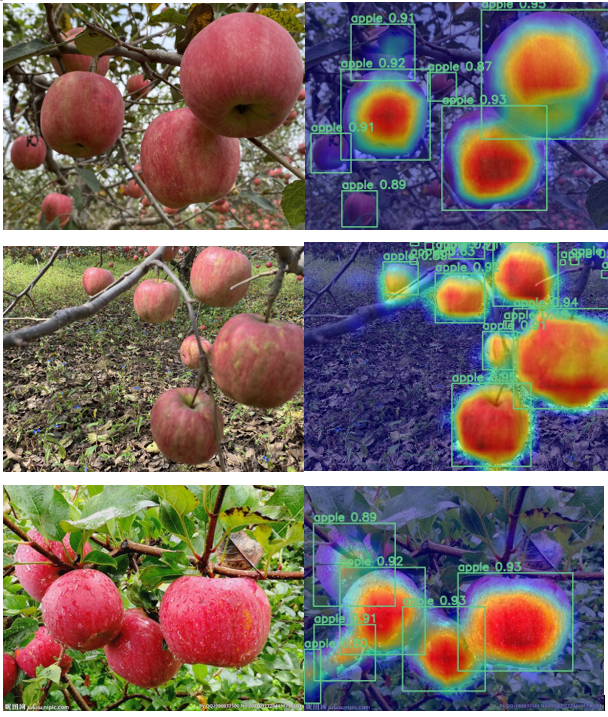
热力图效果
下面是几张图片的热力图绘制效果,通过热力图我们可以很清楚的看到模型所关注的区域为红色,不关注的区域为蓝色。
实现源码
下面是实现YOLO11热力图绘制的主要代码:
import warnings
warnings.filterwarnings('ignore')
warnings.simplefilter('ignore')
import torch, yaml, cv2, os, shutil, sys
import numpy as np
np.random.seed(0)
import matplotlib.pyplot as plt
from tqdm import trange
from PIL import Image
from ultralytics.nn.tasks import attempt_load_weights
from ultralytics.utils.torch_utils import intersect_dicts
from ultralytics.utils.ops import xywh2xyxy, non_max_suppression
from pytorch_grad_cam import GradCAMPlusPlus, GradCAM, XGradCAM, EigenCAM, HiResCAM, LayerCAM, RandomCAM, EigenGradCAM
from pytorch_grad_cam.utils.image import show_cam_on_image, scale_cam_image
from pytorch_grad_cam.activations_and_gradients import ActivationsAndGradients

def letterbox(im, new_shape=(640, 640), color=(114, 114, 114), auto=True, scaleFill=False, scaleup=True, stride=32):
    # Resize and pad image while meeting stride-multiple constraints
    shape = im.shape[:2]  # current shape [height, width]
    if isinstance(new_shape, int):
        new_shape = (new_shape, new_shape)

    # Scale ratio (new / old)
    r = min(new_shape[0] / shape[0], new_shape[1] / shape[1])
    if not scaleup:  # only scale down, do not scale up (for better val mAP)
        r = min(r, 1.0)

    # Compute padding
    ratio = r, r  # width, height ratios
    new_unpad = int(round(shape[1] * r)), int(round(shape[0] * r))
    dw, dh = new_shape[1] - new_unpad[0], new_shape[0] - new_unpad[1]  # wh padding
    if auto:  # minimum rectangle
        dw, dh = np.mod(dw, stride), np.mod(dh, stride)  # wh padding
    elif scaleFill:  # stretch
        dw, dh = 0.0, 0.0
        new_unpad = (new_shape[1], new_shape[0])
        ratio = new_shape[1] / shape[1], new_shape[0] / shape[0]  # width, height ratios

    dw /= 2  # divide padding into 2 sides
    dh /= 2

    if shape[::-1] != new_unpad:  # resize
        im = cv2.resize(im, new_unpad, interpolation=cv2.INTER_LINEAR)
    top, bottom = int(round(dh - 0.1)), int(round(dh + 0.1))
    left, right = int(round(dw - 0.1)), int(round(dw + 0.1))
    im = cv2.copyMakeBorder(im, top, bottom, left, right, cv2.BORDER_CONSTANT, value=color)  # add border
    return im, ratio, (dw, dh)

class ActivationsAndGradients:
    """ Class for extracting activations and
    registering gradients from targetted intermediate layers """

    def __init__(self, model, target_layers, reshape_transform):
        self.model = model
        self.gradients = []
        self.activations = []
        self.reshape_transform = reshape_transform
        self.handles = []
        for target_layer in target_layers:
            self.handles.append(
                target_layer.register_forward_hook(self.save_activation))
            # Because of https://github.com/pytorch/pytorch/issues/61519,
            # we don't use backward hook to record gradients.
            self.handles.append(
                target_layer.register_forward_hook(self.save_gradient))

    def save_activation(self, module, input, output):
        activation = output

        if self.reshape_transform is not None:
            activation = self.reshape_transform(activation)
        self.activations.append(activation.cpu().detach())

    def save_gradient(self, module, input, output):
        if not hasattr(output, "requires_grad") or not output.requires_grad:
            # You can only register hooks on tensor requires grad.
            return

        # Gradients are computed in reverse order
        def _store_grad(grad):
            if self.reshape_transform is not None:
                grad = self.reshape_transform(grad)
            self.gradients = [grad.cpu().detach()] + self.gradients

        output.register_hook(_store_grad)

    def post_process(self, result):
        logits_ = result[:, 4:]
        boxes_ = result[:, :4]
        sorted, indices = torch.sort(logits_.max(1)[0], descending=True)
        return torch.transpose(logits_[0], dim0=0, dim1=1)[indices[0]], torch.transpose(boxes_[0], dim0=0, dim1=1)[indices[0]], xywh2xyxy(torch.transpose(boxes_[0], dim0=0, dim1=1)[indices[0]]).cpu().detach().numpy()

    def __call__(self, x):
        self.gradients = []
        self.activations = []
        model_output = self.model(x)
        post_result, pre_post_boxes, post_boxes = self.post_process(model_output[0])
        return [[post_result, pre_post_boxes]]

    def release(self):
        for handle in self.handles:
            handle.remove()

class yolov8_target(torch.nn.Module):
    def __init__(self, ouput_type, conf, ratio) -> None:
        super().__init__()
        self.ouput_type = ouput_type
        self.conf = conf
        self.ratio = ratio

    def forward(self, data):
        post_result, pre_post_boxes = data
        result = []
        for i in trange(int(post_result.size(0) * self.ratio)):
            if float(post_result[i].max()) < self.conf:
                break
            if self.ouput_type == 'class' or self.ouput_type == 'all':
                result.append(post_result[i].max())
            elif self.ouput_type == 'box' or self.ouput_type == 'all':
                for j in range(4):
                    result.append(pre_post_boxes[i, j])
        return sum(result)

class yolov11_heatmap:
    def __init__(self, weight, device, method, layer, backward_type, conf_threshold, ratio, show_box, renormalize):
        device = torch.device(device)
        ckpt = torch.load(weight)
        model_names = ckpt['model'].names
        model = attempt_load_weights(weight, device)
        model.info()
        for p in model.parameters():
            p.requires_grad_(True)
        model.eval()

        target = yolov8_target(backward_type, conf_threshold, ratio)
        target_layers = [model.model[l] for l in layer]
        method = eval(method)(model, target_layers)
        method.activations_and_grads = ActivationsAndGradients(model, target_layers, None)

        colors = np.random.uniform(0, 255, size=(len(model_names), 3)).astype(np.uint8)
        self.__dict__.update(locals())

    def post_process(self, result):
        result = non_max_suppression(result, conf_thres=self.conf_threshold, iou_thres=0.65)[0]
        return result

    def draw_detections(self, box, color, name, img):
        xmin, ymin, xmax, ymax = list(map(int, list(box)))
        cv2.rectangle(img, (xmin, ymin), (xmax, ymax), tuple(int(x) for x in color), 2)
        cv2.putText(img, str(name), (xmin, ymin - 5), cv2.FONT_HERSHEY_SIMPLEX, 0.8, tuple(int(x) for x in color), 2, lineType=cv2.LINE_AA)
        return img

    def renormalize_cam_in_bounding_boxes(self, boxes, image_float_np, grayscale_cam):
        """Normalize the CAM to be in the range [0, 1]
        inside every bounding boxes, and zero outside of the bounding boxes. """
        renormalized_cam = np.zeros(grayscale_cam.shape, dtype=np.float32)
        for x1, y1, x2, y2 in boxes:
            x1, y1 = max(x1, 0), max(y1, 0)
            x2, y2 = min(grayscale_cam.shape[1] - 1, x2), min(grayscale_cam.shape[0] - 1, y2)
            renormalized_cam[y1:y2, x1:x2] = scale_cam_image(grayscale_cam[y1:y2, x1:x2].copy())
        renormalized_cam = scale_cam_image(renormalized_cam)
        eigencam_image_renormalized = show_cam_on_image(image_float_np, renormalized_cam, use_rgb=True)
        return eigencam_image_renormalized

    def process(self, img_path, save_path):
        # img process
        img = cv2.imread(img_path)
        img = letterbox(img)[0]
        img = cv2.cvtColor(img, cv2.COLOR_BGR2RGB)
        img = np.float32(img) / 255.0
        tensor = torch.from_numpy(np.transpose(img, axes=[2, 0, 1])).unsqueeze(0).to(self.device)

        try:
            grayscale_cam = self.method(tensor, [self.target])
        except AttributeError as e:
            return

        grayscale_cam = grayscale_cam[0, :]
        cam_image = show_cam_on_image(img, grayscale_cam, use_rgb=True)

        pred = self.model(tensor)[0]
        pred = self.post_process(pred)
        if self.renormalize:
            cam_image = self.renormalize_cam_in_bounding_boxes(pred[:, :4].cpu().detach().numpy().astype(np.int32), img, grayscale_cam)
        if self.show_box:
            for data in pred:
                data = data.cpu().detach().numpy()
                cam_image = self.draw_detections(data[:4], self.colors[int(data[4:].argmax())], f'{self.model_names[int(data[4:].argmax())]} {float(data[4:].max()):.2f}', cam_image)

        cam_image = Image.fromarray(cam_image)
        cam_image.save(save_path)

    def __call__(self, img_path, save_path, grad_name):
        # remove dir if exist
        # if os.path.exists(save_path):
        #     shutil.rmtree(save_path)
        # make dir if not exist
        if not os.path.exists(save_path):
            os.makedirs(save_path, exist_ok=True)

        if os.path.isdir(img_path):
            for img_path_ in os.listdir(img_path):
                name = img_path_.rsplit('.')[0]
                end_name = img_path_.rsplit('.')[-1]
                self.process(f'{img_path}/{img_path_}', f'{save_path}/{name}_{grad_name}.{end_name}')
        else:
            self.process(img_path, f'{save_path}/result_{grad_name}.png')

def get_params():
    # 绘制热力图方法列表
    grad_list = [
        'GradCAM',
        'GradCAMPlusPlus',
        'XGradCAM',
        'EigenCAM',
        'HiResCAM',
        'LayerCAM',
        'RandomCAM',
        'EigenGradCAM'
    ]
    # 自定义需要绘制热力图的层索引,可以用列表绘制不同层的热力图,单层或者多层都可以,如[9]或者[10, 12, 14, 16, 18]等,将多层的话会将结果进行汇总到一张图上
    # layers = [10, 12, 14, 16, 18]
    layers = [8]
    for grad_name in grad_list:
        params = {
            'weight': 'best.pt', # 训练好的权重路径
            'device': 'cpu',  # cpu或者cuda:0
            'method': grad_name, # GradCAMPlusPlus, GradCAM, XGradCAM, EigenCAM, HiResCAM, LayerCAM, RandomCAM, EigenGradCAM
            'layer': layers,  # 计算梯度的层, 指定层的索引
            'backward_type': 'class', # class, box, all
            'conf_threshold': 0.2, # 置信度阈值默认0.2, 根据情况调节
            'ratio': 0.02, # 建议0.02-0.1,取前多少数据,默认是0.02,只取置信度排序后的前百分之2的目标进行计算热力图。
            'show_box': True,  #是否显示检测框
            'renormalize': False   #是否优化热力图显示结果
        }
        yield params

if __name__ == '__main__':
    for each in get_params():
        model = yolov11_heatmap(**each)
        # model第一个参数:单张图片路径或者图片文件夹路径; 第二个参数:保存路径; 第三个参数:绘制热力图方法
        # model(r'images/00052.jpg', 'result', each['method'])
        model(r'images', 'result', each['method'])
主要参数说明:
get_params函数中的grad_list 为绘制热力图使用的方法,提供了8种基于梯度或特征激活的热力图生成方法,本脚本会绘制所有方法的热力图,图片保存的命名规则为图片名+热力图计算方法名称.jpg。;
layers为需要绘制的网络结构层索引,单层或者多层都可以,多层的话会将结果进行汇总到一张图上;
weight参数为训练好的权重路径;
show_box表示是否在热力图上显示检测框;
model函数的第一个参数为:单张图片路径或者图片文件夹路径; 第二个参数:保存热力图的结果路径;
我这里传入的是一个images文件夹路径,运行代码后,结果如下:
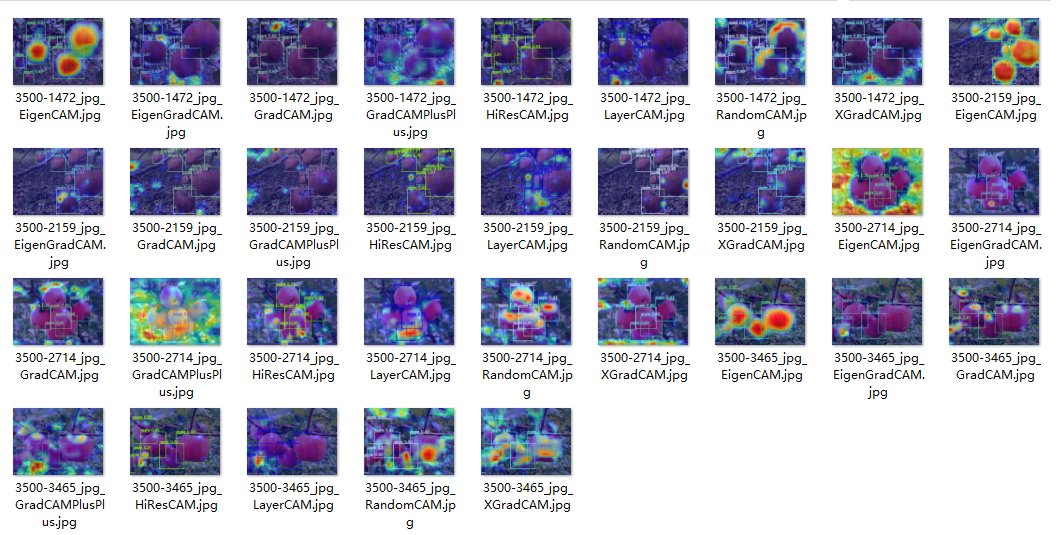
可以挑选比较好的热力图生成方法产生的结果进行展示。
好了,这篇文章就介绍到这里,喜欢的小伙伴感谢给点个赞和关注,更多精彩内容持续更新~~
关于本篇文章大家有任何建议或意见,欢迎在评论区留言交流!

AtomGit 是由开放原子开源基金会联合 CSDN 等生态伙伴共同推出的新一代开源与人工智能协作平台。平台坚持“开放、中立、公益”的理念,把代码托管、模型共享、数据集托管、智能体开发体验和算力服务整合在一起,为开发者提供从开发、训练到部署的一站式体验。
更多推荐


 31
31 0
0- 0


 已为社区贡献23条内容

所有评论(0)