【鸿蒙ArkUI】天气App开发实践——动态主题与数据可视化实现
·
一、技术背景
1.1 项目概述
天气应用是移动端常见应用类型之一。本项目实现以下功能:
| 功能模块 | 技术要点 |
|---|---|
| 实时天气展示 | 状态绑定、数据驱动 |
| 动态主题切换 | 条件渐变背景 |
| 生活指数展示 | @Builder组件复用 |
| 逐小时/7日预报 | 列表渲染、数据生成 |
| 城市切换 | 模态弹窗、状态联动 |
1.2 技术栈
- 框架: ArkUI
- 语言: ArkTS
- 模型: Stage Model
- 工具: DevEco Studio
二、数据模型设计
2.1 接口定义
// 天气主数据
interface WeatherInfo {
  city: string
  temp: number
  cond: string
  humid: number
  wind: string
  uv: string
  high: number
  low: number
  aqi: number
  aqiDesc: string
}

// 小时预报
interface HourlyItem {
  time: string
  temp: number
  icon: string
}

// 日预报
interface DailyItem {
  day: string
  date: string
  icon: string
  high: number
  low: number
  desc: string
}
2.2 数据源
项目采用本地模拟数据,支持8个城市:
private readonly CITIES: string[] = [
  '北京市', '上海市', '广州市', '深圳市',
  '杭州市', '成都市', '武汉市', '南京市'
]

private readonly WEATHER_DATA: WeatherInfo[] = [
  { city: '北京市', temp: 26, cond: '晴', humid: 45, wind: '3级',
    uv: '中等', high: 30, low: 18, aqi: 72, aqiDesc: '良' },
  { city: '上海市', temp: 24, cond: '多云', humid: 62, wind: '4级',
    uv: '中等', high: 27, low: 20, aqi: 55, aqiDesc: '良' },
  { city: '广州市', temp: 31, cond: '雷阵雨', humid: 78, wind: '3级',
    uv: '强', high: 33, low: 25, aqi: 38, aqiDesc: '优' },
  // ... 其他城市数据
]
三、状态管理
3.1 状态变量定义
@Entry
@Component
struct Index {
  // 基础天气信息
  @State location: string = '北京市'
  @State currentTemp: number = 26
  @State currentCondition: string = '晴'

  // 生活指数
  @State currentHumidity: number = 45
  @State currentWind: string = '3级'
  @State currentUV: string = '中等'

  // 温度范围
  @State currentHigh: number = 30
  @State currentLow: number = 18

  // 空气质量
  @State currentAQI: number = 72
  @State currentAQIDesc: string = '良'

  // UI状态
  @State showCityPicker: boolean = false

  // 预报数据
  @State hourlyData: HourlyItem[]
  @State dailyData: DailyItem[]
}
3.2 状态联动机制
城市切换时,所有状态同步更新:
private switchCity(city: string): void {
  const data = this.getWeatherByCity(city)

  // 批量状态更新
  this.location = city
  this.currentTemp = data.temp
  this.currentCondition = data.cond
  this.currentHumidity = data.humid
  this.currentWind = data.wind
  this.currentUV = data.uv
  this.currentHigh = data.high
  this.currentLow = data.low
  this.currentAQI = data.aqi
  this.currentAQIDesc = data.aqiDesc

  // 重新生成预报数据
  this.hourlyData = this.generateHourlyData(data.cond, data.temp)
  this.dailyData = this.generateDailyData(data.cond, data.high, data.low)

  // 关闭弹窗
  this.showCityPicker = false
}
四、核心实现
4.1 动态渐变背景
根据天气状况动态计算渐变色:
private getBgGradient(cond: string): string {
  const gradientMap: Record<string, string> = {
    '晴': '#FF9F0A',
    '多云': '#8E8E93',
    '阴': '#8E8E93',
    '小雨': '#5AC8FA',
    '阵雨': '#5AC8FA',
    '雷阵雨': '#5AC8FA'
  }
  return gradientMap[cond] || '#4A90D9'
}

private getBgEnd(cond: string): string {
  const endMap: Record<string, string> = {
    '晴': '#FFD60A',
    '多云': '#636366',
    '阴': '#636366',
    '小雨': '#007AFF',
    '阵雨': '#007AFF',
    '雷阵雨': '#007AFF'
  }
  return endMap[cond] || '#87CEEB'
}
应用渐变:
Column() {
  // ...
}
.linearGradient({
  direction: GradientDirection.Bottom,
  colors: [
    [this.getBgGradient(this.currentCondition), 0],
    [this.getBgEnd(this.currentCondition), 1]
  ]
})
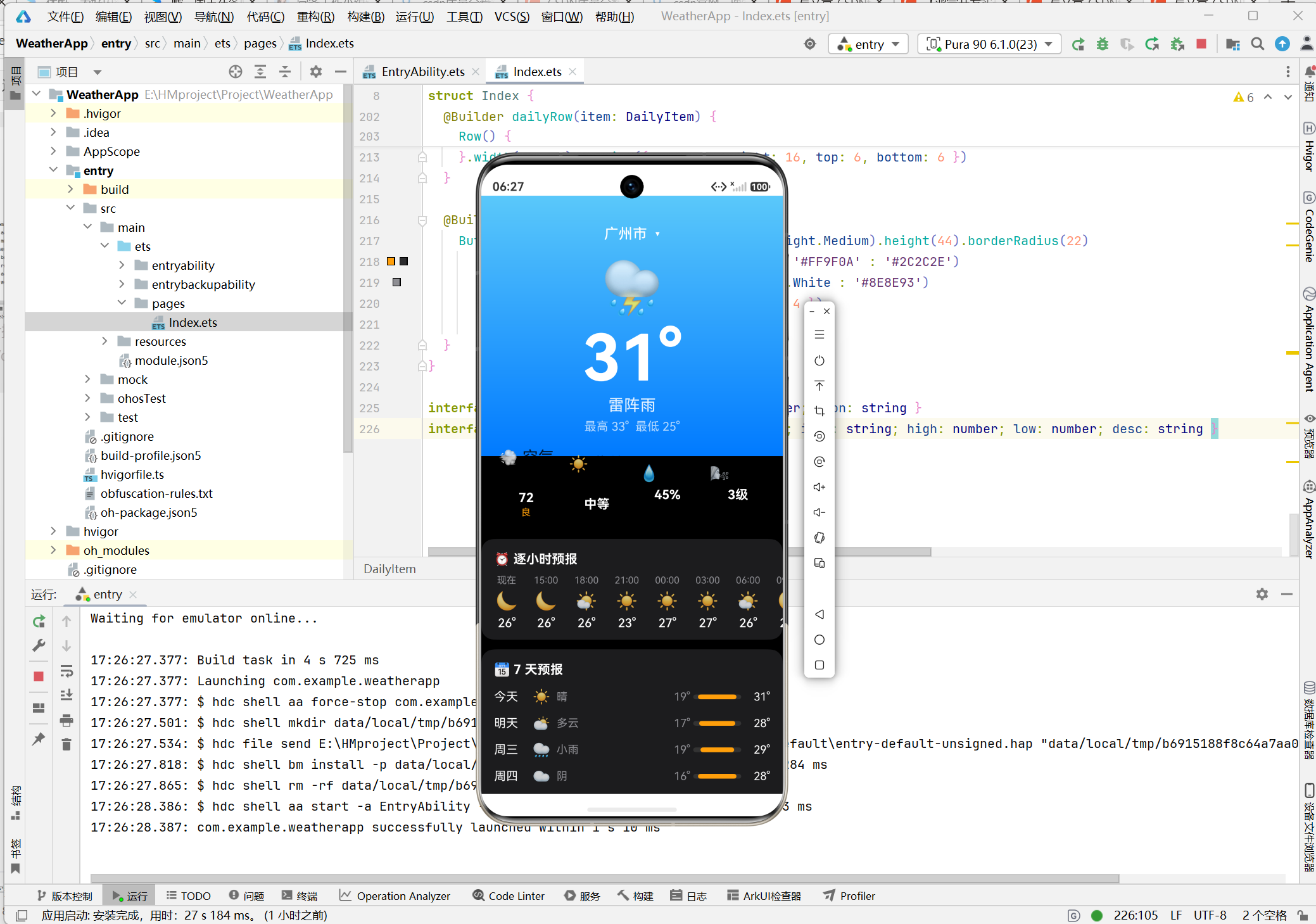
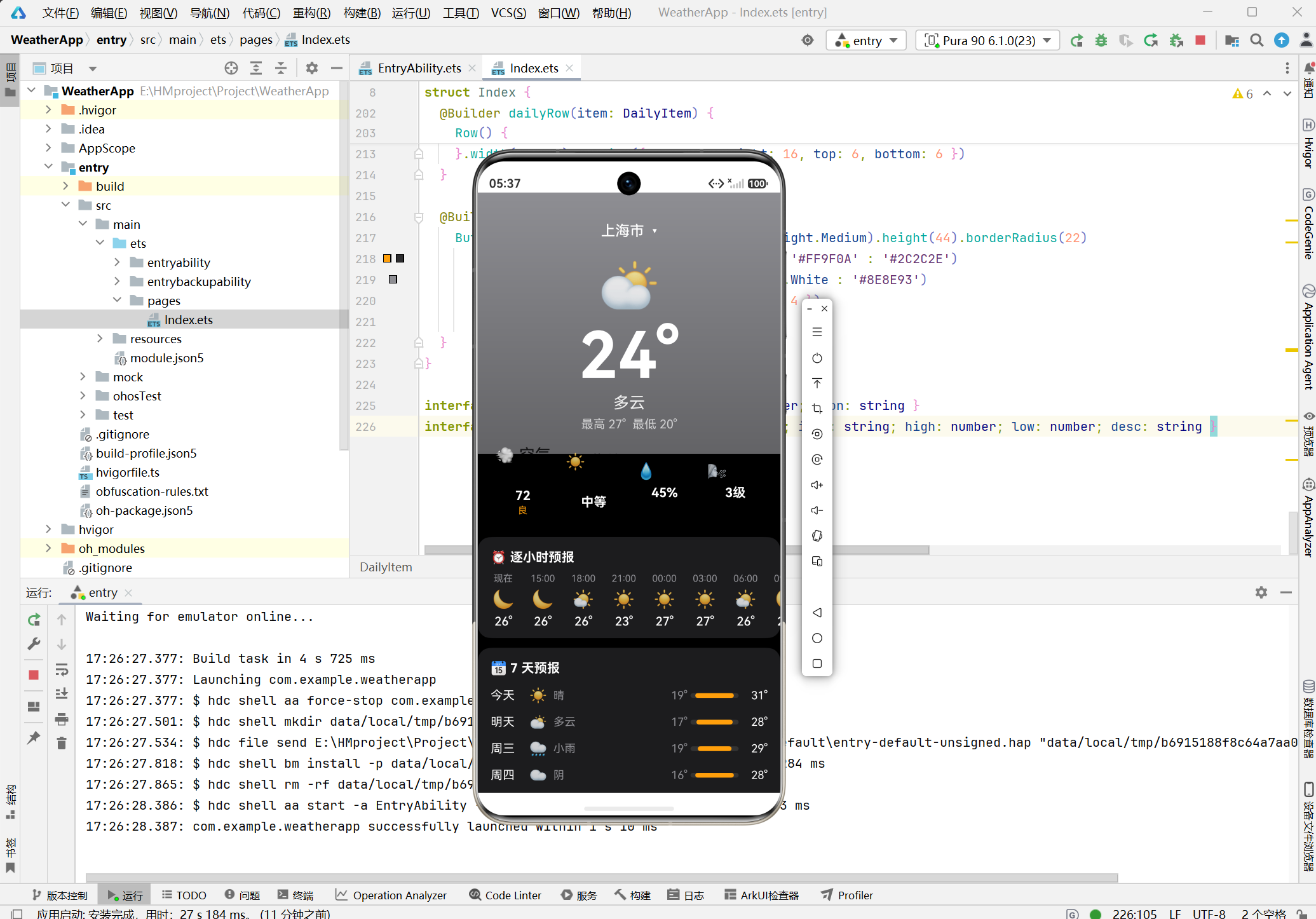
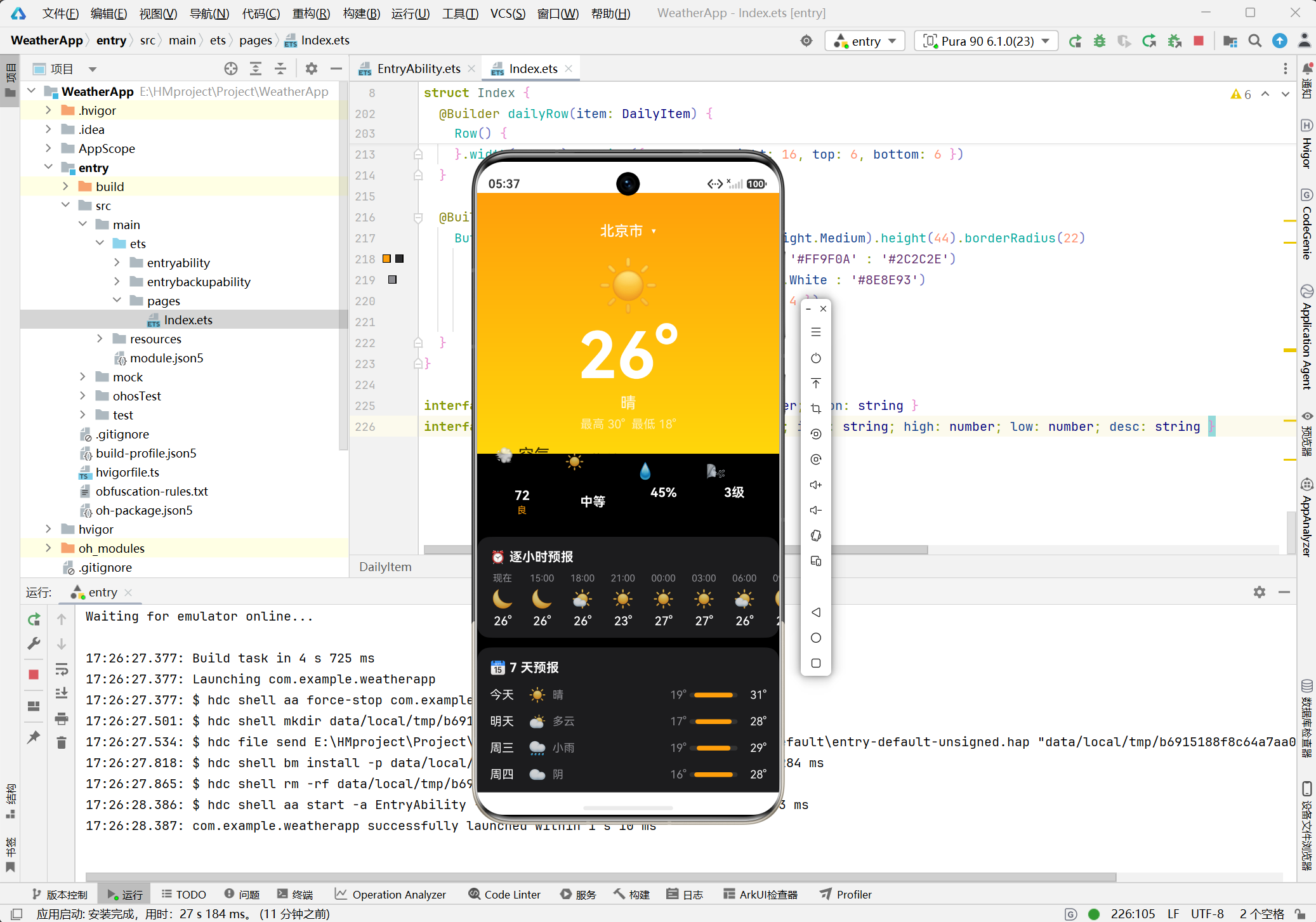
主题效果:
| 天气 | 起始色 | 结束色 | 视觉效果 |
|---|---|---|---|
| 晴 | #FF9F0A | #FFD60A | 温暖明亮 |
| 多云/阴 | #8E8E93 | #636366 | 沉稳内敛 |
| 雨 | #5AC8FA | #007AFF | 清新凉爽 |
4.2 温度条可视化
温度条宽度与颜色根据温度动态计算:
// 宽度计算:基于温差
private tempBarWidth(low: number, high: number): string {
  const diff = high - low
  const width = Math.floor((diff / 20) * 100 + 20)
  return width + '%'
}

// 颜色计算:基于平均温度
private tempBarColor(low: number, high: number): string {
  const avg = (low + high) / 2
  if (avg >= 28) return '#FF3B30'   // 红色-热
  if (avg >= 20) return '#FF9F0A'   // 橙色-温
  return '#34C759'                   // 绿色-凉
}
4.3 数据生成算法
逐小时预报:
private generateHourlyData(cond: string, baseTemp: number): HourlyItem[] {
  const times = ['现在', '15:00', '18:00', '21:00', '00:00', '03:00', '06:00', '09:00']
  const icons = ['🌙', '🌙', '🌤️', '☀️', '☀️', '☀️', '🌤️', '🌙']

  return times.map((time, i) => ({
    time,
    temp: i === 0 ? baseTemp : baseTemp + Math.floor(Math.random() * 6) - 3,
    icon: icons[i]
  }))
}
7日预报:
private generateDailyData(cond: string, high: number, low: number): DailyItem[] {
  const days = ['今天', '明天', '周三', '周四', '周五', '周六', '周日']
  const icons = ['☀️', '⛅', '🌧️', '☁️', '☀️', '☀️', '⛅']
  const descs = ['晴', '多云', '小雨', '阴', '晴', '晴', '多云']

  return days.map((day, i) => ({
    day,
    date: '6月' + (i + 1) + '日',
    icon: icons[i],
    high: high + Math.floor(Math.random() * 6) - 3,
    low: low + Math.floor(Math.random() * 4) - 2,
    desc: descs[i]
  }))
}
五、组件封装
5.1 @Builder装饰器
@Builder 用于封装可复用的UI描述,支持参数传递。
5.2 信息卡片组件
@Builder compactCard(icon: string, value: string, desc: string, color: string) {
  Column() {
    Text(icon).fontSize(20)
    Text(value)
      .fontSize(16)
      .fontWeight(FontWeight.Bold)
      .fontColor(Color.White)
      .margin({ top: 6 })
    if (desc.length > 0) {
      Text(desc)
        .fontSize(12)
        .fontColor(color)
        .margin({ top: 2 })
    }
  }
  .layoutWeight(1)
  .padding({ top: 10, bottom: 10 })
  .alignItems(HorizontalAlign.Center)
}
5.3 小时预报项组件
@Builder hourlyItem(item: HourlyItem) {
  Column() {
    Text(item.time)
      .fontSize(12)
      .fontColor('#8E8E93')
    Text(item.icon)
      .fontSize(22)
      .margin({ top: 6 })
    Text(String(item.temp) + '°')
      .fontSize(15)
      .fontWeight(FontWeight.Medium)
      .fontColor(Color.White)
      .margin({ top: 6 })
  }
  .padding({ left: 10, right: 10 })
  .alignItems(HorizontalAlign.Center)
}
5.4 日预报行组件
@Builder dailyRow(item: DailyItem) {
  Row() {
    Text(item.day)
      .fontSize(15)
      .fontColor(Color.White)
      .width(48)
    Text(item.icon)
      .fontSize(18)
      .width(30)
    Text(item.desc)
      .fontSize(14)
      .fontColor('#8E8E93')
      .width(36)
    Blank()
    Text(String(item.low) + '°')
      .fontSize(14)
      .fontColor('#8E8E93')
      .width(32)
      .textAlign(TextAlign.End)

    // 温度条容器
    Column() {
      Column()
        .width(this.tempBarWidth(item.low, item.high))
        .height(6)
        .borderRadius(3)
        .backgroundColor(this.tempBarColor(item.low, item.high))
    }
    .width(60)
    .height(6)
    .backgroundColor('#333333')
    .borderRadius(3)
    .margin({ left: 4, right: 4 })

    Text(String(item.high) + '°')
      .fontSize(14)
      .fontColor(Color.White)
      .width(32)
      .textAlign(TextAlign.End)
  }
  .width('100%')
  .padding({ left: 16, right: 16, top: 6, bottom: 6 })
}
5.5 城市按钮组件
@Builder cityButton(city: string) {
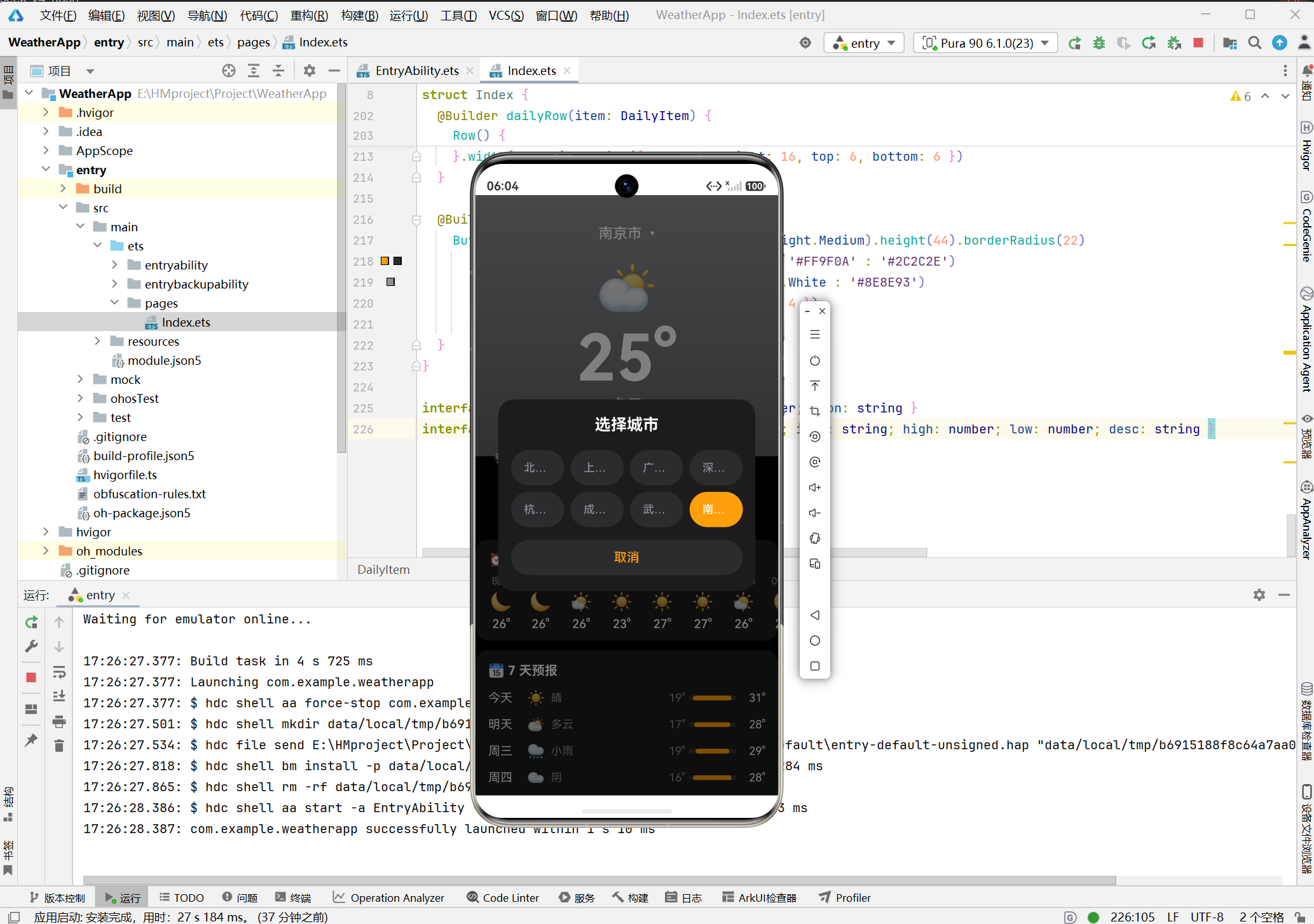
  Button(city)
    .fontSize(14)
    .fontWeight(FontWeight.Medium)
    .height(44)
    .borderRadius(22)
    .backgroundColor(this.location === city ? '#FF9F0A' : '#2C2C2E')
    .fontColor(this.location === city ? Color.White : '#8E8E93')
    .layoutWeight(1)
    .margin({ left: 4, right: 4 })
    .onClick(() => this.switchCity(city))
}
六、页面布局
6.1 布局结构
Stack
├── Scroll (主内容)
│   └── Column
│       ├── Column (天气展示区 - 渐变背景)
│       ├── Row (信息卡片)
│       ├── Column (逐小时预报)
│       ├── Column (7天预报)
│       └── Text (更新时间)
└── Column (城市选择弹窗 - 条件渲染)
6.2 模态弹窗实现
if (this.showCityPicker) {
  Column() {
    Column() {
      Text('选择城市')
        .fontSize(20)
        .fontWeight(FontWeight.Bold)
        .fontColor(Color.White)
        .margin({ top: 20, bottom: 16 })

      Row() {
        this.cityButton(this.CITIES[0])
        this.cityButton(this.CITIES[1])
        this.cityButton(this.CITIES[2])
        this.cityButton(this.CITIES[3])
      }
      .width('100%')
      .padding({ left: 12, right: 12 })

      Row() {
        this.cityButton(this.CITIES[4])
        this.cityButton(this.CITIES[5])
        this.cityButton(this.CITIES[6])
        this.cityButton(this.CITIES[7])
      }
      .width('100%')
      .padding({ left: 12, right: 12 })
      .margin({ top: 8 })

      Button('取消')
        .fontSize(16)
        .fontColor('#FF9F0A')
        .backgroundColor('#2C2C2E')
        .width('90%')
        .height(44)
        .borderRadius(22)
        .margin({ top: 16, bottom: 20 })
        .onClick(() => this.showCityPicker = false)
    }
    .width('85%')
    .backgroundColor('#1C1C1E')
    .borderRadius(20)
  }
  .width('100%')
  .height('100%')
  .backgroundColor('#80000000')
  .justifyContent(FlexAlign.Center)
  .onClick(() => this.showCityPicker = false)
}
七、运行验证
7.1 构建命令
# DevEco Studio菜单
Build > Build Hap(s)/APP(s) > Build Hap(s)
7.2 运行效果
八、技术要点总结
| 技术点 | 实现方式 |
|---|---|
| 状态驱动 | @State装饰器 |
| 组件复用 | @Builder装饰器 |
| 动态主题 | 条件渐变背景 |
| 温度可视化 | 动态宽度+颜色计算 |
| 模态弹窗 | Stack叠加+条件渲染 |
| 数据生成 | 随机算法+基准值偏移 |
九、扩展方向
| 扩展项 | 技术方案 |
|---|---|
| 真实API | HTTP请求 + JSON解析 |
| 地理定位 | @ohos.geoLocationManager |
| 数据缓存 | @ohos.data.preferences |
| 天气动画 | Canvas / Lottie |
| 下拉刷新 | Refresh组件 |
十、结语
本文详细讲解了鸿蒙天气App的实现过程,涵盖动态主题、数据可视化、组件封装等核心内容。通过本项目,可快速掌握ArkUI声明式开发的核心范式。
参考资料:

AtomGit 是由开放原子开源基金会联合 CSDN 等生态伙伴共同推出的新一代开源与人工智能协作平台。平台坚持“开放、中立、公益”的理念,把代码托管、模型共享、数据集托管、智能体开发体验和算力服务整合在一起,为开发者提供从开发、训练到部署的一站式体验。
更多推荐



 4
4 0
0- 0


 已为社区贡献1条内容

所有评论(0)