DataOut.cs完整解析
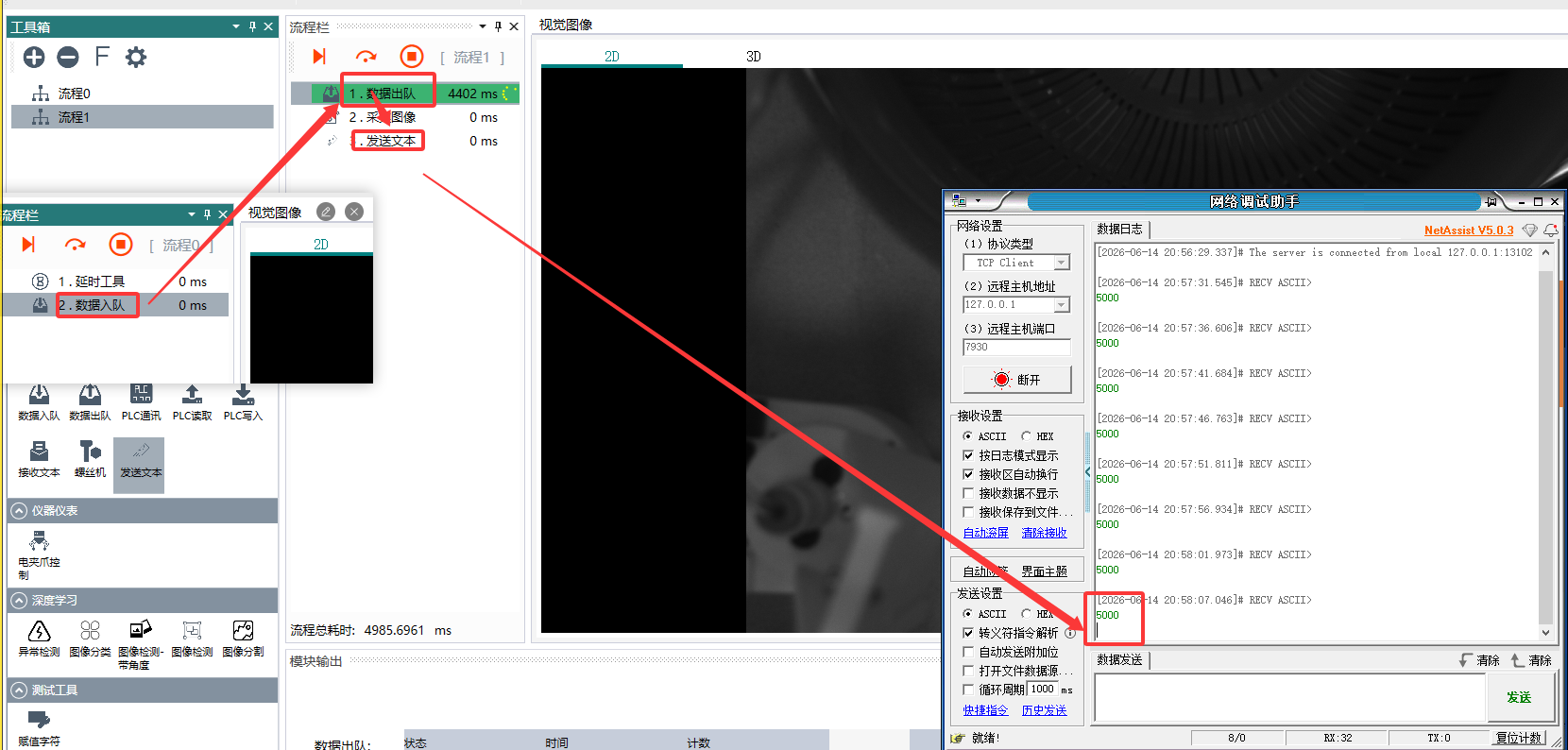
数据入队模块的-ExeModule
数据出队模块的-ExeModule
IsEnable的作用
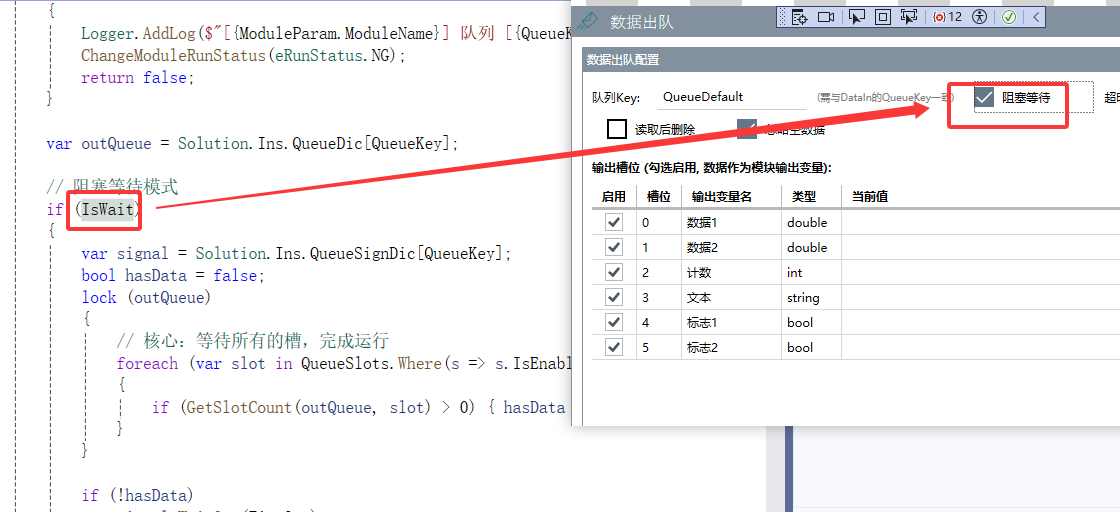
核心内容:
构造函数自动全局注册 — new DataOut(key) 立即写入 Solution.Ins.QueueDic[key] = this,这意味着 DataOut 是跨 Project 全局共享的实例,任何流程通过同一个 Key 都能访问到
10 个 DefineXXXQueue 方法 — 在 m_DataQueueList 中创建类型化 List<T> 容器,同时在 m_DataTypeList 记录类型字符串。调用顺序决定槽位索引,支持 double/int/string/bool/HImage 及其数组共 10 种类型
查询三方法 — GetQueueCount()(槽位总数)、GetDataType(index)(类型字符串,供 DataIn 做类型校验)、GetDataQueue(index)(返回 object,调用者自行强转)
ExeModule 空实现 — DataOut 本身不做任何操作,只是被动容器。读取操作由调用者(如 Plugin.DataOut)完成
两套队列系统对比 — DataOut 多槽位类型化队列 vs ECommunacation 的字符串 FIFO 队列,二者完全独立、用途不同
属性"假生效" — IsLimitLength/IsWait/IsDeleteData 等属性值不强制执行,全靠调用者自觉遵守
6 个隐患 — 构造函数副作用(key 冲突静默覆盖)、ExeModule 空实现、Clear() 中 List<List<Image>> 类型错误(应为 List<HImage>)、10 个 Define 方法重复代码、List<T> 无限增长无内存保护、行为属性不强制执行
完整数据流 — 从 Plugin.DataOut.Loaded 注册 → Define 槽位 → DataIn 写入 → Plugin.DataOut 读取 → AddOutputParam 输出的端到端链路
DataOut.cs 完整解析 — 跨模块数据出队引擎
文件:
Services\DataOut.cs(230行)
继承:ModuleBase— 本身可作为流程节点使用
角色: 定义类型化队列槽位, 供 DataIn 写入, 供下游模块读取
配套:DataIn.cs(入队端) /Plugin.DataOut(我们创建的 UI 插件)
1. 它解决什么问题
DataOut 是一个 类型化多槽位队列容器。它不是简单的 FIFO — 而是一个数组, 每个槽位有自己的类型和独立的 List<T> 实例, DataIn 按槽位索引写入, 下游模块按槽位索引读取。
                  DataOut (QueueKey = "Q1")

  槽位[0] = List<double>  ← DataIn 写入 → List<double>.Add(3.14)
  槽位[1] = List<double>  ← DataIn 写入 → List<double>.Add(6.28)
  槽位[2] = List<int>     ← DataIn 写入 → List<int>.Add(100)
  槽位[3] = List<string>  ← DataIn 写入 → List<string>.Add("OK")
  槽位[4] = List<bool>    ← DataIn 写入 → List<bool>.Add(true)
2. 构造函数 — 自动注册到全局字典
public DataOut(string queueKey)
{
    QueueKey = queueKey;
    Solution.Ins.QueueDic[QueueKey] = this;           // ★ 注册到全局字典
    Solution.Ins.QueueSignDic[QueueKey] = new AutoResetEvent(false);  // ★ 创建信号量
}
关键: 构造时 QueueKey 作为 Key 注册到 Solution.Ins.QueueDic — 这意味着 DataOut 是跨 Project 全局共享的。任何流程通过同一个 QueueKey 都能访问到同一个 DataOut 实例。
3. 源码结构 (230行)
DataOut : ModuleBase
│
├── ★ 构造 → 全局注册
│
├── 属性 (队列行为控制)
│   ├── QueueKey           ← 队列标识
│   ├── IsLimitLength      ← 是否限制长度
│   ├── LimitLength        ← 最大长度 (默认1)
│   ├── IsWait             ← 是否阻塞等待 (未在本类实现, 供调用者判断)
│   ├── IsDeleteData       ← 读取后是否删除 (未在本类实现, 供调用者判断)
│   └── IsIgnoreError      ← 是否忽略空数据错误
│
├── 内部容器
│   ├── m_DataQueueList    ← ObservableCollection<object>  每个元素是一个 List<T>
│   └── m_DataTypeList     ← ObservableCollection<string>  对应每个槽位的类型字符串
│
├── ★ 10 个 DefineXXXQueue 方法 (定义槽位)
│   ├── DefineIntQueue()       → new List<int>()
│   ├── DefineDoubleQueue()    → new List<double>()
│   ├── DefineStringQueue()    → new List<string>()
│   ├── DefineBoolQueue()      → new List<bool>()
│   ├── DefineIntListQueue()   → new List<List<int>>()
│   ├── DefineDoubleListQueue()→ new List<List<double>>()
│   ├── DefineStringListQueue()→ new List<List<string>>()
│   ├── DefineBoolListQueue()  → new List<List<bool>>()
│   ├── DefineHImageQueue()    → new List<HImage>()
│   └── DefineHImageListQueue()→ new List<List<HImage>>()
│
├── 查询方法
│   ├── GetQueueCount()        → 槽位总数
│   ├── GetDataType(index)     → 指定槽位的类型字符串
│   └── GetDataQueue(index)    → 指定槽位的 List<T> (返回 object)
│
├── Clear()                    → 清空所有槽位 + 唤醒等待者
└── ExeModule()                → 空实现 (return true)
4. 10 个 DefineXXXQueue — 槽位定义
每个 DefineXXXQueue 方法做两件事: 创建类型化容器 + 记录类型名:
public void DefineDoubleQueue()
{
    m_DataQueueList.Add(new List<double>());   // 容器: 存放 double 值
    m_DataTypeList.Add("double");              // 类型名: 供 DataIn 做类型匹配
}

public void DefineIntListQueue()
{
    m_DataQueueList.Add(new List<List<int>>()); // 容器: 存放 int[] 数组
    m_DataTypeList.Add("int[]");                // 类型名: "int[]"
}
调用顺序决定槽位索引:
DefineDoubleQueue()  → 槽位[0] = List<double>
DefineDoubleQueue()  → 槽位[1] = List<double>
DefineIntQueue()     → 槽位[2] = List<int>
DefineStringQueue()  → 槽位[3] = List<string>
DefineBoolQueue()    → 槽位[4] = List<bool>
DefineBoolQueue()    → 槽位[5] = List<bool>
5. 查询方法 — 供 DataIn 和下游读取
// 获取槽位总数
public int GetQueueCount() => m_DataQueueList.Count;

// 获取第 index 个槽位的类型字符串
public string GetDataType(int index) => m_DataTypeList[index];

// 获取第 index 个槽位的 List<T> 容器 (返回 object, 调用者自行强转)
public object GetDataQueue(int index) => m_DataQueueList[index];
下游读取示例 (来自我们的 Plugin.DataOut):
// 槽位[0] = List<double>
List<double> dList = (List<double>)dataOut.GetDataQueue(0);

// 取最后一个值
double val = dList.Last();    // 或 dList[dList.Count - 1]

// 是否出队后删除?
if (IsDeleteData) dList.RemoveAt(dList.Count - 1);
6. Clear() — 清空队列
public void Clear()
{
    lock (this)  // ★ 加锁: 清空时阻止 DataIn 写入
    {
        // 按 10 种类型逐个清空
        foreach (var item in m_DataQueueList)
        {
            if (item is List<bool> boolList)          boolList.Clear();
            else if (item is List<int> intList)        intList.Clear();
            else if (item is List<double> doubleList)  doubleList.Clear();
            else if (item is List<string> stringList)  stringList.Clear();
            // ... 数组类型同理 ...
            else if (item is List<List<Image>> imgList) imgList.Clear();
        }

        // 清空后唤醒等待者
        Solution.Ins.QueueSignDic[QueueKey].Set();
    }
}
注意: Clear 只清空槽位内容, 不删除槽位本身 — m_DataTypeList 保持不变, 下次 DataIn 写入时类型校验仍然有效。
7. ExeModule() — 空实现
public override bool ExeModule()
{
    return true;  // DataOut 本身不执行任何操作
}
DataOut 的 ExeModule 是空实现 — 因为读取操作由调用者 (如 Plugin.DataOut) 完成, DataOut 只是一个被动容器。把它放在流程中主要是为了定义槽位 (通过构造和 Plugin.DataOut 的 Loaded 事件), 而非运行时执行。
8. DataOut vs ECommunacation 的两套队列系统
项目中存在两套完全独立的队列系统, 容易混淆:
| 维度 | DataOut 队列 | ECommunacation 队列 |
|---|---|---|
| 用途 | 流程间传递类型化数据 | 收发通讯字符串 |
| 容器 | List<T>[] (多槽位) |
Queue<string> (单队列 FIFO) |
| 写入方 | DataIn (类型化写入) | 通讯事件回调 (字符串写入) |
| 读取方 | 任意模块 (通过索引) | ReceiveStr 插件 (Dequeue) |
| 信号量 | QueueSignDic[key] |
m_RecStrSignal |
| 类型 | 10 种 (double/int/string/bool/HImage + 数组) | 仅 string |
| 全局注册 | QueueDic[key] = this |
属于 ECommunacation 实例, 不在全局字典 |
9. 完整数据流 — 以 Plugin.DataOut 为例
启动 (Plugin.DataOut.Loaded)
  │
  ├→ new JGTechVision.Services.DataOut("QueueMerged")
  │     └→ QueueDic["QueueMerged"] = this  ← ★ 全局注册
  │
  └→ DefineDoubleQueue() × 2 + DefineIntQueue() + DefineStringQueue() + DefineBoolQueue() × 2
        └→ 6 个槽位就绪

════════ 运行中 ════════

DataIn (Project_A).ExeModule()
  │
  ├→ dataOut = QueueDic["QueueMerged"]
  ├→ lock(dataOut)
  ├→ List<double> list = dataOut.GetDataQueue(0)   ← 取槽位[0]
  ├→ list.Add(3.14)                                 ← 写入
  └→ QueueSignDic["QueueMerged"].Set()              ← 唤醒

Plugin.DataOut (Project_Main).ExeModule()
  │
  ├→ dataOut = QueueDic["QueueMerged"]
  ├→ lock(dataOut)
  ├→ List<double> list = dataOut.GetDataQueue(0)   ← 取槽位[0]
  ├→ double val = list.Last()                       ← 读取
  ├→ if (IsDeleteData) list.RemoveAt(list.Count-1)  ← 可选出队
  └→ AddOutputParam("数据1", "double", val)         ← 输出
10. IsLimitLength 与 LimitLength 的使用
这两个属性不在 DataOut 类本身生效 — 而是由调用者 (DataIn 或 Plugin.DataOut) 在写入/读取时主动判断:
// DataIn 写入时的限长保护
if (outQueue.IsLimitLength && dList.Count >= outQueue.LimitLength)
    dList.RemoveAt(0);    // 超出限制 → 移除最旧的数据
dList.Add(newValue);      // 追加新数据
LimitLength = 1 时队列退化为"只保留最新值", 类似一个可读写的变量而非缓冲区。
11. 设计分析
优点
- 多槽位类型安全: 每个槽位有明确类型, 写入时做类型校验
- 全局共享: 通过
Solution.Ins.QueueDic跨 Project 访问 - 自描述:
m_DataTypeList记录了每个槽位的类型, 调用者可以动态查询 - 双容器同步:
m_DataQueueList(数据) +m_DataTypeList(类型) 始终保持同步 - 信号驱动:
QueueSignDic[key].Set()支持阻塞等待
隐患
| 问题 | 说明 |
|---|---|
| 构造函数有副作用 | new DataOut(key) 会立即注册到全局字典 — 如果 key 冲突会静默覆盖旧实例 |
ExeModule 空实现 |
继承 ModuleBase 但执行体为空, 放在流程中无实际效果 |
Clear() 中 HImage 类型错误 |
item is List<List<Image>> — 应该是 List<HImage>, 但用了 System.Drawing.Image |
| 10 个 Define 方法重复 | 可以用泛型方法 DefineQueue<T>(string typeName) 消除 |
| 无容量上限 | List<T> 无限增长, 没有全局内存保护 |
IsWait/IsLimitLength 不生效 |
这些属性值靠调用者自觉遵守, 本类不强制执行 |
文档说明: 基于 DataOut.cs (230行) 源码静态分析生成。与 DataIn.cs 配对使用, 共同构成跨模块的多槽位类型化数据队列系统。注意与 ECommunacation 的字符串队列区别。当前版本 2026-06-10。

AtomGit 是由开放原子开源基金会联合 CSDN 等生态伙伴共同推出的新一代开源与人工智能协作平台。平台坚持“开放、中立、公益”的理念,把代码托管、模型共享、数据集托管、智能体开发体验和算力服务整合在一起,为开发者提供从开发、训练到部署的一站式体验。
更多推荐



 1
1 0
0- 0


 已为社区贡献51条内容

所有评论(0)