C# Tokenizers.DotNet测试工具
·
Tokenizers.DotNet 简介
Tokenizers.DotNet 是 HuggingFace Tokenizers 库的 .NET 封装(.NET wrapper),让你可以在 C# 和 .NET 环境中使用 HuggingFace 生态系统的分词器(Tokenizer)。
核心特点
| 特性 | 说明 |
|---|---|
| 技术栈 | 底层使用 Rust 实现的高性能 tokenizer,通过 .NET 封装提供 C# 接口 |
| 开源协议 | MIT License |
| .NET 要求 | .NET 6 或更高版本 |
| 主要用途 | 在 .NET 应用中为 LLM(大语言模型)预处理文本 |
主要功能
-
从 HuggingFace Hub 下载 tokenizer 文件 - 直接通过 API 获取预训练模型的分词配置
-
加载本地 tokenizer.json 文件
-
文本编码 - 将字符串转换为 Token ID 数组(
uint[]) -
Token 解码 - 将 Token ID 数组还原为字符串
安装方式
需要安装两个 NuGet 包:
bash
dotnet add package Tokenizers.DotNet
dotnet add package Tokenizers.DotNet.runtime.win-x64   # Windows x64
注意:对于 ARM64 架构,应使用
Tokenizers.DotNet.runtime.win-arm64;Linux 环境有对应的linux-x64和linux-arm64版本。旧的Tokenizers.DotNet.runtime.win包已被弃用,建议改用指定架构的包。
基础示例
csharp
using Tokenizers.DotNet;
// 从 HuggingFace 下载 tokenizer
var hubName = "skt/kogpt2-base-v2";
var tokenizerPath = await HuggingFace.GetFileFromHub(hubName, "tokenizer.json", "deps");
// 创建 tokenizer 实例
var tokenizer = new Tokenizer(vocabPath: tokenizerPath);
// 编码:文本 → Token IDs
string text = "음, 이제 식사도 해볼까요";
uint[] tokens = tokenizer.Encode(text);
Console.WriteLine(string.Join(", ", tokens)); // 9330, 387, 12857, ...
// 解码:Token IDs → 文本
string decoded = tokenizer.Decode(tokens);
Console.WriteLine(decoded); // 输出原始文本
测试工具
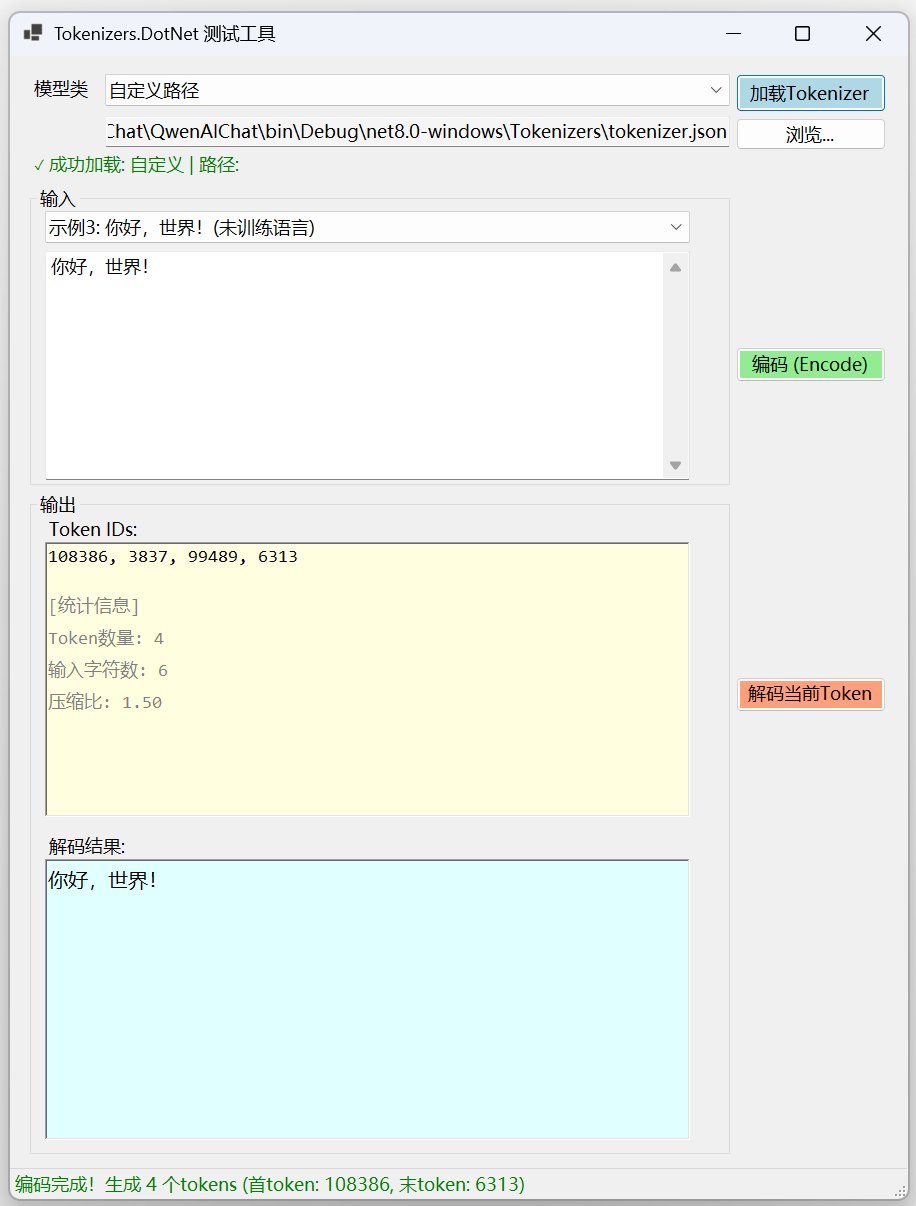
C#代码
Form1.Designer.cs
namespace TokenizersWinFormTest
{
    partial class Form1
    {
        private System.ComponentModel.IContainer components = null;

        // 控件声明
        private System.Windows.Forms.ComboBox cmbModelType;
        private System.Windows.Forms.TextBox txtInputText;
        private System.Windows.Forms.Button btnEncode;
        private System.Windows.Forms.RichTextBox rtxtEncodedTokens;
        private System.Windows.Forms.Button btnDecode;
        private System.Windows.Forms.RichTextBox rtxtDecodedText;
        private System.Windows.Forms.GroupBox grpInput;
        private System.Windows.Forms.GroupBox grpOutput;
        private System.Windows.Forms.Label lblModelInfo;
        private System.Windows.Forms.Button btnLoadTokenizer;
        private System.Windows.Forms.TextBox txtTokenizerPath;
        private System.Windows.Forms.Button btnBrowseFile;
        private System.Windows.Forms.ComboBox cmbExampleText;
        private System.Windows.Forms.Label lblModel;
        private System.Windows.Forms.Label lblTokens;
        private System.Windows.Forms.Label lblDecoded;

        protected override void Dispose(bool disposing)
        {
            if (disposing && (components != null))
            {
                components.Dispose();
            }
            base.Dispose(disposing);
        }

        private void InitializeComponent()
        {
            cmbModelType = new ComboBox();
            txtInputText = new TextBox();
            btnEncode = new Button();
            rtxtEncodedTokens = new RichTextBox();
            btnDecode = new Button();
            rtxtDecodedText = new RichTextBox();
            grpInput = new GroupBox();
            cmbExampleText = new ComboBox();
            grpOutput = new GroupBox();
            lblTokens = new Label();
            lblDecoded = new Label();
            lblModelInfo = new Label();
            btnLoadTokenizer = new Button();
            txtTokenizerPath = new TextBox();
            btnBrowseFile = new Button();
            lblModel = new Label();
            statusStrip1 = new StatusStrip();
            lblStatus = new ToolStripStatusLabel();
            grpInput.SuspendLayout();
            grpOutput.SuspendLayout();
            statusStrip1.SuspendLayout();
            SuspendLayout();
            //
            // cmbModelType
            //
            cmbModelType.DropDownStyle = ComboBoxStyle.DropDownList;
            cmbModelType.Items.AddRange(new object[] { "skt/kogpt2-base-v2 (韩语)", "openai-community/gpt2 (英语)", "自定义路径" });
            cmbModelType.Location = new Point(95, 18);
            cmbModelType.Name = "cmbModelType";
            cmbModelType.Size = new Size(625, 32);
            cmbModelType.TabIndex = 1;
            //
            // txtInputText
            //
            txtInputText.Location = new Point(15, 65);
            txtInputText.Multiline = true;
            txtInputText.Name = "txtInputText";
            txtInputText.ScrollBars = ScrollBars.Vertical;
            txtInputText.Size = new Size(645, 229);
            txtInputText.TabIndex = 1;
            txtInputText.Text = "음, 이제 식사도 해볼까요";
            //
            // btnEncode
            //
            btnEncode.BackColor = Color.LightGreen;
            btnEncode.Enabled = false;
            btnEncode.Location = new Point(726, 291);
            btnEncode.Name = "btnEncode";
            btnEncode.Size = new Size(150, 35);
            btnEncode.TabIndex = 2;
            btnEncode.Text = "编码 (Encode)";
            btnEncode.UseVisualStyleBackColor = false;
            //
            // rtxtEncodedTokens
            //
            rtxtEncodedTokens.BackColor = Color.LightYellow;
            rtxtEncodedTokens.Font = new Font("Consolas", 9F);
            rtxtEncodedTokens.Location = new Point(15, 50);
            rtxtEncodedTokens.Name = "rtxtEncodedTokens";
            rtxtEncodedTokens.ReadOnly = true;
            rtxtEncodedTokens.Size = new Size(645, 275);
            rtxtEncodedTokens.TabIndex = 1;
            rtxtEncodedTokens.Text = "";
            rtxtEncodedTokens.WordWrap = false;
            //
            // btnDecode
            //
            btnDecode.BackColor = Color.LightSalmon;
            btnDecode.Enabled = false;
            btnDecode.Location = new Point(726, 621);
            btnDecode.Name = "btnDecode";
            btnDecode.Size = new Size(150, 35);
            btnDecode.TabIndex = 4;
            btnDecode.Text = "解码当前Token (Decode)";
            btnDecode.UseVisualStyleBackColor = false;
            //
            // rtxtDecodedText
            //
            rtxtDecodedText.BackColor = Color.LightCyan;
            rtxtDecodedText.Font = new Font("微软雅黑", 10F);
            rtxtDecodedText.Location = new Point(15, 367);
            rtxtDecodedText.Name = "rtxtDecodedText";
            rtxtDecodedText.ReadOnly = true;
            rtxtDecodedText.Size = new Size(645, 281);
            rtxtDecodedText.TabIndex = 3;
            rtxtDecodedText.Text = "";
            //
            // grpInput
            //
            grpInput.Controls.Add(cmbExampleText);
            grpInput.Controls.Add(txtInputText);
            grpInput.Location = new Point(20, 130);
            grpInput.Name = "grpInput";
            grpInput.Size = new Size(700, 300);
            grpInput.TabIndex = 6;
            grpInput.TabStop = false;
            grpInput.Text = "输入";
            //
            // cmbExampleText
            //
            cmbExampleText.DropDownStyle = ComboBoxStyle.DropDownList;
            cmbExampleText.Items.AddRange(new object[] { "自定义输入", "示例1: 음, 이제 식사도 해볼까요 (韩语)", "示例2: i was nervous before the exam (英语)", "示例3: 你好,世界!(未训练语言)" });
            cmbExampleText.Location = new Point(15, 25);
            cmbExampleText.Name = "cmbExampleText";
            cmbExampleText.Size = new Size(645, 32);
            cmbExampleText.TabIndex = 0;
            //
            // grpOutput
            //
            grpOutput.Controls.Add(lblTokens);
            grpOutput.Controls.Add(rtxtEncodedTokens);
            grpOutput.Controls.Add(lblDecoded);
            grpOutput.Controls.Add(rtxtDecodedText);
            grpOutput.Location = new Point(20, 436);
            grpOutput.Name = "grpOutput";
            grpOutput.Size = new Size(700, 663);
            grpOutput.TabIndex = 7;
            grpOutput.TabStop = false;
            grpOutput.Text = "输出";
            //
            // lblTokens
            //
            lblTokens.Location = new Point(15, 25);
            lblTokens.Name = "lblTokens";
            lblTokens.Size = new Size(100, 25);
            lblTokens.TabIndex = 0;
            lblTokens.Text = "Token IDs:";
            //
            // lblDecoded
            //
            lblDecoded.Location = new Point(15, 342);
            lblDecoded.Name = "lblDecoded";
            lblDecoded.Size = new Size(100, 25);
            lblDecoded.TabIndex = 2;
            lblDecoded.Text = "解码结果:";
            //
            // lblModelInfo
            //
            lblModelInfo.ForeColor = Color.Gray;
            lblModelInfo.Location = new Point(20, 96);
            lblModelInfo.Name = "lblModelInfo";
            lblModelInfo.Size = new Size(700, 30);
            lblModelInfo.TabIndex = 5;
            lblModelInfo.Text = "请先选择模型并点击'加载Tokenizer'";
            //
            // btnLoadTokenizer
            //
            btnLoadTokenizer.BackColor = Color.LightBlue;
            btnLoadTokenizer.Location = new Point(726, 18);
            btnLoadTokenizer.Name = "btnLoadTokenizer";
            btnLoadTokenizer.Size = new Size(150, 38);
            btnLoadTokenizer.TabIndex = 2;
            btnLoadTokenizer.Text = "加载Tokenizer";
            btnLoadTokenizer.UseVisualStyleBackColor = false;
            //
            // txtTokenizerPath
            //
            txtTokenizerPath.BackColor = Color.WhiteSmoke;
            txtTokenizerPath.Location = new Point(95, 60);
            txtTokenizerPath.Name = "txtTokenizerPath";
            txtTokenizerPath.ReadOnly = true;
            txtTokenizerPath.Size = new Size(625, 31);
            txtTokenizerPath.TabIndex = 3;
            //
            // btnBrowseFile
            //
            btnBrowseFile.Enabled = false;
            btnBrowseFile.Location = new Point(726, 62);
            btnBrowseFile.Name = "btnBrowseFile";
            btnBrowseFile.Size = new Size(150, 32);
            btnBrowseFile.TabIndex = 4;
            btnBrowseFile.Text = "浏览...";
            btnBrowseFile.UseVisualStyleBackColor = true;
            //
            // lblModel
            //
            lblModel.Location = new Point(20, 20);
            lblModel.Name = "lblModel";
            lblModel.Size = new Size(70, 25);
            lblModel.TabIndex = 0;
            lblModel.Text = "模型类型:";
            //
            // statusStrip1
            //
            statusStrip1.ImageScalingSize = new Size(24, 24);
            statusStrip1.Items.AddRange(new ToolStripItem[] { lblStatus });
            statusStrip1.Location = new Point(0, 1112);
            statusStrip1.Name = "statusStrip1";
            statusStrip1.Size = new Size(898, 31);
            statusStrip1.TabIndex = 8;
            statusStrip1.Text = "statusStrip1";
            //
            // lblStatus
            //
            lblStatus.Name = "lblStatus";
            lblStatus.Size = new Size(46, 24);
            lblStatus.Text = "就绪";
            //
            // Form1
            //
            ClientSize = new Size(898, 1143);
            Controls.Add(statusStrip1);
            Controls.Add(lblModel);
            Controls.Add(cmbModelType);
            Controls.Add(btnEncode);
            Controls.Add(btnLoadTokenizer);
            Controls.Add(btnDecode);
            Controls.Add(txtTokenizerPath);
            Controls.Add(btnBrowseFile);
            Controls.Add(lblModelInfo);
            Controls.Add(grpInput);
            Controls.Add(grpOutput);
            Font = new Font("微软雅黑", 9F);
            Name = "Form1";
            StartPosition = FormStartPosition.CenterScreen;
            Text = "Tokenizers.DotNet 测试工具";
            grpInput.ResumeLayout(false);
            grpInput.PerformLayout();
            grpOutput.ResumeLayout(false);
            statusStrip1.ResumeLayout(false);
            statusStrip1.PerformLayout();
            ResumeLayout(false);
            PerformLayout();
        }
        private StatusStrip statusStrip1;
        private ToolStripStatusLabel lblStatus;
    }
}
Form1.cs
using System;
using System.Collections.Generic;
using System.Drawing;
using System.IO;
using System.Threading.Tasks;
using System.Windows.Forms;
using Tokenizers.DotNet;

namespace TokenizersWinFormTest
{
    public partial class Form1 : Form
    {
        private Tokenizer? currentTokenizer;
        private string? currentTokenizerPath;

        public Form1()
        {
            InitializeComponent();
            SetupEventHandlers();
        }

        private void SetupEventHandlers()
        {
            this.cmbModelType.SelectedIndexChanged += CmbModelType_SelectedIndexChanged!;
            this.btnLoadTokenizer.Click += BtnLoadTokenizer_Click!;
            this.btnBrowseFile.Click += BtnBrowseFile_Click!;
            this.btnEncode.Click += BtnEncode_Click!;
            this.btnDecode.Click += BtnDecode_Click!;
            this.cmbExampleText.SelectedIndexChanged += CmbExampleText_SelectedIndexChanged!;
        }

        private void CmbModelType_SelectedIndexChanged(object? sender, EventArgs e)
        {
            bool isCustom = this.cmbModelType.SelectedIndex == 2;
            this.btnBrowseFile.Enabled = isCustom;

            if (!isCustom)
            {
                this.txtTokenizerPath.Text = "";
                this.btnLoadTokenizer.Enabled = true;
            }
            else
            {
                this.btnLoadTokenizer.Enabled = !string.IsNullOrEmpty(this.txtTokenizerPath.Text);
            }

            ClearOutput();
        }

        private async void BtnLoadTokenizer_Click(object? sender, EventArgs e)
        {
            try
            {
                this.lblStatus.Text = "正在加载Tokenizer...";
                this.lblStatus.ForeColor = Color.Orange;
                this.btnLoadTokenizer.Enabled = false;

                string? tokenizerPath;

                if (this.cmbModelType.SelectedIndex == 2) // 自定义路径
                {
                    tokenizerPath = this.txtTokenizerPath.Text;
                    if (string.IsNullOrEmpty(tokenizerPath))
                    {
                        MessageBox.Show("请先选择tokenizer.json文件路径!", "提示",
                            MessageBoxButtons.OK, MessageBoxIcon.Warning);
                        return;
                    }
                }
                else
                {
                    // 从HuggingFace下载或获取本地路径
                    string hubName = this.cmbModelType.SelectedIndex == 0 ?
                        "skt/kogpt2-base-v2" : "openai-community/gpt2";
                    string filePath = "tokenizer.json";

                    this.lblStatus.Text = $"正在获取 {hubName} 的tokenizer...";
                    tokenizerPath = await GetTokenizerPath(hubName, filePath);

                    if (string.IsNullOrEmpty(tokenizerPath))
                    {
                        throw new Exception("获取tokenizer失败");
                    }
                }

                // 创建Tokenizer实例
                this.currentTokenizer = new Tokenizer(vocabPath: tokenizerPath);
                this.currentTokenizerPath = tokenizerPath;

                string modelInfo = this.cmbModelType.SelectedIndex == 0 ? "KoGPT2 (韩语)" :
                                  (this.cmbModelType.SelectedIndex == 1 ? "GPT2 (英语)" : "自定义");

                this.lblModelInfo.Text = $"✓ 成功加载: {modelInfo} | 路径: {tokenizerPath}";
                this.lblModelInfo.ForeColor = Color.Green;

                this.btnEncode.Enabled = true;
                this.lblStatus.Text = "Tokenizer加载成功!可以进行编码/解码测试。";
                this.lblStatus.ForeColor = Color.Green;

                // 显示版本信息
                try
                {
                    string version = this.currentTokenizer.GetVersion();
                    Console.WriteLine($"Tokenizers.DotNet版本: {version}");
                }
                catch { }
            }
            catch (Exception ex)
            {
                MessageBox.Show($"加载Tokenizer失败:\n{ex.Message}", "错误",
                    MessageBoxButtons.OK, MessageBoxIcon.Error);
                this.lblStatus.Text = $"加载失败: {ex.Message}";
                this.lblStatus.ForeColor = Color.Red;
                this.btnEncode.Enabled = false;
            }
            finally
            {
                this.btnLoadTokenizer.Enabled = true;
            }
        }

        private async Task<string?> GetTokenizerPath(string hubName, string filePath)
        {
            try
            {
                // 本地缓存路径
                string localPath = Path.Combine(
                    AppDomain.CurrentDomain.BaseDirectory,
                    "tokenizers",
                    hubName.Replace('/', '_'),
                    filePath);

                // 如果文件已存在,直接返回
                if (File.Exists(localPath))
                {
                    this.lblStatus.Text = $"使用本地缓存: {localPath}";
                    return localPath;
                }

                // 创建目录
                string? directory = Path.GetDirectoryName(localPath);
                if (!string.IsNullOrEmpty(directory))
                {
                    Directory.CreateDirectory(directory);
                }

                // 提示用户手动下载
                DialogResult result = MessageBox.Show(
                    $"未找到tokenizer.json文件\n\n" +
                    $"请从以下地址下载:\n" +
                    $"https://huggingface.co/{hubName}/blob/main/{filePath}\n\n" +
                    $"并保存到:\n{localPath}\n\n" +
                    $"或者现在选择本地文件?",
                    "需要tokenizer.json文件",
                    MessageBoxButtons.YesNo,
                    MessageBoxIcon.Question);

                if (result == DialogResult.Yes)
                {
                    using (OpenFileDialog openFileDialog = new OpenFileDialog())
                    {
                        openFileDialog.Title = "选择 tokenizer.json 文件";
                        openFileDialog.Filter = "JSON files (*.json)|*.json|All files (*.*)|*.*";
                        openFileDialog.InitialDirectory = AppDomain.CurrentDomain.BaseDirectory;

                        if (openFileDialog.ShowDialog() == DialogResult.OK)
                        {
                            // 复制到缓存目录
                            File.Copy(openFileDialog.FileName, localPath, true);
                            return localPath;
                        }
                    }
                }

                return null;
            }
            catch (Exception ex)
            {
                throw new Exception($"获取tokenizer失败: {ex.Message}");
            }
        }

        private void BtnBrowseFile_Click(object? sender, EventArgs e)
        {
            using (OpenFileDialog openFileDialog = new OpenFileDialog())
            {
                openFileDialog.Title = "选择 tokenizer.json 文件";
                openFileDialog.Filter = "JSON files (*.json)|*.json|All files (*.*)|*.*";
                openFileDialog.InitialDirectory = AppDomain.CurrentDomain.BaseDirectory;

                if (openFileDialog.ShowDialog() == DialogResult.OK)
                {
                    this.txtTokenizerPath.Text = openFileDialog.FileName;
                    this.btnLoadTokenizer.Enabled = true;
                    this.lblStatus.Text = $"已选择文件: {Path.GetFileName(openFileDialog.FileName)}";
                }
            }
        }

        private void BtnEncode_Click(object? sender, EventArgs e)
        {
            if (this.currentTokenizer == null)
            {
                MessageBox.Show("请先加载Tokenizer!", "提示",
                    MessageBoxButtons.OK, MessageBoxIcon.Warning);
                return;
            }

            if (string.IsNullOrWhiteSpace(this.txtInputText.Text))
            {
                MessageBox.Show("请输入要编码的文本!", "提示",
                    MessageBoxButtons.OK, MessageBoxIcon.Warning);
                return;
            }

            try
            {
                this.lblStatus.Text = "正在编码...";
                this.btnEncode.Enabled = false;

                string text = this.txtInputText.Text;
                uint[] tokens = this.currentTokenizer.Encode(text);

                // 清空并显示Token IDs
                this.rtxtEncodedTokens.Clear();
                string tokenIds = string.Join(", ", tokens);
                this.rtxtEncodedTokens.Text = tokenIds;

                // 显示统计信息
                this.rtxtEncodedTokens.SelectionStart = this.rtxtEncodedTokens.TextLength;
                this.rtxtEncodedTokens.SelectionColor = Color.Gray;
                this.rtxtEncodedTokens.AppendText($"\n\n[统计信息]");
                this.rtxtEncodedTokens.AppendText($"\nToken数量: {tokens.Length}");
                this.rtxtEncodedTokens.AppendText($"\n输入字符数: {text.Length}");
                this.rtxtEncodedTokens.AppendText($"\n压缩比: {(double)text.Length / tokens.Length:F2}");

                // 自动解码验证
                if (tokens.Length > 0)
                {
                    try
                    {
                        string decoded = this.currentTokenizer.Decode(tokens);
                        this.rtxtDecodedText.Text = decoded;
                    }
                    catch { }
                }

                this.btnDecode.Enabled = true;
                this.lblStatus.Text = $"编码完成!生成 {tokens.Length} 个tokens";
                this.lblStatus.ForeColor = Color.Green;

                // 显示首尾token信息
                if (tokens.Length > 0)
                {
                    this.lblStatus.Text += $" (首token: {tokens[0]}, 末token: {tokens[tokens.Length - 1]})";
                }
            }
            catch (Exception ex)
            {
                MessageBox.Show($"编码失败:\n{ex.Message}", "错误",
                    MessageBoxButtons.OK, MessageBoxIcon.Error);
                this.lblStatus.Text = $"编码失败: {ex.Message}";
                this.lblStatus.ForeColor = Color.Red;
            }
            finally
            {
                this.btnEncode.Enabled = true;
            }
        }

        private void BtnDecode_Click(object? sender, EventArgs e)
        {
            if (this.currentTokenizer == null)
            {
                MessageBox.Show("请先加载Tokenizer!", "提示",
                    MessageBoxButtons.OK, MessageBoxIcon.Warning);
                return;
            }

            if (string.IsNullOrWhiteSpace(this.rtxtEncodedTokens.Text))
            {
                MessageBox.Show("没有可解码的Token IDs!请先进行编码。", "提示",
                    MessageBoxButtons.OK, MessageBoxIcon.Warning);
                return;
            }

            try
            {
                this.lblStatus.Text = "正在解码...";
                this.btnDecode.Enabled = false;

                // 从文本框解析Token IDs
                string tokenText = this.rtxtEncodedTokens.Text;

                // 移除统计信息部分
                int statsIndex = tokenText.IndexOf("\n\n[统计信息]", StringComparison.Ordinal);
                if (statsIndex > 0)
                {
                    tokenText = tokenText.Substring(0, statsIndex);
                }

                string[] tokenStrings = tokenText.Split(new[] { ',', ' ', '\n', '\r' }, StringSplitOptions.RemoveEmptyEntries);
                var tokenIds = new List<uint>();

                foreach (string tokenStr in tokenStrings)
                {
                    if (uint.TryParse(tokenStr.Trim(), out uint tokenId))
                    {
                        tokenIds.Add(tokenId);
                    }
                }

                if (tokenIds.Count == 0)
                {
                    throw new Exception("未找到有效的Token IDs");
                }

                // 转换为数组
                uint[] tokenArray = tokenIds.ToArray();
                string decoded = this.currentTokenizer.Decode(tokenArray);
                this.rtxtDecodedText.Text = decoded;

                this.lblStatus.Text = $"解码成功!还原为 {decoded.Length} 个字符";
                this.lblStatus.ForeColor = Color.Green;
            }
            catch (Exception ex)
            {
                MessageBox.Show($"解码失败:\n{ex.Message}", "错误",
                    MessageBoxButtons.OK, MessageBoxIcon.Error);
                this.lblStatus.Text = $"解码失败: {ex.Message}";
                this.lblStatus.ForeColor = Color.Red;
            }
            finally
            {
                this.btnDecode.Enabled = true;
            }
        }

        private void CmbExampleText_SelectedIndexChanged(object? sender, EventArgs e)
        {
            switch (this.cmbExampleText.SelectedIndex)
            {
                case 1:
                    this.txtInputText.Text = "음, 이제 식사도 해볼까요";
                    break;
                case 2:
                    this.txtInputText.Text = "i was nervous before the exam, and i had a fever.";
                    break;
                case 3:
                    this.txtInputText.Text = "你好,世界!This is a mixed language test.";
                    break;
                default:
                    // 保留当前文本
                    break;
            }

            // 如果加载了tokenizer,可以选择自动编码
            if (this.currentTokenizer != null && this.cmbExampleText.SelectedIndex != 0)
            {
                BtnEncode_Click(sender, e);
            }
        }

        private void ClearOutput()
        {
            this.rtxtEncodedTokens.Clear();
            this.rtxtDecodedText.Clear();
            this.btnDecode.Enabled = false;
        }

        protected override void OnFormClosing(FormClosingEventArgs e)
        {
            // 清理资源
            this.currentTokenizer?.Dispose();
            base.OnFormClosing(e);
        }
    }
}

AtomGit 是由开放原子开源基金会联合 CSDN 等生态伙伴共同推出的新一代开源与人工智能协作平台。平台坚持“开放、中立、公益”的理念,把代码托管、模型共享、数据集托管、智能体开发体验和算力服务整合在一起,为开发者提供从开发、训练到部署的一站式体验。
更多推荐


 8
8 0
0- 0


 已为社区贡献5条内容

所有评论(0)