营养对比分析 - 碳水与蛋白质吸收度研究鸿蒙PC Electron框架技术实现详解
·
欢迎加入开源鸿蒙PC社区:
https://harmonypc.csdn.net/
atomgit仓库地址:https://atomgit.com/Math_teacher_fan/tanshuiyudanbaizhi
一、项目概述与设计理念
1.1 应用背景
随着健康意识的提升,越来越多的人开始关注饮食营养。碳水化合物和蛋白质是人体最重要的两种营养素,但它们的吸收方式和效果截然不同:
- 碳水化合物:快速提供能量,约30分钟达到吸收峰值
- 蛋白质:缓慢吸收,约2小时达到吸收峰值,需要分解为氨基酸
本应用旨在帮助用户理解这两种营养素的差异,做出更科学的饮食选择。
1.2 技术架构选型
| 技术方案 | 优势 | 适用场景 |
|---|---|---|
| 鸿蒙Electron | 原生性能优秀,系统集成度高 | 需要与鸿蒙系统深度交互的应用 |
| Web前端技术 | 开发效率高,跨平台能力强 | 快速迭代,界面复杂的应用 |
| Canvas | 图表绘制能力强,性能优秀 | 科学数据可视化 |
| LocalStorage | 数据持久化简单,无需后端支持 | 单机应用,数据量较小的场景 |
1.3 功能模块划分
┌─────────────────────────────────────────────────────┐
│                    功能模块架构                      │
├─────────────────────────────────────────────────────┤
│  ⚖️ 营养对比  │  🍎 食物数据库  │  📊 吸收分析        │
├─────────────────────────────────────────────────────┤
│  🔢 摄入计算  │  📋 营养报告  │                     │
└─────────────────────────────────────────────────────┘
二、核心代码实现详解
2.1 营养对比模块实现
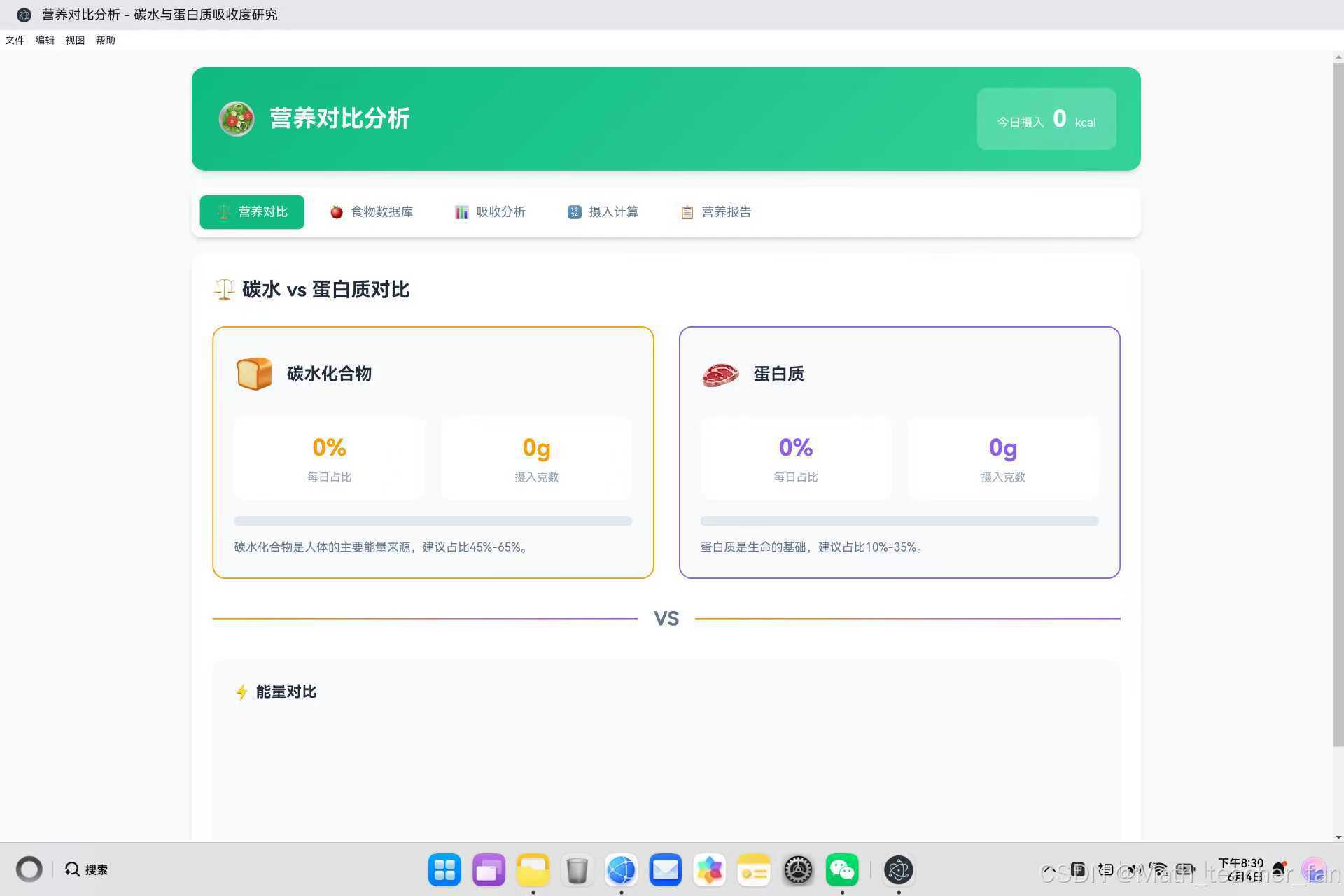
营养对比是应用的核心功能,展示碳水与蛋白质的能量对比。
const CompareModule = {
    init() {
        this.updateComparison();
        this.updateEnergyChart();
    },

    updateComparison() {
        const stats = DataManager.getTodayStats();

        // 更新每日热量
        document.getElementById('dailyCalories').textContent = stats.calories;

        // 计算碳水和蛋白质的热量贡献
        const carbCalories = stats.carb * 4;      // 碳水:4 kcal/g
        const proteinCalories = stats.protein * 4; // 蛋白质:4 kcal/g
        const totalMacroCalories = carbCalories + proteinCalories;

        // 计算占比
        const carbPercent = totalMacroCalories > 0 ? Math.round((carbCalories / totalMacroCalories) * 100) : 0;
        const proteinPercent = totalMacroCalories > 0 ? Math.round((proteinCalories / totalMacroCalories) * 100) : 0;

        // 更新UI
        document.getElementById('carbPercent').textContent = carbPercent + '%';
        document.getElementById('carbGrams').textContent = stats.carb + 'g';
        document.getElementById('carbBar').style.width = carbPercent + '%';

        document.getElementById('proteinPercent').textContent = proteinPercent + '%';
        document.getElementById('proteinGrams').textContent = stats.protein + 'g';
        document.getElementById('proteinBar').style.width = proteinPercent + '%';
    },

    updateEnergyChart() {
        const stats = DataManager.getTodayStats();
        const container = document.getElementById('energyChart');

        const carbEnergy = stats.carb * 4;
        const proteinEnergy = stats.protein * 4;

        // 计算柱状图高度
        const maxEnergy = Math.max(carbEnergy, proteinEnergy, 100);
        const carbHeight = (carbEnergy / maxEnergy) * 150;
        const proteinHeight = (proteinEnergy / maxEnergy) * 150;

        container.innerHTML = `
            <div class="energy-bar carb" style="height: ${Math.max(carbHeight, 30)}px">
                <span class="energy-value">${carbEnergy}</span>
                <span class="energy-label">碳水能量(kcal)</span>
            </div>
            <div class="energy-bar protein" style="height: ${Math.max(proteinHeight, 30)}px">
                <span class="energy-value">${proteinEnergy}</span>
                <span class="energy-label">蛋白质能量(kcal)</span>
            </div>
        `;
    }
};
代码解析:
- 热量计算:碳水和蛋白质每克均提供4千卡热量
- 占比计算:基于热量贡献计算百分比
- 动态渲染:根据计算结果动态更新进度条和柱状图
- 最小高度保护:确保柱状图至少显示30px高度
2.2 吸收曲线可视化实现
使用Canvas绘制碳水与蛋白质的吸收曲线对比。
const AbsorbModule = {
    init() {
        this.drawAbsorptionCurve();
    },

    drawAbsorptionCurve() {
        const canvas = document.getElementById('absorptionCurve');
        const ctx = canvas.getContext('2d');

        // 高清适配
        canvas.width = canvas.offsetWidth * 2;
        canvas.height = canvas.offsetHeight * 2;
        ctx.scale(2, 2);

        const width = canvas.offsetWidth;
        const height = canvas.offsetHeight;
        const padding = 40;

        // 清空画布
        ctx.clearRect(0, 0, width, height);

        // 绘制网格线
        ctx.strokeStyle = '#e2e8f0';
        ctx.lineWidth = 1;

        for (let i = 0; i <= 5; i++) {
            const y = padding + (height - 2 * padding) * i / 5;
            ctx.beginPath();
            ctx.moveTo(padding, y);
            ctx.lineTo(width - padding, y);
            ctx.stroke();
        }

        // 碳水化合物吸收曲线 (快速吸收)
        ctx.beginPath();
        ctx.strokeStyle = '#f59e0b';
        ctx.lineWidth = 3;

        for (let x = 0; x <= 240; x += 5) {
            // 使用指数衰减余弦函数模拟快速吸收曲线
            const y = padding + (height - 2 * padding) * (1 - Math.exp(-x / 40) * Math.cos(x / 30));
            if (x === 0) {
                ctx.moveTo(padding, y);
            } else {
                ctx.lineTo(padding + (width - 2 * padding) * x / 240, y);
            }
        }
        ctx.stroke();

        // 蛋白质吸收曲线 (慢速吸收)
        ctx.beginPath();
        ctx.strokeStyle = '#8b5cf6';
        ctx.lineWidth = 3;

        for (let x = 0; x <= 240; x += 5) {
            // 使用指数衰减线性增长函数模拟慢速吸收曲线
            const y = padding + (height - 2 * padding) * (1 - Math.exp(-x / 80) * (1 + x / 80));
            if (x === 0) {
                ctx.moveTo(padding, y);
            } else {
                ctx.lineTo(padding + (width - 2 * padding) * x / 240, y);
            }
        }
        ctx.stroke();

        // 绘制标签
        ctx.font = '12px sans-serif';
        ctx.fillStyle = '#f59e0b';
        ctx.fillText('碳水化合物', width - 120, padding + 20);
        ctx.fillStyle = '#8b5cf6';
        ctx.fillText('蛋白质', width - 80, padding + 40);
    }
};
代码解析:
- Canvas高清适配:通过双倍尺寸和scale实现高清显示
- 吸收曲线数学模型:
- 碳水化合物:
1 - exp(-x/40) * cos(x/30)- 快速上升后波动下降 - 蛋白质:
1 - exp(-x/80) * (1 + x/80)- 缓慢持续上升
- 碳水化合物:
- 网格绘制:提供参考线便于对比
- 颜色编码:橙色代表碳水,紫色代表蛋白质
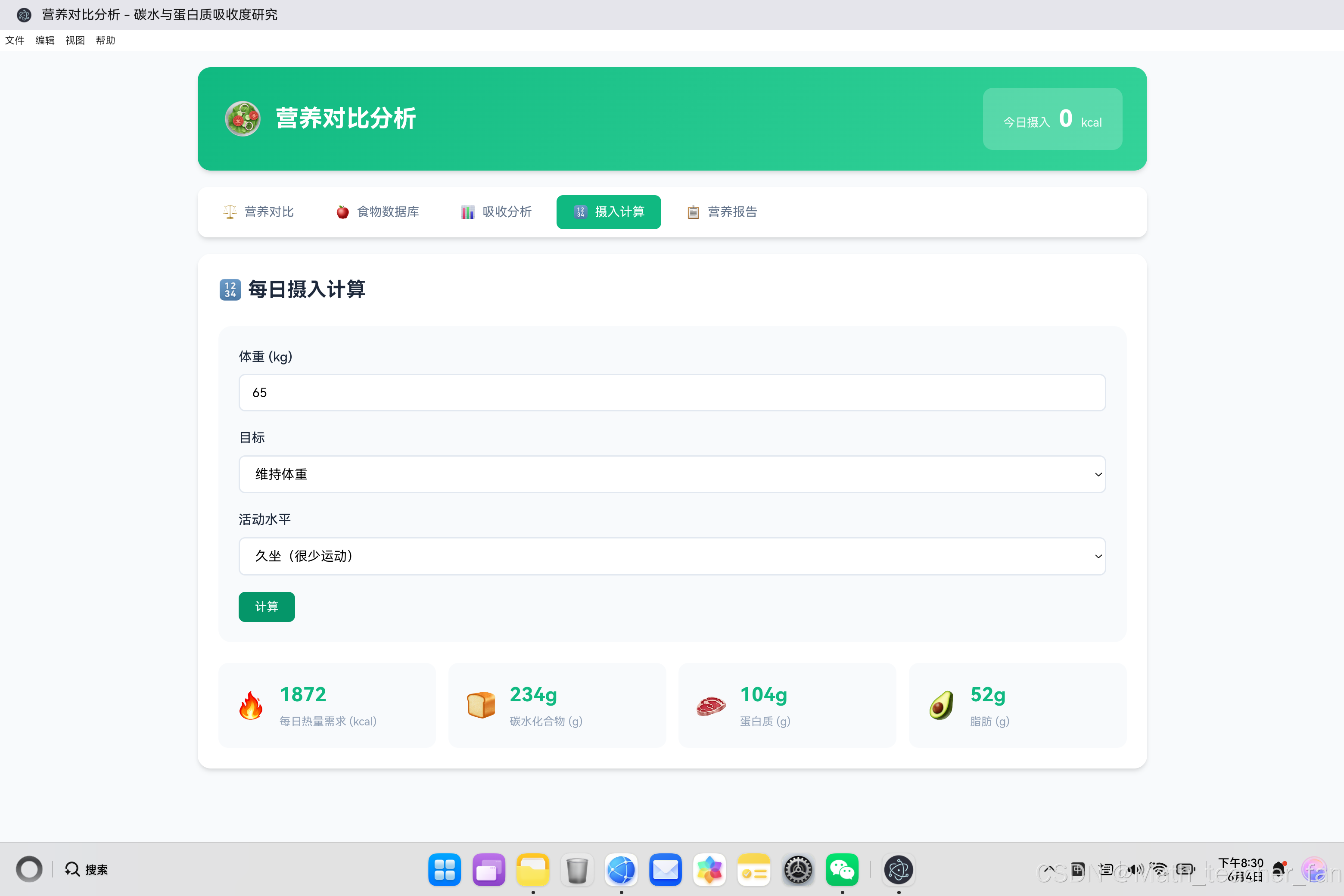
2.3 摄入计算器实现
根据用户体重和目标计算每日营养需求。
const CalculatorModule = {
    init() {
        this.calculateNutrition();
    },

    calculateNutrition() {
        const weight = parseFloat(document.getElementById('calcWeight').value) || 65;
        const goal = document.getElementById('calcGoal').value;
        const activity = document.getElementById('calcActivity').value;

        // 基础代谢率 (BMR) - 简化计算公式
        const bmr = weight * 24;  // 每公斤体重约24千卡

        // 活动系数映射
        const activityMultipliers = {
            sedentary: 1.2,      // 久坐
            light: 1.375,        // 轻度活动
            moderate: 1.55,      // 中度活动
            active: 1.725        // 高度活动
        };

        // 目标系数映射
        const goalMultipliers = {
            maintain: 1.0,        // 维持体重
            lose: 0.8,           // 减重(减少20%)
            gain: 1.2            // 增肌(增加20%)
        };

        // 每日总能量消耗 (TDEE)
        const tdee = bmr * activityMultipliers[activity] * goalMultipliers[goal];

        // 计算各营养素目标
        const calories = Math.round(tdee);
        const carb = Math.round((calories * 0.5) / 4);      // 碳水占50%
        const protein = Math.round(weight * 1.6);           // 每公斤体重1.6g蛋白质
        const fat = Math.round((calories * 0.25) / 9);      // 脂肪占25%

        // 更新显示
        document.getElementById('resultCalories').textContent = calories;
        document.getElementById('resultCarb').textContent = carb + 'g';
        document.getElementById('resultProtein').textContent = protein + 'g';
        document.getElementById('resultFat').textContent = fat + 'g';
    }
};
代码解析:
- BMR计算:简化公式,每公斤体重约24千卡
- TDEE计算:BMR × 活动系数 × 目标系数
- 营养素分配:
- 碳水化合物:50%热量
- 蛋白质:每公斤体重1.6克
- 脂肪:25%热量
2.4 数据管理模块实现
统一的数据管理接口确保数据持久化和一致性。
const DataManager = {
    getFoods() {
        return JSON.parse(localStorage.getItem('nutrition_foods') || JSON.stringify(foodDatabase));
    },

    saveFoods(foods) {
        localStorage.setItem('nutrition_foods', JSON.stringify(foods));
    },

    getDailyRecords() {
        return JSON.parse(localStorage.getItem('nutrition_records') || '[]');
    },

    saveDailyRecords(records) {
        localStorage.setItem('nutrition_records', JSON.stringify(records));
    },

    addRecord(food, amount) {
        const records = this.getDailyRecords();
        const today = new Date().toISOString().split('T')[0];

        // 计算实际摄入的营养成分
        const carb = (food.carb / 100) * amount;
        const protein = (food.protein / 100) * amount;
        const fat = (food.fat / 100) * amount;
        const calorie = (food.calorie / 100) * amount;

        records.push({
            id: Date.now(),
            foodId: food.id,
            name: food.name,
            icon: food.icon,
            amount,
            carb: Math.round(carb * 10) / 10,
            protein: Math.round(protein * 10) / 10,
            fat: Math.round(fat * 10) / 10,
            calorie: Math.round(calorie),
            date: today
        });

        this.saveDailyRecords(records);
        return records;
    },

    getTodayStats() {
        const records = this.getDailyRecords();
        const today = new Date().toISOString().split('T')[0];
        const todayRecords = records.filter(r => r.date === today);

        return todayRecords.reduce((acc, r) => ({
            calories: acc.calories + r.calorie,
            carb: acc.carb + r.carb,
            protein: acc.protein + r.protein,
            fat: acc.fat + r.fat,
            count: acc.count + 1
        }), { calories: 0, carb: 0, protein: 0, fat: 0, count: 0 });
    }
};
代码解析:
- 数据存储:使用localStorage实现本地持久化
- 默认数据:首次使用时加载预设食物数据库
- 营养计算:根据食物营养成分和摄入量计算实际摄入
- 统计聚合:使用reduce方法计算今日总摄入
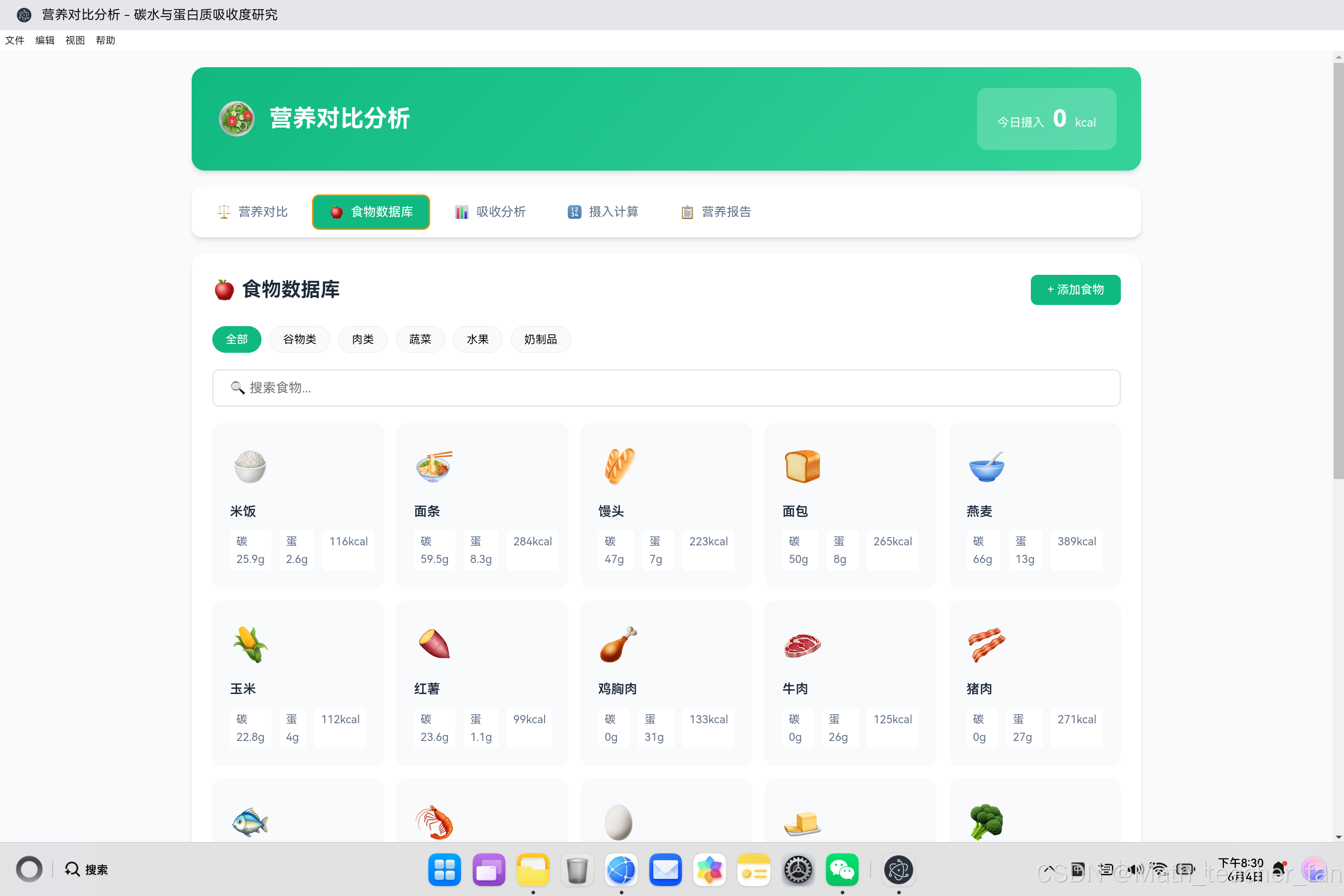
三、食物数据库设计
3.1 食物数据模型
// 食物数据库结构
const foodDatabase = [
    {
        id: 1,
        name: '米饭',
        icon: '🍚',
        category: 'grain',
        carb: 25.9,
        protein: 2.6,
        fat: 0.3,
        calorie: 116
    },
    {
        id: 8,
        name: '鸡胸肉',
        icon: '🍗',
        category: 'meat',
        carb: 0.0,
        protein: 31.0,
        fat: 1.2,
        calorie: 133
    },
    // ... 更多食物数据
];
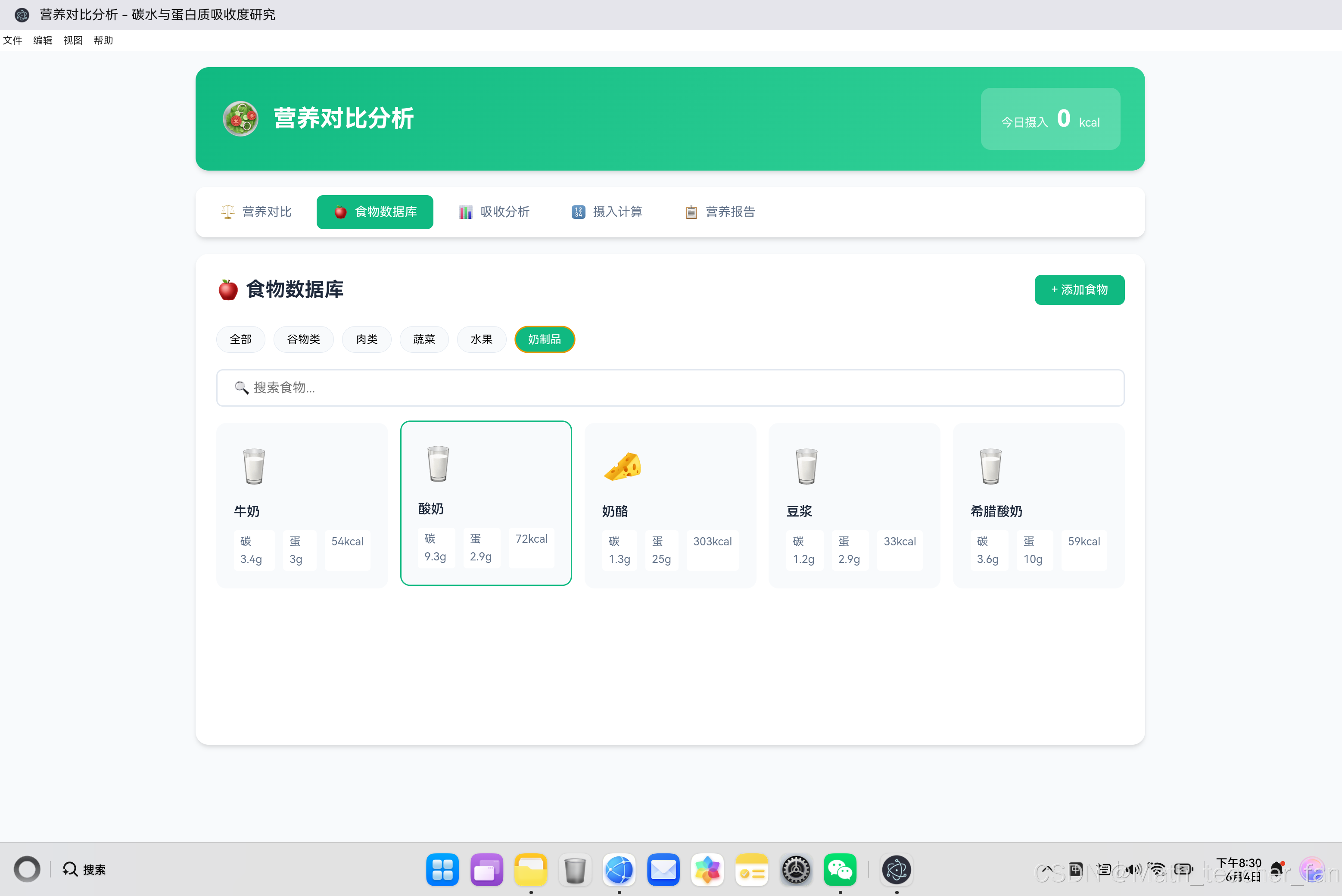
3.2 食物分类
| 分类 | 图标 | 食物数量 | 特点 |
|---|---|---|---|
| 谷物类 | 🌾 | 7种 | 高碳水、低蛋白质 |
| 肉类 | 🥩 | 7种 | 高蛋白、低碳水 |
| 蔬菜类 | 🥬 | 6种 | 低热量、高纤维 |
| 水果类 | 🍎 | 5种 | 中等碳水、维生素丰富 |
| 奶制品 | 🥛 | 5种 | 均衡营养 |
3.3 搜索和筛选功能
searchFoods() {
    const searchValue = document.getElementById('foodSearch').value.toLowerCase();
    const foods = DataManager.getFoods();

    let filtered = foods;

    // 分类筛选
    if (currentCategory !== 'all') {
        filtered = filtered.filter(f => f.category === currentCategory);
    }

    // 关键词搜索
    if (searchValue) {
        filtered = filtered.filter(f => f.name.toLowerCase().includes(searchValue));
    }

    // 渲染结果
    this.renderFoods(filtered);
}
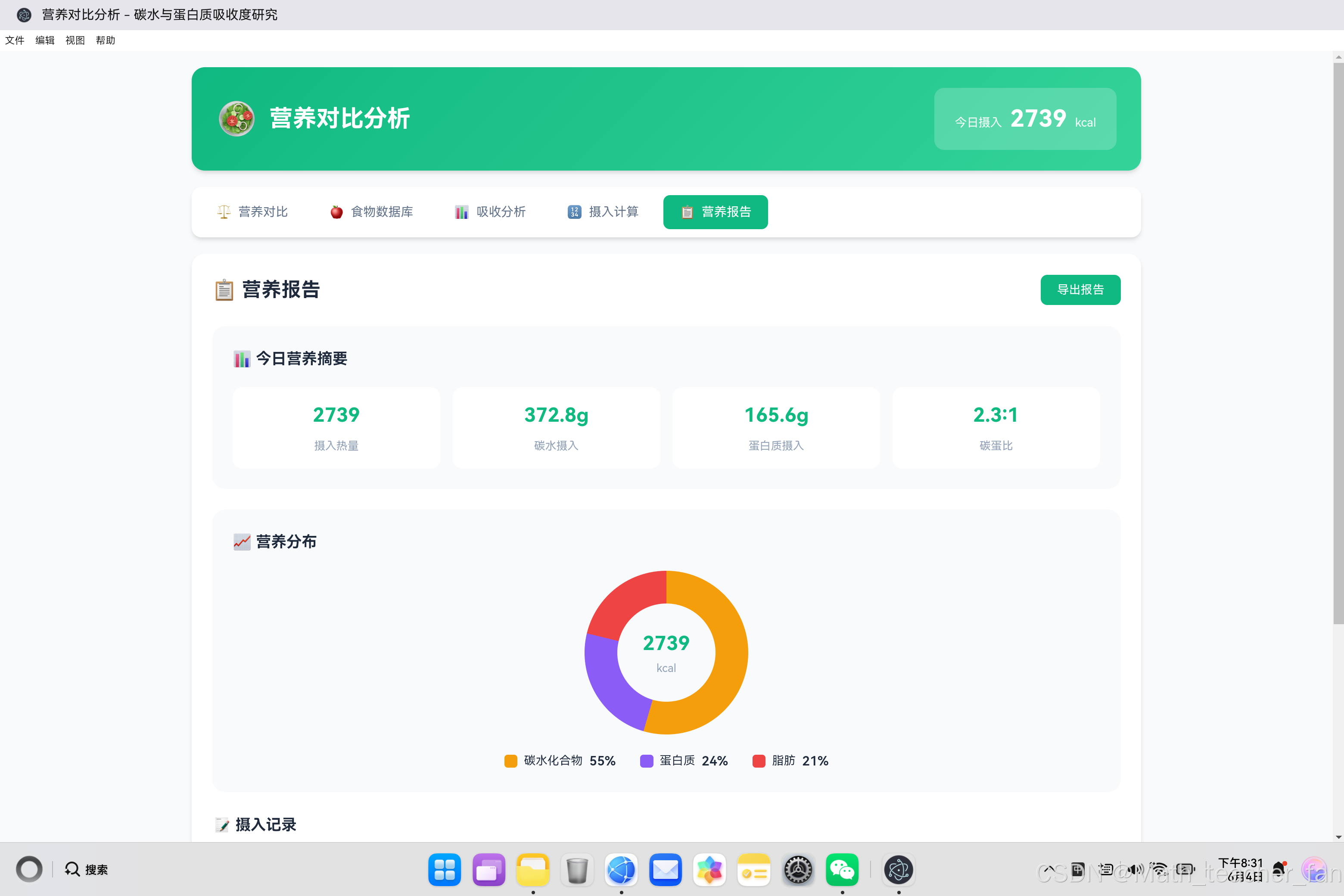
四、营养报告模块
4.1 饼图可视化
updateReport() {
    const stats = DataManager.getTodayStats();

    // 计算各营养素热量占比
    const total = stats.carb * 4 + stats.protein * 4 + stats.fat * 9;
    const carbDegree = total > 0 ? ((stats.carb * 4) / total) * 360 : 0;
    const proteinDegree = total > 0 ? ((stats.protein * 4) / total) * 360 : 0;

    // 使用CSS conic-gradient绘制饼图
    const pieChart = document.getElementById('pieChart');
    pieChart.style.background = `conic-gradient(
        #f59e0b 0deg,
        #f59e0b ${carbDegree}deg,
        #8b5cf6 ${carbDegree}deg,
        #8b5cf6 ${carbDegree + proteinDegree}deg,
        #ef4444 ${carbDegree + proteinDegree}deg,
        #ef4444 360deg
    )`;

    // 更新图例
    document.getElementById('legendCarb').textContent = total > 0 ? Math.round((stats.carb * 4 / total) * 100) + '%' : '0%';
    document.getElementById('legendProtein').textContent = total > 0 ? Math.round((stats.protein * 4 / total) * 100) + '%' : '0%';
    document.getElementById('legendFat').textContent = total > 0 ? Math.round((stats.fat * 9 / total) * 100) + '%' : '0%';
}
技术要点:
- CSS conic-gradient:纯CSS实现饼图,无需Canvas
- 动态计算角度:根据营养成分比例计算扇形角度
- 图例同步更新:保持图例与饼图数据一致
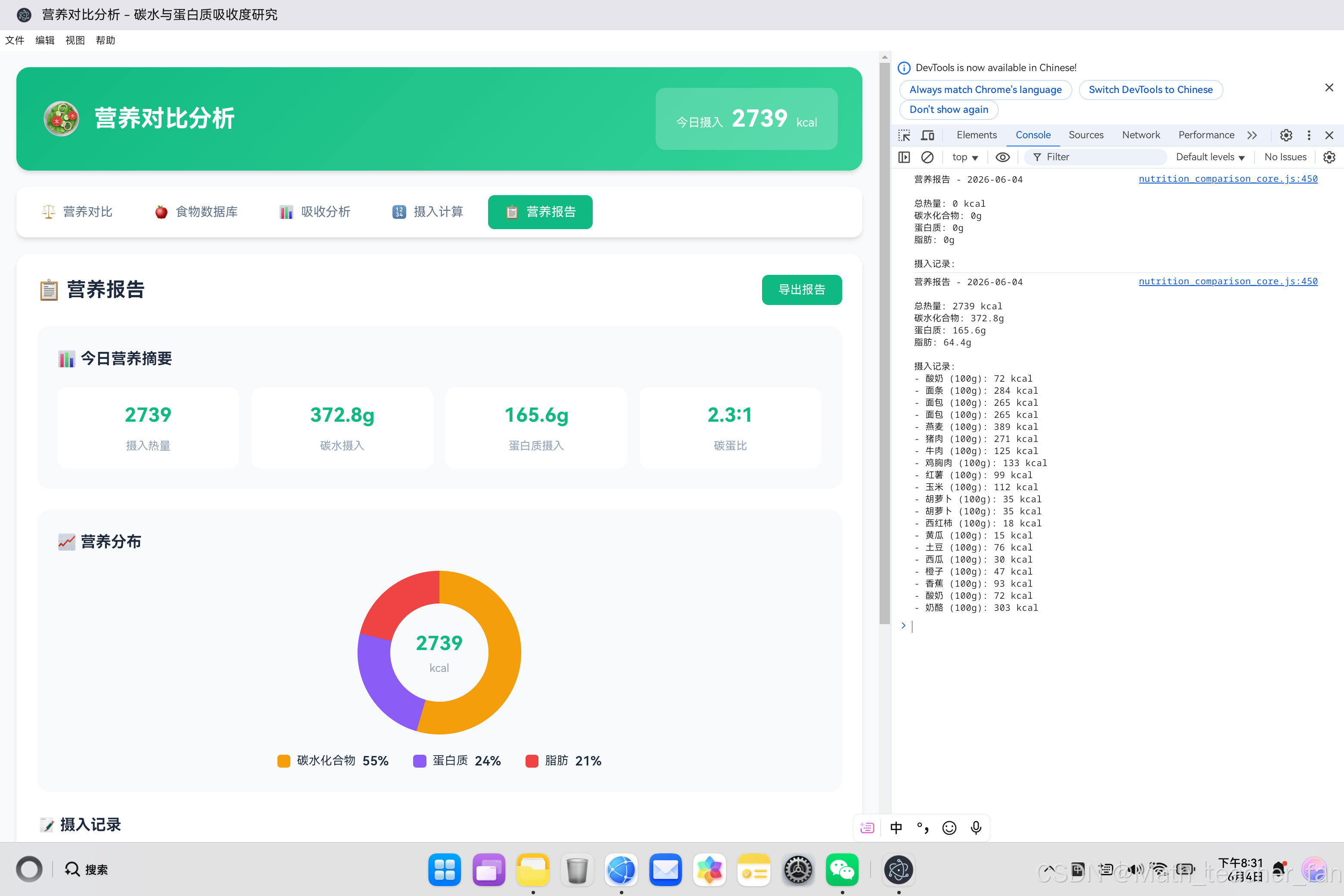
4.2 记录导出功能
exportReport() {
    const stats = DataManager.getTodayStats();
    const records = DataManager.getDailyRecords();
    const today = new Date().toISOString().split('T')[0];
    const todayRecords = records.filter(r => r.date === today);

    let report = `营养报告 - ${today}\n\n`;
    report += `总热量: ${stats.calories} kcal\n`;
    report += `碳水化合物: ${stats.carb}g\n`;
    report += `蛋白质: ${stats.protein}g\n`;
    report += `脂肪: ${stats.fat}g\n\n`;
    report += `摄入记录:\n`;

    todayRecords.forEach(r => {
        report += `- ${r.name} (${r.amount}g): ${r.calorie} kcal\n`;
    });

    console.log(report);
    UIManager.showToast('报告已生成,请查看控制台');
}
五、UI设计与交互体验
5.1 视觉设计风格
色彩方案:
- 主色调:绿色(#10b981)- 代表健康、自然
- 碳水色:橙色(#f59e0b)- 代表能量、快速
- 蛋白质色:紫色(#8b5cf6)- 代表智慧、缓慢
- 脂肪色:红色(#ef4444)- 代表热量
布局特点:
- 卡片式设计,信息层次清晰
- 响应式布局,适配不同屏幕尺寸
- 渐变背景和阴影效果,增强视觉层次感
5.2 营养对比卡片
<div class="comparison-cards">
    <div class="comparison-card carb">
        <div class="card-header">
            <span class="card-icon">🍞</span>
            <h3>碳水化合物</h3>
        </div>
        <div class="card-stats">
            <div class="stat-item">
                <span class="stat-value">50%</span>
                <span class="stat-label">每日占比</span>
            </div>
            <div class="stat-item">
                <span class="stat-value">200g</span>
                <span class="stat-label">摄入克数</span>
            </div>
        </div>
        <div class="comparison-bar">
            <div class="bar-fill carb" style="width: 50%"></div>
        </div>
    </div>

    <div class="comparison-card protein">
        <!-- 蛋白质卡片结构类似 -->
    </div>
</div>
5.3 响应式设计
@media (max-width: 768px) {
    .comparison-cards {
        grid-template-columns: 1fr;
    }

    .energy-chart {
        flex-direction: column;
        align-items: center;
        height: auto;
    }

    .calculator-results {
        grid-template-columns: 1fr;
    }
}
六、技术亮点与创新
6.1 Canvas吸收曲线绘制
使用数学函数模拟营养吸收过程:
吸收曲线数学模型

碳水化合物吸收曲线(快速吸收):
y = 1 - e^(-x/40) * cos(x/30)
特点:快速上升,30分钟达到峰值,随后波动下降

蛋白质吸收曲线(慢速吸收):
y = 1 - e^(-x/80) * (1 + x/80)
特点:缓慢上升,2小时达到峰值,持续时间长

时间轴:0 → 240分钟(4小时)
6.2 实时数据同步
所有模块共享同一数据源,实时更新:
数据流向
┌─────────────────────┐
│    添加食物记录      │
└─────────┬───────────┘
          ▼
┌─────────────────────┐
│   DataManager       │ ← 核心数据管理
└─────────┬───────────┘
          ▼
┌─────────────────────────────────────────────┐
│                                           │
▼                                           ▼
CompareModule                        ReportModule
(营养对比)                          (营养报告)
│                                           │
▼                                           ▼
食物数据库                           摄入计算器
6.3 科学计算模型
// 每日热量需求计算公式
const tdee = bmr * activityMultiplier * goalMultiplier;

// 营养素分配原则
// 碳水化合物:45%-65% → 推荐50%
// 蛋白质:10%-35% → 推荐每公斤体重1.6g
// 脂肪:20%-35% → 推荐25%

// 热量换算
// 碳水化合物:1g = 4 kcal
// 蛋白质:1g = 4 kcal
// 脂肪:1g = 9 kcal
七、总结与展望
7.1 项目成果
| 功能模块 | 状态 | 核心特性 |
|---|---|---|
| 营养对比 | ✅ | 碳水vs蛋白质对比、能量柱状图 |
| 食物数据库 | ✅ | 30种食物、分类筛选、搜索 |
| 吸收分析 | ✅ | Canvas曲线绘制、影响因素 |
| 摄入计算 | ✅ | BMR/TDEE计算、目标导向 |
| 营养报告 | ✅ | 饼图展示、记录导出 |
7.2 未来规划
- AI智能推荐:根据用户数据提供个性化饮食建议
- 运动追踪:结合运动数据调整营养需求
- 云端同步:支持多设备数据同步
- 社区分享:分享饮食计划和成果
7.3 技术价值
营养对比分析应用展示了如何使用Web技术栈在鸿蒙PC平台上开发健康类应用,为开发者提供了以下参考:
- Canvas科学数据可视化技术
- 数学模型在前端的应用
- 营养计算算法实现
- 用户交互体验设计
通过本项目的实践,开发者可以快速掌握健康类应用开发的核心技术,为构建更多优秀应用奠定基础。

AtomGit 是由开放原子开源基金会联合 CSDN 等生态伙伴共同推出的新一代开源与人工智能协作平台。平台坚持“开放、中立、公益”的理念,把代码托管、模型共享、数据集托管、智能体开发体验和算力服务整合在一起,为开发者提供从开发、训练到部署的一站式体验。
更多推荐
 0
0 0
0- 0


 已为社区贡献19条内容

所有评论(0)