DINOv3 密集特征可视化 (OpenVINO)
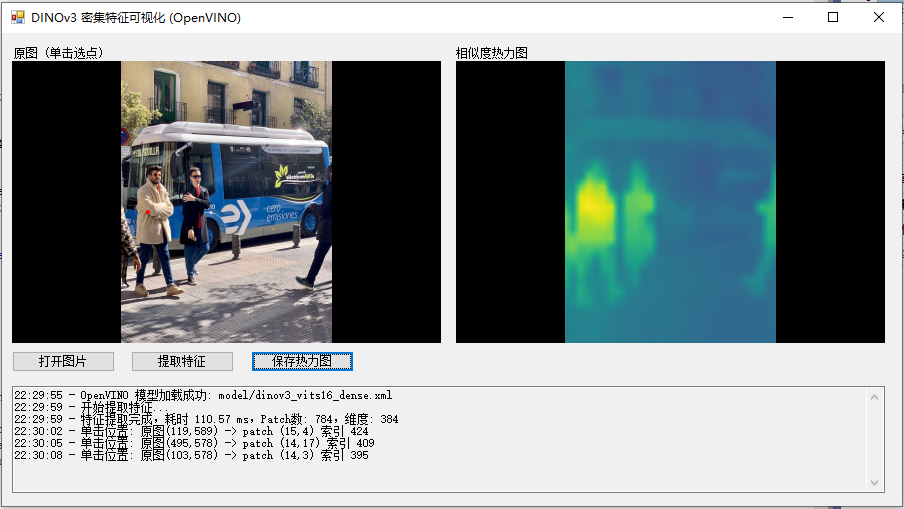
Form1.cs
using OpenCvSharp;
using OpenVinoSharp;
using System;
using System.Collections.Generic;
using System.Diagnostics.Eventing.Reader;
using System.Drawing;
using System.Drawing.Imaging;
using System.Linq;
using System.Windows.Forms;
using static System.Windows.Forms.VisualStyles.VisualStyleElement;

namespace Onnx_Demo
{
    public partial class Form1 : Form
    {
        // 配置
        private readonly string modelPath = "model/dinov3_vits16_dense.xml";
        private const int InputSize = 448;          // 必须与导出时一致
        private const int PatchSize = 16;
        private int GridSize => InputSize / PatchSize;   // 28
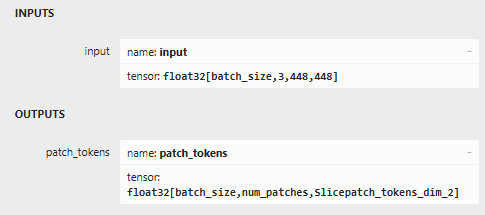
        private const int FeatureDim = 384;        // ViT-Small: 384  ViT-Base: 768  ViT-Large 1024  [batch_size, 784, 384] 即为:对于每个输入图像,输出 784 个局部区域的特征向量,每个向量 384 维

        private Core ovCore;
        private CompiledModel compiledModel;
        private InferRequest inferRequest;
        private float[,] patchFeatures;             // [NumPatches, FeatureDim]
        private Mat originalImage;                  // 原始图像 (BGR)
        private bool featuresReady = false;

        public Form1()
        {
            InitializeComponent();
            InitializeModel();
            AttachEvents();
        }

        private void Form1_Load(object sender, EventArgs e)
        {
            string imagePath = "test_img/bus.jpg";
            originalImage = Cv2.ImRead(imagePath, ImreadModes.Color);
            pictureBox1.Image = Image.FromFile(imagePath);
        }

        private void InitializeModel()
        {
            try
            {
                ovCore = new Core();
                var model = ovCore.read_model(modelPath);
                compiledModel = ovCore.compile_model(model, "GPU.0");
                inferRequest = compiledModel.create_infer_request();
                LogMessage($"OpenVINO 模型加载成功: {modelPath}");
            }
            catch (Exception ex)
            {
                LogMessage($"模型加载失败: {ex.Message}");
                MessageBox.Show("请确保 dinov3_vits16_dense.onnx 文件存在且 OpenVINO 环境正常。", "错误", MessageBoxButtons.OK, MessageBoxIcon.Error);
            }
        }

        private void AttachEvents()
        {
            this.pictureBox1.MouseClick += PictureBox1_MouseClick;
        }

        private void LogMessage(string msg)
        {
            if (textBox1.InvokeRequired)
                textBox1.Invoke(new Action(() => textBox1.AppendText($"{DateTime.Now:HH:mm:ss} - {msg}\r\n")));
            else
                textBox1.AppendText($"{DateTime.Now:HH:mm:ss} - {msg}\r\n");
        }

        private void button1_Click(object sender, EventArgs e)
        {
            using (OpenFileDialog ofd = new OpenFileDialog())
            {
                ofd.Filter = "图像文件|*.bmp;*.jpg;*.jpeg;*.png";
                if (ofd.ShowDialog() == DialogResult.OK)
                {
                    string imagePath = ofd.FileName;
                    originalImage = Cv2.ImRead(imagePath, ImreadModes.Color);
                    pictureBox1.Image = Image.FromFile(imagePath);
                    featuresReady = false;
                    pictureBox2.Image = null;
                    LogMessage($"已加载图片: {imagePath}");
                }
            }
        }

        private void button2_Click(object sender, EventArgs e)
        {
            if (originalImage == null)
            {
                MessageBox.Show("请先打开图片。", "提示", MessageBoxButtons.OK, MessageBoxIcon.Warning);
                return;
            }
            if (inferRequest == null)
            {
                MessageBox.Show("模型未正确加载。", "错误", MessageBoxButtons.OK, MessageBoxIcon.Error);
                return;
            }

            button2.Enabled = false;
            pictureBox2.Image = null;
            LogMessage("开始提取特征...");
            Application.DoEvents();

            try
            {
                // 预处理并获取输入张量
                var inputTensor = Preprocess(originalImage);
                // 设置输入
                inferRequest.set_input_tensor(inputTensor);
                DateTime start = DateTime.Now;
                // 执行推理
                inferRequest.infer();
                DateTime end = DateTime.Now;
                // 获取输出张量(假设输出名称为 "patch_tokens")
                var outputTensor = inferRequest.get_output_tensor("patch_tokens");
                var shape = outputTensor.shape;
                int batch = (int)shape[0];
                int numPatches = (int)shape[1];
                int actualDim = (int)shape[2];

                if (numPatches != GridSize * GridSize)
                    throw new Exception($"Patch数量错误: 预期 {GridSize * GridSize}, 实际 {numPatches}");
                if (actualDim != FeatureDim)
                    LogMessage($"特征维度 {actualDim} (预期 {FeatureDim}),继续...");

                float[] flat = outputTensor.get_data<float>((int)outputTensor.size);
                patchFeatures = new float[numPatches, actualDim];
                for (int i = 0; i < numPatches; i++)
                    for (int j = 0; j < actualDim; j++)
                        patchFeatures[i, j] = flat[i * actualDim + j];

                featuresReady = true;
                LogMessage($"特征提取完成,耗时 {(end - start).TotalMilliseconds:F2} ms,Patch数: {numPatches},维度: {actualDim}");
                //MessageBox.Show("特征已就绪,请在左侧图片上单击选择查询点。", "提示", MessageBoxButtons.OK, MessageBoxIcon.Information);
            }
            catch (Exception ex)
            {
                LogMessage($"特征提取失败: {ex.Message}");
                MessageBox.Show($"推理错误: {ex.Message}", "错误", MessageBoxButtons.OK, MessageBoxIcon.Error);
            }
            finally
            {
                button2.Enabled = true;
            }
        }

        private void PictureBox1_MouseClick(object sender, MouseEventArgs e)
        {
            if (!featuresReady || patchFeatures == null)
            {
                MessageBox.Show("请先点击“提取特征”按钮。", "提示", MessageBoxButtons.OK, MessageBoxIcon.Information);
                return;
            }
            if (originalImage == null) return;

            int clickX = e.X;
            int clickY = e.Y;

            Rectangle imgRect = GetImageRectangle(pictureBox1);
            if (!imgRect.Contains(clickX, clickY))
            {
                LogMessage("点击位置不在图像区域内。");
                return;
            }

            float scaleX = (float)originalImage.Width / imgRect.Width;
            float scaleY = (float)originalImage.Height / imgRect.Height;
            int origX = (int)((clickX - imgRect.X) * scaleX);
            int origY = (int)((clickY - imgRect.Y) * scaleY);
            origX = Math.Max(0, Math.Min(origX, originalImage.Width - 1));
            origY = Math.Max(0, Math.Min(origY, originalImage.Height - 1));

            float modelX = origX * (float)InputSize / originalImage.Width;
            float modelY = origY * (float)InputSize / originalImage.Height;
            int patchCol = (int)(modelX / PatchSize);
            int patchRow = (int)(modelY / PatchSize);
            patchCol = Math.Min(patchCol, GridSize - 1);
            patchRow = Math.Min(patchRow, GridSize - 1);
            int targetIdx = patchRow * GridSize + patchCol;

            LogMessage($"单击位置: 原图({origX},{origY}) -> patch ({patchRow},{patchCol}) 索引 {targetIdx}");

            float[,] simMap = ComputeSimilarityMap(patchFeatures, targetIdx, GridSize);
            Bitmap heatmap = GenerateHeatmap(simMap, originalImage.Width, originalImage.Height);
            pictureBox2.Image = heatmap;

            Image markedImage = DrawMarkerOnImage(originalImage, new OpenCvSharp.Point(origX, origY));
            pictureBox1.Image = markedImage;
        }

        // ========== 辅助函数 ==========
        private Tensor Preprocess(Mat bgrImage)
        {
            // BGR -> RGB, resize to InputSize x InputSize
            Mat rgb = new Mat();
            Cv2.CvtColor(bgrImage, rgb, ColorConversionCodes.BGR2RGB);
            Mat resized = new Mat();
            Cv2.Resize(rgb, resized, new OpenCvSharp.Size(InputSize, InputSize));

            // 归一化: [0,1] -> 减均值除标准差
            resized.ConvertTo(resized, MatType.CV_32FC3, 1.0 / 255.0);
            float[] mean = { 0.485f, 0.456f, 0.406f };
            float[] std = { 0.229f, 0.224f, 0.225f };

            int h = InputSize, w = InputSize;
            float[] inputData = new float[3 * h * w];
            for (int y = 0; y < h; y++)
            {
                for (int x = 0; x < w; x++)
                {
                    Vec3f pixel = resized.At<Vec3f>(y, x); // R,G,B
                    inputData[0 * h * w + y * w + x] = (pixel.Item0 - mean[0]) / std[0];
                    inputData[1 * h * w + y * w + x] = (pixel.Item1 - mean[1]) / std[1];
                    inputData[2 * h * w + y * w + x] = (pixel.Item2 - mean[2]) / std[2];
                }
            }
            resized.Dispose();
            rgb.Dispose();

            // 创建 OpenVINO Tensor (NCHW)
            var shape = new long[] { 1, 3, h, w };
            Tensor tensor = new Tensor(new Shape(shape), inputData);
            return tensor;
        }

        private float[,] ComputeSimilarityMap(float[,] feats, int targetIdx, int gridSize)
        {
            int numPatches = feats.GetLength(0);
            int dim = feats.GetLength(1);
            float[,] sim = new float[gridSize, gridSize];

            float[] target = new float[dim];
            for (int j = 0; j < dim; j++) target[j] = feats[targetIdx, j];
            float targetNorm = (float)Math.Sqrt(target.Sum(v => v * v));

            const float eps = 1e-8f;
            for (int idx = 0; idx < numPatches; idx++)
            {
                float[] curr = new float[dim];
                for (int j = 0; j < dim; j++) curr[j] = feats[idx, j];
                float currNorm = (float)Math.Sqrt(curr.Sum(v => v * v));
                float dot = 0;
                for (int j = 0; j < dim; j++) dot += curr[j] * target[j];
                float cos = dot / (currNorm * targetNorm + eps);
                int row = idx / gridSize;
                int col = idx % gridSize;
                sim[row, col] = cos;
            }
            return sim;
        }

        private Bitmap GenerateHeatmap(float[,] simMap, int outW, int outH)
        {
            int g = GridSize;
            float[,] upsampled = BilinearUpsample(simMap, outH, outW);
            var colors = GetViridisColormap();
            Bitmap bmp = new Bitmap(outW, outH);
            for (int y = 0; y < outH; y++)
            {
                for (int x = 0; x < outW; x++)
                {
                    float val = upsampled[y, x];
                    int idx = (int)(val * 255);
                    idx = Math.Max(0, Math.Min(255, idx));
                    bmp.SetPixel(x, y, colors[idx]);
                }
            }
            return bmp;
        }

        private float[,] BilinearUpsample(float[,] src, int newH, int newW)
        {
            int srcH = src.GetLength(0);
            int srcW = src.GetLength(1);
            float[,] dst = new float[newH, newW];
            float scaleX = (float)(srcW - 1) / newW;
            float scaleY = (float)(srcH - 1) / newH;

            for (int y = 0; y < newH; y++)
            {
                float fy = y * scaleY;
                int y0 = (int)Math.Floor(fy);
                int y1 = Math.Min(y0 + 1, srcH - 1);
                float dy = fy - y0;
                for (int x = 0; x < newW; x++)
                {
                    float fx = x * scaleX;
                    int x0 = (int)Math.Floor(fx);
                    int x1 = Math.Min(x0 + 1, srcW - 1);
                    float dx = fx - x0;
                    float v00 = src[y0, x0];
                    float v01 = src[y0, x1];
                    float v10 = src[y1, x0];
                    float v11 = src[y1, x1];
                    float v0 = v00 * (1 - dx) + v01 * dx;
                    float v1 = v10 * (1 - dx) + v11 * dx;
                    dst[y, x] = v0 * (1 - dy) + v1 * dy;
                }
            }
            return dst;
        }

        private Color[] GetViridisColormap()
        {
            Mat cm = new Mat(1, 256, MatType.CV_8UC3);
            for (int i = 0; i < 256; i++)
                cm.Set<Vec3b>(0, i, new Vec3b((byte)i, (byte)i, (byte)i));
            Cv2.ApplyColorMap(cm, cm, ColormapTypes.Viridis);
            Color[] colors = new Color[256];
            for (int i = 0; i < 256; i++)
            {
                Vec3b bgr = cm.At<Vec3b>(0, i);
                colors[i] = Color.FromArgb(bgr.Item2, bgr.Item1, bgr.Item0);
            }
            cm.Dispose();
            return colors;
        }

        private Image DrawMarkerOnImage(Mat bgrImg, OpenCvSharp.Point pixel)
        {
            Mat marked = bgrImg.Clone();
            Cv2.Circle(marked, new OpenCvSharp.Point(pixel.X, pixel.Y), 8, new Scalar(0, 0, 255), -1);
            return new Bitmap(marked.ToMemoryStream());
        }

        private Rectangle GetImageRectangle(PictureBox picBox)
        {
            if (picBox.Image == null) return Rectangle.Empty;
            PictureBoxSizeMode mode = picBox.SizeMode;
            int imgW = picBox.Image.Width;
            int imgH = picBox.Image.Height;
            int ctrlW = picBox.Width;
            int ctrlH = picBox.Height;

            if (mode == PictureBoxSizeMode.Zoom)
            {
                float scale = Math.Min((float)ctrlW / imgW, (float)ctrlH / imgH);
                int drawW = (int)(imgW * scale);
                int drawH = (int)(imgH * scale);
                int x = (ctrlW - drawW) / 2;
                int y = (ctrlH - drawH) / 2;
                return new Rectangle(x, y, drawW, drawH);
            }
            else if (mode == PictureBoxSizeMode.Normal || mode == PictureBoxSizeMode.AutoSize)
            {
                return new Rectangle(0, 0, imgW, imgH);
            }
            else // StretchImage
            {
                return new Rectangle(0, 0, ctrlW, ctrlH);
            }
        }

        private void button3_Click(object sender, EventArgs e)
        {
            if (pictureBox2.Image == null)
            {
                MessageBox.Show("请先进行推理!", "提示", MessageBoxButtons.OK, MessageBoxIcon.Information);
                return;
            }

            SaveFileDialog sfd = new SaveFileDialog();
            sfd.Title = "保存图像";
            sfd.Filter = "PNG图片 (*.png)|*.png|JPEG图片 (*.jpg)|*.jpg|BMP图片 (*.bmp)|*.bmp";
            sfd.FilterIndex = 1;
            if (sfd.ShowDialog() == DialogResult.OK)
            {
                string ext = System.IO.Path.GetExtension(sfd.FileName).ToLower();
                ImageFormat format = ImageFormat.Png;
                if (ext == ".jpg" || ext == ".jpeg")
                    format = ImageFormat.Jpeg;
                else if (ext == ".bmp")
                    format = ImageFormat.Bmp;

                using (var stream = pictureBox2.Image)
                using (var bitmap = new Bitmap(stream))
                {
                    bitmap.Save(sfd.FileName, format);
                }
                MessageBox.Show($"保存成功!\n位置: {sfd.FileName}", "完成", MessageBoxButtons.OK, MessageBoxIcon.Information);
            }
        }
    }
}
Form1.designer.cs
namespace Onnx_Demo
{
    partial class Form1
    {
        private System.ComponentModel.IContainer components = null;
        private System.Windows.Forms.PictureBox pictureBox1;
        private System.Windows.Forms.PictureBox pictureBox2;
        private System.Windows.Forms.Button button1;
        private System.Windows.Forms.Button button2;
        private System.Windows.Forms.Button button3;
        private System.Windows.Forms.TextBox textBox1;
        private System.Windows.Forms.Label label1;
        private System.Windows.Forms.Label label2;

        protected override void Dispose(bool disposing)
        {
            if (disposing && (components != null))
            {
                components.Dispose();
            }
            base.Dispose(disposing);
        }

        private void InitializeComponent()
        {
            this.pictureBox1 = new System.Windows.Forms.PictureBox();
            this.pictureBox2 = new System.Windows.Forms.PictureBox();
            this.button1 = new System.Windows.Forms.Button();
            this.button2 = new System.Windows.Forms.Button();
            this.button3 = new System.Windows.Forms.Button();
            this.textBox1 = new System.Windows.Forms.TextBox();
            this.label1 = new System.Windows.Forms.Label();
            this.label2 = new System.Windows.Forms.Label();
            ((System.ComponentModel.ISupportInitialize)(this.pictureBox1)).BeginInit();
            ((System.ComponentModel.ISupportInitialize)(this.pictureBox2)).BeginInit();
            this.SuspendLayout();
            //
            // pictureBox1
            //
            this.pictureBox1.BackColor = System.Drawing.Color.Black;
            this.pictureBox1.Location = new System.Drawing.Point(12, 40);
            this.pictureBox1.Name = "pictureBox1";
            this.pictureBox1.Size = new System.Drawing.Size(500, 400);
            this.pictureBox1.SizeMode = System.Windows.Forms.PictureBoxSizeMode.Zoom;
            this.pictureBox1.TabIndex = 0;
            this.pictureBox1.TabStop = false;
            //
            // pictureBox2
            //
            this.pictureBox2.BackColor = System.Drawing.Color.Black;
            this.pictureBox2.Location = new System.Drawing.Point(530, 40);
            this.pictureBox2.Name = "pictureBox2";
            this.pictureBox2.Size = new System.Drawing.Size(500, 400);
            this.pictureBox2.SizeMode = System.Windows.Forms.PictureBoxSizeMode.Zoom;
            this.pictureBox2.TabIndex = 1;
            this.pictureBox2.TabStop = false;
            //
            // button1
            //
            this.button1.Location = new System.Drawing.Point(12, 450);
            this.button1.Name = "button1";
            this.button1.Size = new System.Drawing.Size(120, 30);
            this.button1.TabIndex = 2;
            this.button1.Text = "打开图片";
            this.button1.UseVisualStyleBackColor = true;
            this.button1.Click += new System.EventHandler(this.button1_Click);
            //
            // button2
            //
            this.button2.Location = new System.Drawing.Point(150, 450);
            this.button2.Name = "button2";
            this.button2.Size = new System.Drawing.Size(120, 30);
            this.button2.TabIndex = 3;
            this.button2.Text = "提取特征";
            this.button2.UseVisualStyleBackColor = true;
            this.button2.Click += new System.EventHandler(this.button2_Click);
            //
            // button3
            //
            this.button3.Location = new System.Drawing.Point(290, 450);
            this.button3.Name = "button3";
            this.button3.Size = new System.Drawing.Size(120, 30);
            this.button3.TabIndex = 4;
            this.button3.Text = "保存热力图";
            this.button3.UseVisualStyleBackColor = true;
            this.button3.Click += new System.EventHandler(this.button3_Click);
            //
            // textBox1
            //
            this.textBox1.Location = new System.Drawing.Point(12, 500);
            this.textBox1.Multiline = true;
            this.textBox1.Name = "textBox1";
            this.textBox1.ReadOnly = true;
            this.textBox1.ScrollBars = System.Windows.Forms.ScrollBars.Vertical;
            this.textBox1.Size = new System.Drawing.Size(1018, 150);
            this.textBox1.TabIndex = 5;
            //
            // label1
            //
            this.label1.AutoSize = true;
            this.label1.Location = new System.Drawing.Point(12, 20);
            this.label1.Name = "label1";
            this.label1.Size = new System.Drawing.Size(68, 17);
            this.label1.TabIndex = 6;
            this.label1.Text = "原图 (单击选点)";
            //
            // label2
            //
            this.label2.AutoSize = true;
            this.label2.Location = new System.Drawing.Point(527, 20);
            this.label2.Name = "label2";
            this.label2.Size = new System.Drawing.Size(68, 17);
            this.label2.TabIndex = 7;
            this.label2.Text = "相似度热力图";
            //
            // Form1
            //
            this.AutoScaleDimensions = new System.Drawing.SizeF(7F, 17F);
            this.AutoScaleMode = System.Windows.Forms.AutoScaleMode.Font;
            this.ClientSize = new System.Drawing.Size(1050, 670);
            this.Controls.Add(this.label2);
            this.Controls.Add(this.label1);
            this.Controls.Add(this.textBox1);
            this.Controls.Add(this.button3);
            this.Controls.Add(this.button2);
            this.Controls.Add(this.button1);
            this.Controls.Add(this.pictureBox2);
            this.Controls.Add(this.pictureBox1);
            this.Name = "Form1";
            this.Text = "DINOv3 密集特征可视化 (OpenVINO)";
            this.Load += new System.EventHandler(this.Form1_Load);
            ((System.ComponentModel.ISupportInitialize)(this.pictureBox1)).EndInit();
            ((System.ComponentModel.ISupportInitialize)(this.pictureBox2)).EndInit();
            this.ResumeLayout(false);
            this.PerformLayout();
        }
    }
}
Python ONNX导出脚本
import torch
import torch.nn as nn
import argparse
from dinov3.hub.backbones import load_dinov3_model

class DINOv3DenseWrapper(nn.Module):
    def __init__(self, model):
        super().__init__()
        self.model = model

    def forward(self, x):
        out = self.model.forward_features(x)  # 返回 dict
        # 提取归一化后的 patch tokens
        patch_tokens = out['x_norm_patchtokens']  # [B, N, D]
        return patch_tokens

def export_rad_dinov3(
    model_name: str,
    weight_path: str,
    output_path: str = "dinov3_dense.onnx",
    image_size: int = 448,
    batch_size: int = 1,
    opset_version: int = 17,
    device: str = "cpu"
):
    print(f"Loading {model_name} from {weight_path} ...")
    model = load_dinov3_model(model_name, pretrained_weight_path=weight_path)
    model.eval()
    model.to(device)

    wrapped = DINOv3DenseWrapper(model)
    wrapped.eval()

    dummy_input = torch.randn(batch_size, 3, image_size, image_size).to(device)

    with torch.no_grad():
        test_out = wrapped(dummy_input)
        print(f"Wrapper output shape: {test_out.shape}")   # [1, 784, 384]
        num_patches = test_out.shape[1]
        feat_dim = test_out.shape[2]
        print(f"num_patches = {num_patches}, feature_dim = {feat_dim}")

    print(f"Exporting to {output_path} ...")
    torch.onnx.export(
        wrapped,
        dummy_input,
        output_path,
        export_params=True,
        opset_version=opset_version,
        do_constant_folding=True,
        input_names=['input'],
        output_names=['patch_tokens'],
        dynamic_axes={
            'input': {0: 'batch_size', 2: 'height', 3: 'width'},
            'patch_tokens': {0: 'batch_size', 1: 'num_patches'}
        },
        verbose=False
    )

    try:
        import onnx
        onnx_model = onnx.load(output_path)
        onnx.checker.check_model(onnx_model)
        print("ONNX validation passed ✓")
    except ImportError:
        print("Install onnx for validation.")

    print(f"Model saved to {output_path}")

def main():
    parser = argparse.ArgumentParser()
    parser.add_argument('--model', type=str, required=True)
    parser.add_argument('--weight', type=str, required=True)
    parser.add_argument('--output', type=str, default='dinov3_dense.onnx')
    parser.add_argument('--image-size', type=int, default=448)
    parser.add_argument('--batch-size', type=int, default=1)
    parser.add_argument('--opset', type=int, default=17)
    parser.add_argument('--device', type=str, default='cpu')
    args = parser.parse_args()

    export_rad_dinov3(
        model_name=args.model,
        weight_path=args.weight,
        output_path=args.output,
        image_size=args.image_size,
        batch_size=args.batch_size,
        opset_version=args.opset,
        device=args.device
    )

if __name__ == "__main__":
    main()
(RAD) D:\python\RAD-main>python export_rad_manual.py ^
More? --model dinov3_vits16 ^
More? --weight ./weights/dinov3_vits16_pretrain_lvd1689m-08c60483.pth ^
More? --image-size 448 ^
More? --output dinov3_vits16_dense.onnx
Loading dinov3_vits16 from ./weights/dinov3_vits16_pretrain_lvd1689m-08c60483.pth ...
<All keys matched successfully>
Wrapper output shape: torch.Size([1, 784, 384])
num_patches = 784, feature_dim = 384
Exporting to dinov3_vits16_dense.onnx ...
D:\python\RAD-main\dinov3\layers\block.py:133: TracerWarning: Converting a tensor to a Python integer might cause the trace to be incorrect. We can't record the data flow of Python values, so this value will be treated as a constant in the future. This means that the trace might not generalize to other inputs!
sample_subset_sizes = [max(int(b * (1 - self.sample_drop_ratio)), 1) for b in b_list]
D:\python\RAD-main\dinov3\layers\attention.py:76: TracerWarning: Converting a tensor to a Python boolean might cause the trace to be incorrect. We can't record the data flow of Python values, so this value will be treated as a constant in the future. This means that the trace might not generalize to other inputs!
assert prefix >= 0
ONNX validation passed ✓
Model saved to dinov3_vits16_dense.onnx
-
784 = 输出 patch 的数量
输入图像尺寸 448×448,patch size = 16,所以每张图像被分割成(448/16) × (448/16) = 28 × 28 = 784个不重叠的 patch。每个 patch 对应图像中的一个局部区域。 -
384 = 每个 patch 的特征向量维度
这是你使用的dinov3_vits16模型的特征维度(ViT-Small 的输出维度为 384)。不同规模模型的特征维度不同:-
ViT-Small: 384
-
ViT-Base: 768
-
ViT-Large: 1024
-
因此,导出的 ONNX 模型输出 [batch_size, 784, 384] 即为:对于每个输入图像,输出 784 个局部区域的特征向量,每个向量 384 维。这些密集特征可以用于下游任务(如语义分割、对应关系匹配、可视化等)。
OpenVINO 的 mo 工具对 ONNX 的容错性比 onnx-simplifier 更强,可能能直接转换:
bash
mo --input_model dinov3_vits16_dense.onnx --output_dir ./ir/ --input_shape [1,3,448,448]
转换后测试 IR 在 GPU 上的表现:
bash
benchmark_app -m ./ir/dinov3_vits16_dense.xml -d GPU

AtomGit 是由开放原子开源基金会联合 CSDN 等生态伙伴共同推出的新一代开源与人工智能协作平台。平台坚持“开放、中立、公益”的理念,把代码托管、模型共享、数据集托管、智能体开发体验和算力服务整合在一起,为开发者提供从开发、训练到部署的一站式体验。
更多推荐


 13
13 0
0- 0


 已为社区贡献5条内容

所有评论(0)