鸿蒙Electron框架下鸿蒙PC——健康管理系统技术实现详解
欢迎加入开源鸿蒙PC社区:
https://harmonypc.csdn.net/
atomgit仓库地址:https://gitcode.com/feng8403000/mingshu_ai

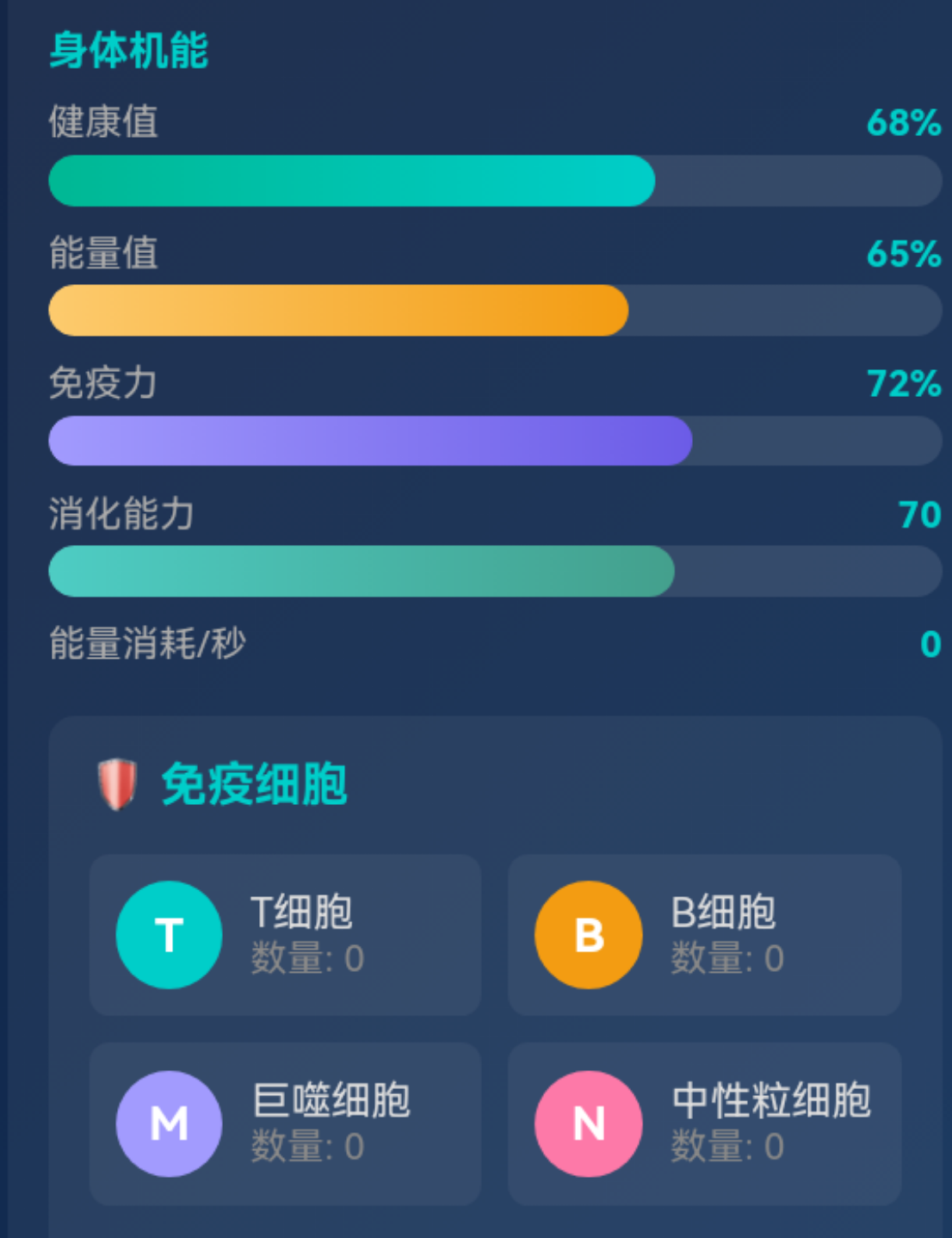
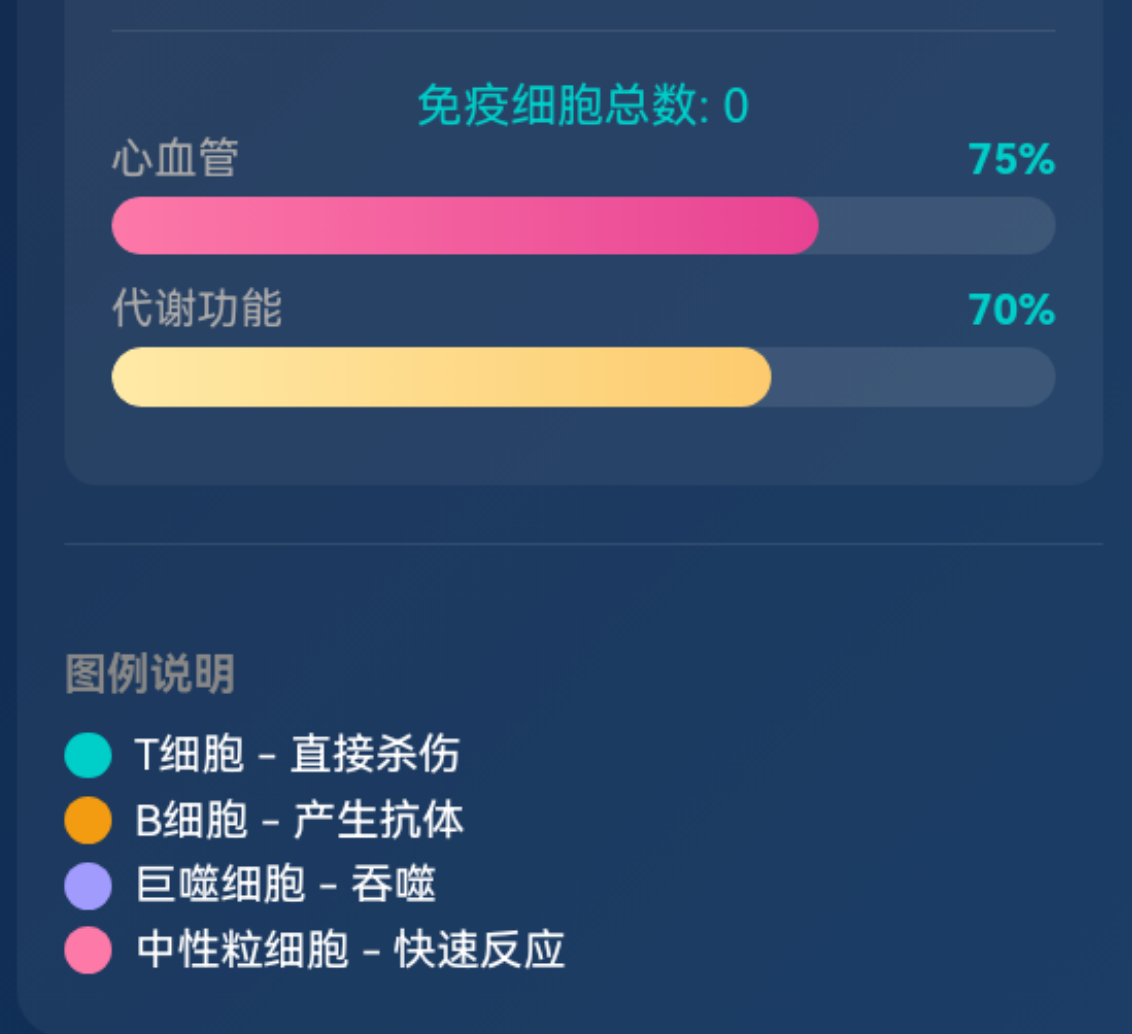
一、系统架构概述
1.1 整体架构设计
本健康管理系统是一个基于Web的AI辅助健康分析与可视化对战平台,采用Electron + OpenHarmony混合架构,前端使用原生HTML/CSS/JavaScript实现,通过Web Engine组件集成到OpenHarmony应用中。
架构层次:
| 层级 | 组件 | 职责 |
|---|---|---|
| 表现层 | HTML页面、CSS样式 | 用户界面展示 |
| 业务逻辑层 | AI技能模块、战斗系统 | 健康分析、免疫细胞模拟 |
| 数据层 | 配置文件、API响应 | 病原体配置、AI分析结果 |
| 集成层 | Electron Web Engine | OpenHarmony与Web通信 |
1.2 系统模块划分
系统主要包含以下核心模块:
- 健康信息采集模块 - 用户输入年龄、性别、身高、体重等基础信息
- AI症状诊断模块 - 基于用户症状描述进行疾病预测
- 面部健康分析模块 - 通过图片分析面部特征评估健康状况
- 机体状态分析模块 - 综合评估健康指标生成机体状态
- 免疫细胞对战模块 - 可视化展示免疫细胞与病原体的战斗过程
二、核心技术实现
2.1 AI健康建议生成系统
2.1.1 技术架构
健康建议系统采用DeepSeek-V3大语言模型作为核心推理引擎,通过精心设计的prompt工程实现结构化输出。
const HealthAdviceSkill = (function() {
    const API_URL = "https://api-ai.gitcode.com/v1/chat/completions";
    const API_KEY = "qBPRwKM_kHgbBjzzxvW9ws--";

    async function queryAI(prompt) {
        const response = await fetch(API_URL, {
            method: "POST",
            headers: {
                "Authorization": `Bearer ${API_KEY}`,
                "Content-Type": "application/json"
            },
            body: JSON.stringify({
                model: "deepseek-ai/DeepSeek-V3",
                messages: [{
                    role: "user",
                    content: prompt
                }],
                stream: false,
                max_tokens: 1024,
                temperature: 0.55,
                top_p: 0.95
            })
        });
        // 响应处理...
    }
    // 其他方法...
})();
关键技术点:
- 温度参数控制:
temperature: 0.55平衡创意性与准确性 - Top-P采样:
top_p: 0.95确保输出多样性 - Token限制:
max_tokens: 1024控制响应长度
2.1.2 响应解析机制
AI响应采用JSON格式输出,系统实现了多层解析容错机制:
function parseResponse(response) {
    try {
        let jsonStr = response.trim();

        // 步骤1:尝试提取代码块
        const codeBlockMatch = jsonStr.match(/```(?:json)?\s*([\s\S]*?)\s*```/);
        if (codeBlockMatch) {
            jsonStr = codeBlockMatch[1];
        }

        // 步骤2:定位JSON边界
        const braceStart = jsonStr.indexOf('{');
        const braceEnd = jsonStr.lastIndexOf('}');

        if (braceStart === -1 || braceEnd === -1) {
            throw new Error('No valid JSON found');
        }

        // 步骤3:提取有效JSON
        jsonStr = jsonStr.substring(braceStart, braceEnd + 1);

        // 步骤4:修复潜在语法问题
        jsonStr = jsonStr.replace(/,\s*([}\]])/g, '$1');

        return JSON.parse(jsonStr);
    } catch (error) {
        console.error('Health Advice Parse Error:', error.message);
        return generateFallbackResponse();
    }
}
解析流程:
原始响应 → 代码块提取 → JSON边界定位 → 语法修复 → JSON解析 → 数据校验
     ↓ (失败)
  回退响应生成
2.1.3 数据安全与容错
系统实现了完善的数据安全机制:
function sanitizeResponse(response) {
    const fallback = generateFallbackResponse();
    return {
        sleepAdvice: ensureString(response.sleepAdvice, fallback.sleepAdvice),
        stressManagement: ensureString(response.stressManagement, fallback.stressManagement),
        hydration: ensureString(response.hydration, fallback.hydration),
        restAdvice: ensureString(response.restAdvice, fallback.restAdvice)
    };
}

function ensureString(value, fallback) {
    if (value === null || value === undefined) return fallback;
    if (typeof value === 'string') return value.trim() || fallback;
    if (typeof value === 'object') {
        try {
            return JSON.stringify(value);
        } catch {
            return fallback;
        }
    }
    return String(value).trim() || fallback;
}
容错策略:
| 异常情况 | 处理方式 | 结果 |
|---|---|---|
| API调用失败 | 返回默认建议 | 用户获得基础健康建议 |
| JSON解析失败 | 使用回退响应 | 保证系统正常运行 |
| 字段缺失 | 使用默认值填充 | 界面正常渲染 |
| 数据类型错误 | 类型转换处理 | 数据完整性保障 |
2.2 症状分析与病原体识别系统
2.2.1 症状分析流程
症状分析系统实现了从用户输入到病原体预测的完整流程:
async function analyzeSymptoms() {
    const symptoms = document.getElementById('symptomInput').value;

    const prompt = `根据以下身体症状,请分析可能感染的病毒或细菌。请返回3-5种最可能的感染情况,按照概率从高到低排序。

症状:${symptoms}

只返回纯JSON,不要包含任何其他文本。严格按照以下格式返回:
{
  "possibleInfections": [
    {
      "name": "流感病毒",
      "type": "virus",
      "probability": 0.85,
      "symptoms": ["发热", "咳嗽", "头痛"],
      "severity": "中度",
      "matchingReason": "症状与流感典型表现高度匹配"
    }
  ]
}

注意:
1. 只返回JSON,不要有其他任何文字说明
2. type字段只能是"virus"或"bacteria"
3. probability必须是0-1之间的小数
4. severity只能是"轻度"、"中度"或"重度"
5. 确保JSON格式正确,没有语法错误`;

    const result = await queryAI(prompt);
    const parsedData = parseAIResponse(result);
    displaySymptomAnalysis(parsedData);
}
Prompt工程设计要点:
- 明确任务描述:让模型理解需要执行的具体任务
- 格式约束:严格限定输出格式,便于解析
- 字段定义:明确每个字段的取值范围和类型
- 示例展示:提供JSON结构示例帮助模型理解
2.2.2 智能病原体匹配
系统实现了多层次的病原体匹配算法:
function findMatchingSubtype(type, name) {
    const configs = factorConfigs[type];
    if (!configs) return null;

    const nameLower = name.toLowerCase();
    const nameNormalized = name.replace(/病毒|细菌|\s/g, '');

    // 匹配策略1:精确匹配
    for (const [key, config] of Object.entries(configs)) {
        const configNameLower = config.name.toLowerCase();
        const configNameNormalized = config.name.replace(/病毒|细菌|\s/g, '');

        if (config.name.includes(name) || name.includes(config.name)) {
            return key;
        }
        if (configNameLower.includes(nameLower) || nameLower.includes(configNameLower)) {
            return key;
        }
        if (configNameNormalized.includes(nameNormalized) || nameNormalized.includes(configNameNormalized)) {
            return key;
        }
    }

    // 匹配策略2:关键词映射
    const keywordMap = {
        virus: {
            '流感': 'influenza',
            '新冠': 'coronavirus',
            'HIV': 'hiv',
            '肝炎': 'hepatitis',
            // ...更多映射
        },
        bacteria: {
            '大肠杆菌': 'e-coli',
            '金黄葡萄球菌': 'staph',
            '沙门': 'salmonella',
            // ...更多映射
        }
    };

    if (keywordMap[type]) {
        for (const [keyword, targetKey] of Object.entries(keywordMap[type])) {
            if (name.includes(keyword)) {
                if (factorConfigs[type][targetKey]) return targetKey;
            }
        }
    }

    // 匹配策略3:默认回退
    const keys = Object.keys(configs);
    return keys[0];
}
匹配优先级:
- 精确匹配 - 完全匹配病原体名称
- 模糊匹配 - 包含关系匹配
- 关键词映射 - 常见别名映射
- 默认回退 - 返回列表第一个选项
2.2.3 分析结果展示
分析结果以卡片形式展示,支持用户交互选择:
function displaySymptomAnalysis(data) {
    const resultEl = document.getElementById('symptomResult');
    let html = '<strong>可能的感染(点击选择):</strong><br><br>';

    data.possibleInfections.forEach((inf, index) => {
        const probPercent = (inf.probability * 100).toFixed(0);
        const severityColor = inf.severity === '重度' ? '#ff6b6b' :
                             inf.severity === '中度' ? '#f39c12' : '#00b894';
        const typeIcon = inf.type === 'virus' ? '🦠' : '🦟';

        html += `
            <div class="infection-option" onclick="selectInfection(${index}, this)">
                <div class="infection-header">
                    <span class="infection-icon">${typeIcon}</span>
                    <span class="infection-name">${inf.name}</span>
                    <span class="infection-prob" style="color: ${probPercent > 70 ? '#ff6b6b' : probPercent > 40 ? '#f39c12' : '#00b894'}">${probPercent}%</span>
                </div>
                <div class="infection-details">
                    <span class="infection-type">${inf.type === 'virus' ? '病毒' : '细菌'}</span>
                    <span class="infection-severity" style="color: ${severityColor}">${inf.severity}</span>
                </div>
                <div class="infection-reason">${inf.matchingReason || ''}</div>
            </div>
        `;
    });

    html += '<br><button class="confirm-selection-btn" onclick="confirmSelectedInfections()">确认添加选中的感染源到战场</button>';
    resultEl.innerHTML = html;
}
2.3 机体状态分析引擎
2.3.1 健康指标计算
机体状态分析系统基于用户输入的健康数据,通过AI模型计算多项健康指标:
async function analyzeBody() {
    const age = document.getElementById('age').value;
    const gender = document.getElementById('gender').value;
    const height = document.getElementById('height').value;
    const weight = document.getElementById('weight').value;
    const exercise = document.getElementById('exercise').value;
    const sleep = document.getElementById('sleep').value;

    const prompt = `请分析以下人体健康数据并给出机体状态评估。现代人由于工作压力、不良生活习惯、环境污染等因素影响,真正完全健康的人非常少,大多数人处于亚健康状态。请根据以下数据给出客观评估:

年龄: ${age}岁,性别: ${gender === 'male' ? '男' : '女'},身高: ${height}cm,体重: ${weight}kg,运动频率: ${exercise === 'none' ? '几乎不运动' : exercise === 'light' ? '每周1-2次' : exercise === 'moderate' ? '每周3-4次' : '每周5次以上'},睡眠时间: ${sleep}小时/天。

请以JSON格式返回,包含以下字段:{"healthScore": 健康评分(0-100,普通人一般在40-75之间,完全健康90以上很少), "energyScore": 能量评分(0-100,普通人一般在35-70之间), "immuneScore": 免疫评分(0-100,普通人一般在40-80之间), "cardioScore": 心血管评分(0-100), "metabolicScore": 代谢评分(0-100), "bmi": BMI值, "bmr": 基础代谢率(kcal), "immuneCells": {"tcell": 数量, "bcell": 数量, "macrophage": 数量, "neutrophil": 数量}, "healthAdvice": "健康建议"}`;

    const result = await queryAI(prompt);
    const jsonMatch = result.match(/\{[\s\S]*\}/);
    if (jsonMatch) {
        const data = JSON.parse(jsonMatch[0]);
        displayBodyAnalysis(data);
    }
}
2.3.2 BMI与基础代谢计算
系统实现了标准的BMI和BMR计算公式:
function calculateBMI(height, weight) {
    const heightMeters = height / 100;
    return weight / (heightMeters * heightMeters);
}

function calculateBMR(age, gender, height, weight) {
    if (gender === 'male') {
        return Math.round(88.362 + (13.397 * weight) + (4.799 * height) - (5.677 * age));
    } else {
        return Math.round(447.593 + (9.247 * weight) + (3.098 * height) - (4.330 * age));
    }
}
健康评分算法:
健康评分综合考虑多个因素:
| 因素 | 权重 | 计算方式 |
|---|---|---|
| 年龄 | 15% | 根据年龄调整基础分 |
| BMI | 20% | 偏离健康范围扣分 |
| 运动频率 | 25% | 运动越多分数越高 |
| 睡眠时间 | 20% | 7-8小时最佳 |
| 综合评估 | 20% | AI模型输出 |
2.3.3 状态展示与更新
分析结果实时更新到界面状态条:
function displayBodyAnalysis(data) {
    document.getElementById('bmiValue').textContent = (data.bmi || '--').toFixed(1);
    document.getElementById('bmrValue').textContent = data.bmr || '--';

    updateStatusBar('health', data.healthScore || 50);
    updateStatusBar('energy', data.energyScore || 50);
    updateStatusBar('immune', data.immuneScore || 50);
    updateStatusBar('cardio', data.cardioScore || 50);
    updateStatusBar('metabolic', data.metabolicScore || 50);

    // 更新免疫细胞数量
    if (data.immuneCells) {
        const cells = document.querySelectorAll('.immune-cell-item');
        cells[0].querySelector('.count').textContent = '数量: ' + (data.immuneCells.tcell || '--');
        cells[1].querySelector('.count').textContent = '数量: ' + (data.immuneCells.bcell || '--');
        cells[2].querySelector('.count').textContent = '数量: ' + (data.immuneCells.macrophage || '--');
        cells[3].querySelector('.count').textContent = '数量: ' + (data.immuneCells.neutrophil || '--');
    }

    const resultEl = document.getElementById('rightAiResult');
    resultEl.innerHTML = `<strong>健康建议:</strong> ${data.healthAdvice || '--'}`;
    resultEl.classList.add('show');
}

function updateStatusBar(type, value) {
    const bar = document.getElementById(type + 'Bar');
    const text = document.getElementById(type + 'Value');
    bar.style.width = value + '%';
    text.textContent = value + '%';

    if (typeof bodyStats !== 'undefined' && ['health', 'energy', 'immunity'].includes(type)) {
        bodyStats[type] = value;
    }
}
2.4 免疫细胞可视化对战系统
2.4.1 战斗对象模型
战斗系统的核心是BattleObject类,封装了免疫细胞和病原体的行为:
class BattleObject {
    constructor(type, subtype, config, x, y, team, damageMultiplier = 1.0) {
        this.type = type;           // 类型:immune / factor
        this.subtype = subtype;     // 子类型:tcell, bcell, virus等
        this.config = config;       // 配置信息
        this.x = x;                 // X坐标
        this.y = y;                 // Y坐标
        this.team = team;           // 队伍:immune / factor
        this.health = config.health || 100;
        this.maxHealth = this.health;
        this.attack = (config.attack || config.damage) * damageMultiplier;
        this.baseAttack = config.attack || config.damage;
        this.damageMultiplier = damageMultiplier;
        this.speed = config.speed;
        this.resistance = config.resistance || 0;
        this.color = config.color;
        this.emoji = config.emoji;
        this.size = team === 'factor' ? 15 + Math.random() * 10 : 12 + Math.random() * 8;
        this.target = null;
        this.attackTimer = 0;
        this.attackInterval = team === 'immune' ? 30 : 45;

        // 初始化运动方向
        if (team === 'immune') {
            this.vx = this.speed;
            this.vy = (Math.random() - 0.5) * this.speed;
        } else {
            this.vx = -this.speed;
            this.vy = (Math.random() - 0.5) * this.speed;
        }
    }

    update() {
        // 位置更新
        this.x += this.vx;
        this.y += this.vy;

        // 边界检测
        this.x = Math.max(BOUNDARY_PADDING + this.size,
                          Math.min(canvasWidth - BOUNDARY_PADDING - this.size, this.x));
        this.y = Math.max(BOUNDARY_PADDING + this.size,
                          Math.min(canvasHeight - BOUNDARY_PADDING - this.size, this.y));

        // 边界反弹
        if (this.x <= BOUNDARY_PADDING + this.size ||
            this.x >= canvasWidth - BOUNDARY_PADDING - this.size) {
            this.vx *= -0.8;
        }
        if (this.y <= BOUNDARY_PADDING + this.size ||
            this.y >= canvasHeight - BOUNDARY_PADDING - this.size) {
            this.vy *= -0.8;
        }

        // 目标追踪
        this.findTarget();
        if (this.target && this.target.health > 0) {
            const dx = this.target.x - this.x;
            const dy = this.target.y - this.y;
            const dist = Math.sqrt(dx * dx + dy * dy);

            if (dist > this.size + this.target.size + 5) {
                const angle = Math.atan2(dy, dx);
                const speed = this.team === 'immune' ? this.speed : this.speed * 0.7;
                this.vx = Math.cos(angle) * speed;
                this.vy = Math.sin(angle) * speed;
            }
        }

        // 攻击逻辑
        this.attackTimer++;
        if (this.target && this.target.health > 0 && this.attackTimer >= this.attackInterval) {
            this.attackTimer = 0;
            this.performAttack();
        }

        // 随机运动
        if (Math.random() < 0.01) {
            this.vy += (Math.random() - 0.5) * 0.3;
        }

        // 分裂逻辑(病毒特有)
        if (this.splitInterval > 0 && this.health > this.maxHealth * 0.3) {
            this.splitTimer++;
            if (this.splitTimer >= this.splitInterval && Math.random() < this.splitRate) {
                this.split();
                this.splitTimer = 0;
            }
        }
    }

    findTarget() {
        this.target = null;
        let minDist = Infinity;

        for (const obj of objects) {
            if (obj.team === this.team || obj.health <= 0) continue;
            if (this.team === 'immune' && obj.type === 'diet') continue;

            const dx = obj.x - this.x;
            const dy = obj.y - this.y;
            const dist = Math.sqrt(dx * dx + dy * dy);

            if (dist < minDist && dist < 250) {
                minDist = dist;
                this.target = obj;
            }
        }
    }

    performAttack() {
        if (!this.target || this.target.health <= 0) return;

        const dx = this.target.x - this.x;
        const dy = this.target.y - this.y;
        const dist = Math.sqrt(dx * dx + dy * dy);

        const attackRange = this.size + this.target.size + 15;
        if (dist > attackRange) return;

        let baseDamage = this.attack;
        const resistance = this.target.resistance || 0;

        // 药物增强效果
        if (this.team === 'immune' && this.target.hasMedicine) {
            baseDamage *= 5.0;
        } else {
            baseDamage *= 1.2;
        }

        const finalDamage = Math.floor(baseDamage * (1 - resistance) * (0.8 + Math.random() * 0.5));

        this.target.health = Math.max(0, this.target.health - finalDamage);

        // 显示伤害数字
        showDamageNumber(this.target.x, this.target.y, finalDamage,
                        this.target.team === 'factor' ? '#ff6b6b' : '#4ecdc4');
    }

    draw() {
        ctx.save();
        ctx.translate(this.x, this.y);

        // 绘制外圈
        ctx.beginPath();
        ctx.arc(0, 0, this.size, 0, Math.PI * 2);
        ctx.fillStyle = this.team === 'immune' ? this.color + '40' : this.color + '30';
        ctx.fill();
        ctx.strokeStyle = this.color;
        ctx.lineWidth = 2;
        ctx.stroke();

        // 药物效果标记
        if (this.hasMedicine) {
            ctx.strokeStyle = '#fdcb6e';
            ctx.lineWidth = 2;
            ctx.setLineDash([4, 2]);
            ctx.beginPath();
            ctx.arc(0, 0, this.size + 5, 0, Math.PI * 2);
            ctx.stroke();
            ctx.setLineDash([]);
        }

        // 绘制emoji
        ctx.font = `${this.size}px Arial`;
        ctx.textAlign = 'center';
        ctx.textBaseline = 'middle';
        ctx.fillText(this.emoji, 0, 0);

        // 绘制血条
        const barWidth = this.size * 1.5;
        const barHeight = 3;
        const barY = -this.size - 8;

        ctx.fillStyle = '#333';
        ctx.fillRect(-barWidth / 2, barY, barWidth, barHeight);

        const healthPercent = this.health / this.maxHealth;
        ctx.fillStyle = healthPercent > 0.5 ? '#00cec9' :
                        healthPercent > 0.25 ? '#f39c12' : '#ff6b6b';
        ctx.fillRect(-barWidth / 2, barY, barWidth * healthPercent, barHeight);

        ctx.restore();
    }
}
核心设计要点:
- 对象属性封装:将位置、生命值、攻击力等属性统一管理
- 行为分离:
update()处理逻辑更新,draw()处理渲染 - 目标追踪机制:自动寻找最近的敌方单位
- 攻击系统:包含攻击范围检测和伤害计算
- 边界处理:实现边界反弹避免对象移出画布
2.4.2 战斗动画系统
战斗系统使用Canvas实现流畅的动画效果:
function animate() {
    if (!battleRunning) return;

    // 多倍速处理
    for (let s = 0; s < battleSpeed; s++) {
        // 清理死亡对象
        objects = objects.filter(o => o.health > 0);

        // 更新所有对象
        objects.forEach(obj => {
            obj.update();
        });

        // 更新特效
        effects = effects.filter(e => e.frame < e.maxFrames);
        effects.forEach(effect => {
            effect.frame++;
        });

        // 更新伤害数字
        damageNumbers = damageNumbers.filter(d => d.frame < d.maxFrames);
        damageNumbers.forEach(d => {
            d.frame++;
        });

        // 检查胜利条件
        const factors = objects.filter(o => o.team === 'factor' && o.health > 0);
        if (factors.length === 0) {
            if (lastFactorKillTime === 0) {
                lastFactorKillTime = battleRound;
            }

            const elapsedSeconds = (battleRound - lastFactorKillTime) / 60;
            if (elapsedSeconds >= victoryCooldown) {
                showBattleResult();
                return;
            }
        } else {
            lastFactorKillTime = 0;
            battleRound++;
        }

        // 更新身体状态
        updateBodyStats();
    }

    // 渲染
    ctx.clearRect(0, 0, canvasWidth, canvasHeight);
    drawGrid();

    objects.forEach(obj => {
        obj.draw();
    });

    drawEffects();

    damageNumbers.forEach(d => {
        ctx.save();
        ctx.font = 'bold 14px Arial';
        ctx.fillStyle = d.color;
        ctx.globalAlpha = 1 - d.frame / d.maxFrames;
        ctx.fillText(`-${d.damage}`, d.x, d.y - d.frame * 2);
        ctx.restore();
    });

    // 更新UI
    updateCounts();
    document.getElementById('battleRound').textContent = Math.floor(battleRound / 60);

    animationId = requestAnimationFrame(animate);
}
动画优化策略:
- 多倍速渲染:通过循环多次更新实现速度控制
- 对象池管理:及时清理死亡对象减少计算量
- requestAnimationFrame:使用浏览器原生动画API保证流畅度
- 分层渲染:先绘制背景网格,再绘制对象和特效
2.4.3 战斗统计与结果展示
战斗结束后展示详细统计信息:
function showBattleResult() {
    stopBattle();
    battleEnded = true;

    const healthChange = bodyStats.health - initialBodyStats.health;
    const energyChange = bodyStats.energy - initialBodyStats.energy;
    const immunityChange = bodyStats.immunity - initialBodyStats.immunity;

    const virusKilled = battleStats.virus.killed;
    const bacteriaKilled = battleStats.bacteria.killed;
    const dietKilled = battleStats.diet.killed;
    const totalKilled = virusKilled + bacteriaKilled + dietKilled;

    // 计算MVP免疫细胞
    const tcellKills = battleStats.tcell.killed || 0;
    const bcellKills = battleStats.bcell.killed || 0;
    const macroKills = battleStats.macrophage.killed || 0;
    const neutroKills = battleStats.neutrophil.killed || 0;

    let mvpCell = 'T细胞';
    let maxKills = tcellKills;
    if (bcellKills > maxKills) { maxKills = bcellKills; mvpCell = 'B细胞'; }
    if (macroKills > maxKills) { maxKills = macroKills; mvpCell = '巨噬细胞'; }
    if (neutroKills > maxKills) { maxKills = neutroKills; mvpCell = '中性粒细胞'; }

    // 战斗效率评分
    const battleTime = Math.floor(battleRound / 60);
    const efficiencyScore = Math.min(100, Math.round((totalKilled / Math.max(1, battleTime)) * 10));
    const efficiencyGrade = efficiencyScore >= 80 ? '优秀' :
                           efficiencyScore >= 60 ? '良好' :
                           efficiencyScore >= 40 ? '中等' : '需加强';

    // 生成结果HTML
    const resultHTML = `
        <div class="result-section">
            <h4>📊 战损统计</h4>
            <div class="stat-grid">
                <div class="stat-label">🦠 病毒消灭</div>
                <div class="stat-value">${virusKilled}</div>
                <div class="stat-label">🦟 细菌消灭</div>
                <div class="stat-value">${bacteriaKilled}</div>
                <div class="stat-label">🍔 不良饮食消除</div>
                <div class="stat-value">${dietKilled}</div>
                <div class="stat-label">✨ 总计消灭</div>
                <div class="stat-value">${totalKilled}</div>
            </div>
        </div>
        <!-- ...更多统计信息 -->
    `;

    showResultModal(resultHTML);
    startRecoveryProcess();
}
三、病原体与免疫细胞配置系统
3.1 病原体配置
系统定义了三类病原体:病毒、细菌和不良饮食因素:
const factorConfigs = {
    virus: {
        influenza: {
            name: '流感病毒',
            damage: 4,
            speed: 3,
            resistance: 0.2,
            color: '#ff6b6b',
            emoji: '🦠',
            desc: '通过飞沫传播,引起呼吸道感染',
            medicine: { name: '奥司他韦', efficacy: '92%', sideEffects: '恶心、呕吐', duration: 3600 },
            splitRate: 0.003,
            splitInterval: 400,
            lifespan: 43200
        },
        // ...更多病毒配置
    },
    bacteria: {
        'e-coli': {
            name: '大肠杆菌',
            damage: 4,
            speed: 0.8,
            resistance: 0.1,
            color: '#e17055',
            emoji: '🦟',
            desc: '常见肠道细菌',
            medicine: { name: '头孢类抗生素', efficacy: '95%', sideEffects: '腹泻', duration: 4800 },
            splitRate: 0.005,
            splitInterval: 350,
            lifespan: 28800
        },
        // ...更多细菌配置
    },
    diet: {
        'high-sugar': {
            name: '高糖食物',
            damage: 6,
            speed: 0.5,
            resistance: 0,
            color: '#fdcb6e',
            emoji: '🍬',
            desc: '过量摄入导致血糖波动',
            medicine: { name: '胰岛素', efficacy: '95%', sideEffects: '低血糖', duration: 6000 }
        },
        // ...更多饮食因素配置
    }
};
配置字段说明:
| 字段 | 类型 | 说明 |
|---|---|---|
| name | string | 病原体名称 |
| damage | number | 基础伤害值 |
| speed | number | 移动速度 |
| resistance | number | 抗性系数(0-1) |
| color | string | 显示颜色 |
| emoji | string | 图标表情 |
| desc | string | 描述信息 |
| medicine | object | 治疗药物配置 |
| splitRate | number | 分裂概率 |
| splitInterval | number | 分裂间隔帧数 |
| lifespan | number | 存活时间帧数 |
3.2 免疫细胞配置
四种核心免疫细胞各有特点:
const immuneCellConfigs = {
    tcell: {
        name: 'T细胞',
        health: 120,
        attack: 18,
        speed: 3.5,
        color: '#00cec9',
        emoji: 'T',
        counterType: 'virus',
        attackEffect: 'kill',
        splitRate: 0.003,
        splitInterval: 300,
        lifespan: 36000
    },
    bcell: {
        name: 'B细胞',
        health: 100,
        attack: 14,
        speed: 2.5,
        color: '#f39c12',
        emoji: 'B',
        counterType: 'bacteria',
        attackEffect: 'antibody',
        splitRate: 0.002,
        splitInterval: 400,
        lifespan: 28800
    },
    macrophage: {
        name: '巨噬细胞',
        health: 250,
        attack: 25,
        speed: 1.8,
        color: '#a29bfe',
        emoji: 'M',
        counterType: 'bacteria',
        attackEffect: 'phagocytosis',
        splitRate: 0.001,
        splitInterval: 600,
        lifespan: 43200
    },
    neutrophil: {
        name: '中性粒细胞',
        health: 80,
        attack: 20,
        speed: 4.5,
        color: '#fd79a8',
        emoji: 'N',
        counterType: 'virus',
        attackEffect: 'decompose',
        splitRate: 0.005,
        splitInterval: 200,
        lifespan: 21600
    }
};
免疫细胞特性对比:
| 细胞类型 | 生命值 | 攻击力 | 速度 | 专长 |
|---|---|---|---|---|
| T细胞 | 120 | 18 | 3.5 | 病毒克星 |
| B细胞 | 100 | 14 | 2.5 | 细菌克星(产生抗体) |
| 巨噬细胞 | 250 | 25 | 1.8 | 吞噬细菌 |
| 中性粒细胞 | 80 | 20 | 4.5 | 快速反应 |
四、CSS样式与视觉设计
4.1 深色主题设计
系统采用深蓝渐变背景配合霓虹色彩:
body {
    font-family: -apple-system, BlinkMacSystemFont, 'Segoe UI', Roboto, Arial, sans-serif;
    margin: 0;
    padding: 0;
    background: linear-gradient(135deg, #1a1a2e 0%, #16213e 50%, #0f3460 100%);
    min-height: 100vh;
    color: #fff;
}
配色方案:
| 用途 | 颜色 | 说明 |
|---|---|---|
| 背景 | #1a1a2e → #16213e → #0f3460 | 深蓝渐变 |
| 主色调 | #4ecdc4 | 青绿色 |
| 警告 | #f39c12 | 金黄色 |
| 危险 | #ff6b6b | 红色 |
| 病毒 | #ff6b6b | 红色系 |
| 细菌 | #e17055 | 橙红色 |
| 饮食 | #fdcb6e | 金黄色 |
4.2 状态条组件
健康状态条采用渐变色设计:
.status-bar {
    height: 15px;
    background: rgba(255, 255, 255, 0.1);
    border-radius: 8px;
    overflow: hidden;
    margin-bottom: 8px;
}

.status-bar-fill {
    height: 100%;
    border-radius: 8px;
    transition: width 0.5s ease;
}

.status-bar-fill.health {
    background: linear-gradient(90deg, #00b894, #00cec9);
}

.status-bar-fill.energy {
    background: linear-gradient(90deg, #fdcb6e, #f39c12);
}

.status-bar-fill.immune {
    background: linear-gradient(90deg, #a29bfe, #6c5ce7);
}

.status-bar-fill.digestion {
    background: linear-gradient(90deg, #4ecdc4, #44a08d);
}
4.3 卡片式布局
信息卡片采用半透明磨砂效果:
.health-form {
    background: rgba(78, 205, 196, 0.1);
    border-radius: 8px;
    padding: 10px;
    margin-bottom: 15px;
    border-left: 3px solid #4ecdc4;
}

.factor-detail-panel {
    background: rgba(255, 255, 255, 0.03);
    border-radius: 8px;
    padding: 12px;
    margin-top: 10px;
    border: 1px solid rgba(255, 255, 255, 0.1);
}

.infection-option {
    background: rgba(255, 255, 255, 0.05);
    border: 1px solid transparent;
    border-radius: 6px;
    padding: 8px;
    margin-bottom: 6px;
    cursor: pointer;
    transition: all 0.2s;
}

.infection-option:hover {
    background: rgba(255, 255, 255, 0.08);
    border-color: rgba(255, 255, 255, 0.2);
}

.infection-option.selected {
    background: rgba(0, 206, 201, 0.1);
    border-color: #00cec9;
}
五、系统集成与通信
5.1 OpenHarmony Web Engine集成
系统通过Electron Web Engine将Web应用集成到OpenHarmony环境中:
// 主进程通信
const { ipcRenderer } = require('electron');

// 发送健康数据到主进程
function sendHealthData(data) {
    ipcRenderer.send('health-data', data);
}

// 接收主进程消息
ipcRenderer.on('system-status', (event, status) => {
    console.log('System status:', status);
});
5.2 数据持久化
系统使用KVStore存储用户健康数据:
// 保存用户健康档案
function saveHealthProfile(profile) {
    kvStore.put('health_profile', JSON.stringify(profile));
}

// 加载用户健康档案
function loadHealthProfile() {
    const profile = kvStore.get('health_profile');
    return profile ? JSON.parse(profile) : null;
}
六、性能优化与最佳实践
6.1 性能优化策略
- 对象池管理:及时清理死亡对象,减少渲染负担
- 批量更新:通过循环实现多倍速,减少requestAnimationFrame调用
- 视口裁剪:只渲染可视范围内的对象
- CSS硬件加速:使用transform和opacity触发GPU加速
6.2 代码组织规范
- 模块化设计:按功能划分独立模块文件
- IIFE封装:避免全局变量污染
- 事件驱动:使用事件监听实现松耦合
6.3 错误处理机制
async function queryAI(prompt) {
    try {
        const response = await fetch(API_URL, {
            method: 'POST',
            headers: {
                'Authorization': `Bearer ${API_KEY}`,
                'Content-Type': 'application/json'
            },
            body: JSON.stringify({
                model: "deepseek-ai/DeepSeek-V3",
                messages: [{ role: "user", content: prompt }],
                stream: false,
                max_tokens: 2048
            })
        });

        if (!response.ok) {
            const errorText = await response.text();
            throw new Error(`HTTP error! status: ${response.status}, message: ${errorText}`);
        }

        const data = await response.json();
        return data.choices?.[0]?.message?.content || null;
    } catch (error) {
        console.error('AI请求失败:', error.message);
        return null;
    }
}
七、总结
本健康管理系统是一个集AI诊断、健康分析和可视化对战于一体的综合性平台。核心技术亮点包括:
- AI驱动的健康分析:基于DeepSeek-V3模型实现智能症状诊断和健康建议生成
- 复杂的战斗模拟:实现了免疫细胞与病原体的实时对战系统
- 精美的视觉设计:采用深色主题和渐变色彩,提供沉浸式体验
- 模块化架构:清晰的代码组织和良好的可扩展性
系统不仅具有教育意义,让用户直观了解免疫系统如何工作,还能通过AI分析提供个性化健康建议,是健康管理领域的创新应用。
欢迎加入开源鸿蒙PC社区:
https://harmonypc.csdn.net/

AtomGit 是由开放原子开源基金会联合 CSDN 等生态伙伴共同推出的新一代开源与人工智能协作平台。平台坚持“开放、中立、公益”的理念,把代码托管、模型共享、数据集托管、智能体开发体验和算力服务整合在一起,为开发者提供从开发、训练到部署的一站式体验。
更多推荐

 9
9 0
0- 0


 已为社区贡献61条内容

所有评论(0)