AI智能知识库问答系统(基于 FastAPI和Dify)
项目简单介绍
本项目是一个基于 FastAPI 和 Dify 的计算机专业知识管理与智能问答平台。用户可以浏览、管理爬取的计算机专业文章,并利用大模型对这些知识进行深度总结和问答。
核心技术栈
- Web 框架: FastAPI,利用其异步特性保证高性能。
- 数据库引擎: MySQL 8.0。
- 数据库 ORM: SQLAlchemy,使用
asyncio进行非阻塞数据库操作(结合aiomysql或asyncmy驱动)。 - 安全与鉴权: 使用
passlib的bcrypt算法进行密码加密存储,并使用 JWT (JSON Web Tokens) 进行接口鉴权。 - AI 引擎: 通过异步 HTTP 客户端(如
httpx)调用 Dify API 以及模型调用
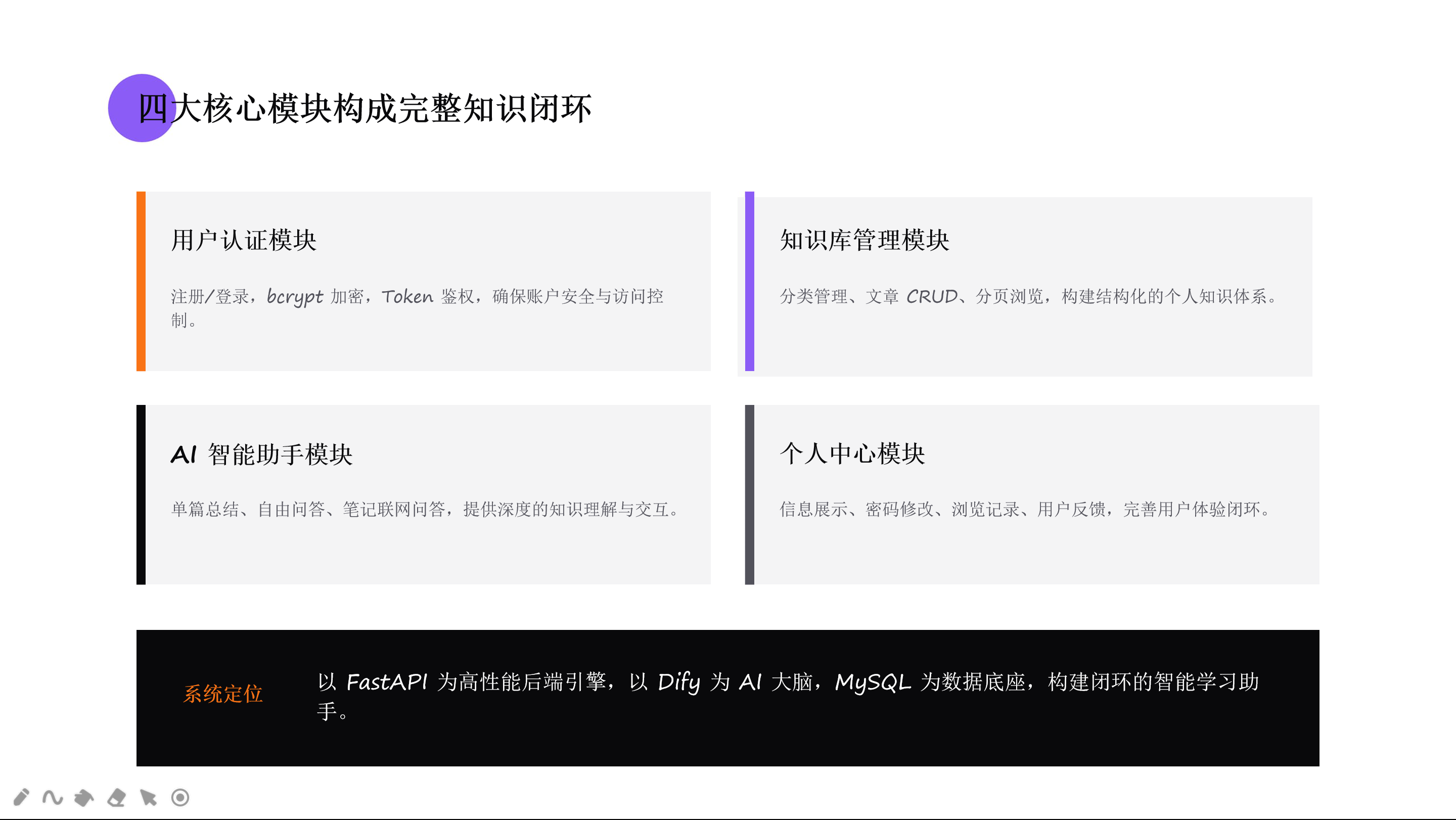
AI智能知识库四大核心模块
一、用户认证模块
用户认证模块主要负责:
1、用户注册
2、用户登录
3、Token 鉴权
4、密码加密存储
实现思路如下图流程图所示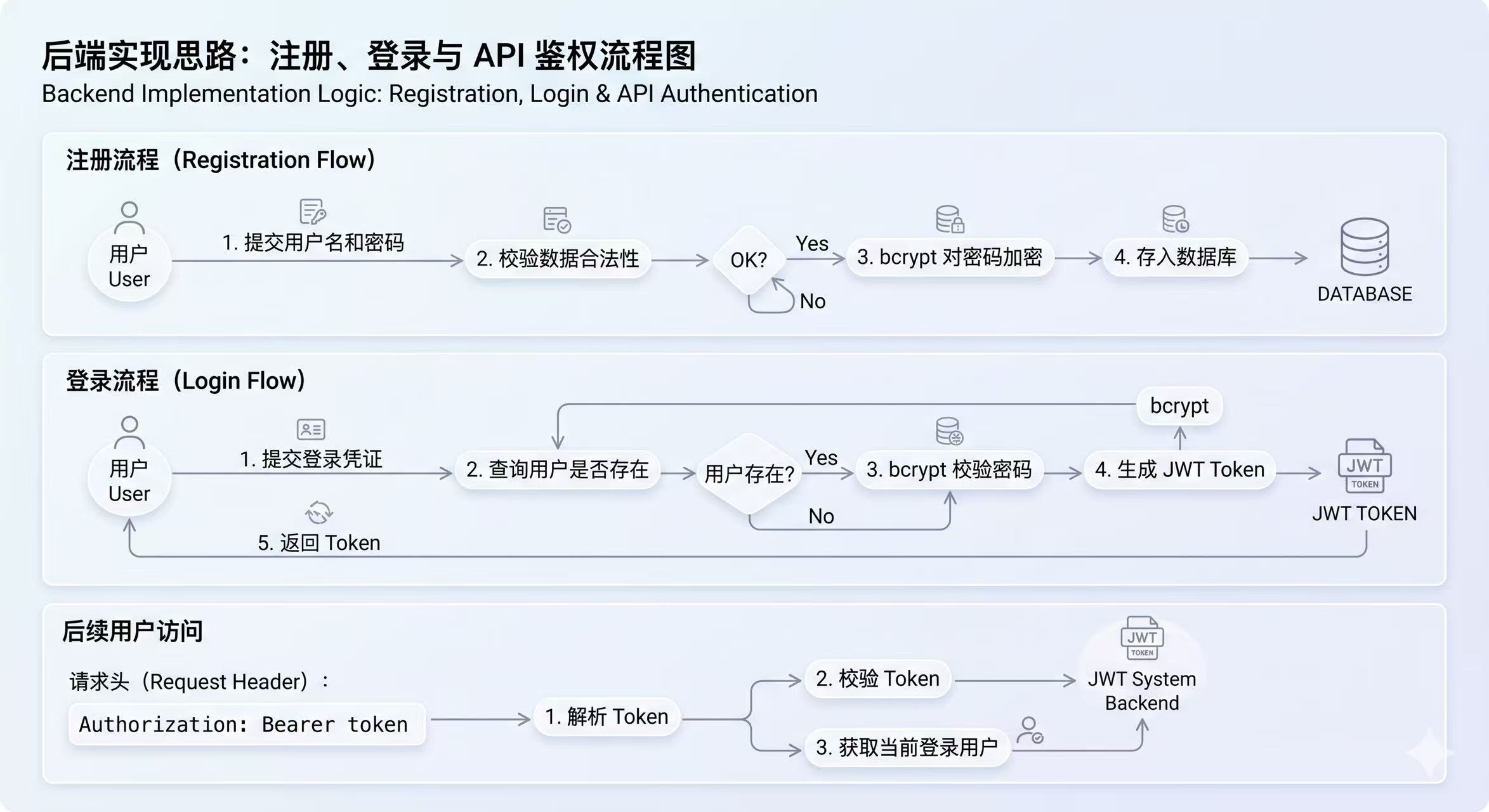
1.1 bcrypt 密码加密
刚开始我以为的加密:
123456 -> 加密后固定字符串
其实bcrypt 每次加密结果都不同,我们可以在Yaak测试里看到区别。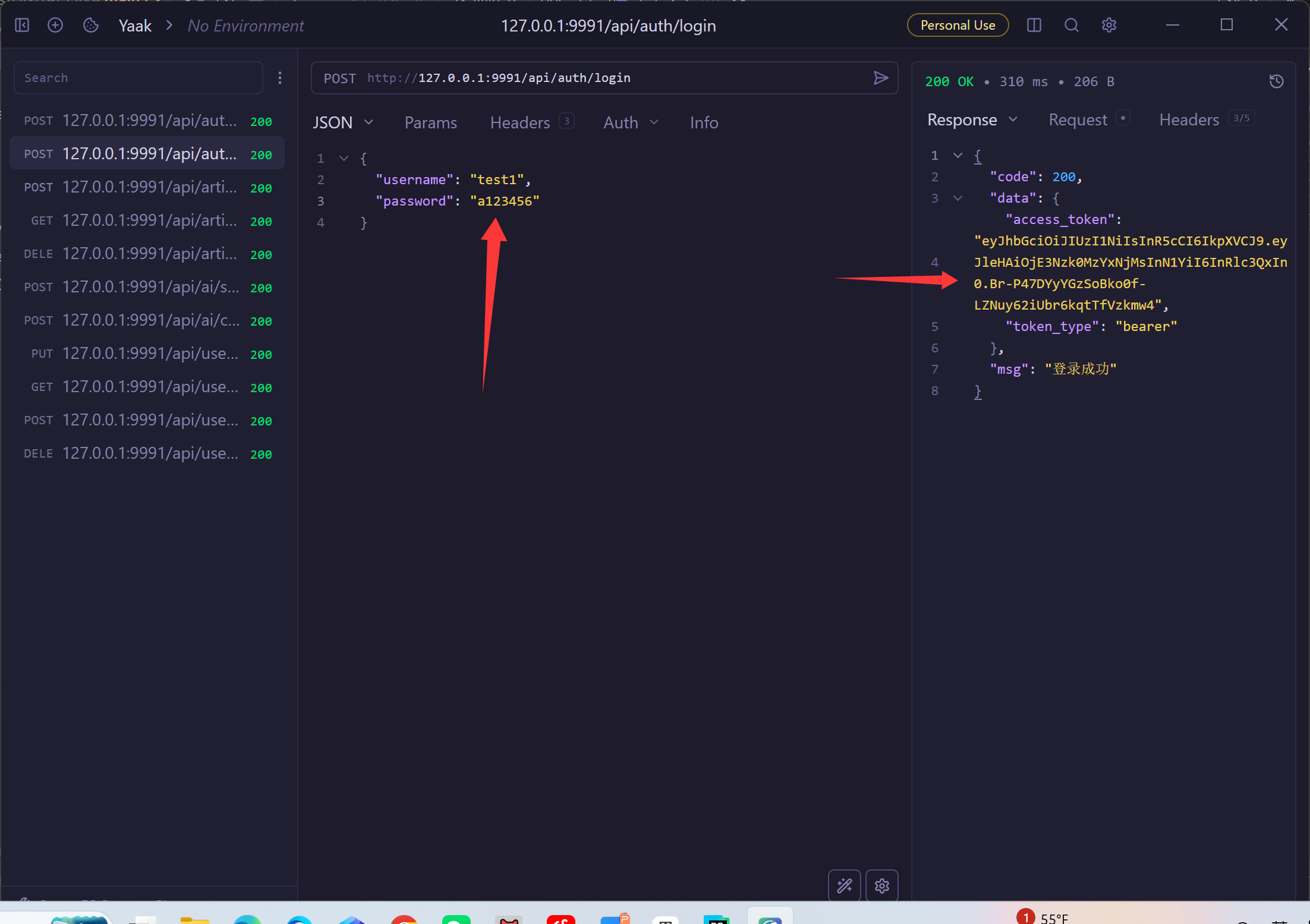
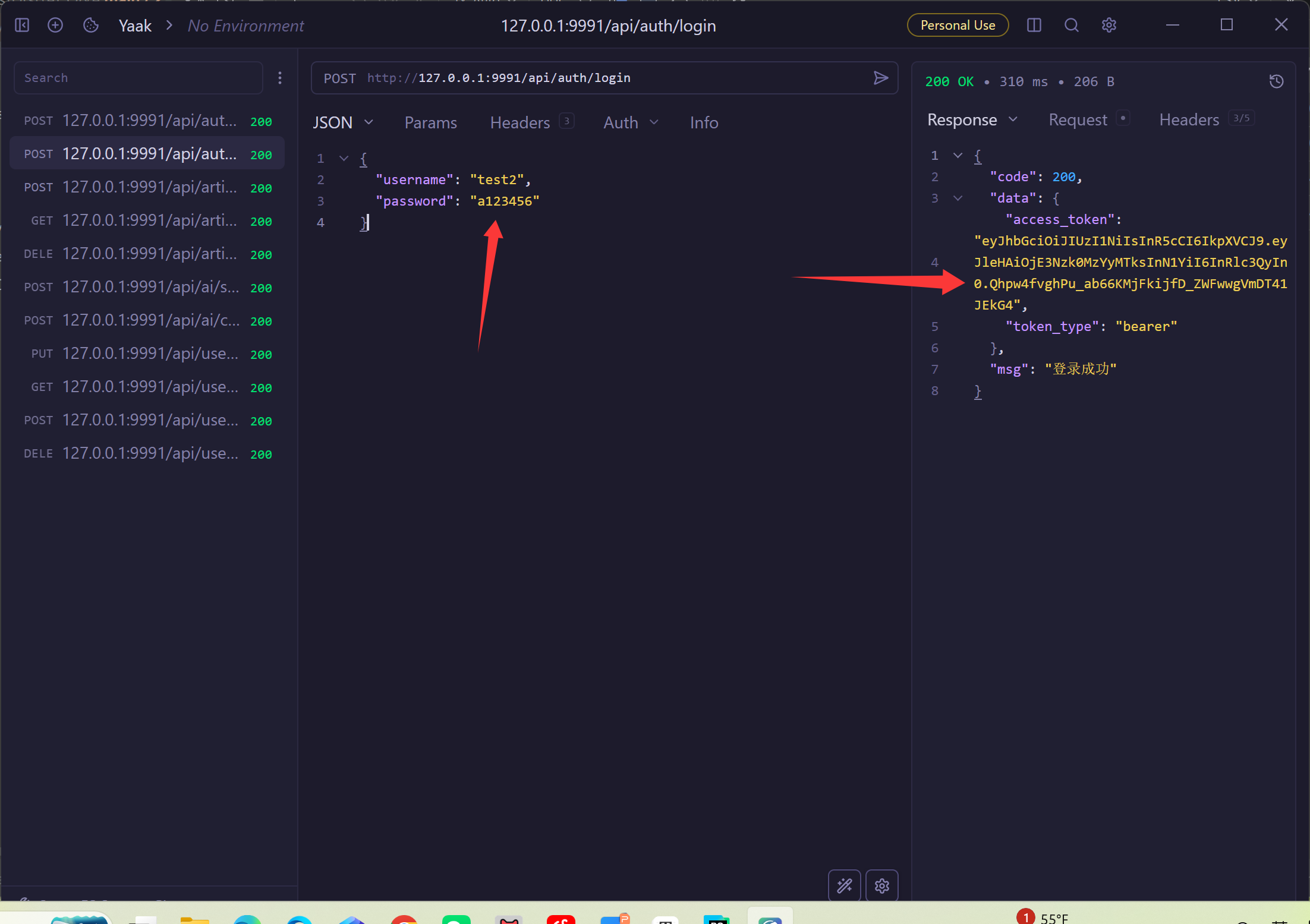
即使是同一个密码,每次生成的 hash 都不一样。
1.2 JWT 鉴权
- Token 过期
- Token 无效
- Bearer 前缀错误
- 请求头没带 Token
- 解码失败
在后端测试当中,尤其要注意输入的token格式是否正确。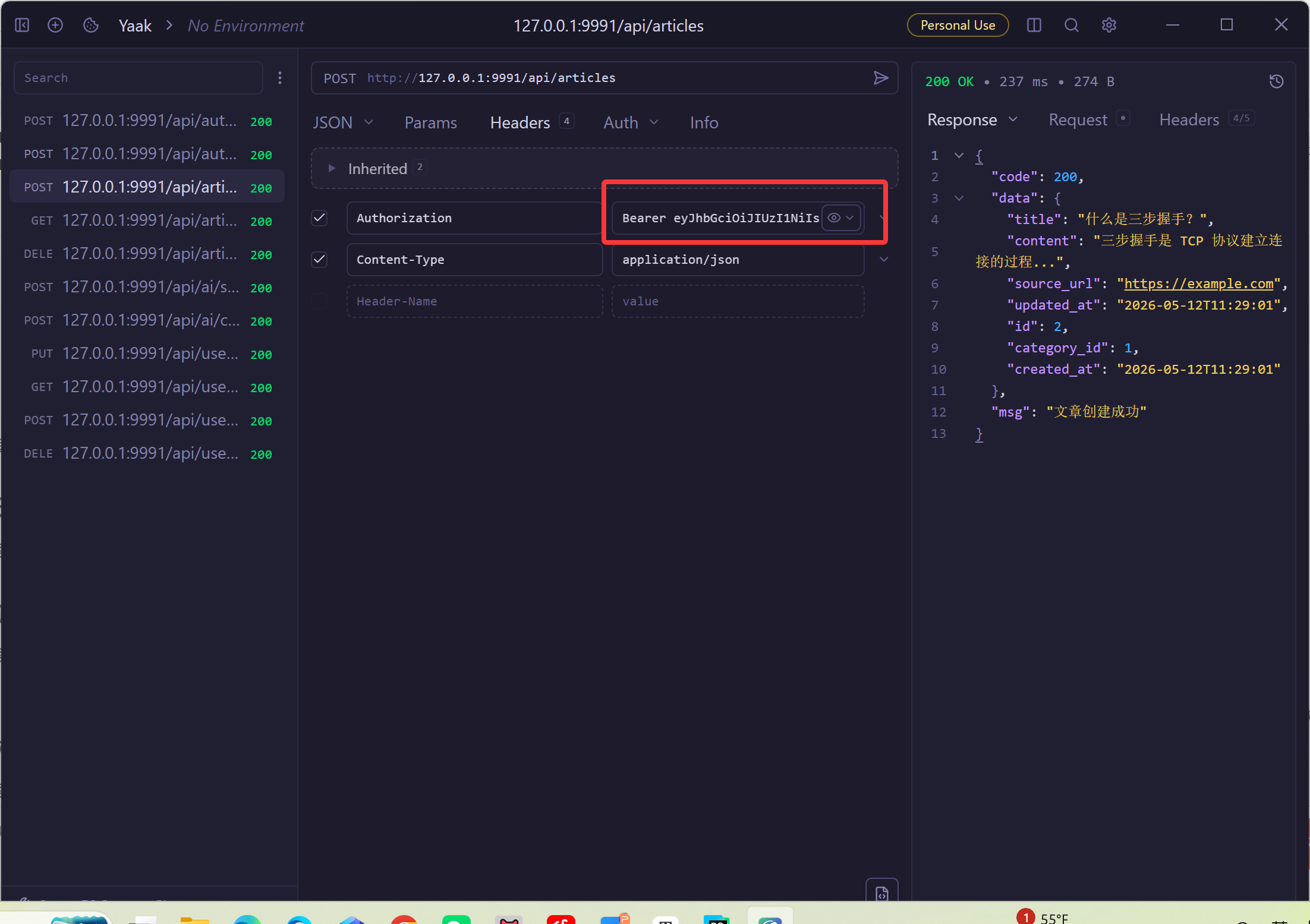
输入格式:Bearer空格+密钥
二、知识库管理模块
知识库模块主要负责:
- 分类管理
- 文章管理
- CRUD 操作
- 分页查询
- 浏览记录
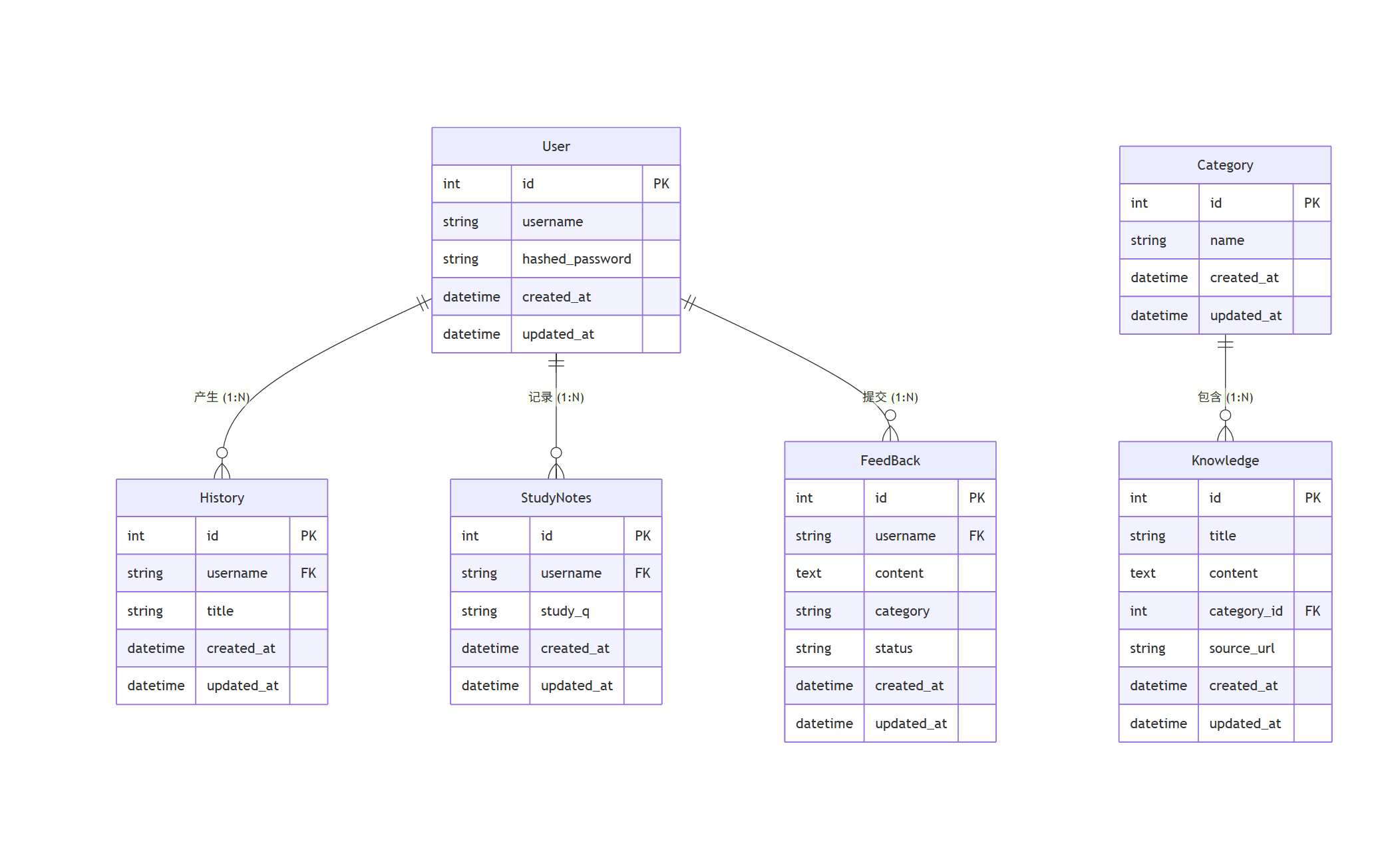
后端实现思路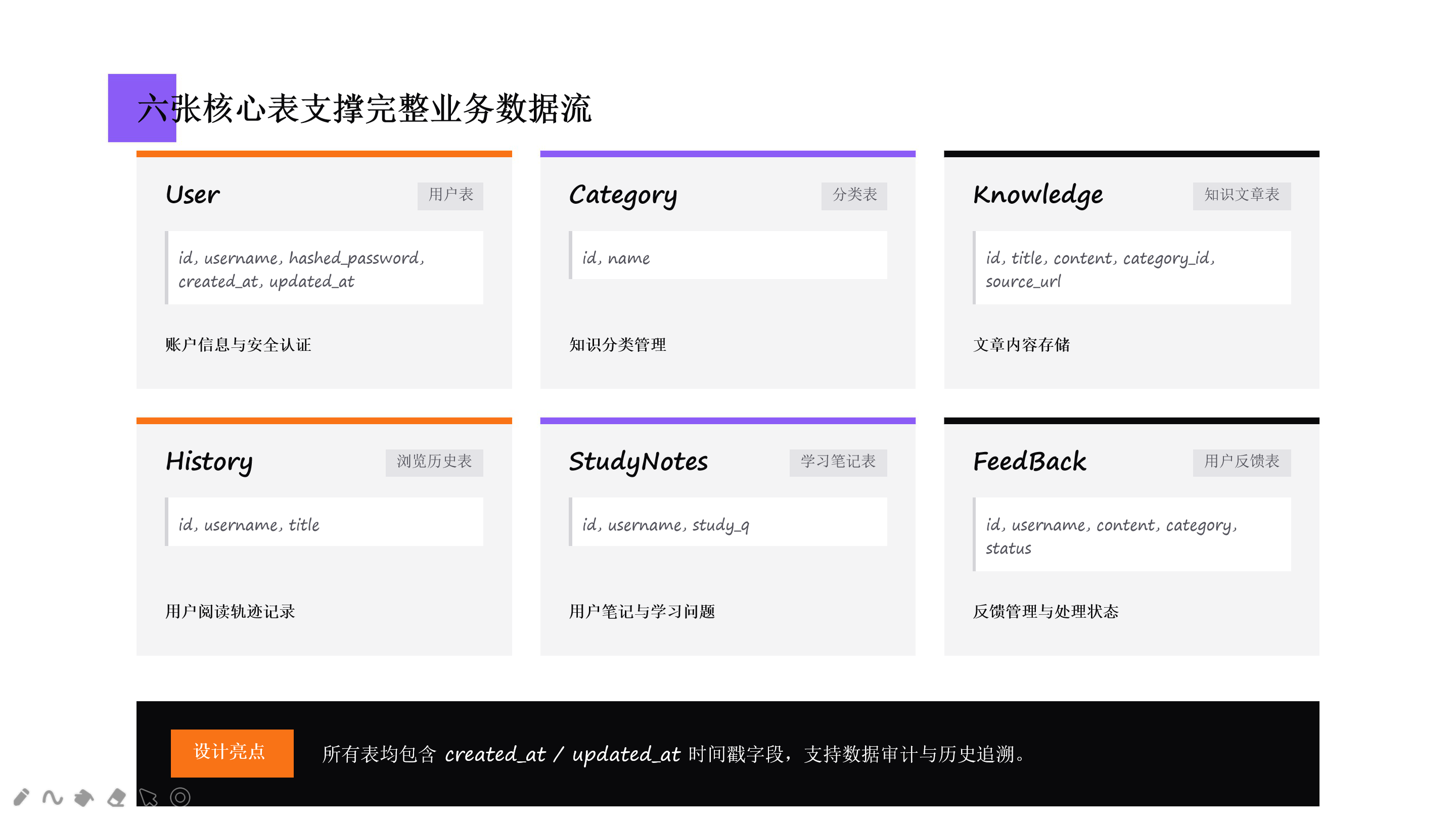
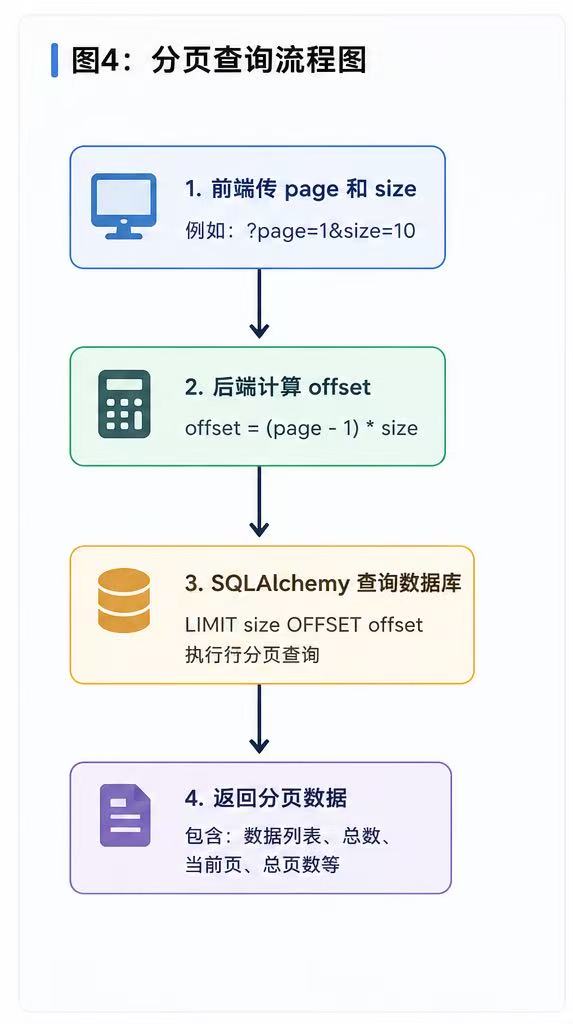
分页逻辑
分页看起来简单:
?page=1&size=10
但真正处理时需要:
不仅要返回文章内容。
还要:
- 获取当前用户
- 插入浏览记录
- 提交事务
offset = (page - 1) * size
浏览记录自动插入
用户查看文章详情时,通常不仅要返回文章内容,还要:
- 获取当前用户
- 插入浏览记录到 histories 表
- 提交事务
代码展示如下:
from fastapi import BackgroundTasks

# 1. 独立出来的后台异步任务
async def save_history_task(username: str, title: str):
    async with AsyncSessionLocal() as session:
        try:
            history = History(username=username, title=title)
            session.add(history)
            await session.commit()
        except Exception as e:
            logger.error(f"后台写入历史记录失败: {e}")

# 2. 极其干净的文章详情接口
@router.get("/articles/{id}")
async def get_article(id: int, background_tasks: BackgroundTasks, db: AsyncSession):
    # 查文章
    article = await db.get(Knowledge, id)
    if not article:
        return error("文章走失了...", code=404)
三、AI 智能助手模块
AI 智能助手模块是这个小项目的核心模块。
主要功能如下:
- AI 总结文章
- AI 自由问答
- 学习笔记分析
- Dify 工作流调用
- 流式输出
Dify 工作流的使用
这里我没有直接调用模型 API。
而是通过 Dify 工作流来处理逻辑。
Dify 工作流可以:
1、管理 Prompt
2、管理上下文
3、管理模型参数
4、做分类器
5、做工作流编排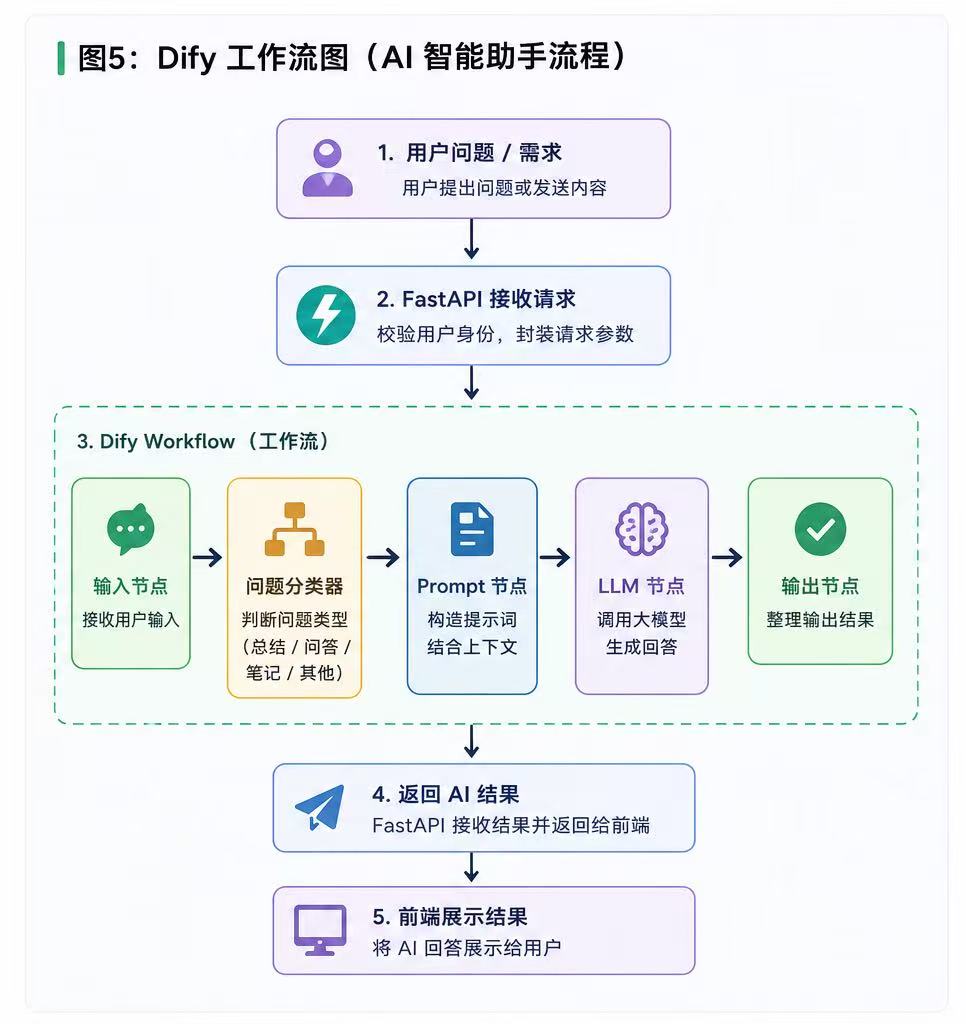
后端就只负责:
发送请求
接收结果
在前后端分离的系统里,我们后端对前端承诺了统一的格式:要么是一气呵成的标准 JSON({“code”: 200, “data”: “…”}),要么是标准的打字机流式输出(data: {“text”: “…”}\n\n)。
当我们作为“中间商”去请求上一级的 Dify API 时,却发现 Dify 仿佛是在玩一种很新的随机盲盒。
-
普通 Chatbot 应用:返回的 JSON 里,内容藏在 answer 字段。
-
Workflow 工作流应用:返回的 JSON 里,内容藏在 data.outputs 字段。
-
流式(Stream)输出:它不直接给你文本,而是抛出一堆类似 event: message、event: workflow_finished 这样的事件行,真正的文本碎屑还被包裹在 data: {…} 里。
流式输出的难点流式对话(打字机效果)调起来最痛苦。因为 Dify 吐出来的是它自定义的事件流,而前端(如 Yaak 调试工具或现代浏览器组件)在解析标准 Server-Sent Events (SSE) 时,严格要求每段数据必须以 data: 开头并以 \n\n 结尾。
如下图所示: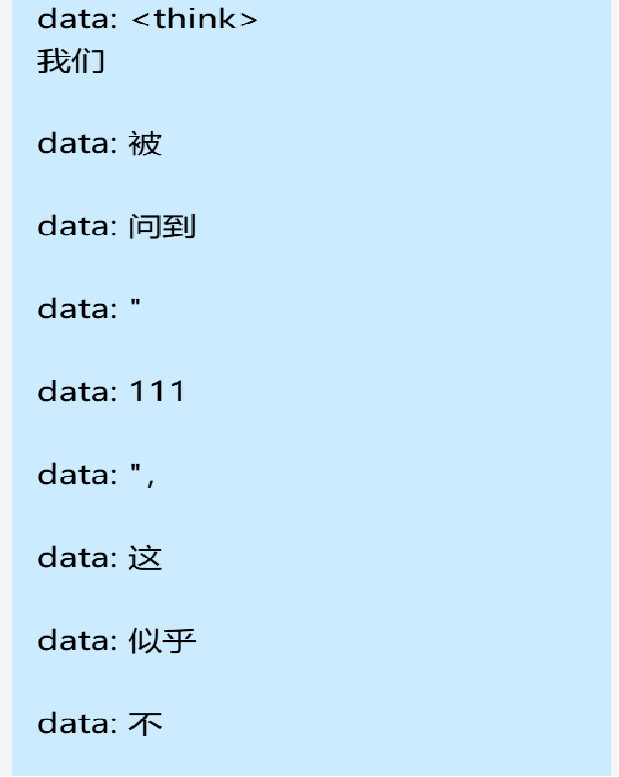
我通过在 FastAPI 拦截 Dify 的原始数据流,像“过滤网”一样只筛出真正的文字碎屑,重新组装成标准电报格式再 yield 出去。
async def chat_stream(query: str, user_id: str, conversation_id: str = "", api_key: str = None):
    """
    自由问答(流式:打字机效果,拿到一点给前端发一点)
    """
    url = f"{DIFY_BASE_URL}/chat-messages"
    payload = {
        "inputs": {},
        "query": query,
        "response_mode": "streaming",
        "conversation_id": conversation_id,
        "user": str(user_id)
    }

    async with httpx.AsyncClient(timeout=120.0) as client:
        async with client.stream("POST", url, headers=get_dify_headers(api_key), json=payload) as response:
            response.raise_for_status()
            async for line in response.aiter_lines():
                if line.startswith("data: "):
                    json_str = line[6:]
                    try:
                        data = json.loads(json_str)
                        if "answer" in data:
                            yield f"data: {data['answer']}\n\n"
                    except json.JSONDecodeError:
                        continue
四、个人中心模块
个人中心主要包括:
- 用户信息展示
- 修改密码
- 浏览记录
- 学习笔记
- 用户反馈
虽然这个模块没有 AI 那么“炫”。
但真正做项目的时候会发现:
用户系统永远是一堆细节。
- 修改密码
修改密码不是:
直接 update
防御策略剖析:
- 防止空密码与弱密码: 我们绝不能容忍前端传过来一个空字符串或者“123”。利用 Pydantic 的严苛校验,强制新密码至少 6 个字符 。
- 验证旧密码: 必须使用 bcrypt 的 verify_password 校验器,确保操作者真的是号主本人 。
- 单向加密: 校验通过后,使用 get_password_hash 将新密码变成不可逆的哈希乱码再存入数据库。
TODO: 修改密码代码实现
async def update_password(
        data: PasswordUpdate,
        db: AsyncSession = Depends(get_db),
        current_user: dict = Depends(get_current_user)
):
    """修改密码:验证旧密码,加密新密码后更新"""

    # 【新增调试代码】打印当前解析出的用户名
    print(f"Token中解析出的用户名: '{current_user['username']}'")

    result = await db.execute(select(User).where(User.username == current_user["username"]))
    user = result.scalars().first()

    if not user:
        # 【新增调试代码】打印数据库查询结果为空的提示
        print("查询结果为空,说明数据库中不存在该 username")
        return error(msg="用户不存在", code=404)

    if not verify_password(data.old_password, user.password):
        return error(msg="旧密码错误", code=400)

    user.password = get_password_hash(data.new_password)
    await db.commit()
    return success(msg="密码修改成功,请重新登录")
- 用户反馈功能:当 AI 真正参与业务
核心逻辑:
- 接收规范参数: 前端必须精准传入 feedback_text 字段给工作流,少一个字母都会报 422 错误 。
- 调用 Dify 工作流: 后端作为安全代理,异步请求 https://api.dify.ai/v1/workflows/run 接口 。
- 拿到 Dify 的分类结果后,将用户名、内容、AI 分类标签、以及 状态(“待处理”) 一起打包存入 MySQL,并把 AI 温暖的回复透传给前端 。
TODO: Feedback 接口代码实现
import httpx
from config import settings
from app.models.feedback import Feedback

# 1. 定义反馈接收模型
class FeedbackCreate(BaseModel):
    feedback_text: str # 必须叫这个名字,对齐 Dify 变量

@router.post("/user/feedback")
async def submit_smart_feedback(
    data: FeedbackCreate,
    db: AsyncSession = Depends(get_db),
    current_user: dict = Depends(get_current_user)
):
    # 2. 拼接 Dify 工作流 URL 与鉴权头
    dify_url = f"{settings.DIFY_BASE_URL}/workflows/run" # [cite: 391]
    headers = {
        "Authorization": f"Bearer {settings.DIFY_FEEDBACK_API_KEY}", # [cite: 394]
        "Content-Type": "application/json"
    }
    payload = {
        "inputs": {"feedback_text": data.feedback_text}, #
        "response_mode": "blocking",
        "user": current_user["username"]
    }

    try:
        # 3. 异步请求 Dify
        async with httpx.AsyncClient() as client:
            resp = await client.post(dify_url, headers=headers, json=payload, timeout=15.0)
            resp.raise_for_status()

            dify_data = resp.json()
            outputs = dify_data.get("data", {}).get("outputs", {})

            # 解析 Dify 吐出的结果
            ai_category = outputs.get("category", "未分类")
            ai_reply = outputs.get("reply", "感谢反馈,我们会尽快处理!")

            # 4. 落库保存,留下 AI 处理的痕迹
            new_feedback = Feedback(
                username=current_user["username"],
                content=data.feedback_text,
                category=ai_category, # 记录 AI 的分类打标
                status="待处理" #
            )
            db.add(new_feedback)
            await db.commit()

            return success(data={"category": ai_category, "reply": ai_reply}, msg="反馈已智能处理")

    except Exception as e:
        print(f"智能反馈异常: {e}")
        return error(msg="智能反馈助理开小差了", code=500)
- 学习笔记功能
我把用户的笔记疑问(study_q)作为上下文,结合右侧悬浮的 Dify 助手,整个交互就有了生命。用户不用死记硬背,不懂直接抛给 AI
from app.models.notes import StudyNotes

# 1. 笔记模型 (严格对齐报错过的 study_q)
class NoteCreate(BaseModel):
    study_q: str # 前端曾经漏传导致的 422 惨案就是它
    # 如果还需要关联知识库文章,可以加上 knowledge_id: int

# 新增笔记
@router.post("/user/notes")
async def create_note(
    data: NoteCreate,
    db: AsyncSession = Depends(get_db),
    current_user: dict = Depends(get_current_user)
):
    new_note = StudyNotes(
        username=current_user["username"],
        study_q=data.study_q
    )
    db.add(new_note)
    await db.commit()
    await db.refresh(new_note)
    return success(data={"id": new_note.id}, msg="笔记保存成功,可随时召唤AI解答!")

# 查询笔记列表
@router.get("/user/notes")
async def get_notes(
    db: AsyncSession = Depends(get_db),
    current_user: dict = Depends(get_current_user)
):
    stmt = select(StudyNotes).where(StudyNotes.username == current_user["username"]).order_by(StudyNotes.id.desc())
    result = await db.execute(stmt)
    notes = result.scalars().all()

    return success(data=[{"id": n.id, "study_q": n.study_q} for n in notes], msg="获取笔记成功")

# 删除笔记
@router.delete("/user/notes/{note_id}")
async def delete_note(
    note_id: int,
    db: AsyncSession = Depends(get_db),
    current_user: dict = Depends(get_current_user)
):
    stmt = select(StudyNotes).where(
        StudyNotes.id == note_id,
        StudyNotes.username == current_user["username"]
    )
    result = await db.execute(stmt)
    note = result.scalars().first()

    if not note:
        return error(msg="笔记不存在或无权删除", code=404) # [cite: 433]

    await db.delete(note)
    await db.commit()
    return success(msg="笔记删除成功")
项目总结
这个项目真正做下来之后,我最大的感受是——AI 项目其实并不是在“疯狂训练模型”。
更多时候是在:
- 做接口与数据流转:AI 只是中转站的常客
在接入 Dify 智能体时,我才深刻体会到,大模型不会自己去读数据库 。它需要后端充当“安全代理层”,前端发请求,后端校验身份、拼装 Prompt、调用 httpx.AsyncClient 进行异步请求,最后再把结果塞进 JSON 返回给前端 。AI 的智商再高,没有后端严密的数据流转喂给它上下文,它也就是个聊天机器人。 - 处理异常与解决前后端联调:满屏的 401、422 和 500
你以为 AI 会帮你解决 Bug,结果是你得帮系统解决 AI 带来的各种玄学异常。比如在调试 SSE(Server-Sent Events)流式输出时,明明后端抓包看到了 603 字节的数据包,前端却像个死人一样没反应。排查了半天才发现,那是由于 SSE 协议极其死板,必须严格遵守 data: 开头并带双换行符 \n\n 的格式 。
大模型更像:“能力增强模块”。
真正让系统跑起来的,还是传统 Web 开发!
完整代码在:
https://github.com/ArjfjRojdvEfiln/AI_QA.git

AtomGit 是由开放原子开源基金会联合 CSDN 等生态伙伴共同推出的新一代开源与人工智能协作平台。平台坚持“开放、中立、公益”的理念,把代码托管、模型共享、数据集托管、智能体开发体验和算力服务整合在一起,为开发者提供从开发、训练到部署的一站式体验。
更多推荐

 9
9 0
0- 0


 已为社区贡献2条内容

所有评论(0)