Gradio介绍安装与使用
Gradio是什么?
Hugging Face发布的开源Python包,可以为机器学习模型、API或任意Python函数快速构建demo或web应用,并且通过Gradio的内置共享功能可以快速生成对应的链接,而无需任何编程基础
官方网站: https://www.gradio.app/ - 官方文档 - 快速开始: https://www.gradio.app/guides/quickstart
为什么要学习Gradio?
1.直观演示你的模型、API、函数: 需要图形化的界面,但又不太需要过多关心界面
2.快速部署和分享: 只需要多添加一个参数`share=True`,就会生成一个公共URL(72小时后过期),世界各地的人都可以访问
3.公共URL格式示例: https://a23dsf231adb.gradio.liveve
快速入门
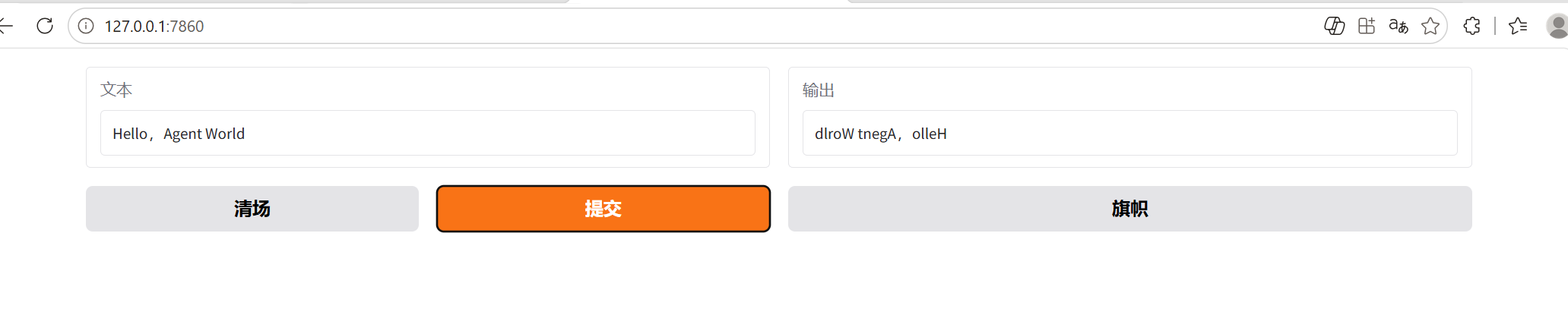
python import gradio as gr
def reverse_text(text):
return text[::-1] #字符串反转
demo = gr.Interface(fn=reverse_text, inputs="text", outputs="text")
demo.launch(share="True")
| 参数 | 作用 | 示例 |
|---|---|---|
fn | 要包装的 Python 函数,界面的 “逻辑核心” | fn=reverse_text |
inputs | 界面的输入组件,指定用户怎么给函数传参 | inputs="text" 或 gr.Textbox() |
outputs | 界面的输出组件,指定函数返回值怎么展示 | outputs="text" 或 gr.Textbox() |
1. fn
- 必须是一个可调用的 Python 函数
- 函数的参数个数要和
inputs的组件数量一一对应 - 函数的返回值个数要和
outputs的组件数量一一对应
例:
python
def add(a, b):  # 两个参数 → inputs 要给两个组件
    return a + b  # 一个返回值 → outputs 给一个组件

demo = gr.Interface(fn=add, inputs=["number", "number"], outputs="number")
2. inputs
可以是字符串简写,也可以是组件对象:
- 简写:
"text"/"number"/"image"/"audio"/"file"等 - 组件对象:
gr.Textbox()/gr.Slider()/gr.Image()等 - 多个输入用列表:
inputs=["text", "number"]
例:
python
# 简写
gr.Interface(fn=..., inputs=["text", "image"], outputs=...)

# 组件对象(可自定义配置)
gr.Interface(
    fn=...,
    inputs=[gr.Textbox(label="请输入文本"), gr.Image(type="pil", label="上传图片")],
    outputs=...
)
3. outputs
用法和 inputs 完全一样,用来展示函数的返回值:
- 简写:
"text"/"image"/"label"/"json"等 - 组件对象:
gr.Textbox()/gr.Label()/gr.Image()等 - 多个输出用列表:
outputs=["text", "image"]
例:
python
def process(text, img):
    return text.upper(), img

demo = gr.Interface(
    fn=process,
    inputs=["text", "image"],
    outputs=["text", "image"]
)
三、常用进阶参数
表格
| 参数 | 作用 | 示例 |
|---|---|---|
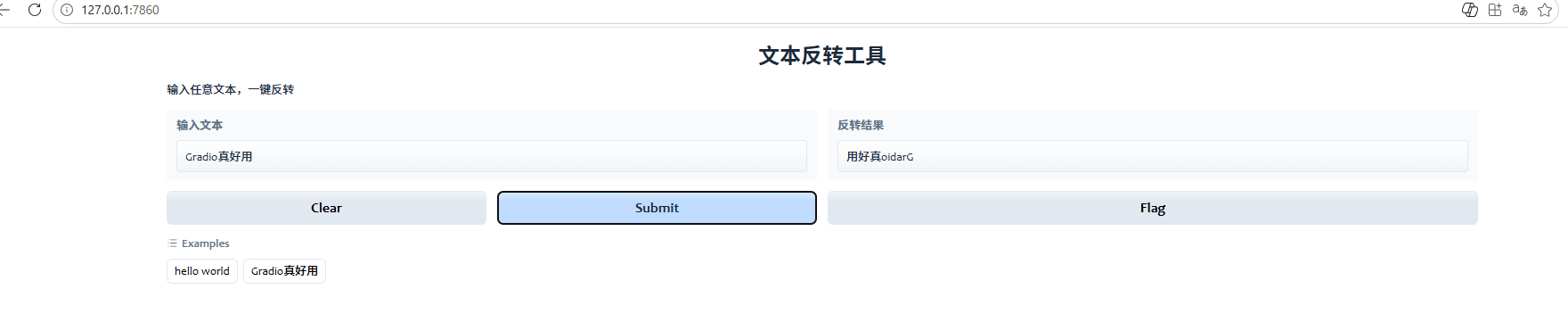
title | 页面标题,显示在界面顶部 | title="文本反转工具" |
description | 简短说明,显示在标题下方 | description="输入文本,返回反转后的结果" |
examples | 给用户提供预设示例,一键填充输入 | examples=[["hello"], ["你好"]] |
allow_flagging | 是否允许用户标记结果(比如 “好 / 不好”) | allow_flagging="never"(关闭) |
theme | 设置界面主题 | theme=gr.themes.Soft() |
完整示例:
python
import gradio as gr

def reverse_text(text):
    return text[::-1]

demo = gr.Interface(
    fn=reverse_text,
    inputs=gr.Textbox(label="输入文本"),
    outputs=gr.Textbox(label="反转结果"),
    title="文本反转工具",
    description="输入任意文本,一键反转",
    examples=[["hello world"], ["Gradio真好用"]],

)

demo.launch(
    share=True,
    theme=gr.themes.Glass()
四、launch() 里的关键参数
| 参数 | 作用 | 示例 |
|---|---|---|
share | 是否生成公网链接(72 小时有效) | share=True |
server_name | 绑定到 0.0.0.0,方便局域网访问 | server_name="0.0.0.0" |
server_port | 指定端口,默认是 7860 | server_port=7861 |
debug | 开启调试模式,报错会显示完整堆栈 | debug=True |

AtomGit 是由开放原子开源基金会联合 CSDN 等生态伙伴共同推出的新一代开源与人工智能协作平台。平台坚持“开放、中立、公益”的理念,把代码托管、模型共享、数据集托管、智能体开发体验和算力服务整合在一起,为开发者提供从开发、训练到部署的一站式体验。
更多推荐

 11
11 0
0- 0


 已为社区贡献1条内容

所有评论(0)