【Isaac Lab/Isaac Sim】教程4:基于RMPFlow控制6轴机械臂实现真空吸盘抓取
文章目录
1 给6轴机械臂安装真空吸盘
教程2:CAD转URDF-基于SolidWorks插件solidworks_urdf_exporter.md
[教程3:基于Surface Gripper制作真空吸盘.md](./教程3:基于Surface Gripper制作真空吸盘.md)
利用教程2和教程3创建的资源组装6轴机器人
-
打开Isaac Sim
cd path/to/isaacsim ./isaac-sim.sh -
File->New From Stage Template->Empty,创建一个空的Stage
-
选中World,右键Clear Default Prim
-
从Content中选择教程2导出的机器人拖入到Viewpoint,并在Stage中选中机器人拖动到Root节点,并右键Set as Default Prim
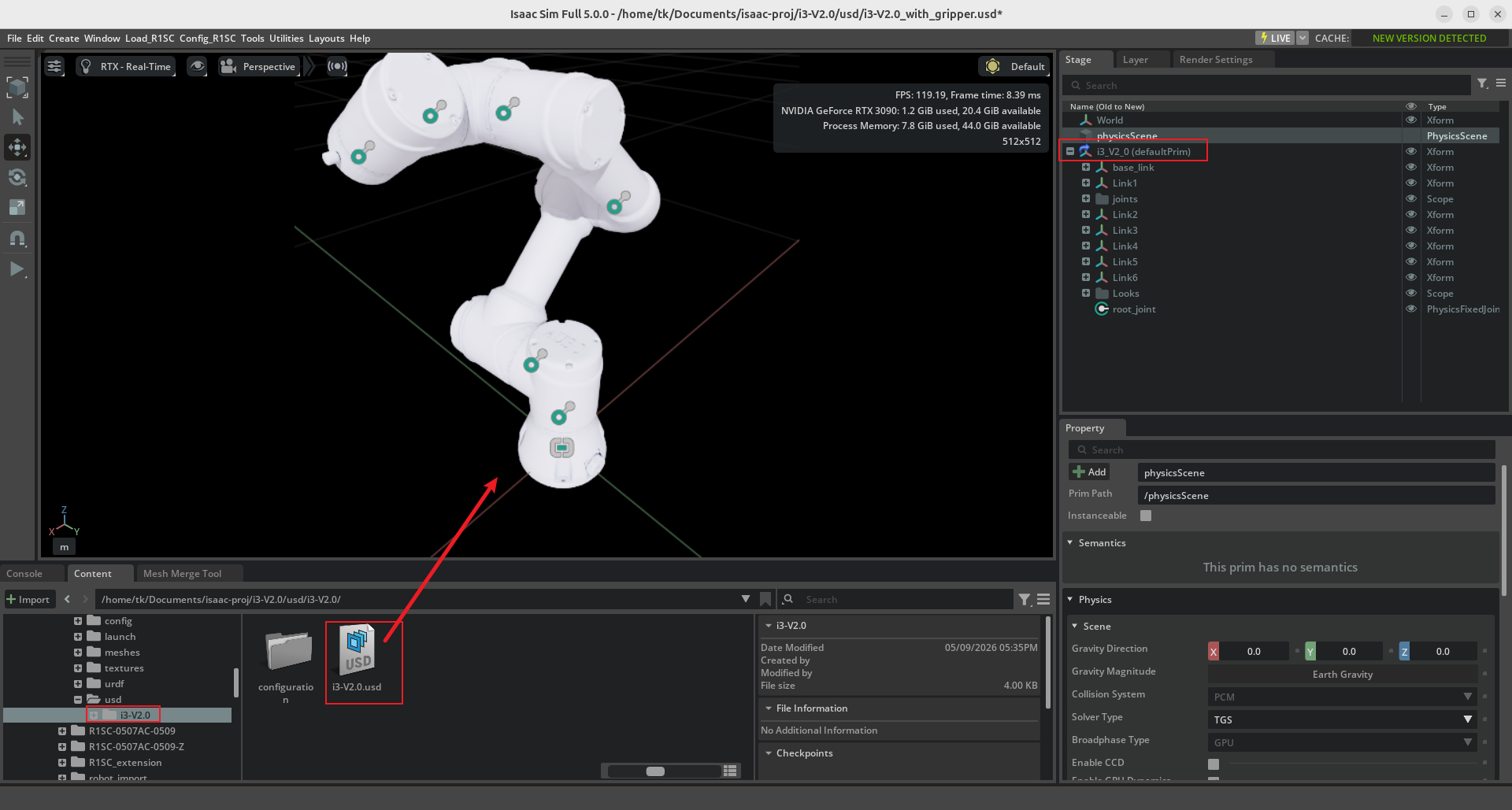
-
选中机器人,将Translate属性归零,使机器人位于坐标原点
-
选中Link6,创建一个Xform,并重命名为ee_Link,并将Transform属性归零为默认值。
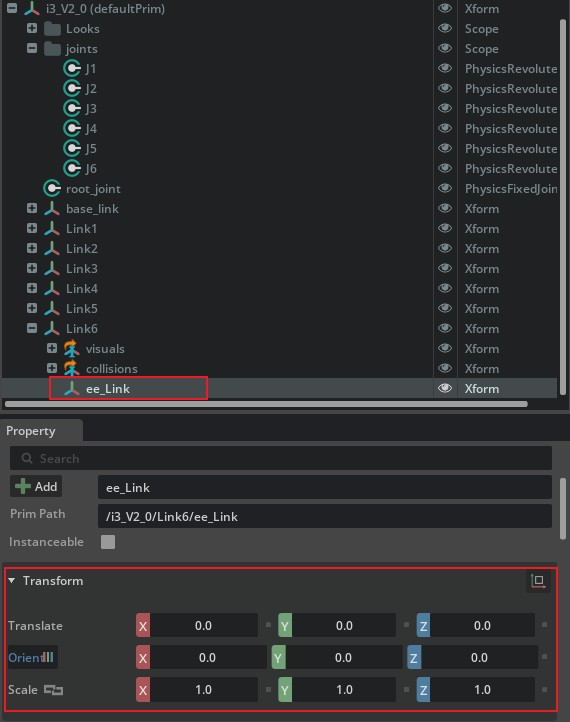
-
选中ee_Link,将其拖到机械手臂root上。
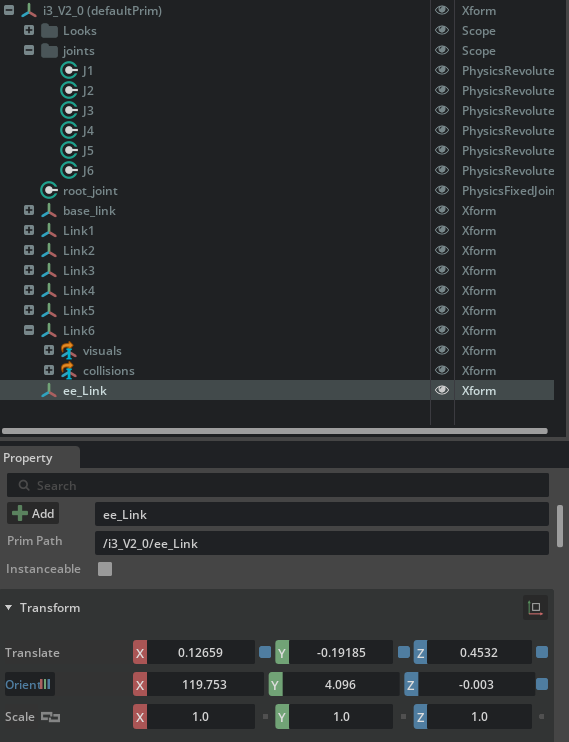
-
选中ee_Link,添加Rigid Body属性。
-
选中Link6和ee_Link,创建FixedJoint,重命名为Tool_Joint。
为了方便查看关节,可将Tool_Joint拖动到joints文件夹下
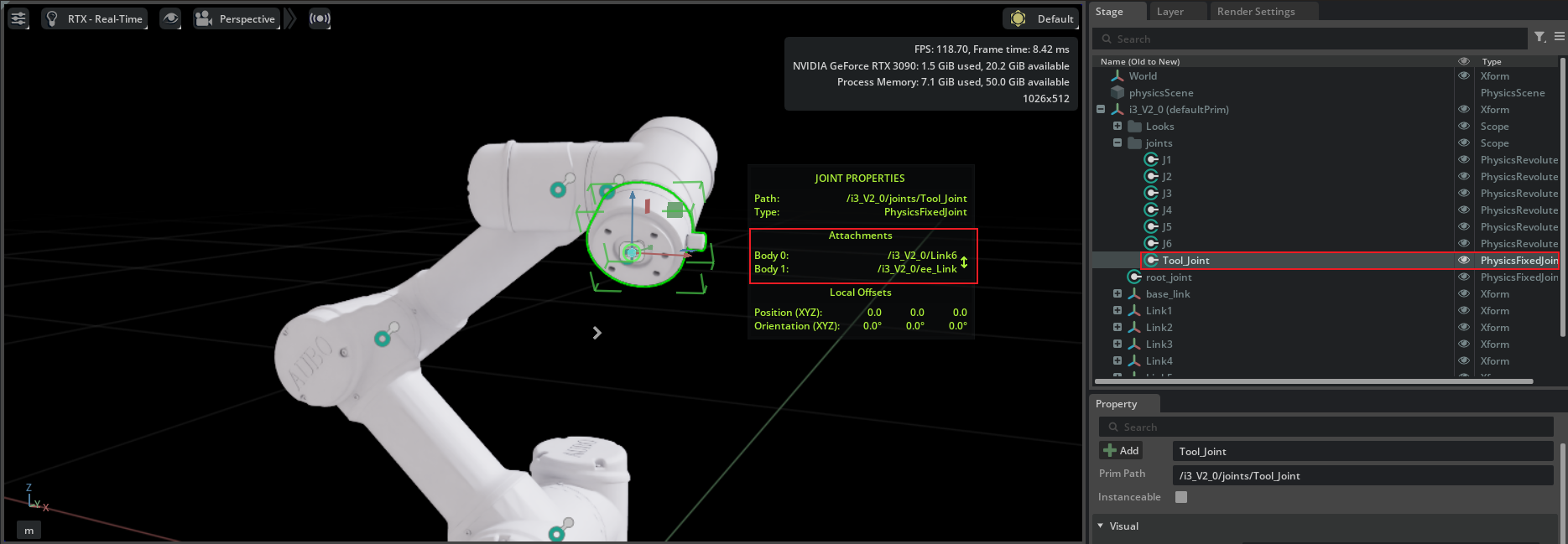
-
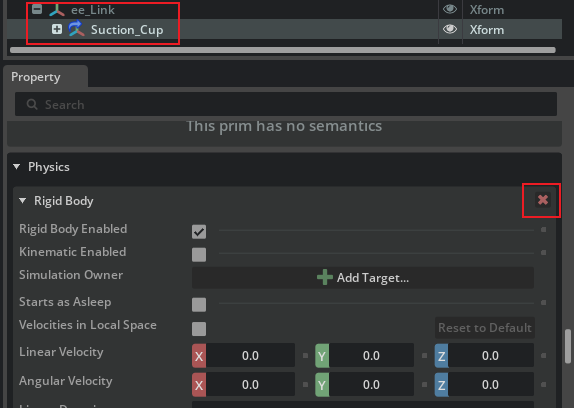
将教程3创建的真空吸盘模型拖入到ee_Link下,并删除Suction_Cup的Rigid Body属性。
-
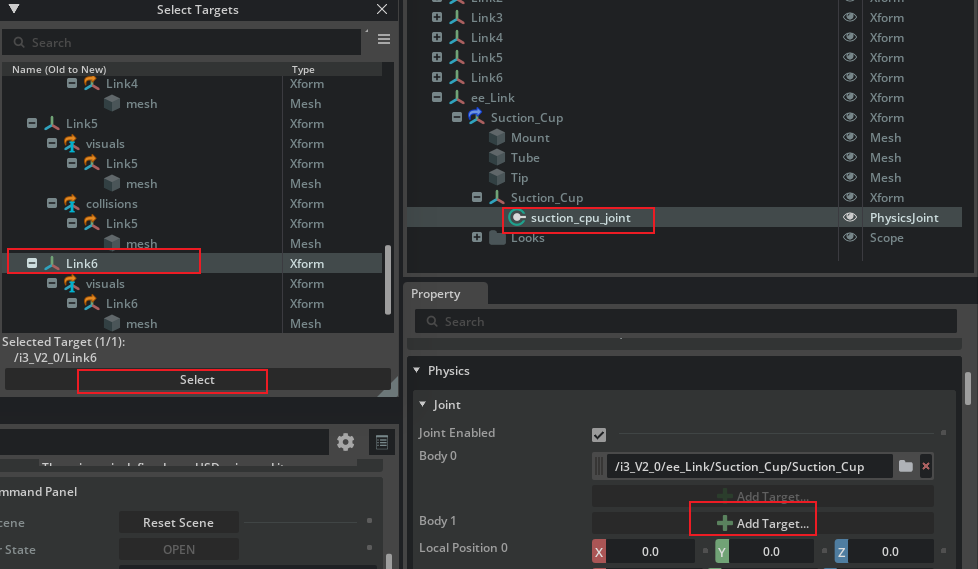
展开Suction_Cup,选中suction_cup_joint,Body1点击Add Target,选择Link6
-
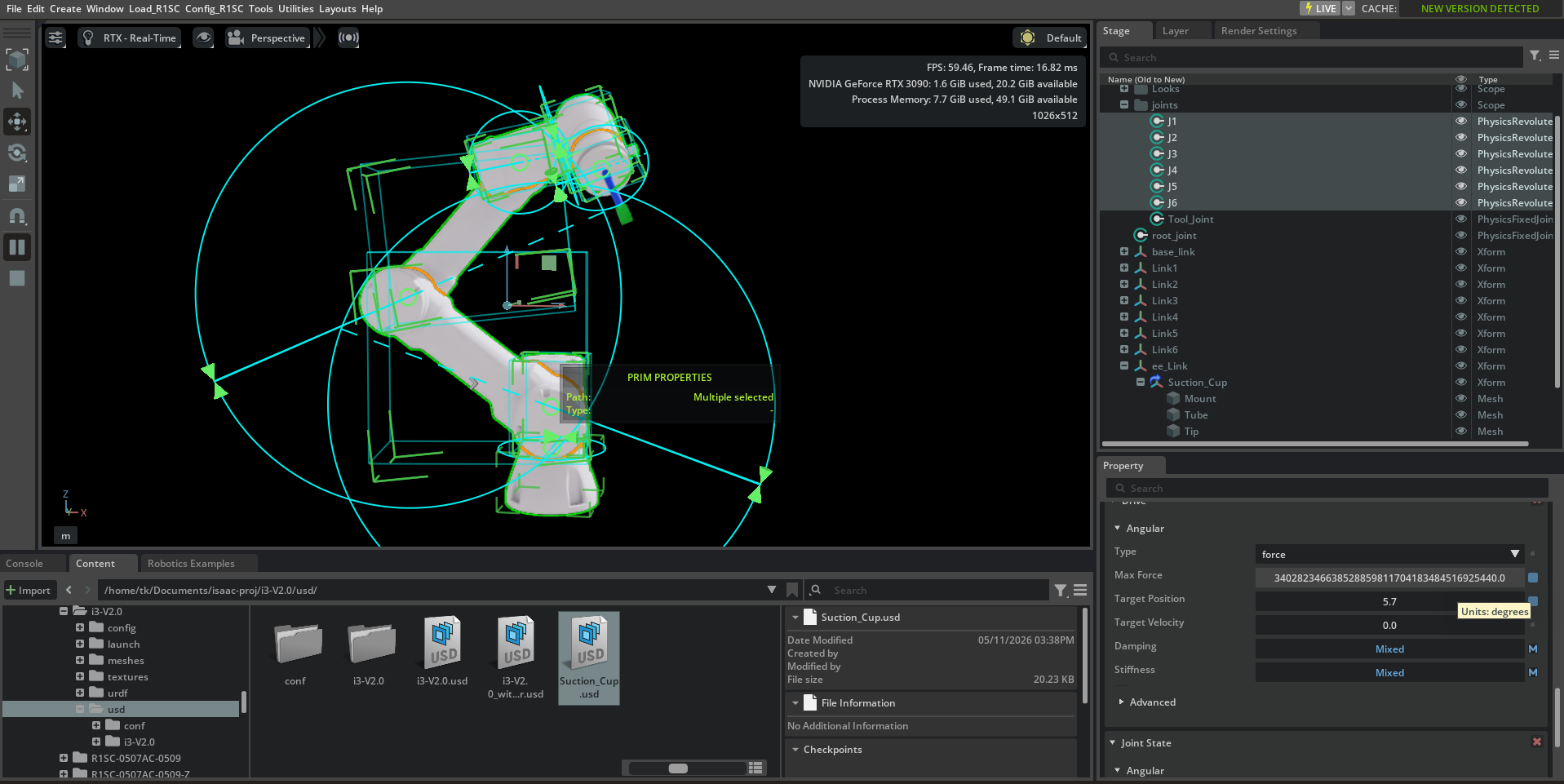
选中旋转关节,点击Play,即可控制机械手臂转动,至此真空吸盘安装成功。
2 调整机器人增益参数
-
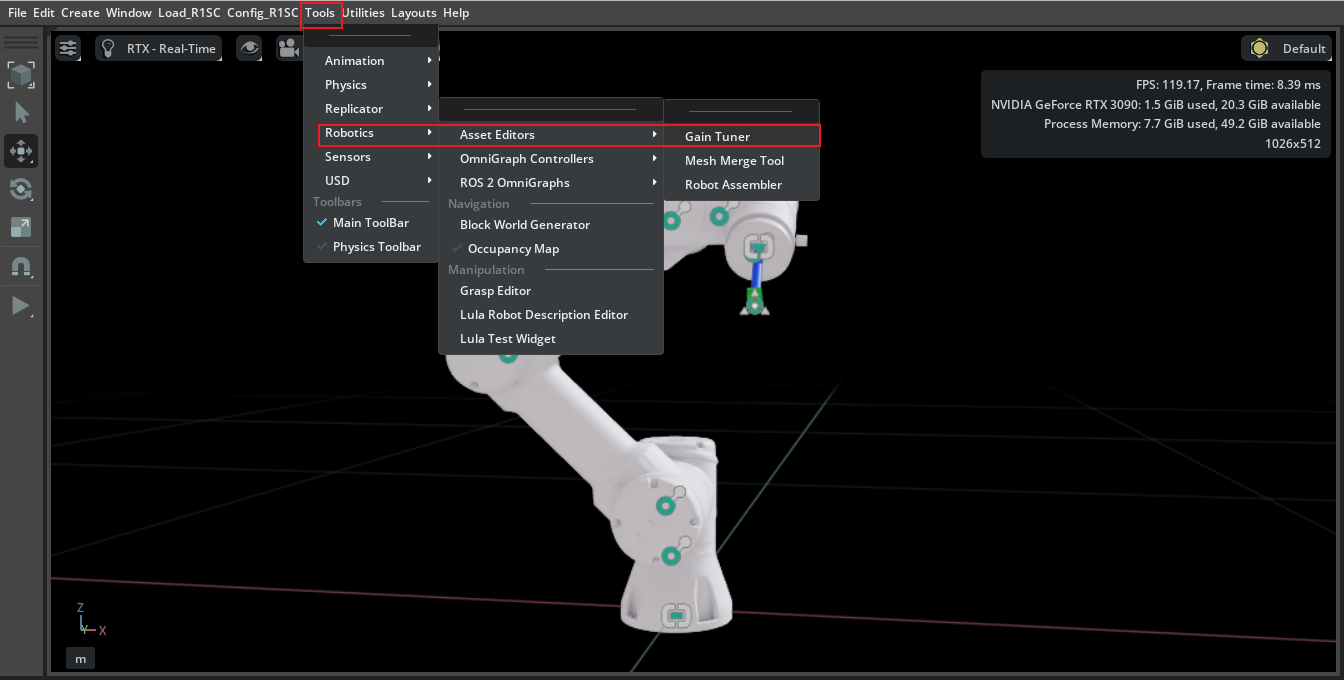
点击Tools->Robotics->Asset Editors->Gain Tunner,打开增益调整器,并点击Play。
-
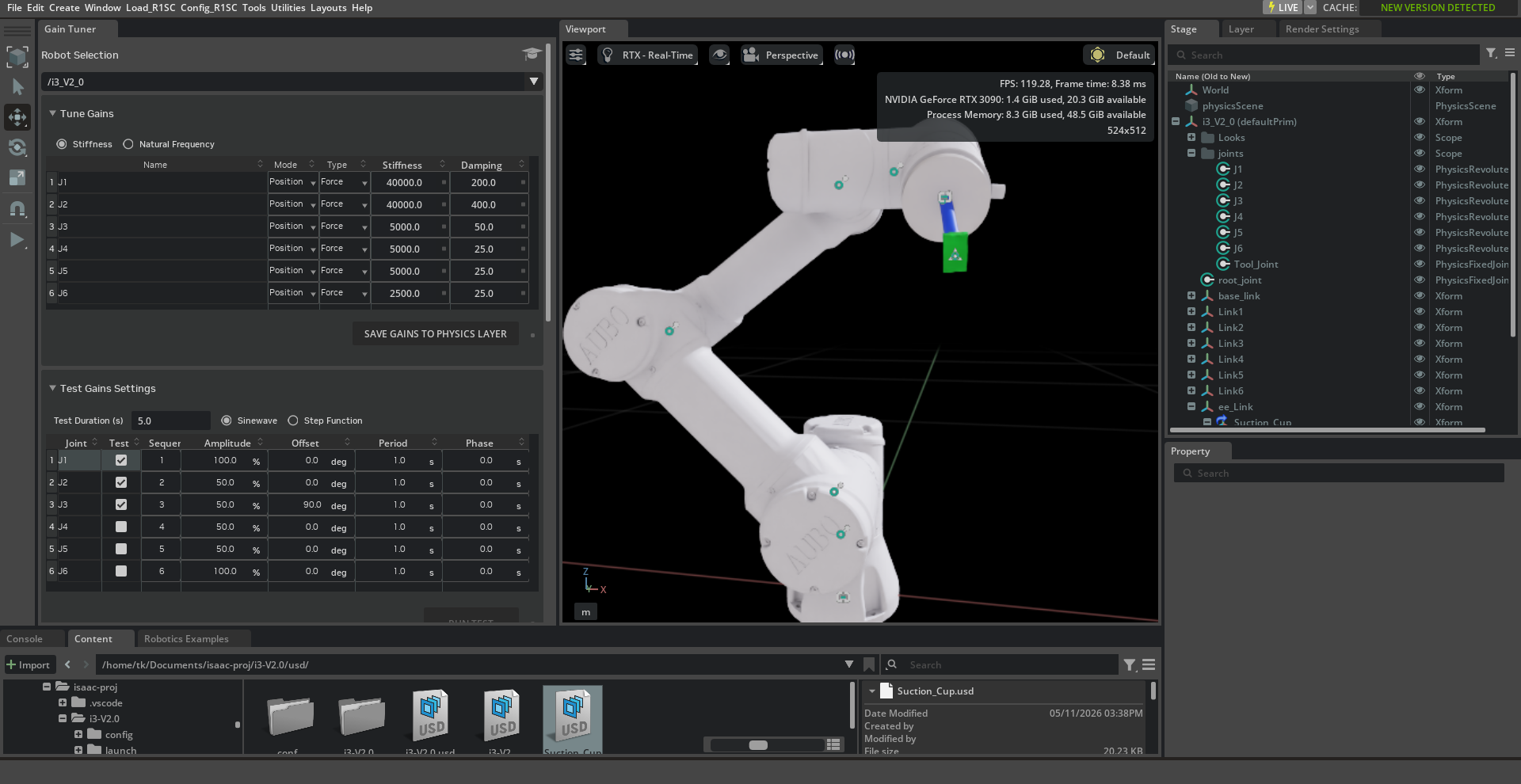
调整每个关节的Stiffness和Damping,然后点击
SAVE GAINS TO PHYSICS LAYER,然后选择需要测试的关节,调整关节运动范围(默认100%,全部行程),然后点击RUN TEST,等测试结束后,观察波形图,知道波形稳定无毛刺即可。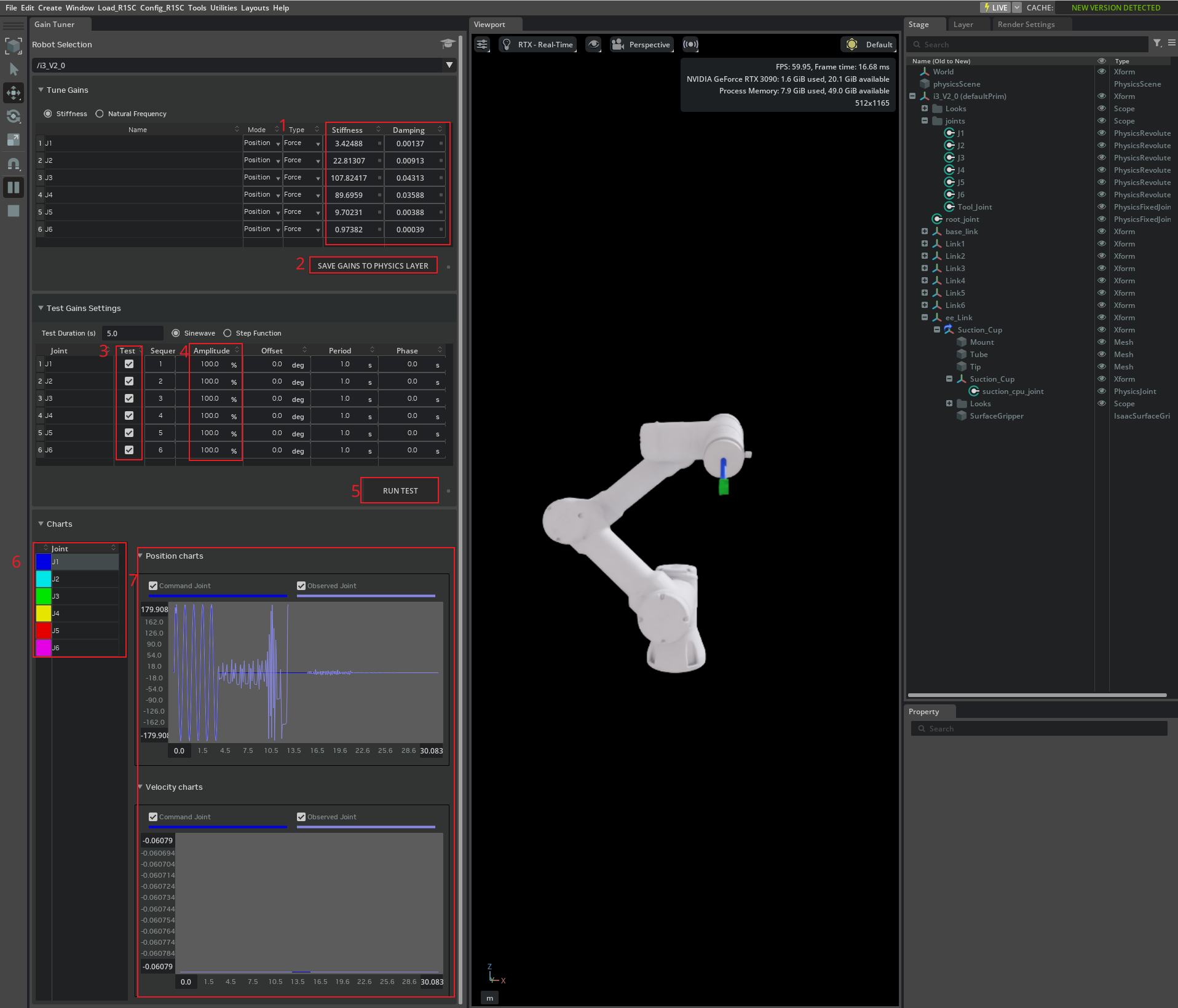
-
调整好后点击保存
3 导出机器人URDF文件
-
Window->Extention,搜索urdf,启用URDF Exporter,并设置为
AUTOLOAD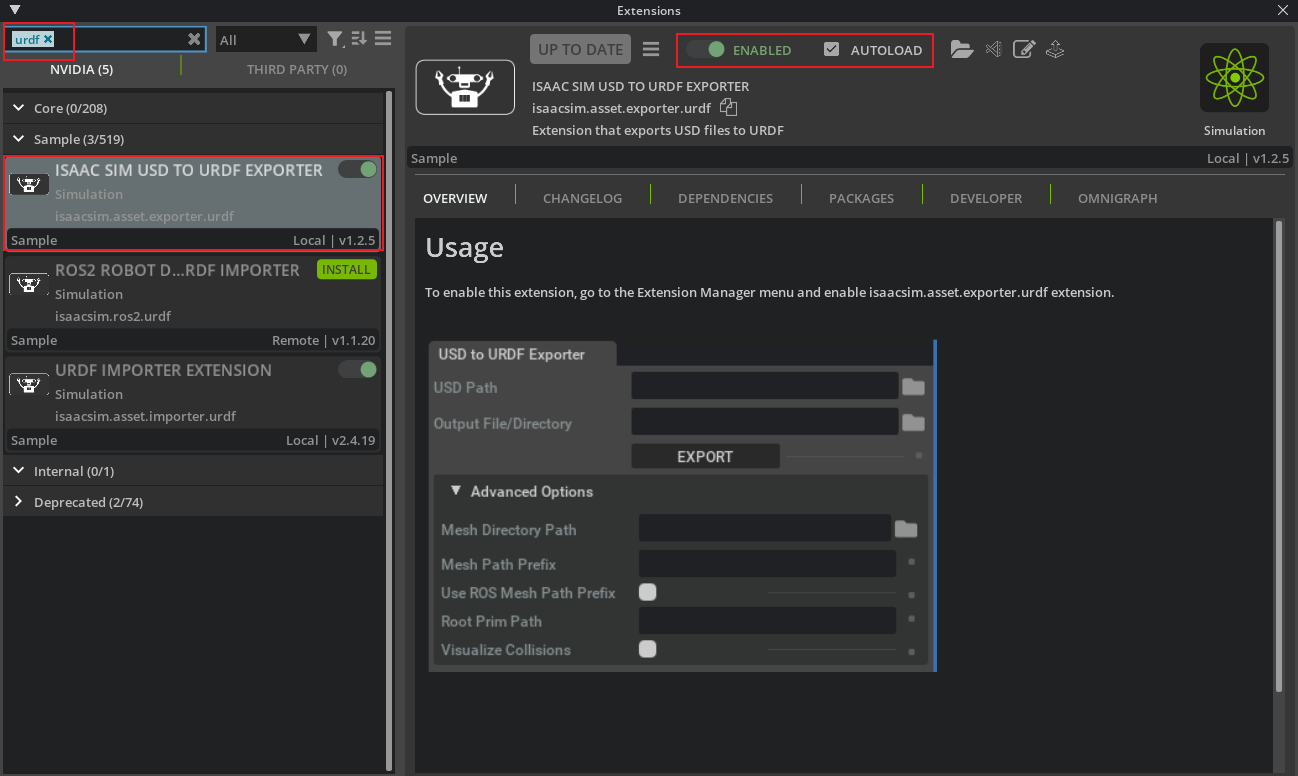
-
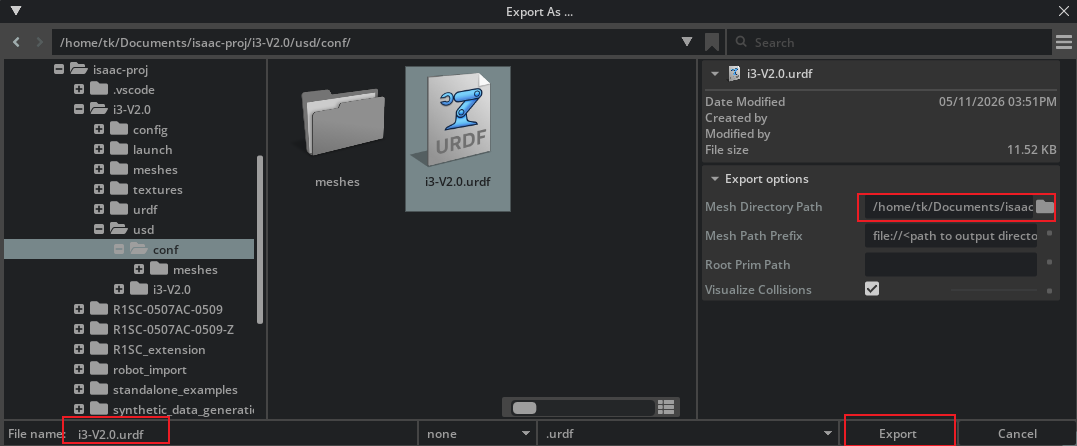
File->Export to URDF,填写文件名,设置Mesh导出路径,点击Export。
-
在控制台中看到如下输出即为导出成功,可在对应的文件夹下查看导出结果,也可将导出结果上传到Robot Viewer查看.
[8059.134s] [ext: omni.kit.registry.nucleus-0.0.0] startup
self._mesh_dir:  /home/tk/Documents/isaac-proj/i3-V2.0/usd/conf/meshes/
self._mesh_path_prefix:  file://<path to output directory>
self._root:  None
self._visualize_collision_meshes:  True
Root prim not specified. Using the Default Prim on Stage.  /i3_V2_0
Export to URDF successful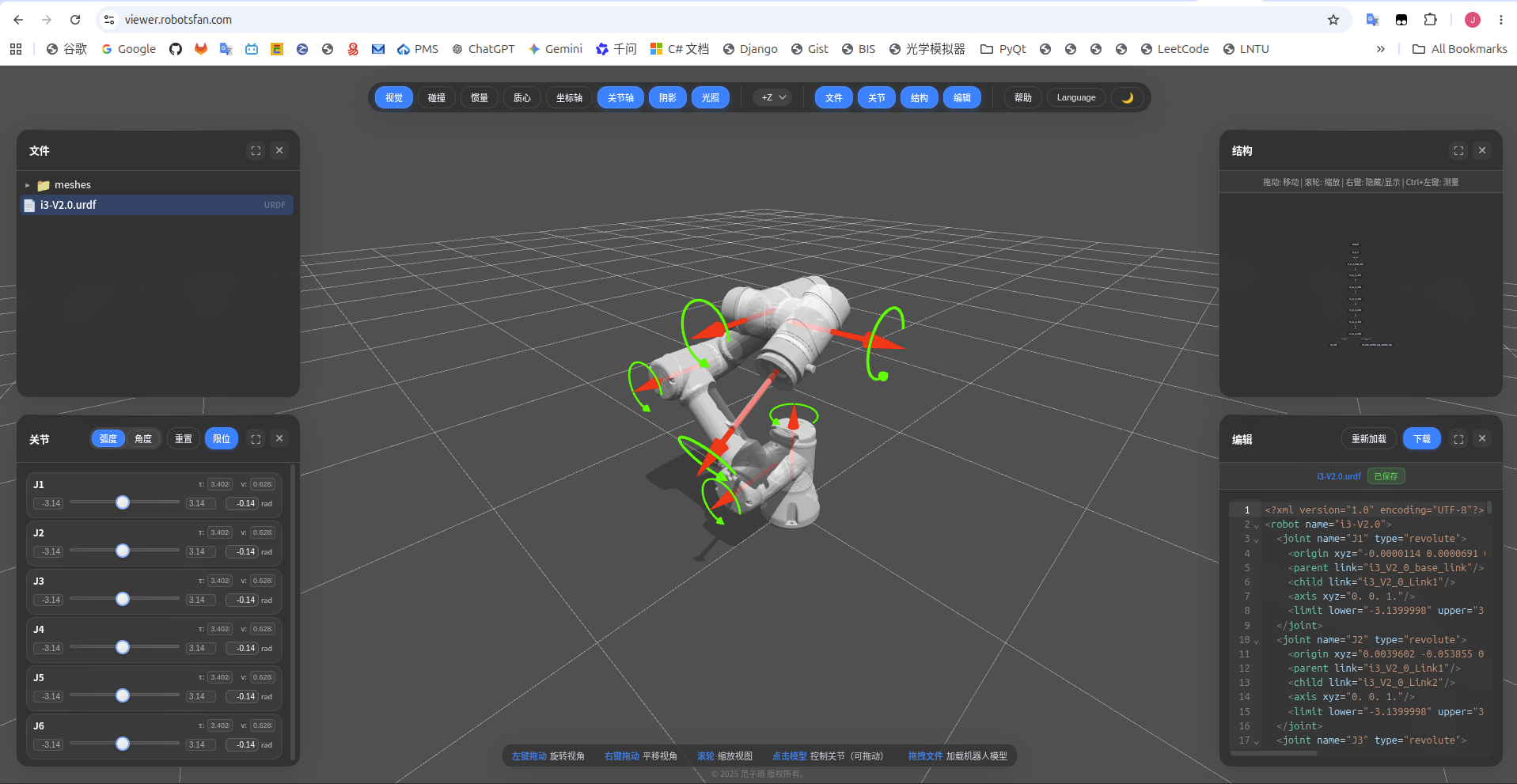
4 通过Lula Robot Description Editor导出机器人描述参数
-
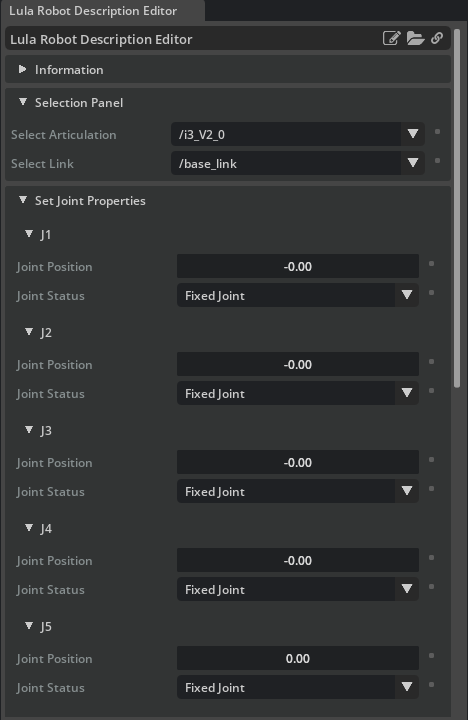
点击Play,然后点击Tools->Robotics->Lula Robot Description Editor,打开Lula机器人描述参数编辑器,Select Articulation选择Stage中的机器人。
-
将J1-J6设置为Active Joint
-
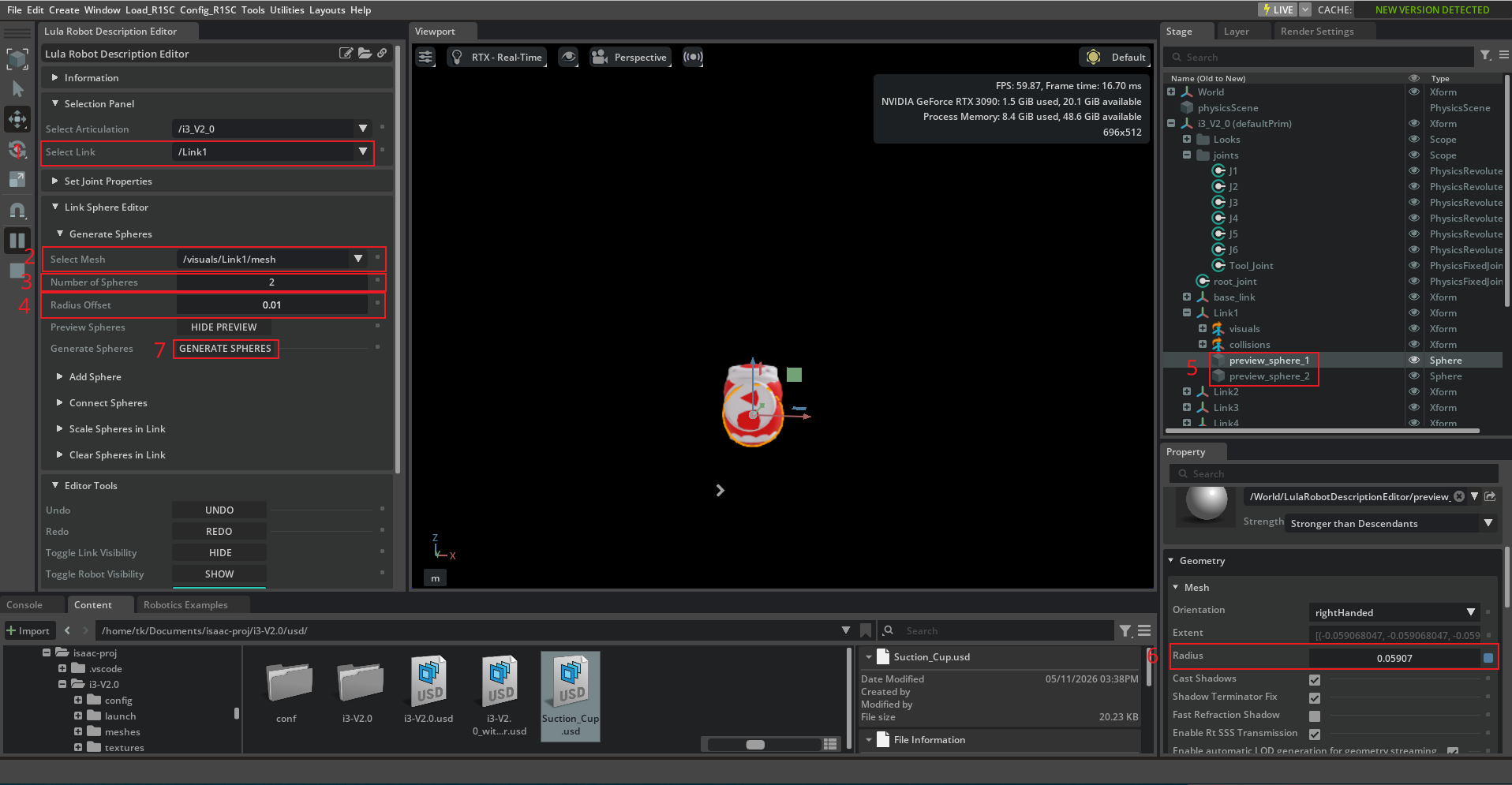
Select Link选择不同的Link Prim,然后在Link Sphere Editor中根据实际情况生成碰撞体。
-
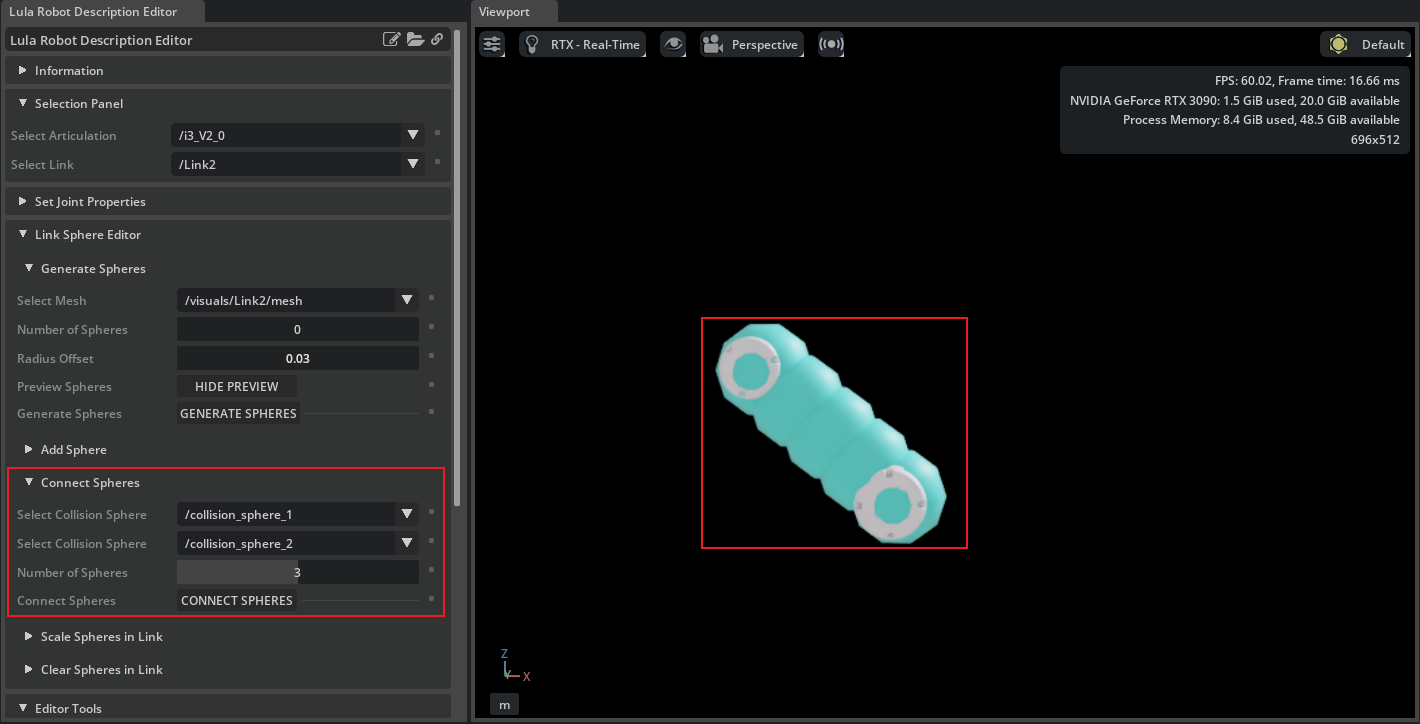
可选择Connect Sphere快速为连杆添加碰撞体。
-
配置好碰撞体后,导出机器人描述文件。
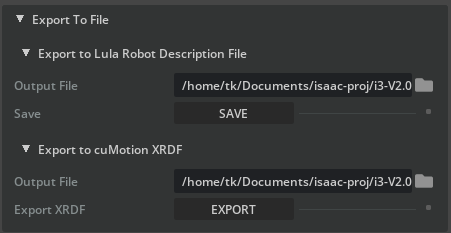
-
机器人描述文件导出成功后,点击Tools->Robotics->Lula Test Widget,打开Lula运动学测试工具,然后点击Play。
-
Select Articulation选择机器人
/i3_V2_0,Robot Description YAML加载步骤5导出的机器人yaml描述文件,Robot URDF加载第三节中步骤2导出的urdf文件,然后点击LOAD,Select End Effector Frame选择ee_Link_Suction_Cup_Suction_Cup。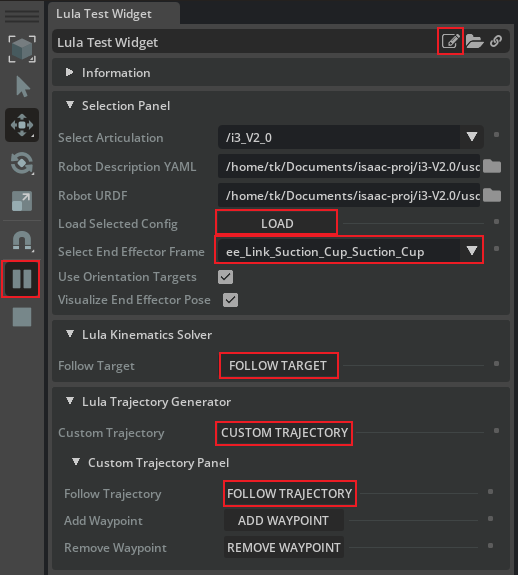
-
点击Lula Kinematics Solver->
FOLLOW TARGET,机器人将运动到红色Box目标位置,且保持末端与Box姿态一致。拖动红色Box,末端将自动跟随。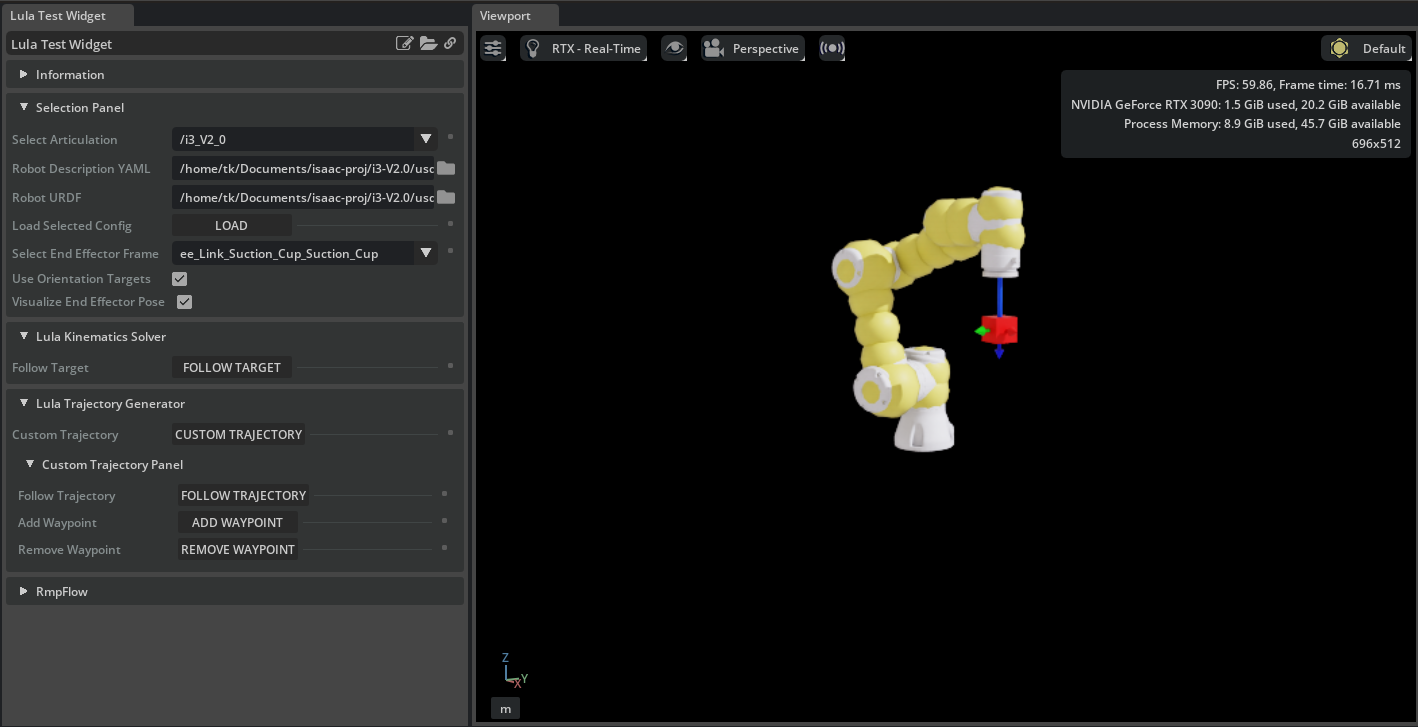
注意
默认的Target位置可能机器人末端无法到达,报下列错误。
2026-05-12T00:16:56Z [63,300,304ms] [Warning] [isaacsim.robot_motion.lula_test_widget.controllers] Failed to compute Inverse Kinematics所以需要修改默认的Target位置。点击Lula Test Widget 窗口右上角Open Source Code图标,打开扩展源代码,打开
test_scenarios.py找到def _create_target(self, position=None, orientation=None)修改target的位置,然后点击保存,重新执行步骤7和8即可。def _create_target(self, position=None, orientation=None): if position is None: # target 位置 position = np.array([0.3, 0, 0.3]) if orientation is None: # target 方向,四元数形式(W,X,Y,Z) orientation = np.array([0, -1, 0, 0]) self._target = VisualCuboid( "/World/Target", size=0.05, position=position, orientation=orientation, color=np.array([1.0, 0, 0]) ) -
点击Lula Trajectory Generator->
CUSTOM TARJECTORY,然后点击FOLLOW TARJECTORY,机器人将移动末端走一个矩形轨迹。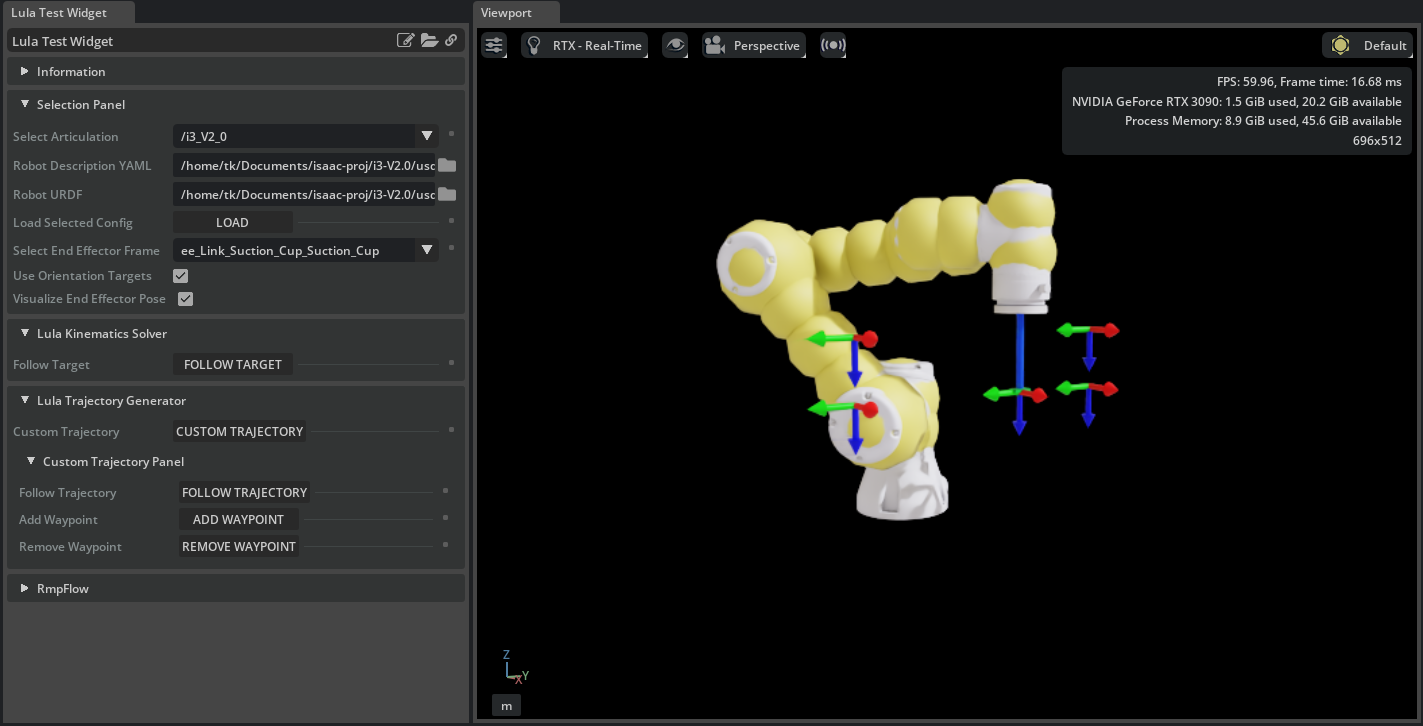
注意
默认生成的轨迹点机器人可能无法正常解算出一个合理的动作空间,即报类似下列错误。
[Lula] Task space path conversion reached minimum 's' step size delta' [1e-05] without finding a valid waypoint. The last waypoint conversion was at domain value [0.33], where the domain bounds for the task space path are [0, 1.22361]
[Lula] Conversion from `TaskSpacePathSpec` to `LinearCSpacePath` failed.
2026-05-12T00:40:09Z [64,693,208ms] [Error] [omni.ui.python] AttributeError: 'NoneType' object has no attribute 'get_active_joints'

At:
/home/tk/isaacsim/exts/isaacsim.robot_motion.motion_generation/isaacsim/robot_motion/motion_generation/articulation_trajectory.py(40): __init__
/home/tk/isaacsim/exts/isaacsim.robot_motion.lula_test_widget/isaacsim/robot_motion/lula_test_widget/test_scenarios.py(137): create_trajectory_controller
/home/tk/isaacsim/exts/isaacsim.robot_motion.lula_test_widget/isaacsim/robot_motion/lula_test_widget/extension.py(635): follow_trajectory
所以需要修改默认的轨迹。点击Lula Test Widget 窗口右上角Open Source Code图标,打开扩展源代码,打开
test_scenarios.py找到def on_custom_trajectory(self, robot_description_path, urdf_path)修改轨迹点的位置,然后点击保存,重新执行步骤7和9即可。def on_custom_trajectory(self, robot_description_path, urdf_path): self.scenario_reset() if self.lula_ik is None: return self.scenario_name = "Custom Trajectory" # 轨迹点方向 orientation = np.array([0, 1, 0, 0]) # 轨迹点位置坐标 rect_path = np.array([[0.3, -0.3, 0.1], [0.3, 0.3, 0.1], [0.3, 0.3, 0.5], [0.3, -0.3, 0.5], [0.3, -0.3, 0.1]]) self.traj_gen = LulaTaskSpaceTrajectoryGenerator(robot_description_path, urdf_path) self._trajectory_base_frame = SingleXFormPrim("/Trajectory", position=np.array([0, 0, 0])) for i in range(4): frame_prim = self._create_frame_prim(rect_path[i], orientation, f"/Trajectory/Target_{i+1}") self._trajectory_targets.append(frame_prim)一组可行的轨迹点坐标
rect_path = np.array([ [0.22, -0.18, 0.28], [0.22, 0.18, 0.28], [0.22, 0.18, 0.20], [0.22, -0.18, 0.20], [0.22, -0.18, 0.28], ]) -
至此机器人描述文件导出成功,并通过测试。
5 生成RMPFlow配置文件
官方文档:
-
根据官方模板修改为当前机器人配置即可
# Artificially limit the robot joints. For example: # A joint with range +-pi would be limited to +-(pi-.01) joint_limit_buffers: [.01, .01, .01, .01, .01, .01] # RMPflow has many modifiable parameters, but these serve as a great start. # Most parameters will not need to be modified rmp_params: cspace_target_rmp: metric_scalar: 50. position_gain: 100. damping_gain: 50. robust_position_term_thresh: .5 inertia: 1. cspace_trajectory_rmp: p_gain: 100. d_gain: 10. ff_gain: .25 weight: 50. cspace_affine_rmp: final_handover_time_std_dev: .25 weight: 2000. joint_limit_rmp: metric_scalar: 1000. metric_length_scale: .01 metric_exploder_eps: 1e-3 metric_velocity_gate_length_scale: .01 accel_damper_gain: 200. accel_potential_gain: 1. accel_potential_exploder_length_scale: .1 accel_potential_exploder_eps: 1e-2 joint_velocity_cap_rmp: max_velocity: 4. velocity_damping_region: 1.5 damping_gain: 1000.0 metric_weight: 100. target_rmp: accel_p_gain: 30. accel_d_gain: 85. accel_norm_eps: .075 metric_alpha_length_scale: .05 min_metric_alpha: .01 max_metric_scalar: 10000 min_metric_scalar: 2500 proximity_metric_boost_scalar: 20. proximity_metric_boost_length_scale: .02 xi_estimator_gate_std_dev: 20000. accept_user_weights: false axis_target_rmp: accel_p_gain: 210. accel_d_gain: 60. metric_scalar: 10 proximity_metric_boost_scalar: 3000. proximity_metric_boost_length_scale: .08 xi_estimator_gate_std_dev: 20000. accept_user_weights: false collision_rmp: damping_gain: 50. damping_std_dev: .04 damping_robustness_eps: 1e-2 damping_velocity_gate_length_scale: .01 repulsion_gain: 800. repulsion_std_dev: .01 metric_modulation_radius: .5 metric_scalar: 10000. metric_exploder_std_dev: .02 metric_exploder_eps: .001 damping_rmp: accel_d_gain: 30. metric_scalar: 50. inertia: 100. canonical_resolve: max_acceleration_norm: 50. projection_tolerance: .01 verbose: false # body_cylinders are used to promote self-collision avoidance between the robot and its base # The example below defines the robot base to be a capsule defined by the absolute coordinates pt1 and pt2. # The semantic name provided for each body_cylinder does not need to be present in the robot URDF. body_cylinders: - name: base pt1: [0,0,.333] pt2: [0,0,0.] radius: .05 # body_collision_controllers defines spheres located at specified frames in the robot URDF # These spheres will not be allowed to collide with the capsules enumerated under body_cylinders # By design, most frames in industrial robots are kinematically unable to collide with the robot base. # It is often only necessary to define body_collision_controllers near the end effector body_collision_controllers: - name: ee_Link radius: .05 -
保存为i3-V2.0_rmpflow_conf.yaml。
-
点击Tools->Robotics->Lula Test Widget,打开Lula运动学测试工具,然后点击Play.Select Articulation选择机器人
/i3_V2_0,Robot Description YAML加载步骤5导出的机器人yaml描述文件,Robot URDF加载第三节中步骤2导出的urdf文件,然后点击LOAD,Select End Effector Frame选择ee_Link_Suction_Cup_Suction_Cup。RmpFlow Config YAML加载保存好的i3-V2.0_rmpflow_conf.yaml配置文件,然后点击FOLLOW TARGET,机器人将自动运动到红色目标中心,并保持末端姿态与目标姿态一致。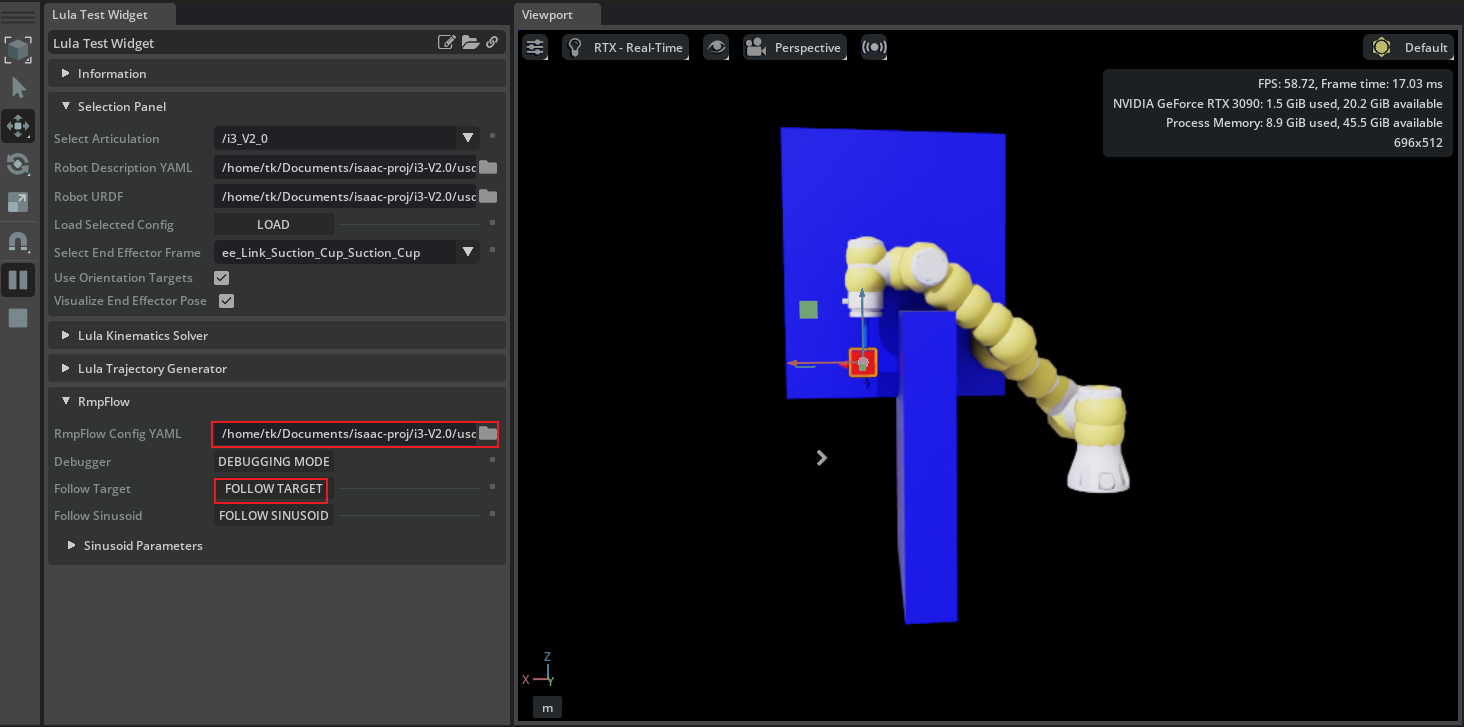
-
至此RMPFlow配置文件测试完成。机器人已经可以通过RMPFlow实现运动学控制了。
6 Standalone 方式通过RMPFlow控制机械臂抓取。
参考官方例程:
standalone_examples/api/isaacsim.robot.manipulators/ur10e
-
文件结构
i3_v2_0/ # 项目根目录(建议用下划线,避免横线在 Python 导入时报错) ├── sw_to_urdf/ # solidworks导出的urdf文件以及 ├── assets/ # 存放导出的 .usd 模型和 .urdf | ├── meshes/ | ├── i3-V2.0_with_gripper.usd │ └── i3-V2.0.urdf ├── configs/ # 配置文件 │ ├── i3-V2.0_robot_conf.xrdf # 机器人描述文件 │ ├── i3-V2.0_robot_conf.yaml # 机器人描述文件 │ └── i3-V2.0_robot_rmpflow_conf.yaml # RMPFlow配置文件 ├── controllers/ # 控制逻辑层 │ ├── __init__.py │ ├── rpick_palce.py # pick and place 控制器 │ └── rmpflow.py # RMPFlow 控制器 ├── tasks/ # 高层任务逻辑(场景管理) │ ├── __init__.py │ └── pick_place.py # pick and place 场景 ├── .vscode/ # VS Code 调试配置 │ └── launch.json # 配置 omni.kit.debug.vscode_debugger └── pick_up_example.py # 统一启动入口 -
项目链接:https://github.com/gitleej/i3_V2_0.git
配置好环境,运行,效果如下。
B站:Isaac Sim 5.0 基于RMPFlow控制六轴机械臂+真空吸盘实现抓取 -
pick_up_example.py
# -*- coding: utf-8 -*- # ---------------------------------------------------------------------------------------------------------------------- # pick_up_example.py # Author: AILEE # Create: 2026-04-29 09:43:48 # Last Modified: 2026-05-12 11:31:42 # Last Modified By: AILEE # Description: 驱动i3机械臂实现拾取和放置的示例脚本 # Copy Right @ 2026 AILEE All Rights Reserved. # ---------------------------------------------------------------------------------------------------------------------- from isaacsim import SimulationApp simulation_app = SimulationApp({"headless": False}) from isaacsim.core.api import World from tasks.pick_palce import PickPlace from controller.pick_place import PickPlaceController from omni.isaac.core.utils.math import radians_to_degrees import numpy as np np.set_printoptions(precision=3, suppress=True) my_world = World(stage_units_in_meters=1.0, physics_dt=1 / 200, rendering_dt=20 / 200) target_position = np.array([-0.3, 0.3, 0.0]) target_position[2] = 0.0515 my_task = PickPlace( name="i3_pick_place", target_position=target_position, cube_size=np.array([0.1, 0.1, 0.0515]), cube_initial_position=np.array([0.3, 0.3, 0.026]), # cube_initial_orientation=np.array([0.0, -1.0, 0.0, 0.0]) ) my_world.add_task(my_task) my_world.reset() task_params = my_world.get_task("i3_pick_place").get_params() r1sc_name = task_params["robot_name"]["value"] my_r1sc = my_world.scene.get_object(r1sc_name) # 初始化控制器 my_controller = PickPlaceController( name="controller", robot_articulation=my_r1sc, gripper=my_r1sc.gripper ) task_params = my_world.get_task("i3_pick_place").get_params() articulation_controller = my_r1sc.get_articulation_controller() reset_needed = False task_completed = False while simulation_app.is_running(): my_world.step(render=True) if my_world.is_playing(): if reset_needed: my_world.reset() reset_needed = False my_controller.reset() task_completed = False if my_world.current_time_step_index == 0: my_controller.reset() observations = my_world.get_observations() actions = my_controller.forward( picking_position=observations[task_params["cube_name"]["value"]]["position"], # end_effector_orientation=observations[task_params["cube_name"]["value"]]["orientation"], # 增加姿态输入 end_effector_orientation=np.array([0, -1, 0, 0]), # 如果不想使用物体姿态,可以设置为固定值 # placing_position=observations[task_params["cube_name"]["value"]]["target_position"], placing_position=target_position, current_joint_positions=observations[task_params["robot_name"]["value"]]["joint_positions"], # 增加下探距离,确保控制器有“下探”这个动作的空间 end_effector_offset=np.array([0, 0, 0.024]), ) if my_controller.is_done() and not task_completed: print("done picking and placing") task_completed = True articulation_controller.apply_action(actions) end_position = observations[task_params["robot_name"]["value"]]["end_effector_position"] end_orientation = observations[task_params["robot_name"]["value"]]["end_effector_orientation"] # observations = my_world.get_observations() joint_positions = radians_to_degrees( observations[task_params["robot_name"]["value"]]["joint_positions"]) actions_joint_positions = actions.joint_positions if actions.joint_positions[0] is None else radians_to_degrees(actions.joint_positions) # 2. 打印当前状态,排查是否在放置阶段卡住 current_event = my_controller.get_current_event() print("[{}]".format(current_event), "current cube position:", observations[task_params["cube_name"]["value"]]["position"]) print("[{}]".format(current_event), "current end effector position:", end_position, end_orientation) print("[{}]".format(current_event), "actions joint positions:{}".format(actions_joint_positions)) print("[{}]".format(current_event), "current joint positions:{}".format(joint_positions)) if my_world.is_stopped(): reset_needed = True simulation_app.close() -
/task/pick_place.py
# -*- coding: utf-8 -*- # ---------------------------------------------------------------------------------------------------------------------- # pick_palce.py # Author: AILEE # Create: 2026-04-29 09:50:46 # Last Modified: 2026-05-12 11:14:19 # Last Modified By: AILEE # Description: pick place 任务定义 # Copy Right @ 2026 AILEE All Rights Reserved. # ---------------------------------------------------------------------------------------------------------------------- import os import isaacsim.core.api.tasks as tasks import numpy as np from typing import Optional from isaacsim.robot.manipulators.manipulators import SingleManipulator from isaacsim.robot.manipulators.grippers import SurfaceGripper from isaacsim.core.utils.stage import add_reference_to_stage from omni.isaac.core.utils.rotations import quat_to_euler_angles from omni.isaac.core.utils.math import radians_to_degrees class PickPlace(tasks.PickPlace): def __init__(self, name = "i3_pick_place", cube_initial_position: Optional[np.ndarray] = None, cube_initial_orientation: Optional[np.ndarray] = None, target_position: Optional[np.ndarray] = None, cube_size: Optional[np.ndarray] = np.array([0.0515, 0.0515, 0.0515]), offset: Optional[np.ndarray] = None)-> None: tasks.PickPlace.__init__( self, name=name, cube_initial_position=cube_initial_position, cube_initial_orientation=cube_initial_orientation, target_position=target_position, cube_size=cube_size, offset=offset ) return def set_robot(self): current_dir = os.path.dirname(os.path.abspath(__file__)) assert_path = os.path.abspath(os.path.sep.join([current_dir, "..", "assets/i3-V2.0_with_gripper.usd"])) print("assert_path: ", assert_path) add_reference_to_stage( usd_path=assert_path, prim_path="/i3" ) # 定义真空吸盘 gripper = SurfaceGripper( # end_effector_prim_path="/i3/Link6/flange/gripper", end_effector_prim_path="/i3/ee_Link", surface_gripper_path="/i3/ee_Link/Suction_Cup/SurfaceGripper", ) # 定义机械臂 manipulator = SingleManipulator( prim_path="/i3", name="i3_robot", # end_effector_prim_path="/i3/Link6/flange/gripper", end_effector_prim_path="/i3/ee_Link", gripper=gripper, ) return manipulator def get_observations(self) -> dict: """[summary] Returns: dict: [description] """ joints_state = self._robot.get_joints_state() cube_position, cube_orientation = self._cube.get_local_pose() end_effector_position, end_effector_orientation = self._robot.end_effector.get_local_pose() roll, pitch, yaw = quat_to_euler_angles(end_effector_orientation) return { self._cube.name: { "position": cube_position, "orientation": cube_orientation, "target_position": self._target_position, }, self._robot.name: { "joint_positions": joints_state.positions, "end_effector_position": end_effector_position, "end_effector_orientation": np.array([radians_to_degrees(roll), radians_to_degrees(pitch), radians_to_degrees(yaw)]), }, } -
/controller/pick_place.py
# -*- coding: utf-8 -*- # ---------------------------------------------------------------------------------------------------------------------- # pick_place.py # Author: AILEE # Create: 2026-04-29 11:27:15 # Last Modified: 2026-05-08 16:57:47 # Last Modified By: AILEE # Description: pick place 控制器定义,基于RMPFlow实现 # Copy Right @ 2026 AILEE All Rights Reserved. # ---------------------------------------------------------------------------------------------------------------------- import isaacsim.robot.manipulators.controllers as manipulators_controllers from isaacsim.core.prims import SingleArticulation from isaacsim.robot.manipulators.grippers import SurfaceGripper from .rmpflow import RMPFlowController class PickPlaceController(manipulators_controllers.PickPlaceController): def __init__(self, name: str, gripper: SurfaceGripper, robot_articulation: SingleArticulation, events_dt = None) -> None: if events_dt is None: events_dt = [0.005, 0.002, 1, 0.05, 0.008, 0.005, 0.0008, 0.1, 0.0008, 0.008] manipulators_controllers.PickPlaceController.__init__( self, name=name, cspace_controller=RMPFlowController( name=name + "_cspace_controller", robot_articulation=robot_articulation ), gripper=gripper, events_dt=events_dt, end_effector_initial_height=0.3, ) return -
/controller/rmpflow.py
# -*- coding: utf-8 -*-
# ----------------------------------------------------------------------------------------------------------------------
# rmpflow.py
# Author:           AILEE
# Create:           2026-04-29 11:32:13
# Last Modified:    2026-05-12 11:24:23
# Last Modified By: AILEE
# Description:      RMPFlow控制器定义
# Copy Right @ 2026 AILEE All Rights Reserved.
# ----------------------------------------------------------------------------------------------------------------------

import os

import isaacsim.robot_motion.motion_generation as mg
from isaacsim.core.prims import Articulation

class RMPFlowController(mg.MotionPolicyController):
    def __init__(self,
                 name:str,
                 robot_articulation: Articulation,
                 physics_dt: float = 1.0 / 60.0) -> None:
        current_dir = os.path.dirname(os.path.abspath(__file__))
        self.rmpflow = mg.lula.motion_policies.RmpFlow(
            robot_description_path=os.path.sep.join([current_dir, "..", "conf/i3-V2.0_robot_conf.yaml"]),
            rmpflow_config_path=os.path.sep.join([current_dir, "..", "conf/i3-V2.0_robot_rmpflow_conf.yaml"]),
            urdf_path=os.path.sep.join([current_dir, "..", "assets/i3-V2.0.urdf"]),
            end_effector_frame_name="ee_Link_Suction_Cup_Suction_Cup",
            maximum_substep_size=0.00334
        )

        # --- 添加以下代码来开启可视化 ---
        # 开启 RMPFlow 的目标坐标轴显示
        # self.rmpflow.set_visualization_enabled(True)
        # self.rmpflow.visualize_end_effector_position()
        # 开启碰撞球显示(非常有用于排查为什么“不敢放下”物体)
        self.rmpflow.visualize_collision_spheres()
        # ----------------------------

        self.articulation_rmp = mg.ArticulationMotionPolicy(robot_articulation, self.rmpflow, physics_dt)

        mg.MotionPolicyController.__init__(self, name=name, articulation_motion_policy=self.articulation_rmp)
        self._default_position, self._default_orientation = (
            self._articulation_motion_policy._robot_articulation.get_world_pose()
        )
        self._motion_policy.set_robot_base_pose(
            robot_position=self._default_position, robot_orientation=self._default_orientation
        )
        return

    def reset(self):
        mg.MotionPolicyController.reset(self)
        self._motion_policy.set_robot_base_pose(
            robot_position=self._default_position, robot_orientation=self._default_orientation
        )
附录:添加VS Code扩展
官方文档
-
打开VSCode,扩展搜索Isaac Sim VS Code Edition,点击安装。
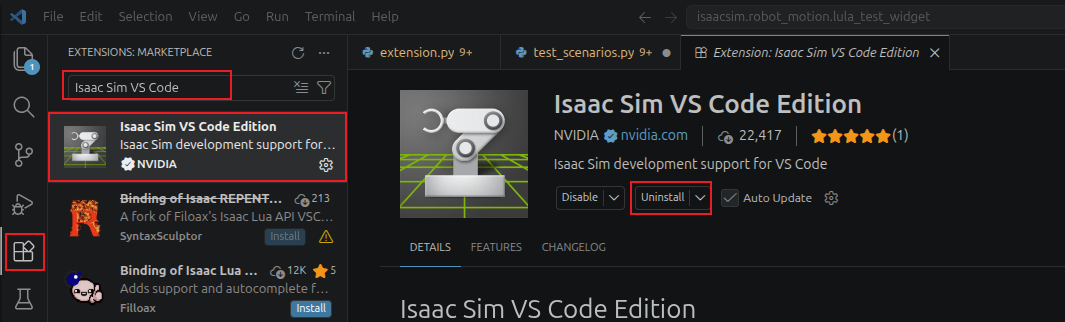
-
打开Isaac Sim,点击Window->Extention,搜索
vscode选择VS CODE INTEGRATION,点击ENABLED,并勾选AUTOLOAD。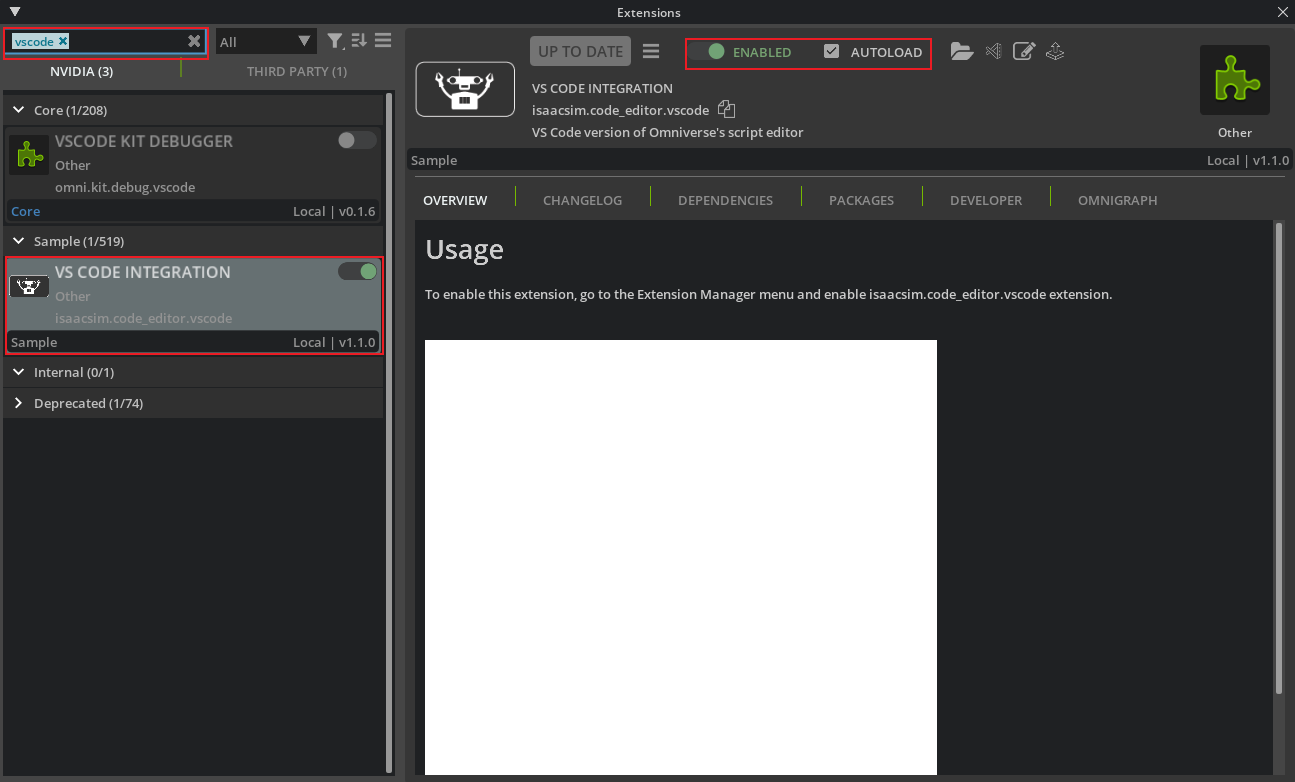
参考
- Tutorial 6: Setup a Manipulator
- Tutorial 7: Configure a Manipulator
- Tutorial 8: Generate Robot Configuration File
- Tutorial 9: Pick and Place Example
- Tutorial 11: Tuning Joint Drive Gains
- Lula Robot Description and XRDF Editor
- Lula RMPflow
- Configuring RMPflow for a New Manipulator
- B站视频:【Isaac Sim】通过urdf导入机器人并通过rmpflow控制机器人运动/避障

AtomGit 是由开放原子开源基金会联合 CSDN 等生态伙伴共同推出的新一代开源与人工智能协作平台。平台坚持“开放、中立、公益”的理念,把代码托管、模型共享、数据集托管、智能体开发体验和算力服务整合在一起,为开发者提供从开发、训练到部署的一站式体验。
更多推荐


 11
11 0
0- 0


 已为社区贡献3条内容

所有评论(0)