LLM之Agent(五十)|手把手教你用 Hermes Agent 搭建 AI 会议助手:从安装到代码全解析
你有过这样的经历吗?一场会议开完,写纪要写到手软。谁说了什么、定了什么事、谁负责跟进——全靠记忆和零散笔记拼凑。
更崩溃的是,下周开会时,上周的待办没人记得,同一个问题反复讨论。
今天带来一份完整的技术教程:用 Hermes Agent + Streamlit 搭建一个真正的 AI Meeting Copilot。它不仅能总结会议纪要,还能提取决策、风险、行动项,甚至自动生成 Slack 通报。最厉害的是,它支持会议历史追溯和连续性管理。
完整源码已开源:https://github.com/AashiDutt/Hermes_Agent_Demo
Hermes Agent 是什么?
Hermes Agent 是 Nous Research(Hermes 和 Nomos 模型系列背后的实验室)开发的开源(MIT 协议)自主智能体运行时。它不是 IDE 里的编程助手,也不是简单包装 LLM API 的薄层——它是一个持久运行的进程,驻留在你的服务器上,跨会话记住学到的东西,运行越久能力越强。
项目在 GitHub 上已经积累了超过 25,000 颗星,常被拿来与 OpenClaw、Claude Code 等工具比较。
几个核心特性:
-
闭环学习:Hermes 会从经验中创建技能,在后续使用中不断优化;主动持久化知识;用 FTS5 + LLM 摘要搜索自己的历史对话;通过 Honcho 构建辩证式用户模型,随会话深化
-
模型无关的提供商解析:支持 OpenRouter 上 200+ 模型,以及 Anthropic、OpenAI、GitHub Copilot、DeepSeek、Nous Portal 和任何自定义 OpenAI 兼容端点。运行时解析器处理提供商选择、API 密钥路由和故障转移
-
多平台网关:单一网关进程连接 CLI、Telegram、Discord、Slack、WhatsApp、Signal、Matrix、Mattermost、Email、SMS 等 15+ 平台
-
OpenAI 兼容 API 服务器:任何支持 OpenAI 格式的前端都可以调用 Hermes 作为端点。提供
/v1/responses、/v1/chat/completions、/v1/models和健康检查端点,SQLite 持久化响应 -
六种执行后端:本地、Docker、SSH、Daytona、Singularity、Modal——从 5 美元 VPS 到 GPU 集群都能跑
Demo 功能演示
这个 Meeting Copilot 是一个 Streamlit 应用,通过 HTTP 与 Hermes Agent 通信。你粘贴或上传会议文字,提供元数据(标题、日期、参会人),点击按钮,Hermes Agent 就会处理并返回结构化 JSON,包含:
-
执行摘要
-
决策与风险
-
带责任人和截止日期的行动项
-
上次会议的遗留事项
-
Slack 就绪的通报文本
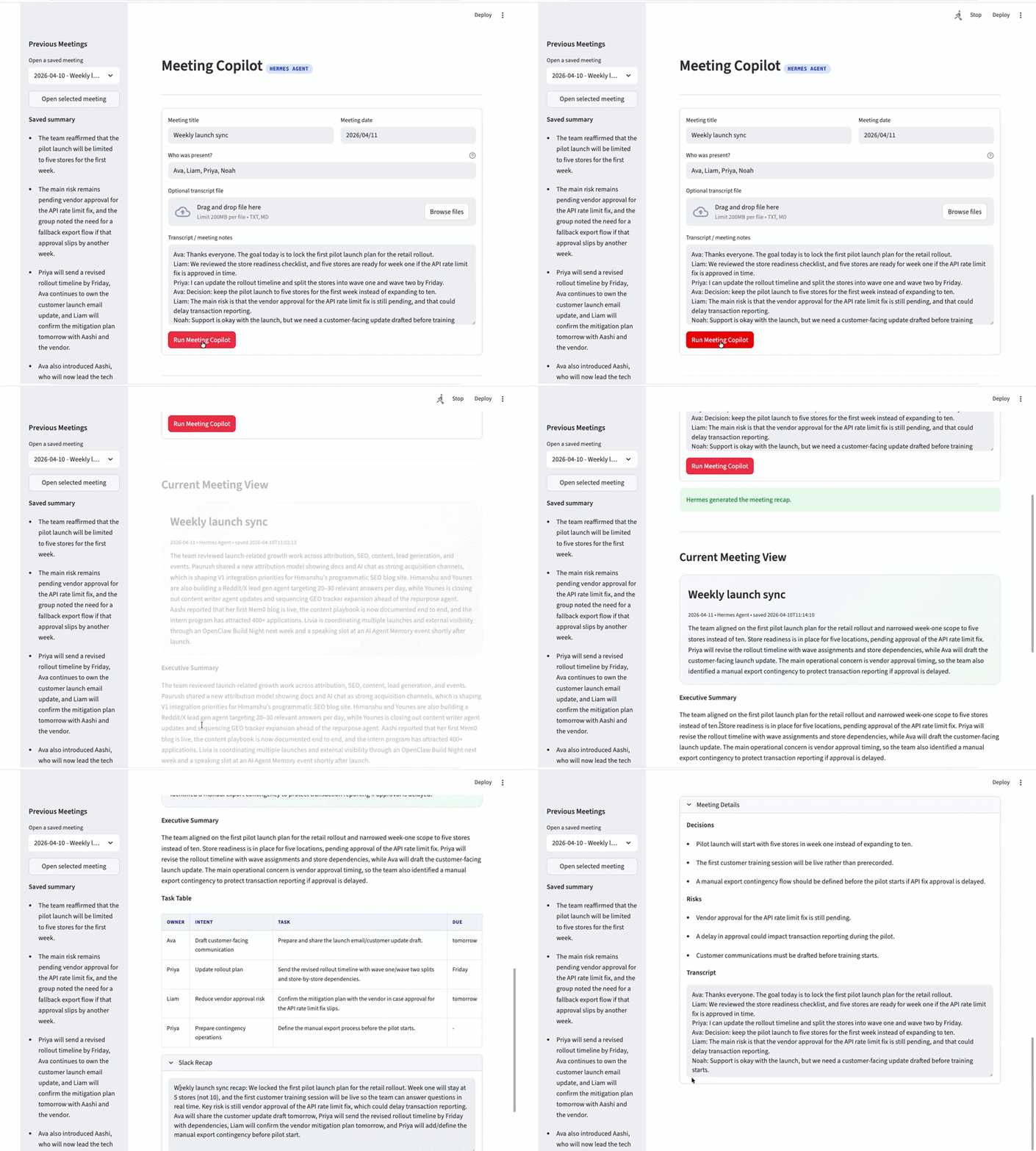
应用由两个文件组成:
-
app.py:Streamlit 前端,处理 UI、会话状态、会议历史和渲染 -
hermes_demo.py:后端模块,构建提示词、调用 Hermes API、解析响应、管理持久化
完整运行流程:
-
应用读取上传的文字文件(如有),与文本框内容合并
-
如果合并后文字为空,显示"请先添加会议文字或笔记"
-
从会话状态加载当前会议历史,获取最近一次保存的纪要作为上下文
-
调用
run_hermes_meeting_copilot() -
该函数构建提示词,包含会议标题、日期、参会人、文字,以及(如有)上次会议摘要和遗留项
-
向 Hermes 的
/v1/responses发送 POST 请求,model="hermes-agent",store=True -
Hermes 返回结构化输出,应用解析并规范化为 summary、decisions、risks、next_steps、slack_recap、response_id 等字段
-
Hermes 成功后,创建新会议记录,添加到侧边栏历史顶部,设为活跃会议,保存到
data/app_state.json -
UI 渲染当前会议视图,包括执行摘要、任务表、Slack 通报和会议详情
-
如果 Hermes 不可达,流程在 API 调用处停止,显示错误和启动命令
注意:纪要是在 Hermes 成功完成后保存的,不是点击按钮的瞬间。
环境准备与安装
安装 Hermes Agent
curl -fsSL https://raw.githubusercontent.com/NousResearch/hermes-agent/main/scripts/install.sh | bash配置模型提供商
hermes model这会打开交互式选择器,包含 Nous Portal、OpenRouter、Anthropic、OpenAI、GitHub Copilot、DeepSeek 和自定义端点。根据你的环境选择。
启用 API 服务器
在 ~/.hermes/.env 中添加:
API_SERVER_ENABLED=trueAPI_SERVER_KEY=change-me-local-dev然后启动网关:
hermes gatewayAPI 服务器默认在 8642 端口启动。
安装 Python 依赖
requirements.txt 内容:
streamlit>=1.35.0requests>=2.31.0安装并运行:
pip install -r requirements.txtstreamlit run app.py代码详解
Step 1:系统提示词(hermes_demo.py)
Copilot 的骨干是指令提示词,告诉 Agent 返回什么 JSON 格式,设定行为规则:
MEETING_COPILOT_INSTRUCTIONS = """
You are Hermes Agent operating as a Meeting Copilot.

You will receive:
- the current meeting title, date, participants, and transcript
- optional prior meeting context from the app, if available

Return only valid JSON with this exact shape:
{
  "meeting_title": "string",
  "meeting_date": "string",
  "summary": "string",
  "decisions": ["string"],
  "risks": ["string"],
  "next_steps": [
    {"owner": "string", "intent": "string", "task": "string", "due": "string"}
  ],
  "carry_forward": ["string"],
  "slack_recap": "string",
  "task_list_markdown": "string"
}

Rules:
- Return raw JSON only. No markdown fences. No extra commentary.
- Keep the summary to 3 to 5 sentences.
- Use concise bullets in arrays.
- If the transcript does not specify an owner or due date, use an empty string for that field.
- "carry_forward" should list unresolved or reusable context from the previous meeting only if relevant.
- "slack_recap" should be ready to paste into Slack.
- "task_list_markdown" should be a markdown checklist.
""".strip()
这段提示词作为 Responses API 的 instructions 字段发送。通过约束 Hermes 只返回原始 JSON,应用可以确定性解析响应,不用担心 markdown 包装或对话前缀。
Step 2:构建带上下文的用户提示词
_build_meeting_prompt() 函数把所有信息组装成单个字符串。关键是包含上次会议的摘要和遗留项,让 Hermes 获得跨会话的连续性:
def _build_meeting_prompt(
    meeting_title: str,
    meeting_date: str,
    participants_text: str,
    transcript_text: str,
    previous_result: dict[str, Any] | None,
) -> str:
    sections = [
        f"Meeting title: {meeting_title.strip()}",
        f"Meeting date: {meeting_date.strip()}",
        f"Participants: {participants_text.strip()}",
    ]
    if previous_result and previous_result.get("summary"):
        carry = previous_result.get("carry_forward", [])
        carry_text = "\n".join(f"- {item}" for item in carry[:4]) if carry else "- None"
        sections.extend(
            [
                "",
                "Previous saved meeting context:",
                f"Title: {previous_result.get('meeting_title', '')}",
                f"Date: {previous_result.get('meeting_date', '')}",
                f"Summary: {previous_result.get('summary', '')}",
                "Carry-forward items:",
                carry_text,
            ]
        )
    sections.extend(["", "Transcript / notes:", transcript_text.strip()])
    return "\n".join(sections).strip()
这个函数让 copilot 变得有状态。没有它,每次会议都是孤立分析的。有了它,Agent 可以引用上次未解决的问题,并标注为遗留项。
Step 3:调用 Hermes API
run_hermes_meeting_copilot() 函数构建 payload 并发送到 Hermes 的 /v1/responses 端点:
def run_hermes_meeting_copilot(
    api_base_url: str,
    meeting_title: str,
    meeting_date: str,
    participants_text: str,
    transcript_text: str,
    previous_result: dict[str, Any] | None = None,
    api_key: str = "",
) -> dict[str, Any]:
    user_prompt = _build_meeting_prompt(
        meeting_title=meeting_title,
        meeting_date=meeting_date,
        participants_text=participants_text,
        transcript_text=transcript_text,
        previous_result=previous_result,
    )
    payload = {
        "model": "hermes-agent",
        "instructions": MEETING_COPILOT_INSTRUCTIONS,
        "input": user_prompt,
        "store": True,
    }
    response_json = _post_response(api_base_url, payload, api_key=api_key)
    text = _extract_output_text(response_json)
    data = _normalize_meeting_result(_parse_json_text(text))
    data["response_id"] = response_json.get("id", "")
    data["raw_text"] = text
    data["submitted_transcript"] = transcript_text
    return data
三个关键细节:
-
model: "hermes-agent":这是 API 服务器期望的模型名。它不指向某个特定 LLM,而是告诉服务器通过完整的 Hermes Agent 循环路由,使用你通过
hermes model配置的提供商 -
store: True:告诉 Hermes 将响应持久化到 SQLite,之后可通过
GET /v1/responses/{id}检索。应用用这个实现侧边栏"打开选定会议"功能 -
instructions vs input:Responses API 把系统级指令和用户输入分开。会议 copilot 指令保持不变,用户输入每次不同
实际 HTTP 调用在 _post_response 中:
def _post_response(
    api_base_url: str,
    payload: dict[str, Any],
    api_key: str = "",
) -> dict[str, Any]:
    try:
        response = requests.post(
            f"{api_base_url.rstrip('/')}/responses",
            headers=_headers(api_key),
            json=payload,
            timeout=DEFAULT_REQUEST_TIMEOUT,
        )
    except requests.RequestException as exc:
        raise HermesAPIError(
            "Could not reach the Hermes API server. Start Hermes with "
            "`API_SERVER_ENABLED=true hermes gateway run` and make sure the base URL is correct."
        ) from exc

    if response.status_code != 200:
        raise HermesAPIError(f"Hermes API returned HTTP {response.status_code}: {response.text[:600]}")

    try:
        return response.json()
    except ValueError as exc:
        raise HermesAPIError(f"Hermes returned non-JSON output: {response.text[:600]}") from exc
超时设置为 180 秒(DEFAULT_REQUEST_TIMEOUT),这很宽松但是必要的。Hermes Agent 不只是转发给 LLM——它可能调用工具、搜索历史会话或触发技能创建后才返回。
底层模型到底是谁?
一个容易被忽略的细节:Streamlit 应用并不直接调用特定 LLM。在请求 payload 中:
payload = {
    "model": "hermes-agent",
    "instructions": MEETING_COPILOT_INSTRUCTIONS,
    "input": user_prompt,
    "store": True,
}
乍一看 hermes-agent 像是模型名,其实不是。hermes-agent 是 Hermes API 服务器暴露的运行时。Hermes 接收会议文字,应用指令,然后将请求路由到当前配置的底层语言模型。
也就是说,UI 中显示的摘要、决策、风险、行动项和 Slack 通报,都是由 Hermes 当前配置的底层模型生成的。
实际流程:
-
Streamlit 应用发送会议数据到本地 Hermes API 服务器
-
Hermes 在
/v1/responses接收请求 -
Hermes 将任务转发给配置的提供商/模型
-
该模型生成结构化纪要
-
Hermes 将结果作为 Responses API payload 返回给应用
-
应用解析 payload 并在 UI 中渲染
重要的架构点:应用是模型无关的。如果你在 Hermes 中更改配置模型,应用代码完全不需要改动。
在作者的本地 Hermes Agent 配置中,通过提供商设置了 gpt-5.4 模型,所以 UI 中所有摘要和结构化输出都由该模型生成。如果你配置不同的提供商,同样的应用会使用那个模型,无需更改任何工具代码。
Step 4:解析 Hermes 响应
Hermes 返回 Responses API 信封。助手文字嵌套在 output[].content[].text 中。提取函数遍历这个结构:
def _extract_output_text(response_json: dict[str, Any]) -> str:
    output = response_json.get("output", [])
    for item in output:
        if item.get("type") != "message":
            continue
        for part in item.get("content", []):
            if part.get("type") == "output_text":
                return str(part.get("text", "")).strip()
raise HermesAPIError("Hermes response did not contain assistant output text.")提取原始文字后,_parse_json_text 处理 LLM 有时会忽略"只返回原始 JSON"指令的现实——可能包裹在 markdown 围栏中或添加评论:
def _parse_json_text(text: str) -> dict[str, Any]:
    cleaned = text.strip()
    if not cleaned:
        raise HermesAPIError("Hermes returned an empty response.")

    direct = _try_json_loads(cleaned)
    if isinstance(direct, dict):
        return direct

    fenced_match = re.search(r"```(?:json)?\s*(\{.*\})\s*```", cleaned, re.DOTALL)
    if fenced_match:
        fenced = _try_json_loads(fenced_match.group(1))
        if isinstance(fenced, dict):
            return fenced

    brace_match = re.search(r"(\{.*\})", cleaned, re.DOTALL)
    if brace_match:
        embedded = _try_json_loads(brace_match.group(1))
        if isinstance(embedded, dict):
            return embedded

    raise HermesAPIError(f"Hermes did not return valid JSON. Raw output:\n{cleaned[:1200]}")
这种三层解析(直接 JSON → 围栏 JSON → 括号提取 JSON)是消费结构化 LLM 输出的实用模式,对常见格式偏差具有弹性。
Step 5:规范化结果
解析后,_normalize_meeting_result 确保每个预期字段都存在且有合理的默认值:
def _normalize_meeting_result(data: dict[str, Any]) -> dict[str, Any]:
    normalized = dict(data)
    normalized.setdefault("meeting_title", "")
    normalized.setdefault("meeting_date", "")
    normalized.setdefault("summary", "")
    normalized.setdefault("decisions", [])
    normalized.setdefault("risks", [])
    normalized.setdefault("next_steps", [])
    normalized.setdefault("carry_forward", [])
    normalized.setdefault("slack_recap", "")
    normalized.setdefault("task_list_markdown", "")
    normalized["next_steps"] = _normalize_next_steps(normalized.get("next_steps", []))
    return normalized
_normalize_next_steps 函数特别有趣——如果 LLM 遗漏了 intent 字段,它会从任务文字中推断:
def _infer_intent(task_text: str, context_text: str = "") -> str:
    combined = f"{task_text} {context_text}".lower()
    if any(word in combined for word in ("risk", "fallback", "mitigation", "blocker", "approval")):
        return "Risk mitigation"
    if any(word in combined for word in ("send", "share", "draft", "update", "email", "communicat")):
        return "Communication"
    if any(word in combined for word in ("confirm", "review", "align", "approve", "check")):
        return "Alignment"
    if any(word in combined for word in ("build", "create", "prepare", "define", "implement")):
        return "Execution"
    return "Follow-up"
Step 6:Streamlit 前端(app.py)
前端处理三件事:输入收集、结果渲染、会议历史管理。
输入收集使用 Streamlit 表单,包含标题、日期、参会人、可选文件上传和预填充示例数据的文本区域:
with st.form("meeting_copilot_form"):
    top_left, top_right = st.columns([1.1, 0.9])
    with top_left:
        meeting_title = st.text_input("Meeting title", value="Weekly launch sync")
    with top_right:
        meeting_date = st.date_input("Meeting date", value=date.today())

    participants_text = st.text_input(
        "Who was present?",
        value="Ava, Liam, Priya",
        help="Comma-separated names.",
    )
    transcript_file = st.file_uploader("Optional transcript file", type=["txt", "md"])
    transcript_text = st.text_area(
        "Transcript / meeting notes",
        value=SAMPLE_TRANSCRIPT,
        height=220,
    )
run_workflow = st.form_submit_button("Run Meeting Copilot", type="primary")提交处理把所有内容串联起来:合并上传和输入的文字,获取前文上下文,调用 Hermes,更新状态:
if run_workflow:
    uploaded_text = ""
    if transcript_file is not None:
        uploaded_text = transcript_file.read().decode("utf-8", errors="ignore").strip()

    combined_transcript = "\n\n".join(part for part in [transcript_text.strip(), uploaded_text] if part)
    if not combined_transcript.strip():
        st.warning("Add a transcript or meeting notes first.")
    else:
        history_before = st.session_state["history"]
        previous_result = _get_previous_context(history_before)
        try:
            result = run_hermes_meeting_copilot(
                api_base_url=st.session_state["api_base_url"],
                meeting_title=meeting_title,
                meeting_date=str(meeting_date),
                participants_text=participants_text,
                transcript_text=combined_transcript,
                previous_result=previous_result,
                api_key=st.session_state["api_key"],
            )
            st.success("Hermes generated the meeting recap.")

            new_record = _build_history_record(result)
            updated_history = [new_record] + history_before
            st.session_state["history"] = updated_history
            st.session_state["selected_history_id"] = new_record["id"]
            st.session_state["active_result"] = _decorate_result(new_record, result)
            _save_state(updated_history, new_record)
        except HermesAPIError as exc:
            st.error(str(exc))
st.info("Start Hermes and retry: `API_SERVER_ENABLED=true API_SERVER_HOST=127.0.0.1 API_SERVER_PORT=8642 hermes gateway run`")结果渲染显示摘要卡片、行动项表格、Slack 通报和详细会议数据:
if not active_result:
    st.info("Run the copilot or open a previous meeting from the sidebar.")
else:
    backend_text = "Hermes Agent"
    saved_at = active_result.get("_saved_at", "")
    saved_suffix = f" • saved {saved_at}" if saved_at else ""
    st.markdown(
        f"""
<div class="summary-card">
  <h3 style="margin:0 0 6px 0;">{escape(active_result.get('meeting_title', 'Meeting'))}</h3>
  <div class="meta-line">{escape(active_result.get('meeting_date', ''))} • {escape(backend_text)}{escape(saved_suffix)}</div>
  <div>{escape(active_result.get('summary', ''))}</div>
</div>
""",
        unsafe_allow_html=True,
    )

    st.markdown("**Executive Summary**")
Step 7:会议历史与持久化
应用在 st.session_state 和磁盘 data/app_state.json 中同时维护历史列表。每条记录包含:
def _build_history_record(result: dict) -> dict:
    return {
        "id": uuid.uuid4().hex,
        "backend": "hermes",
        "response_id": result.get("response_id", ""),
        "meeting_title": result.get("meeting_title", ""),
        "meeting_date": result.get("meeting_date", ""),
        "summary": result.get("summary", ""),
        "saved_at": datetime.now().isoformat(timespec="seconds"),
        "cached_result": result,
    }
response_id 是回到 Hermes 的关键链接。当你从侧边栏打开历史会议时,应用可以选择性地从 Hermes 的存储响应中刷新结果:
def _load_record_result(record: dict, api_base_url: str, api_key: str, refresh: bool = False) -> dict | None:
    cached = record.get("cached_result")
    response_id = record.get("response_id", "")

    if not response_id:
        return _decorate_result(record, cached)
    if not refresh and isinstance(cached, dict) and cached.get("summary"):
        return _decorate_result(record, cached)

    try:
        refreshed = fetch_saved_hermes_result(
            api_base_url=api_base_url,
            response_id=response_id,
            api_key=api_key,
        )
        return _decorate_result(record, refreshed)
    except HermesAPIError:
        return _decorate_result(record, cached)
这种双重存储策略(本地 JSON 缓存 + Hermes 服务端持久化)意味着应用即使在 Hermes 临时离线时也能工作,重新连接后可以同步。
Step 8:获取已保存的响应
fetch_saved_hermes_result 函数调用 GET /v1/responses/{response_id} 检索之前存储的结果:
def fetch_saved_hermes_result(
    api_base_url: str,
    response_id: str,
    api_key: str = "",
) -> dict[str, Any]:
    if not response_id.strip():
        raise HermesAPIError("No saved Hermes response id is available yet.")

    try:
        response = requests.get(
            f"{api_base_url.rstrip('/')}/responses/{response_id.strip()}",
            headers=_headers(api_key),
            timeout=30,
        )
    except requests.RequestException as exc:
        raise HermesAPIError(
            "Could not reach the Hermes API server while loading the last saved recap."
        ) from exc

    if response.status_code != 200:
        raise HermesAPIError(f"Hermes API returned HTTP {response.status_code}: {response.text[:600]}")

    response_json = response.json()
    text = _extract_output_text(response_json)
    data = _normalize_meeting_result(_parse_json_text(text))
    data["response_id"] = response_json.get("id", response_id)
    data["raw_text"] = text
    return data
这之所以可行,是因为原始调用使用了 store: True。Hermes 将响应持久化到 SQLite,即使网关重启也能保留。
深度观察
API 服务器作为集成层
整个会议 copilot 通过两个 HTTP 端点与 Hermes 通信:POST /v1/responses 和 GET /v1/responses/{id}。这就是完整的接口面积。Streamlit 应用不导入任何 Hermes Python 模块,不需要在同一台机器上,也不关心后台运行的是什么 LLM。
这是有意的设计选择。API 服务器在 v0.4.0 中引入,明确目标是让任何支持 OpenAI 格式的前端都能调用 Hermes。社区反应强烈:有 Reddit 用户把可能性描述为"克里斯托弗·诺兰电影级别的东西"——因为让自我改进的 Agent 作为有状态端点可调用,开启了普通 LLM API 无法实现的编排模式。
防御式 JSON 解析很重要
_parse_json_text 中的三层解析(直接、围栏、括号提取)不是过度工程。实际中,即使明确指令"只返回原始 JSON",LLM 偶尔还是会用 markdown 围栏包裹输出或前面加一句评论。回退链意味着应用很少因格式问题失败。如果你正在构建任何依赖结构化 LLM 输出的应用,这个模式都值得采用。
通过 Carry-Forward 实现连续性
_get_previous_context() 函数——找到最近有摘要的缓存结果——让 copilot 在一系列会议中有用,而不只是单次。发送给 Hermes 的提示词包含上次会议的摘要和遗留项,所以 Agent 可以标注上周的行动项是否仍未解决,或之前识别的风险是否已处理。
这与 Hermes Agent 自己的会话记忆是分开的。应用通过 data/app_state.json 管理自己的连续性链,而 Hermes 独立维护自己的会话数据库、技能和用户模型。两个层次都贡献了系统随时间改进的能力。
本地降级方案
代码库包含 run_local_meeting_copilot,一个基于正则和启发式的降级方案,不调用 Hermes 就能提取决策、风险和行动项。它使用 OWNER_PATTERNS 等模式匹配来找到"Alice will send the report by Friday"这样的结构:
OWNER_PATTERNS = (
    r"\b(?P<owner>[A-Z][a-z]+(?: [A-Z][a-z]+)?)\s+will\s+(?P<task>[^.?!]+)",
    r"\b(?P<owner>[A-Z][a-z]+(?: [A-Z][a-z]+)?)\s+owns?\s+(?P<task>[^.?!]+)",
    r"\b(?P<owner>[A-Z][a-z]+(?: [A-Z][a-z]+)?)\s+is\s+(?:taking|owning|handling)\s+(?P<task>[^.?!]+)",
)
虽然当前流程是 Hermes-only,但有这个降级方案意味着应用可以优雅降级。如果 Hermes 不可达,你可以接入本地后端作为备份,仍然产生可用(虽然不那么复杂)的输出。
核心要点总结
-
Hermes Agent 是模型无关的:payload 使用
model: "hermes-agent",委托给你配置的提供商。通过运行hermes model从 Anthropic 切换到本地 Ollama 实例,只需改一个设置,应用代码完全不变。 -
Responses API + store: True 是关键架构决策:通过服务端持久化响应,应用免费获得持久的会议历史。每次调用返回的
response_id成为该会议结构化输出的永久句柄,随时可通过GET /v1/responses/{id}检索。 -
受益于学习闭环:Hermes 从复杂任务中创建技能,在后续使用中优化。每周运行的会议 copilot 会随时间受益于 Hermes 积累的关于你会议模式、参会人和术语的知识。这与无状态 API 调用根本不同。
-
网关是分发层:虽然这个 demo 在 Streamlit 中渲染结果,但服务 API 的同一个 Hermes 网关进程也可以分发到 Telegram、Slack、Discord、WhatsApp、Signal 等 15+ 平台。添加一个 cron 作业每周向 Slack 频道发送会议摘要,不需要改任何 copilot 逻辑。
-
结构化输出 + 防御式解析:约束指令("只返回原始 JSON")与弹性解析(先试直接,再试围栏,再试括号提取)的组合,处理了 LLM 输出的现实。这是任何需要从 Agent 获取结构化数据的应用的可迁移模式。
-
分离你的连续性层:这个 demo 在
app_state.json中维护自己的会议历史,同时 Hermes 维护自己的会话记忆和技能。应用控制什么上下文注入到下一个提示词,而 Hermes 独立学习和改进。这种分离让你对会议间连续性有显式控制,而不依赖 Agent 的内部状态管理来处理关键应用逻辑。
结语
会议纪要这件事,说大不大,说小不小。但它占用了大量脑力劳动,而且一旦遗漏关键决策,代价往往很高。
这个方案的价值不在于"用AI代替人",而在于把重复性、模板化的整理工作交给机器,让人把精力放在判断和行动上。
而且它是完全开源的(MIT协议),代码在 GitHub 上可以直接下载。哪怕你只把它当成一个学习项目,里面关于提示词工程、JSON解析、状态管理的技巧,都值得借鉴。
📌 完整源码:
https://github.com/AashiDutt/Hermes_Agent_Demo
💬 互动一下
你平时怎么整理会议纪要?有没有遇到过"开完会就忘"或者"待办没人跟"的情况?欢迎在评论区聊聊你的经验。
本文整理自技术教程,仅供学习交流。
参考来源:
-
Hermes Agent 官方文档:https://hermes-agent.nousresearch.com/docs/
-
GitHub 仓库:https://github.com/NousResearch/Hermes-Agent

AtomGit 是由开放原子开源基金会联合 CSDN 等生态伙伴共同推出的新一代开源与人工智能协作平台。平台坚持“开放、中立、公益”的理念,把代码托管、模型共享、数据集托管、智能体开发体验和算力服务整合在一起,为开发者提供从开发、训练到部署的一站式体验。
更多推荐

 9
9 0
0- 0


 已为社区贡献7条内容

所有评论(0)