Qt 6.11正式发布!
Qt 6.11 Released!
Qt 6.11正式发布!
Mar 23, 2026 by Volker Hilsheimer
2026年3月23日 Volker Hilsheimer
The 6.11 release for Qt Framework is now available, with improved performance, newly supported techniques and capabilities on graphics, connectivity and languages, not to mention a whole new approach to asynchronous C++ coding. Take a closer look.
Qt Framework的6.11版本现已发布,其性能得到了提升,在图形、连接和语言方面支持了新的技术和功能,更不用说异步C++编码的全新方法了。仔细看看。
The Release at a Glance
粗略地看
Once again, the release comes with a wealth of improvements, fixes, and new capabilities. Here's a super-summary of our highlights.
该版本再次带来了大量的改进、修复和新功能。这是我们亮点的精彩总结。
Browse downwards for more details.
向下浏览以获取更多详细信息。
Jump to the end for Thanks and how to download.
跳到最后感谢和如何下载。
Hardware-Accelerated 2D Rendering
硬件加速2D渲染
3D Improvements
3D改进
Interactive Graphs
交互式图形
Declarative Approach to C++
C++语言的声明式方法
Other Improvements
其他改进
Watch the Highlights Release Video
观看亮点发布视频
Here's Maycon's summary of the release highlights:
以下是Maycon对发布亮点的总结:
If the embed doesn't show, you can watch the release video in YouTube.
如果嵌入没有显示,可以在YouTube上观看发布视频。
Performance & Productivity to 2D Rendering: Qt Canvas Painter
2D渲染的性能和生产力:Qt Canvas Painter
The release brings about a new, modern way of drawing 2D graphics with Qt: Qt Canvas Painter. It’s a new module with imperative 2D graphics rendering capabilities built on top of Qt’s Rendering Hardware Interface (RHI). The hardware acceleration provides notable performance gains for your UI graphics, with benchmarks showing significant speedups over the earlier module, QPainter’s OpenGL backend.
该版本带来了一种使用Qt绘制2D图形的新的现代方式:Qt Canvas Painter。这是一个基于Qt渲染硬件接口(RHI)构建的具有命令式2D图形渲染功能的新模块。硬件加速为UI图形提供了显著的性能提升,基准测试显示,与QPainter的OpenGL后端早期模块相比,硬件加速有了显著提高。
Qt Canvas Painter closely follows the familiar HTML Canvas 2D context, making it fast and easy to start using it, and providing productivity from the start.
Qt Canvas Painter紧密遵循熟悉的HTML Canvas 2D上下文,使其快速轻松地开始使用,并从一开始就提供生产力。
In addition to the performance and productivity uplifts, the new module adds some great advanced features to the table. These include adjustable antialiasing, box gradients and shadows, grid patterns, custom shader brushes, and color effects—supporting modern, visually rich UIs and efficient GPU‑driven drawing workflows.
除了提高性能和生产率外,新模块还增加了一些非常先进的功能。这些包括可调节的抗锯齿、框渐变和阴影、网格图案、自定义着色器画笔和颜色效果,支持现代、视觉丰富的UI和高效的GPU驱动的绘图工作流程。
See what it’s about in this 1-minute teaser video:
在这段1分钟的预告片中看看它是关于什么的:
And dive deeper in Kaj’s blog series:
深入Kaj的博客系列:
-
Part 1: Introducing Qt Canvas Painter
-
第1部分:介绍Qt Canvas Painter
-
Part 2: New Canvas Rendering Features
-
第2部分:新的画布渲染功能
-
Part 3: Accelerated 2D Canvas Benchmarks
-
第3部分:加速2D画布基准测试
Improvements to One of the Best 3D Frameworks
对最佳3D框架之一的改进
Qt has evolved into offering the same 3D capabilities as a game engine but providing consistent, high performance. That means UIs with Qt Quick 3D run smoothly even with complex elements, effects, or animations.
Qt已经发展成为提供与游戏引擎相同的3D功能,但提供一致的高性能。这意味着Qt Quick 3D的UI即使在复杂的元素、效果或动画中也能流畅运行。
New Real-Time Rendering Techniques: SSGI, SSR, and Motion Vectors
新的实时渲染技术:SSGI、SSR和运动矢量
Where Qt 6.10 introduced improvements on lightmap baking, a technique used for how light interacts with static objects, the 6.11 release now introduces a dynamic alternative to it. SSGI (Screen Space Global Illumination) is a rendering technique for simulating how light bounces off surfaces on the screen as a post-processing effect, reacting to changes in real time. SSGI does come with some performance costs, though, suggesting going for lightmap baking for resource-constraint targets and SSGI rather for rich 3D UIs especially on less performance-sensitive applications.
Qt 6.10引入了对光照贴图烘焙的改进,光照贴图是一种用于光如何与静态对象交互的技术,而6.11版本现在引入了一种动态替代方案。SSGI(屏幕空间全局照明)是一种渲染技术,用于模拟光如何作为后处理效果从屏幕上的表面反弹,实时对变化做出反应。不过,SSGI确实会带来一些性能成本,建议为资源约束目标和SSGI进行光照贴图烘焙,而不是为丰富的3D UI,特别是在对性能不太敏感的应用程序上。
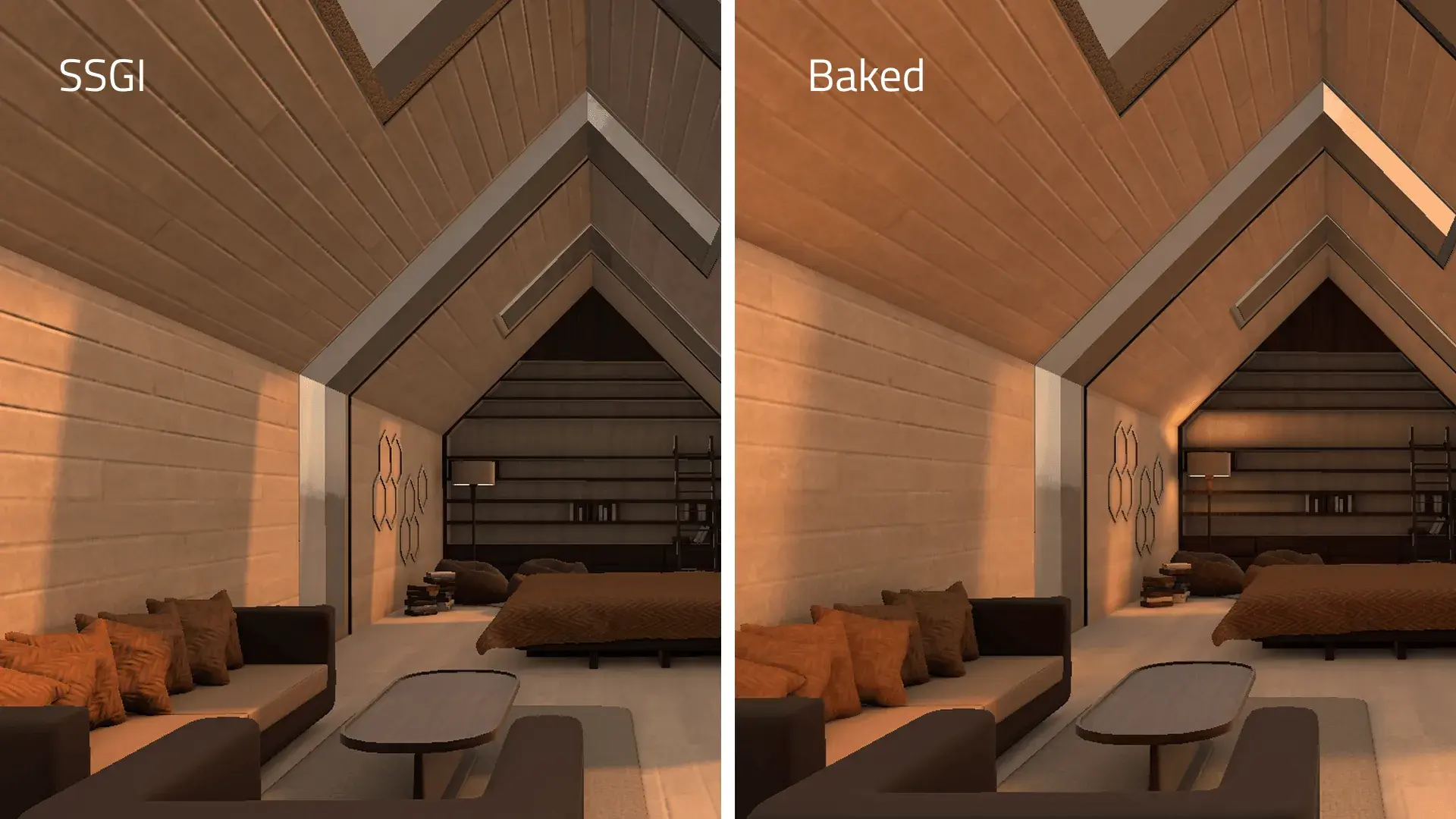
Another real-time rendering technique new in 6.11 is the Screen Space Reflections (SSR). Similar to SSGI, it uses what’s visible on the screen but for rendering reflections, "raymarching" through each pixel and reflecting them correspondingly.
6.11中新增的另一种实时渲染技术是屏幕空间反射(SSR)。与SSGI类似,它使用屏幕上可见的东西来渲染反射,“光线行进”通过每个像素并相应地反射它们。
For more:
更多信息:
-
See Jonas’s blog on lightmap baking, SSGI and SSR
-
查看Jonas关于光照贴图烘焙、SSGI和SSR的博客
-
Try it yourself with the Qt Quick 3D - SSGI Lightmap in Qt examples
-
在Qt示例中使用Qt Quick 3D-SSGI Lightmap亲自尝试
Furthermore, through the SceneEnvironment and ExtendedSceneEnvironment types, Qt Quick 3D supports a variety of techniques for anti-aliased rendering of 3D objects. Temporal anti-aliasing and motion blur is particularly interesting for reducing jaggedness of moving objects. With Qt 6.11, we are adding the generation of per-object motion vectors, which provides an excellent balance of computational cost and fidelity of output.
此外,通过SceneEnvironment和ExtendedSceneeenvironment类型,Qt Quick 3D支持各种用于3D对象抗锯齿渲染的技术。时间抗锯齿和运动模糊对于减少运动对象的锯齿特别有趣。在Qt 6.11中,我们添加了每个对象运动矢量的生成,这在计算成本和输出保真度之间实现了很好的平衡。
Advanced Render-Pass Customization
高级渲染过程自定义
For users that need to go beyond the default rendering pipeline because they require advanced visual effects, optimized performance, or integration of custom techniques, Qt Quick 3D now provides options to customize the render passes. New APIs for layers and tags make it possible to specify which items should be included in different parts of the render pipeline, direct them to different render targets, and give control over the individual render passes. Use existing materials, augment materials with additional shaders, or override aspects of materials. All this new flexibility is directly usable from QML.
对于需要超越默认渲染管道的用户,因为他们需要高级视觉效果、优化性能或集成自定义技术,Qt Quick 3D现在提供了自定义渲染过程的选项。层和标签的新API可以指定哪些项目应包含在渲染管道的不同部分中,将它们定向到不同的渲染目标,并对各个渲染过程进行控制。使用现有材质,使用其他着色器增强材质,或覆盖材质的某些方面。QML可以直接使用所有这些新的灵活性。
To see some more examples for what you can do with Qt Quick 3D in Qt 6.11, go here:
要查看Qt 6.11中Qt Quick 3D的更多示例,请访问此处:
-
Antti’s blog about Rain and Snow effects with Qt Quick 3D Particles
-
Antti关于使用Qt Quick 3D粒子的雨雪效果的博客
-
Sadegh’s blog on how to implement volumetric light shafts with real IES profiles
-
Sadegh关于如何使用真实IES轮廓实现体积光轴的博客
New Ways to Create and Interact with Graphs
创建图形和与图形交互的新方法
For graphs, here’s a new Qt example, the Wind Turbine Dashboard, showcasing how flexibly you can create and combine data visualizations from simple 2D presentations to complex 3D graphing. The graphs are also highly customizable, be it for their appearance, labels, or user interactions.
对于图形,这里有一个新的Qt示例,即风力涡轮机仪表板,展示了如何灵活地创建和组合从简单的2D演示到复杂的3D图形的数据可视化。这些图形也是高度可定制的,无论是外观、标签还是用户交互。
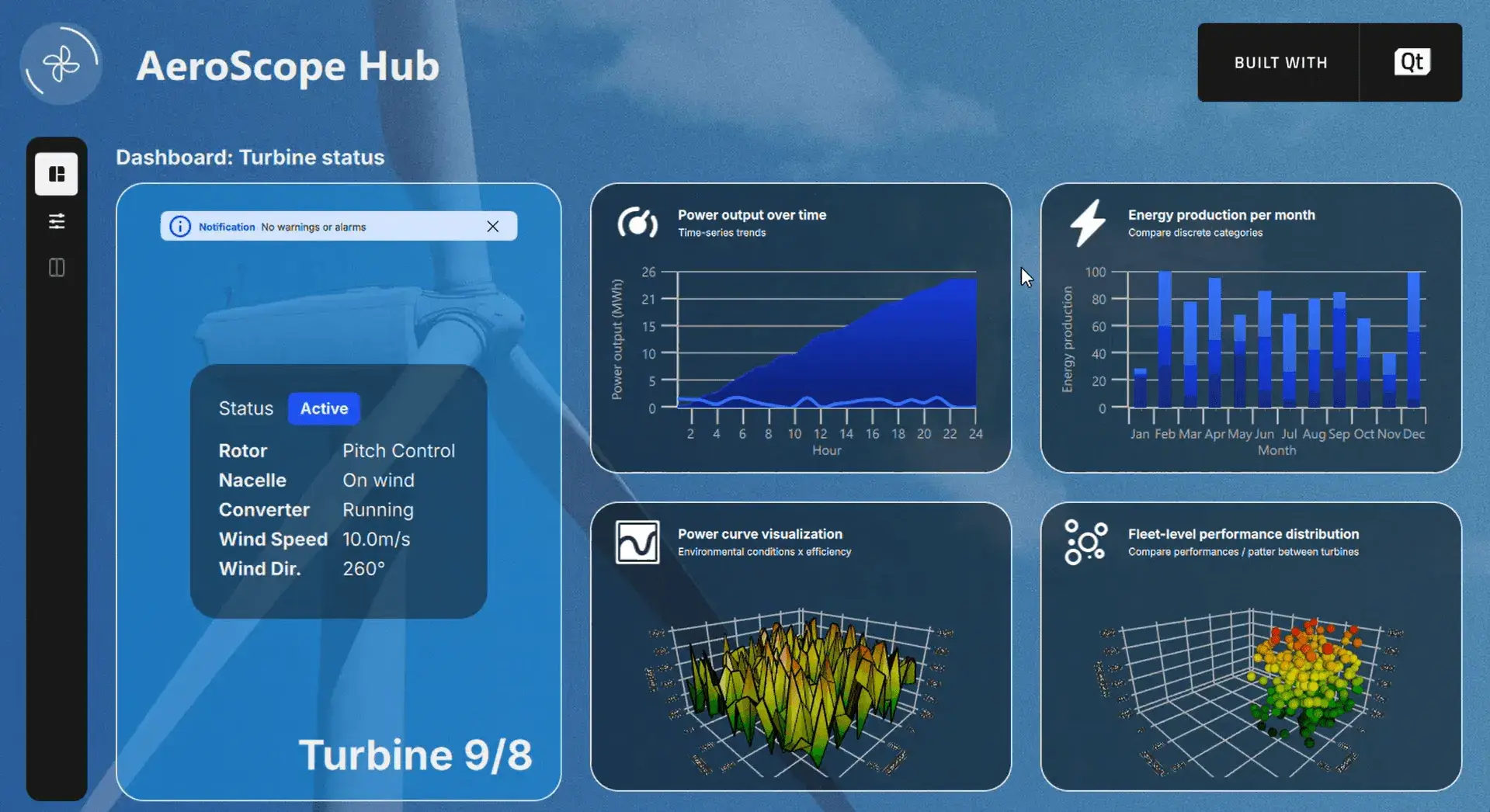
Try it yourself: The Wind Turbine Dashboard is available in the Qt examples (make sure you’ve installed the Qt Graphs module).
自己试试:Qt示例中提供了风力涡轮机仪表板(确保已安装Qt图形模块)。
In this new example, you see that 3D graphs now support multiple axis. Use different axis instances for the rowAxis, valueAxis, and columnAxis properties in QBar3DSeries, or for the axisX, axisY, and axisZ properties in QScatter3DSeries and QSurface3DSeries. We have added several new properties to the different elements in the Graphs module to give more control over how graphs are rendered, from overriding theme colors for individual axis and gradients in area graphs to line, stroke, and join styles in line graphs. Labels in Bar3DSeries can be customized and positioned more flexibly, QDateTimeAxis can take a time zone and allows panning and zooming, and properties such as QSplineSeries::optimized and GraphsItem3D.cutoffMargin allow further fine-tuning.
在这个新示例中,可以看到3D图形现在支持多轴。对于QBar3DSeries中的rowAxis、valueAxis和columnAxis属性,或者QScatter3DSeries和QSurface3DSeries中的axisX、axisY和axisZ属性,使用不同的轴实例。我们为图形模块中的不同元素添加了几个新属性,以更好地控制图形的渲染方式,从覆盖区域图中单个轴和渐变的主题颜色到线条图中的线条、笔划和连接样式。Bar3DSeries中的标签可以更灵活地定制和定位,QDateTimeAxis可以采用时区并允许平移和缩放,QSplineSeries::optimized和GraphsItem3D.cutoffMargin等属性允许进一步微调。
And if that is not enough, then the new CustomSeries type allows the implementation of completely custom graphs where a user-defined delegate renders each data point.
如果这还不够,那么新的CustomSeries类型允许实现完全自定义的图,其中用户定义的委托呈现每个数据点。
A Declarative Approach to Asynchronous Coding: Qt TaskTree
异步编码的声明式方法:Qt任务树
Qt TaskTree is a new module, available in Qt 6.11 as a technology preview.
Qt TaskTree是一个新模块,在Qt 6.11中作为技术预览版提供。
Qt TaskTree brings a completely new perspective to API design in Qt, introducing a declarative description approach to C++. An asynchronous workflow is expressed as a declarative description via a recipe, a re-usable object passed to a task tree, which then automatically manages the workflow accordingly. This clearly separates the workflow from the boilerplate code, making the code much more readable than traditional approaches. The task tree handles the tedious tasks for you, and you have even a complex workflow clearly and precisely described in one place.
Qt任务树为Qt中的API设计带来了全新的视角,为C++引入了一种声明性描述方法。异步工作流通过配方表示为声明性描述,配方是传递给任务树的可重用对象,然后任务树会相应地自动管理工作流。这清楚地将工作流与样板代码分开,使代码比传统方法更具可读性。任务树处理繁琐的任务,甚至可以在一个地方清晰准确地描述复杂的工作流程。
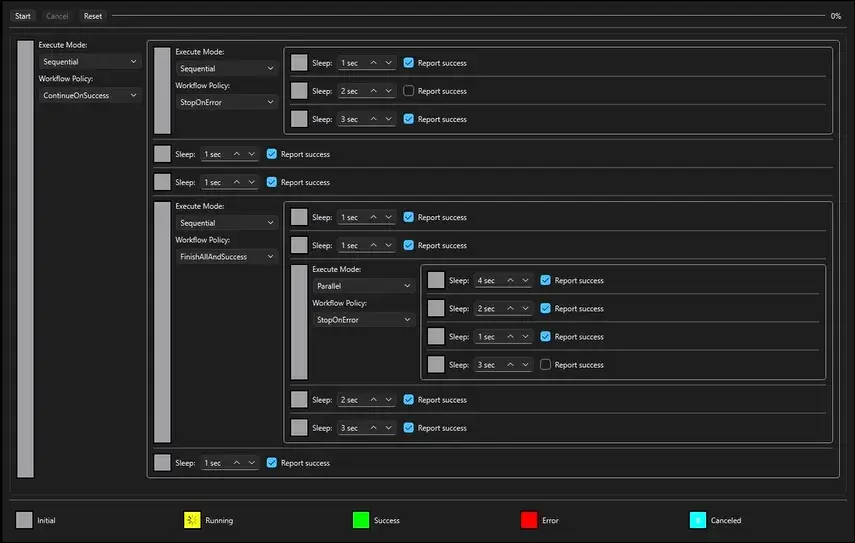
In addition, Qt TaskTree resolves the issue of API incompatibilities, unifying various asynchronous APIs into a common interface, and allowing to adapt any asynchronous task to work with the module.
此外,Qt TaskTree解决了API不兼容的问题,将各种异步API统一到一个公共接口中,并允许调整任何异步任务以与模块一起工作。
Qt TaskTree is a big change, as it changes the way we think about writing and reading asynchronous code. For more information:
Qt TaskTree是一个很大的变化,因为它改变了我们编写和读取异步代码的方式。更多信息:
-
See Jarek’s blog Introducing the Qt TaskTree Module,
-
请参阅Jarek的博客介绍Qt任务树模块,
-
Visit the Qt TaskTree documentation,
-
请访问Qt TaskTree文档,
-
Try it out online in the Task Tree Demo.
-
在任务树演示中在线尝试。
Other Notable Improvements
其他显著改进
Some of the other big improvements in the Qt 6.11 release include additions to the UI framework, easier connecting to web services and other connectivity improvements, and easier integration of QML and C++.
Qt 6.11版本的其他一些重大改进包括添加了UI框架,更容易连接到web服务和其他连接改进,以及更容易集成QML和C++。
UI Framework and 2D Additions
UI框架和2D添加
We got a lot of great feedback on the work we put into improving the support for Lottie and SVG vector animations, and with Qt 6.11 we have continued that journey. We now support path and morphing animations, as well as matte layers, SVG masks, and SVG symbols. We respect the predefined subset of CSS animation timing functions, and the Lottie backend for the Qt Quick VectorImage module, as well as the lottietoqml tool, are now stable and out of tech preview.
我们在改进对Lottie和SVG矢量动画的支持方面得到了很多很好的反馈,在Qt 6.11中,我们继续了这一旅程。我们现在支持路径和变形动画,以及蒙版层、SVG蒙版和SVG符号。我们尊重CSS动画计时函数的预定义子集,Qt Quick VectorImage模块的Lottie后端以及lottietoqml工具现在都是稳定的技术预览版。
For our UI frameworks we added a much-asked-for DoubleSpinBox to Qt Quick Controls, added APIs to control default button handling in DialogButtonBox, and allow the corner radii of a RectangularShadow effect to be controlled independently.
对于我们的UI框架,我们在Qt Quick Controls中添加了备受期待的DoubleSpinBox,添加了API来控制DialogButtonBox中的默认按钮处理,并允许独立控制矩形阴影效果的角半径。
For and from Qt Widgets users, we merged contributions that added a new StretchBanner option to QWizard, the possibility to tune the behavior of QAbstractItemView’s default keyboard search using the new keyboardSearchFlags, and the ability to control the visibility of the preview column in a QColumnView.
对于Qt Widgets用户,我们合并了向QWizard添加新的StretchBanner选项的贡献,使用新的键盘SearchFlags调整QAbstractItemView默认键盘搜索行为的可能性,以及控制QColumnView中预览列可见性的能力。
Across both Qt Quick Controls and Qt Widgets, we have improved how accessibility clients can navigate UI elements and get notified about changes to roles and orientations.
在Qt Quick Controls和Qt Widgets中,我们改进了可访问性客户端如何导航UI元素,并收到角色和方向更改的通知。
Web and Connectivity Improvements
Web和连接改进
For Qt 6.11, we have continued to focus on the integration with web services. With the Qt OpenAPI module it becomes easy to generate Qt HTTP client code that uses Qt Networks RESTful APIs. The generator is a plugin into the OpenAPI Generator, so it consumes OpenAPI YAML specifications, is highly customizable, and integrates with the cmake build system.
对于Qt 6.11,我们继续关注与web服务的集成。使用Qt OpenAPI模块,可以轻松生成使用Qt Networks RESTful API的Qt HTTP客户端代码。生成器是OpenAPI生成器中的一个插件,因此它使用OpenAPI YAML规范,高度可定制,并与cmake构建系统集成。
For more information:
更多信息:
-
Read Tatiana’s blog about Support of OpenAPI in Qt 6
-
阅读Tatiana关于Qt 6中OpenAPI支持的博客
-
Visit the Qt Open API documentation
-
访问Qt Open API文档
-
尝试ChatGPT RESTful API客户端示例
For Qt GRPC, we have added new mechanisms to control flow and content of requests and responses. The Qt HTTP Server module makes it easier to implement scalable servers, with several improvements that give control over limits, and the possibility to handle responses in worker threads. On the lowest level, the QNetworkRequest can now specify the TCP Keep Alive parameters for the current request, and by default, inactive connections are now automatically terminated after 2 minutes of inactivity.
对于Qt GRPC,我们添加了新的机制来控制请求和响应的流和内容。Qt HTTP Server模块使实现可扩展服务器变得更加容易,并进行了几项改进,可以控制限制,并可以在工作线程中处理响应。在最低级别,QNetworkRequest现在可以为当前请求指定TCP Keep-Alive参数,默认情况下,非活动连接在2分钟的非活动后会自动终止。
Easier Integration of QML and C++
QML和C更容易集成++
The QML language server has learned where the C++ definition of a QML type is, making it easy to navigate between the two languages from the IDE. C++ code can find QML objects by ID, and can now easily traverse the hierarchy of QML contexts. Properties declared in C++ can be explicitly tagged as virtual and overrides to avoid accidental shadowing of properties.
QML语言服务器已经知道QML类型的C++定义在哪里,从而可以从IDE轻松地在两种语言之间导航。C++代码可以通过ID找到QML对象,现在可以轻松地遍历QML上下文的层次结构。在C++中声明的属性可以显式标记为virtual和override,以避免属性的意外阴影。
Following up on its introduction in Qt 6.10, QRangeModel has gotten a companion class, QRangeModelAdapter, which provides a C++ API to modify the model data while speaking QAbstractItemModel protocol. For data where each row or item is backed by the same QObject subclass, QRangeModel can automatically connect each object’s property change notification to the dataChanged() signal to keep the UI up to date about data changes, without any additional code. This makes it even easier to make data from C++ backend code available to Qt Quick (or Widget) item views, without having to work with QAbstractItemModel APIs.
继Qt 6.10中的介绍之后,QRangeModel获得了一个配套类QRangeModelAdapter,它提供了一个C++API来修改模型数据,同时使用QAbstractItemModel协议。对于每一行或每一项都由同一QObject子类支持的数据,QRangeModel可以自动将每个对象的属性更改通知连接到dataChanged()信号,以使UI保持数据更改的最新状态,而无需任何额外代码。这使得将C++后端代码中的数据提供给Qt Quick(或Widget)项目视图变得更加容易,而无需使用QAbstractItemModel API。
For more information:
更多信息:
-
Read Sami’s blogs about QML Language Server and linter additions
-
阅读Sami关于QML语言服务器和linter添加的博客
-
Read my blog about QRangeModel updates and QRangeModelAdapter
-
阅读我关于QRangeModel更新和QRangeModelAdapter的博客
What Else Is New?
还有什么新鲜事吗?
The above highlights some of the big additions in Qt 6.11. In the What’s New in Qt 6.11 document you’ll find a lot of other things, such as new Qt Multimedia APIs for real-time audio processing. Developers targeting the Android platform will find it easier to call Java/Kotlin APIs from C++ and vice versa thanks to improvements in Qt Jenny, QtQuickView, and the ability to opt out of the default exception handling of QJniObject.
以上重点介绍了Qt 6.11中的一些重要新增功能。在Qt 6.11的新增功能文档中,会发现许多其他内容,例如用于实时音频处理的新Qt多媒体API。面向Android平台的开发人员将发现,由于Qt Jenny、QtQuickView的改进以及选择退出QJniObject默认异常处理的能力,从C++调用Java/Kotlin API变得更加容易,反之亦然。
If you use qdoc for documenting your own APIs, you’ll find a long list of new commands that you can use especially for modern C++ using concepts. The improved rendering of modern C++ APIs to HTML makes it easier to read some of the template-heavy APIs in Qt.
如果使用qdoc来记录自己的API,会发现一长串新命令,尤其适用于现代C++概念。现代C++API到HTML的改进呈现使Qt中一些模板繁重的API更容易阅读。
Thanks
谢意
I’d like to thank all the contributors who have helped with making Qt 6.11 a reality. You can find a full list of all community members that landed a patch to the Qt source code at the end of the release notes.
我要感谢所有帮助Qt 6.11成为现实的贡献者。可以在发行说明末尾找到所有社区成员的完整列表,这些成员为Qt源代码安装了补丁。
A special Thanks goes to all of you who have helped making Qt better by reporting bugs, telling us about your use cases, and sending us your feedback, especially to the technology preview modules and new functionality during the Beta period. And finally, I’d like to thank everyone involved in getting the release out of the door!
特别感谢所有通过报告错误、告诉我们用例并向我们发送反馈来帮助Qt变得更好的人,特别是在测试期间对技术预览模块和新功能的反馈。最后,我要感谢所有参与发布的人!
Update Today
今日更新
As always, the new release is available through the Qt installer. You can also download the release via our website or your Qt Account page.
与往常一样,新版本可以通过Qt安装程序获得。您还可以通过我们的网站或您的Qt帐户页面下载该版本。

AtomGit 是由开放原子开源基金会联合 CSDN 等生态伙伴共同推出的新一代开源与人工智能协作平台。平台坚持“开放、中立、公益”的理念,把代码托管、模型共享、数据集托管、智能体开发体验和算力服务整合在一起,为开发者提供从开发、训练到部署的一站式体验。
更多推荐


 0
0 0
0- 0


 已为社区贡献1条内容

所有评论(0)