win11 安装 Claude Code
一、相关链接
二、安装命令
Get started
Native Install (Recommended)
macOS, Linux, WSL:
curl -fsSL https://claude.ai/install.sh | bash
Windows PowerShell:
irm https://claude.ai/install.ps1 | iex
Windows CMD:
curl -fsSL https://claude.ai/install.cmd -o install.cmd && install.cmd && del install.cmd
使用npm安装(非默认推荐)
1、安装nodejs环境
2、npm install -g @anthropic-ai/claude-code
三、安装
1、执行cmd安装命令
C:\Users\admin>curl -fsSL https://claude.ai/install.cmd -o install.cmd && install.cmd && del install.cmd
此时不应有 <。
C:\Users\admin><!DOCTYPE html><!-- Last Published: Fri Apr 24 2026 17:35:38 GMT+0000 (Coordinated Universal Time) --><html data-wf-domain="websitemain.claude.com" data-wf-page="68bd5cf2687bfe3893fd2b7f" data-wf-site="6889473510b50328dbb70ae6" data-wf-intellimize-customer-id="117902971" lang="en-US"><head><meta charset="utf-8"/><link href="https://cdn.prod.website-files.com" rel="preconnect" crossorigin="anonymous"/><title>App unavailable in region | Claude</title><link rel="alternate" hrefLang="x-default" href="https://claude.com/app-unavailable-in-region"/><link rel="alternate" hrefLang="en-US" href="https://claude.com/app-unavailable-in-region"/><link rel="alternate" hrefLang="ja-JP" href="https://claude.com/ja-jp/app-unavailable-in-region"/><link rel="alternate" hrefLang="de-DE" href="https://claude.com/de-de/app-unavailable-in-region"/><link rel="alternate" hrefLang="fr-FR" href="https://claude.com/fr-fr/app-unavailable-in-region"/><link rel="alternate" hrefLang="ko-KR" href="https://claude.com/ko-kr/app-unavailable-in-region"/><meta content="Unfortunately, Claude isn't available here." name="description"/><meta content="App unavailable in region | Claude" property="og:title"/><meta content="Unfortunately, Claude isn't available here." property="og:description"/><meta content="https://cdn.prod.website-files.com/6889473510b50328dbb70ae6/68c469d23594abeb9ab6ee48_70ed020ecf8fa028b9bc95fa819720b6_og_claude-generic.jpg" property="og:image"/><meta content="App unavailable in region | Claude" property="twitter:title"/><meta content="Unfortunately, Claude isn't available here." property="twitter:description"/><meta property="og:type" content="website"/><meta content="summary_large_image" name="twitter:card"/><meta content="width=device-width, initial-scale=1" name="viewport"/><meta content="tPMMBQMBzgZlNmCBal5cMPAx3nhO2iyM4rT9nxuRcdk" name="google-site-verification"/><link href="https://cdn.prod.website-files.com/6889473510b50328dbb70ae6/css/claude-brand.shared.b21da4767.min.css" rel="stylesheet" type="text/css" integrity="sha384-sh2kdn272tmpNN81jKXFRsYH31QZyF5z4EByk4BZLlJSesWeFGGYY/9uI9v9uSYr" crossorigin="anonymous"/><script type="text/javascript">!function(o,c){var n=c.documentElement,t=" w-mod-";n.className+=t+"js",("ontouchstart"in o||o.DocumentTouch&&c instanceof DocumentTouch)&&(n.className+=t+"touch")}(window,document);</script><link href="https://cdn.prod.website-files.com/6889473510b50328dbb70ae6/689f4a9aff1f63fde75cf733_favicon.png" rel="shortcut icon" type="image/x-icon"/><link href="https://cdn.prod.website-files.com/6889473510b50328dbb70ae6/68c33859cc6cd903686c66a2_apple-touch-icon.png" rel="apple-touch-icon"/><link href="https://claude.com/app-unavailable-in-region" rel="canonical"/><style>.anti-flicker, .anti-flicker * {visibility: hidden !important; opacity: 0 !important;}</style><style>[data-wf-hidden-variation], [data-wf-hidden-variation] * {报:app-unavailable-in-region
2、解决报错
先打开代理,然后在cmd设置临时使用代理
#set http_proxy=http://127.0.0.1:7897
set https_proxy=http://127.0.0.1:7897
3、再次执行安装
C:\Users\admin>curl -fsSL https://claude.ai/install.cmd -o install.cmd && install.cmd && del install.cmd
稍等一会
Setting up Claude Code...
✔ Claude Code successfully installed!
Version: 2.1.121
Location: C:\Users\admin\.local\bin\claude.exe
Next: Run claude --help to get started
⚠ Setup notes:
● Native installation exists but C:\Users\admin\.local\bin is not in your PATH. Add it by opening: System Properties → Environment Variables → Edit User PATH → New → Add the path above. Then restart your
terminal.
Installation complete!
4、相关文件和目录
C:\Users\admin\.local\bin\claude.exe
C:\Users\admin\.claude
.claude\settings.json
{
  "autoUpdatesChannel": "latest"
}
C:\Users\admin>echo %USERPROFILE%
C:\Users\admin
5、设置环境变量
在环境变量Path添加:C:\Users\admin\.local\bin
新开cmd窗口
6、查看版本
C:\Users\admin>claude --version
2.1.121 (Claude Code)
7、迁移配置及数据储存目录(可选)
把C:\Users\admin\.claude复制到D:\xxx下
设置环境变量:CLAUDE_CONFIG_DIR=D:\xxx\.claude
四、运行claude
1、运行claude
C:\Users\admin>claude
Claude configuration file not found at: D:\admin\.claude\.claude.json
A backup file exists at: D:\admin\.claude\backups\.claude.json.backup.1777350692012
You can manually restore it by running: cp "D:\admin\.claude\backups\.claude.json.backup.1777350692012" "D:\admin\.claude\.claude.json"


Claude configuration file not found at: D:\admin\.claude\.claude.json
A backup file exists at: D:\admin\.claude\backups\.claude.json.backup.1777350692012
You can manually restore it by running: cp "D:\admin\.claude\backups\.claude.json.backup.1777350692012" "D:\admin\.claude\.claude.json"


Claude configuration file not found at: D:\admin\.claude\.claude.json
A backup file exists at: D:\admin\.claude\backups\.claude.json.backup.1777350692012
You can manually restore it by running: cp "D:\admin\.claude\backups\.claude.json.backup.1777350692012" "D:\admin\.claude\.claude.json"

Welcome to Claude Code v2.1.121
…………………………………………………………………………………………………………………………………………………………

     *                                       █████▓▓░
                                 *         ███▓░     ░░
            ░░░░░░                        ███▓░
    ░░░   ░░░░░░░░░░                      ███▓░
   ░░░░░░░░░░░░░░░░░░░    *                ██▓░░      ▓
                                             ░▓▓███▓▓░
 *                                 ░░░░
                                 ░░░░░░░░
                               ░░░░░░░░░░░░░░░░
       █████████                                        *
      ██▄█████▄██                        *
       █████████      *
…………………█ █   █ █………………………………………………………………………………………………………………

 Unable to connect to Anthropic services

 Failed to connect to api.anthropic.com: ERR_BAD_REQUEST

 Please check your internet connection and network settings.

 Note: Claude Code might not be available in your country. Check supported countries at https://anthropic.com/supported-countries
报连接错误
2、设置临时代理
C:\Users\admin>set https_proxy=http://127.0.0.1:7897
3、再次运行claude
C:\Users\admin>claude
Welcome to Claude Code v2.1.121
…………………………………………………………………………………………………………………………………………………………
* █████▓▓░
* ███▓░ ░░
░░░░░░ ███▓░
░░░ ░░░░░░░░░░ ███▓░
░░░░░░░░░░░░░░░░░░░ * ██▓░░ ▓
░▓▓███▓▓░
* ░░░░
░░░░░░░░
░░░░░░░░░░░░░░░░
█████████ *
██▄█████▄██ *
█████████ *
…………………█ █ █ █………………………………………………………………………………………………………………
Let's get started.
Choose the text style that looks best with your terminal
To change this later, run /theme
1. Auto (match terminal)
❯ 2. Dark mode ✔
3. Light mode
4. Dark mode (colorblind-friendly)
5. Light mode (colorblind-friendly)
6. Dark mode (ANSI colors only)
7. Light mode (ANSI colors only)
╌╌╌╌╌╌╌╌╌╌╌╌╌╌╌╌╌╌╌╌╌╌╌╌╌╌╌╌╌╌╌╌╌╌╌╌╌╌╌╌╌╌╌╌╌╌╌╌╌╌╌╌╌╌╌╌╌╌╌╌╌╌╌╌╌╌╌╌╌╌╌╌╌╌╌╌╌╌╌╌╌╌╌╌╌╌╌╌╌╌╌╌╌╌╌╌╌╌╌╌╌╌╌╌╌╌╌╌╌╌╌╌╌╌╌╌╌╌╌╌╌╌╌╌╌╌╌╌╌╌╌╌╌╌╌╌╌╌╌╌╌╌╌╌╌╌╌╌╌╌╌╌╌╌╌╌╌╌╌╌╌╌╌╌╌╌╌╌╌╌╌╌╌╌╌╌╌╌╌╌╌╌╌╌╌╌╌╌╌╌╌╌╌╌╌╌╌╌╌╌╌╌╌╌╌╌╌
1 function greet() {
2 - console.log("Hello, World!");
2 + console.log("Hello, Claude!");
3 }
╌╌╌╌╌╌╌╌╌╌╌╌╌╌╌╌╌╌╌╌╌╌╌╌╌╌╌╌╌╌╌╌╌╌╌╌╌╌╌╌╌╌╌╌╌╌╌╌╌╌╌╌╌╌╌╌╌╌╌╌╌╌╌╌╌╌╌╌╌╌╌╌╌╌╌╌╌╌╌╌╌╌╌╌╌╌╌╌╌╌╌╌╌╌╌╌╌╌╌╌╌╌╌╌╌╌╌╌╌╌╌╌╌╌╌╌╌╌╌╌╌╌╌╌╌╌╌╌╌╌╌╌╌╌╌╌╌╌╌╌╌╌╌╌╌╌╌╌╌╌╌╌╌╌╌╌╌╌╌╌╌╌╌╌╌╌╌╌╌╌╌╌╌╌╌╌╌╌╌╌╌╌╌╌╌╌╌╌╌╌╌╌╌╌╌╌╌╌╌╌╌╌╌╌╌╌╌
Syntax theme: Monokai Extended (ctrl+t to disable)
选默认
Claude Code can be used with your Claude subscription or billed based on API usage through your Console account.
Select login method:
❯ 1. Claude account with subscription · Pro, Max, Team, or Enterprise
2. Anthropic Console account · API usage billing
3. 3rd-party platform · Amazon Bedrock, Microsoft Foundry, or Vertex AI
Ctrl+C,Ctrl+C 退出
4、设置模型
通过.claude\settings.json,设置模型 (以后可以用CC-Switch设置模型)
Deepseek API Key
{
  "env": {
    "ANTHROPIC_AUTH_TOKEN": "你的Deepseek API Key(sk-开头)",
    "ANTHROPIC_BASE_URL": "https://api.deepseek.com/anthropic",
    "ANTHROPIC_MODEL": "deepseek-v4-pro",
    "ANTHROPIC_SMALL_FAST_MODEL": "deepseek-v4-flash",
    "API_TIMEOUT_MS": "300000",
    "CLAUDE_CODE_DISABLE_NONESSENTIAL_TRAFFIC": "1"
  },
  "permissions": {
    "allow": [],
    "deny": []
  },
  "autoUpdatesChannel": "latest",
  "theme": "dark"
}
阿里云百炼API Key
{
  "env": {
    "ANTHROPIC_AUTH_TOKEN": "你的阿里云百炼API Key(sk-sp-开头)",
    "ANTHROPIC_BASE_URL": "https://dashscope.aliyuncs.com/apps/anthropic",
    "ANTHROPIC_MODEL": "qwen3.6-plus",
    "ANTHROPIC_SMALL_FAST_MODEL": "qwen3.6-flash",
    "API_TIMEOUT_MS": "300000",
    "CLAUDE_CODE_DISABLE_NONESSENTIAL_TRAFFIC": "1"
  },
  "permissions": {
    "allow": [],
    "deny": []
  },
  "autoUpdatesChannel": "latest",
  "theme": "dark"
}
Coding Plan 专属模式
如果您订阅了阿里云百炼的 Coding Plan 服务,请使用以下专属配置:
{
  "env": {
    "ANTHROPIC_AUTH_TOKEN": "你的Coding Plan API Key",
    "ANTHROPIC_BASE_URL": "https://coding.dashscope.aliyuncs.com/apps/anthropic",
    "ANTHROPIC_MODEL": "qwen3.6-plus"
  }
}
临时切换模型
在 Claude Code 对话中,可以随时使用/model命令切换模型:
/model qwen3.6-flash
/model deepseek-v4-pro
5、再次运行claude
C:\Users\admin>claude
Welcome to Claude Code v2.1.121
…………………………………………………………………………………………………………………………………………………………
* █████▓▓░
* ███▓░ ░░
░░░░░░ ███▓░
░░░ ░░░░░░░░░░ ███▓░
░░░░░░░░░░░░░░░░░░░ * ██▓░░ ▓
░▓▓███▓▓░
* ░░░░
░░░░░░░░
░░░░░░░░░░░░░░░░
█████████ *
██▄█████▄██ *
█████████ *
…………………█ █ █ █………………………………………………………………………………………………………………
Let's get started.
Choose the text style that looks best with your terminal
To change this later, run /theme
1. Auto (match terminal)
❯ 2. Dark mode ✔
3. Light mode
4. Dark mode (colorblind-friendly)
5. Light mode (colorblind-friendly)
6. Dark mode (ANSI colors only)
7. Light mode (ANSI colors only)
选默认
Security notes:
1. Claude can make mistakes
You should always review Claude's responses, especially when
running code.
2. Due to prompt injection risks, only use it with code you trust
Learn more: https://code.claude.com/docs/en/security
Press Enter to continue…
按回车
─────────────────────────────────────────────────────────────────────────────────────────────────────────────────────────────────────────────────────────────────────────────────────────────────────────────────
Accessing workspace:
C:\Users\admin
Quick safety check: Is this a project you created or one you trust? (Like your own code, a well-known open source project, or work from your team). If not, take a moment to review what's in this folder
first.
Claude Code'll be able to read, edit, and execute files here.
Security guide
❯ 1. Yes, I trust this folder
2. No, exit
Enter to confirm · Esc to cancel
按Esc (这个目录有点大)
6、创建项目目录
创建项目目录:D:\CCProjects\project1
7、再次运行claude
C:\Users\admin>D:
D:\>cd D:\CCProjects\project1
D:\CCProjects\project1>claude
─────────────────────────────────────────────────────────────────────────────────────────────────────────────────────────────────────────────────────────────────────────────────────────────────────────────────
Accessing workspace:
D:\CCProjects\project1
Quick safety check: Is this a project you created or one you trust? (Like your own code, a well-known open source project, or work from your team). If not, take a moment to review what's in this folder
first.
Claude Code'll be able to read, edit, and execute files here.
Security guide
❯ 1. Yes, I trust this folder
2. No, exit
Enter to confirm · Esc to cancel
按回车
-----------------------------------------------------------------
D:\CCProjects\project1>claude
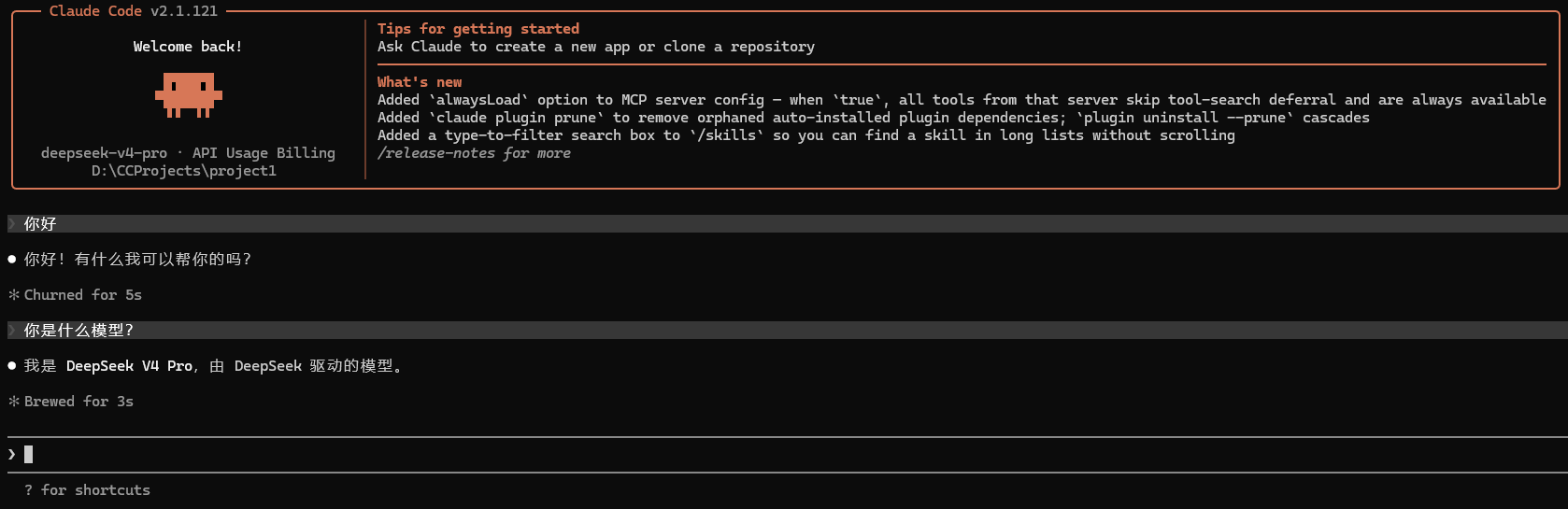
╭─── Claude Code v2.1.121 ──────────────────────────────────────────────────────────────────────────────────────────────────────────────────────────────────────────────────────────────╮
│ │ Tips for getting started │
│ Welcome back! │ Ask Claude to create a new app or clone a repository │
│ │ ─────────────────────────────────────────────────────────────────────────────────────────────────────────────────────────────────────────── │
│ ▐▛███▜▌ │ What's new │
│ ▝▜█████▛▘ │ Added `alwaysLoad` option to MCP server config — when `true`, all tools from that server skip tool-search deferral and are always available │
│ ▘▘ ▝▝ │ Added `claude plugin prune` to remove orphaned auto-installed plugin dependencies; `plugin uninstall --prune` cascades │
│ │ Added a type-to-filter search box to `/skills` so you can find a skill in long lists without scrolling │
│ deepseek-v4-pro · API Usage Billing │ /release-notes for more │
│ D:\CCProjects\project1 │ │
╰───────────────────────────────────────────────────────────────────────────────────────────────────────────────────────────────────────────────────────────────────────────────────────╯
─────────────────────────────────────────────────────────────────────────────────────────────────────────────────────────────────────────────────────────────────────────────────────────────────────────────────
❯
─────────────────────────────────────────────────────────────────────────────────────────────────────────────────────────────────────────────────────────────────────────────────────────────────────────────────
? for shortcuts
----------------------------------------------------
❯ 你好
● 你好!有什么我可以帮你的吗?
✻ Churned for 5s
❯ 你是什么模型?
● 我是 DeepSeek V4 Pro,由 DeepSeek 驱动的模型。
✻ Brewed for 3s
─────────────────────────────────────────────────────────────────────────────────────────────────────────────────────────────────────────────────────────────────────────────────────────────────────────────────
❯ /exit
─────────────────────────────────────────────────────────────────────────────────────────────────────────────────────────────────────────────────────────────────────────────────────────────────────────────────
/exit Exit the CLI
/context Visualize current context usage as a colored grid
/claude-api Build, debug, and optimize Claude API / Anthropic SDK apps. Apps built with this skill should include prompt caching. Also handles migrating existing Claude API code between
Claude model versions (4.5 → 4.6, 4.6 → 4.7, retired-model replacements). TRIGGER when: code imports `anthropic`/`@anthropic-ai/sdk`; user asks for the Claude API, Anthropic …
/memory Edit Claude memory files
/clear Start a new session with empty context; previous session stays on disk (resumable with /resume)
Resume this session with:
claude --resume 27f33cee-a5e6-4de7-b460-ee8495abf5ca
D:\CCProjects\project1>
五、其他
1、Claude Code插件
VSCode可以安装Claude Code插件
2、Desktop版
Claude Code还有一款Desktop可以安装:Claude Setup.exe

AtomGit 是由开放原子开源基金会联合 CSDN 等生态伙伴共同推出的新一代开源与人工智能协作平台。平台坚持“开放、中立、公益”的理念,把代码托管、模型共享、数据集托管、智能体开发体验和算力服务整合在一起,为开发者提供从开发、训练到部署的一站式体验。
更多推荐

 11
11 0
0- 0


 已为社区贡献6条内容

所有评论(0)