分析WM Shell中线程相关的官方帮助文档
背景
这几年WM Shell部分也在不断更新,而且基本上互联网,AI等对于WM Shell的知识几乎是空白的啥也搜不到,马哥这边对于WM Shell出了自己去代码调研以外,也会经常去寻找一些官方的文档资料进行学习,下面就是关于WM Shell相关的官方文档路径。
frameworks/base/libs/WindowManager/Shell/src/com/android/wm/shell/docs
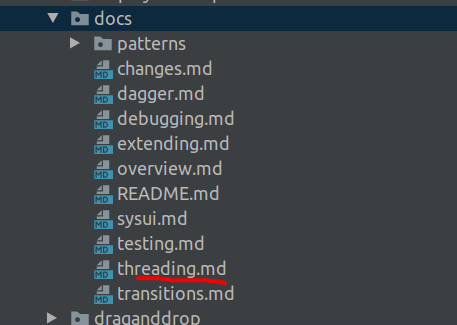
今天分享一下我们比较陌生的的WM Shell的线程知识,针对这块我们一起看着官方文档学习哈,有啥要讨论分享的知识可以vip群中讨论发言哈。
Threading
Boundaries
                                    Thread boundary
                                          |
                                WM Shell  | SystemUI
                                          |
                                          |
FeatureController <-> FeatureInterface <--|--> WMShell <-> SysUI
       |          (^post to shell thread) |            (^post to main thread)
      ...                                 |
       |                                  |
 OtherControllers                         |
Threads
We currently have multiple threads in use in the Shell library depending on the configuration by
the product.
- SysUI main thread (standard main thread)
ShellMainThread(only used if the resourceconfig_enableShellMainThreadis set true
(ie. phones))- This falls back to the SysUI main thread otherwise
- Note:
- This thread runs with
THREAD_PRIORITY_DISPLAYpriority since so many windowing-critical
components depend on it - This is also the UI thread for almost all UI created by the Shell
- The Shell main thread Handler (and the Executor that wraps it) is async, so
messages/runnables used via this Handler are handled immediately if there is no sync
messages prior to it in the queue.
- This thread runs with
ShellBackgroundThread(for longer running tasks where we don’t want to block the shell main
thread)- This is always another thread even if config_enableShellMainThread is not set true
- Note:
- This thread runs with
THREAD_PRIORITY_BACKGROUNDpriority but can be requested to be boosted
toTHREAD_PRIORITY_FOREGROUND
- This thread runs with
ShellAnimationThread(currently only used for Transitions and Splitscreen, but potentially all
animations could be offloaded here)ShellSplashScreenThread(only for use with splashscreens)
Dagger setup
The threading-related components are provided by the WMShellConcurrencyModule,
for example, the Executors and Handlers for the various threads that are used. You can request
an executor of the necessary type by using the appropriate annotation for each of the threads (ie.
@ShellMainThread Executor) when injecting into your Shell component.
To get the SysUI main thread, you can use the @Main annotation.
Best practices
Components
- Don’t do initialization in the Shell component constructors
- If the host SysUI is not careful, it may construct the WMComponent dependencies on the main
thread, and this reduces the likelihood that components will intiailize on the wrong thread
in such cases
- If the host SysUI is not careful, it may construct the WMComponent dependencies on the main
- Be careful of using CountDownLatch and other blocking synchronization mechanisms in Shell code
- If the Shell main thread is not a separate thread, this will cause a deadlock
- Callbacks, Observers, Listeners to any non-shell component should post onto main Shell thread
- This includes Binder calls, SysUI calls, BroadcastReceivers, etc. Basically any API that
takes a runnable should either be registered with the right Executor/Handler or posted to
the main Shell thread manually
- This includes Binder calls, SysUI calls, BroadcastReceivers, etc. Basically any API that
- Since everything in the Shell runs on the main Shell thread, you do not need to explicitly
synchronizeyour code (unless you are trying to prevent reentrantcy, but that can also be
done in other ways)
Handlers/Executors
- You generally never need to create Handlers explicitly, instead inject
@ShellMainThread ShellExecutorinstead- This is a common pattern to defer logic in UI code, but the Handler created wraps the Looper
that is currently running, which can be wrong (see above for initialization vs construction)
- This is a common pattern to defer logic in UI code, but the Handler created wraps the Looper
- That said, sometimes Handlers are necessary because Framework API only takes Handlers or you
want to dedupe multiple messages- In such cases inject
@ShellMainThread Handleror use view.getHandler() which should be OK
assuming that the view root was initialized on the main Shell thread
- In such cases inject
- Never use Looper.getMainLooper()
- It’s likely going to be wrong, you can inject
@Main ShellExecutorto get the SysUI main thread
- It’s likely going to be wrong, you can inject
Testing
- You can use a
TestShellExecutorto control the processing of messages
原文地址:
https://mp.weixin.qq.com/s/MhLa812mRCxuryL5WF7YfQ
更多fw实战开发干货,请关注“千里马学框架”

AtomGit 是由开放原子开源基金会联合 CSDN 等生态伙伴共同推出的新一代开源与人工智能协作平台。平台坚持“开放、中立、公益”的理念,把代码托管、模型共享、数据集托管、智能体开发体验和算力服务整合在一起,为开发者提供从开发、训练到部署的一站式体验。
更多推荐


 0
0 0
0- 0


 已为社区贡献6条内容

所有评论(0)