vue使用iframe内嵌unity模型,并且向模型传递信息,接受信息
·
1 静态模型地址
放在跟src同级的static里边,testHtml就是需要嵌的网页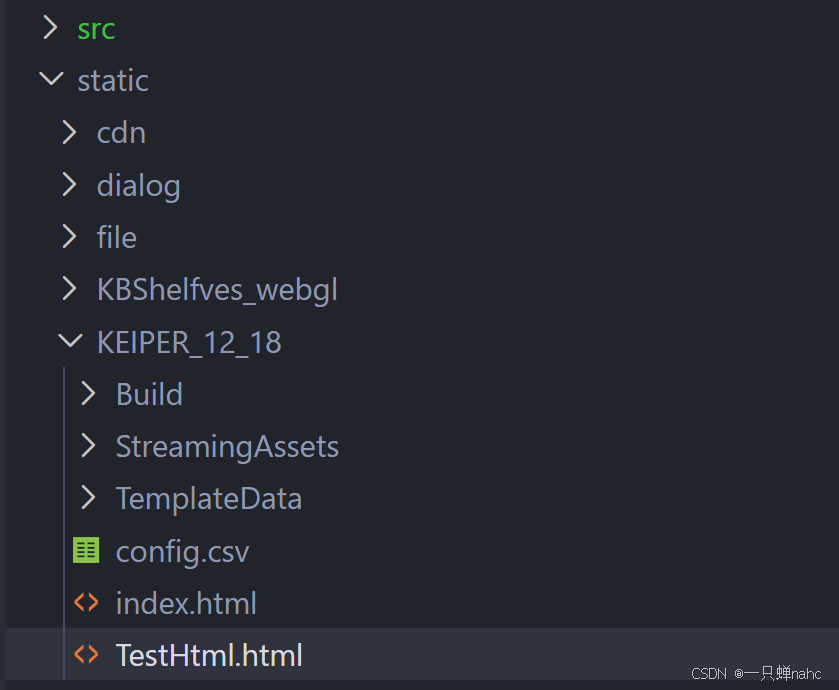
2 TestHtml文件内容
<body>
    <div id="unity-container">
        <canvas id="unity-canvas"></canvas>
    </div>

    <script src="Build/KEIPER_12_18.loader.js"></script>
    <script>
        let unityInstance = null;

        createUnityInstance(document.querySelector("#unity-canvas"), {
            dataUrl: "Build/KEIPER_12_18.data",
            frameworkUrl: "Build/KEIPER_12_18.framework.js",
            codeUrl: "Build/KEIPER_12_18.wasm",
            streamingAssetsUrl: "StreamingAssets",
            companyName: "DefaultCompany",
            productName: "KEIPER_2025_1211",
            productVersion: "1.0",
        }).then(instance => {
            unityInstance = instance;
            console.log("Unity loaded");

            window.addEventListener('message', (event) => {
                console.log("模型收到来自父窗口的消息:", event.data)
                if (event.data.type == 'call-callUnity') {
                    callUnity(JSON.stringify(event.data.data));

                }
            })


        });


        function callUnity(msg) {
            if (!unityInstance) {
                console.warn("Unity not ready");
                return;
            }

            //进行切片发送
            const jsonStr = typeof msg === "string" ? msg: JSON.stringify(msg);
            const size = 1024;
            const total = Math.ceil(jsonStr.length/size);

            for(let i=0;i<total;i++){
                const chunk = jsonStr.substr(i * size, size);
                strNew =  i + "/" + total + "|" + chunk;
                unityInstance.SendMessage(
                    "WebGLSendAndReceiver",
                    "OnReceiveMessage",
                    i + "/" + total + "|" + chunk
                );

               //alert(strNew);

            }
        }

        // Unity → HTML(给 Unity 调用)
        function OnReceiveFromUnity(message) {
            /*  alert("Unity 传来的参数是:\n\n" + message); */
            console.log("从Unity接收到的消息:", message);

            const msgObject = {
                type: 'unity-message',
                data: message
            };
            try {
                window.top.postMessage(msgObject, '*');
            } catch (error) {
                console.error("发送消息失败:", error);
            }
        }


    </script>

</body>
主要就是两个方法
1、监听unity发来的消息,然后包装一下,等待发给vue
function OnReceiveFromUnity(message) {
    /*  alert("Unity 传来的参数是:\n\n" + message); */
    console.log("从Unity接收到的消息:", message);

    const msgObject = {
        type: 'unity-message',
        data: message
    };
    try {
        window.top.postMessage(msgObject, '*');
    } catch (error) {
        console.error("发送消息失败:", error);
    }
}
2、监听来自vue的消息,切片发送给unity
 window.addEventListener('message', (event) => {
		console.log("模型收到来自父窗口的消息:", event.data)
    if (event.data.type == 'call-callUnity') {
        callUnity(JSON.stringify(event.data.data));

    }
})
3 vue文件代码
<iframe style="width: 1920px;height:1080px;" id="modelRef" ref="modelRef" src="static/KEIPER_12_18/TestHtml.html" frameborder="0" @load="onModelLoad"></iframe>
load方法是模型加载后会执行,监听来自unity发送的消息
 onModelLoad() {
   window.addEventListener('message', function (event) {
        if (event.data.type == 'unity-message') {
            console.log('收到来自unity的消息:', event.data);
            this.testId = event.data.data
            this.getDialogData(this.testId)
        }
    }.bind(this));
},
4 给unity传信息
sendMessageToIframe(message) {
  const iframe = this.$refs.modelRef;
    if (!iframe) {
        console.error('无法获取iframe引用');
        return;
    }
   let newMessage = {
       type: 'call-callUnity',
       data:message
   };
    //console.log('向unity发送消息---------------vue:', newMessage);
    iframe.contentWindow.postMessage(newMessage, '*');
},

AtomGit 是由开放原子开源基金会联合 CSDN 等生态伙伴共同推出的新一代开源与人工智能协作平台。平台坚持“开放、中立、公益”的理念,把代码托管、模型共享、数据集托管、智能体开发体验和算力服务整合在一起,为开发者提供从开发、训练到部署的一站式体验。
更多推荐

 2
2 0
0- 0


 已为社区贡献1条内容

所有评论(0)