CentOS 7 核心运维实战:RAID/LVM/ 系统启动 / Shell 编程全解析
补充
思考
-
RAID 0 实现的原理是什么?有什么特点?
-
实现原理:将数据条带化(Stripe) 均匀拆分到多块硬盘上并行读写,没有校验盘、没有冗余,数据分段同时写入多块盘。
-
特点:
-
读写速度极快,性能随硬盘数量线性提升
-
无冗余,任意一块盘损坏,所有数据全部丢失
-
无容量损耗,总容量 = 所有硬盘容量之和
-
成本低,适合对速度要求高、但数据不重要的场景
-
-
-
RAID 1 实现的原理是什么?有什么特点?
- 实现原理:采用镜像(Mirror) 方式,数据同时完整写入两块硬盘,两块盘内容完全一致。
- 特点:
- 高可靠性,一块盘坏了另一块可继续工作,数据不丢
- 读性能较好,写性能略有下降
- 容量利用率低,总容量 = 单块硬盘容量
- 至少需要 2 块盘
-
RAID 5 实现的原理是什么?有什么特点?
- 实现原理:数据条带化分布,同时将奇偶校验数据均匀分布在所有硬盘上,不单独使用校验盘。
- 特点:
- 兼顾性能与安全性,允许坏 1 块盘不丢数据
- 读性能好,写性能一般(需计算校验)
- 容量利用率高,总容量 = (硬盘数 − 1) × 单盘容量
- 至少需要 3 块盘
- 坏盘后重建压力大,重建期间容易二次损坏
-
假设你有6块2T硬盘,现需要为web应用提供4T存储空间,为db应用也提供4T存储空间。如何使用raid技术实现?讲述实现过程。
-
LVM 技术有哪些优点?
-
概述使用LVM技术为web应用提供存储过程。
-
如果web应用使用的存储空间不足,如何扩容?
分区扩容
准备分区sdb1,容量10G,准备扩容5G。
[root@centos7 ~ 09:22:08]# df -hT /webapp
文件系统        类型     容量  已用  可用 已用% 挂载点
/dev/sdb1      xfs    10G   33M   10G    1% /webapp
[root@centos7 ~ 09:26:23]# ls /webapp/
host.conf  hostname  hosts  hosts.allow  hosts.deny
扩容的前提是分区后紧邻的物理空间要有足够的空间扩容。
[root@centos7 ~ 09:23:42]# parted /dev/sdb unit MiB print
Model: VMware, VMware Virtual S (scsi)
Disk /dev/sdb: 20480MiB
Sector size (logical/physical): 512B/512B
Partition Table: msdos
Disk Flags:

Number  Start    End       Size      Type     File system  标志
 1      1.00MiB  10241MiB  10240MiB  primary  xfs
使用parted扩容
# 先卸载
[root@centos7 ~ 09:26:42]# umount /webapp

# 在扩容分区
[root@centos7 ~ 09:27:13]# parted /dev/sdb unit MiB resizepart 1 15000
信息: You may need to update /etc/fstab.

[root@centos7 ~ 09:27:15]# lsblk /dev/sdb1
NAME MAJ:MIN RM  SIZE RO TYPE MOUNTPOINT
sdb1   8:17   0 14.7G  0 part

# 挂载测试文件系统是否可用
[root@centos7 ~ 09:27:56]# mount /dev/sdb1 /webapp

# 扩容文件系统
[root@centos7 ~ 09:28:19]# xfs_growfs /webapp

# 验证文件系统容量
[root@centos7 ~ 09:28:30]# df -hT /webapp/
文件系统        类型    容量  已用  可用 已用% 挂载点
/dev/sdb1      xfs    15G   33M   15G    1% /webapp

# 文件也在
[root@centos7 ~ 09:28:45]# ls /webapp/
host.conf  hostname  hosts  hosts.allow  hosts.deny
使用本地ISO仓库安装图形化
- 关联ISO镜像
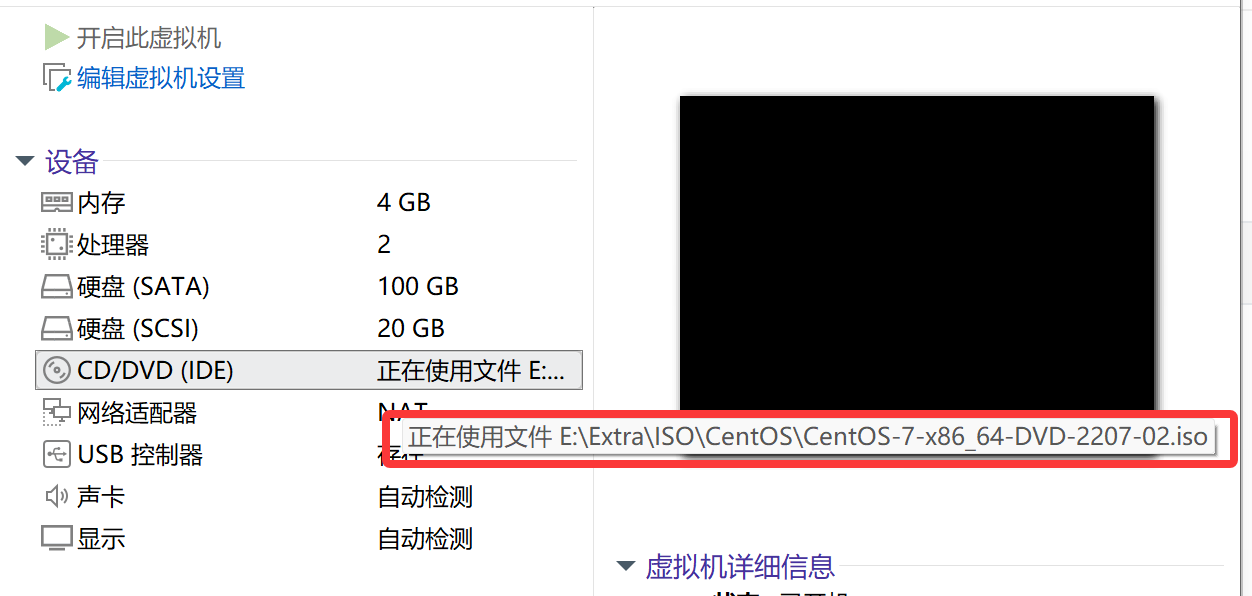
- 挂载光盘。
[root@centos7 ~ 10:40:58]# lsblk /dev/sr0
NAME MAJ:MIN RM  SIZE RO TYPE MOUNTPOINT
sr0   11:0    1  4.4G  0 rom

[root@centos7 ~ 10:43:52]# mkdir /dvd
[root@centos7 ~ 10:44:07]# mount /dev/sr0 /dvd
mount: /dev/sr0 写保护,将以只读方式挂载

[root@centos7 ~ 10:44:10]# ls /dvd
CentOS_BuildTag  EULA  images    LiveOS    repodata          RPM-GPG-KEY-CentOS-Testing-7
EFI              GPL   isolinux  Packages  RPM-GPG-KEY-CentOS-7  TRANS.TBL
- 配置仓库指向本地/dvd目录
# 备份原有仓库
[root@centos7 ~ 10:47:24]# mkdir /etc/yum.repos.d/bak
[root@centos7 ~ 10:47:58]# mv /etc/yum.repos.d/*repo /etc/yum.repos.d/bak

# 创建本地仓库
[root@centos7 ~ 10:44:12]# vim /etc/yum.repos.d/dvd.repo
[dvd]
name=CentOS-7 dvd
baseurl=file:///dvd
gpgcheck=0
enabled=1
- 安装图形化环境组
[root@centos7 ~ 10:52:01]# yum group install '带 GUI 的服务器'
系统启动原理
系统启动过程
从接通电源到系统呈现登录提示符,需硬件初始化、固件引导、内核加载、系统初始化等多环节配合。
以下从宏观层面梳理 CentOS 7 完整启动流程:
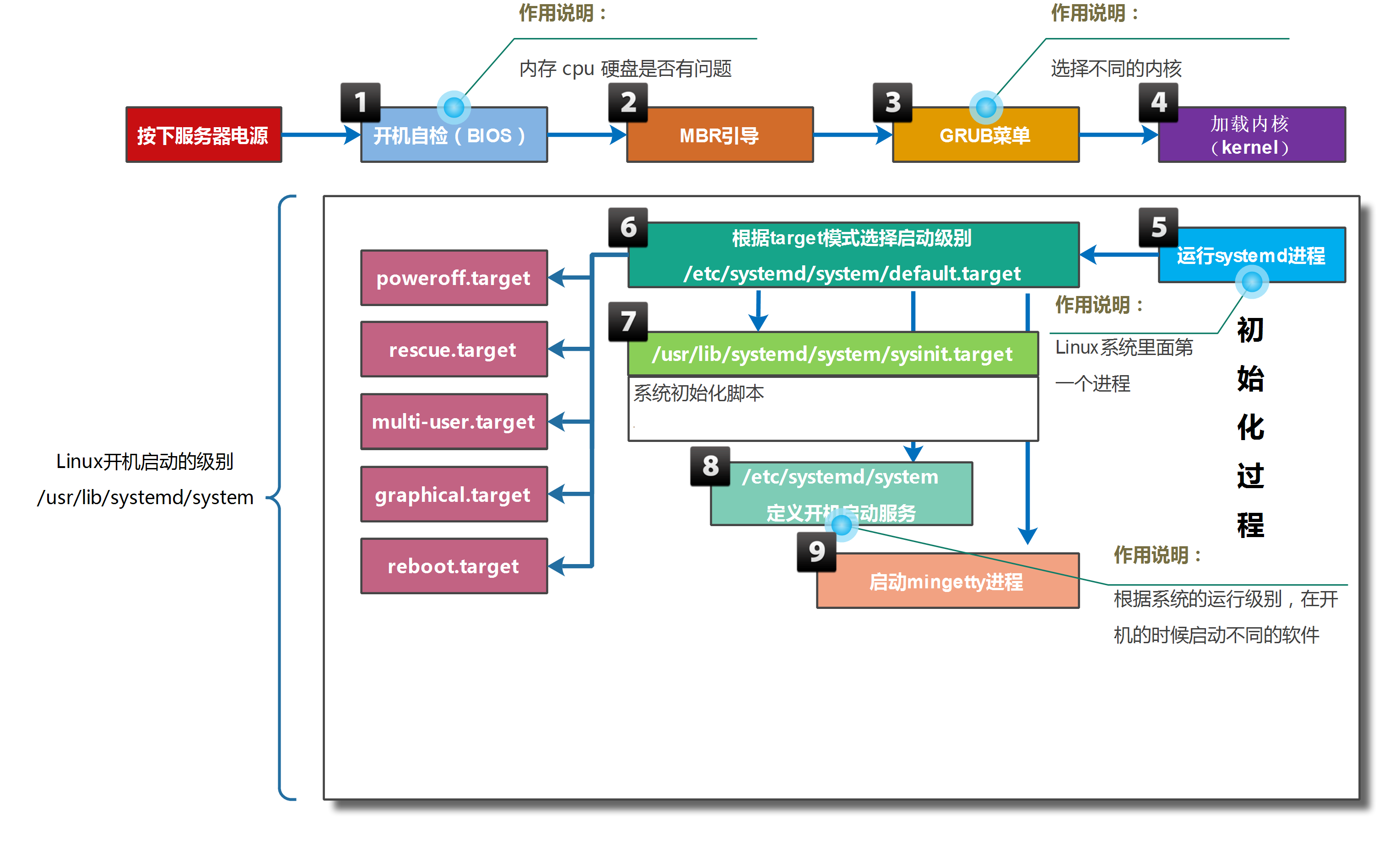
- 计算机接通电源后,系统固件(UEFI 或传统 BIOS)首先执行开机自检(POST),检测 CPU、内存、硬盘等核心硬件是否正常。
- 配置说明:启动早期按特定快捷键(如 F2)可进入固件配置界面,调整启动顺序、硬件参数等。 - 固件按配置的启动顺序搜索启动设备,读取磁盘主启动记录(MBR)中的引导加载器(CentOS 7 默认为 GRUB2),并将系统控制权移交 GRUB2。
- 配置说明:通过grub2-install命令可将 GRUB2 安装为磁盘默认启动加载器。 - GRUB2 读取
/boot/grub2/grub.cfg配置文件,显示操作系统选择菜单。
- 配置说明:不可直接编辑grub.cfg,需通过修改/etc/grub.d/目录下的脚本、/etc/default/grub配置文件,再执行grub2-mkconfig命令生成新的grub.cfg。 - 引导加载器根据选中的启动项,从磁盘加载内核(vmlinuz)和 initramfs 到内存,并将内核参数、initramfs 内存地址传递给内核。
- initramfs 是临时内存文件系统,包含启动所需的硬件驱动、初始化脚本等,内核通过它完成硬件初始化。
- 配置说明:通过/etc/dracut.conf.d/目录、dracut命令生成 initramfs,lsinitrd命令可查看 initramfs 内容。 - initramfs 执行
/sbin/init(CentOS 7 中该文件为 systemd 的软链接),作为系统首个进程(PID 1)。
- 配置说明:可通过内核参数init=command指定自定义初始化程序。 - systemd 加载内核命令行指定的 target,或系统默认的
default.target(通常为文本/图形登录界面)。
- 配置说明:通过systemctl命令设置默认 target(如systemctl set-default multi-user.target)。 default.target依赖sysinit.target,该 target 完成系统基础初始化:读取/etc/fstab挂载文件系统、激活日志服务(systemd-journald)等。
- 配置说明:通过/etc/fstab配置文件设置文件系统开机自动挂载规则。default.target激活所有配置为开机自启的 systemd 单元(如服务、定时器等)。
- 配置说明:通过systemctl enable <服务名>设置服务开机自启。default.target激活getty.target,打开 tty1 终端,提供用户登录入口。
系统 target 机制
目录和子目录、子文件之间关系:目录包含子目录和子文件。
- service一个服务,例如sshd,提供远程执行命令、复制文件。
- target 是一个可以包含service、time等对象的特殊unit。systemctl start target,激活该target包含的所有对象。
systemd 以 target 类型单元对各类系统单元(服务、挂载、设备等)进行分组管理,target 可嵌套依赖,形成层级化的启动逻辑。
# 查看 graphical.target 的直接/间接依赖
[root@centos7 ~]# systemctl list-dependencies graphical.target
graphical.target
● ├─accounts-daemon.service
● ├─gdm.service
● ├─initial-setup-reconfiguration.service
● ├─network.service
● ├─rtkit-daemon.service
● ├─systemd-readahead-collect.service
● ├─systemd-readahead-replay.service
● ├─systemd-update-utmp-runlevel.service
● ├─udisks2.service
● └─multi-user.target
......

[root@centos7 ~]# systemctl list-dependencies multi-user.target
multi-user.target
● ├─abrt-ccpp.service
● ├─abrt-oops.service
● ├─abrt-vmcore.service
● ├─abrt-xorg.service
● ├─abrtd.service
● ├─atd.service
......

# 查看 sshd.service 的反向依赖(哪些 target 依赖该服务)
[root@centos7 ~]# systemctl list-dependencies sshd.service --reverse
sshd.service
● └─multi-user.target
●   └─graphical.target
传统 SysVinit 定义 7 个运行级别(0-6),CentOS 7 虽使用 systemd,但仍保留对运行级别的兼容映射,具体如下:
| 运行级别 | 对应 systemd target | 作用描述 |
|---|---|---|
| 0 | - | 关机(halt):终止所有进程并关闭电源,对应命令 shutdown -h now。 |
| 1 | emergency.target/rescue.target | 单用户模式:仅 root 可登录,无网络服务,用于系统修复(如密码找回)。 |
| 2 | - | 多用户模式(无 NFS):支持多用户登录,但不启动网络文件系统,部分发行版与级别 3 功能一致。 |
| 3 | multi-user.target | 完全多用户模式(文本界面):启动所有网络服务,命令行登录,无图形界面。 |
| 4 | - | 预留级别:默认未使用,可自定义用途。 |
| 5 | graphical.target | 图形化多用户模式:在级别 3 基础上启动图形界面(GNOME/KDE),图形登录。 |
| 6 | - | 重启(reboot):终止所有进程并重启,对应命令 shutdown -r now。 |
系统运行目标配置
切换当前系统的运行 target:
# 切换为文本界面(multi-user.target)
[root@centos7 ~]# systemctl isolate multi-user.target

# 切换为图形界面(graphical.target)
[root@centos7 ~]# systemctl isolate graphical.target
设置系统启动默认 target:
# 查看当前默认 target
[root@centos7 ~]# systemctl get-default
graphical.target

# 设置默认 target 为 multi-user.target(文本界面)
[root@centos7 ~]# systemctl set-default multi-user.target

# 重启系统验证配置
[root@centos7 ~]# reboot
思考:如何划分gdm.service归属multi-user.target?
ROOT 密码重置
-
重启系统,中断 GRUB2 菜单倒计时,选中第一个内核条目并按
e编辑。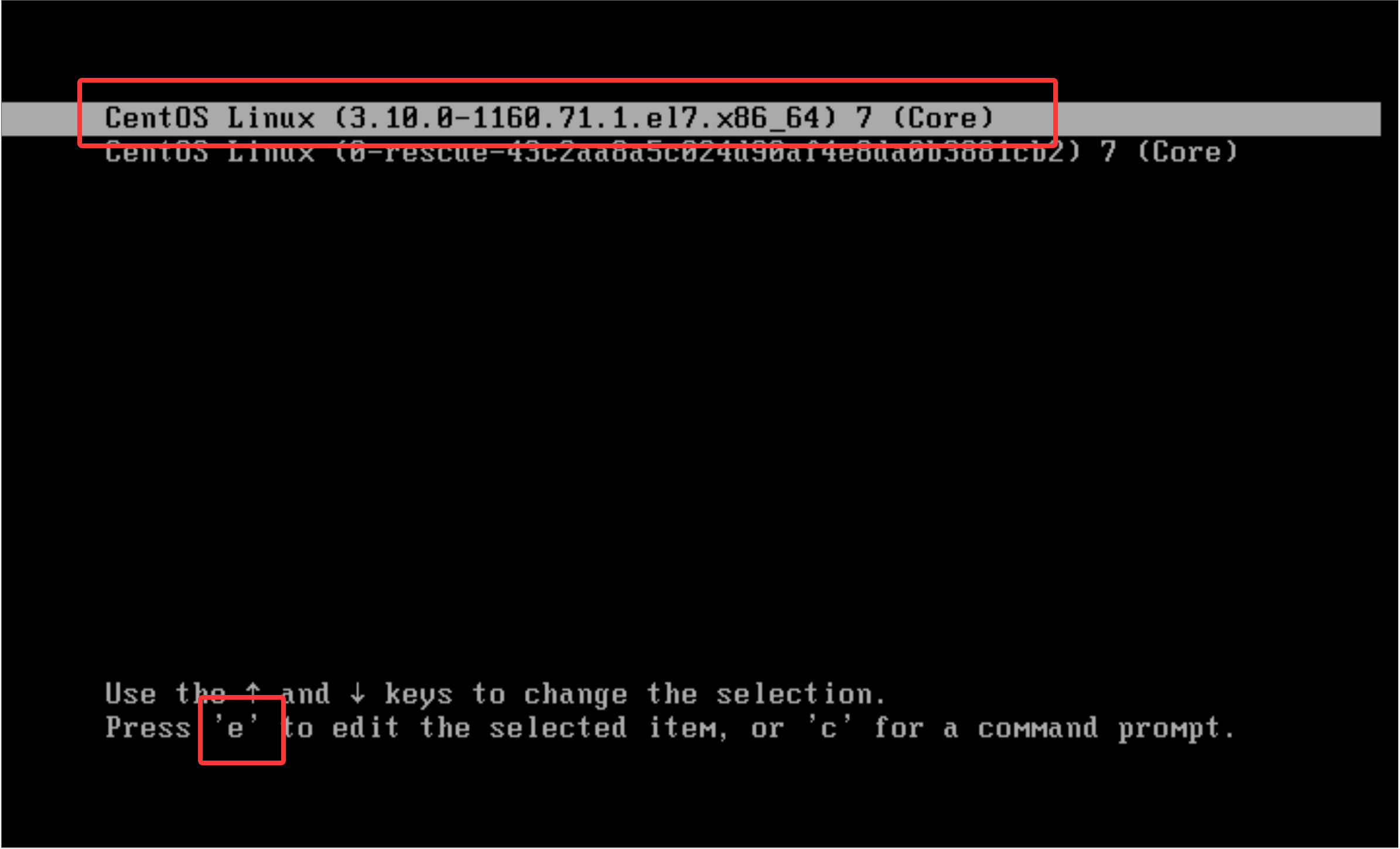
-
定位到
linux16开头的行,行尾添加rd.break(rd.break前有空格)(在 initramfs 移交控制权前中断),按Ctrl+x启动。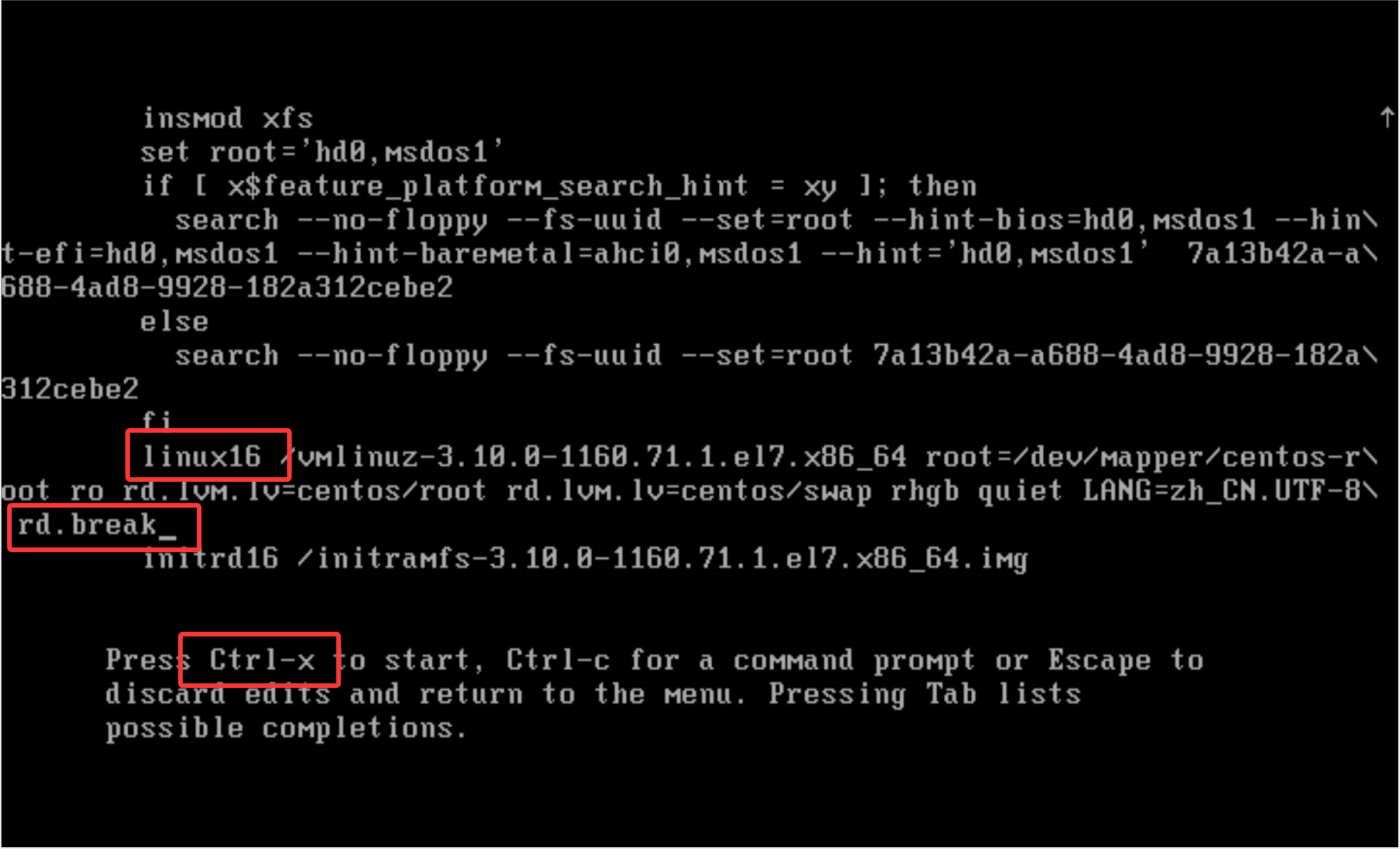
-
系统进入 root shell,此时根文件系统(/sysroot)为只读挂载,重新挂载为读写:
bash switch_root:/# mount -o remount,rw /sysroot
- 切换根目录到 /sysroot(实际系统根目录):
bash switch_root:/# chroot /sysroot
- 设置新 root 密码(将
password替换为自定义密码):
bash sh-4.2# echo password | passwd --stdin root
- 若启用 SELinux,则需触发文件重新打标(否则密码修改可能失效):
bash sh-4.2# touch /.autorelabel
- 退出 chroot 环境并继续启动:
bash sh-4.2# exit switch_root:/# exit
- 系统重启后,使用新密码登录 root 验证。
/etc/fstab 配置故障排查
/etc/fstab 用于定义文件系统开机自动挂载规则,配置错误会导致系统启动异常,以下为常见故障及修复方法。
环境准备(模拟故障前的正常配置)
# 为 /dev/sdb 创建 MBR 分区表
[root@centos7 ~]# parted /dev/sdb mklabel msdos

# 创建 10GB 主分区
[root@centos7 ~]# parted /dev/sdb unit MiB mkpart primary 1 10241

# 格式化为 XFS 文件系统
[root@centos7 ~]# mkfs.xfs /dev/sdb1

# 创建挂载点
[root@centos7 ~]# mkdir /data01

# 添加 fstab 持久化挂载规则
[root@centos7 ~]# echo '/dev/sdb1 /data01 xfs defaults 0 0' >> /etc/fstab

# 挂载并验证
[root@centos7 ~]# mount -a
[root@centos7 ~]# df -h /data01
文件系统        容量  已用  可用 已用% 挂载点
/dev/sdb1        10G   33M   10G    1% /data01
故障 1:挂载点不存在
模拟故障:
[root@centos7 ~]# umount /data01
[root@centos7 ~]# rmdir /data01
故障现象:重启后系统可正常进入,挂载点 /data01 会被自动创建,分区正常挂载。
说明:CentOS 7 会自动创建 fstab 中定义的不存在的挂载点,此故障无实际影响。
故障 2:设备名称错误/设备不存在
模拟故障:修改 fstab 中设备名(如 sdb1 → sdb2):
[root@centos7 ~]# vim /etc/fstab
/dev/sdb2 /data01 xfs defaults 0 0
故障现象:启动时无法找到 /dev/sdb2,超时(90秒)后进入 emergency 模式。
修复方法:在 emergency 模式下,编辑 /etc/fstab 修正设备名或注释错误条目,输入 exit 继续启动。
SELinux
firewalld 管理网络数据包。
Secure Enhance Linux:给每个文件都贴上一个标签。
应用程序 httpd 打标签A,提供/usr/share/nginx/html目录给客户端,/usr/share/nginx/html目录也打上标签A。
生活场景:门禁卡 702 打标签 A - 702 打标签A。
会验证身份?
Shell 特殊变量
Shell 位置参数变量
在 Shell 中存在一些特殊且重要的变量,例如:$0、$1,我们称之为位置参数变量。要从命令行、函数或脚本执行等处传递参数时,就需要在 Shell 脚本中使用位置参数变量。
部分位置参数变量如下:
- $0,获取当前执行的 Shell 脚本的文件名,如果执行脚本包含了路径,那么就包括脚本路径。
- **n∗∗,获取当前执行的Shell脚本的∗∗第n个参数值∗∗。如果n大于9,则用大括号括起来,例如n**,获取当前执行的 Shell 脚本的**第n个参数值**。如果n大于9,则用大括号括起来,例如n∗∗,获取当前执行的Shell脚本的∗∗第n个参数值∗∗。如果n大于9,则用大括号括起来,例如{10},接的参数以空格隔开。
- $#,获取当前执行的 Shell 脚本后面接的参数数量。
- **∗∗∗,获取当前Shell脚本所有传参的参数,不加引号和‘***,获取当前 Shell 脚本所有传参的参数,不加引号和`∗∗∗,获取当前Shell脚本所有传参的参数,不加引号和‘@
相同;如果给∗‘加上双引号,例如:‘"*`加上双引号,例如:`"∗‘加上双引号,例如:‘"*",则表示将所有的参数视为单个字符串,相当于$1 $2 $3`。 - **@∗∗,获取当前Shell脚本所有传参的参数,不加引号和@**,获取当前 Shell 脚本所有传参的参数,不加引号和@∗∗,获取当前Shell脚本所有传参的参数,不加引号和*相同;如果给@加上双引号,例如:‘@加上双引号,例如:`@加上双引号,例如:‘@
,则表示将所有的参数视为不同的独立字符串,相当于"$1"、“$2”、“$3”…`,这是将多参数传递给其他程序的最佳方式,因为它会保留所有的内嵌在每个参数里的任何空白。
示例1:showargs.sh 内容如下
#!/bin/bash
echo $0
echo $1
echo $2
echo $10
echo ${10}
echo $#
echo $*
echo $@
echo "$@"
[root@centos7 ~]$ bash showargs.sh {a..z}
showargs.sh
a
b
a0
j
26
a b c d e f g h i j k l m n o p q r s t u v w x y z
a b c d e f g h i j k l m n o p q r s t u v w x y z
a b c d e f g h i j k l m n o p q r s t u v w x y z
示例2:sshd_ctl 内容如下
#!/bin/bash
systemctl $1 sshd
执行效果如下:
[root@centos7 ~]$ [root@centos7 ~] sshd_ctl stop
[root@centos7 ~]$ [root@centos7 ~] sshd_ctl status
[root@centos7 ~]$ [root@centos7 ~] sshd_ctl start
Shell 进程中的特殊状态变量
$?
作用:获取执行上一个指令的执行状态返回值:0为成功,非零为失败,这个变量最常用。
[root@centos7 ~]$ ls
hello  script.sh  showargs.sh
[root@centos7 ~]$ echo $?
0
[root@centos7 ~]$ ls /root
ls: 无法打开目录/root: 权限不够
[root@centos7 ~]$ echo $?
2

# man ls查看,退出码含义
[root@centos7 ~]$ man ls
......
   Exit status:
       0      if OK,
       1      if minor problems (e.g., cannot access subdirectory),
       2      if serious trouble (e.g., cannot access command-line argument).
$$(不重要)
作用:获取当前执行的 Shell 脚本的进程号(PID),这个变量不常用,了解即可。
[root@centos7 ~]$ echo $$
2447
[root@centos7 ~]$ kill -9 $$

Connection closed by foreign host.

Disconnected from remote host(10.1.8.88) at 21:00:36.

Type `help' to learn how to use Xshell prompt.
$!(不重要)
作用:获取上一个在后台工作的进程的进程号(PID),这个变量不常用,了解即可。
[root@centos7 ~]$ md5sum /dev/zero &
[1] 2611
[root@centos7 ~]$ echo $!
2611
[root@centos7 ~]$ ps o pid,%cpu,%mem,command $!
   PID %CPU %MEM COMMAND
  2611 99.1  0.0 md5sum /dev/zero
[root@centos7 ~]$ kill $!
[1]+  Terminated              md5sum /dev/zero
$_(不重要)
作用:获取在此之前执行的命令或脚本的最后一个参数,这个变量不常用,了解即可。
[root@centos7 ~]$ ls /etc/hosts /etc/fstab /etc/hostname
/etc/fstab  /etc/hostname  /etc/hosts
[root@centos7 ~]$ cat $_
sjw-shell
[root@centos7 ~]$ cat /etc/hostname
sjw-shell
Shell 内置变量命令
echo
echo命令参数选项:
- -n,不换行输出内容。
- -e,解析转义字符(见下面的字符)
转义字符:
- \n,换行。
- \t,制表符(tab)。
- \b,退格。
- \r,退格到开头。
[root@centos7 ~]$ echo -n "sjw ";echo laowang
sjw laowang
[root@centos7 ~]$ echo -e "sjw\nlaowang"
sjw
laowang
[root@centos7 ~]$ echo -e "sjw\tlaowang"
sjw   laowang

[root@centos7 ~]$ echo -e "1\b23"
23

[root@centos7 ~]$ echo -e "123\b"
123

# 后面有东西才会覆盖
[root@centos7 ~]$ echo -ne "123\b";echo haha
12haha

# 覆盖 hello,从头打印
[root@centos7 ~]$ echo -n "hello" ;echo -e "\rworld"
world

# 覆盖 hello,从头打印,最后o没有覆盖
[root@centos7 ~ 15:58:34]# echo -n "hello" ;echo -e "\rword"
wordo
read
从标准输入读取字符串等信息, 传给 Shell 程序内部定义的变量。
[root@centos7 ~]$ cat read.sh
#!/bin/sh
read -p "输入你想要说的话:" str
echo "你想要说的话是:$str"

[root@centos7 ~]$ bash read.sh
输入你想要说的话:`hello world`
你想要说的话是:hello world

# 不显示输入的内容
[root@centos7 ~]$ read -s -p "请设置用户密码: " password
请设置用户密码:

[root@centos7 ~]$ echo $password
redhat
案例:开发set_pass设置密码,例如set_pass sjw,提示用户输入密码,然后设置为相应密码。
[root@centos7 ~]$ vim set_pass
#!/bin/bash
# -s 代表不显示输入的内容
read -sp "请输入用户 $1 新密码:" password
echo
echo $password | passwd --stdin $1

[root@centos7 ~]$ [root@centos7 ~] ./set_pass sjw
请输入用户 sjw 新密码:123 # 密码是不显示的
更改用户 sjw 的密码 。
passwd:所有的身份验证令牌已经成功更新。
复习:查看帮助信息。
- –help(或者-h),例如date --help
- man man_page,例如 man echo
- help command,例如help read
案例:开发工具my_select,模拟tzselect,不需要实际判断。
#!/bin/bash
echo 'Please identify a location so that time zone rules can be set correctly.
Please select a continent or ocean.
 1) Africa
 2) Americas
 3) Antarctica
 4) Arctic Ocean
 5) Asia
 6) Atlantic Ocean
 7) Australia
 8) Europe
 9) Indian Ocean
10) Pacific Ocean
11) none - I want to specify the time zone using the Posix TZ format.'

read -p "#? " choice_1

echo '
Please select a country.
 1) Afghanistan       18) Israel            35) Palestine
 2) Armenia       19) Japan         36) Philippines
 3) Azerbaijan        20) Jordan            37) Qatar
 4) Bahrain       21) Kazakhstan        38) Russia
 5) Bangladesh        22) Korea (North)     39) Saudi Arabia
 6) Bhutan        23) Korea (South)     40) Singapore
 7) Brunei        24) Kuwait            41) Sri Lanka
 8) Cambodia          25) Kyrgyzstan        42) Syria
 9) China         26) Laos          43) Taiwan
10) Cyprus        27) Lebanon           44) Tajikistan
11) East Timor        28) Macau         45) Thailand
12) Georgia       29) Malaysia          46) Turkmenistan
13) Hong Kong         30) Mongolia          47) United Arab Emirates
14) India         31) Myanmar (Burma)       48) Uzbekistan
15) Indonesia         32) Nepal         49) Vietnam
16) Iran          33) Oman          50) Yemen
17) Iraq          34) Pakistan'

read -p "#? " choice_2

echo '
Please select one of the following time zone regions.
1) Beijing Time
2) Xinjiang Time'

read -p "#? " choice_3

echo '
The following information has been given:

    China
    Beijing Time

Therefore TZ='Asia/Shanghai' will be used.
Local time is now:  Fri Apr 10 16:16:09 CST 2026.
Universal Time is now:  Fri Apr 10 08:16:09 UTC 2026.
Is the above information OK?
1) Yes
2) No'

read -p "#? " choice_4

echo '
You can make this change permanent for yourself by appending the line
    TZ='Asia/Shanghai'; export TZ
to the file '.profile' in your home directory; then log out and log in again.

Here is that TZ value again, this time on standard output so that you
can use the /usr/bin/tzselect command in shell scripts:
Asia/Shanghai'
数值计算
下面就给大家介绍一下常见的 Shell 算术运算符:
- +、-,一元正号和负号。
- +、-,加法和减法。
- *、/、%,乘法、除法、取余(取模)。
- **,幂运算。
- ++、–,增加及减少,可前置也可放在变量结尾。
- !、&&、||,逻辑非(取反)、逻辑与(and)、逻辑或(or)。
- <、<=、>、>=,比较符号(小于、小于等于、大于、大于等于)。
- ==、!=、=,比较符号(相等、不相等,对于字符串也可以表示相当于)。
- <<、>>,向左移位、向右移位。
- ~、|、&、^,按位取反、按位异或、按位与、按位。
- =、+=、-=、*=、/=、%=,赋值运算符,例如
a+=1相当于a=a+1,a-=1相当于a=a-1。
Shell 中常见的算术运算命令:
- $(()),用于整数运算的常用运算符,效率很高。
- $[],用于整数运算。
- bc,Linux下的一个计算器程序(适合整数及小数运算)。
(()) 双小括号数值运算命令
双小括号 (()) 的作用是进行数值运算与数值比较,它的效率很高,用法灵活,是企业场景运维人员经常采用的运算操作符。
1 (()) 双小括号数值运算的基础语法
双小括号 (()) 的操作方法:
- ((i=i+1)),此种书写方法为运算后赋值法,即将i+1的运算结果赋值给变量i。
注意:不能用 echo ((i=i+l))输出表达式的值,可以用echo $((i=i+l))输出其值。
- **i=((i+1))∗∗,可以在‘(())‘前加‘((i+1))**,可以在 `(())` 前加 `((i+1))∗∗,可以在‘(())‘前加‘` 符,表示将表达式运算后赋值给i。
- (( 8>7 && 5==5)),可以进行比较操作,还可以加入逻辑与和逻辑或,用于条件判断。
- **echo ((2+1))∗∗,需要直接输出运算表达式的运算结果时,可以在‘(())‘前加‘((2+1))**,需要直接输出运算表达式的运算结果时,可以在 `(())` 前加 `((2+1))∗∗,需要直接输出运算表达式的运算结果时,可以在‘(())‘前加‘` 符。
2 (()) 双小括号数运算实践
**示例1:**简单的数值计算。
[root@centos7 ~]$ echo $((1+1))
2
[root@centos7 ~]$ echo $((6*3))
18
[root@centos7 ~]$ ((i=5))
[root@centos7 ~]$ ((i=i*2))
[root@centos7 ~]$ echo $i
10
**示例2:**复杂的数值计算。
[root@centos7 ~]$ ((a=1+2**3-4%3))
[root@centos7 ~]$ echo $a
8

[root@centos7 ~]$ b=$((a=1+2**3-4%3))
[root@centos7 ~]$ echo $b
8
[root@centos7 ~]$ echo $((a=1+2**3-4%3))
8

[root@centos7 ~]$ a=$((100*(100+1)/2))
[root@centos7 ~]$ echo $a
5050
[root@centos7 ~]$ echo $((100*(100+1)/2))
5050
**示例3:**特殊运算符号
[root@centos7 ~]$ a=8;echo $((a+=1))
9
[root@centos7 ~]$ echo $((a**2))
81
**示例4:**比较和判断
[root@centos7 ~]$ ((3<8))
[root@centos7 ~]$ echo $?
0
[root@centos7 ~]$ echo $((3<8))
1

[root@centos7 ~]$ ((3>8))
[root@centos7 ~]$ echo $?
1
[root@centos7 ~]$ echo $((3>8))
0

[root@centos7 ~]$ echo $((3==3))
1

[root@centos7 ~]$ if ((8>7 && 5==5));then echo yes;fi
yes
**示例5:**变量前后使用–和++特殊运算符的表达式
[root@centos7 ~]$ a=10
[root@centos7 ~]$ echo $((a++))
10
[root@centos7 ~]$ echo $a
11

[root@centos7 ~]$ echo $((--a))
10
[root@centos7 ~]$ echo $a
10
总结:
- 执行
echo $((a++))和echo $((a--))命令输出整个表达式时,输出的值即为a的值,表达式执行完毕后,会对a进行++、--的运算 - 执行
echo $((++a))和echo $((--a))命令输出整个表达式时,会先对a进行++、--的运算,然后再输出表达式的值,即为a运算后的值。
**示例6:**通过 (())运算后赋值给变量
[root@centos7 ~]$ num=99
[root@centos7 ~]$ echo $((num+1))
100
[root@centos7 ~]$ num=$((num+1))
[root@centos7 ~]$ echo $num
100
let 命令
let运算命令的语法格式为:let 表达式
let表达式的功能等同于:((表达式))
示例:
[root@centos7 ~]$ i=2
[root@centos7 ~]$ i=i+8
[root@centos7 ~]$ echo $i
i+8

[root@centos7 ~]$ i=2
[root@centos7 ~]$ let i=i+8
[root@centos7 ~]$ echo $i
10
bc 命令
bc 是UNIX/Linux下的计算器,因此,除了可以作为计算器来使用,还可以作为命令行计算工具使用。
示例:
[root@centos7 ~]$ bc
bc 1.06.95
Copyright 1991-1994, 1997, 1998, 2000, 2004, 2006 Free Software Foundation, Inc.
This is free software with ABSOLUTELY NO WARRANTY.
For details type `warranty'.
1+3*4-6/3^3%4
13
# 设置小数点位数
scale=4
1/3
.3333
quit

[root@centos7 ~]$ echo '1+3*4-6/3^3%4' | bc
13
[root@centos7 ~]$ echo 'scale=4;1/3' | bc
.3333
$[] 符号的运算
示例1:
[root@centos7 ~]$ echo $[1+1]
2
[root@centos7 ~]$ echo $[4-2]
2
[root@centos7 ~]$ echo $[2*2]
4
[root@centos7 ~]$ echo $[4/2]
2
[root@centos7 ~]$ echo $[5/2]
2
[root@centos7 ~]$ echo $[5%2]
1
[root@centos7 ~]$ count=3;echo $[(count+1)*3]
12
[root@centos7 ~]$ count=3;echo $[ ++count + 3 ]
7
[root@centos7 ~]$ count=3;echo $[ count++ + 3 ]
6
[root@centos7 ~]$ count=3;echo $[ --count + 3 ]
5
[root@centos7 ~]$ count=3;echo $[ count-- + 3 ]
6
综合案例
通过一条命令计算输出 1+2+3+...+10 的表达式,并计算出结果,请使用bc命令计算。输出内容如1+2+3+4+5+6+7+8+9+10=55。
[root@centos7 ~]# echo {1..10}
1 2 3 4 5 6 7 8 9 10

[root@centos7 ~]# echo {1..10} | tr ' ' '+'
1+2+3+4+5+6+7+8+9+10

[root@centos7 ~]# echo "Today is $(date +%A)"
Today is Friday

[root@centos7 ~]# echo $[ 1+2+3 ]
6

[root@centos7 ~]# echo $[ $(echo {1..10} | tr ' ' '+') ]
55

[root@centos7 ~]# echo $(echo {1..10} | tr ' ' '+')=$[ $(echo {1..10} | tr ' ' '+') ]
1+2+3+4+5+6+7+8+9+10=55

AtomGit 是由开放原子开源基金会联合 CSDN 等生态伙伴共同推出的新一代开源与人工智能协作平台。平台坚持“开放、中立、公益”的理念,把代码托管、模型共享、数据集托管、智能体开发体验和算力服务整合在一起,为开发者提供从开发、训练到部署的一站式体验。
更多推荐



 23
23 0
0- 0


 已为社区贡献4条内容

所有评论(0)