此时其他的虚拟线程会被分配到这个携带器上。
用的吞吐量,相比于传统的线程是由操作系统调度来看,虚拟线程是我们自己程序调度的线程。如果你对之前java提供的线程API比较熟悉了,那么在学习虚拟线程的时候会比较轻松,传统线程能运行的代码,虚拟线程也可以运行。虚拟线程的出现,并没有修改java原有的并发模型,也不会替代原有的线程。虚拟线程主要作用是提升服务器端的吞吐量。
为什么要有虚拟线程
服务器应用程序的伸缩性受利特尔法则(Little’s Law)的制约,与下面3点有关
-
延迟:请求处理的耗时
-
并发量:同一时刻处理的请求数量
-
吞吐量:单位时间内处理的数据数量
比如一个服务器应用程序的延迟是50ms,处理10个并发请求,则吞吐量是200请求/秒(10 / 0.05),如果吞吐量要达到2000请求/秒,则处理的并发请求数量是100。按照1个请求对应一个线程的比例来看,要想提高吞吐量,线程数量也要增加。
java中的线程是在操作系统线程(OS thread)进行了一层包装(目前大部分语言实现采用的线程模型,都是用户态的线程一对一映射到内核线程上,好处是实现简单,统一由操作系统负责调度),OS线程的优点是它足够通用,不管是什么语言/什么应用场景,但OS线程的问题也正是来自于此:
- OS不知道用户态的程序会如何使用线程,它会给每条线程分配一个固定大小的堆栈,通常会比实际使用的要大很多;
- 线程的上下文切换要通过内核调度进行,相对更慢;
- 线程的调度算法需要做兼顾和妥协,很难做特定的优化,像web server中处理请求的线程和视频编解码的线程行为有很大的区别;
为了解决该问题,虚拟线程就出现了。也就是多对多的线程模型:经典的就是Erlang的进程和Go的goroutine,M:N 的映射关系,大量(M)虚拟的线程被调度在较少数量(N)的操作系统线程上运行。用户态的运行时负责调度用户态线程,OS则只需要负责OS线程,各司其职。灵活度更高,开发者基本不用担心线程数爆炸的问题。
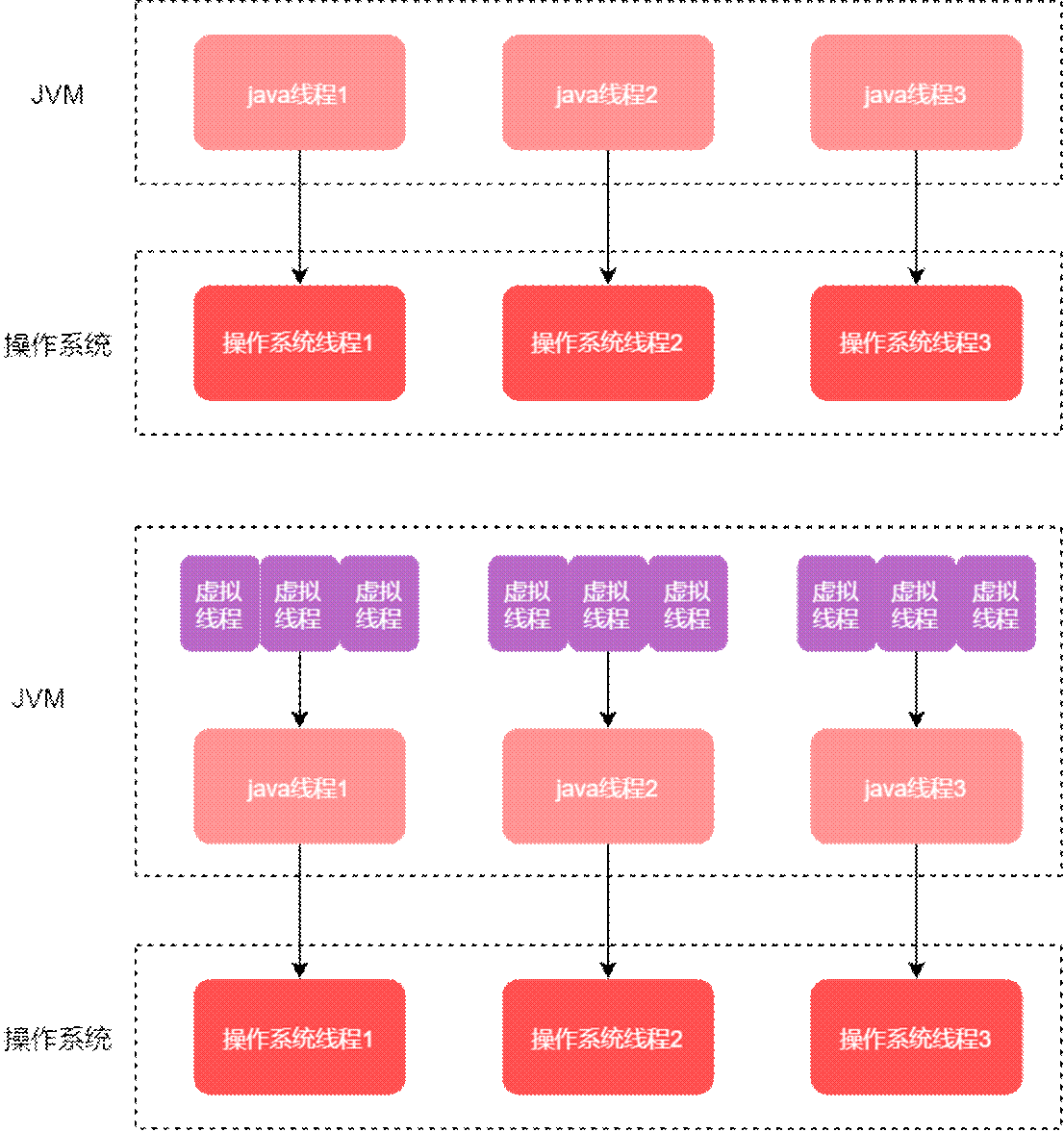
与虚拟地址可以映射到物理内存类似,java是将大量的虚拟线程映射到少量的操作系统线程,带来了一些好处:
- 线程的切换很快,无需系统调用和系统级别的上下文切换
- 分配线程的开销很低:一方面是创建和销毁很快,另一方面内存使用也更少
- 竞态条件和线程同步处理起来更简单
- 且虚拟线程的生命周期短暂,不会有很深的栈的调用
- 一个虚拟线程的生命周期中只运行一个任务,因此可以创建大量的虚拟线程,
- 虚拟线程无需池化
另一方面,虚拟线程不能带来什么?
要意识到虚拟线程是更轻量的线程,但并不是"更快"的线程,它每秒执行的CPU指令并不会比普通线程要多。假设有这样一个场景,需要同时启动10000个任务做一些事情:
java
// 创建一个虚拟线程的Executor,该Executor每执行一个任务就会创建一个新的虚拟线程
try (var executor = Executors.newVirtualThreadPerTaskExecutor()) {
    IntStream.range(0, 10_000).forEach(i -> {
        executor.submit(() -> {
            doSomething();
            return i;
        });
    });
}  // executor.close() is called implicitly, and waits
考虑两种场景:
-
如果doSomething()里执行的是某类IO操作,那么使用虚拟线程是非常合适的,因为虚拟线程创建和切换的代价很低,底层对应的可能只需要几个OS线程。如果没有虚拟线程,不考虑ForkJoin之类的工具,使用普通线程的话:
-
- Executors.newVirtualThreadPerTaskExecutor()换成Executors.newCachedThreadPool()。结果是程序会崩溃,因为大多数操作系统和硬件不支持这种规模的线程数。
- 换成Executors.newFixedThreadPool(200)或者其他自定义的线程池,那这10000个任务将会共享200个线程,许多任务将按顺序运行而不是同时运行,并且程序需要很长时间才能完成。
-
如果doSomething()里执行的是某类计算任务,例如给一个大数组排序,那么虚拟线程反而还可能带来多余的开销。
总结一下,虚拟线程真正擅长的是等待,等待大量阻塞操作完成。它能提供的是 scale(更高的吞吐量),而不是 speed(更低的延迟)。虚拟线程最适合的是原来需要更多线程数来处理计算无关业务的场景,典型的就是像web容器、数据库、文件操作一类的IO密集型的应用。
虚拟线程的理解
平台线程和虚拟线程
平台线程(platform thread):指Java中的线程,比如通过Executors.newFixedThreadPool()创建出来的线程,我们称之为平台线程。
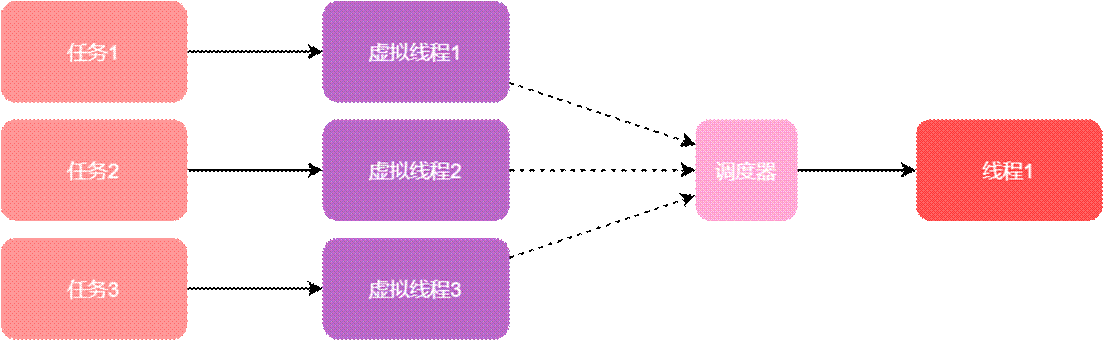
虚拟线程并不会直接分配给cpu去执行,而是通过调度器分配给平台线程,平台线程再被调度器管理。Java中虚拟线程的调度器采用了工作窃取的模式进行FIFO的操作,调度器的并行数默认是Jvm获取的处理器数量(通过该方法获取的数量Runtime.getRuntime().availableProcessors()),调度器并非分时(time sharing)的。在使用虚拟线程编写程序时,不能控制虚拟线程何时分配给平台线程,也不能控制平台线程何时分配给cpu。
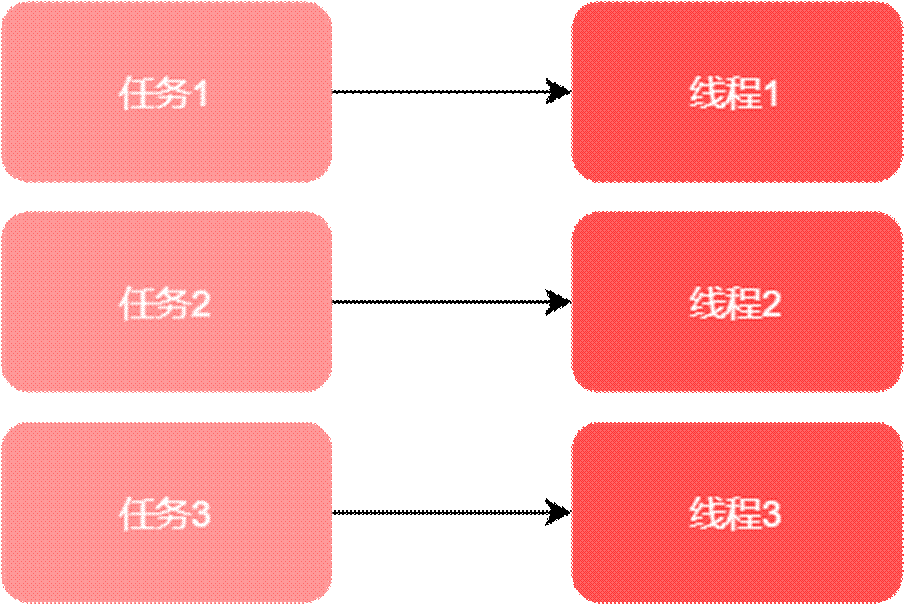
以前任务和平台线程的关系:
使用虚拟线程之后,任务-虚拟线程-调度器-平台线程的关系,1个平台线程可以被调度器分配不同的虚拟线程:
携带器
调度器将虚拟线程挂载到平台线程之后,该平台线程叫做虚拟线程的携带器(言外之意就是,平台线程携带着虚拟线程),调度器并不维护虚拟线程和携带器之间的关联关系,因此在一个虚拟线程的生命周期中可以被分配到不同的携带器,即虚拟线程运行了一小段代码后,可能会脱离携带器,此时其他的虚拟线程会被分配到这个携带器上。
携带器和虚拟线程是相互独立的,比如:
-
虚拟线程不能使用携带器的标识,Thread.current()方法获取的是虚拟线程本身。
-
两者有各自的栈空间。
-
两者不能访问对方的Thread Local变量。
在程序的执行过程中,虚拟线程遇到阻塞的操作时大部分情况下会被解除挂载,阻塞结束后,虚拟线程会被调度器重新挂载到携带器上,因此虚拟线程会频繁的挂载和解除挂载,这并不会导致操作系统线程的阻塞。下面的代码在执行两个get方法和send方法(会有io操作)时会使虚拟线程发生挂载和解除挂载:
java
response.send(future1.get() + future2.get());
有些阻塞操作并不会导致虚拟线程解除挂载,这样会同时阻塞携带器和操作系统线程,例如:操作系统基本的文件操作,java中的Object.wait()方法。下面两种情况不会导致虚拟线程的解除挂载:
- 执行synchronized同步代码(会导致携带器阻塞,所以建议使用ReentrantLock替换掉synchronized)
- 执行本地方法或外部函数
虚拟线程和平台线程的区别
从内存空间上来说,虚拟线程的栈空间可以看作是一个大块的栈对象,它被存储在了java堆中,相比于单独存储对象,堆中存储虚拟线程的栈会造成一些空间的浪费,这点在后续的java版本中应该会得到改善,当然这样也是有一些好处的,就是可以重复利用这部分栈空间,不用多次申请开辟新的内存地址。虚拟线程的栈空间最大可以达到平台线程的栈空间容量。
虚拟线程并不是GC root,其中的引用不会出现stop-world,当虚拟线程被阻塞之后比如BlockingQueue.take(),平台线程既不能获取到虚拟线程,也不能获取到queue队列,这样该平台线程可能会被回收掉,虚拟线程在运行或阻塞时不会被GC
-
通过Thread构造方法创建的线程都是平台线程
-
虚拟线程是守护线程,不能通过setDaemon方法改成非守护线程
-
虚拟线程的优先级是默认的5,不能被修改,将来的版本可能允许修改
-
虚拟线程不支持stop(),suspend(),resume()方法
使用虚拟线程
java中创建的虚拟线程本质都是通过Thread.Builder.OfVirtual对象进行创建的,虚拟线程的API非常非常简单,在设计上与现有的Thread类完全兼容。虚拟线程创建出来后也是Thread实例,因此很多原先的代码可以无缝迁移。创建虚拟线程有三种方式:
- 通过Thread.startVirtualThread直接创建一个虚拟线程
java
//创建任务https://github.com/lertsunachb/kypofg/blob/main/hUbPXmn.md
https://github.com/lertsunachb/kypofg/blob/main/edbmpuZ.md
https://github.com/lertsunachb/kypofg/blob/main/vPqpvWU.md
https://github.com/lertsunachb/kypofg/blob/main/APeTjVx.md
https://github.com/lertsunachb/kypofg/blob/main/bfQgXTD.md
https://github.com/lertsunachb/kypofg/blob/main/iFZRZpq.md
https://github.com/lertsunachb/kypofg/blob/main/oMOnYWq.md
https://github.com/lertsunachb/kypofg/blob/main/NxqrAeM.md
https://github.com/lertsunachb/kypofg/blob/main/APeuZRW.md
https://github.com/lertsunachb/kypofg/blob/main/tAZRgKZ.md
https://github.com/lertsunachb/kypofg/blob/main/WESTOwI.md
https://github.com/lertsunachb/kypofg/blob/main/sPjCEjQ.md
https://github.com/lertsunachb/kypofg/blob/main/lYjlwyN.md
https://github.com/lertsunachb/kypofg/blob/main/pxJbNTv.md
https://github.com/lertsunachb/kypofg/blob/main/zUMLKRW.md
https://github.com/lertsunachb/kypofg/blob/main/gQzBgNE.md
https://github.com/lertsunachb/kypofg/blob/main/MTbAcxw.md
https://github.com/lertsunachb/kypofg/blob/main/WQyENnY.md
https://github.com/lertsunachb/kypofg/blob/main/tGAZKJc.md
https://github.com/lertsunachb/kypofg/blob/main/mBvYdNs.md
https://github.com/lertsunachb/kypofg/blob/main/EjLHRGm.md
https://github.com/lertsunachb/kypofg/blob/main/rmEkiaC.md
https://github.com/lertsunachb/kypofg/blob/main/CZGcUNA.md
https://github.com/lertsunachb/kypofg/blob/main/tuCfXFn.md
https://github.com/lertsunachb/kypofg/blob/main/hePsDfX.md
https://github.com/lertsunachb/kypofg/blob/main/kCajaiH.md
https://github.com/lertsunachb/kypofg/blob/main/lyFAqBO.md
https://github.com/lertsunachb/kypofg/blob/main/alnnTsD.md
https://github.com/lertsunachb/kypofg/blob/main/QsSOMvp.md
https://github.com/lertsunachb/kypofg/blob/main/bIEgwUe.md
https://github.com/lertsunachb/kypofg/blob/main/vPUuiif.md
https://github.com/lertsunachb/kypofg/blob/main/rMrXynz.md
https://github.com/lertsunachb/kypofg/blob/main/gDehzjY.md
https://github.com/lertsunachb/kypofg/blob/main/wTClxPj.md
https://github.com/lertsunachb/kypofg/blob/main/UNoJIKt.md
https://github.com/lertsunachb/kypofg/blob/main/oQAMxtz.md
https://github.com/lertsunachb/kypofg/blob/main/rLMjeai.md
https://github.com/lertsunachb/kypofg/blob/main/hlKuamU.md
https://github.com/lertsunachb/kypofg/blob/main/EhMMIFd.md
https://github.com/lertsunachb/kypofg/blob/main/tdzIuDZ.md
https://github.com/lertsunachb/kypofg/blob/main/hzyGLrA.md
https://github.com/lertsunachb/kypofg/blob/main/rhXLuiu.md
https://github.com/lertsunachb/kypofg/blob/main/xLVSjFu.md
https://github.com/lertsunachb/kypofg/blob/main/fQPlbNL.md
https://github.com/lertsunachb/kypofg/blob/main/OAQqBWS.md
https://github.com/lertsunachb/kypofg/blob/main/VialsUZ.md
https://github.com/lertsunachb/kypofg/blob/main/gHzrQkM.md
https://github.com/lertsunachb/kypofg/blob/main/YVAXLKq.md
https://github.com/lertsunachb/kypofg/blob/main/lVEXFTD.md
https://github.com/lertsunachb/kypofg/blob/main/tWHpyrp.md
https://github.com/lertsunachb/kypofg/blob/main/hckzfkc.md
https://github.com/lertsunachb/kypofg/blob/main/NLzCDFm.md
https://github.com/lertsunachb/kypofg/blob/main/zCWnoge.md
https://github.com/lertsunachb/kypofg/blob/main/pCbmxWg.md
https://github.com/lertsunachb/kypofg/blob/main/gWMlbAO.md
https://github.com/lertsunachb/kypofg/blob/main/XxJAYxT.md
https://github.com/lertsunachb/kypofg/blob/main/pjWEtlm.md
https://github.com/lertsunachb/kypofg/blob/main/VpksakH.md
https://github.com/lertsunachb/kypofg/blob/main/eBhGYfV.md
https://github.com/lertsunachb/kypofg/blob/main/rFzyVaU.md
https://github.com/lertsunachb/kypofg/blob/main/MaINKPH.md
https://github.com/lertsunachb/kypofg/blob/main/ZfyxCBl.md
https://github.com/lertsunachb/kypofg/blob/main/VfaGpsK.md
https://github.com/lertsunachb/kypofg/blob/main/KqlSXhj.md
https://github.com/lertsunachb/kypofg/blob/main/kYiCvjn.md
https://github.com/lertsunachb/kypofg/blob/main/rFjQIjF.md
https://github.com/lertsunachb/kypofg/blob/main/DTuGIqw.md
https://github.com/lertsunachb/kypofg/blob/main/lZneQjQ.md
https://github.com/lertsunachb/kypofg/blob/main/RlxaLss.md
https://github.com/lertsunachb/kypofg/blob/main/iMCeCEG.md
https://github.com/lertsunachb/kypofg/blob/main/dFUnzsE.md
https://github.com/lertsunachb/kypofg/blob/main/ZtuHcCH.md
https://github.com/lertsunachb/kypofg/blob/main/sPqOVty.md
https://github.com/lertsunachb/kypofg/blob/main/psThWiT.md
https://github.com/lertsunachb/kypofg/blob/main/KIjDRer.md
https://github.com/lertsunachb/kypofg/blob/main/AWorruy.md
https://github.com/lertsunachb/kypofg/blob/main/gPyGJSa.md
https://github.com/lertsunachb/kypofg/blob/main/mumNYVH.md
https://github.com/lertsunachb/kypofg/blob/main/FsxMXEF.md
https://github.com/lertsunachb/kypofg/blob/main/oLcDotM.md
https://github.com/lertsunachb/kypofg/blob/main/rVwvorC.md
https://github.com/lertsunachb/kypofg/blob/main/mpxZEVn.md
https://github.com/lertsunachb/kypofg/blob/main/HeOWfrg.md
https://github.com/lertsunachb/kypofg/blob/main/ePgZhJy.md
https://github.com/lertsunachb/kypofg/blob/main/UruCVak.md
https://github.com/lertsunachb/kypofg/blob/main/NORDcvE.md
https://github.com/lertsunachb/kypofg/blob/main/bYJvgrA.md
https://github.com/lertsunachb/kypofg/blob/main/YbGmlrS.md
https://github.com/lertsunachb/kypofg/blob/main/SqTmzkQ.md
https://github.com/lertsunachb/kypofg/blob/main/fWxXMAN.md
https://github.com/lertsunachb/kypofg/blob/main/MfuzvFw.md
https://github.com/lertsunachb/kypofg/blob/main/gFkSUbF.md
https://github.com/lertsunachb/kypofg/blob/main/thGpHTG.md
https://github.com/lertsunachb/kypofg/blob/main/kCntnjC.md
https://github.com/lertsunachb/kypofg/blob/main/fJhuMEI.md
https://github.com/lertsunachb/kypofg/blob/main/AphQzdr.md
https://github.com/lertsunachb/kypofg/blob/main/MGcEPXP.md
https://github.com/lertsunachb/kypofg/blob/main/npluzWp.md
https://github.com/lertsunachb/kypofg/blob/main/nxVejln.md
https://github.com/lertsunachb/kypofg/blob/main/rCQbeNy.md
https://github.com/lertsunachb/kypofg/blob/main/uXZaGXy.md
https://github.com/lertsunachb/kypofg/blob/main/rSmPxVq.md
https://github.com/lertsunachb/kypofg/blob/main/zLomVgI.md


https://github.com/lertsunachb/kypofg/blob/main/XPjHnxY.md
https://github.com/lertsunachb/hymkom/blob/main/eKJbwFR.md
https://github.com/lertsunachb/zasxdv/blob/main/MKHgVLp.md
https://github.com/lertsunachb/wgfgyd/blob/main/INOjvHw.md
https://github.com/lertsunachb/bflntc/blob/main/PdKhAKi.md
https://github.com/lertsunachb/bagfqy/blob/main/nEmxbTH.md
https://github.com/lertsunachb/ftjmdd/blob/main/CXEATjZ.md
https://github.com/lertsunachb/ttgqip/blob/main/Ghfyhjw.md
https://github.com/lertsunachb/votyuy/blob/main/LNwcloX.md
https://github.com/lertsunachb/uhkpoj/blob/main/eyGZbQZ.md
https://github.com/lertsunachb/yvbzil/blob/main/ijlnydn.md

Runnable task = () -> {
    System.out.println("执行任务");
};

//创建虚拟线程将任务task传入并启动
Thread.startVirtualThread(task);

//主线程睡眠,否则可能看不到控制台的打印
TimeUnit.SECONDS.sleep(1);
- 使用Thread.ofVirtual()方法创建
java

AtomGit 是由开放原子开源基金会联合 CSDN 等生态伙伴共同推出的新一代开源与人工智能协作平台。平台坚持“开放、中立、公益”的理念,把代码托管、模型共享、数据集托管、智能体开发体验和算力服务整合在一起,为开发者提供从开发、训练到部署的一站式体验。
更多推荐
 1
1 0
0- 0


 已为社区贡献1条内容

所有评论(0)