RAG技术(Elasticsearch版)
RAG技术(Elasticsearch版)
概论
检索增强⽣成( Retrieval-Augmented Generation , RAG ) 是⼀种结合信息检索与⽣成式 AI 的 技术,它的核⼼思想是在⽣成答案前,先从外部知识库中检索与⽤户问题相关的信息,并将这些信息 作为提示( Prompt )输⼊模型,从⽽弥补 LLM 的静态知识局限。
大模型本身有两个致命问题
- 知识过时:模型训练数据是固定的,不会自动更新,回答会落后。
- 容易一本正经胡说八道(幻觉):不知道就瞎编,看起来很对,其实错得离谱。
RAG 就是解决这两个问题的核心方案。
为什么要用 RAG,而不是直接微调模型?
- 微调成本高:要重新训练、耗显卡、耗时间
- 更新慢:知识变了要重新训
- RAG 轻量灵活
- 加新知识只需要往库里丢文档
- 随时增删改,不用重训模型
- 可控性强,回答必须基于给定资料,不乱编
通俗理解:
不用 RAG,模型是 “凭记忆答题”;
用了 RAG,模型是 “开卷考试”,更准、更新、更可信。
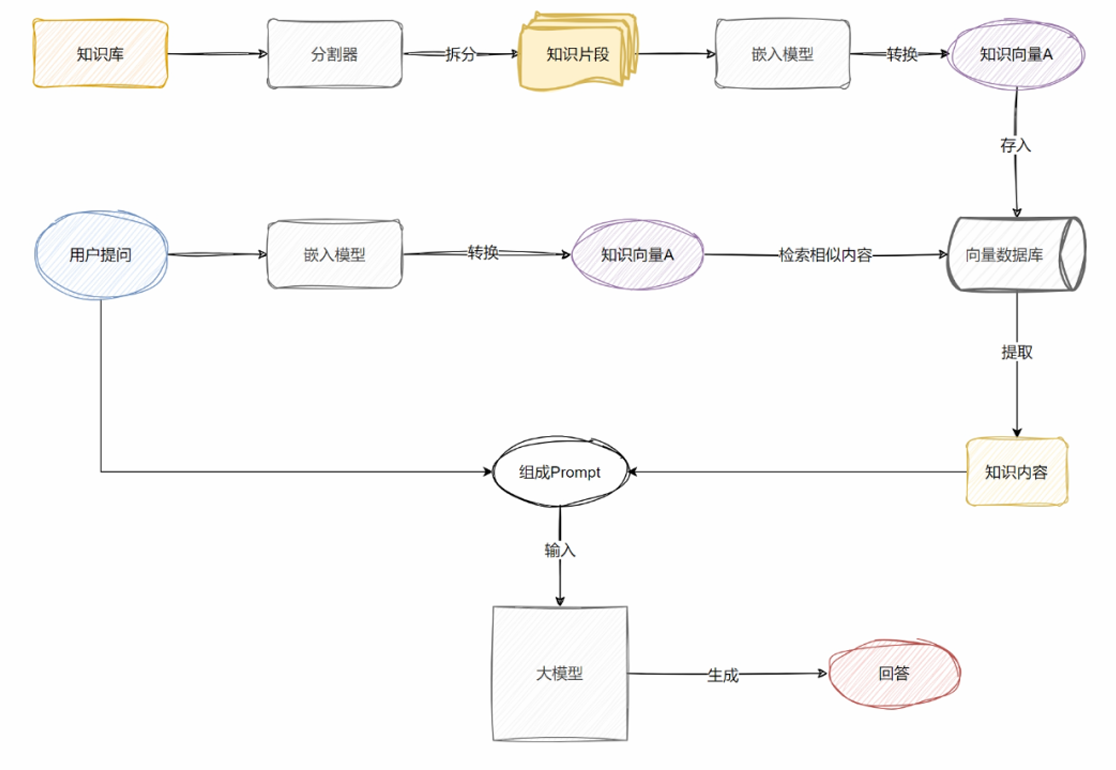
RAG 就是我们的外挂知识库,简单的理解,在向⼤模型提问前,我们需要预**先对⼤量私有化知识内 容进⾏梳理,提取(检索)出与提问相关的知识内容后整合到 Prompt 中再向⼤模型提问,让⼤模 型围绕“固定的知识”进⾏针对性回答。**从⽽提升模型输出内容的准确性和可靠性(增强⽣成),如下图所示。
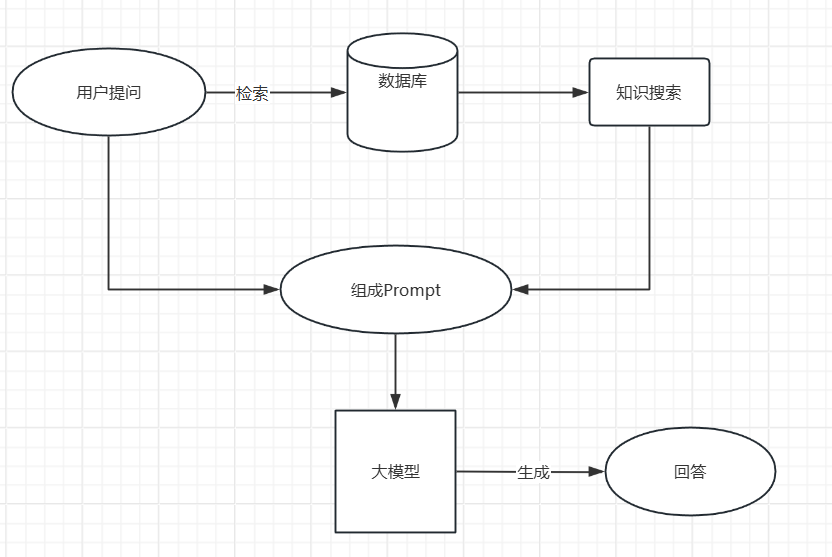
RAG的作用
RAG是一种结合了检索和生成的技术,核心思想是:
检索:根据用户问题,从知识库(向量数据库)中检索出相关的文档或段落。
生成:基于检索到的内容,生成一个更准确的、更相关的回答。
通过RAG技术改造后,大模型就能:
1.准确回答关于特定内容的问题
2.在合适的时机推荐相关课程和服务
3.⽤特定的语⽓和⽤户交流
4.提供更新、更准确的建议
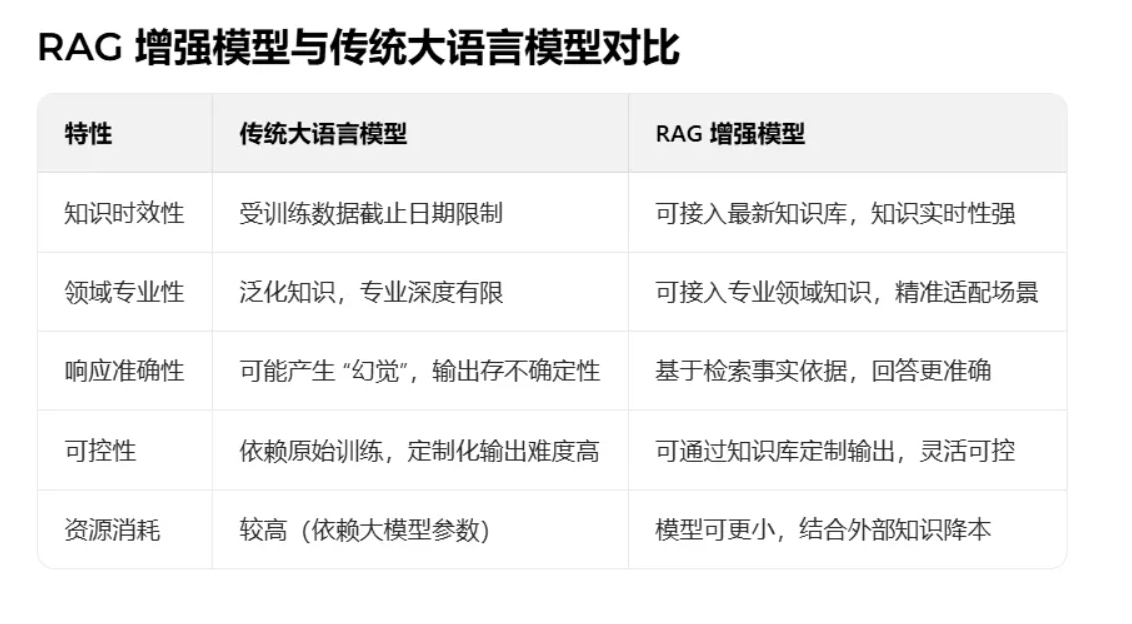
RAG工作流程
检索阶段
关键字检索
顾名思义就是我们⽇常⼯作中常⻅的检索⽅式,⽐如:通过输⼊订单标题关键词,模糊检索到 订单信息。
相似度检索
1.知识分块处理

2.知识向量化存储
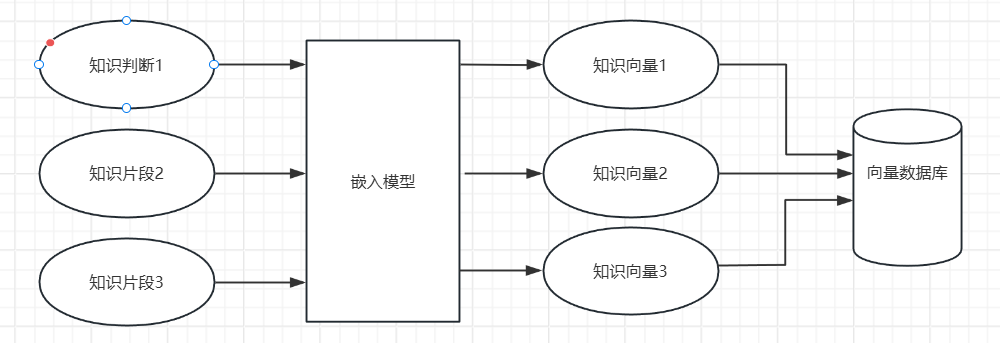
3.问题处理
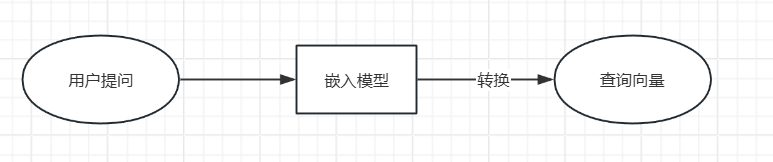
4.向量检索
通过计算向量之间的距离(如余弦距离、欧⽒距离等)来实现。
⽣成阶段
1.提示词⼯程
构建包含检索内容和⽤户查询的提示模版,设置系统⻆⾊和相关参数。
2.上下⽂增强⽣成
将检索到的⽂档作为上下⽂提供给⼤模型。然后⼤模型⽣成基于检索内容的准确回答。
Elasticsearch向量数据库
介绍
Elasticsearch 是世界上部署最⼴泛的开源向量数据库,为您提供⼤规模、⾼效地创建、存储和搜 索向量嵌⼊的有效⽅法。借助 Elastic 的企业级向量数据库,即使数据快速变化,您也可以实现快 速查询时间和最佳性能。它可根据扩展进⾏构建,在简化开发流程的同时提供相关的个性化搜索结 果。
Elasticsearch 是⼀个开源的、分布式的、 RESTful 的分析引擎,可以处理⽂本、数值、地理、 结构化和⾮结构化数据。基于 Apache Lucene ,最初于2010年由 Elasticsearch N.V. 发布。 Elasticsearch 是 Elastic堆栈的⼀部分,这是⼀套免费且开源的⼯具,⽤于 数据摄⼊、丰富、存储、分析和可视化。
官⽅⽹站: https://www.elastic.co/cn/elasticsearch/vector-database
常见应用场景:
1.全文搜索
Elasticsearch 凭借其强⼤、可扩展和快速的搜索功能,在全⽂搜索场景中表现出⾊。它允 许⽤户以近乎实时的响应执⾏复杂的查询,常⽤于⼤型⽹站和应⽤程序的搜索功能。
2.实时分析
Elasticsearch 能够实时执⾏分析,适⽤于跟踪实时数据(如⽤户活动、交易或传感器输 出)的仪表盘。它可以对结构化和⾮结构化数据进⾏索引和分析,⽀持聚合操作和复杂的数据 可视化。
4.地理数据应⽤
Elasticsearch 通过地理空间索引和搜索功能⽀持地理数据,这对于需要管理和可视化地理 信息的应⽤程序(如地图和基于位置的服务)⾮常有⽤。它使得执⾏邻近搜索和基于位置的数 据可视化成为可能。
5.⽇志和事件数据分析
Elasticsearch 常⽤于聚合、监控和分析来⾃各种来源的⽇志和事件数据。
6.推荐系统
基于⽤户的⾏为和兴趣, Elasticsearch 可以构建推荐系统,推荐相关的内容和产品,提升 ⽤户体验和转化率。
7.业务分析
Elasticsearch 还可⽤于企业数据分析、市场调研等业务分析场景。它可以对海量数据进⾏ 搜索、聚合和分析,⽀持多种数据格式和数据源,帮助⽤户了解业务情况、市场趋势等。
综上所述, Elasticsearch 适⽤于需要⼤规模数据存储、实时搜索和分析的场景,特别是对于结构 化和⾮结构化数据的全⽂搜索和聚合分析。它的⾼性能、可扩展性和易⽤性使得它成为许多企业和开 发者的⾸选⼯具。
VectorStore 的操作
SpringBoot 整合 Elasticsearch 是企业级开发中常⻅的需求,⽤于实现⾼效的全⽂检索、⽇志分 析等功能。
在这⾥,我们会结合 SpringAI 来对向量数据库进⾏操作。我们选择的组件为 SpringAI 中的 VectorStore 。 VectorStore 是⼀种⽤于存储和检索⾼维向量数据的数据库或存储解决⽅案,它在 AI 应⽤中扮演着⾄关重要的⻆⾊。
VectorStore 特别适⽤于处理那些经过嵌⼊模型转化后的数据。在 VectorStore 中,查询与传统 关系数据库不同,它执⾏的是相似性搜索,⽽⾮精确匹配。当给定向量作为查询时,它会返回与查询 向量相似的向量。
VectorStore 主要⽤于将数据与 AI 模型集成。它存储并⽀持对这些向量的相似性搜索,为 AI 模 型提供丰富的上下⽂信息,从⽽实现更精确、更智能的回复。这种技术被称为检索增强⽣成。
环境要求
Elasticsearch :需先安装并启动,这⾥使⽤到的版本是8.15.5。
Spring Boot :因为后期 AI 依赖⾼版本 Boot,这里是3.4.5。
JDK:最低要求 17。
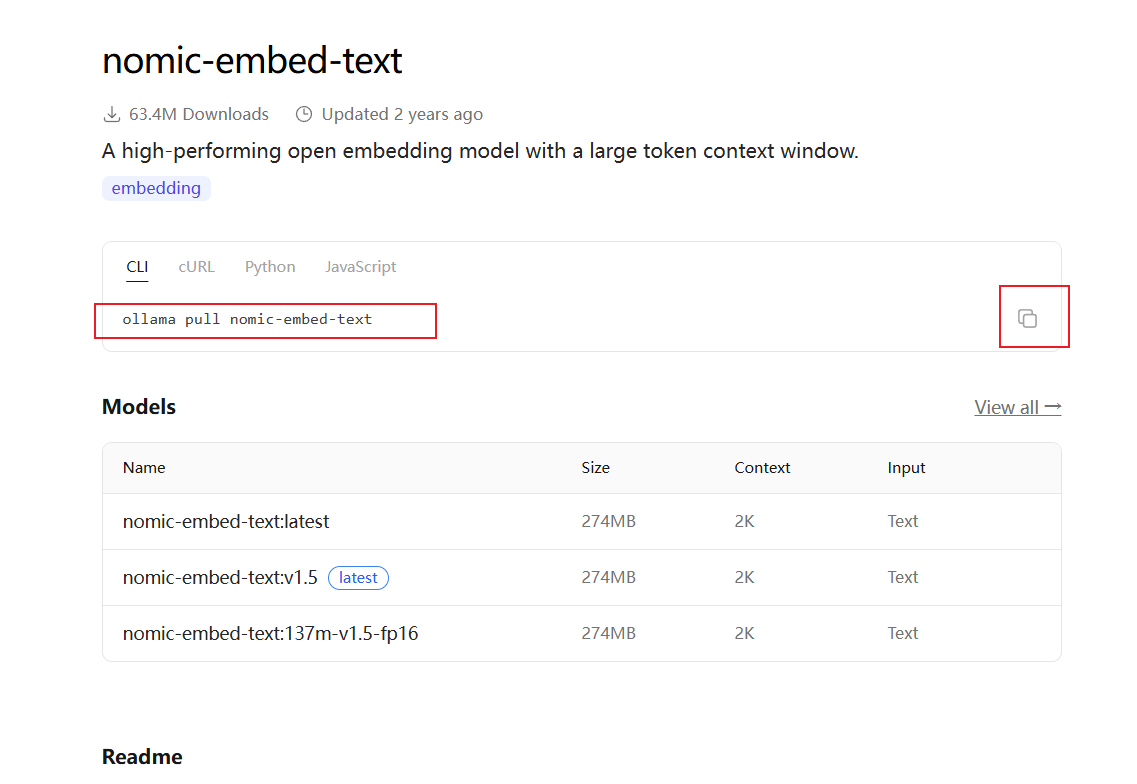
Ollama 中安装⽂本嵌⼊模型 拉取⽂本嵌⼊模型 nomic-embed-text 。
拉取嵌入式模型
首先要安装Ollama,安装教程在主页的SpringAI篇有步骤。在终端运行指令进行安装。
SpringAI篇快速进入链接:https://blog.csdn.net/2401_83310208/article/details/159610180?spm=1001.2014.3001.5501
引入依赖
<dependency>
    <groupId>org.projectlombok</groupId>
    <artifactId>lombok</artifactId>
</dependency>
<dependency>
    <groupId>org.springframework.boot</groupId>
    <artifactId>spring-boot-starter-web</artifactId>
</dependency>
<dependency>
    <groupId>org.springframework.boot</groupId>
    <artifactId>spring-boot-starter-test</artifactId>
</dependency>
<dependency>
    <groupId>org.springframework.ai</groupId>
    <artifactId>spring-ai-starter-model-ollama</artifactId>
</dependency>
<dependency>
    <groupId>org.springframework.ai</groupId>
    <artifactId>spring-ai-starter-vector-store-elasticsearch</artifactId>
</dependency>
<!-- 兼容的Elasticsearch客户端 -->
<dependency>
    <groupId>co.elastic.clients</groupId>
    <artifactId>elasticsearch-java</artifactId>
    <version>${elasticsearch.client.version}</version>
</dependency>
<dependency>
    <groupId>org.elasticsearch.client</groupId>
    <artifactId>elasticsearch-rest-client</artifactId>
    <version>${elasticsearch.client.version}</version>
</dependency>
配置文件application.yml
  elasticsearch:
    uris: http://192.168.128.65:9200/ #自己elasticsearch启动的地方(这里是虚拟机的)
    username: elastic #默认名字
    password: xxxxxx #自己的密码
  ai:
    ollama:
      base-url: http://localhost:11434  #默认
      embedding:
        model: nomic-embed-text:latest  #嵌入模型名字
      chat:
        model: qwen3:8b #大模型名字
        options:
          temperature: 0.7  #温度
    vectorstore:
      elasticsearch:
        dimensions: 768
        index-name: vectorstore1  #名字,随便取
        initialize-schema: true # 向量中的维数
        similarity: cosine # 要使⽤的相似性函数
相关操作
查看内容是否添加删除
启动elasticsearch后在浏览器输入启动的地址( 配置类的uris)+/配置类取的名字+/_search
添加文档
@Resource
private VectorStore vectorStore;

@Test
public void add1(){
    List<Document> documents = List.of(
            new Document("I like java"),
            new Document("I like springAi"),
            new Document("I like spring"),
            new Document("I like python")
    );
    vectorStore.add(documents);

}
查询
// 根据查询字符串进⾏相似性搜索,返回相似的⽂档列表。
@Test
public void find1() {
// 默认情况下,返回的数据为4条。
List<Document> documents = vectorStore.similaritySearch("I like");
documents.forEach(e -> log.info("e:{}", e));
}
@Test
public void find2(){
    SearchRequest searchRequest = SearchRequest.builder()
            .topK(5) //返回达到相似度的几条数据
       	 	.query("查询学院") //查询内容
        	.similarityThreshold(0.5)//达到多少相似度返回结果
            .build();
    List<Document> documents =vectorStore.similaritySearch(searchRequest);
    documents.forEach(System.out::println);
}
//全搜索
@Test
public void find3(){
    SearchRequest searchRequest = SearchRequest.builder()
            .topK(1000).similarityThreshold(0.0)
            .build();

    List<Document> documents = vectorStore.similaritySearch(searchRequest);
    documents.forEach(System.out::println);
}
删除⽂档
@Test
public void find4(){
    // 构建搜索请求对象,设置查询数量和相似度阈值
    SearchRequest searchRequest = SearchRequest.builder()
            .topK(1000) // 设置返回最大文档数量
            .similarityThreshold(0.0) // 设置相似度过滤阈值
            .build(); // 构建请求对象

    // 执行向量相似度搜索,获取文档列表
    List<Document> documents =vectorStore.similaritySearch(searchRequest);

    // 遍历搜索结果文档集合
    for (Document doc : documents){
        System.out.println("文档:"+doc); // 打印完整文档信息
        String id = doc.getId(); // 获取文档ID
        String text = doc.getText(); // 获取文档文本内容
        Double score = doc.getScore(); // 获取文档匹配相似度分数
        System.out.println("id:"+ id);
        System.out.println("内容:"+ text);
        System.out.println("相似度:"+ score);
        System.out.println("==================================");
    }
}
@Test
public void delete(){
    List<String> ids = List.of("1b8a5343-174a-4535-bd00-35a7abd13b88","76763e00-5432-4ce4-86a5-8304726565bf"); //id
    vectorStore.delete(ids);
}
引⼊外部⽂档
依赖
<!-- pdf⽂件读取 -->
<dependency>
    <groupId>org.springframework.ai</groupId>
    <artifactId>spring-ai-pdf-document-reader</artifactId>
</dependency>
<!-- ⽂本⽂件读取 -->
<dependency>
    <groupId>org.springframework.ai</groupId>
    <artifactId>spring-ai-tika-document-reader</artifactId>
</dependency>
<!-- markdown⽂件读取 -->
<dependency>
    <groupId>org.springframework.ai</groupId>
    <artifactId>spring-ai-markdown-document-reader</artifactId>
</dependency>
外部文档

导入向量数据库
@Value("classpath:101.txt")
private org.springframework.core.io.Resource txtResource;
@Value("classpath:RAG.pdf")
private org.springframework.core.io.Resource pdfResource;
@Value("classpath:101.md")
private org.springframework.core.io.Resource mdResource;

@Test
public void add3(){
    TextReader textReader = new TextReader(txtResource);
    List<Document> documents = textReader.get();
    //转换:按Token拆分
    TokenTextSplitter splitter =new TokenTextSplitter();
    List<Document> chunks = splitter.apply(documents);
    //加载:存储到ES向量数据库
    vectorStore.add(chunks);
}
@Test
public void add4(){
    PagePdfDocumentReader pdfReader = new PagePdfDocumentReader(pdfResource);
    List<Document> documents = pdfReader.get();
    //转换:按Token拆分
    TokenTextSplitter splitter =new TokenTextSplitter();
    List<Document> chunks = splitter.apply(documents);
    //加载:存储到ES向量数据库
    vectorStore.add(chunks);
}
@Test
public void add5(){
    MarkdownDocumentReaderConfig config =
            MarkdownDocumentReaderConfig.builder()
                    .withHorizontalRuleCreateDocument(true)
                    .withIncludeCodeBlock(false)
                    .withIncludeBlockquote(false)
                    .withAdditionalMetadata("filename",
                            mdResource.getFilename())
                    .build();
    MarkdownDocumentReader markdownDocumentReader = new
            MarkdownDocumentReader(mdResource, config);
    List<Document> documents = markdownDocumentReader.get();
    //转换:按Token拆分
    TokenTextSplitter splitter =new TokenTextSplitter();
    List<Document> chunks = splitter.apply(documents);
    //加载:存储到ES向量数据库
    vectorStore.add(chunks);
}
搭建本地 RAG 系统
配置类config
import jakarta.annotation.Resource;
import org.springframework.ai.chat.client.ChatClient;


import org.springframework.ai.ollama.OllamaChatModel;
import org.springframework.context.annotation.Bean;
import org.springframework.context.annotation.Configuration;

@Configuration // 标记为Spring配置类
public class ChatClientConfig {
    @Resource // Spring依赖注入注解
    private OllamaChatModel openAiChatModel; // 注入Ollama聊天模型

    @Bean("openAiChatClient") // 注册Bean并指定名称
    public ChatClient openAiChatClient(){
        return ChatClient.builder(openAiChatModel) // 构建ChatClient,绑定模型
                .build(); // 创建ChatClient实例
    }
}
关键代码controller
import jakarta.annotation.Resource;
import lombok.extern.slf4j.Slf4j;
import org.springframework.ai.chat.client.ChatClient;
import org.springframework.ai.chat.prompt.PromptTemplate;
import org.springframework.ai.document.Document;
import org.springframework.ai.vectorstore.SearchRequest;
import org.springframework.ai.vectorstore.VectorStore;
import org.springframework.web.bind.annotation.GetMapping;
import org.springframework.web.bind.annotation.RequestMapping;
import org.springframework.web.bind.annotation.RequestParam;
import org.springframework.web.bind.annotation.RestController;
import reactor.core.publisher.Flux;

import java.util.List;
import java.util.stream.Collectors;
@Slf4j
@RestController
@RequestMapping("/rag")
public class RagController {
    @Resource // Spring依赖注入,注入聊天客户端
    private ChatClient openAiChatClient;
    @Resource
    private VectorStore vectorStore; // 注入向量数据库存储对象

    // 定义GET接口,设置响应类型为html,支持流式返回
    @GetMapping(value = "/stream", produces = "text/html;charset=utf-8")
    public Flux<String> stream(@RequestParam("question") String question) { // 接收前端传入的问题参数
        // 1. 构建向量搜索请求
        SearchRequest searchRequest = SearchRequest.builder()
                .query(question) // 设置搜索关键词
                .topK(5) // 设置返回最大匹配数
                .similarityThreshold(0.5) // 设置相似度阈值
                .build(); // 构建请求对象
        // 执行向量相似度搜索,获取匹配文档
        List<Document> documents = vectorStore.similaritySearch(searchRequest);
        // 遍历打印匹配的文档日志
        documents.forEach(e -> {
            log.info("e:{}", e);
        });

        // 2. 定义大模型提示词模板
        String prompt = """
                #请根据一下上下文回答问题
                {doc}
                #问题
                {question}
                """;
        PromptTemplate promptTemplate = new PromptTemplate(prompt); // 创建提示词模板

        // 给模板参数赋值:拼接文档内容
        promptTemplate.add("doc", documents.stream()
                .map(Document::getText)
                .collect(Collectors.joining("\n")));
        promptTemplate.add("question", question); // 绑定用户问题

        // 调用大模型,流式返回回答内容
        return openAiChatClient.prompt(promptTemplate.create())
                .stream().content(); // 获取流式响应文本
    }
}

AtomGit 是由开放原子开源基金会联合 CSDN 等生态伙伴共同推出的新一代开源与人工智能协作平台。平台坚持“开放、中立、公益”的理念,把代码托管、模型共享、数据集托管、智能体开发体验和算力服务整合在一起,为开发者提供从开发、训练到部署的一站式体验。
更多推荐


 21
21 0
0- 0


 已为社区贡献4条内容

所有评论(0)