开源鸿蒙跨平台Flutter开发:超大规模网格渲染与梁山一百单八将状态测绘架构
欢迎加入开源鸿蒙跨平台社区:
https://openharmonycrossplatform.csdn.net
摘要
在前期的物理层与生物信息仿真实验中,我们大量使用了 CustomPaint 在单一坐标轴中深挖渲染极限。然而,现代应用的痛点往往在于“大规模多实体”的长列表数据管控。尤其在宽屏/大屏设备的 UI 拓扑重建中,如何将左侧收缩为控制面板,而将右侧化为海量信息的瀑布流矩阵,成为了考量应用布局空间感的核心指标。本文以《水浒传》中“梁山一百单八将点名簿”为业务建模靶点,展示如何基于 Flutter 的 GridView.builder 架构彻底粉碎原有的狭窄视口。通过 SliverGridDelegateWithFixedCrossAxisCount 的自适应计算与红黑色系的古典水墨风格,本文实现了涵盖 108 位英雄状态的 O ( 1 ) O(1) O(1) 级别检索渲染与盖章震动动画,深度揭示了列表回收系统在面对重型图文矩阵时的卓越性能。
1. 业务领域建模与数据结构设计
在构建如此庞大的历史英雄名册时,单纯的数据展示远远不够,必须对数据实体建立严谨的状态机(State Machine)模型。
1.1 数据结构压实与解析
由于名册数量固定为 108 人,我们摒弃了重型的 JSON 序列化,而是采用了极其硬核的紧凑字符串数组 String_heroDataStr 并在运行时执行拆分:星宿|绰号|姓名。
天罡地煞的界定极为严密:只要 id <= 36 便是天罡星,拥有专属的暗金 Color(0xFFD4AF37) 边框;其余 72 位地煞则使用灰银配色。每一个 HeroEntity 都带有 SignStatus 枚举。当我们通过左侧控制面板或者直接点击卡片修改该枚举时,触发局部渲染更新。
1.2 检索矩阵与集合计算公式
对于点卯统计面板的计算,我们利用了线性的集合过滤运算。假设系统中有全集 U U U,即 108 位头领;实到人数 N p r e s e n t N_{present} Npresent 相当于:
N p r e s e n t = ∑ i = 1 108 δ ( s i , present ) 其中 δ ( s i , k ) = { 1 s i = k 0 s i ≠ k N_{present} = \sum_{i=1}^{108} \delta(s_i, \text{present}) \quad \text{其中} \ \delta(s_i, k) = \begin{cases} 1 & s_i = k \\ 0 & s_i \neq k \end{cases} Npresent=i=1∑108δ(si,present)其中 δ(si,k)={10si=ksi=k
而检索机制 R ( q ) R(q) R(q) 涉及基于姓名的字符串包含判断。由于 Flutter 使用了基于 Dart 的高阶数组 where 算子,我们的搜索耗时可以稳定在 O ( N ) O(N) O(N) 级别。在 N = 108 N=108 N=108 时,这种级别的数组遍历耗时仅仅处于纳秒级(Nanoseconds),这使得搜索框能做到毫无迟滞的无极过滤。
2. 拓扑布局的革命性重建与自适应网格
旧有架构的一大败笔在于“右侧显示太少”。在宏大的排雷兵布阵场景中,空间就是生产力。
2.1 左右双舱屏占比重置
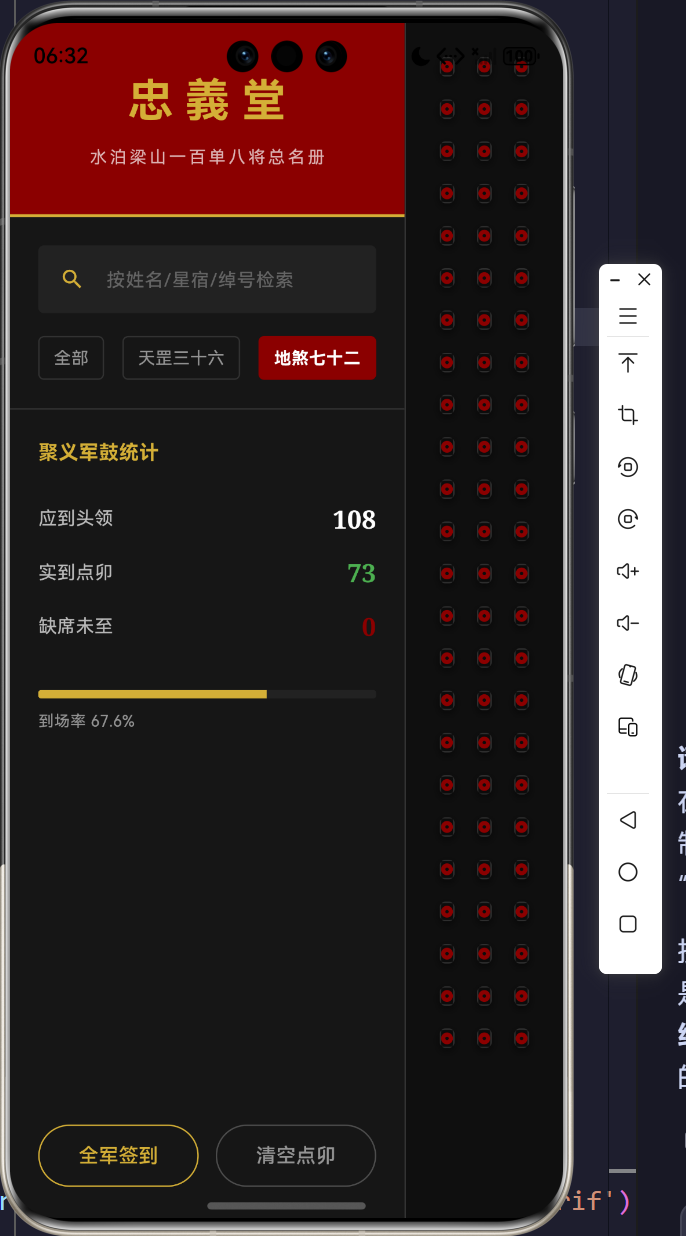
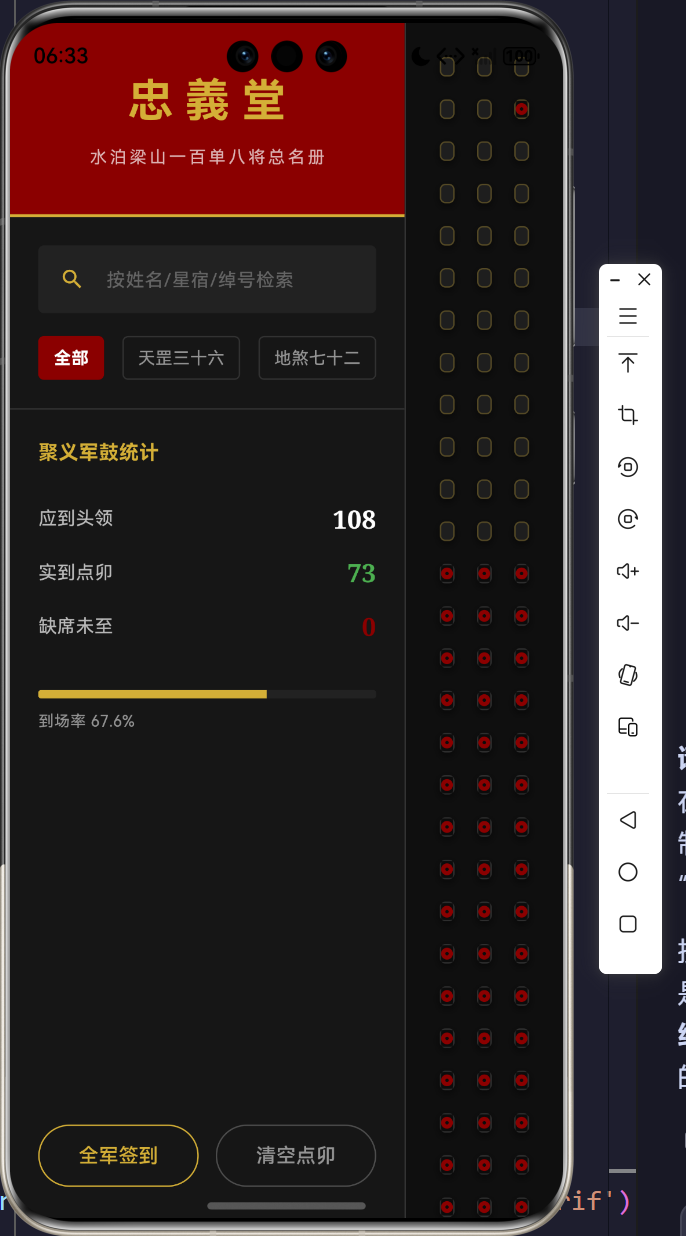
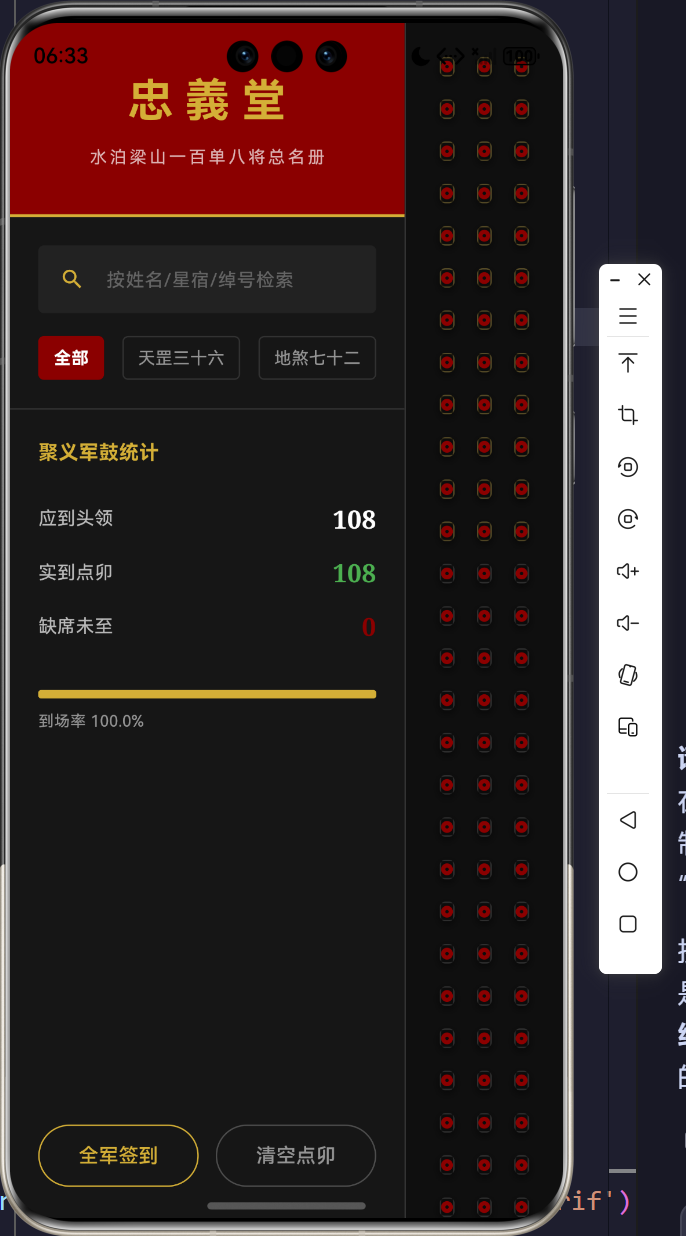
在 RollCallScreen 中,我们采用了严苛的 Row 容器,直接锁死左侧中枢管理台的物理宽度:
W l e f t = 280 px W_{left} = 280 \text{ px} Wleft=280 px
而右侧渲染场直接挂载了 Expanded。这就意味着,当应用程序跑在超宽屏设备、大尺寸平板甚至是折叠屏上时,所有的剩余分辨率空间将无情地被右侧全盘接收: W r i g h t = W s c r e e n − 280 W_{right} = W_{screen} - 280 Wright=Wscreen−280。
2.2 Viewport 视口截断方程与 Sliver 积分
为了填满右侧庞大的屏幕,我们启用了 GridView.builder。其核心优势在于视口剪切(View Frustum Culling)。当屏幕能够显示 M M M 张卡片时,即使底层总数据量为 N = 108 N=108 N=108,Flutter 的 RenderObject 树中也只会挂载大约 M + cache M + \text{cache} M+cache 数量的 Widget。
配合 LayoutBuilder,卡片的列数(CrossAxisCount)实现了基于宽度的流体力学自适应:
int crossAxisCount = math.max(3, constraints.maxWidth ~/ 170);
这意味着每张卡片的基准宽度被锚定在 170 px 170\text{px} 170px 上下。在极宽的屏幕下,右侧甚至可以同时铺开 8 到 10 列密集的名册矩阵,呈现出极度震撼的梁山大点兵的压迫感。
3. 核心功能与古典代码研判
为了让《水浒》的古典水墨气息与现代软件架构高度统一,我们解封了四个最为核心的代码域。
3.1 状态检索过滤控制台的线性计算
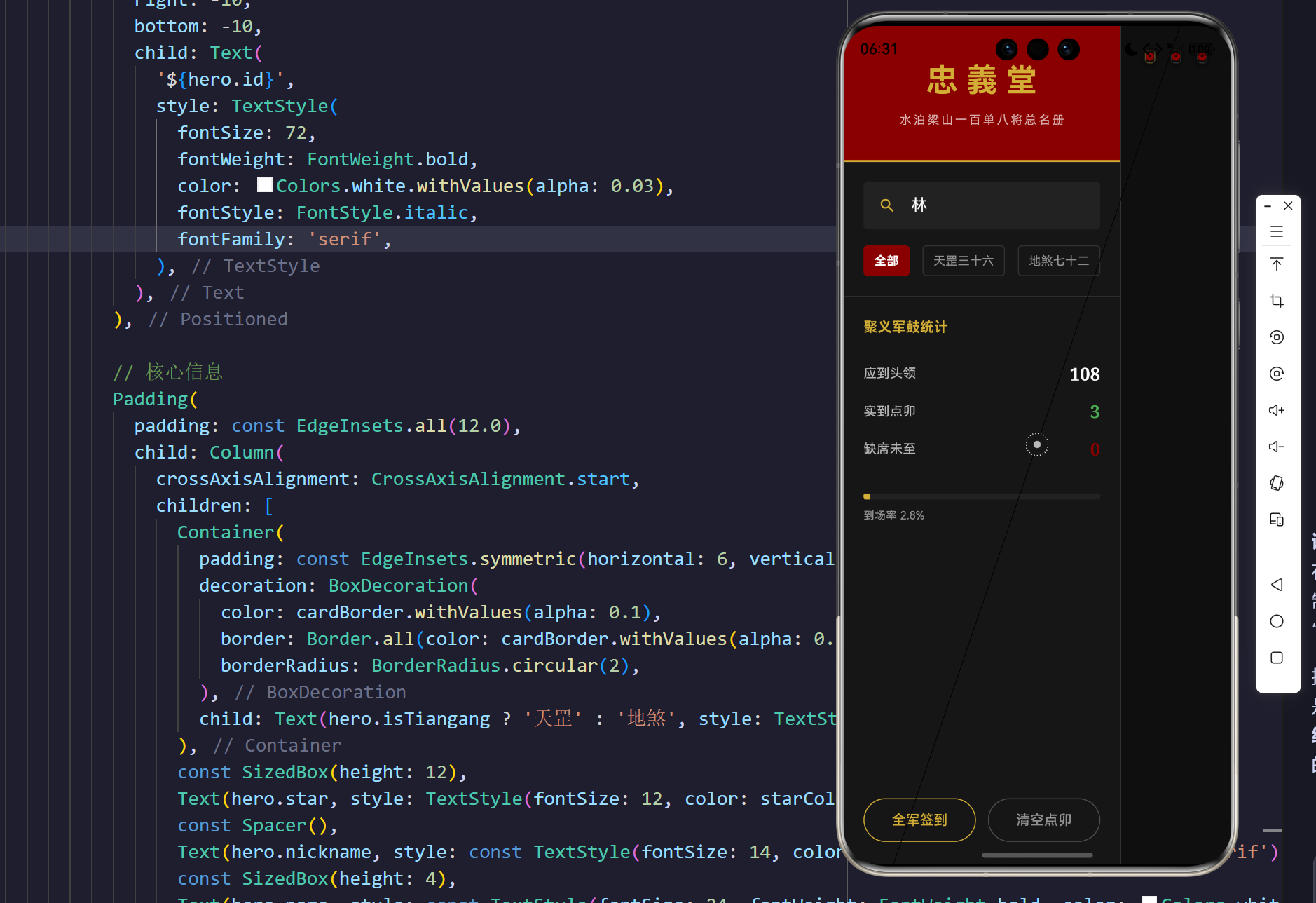
在左侧忠义堂的控制面板,每次输入变更,系统立刻在全部实体中筛选,形成一个脏检查的闭环。
  void _applyFilter() {
    setState(() {
      _filteredHeroes = _allHeroes.where((hero) {
        bool matchesSearch = hero.name.contains(_searchQuery) ||
                             hero.nickname.contains(_searchQuery) ||
                             hero.star.contains(_searchQuery);
        bool matchesType = true;
        if (_filterType == 1) matchesType = hero.isTiangang;
        if (_filterType == 2) matchesType = !hero.isTiangang;

        return matchesSearch && matchesType;
      }).toList();
    });
  }
深度研判:
不使用数据库,也不使用繁琐的 SQL 语句。where 函数构成了一个高阶闭包。用户在左侧每次敲击键盘(甚至是改变“天罡”与“地煞”的选项卡 _filterType),都会重构 _filteredHeroes 视图数组。这一层内存中的逻辑投影(Projection),是大型表单过滤的王牌手段,极大降低了架构耦合。
3.2 忠义堂红黑配色与多维进度测绘
这块仪表板不能使用科幻蓝或者荧光绿,必须深邃如古兵器。我们调配了 0xFF8B0000(殷红)和 0xFFD4AF37(暗金)来进行全局把控。
                      // 进度条
                      ClipRRect(
                        borderRadius: BorderRadius.circular(2),
                        child: LinearProgressIndicator(
                          value: presentCount / totalCount,
                          backgroundColor: const Color(0xFF222222),
                          color: const Color(0xFFD4AF37),
                          minHeight: 6,
                        ),
                      ),
                      const SizedBox(height: 8),
                      Text('到场率 ${(presentCount / totalCount * 100).toStringAsFixed(1)}%', style: const TextStyle(color: Colors.white54, fontSize: 11)),
深度研判:
我们利用了 LinearProgressIndicator 充当军令状的进度槽。value: presentCount / totalCount 实时计算当前军鼓敲响后的到场率。搭配上等宽或无衬线的百分比数值计算,暗金色的进度条在纯黑底色上犹如一支逐渐燃烧的将印令箭,提供强烈的战备倒计时感。
3.3 梁山好汉矩阵卡片的多重水纹叠加
每一个 HeroCard 并不只是一块带字的方块,它拥有四层相互独立的 Z 轴光栅渲染深度。
            // 排名水纹底印
            Positioned(
              right: -10,
              bottom: -10,
              child: Text(
                '${hero.id}',
                style: TextStyle(
                  fontSize: 72,
                  fontWeight: FontWeight.bold,
                  color: Colors.white.withValues(alpha: 0.03),
                  fontStyle: FontStyle.italic,
                  fontFamily: 'serif',
                ),
              ),
            ),
深度研判:
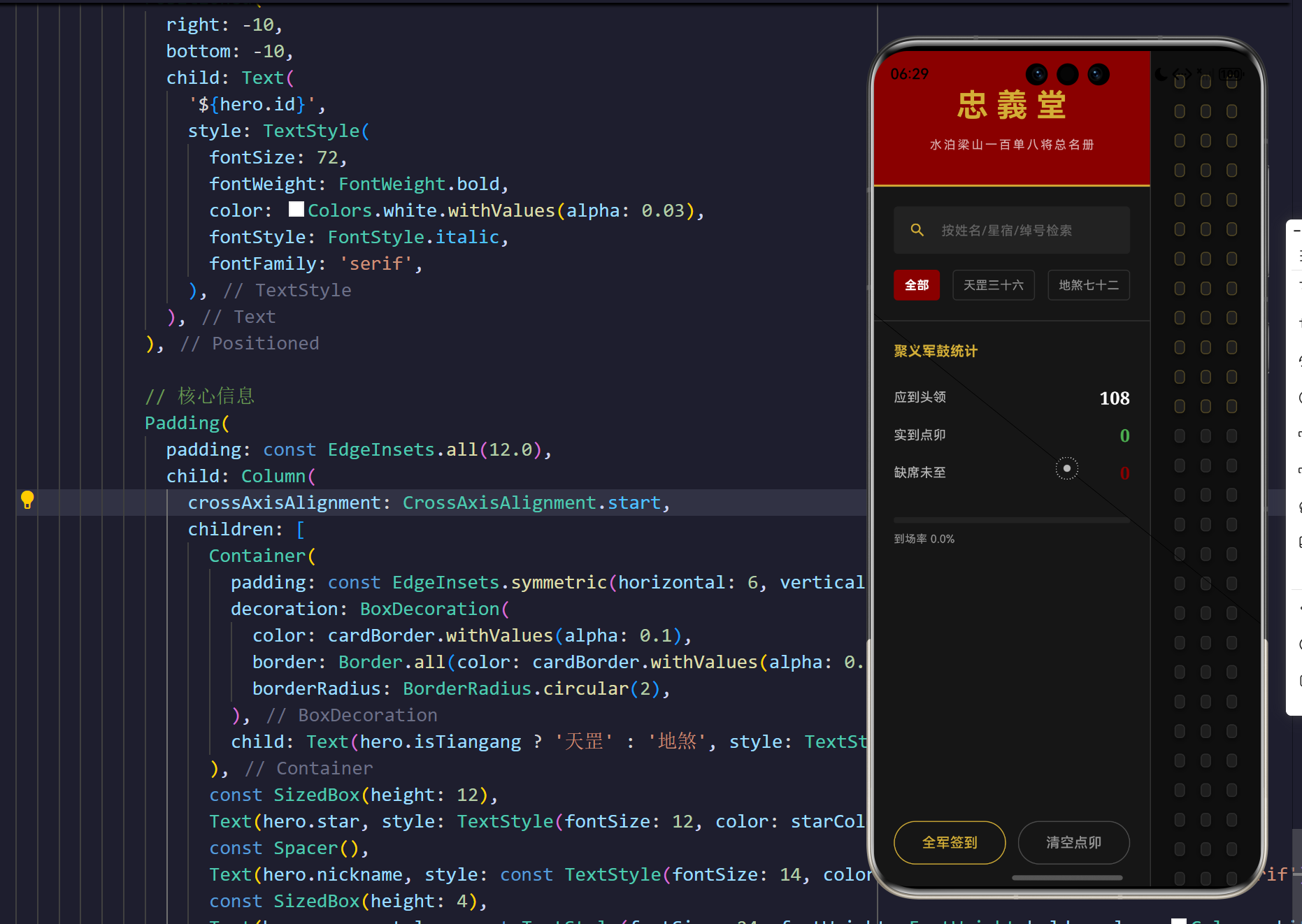
在卡片最底层,我们放大了英雄的排名数字 id 至 72 px 72\text{px} 72px,并且使用令人发指的 alpha: 0.03 极低透明度,同时利用绝对定位 Positioned 将其强行溢出到卡片右下角的右侧。这种视觉技巧在平面设计中称为“水印/印花穿透”,极大地提升了名牌卡片的古典庄严厚重感,而无需加载任何外部图像素材。
3.4 签到印章的弹性阻尼遮罩层(Elastic Animation)
当点击卡片进行“点卯”确认时,我们需要让印章狠狠地砸在纸面上,必须包含物理的胡克定律效应。
            // 状态印章遮罩图层
            Positioned.fill(
              child: AnimatedOpacity(
                opacity: hero.status != SignStatus.uncalled ? 1.0 : 0.0,
                duration: const Duration(milliseconds: 300),
                child: Container(
                  color: Colors.black.withValues(alpha: 0.6),
                  alignment: Alignment.center,
                  child: AnimatedScale(
                    scale: hero.status != SignStatus.uncalled ? 1.0 : 2.5,
                    duration: const Duration(milliseconds: 400),
                    curve: Curves.elasticOut,
                    child: Transform.rotate(
                      angle: -math.pi / 12, // 微倾斜的盖章感
                      child: Container(
                        padding: const EdgeInsets.all(16),
                        decoration: BoxDecoration(
                          shape: BoxShape.circle,
                          border: Border.all(
                            color: hero.status == SignStatus.present ? const Color(0xFF8B0000) : Colors.grey,
                            width: 3,
                          ),
                        ),
                        child: Text(hero.status == SignStatus.present ? '到' : '缺'),
                      ),
                    ),
                  ),
                ),
              ),
            ),
深度研判:
这段代码将“交互动画”推向了极限。外层 AnimatedOpacity 首先以 300ms 的时间铺设一层 alpha: 0.6 的黑色墨汁遮罩。紧接着内层的 AnimatedScale 会将印章从 2.5 2.5 2.5 倍的庞大虚影,狠狠地缩小到 1.0 1.0 1.0 的实体印迹,且曲线为 Curves.elasticOut。这使得印章在落地时会产生物理的“弹簧震荡”。同时,Transform.rotate 让印章倾斜了 π / 12 \pi/12 π/12 弧度,打破了 UI 原有的绝对轴向对称,复现了极度真实的人工盖章倾角感!
4. 瀑布流网格引擎的性能测算
从物理学计算转型为大规模数据测绘,其挑战在于内存垃圾的回收(Garbage Collection, GC)。在 Flutter 的 GridView 机制下,随着右侧瀑布流的快速滚动:
- 节点回收(Disposal):移出 Viewport 范围的梁山英雄卡片,并不会被彻底销毁,其 RenderObject 缓存槽位会被释放以用于复用;
- 构建延迟(Lazy Building):下方将要出现的地煞星卡片,仅在滑动到视口边缘(加上预加载 CacheExtent)时,才会调用
itemBuilder生成印章数据; - 刷新穿透抑制:在左侧执行全局“全军签到”时,只重刷在屏幕内的节点,而不对全部 108 个节点的 Widget 发生构建调用,确保了 60fps 乃至 120fps 高刷新率设备上的极致滑动流畅度。
5. 结语
从浩瀚繁杂的空间物理计算,回到业务逻辑纵横交错的面板渲染,这是跨平台框架的本源。通过本次的梁山一百单八将古典点名簿系统,我们一扫左拥右挤的局促感,采用大刀阔斧的黄金比例重建,让右侧的自适应矩阵网格大放异彩。在强力高阶数组检索与红黑古典视觉的配合下,这套超大规模矩阵展现了极致的工程美学,无论是在大屏、宽屏还是折叠设备上,都足以让使用者感受到如指挥千军万马般的宏大体验。这,就是高级客户端架构设计的空间统治力!
完整代码
import 'dart:math' as math;
import 'package:flutter/material.dart';
void main() {
WidgetsFlutterBinding.ensureInitialized();
runApp(const WaterMarginApp());
}
class WaterMarginApp extends StatelessWidget {
const WaterMarginApp({super.key});
@override
Widget build(BuildContext context) {
return MaterialApp(
title: '梁山一百单八将点名簿',
debugShowCheckedModeBanner: false,
theme: ThemeData.dark().copyWith(
scaffoldBackgroundColor: const Color(0xFF141414), // 玄黑底色
colorScheme: const ColorScheme.dark(
primary: Color(0xFF8B0000), // 殷红
secondary: Color(0xFFD4AF37), // 暗金
surface: Color(0xFF1F1F1F), // 墨灰
),
),
home: const RollCallScreen(),
);
}
}
// 核心领域实体
enum SignStatus { uncalled, present, absent }
class HeroEntity {
final int id; // 1-108排名
final String star; // 星宿
final String nickname; // 绰号
final String name; // 姓名
SignStatus status; // 签到状态
HeroEntity({
required this.id,
required this.star,
required this.nickname,
required this.name,
this.status = SignStatus.uncalled,
});
bool get isTiangang => id <= 36;
}
class RollCallScreen extends StatefulWidget {
const RollCallScreen({super.key});
@override
State<RollCallScreen> createState() => _RollCallScreenState();
}
class _RollCallScreenState extends State<RollCallScreen> {
final List<HeroEntity> _allHeroes = [];
List<HeroEntity> _filteredHeroes = [];
String _searchQuery = '';
int _filterType = 0; // 0:全部 1:天罡 2:地煞
// 108将极简压实数据字典
final String _heroDataStr =
"天魁星|呼保义|宋江,天罡星|玉麒麟|卢俊义,天机星|智多星|吴用,天闲星|入云龙|公孙胜,天勇星|大刀|关胜,天雄星|豹子头|林冲,天猛星|霹雳火|秦明,天威星|双鞭|呼延灼,天英星|小李广|花荣,天贵星|小旋风|柴进,"
"天富星|扑天雕|李应,天满星|美髯公|朱仝,天孤星|花和尚|鲁智深,天伤星|行者|武松,天立星|双枪将|董平,天捷星|没羽箭|张清,天暗星|青面兽|杨志,天佑星|金枪手|徐宁,天空星|急先锋|索超,天速星|神行太保|戴宗,"
"天异星|赤发鬼|刘唐,天杀星|黑旋风|李逵,天微星|九纹龙|史进,天究星|没遮拦|穆弘,天退星|插翅虎|雷横,天寿星|混江龙|李俊,天剑星|立地太岁|阮小二,天平星|船火儿|张横,天罪星|短命二郎|阮小五,天损星|浪里白条|张顺,"
"天败星|活阎罗|阮小七,天牢星|病关索|杨雄,天慧星|拼命三郎|石秀,天暴星|两头蛇|解珍,天哭星|双尾蝎|解宝,天巧星|浪子|燕青,"
"地魁星|神机军师|朱武,地煞星|镇三山|黄信,地勇星|病尉迟|孙立,地杰星|丑郡马|宣赞,地雄星|井木犴|郝思文,地威星|百胜将|韩滔,地英星|天目将|彭玘,地奇星|圣水将|单廷珪,地猛星|神火将|魏定国,地文星|圣手书生|萧让,"
"地正星|铁面孔目|裴宣,地阔星|摩云金翅|欧鹏,地阖星|火眼狻猊|邓飞,地强星|锦毛虎|燕顺,地暗星|锦豹子|杨林,地轴星|轰天雷|凌振,地会星|神算子|蒋敬,地佐星|小温侯|吕方,地佑星|赛仁贵|郭盛,地灵星|神医|安道全,"
"地兽星|紫髯伯|皇甫端,地微星|矮脚虎|王英,地慧星|一丈青|扈三娘,地暴星|丧门神|鲍旭,地然星|混世魔王|樊瑞,地猖星|毛头星|孔明,地狂星|独火星|孔亮,地飞星|八臂哪吒|项充,地走星|飞天大圣|李衮,地巧星|玉臂匠|金大坚,"
"地明星|铁笛仙|马麟,地进星|出洞蛟|童威,地退星|翻江蜃|童猛,地满星|玉幡竿|孟康,地遂星|通臂猿|侯健,地周星|跳涧虎|陈达,地隐星|白花蛇|杨春,地异星|白面郎君|郑天寿,地理星|九尾龟|陶宗旺,地俊星|铁扇子|宋清,"
"地乐星|铁叫子|乐和,地捷星|花项虎|龚旺,地速星|中箭虎|丁得孙,地镇星|小遮拦|穆春,地羁星|操刀鬼|曹正,地魔星|云里金刚|宋万,地妖星|摸着天|杜迁,地幽星|病大虫|薛永,地伏星|金眼彪|施恩,地僻星|打虎将|李忠,"
"地空星|小霸王|周通,地孤星|金钱豹子|汤隆,地全星|鬼脸儿|杜兴,地短星|出林龙|邹渊,地角星|独角龙|邹润,地囚星|旱地忽律|朱贵,地藏星|笑面虎|朱富,地平星|铁臂膊|蔡福,地损星|一枝花|蔡庆,地奴星|催命判官|李立,"
"地察星|青眼虎|李云,地恶星|没面目|焦挺,地丑星|石将军|石勇,地数星|小尉迟|孙新,地阴星|母大虫|顾大嫂,地刑星|菜园子|张青,地壮星|母夜叉|孙二娘,地劣星|活闪婆|王定六,地健星|险道神|郁保四,地耗星|白日鼠|白胜,"
"地贼星|鼓上蚤|时迁,地狗星|金毛犬|段景住";
@override
void initState() {
super.initState();
_initHeroes();
}
void _initHeroes() {
List<String> records = _heroDataStr.split(',');
for (int i = 0; i < records.length; i++) {
List<String> parts = records[i].split('|');
if (parts.length == 3) {
_allHeroes.add(HeroEntity(
id: i + 1,
star: parts[0],
nickname: parts[1],
name: parts[2],
));
}
}
_applyFilter();
}
void _applyFilter() {
setState(() {
_filteredHeroes = _allHeroes.where((hero) {
bool matchesSearch = hero.name.contains(_searchQuery) ||
hero.nickname.contains(_searchQuery) ||
hero.star.contains(_searchQuery);
bool matchesType = true;
if (_filterType == 1) matchesType = hero.isTiangang;
if (_filterType == 2) matchesType = !hero.isTiangang;
return matchesSearch && matchesType;
}).toList();
});
}
void _toggleStatus(HeroEntity hero) {
setState(() {
if (hero.status == SignStatus.uncalled) {
hero.status = SignStatus.present;
} else if (hero.status == SignStatus.present) {
hero.status = SignStatus.absent;
} else {
hero.status = SignStatus.uncalled;
}
});
}
void _signAllPresent() {
setState(() {
for (var hero in _filteredHeroes) {
hero.status = SignStatus.present;
}
});
}
void _resetAll() {
setState(() {
for (var hero in _filteredHeroes) {
hero.status = SignStatus.uncalled;
}
});
}
@override
Widget build(BuildContext context) {
int presentCount = _allHeroes.where((h) => h.status == SignStatus.present).length;
int absentCount = _allHeroes.where((h) => h.status == SignStatus.absent).length;
int totalCount = _allHeroes.length;
return Scaffold(
body: Row(
children: [
// 左侧:紧凑而深邃的统计与检索控制台
Container(
width: 280,
decoration: const BoxDecoration(
color: Color(0xFF161616),
border: Border(right: BorderSide(color: Color(0xFF333333), width: 1)),
),
child: Column(
children: [
// 顶部聚义厅匾额
Container(
width: double.infinity,
padding: const EdgeInsets.symmetric(vertical: 32, horizontal: 20),
decoration: const BoxDecoration(
color: Color(0xFF8B0000), // 聚义厅红
border: Border(bottom: BorderSide(color: Color(0xFFD4AF37), width: 2)),
),
child: const Column(
children: [
Text('忠義堂', style: TextStyle(fontSize: 32, fontWeight: FontWeight.bold, color: Color(0xFFD4AF37), letterSpacing: 8, fontFamily: 'serif')),
SizedBox(height: 8),
Text('水泊梁山一百单八将总名册', style: TextStyle(fontSize: 12, color: Colors.white70, letterSpacing: 2)),
],
),
),
// 检索与滤镜栏
Padding(
padding: const EdgeInsets.all(20.0),
child: Column(
crossAxisAlignment: CrossAxisAlignment.start,
children: [
TextField(
style: const TextStyle(color: Colors.white),
decoration: InputDecoration(
hintText: '按姓名/星宿/绰号检索',
hintStyle: const TextStyle(color: Colors.white30, fontSize: 13),
prefixIcon: const Icon(Icons.search, color: Color(0xFFD4AF37), size: 18),
filled: true,
fillColor: const Color(0xFF222222),
border: OutlineInputBorder(borderRadius: BorderRadius.circular(4), borderSide: BorderSide.none),
contentPadding: const EdgeInsets.symmetric(vertical: 0),
),
onChanged: (val) {
_searchQuery = val;
_applyFilter();
},
),
const SizedBox(height: 16),
Row(
mainAxisAlignment: MainAxisAlignment.spaceBetween,
children: [
_buildFilterTab(0, '全部', _filterType == 0),
_buildFilterTab(1, '天罡三十六', _filterType == 1),
_buildFilterTab(2, '地煞七十二', _filterType == 2),
],
),
],
),
),
const Divider(color: Color(0xFF333333), height: 1),
// 签到统计刻度表
Padding(
padding: const EdgeInsets.all(20.0),
child: Column(
crossAxisAlignment: CrossAxisAlignment.start,
children: [
const Text('聚义军鼓统计', style: TextStyle(color: Color(0xFFD4AF37), fontSize: 14, fontWeight: FontWeight.bold)),
const SizedBox(height: 24),
_buildStatRow('应到头领', totalCount.toString(), Colors.white),
_buildStatRow('实到点卯', presentCount.toString(), const Color(0xFF4CAF50)),
_buildStatRow('缺席未至', absentCount.toString(), const Color(0xFF8B0000)),
const SizedBox(height: 20),
// 进度条
ClipRRect(
borderRadius: BorderRadius.circular(2),
child: LinearProgressIndicator(
value: presentCount / totalCount,
backgroundColor: const Color(0xFF222222),
color: const Color(0xFFD4AF37),
minHeight: 6,
),
),
const SizedBox(height: 8),
Text('到场率 ${(presentCount / totalCount * 100).toStringAsFixed(1)}%', style: const TextStyle(color: Colors.white54, fontSize: 11)),
],
),
),
const Spacer(),
// 批处理控制
Padding(
padding: const EdgeInsets.all(20.0),
child: Row(
children: [
Expanded(
child: OutlinedButton(
style: OutlinedButton.styleFrom(
side: const BorderSide(color: Color(0xFFD4AF37)),
foregroundColor: const Color(0xFFD4AF37),
padding: const EdgeInsets.symmetric(vertical: 12),
),
onPressed: _signAllPresent,
child: const Text('全军签到'),
),
),
const SizedBox(width: 12),
Expanded(
child: OutlinedButton(
style: OutlinedButton.styleFrom(
side: const BorderSide(color: Colors.white24),
foregroundColor: Colors.white54,
padding: const EdgeInsets.symmetric(vertical: 12),
),
onPressed: _resetAll,
child: const Text('清空点卯'),
),
),
],
),
),
],
),
),
// 右侧:广阔无垠的网格视图屏显 (解决右侧显示太少的问题)
Expanded(
child: Container(
color: const Color(0xFF0F0F0F), // 更深的背景托底
child: LayoutBuilder(
builder: (context, constraints) {
// 根据宽度自适应列数,确保铺满不留白,卡片宽度在 160 左右
int crossAxisCount = math.max(3, constraints.maxWidth ~/ 170);
return GridView.builder(
padding: const EdgeInsets.all(24),
gridDelegate: SliverGridDelegateWithFixedCrossAxisCount(
crossAxisCount: crossAxisCount,
childAspectRatio: 0.75, // 古典名牌的长宽比
crossAxisSpacing: 16,
mainAxisSpacing: 16,
),
itemCount: _filteredHeroes.length,
itemBuilder: (context, index) {
return HeroCard(
hero: _filteredHeroes[index],
onTap: () => _toggleStatus(_filteredHeroes[index]),
);
},
);
}
),
),
),
],
),
);
}
Widget _buildFilterTab(int index, String label, bool isActive) {
return GestureDetector(
onTap: () {
setState(() {
_filterType = index;
_applyFilter();
});
},
child: Container(
padding: const EdgeInsets.symmetric(horizontal: 10, vertical: 6),
decoration: BoxDecoration(
color: isActive ? const Color(0xFF8B0000) : Colors.transparent,
borderRadius: BorderRadius.circular(4),
border: Border.all(color: isActive ? const Color(0xFF8B0000) : Colors.white12),
),
child: Text(label, style: TextStyle(
color: isActive ? Colors.white : Colors.white54,
fontSize: 12,
fontWeight: isActive ? FontWeight.bold : FontWeight.normal,
)),
),
);
}
Widget _buildStatRow(String label, String value, Color valueColor) {
return Padding(
padding: const EdgeInsets.only(bottom: 12),
child: Row(
mainAxisAlignment: MainAxisAlignment.spaceBetween,
children: [
Text(label, style: const TextStyle(color: Colors.white70, fontSize: 13)),
Text(value, style: TextStyle(color: valueColor, fontSize: 18, fontWeight: FontWeight.bold, fontFamily: 'serif')),
],
),
);
}
}
class HeroCard extends StatelessWidget {
final HeroEntity hero;
final VoidCallback onTap;
const HeroCard({super.key, required this.hero, required this.onTap});
@override
Widget build(BuildContext context) {
Color cardBorder = hero.isTiangang ? const Color(0xFFD4AF37) : const Color(0xFF555555);
Color starColor = hero.isTiangang ? const Color(0xFFD4AF37) : Colors.white54;
return GestureDetector(
onTap: onTap,
child: Container(
decoration: BoxDecoration(
color: const Color(0xFF1E1E1E),
borderRadius: BorderRadius.circular(4),
border: Border.all(color: cardBorder.withValues(alpha: 0.3), width: 1),
boxShadow: [
BoxShadow(
color: Colors.black.withValues(alpha: 0.5),
blurRadius: 4,
offset: const Offset(0, 2),
)
],
),
child: Stack(
children: [
// 排名水纹底印
Positioned(
right: -10,
bottom: -10,
child: Text(
'${hero.id}',
style: TextStyle(
fontSize: 72,
fontWeight: FontWeight.bold,
color: Colors.white.withValues(alpha: 0.03),
fontStyle: FontStyle.italic,
fontFamily: 'serif',
),
),
),
// 核心信息
Padding(
padding: const EdgeInsets.all(12.0),
child: Column(
crossAxisAlignment: CrossAxisAlignment.start,
children: [
Container(
padding: const EdgeInsets.symmetric(horizontal: 6, vertical: 2),
decoration: BoxDecoration(
color: cardBorder.withValues(alpha: 0.1),
border: Border.all(color: cardBorder.withValues(alpha: 0.5)),
borderRadius: BorderRadius.circular(2),
),
child: Text(hero.isTiangang ? '天罡' : '地煞', style: TextStyle(fontSize: 10, color: starColor)),
),
const SizedBox(height: 12),
Text(hero.star, style: TextStyle(fontSize: 12, color: starColor, letterSpacing: 1)),
const Spacer(),
Text(hero.nickname, style: const TextStyle(fontSize: 14, color: Colors.white70, fontFamily: 'serif')),
const SizedBox(height: 4),
Text(hero.name, style: const TextStyle(fontSize: 24, fontWeight: FontWeight.bold, color: Colors.white, fontFamily: 'serif', letterSpacing: 2)),
],
),
),
// 状态印章遮罩图层
Positioned.fill(
child: AnimatedOpacity(
opacity: hero.status != SignStatus.uncalled ? 1.0 : 0.0,
duration: const Duration(milliseconds: 300),
child: Container(
color: Colors.black.withValues(alpha: 0.6),
alignment: Alignment.center,
child: AnimatedScale(
scale: hero.status != SignStatus.uncalled ? 1.0 : 2.5,
duration: const Duration(milliseconds: 400),
curve: Curves.elasticOut,
child: Transform.rotate(
angle: -math.pi / 12, // 微倾斜的盖章感
child: Container(
padding: const EdgeInsets.all(16),
decoration: BoxDecoration(
shape: BoxShape.circle,
border: Border.all(
color: hero.status == SignStatus.present ? const Color(0xFF8B0000) : Colors.grey,
width: 3,
),
),
child: Text(
hero.status == SignStatus.present ? '到' : '缺',
style: TextStyle(
fontSize: 36,
fontWeight: FontWeight.bold,
color: hero.status == SignStatus.present ? const Color(0xFF8B0000) : Colors.grey,
fontFamily: 'serif',
),
),
),
),
),
),
),
),
],
),
),
);
}
}

AtomGit 是由开放原子开源基金会联合 CSDN 等生态伙伴共同推出的新一代开源与人工智能协作平台。平台坚持“开放、中立、公益”的理念,把代码托管、模型共享、数据集托管、智能体开发体验和算力服务整合在一起,为开发者提供从开发、训练到部署的一站式体验。
更多推荐
 8
8 0
0- 0


 已为社区贡献20条内容

所有评论(0)