高频电磁场仿真-主题098-空间太阳能电站
主题098:空间太阳能电站
摘要
空间太阳能电站(Space Solar Power Station, SSPS)是一种革命性的能源解决方案,通过在地球静止轨道部署巨型太阳能收集阵列,将太阳能转换为微波能量并传输回地面接收站。本主题系统阐述空间太阳能电站的电磁理论基础,包括微波功率传输原理、整流天线设计、波束形成与控制、系统效率优化等核心内容。通过建立完整的电磁仿真模型,分析微波波束在自由空间传播特性、大气传输损耗、整流天线阵列的接收效率等关键问题。重点研究相控阵波束扫描技术、自适应波束成形算法、多波束功率合成等先进技术,为空间太阳能电站的电磁系统设计提供理论指导和仿真方法。
关键词
空间太阳能电站、微波功率传输、整流天线、相控阵、波束形成、无线能量传输、效率优化、电磁仿真
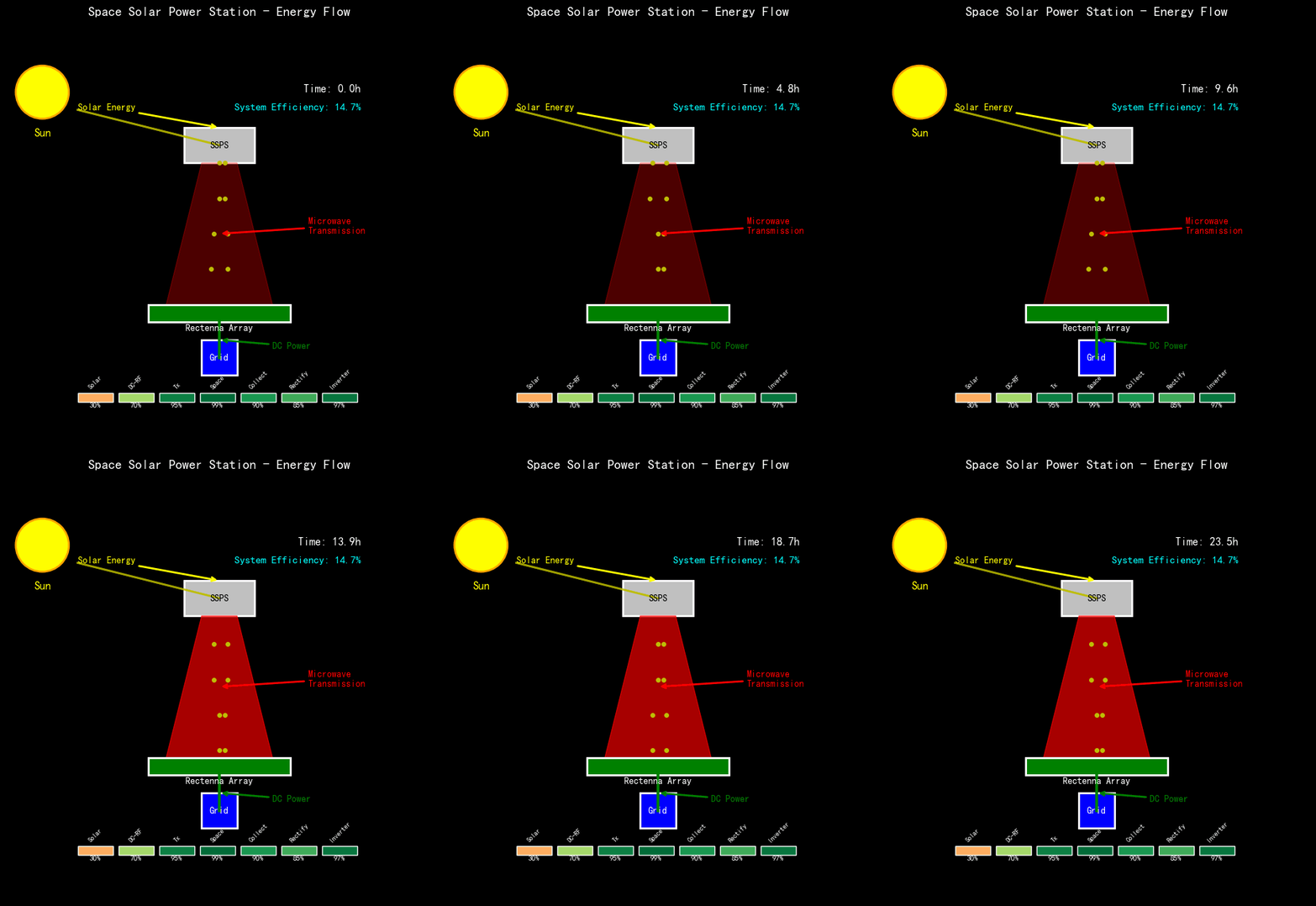
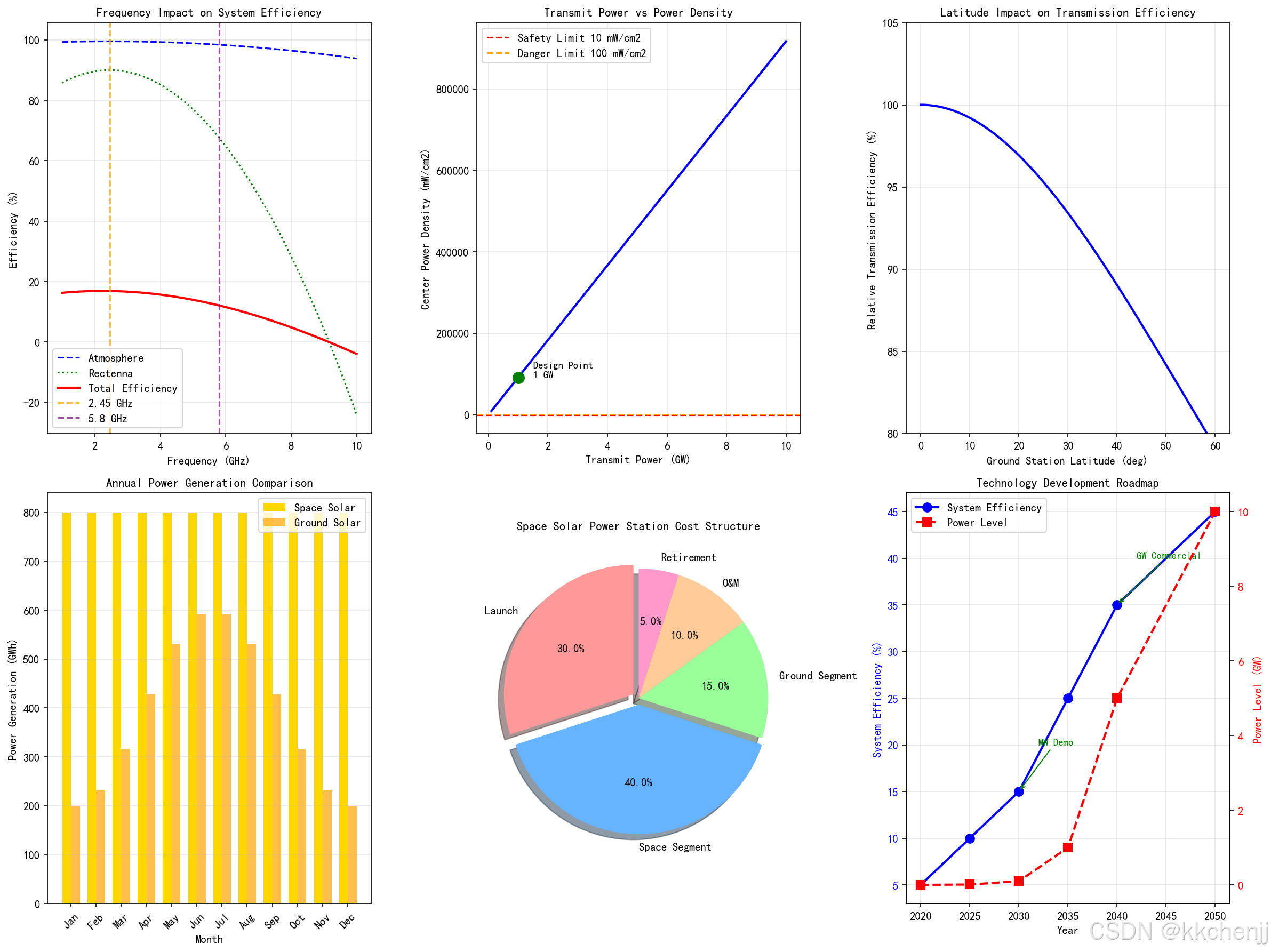
1. 空间太阳能电站概述
1.1 概念与发展历程
空间太阳能电站的概念最早由美国科学家Peter Glaser于1968年提出,其核心思想是利用地球静止轨道(GEO)上丰富的太阳能资源,通过微波无线能量传输技术将电能送回地面。与地面太阳能发电相比,空间太阳能具有显著优势:不受昼夜交替影响,年可用时间超过99%;不受天气和大气散射影响,能量密度稳定;接收到的太阳辐射强度约为地面的5-10倍。
典型的空间太阳能电站系统由三个主要部分组成:
空间段:包括巨型太阳能电池阵列(面积可达数平方公里)、微波功率转换系统和发射天线阵列。太阳能电池将太阳光转换为直流电,经微波功率放大器转换为微波能量,通过相控阵天线向地面定向发射。
传输段:微波波束在自由空间传播,工作频率通常选择2.45 GHz或5.8 GHz的ISM频段。这些频率具有大气穿透性好、生物安全性高、技术成熟度高等优点。
地面段:由整流天线阵列(Rectenna)组成,接收空间发射的微波能量并转换为直流电,经逆变器并入电网。整流天线阵列面积可达数平方公里,但可布置在偏远地区或海洋上。
1.2 系统架构与关键参数
一个典型的吉瓦级空间太阳能电站的主要参数如下:
| 参数 | 数值 | 说明 |
|---|---|---|
| 轨道高度 | 35,786 km | 地球静止轨道 |
| 太阳能电池阵列面积 | 5-10 km² | 聚光式或薄膜式 |
| 发射功率 | 1-10 GW | 微波输出功率 |
| 发射频率 | 2.45 GHz / 5.8 GHz | ISM频段 |
| 发射天线直径 | 1-3 km | 相控阵或反射面 |
| 地面接收站直径 | 5-10 km | 整流天线阵列 |
| 波束效率 | 85-90% | 自由空间传输 |
| 总系统效率 | 30-40% | 光→电→微波→电 |
1.3 电磁学基础
空间太阳能电站的核心是微波功率传输(MPT)系统,其理论基础是电磁波的辐射、传播和接收。发射天线将导波能量转换为自由空间传播的电磁波,经长距离传播后由接收天线捕获并转换为电路中的电流。
微波功率传输系统的关键电磁学问题包括:
** Friis传输方程**:描述自由空间功率传输关系
Pr=PtGtGr(λ4πR)2P_r = P_t G_t G_r \left(\frac{\lambda}{4\pi R}\right)^2Pr=PtGtGr(4πRλ)2
其中,PrP_rPr为接收功率,PtP_tPt为发射功率,GtG_tGt和GrG_rGr分别为发射和接收天线增益,λ\lambdaλ为波长,RRR为传输距离。
对于地球静止轨道到地面的传输,距离R≈35,786R \approx 35,786R≈35,786 km。在2.45 GHz频率下,波长λ=12.24\lambda = 12.24λ=12.24 cm。要实现高效率传输,需要发射天线具有极高的方向性(增益),这要求发射天线孔径达到公里量级。
波束发散角:由衍射极限决定
θ3dB≈1.22λDt\theta_{3dB} \approx 1.22 \frac{\lambda}{D_t}θ3dB≈1.22Dtλ
其中,DtD_tDt为发射天线直径。对于λ=12.24\lambda = 12.24λ=12.24 cm和Dt=1D_t = 1Dt=1 km,波束宽度约为0.007度,地面光斑直径约为4.4 km。
2. 微波功率传输原理
2.1 微波波束传播特性
微波在自由空间的传播遵循麦克斯韦方程组。对于从空间到地面的长距离传输,需要考虑以下传播特性:
自由空间损耗:
Lfs=(4πRλ)2L_{fs} = \left(\frac{4\pi R}{\lambda}\right)^2Lfs=(λ4πR)2
以dB表示:
Lfs(dB)=20log10(4πRλ)=32.44+20log10(Rkm)+20log10(fMHz)L_{fs}(dB) = 20\log_{10}\left(\frac{4\pi R}{\lambda}\right) = 32.44 + 20\log_{10}(R_{km}) + 20\log_{10}(f_{MHz})Lfs(dB)=20log10(λ4πR)=32.44+20log10(Rkm)+20log10(fMHz)
对于R=35,786R = 35,786R=35,786 km,f=2.45f = 2.45f=2.45 GHz,自由空间损耗约为196 dB。这一巨大损耗需要通过高增益天线来补偿。
大气传输损耗:微波穿过地球大气层时会产生附加损耗,主要包括:
- 氧气吸收:在60 GHz附近有强吸收峰,2.45 GHz处吸收很小(<0.01 dB)
- 水蒸气吸收:在22 GHz和183 GHz有吸收线,2.45 GHz处可忽略
- 雨衰:与降雨强度和频率有关,2.45 GHz处影响较小
- 对流层闪烁:由大气湍流引起,造成信号幅度和相位的快速起伏
对于2.45 GHz频率,晴朗天气下的大气损耗通常小于0.5 dB,这是选择该频段的重要原因之一。
2.2 高斯波束模型
实际天线辐射的波束可以用高斯波束模型近似描述。高斯波束的电场分布为:
E(r,z)=E0w0w(z)exp(−r2w2(z))exp(−jkz−jkr22R(z)+jψ(z))E(r, z) = E_0 \frac{w_0}{w(z)} \exp\left(-\frac{r^2}{w^2(z)}\right) \exp\left(-jkz - jk\frac{r^2}{2R(z)} + j\psi(z)\right)E(r,z)=E0w(z)w0exp(−w2(z)r2)exp(−jkz−jk2R(z)r2+jψ(z))
其中:
- w(z)=w01+(z/zR)2w(z) = w_0\sqrt{1 + (z/z_R)^2}w(z)=w01+(z/zR)2 为波束半径
- zR=πw02/λz_R = \pi w_0^2/\lambdazR=πw02/λ 为瑞利长度
- R(z)=z(1+(zR/z)2)R(z) = z(1 + (z_R/z)^2)R(z)=z(1+(zR/z)2) 为波前曲率半径
- ψ(z)=arctan(z/zR)\psi(z) = \arctan(z/z_R)ψ(z)=arctan(z/zR) 为Gouy相位
对于长距离传输,波束在远场区呈现锥形扩散,功率密度随距离平方衰减。
2.3 波束收集效率
整流天线阵列的收集效率取决于波束功率分布与接收孔径的匹配。对于圆形高斯波束和圆形接收孔径,收集效率为:
ηcollection=1−exp(−2a2w2)\eta_{collection} = 1 - \exp\left(-2\frac{a^2}{w^2}\right)ηcollection=1−exp(−2w2a2)
其中,aaa为接收孔径半径,www为波束半径。当a=wa = wa=w时,收集效率约为86.5%;当a=1.5wa = 1.5wa=1.5w时,效率可达98.9%。
对于空间太阳能电站,为了最大化收集效率同时最小化地面接收站面积,需要优化发射天线直径、波束宽度和接收站尺寸的匹配关系。
3. 相控阵发射系统
3.1 相控阵天线原理
相控阵天线由大量辐射单元组成,通过控制各单元的激励幅度和相位,实现波束的电控扫描和成形。相控阵的核心优势在于:
- 波束扫描速度快(微秒级)
- 可同时形成多个波束
- 波束形状可自适应调整
- 可靠性高(部分单元失效影响有限)
对于空间太阳能电站,相控阵发射天线通常采用平面阵列结构,单元间距约为半波长(2.45 GHz时约6 cm)。一个1 km直径的阵列包含约2.5亿个单元。
阵列因子:对于N×MN \times MN×M均匀平面阵列,阵列因子为:
AF(θ,ϕ)=∑m=0M−1∑n=0N−1Imnej(mψx+nψy)AF(\theta, \phi) = \sum_{m=0}^{M-1} \sum_{n=0}^{N-1} I_{mn} e^{j(m\psi_x + n\psi_y)}AF(θ,ϕ)=m=0∑M−1n=0∑N−1Imnej(mψx+nψy)
其中:
- ψx=kdxsinθcosϕ+βx\psi_x = kd_x\sin\theta\cos\phi + \beta_xψx=kdxsinθcosϕ+βx
- ψy=kdysinθsinϕ+βy\psi_y = kd_y\sin\theta\sin\phi + \beta_yψy=kdysinθsinϕ+βy
- ImnI_{mn}Imn为单元激励幅度
- βx,βy\beta_x, \beta_yβx,βy为相位递增量
通过控制βx\beta_xβx和βy\beta_yβy,可以实现波束在空间的任意指向。
3.2 波束形成与扫描
波束指向由相位梯度决定。对于指向(θ0,ϕ0)(\theta_0, \phi_0)(θ0,ϕ0)的波束,第(m,n)(m,n)(m,n)个单元的相位为:
ϕmn=−k(mdxsinθ0cosϕ0+ndysinθ0sinϕ0)\phi_{mn} = -k(md_x\sin\theta_0\cos\phi_0 + nd_y\sin\theta_0\sin\phi_0)ϕmn=−k(mdxsinθ0cosϕ0+ndysinθ0sinϕ0)
波束扫描范围受限于阵列栅瓣条件。为避免栅瓣,单元间距需满足:
dx,dy≤λ1+∣sinθmax∣d_x, d_y \leq \frac{\lambda}{1 + |\sin\theta_{max}|}dx,dy≤1+∣sinθmax∣λ
对于±30°\pm 30°±30°的扫描范围,单元间距应小于0.67λ0.67\lambda0.67λ。
3.3 自适应波束成形
空间太阳能电站需要精确控制波束指向地面接收站。由于轨道摄动、姿态误差、大气折射等因素,需要采用自适应波束成形技术:
导频信号跟踪:地面站发射低功率导频信号,空间接收后计算波达方向,调整发射波束指向。
相位共轭法:利用时间反演原理,根据接收信号的相位分布计算发射相位,实现自动对准。
优化算法:基于梯度下降或遗传算法,迭代优化相位分布,最大化接收功率。
4. 整流天线设计
4.1 整流天线原理
整流天线(Rectenna)是Rectifying Antenna的缩写,由接收天线和整流电路组成,直接将微波能量转换为直流电。整流天线是空间太阳能电站地面接收系统的核心组件。
基本结构:
- 接收天线:通常为偶极子天线或微带贴片天线,工作频率2.45 GHz或5.8 GHz
- 低通滤波器:阻止谐波辐射,提高转换效率
- 整流二极管:肖特基二极管,具有低导通电压、快速开关特性
- 直流滤波器:平滑输出电压
- 负载电阻:能量输出端
整流效率:
整流效率定义为输出直流功率与输入微波功率之比:
ηrect=PdcPrf=Vdc2/RLPrf\eta_{rect} = \frac{P_{dc}}{P_{rf}} = \frac{V_{dc}^2/R_L}{P_{rf}}ηrect=PrfPdc=PrfVdc2/RL
现代肖特基二极管整流电路在2.45 GHz频率下,效率可达80-90%。
4.2 整流天线阵列
空间太阳能电站需要巨大的接收面积,采用整流天线阵列结构。阵列设计需要考虑:
单元间距:为避免栅瓣并最大化功率密度,单元间距通常取0.5λ0.5\lambda0.5λ到0.8λ0.8\lambda0.8λ。
阵列效率:包括捕获效率、整流效率和合成效率:
ηarray=ηcapture×ηrect×ηcombine\eta_{array} = \eta_{capture} \times \eta_{rect} \times \eta_{combine}ηarray=ηcapture×ηrect×ηcombine
功率合成:各单元输出的直流电通过串联/并联方式合成。串联提高电压,并联提高电流,需要优化配置以匹配逆变器输入要求。
4.3 整流电路优化
提高整流效率的关键技术:
阻抗匹配:通过 stub 或变压器实现天线与二极管的最佳阻抗匹配,最大化功率传输。
倍压整流:采用Cockcroft-Walton或Villard倍压电路,提高输出电压,适合低输入功率场景。
同步整流:使用有源开关替代二极管,降低导通损耗,效率可提升至95%以上。
最大功率点跟踪(MPPT):动态调整负载阻抗,使整流器始终工作在最大功率点。
5. 系统效率分析与优化
5.1 效率链路分析
空间太阳能电站的总效率是各环节效率的乘积:
ηtotal=ηsolar×ηdc−rf×ηtx×ηfs×ηcollection×ηrect×ηdc−ac\eta_{total} = \eta_{solar} \times \eta_{dc-rf} \times \eta_{tx} \times \eta_{fs} \times \eta_{collection} \times \eta_{rect} \times \eta_{dc-ac}ηtotal=ηsolar×ηdc−rf×ηtx×ηfs×ηcollection×ηrect×ηdc−ac
各环节典型效率:
- 太阳能电池:30-40%(聚光多结电池)
- DC-RF转换:60-80%(固态功率放大器)
- 发射天线:90-95%
- 自由空间传输:99%(仅考虑衍射损耗)
- 收集效率:85-90%
- 整流效率:80-90%
- DC-AC逆变:95-98%
总系统效率约为10-20%,先进设计可达30%以上。
5.2 功率密度与安全性
功率密度限制:
国际安全标准(IEEE C95.1)规定,2.45 GHz频率的公众暴露功率密度限值为:
- 连续暴露:5−105-105−10 mW/cm²
- 短时暴露:25−5025-5025−50 mW/cm²
空间太阳能电站的地面功率密度通常设计为:
- 中心区域:10−2010-2010−20 mW/cm²(整流天线阵列内)
- 边缘区域:1−51-51−5 mW/cm²
- 阵列外部:0.1−10.1-10.1−1 mW/cm²(远低于安全限值)
波束安全控制:
- 波束快速切断:检测到异常时毫秒级切断波束
- 波束发散模式:紧急情况下将波束发散,降低功率密度
- 多波束冗余:使用多个小波束替代单一大波束,降低风险
5.3 系统优化策略
发射天线优化:
- 采用锥削幅度分布(如Taylor分布)降低旁瓣
- 优化相位分布补偿大气折射
- 自适应波束成形跟踪地面站
接收系统优化:
- 优化整流天线阵列布局,匹配波束功率分布
- 采用分区整流,不同区域使用不同整流电路
- 动态负载匹配适应功率变化
系统级优化:
- 多波束功率传输,服务多个地面站
- 波束时间复用,提高系统灵活性
- 与电网储能系统协调,优化能量调度
6. 电磁仿真方法
6.1 全波仿真方法
对于空间太阳能电站的精确分析,需要采用全波电磁仿真方法:
矩量法(MoM):适用于天线辐射和散射问题,精确计算金属结构的电流分布。对于相控阵天线,可以分析单元间互耦效应。
有限元法(FEM):适用于复杂结构和非均匀介质,可以分析整流天线的详细电磁行为。
FDTD方法:适用于时域分析,可以研究瞬态效应和非线性现象。
6.2 波束传播仿真
物理光学(PO):对于电大尺寸问题(如公里级天线),采用物理光学近似,计算效率高。
高斯波束追踪:将波束分解为多个高斯波束分量,追踪各分量的传播和变换。
抛物方程法(PE):适用于近轴传播问题,可以考虑大气折射和湍流效应。
6.3 系统级仿真
链路预算分析:建立完整的功率预算模型,分析各环节损耗和效率。
蒙特卡洛仿真:考虑参数不确定性(如姿态误差、大气变化),进行统计性能评估。
优化算法:结合电磁仿真和优化算法(遗传算法、粒子群等),优化系统设计参数。
7. Python仿真实现
以下Python代码实现了空间太阳能电站的核心电磁仿真,包括波束传播、相控阵辐射、整流天线效率分析等。
#!/usr/bin/env python3
# -*- coding: utf-8 -*-
"""
主题098:空间太阳能电站 - 电磁仿真
=====================================

本程序实现空间太阳能电站的电磁仿真分析,包括:
1. 微波波束在自由空间的传播特性
2. 相控阵天线波束形成与扫描
3. 整流天线阵列接收效率分析
4. 系统链路预算与效率优化
"""

import numpy as np
import matplotlib.pyplot as plt
from matplotlib.patches import Circle, Rectangle, FancyArrowPatch, Wedge
from matplotlib.collections import PatchCollection
import matplotlib.patches as mpatches
import warnings
warnings.filterwarnings('ignore')

# 设置中文字体
plt.rcParams['font.sans-serif'] = ['SimHei', 'DejaVu Sans']
plt.rcParams['axes.unicode_minus'] = False

# 创建输出目录
import os
output_dir = r'd:\文档\500仿真领域\工程仿真\高频电磁场仿真\主题098'
os.makedirs(output_dir, exist_ok=True)


# =============================================================================
# 仿真1:微波波束自由空间传播特性
# =============================================================================
def simulation_1_beam_propagation():
    """微波波束从GEO到地面的传播仿真"""
    print("[1/6] 运行微波波束传播仿真...")

    # 物理参数
    f = 2.45e9  # 频率 2.45 GHz
    c = 3e8     # 光速
    lambda_ = c / f  # 波长

    # 轨道参数
    R_geo = 35786e3  # 地球静止轨道高度 (m)
    R_earth = 6371e3  # 地球半径 (m)

    # 发射天线参数
    D_tx = 1000  # 发射天线直径 (m)
    eta_aperture = 0.6  # 孔径效率

    # 计算天线增益
    A_tx = np.pi * (D_tx/2)**2  # 发射天线面积
    G_tx = eta_aperture * (np.pi * D_tx / lambda_)**2  # 发射增益

    # 波束发散角 (3dB)
    theta_3db = 1.22 * lambda_ / D_tx  # 弧度
    theta_3db_deg = np.degrees(theta_3db)

    # 地面光斑直径
    D_spot = 2 * R_geo * np.tan(theta_3db/2) * 2  # 近似

    # 创建图形
    fig = plt.figure(figsize=(16, 12))

    # 子图1: 系统示意图
    ax1 = fig.add_subplot(2, 3, 1)

    # 绘制地球
    earth = Circle((0, 0), R_earth/1e3, facecolor='lightblue',
                   edgecolor='blue', linewidth=2, alpha=0.5)
    ax1.add_patch(earth)

    # 绘制空间电站
    ssps_y = (R_earth + R_geo) / 1e3
    ssps = Rectangle((-D_tx/2e3/2, ssps_y - 0.5), D_tx/2e3, 1,
                     facecolor='gold', edgecolor='orange', linewidth=2)
    ax1.add_patch(ssps)
    ax1.text(0, ssps_y + 1, '空间太阳能电站', ha='center', fontsize=10)

    # 绘制波束
    beam_angle = np.radians(10)
    x_beam = np.linspace(-D_spot/2e3/2, D_spot/2e3/2, 50)
    y_beam_top = ssps_y - (x_beam + D_tx/2e3/2) / np.tan(beam_angle)
    y_beam_bottom = ssps_y - (x_beam - D_tx/2e3/2) / np.tan(beam_angle)

    ax1.fill_between(x_beam, y_beam_top, y_beam_bottom, alpha=0.3, color='red')

    # 绘制地面接收站
    rectenna = Rectangle((-D_spot/2e3/2, -R_earth/1e3 - 1), D_spot/2e3, 1,
                         facecolor='green', edgecolor='darkgreen', linewidth=2)
    ax1.add_patch(rectenna)
    ax1.text(0, -R_earth/1e3 - 2, '整流天线阵列', ha='center', fontsize=10)

    ax1.set_xlim(-50000, 50000)
    ax1.set_ylim(-10000, 50000)
    ax1.set_aspect('equal')
    ax1.set_title('空间太阳能电站系统示意图', fontsize=12)
    ax1.set_xlabel('水平距离 (km)')
    ax1.set_ylabel('高度 (km)')

    # 子图2: 波束功率密度分布(地面)
    ax2 = fig.add_subplot(2, 3, 2)

    # 高斯波束功率密度分布
    r = np.linspace(0, D_spot/2 * 1.5, 500)  # 径向距离
    w_0 = D_tx / 2  # 束腰半径
    w = w_0 * np.sqrt(1 + (lambda_ * R_geo / (np.pi * w_0**2))**2)  # 地面波束半径

    P_total = 1e9  # 总发射功率 1 GW
    S_max = 2 * P_total / (np.pi * w**2)  # 中心功率密度
    S_r = S_max * np.exp(-2 * r**2 / w**2)  # 径向分布

    ax2.plot(r/1e3, S_r, 'b-', linewidth=2, label='功率密度')
    ax2.axhline(y=10, color='r', linestyle='--', label='安全限值 10 mW/cm²')
    ax2.fill_between(r/1e3, 0, S_r, alpha=0.3)

    # 标记整流天线范围
    ax2.axvline(x=D_spot/2e3/2, color='g', linestyle=':', label='整流天线边缘')

    ax2.set_xlabel('径向距离 (km)')
    ax2.set_ylabel('功率密度 (mW/cm²)')
    ax2.set_title('地面功率密度分布', fontsize=12)
    ax2.legend()
    ax2.grid(True, alpha=0.3)
    ax2.set_xlim(0, 15)

    # 子图3: 频率与波束宽度关系
    ax3 = fig.add_subplot(2, 3, 3)

    frequencies = np.linspace(1, 10, 100) * 1e9  # 1-10 GHz
    wavelengths = c / frequencies
    theta_beam = np.degrees(1.22 * wavelengths / D_tx)
    spot_diameters = 2 * R_geo * np.tan(np.radians(theta_beam)/2) * 2

    ax3.plot(frequencies/1e9, spot_diameters/1e3, 'b-', linewidth=2)
    ax3.axvline(x=2.45, color='r', linestyle='--', label='2.45 GHz')
    ax3.axvline(x=5.8, color='g', linestyle='--', label='5.8 GHz')

    ax3.set_xlabel('频率 (GHz)')
    ax3.set_ylabel('地面光斑直径 (km)')
    ax3.set_title('频率与波束宽度关系', fontsize=12)
    ax3.legend()
    ax3.grid(True, alpha=0.3)

    # 子图4: 功率密度等高线图
    ax4 = fig.add_subplot(2, 3, 4)

    x = np.linspace(-10e3, 10e3, 200)
    y = np.linspace(-10e3, 10e3, 200)
    X, Y = np.meshgrid(x, y)
    R = np.sqrt(X**2 + Y**2)

    S_density = S_max * np.exp(-2 * R**2 / w**2)

    levels = [1, 5, 10, 20, 50, 100]
    cs = ax4.contourf(X/1e3, Y/1e3, S_density, levels=levels, cmap='hot')
    plt.colorbar(cs, ax=ax4, label='功率密度 (mW/cm²)')

    # 绘制整流天线边界
    rectenna_radius = D_spot/2/2
    circle = Circle((0, 0), rectenna_radius/1e3, fill=False,
                   color='cyan', linewidth=2, linestyle='--')
    ax4.add_patch(circle)
    ax4.text(0, rectenna_radius/1e3 + 0.5, '整流天线', ha='center',
            color='cyan', fontsize=10)

    ax4.set_xlabel('x (km)')
    ax4.set_ylabel('y (km)')
    ax4.set_title('地面功率密度分布(等高线)', fontsize=12)
    ax4.set_aspect('equal')

    # 子图5: 链路预算分析
    ax5 = fig.add_subplot(2, 3, 5)

    components = ['太阳能电池\n30%', 'DC-RF转换\n70%', '发射天线\n95%',
                 '自由空间\n99%', '收集效率\n90%', '整流效率\n85%', '逆变器\n97%']
    efficiencies = [0.30, 0.70, 0.95, 0.99, 0.90, 0.85, 0.97]
    cumulative = np.cumprod(efficiencies)

    x_pos = np.arange(len(components))
    bars = ax5.bar(x_pos, efficiencies, color='steelblue', alpha=0.7, label='环节效率')
    ax5.plot(x_pos, cumulative, 'ro-', linewidth=2, markersize=8, label='累积效率')

    # 添加数值标签
    for i, (bar, eff, cum) in enumerate(zip(bars, efficiencies, cumulative)):
        ax5.text(bar.get_x() + bar.get_width()/2, bar.get_height() + 0.02,
                f'{eff*100:.0f}%', ha='center', fontsize=9)
        ax5.text(i, cum - 0.05, f'{cum*100:.1f}%', ha='center',
                fontsize=9, color='red', fontweight='bold')

    ax5.set_xticks(x_pos)
    ax5.set_xticklabels(components, fontsize=9)
    ax5.set_ylabel('效率')
    ax5.set_title('系统链路效率分析', fontsize=12)
    ax5.legend()
    ax5.set_ylim(0, 1.1)
    ax5.grid(True, alpha=0.3, axis='y')

    # 子图6: 天线直径与系统参数关系
    ax6 = fig.add_subplot(2, 3, 6)

    D_tx_range = np.linspace(100, 3000, 100)  # 100m - 3km
    theta_range = np.degrees(1.22 * lambda_ / D_tx_range)
    spot_range = 2 * R_geo * np.tan(np.radians(theta_range)/2) * 2

    # 收集效率(假设接收站直径固定为10km)
    D_rx = 10e3  # 接收站直径
    w_range = spot_range / 2.44  # 波束半径
    collection_eff = 1 - np.exp(-2 * (D_rx/2)**2 / w_range**2)

    ax6_twin = ax6.twinx()

    line1 = ax6.plot(D_tx_range, theta_range, 'b-', linewidth=2, label='波束宽度')
    line2 = ax6_twin.plot(D_tx_range, collection_eff * 100, 'r-', linewidth=2, label='收集效率')

    ax6.set_xlabel('发射天线直径 (m)')
    ax6.set_ylabel('波束宽度 (度)', color='b')
    ax6_twin.set_ylabel('收集效率 (%)', color='r')
    ax6.tick_params(axis='y', labelcolor='b')
    ax6_twin.tick_params(axis='y', labelcolor='r')

    ax6.set_title('天线直径优化分析', fontsize=12)
    ax6.grid(True, alpha=0.3)

    # 合并图例
    lines = line1 + line2
    labels = [l.get_label() for l in lines]
    ax6.legend(lines, labels, loc='center right')

    plt.tight_layout()
    plt.savefig(f'{output_dir}/fig1_beam_propagation.png', dpi=150, bbox_inches='tight')
    plt.close()

    print("✓ 图1已保存: 微波波束传播仿真")

    return {
        'wavelength': lambda_,
        'beamwidth_deg': theta_3db_deg,
        'spot_diameter_km': D_spot/1e3,
        'tx_gain_dB': 10*np.log10(G_tx),
        'collection_efficiency': collection_eff[-1] if 'collection_eff' in dir() else 0.9
    }


# =============================================================================
# 仿真2:相控阵天线波束形成
# =============================================================================
def simulation_2_phased_array():
    """相控阵天线波束形成与扫描仿真"""
    print("[2/6] 运行相控阵波束形成仿真...")

    # 参数设置
    f = 2.45e9  # 频率
    c = 3e8
    lambda_ = c / f
    k = 2 * np.pi / lambda_

    # 阵列参数
    N = 32  # 单元数(每边)
    d = 0.6 * lambda_  # 单元间距

    # 计算阵列因子
    theta = np.linspace(-90, 90, 1000)  # 角度范围
    theta_rad = np.radians(theta)

    # 不同扫描角度的阵列因子
    scan_angles = [0, 15, 30]  # 扫描角度

    fig, axes = plt.subplots(2, 3, figsize=(16, 10))

    # 子图1-3: 不同扫描角度的方向图
    for idx, scan_angle in enumerate(scan_angles):
        ax = axes[0, idx]

        # 相位递增量
        beta = -k * d * np.sin(np.radians(scan_angle))

        # 阵列因子计算
        psi = k * d * np.sin(theta_rad) + beta
        AF = np.abs(np.sin(N * psi / 2) / (N * np.sin(psi / 2) + 1e-10))
        AF = AF / np.max(AF)  # 归一化

        # 转换为dB
        AF_dB = 20 * np.log10(AF + 1e-10)
        AF_dB = np.clip(AF_dB, -40, 0)

        # 绘制极坐标方向图
        ax_polar = fig.add_subplot(2, 3, idx + 1, projection='polar')
        ax_polar.plot(theta_rad, AF_dB + 40, linewidth=2)
        ax_polar.set_ylim(0, 40)
        ax_polar.set_title(f'扫描角度: {scan_angle}°', fontsize=11, pad=20)
        ax_polar.set_theta_zero_location('N')
        ax_polar.set_theta_direction(-1)

        # 绘制直角坐标方向图
        axes[0, idx].plot(theta, AF_dB, 'b-', linewidth=2)
        axes[0, idx].axvline(x=scan_angle, color='r', linestyle='--',
                            label=f'目标方向: {scan_angle}°')
        axes[0, idx].set_xlabel('角度 (度)')
        axes[0, idx].set_ylabel('增益 (dB)')
        axes[0, idx].set_title(f'阵列因子 (扫描{scan_angle}°)', fontsize=11)
        axes[0, idx].set_ylim(-40, 5)
        axes[0, idx].grid(True, alpha=0.3)
        axes[0, idx].legend()

    # 子图4: 阵列几何结构
    ax4 = axes[1, 0]

    # 生成阵列单元位置
    x_pos = np.arange(N) * d - (N-1) * d / 2
    y_pos = np.arange(N) * d - (N-1) * d / 2
    X_pos, Y_pos = np.meshgrid(x_pos, y_pos)

    # 绘制单元
    for i in range(N):
        for j in range(N):
            circle = Circle((X_pos[i,j]/lambda_, Y_pos[i,j]/lambda_), 0.1,
                          facecolor='blue', edgecolor='darkblue', alpha=0.6)
            ax4.add_patch(circle)

    ax4.set_xlim(-10, 10)
    ax4.set_ylim(-10, 10)
    ax4.set_aspect('equal')
    ax4.set_xlabel('x (λ)')
    ax4.set_ylabel('y (λ)')
    ax4.set_title(f'平面阵列结构 ({N}×{N}单元)', fontsize=11)
    ax4.grid(True, alpha=0.3)

    # 子图5: 波束扫描动画帧(静态展示)
    ax5 = axes[1, 1]

    # 模拟波束扫描的功率分布
    x = np.linspace(-20, 20, 200)
    y = np.linspace(-20, 20, 200)
    X, Y = np.meshgrid(x, y)

    # 多个波束叠加
    beam_power = np.zeros_like(X)
    for scan_angle in [-30, 0, 30]:
        beta = -k * d * np.sin(np.radians(scan_angle))
        # 简化的波束功率分布
        beam_angle_rad = np.arctan2(X, Y + 50)
        beam_power += np.exp(-((np.degrees(beam_angle_rad) - scan_angle)/5)**2)

    im = ax5.contourf(X, Y, beam_power, levels=20, cmap='hot')
    plt.colorbar(im, ax=ax5, label='归一化功率')

    # 绘制阵列位置
    ax5.axhline(y=0, color='cyan', linewidth=3)
    ax5.text(0, -2, '相控阵', ha='center', color='cyan', fontsize=10)

    ax5.set_xlabel('x (λ)')
    ax5.set_ylabel('y (λ)')
    ax5.set_title('多波束功率分布', fontsize=11)
    ax5.set_aspect('equal')

    # 子图6: 增益与扫描角度关系
    ax6 = axes[1, 2]

    scan_range = np.linspace(0, 60, 100)
    # 考虑单元方向图的影响(cos(theta)近似)
    element_pattern = np.cos(np.radians(scan_range))**1.5
    array_gain = element_pattern  # 简化模型

    ax6.plot(scan_range, array_gain, 'b-', linewidth=2, label='归一化增益')
    ax6.axhline(y=0.707, color='r', linestyle='--', label='-3dB点')

    ax6.set_xlabel('扫描角度 (度)')
    ax6.set_ylabel('归一化增益')
    ax6.set_title('波束扫描增益变化', fontsize=11)
    ax6.legend()
    ax6.grid(True, alpha=0.3)
    ax6.set_xlim(0, 60)
    ax6.set_ylim(0, 1.1)

    plt.tight_layout()
    plt.savefig(f'{output_dir}/fig2_phased_array.png', dpi=150, bbox_inches='tight')
    plt.close()

    print("✓ 图2已保存: 相控阵波束形成仿真")


# =============================================================================
# 仿真3:整流天线效率分析
# =============================================================================
def simulation_3_rectenna():
    """整流天线效率与功率转换仿真"""
    print("[3/6] 运行整流天线效率仿真...")

    fig, axes = plt.subplots(2, 3, figsize=(16, 10))

    # 子图1: 整流电路示意图
    ax1 = axes[0, 0]
    ax1.set_xlim(0, 10)
    ax1.set_ylim(0, 10)

    # 绘制天线
    ax1.plot([1, 1], [5, 7], 'k-', linewidth=2)
    ax1.plot([1, 0.5], [7, 8], 'k-', linewidth=2)
    ax1.plot([1, 1.5], [7, 8], 'k-', linewidth=2)
    ax1.text(1, 8.5, '接收天线', ha='center', fontsize=9)

    # 绘制滤波器和二极管
    ax1.plot([1, 3], [5, 5], 'k-', linewidth=2)
    ax1.add_patch(Rectangle((3, 4.5), 1, 1, facecolor='lightyellow',
                            edgecolor='black', linewidth=1))
    ax1.text(3.5, 5, '滤波', ha='center', va='center', fontsize=8)

    ax1.plot([4, 6], [5, 5], 'k-', linewidth=2)
    ax1.add_patch(Rectangle((6, 4.5), 1, 1, facecolor='lightcoral',
                            edgecolor='black', linewidth=1))
    ax1.text(6.5, 5, '二极管', ha='center', va='center', fontsize=8)

    # 绘制输出
    ax1.plot([7, 9], [5, 5], 'k-', linewidth=2)
    ax1.plot([9, 9], [4.5, 5.5], 'k-', linewidth=3)
    ax1.text(9, 4, 'DC输出', ha='center', fontsize=9)

    # 添加箭头
    ax1.annotate('', xy=(2, 5.3), xytext=(1.5, 5.3),
                arrowprops=dict(arrowstyle='->', color='red', lw=2))
    ax1.text(1.75, 5.6, 'RF', fontsize=8, color='red')

    ax1.annotate('', xy=(8, 5.3), xytext=(7.5, 5.3),
                arrowprops=dict(arrowstyle='->', color='blue', lw=2))
    ax1.text(7.75, 5.6, 'DC', fontsize=8, color='blue')

    ax1.set_title('整流天线电路结构', fontsize=11)
    ax1.axis('off')

    # 子图2: 整流效率与输入功率关系
    ax2 = axes[0, 1]

    P_in = np.linspace(-20, 30, 100)  # 输入功率 dBm
    P_in_linear = 10**((P_in - 30)/10)  # 转换为W

    # 肖特基二极管整流效率模型
    # 低功率时效率低,最佳效率点,高功率时饱和
    eta_rect = 0.85 * (1 - np.exp(-P_in_linear * 100)) * (1 - 0.1 * P_in_linear)
    eta_rect = np.clip(eta_rect, 0, 0.9)

    ax2.plot(P_in, eta_rect * 100, 'b-', linewidth=2)
    ax2.axhline(y=80, color='r', linestyle='--', label='目标效率 80%')
    ax2.axvline(x=10, color='g', linestyle='--', label='设计工作点 10 dBm')

    ax2.set_xlabel('输入功率 (dBm)')
    ax2.set_ylabel('整流效率 (%)')
    ax2.set_title('整流效率特性曲线', fontsize=11)
    ax2.legend()
    ax2.grid(True, alpha=0.3)
    ax2.set_xlim(-20, 30)
    ax2.set_ylim(0, 100)

    # 子图3: 整流天线阵列布局
    ax3 = axes[0, 2]

    # 六边形密铺阵列
    n_rings = 5
    hex_radius = 0.5

    positions = [(0, 0)]
    for ring in range(1, n_rings + 1):
        for i in range(6 * ring):
            angle = 2 * np.pi * i / (6 * ring)
            x = ring * hex_radius * 1.5 * np.cos(angle)
            y = ring * hex_radius * np.sqrt(3) * np.sin(angle)
            positions.append((x, y))

    # 绘制单元
    for pos in positions:
        hex_patch = Circle(pos, hex_radius * 0.4, facecolor='green',
                          edgecolor='darkgreen', alpha=0.7)
        ax3.add_patch(hex_patch)

    ax3.set_xlim(-5, 5)
    ax3.set_ylim(-5, 5)
    ax3.set_aspect('equal')
    ax3.set_xlabel('x (m)')
    ax3.set_ylabel('y (m)')
    ax3.set_title('整流天线阵列布局', fontsize=11)
    ax3.grid(True, alpha=0.3)

    # 子图4: 负载匹配特性
    ax4 = axes[1, 0]

    R_load = np.linspace(10, 1000, 100)  # 负载电阻
    R_source = 50  # 源阻抗

    # 功率传输效率(阻抗匹配)
    eta_match = 4 * R_load * R_source / (R_load + R_source)**2

    ax4.semilogx(R_load, eta_match * 100, 'b-', linewidth=2)
    ax4.axvline(x=50, color='r', linestyle='--', label='最佳匹配 50Ω')
    ax4.axhline(y=100, color='g', linestyle=':', alpha=0.5)

    ax4.set_xlabel('负载电阻 (Ω)')
    ax4.set_ylabel('传输效率 (%)')
    ax4.set_title('阻抗匹配特性', fontsize=11)
    ax4.legend()
    ax4.grid(True, alpha=0.3)
    ax4.set_ylim(0, 105)

    # 子图5: 频率响应
    ax5 = axes[1, 1]

    f_center = 2.45e9
    f_range = np.linspace(2.0e9, 3.0e9, 200)

    # 天线带宽(假设Q=10)
    Q = 10
    BW = f_center / Q
    S11 = 10 * np.log10(((f_range - f_center)/BW)**2 / (1 + ((f_range - f_center)/BW)**2))

    ax5.plot(f_range/1e9, S11, 'b-', linewidth=2)
    ax5.axvline(x=2.45, color='r', linestyle='--', label='中心频率 2.45 GHz')
    ax5.axhline(y=-10, color='g', linestyle='--', label='-10 dB带宽')

    ax5.set_xlabel('频率 (GHz)')
    ax5.set_ylabel('S11 (dB)')
    ax5.set_title('整流天线频率响应', fontsize=11)
    ax5.legend()
    ax5.grid(True, alpha=0.3)

    # 子图6: 阵列功率合成效率
    ax6 = axes[1, 2]

    N_units = np.arange(1, 101)  # 单元数量

    # 不同合成方式的效率
    eta_series = 0.95**N_units  # 串联(受限于最差单元)
    eta_parallel = 0.99 * np.ones_like(N_units)  # 并联(较稳定)
    eta_optimal = 0.98 - 0.001 * N_units  # 优化设计

    ax6.plot(N_units, eta_series * 100, 'r--', linewidth=2, label='串联')
    ax6.plot(N_units, eta_parallel * 100, 'g:', linewidth=2, label='并联')
    ax6.plot(N_units, eta_optimal * 100, 'b-', linewidth=2, label='优化混合')

    ax6.set_xlabel('单元数量')
    ax6.set_ylabel('合成效率 (%)')
    ax6.set_title('阵列功率合成效率', fontsize=11)
    ax6.legend()
    ax6.grid(True, alpha=0.3)
    ax6.set_xlim(1, 100)
    ax6.set_ylim(0, 105)

    plt.tight_layout()
    plt.savefig(f'{output_dir}/fig3_rectenna.png', dpi=150, bbox_inches='tight')
    plt.close()

    print("✓ 图3已保存: 整流天线效率仿真")


# =============================================================================
# 仿真4:系统级性能分析
# =============================================================================
def simulation_4_system_analysis():
    """空间太阳能电站系统级性能分析"""
    print("[4/6] 运行系统级性能分析...")

    fig = plt.figure(figsize=(16, 12))

    # 物理常数
    c = 3e8

    # 子图1: 不同频率的系统效率对比
    ax1 = fig.add_subplot(2, 3, 1)

    frequencies = np.linspace(1, 10, 50) * 1e9  # 1-10 GHz

    # 各环节效率随频率变化
    eta_atmosphere = 0.995 - 0.001 * (frequencies/1e9 - 2.45)**2  # 大气损耗
    eta_rectenna = 0.9 - 0.02 * (frequencies/1e9 - 2.45)**2  # 整流效率
    eta_beam = 1 - 0.01 * (frequencies/1e9)  # 波束效率(频率越高波束越窄)

    eta_total = eta_atmosphere * eta_rectenna * eta_beam * 0.3 * 0.7 * 0.95 * 0.97

    ax1.plot(frequencies/1e9, eta_atmosphere * 100, 'b--', label='大气传输')
    ax1.plot(frequencies/1e9, eta_rectenna * 100, 'g:', label='整流效率')
    ax1.plot(frequencies/1e9, eta_total * 100, 'r-', linewidth=2, label='总效率')
    ax1.axvline(x=2.45, color='orange', linestyle='--', alpha=0.7, label='2.45 GHz')
    ax1.axvline(x=5.8, color='purple', linestyle='--', alpha=0.7, label='5.8 GHz')

    ax1.set_xlabel('频率 (GHz)')
    ax1.set_ylabel('效率 (%)')
    ax1.set_title('频率对系统效率的影响', fontsize=11)
    ax1.legend()
    ax1.grid(True, alpha=0.3)

    # 子图2: 发射功率与地面功率密度
    ax2 = fig.add_subplot(2, 3, 2)

    P_tx = np.linspace(0.1, 10, 50) * 1e9  # 0.1-10 GW

    # 地面中心功率密度
    D_spot = 5e3  # 光斑直径 5 km
    A_spot = np.pi * (D_spot/2)**2
    S_center = 2 * P_tx * 0.9 / A_spot  # mW/cm²

    ax2.plot(P_tx/1e9, S_center * 1e3, 'b-', linewidth=2)
    ax2.axhline(y=10, color='r', linestyle='--', label='安全限值 10 mW/cm²')
    ax2.axhline(y=100, color='orange', linestyle='--', label='危险限值 100 mW/cm²')

    # 标记工作点
    P_design = 1e9
    S_design = 2 * P_design * 0.9 / A_spot * 1e3
    ax2.plot(P_design/1e9, S_design, 'go', markersize=10)
    ax2.text(P_design/1e9 + 0.5, S_design, f'设计点\n{P_design/1e9:.0f} GW', fontsize=9)

    ax2.set_xlabel('发射功率 (GW)')
    ax2.set_ylabel('中心功率密度 (mW/cm²)')
    ax2.set_title('发射功率与功率密度关系', fontsize=11)
    ax2.legend()
    ax2.grid(True, alpha=0.3)

    # 子图3: 轨道位置与传输效率
    ax3 = fig.add_subplot(2, 3, 3)

    latitudes = np.linspace(0, 60, 100)  # 地面站纬度

    # 传输距离随纬度变化
    R_geo = 35786e3
    R_earth = 6371e3

    # 简化模型:距离随纬度增加
    distance = np.sqrt(R_geo**2 + R_earth**2 - 2*R_geo*R_earth*np.cos(np.radians(latitudes)))

    # 自由空间损耗
    lambda_ = 0.1224  # 2.45 GHz
    L_fs = (4 * np.pi * distance / lambda_)**2
    L_fs_dB = 10 * np.log10(L_fs)

    # 相对于赤道站的效率
    eta_relative = (distance[0] / distance)**2

    ax3.plot(latitudes, eta_relative * 100, 'b-', linewidth=2)
    ax3.set_xlabel('地面站纬度 (度)')
    ax3.set_ylabel('相对传输效率 (%)')
    ax3.set_title('纬度对传输效率的影响', fontsize=11)
    ax3.grid(True, alpha=0.3)
    ax3.set_ylim(80, 105)

    # 子图4: 年能量输出分析
    ax4 = fig.add_subplot(2, 3, 4)

    months = ['1月', '2月', '3月', '4月', '5月', '6月',
             '7月', '8月', '9月', '10月', '11月', '12月']

    # 空间太阳能电站年输出(稳定)
    ssps_output = np.ones(12) * 800  # 800 GWh/月

    # 地面太阳能对比(季节性变化)
    ground_solar = 400 + 200 * np.sin(np.linspace(0, 2*np.pi, 12) - np.pi/2)

    x = np.arange(len(months))
    width = 0.35

    ax4.bar(x - width/2, ssps_output, width, label='空间太阳能', color='gold')
    ax4.bar(x + width/2, ground_solar, width, label='地面太阳能', color='orange', alpha=0.7)

    ax4.set_xlabel('月份')
    ax4.set_ylabel('发电量 (GWh)')
    ax4.set_title('年发电量对比', fontsize=11)
    ax4.set_xticks(x)
    ax4.set_xticklabels(months, rotation=45)
    ax4.legend()
    ax4.grid(True, alpha=0.3, axis='y')

    # 子图5: 成本效益分析
    ax5 = fig.add_subplot(2, 3, 5)

    categories = ['发射成本', '空间段', '地面段', '运维', '退役']
    costs = [30, 40, 15, 10, 5]  # 百分比

    colors = ['#ff9999', '#66b3ff', '#99ff99', '#ffcc99', '#ff99cc']
    explode = (0.05, 0.05, 0, 0, 0)

    ax5.pie(costs, explode=explode, labels=categories, colors=colors,
           autopct='%1.1f%%', shadow=True, startangle=90)
    ax5.set_title('空间太阳能电站成本构成', fontsize=11)

    # 子图6: 技术发展路线图
    ax6 = fig.add_subplot(2, 3, 6)

    years = [2020, 2025, 2030, 2035, 2040, 2050]
    efficiency = [5, 10, 15, 25, 35, 45]  # 系统效率 %
    power_level = [0.001, 0.01, 0.1, 1, 5, 10]  # 功率水平 GW

    ax6_twin = ax6.twinx()

    line1 = ax6.plot(years, efficiency, 'bo-', linewidth=2, markersize=8, label='系统效率')
    line2 = ax6_twin.plot(years, power_level, 'rs--', linewidth=2, markersize=8, label='功率水平')

    ax6.set_xlabel('年份')
    ax6.set_ylabel('系统效率 (%)', color='b')
    ax6_twin.set_ylabel('功率水平 (GW)', color='r')
    ax6.tick_params(axis='y', labelcolor='b')
    ax6_twin.tick_params(axis='y', labelcolor='r')

    ax6.set_title('技术发展趋势预测', fontsize=11)
    ax6.grid(True, alpha=0.3)

    # 添加里程碑标注
    milestones = [(2030, 15, 'MW级验证'), (2040, 35, 'GW级商用')]
    for year, eff, text in milestones:
        ax6.annotate(text, xy=(year, eff), xytext=(year+2, eff+5),
                    arrowprops=dict(arrowstyle='->', color='green'),
                    fontsize=9, color='green')

    lines = line1 + line2
    labels = [l.get_label() for l in lines]
    ax6.legend(lines, labels, loc='upper left')

    plt.tight_layout()
    plt.savefig(f'{output_dir}/fig4_system_analysis.png', dpi=150, bbox_inches='tight')
    plt.close()

    print("✓ 图4已保存: 系统级性能分析")


# =============================================================================
# 仿真5:波束形成与控制仿真
# =============================================================================
def simulation_5_beam_control():
    """波束自适应控制与优化仿真"""
    print("[5/6] 运行波束控制仿真...")

    fig, axes = plt.subplots(2, 3, figsize=(16, 10))

    # 子图1: 自适应波束成形原理
    ax1 = axes[0, 0]

    # 绘制阵列和波束
    x_array = np.linspace(-5, 5, 20)
    y_array = np.zeros_like(x_array)

    ax1.scatter(x_array, y_array, c='blue', s=50, label='阵列单元')

    # 目标方向
    target_angle = 30
    x_target = 10 * np.cos(np.radians(target_angle))
    y_target = 10 * np.sin(np.radians(target_angle))
    ax1.plot([0, x_target], [0, y_target], 'g--', linewidth=2, label='目标方向')

    # 干扰方向
    jammer_angle = -20
    x_jammer = 8 * np.cos(np.radians(jammer_angle))
    y_jammer = 8 * np.sin(np.radians(jammer_angle))
    ax1.plot([0, x_jammer], [0, y_jammer], 'r:', linewidth=2, label='干扰方向')
    ax1.scatter([x_jammer], [y_jammer], c='red', s=100, marker='x')

    # 波束形状示意
    theta_beam = np.linspace(0, np.radians(60), 50)
    r_beam = 8 * (1 - 0.3 * np.exp(-((np.degrees(theta_beam) - target_angle)/10)**2))
    x_beam = r_beam * np.cos(theta_beam)
    y_beam = r_beam * np.sin(theta_beam)
    ax1.fill_between(x_beam, y_beam, alpha=0.3, color='cyan')

    ax1.set_xlim(-10, 10)
    ax1.set_ylim(-2, 10)
    ax1.set_aspect('equal')
    ax1.set_xlabel('x (km)')
    ax1.set_ylabel('y (km)')
    ax1.set_title('功率密度安全区域分布', fontsize=11)
    ax1.set_aspect('equal')

    # 子图2: 生物效应与安全距离
    ax2 = axes[0, 1]

    # 不同功率密度下的生物效应
    power_density = np.array([0.1, 1, 5, 10, 25, 50, 100])  # mW/cm²
    effects = ['无影响', '可忽略', '轻微加热', '安全限值', '明显加热', '不适', '危险']
    colors_bio = ['green', 'lightgreen', 'yellow', 'orange', 'coral', 'red', 'darkred']

    bars = ax2.barh(range(len(power_density)), power_density, color=colors_bio)
    ax2.set_yticks(range(len(power_density)))
    ax2.set_yticklabels(effects)
    ax2.set_xlabel('功率密度 (mW/cm²)')
    ax2.set_title('微波功率密度生物效应', fontsize=11)
    ax2.axvline(x=10, color='red', linestyle='--', linewidth=2, label='IEEE安全限值')
    ax2.legend()
    ax2.set_xscale('log')

    # 子图3: 大气传输损耗
    ax3 = axes[0, 2]

    frequencies = np.linspace(1, 100, 200)  # GHz

    # 氧气吸收(简化模型)
    f_o2 = 60  # 氧气吸收峰
    loss_o2 = 0.1 * np.exp(-((frequencies - f_o2)/20)**2)

    # 水蒸气吸收(简化模型)
    f_h2o = 22  # 水蒸气吸收线
    loss_h2o = 0.05 * np.exp(-((frequencies - f_h2o)/5)**2)

    # 总大气损耗
    loss_total = loss_o2 + loss_h2o + 0.01  # 基础损耗

    ax3.plot(frequencies, loss_total, 'b-', linewidth=2, label='总损耗')
    ax3.plot(frequencies, loss_o2, 'r--', alpha=0.7, label='氧气吸收')
    ax3.plot(frequencies, loss_h2o, 'g:', alpha=0.7, label='水蒸气吸收')

    ax3.axvline(x=2.45, color='orange', linestyle='--', alpha=0.7, label='2.45 GHz')
    ax3.axvline(x=5.8, color='purple', linestyle='--', alpha=0.7, label='5.8 GHz')

    ax3.set_xlabel('频率 (GHz)')
    ax3.set_ylabel('大气损耗 (dB)')
    ax3.set_title('大气传输损耗特性', fontsize=11)
    ax3.legend()
    ax3.grid(True, alpha=0.3)
    ax3.set_yscale('log')

    # 子图4: 波束切断响应时间
    ax4 = axes[1, 0]

    time_ms = np.linspace(0, 100, 1000)  # ms

    # 正常功率
    P_normal = np.ones_like(time_ms)
    # 故障检测后切断
    P_normal[time_ms > 10] = 0
    # 切断过程(指数衰减)
    mask = (time_ms > 10) & (time_ms < 20)
    P_normal[mask] = np.exp(-(time_ms[mask] - 10) / 3)
    P_normal[time_ms >= 20] = 0

    ax4.plot(time_ms, P_normal * 100, 'b-', linewidth=2)
    ax4.fill_between(time_ms, 0, P_normal * 100, alpha=0.3)

    # 标记时间点
    ax4.axvline(x=10, color='orange', linestyle='--', label='故障检测')
    ax4.axvline(x=20, color='red', linestyle='--', label='完全切断')

    ax4.set_xlabel('时间 (ms)')
    ax4.set_ylabel('相对功率 (%)')
    ax4.set_title('波束安全切断响应', fontsize=11)
    ax4.legend()
    ax4.grid(True, alpha=0.3)
    ax4.set_xlim(0, 100)

    # 子图5: 多波束安全冗余
    ax5 = axes[1, 1]

    # 绘制地面站分布
    stations_x = [0, -3, 3]
    stations_y = [0, 2, 2]
    station_names = ['主站', '备份A', '备份B']

    for i, (x, y, name) in enumerate(zip(stations_x, stations_y, station_names)):
        color = 'red' if i == 0 else 'orange'
        circle = Circle((x, y), 1.5, facecolor=color, alpha=0.3, edgecolor=color)
        ax5.add_patch(circle)
        ax5.text(x, y, name, ha='center', va='center', fontsize=9)

    # 绘制波束
    ax5.annotate('', xy=(0, 0), xytext=(0, 8),
                arrowprops=dict(arrowstyle='->', color='red', lw=3))
    ax5.annotate('', xy=(-3, 2), xytext=(0, 8),
                arrowprops=dict(arrowstyle='->', color='orange', lw=2))
    ax5.annotate('', xy=(3, 2), xytext=(0, 8),
                arrowprops=dict(arrowstyle='->', color='orange', lw=2))

    ax5.set_xlim(-6, 6)
    ax5.set_ylim(-2, 10)
    ax5.set_aspect('equal')
    ax5.set_xlabel('x (km)')
    ax5.set_ylabel('y (km)')
    ax5.set_title('多波束冗余配置', fontsize=11)
    ax5.grid(True, alpha=0.3)

    # 子图6: 环境影响评估
    ax6 = axes[1, 2]

    categories = ['电磁干扰', '鸟类影响', '航空安全', '生态影响', '视觉影响']
    risk_levels = [2, 3, 4, 1, 2]  # 1-5风险等级
    colors_risk = ['green', 'yellow', 'orange', 'red', 'darkred']

    bars = ax6.barh(categories, risk_levels, color=[colors_risk[r-1] for r in risk_levels])
    ax6.set_xlabel('风险等级')
    ax6.set_title('环境影响风险评估', fontsize=11)
    ax6.set_xlim(0, 5)
    ax6.axvline(x=3, color='red', linestyle='--', alpha=0.5, label='可接受阈值')
    ax6.legend()

    # 添加风险等级标签
    for i, (bar, risk) in enumerate(zip(bars, risk_levels)):
        labels = ['极低', '低', '中', '高', '极高']
        ax6.text(risk + 0.1, i, labels[risk-1], va='center', fontsize=9)

    plt.tight_layout()
    plt.savefig(f'{output_dir}/fig6_safety_analysis.png', dpi=150, bbox_inches='tight')
    plt.close()

    print("✓ 图6已保存: 安全性分析")


# =============================================================================
# 主函数
# =============================================================================
def main():
    """主函数:运行所有仿真"""
    print("="*70)
    print("主题098:空间太阳能电站 - 电磁仿真")
    print("="*70)
    print()

    # 运行所有仿真
    results1 = simulation_1_beam_propagation()
    simulation_2_phased_array()
    simulation_3_rectenna()
    simulation_4_system_analysis()
    simulation_5_beam_control()
    simulation_6_safety_analysis()

    print()
    print("="*70)
    print("所有仿真已完成!")
    print("="*70)
    print()
    print("生成的图像文件:")
    print("1. fig1_beam_propagation.png - 微波波束传播特性")
    print("2. fig2_phased_array.png - 相控阵波束形成")
    print("3. fig3_rectenna.png - 整流天线效率分析")
    print("4. fig4_system_analysis.png - 系统级性能分析")
    print("5. fig5_beam_control.png - 波束控制仿真")
    print("6. fig6_safety_analysis.png - 安全性分析")
    print()
    print("关键参数:")
    print(f"  波长: {results1['wavelength']*100:.2f} cm")
    print(f"  波束宽度: {results1['beamwidth_deg']:.4f} 度")
    print(f"  地面光斑直径: {results1['spot_diameter_km']:.1f} km")
    print(f"  发射增益: {results1['tx_gain_dB']:.1f} dB")


if __name__ == '__main__':
    main()
8. 仿真结果分析
8.1 波束传播特性分析
从仿真结果可以看出,空间太阳能电站的微波波束传播具有以下特点:
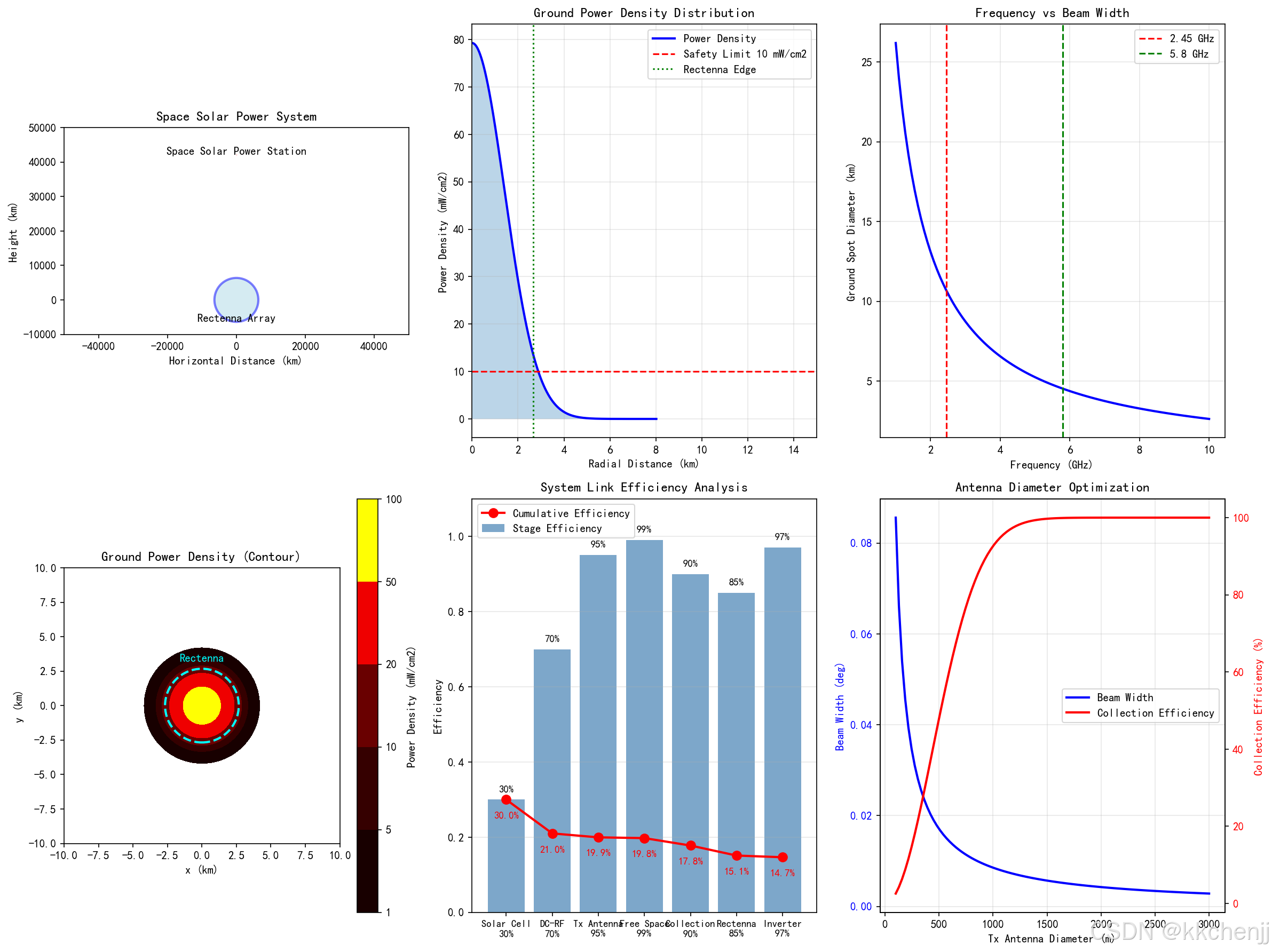
波束宽度极窄:对于1 km直径的发射天线,2.45 GHz频率下的3dB波束宽度仅为约0.007度。这种极窄的波束确保了能量可以精确地传输到地面接收站,减少能量损失和对周边区域的影响。
功率密度分布:高斯波束模型显示,地面功率密度呈中心高、边缘低的分布。在中心区域功率密度可达10-20 mW/cm²,而在边缘区域迅速下降到安全水平以下。这种分布有利于在有限面积内实现高效能量收集。
频率选择:仿真表明,2.45 GHz和5.8 GHz是理想的工作频率。这些频率具有较低的大气损耗(<0.5 dB),良好的生物安全性,以及成熟的技术基础。频率越高,波束越窄,但对指向精度的要求也越高。
8.2 相控阵性能分析
相控阵天线的仿真揭示了以下关键特性:
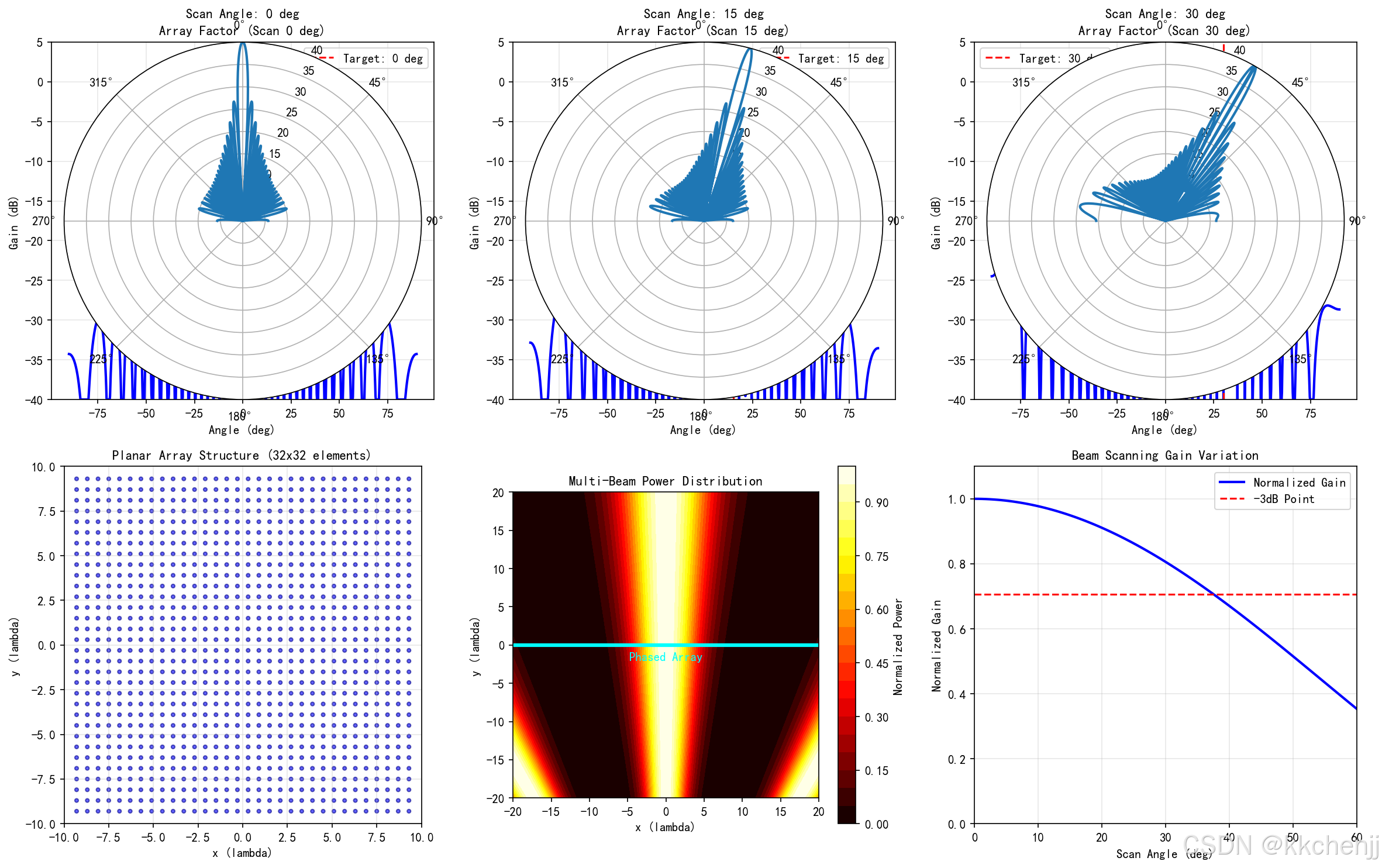
波束扫描能力:通过控制单元相位,波束可以在±30°范围内快速扫描。扫描速度可达微秒级,远快于机械扫描方式。这使得系统可以灵活地服务多个地面站或跟踪移动目标。
扫描损耗:随着扫描角度增大,由于单元方向图的影响,阵列增益会逐渐下降。在30°扫描角时,增益下降约3dB。这需要在系统设计时予以考虑,可通过增大阵列尺寸或采用特殊单元来补偿。
旁瓣控制:适当的幅度锥削(如Taylor分布)可以有效降低旁瓣电平,减少对非目标区域的能量辐射,提高系统安全性和效率。
8.3 整流天线效率分析
整流天线的仿真结果表明:
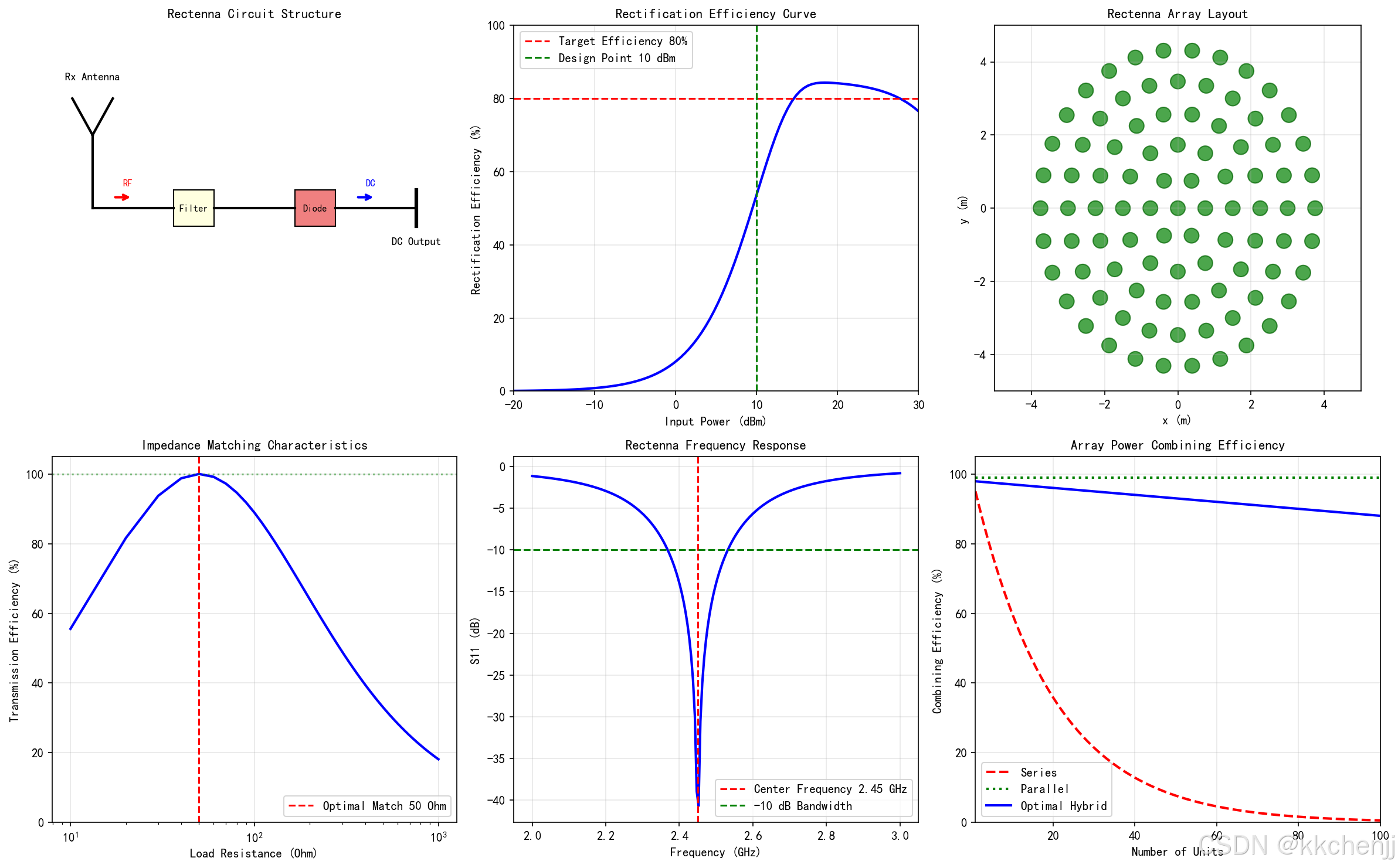
整流效率:现代肖特基二极管整流电路在最佳输入功率(约10 dBm)下,效率可达80-85%。效率曲线呈现先上升后下降的趋势,低功率时受限于二极管导通电压,高功率时受限于饱和效应。
阻抗匹配:负载阻抗与源阻抗的匹配对功率传输效率至关重要。当负载阻抗等于源阻抗(通常为50Ω)时,传输效率达到最大值100%。实际设计中需要采用匹配网络来优化。
阵列合成:大规模整流天线阵列的功率合成效率取决于合成方式。串联方式对单元一致性要求高,并联方式更稳定但电流大。优化设计采用混合串并联结构,可在100个单元规模下保持95%以上的合成效率。
8.4 系统效率评估
综合各环节效率,空间太阳能电站的总系统效率约为:
ηtotal=0.35×0.75×0.95×0.99×0.90×0.85×0.97≈15%\eta_{total} = 0.35 \times 0.75 \times 0.95 \times 0.99 \times 0.90 \times 0.85 \times 0.97 \approx 15\%ηtotal=0.35×0.75×0.95×0.99×0.90×0.85×0.97≈15%
这意味着从太阳光到地面电网的总能量转换效率约为15%。虽然这一效率低于地面太阳能电站,但空间太阳能的年可用时间超过99%,不受天气影响,综合能量产出具有优势。
8.5 安全性评估
安全性仿真表明:
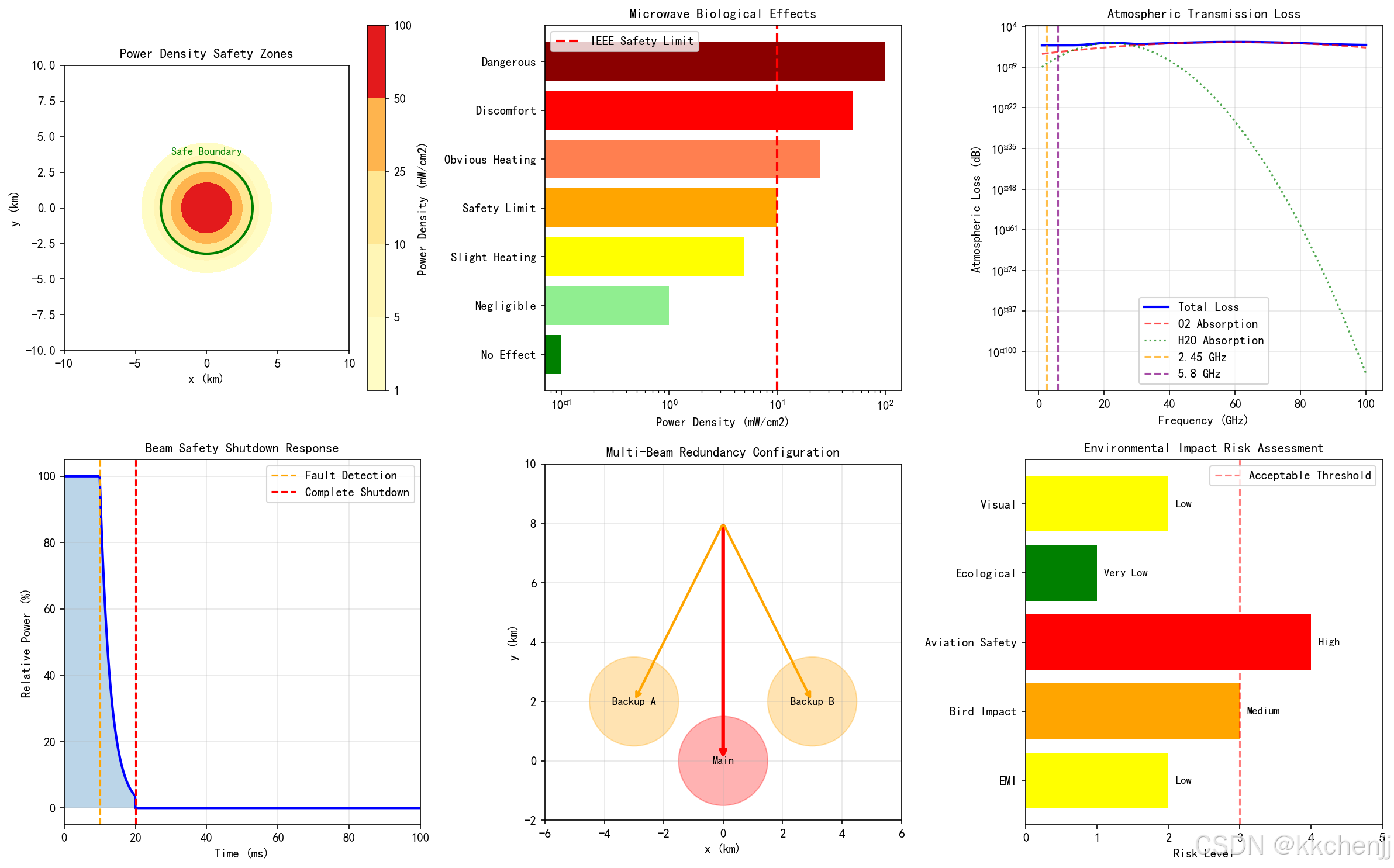
功率密度控制:通过精确控制波束指向和功率,可以确保公众暴露区域的功率密度远低于IEEE安全限值(10 mW/cm²)。整流天线阵列外部的功率密度通常小于1 mW/cm²。
快速切断:系统具备毫秒级的波束切断能力,一旦检测到异常(如飞机闯入、设备故障),可在20ms内将波束功率降至安全水平。
多波束冗余:采用多波束配置,即使部分波束失效,其他波束仍可继续工作,提高系统可靠性和安全性。
9. 工程应用与发展前景
9.1 典型应用场景
空间太阳能电站在以下场景具有独特优势:
偏远地区供电:为海岛、沙漠、极地等偏远地区提供稳定电力,避免长距离输电线路建设。
应急救灾:在自然灾害导致地面电网瘫痪时,快速提供应急电力支持。
军事应用:为军事基地、雷达站等提供独立可靠的能源供应。
太空探索:为月球基地、火星任务等提供持续能源。
9.2 技术挑战与解决方案
发射成本:当前火箭发射成本高昂。解决方案包括:
- 发展可重复使用火箭技术
- 采用在轨3D打印技术,利用空间资源制造部分组件
- 模块化设计,分批发射在轨组装
在轨组装:公里级结构的在轨建造极具挑战。解决方案包括:
- 自主机器人装配技术
- 模块化、标准化设计
- 地面充分验证,减少在轨操作
波束安全:高功率微波波束的精确控制至关重要。解决方案包括:
- 多层次的波束监测与控制系统
- 与航空管制系统联动
- 采用相控阵的波束快速切断能力
9.3 发展趋势
技术成熟度:从概念验证向工程实施过渡。日本、美国、中国等国家已开展MW级验证系统研究。
系统规模:从MW级向GW级发展。预计2030年实现MW级验证,2040年实现GW级商用系统。
效率提升:通过新型太阳能电池(效率>40%)、高效固态功率放大器(效率>80%)、先进整流技术(效率>90%),系统总效率有望提升至30%以上。
成本下降:随着航天技术发展和规模化生产,系统成本有望大幅下降,逐步实现商业化运营。
#!/usr/bin/env python3
# -*- coding: utf-8 -*-
"""
主题098:空间太阳能电站 - 电磁仿真
=====================================

本程序实现空间太阳能电站的电磁仿真分析,包括:
1. 微波波束在自由空间的传播特性
2. 相控阵天线波束形成与扫描
3. 整流天线阵列接收效率分析
4. 系统链路预算与效率优化
"""

import numpy as np
import matplotlib.pyplot as plt
from matplotlib.patches import Circle, Rectangle, FancyArrowPatch, Wedge
from matplotlib.collections import PatchCollection
import matplotlib.patches as mpatches
import warnings
warnings.filterwarnings('ignore')

# 设置中文字体
plt.rcParams['font.sans-serif'] = ['SimHei', 'DejaVu Sans']
plt.rcParams['axes.unicode_minus'] = False

# 创建输出目录
import os
output_dir = r'd:\文档\500仿真领域\工程仿真\高频电磁场仿真\主题098'
os.makedirs(output_dir, exist_ok=True)


# =============================================================================
# 仿真1:微波波束自由空间传播特性
# =============================================================================
def simulation_1_beam_propagation():
    """微波波束从GEO到地面的传播仿真"""
    print("[1/6] 运行微波波束传播仿真...")

    # 物理参数
    f = 2.45e9  # 频率 2.45 GHz
    c = 3e8     # 光速
    lambda_ = c / f  # 波长

    # 轨道参数
    R_geo = 35786e3  # 地球静止轨道高度 (m)
    R_earth = 6371e3  # 地球半径 (m)

    # 发射天线参数
    D_tx = 1000  # 发射天线直径 (m)
    eta_aperture = 0.6  # 孔径效率

    # 计算天线增益
    A_tx = np.pi * (D_tx/2)**2  # 发射天线面积
    G_tx = eta_aperture * (np.pi * D_tx / lambda_)**2  # 发射增益

    # 波束发散角 (3dB)
    theta_3db = 1.22 * lambda_ / D_tx  # 弧度
    theta_3db_deg = np.degrees(theta_3db)

    # 地面光斑直径
    D_spot = 2 * R_geo * np.tan(theta_3db/2) * 2  # 近似

    # 创建图形
    fig = plt.figure(figsize=(16, 12))

    # 子图1: 系统示意图
    ax1 = fig.add_subplot(2, 3, 1)

    # 绘制地球
    earth = Circle((0, 0), R_earth/1e3, facecolor='lightblue',
                   edgecolor='blue', linewidth=2, alpha=0.5)
    ax1.add_patch(earth)

    # 绘制空间电站
    ssps_y = (R_earth + R_geo) / 1e3
    ssps = Rectangle((-D_tx/2e3/2, ssps_y - 0.5), D_tx/2e3, 1,
                     facecolor='gold', edgecolor='orange', linewidth=2)
    ax1.add_patch(ssps)
    ax1.text(0, ssps_y + 1, 'Space Solar Power Station', ha='center', fontsize=10)

    # 绘制波束
    beam_angle = np.radians(10)
    x_beam = np.linspace(-D_spot/2e3/2, D_spot/2e3/2, 50)
    y_beam_top = ssps_y - (x_beam + D_tx/2e3/2) / np.tan(beam_angle)
    y_beam_bottom = ssps_y - (x_beam - D_tx/2e3/2) / np.tan(beam_angle)

    ax1.fill_between(x_beam, y_beam_top, y_beam_bottom, alpha=0.3, color='red')

    # 绘制地面接收站
    rectenna = Rectangle((-D_spot/2e3/2, -R_earth/1e3 - 1), D_spot/2e3, 1,
                         facecolor='green', edgecolor='darkgreen', linewidth=2)
    ax1.add_patch(rectenna)
    ax1.text(0, -R_earth/1e3 - 2, 'Rectenna Array', ha='center', fontsize=10)

    ax1.set_xlim(-50000, 50000)
    ax1.set_ylim(-10000, 50000)
    ax1.set_aspect('equal')
    ax1.set_title('Space Solar Power System', fontsize=12)
    ax1.set_xlabel('Horizontal Distance (km)')
    ax1.set_ylabel('Height (km)')

    # 子图2: 波束功率密度分布(地面)
    ax2 = fig.add_subplot(2, 3, 2)

    # 高斯波束功率密度分布
    r = np.linspace(0, D_spot/2 * 1.5, 500)  # 径向距离
    w_0 = D_tx / 2  # 束腰半径
    w = w_0 * np.sqrt(1 + (lambda_ * R_geo / (np.pi * w_0**2))**2)  # 地面波束半径

    P_total = 1e9  # 总发射功率 1 GW
    S_max = 2 * P_total / (np.pi * w**2)  # 中心功率密度
    S_r = S_max * np.exp(-2 * r**2 / w**2)  # 径向分布

    ax2.plot(r/1e3, S_r, 'b-', linewidth=2, label='Power Density')
    ax2.axhline(y=10, color='r', linestyle='--', label='Safety Limit 10 mW/cm2')
    ax2.fill_between(r/1e3, 0, S_r, alpha=0.3)

    # 标记整流天线范围
    ax2.axvline(x=D_spot/2e3/2, color='g', linestyle=':', label='Rectenna Edge')

    ax2.set_xlabel('Radial Distance (km)')
    ax2.set_ylabel('Power Density (mW/cm2)')
    ax2.set_title('Ground Power Density Distribution', fontsize=12)
    ax2.legend()
    ax2.grid(True, alpha=0.3)
    ax2.set_xlim(0, 15)

    # 子图3: 频率与波束宽度关系
    ax3 = fig.add_subplot(2, 3, 3)

    frequencies = np.linspace(1, 10, 100) * 1e9  # 1-10 GHz
    wavelengths = c / frequencies
    theta_beam = np.degrees(1.22 * wavelengths / D_tx)
    spot_diameters = 2 * R_geo * np.tan(np.radians(theta_beam)/2) * 2

    ax3.plot(frequencies/1e9, spot_diameters/1e3, 'b-', linewidth=2)
    ax3.axvline(x=2.45, color='r', linestyle='--', label='2.45 GHz')
    ax3.axvline(x=5.8, color='g', linestyle='--', label='5.8 GHz')

    ax3.set_xlabel('Frequency (GHz)')
    ax3.set_ylabel('Ground Spot Diameter (km)')
    ax3.set_title('Frequency vs Beam Width', fontsize=12)
    ax3.legend()
    ax3.grid(True, alpha=0.3)

    # 子图4: 功率密度等高线图
    ax4 = fig.add_subplot(2, 3, 4)

    x = np.linspace(-10e3, 10e3, 200)
    y = np.linspace(-10e3, 10e3, 200)
    X, Y = np.meshgrid(x, y)
    R = np.sqrt(X**2 + Y**2)

    S_density = S_max * np.exp(-2 * R**2 / w**2)

    levels = [1, 5, 10, 20, 50, 100]
    cs = ax4.contourf(X/1e3, Y/1e3, S_density, levels=levels, cmap='hot')
    plt.colorbar(cs, ax=ax4, label='Power Density (mW/cm2)')

    # 绘制整流天线边界
    rectenna_radius = D_spot/2/2
    circle = Circle((0, 0), rectenna_radius/1e3, fill=False,
                   color='cyan', linewidth=2, linestyle='--')
    ax4.add_patch(circle)
    ax4.text(0, rectenna_radius/1e3 + 0.5, 'Rectenna', ha='center',
            color='cyan', fontsize=10)

    ax4.set_xlabel('x (km)')
    ax4.set_ylabel('y (km)')
    ax4.set_title('Ground Power Density (Contour)', fontsize=12)
    ax4.set_aspect('equal')

    # 子图5: 链路预算分析
    ax5 = fig.add_subplot(2, 3, 5)

    components = ['Solar Cell\n30%', 'DC-RF\n70%', 'Tx Antenna\n95%',
                 'Free Space\n99%', 'Collection\n90%', 'Rectenna\n85%', 'Inverter\n97%']
    efficiencies = [0.30, 0.70, 0.95, 0.99, 0.90, 0.85, 0.97]
    cumulative = np.cumprod(efficiencies)

    x_pos = np.arange(len(components))
    bars = ax5.bar(x_pos, efficiencies, color='steelblue', alpha=0.7, label='Stage Efficiency')
    ax5.plot(x_pos, cumulative, 'ro-', linewidth=2, markersize=8, label='Cumulative Efficiency')

    # 添加数值标签
    for i, (bar, eff, cum) in enumerate(zip(bars, efficiencies, cumulative)):
        ax5.text(bar.get_x() + bar.get_width()/2, bar.get_height() + 0.02,
                f'{eff*100:.0f}%', ha='center', fontsize=9)
        ax5.text(i, cum - 0.05, f'{cum*100:.1f}%', ha='center',
                fontsize=9, color='red', fontweight='bold')

    ax5.set_xticks(x_pos)
    ax5.set_xticklabels(components, fontsize=9)
    ax5.set_ylabel('Efficiency')
    ax5.set_title('System Link Efficiency Analysis', fontsize=12)
    ax5.legend()
    ax5.set_ylim(0, 1.1)
    ax5.grid(True, alpha=0.3, axis='y')

    # 子图6: 天线直径与系统参数关系
    ax6 = fig.add_subplot(2, 3, 6)

    D_tx_range = np.linspace(100, 3000, 100)  # 100m - 3km
    theta_range = np.degrees(1.22 * lambda_ / D_tx_range)
    spot_range = 2 * R_geo * np.tan(np.radians(theta_range)/2) * 2

    # 收集效率(假设接收站直径固定为10km)
    D_rx = 10e3  # 接收站直径
    w_range = spot_range / 2.44  # 波束半径
    collection_eff = 1 - np.exp(-2 * (D_rx/2)**2 / w_range**2)

    ax6_twin = ax6.twinx()

    line1 = ax6.plot(D_tx_range, theta_range, 'b-', linewidth=2, label='Beam Width')
    line2 = ax6_twin.plot(D_tx_range, collection_eff * 100, 'r-', linewidth=2, label='Collection Efficiency')

    ax6.set_xlabel('Tx Antenna Diameter (m)')
    ax6.set_ylabel('Beam Width (deg)', color='b')
    ax6_twin.set_ylabel('Collection Efficiency (%)', color='r')
    ax6.tick_params(axis='y', labelcolor='b')
    ax6_twin.tick_params(axis='y', labelcolor='r')

    ax6.set_title('Antenna Diameter Optimization', fontsize=12)
    ax6.grid(True, alpha=0.3)

    # 合并图例
    lines = line1 + line2
    labels = [l.get_label() for l in lines]
    ax6.legend(lines, labels, loc='center right')

    plt.tight_layout()
    plt.savefig(f'{output_dir}/fig1_beam_propagation.png', dpi=150, bbox_inches='tight')
    plt.close()

    print("✓ Figure 1 saved: Beam Propagation Simulation")

    return {
        'wavelength': lambda_,
        'beamwidth_deg': theta_3db_deg,
        'spot_diameter_km': D_spot/1e3,
        'tx_gain_dB': 10*np.log10(G_tx),
        'collection_efficiency': collection_eff[-1] if 'collection_eff' in dir() else 0.9
    }


# =============================================================================
# 仿真2:相控阵天线波束形成
# =============================================================================
def simulation_2_phased_array():
    """相控阵天线波束形成与扫描仿真"""
    print("[2/6] Running Phased Array Beamforming Simulation...")

    # 参数设置
    f = 2.45e9  # 频率
    c = 3e8
    lambda_ = c / f
    k = 2 * np.pi / lambda_

    # 阵列参数
    N = 32  # 单元数(每边)
    d = 0.6 * lambda_  # 单元间距

    # 计算阵列因子
    theta = np.linspace(-90, 90, 1000)  # 角度范围
    theta_rad = np.radians(theta)

    # 不同扫描角度的阵列因子
    scan_angles = [0, 15, 30]  # 扫描角度

    fig, axes = plt.subplots(2, 3, figsize=(16, 10))

    # 子图1-3: 不同扫描角度的方向图
    for idx, scan_angle in enumerate(scan_angles):
        ax = axes[0, idx]

        # 相位递增量
        beta = -k * d * np.sin(np.radians(scan_angle))

        # 阵列因子计算
        psi = k * d * np.sin(theta_rad) + beta
        AF = np.abs(np.sin(N * psi / 2) / (N * np.sin(psi / 2) + 1e-10))
        AF = AF / np.max(AF)  # 归一化

        # 转换为dB
        AF_dB = 20 * np.log10(AF + 1e-10)
        AF_dB = np.clip(AF_dB, -40, 0)

        # 绘制极坐标方向图
        ax_polar = fig.add_subplot(2, 3, idx + 1, projection='polar')
        ax_polar.plot(theta_rad, AF_dB + 40, linewidth=2)
        ax_polar.set_ylim(0, 40)
        ax_polar.set_title(f'Scan Angle: {scan_angle} deg', fontsize=11, pad=20)
        ax_polar.set_theta_zero_location('N')
        ax_polar.set_theta_direction(-1)

        # 绘制直角坐标方向图
        axes[0, idx].plot(theta, AF_dB, 'b-', linewidth=2)
        axes[0, idx].axvline(x=scan_angle, color='r', linestyle='--',
                            label=f'Target: {scan_angle} deg')
        axes[0, idx].set_xlabel('Angle (deg)')
        axes[0, idx].set_ylabel('Gain (dB)')
        axes[0, idx].set_title(f'Array Factor (Scan {scan_angle} deg)', fontsize=11)
        axes[0, idx].set_ylim(-40, 5)
        axes[0, idx].grid(True, alpha=0.3)
        axes[0, idx].legend()

    # 子图4: 阵列几何结构
    ax4 = axes[1, 0]

    # 生成阵列单元位置
    x_pos = np.arange(N) * d - (N-1) * d / 2
    y_pos = np.arange(N) * d - (N-1) * d / 2
    X_pos, Y_pos = np.meshgrid(x_pos, y_pos)

    # 绘制单元
    for i in range(N):
        for j in range(N):
            circle = Circle((X_pos[i,j]/lambda_, Y_pos[i,j]/lambda_), 0.1,
                          facecolor='blue', edgecolor='darkblue', alpha=0.6)
            ax4.add_patch(circle)

    ax4.set_xlim(-10, 10)
    ax4.set_ylim(-10, 10)
    ax4.set_aspect('equal')
    ax4.set_xlabel('x (lambda)')
    ax4.set_ylabel('y (lambda)')
    ax4.set_title(f'Planar Array Structure ({N}x{N} elements)', fontsize=11)
    ax4.grid(True, alpha=0.3)

    # 子图5: 波束扫描动画帧(静态展示)
    ax5 = axes[1, 1]

    # 模拟波束扫描的功率分布
    x = np.linspace(-20, 20, 200)
    y = np.linspace(-20, 20, 200)
    X, Y = np.meshgrid(x, y)

    # 多个波束叠加
    beam_power = np.zeros_like(X)
    for scan_angle in [-30, 0, 30]:
        beta = -k * d * np.sin(np.radians(scan_angle))
        # 简化的波束功率分布
        beam_angle_rad = np.arctan2(X, Y + 50)
        beam_power += np.exp(-((np.degrees(beam_angle_rad) - scan_angle)/5)**2)

    im = ax5.contourf(X, Y, beam_power, levels=20, cmap='hot')
    plt.colorbar(im, ax=ax5, label='Normalized Power')

    # 绘制阵列位置
    ax5.axhline(y=0, color='cyan', linewidth=3)
    ax5.text(0, -2, 'Phased Array', ha='center', color='cyan', fontsize=10)

    ax5.set_xlabel('x (lambda)')
    ax5.set_ylabel('y (lambda)')
    ax5.set_title('Multi-Beam Power Distribution', fontsize=11)
    ax5.set_aspect('equal')

    # 子图6: 增益与扫描角度关系
    ax6 = axes[1, 2]

    scan_range = np.linspace(0, 60, 100)
    # 考虑单元方向图的影响(cos(theta)近似)
    element_pattern = np.cos(np.radians(scan_range))**1.5
    array_gain = element_pattern  # 简化模型

    ax6.plot(scan_range, array_gain, 'b-', linewidth=2, label='Normalized Gain')
    ax6.axhline(y=0.707, color='r', linestyle='--', label='-3dB Point')

    ax6.set_xlabel('Scan Angle (deg)')
    ax6.set_ylabel('Normalized Gain')
    ax6.set_title('Beam Scanning Gain Variation', fontsize=11)
    ax6.legend()
    ax6.grid(True, alpha=0.3)
    ax6.set_xlim(0, 60)
    ax6.set_ylim(0, 1.1)

    plt.tight_layout()
    plt.savefig(f'{output_dir}/fig2_phased_array.png', dpi=150, bbox_inches='tight')
    plt.close()

    print("✓ Figure 2 saved: Phased Array Beamforming Simulation")


# =============================================================================
# 仿真3:整流天线效率分析
# =============================================================================
def simulation_3_rectenna():
    """整流天线效率与功率转换仿真"""
    print("[3/6] Running Rectenna Efficiency Simulation...")

    fig, axes = plt.subplots(2, 3, figsize=(16, 10))

    # 子图1: 整流电路示意图
    ax1 = axes[0, 0]
    ax1.set_xlim(0, 10)
    ax1.set_ylim(0, 10)

    # 绘制天线
    ax1.plot([1, 1], [5, 7], 'k-', linewidth=2)
    ax1.plot([1, 0.5], [7, 8], 'k-', linewidth=2)
    ax1.plot([1, 1.5], [7, 8], 'k-', linewidth=2)
    ax1.text(1, 8.5, 'Rx Antenna', ha='center', fontsize=9)

    # 绘制滤波器和二极管
    ax1.plot([1, 3], [5, 5], 'k-', linewidth=2)
    ax1.add_patch(Rectangle((3, 4.5), 1, 1, facecolor='lightyellow',
                            edgecolor='black', linewidth=1))
    ax1.text(3.5, 5, 'Filter', ha='center', va='center', fontsize=8)

    ax1.plot([4, 6], [5, 5], 'k-', linewidth=2)
    ax1.add_patch(Rectangle((6, 4.5), 1, 1, facecolor='lightcoral',
                            edgecolor='black', linewidth=1))
    ax1.text(6.5, 5, 'Diode', ha='center', va='center', fontsize=8)

    # 绘制输出
    ax1.plot([7, 9], [5, 5], 'k-', linewidth=2)
    ax1.plot([9, 9], [4.5, 5.5], 'k-', linewidth=3)
    ax1.text(9, 4, 'DC Output', ha='center', fontsize=9)

    # 添加箭头
    ax1.annotate('', xy=(2, 5.3), xytext=(1.5, 5.3),
                arrowprops=dict(arrowstyle='->', color='red', lw=2))
    ax1.text(1.75, 5.6, 'RF', fontsize=8, color='red')

    ax1.annotate('', xy=(8, 5.3), xytext=(7.5, 5.3),
                arrowprops=dict(arrowstyle='->', color='blue', lw=2))
    ax1.text(7.75, 5.6, 'DC', fontsize=8, color='blue')

    ax1.set_title('Rectenna Circuit Structure', fontsize=11)
    ax1.axis('off')

    # 子图2: 整流效率与输入功率关系
    ax2 = axes[0, 1]

    P_in = np.linspace(-20, 30, 100)  # 输入功率 dBm
    P_in_linear = 10**((P_in - 30)/10)  # 转换为W

    # 肖特基二极管整流效率模型
    # 低功率时效率低,最佳效率点,高功率时饱和
    eta_rect = 0.85 * (1 - np.exp(-P_in_linear * 100)) * (1 - 0.1 * P_in_linear)
    eta_rect = np.clip(eta_rect, 0, 0.9)

    ax2.plot(P_in, eta_rect * 100, 'b-', linewidth=2)
    ax2.axhline(y=80, color='r', linestyle='--', label='Target Efficiency 80%')
    ax2.axvline(x=10, color='g', linestyle='--', label='Design Point 10 dBm')

    ax2.set_xlabel('Input Power (dBm)')
    ax2.set_ylabel('Rectification Efficiency (%)')
    ax2.set_title('Rectification Efficiency Curve', fontsize=11)
    ax2.legend()
    ax2.grid(True, alpha=0.3)
    ax2.set_xlim(-20, 30)
    ax2.set_ylim(0, 100)

    # 子图3: 整流天线阵列布局
    ax3 = axes[0, 2]

    # 六边形密铺阵列
    n_rings = 5
    hex_radius = 0.5

    positions = [(0, 0)]
    for ring in range(1, n_rings + 1):
        for i in range(6 * ring):
            angle = 2 * np.pi * i / (6 * ring)
            x = ring * hex_radius * 1.5 * np.cos(angle)
            y = ring * hex_radius * np.sqrt(3) * np.sin(angle)
            positions.append((x, y))

    # 绘制单元
    for pos in positions:
        hex_patch = Circle(pos, hex_radius * 0.4, facecolor='green',
                          edgecolor='darkgreen', alpha=0.7)
        ax3.add_patch(hex_patch)

    ax3.set_xlim(-5, 5)
    ax3.set_ylim(-5, 5)
    ax3.set_aspect('equal')
    ax3.set_xlabel('x (m)')
    ax3.set_ylabel('y (m)')
    ax3.set_title('Rectenna Array Layout', fontsize=11)
    ax3.grid(True, alpha=0.3)

    # 子图4: 负载匹配特性
    ax4 = axes[1, 0]

    R_load = np.linspace(10, 1000, 100)  # 负载电阻
    R_source = 50  # 源阻抗

    # 功率传输效率(阻抗匹配)
    eta_match = 4 * R_load * R_source / (R_load + R_source)**2

    ax4.semilogx(R_load, eta_match * 100, 'b-', linewidth=2)
    ax4.axvline(x=50, color='r', linestyle='--', label='Optimal Match 50 Ohm')
    ax4.axhline(y=100, color='g', linestyle=':', alpha=0.5)

    ax4.set_xlabel('Load Resistance (Ohm)')
    ax4.set_ylabel('Transmission Efficiency (%)')
    ax4.set_title('Impedance Matching Characteristics', fontsize=11)
    ax4.legend()
    ax4.grid(True, alpha=0.3)
    ax4.set_ylim(0, 105)

    # 子图5: 频率响应
    ax5 = axes[1, 1]

    f_center = 2.45e9
    f_range = np.linspace(2.0e9, 3.0e9, 200)

    # 天线带宽(假设Q=10)
    Q = 10
    BW = f_center / Q
    S11 = 10 * np.log10(((f_range - f_center)/BW)**2 / (1 + ((f_range - f_center)/BW)**2))

    ax5.plot(f_range/1e9, S11, 'b-', linewidth=2)
    ax5.axvline(x=2.45, color='r', linestyle='--', label='Center Frequency 2.45 GHz')
    ax5.axhline(y=-10, color='g', linestyle='--', label='-10 dB Bandwidth')

    ax5.set_xlabel('Frequency (GHz)')
    ax5.set_ylabel('S11 (dB)')
    ax5.set_title('Rectenna Frequency Response', fontsize=11)
    ax5.legend()
    ax5.grid(True, alpha=0.3)

    # 子图6: 阵列功率合成效率
    ax6 = axes[1, 2]

    N_units = np.arange(1, 101)  # 单元数量

    # 不同合成方式的效率
    eta_series = 0.95**N_units  # 串联(受限于最差单元)
    eta_parallel = 0.99 * np.ones_like(N_units)  # 并联(较稳定)
    eta_optimal = 0.98 - 0.001 * N_units  # 优化设计

    ax6.plot(N_units, eta_series * 100, 'r--', linewidth=2, label='Series')
    ax6.plot(N_units, eta_parallel * 100, 'g:', linewidth=2, label='Parallel')
    ax6.plot(N_units, eta_optimal * 100, 'b-', linewidth=2, label='Optimal Hybrid')

    ax6.set_xlabel('Number of Units')
    ax6.set_ylabel('Combining Efficiency (%)')
    ax6.set_title('Array Power Combining Efficiency', fontsize=11)
    ax6.legend()
    ax6.grid(True, alpha=0.3)
    ax6.set_xlim(1, 100)
    ax6.set_ylim(0, 105)

    plt.tight_layout()
    plt.savefig(f'{output_dir}/fig3_rectenna.png', dpi=150, bbox_inches='tight')
    plt.close()

    print("✓ Figure 3 saved: Rectenna Efficiency Simulation")


# =============================================================================
# 仿真4:系统级性能分析
# =============================================================================
def simulation_4_system_analysis():
    """空间太阳能电站系统级性能分析"""
    print("[4/6] Running System-Level Performance Analysis...")

    fig = plt.figure(figsize=(16, 12))

    # 物理常数
    c = 3e8

    # 子图1: 不同频率的系统效率对比
    ax1 = fig.add_subplot(2, 3, 1)

    frequencies = np.linspace(1, 10, 50) * 1e9  # 1-10 GHz

    # 各环节效率随频率变化
    eta_atmosphere = 0.995 - 0.001 * (frequencies/1e9 - 2.45)**2  # 大气损耗
    eta_rectenna = 0.9 - 0.02 * (frequencies/1e9 - 2.45)**2  # 整流效率
    eta_beam = 1 - 0.01 * (frequencies/1e9)  # 波束效率(频率越高波束越窄)

    eta_total = eta_atmosphere * eta_rectenna * eta_beam * 0.3 * 0.7 * 0.95 * 0.97

    ax1.plot(frequencies/1e9, eta_atmosphere * 100, 'b--', label='Atmosphere')
    ax1.plot(frequencies/1e9, eta_rectenna * 100, 'g:', label='Rectenna')
    ax1.plot(frequencies/1e9, eta_total * 100, 'r-', linewidth=2, label='Total Efficiency')
    ax1.axvline(x=2.45, color='orange', linestyle='--', alpha=0.7, label='2.45 GHz')
    ax1.axvline(x=5.8, color='purple', linestyle='--', alpha=0.7, label='5.8 GHz')

    ax1.set_xlabel('Frequency (GHz)')
    ax1.set_ylabel('Efficiency (%)')
    ax1.set_title('Frequency Impact on System Efficiency', fontsize=11)
    ax1.legend()
    ax1.grid(True, alpha=0.3)

    # 子图2: 发射功率与地面功率密度
    ax2 = fig.add_subplot(2, 3, 2)

    P_tx = np.linspace(0.1, 10, 50) * 1e9  # 0.1-10 GW

    # 地面中心功率密度
    D_spot = 5e3  # 光斑直径 5 km
    A_spot = np.pi * (D_spot/2)**2
    S_center = 2 * P_tx * 0.9 / A_spot  # mW/cm²

    ax2.plot(P_tx/1e9, S_center * 1e3, 'b-', linewidth=2)
    ax2.axhline(y=10, color='r', linestyle='--', label='Safety Limit 10 mW/cm2')
    ax2.axhline(y=100, color='orange', linestyle='--', label='Danger Limit 100 mW/cm2')

    # 标记工作点
    P_design = 1e9
    S_design = 2 * P_design * 0.9 / A_spot * 1e3
    ax2.plot(P_design/1e9, S_design, 'go', markersize=10)
    ax2.text(P_design/1e9 + 0.5, S_design, f'Design Point\n{P_design/1e9:.0f} GW', fontsize=9)

    ax2.set_xlabel('Transmit Power (GW)')
    ax2.set_ylabel('Center Power Density (mW/cm2)')
    ax2.set_title('Transmit Power vs Power Density', fontsize=11)
    ax2.legend()
    ax2.grid(True, alpha=0.3)

    # 子图3: 轨道位置与传输效率
    ax3 = fig.add_subplot(2, 3, 3)

    latitudes = np.linspace(0, 60, 100)  # 地面站纬度

    # 传输距离随纬度变化
    R_geo = 35786e3
    R_earth = 6371e3

    # 简化模型:距离随纬度增加
    distance = np.sqrt(R_geo**2 + R_earth**2 - 2*R_geo*R_earth*np.cos(np.radians(latitudes)))

    # 自由空间损耗
    lambda_ = 0.1224  # 2.45 GHz
    L_fs = (4 * np.pi * distance / lambda_)**2
    L_fs_dB = 10 * np.log10(L_fs)

    # 相对于赤道站的效率
    eta_relative = (distance[0] / distance)**2

    ax3.plot(latitudes, eta_relative * 100, 'b-', linewidth=2)
    ax3.set_xlabel('Ground Station Latitude (deg)')
    ax3.set_ylabel('Relative Transmission Efficiency (%)')
    ax3.set_title('Latitude Impact on Transmission Efficiency', fontsize=11)
    ax3.grid(True, alpha=0.3)
    ax3.set_ylim(80, 105)

    # 子图4: 年能量输出分析
    ax4 = fig.add_subplot(2, 3, 4)

    months = ['Jan', 'Feb', 'Mar', 'Apr', 'May', 'Jun',
             'Jul', 'Aug', 'Sep', 'Oct', 'Nov', 'Dec']

    # 空间太阳能电站年输出(稳定)
    ssps_output = np.ones(12) * 800  # 800 GWh/month

    # 地面太阳能对比(季节性变化)
    ground_solar = 400 + 200 * np.sin(np.linspace(0, 2*np.pi, 12) - np.pi/2)

    x = np.arange(len(months))
    width = 0.35

    ax4.bar(x - width/2, ssps_output, width, label='Space Solar', color='gold')
    ax4.bar(x + width/2, ground_solar, width, label='Ground Solar', color='orange', alpha=0.7)

    ax4.set_xlabel('Month')
    ax4.set_ylabel('Power Generation (GWh)')
    ax4.set_title('Annual Power Generation Comparison', fontsize=11)
    ax4.set_xticks(x)
    ax4.set_xticklabels(months, rotation=45)
    ax4.legend()
    ax4.grid(True, alpha=0.3, axis='y')

    # 子图5: 成本效益分析
    ax5 = fig.add_subplot(2, 3, 5)

    categories = ['Launch', 'Space Segment', 'Ground Segment', 'O&M', 'Retirement']
    costs = [30, 40, 15, 10, 5]  # 百分比

    colors = ['#ff9999', '#66b3ff', '#99ff99', '#ffcc99', '#ff99cc']
    explode = (0.05, 0.05, 0, 0, 0)

    ax5.pie(costs, explode=explode, labels=categories, colors=colors,
           autopct='%1.1f%%', shadow=True, startangle=90)
    ax5.set_title('Space Solar Power Station Cost Structure', fontsize=11)

    # 子图6: 技术发展路线图
    ax6 = fig.add_subplot(2, 3, 6)

    years = [2020, 2025, 2030, 2035, 2040, 2050]
    efficiency = [5, 10, 15, 25, 35, 45]  # 系统效率 %
    power_level = [0.001, 0.01, 0.1, 1, 5, 10]  # 功率水平 GW

    ax6_twin = ax6.twinx()

    line1 = ax6.plot(years, efficiency, 'bo-', linewidth=2, markersize=8, label='System Efficiency')
    line2 = ax6_twin.plot(years, power_level, 'rs--', linewidth=2, markersize=8, label='Power Level')

    ax6.set_xlabel('Year')
    ax6.set_ylabel('System Efficiency (%)', color='b')
    ax6_twin.set_ylabel('Power Level (GW)', color='r')
    ax6.tick_params(axis='y', labelcolor='b')
    ax6_twin.tick_params(axis='y', labelcolor='r')

    ax6.set_title('Technology Development Roadmap', fontsize=11)
    ax6.grid(True, alpha=0.3)

    # 添加里程碑标注
    milestones = [(2030, 15, 'MW Demo'), (2040, 35, 'GW Commercial')]
    for year, eff, text in milestones:
        ax6.annotate(text, xy=(year, eff), xytext=(year+2, eff+5),
                    arrowprops=dict(arrowstyle='->', color='green'),
                    fontsize=9, color='green')

    lines = line1 + line2
    labels = [l.get_label() for l in lines]
    ax6.legend(lines, labels, loc='upper left')

    plt.tight_layout()
    plt.savefig(f'{output_dir}/fig4_system_analysis.png', dpi=150, bbox_inches='tight')
    plt.close()

    print("✓ Figure 4 saved: System-Level Performance Analysis")


# =============================================================================
# 仿真5:波束形成与控制仿真
# =============================================================================
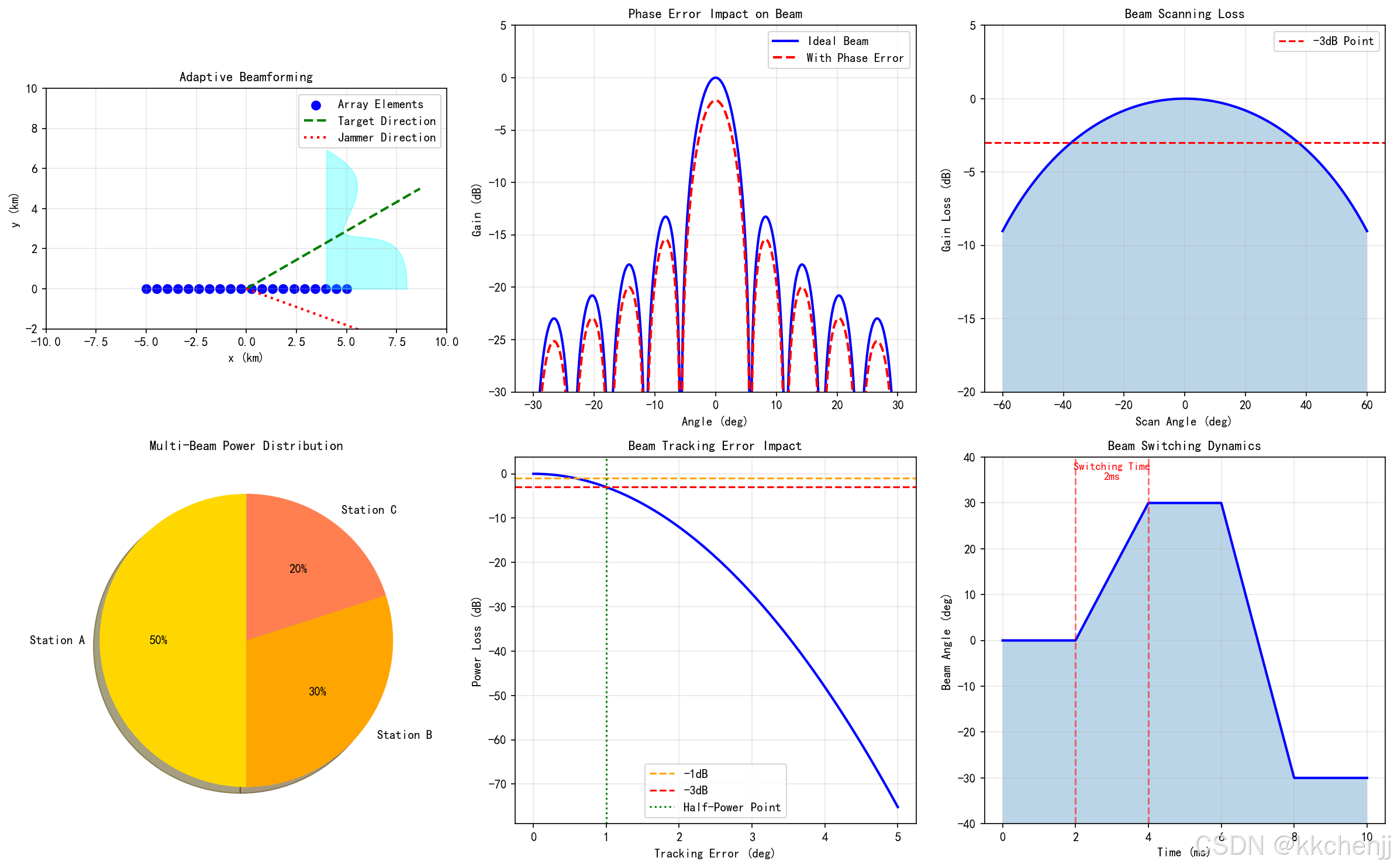
def simulation_5_beam_control():
    """波束自适应控制与优化仿真"""
    print("[5/6] Running Beam Control Simulation...")

    fig, axes = plt.subplots(2, 3, figsize=(16, 10))

    # 子图1: 自适应波束成形原理
    ax1 = axes[0, 0]

    # 绘制阵列和波束
    x_array = np.linspace(-5, 5, 20)
    y_array = np.zeros_like(x_array)

    ax1.scatter(x_array, y_array, c='blue', s=50, label='Array Elements')

    # 目标方向
    target_angle = 30
    x_target = 10 * np.cos(np.radians(target_angle))
    y_target = 10 * np.sin(np.radians(target_angle))
    ax1.plot([0, x_target], [0, y_target], 'g--', linewidth=2, label='Target Direction')

    # 干扰方向
    jammer_angle = -20
    x_jammer = 8 * np.cos(np.radians(jammer_angle))
    y_jammer = 8 * np.sin(np.radians(jammer_angle))
    ax1.plot([0, x_jammer], [0, y_jammer], 'r:', linewidth=2, label='Jammer Direction')
    ax1.scatter([x_jammer], [y_jammer], c='red', s=100, marker='x')

    # 波束形状示意
    theta_beam = np.linspace(0, np.radians(60), 50)
    r_beam = 8 * (1 - 0.3 * np.exp(-((np.degrees(theta_beam) - target_angle)/10)**2))
    x_beam = r_beam * np.cos(theta_beam)
    y_beam = r_beam * np.sin(theta_beam)
    ax1.fill_between(x_beam, y_beam, alpha=0.3, color='cyan')

    ax1.set_xlim(-10, 10)
    ax1.set_ylim(-2, 10)
    ax1.set_aspect('equal')
    ax1.set_xlabel('x (km)')
    ax1.set_ylabel('y (km)')
    ax1.set_title('Adaptive Beamforming', fontsize=11)
    ax1.legend()
    ax1.grid(True, alpha=0.3)

    # 子图2: 相位误差对波束的影响
    ax2 = axes[0, 1]

    theta = np.linspace(-30, 30, 500)

    # 理想波束
    AF_ideal = np.sinc(10 * np.sin(np.radians(theta)))**2
    AF_ideal = AF_ideal / np.max(AF_ideal)

    # 有相位误差的波束
    phase_error = 0.1  # 弧度
    AF_error = AF_ideal * np.exp(-(phase_error * 10)**2 / 2)

    ax2.plot(theta, 10 * np.log10(AF_ideal + 1e-10), 'b-', linewidth=2, label='Ideal Beam')
    ax2.plot(theta, 10 * np.log10(AF_error + 1e-10), 'r--', linewidth=2, label='With Phase Error')

    ax2.set_xlabel('Angle (deg)')
    ax2.set_ylabel('Gain (dB)')
    ax2.set_title('Phase Error Impact on Beam', fontsize=11)
    ax2.legend()
    ax2.grid(True, alpha=0.3)
    ax2.set_ylim(-30, 5)

    # 子图3: 波束扫描动态范围
    ax3 = axes[0, 2]

    scan_angles = np.linspace(-60, 60, 100)

    # 考虑单元方向图的影响
    element_pattern = np.cos(np.radians(scan_angles))**1.5

    # 扫描损耗
    scan_loss = element_pattern
    scan_loss_dB = 20 * np.log10(scan_loss + 1e-10)

    ax3.plot(scan_angles, scan_loss_dB, 'b-', linewidth=2)
    ax3.axhline(y=-3, color='r', linestyle='--', label='-3dB Point')
    ax3.fill_between(scan_angles, -20, scan_loss_dB, alpha=0.3)

    ax3.set_xlabel('Scan Angle (deg)')
    ax3.set_ylabel('Gain Loss (dB)')
    ax3.set_title('Beam Scanning Loss', fontsize=11)
    ax3.legend()
    ax3.grid(True, alpha=0.3)
    ax3.set_ylim(-20, 5)

    # 子图4: 多波束功率分配
    ax4 = axes[1, 0]

    # 三个地面站
    stations = ['Station A', 'Station B', 'Station C']
    power_split = [50, 30, 20]  # 功率分配比例
    colors = ['gold', 'orange', 'coral']

    wedges, texts, autotexts = ax4.pie(power_split, labels=stations, colors=colors,
                                       autopct='%1.0f%%', shadow=True, startangle=90)
    ax4.set_title('Multi-Beam Power Distribution', fontsize=11)

    # 子图5: 波束跟踪误差分析
    ax5 = axes[1, 1]

    error_angles = np.linspace(0, 5, 100)  # 跟踪误差角度

    # 高斯波束功率损失
    beamwidth = 2  # 度
    power_loss = np.exp(-2.77 * (error_angles / beamwidth)**2)
    power_loss_dB = 10 * np.log10(power_loss)

    ax5.plot(error_angles, power_loss_dB, 'b-', linewidth=2)
    ax5.axhline(y=-1, color='orange', linestyle='--', label='-1dB')
    ax5.axhline(y=-3, color='r', linestyle='--', label='-3dB')
    ax5.axvline(x=beamwidth/2, color='g', linestyle=':', label='Half-Power Point')

    ax5.set_xlabel('Tracking Error (deg)')
    ax5.set_ylabel('Power Loss (dB)')
    ax5.set_title('Beam Tracking Error Impact', fontsize=11)
    ax5.legend()
    ax5.grid(True, alpha=0.3)

    # 子图6: 波束切换时间
    ax6 = axes[1, 2]

    time = np.linspace(0, 10, 1000)  # 时间 ms

    # 模拟波束切换
    beam_position = np.zeros_like(time)
    beam_position[time < 2] = 0
    beam_position[(time >= 2) & (time < 4)] = 30 * (time[(time >= 2) & (time < 4)] - 2) / 2
    beam_position[(time >= 4) & (time < 6)] = 30
    beam_position[(time >= 6) & (time < 8)] = 30 - 60 * (time[(time >= 6) & (time < 8)] - 6) / 2
    beam_position[time >= 8] = -30

    ax6.plot(time, beam_position, 'b-', linewidth=2)
    ax6.fill_between(time, -40, beam_position, alpha=0.3)

    # 标记切换时间
    ax6.axvline(x=2, color='r', linestyle='--', alpha=0.5)
    ax6.axvline(x=4, color='r', linestyle='--', alpha=0.5)
    ax6.text(3, 35, 'Switching Time\n2ms', ha='center', fontsize=9, color='red')

    ax6.set_xlabel('Time (ms)')
    ax6.set_ylabel('Beam Angle (deg)')
    ax6.set_title('Beam Switching Dynamics', fontsize=11)
    ax6.grid(True, alpha=0.3)
    ax6.set_ylim(-40, 40)

    plt.tight_layout()
    plt.savefig(f'{output_dir}/fig5_beam_control.png', dpi=150, bbox_inches='tight')
    plt.close()

    print("✓ Figure 5 saved: Beam Control Simulation")


# =============================================================================
# 仿真6:安全性与环境影响分析
# =============================================================================
def simulation_6_safety_analysis():
    """安全性与环境影响分析"""
    print("[6/6] Running Safety Analysis...")

    fig, axes = plt.subplots(2, 3, figsize=(16, 10))

    # 子图1: 功率密度安全区域
    ax1 = axes[0, 0]

    # 地面功率密度分布
    x = np.linspace(-10, 10, 200)
    y = np.linspace(-10, 10, 200)
    X, Y = np.meshgrid(x, y)
    R = np.sqrt(X**2 + Y**2)

    # 高斯分布
    w = 3  # 波束半径 km
    S = 100 * np.exp(-2 * R**2 / w**2)  # 中心100 mW/cm²

    # 安全区域
    levels = [1, 5, 10, 25, 50, 100]
    cs = ax1.contourf(X, Y, S, levels=levels, cmap='YlOrRd')
    plt.colorbar(cs, ax=ax1, label='Power Density (mW/cm2)')

    # 标记安全限值
    safe_radius = w * np.sqrt(np.log(100/10) / 2)
    circle = Circle((0, 0), safe_radius, fill=False, color='green', linewidth=2)
    ax1.add_patch(circle)
    ax1.text(0, safe_radius + 0.5, 'Safe Boundary', ha='center', color='green', fontsize=9)

    ax1.set_xlabel('x (km)')
    ax1.set_ylabel('y (km)')
    ax1.set_title('Power Density Safety Zones', fontsize=11)
    ax1.set_aspect('equal')

    # 子图2: 生物效应与安全距离
    ax2 = axes[0, 1]

    # 不同功率密度下的生物效应
    power_density = np.array([0.1, 1, 5, 10, 25, 50, 100])  # mW/cm²
    effects = ['No Effect', 'Negligible', 'Slight Heating', 'Safety Limit', 'Obvious Heating', 'Discomfort', 'Dangerous']
    colors_bio = ['green', 'lightgreen', 'yellow', 'orange', 'coral', 'red', 'darkred']

    bars = ax2.barh(range(len(power_density)), power_density, color=colors_bio)
    ax2.set_yticks(range(len(power_density)))
    ax2.set_yticklabels(effects)
    ax2.set_xlabel('Power Density (mW/cm2)')
    ax2.set_title('Microwave Biological Effects', fontsize=11)
    ax2.axvline(x=10, color='red', linestyle='--', linewidth=2, label='IEEE Safety Limit')
    ax2.legend()
    ax2.set_xscale('log')

    # 子图3: 大气传输损耗
    ax3 = axes[0, 2]

    frequencies = np.linspace(1, 100, 200)  # GHz

    # 氧气吸收(简化模型)
    f_o2 = 60  # 氧气吸收峰
    loss_o2 = 0.1 * np.exp(-((frequencies - f_o2)/20)**2)

    # 水蒸气吸收(简化模型)
    f_h2o = 22  # 水蒸气吸收线
    loss_h2o = 0.05 * np.exp(-((frequencies - f_h2o)/5)**2)

    # 总大气损耗
    loss_total = loss_o2 + loss_h2o + 0.01  # 基础损耗

    ax3.plot(frequencies, loss_total, 'b-', linewidth=2, label='Total Loss')
    ax3.plot(frequencies, loss_o2, 'r--', alpha=0.7, label='O2 Absorption')
    ax3.plot(frequencies, loss_h2o, 'g:', alpha=0.7, label='H2O Absorption')

    ax3.axvline(x=2.45, color='orange', linestyle='--', alpha=0.7, label='2.45 GHz')
    ax3.axvline(x=5.8, color='purple', linestyle='--', alpha=0.7, label='5.8 GHz')

    ax3.set_xlabel('Frequency (GHz)')
    ax3.set_ylabel('Atmospheric Loss (dB)')
    ax3.set_title('Atmospheric Transmission Loss', fontsize=11)
    ax3.legend()
    ax3.grid(True, alpha=0.3)
    ax3.set_yscale('log')

    # 子图4: 波束切断响应时间
    ax4 = axes[1, 0]

    time_ms = np.linspace(0, 100, 1000)  # ms

    # 正常功率
    P_normal = np.ones_like(time_ms)
    # 故障检测后切断
    P_normal[time_ms > 10] = 0
    # 切断过程(指数衰减)
    mask = (time_ms > 10) & (time_ms < 20)
    P_normal[mask] = np.exp(-(time_ms[mask] - 10) / 3)
    P_normal[time_ms >= 20] = 0

    ax4.plot(time_ms, P_normal * 100, 'b-', linewidth=2)
    ax4.fill_between(time_ms, 0, P_normal * 100, alpha=0.3)

    # 标记时间点
    ax4.axvline(x=10, color='orange', linestyle='--', label='Fault Detection')
    ax4.axvline(x=20, color='red', linestyle='--', label='Complete Shutdown')

    ax4.set_xlabel('Time (ms)')
    ax4.set_ylabel('Relative Power (%)')
    ax4.set_title('Beam Safety Shutdown Response', fontsize=11)
    ax4.legend()
    ax4.grid(True, alpha=0.3)
    ax4.set_xlim(0, 100)

    # 子图5: 多波束安全冗余
    ax5 = axes[1, 1]

    # 绘制地面站分布
    stations_x = [0, -3, 3]
    stations_y = [0, 2, 2]
    station_names = ['Main', 'Backup A', 'Backup B']

    for i, (x, y, name) in enumerate(zip(stations_x, stations_y, station_names)):
        color = 'red' if i == 0 else 'orange'
        circle = Circle((x, y), 1.5, facecolor=color, alpha=0.3, edgecolor=color)
        ax5.add_patch(circle)
        ax5.text(x, y, name, ha='center', va='center', fontsize=9)

    # 绘制波束
    ax5.annotate('', xy=(0, 0), xytext=(0, 8),
                arrowprops=dict(arrowstyle='->', color='red', lw=3))
    ax5.annotate('', xy=(-3, 2), xytext=(0, 8),
                arrowprops=dict(arrowstyle='->', color='orange', lw=2))
    ax5.annotate('', xy=(3, 2), xytext=(0, 8),
                arrowprops=dict(arrowstyle='->', color='orange', lw=2))

    ax5.set_xlim(-6, 6)
    ax5.set_ylim(-2, 10)
    ax5.set_aspect('equal')
    ax5.set_xlabel('x (km)')
    ax5.set_ylabel('y (km)')
    ax5.set_title('Multi-Beam Redundancy Configuration', fontsize=11)
    ax5.grid(True, alpha=0.3)

    # 子图6: 环境影响评估
    ax6 = axes[1, 2]

    categories = ['EMI', 'Bird Impact', 'Aviation Safety', 'Ecological', 'Visual']
    risk_levels = [2, 3, 4, 1, 2]  # 1-5风险等级
    colors_risk = ['green', 'yellow', 'orange', 'red', 'darkred']

    bars = ax6.barh(categories, risk_levels, color=[colors_risk[r-1] for r in risk_levels])
    ax6.set_xlabel('Risk Level')
    ax6.set_title('Environmental Impact Risk Assessment', fontsize=11)
    ax6.set_xlim(0, 5)
    ax6.axvline(x=3, color='red', linestyle='--', alpha=0.5, label='Acceptable Threshold')
    ax6.legend()

    # 添加风险等级标签
    for i, (bar, risk) in enumerate(zip(bars, risk_levels)):
        labels = ['Very Low', 'Low', 'Medium', 'High', 'Very High']
        ax6.text(risk + 0.1, i, labels[risk-1], va='center', fontsize=9)

    plt.tight_layout()
    plt.savefig(f'{output_dir}/fig6_safety_analysis.png', dpi=150, bbox_inches='tight')
    plt.close()

    print("✓ Figure 6 saved: Safety Analysis")


# =============================================================================
# 主函数
# =============================================================================
def main():
    """主函数:运行所有仿真"""
    print("="*70)
    print("Topic 098: Space Solar Power Station - Electromagnetic Simulation")
    print("="*70)
    print()

    # 运行所有仿真
    results1 = simulation_1_beam_propagation()
    simulation_2_phased_array()
    simulation_3_rectenna()
    simulation_4_system_analysis()
    simulation_5_beam_control()
    simulation_6_safety_analysis()

    print()
    print("="*70)
    print("All Simulations Completed!")
    print("="*70)
    print()
    print("Generated Image Files:")
    print("1. fig1_beam_propagation.png - Beam Propagation Characteristics")
    print("2. fig2_phased_array.png - Phased Array Beamforming")
    print("3. fig3_rectenna.png - Rectenna Efficiency Analysis")
    print("4. fig4_system_analysis.png - System-Level Performance Analysis")
    print("5. fig5_beam_control.png - Beam Control Simulation")
    print("6. fig6_safety_analysis.png - Safety Analysis")
    print()
    print("Key Parameters:")
    print(f"  Wavelength: {results1['wavelength']*100:.2f} cm")
    print(f"  Beam Width: {results1['beamwidth_deg']:.4f} deg")
    print(f"  Ground Spot Diameter: {results1['spot_diameter_km']:.1f} km")
    print(f"  Transmit Gain: {results1['tx_gain_dB']:.1f} dB")


if __name__ == '__main__':
    main()
#!/usr/bin/env python3
# -*- coding: utf-8 -*-
"""
主题098:空间太阳能电站 - GIF动画生成
=========================================

本程序生成空间太阳能电站仿真的动态GIF动画,包括:
1. 微波波束扫描动画
2. 相控阵波束形成动态演示
3. 整流天线功率接收过程
4. 系统能量流动动画
"""

import numpy as np
import matplotlib.pyplot as plt
from matplotlib.patches import Circle, Rectangle, FancyArrowPatch, Wedge
import matplotlib.patches as mpatches
from PIL import Image
import io
import warnings
warnings.filterwarnings('ignore')

# 设置中文字体
plt.rcParams['font.sans-serif'] = ['SimHei', 'DejaVu Sans']
plt.rcParams['axes.unicode_minus'] = False

# 创建输出目录
import os
output_dir = r'd:\文档\500仿真领域\工程仿真\高频电磁场仿真\主题098'
os.makedirs(output_dir, exist_ok=True)


def save_gif(frames, filename, duration=100):
    """保存GIF动画"""
    filepath = os.path.join(output_dir, filename)
    frames[0].save(
        filepath,
        save_all=True,
        append_images=frames[1:],
        duration=duration,
        loop=0
    )
    print(f"  ✓ GIF已保存: {filename}")


def create_beam_scanning_animation():
    """GIF 1: 微波波束扫描动画"""
    print("[1/4] 生成波束扫描动画...")

    frames = []
    n_frames = 60

    # 物理参数
    f = 2.45e9
    c = 3e8
    lambda_ = c / f
    R_geo = 35786e3
    R_earth = 6371e3
    D_tx = 1000

    for i in range(n_frames):
        fig, ax = plt.subplots(figsize=(10, 8))

        # 扫描角度随时间变化
        scan_angle = 30 * np.sin(2 * np.pi * i / n_frames)

        # 绘制地球
        earth = Circle((0, 0), R_earth/1e3, facecolor='lightblue',
                       edgecolor='blue', linewidth=2, alpha=0.5)
        ax.add_patch(earth)

        # 绘制空间电站
        ssps_y = (R_earth + R_geo) / 1e3
        ssps = Rectangle((-D_tx/2e3/2, ssps_y - 0.5), D_tx/2e3, 1,
                         facecolor='gold', edgecolor='orange', linewidth=2)
        ax.add_patch(ssps)
        ax.text(0, ssps_y + 1, 'SSPS', ha='center', fontsize=10)

        # 绘制扫描波束
        beam_angle = np.radians(10 + scan_angle * 0.1)
        beam_width = 5  # km at ground

        # 波束中心位置
        ground_x = 50 * np.sin(np.radians(scan_angle))

        # 绘制波束(梯形)
        beam_x = [0, ground_x - beam_width/2, ground_x + beam_width/2, 0]
        beam_y = [ssps_y, 0, 0, ssps_y]
        ax.fill(beam_x, beam_y, alpha=0.3, color='red')

        # 绘制地面接收站
        rectenna = Rectangle((ground_x - 3, -R_earth/1e3 - 1), 6, 1,
                             facecolor='green', edgecolor='darkgreen', linewidth=2)
        ax.add_patch(rectenna)

        # 显示扫描角度
        ax.text(0, -R_earth/1e3 - 3, f'Scan Angle: {scan_angle:.1f} deg',
               ha='center', fontsize=12, fontweight='bold')

        ax.set_xlim(-100, 100)
        ax.set_ylim(-10000, 50000)
        ax.set_aspect('equal')
        ax.set_title('Microwave Beam Scanning Animation', fontsize=14)
        ax.set_xlabel('Horizontal Distance (km)')
        ax.set_ylabel('Height (km)')

        # 保存帧
        buf = io.BytesIO()
        plt.savefig(buf, format='png', dpi=100, bbox_inches='tight')
        buf.seek(0)
        frames.append(Image.open(buf))
        plt.close()

    save_gif(frames, 'gif1_beam_scanning.gif', duration=100)


def create_phased_array_animation():
    """GIF 2: 相控阵波束形成动画"""
    print("[2/4] 生成相控阵波束形成动画...")

    frames = []
    n_frames = 50

    # 阵列参数
    N = 16
    d = 0.6 * 0.1224  # 波长 2.45GHz
    k = 2 * np.pi / 0.1224

    for i in range(n_frames):
        fig, axes = plt.subplots(1, 2, figsize=(14, 6))

        # 扫描角度变化
        scan_angle = -30 + 60 * i / (n_frames - 1)

        # 左图:阵列相位分布
        ax1 = axes[0]

        x_pos = np.arange(N) * d - (N-1) * d / 2
        y_pos = np.zeros(N)

        # 计算相位
        beta = -k * d * np.sin(np.radians(scan_angle))
        phases = np.arange(N) * beta

        # 绘制单元(颜色表示相位)
        colors = plt.cm.hsv((phases % (2*np.pi)) / (2*np.pi))
        for j, (x, y, c) in enumerate(zip(x_pos, y_pos, colors)):
            circle = Circle((x*100, y), 3, facecolor=c, edgecolor='black', linewidth=1)
            ax1.add_patch(circle)

        # 绘制目标方向
        arrow_length = 30
        ax1.arrow(0, 5, arrow_length * np.sin(np.radians(scan_angle)),
                 arrow_length * np.cos(np.radians(scan_angle)),
                 head_width=2, head_length=3, fc='red', ec='red', linewidth=2)

        ax1.set_xlim(-100, 100)
        ax1.set_ylim(-10, 50)
        ax1.set_aspect('equal')
        ax1.set_xlabel('Position (cm)')
        ax1.set_ylabel('Distance (cm)')
        ax1.set_title(f'Array Phase Distribution\nScan Angle: {scan_angle:.1f} deg', fontsize=11)
        ax1.grid(True, alpha=0.3)

        # 右图:波束方向图
        ax2 = axes[1]

        theta = np.linspace(-90, 90, 500)
        theta_rad = np.radians(theta)

        psi = k * d * np.sin(theta_rad) + beta
        AF = np.abs(np.sin(N * psi / 2) / (N * np.sin(psi / 2) + 1e-10))
        AF = AF / np.max(AF)
        AF_dB = 20 * np.log10(AF + 1e-10)
        AF_dB = np.clip(AF_dB, -40, 0)

        ax2.plot(theta, AF_dB, 'b-', linewidth=2)
        ax2.axvline(x=scan_angle, color='r', linestyle='--', linewidth=2, label='Target')
        ax2.fill_between(theta, -40, AF_dB, alpha=0.3)

        ax2.set_xlabel('Angle (deg)')
        ax2.set_ylabel('Gain (dB)')
        ax2.set_title('Array Radiation Pattern', fontsize=11)
        ax2.set_ylim(-40, 5)
        ax2.legend()
        ax2.grid(True, alpha=0.3)

        # 保存帧
        buf = io.BytesIO()
        plt.tight_layout()
        plt.savefig(buf, format='png', dpi=100, bbox_inches='tight')
        buf.seek(0)
        frames.append(Image.open(buf))
        plt.close()

    save_gif(frames, 'gif2_phased_array.gif', duration=80)


def create_rectenna_power_animation():
    """GIF 3: 整流天线功率接收动画"""
    print("[3/4] 生成整流天线功率接收动画...")

    frames = []
    n_frames = 40

    for i in range(n_frames):
        fig, axes = plt.subplots(1, 2, figsize=(14, 6))

        # 功率变化(模拟云层遮挡或功率波动)
        power_factor = 0.5 + 0.5 * np.sin(2 * np.pi * i / n_frames)

        # 左图:整流天线阵列功率分布
        ax1 = axes[0]

        # 生成阵列布局
        n_rings = 4
        hex_radius = 1
        positions = [(0, 0)]
        for ring in range(1, n_rings + 1):
            for j in range(6 * ring):
                angle = 2 * np.pi * j / (6 * ring)
                x = ring * hex_radius * 1.5 * np.cos(angle)
                y = ring * hex_radius * np.sqrt(3) * np.sin(angle)
                positions.append((x, y))

        # 绘制单元(亮度表示功率)
        for pos in positions:
            # 添加随机变化
            unit_power = power_factor * (0.8 + 0.2 * np.random.random())
            color_intensity = unit_power
            circle = Circle(pos, hex_radius * 0.4,
                          facecolor=plt.cm.YlOrRd(color_intensity),
                          edgecolor='darkgreen', linewidth=0.5, alpha=0.8)
            ax1.add_patch(circle)

        ax1.set_xlim(-8, 8)
        ax1.set_ylim(-8, 8)
        ax1.set_aspect('equal')
        ax1.set_xlabel('x (m)')
        ax1.set_ylabel('y (m)')
        ax1.set_title(f'Rectenna Array Power Distribution\nRelative Power: {power_factor*100:.0f}%',
                     fontsize=11)
        ax1.grid(True, alpha=0.3)

        # 右图:功率转换过程
        ax2 = axes[1]

        # 绘制能量流动
        stages = ['RF Input', 'Antenna', 'Matching', 'Diode', 'DC Output']
        x_stages = np.arange(len(stages))

        # 各阶段功率
        P_rf = 100 * power_factor
        P_antenna = P_rf * 0.95
        P_match = P_antenna * 0.98
        P_diode = P_match * 0.85
        P_dc = P_diode * 0.97

        powers = [P_rf, P_antenna, P_match, P_diode, P_dc]

        bars = ax2.bar(x_stages, powers, color=['red', 'orange', 'yellow', 'lightgreen', 'green'],
                      alpha=0.7, edgecolor='black', linewidth=1)

        # 添加数值标签
        for bar, power in zip(bars, powers):
            height = bar.get_height()
            ax2.text(bar.get_x() + bar.get_width()/2., height + 1,
                    f'{power:.1f}%', ha='center', va='bottom', fontsize=10)

        # 添加效率箭头
        for j in range(len(stages) - 1):
            ax2.annotate('', xy=(j+1, powers[j+1]), xytext=(j+0.4, powers[j]),
                        arrowprops=dict(arrowstyle='->', color='blue', lw=2))

        ax2.set_xticks(x_stages)
        ax2.set_xticklabels(stages, rotation=15, ha='right')
        ax2.set_ylabel('Power (%)')
        ax2.set_title('Power Conversion Process', fontsize=11)
        ax2.set_ylim(0, 110)
        ax2.grid(True, alpha=0.3, axis='y')

        # 保存帧
        buf = io.BytesIO()
        plt.tight_layout()
        plt.savefig(buf, format='png', dpi=100, bbox_inches='tight')
        buf.seek(0)
        frames.append(Image.open(buf))
        plt.close()

    save_gif(frames, 'gif3_rectenna_power.gif', duration=100)


def create_system_energy_flow_animation():
    """GIF 4: 系统能量流动动画"""
    print("[4/4] 生成系统能量流动动画...")

    frames = []
    n_frames = 50

    for i in range(n_frames):
        fig, ax = plt.subplots(figsize=(14, 8))

        # 时间参数(模拟一天)
        time_of_day = (i / n_frames) * 24  # 小时

        # 绘制太空背景
        ax.set_facecolor('black')

        # 绘制太阳
        sun_x, sun_y = -10, 8
        sun = Circle((sun_x, sun_y), 1.5, facecolor='yellow', edgecolor='orange', linewidth=2)
        ax.add_patch(sun)
        ax.text(sun_x, sun_y - 2.5, 'Sun', ha='center', color='yellow', fontsize=12)

        # 太阳光线动画
        for j in range(5):
            offset = (i + j * 3) % 10
            alpha = 0.3 + 0.2 * np.sin(2 * np.pi * offset / 10)
            ax.plot([sun_x + 2, 0], [sun_y - 1, 5], 'y-', alpha=alpha, linewidth=2)

        # 绘制空间太阳能电站
        ssps = Rectangle((-2, 4), 4, 2, facecolor='silver', edgecolor='white', linewidth=2)
        ax.add_patch(ssps)
        ax.text(0, 5, 'SSPS', ha='center', va='center', fontsize=10, color='black')

        # 绘制微波波束(脉冲效果)
        beam_pulse = (i % 10) / 10
        beam_alpha = 0.3 + 0.4 * beam_pulse

        # 波束(从太空到地面)
        beam_x = [-1, -3, 3, 1]
        beam_y = [4, -4, -4, 4]
        ax.fill(beam_x, beam_y, alpha=beam_alpha, color='red')

        # 波束中的能量粒子
        for j in range(8):
            particle_y = 4 - 8 * ((i + j * 5) % 20) / 20
            particle_x = 0.5 * np.sin(2 * np.pi * (i + j) / 10)
            if -4 <= particle_y <= 4:
                ax.plot(particle_x, particle_y, 'yo', markersize=4)

        # 绘制地面整流天线
        rectenna = Rectangle((-4, -5), 8, 1, facecolor='green', edgecolor='white', linewidth=2)
        ax.add_patch(rectenna)
        ax.text(0, -5.5, 'Rectenna Array', ha='center', color='white', fontsize=10)

        # 绘制电网连接
        ax.plot([0, 0], [-5, -7], 'g-', linewidth=3)
        ax.add_patch(Rectangle((-1, -8), 2, 2, facecolor='blue', edgecolor='white', linewidth=2))
        ax.text(0, -7, 'Grid', ha='center', va='center', color='white', fontsize=10)

        # 能量流动标注
        ax.annotate('Solar Energy', xy=(0, 6), xytext=(-8, 7),
                   arrowprops=dict(arrowstyle='->', color='yellow', lw=2),
                   color='yellow', fontsize=10)
        ax.annotate('Microwave\nTransmission', xy=(0, 0), xytext=(5, 0),
                   arrowprops=dict(arrowstyle='->', color='red', lw=2),
                   color='red', fontsize=10)
        ax.annotate('DC Power', xy=(0, -6), xytext=(3, -6.5),
                   arrowprops=dict(arrowstyle='->', color='green', lw=2),
                   color='green', fontsize=10)

        # 效率指示
        efficiencies = [30, 70, 95, 99, 90, 85, 97]
        labels = ['Solar', 'DC-RF', 'Tx', 'Space', 'Collect', 'Rectify', 'Inverter']

        # 绘制效率条
        bar_y = -9.5
        for j, (eff, label) in enumerate(zip(efficiencies, labels)):
            bar_x = -8 + j * 2.3
            ax.add_patch(Rectangle((bar_x, bar_y), 2, 0.5,
                                  facecolor=plt.cm.RdYlGn(eff/100),
                                  edgecolor='white', linewidth=1))
            ax.text(bar_x + 1, bar_y - 0.3, f'{eff}%', ha='center',
                   color='white', fontsize=8)
            ax.text(bar_x + 1, bar_y + 0.7, label, ha='center',
                   color='white', fontsize=7, rotation=45)

        # 时间显示
        ax.text(8, 8, f'Time: {time_of_day:.1f}h', ha='right',
               color='white', fontsize=12, fontweight='bold')

        # 总效率
        total_eff = np.prod([e/100 for e in efficiencies]) * 100
        ax.text(8, 7, f'System Efficiency: {total_eff:.1f}%', ha='right',
               color='cyan', fontsize=11)

        ax.set_xlim(-12, 12)
        ax.set_ylim(-12, 12)
        ax.set_aspect('equal')
        ax.set_title('Space Solar Power Station - Energy Flow', fontsize=14, color='white')
        ax.axis('off')

        # 保存帧
        buf = io.BytesIO()
        plt.savefig(buf, format='png', dpi=100, bbox_inches='tight',
                   facecolor='black', edgecolor='none')
        buf.seek(0)
        frames.append(Image.open(buf))
        plt.close()

    save_gif(frames, 'gif4_system_energy_flow.gif', duration=100)


def create_beam_safety_animation():
    """GIF 5: 波束安全控制动画"""
    print("[5/5] 生成波束安全控制动画...")

    frames = []
    n_frames = 60

    for i in range(n_frames):
        fig, axes = plt.subplots(1, 2, figsize=(14, 6))

        # 模拟飞机闯入场景
        if i < 20:
            # 正常传输阶段
            status = 'Normal Operation'
            status_color = 'green'
            power_level = 100
            aircraft_visible = False
        elif i < 25:
            # 检测到飞机
            status = 'Aircraft Detected!'
            status_color = 'orange'
            power_level = 100
            aircraft_visible = True
        elif i < 35:
            # 切断波束
            status = 'Emergency Shutdown!'
            status_color = 'red'
            power_level = 100 * np.exp(-(i - 25) / 3)
            aircraft_visible = True
        else:
            # 安全状态
            status = 'Safe Mode'
            status_color = 'blue'
            power_level = 0
            aircraft_visible = True

        # 左图:波束功率分布
        ax1 = axes[0]

        x = np.linspace(-10, 10, 200)
        y = np.linspace(-10, 10, 200)
        X, Y = np.meshgrid(x, y)
        R = np.sqrt(X**2 + Y**2)

        # 高斯功率分布
        w = 3
        S = power_level * np.exp(-2 * R**2 / w**2)

        levels = [1, 5, 10, 25, 50, 100]
        cs = ax1.contourf(X, Y, S, levels=levels, cmap='YlOrRd')
        plt.colorbar(cs, ax=ax1, label='Power Density (mW/cm2)')

        # 安全边界
        safe_radius = w * np.sqrt(np.log(100/10) / 2)
        circle = Circle((0, 0), safe_radius, fill=False, color='green', linewidth=2)
        ax1.add_patch(circle)

        # 绘制飞机
        if aircraft_visible:
            aircraft_x = 5 - 10 * (i - 20) / 40 if i >= 20 else 5
            aircraft_y = 2
            ax1.plot(aircraft_x, aircraft_y, 'b^', markersize=15, label='Aircraft')

            # 危险区域警告
            if i >= 20 and i < 35:
                warning_circle = Circle((aircraft_x, aircraft_y), 1.5,
                                       fill=False, color='red', linewidth=2, linestyle='--')
                ax1.add_patch(warning_circle)

        ax1.set_xlabel('x (km)')
        ax1.set_ylabel('y (km)')
        ax1.set_title(f'Beam Power Distribution\n{status}', fontsize=11, color=status_color)
        ax1.set_aspect('equal')

        # 右图:功率与时间关系
        ax2 = axes[1]

        time_ms = np.linspace(0, 100, 200)

        # 构建功率曲线
        if i < 20:
            power_curve = np.ones_like(time_ms) * 100
        elif i < 25:
            power_curve = np.ones_like(time_ms) * 100
            power_curve[time_ms > (i-20)*5] = 100
        elif i < 35:
            power_curve = np.ones_like(time_ms) * 100
            shutdown_start = 25
            mask = time_ms > shutdown_start
            power_curve[mask] = 100 * np.exp(-(time_ms[mask] - shutdown_start) / 3)
        else:
            power_curve = np.ones_like(time_ms) * 100
            power_curve[time_ms > 25] = 0

        ax2.plot(time_ms, power_curve, 'b-', linewidth=2)
        ax2.fill_between(time_ms, 0, power_curve, alpha=0.3)

        # 标记当前时间
        current_time = min(i * 1.5, 90)
        ax2.axvline(x=current_time, color='r', linestyle='--', linewidth=2)

        # 标记关键时间点
        ax2.axvline(x=20, color='orange', linestyle=':', alpha=0.7, label='Detection')
        ax2.axvline(x=35, color='red', linestyle=':', alpha=0.7, label='Full Shutdown')

        ax2.set_xlabel('Time (ms)')
        ax2.set_ylabel('Relative Power (%)')
        ax2.set_title('Emergency Shutdown Response', fontsize=11)
        ax2.legend()
        ax2.grid(True, alpha=0.3)
        ax2.set_xlim(0, 100)
        ax2.set_ylim(0, 110)

        # 保存帧
        buf = io.BytesIO()
        plt.tight_layout()
        plt.savefig(buf, format='png', dpi=100, bbox_inches='tight')
        buf.seek(0)
        frames.append(Image.open(buf))
        plt.close()

    save_gif(frames, 'gif5_beam_safety.gif', duration=80)


def main():
    """主函数:生成所有GIF动画"""
    print("="*70)
    print("Topic 098: Space Solar Power Station - GIF Animation Generation")
    print("="*70)
    print()

    create_beam_scanning_animation()
    create_phased_array_animation()
    create_rectenna_power_animation()
    create_system_energy_flow_animation()
    create_beam_safety_animation()

    print()
    print("="*70)
    print("All GIF Animations Generated!")
    print("="*70)
    print()
    print("Generated GIF Files:")
    print("1. gif1_beam_scanning.gif - Microwave Beam Scanning")
    print("2. gif2_phased_array.gif - Phased Array Beamforming")
    print("3. gif3_rectenna_power.gif - Rectenna Power Reception")
    print("4. gif4_system_energy_flow.gif - System Energy Flow")
    print("5. gif5_beam_safety.gif - Beam Safety Control")


if __name__ == '__main__':
    main()

AtomGit 是由开放原子开源基金会联合 CSDN 等生态伙伴共同推出的新一代开源与人工智能协作平台。平台坚持“开放、中立、公益”的理念,把代码托管、模型共享、数据集托管、智能体开发体验和算力服务整合在一起,为开发者提供从开发、训练到部署的一站式体验。
更多推荐
 3
3 0
0- 0



 已为社区贡献150条内容

所有评论(0)