用户管理模块设计方案
·
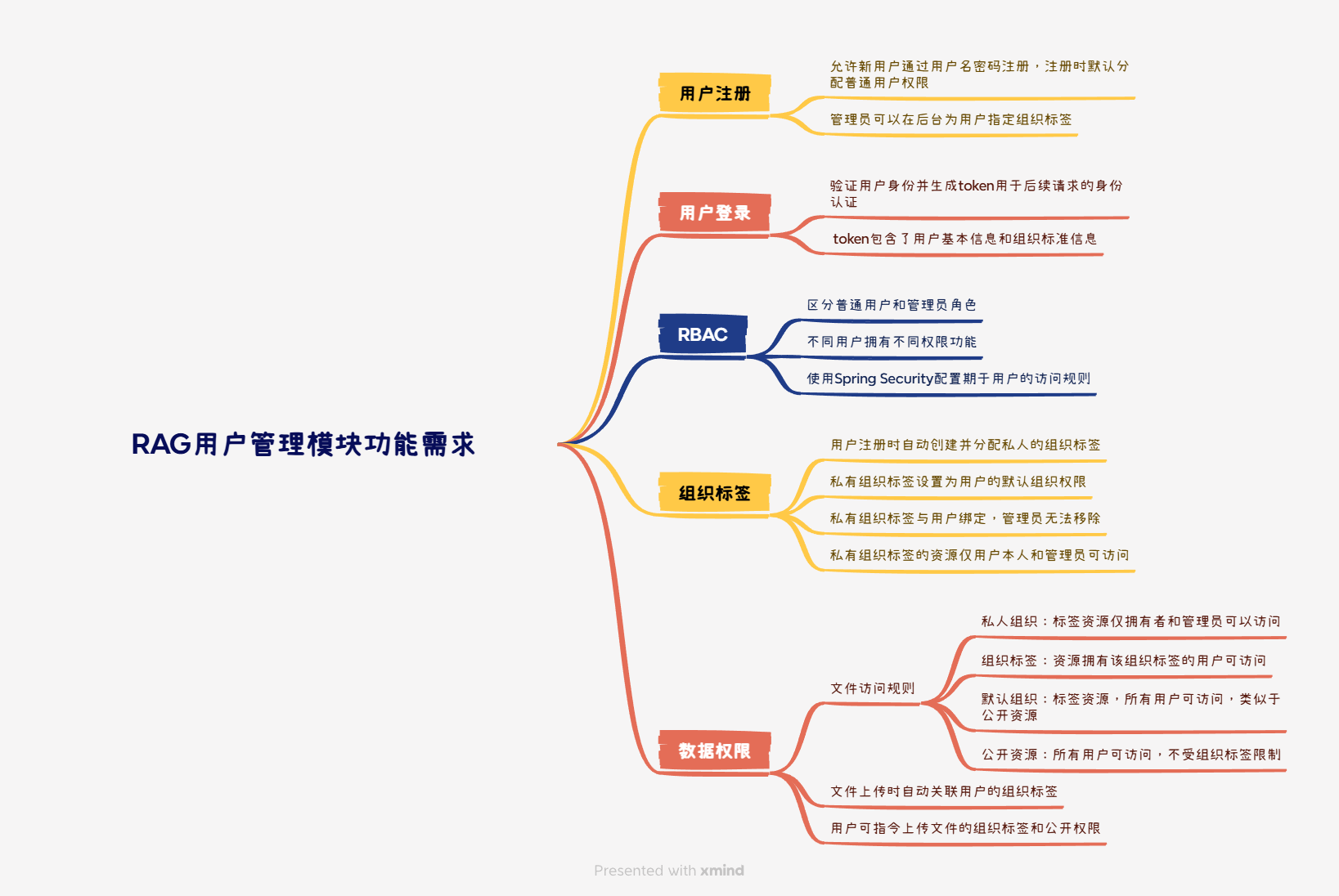
用户管理模块负责处理用户注册登录和权限控制功能,其核心目标是:
- 确保用户身份的安全性
- 提供灵活的权限管理机制支持角色的访问控制,通过RBAC实现不同角色的权限区分,通过组织标签实现数据访问权限隔离
- 为其他模块提供用户信息支持
功能需求
技术选型
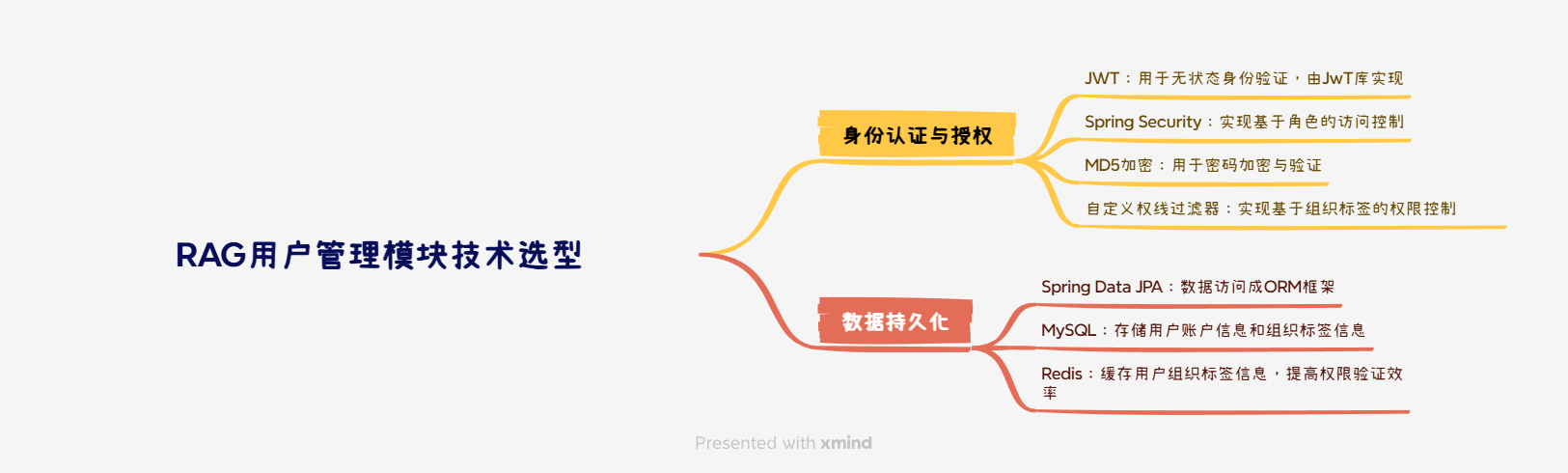
关键流程
用户注册流程
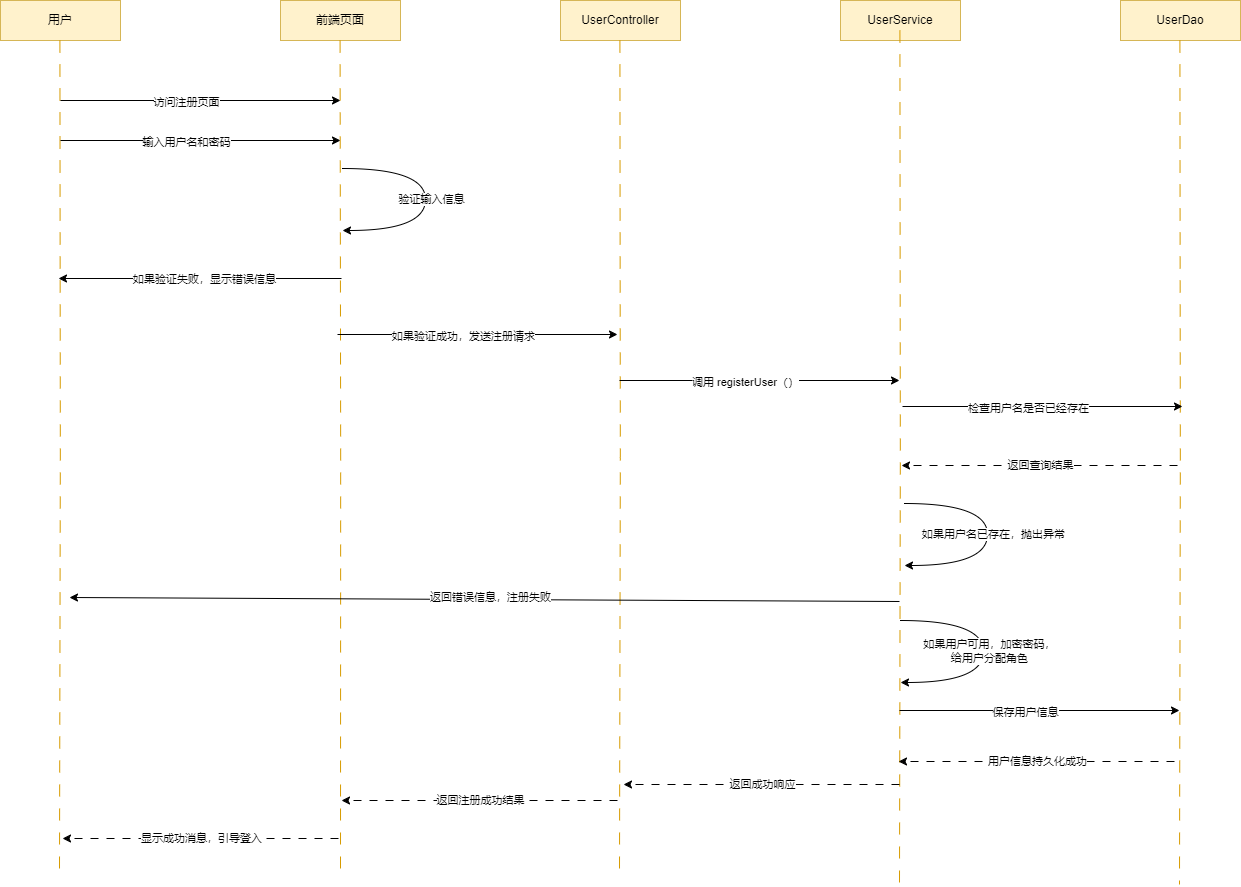
- 接收用户注册请求,验证用户名和密码
- 检查用户名是否已存在
- 使用md5加密
- 创建用户记录设置默认权限
- 创建私人组织标签
- 将私人组织标签设置为用户的主组织标签,返回注册成功响应
用户登录流程
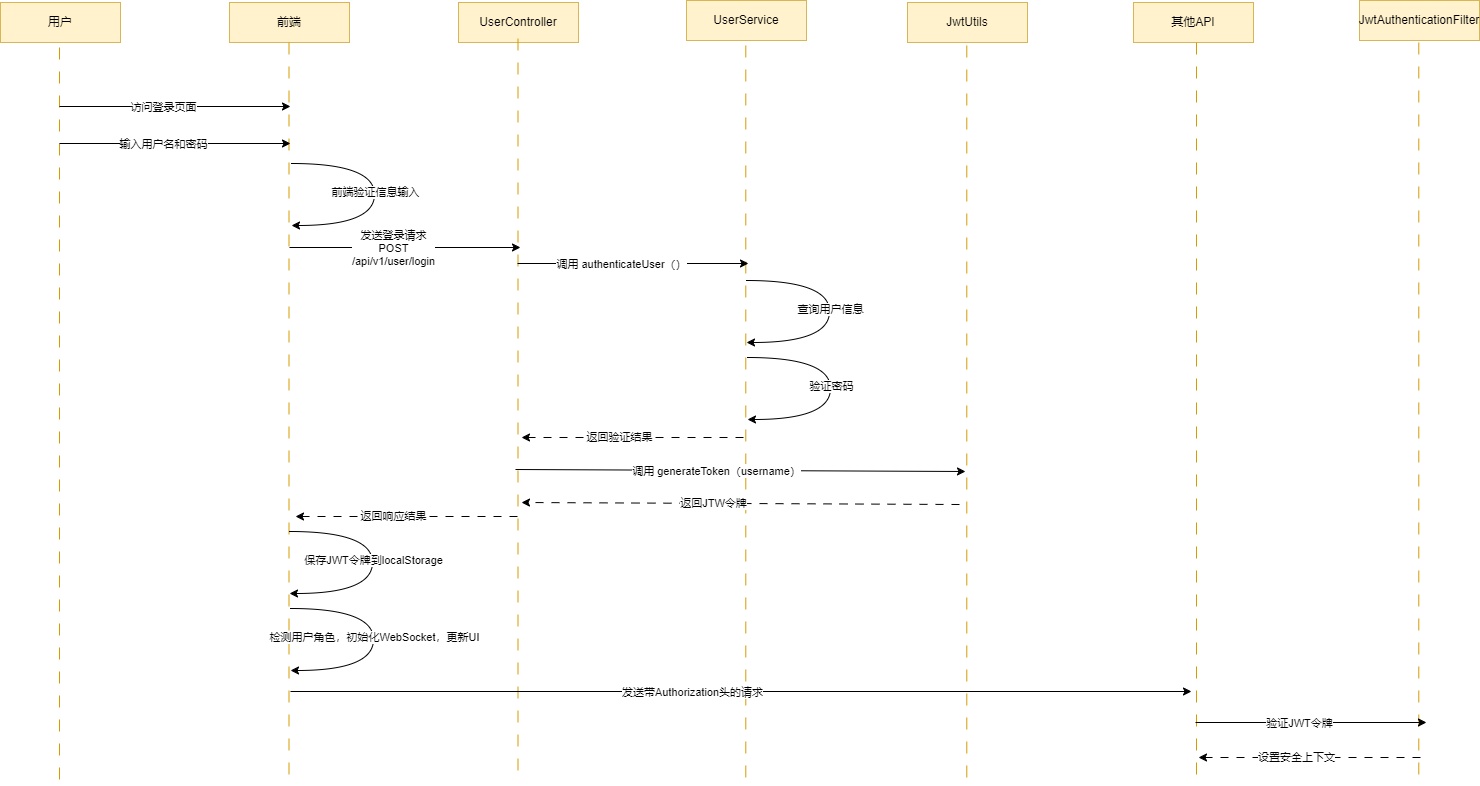
- 接收用户登录请求,获取用户名和密码
- 查询用户记录并验证密码;加载用户主织标签信息
- 生成包含用户信息和组织标签的jwt token
- 返回登录成功响应和token
组织标签管理流程
- 管理员创建组织标签设置标签名称和描述
- 可以选择设置父级组织标签
- 管理员为用户分配组织标签
- 系统自动保留用户的私人组织标签,确保其不能被移除
- 用户查看自己的组织标签
权限验证流程
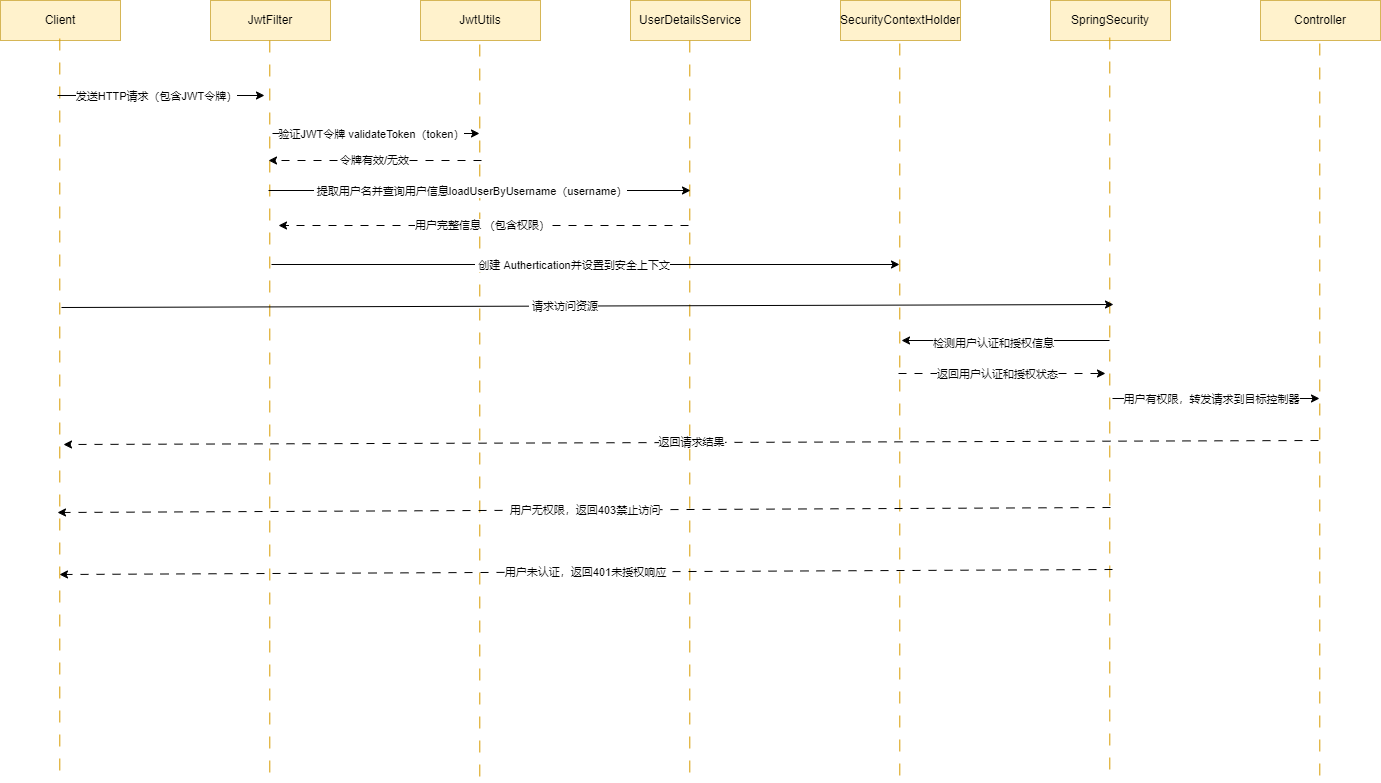
- 解析请求通道JWT token , 验证有效性
- 提取用户id,角色和组织标签信息
- 对功能权限请求,根据用户角色判断是否允许访问
- 对数据权限请求,根据用户组织标签判断是否可以访问特定资源
- 允许或拒绝请求访问
接口设计
01、用户注册接口
- URL: /api/v1/users/register
- Method: POST
- Request Body:
{
  "username": "string",   // 用户名,唯一
  "password": "string"    // 密码(明文传输,后端加密存储)
}- Response:
{
  "code": 200, // 成功
  "message": "User registered successfully"
}

{
  "code": 400, // 失败
  "message": "Username already exists"
}
02、用户登录接口
- URL: /api/v1/users/login
- Method: POST
- Request Body:
{
  "username": "string",
  "password": "string"
}- Response:
{
  "code": 200, // 成功
  "message": "Login successful",
  "data": {
    "token": "JWT_TOKEN_STRING"
  }
}

{
  "code": 401, // 失败
  "message": "Invalid username or password"
}
03、获取用户信息接口
- URL: /api/v1/users/me
- Method: GET
- Headers:
-
- Authorization: Bearer JWT_TOKEN_STRING
- Response:
{
  "code": 200,// 成功
  "message": "Success",
  "data": {
    "id": 1,
    "username": "example_user",
    "role": "USER",
    "orgTags": ["PRIVATE_example_user", "dept1", "team2"],
    "primaryOrg": "PRIVATE_example_user"
  }
}

{
  "code": 401, // 失败
  "message": "Unauthorized"
}
04、用户列表查询接口
- URL: /api/v1/admin/users/list
- Method: GET
- Headers:
-
- Authorization: Bearer JWT_TOKEN_STRING
- Query Parameters:
-
- page: 页码(从1开始,默认1)
- size: 每页条数(默认20)
- keyword: 搜索关键词(可选)
- orgTag: 按组织标签筛选(可选)
- status: 用户状态(可选,0=禁用,1=启用)
- Response:
{
  "code": 200,
  "message": "Get users successful",
  "data": {
    "content": [
      {
        "userId": "user1",
        "username": "用户1",
        "email": "user1@example.com",
        "status": 1,
        "orgTags": ["dept1", "team2"],
        "primaryOrg": "dept1",
        "createTime": "2023-01-01T12:00:00Z",
        "lastLoginTime": "2023-06-15T08:30:00Z"
      },
      // 更多用户...
    ],
    "totalElements": 150,
    "totalPages": 8,
    "size": 20,
    "number": 0
  }
}
05、组织标签管理接口
5.1 创建组织标签(管理员)
- URL: /api/v1/admin/org-tags
- Method: POST
- Headers:
-
- Authorization: Bearer JWT_TOKEN_STRING
- Request Body:
{
  "tagId": "string",     // 标签ID,唯一
  "name": "string",      // 标签名称
  "description": "string", // 标签描述
  "parentTag": "string"  // 父标签ID(可选)
}- Response:
{
  "code": 200, // 成功
  "message": "Organization tag created successfully"
}
5.2 为用户分配组织标签(admin)
- URL: /api/v1/admin/users/{userId}/org-tags
- Method: PUT
- Headers:
-
- Authorization: Bearer JWT_TOKEN_STRING
- Request Body:
{
  "orgTags": ["tag1", "tag2"]
}- Response:
{
  "code": 200, //   成功:
  "message": "Organization tags assigned successfully"
}
5.3 设置用户主组织
- URL: /api/v1/users/primary-org
- Method: PUT
- Headers:
-
- Authorization: Bearer JWT_TOKEN_STRING
- Request Body:
{
  "primaryOrg": "tag1",
  "userId":"xxx"
}- Response:
{
  "code": 200,
  "message": "Primary organization set successfully"
}
5.4 获取用户组织标签详情
- URL: /api/v1/users/org-tags
- Method: GET
- Headers:
-
- Authorization: Bearer JWT_TOKEN_STRING
- Response:
{
  "code": 200,
  "message": "Get user organization tags successful",
  "data": {
    "orgTags": ["PRIVATE_example_user", "dept1", "team2"],
    "primaryOrg": "PRIVATE_example_user",
    "orgTagDetails": [
      {
        "tagId": "PRIVATE_example_user",
        "name": "example_user的私人空间",
        "description": "用户的私人组织标签,仅用户本人可访问"
      },
      {
        "tagId": "dept1",
        "name": "部门1",
        "description": "部门1的组织标签"
      },
      {
        "tagId": "team2",
        "name": "团队2",
        "description": "团队2的组织标签"
      }
    ]
  }
}
5.5 组织标签树查询接口 (admin)
- URL: /api/v1/admin/org-tags/tree
- Method: GET
- Headers:
-
- Authorization: Bearer JWT_TOKEN_STRING
- Response:
{
  "code": 200,
  "message": "Get organization tag tree successful",
  "data": [
    {
      "tagId": "dept1",
      "name": "部门1",
      "description": "部门1描述",
      "children": [
        {
          "tagId": "team1",
          "name": "团队1",
          "description": "团队1描述",
          "children": []
        },
        {
          "tagId": "team2",
          "name": "团队2",
          "description": "团队2描述",
          "children": []
        }
      ]
    },
    {
      "tagId": "dept2",
      "name": "部门2",
      "description": "部门2描述",
      "children": []
    }
  ]
}
5.6 更新组织标签接口(admin)
- URL: /api/v1/admin/org-tags/{tagId}
- Method: PUT
- Headers:
-
- Authorization: Bearer JWT_TOKEN_STRING
- Request Body:
{
  "name": "string",       // 新标签名称
  "description": "string", // 新标签描述
  "parentTag": "string"    // 新父标签ID(可选)
}- Response:
{
  "code": 200,
  "message": "Organization tag updated successfully"
}
5.7 删除组织标签接口
- URL: /api/v1/admin/org-tags/{tagId}
- Method: DELETE
- Headers:
-
- Authorization: Bearer JWT_TOKEN_STRING
- Response:
{
  "code": 200, // 成功
  "message": "Organization tag deleted successfully"
}
{
  "code": 409, // 错误(标签已被使用):
  "message": "Cannot delete tag as it is associated with users or documents"
}
库表设计
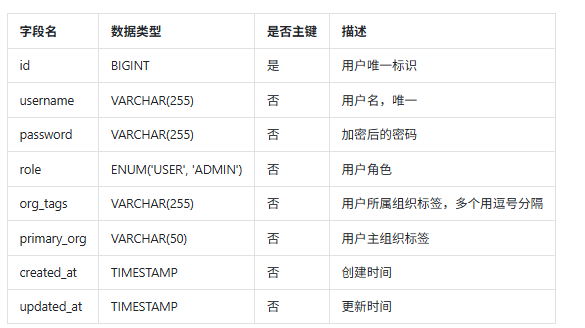
01、用户表 (users)
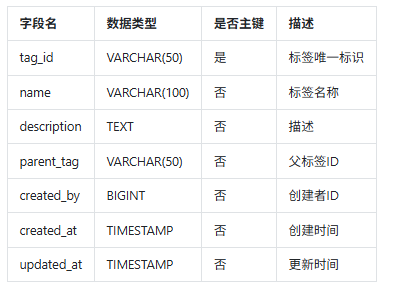
02、组织标签表

AtomGit 是由开放原子开源基金会联合 CSDN 等生态伙伴共同推出的新一代开源与人工智能协作平台。平台坚持“开放、中立、公益”的理念,把代码托管、模型共享、数据集托管、智能体开发体验和算力服务整合在一起,为开发者提供从开发、训练到部署的一站式体验。
更多推荐
 15
15 0
0- 0


 已为社区贡献49条内容

所有评论(0)