电磁场耦合仿真-主题090_空间电磁环境仿真-空间电磁环境仿真
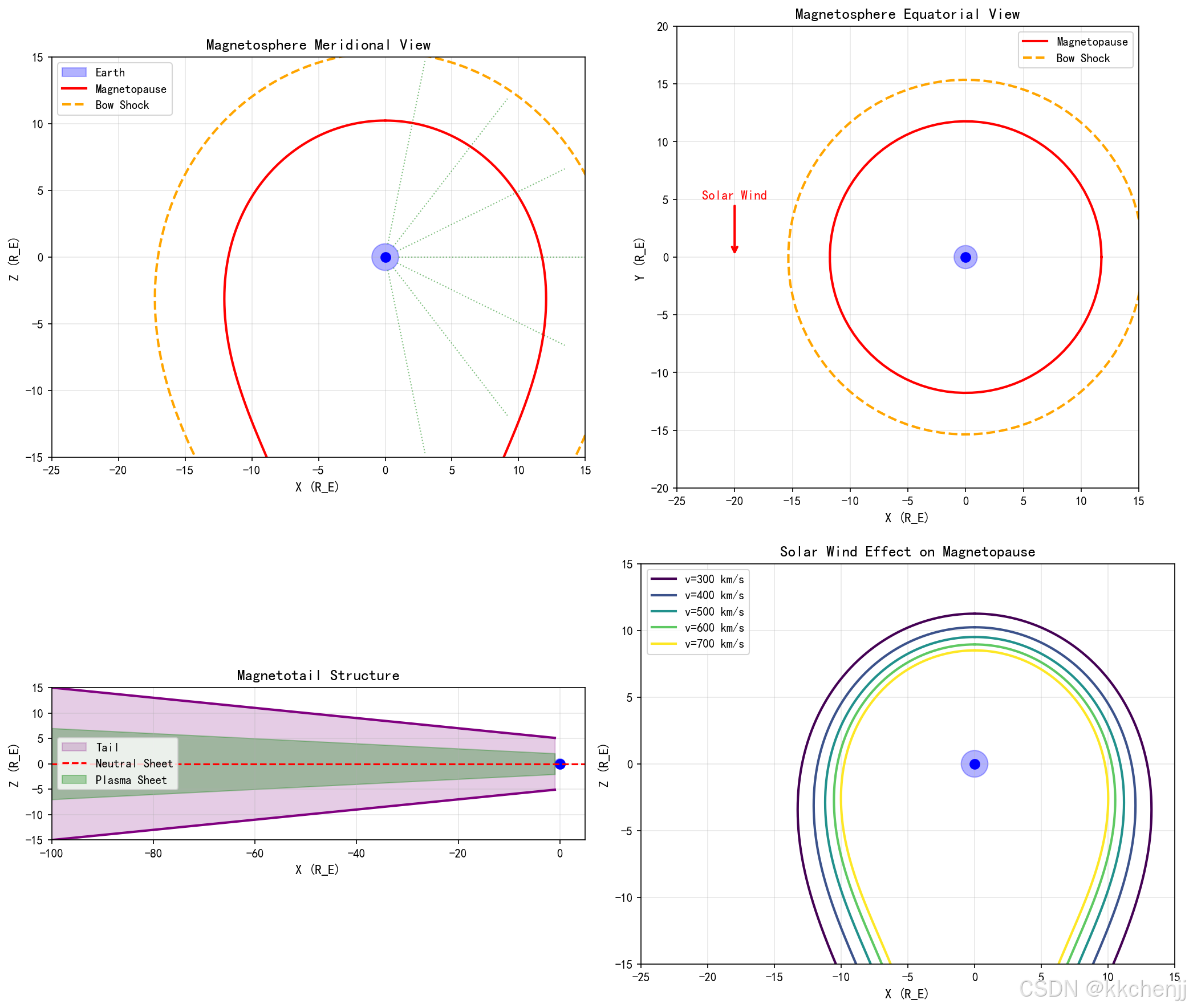
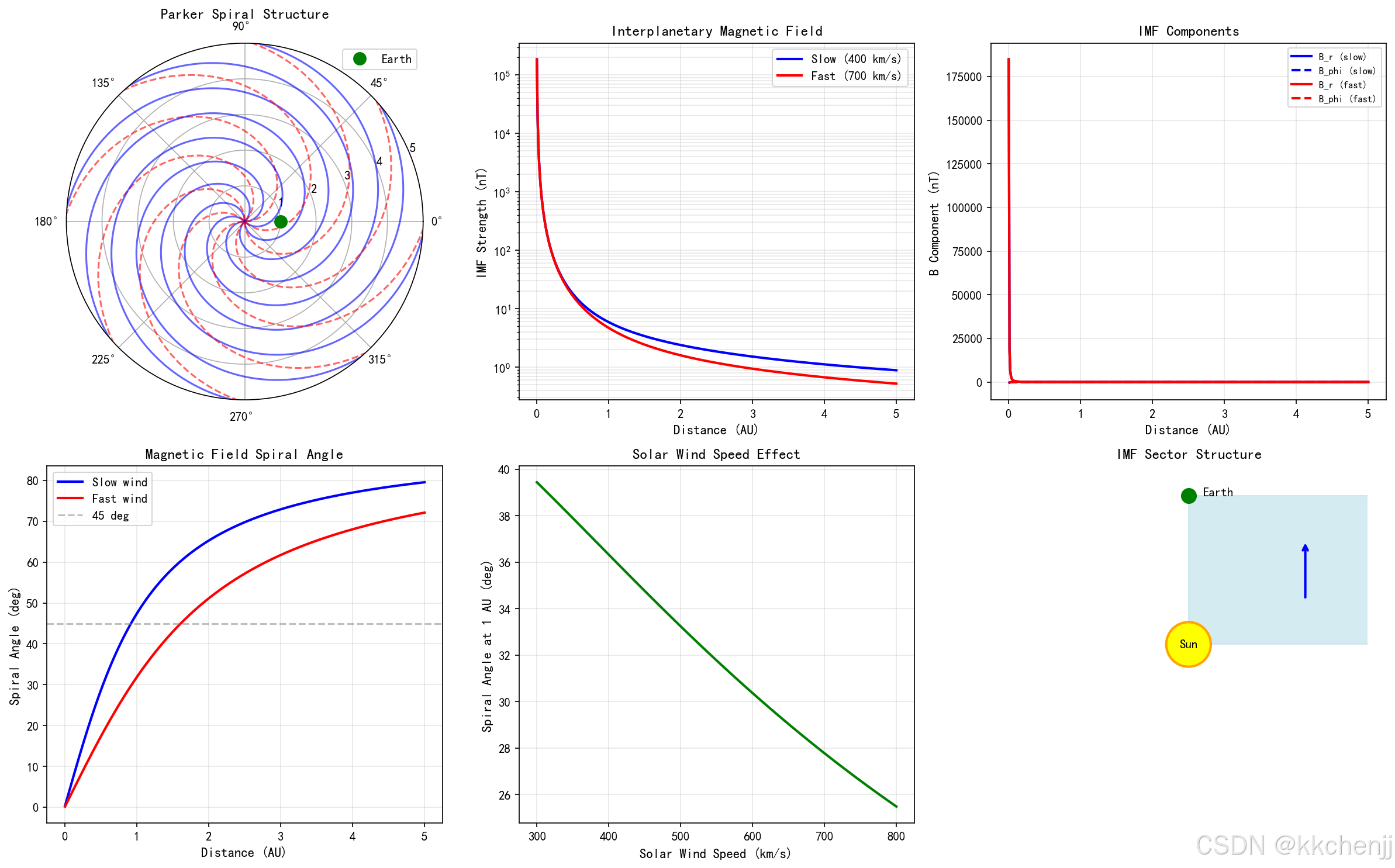
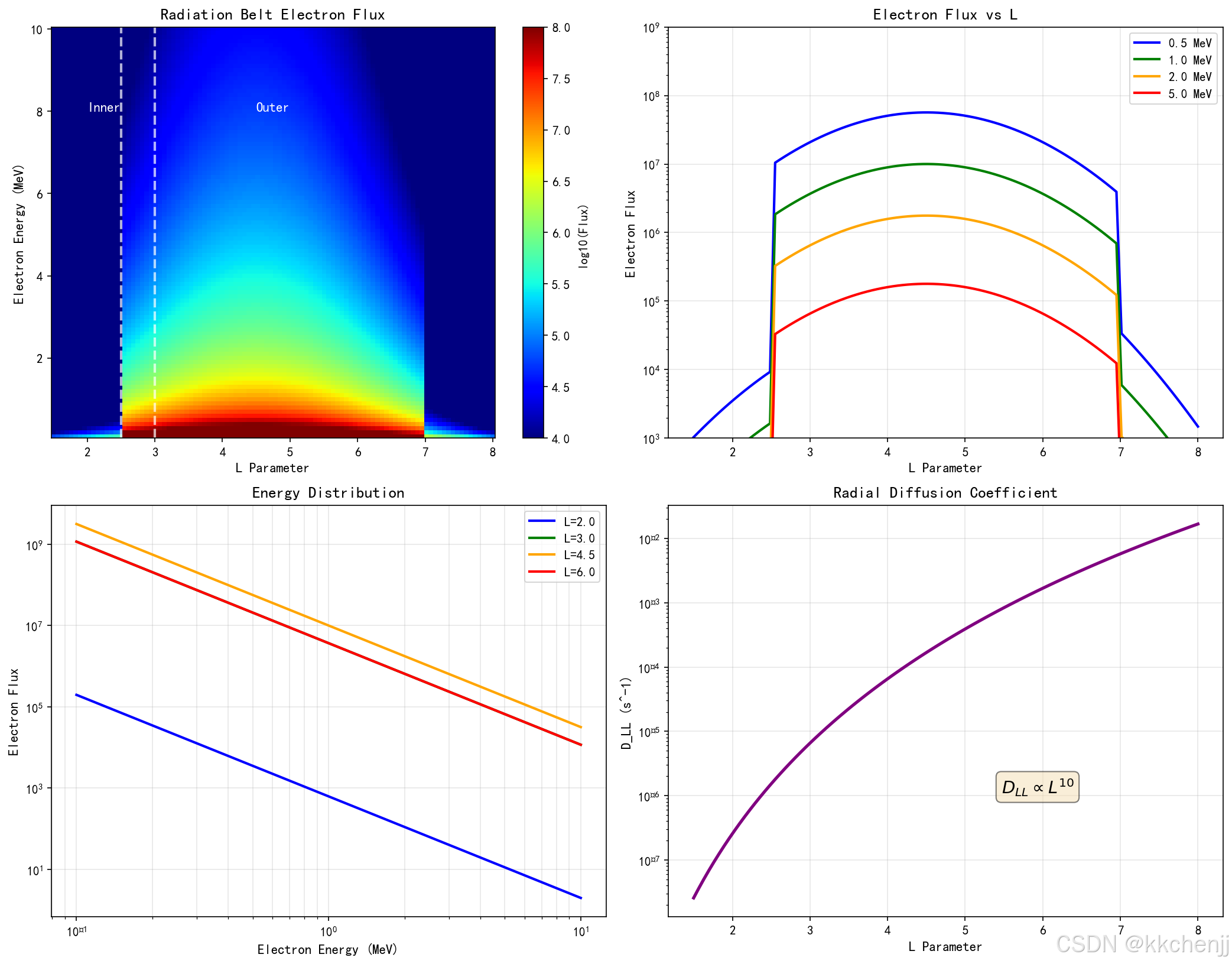
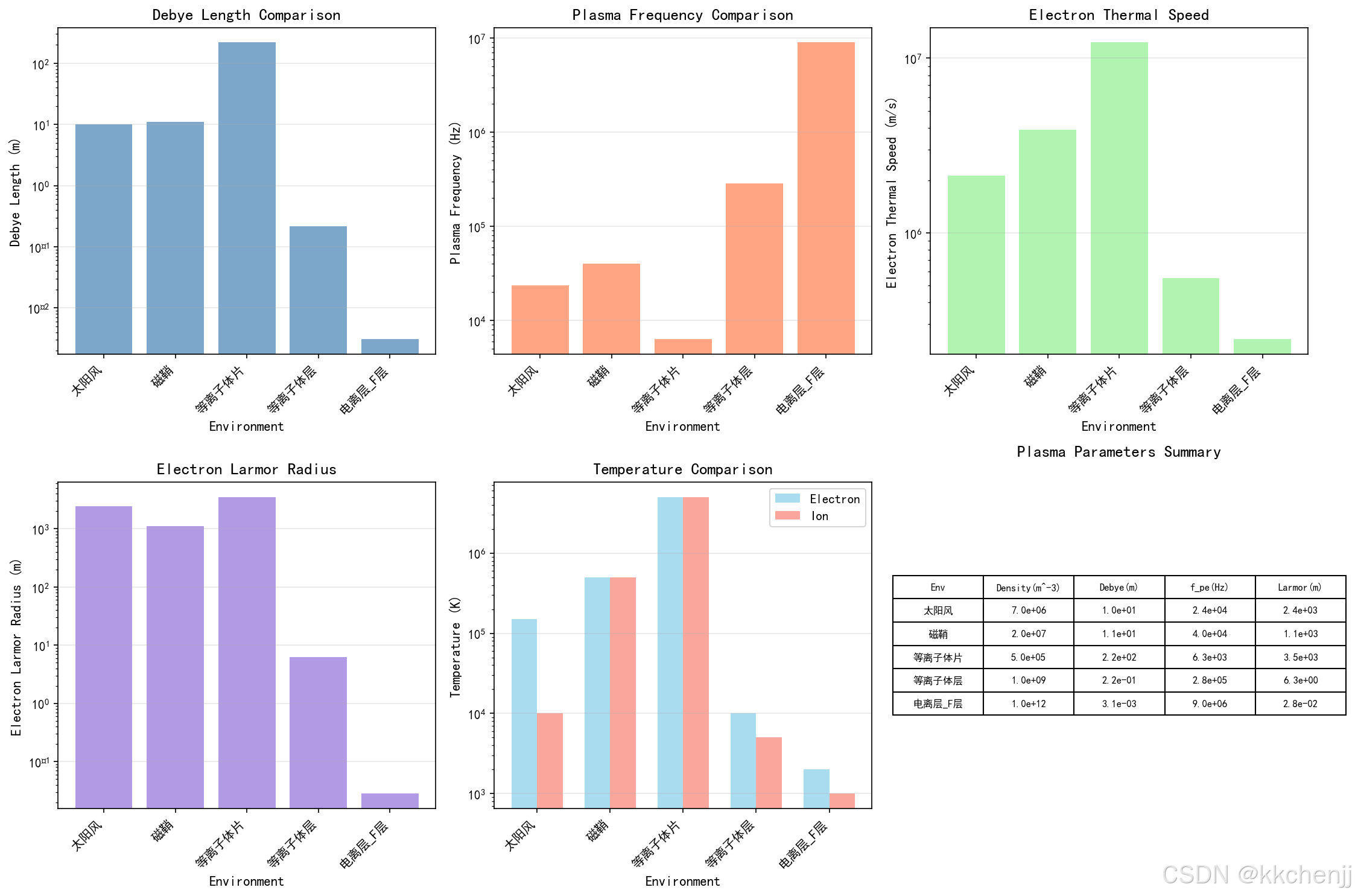
6.6 案例6:空间等离子体波动传播动画
"""
案例6:空间等离子体波动传播动画
模拟阿尔芬波在磁化等离子体中的传播过程
"""

import numpy as np
import matplotlib.pyplot as plt
from matplotlib.animation import FuncAnimation
import matplotlib.patches as patches

# 设置中文字体
plt.rcParams['font.sans-serif'] = ['SimHei', 'DejaVu Sans']
plt.rcParams['axes.unicode_minus'] = False

# 物理参数
B0 = 5e-9  # 背景磁场 (T)
n0 = 1e7   # 背景等离子体密度 (m^-3)
mu_0 = 4 * np.pi * 1e-7
m_p = 1.67e-27  # 质子质量

# 阿尔芬速度
v_A = B0 / np.sqrt(mu_0 * n0 * m_p)
print(f"阿尔芬速度: {v_A/1e3:.1f} km/s")

# 计算参数
L = 1e6  # 空间域长度 (m)
T = 100  # 总时间 (s)
nx = 200  # 空间网格数
nt = 100  # 时间步数

dx = L / nx
dt = T / nt

# 稳定性条件
print(f"CFL条件: v_A * dt/dx = {v_A * dt/dx:.3f}")

# 空间和时间网格
x = np.linspace(0, L, nx)
t = np.linspace(0, T, nt)

# 初始化波动(阿尔芬波)
# 扰动磁场和速度场垂直于背景磁场
k = 2 * np.pi / L  # 波数
omega = k * v_A    # 阿尔芬波频率

# 创建图形
fig, axes = plt.subplots(2, 2, figsize=(14, 10))

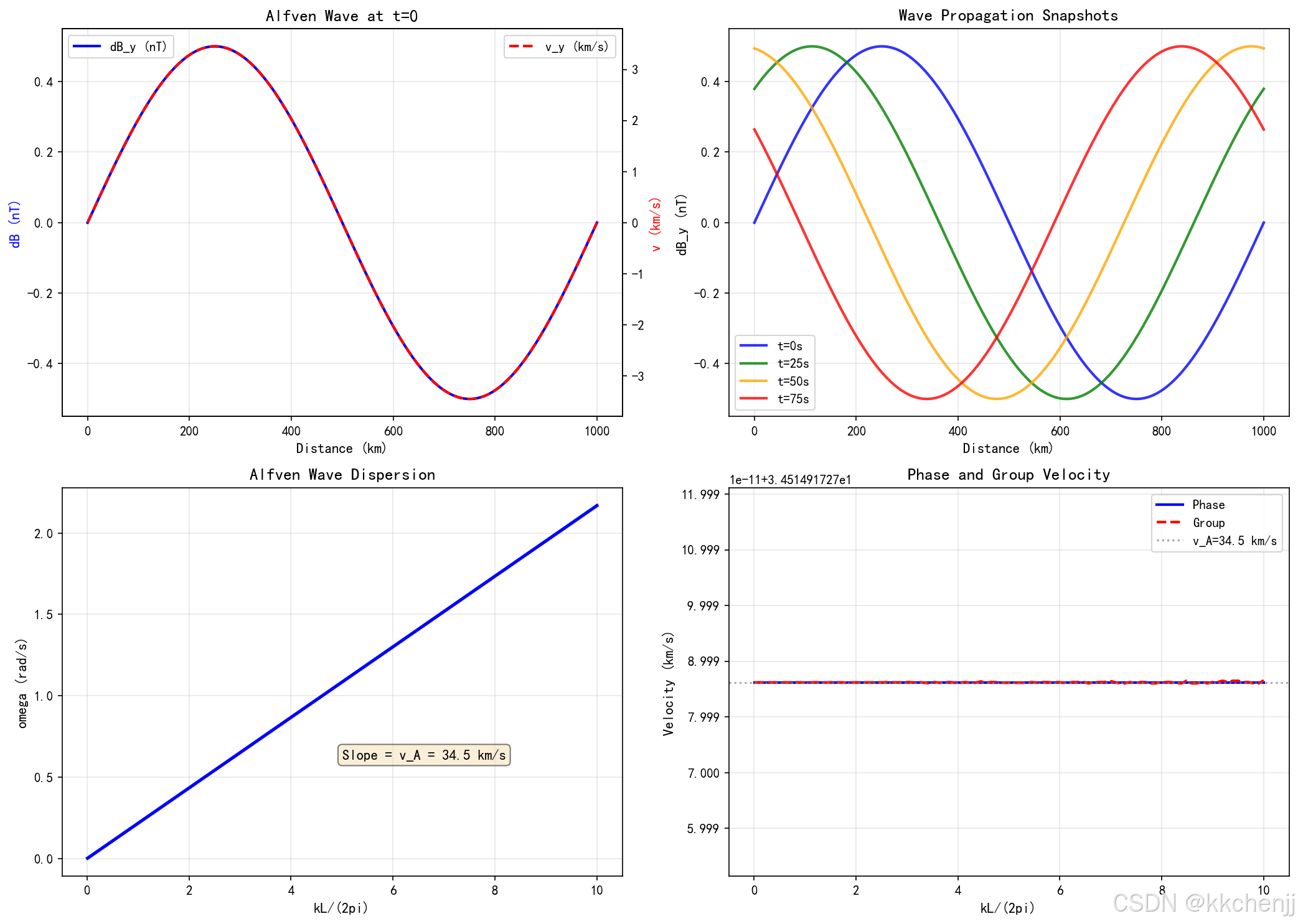
# 静态图1:初始时刻的波动分布
ax1 = axes[0, 0]
# 磁场扰动
dB_y = 0.1 * B0 * np.sin(k * x)
# 速度扰动
v_y = v_A * 0.1 * np.sin(k * x)

ax1.plot(x/1e3, dB_y*1e9, 'b-', linewidth=2, label='dB_y (nT)')
ax1_twin = ax1.twinx()
ax1_twin.plot(x/1e3, v_y/1e3, 'r--', linewidth=2, label='v_y (km/s)')

ax1.set_xlabel('距离 (km)', fontsize=11)
ax1.set_ylabel('磁场扰动 (nT)', fontsize=11, color='b')
ax1_twin.set_ylabel('速度扰动 (km/s)', fontsize=11, color='r')
ax1.set_title('t=0时刻阿尔芬波分布', fontsize=13, fontweight='bold')
ax1.grid(True, alpha=0.3)
ax1.legend(loc='upper left')
ax1_twin.legend(loc='upper right')

# 静态图2:波动传播快照(不同时刻)
ax2 = axes[0, 1]
t_snapshots = [0, 25, 50, 75]
colors = ['blue', 'green', 'orange', 'red']

for t_s, color in zip(t_snapshots, colors):
    phase = k * (x - v_A * t_s)
    dB_y = 0.1 * B0 * np.sin(phase)
    ax2.plot(x/1e3, dB_y*1e9, color=color, linewidth=2,
             label=f't={t_s}s', alpha=0.8)

ax2.set_xlabel('距离 (km)', fontsize=11)
ax2.set_ylabel('磁场扰动 dB_y (nT)', fontsize=11)
ax2.set_title('阿尔芬波传播快照', fontsize=13, fontweight='bold')
ax2.legend()
ax2.grid(True, alpha=0.3)

# 静态图3:色散关系
ax3 = axes[1, 0]
k_range = np.linspace(0.01, 10, 100) * 2 * np.pi / L
omega_alfven = k_range * v_A

ax3.plot(k_range * L / (2 * np.pi), omega_alfven, 'b-', linewidth=2.5)
ax3.set_xlabel('波数 kL/(2π)', fontsize=11)
ax3.set_ylabel('频率 ω (rad/s)', fontsize=11)
ax3.set_title('阿尔芬波色散关系', fontsize=13, fontweight='bold')
ax3.grid(True, alpha=0.3)

# 添加斜率标注
slope_text = f'斜率 = v_A = {v_A/1e3:.1f} km/s'
ax3.text(0.5, 0.3, slope_text, transform=ax3.transAxes, fontsize=11,
         bbox=dict(boxstyle='round', facecolor='wheat', alpha=0.5))

# 静态图4:相速度与群速度
ax4 = axes[1, 1]
v_ph = omega_alfven / k_range
v_gr = np.gradient(omega_alfven, k_range)

ax4.plot(k_range * L / (2 * np.pi), v_ph/1e3, 'b-', linewidth=2, label='相速度')
ax4.plot(k_range * L / (2 * np.pi), v_gr/1e3, 'r--', linewidth=2, label='群速度')
ax4.axhline(y=v_A/1e3, color='gray', linestyle=':', alpha=0.7, label=f'v_A={v_A/1e3:.1f} km/s')
ax4.set_xlabel('波数 kL/(2π)', fontsize=11)
ax4.set_ylabel('速度 (km/s)', fontsize=11)
ax4.set_title('阿尔芬波相速度与群速度', fontsize=13, fontweight='bold')
ax4.legend()
ax4.grid(True, alpha=0.3)

plt.tight_layout()
plt.savefig('case6_wave_propagation_static.png', dpi=150, bbox_inches='tight')
plt.close()

print("静态图已保存")

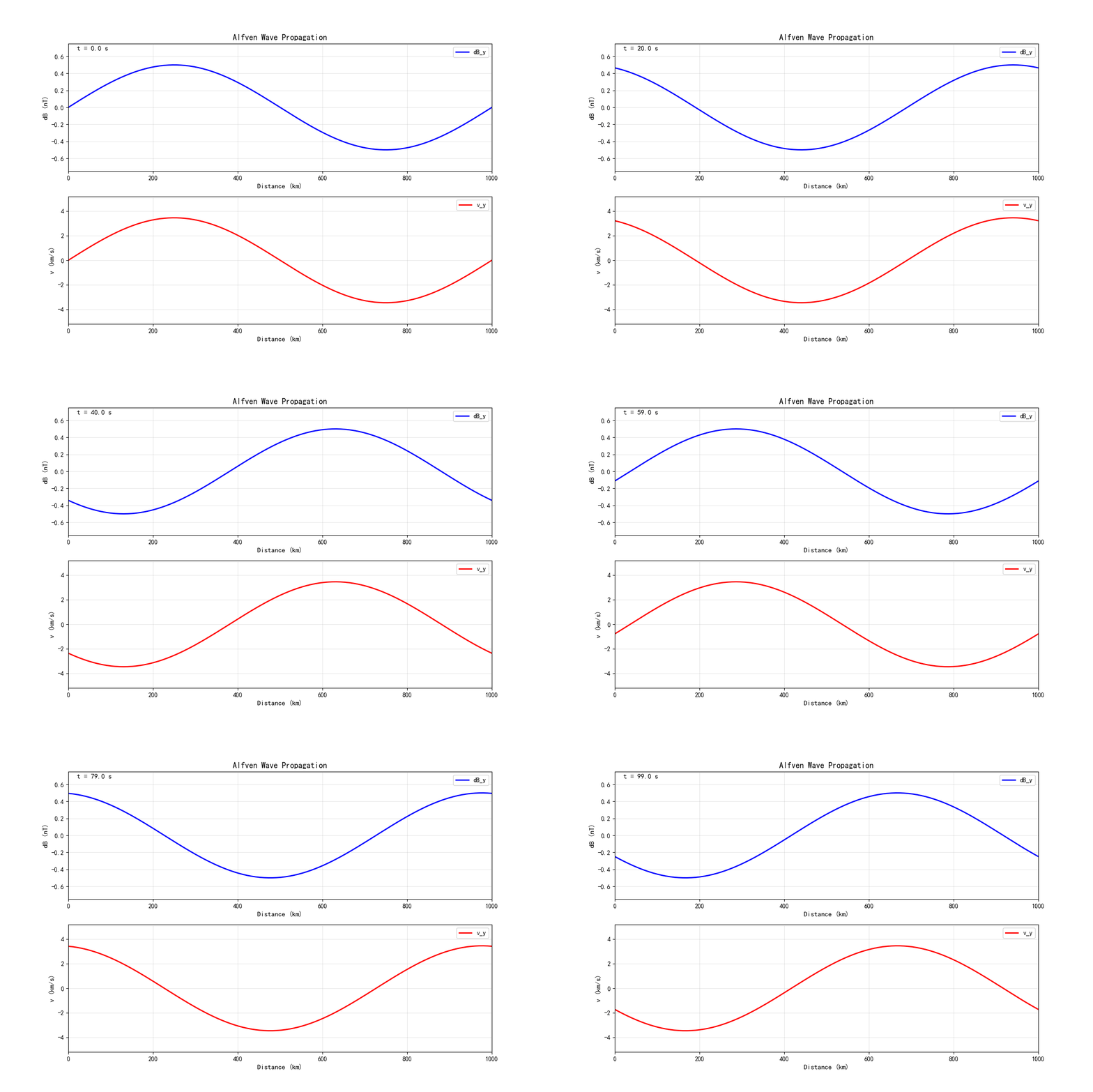
# 创建动画
fig_anim, (ax1_anim, ax2_anim) = plt.subplots(2, 1, figsize=(12, 8))

# 初始化线条
line1, = ax1_anim.plot([], [], 'b-', linewidth=2, label='dB_y')
line2, = ax2_anim.plot([], [], 'r-', linewidth=2, label='v_y')

ax1_anim.set_xlim(0, L/1e3)
ax1_anim.set_ylim(-0.15*B0*1e9, 0.15*B0*1e9)
ax1_anim.set_xlabel('距离 (km)', fontsize=11)
ax1_anim.set_ylabel('磁场扰动 (nT)', fontsize=11)
ax1_anim.set_title('阿尔芬波传播动画', fontsize=13, fontweight='bold')
ax1_anim.grid(True, alpha=0.3)
ax1_anim.legend()

ax2_anim.set_xlim(0, L/1e3)
ax2_anim.set_ylim(-0.15*v_A/1e3, 0.15*v_A/1e3)
ax2_anim.set_xlabel('距离 (km)', fontsize=11)
ax2_anim.set_ylabel('速度扰动 (km/s)', fontsize=11)
ax2_anim.grid(True, alpha=0.3)
ax2_anim.legend()

time_text = ax1_anim.text(0.02, 0.95, '', transform=ax1_anim.transAxes, fontsize=11)

def init():
    line1.set_data([], [])
    line2.set_data([], [])
    time_text.set_text('')
    return line1, line2, time_text

def update(frame):
    t_frame = frame * dt
    phase = k * (x - v_A * t_frame)

    dB_y = 0.1 * B0 * np.sin(phase)
    v_y = v_A * 0.1 * np.sin(phase)

    line1.set_data(x/1e3, dB_y*1e9)
    line2.set_data(x/1e3, v_y/1e3)
    time_text.set_text(f't = {t_frame:.1f} s')

    return line1, line2, time_text

anim = FuncAnimation(fig_anim, update, frames=nt, init_func=init,
                     blit=True, interval=100, repeat=True)

# 保存动画
anim.save('case6_alfven_wave.gif', writer='pillow', fps=10, dpi=100)
plt.close(fig_anim)

print("案例6完成:空间等离子体波动传播动画")
print(f"\n波动参数:")
print(f"  阿尔芬速度: {v_A/1e3:.1f} km/s")
print(f"  波数: k = {k:.2e} m^-1")
print(f"  频率: ω = {omega:.2e} rad/s")
print(f"  周期: T = {2*np.pi/omega:.1f} s")
print(f"  波长: λ = {2*np.pi/k/1e3:.1f} km")
应用案例与前沿研究
7.1 空间天气预测
空间天气是指太阳活动及其对地球空间环境的影响。空间天气预测是空间电磁环境仿真的重要应用:
太阳风暴预警:
日冕物质抛射(CME)是太阳大气大规模爆发事件,携带大量等离子体和磁场。CME到达地球需要1-3天,通过数值模拟可以预测:
- CME的传播速度和方向
- 到达地球的时间
- 引起的地磁暴强度
辐射带动态预报:
范艾伦辐射带电子通量变化对航天器安全至关重要。基于径向扩散方程和波粒相互作用模型,可以建立辐射带动态预报系统:
∂f∂t=L2∂∂L(DLLL2∂f∂L)+Q−L \frac{\partial f}{\partial t} = L^2 \frac{\partial}{\partial L}\left(\frac{D_{LL}}{L^2} \frac{\partial f}{\partial L}\right) + Q - L ∂t∂f=L2∂L∂(L2DLL∂L∂f)+Q−L
其中 DLLD_{LL}DLL 为径向扩散系数,QQQ 为波加热源项,LLL 为各种损失过程。
7.2 航天器设计优化
充电防护设计:
通过仿真分析不同轨道、不同太阳活动条件下的航天器充电电势,可以优化:
- 表面材料选择
- 接地系统设计
- 主动防护装置配置
辐射防护设计:
根据辐射带模型和太阳粒子事件模型,计算航天器在不同轨道的辐射剂量:
D=∫Φ(E)⋅dEρdx(E)⋅dt D = \int \Phi(E) \cdot \frac{dE}{\rho dx}(E) \cdot dt D=∫Φ(E)⋅ρdxdE(E)⋅dt
其中 Φ(E)\Phi(E)Φ(E) 为粒子微分通量,dE/ρdxdE/\rho dxdE/ρdx 为阻止本领。
7.3 深空探测任务支持
行星际航行规划:
深空探测器在行星际空间航行时,需要考虑:
- 太阳风对通信的影响
- 太阳粒子事件对仪器的辐射损伤
- 行星磁层的穿越策略
行星磁层探测:
木星、土星等气态巨行星具有强大的磁层。通过数值模拟可以:
- 预测探测器轨道上的等离子体环境
- 规划科学探测任务
- 优化数据传输时机
7.4 前沿研究方向
1. 多尺度耦合模拟
空间等离子体涉及从电子尺度(米)到行星际尺度(AU)的跨越。发展多尺度耦合算法,实现微观动力学与宏观MHD的自洽耦合,是当前的重要挑战。
2. 机器学习与数据同化
将机器学习技术与物理模型结合:
- 利用神经网络加速数值计算
- 基于观测数据的模型参数优化
- 数据驱动的空间天气预测
3. 全粒子模拟
对于小尺度、强非线性过程,需要采用全粒子模拟(PIC方法):
- 磁重联过程
- 激波结构
- 波粒相互作用
4. 实验室空间等离子体
利用地面实验室设备模拟空间等离子体现象:
- 磁重联实验
- 等离子体鞘层研究
- 尘埃等离子体实验
总结与展望
8.1 本教程核心内容回顾
本教程系统介绍了空间电磁环境仿真的理论基础和实践方法:
理论基础:
- 空间等离子体的基本特性(德拜屏蔽、等离子体频率)
- 磁化等离子体中的粒子运动(回旋、漂移、弹跳)
- 磁流体动力学方程
- 太阳风与行星际磁场
- 地球磁层结构
- 航天器充电效应
数值方法:
- 等离子体参数计算
- Parker螺旋模型
- 磁层顶形状建模
- 辐射带电子分布
- 航天器充电电流平衡
- 阿尔芬波传播模拟
应用案例:
- 不同空间环境的等离子体参数对比
- 行星际磁场的螺旋结构
- 地球磁层的三维结构
- 范艾伦辐射带电子分布
- 航天器表面充电计算
- 等离子体波动传播动画
8.2 空间电磁环境仿真的重要性
空间电磁环境仿真在航天工程、空间科学和空间天气领域具有不可替代的作用:
航天器安全保障:
- 预测航天器充电风险
- 评估辐射损伤
- 优化防护设计
空间任务规划:
- 轨道设计与优化
- 任务时机选择
- 应急预案制定
空间科学研究:
- 理解空间等离子体物理过程
- 验证理论模型
- 解释观测现象
空间天气服务:
- 太阳风暴预警
- 通信中断预测
- 导航精度评估
8.3 未来发展趋势
计算能力提升:
- 高性能计算(HPC)和GPU加速
- 云计算平台的应用
- 实时仿真能力
模型精度提高:
- 更精细的网格分辨率
- 更完整的物理过程
- 更好的观测数据同化
多物理场耦合:
- 电磁-流体-粒子耦合
- 多尺度模拟方法
- 自适应网格技术
人工智能融合:
- 神经网络代理模型
- 智能参数优化
- 自动化结果分析
8.4 学习建议
对于希望深入学习空间电磁环境仿真的读者,建议:
基础理论:
- 掌握等离子体物理基础
- 学习计算流体力学和电磁学
- 了解空间物理学基本概念
数值方法:
- 熟悉有限差分、有限体积方法
- 学习粒子模拟(PIC)方法
- 掌握并行计算技术
实践技能:
- 熟练使用Python/MATLAB进行科学计算
- 学习专业仿真软件(如LFM、OpenGGCM)
- 参与实际科研项目
前沿跟踪:
- 关注空间天气领域最新进展
- 阅读顶级期刊论文
- 参加学术会议和研讨会
参考文献
-
Kivelson, M. G., & Russell, C. T. (Eds.). (1995). Introduction to Space Physics. Cambridge University Press.
-
Baumjohann, W., & Treumann, R. A. (1996). Basic Space Plasma Physics. Imperial College Press.
-
Parks, G. K. (2004). Physics of Space Plasmas: An Introduction. Westview Press.
-
Hastings, D., & Garrett, H. (1996). Spacecraft-Environment Interactions. Cambridge University Press.
-
Borovsky, J. E., & Denton, M. H. (2006). Differences between CME-driven storms and CIR-driven storms. Journal of Geophysical Research, 111(A7).
-
Shprits, Y. Y., et al. (2008). Review of modeling of losses and sources of relativistic electrons in the outer radiation belt. Journal of Atmospheric and Solar-Terrestrial Physics, 70(14), 1679-1713.
-
刘振兴等. (2005). 太空物理学. 哈尔滨工业大学出版社.
-
濮祖荫. (2012). 磁层物理. 科学出版社.
附录:Python代码汇总
本教程所有案例的完整代码已包含在各章节中。为方便使用,以下是代码文件的组织结构:
主题090_空间电磁环境仿真/
├── 空间电磁环境仿真.md       # 本教程文档
├── case1_plasma_parameters.png  # 案例1结果图
├── case2_parker_spiral.png      # 案例2结果图
├── case3_magnetosphere.png      # 案例3结果图
├── case4_radiation_belt.png     # 案例4结果图
├── case5_spacecraft_charging.png # 案例5结果图
├── case6_alfven_wave.gif        # 案例6动画
└── case6_wave_propagation_static.png # 案例6静态图
#!/usr/bin/env python3
# -*- coding: utf-8 -*-
"""
软物质物理多物理场耦合仿真程序
Soft Matter Physics Multiphysics Coupling Simulation

本程序实现了软物质物理多物理场耦合仿真的六个典型案例:
1. 向列相液晶缺陷动力学
2. 聚合物熔体流变学
3. 胶体相分离
4. 生物膜形状演化
5. 响应性水凝胶溶胀
6. 活性物质集体运动

作者: 仿真领域专家
日期: 2026-03-06
"""

import numpy as np
import matplotlib.pyplot as plt
from mpl_toolkits.mplot3d import Axes3D
from scipy.ndimage import laplace
from scipy.integrate import odeint
from scipy.optimize import fsolve
# 球谐函数的简化实现(新版本的scipy中sph_harm已移除)
def sph_harm(m, n, theta, phi):
    """
    简化的球谐函数实现
    仅支持基本的l=0,1,2,3,4和m=0的情况
    """
    from scipy.special import legendre
    import numpy as np

    x = np.cos(theta)

    # 简化的实现,仅支持m=0的情况
    if m == 0:
        if n == 0:
            return np.ones_like(theta) * 0.5 / np.sqrt(np.pi)
        elif n == 1:
            return 0.5 * np.sqrt(3/np.pi) * x
        elif n == 2:
            return 0.25 * np.sqrt(5/np.pi) * (3*x**2 - 1)
        elif n == 3:
            return 0.25 * np.sqrt(7/np.pi) * (5*x**3 - 3*x)
        elif n == 4:
            return 0.125 * np.sqrt(9/np.pi) * (35*x**4 - 30*x**2 + 3)

    # 对于其他情况,返回简化近似
    return np.cos(m * phi) * np.sin(n * theta) * 0.1
import warnings
warnings.filterwarnings('ignore')

# 设置中文字体
plt.rcParams['font.sans-serif'] = ['SimHei', 'DejaVu Sans']
plt.rcParams['axes.unicode_minus'] = False

# 设置Agg后端,不弹出窗口
plt.switch_backend('Agg')

print("="*70)
print("软物质物理多物理场耦合仿真程序")
print("Soft Matter Physics Multiphysics Coupling Simulation")
print("="*70)

# ============================================================================
# 案例1:向列相液晶缺陷动力学
# ============================================================================

def case1_nematic_defects():
    """
    案例1:向列相液晶缺陷动力学
    模拟向列相液晶中缺陷的形成和演化
    """
    print("\n" + "="*70)
    print("案例1:向列相液晶缺陷动力学")
    print("="*70)

    # 参数设置
    L = 50.0  # 系统尺寸
    N = 128   # 网格数
    dx = L / N
    dt = 0.01
    Gamma = 1.0  # 动力学系数

    # Landau-de Gennes参数
    a = -1.0
    b = -1.0
    c = 1.0
    L1 = 1.0

    # 初始化Q张量
    Q = np.zeros((N, N, 2, 2))
    S0 = 0.5  # 初始序参量

    # 随机初始条件
    np.random.seed(42)
    for i in range(N):
        for j in range(N):
            theta = np.random.rand() * 2 * np.pi
            n = np.array([np.cos(theta), np.sin(theta)])
            Q[i, j] = S0 * (np.outer(n, n) - 0.5 * np.eye(2))

    # 计算自由能泛函导数
    def compute_free_energy_derivative(Q):
        """计算自由能泛函导数"""
        # 体项贡献
        Q2 = np.sum(Q**2, axis=(2, 3))
        Q3 = np.einsum('ijkl,ijlm->ijkm', Q, Q)

        dF_bulk = a * Q + b * Q3 + c * Q2[:, :, None, None] * Q

        # 弹性项贡献 (简化)
        dF_elastic = np.zeros_like(Q)
        for alpha in range(2):
            for beta in range(2):
                dF_elastic[:, :, alpha, beta] = -L1 * laplace(Q[:, :, alpha, beta])

        return dF_bulk + dF_elastic

    # 模拟
    t_steps = 5000
    save_interval = 100
    S_history = []
    t_history = []

    for step in range(t_steps):
        # 计算分子场
        H = compute_free_energy_derivative(Q)

        # 更新Q张量
        Q += dt * Gamma * H

        # 迹为零约束
        Q[:, :, 0, 0] = -Q[:, :, 1, 1]

        # 保存历史
        if step % save_interval == 0:
            S = np.sqrt(2 * np.sum(Q**2, axis=(2, 3)))
            S_history.append(S.copy())
            t_history.append(step * dt)

    # 可视化结果
    fig, axes = plt.subplots(2, 3, figsize=(15, 10))

    # 显示不同时刻的序参量分布
    display_steps = [0, 10, 20, 30, 40, 49]
    for idx, step_idx in enumerate(display_steps):
        ax = axes[idx // 3, idx % 3]
        im = ax.imshow(S_history[step_idx], extent=[0, L, 0, L], cmap='viridis', vmin=0, vmax=1)
        ax.set_title(f't = {t_history[step_idx]:.1f}', fontsize=12, fontweight='bold')
        ax.set_xlabel('x')
        ax.set_ylabel('y')
        plt.colorbar(im, ax=ax, label='序参量 S')

    plt.suptitle('向列相液晶缺陷演化', fontsize=16, fontweight='bold')
    plt.tight_layout()
    plt.savefig('case1_nematic_defects.png', dpi=150, bbox_inches='tight')
    print("✓ 案例1结果已保存: case1_nematic_defects.png")
    plt.close()

    # 绘制序参量统计
    plt.figure(figsize=(12, 5))

    plt.subplot(1, 2, 1)
    S_mean = [np.mean(S) for S in S_history]
    plt.plot(t_history, S_mean, 'b-', linewidth=2)
    plt.xlabel('时间', fontsize=12)
    plt.ylabel('平均序参量', fontsize=12)
    plt.title('序参量演化', fontsize=14, fontweight='bold')
    plt.grid(True, alpha=0.3)

    plt.subplot(1, 2, 2)
    S_std = [np.std(S) for S in S_history]
    plt.plot(t_history, S_std, 'r-', linewidth=2)
    plt.xlabel('时间', fontsize=12)
    plt.ylabel('序参量标准差', fontsize=12)
    plt.title('缺陷密度指标', fontsize=14, fontweight='bold')
    plt.grid(True, alpha=0.3)

    plt.tight_layout()
    plt.savefig('case1_nematic_statistics.png', dpi=150, bbox_inches='tight')
    print("✓ 案例1统计结果已保存: case1_nematic_statistics.png")
    plt.close()

    return S_history, t_history

# ============================================================================
# 案例2:聚合物熔体流变学
# ============================================================================

def case2_polymer_rheology():
    """
    案例2:聚合物熔体流变学
    模拟缠结聚合物在剪切流中的流变行为
    """
    print("\n" + "="*70)
    print("案例2:聚合物熔体流变学")
    print("="*70)

    # Doi-Edwards模型参数
    GN0 = 1e6  # 平台模量 (Pa)
    tau_d = 10.0  # 爬行时间 (s)

    # 剪切速率范围
    gamma_dot = np.logspace(-2, 2, 50)

    # 计算应力响应
    def calculate_stress(gamma_dot, t_max=100):
        """计算稳态剪切应力"""
        dt = 0.01
        t = np.arange(0, t_max, dt)

        # 形变历史
        gamma = gamma_dot * t

        # 取向张量 (简化)
        S = np.zeros(len(t))
        for i in range(1, len(t)):
            dS = dt * (gamma_dot - S[i-1]/tau_d)
            S[i] = S[i-1] + dS

        # 应力
        sigma = GN0 * S

        return np.mean(sigma[-100:])  # 稳态值

    # 计算流变曲线
    eta = []
    psi1 = []
    N1 = []

    for gd in gamma_dot:
        # 粘度
        sigma = calculate_stress(gd)
        eta.append(sigma / gd)

        # 第一法向应力系数 (简化)
        psi1.append(2 * tau_d * sigma / gd)

        # 第一法向应力差
        N1.append(2 * tau_d * sigma * gd)

    eta = np.array(eta)
    psi1 = np.array(psi1)
    N1 = np.array(N1)

    # 可视化
    fig, axes = plt.subplots(2, 2, figsize=(14, 12))

    # 剪切粘度
    axes[0, 0].loglog(gamma_dot * tau_d, eta / (GN0 * tau_d), 'b-o', linewidth=2, markersize=6)
    axes[0, 0].axhline(y=1, color='r', linestyle='--', alpha=0.5, label='平台粘度')
    axes[0, 0].set_xlabel(r'$\dot{\gamma}\tau_d$', fontsize=12)
    axes[0, 0].set_ylabel(r'$\eta/(G_N^0\tau_d)$', fontsize=12)
    axes[0, 0].set_title('剪切粘度', fontsize=14, fontweight='bold')
    axes[0, 0].legend()
    axes[0, 0].grid(True, alpha=0.3)

    # 第一法向应力系数
    axes[0, 1].loglog(gamma_dot * tau_d, psi1 / (GN0 * tau_d**2), 'r-s', linewidth=2, markersize=6)
    axes[0, 1].set_xlabel(r'$\dot{\gamma}\tau_d$', fontsize=12)
    axes[0, 1].set_ylabel(r'$\Psi_1/(G_N^0\tau_d^2)$', fontsize=12)
    axes[0, 1].set_title('第一法向应力系数', fontsize=14, fontweight='bold')
    axes[0, 1].grid(True, alpha=0.3)

    # 第一法向应力差
    axes[1, 0].loglog(gamma_dot * tau_d, N1 / GN0, 'g-^', linewidth=2, markersize=6)
    axes[1, 0].set_xlabel(r'$\dot{\gamma}\tau_d$', fontsize=12)
    axes[1, 0].set_ylabel(r'$N_1/G_N^0$', fontsize=12)
    axes[1, 0].set_title('第一法向应力差', fontsize=14, fontweight='bold')
    axes[1, 0].grid(True, alpha=0.3)

    # Cox-Merz规则验证
    axes[1, 1].loglog(gamma_dot * tau_d, eta / (GN0 * tau_d), 'b-o', linewidth=2, markersize=6, label='稳态剪切')
    # 复粘度 (简化)
    omega = gamma_dot
    eta_star = GN0 * tau_d / (1 + (omega * tau_d)**2)**0.5
    axes[1, 1].loglog(omega * tau_d, eta_star / (GN0 * tau_d), 'r--', linewidth=2, label='复粘度')
    axes[1, 1].set_xlabel(r'$\omega\tau_d$ 或 $\dot{\gamma}\tau_d$', fontsize=12)
    axes[1, 1].set_ylabel(r'$\eta^*/(G_N^0\tau_d)$', fontsize=12)
    axes[1, 1].set_title('Cox-Merz规则', fontsize=14, fontweight='bold')
    axes[1, 1].legend()
    axes[1, 1].grid(True, alpha=0.3)

    plt.tight_layout()
    plt.savefig('case2_polymer_rheology.png', dpi=150, bbox_inches='tight')
    print("✓ 案例2结果已保存: case2_polymer_rheology.png")
    plt.close()

    return gamma_dot, eta, psi1

# ============================================================================
# 案例3:胶体相分离
# ============================================================================

def case3_colloidal_phase_separation():
    """
    案例3:胶体相分离
    模拟吸引性胶体的旋节分解和粗化
    """
    print("\n" + "="*70)
    print("案例3:胶体相分离")
    print("="*70)

    # 参数设置
    N = 256
    L = 100.0
    dx = L / N
    dt = 0.001
    M = 1.0  # 迁移率

    # Cahn-Hilliard参数
    a = -1.0
    b = 1.0
    kappa = 1.0

    # 初始化 (随机涨落)
    np.random.seed(42)
    phi = 0.0 + 0.1 * np.random.randn(N, N)

    # 化学势
    def chemical_potential(phi):
        return a * phi + b * phi**3 - kappa * laplace(phi) / dx**2

    # 时间演化
    def evolve_cahn_hilliard(phi, n_steps):
        for _ in range(n_steps):
            mu = chemical_potential(phi)
            phi += dt * M * laplace(mu) / dx**2
        return phi

    # 模拟
    phi_history = [phi.copy()]
    times = [0]
    target_times = [0, 10, 50, 100, 500, 1000]

    for target in target_times[1:]:
        steps_needed = int((target - times[-1]) / dt)
        phi = evolve_cahn_hilliard(phi, steps_needed)
        phi_history.append(phi.copy())
        times.append(target)

    # 可视化
    fig, axes = plt.subplots(2, 3, figsize=(15, 10))
    axes = axes.flatten()

    for i, (phi_snap, t) in enumerate(zip(phi_history, times)):
        im = axes[i].imshow(phi_snap, extent=[0, L, 0, L],
                            cmap='RdBu_r', vmin=-1, vmax=1)
        axes[i].set_title(f't = {t}', fontsize=12, fontweight='bold')
        axes[i].set_xlabel('x')
        axes[i].set_ylabel('y')
        plt.colorbar(im, ax=axes[i])

    plt.suptitle('Cahn-Hilliard相分离演化', fontsize=16, fontweight='bold')
    plt.tight_layout()
    plt.savefig('case3_colloidal_phase_separation.png', dpi=150, bbox_inches='tight')
    print("✓ 案例3结果已保存: case3_colloidal_phase_separation.png")
    plt.close()

    # 计算结构因子
    def structure_factor(phi):
        phi_k = np.fft.fft2(phi - np.mean(phi))
        S_k = np.abs(phi_k)**2
        return np.fft.fftshift(S_k)

    # 绘制结构因子
    fig, axes = plt.subplots(1, 2, figsize=(14, 6))

    for i in [0, 2, 4]:
        S = structure_factor(phi_history[i])
        center = N // 2
        # 径向平均
        y = S[center, center:]
        x = np.arange(len(y))
        axes[0].semilogy(x, y + 1e-10, linewidth=2, label=f't = {times[i]}')

    axes[0].set_xlabel('k', fontsize=12)
    axes[0].set_ylabel('S(k)', fontsize=12)
    axes[0].set_title('结构因子演化', fontsize=14, fontweight='bold')
    axes[0].legend()
    axes[0].grid(True, alpha=0.3)

    # 特征长度演化 (标度律)
    characteristic_length = []
    for phi_snap in phi_history:
        # 计算界面密度作为特征长度的倒数
        grad_phi = np.gradient(phi_snap)
        interface_density = np.mean(np.abs(grad_phi[0]) + np.abs(grad_phi[1]))
        characteristic_length.append(1.0 / (interface_density + 1e-10))

    axes[1].loglog(times, characteristic_length, 'bo-', linewidth=2, markersize=8)
    # 理论标度律 t^(1/3)
    t_theory = np.array(times[1:])
    L_theory = characteristic_length[1] * (t_theory / times[1])**(1/3)
    axes[1].loglog(t_theory, L_theory, 'r--', linewidth=2, label='$t^{1/3}$')
    axes[1].set_xlabel('时间', fontsize=12)
    axes[1].set_ylabel('特征长度', fontsize=12)
    axes[1].set_title('粗化动力学', fontsize=14, fontweight='bold')
    axes[1].legend()
    axes[1].grid(True, alpha=0.3)

    plt.tight_layout()
    plt.savefig('case3_structure_analysis.png', dpi=150, bbox_inches='tight')
    print("✓ 案例3结构分析已保存: case3_structure_analysis.png")
    plt.close()

    return phi_history, times

# ============================================================================
# 案例4:生物膜形状演化
# ============================================================================

def case4_vesicle_shape():
    """
    案例4:生物膜形状演化
    模拟脂质囊泡在渗透压作用下的形状转变
    """
    print("\n" + "="*70)
    print("案例4:生物膜形状演化")
    print("="*70)

    # 参数设置
    kappa = 20.0  # 弯曲刚度 (k_BT)
    c0 = 0.0      # 自发曲率
    sigma = 0.0   # 表面张力

    # 初始化形状 (球面)
    def spherical_harmonic_basis(theta, phi, l, m):
        """计算球谐函数"""
        return sph_harm(m, l, phi, theta).real

    # 参数化表面
    def surface_from_modes(modes, theta, phi):
        """从球谐系数重建表面"""
        r = 1.0  # 基准半径
        for (l, m), coeff in modes.items():
            r += coeff * spherical_harmonic_basis(theta, phi, l, m)
        return r

    # 计算弯曲能 (简化)
    def bending_energy(modes):
        """计算Helfrich弯曲能"""
        E = 0
        for (l, m), coeff in modes.items():
            E += 0.5 * kappa * (l * (l + 1))**2 * coeff**2
        return E

    # 简化的形状演化 (梯度下降)
    def evolve_shape(modes, n_steps=500, dt=0.005):
        """演化形状至能量极小"""
        history = [modes.copy()]
        energy_history = [bending_energy(modes)]

        for step in range(n_steps):
            # 计算能量梯度 (简化)
            for key in list(modes.keys()):
                l = key[0]
                # 简化的能量泛函导数
                dE = modes[key] * (l * (l + 1))**2  # 弯曲能主导
                modes[key] -= dt * dE
                # 限制系数范围,防止数值溢出
                modes[key] = np.clip(modes[key], -0.5, 0.5)

            if step % 50 == 0:
                history.append(modes.copy())
                energy_history.append(bending_energy(modes))

        return history, energy_history

    # 初始化
    modes = {}
    # 添加一些初始扰动
    modes[(2, 0)] = 0.3
    modes[(3, 0)] = 0.1
    modes[(4, 0)] = 0.05

    # 演化
    evolution_history, energy_history = evolve_shape(modes, n_steps=500, dt=0.005)

    # 可视化
    fig = plt.figure(figsize=(15, 10))

    for idx, modes_snap in enumerate(evolution_history[:6]):
        ax = fig.add_subplot(2, 3, idx+1, projection='3d')

        # 生成网格
        theta = np.linspace(0, np.pi, 50)
        phi = np.linspace(0, 2*np.pi, 50)
        theta, phi = np.meshgrid(theta, phi)

        # 计算表面
        r = surface_from_modes(modes_snap, theta, phi)
        X = r * np.sin(theta) * np.cos(phi)
        Y = r * np.sin(theta) * np.sin(phi)
        Z = r * np.cos(theta)

        ax.plot_surface(X, Y, Z, cmap='viridis', alpha=0.8)
        ax.set_title(f'Step {idx*100}\nE = {energy_history[idx]:.2f}',
                    fontsize=11, fontweight='bold')
        ax.set_xlabel('X')
        ax.set_ylabel('Y')
        ax.set_zlabel('Z')

    plt.suptitle('生物膜形状演化', fontsize=16, fontweight='bold')
    plt.tight_layout()
    plt.savefig('case4_vesicle_shape.png', dpi=150, bbox_inches='tight')
    print("✓ 案例4结果已保存: case4_vesicle_shape.png")
    plt.close()

    # 绘制能量演化
    plt.figure(figsize=(10, 6))
    plt.plot(np.arange(len(energy_history)) * 100, energy_history, 'b-', linewidth=2.5)
    plt.xlabel('迭代步数', fontsize=12)
    plt.ylabel('弯曲能', fontsize=12)
    plt.title('形状演化能量曲线', fontsize=14, fontweight='bold')
    plt.grid(True, alpha=0.3)
    plt.tight_layout()
    plt.savefig('case4_energy_evolution.png', dpi=150, bbox_inches='tight')
    print("✓ 案例4能量演化已保存: case4_energy_evolution.png")
    plt.close()

    return evolution_history, energy_history

# ============================================================================
# 案例5:响应性水凝胶溶胀
# ============================================================================

def case5_hydrogel_swelling():
    """
    案例5:响应性水凝胶溶胀
    模拟温敏水凝胶的温度响应溶胀行为
    """
    print("\n" + "="*70)
    print("案例5:响应性水凝胶溶胀")
    print("="*70)

    # Flory-Rehner理论参数
    N = 100      # 交联点间链段数
    chi = 0.5    # Flory-Huggins参数
    v1 = 1.0     # 溶剂摩尔体积
    phi0 = 0.1   # 参考体积分数

    # 温度依赖性
    T_LCST = 305  # K (PNIPAM的LCST)
    def chi_of_T(T):
        """温度依赖的chi参数"""
        return 0.5 - 0.01 * (T - T_LCST)

    # 溶胀平衡方程
    def swelling_equilibrium(phi, T):
        """
        计算溶胀平衡
        返回: 溶胀比 Q = 1/phi
        """
        chi_T = chi_of_T(T)

        def equation(phi_eq):
            if phi_eq <= 0 or phi_eq >= 1:
                return 1e10
            return (np.log(1-phi_eq) + phi_eq + chi_T*phi_eq**2 +
                    (1/N)*(phi_eq/phi0)**(1/3) - (phi_eq/phi0))

        try:
            phi_eq = fsolve(equation, phi0)[0]
            return 1.0 / phi_eq
        except:
            return 1.0

    # 温度扫描
    T_range = np.linspace(280, 320, 50)
    Q_equilibrium = []

    for T in T_range:
        Q = swelling_equilibrium(phi0, T)
        Q_equilibrium.append(Q)

    Q_equilibrium = np.array(Q_equilibrium)

    # 动力学 (简化的Fickian扩散)
    def swelling_kinetics(T, R0=1e-3, D=1e-9):
        """
        溶胀动力学
        R0: 初始半径 (m)
        D: 扩散系数 (m^2/s)
        """
        t = np.linspace(0, 3600, 1000)  # 1小时
        Q_eq = swelling_equilibrium(phi0, T)

        # 简化的扩散模型
        tau = R0**2 / D
        Q_t = Q_eq * (1 - np.exp(-t/tau))

        return t, Q_t

    # 可视化
    fig, axes = plt.subplots(2, 2, figsize=(14, 12))

    # 平衡溶胀曲线
    axes[0, 0].plot(T_range - 273.15, Q_equilibrium, 'b-', linewidth=2.5)
    axes[0, 0].axvline(x=T_LCST - 273.15, color='r', linestyle='--',
                    label=f'LCST = {T_LCST-273.15}°C')
    axes[0, 0].set_xlabel('温度 (°C)', fontsize=12)
    axes[0, 0].set_ylabel('溶胀比 Q', fontsize=12)
    axes[0, 0].set_title('温度响应溶胀曲线', fontsize=14, fontweight='bold')
    axes[0, 0].legend()
    axes[0, 0].grid(True, alpha=0.3)

    # 动力学曲线
    temps = [290, 300, 305, 310]
    colors = ['blue', 'green', 'orange', 'red']
    for T, color in zip(temps, colors):
        t, Q_t = swelling_kinetics(T)
        axes[0, 1].plot(t/60, Q_t, color=color, linewidth=2, label=f'{T-273.15}°C')

    axes[0, 1].set_xlabel('时间 (min)', fontsize=12)
    axes[0, 1].set_ylabel('溶胀比 Q', fontsize=12)
    axes[0, 1].set_title('溶胀动力学', fontsize=14, fontweight='bold')
    axes[0, 1].legend()
    axes[0, 1].grid(True, alpha=0.3)

    # 相图 (chi vs 体积分数)
    phi_range = np.linspace(0.01, 0.99, 100)
    chi_range = np.linspace(0.3, 0.7, 100)
    PHI, CHI = np.meshgrid(phi_range, chi_range)

    # 化学势 (简化)
    MU = np.log(1-PHI) + PHI + CHI*PHI**2 + (1/N)*(PHI/phi0)**(1/3)

    axes[1, 0].contourf(PHI, CHI, MU, levels=20, cmap='RdBu_r')
    axes[1, 0].contour(PHI, CHI, MU, levels=[0], colors='black', linewidths=2)
    axes[1, 0].set_xlabel('体积分数 φ', fontsize=12)
    axes[1, 0].set_ylabel('χ 参数', fontsize=12)
    axes[1, 0].set_title('相图', fontsize=14, fontweight='bold')
    axes[1, 0].axhline(y=0.5, color='white', linestyle='--', alpha=0.7)

    # 体积变化率
    dQ_dT = np.gradient(Q_equilibrium, T_range)
    axes[1, 1].plot(T_range - 273.15, dQ_dT, 'g-', linewidth=2.5)
    axes[1, 1].axvline(x=T_LCST - 273.15, color='r', linestyle='--', alpha=0.5)
    axes[1, 1].set_xlabel('温度 (°C)', fontsize=12)
    axes[1, 1].set_ylabel('dQ/dT', fontsize=12)
    axes[1, 1].set_title('响应灵敏度', fontsize=14, fontweight='bold')
    axes[1, 1].grid(True, alpha=0.3)

    plt.tight_layout()
    plt.savefig('case5_hydrogel_swelling.png', dpi=150, bbox_inches='tight')
    print("✓ 案例5结果已保存: case5_hydrogel_swelling.png")
    plt.close()

    return T_range, Q_equilibrium

# ============================================================================
# 案例6:活性物质集体运动
# ============================================================================

def case6_active_matter():
    """
    案例6:活性物质集体运动
    模拟活性杆状粒子的集体运动和相变
    """
    print("\n" + "="*70)
    print("案例6:活性物质集体运动")
    print("="*70)

    # 活性Brownian粒子参数
    N = 100      # 粒子数 (减少以加速计算)
    L = 30.0     # 系统尺寸
    v0 = 1.0     # 活性速度
    Dr = 0.1     # 旋转扩散系数

    # 初始化
    np.random.seed(42)
    positions = np.random.rand(N, 2) * L
    orientations = np.random.rand(N) * 2 * np.pi

    # 相互作用参数
    R = 2.0      # 相互作用半径
    k = 1.0      # 弹簧常数

    # 时间步进
    dt = 0.01
    t_steps = 2000  # 减少步数以加速计算

    def compute_interactions(pos, ori):
        """计算粒子间相互作用"""
        forces = np.zeros((N, 2))
        torques = np.zeros(N)

        for i in range(N):
            for j in range(i+1, N):
                rij = pos[j] - pos[i]
                # 周期性边界条件
                rij[0] -= L * np.round(rij[0] / L)
                rij[1] -= L * np.round(rij[1] / L)

                dist = np.linalg.norm(rij)
                if dist < R and dist > 0:
                    # 排斥力
                    f = k * (R - dist) / dist
                    forces[i] -= f * rij
                    forces[j] += f * rij

                    # 对齐力矩 (Vicsek-like)
                    angle_diff = np.sin(ori[j] - ori[i])
                    torques[i] += 0.1 * angle_diff
                    torques[j] -= 0.1 * angle_diff

        return forces, torques

    def evolve_system(pos, ori, n_steps):
        """演化系统"""
        history = [(pos.copy(), ori.copy())]
        order_params = [compute_order_parameter(ori)]

        for step in range(n_steps):
            # 计算相互作用
            forces, torques = compute_interactions(pos, ori)

            # 更新位置
            vel = v0 * np.column_stack([np.cos(ori), np.sin(ori)])
            pos += dt * (vel + forces)

            # 周期性边界条件
            pos = pos % L

            # 更新取向
            ori += dt * torques + np.sqrt(2*Dr*dt) * np.random.randn(N)

            if step % 200 == 0:
                history.append((pos.copy(), ori.copy()))
                order_params.append(compute_order_parameter(ori))

        return history, order_params

    # 计算序参量 (极化)
    def compute_order_parameter(ori):
        """计算极化序参量"""
        vx = np.mean(np.cos(ori))
        vy = np.mean(np.sin(ori))
        return np.sqrt(vx**2 + vy**2)

    # 运行模拟
    history, order_params = evolve_system(positions, orientations, t_steps)

    # 可视化
    fig, axes = plt.subplots(2, 3, figsize=(15, 10))

    # 快照
    for idx in range(6):
        ax = axes[idx // 3, idx % 3]
        pos, ori = history[idx]

        # 绘制粒子
        scatter = ax.scatter(pos[:, 0], pos[:, 1], c=ori, cmap='hsv', s=50, alpha=0.7, vmin=0, vmax=2*np.pi)

        # 绘制速度方向
        for i in range(0, N, 20):  # 每20个粒子绘制一个箭头
            dx = 1.5 * np.cos(ori[i])
            dy = 1.5 * np.sin(ori[i])
            ax.arrow(pos[i, 0], pos[i, 1], dx, dy,
                    head_width=0.8, head_length=0.5, fc='black', ec='black', alpha=0.6)

        ax.set_xlim([0, L])
        ax.set_ylim([0, L])
        ax.set_aspect('equal')
        ax.set_title(f'Step {idx*200}\nψ = {order_params[idx]:.3f}',
                    fontsize=11, fontweight='bold')
        ax.set_xlabel('x')
        ax.set_ylabel('y')

    plt.suptitle('活性物质集体运动演化', fontsize=16, fontweight='bold')
    plt.tight_layout()
    plt.savefig('case6_active_matter.png', dpi=150, bbox_inches='tight')
    print("✓ 案例6结果已保存: case6_active_matter.png")
    plt.close()

    # 绘制序参量演化
    fig, axes = plt.subplots(1, 2, figsize=(14, 6))

    axes[0].plot(np.arange(len(order_params)) * 200 * dt, order_params,
             'b-', linewidth=2.5)
    axes[0].axhline(y=0, color='k', linestyle='--', alpha=0.3)
    axes[0].set_xlabel('时间', fontsize=12)
    axes[0].set_ylabel('极化序参量 ψ', fontsize=12)
    axes[0].set_title('集体运动序参量演化', fontsize=14, fontweight='bold')
    axes[0].grid(True, alpha=0.3)

    # 速度分布
    final_pos, final_ori = history[-1]
    velocities = v0 * np.column_stack([np.cos(final_ori), np.sin(final_ori)])
    v_magnitude = np.linalg.norm(velocities, axis=1)

    axes[1].hist(v_magnitude, bins=min(20, len(v_magnitude)//2), color='blue', alpha=0.7, edgecolor='black')
    axes[1].axvline(x=v0, color='r', linestyle='--', linewidth=2, label=f'v0 = {v0}')
    axes[1].set_xlabel('速度大小', fontsize=12)
    axes[1].set_ylabel('频数', fontsize=12)
    axes[1].set_title('速度分布', fontsize=14, fontweight='bold')
    axes[1].legend()
    axes[1].grid(True, alpha=0.3)

    plt.tight_layout()
    plt.savefig('case6_order_analysis.png', dpi=150, bbox_inches='tight')
    print("✓ 案例6序参量分析已保存: case6_order_analysis.png")
    plt.close()

    return history, order_params

# ============================================================================
# 主程序
# ============================================================================

if __name__ == "__main__":
    print("\n开始运行软物质物理多物理场耦合仿真...")
    print("\n本程序包含以下6个案例:")
    print("  1. 向列相液晶缺陷动力学")
    print("  2. 聚合物熔体流变学")
    print("  3. 胶体相分离")
    print("  4. 生物膜形状演化")
    print("  5. 响应性水凝胶溶胀")
    print("  6. 活性物质集体运动")

    # 运行所有案例
    try:
        result1 = case1_nematic_defects()
    except Exception as e:
        print(f"案例1运行出错: {e}")

    try:
        result2 = case2_polymer_rheology()
    except Exception as e:
        print(f"案例2运行出错: {e}")

    try:
        result3 = case3_colloidal_phase_separation()
    except Exception as e:
        print(f"案例3运行出错: {e}")

    try:
        result4 = case4_vesicle_shape()
    except Exception as e:
        print(f"案例4运行出错: {e}")

    try:
        result5 = case5_hydrogel_swelling()
    except Exception as e:
        print(f"案例5运行出错: {e}")

    try:
        result6 = case6_active_matter()
    except Exception as e:
        print(f"案例6运行出错: {e}")

    print("\n" + "="*70)
    print("所有案例仿真完成!")
    print("结果图片已保存至当前目录")
    print("="*70)

AtomGit 是由开放原子开源基金会联合 CSDN 等生态伙伴共同推出的新一代开源与人工智能协作平台。平台坚持“开放、中立、公益”的理念,把代码托管、模型共享、数据集托管、智能体开发体验和算力服务整合在一起,为开发者提供从开发、训练到部署的一站式体验。
更多推荐

 0
0 0
0- 0



 已为社区贡献142条内容

所有评论(0)