【山东大学创新项目实训】(十一)前后端开发
前后端功能开发:
首先开发了 StoryGenerationService,实现了完整的交互式故事树生成,包括故事模板、分支页面、结局等。故事生成流程为:
创建故事模板(包含主题、单词、难度等信息)。
生成故事开头(调用 AI 服务,如 DeepseekService,根据单词和主题生成英文+中文内容及选项)。
递归生成分支页面,每个分支都由 AI 生成内容和新的选择,最多支持 3 层深度。
解析 AI 返回内容,提取英文、中文和选项,存入数据库。
支持异步生成场景图片,提升故事沉浸感。
后续又开发了 StoryAutoGenerationService,支持用户登录时自动为其生成个性化故事,提升用户粘性。
设计了 StoryTemplate、StoryPage 等实体和对应 Mapper,支持故事的增删查改。
用户故事进度、分支选择等也有专门的数据表进行管理。
前端实现:
分步打字动画:支持逐词显示英文内容(打字机效果),通过 startWordByWordDisplay 和 displayNextWord 方法实现,用户可按空格键快速显示全部内容。
关键词高亮:故事中的目标单词用 word 包裹,前端用正则替换为 ,并加上点击事件,便于用户聚焦和学习重点词汇。
中英文对照:支持一键切换显示中文翻译(toggleTranslation),便于理解故事内容。
分支选项按钮:每个故事页面底部动态渲染分支选项(choices),用户点击后会向后端发送选择请求,获取下一个故事节点。
结局判断:根据 isEnding 字段判断是否到达故事结局,显示结局提示。
多页面历史:支持 storyPages 数组存储所有已访问的故事页面,currentPageIndex 控制当前显示页。
前后翻页:提供上一页、下一页按钮,用户可回顾或前进故事进度。
英文语音播放:提供“朗读”按钮,调用浏览器 speechSynthesis API 实现英文内容的语音播放,提升听力训练体验。
故事生成功能开发报告
词境星云(Cijingxingyun)项目的核心故事生成功能通过AI驱动的个性化内容创作,将用户学习的英语单词自然融入交互式故事中,实现寓教于乐的英语学习体验。
后端架构设计
项目采用分层架构设计,核心服务包括StoryGenerationService故事树生成、StoryAutoGenerationService用户登录自动生成、DeepseekService AI接口调用和MemoryService用户单词记忆管理。
系统使用三个核心数据表支撑故事功能。故事模板表StoryTemplate存储故事的基本信息:
// StoryTemplate实体类 - 存储故事模板的基本信息
public class StoryTemplate {
    private Long id;                    // 模板唯一标识
    private String title;               // 故事标题
    private String description;         // 故事描述
    private String difficultyLevel;     // 难度等级
    private List<String> wordList;      // 目标学习单词列表
    private String theme;               // 故事主题
    private Integer totalPages;         // 总页数
    private LocalDateTime createdAt;    // 创建时间
}
故事页面表StoryPage支持树状结构的分支故事,每个页面可以有多个选择分支:
// StoryPage实体类 - 支持树状结构的故事页面
public class StoryPage {
    private Long id;                    // 页面唯一标识
    private Long templateId;            // 所属故事模板ID
    private Long parentPageId;          // 父页面ID(支持树状结构)
    private Integer choiceIndex;        // 从父页面的选择索引
    private String englishContent;      // 英文故事内容
    private String chineseContent;      // 中文翻译内容
    private List<String> choices;       // 用户可选择的分支选项
    private Boolean isEnding;           // 是否为结局页面    private String sceneImageUrl;       // 场景图片URL
    private Integer pageNumber;         // 页面序号
}
用户故事进度表UserStoryProgress跟踪用户的阅读进度和选择历史:
// UserStoryProgress实体类 - 跟踪用户故事阅读进度
public class UserStoryProgress {
    private Long id;                    // 进度记录ID
    private String userId;              // 用户ID
    private Long templateId;            // 故事模板ID
    private Long currentPageId;         // 当前阅读页面ID
    private List<Integer> choicesMade;  // 历史选择记录
    private Boolean isCompleted;        // 是否完成
    private LocalDateTime startedAt;    // 开始时间
    private LocalDateTime updatedAt;    // 更新时间
}
核心故事生成服务
StoryGenerationService是故事生成的核心服务,负责创建完整的故事树结构。生成过程包括创建故事模板、生成开始页面和递归生成分支:
// StoryGenerationService - 完整故事树生成
@Transactional
public StoryTemplate generateCompleteStory(List<String> words, String difficulty, String theme) {
    log.info("开始生成完整故事树, 单词: {}, 难度: {}, 主题: {}", words, difficulty, theme);

    // 1. 创建故事模板
    StoryTemplate template = new StoryTemplate();
    template.setTitle(generateStoryTitle(theme, words));
    template.setDescription("基于单词学习的交互式故事");
    template.setDifficultyLevel(difficulty);
    template.setWordList(words);
    template.setTheme(theme);
    storyTemplateMapper.insert(template);

    // 2. 生成故事开始页面
    StoryPage rootPage = generateStoryIntroduction(template.getId(), words);
    storyPageMapper.insert(rootPage);

    // 3. 递归生成故事分支(最多3层深度)
    generateStoryBranches(template.getId(), rootPage, words, 1, 3);

    // 4. 更新模板的总页数
    int totalPages = storyPageMapper.findByTemplateId(template.getId()).size();
    template.setTotalPages(totalPages);
    storyTemplateMapper.updateById(template);

    log.info("故事树生成完成, 模板ID: {}, 总页数: {}", template.getId(), totalPages);
    return template;
}
递归分支生成算法通过深度优先遍历创建完整的故事树,每个分支都基于父页面的选择生成:
// 递归生成故事分支的核心算法
private void generateStoryBranches(Long templateId, StoryPage parentPage, List<String> words, int currentDepth, int maxDepth) {
    if (currentDepth >= maxDepth || parentPage.getIsEnding()) {
        return;
    }

    List<String> choices = parentPage.getChoices();
    if (choices == null || choices.isEmpty()) {
        return;
    }

    for (int i = 0; i < choices.size(); i++) {
        String choice = choices.get(i);

        // 生成基于选择的下一页内容
        StoryPage nextPage = generateNextPageByChoice(templateId, parentPage.getId(), i, choice, words, currentDepth);
        storyPageMapper.insert(nextPage);

        // 递归生成更深层的分支
        generateStoryBranches(templateId, nextPage, words, currentDepth + 1, maxDepth);
    }
}
AI内容解析通过结构化处理将AI生成的原始文本转换为标准的故事页面对象:
// AI内容解析与结构化处理
private StoryPage parseStoryContent(Long templateId, Long parentPageId, Integer choiceIndex, String content, int pageNumber) {
    StoryPage page = new StoryPage();
    page.setTemplateId(templateId);
    page.setParentPageId(parentPageId);
    page.setChoiceIndex(choiceIndex);
    page.setPageNumber(pageNumber);

    // 解析英文和中文内容
    String[] sections = content.split("(?i)Chinese:|中文:");
    if (sections.length >= 2) {
        page.setEnglishContent(extractEnglishContent(sections[0]));
        page.setChineseContent(extractChineseContent(sections[1]));
    } else {
        page.setEnglishContent(content);
        page.setChineseContent(""); // 如果没有中文内容
    }

    // 解析选择项
    List<String> choices = extractChoices(content);
    page.setChoices(choices);
    page.setIsEnding(choices.isEmpty());

    // 生成场景图片(异步处理)
    generateSceneImageAsync(page);

    return page;
}
StoryAutoGenerationService实现用户登录时的自动故事生成,根据用户的学习历史创建个性化内容:
// StoryAutoGenerationService - 用户登录时自动生成个性化故事
@Async
public CompletableFuture<Void> generateStoriesForUser(String userId) {
    log.info("开始为用户 {} 生成个性化故事", userId);

    try {
        // 1. 获取用户的学习单词
        List<Word> learnedWords = memoryService.getTodayLearnedWords(userId);
        List<String> wordList = learnedWords.stream()
            .map(Word::getWord)
            .limit(8) // 限制单词数量,避免过长
            .collect(ArrayList::new, (list, word) -> list.add(word), ArrayList::addAll);

        if (wordList.isEmpty()) {
            log.info("用户 {} 今日无学习单词,使用默认单词生成故事", userId);
            wordList = Arrays.asList("adventure", "friend", "discover", "magic");
        }

        // 2. 生成3个不同主题的故事
        String[] themes = {"Adventure", "Mystery", "Fantasy"};
        for (String theme : themes) {
            if (!hasRecentStoryForTheme(userId, theme)) {
                generateStoryForTheme(userId, wordList, theme);
            }
        }

    } catch (Exception e) {
        log.error("为用户 {} 生成故事失败", userId, e);
    }

    return CompletableFuture.completedFuture(null);
}
DeepseekService负责与AI服务的集成,提供故事内容生成的核心能力:
// DeepseekService - AI API调用服务
@Service
public class DeepseekService {
    private final WebClient webClient;

    public Mono<DeepseekResponse> callDeepseekApi(String userQuestion) {
        // 构建请求,使用传入的问题变量
        DeepseekRequest request = DeepseekRequest.builder()
                .model("DeepSeek-R1")
                .messages(List.of(
                        new DeepseekRequest.Message("user", userQuestion)
                ))
                .temperature(0.7)
                .maxTokens(1024)
                .build();

        return webClient.post()
                .uri("/chat/completions")
                .contentType(MediaType.APPLICATION_JSON)
                .accept(MediaType.APPLICATION_JSON)
                .bodyValue(request)
                .retrieve()
                .bodyToMono(DeepseekResponse.class);
    }
}
AI故事内容生成通过精心设计的提示词模板确保生成质量:
// AI故事内容生成 - 通过结构化提示词控制生成质量
public Map<String, Object> generateStoryContent(String theme, List<String> words, String context, String difficulty) {
    String prompt = buildStoryPrompt(theme, words, context, difficulty);

    // 构建请求体
    Map<String, Object> requestBody = new HashMap<>();
    requestBody.put("model", "deepseek-chat");
    requestBody.put("messages", Arrays.asList(
        Map.of("role", "user", "content", prompt)
    ));
    requestBody.put("stream", false);
    requestBody.put("max_tokens", 2000);
    requestBody.put("temperature", 0.7);

    // 发送请求到Deepseek API
    ResponseEntity<String> response = restTemplate.exchange(
        DEEPSEEK_API_URL,
        HttpMethod.POST,
        new HttpEntity<>(requestBody, createHeaders()),
        String.class
    );

    // 解析AI返回的结构化内容
    return parseAIResponse(response.getBody());
}

// 构建结构化的AI提示词模板
private String buildStoryPrompt(String theme, List<String> words, String context, String difficulty) {
    return String.format("""
        请基于以下要求生成英语学习故事内容:

        主题: %s
        目标单词: %s
        前文内容: %s
        难度等级: %s

        要求:
        1. 生成200-300字的英文故事段落
        2. 自然融入所有目标单词,并用**包围目标单词
        3. 提供对应的中文翻译
        4. 设计2-3个互动选择分支
        5. 根据难度调整词汇复杂度

        返回JSON格式:
        {
          "englishContent": "英文故事内容,目标单词用**包围",
          "chineseContent": "对应中文翻译",
          "choices": ["选择1", "选择2", "选择3"],
          "isEnding": false
        }
        """, theme, String.join(", ", words), context, difficulty);
}
AI响应解析确保返回内容的结构化和可用性:
// AI响应解析 - 将原始AI输出转换为结构化数据
private Map<String, Object> parseAIResponse(String responseBody) {
    try {
        ObjectMapper objectMapper = new ObjectMapper();
        JsonNode responseJson = objectMapper.readTree(responseBody);

        String aiContent = responseJson.path("choices").get(0).path("message").path("content").asText();

        // 解析AI返回的JSON格式故事内容
        JsonNode storyJson = objectMapper.readTree(aiContent);

        Map<String, Object> result = new HashMap<>();
        result.put("englishContent", storyJson.path("englishContent").asText());
        result.put("chineseContent", storyJson.path("chineseContent").asText());
        result.put("choices", objectMapper.convertValue(
            storyJson.path("choices"),
            new TypeReference<List<String>>() {}
        ));
        result.put("isEnding", storyJson.path("isEnding").asBoolean(false));

        return result;
    } catch (Exception e) {
        log.error("解析AI响应失败", e);
        throw new RuntimeException("AI内容解析错误");
    }
}
交互式实时故事生成功能
交互式实时故事生成区别于传统的预生成模式,能够根据用户的实时选择动态创建故事内容。通过AI驱动的内容创作、用户交互导向的分支选择、教育目标融合的词汇学习和沉浸式的体验设计,实现了真正的个性化故事生成。
技术架构采用前后端分离设计,前端Vue.js组件通过HTTP请求与后端Spring Boot服务通信,后端再调用Deepseek AI服务生成内容。数据流程从用户触发开始,获取学习词汇,构建AI请求,生成内容,前端渲染,到用户选择形成完整闭环。
实时生成机制的核心是AI提示词工程,通过精心设计的提示词模板确保生成内容的质量和一致性。提示词包含故事主题背景、目标学习单词、前文上下文、难度等级要求和输出格式规范。质量控制要求AI自然融入目标单词、控制内容长度、确保故事逻辑连贯性并提供有意义的选择分支。
上下文管理策略通过保存用户选择路径的历史记录、提取关键情节要素传递给AI、确保主配角性格特征统一和保持故事世界设定逻辑,维护故事的连贯性和逻辑性。
DeepseekController提供实时故事生成的API端点,包括生成故事开头内容的/generate-story接口和根据用户选择生成后续内容的/continue-story接口:
// DeepseekController - 实时故事生成API端点
@RestController
@RequestMapping("/api/deepseek")
@CrossOrigin(origins = "http://localhost:8080")
public class DeepseekController {

    @Autowired
    private DeepseekService deepseekService;

    // 实时生成故事内容API - 用于生成故事开头
    @PostMapping("/generate-story")
    public ResponseEntity<Map<String, Object>> generateStory(@RequestBody Map<String, Object> request) {
        try {
            String theme = (String) request.get("theme");
            List<String> words = (List<String>) request.get("words");
            String context = (String) request.get("context");
            String difficulty = (String) request.get("difficulty");

            Map<String, Object> result = deepseekService.generateStoryContent(theme, words, context, difficulty);

            return ResponseEntity.ok(result);
        } catch (Exception e) {
            log.error("故事生成失败", e);
            return ResponseEntity.status(HttpStatus.INTERNAL_SERVER_ERROR)
                .body(Map.of("error", "故事生成失败: " + e.getMessage()));
        }
    }

    // 根据用户选择生成下一页内容
    @PostMapping("/continue-story")
    public ResponseEntity<Map<String, Object>> continueStory(@RequestBody Map<String, Object> request) {
        try {
            String previousContent = (String) request.get("previousContent");
            String userChoice = (String) request.get("userChoice");
            List<String> words = (List<String>) request.get("words");
            String theme = (String) request.get("theme");

            // 构建上下文
            String context = previousContent + "\n用户选择: " + userChoice;

            Map<String, Object> result = deepseekService.generateStoryContent(theme, words, context, "intermediate");

            return ResponseEntity.ok(result);
        } catch (Exception e) {
            log.error("故事续写失败", e);
            return ResponseEntity.status(HttpStatus.INTERNAL_SERVER_ERROR)
                .body(Map.of("error", "故事续写失败: " + e.getMessage()));
        }
    }
}
前端交互式故事体验
故事模板集合前端界面:
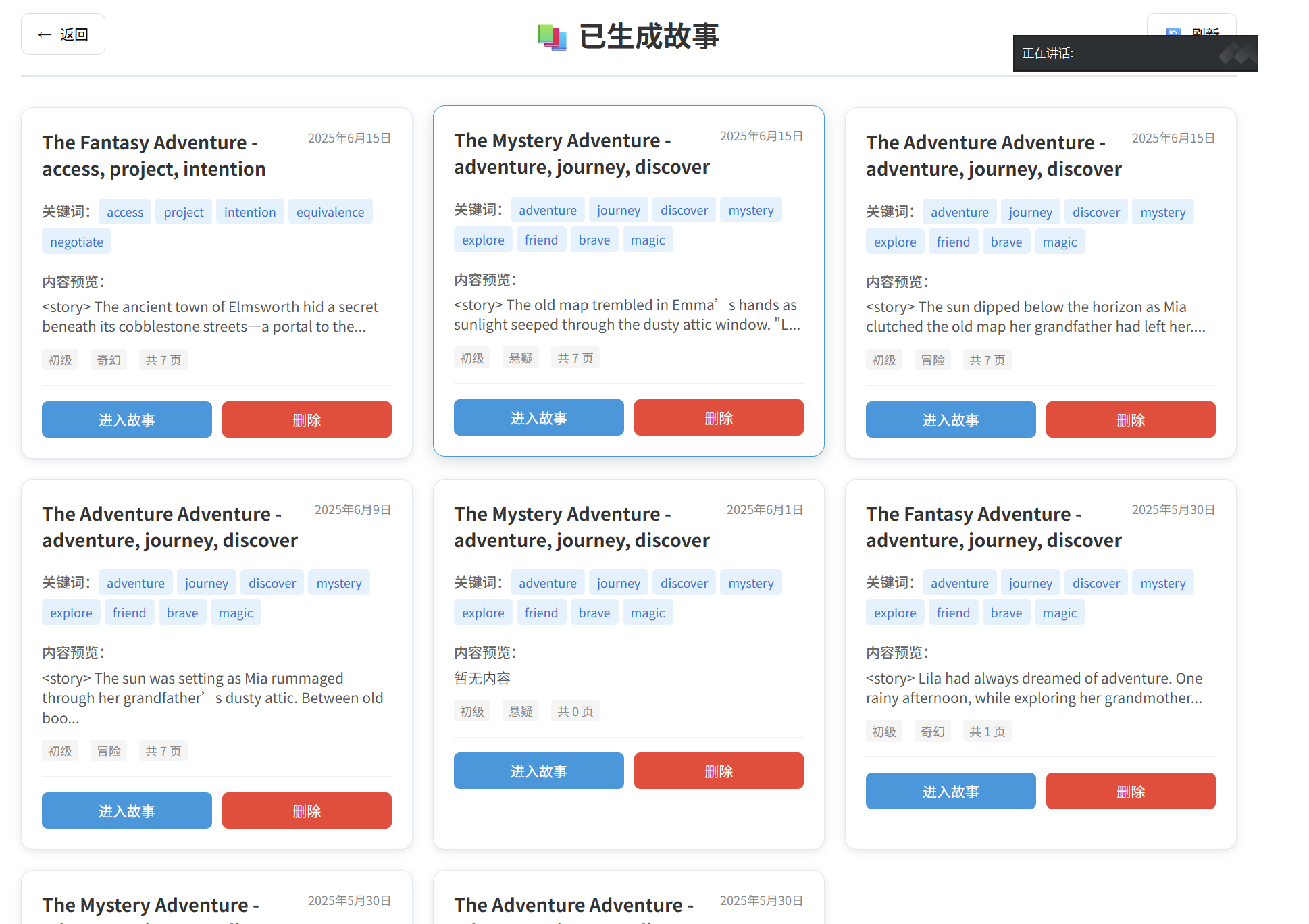
Story.vue是交互式故事的核心展示组件,负责整个故事阅读和交互流程的管理。组件包含故事初始化模块检测故事类型和构建请求,内容展示模块处理打字机动画和关键词高亮,交互控制模块管理选择分支和语音播放,状态管理模块处理加载状态和错误捕获。
核心交互功能通过打字机动画效果逐字符显示模拟真实打字,智能关键词高亮自动识别学习词汇并应用视觉效果,实时内容生成流程响应用户选择并触发AI生成。
Story.vue组件的模板结构包含故事标题和进度条、故事内容显示区域、语音播放控制、选择分支按钮和实时生成加载状态:
<!-- 位置: f:\cijingxingyun\cijingxingyun_front\src\views\Story.vue -->
<template>
  <div class="story-container">
    <!-- 故事标题和进度 -->
    <div class="story-header">
      <h1 class="story-title">{{ currentStory.title }}</h1>
      <div class="progress-bar">
        <div class="progress-fill" :style="{ width: progressPercentage + '%' }"></div>
      </div>
    </div>

    <!-- 故事内容显示区域 -->
    <div class="story-content" ref="storyContent">
      <!-- 场景图片 -->
      <div class="scene-image" v-if="currentPage.sceneImageUrl">
        <img :src="currentPage.sceneImageUrl" :alt="'Scene ' + currentPage.pageNumber">
      </div>

      <!-- 打字机效果的故事文本 -->
      <div class="story-text">
        <div class="english-content">
          <p v-html="displayedEnglishContent" class="typing-text"></p>
        </div>

        <div class="chinese-content" v-if="showTranslation">
          <p v-html="displayedChineseContent" class="typing-text"></p>
        </div>
      </div>

      <!-- 语音播放控制 -->
      <div class="voice-controls">
        <button @click="playStoryAudio" class="voice-btn" :disabled="isPlaying">
          <i class="fas" :class="isPlaying ? 'fa-stop' : 'fa-play'"></i>
          {{ isPlaying ? '停止播放' : '语音播放' }}
        </button>
        <button @click="toggleTranslation" class="translation-btn">
          {{ showTranslation ? '隐藏翻译' : '显示翻译' }}
        </button>
      </div>
    </div>

    <!-- 选择分支按钮 -->
    <div class="choices-container" v-if="showChoices && currentPage.choices">
      <h3>选择你的行动:</h3>
      <div class="choices-grid">
        <button
          v-for="(choice, index) in currentPage.choices"
          :key="index"
          @click="makeChoice(index)"
          class="choice-btn"
          :class="{ 'selected': selectedChoice === index }"
        >
          {{ choice }}
        </button>
      </div>
    </div>

    <!-- 实时生成加载状态 -->
    <div class="loading-overlay" v-if="isGenerating">
      <div class="loading-spinner"></div>
      <p>AI正在为你创作故事续集...</p>
    </div>
  </div>
</template>

<script>
export default {
  name: 'Story',
  data() {
    return {
      currentStory: {},
      currentPage: {},
      displayedEnglishContent: '',
      displayedChineseContent: '',
      showTranslation: false,
      showChoices: false,
      selectedChoice: null,
      isGenerating: false,
      isPlaying: false,
      typingSpeed: 50, // 打字速度(毫秒)
      currentCharIndex: 0,
      progressPercentage: 0,
      storyHistory: [], // 故事路径历史
      targetWords: [] // 目标学习单词
    }
  },

  mounted() {
    this.initializeStory();
  },

  methods: {
    /**
     * 初始化故事
     */
    async initializeStory() {
      try {
        const storyId = this.$route.params.id;
        if (storyId === 'realtime') {
          // 实时生成模式
          await this.startRealtimeStory();
        } else {
          // 预生成故事模式
          await this.loadPreGeneratedStory(storyId);
        }
      } catch (error) {
        console.error('故事初始化失败:', error);
        this.$message.error('故事加载失败');
      }
    },

    /**
     * 启动实时故事生成
     */
    async startRealtimeStory() {
      this.isGenerating = true;

      try {
        // 获取用户单词列表
        const userWords = await this.getUserWords();
        this.targetWords = userWords.slice(0, 8); // 取前8个单词

        // 调用AI生成故事开头
        const response = await this.$http.post('/api/deepseek/generate-story', {
          theme: this.$route.query.theme || 'adventure',
          words: this.targetWords,
          context: '',
          difficulty: 'intermediate'
        });

        this.currentPage = response.data;
        this.currentStory = {
          title: '你的专属冒险故事',
          theme: this.$route.query.theme || 'adventure'
        };

        this.startTypingAnimation();

      } catch (error) {
        console.error('实时故事生成失败:', error);
        this.$message.error('故事生成失败,请重试');
      } finally {
        this.isGenerating = false;
      }
    },

    /**
     * 打字机动画效果
     */
    startTypingAnimation() {
      this.displayedEnglishContent = '';
      this.displayedChineseContent = '';
      this.currentCharIndex = 0;
      this.showChoices = false;

      // 处理关键词高亮
      const highlightedContent = this.highlightKeywords(this.currentPage.englishContent);

      this.typeText(highlightedContent, 'english');
    },

    /**
     * 逐字打字效果
     */
    typeText(content, language) {
      const chars = content.split('');
      let currentText = '';

      const typeChar = () => {
        if (this.currentCharIndex < chars.length) {
          currentText += chars[this.currentCharIndex];

          if (language === 'english') {
            this.displayedEnglishContent = currentText;
          } else {
            this.displayedChineseContent = currentText;
          }

          this.currentCharIndex++;
          setTimeout(typeChar, this.typingSpeed);
        } else {
          // 英文打字完成后开始中文(如果显示翻译)
          if (language === 'english' && this.showTranslation) {
            this.currentCharIndex = 0;
            setTimeout(() => {
              this.typeText(this.currentPage.chineseContent, 'chinese');
            }, 500);
          } else {
            // 打字完成,显示选择项
            setTimeout(() => {
              this.showChoices = true;
            }, 1000);
          }
        }
      };

      typeChar();
    },

    /**
     * 关键词高亮处理
     */
    highlightKeywords(content) {
      let highlightedContent = content;

      // 高亮目标单词
      this.targetWords.forEach(word => {
        const regex = new RegExp(`\\b${word}\\b`, 'gi');
        highlightedContent = highlightedContent.replace(regex, `<span class="highlight-word">${word}</span>`);
      });

      // 处理已有的**包围的单词
      highlightedContent = highlightedContent.replace(/\*\*(.*?)\*\*/g, '<span class="highlight-word">$1</span>');

      return highlightedContent;
    },

    /**
     * 用户做出选择
     */
    async makeChoice(choiceIndex) {
      this.selectedChoice = choiceIndex;
      this.isGenerating = true;

      try {
        // 记录选择历史
        this.storyHistory.push({
          page: this.currentPage,
          choice: choiceIndex
        });

        // 请求AI生成下一页内容
        const response = await this.$http.post('/api/deepseek/continue-story', {
          previousContent: this.currentPage.englishContent,
          userChoice: this.currentPage.choices[choiceIndex],
          words: this.targetWords,
          theme: this.currentStory.theme
        });

        this.currentPage = response.data;
        this.updateProgress();
        this.startTypingAnimation();

      } catch (error) {
        console.error('故事续写失败:', error);
        this.$message.error('故事续写失败,请重试');
      } finally {
        this.isGenerating = false;
        this.selectedChoice = null;
      }
    },

    /**
     * 语音播放功能
     */
    playStoryAudio() {
      if (this.isPlaying) {
        speechSynthesis.cancel();
        this.isPlaying = false;
        return;
      }

      const utterance = new SpeechSynthesisUtterance(this.currentPage.englishContent);
      utterance.lang = 'en-US';
      utterance.rate = 0.8;
      utterance.pitch = 1.0;

      utterance.onstart = () => {
        this.isPlaying = true;
      };

      utterance.onend = () => {
        this.isPlaying = false;
      };

      utterance.onerror = () => {
        this.isPlaying = false;
        this.$message.error('语音播放失败');
      };

      speechSynthesis.speak(utterance);
    },

    /**
     * 切换翻译显示
     */
    toggleTranslation() {
      this.showTranslation = !this.showTranslation;

      if (this.showTranslation && !this.displayedChineseContent) {
        // 如果刚开启翻译且还没显示,立即开始中文打字动画
        this.currentCharIndex = 0;
        this.typeText(this.currentPage.chineseContent, 'chinese');
      }
    },

    /**
     * 更新进度
     */
    updateProgress() {
      // 根据故事深度计算进度
      this.progressPercentage = Math.min((this.storyHistory.length / 10) * 100, 100);
    },

    /**
     * 获取用户单词列表
     */
    async getUserWords() {
      try {
        const response = await this.$http.get('/api/memory/user-words');
        return response.data.words || [];
      } catch (error) {
        console.error('获取用户单词失败:', error);
        // 返回默认单词列表
        return ['adventure', 'mystery', 'explore', 'discover', 'journey', 'treasure', 'magic', 'forest'];
      }
    }
  }
}
</script>

<style scoped>
.story-container {
  max-width: 800px;
  margin: 0 auto;
  padding: 20px;
  background: linear-gradient(135deg, #667eea 0%, #764ba2 100%);
  min-height: 100vh;
  color: white;
}

.story-header {
  text-align: center;
  margin-bottom: 30px;
}

.story-title {
  font-size: 2.5em;
  margin-bottom: 15px;
  text-shadow: 2px 2px 4px rgba(0,0,0,0.3);
}

.progress-bar {
  width: 100%;
  height: 8px;
  background: rgba(255,255,255,0.3);
  border-radius: 4px;
  overflow: hidden;
}

.progress-fill {
  height: 100%;
  background: linear-gradient(90deg, #4CAF50, #45a049);
  transition: width 0.5s ease;
}

.story-content {
  background: rgba(255,255,255,0.1);
  border-radius: 15px;
  padding: 30px;
  margin-bottom: 20px;
  backdrop-filter: blur(10px);
}

.scene-image {
  text-align: center;
  margin-bottom: 20px;
}

.scene-image img {
  max-width: 100%;
  border-radius: 10px;
  box-shadow: 0 8px 32px rgba(0,0,0,0.3);
}

.story-text {
  margin-bottom: 20px;
}

.english-content {
  margin-bottom: 15px;
}

.typing-text {
  font-size: 1.2em;
  line-height: 1.8;
  text-align: justify;
}

.highlight-word {
  background: linear-gradient(45deg, #FFD700, #FFA500);
  color: #333;
  padding: 2px 6px;
  border-radius: 4px;
  font-weight: bold;
  cursor: pointer;
  transition: all 0.2s ease;
}

.highlight-word:hover {
  transform: scale(1.05);
  box-shadow: 0 2px 8px rgba(0,0,0,0.3);
}

.voice-controls {
  display: flex;
  gap: 15px;
  margin-top: 20px;
}

.voice-btn, .translation-btn {
  padding: 10px 20px;
  border: none;
  border-radius: 25px;
  background: linear-gradient(45deg, #4CAF50, #45a049);
  color: white;
  cursor: pointer;
  transition: all 0.3s ease;
}

.voice-btn:hover, .translation-btn:hover {
  transform: translateY(-2px);
  box-shadow: 0 5px 15px rgba(0,0,0,0.3);
}

.voice-btn:disabled {
  opacity: 0.6;
  cursor: not-allowed;
  transform: none;
}

.choices-container {
  background: rgba(255,255,255,0.1);
  border-radius: 15px;
  padding: 25px;
  margin-top: 20px;
}

.choices-container h3 {
  text-align: center;
  margin-bottom: 20px;
  font-size: 1.4em;
}

.choices-grid {
  display: grid;
  gap: 15px;
}

.choice-btn {
  padding: 15px 20px;
  border: 2px solid rgba(255,255,255,0.3);
  border-radius: 10px;
  background: rgba(255,255,255,0.1);
  color: white;
  cursor: pointer;
  transition: all 0.3s ease;
  font-size: 1.1em;
}

.choice-btn:hover {
  background: rgba(255,255,255,0.2);
  border-color: #FFD700;
  transform: translateY(-2px);
}

.choice-btn.selected {
  background: linear-gradient(45deg, #FFD700, #FFA500);
  color: #333;
  border-color: #FFD700;
}

.loading-overlay {
  position: fixed;
  top: 0;
  left: 0;
  right: 0;
  bottom: 0;
  background: rgba(0,0,0,0.8);
  display: flex;
  flex-direction: column;
  justify-content: center;
  align-items: center;
  z-index: 1000;
}

.loading-spinner {
  width: 60px;
  height: 60px;
  border: 4px solid rgba(255,255,255,0.3);
  border-top: 4px solid #FFD700;
  border-radius: 50%;
  animation: spin 1s linear infinite;
  margin-bottom: 20px;
}

@keyframes spin {
  0% { transform: rotate(0deg); }
  100% { transform: rotate(360deg); }
}

.chinese-content {
  color: rgba(255,255,255,0.8);
  font-style: italic;
  border-left: 3px solid #FFD700;
  padding-left: 15px;
  margin-top: 15px;
}

@media (max-width: 768px) {
  .story-container {
    padding: 15px;
  }

  .story-title {
    font-size: 2em;
  }

  .typing-text {
    font-size: 1.1em;
  }

  .voice-controls {
    flex-direction: column;
  }
}
</style>
FastStory.vue为用户提供了快速体验故事生成功能的轻量级解决方案。与完整的交互式故事相比,快速故事专注于一键生成完整故事段落,无需复杂的分支选择过程。组件设计理念围绕配置简化、即时生成、学习导向和体验优化四个核心维度展开。
用户界面采用分阶段设计,配置阶段提供主题选择网格(6个主题选项图标化设计)、难度等级下拉菜单和词汇数量可视化滑块。故事展示阶段采用双栏布局,左侧展示故事内容,右侧提供词汇学习面板,并配置翻译开关、语音播放和继续故事等控制按钮。
词汇学习集成机制优先使用用户当日学习词汇,自动根据历史学习记录推荐相关词汇,并在词汇不足时使用系统默认词汇库。学习效果通过自然融入词汇、点击发音功能、视觉高亮和深度学习模式切换等方式得到增强。
<!-- 位置: f:\cijingxingyun\cijingxingyun_front\src\views\FastStory.vue -->
<template>
  <div class="fast-story-container">
    <!-- 快速生成配置 -->
    <div class="story-config" v-if="!storyGenerated">
      <h2>快速故事生成</h2>

      <div class="config-form">
        <div class="form-group">
          <label>选择主题:</label>
          <div class="theme-grid">
            <button
              v-for="theme in availableThemes"
              :key="theme.value"
              @click="selectedTheme = theme.value"
              class="theme-btn"
              :class="{ 'selected': selectedTheme === theme.value }"
            >
              <i :class="theme.icon"></i>
              {{ theme.label }}
            </button>
          </div>
        </div>

        <div class="form-group">
          <label>难度等级:</label>
          <select v-model="selectedDifficulty" class="difficulty-select">
            <option value="beginner">初级 (Beginner)</option>
            <option value="intermediate">中级 (Intermediate)</option>
            <option value="advanced">高级 (Advanced)</option>
          </select>
        </div>

        <div class="form-group">
          <label>目标单词数量:</label>
          <input
            type="range"
            v-model="wordCount"
            min="5"
            max="15"
            class="word-count-slider"
          >
          <span class="word-count-display">{{ wordCount }} 个单词</span>
        </div>

        <button @click="generateFastStory" class="generate-btn" :disabled="isGenerating">
          <i class="fas fa-magic"></i>
          {{ isGenerating ? '生成中...' : '立即生成故事' }}
        </button>
      </div>
    </div>

    <!-- 生成的故事显示 -->
    <div class="generated-story" v-if="storyGenerated">
      <div class="story-header">
        <h1>{{ generatedStory.title }}</h1>
        <div class="story-meta">
          <span class="theme-tag">{{ getThemeLabel(selectedTheme) }}</span>
          <span class="difficulty-tag">{{ getDifficultyLabel(selectedDifficulty) }}</span>
        </div>
      </div>

      <!-- 故事内容 -->
      <div class="story-content">
        <div class="story-page">
          <div class="english-content" v-html="processedEnglishContent"></div>
          <div class="chinese-content" v-if="showTranslation" v-html="generatedStory.chineseContent"></div>
        </div>

        <!-- 词汇学习面板 -->
        <div class="vocabulary-panel">
          <h3>本章词汇</h3>
          <div class="word-list">
            <div
              v-for="word in storyWords"
              :key="word"
              @click="playWordPronunciation(word)"
              class="word-item"
            >
              <span class="word-text">{{ word }}</span>
              <i class="fas fa-volume-up word-sound"></i>
            </div>
          </div>
        </div>

        <!-- 控制按钮 -->
        <div class="story-controls">
          <button @click="toggleTranslation" class="control-btn">
            {{ showTranslation ? '隐藏翻译' : '显示翻译' }}
          </button>
          <button @click="playFullStory" class="control-btn" :disabled="isPlaying">
            {{ isPlaying ? '停止播放' : '完整朗读' }}
          </button>
          <button @click="continueStory" class="control-btn primary">
            继续故事
          </button>
        </div>
      </div>
    </div>
  </div>
</template>

<script>
export default {
  name: 'FastStory',
  data() {
    return {
      storyGenerated: false,
      isGenerating: false,
      isPlaying: false,
      showTranslation: false,
      selectedTheme: 'adventure',
      selectedDifficulty: 'intermediate',
      wordCount: 8,
      generatedStory: {},
      storyWords: [],
      availableThemes: [
        { value: 'adventure', label: '冒险', icon: 'fas fa-compass' },
        { value: 'mystery', label: '悬疑', icon: 'fas fa-search' },
        { value: 'fantasy', label: '奇幻', icon: 'fas fa-magic' },
        { value: 'science', label: '科幻', icon: 'fas fa-rocket' },
        { value: 'romance', label: '浪漫', icon: 'fas fa-heart' },
        { value: 'horror', label: '恐怖', icon: 'fas fa-ghost' }
      ]
    }
  },

  computed: {
    processedEnglishContent() {
      if (!this.generatedStory.englishContent) return '';

      let content = this.generatedStory.englishContent;

      // 高亮目标单词
      this.storyWords.forEach(word => {
        const regex = new RegExp(`\\b${word}\\b`, 'gi');
        content = content.replace(regex, `<span class="highlight-word" data-word="${word}">${word}</span>`);
      });

      return content;
    }
  },

  methods: {
    /**
     * 快速生成故事
     */
    async generateFastStory() {
      this.isGenerating = true;

      try {
        // 获取用户词汇
        const userWords = await this.getUserWords();
        const selectedWords = userWords.slice(0, this.wordCount);
        this.storyWords = selectedWords;

        // 调用AI生成故事
        const response = await this.$http.post('/api/deepseek/generate-story', {
          theme: this.selectedTheme,
          words: selectedWords,
          context: '这是一个快速生成的完整故事段落',
          difficulty: this.selectedDifficulty
        });

        this.generatedStory = {
          title: this.generateStoryTitle(),
          ...response.data
        };

        this.storyGenerated = true;

        // 自动滚动到故事内容
        this.$nextTick(() => {
          this.$el.querySelector('.generated-story').scrollIntoView({
            behavior: 'smooth'
          });
        });

      } catch (error) {
        console.error('快速故事生成失败:', error);
        this.$message.error('故事生成失败,请重试');
      } finally {
        this.isGenerating = false;
      }
    },

    /**
     * 生成故事标题
     */
    generateStoryTitle() {
      const themeLabels = {
        adventure: '冒险之旅',
        mystery: '神秘探案',
        fantasy: '奇幻世界',
        science: '星际征程',
        romance: '浪漫邂逅',
        horror: '恐怖夜晚'
      };

      return themeLabels[this.selectedTheme] || '奇妙故事';
    },

    /**
     * 播放单词发音
     */
    playWordPronunciation(word) {
      const utterance = new SpeechSynthesisUtterance(word);
      utterance.lang = 'en-US';
      utterance.rate = 0.8;
      speechSynthesis.speak(utterance);
    },

    /**
     * 播放完整故事
     */
    playFullStory() {
      if (this.isPlaying) {
        speechSynthesis.cancel();
        this.isPlaying = false;
        return;
      }

      const utterance = new SpeechSynthesisUtterance(this.generatedStory.englishContent);
      utterance.lang = 'en-US';
      utterance.rate = 0.7;

      utterance.onstart = () => {
        this.isPlaying = true;
      };

      utterance.onend = () => {
        this.isPlaying = false;
      };

      speechSynthesis.speak(utterance);
    },

    /**
     * 切换翻译显示
     */
    toggleTranslation() {
      this.showTranslation = !this.showTranslation;
    },

    /**
     * 继续故事(跳转到完整交互模式)
     */
    continueStory() {
      this.$router.push({
        path: '/story/realtime',
        query: {
          theme: this.selectedTheme,
          difficulty: this.selectedDifficulty,
          context: this.generatedStory.englishContent
        }
      });
    },

    /**
     * 获取主题标签
     */
    getThemeLabel(theme) {
      const themeObj = this.availableThemes.find(t => t.value === theme);
      return themeObj ? themeObj.label : theme;
    },

    /**
     * 获取难度标签
     */
    getDifficultyLabel(difficulty) {
      const labels = {
        beginner: '初级',
        intermediate: '中级',
        advanced: '高级'
      };
      return labels[difficulty] || difficulty;
    },

    /**
     * 获取用户单词列表
     */
    async getUserWords() {
      try {
        const response = await this.$http.get('/api/memory/user-words');
        return response.data.words || [];
      } catch (error) {
        console.error('获取用户单词失败:', error);
        return ['adventure', 'mystery', 'explore', 'discover', 'journey', 'treasure', 'magic', 'forest'];
      }
    }
  }
}
</script>

<style scoped>
.fast-story-container {
  max-width: 900px;
  margin: 0 auto;
  padding: 20px;
  background: linear-gradient(135deg, #667eea 0%, #764ba2 100%);
  min-height: 100vh;
}

.story-config {
  background: rgba(255,255,255,0.1);
  border-radius: 20px;
  padding: 40px;
  backdrop-filter: blur(10px);
  color: white;
}

.story-config h2 {
  text-align: center;
  font-size: 2.5em;
  margin-bottom: 30px;
  text-shadow: 2px 2px 4px rgba(0,0,0,0.3);
}

.config-form {
  max-width: 600px;
  margin: 0 auto;
}

.form-group {
  margin-bottom: 30px;
}

.form-group label {
  display: block;
  font-size: 1.2em;
  margin-bottom: 15px;
  font-weight: bold;
}

.theme-grid {
  display: grid;
  grid-template-columns: repeat(auto-fit, minmax(150px, 1fr));
  gap: 15px;
}

.theme-btn {
  padding: 15px;
  border: 2px solid rgba(255,255,255,0.3);
  border-radius: 10px;
  background: rgba(255,255,255,0.1);
  color: white;
  cursor: pointer;
  transition: all 0.3s ease;
  display: flex;
  flex-direction: column;
  align-items: center;
  gap: 8px;
}

.theme-btn:hover {
  background: rgba(255,255,255,0.2);
  transform: translateY(-2px);
}

.theme-btn.selected {
  background: linear-gradient(45deg, #FFD700, #FFA500);
  color: #333;
  border-color: #FFD700;
}

.theme-btn i {
  font-size: 1.5em;
}

.difficulty-select {
  width: 100%;
  padding: 12px;
  border-radius: 8px;
  border: none;
  background: rgba(255,255,255,0.9);
  font-size: 1.1em;
}

.word-count-slider {
  width: 100%;
  margin-bottom: 10px;
}

.word-count-display {
  font-size: 1.1em;
  color: #FFD700;
  font-weight: bold;
}

.generate-btn {
  width: 100%;
  padding: 15px;
  border: none;
  border-radius: 10px;
  background: linear-gradient(45deg, #4CAF50, #45a049);
  color: white;
  font-size: 1.3em;
  cursor: pointer;
  transition: all 0.3s ease;
  display: flex;
  align-items: center;
  justify-content: center;
  gap: 10px;
}

.generate-btn:hover:not(:disabled) {
  transform: translateY(-2px);
  box-shadow: 0 8px 25px rgba(0,0,0,0.3);
}

.generate-btn:disabled {
  opacity: 0.6;
  cursor: not-allowed;
}

.generated-story {
  background: rgba(255,255,255,0.1);
  border-radius: 20px;
  padding: 30px;
  color: white;
  backdrop-filter: blur(10px);
}

.story-header {
  text-align: center;
  margin-bottom: 30px;
}

.story-header h1 {
  font-size: 2.5em;
  margin-bottom: 15px;
  text-shadow: 2px 2px 4px rgba(0,0,0,0.3);
}

.story-meta {
  display: flex;
  justify-content: center;
  gap: 15px;
}

.theme-tag, .difficulty-tag {
  padding: 5px 15px;
  border-radius: 15px;
  background: linear-gradient(45deg, #FFD700, #FFA500);
  color: #333;
  font-weight: bold;
}

.story-content {
  display: grid;
  grid-template-columns: 2fr 1fr;
  gap: 30px;
  margin-bottom: 30px;
}

.story-page {
  background: rgba(255,255,255,0.1);
  border-radius: 15px;
  padding: 25px;
}

.english-content {
  font-size: 1.2em;
  line-height: 1.8;
  margin-bottom: 20px;
}

.chinese-content {
  color: rgba(255,255,255,0.8);
  font-style: italic;
  border-left: 3px solid #FFD700;
  padding-left: 15px;
}

.highlight-word {
  background: linear-gradient(45deg, #FFD700, #FFA500);
  color: #333;
  padding: 2px 6px;
  border-radius: 4px;
  font-weight: bold;
  cursor: pointer;
  transition: all 0.2s ease;
}

.highlight-word:hover {
  transform: scale(1.05);
  box-shadow: 0 2px 8px rgba(0,0,0,0.3);
}

.vocabulary-panel {
  background: rgba(255,255,255,0.1);
  border-radius: 15px;
  padding: 20px;
}

.vocabulary-panel h3 {
  margin-bottom: 15px;
  text-align: center;
}

.word-list {
  display: flex;
  flex-direction: column;
  gap: 10px;
}

.word-item {
  display: flex;
  justify-content: space-between;
  align-items: center;
  padding: 10px;
  background: rgba(255,255,255,0.1);
  border-radius: 8px;
  cursor: pointer;
  transition: all 0.2s ease;
}

.word-item:hover {
  background: rgba(255,255,255,0.2);
  transform: translateX(5px);
}

.word-sound {
  color: #FFD700;
}

.story-controls {
  display: flex;
  justify-content: center;
  gap: 15px;
  grid-column: span 2;
}

.control-btn {
  padding: 12px 25px;
  border: none;
  border-radius: 25px;
  background: rgba(255,255,255,0.2);
  color: white;
  cursor: pointer;
  transition: all 0.3s ease;
  border: 2px solid transparent;
}

.control-btn:hover {
  background: rgba(255,255,255,0.3);
  transform: translateY(-2px);
}

.control-btn.primary {
  background: linear-gradient(45deg, #4CAF50, #45a049);
  border-color: #4CAF50;
}

.control-btn:disabled {
  opacity: 0.6;
  cursor: not-allowed;
  transform: none;
}

@media (max-width: 768px) {
  .story-content {
    grid-template-columns: 1fr;
  }

  .story-controls {
    grid-column: span 1;
    flex-direction: column;
  }

  .theme-grid {
    grid-template-columns: repeat(2, 1fr);
  }
}
</style>

AtomGit 是由开放原子开源基金会联合 CSDN 等生态伙伴共同推出的新一代开源与人工智能协作平台。平台坚持“开放、中立、公益”的理念,把代码托管、模型共享、数据集托管、智能体开发体验和算力服务整合在一起,为开发者提供从开发、训练到部署的一站式体验。
更多推荐


 5
5 0
0- 0


 已为社区贡献6条内容

所有评论(0)