openclaw添加大模型-千问大模型-qwen3-max
openclaw添加大模型-千问大模型-qwen3-max
文档
开通千问大模型
-
百炼平台:https://bailian.console.aliyun.com/cn-beijing?tab=model#/model-market/detail/qwen3-max
-
在模型广场,找到Qwen3-Max,点击立即体验,就开通了,而且应该是大部分的模型都开通了,这时候就应该慎重了,用超了就收费了
-
现在大部分模型都有1,000,000免费额度
-
建议在模型用量页面,打开免费额度用完即停,避免用超了收费
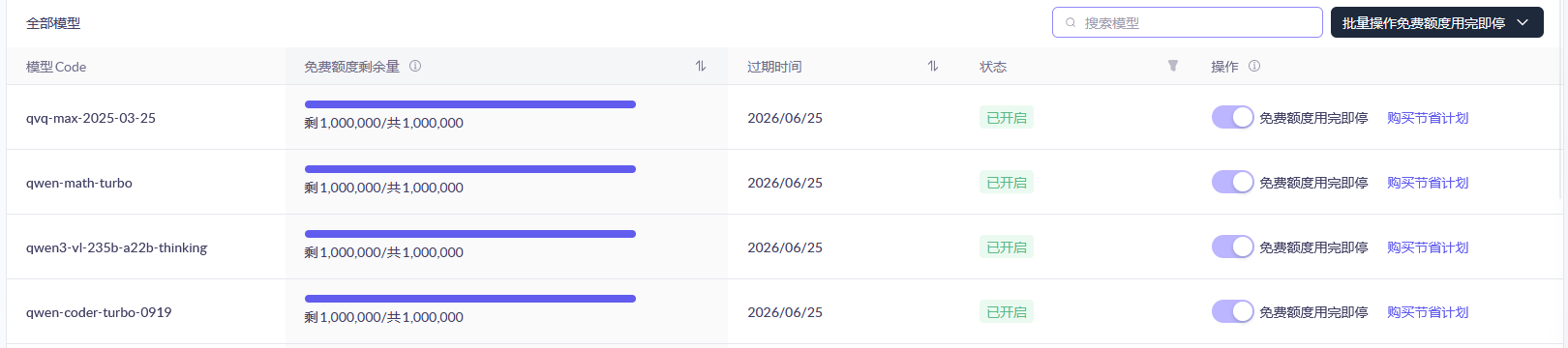
-
1,000,000免费额度,其实一点也不多,几下就没有额度了,打开免费额度用完即停,就可以避免用超了收费
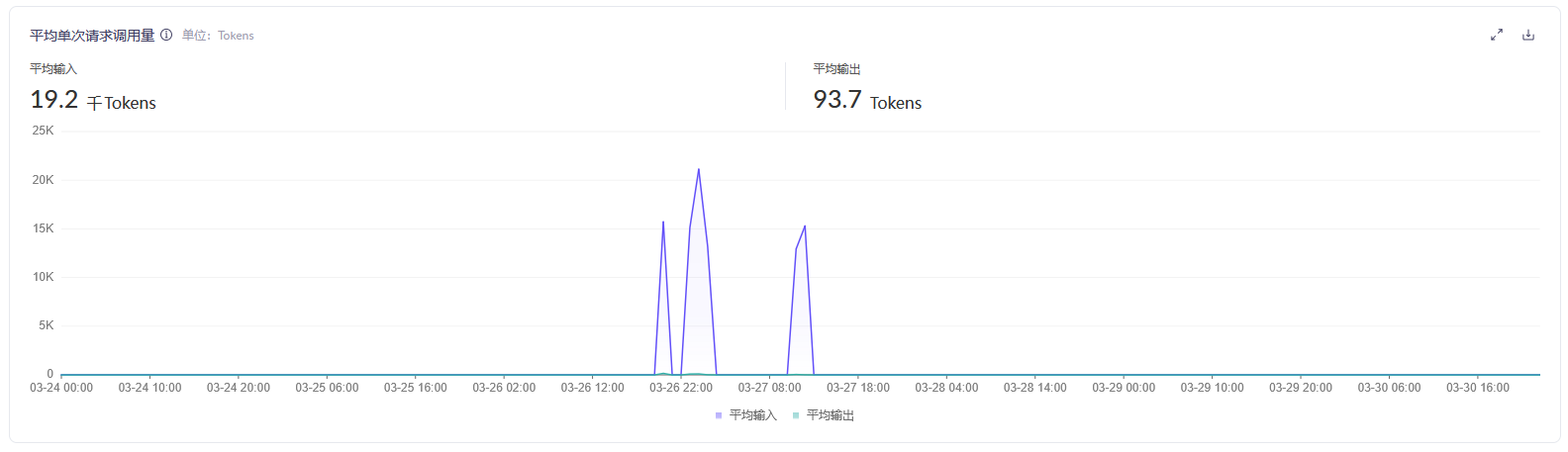
-
业务空间管理:https://bailian.console.aliyun.com/cn-beijing?tab=globalset,新增业务空间,然后在模型权限流控设置里面,授权几个模型

-
API Key:https://bailian.console.aliyun.com/cn-beijing?tab=globalset,创建API Key,归属业务空间选择上面新增业务空间,此时生成的API Key就是要使用的key
openclaw添加大模型-千问大模型
-
安装openclaw,参考:ubuntu安装openclaw-docker安装openclaw
-
进入到容器里
docker exec -it openclaw-gateway sh -
执行配置命令
openclaw configure会有如下交互:
-
Where will the Gateway run?
- Local (this machine)
-
Select sections to configure
- Model
-
Model/auth provider
- Custom Provider,就填这个,不要选择Ali开头的,选择那个会加载出很多没用的模型
-
API Base URL
https://dashscope.aliyuncs.com/compatible-mode/v1,百炼平台就填这个
-
How do you want to provide this API key?
- Paste API key now
-
API Key (leave blank if not required)
- sk-xxxxxx,这个就填在百炼平台生成的key
-
Endpoint compatibility
- OpenAI-compatible (Uses /chat/completions)
-
Model ID
- qwen3-max-2026-01-23,在百炼平台授权的大模型,注意要全小写
-
Endpoint ID
- custom-dashscope-aliyuncs-com,自动生成的,不用改
-
Model alias (optional)
- 不用填。
-
接下来会输出一段文本
Configured custom provider: custom-dashscope-aliyuncs-com/qwen3-max-2026-01-23 Config overwrite: /home/node/.openclaw/openclaw.json (sha256 xxxxxx -> xxxxxx, backup=/home/node/.openclaw/openclaw.json.bak) Updated ~/.openclaw/openclaw.json -
Select sections to configure
- Continue (Done)
配置结束。
-
-
退出容器
-
查看此时的
openclaw.json,models、agents模块会增加大模型相关的内容{ "meta": { "lastTouchedVersion": "2026.3.23", "lastTouchedAt": "2026-03-30T17:49:05.088Z" }, "wizard": { "lastRunAt": "2026-03-30T17:49:05.083Z", "lastRunVersion": "2026.3.23", "lastRunCommand": "configure", "lastRunMode": "local" }, "models": { "mode": "merge", "providers": { "custom-dashscope-aliyuncs-com": { "baseUrl": "https://dashscope.aliyuncs.com/compatible-mode/v1", "apiKey": "sk-xxxxxx", "api": "openai-completions", "models": [ { "id": "qwen3-max-2026-01-23", "name": "qwen3-max-2026-01-23 (Custom Provider)", "reasoning": false, "input": [ "text" ], "cost": { "input": 0, "output": 0, "cacheRead": 0, "cacheWrite": 0 }, "contextWindow": 16000, "maxTokens": 4096 } ] } } }, "agents": { "defaults": { "model": { "primary": "custom-dashscope-aliyuncs-com/qwen3-max-2026-01-23" }, "models": { "custom-dashscope-aliyuncs-com/qwen3-max-2026-01-23": {} }, "compaction": { "mode": "safeguard" }, "maxConcurrent": 4, "subagents": { "maxConcurrent": 8 } } }, "messages": { "ackReactionScope": "group-mentions" }, "commands": { "native": "auto", "nativeSkills": "auto", "restart": true, "ownerDisplay": "raw" }, "gateway": { "mode": "local", "bind": "lan", "controlUi": { "allowedOrigins": [ "http://192.168.1.50:18789" ], "allowInsecureAuth": true, "dangerouslyDisableDeviceAuth": true }, "auth": { "mode": "token", "token": "xxxxxx" }, "trustedProxies": [ "192.168.0.0/16", "172.16.0.0/12", "10.0.0.0/8" ] } } -
重启
openclaw-gateway、openclaw-nginxdocker restart openclaw-gateway docker restart openclaw-nginx此时浏览器再次访问:
http://ip:18789,填写配置文件中的token,登录成功后,可以在页面进行对话了。
注意事项
- 部分内容由AI生成
- 如有不对,欢迎指正!!!

AtomGit 是由开放原子开源基金会联合 CSDN 等生态伙伴共同推出的新一代开源与人工智能协作平台。平台坚持“开放、中立、公益”的理念,把代码托管、模型共享、数据集托管、智能体开发体验和算力服务整合在一起,为开发者提供从开发、训练到部署的一站式体验。
更多推荐

 0
0 0
0- 0


 已为社区贡献1条内容

所有评论(0)