多物理场耦合仿真-主题023-耦合问题的网格生成技术
第023篇:耦合问题的网格生成技术
摘要
网格生成是多物理场耦合仿真的基础与关键环节,直接影响数值解的精度、收敛性和计算效率。本主题系统介绍耦合问题网格生成的核心技术,包括结构化与非结构化网格生成方法、自适应网格加密技术、多物理场网格匹配策略、动网格技术以及高质量网格的评价标准。通过六个典型案例——二维结构化网格生成、Delaunay三角化、自适应网格加密、流固耦合动网格、多物理场网格插值以及网格质量分析,深入阐述网格生成算法的实现原理与工程应用。本主题旨在帮助读者掌握耦合问题网格生成的核心方法,为构建高精度、高效率的多物理场仿真模型奠定坚实基础。
关键词
网格生成,结构化网格,非结构化网格,Delaunay三角化,自适应加密,动网格,网格质量,多物理场耦合
1. 引言
在多物理场耦合仿真中,网格生成是将连续物理域离散为有限个单元或节点的过程,是连接物理模型与数值算法的桥梁。高质量的网格能够准确捕捉物理场的空间分布特征,保证数值解的精度和稳定性。对于耦合问题而言,网格生成面临更多挑战:不同物理场可能需要不同尺度的网格、界面处需要网格匹配或插值、动边界问题需要网格变形或重生成等。
网格生成技术的发展经历了从手工划分到自动化生成的演变。早期的有限元分析依赖工程师手动划分网格,效率低下且质量难以保证。20世纪70年代,自动网格生成算法开始发展,包括映射法、Delaunay三角化、 advancing front方法等。进入21世纪,随着计算能力的提升和工程问题的复杂化,自适应网格技术、并行网格生成、各向异性网格等高级技术得到广泛应用。
本主题将系统介绍耦合问题网格生成的核心方法,包括:
- 网格类型与数据结构
- 结构化网格生成技术
- 非结构化网格生成技术
- 自适应网格加密方法
- 动网格技术
- 多物理场网格匹配策略
- 网格质量评价与优化
2. 网格基础理论
2.1 网格类型与分类
根据拓扑结构,计算网格可分为结构化网格和非结构化网格两大类。
结构化网格具有以下特征:
- 节点编号具有规律性,可用(i, j, k)索引
- 每个内部节点具有相同数量的相邻节点
- 适合有限差分法和有限体积法
- 对复杂几何适应性较差
结构化网格的数学表示为:
x ( i , j , k ) = ( x ( i , j , k ) , y ( i , j , k ) , z ( i , j , k ) ) \mathbf{x}(i, j, k) = (x(i, j, k), y(i, j, k), z(i, j, k)) x(i,j,k)=(x(i,j,k),y(i,j,k),z(i,j,k))
其中i, j, k为网格索引。结构化网格可进一步分为:
- 直角网格:坐标轴对齐,最简单但几何适应性差
- 曲线网格:通过坐标变换适应复杂边界
- 块结构化网格:将复杂域分解为多个结构化块
非结构化网格的特征:
- 节点连接关系任意,需显式存储
- 对复杂几何适应性强
- 适合有限元法和有限体积法
- 内存开销较大,计算效率略低
非结构化网格的拓扑由节点坐标和单元-节点连接关系定义:
M = ( N , E , C ) \mathcal{M} = (\mathcal{N}, \mathcal{E}, \mathcal{C}) M=(N,E,C)
其中 N \mathcal{N} N为节点集合, E \mathcal{E} E为边集合, C \mathcal{C} C为单元集合。
2.2 网格数据结构
高效的网格数据结构是网格算法的基础。常用的数据结构包括:
节点数据结构:
Node {
    id: integer          // 节点编号
    x, y, z: float       // 坐标
    boundary: bool       // 边界标记
    physical_tag: int    // 物理属性标签
}
单元数据结构:
Element {
    id: integer          // 单元编号
    type: ElementType    // 单元类型(三角形、四边形等)
    nodes: [int]         // 节点编号列表
    neighbors: [int]     // 相邻单元编号
    material: int        // 材料编号
}
半边数据结构(Half-Edge):
半边结构是处理非结构化网格的高效数据结构,每条边被表示为两条方向相反的半边:
HalfEdge {
    origin: int          // 起点节点
    twin: HalfEdge       // 对向半边
    next: HalfEdge       // 下一条半边
    face: Face           // 所属面
}
半边结构支持O(1)时间复杂度的邻域查询,广泛应用于网格生成和自适应算法。
2.3 网格质量度量
网格质量直接影响数值解的精度。常用的质量度量包括:
单元形状质量:
对于三角形单元,形状质量因子定义为:
Q = 4 3 A a 2 + b 2 + c 2 Q = \frac{4\sqrt{3}A}{a^2 + b^2 + c^2} Q=a2+b2+c243A
其中A为面积,a, b, c为边长。Q=1表示等边三角形,Q→0表示退化三角形。
对于四边形单元:
Q = 4 A ( a + c ) ( b + d ) ⋅ min ( a + c b + d , b + d a + c ) Q = \frac{4A}{(a + c)(b + d)} \cdot \min\left(\frac{a + c}{b + d}, \frac{b + d}{a + c}\right) Q=(a+c)(b+d)4A⋅min(b+da+c,a+cb+d)
其中a, b, c, d为边长。
尺寸质量:
单元尺寸应与局部物理梯度相匹配:
h e ≈ ∥ u ∥ ∥ ∇ u ∥ h_e \approx \frac{\|u\|}{\|\nabla u\|} he≈∥∇u∥∥u∥
其中 ∥ u ∥ \|u\| ∥u∥为解的幅值, ∥ ∇ u ∥ \|\nabla u\| ∥∇u∥为梯度幅值。
正交质量:
对于有限体积法,面法向量与连接相邻单元中心的向量的对齐程度很重要:
Q o r t h = cos θ = n f ⋅ d P C ∥ n f ∥ ∥ d P C ∥ Q_{orth} = \cos\theta = \frac{\mathbf{n}_f \cdot \mathbf{d}_{PC}}{\|\mathbf{n}_f\| \|\mathbf{d}_{PC}\|} Qorth=cosθ=∥nf∥∥dPC∥nf⋅dPC
3. 结构化网格生成
3.1 代数插值法
代数插值法通过参数化映射将计算域变换到物理域。对于二维问题,坐标变换为:
x ( ξ , η ) = ∑ i = 0 m ∑ j = 0 n x i j ϕ i ( ξ ) ψ j ( η ) \mathbf{x}(\xi, \eta) = \sum_{i=0}^{m}\sum_{j=0}^{n} \mathbf{x}_{ij} \phi_i(\xi) \psi_j(\eta) x(ξ,η)=i=0∑mj=0∑nxijϕi(ξ)ψj(η)
其中 ϕ i \phi_i ϕi和 ψ j \psi_j ψj为插值基函数,常用的包括:
线性插值:
ϕ 0 ( ξ ) = 1 − ξ , ϕ 1 ( ξ ) = ξ \phi_0(\xi) = 1 - \xi, \quad \phi_1(\xi) = \xi ϕ0(ξ)=1−ξ,ϕ1(ξ)=ξ
Hermite插值:
x ( ξ , η ) = x 1 ( η ) H 0 ( ξ ) + x 2 ( η ) H 1 ( ξ ) + d x d ξ ∣ 1 H 2 ( ξ ) + d x d ξ ∣ 2 H 3 ( ξ ) \mathbf{x}(\xi, \eta) = \mathbf{x}_1(\eta)H_0(\xi) + \mathbf{x}_2(\eta)H_1(\xi) + \frac{d\mathbf{x}}{d\xi}\bigg|_1 H_2(\xi) + \frac{d\mathbf{x}}{d\xi}\bigg|_2 H_3(\xi) x(ξ,η)=x1(η)H0(ξ)+x2(η)H1(ξ)+dξdx
1H2(ξ)+dξdx
2H3(ξ)
其中 H i H_i Hi为Hermite基函数,可保证边界导数连续。
超限映射(Transfinite Interpolation):
超限映射通过匹配四条边界曲线生成内部网格:
x ( ξ , η ) = ( 1 − η ) x ( ξ , 0 ) + η x ( ξ , 1 ) + ( 1 − ξ ) x ( 0 , η ) + ξ x ( 1 , η ) \mathbf{x}(\xi, \eta) = (1-\eta)\mathbf{x}(\xi, 0) + \eta\mathbf{x}(\xi, 1) + (1-\xi)\mathbf{x}(0, \eta) + \xi\mathbf{x}(1, \eta) x(ξ,η)=(1−η)x(ξ,0)+ηx(ξ,1)+(1−ξ)x(0,η)+ξx(1,η)
− ( 1 − ξ ) ( 1 − η ) x ( 0 , 0 ) − ξ ( 1 − η ) x ( 1 , 0 ) − ( 1 − ξ ) η x ( 0 , 1 ) − ξ η x ( 1 , 1 ) - (1-\xi)(1-\eta)\mathbf{x}(0, 0) - \xi(1-\eta)\mathbf{x}(1, 0) - (1-\xi)\eta\mathbf{x}(0, 1) - \xi\eta\mathbf{x}(1, 1) −(1−ξ)(1−η)x(0,0)−ξ(1−η)x(1,0)−(1−ξ)ηx(0,1)−ξηx(1,1)
3.2 椭圆网格生成
椭圆网格生成通过求解偏微分方程获得光滑的网格分布。Thompson等人提出的椭圆生成系统为:
g 22 ∂ 2 x ∂ ξ 2 − 2 g 12 ∂ 2 x ∂ ξ ∂ η + g 11 ∂ 2 x ∂ η 2 + J 2 ( P ∂ x ∂ ξ + Q ∂ x ∂ η ) = 0 g_{22}\frac{\partial^2 \mathbf{x}}{\partial \xi^2} - 2g_{12}\frac{\partial^2 \mathbf{x}}{\partial \xi \partial \eta} + g_{11}\frac{\partial^2 \mathbf{x}}{\partial \eta^2} + J^2\left(P\frac{\partial \mathbf{x}}{\partial \xi} + Q\frac{\partial \mathbf{x}}{\partial \eta}\right) = 0 g22∂ξ2∂2x−2g12∂ξ∂η∂2x+g11∂η2∂2x+J2(P∂ξ∂x+Q∂η∂x)=0
其中:
g 11 = ( ∂ x ∂ ξ ) 2 + ( ∂ y ∂ ξ ) 2 g_{11} = \left(\frac{\partial x}{\partial \xi}\right)^2 + \left(\frac{\partial y}{\partial \xi}\right)^2 g11=(∂ξ∂x)2+(∂ξ∂y)2
g 22 = ( ∂ x ∂ η ) 2 + ( ∂ y ∂ η ) 2 g_{22} = \left(\frac{\partial x}{\partial \eta}\right)^2 + \left(\frac{\partial y}{\partial \eta}\right)^2 g22=(∂η∂x)2+(∂η∂y)2
g 12 = ∂ x ∂ ξ ∂ x ∂ η + ∂ y ∂ ξ ∂ y ∂ η g_{12} = \frac{\partial x}{\partial \xi}\frac{\partial x}{\partial \eta} + \frac{\partial y}{\partial \xi}\frac{\partial y}{\partial \eta} g12=∂ξ∂x∂η∂x+∂ξ∂y∂η∂y
J = ∂ x ∂ ξ ∂ y ∂ η − ∂ x ∂ η ∂ y ∂ ξ J = \frac{\partial x}{\partial \xi}\frac{\partial y}{\partial \eta} - \frac{\partial x}{\partial \eta}\frac{\partial y}{\partial \xi} J=∂ξ∂x∂η∂y−∂η∂x∂ξ∂y
控制函数P和Q用于调节网格密度:
P = − ∑ n = 1 N a n ξ − ξ n ∣ ξ − ξ n ∣ e − c n ∣ ξ − ξ n ∣ P = -\sum_{n=1}^{N} a_n \frac{\xi - \xi_n}{|\xi - \xi_n|} e^{-c_n|\xi - \xi_n|} P=−n=1∑Nan∣ξ−ξn∣ξ−ξne−cn∣ξ−ξn∣
通过调整 a n a_n an和 c n c_n cn可在特定位置加密网格。
3.3 双曲网格生成
双曲网格生成从已知边界出发,沿法向推进生成网格。控制方程为:
∂ x ∂ ξ × ∂ x ∂ η = Ω n \frac{\partial \mathbf{x}}{\partial \xi} \times \frac{\partial \mathbf{x}}{\partial \eta} = \Omega \mathbf{n} ∂ξ∂x×∂η∂x=Ωn
其中 Ω \Omega Ω为单元体积, n \mathbf{n} n为法向量。双曲方法计算效率高,适合外流场计算。
4. 非结构化网格生成
4.1 Delaunay三角化
Delaunay三角化是应用最广泛的非结构化网格生成方法,其核心性质是空圆准则:任意三角形的外接圆内不包含其他节点。
Bowyer-Watson算法:
- 构建包含所有点的超级三角形
- 逐点插入,找到外接圆包含新点的所有三角形
- 删除这些三角形,形成空腔
- 连接新点与空腔边界,形成新三角形
- 重复直到所有点插入完毕
Delaunay三角化的对偶图是Voronoi图,满足:
V i = { x : ∥ x − x i ∥ ≤ ∥ x − x j ∥ , ∀ j ≠ i } V_i = \{\mathbf{x} : \|\mathbf{x} - \mathbf{x}_i\| \leq \|\mathbf{x} - \mathbf{x}_j\|, \forall j \neq i\} Vi={x:∥x−xi∥≤∥x−xj∥,∀j=i}
约束Delaunay三角化:
对于存在内部边界的问题,需要保持边界边。约束Delaunay三角化允许边界边不满足空圆准则,但最大化满足Delaunay性质的三角形数量。
4.2 前沿推进法
前沿推进法(Advancing Front Method)从边界出发,逐步向内部生成单元。
算法步骤:
- 离散边界,形成初始前沿
- 选择前沿边,计算理想节点位置
- 检查新单元与现有单元的相交
- 如相交,调整节点位置或选择其他边
- 更新前沿,重复直到前沿为空
理想节点位置计算:
x n e w = x m + h n \mathbf{x}_{new} = \mathbf{x}_m + h \mathbf{n} xnew=xm+hn
其中 x m \mathbf{x}_m xm为边中点,h为局部网格尺寸, n \mathbf{n} n为前沿法向量。
4.3 八叉树/四叉树方法
八叉树(三维)或四叉树(二维)方法通过递归细分空间生成网格。
算法流程:
- 构建包围盒
- 递归细分直到单元满足尺寸要求
- 标记与边界相交的单元
- 在边界附近生成适体单元
- 平衡树结构,确保相邻单元层级差不超过1
八叉树方法适合自适应网格,可方便地实现局部加密。
5. 自适应网格技术
5.1 自适应策略
自适应网格根据解的特征动态调整网格分布,以提高计算效率。自适应策略包括:
h-自适应:通过细分或粗化单元调整网格密度
p-自适应:调整单元的多项式阶数
r-自适应:移动节点位置而不改变拓扑
hp-自适应:结合h和p自适应
5.2 误差估计
自适应的基础是可靠的误差估计。常用的后验误差估计器包括:
残差型误差估计:
η K = h K ∥ R h ∥ L 2 ( K ) + h K 1 / 2 ∥ J h ∥ L 2 ( ∂ K ) \eta_K = h_K \|R_h\|_{L^2(K)} + h_K^{1/2} \|J_h\|_{L^2(\partial K)} ηK=hK∥Rh∥L2(K)+hK1/2∥Jh∥L2(∂K)
其中 R h R_h Rh为单元内部残差, J h J_h Jh为边界跳跃项。
恢复型误差估计(Zienkiewicz-Zhu):
η K = ∥ σ ∗ − σ h ∥ L 2 ( K ) \eta_K = \|\sigma^* - \sigma_h\|_{L^2(K)} ηK=∥σ∗−σh∥L2(K)
其中 σ ∗ \sigma^* σ∗为恢复应力,通过超收敛 patch 恢复技术获得。
目标导向误差估计:
对于特定输出量(如某点应力),误差估计为:
η = ∑ K η K ω K \eta = \sum_K \eta_K \omega_K η=K∑ηKωK
其中 ω K \omega_K ωK为对偶问题的权重。
5.3 网格自适应算法
单元细分:
三角形单元可通过连接边中点细分为4个子三角形。保持细分一致性需要处理悬挂节点。
单元粗化:
通过逆向细分操作合并单元。仅当所有子单元都标记为可粗化时才执行。
网格光滑:
Laplacian光滑通过移动节点到邻域中心改善网格质量:
x i n e w = 1 N i ∑ j ∈ N ( i ) x j \mathbf{x}_i^{new} = \frac{1}{N_i}\sum_{j \in \mathcal{N}(i)} \mathbf{x}_j xinew=Ni1j∈N(i)∑xj
6. 动网格技术
6.1 网格变形方法
对于运动边界问题,需要网格随边界运动而变形。常用方法包括:
弹性体法:
将网格视为弹性体,求解弹性方程:
∇ ⋅ σ = 0 \nabla \cdot \boldsymbol{\sigma} = 0 ∇⋅σ=0
其中应力-应变关系为:
σ = λ tr ( ε ) I + 2 μ ε \boldsymbol{\sigma} = \lambda \text{tr}(\boldsymbol{\varepsilon})\mathbf{I} + 2\mu\boldsymbol{\varepsilon} σ=λtr(ε)I+2με
弹簧类比法:
将网格边视为弹簧,节点运动由弹簧力平衡决定:
∑ j ∈ N ( i ) k i j ( x j − x i ) = 0 \sum_{j \in \mathcal{N}(i)} k_{ij}(\mathbf{x}_j - \mathbf{x}_i) = 0 j∈N(i)∑kij(xj−xi)=0
其中弹簧刚度可取为 k i j = 1 / ∥ x j − x i ∥ k_{ij} = 1/\|\mathbf{x}_j - \mathbf{x}_i\| kij=1/∥xj−xi∥。
径向基函数(RBF)插值:
d ( x ) = ∑ i = 1 N α i ϕ ( ∥ x − x i ∥ ) \mathbf{d}(\mathbf{x}) = \sum_{i=1}^{N} \alpha_i \phi(\|\mathbf{x} - \mathbf{x}_i\|) d(x)=i=1∑Nαiϕ(∥x−xi∥)
其中 ϕ ( r ) \phi(r) ϕ(r)为径向基函数,如 ϕ ( r ) = r 3 \phi(r) = r^3 ϕ(r)=r3。
6.2 网格重生成
当网格变形过大导致质量下降时,需要局部或全局重生成。重生成触发条件包括:
- 最小角小于阈值(如5°)
- 最大长宽比超过阈值(如100)
- 单元体积为负
重生成时需要在新旧网格间插值解:
u n e w = ∑ i N i ( x n e w ) u o l d , i u_{new} = \sum_{i} N_i(\mathbf{x}_{new}) u_{old, i} unew=i∑Ni(xnew)uold,i
7. 多物理场网格匹配
7.1 共形网格
共形网格要求不同物理场在界面处节点重合。实现方法:
- 先生成较粗网格,再统一细分
- 使用相同的网格生成参数
- 在界面处强制节点匹配
7.2 非共形网格与插值
当不同物理场需要不同网格尺度时,使用非共形网格配合插值:
最近邻插值:
u ( x ) = u ( x n e a r e s t ) u(\mathbf{x}) = u(\mathbf{x}_{nearest}) u(x)=u(xnearest)
线性插值:
找到包含 x \mathbf{x} x的单元,使用形函数插值:
u ( x ) = ∑ i N i ( x ) u i u(\mathbf{x}) = \sum_{i} N_i(\mathbf{x}) u_i u(x)=i∑Ni(x)ui
保守插值:
保证通量守恒的插值方法:
∫ Γ u s o u r c e d Γ = ∫ Γ u t a r g e t d Γ \int_{\Gamma} u_{source} d\Gamma = \int_{\Gamma} u_{target} d\Gamma ∫ΓusourcedΓ=∫ΓutargetdΓ
7.3 界面追踪
对于移动界面问题,需要追踪界面位置:
Level Set方法:
界面表示为水平集函数的零等值面:
ϕ ( x , t ) = 0 ⇔ x ∈ Γ \phi(\mathbf{x}, t) = 0 \Leftrightarrow \mathbf{x} \in \Gamma ϕ(x,t)=0⇔x∈Γ
水平集方程:
∂ ϕ ∂ t + v ⋅ ∇ ϕ = 0 \frac{\partial \phi}{\partial t} + \mathbf{v} \cdot \nabla \phi = 0 ∂t∂ϕ+v⋅∇ϕ=0
VOF方法:
体积分数 α \alpha α表示单元内流体体积占比:
∂ α ∂ t + ∇ ⋅ ( v α ) = 0 \frac{\partial \alpha}{\partial t} + \nabla \cdot (\mathbf{v}\alpha) = 0 ∂t∂α+∇⋅(vα)=0
8. Python仿真案例
8.1 案例1:二维结构化网格生成
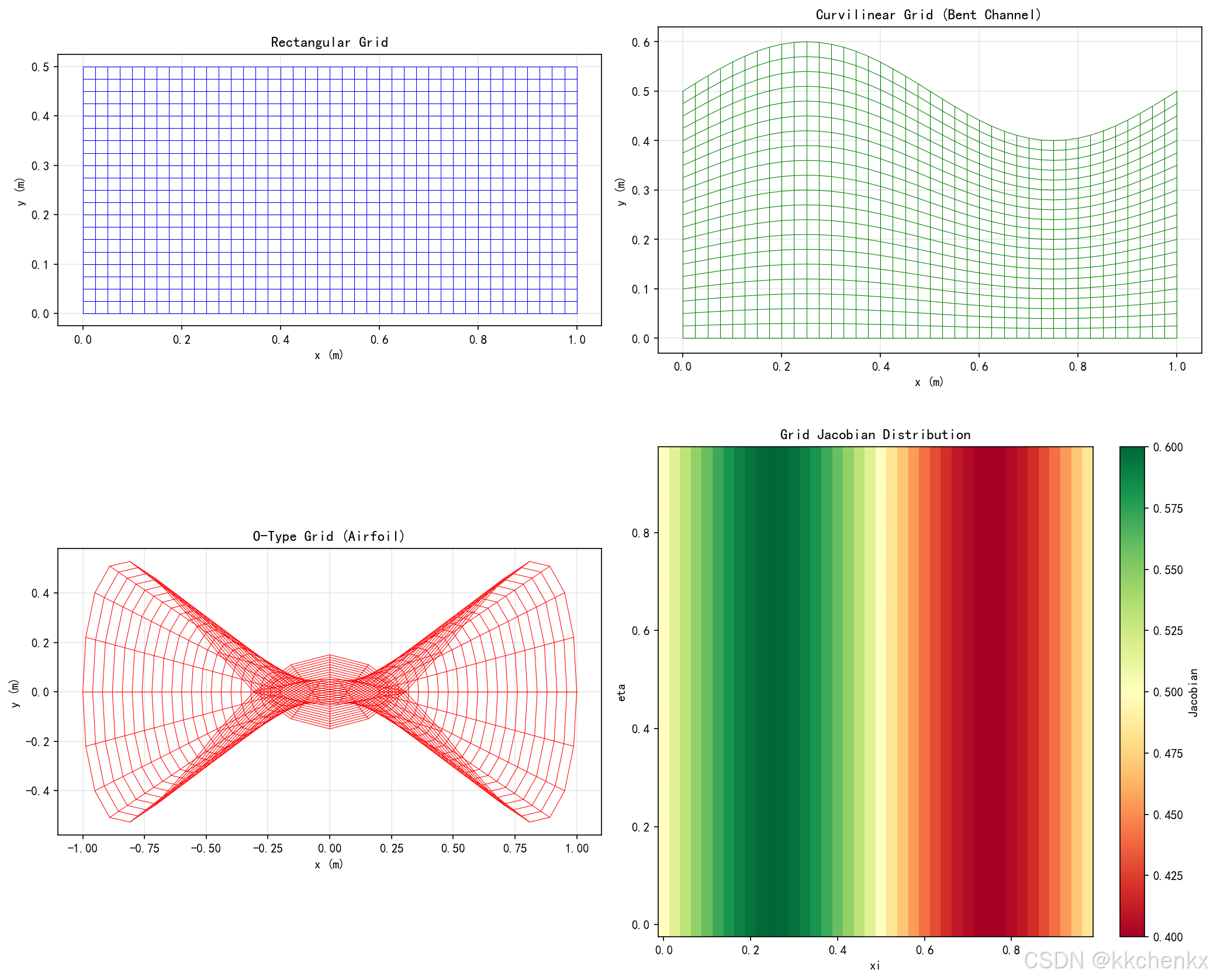
本案例演示使用代数插值法生成二维结构化网格。
# ============================================================
# 案例1:二维结构化网格生成
# ============================================================
import matplotlib
matplotlib.use('Agg')
import numpy as np
import matplotlib.pyplot as plt
from matplotlib.patches import Polygon
import warnings
warnings.filterwarnings('ignore')
import os

output_dir = r'd:\文档\500仿真领域\工程仿真\多物理场耦合仿真\主题023'
os.makedirs(output_dir, exist_ok=True)

plt.rcParams['font.sans-serif'] = ['SimHei', 'DejaVu Sans']
plt.rcParams['axes.unicode_minus'] = False

print("=" * 60)
print("案例1:二维结构化网格生成")
print("=" * 60)

# 定义几何参数
L = 1.0  # 长度
H = 0.5  # 高度
nx, ny = 40, 20  # 网格数

# 生成计算域网格
xi = np.linspace(0, 1, nx + 1)
eta = np.linspace(0, 1, ny + 1)
XI, ETA = np.meshgrid(xi, eta)

# 案例1a:直角网格
print("\n生成直角网格...")
x_rect = L * XI
y_rect = H * ETA

# 案例1b:曲线网格(弯曲通道)
print("生成曲线网格(弯曲通道)...")
def channel_mapping(xi, eta):
    """弯曲通道映射"""
    x = L * xi
    # 上边界弯曲
    y_top = H * (1 + 0.2 * np.sin(2 * np.pi * xi))
    y = eta * y_top
    return x, y

x_curve, y_curve = channel_mapping(XI, ETA)

# 案例1c:翼型绕流网格(O型网格)
print("生成O型网格(翼型周围)...")
# 简化的翼型形状(椭圆)
a, b = 0.2, 0.05  # 椭圆半轴
theta = np.linspace(0, 2*np.pi, nx + 1)
r = np.linspace(1, 5, ny + 1)
THETA, R = np.meshgrid(theta, r)

# 椭圆坐标变换
x_airfoil = a * R * np.cos(THETA)
y_airfoil = b * R * np.sin(THETA) + 0.1 * (R - 1) * np.sin(3 * THETA)

# 绘制结果
fig, axes = plt.subplots(2, 2, figsize=(14, 12))

# 直角网格
ax = axes[0, 0]
for i in range(nx + 1):
    ax.plot(x_rect[:, i], y_rect[:, i], 'b-', linewidth=0.5)
for j in range(ny + 1):
    ax.plot(x_rect[j, :], y_rect[j, :], 'b-', linewidth=0.5)
ax.set_aspect('equal')
ax.set_title('Rectangular Grid', fontsize=12, fontweight='bold')
ax.set_xlabel('x (m)')
ax.set_ylabel('y (m)')
ax.grid(True, alpha=0.3)

# 曲线网格
ax = axes[0, 1]
for i in range(nx + 1):
    ax.plot(x_curve[:, i], y_curve[:, i], 'g-', linewidth=0.5)
for j in range(ny + 1):
    ax.plot(x_curve[j, :], y_curve[j, :], 'g-', linewidth=0.5)
ax.set_aspect('equal')
ax.set_title('Curvilinear Grid (Bent Channel)', fontsize=12, fontweight='bold')
ax.set_xlabel('x (m)')
ax.set_ylabel('y (m)')
ax.grid(True, alpha=0.3)

# O型网格
ax = axes[1, 0]
for i in range(nx + 1):
    ax.plot(x_airfoil[:, i], y_airfoil[:, i], 'r-', linewidth=0.5)
for j in range(ny + 1):
    ax.plot(x_airfoil[j, :], y_airfoil[j, :], 'r-', linewidth=0.5)
ax.set_aspect('equal')
ax.set_title('O-Type Grid (Airfoil)', fontsize=12, fontweight='bold')
ax.set_xlabel('x (m)')
ax.set_ylabel('y (m)')
ax.grid(True, alpha=0.3)

# 网格质量分析
ax = axes[1, 1]
# 计算曲线网格的Jacobian
J = np.zeros((ny, nx))
for j in range(ny):
    for i in range(nx):
        dx_dxi = (x_curve[j, i+1] - x_curve[j, i]) / (xi[1] - xi[0])
        dx_deta = (x_curve[j+1, i] - x_curve[j, i]) / (eta[1] - eta[0])
        dy_dxi = (y_curve[j, i+1] - y_curve[j, i]) / (xi[1] - xi[0])
        dy_deta = (y_curve[j+1, i] - y_curve[j, i]) / (eta[1] - eta[0])
        J[j, i] = dx_dxi * dy_deta - dx_deta * dy_dxi

im = ax.pcolormesh(XI[:-1, :-1], ETA[:-1, :-1], J, cmap='RdYlGn', shading='auto')
plt.colorbar(im, ax=ax, label='Jacobian')
ax.set_title('Grid Jacobian Distribution', fontsize=12, fontweight='bold')
ax.set_xlabel('xi')
ax.set_ylabel('eta')

plt.tight_layout()
plt.savefig(f'{output_dir}/case1_structured_grid.png', dpi=150, bbox_inches='tight')
plt.close()

print(f"✓ 案例1完成,图片已保存")
print(f"  网格点数: {(nx+1)*(ny+1)}")
print(f"  单元数: {nx*ny}")
print(f"  Jacobian范围: [{J.min():.4f}, {J.max():.4f}]")
8.2 案例2:Delaunay三角化
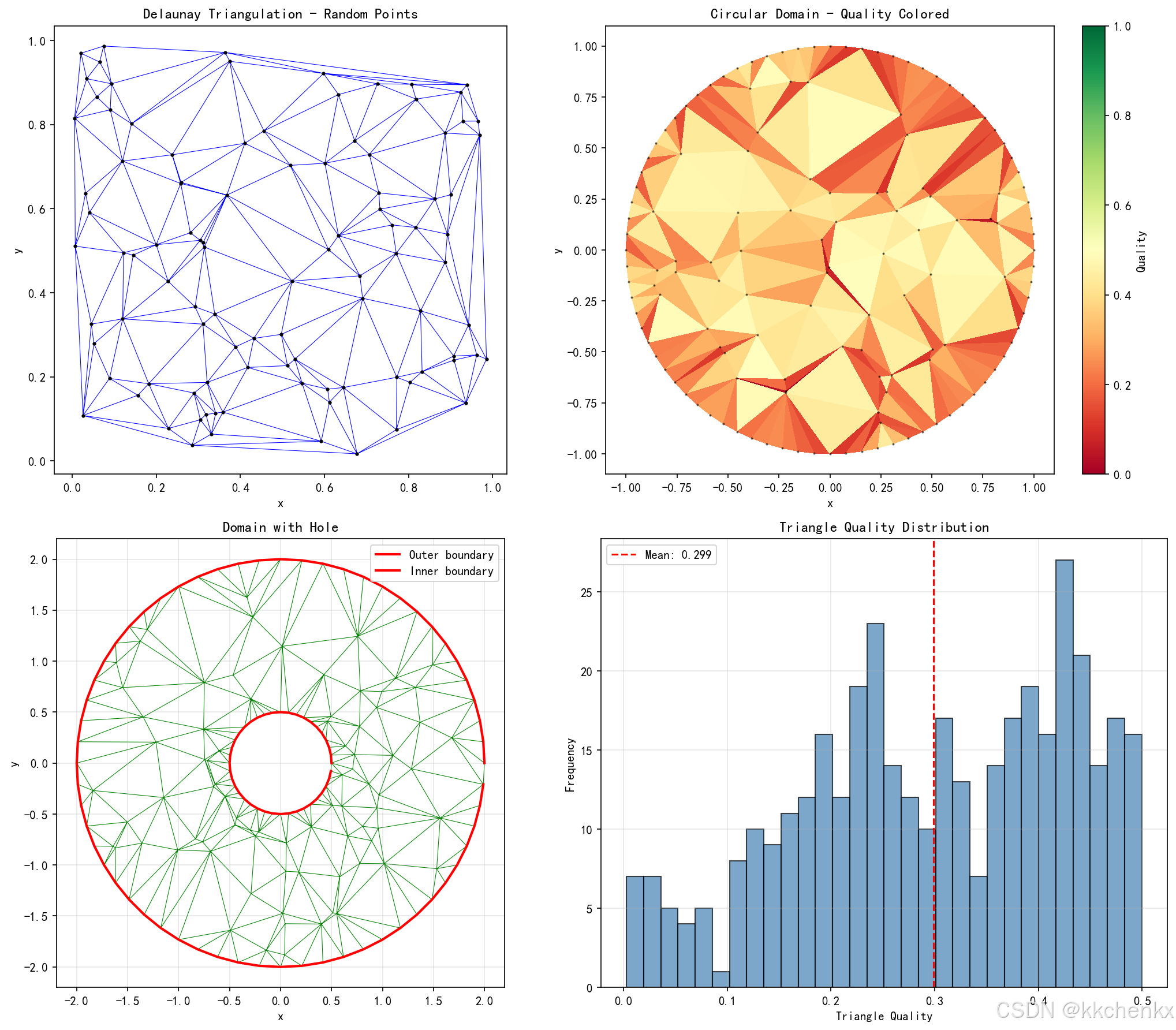
本案例实现Delaunay三角化算法并应用于不同点集。
# ============================================================
# 案例2:Delaunay三角化
# ============================================================
print("\n" + "=" * 60)
print("案例2:Delaunay三角化")
print("=" * 60)

from scipy.spatial import Delaunay

def triangle_quality(p1, p2, p3):
    """计算三角形质量(内切圆半径/外接圆半径)"""
    a = np.linalg.norm(p2 - p1)
    b = np.linalg.norm(p3 - p2)
    c = np.linalg.norm(p1 - p3)
    s = (a + b + c) / 2  # 半周长
    area = np.sqrt(max(0, s * (s - a) * (s - b) * (s - c)))

    if area < 1e-10:
        return 0

    r_in = area / s  # 内切圆半径
    R_circ = a * b * c / (4 * area)  # 外接圆半径

    return r_in / R_circ

# 案例2a:随机点集的Delaunay三角化
print("\n生成随机点集的Delaunay三角化...")
np.random.seed(42)
n_points = 100
points_random = np.random.rand(n_points, 2)
tri_random = Delaunay(points_random)

# 案例2b:圆形域的Delaunay三角化
print("生成圆形域的Delaunay三角化...")
n_circle = 80
theta = np.linspace(0, 2*np.pi, n_circle, endpoint=False)
r_boundary = 1.0
x_boundary = r_boundary * np.cos(theta)
y_boundary = r_boundary * np.sin(theta)

# 内部点
n_inner = 60
r_inner = np.sqrt(np.random.rand(n_inner)) * 0.9
theta_inner = np.random.rand(n_inner) * 2 * np.pi
x_inner = r_inner * np.cos(theta_inner)
y_inner = r_inner * np.sin(theta_inner)

points_circle = np.vstack([
    np.column_stack([x_boundary, y_boundary]),
    np.column_stack([x_inner, y_inner])
])
tri_circle = Delaunay(points_circle)

# 案例2c:带孔洞的Delaunay三角化
print("生成带孔洞区域的Delaunay三角化...")
# 外边界
n_outer = 60
outer_theta = np.linspace(0, 2*np.pi, n_outer, endpoint=False)
x_outer = 2.0 * np.cos(outer_theta)
y_outer = 2.0 * np.sin(outer_theta)

# 内边界(孔洞)
n_inner_boundary = 40
inner_theta = np.linspace(0, 2*np.pi, n_inner_boundary, endpoint=False)
x_inner_bnd = 0.5 * np.cos(inner_theta)
y_inner_bnd = 0.5 * np.sin(inner_theta)

# 内部点
n_fill = 80
points_fill = []
for _ in range(n_fill):
    r = np.random.uniform(0.6, 1.9)
    theta = np.random.uniform(0, 2*np.pi)
    x, y = r * np.cos(theta), r * np.sin(theta)
    points_fill.append([x, y])

points_hole = np.vstack([
    np.column_stack([x_outer, y_outer]),
    np.column_stack([x_inner_bnd, y_inner_bnd]),
    np.array(points_fill)
])
tri_hole = Delaunay(points_hole)

# 过滤掉孔洞内的三角形
def in_hole(point, hole_center, hole_radius):
    return np.linalg.norm(point - hole_center) < hole_radius

hole_center = np.array([0, 0])
hole_radius = 0.5
valid_triangles = []
for simplex in tri_hole.simplices:
    centroid = np.mean(points_hole[simplex], axis=0)
    if not in_hole(centroid, hole_center, hole_radius):
        valid_triangles.append(simplex)
valid_triangles = np.array(valid_triangles)

# 绘制结果
fig, axes = plt.subplots(2, 2, figsize=(14, 12))

# 随机点集
ax = axes[0, 0]
ax.triplot(points_random[:, 0], points_random[:, 1], tri_random.simplices, 'b-', linewidth=0.5)
ax.plot(points_random[:, 0], points_random[:, 1], 'ko', markersize=2)
ax.set_aspect('equal')
ax.set_title('Delaunay Triangulation - Random Points', fontsize=12, fontweight='bold')
ax.set_xlabel('x')
ax.set_ylabel('y')

# 圆形域
ax = axes[0, 1]
# 计算每个三角形的质量
qualities = []
for simplex in tri_circle.simplices:
    q = triangle_quality(points_circle[simplex[0]],
                         points_circle[simplex[1]],
                         points_circle[simplex[2]])
    qualities.append(q)
qualities = np.array(qualities)

# 使用颜色表示质量
triang = plt.matplotlib.tri.Triangulation(points_circle[:, 0], points_circle[:, 1],
                                          tri_circle.simplices)
collec = ax.tripcolor(triang, qualities, cmap='RdYlGn', vmin=0, vmax=1)
plt.colorbar(collec, ax=ax, label='Quality')
ax.plot(points_circle[:, 0], points_circle[:, 1], 'ko', markersize=1, alpha=0.5)
ax.set_aspect('equal')
ax.set_title('Circular Domain - Quality Colored', fontsize=12, fontweight='bold')
ax.set_xlabel('x')
ax.set_ylabel('y')

# 带孔洞
ax = axes[1, 0]
ax.triplot(points_hole[:, 0], points_hole[:, 1], valid_triangles, 'g-', linewidth=0.5)
ax.plot(x_outer, y_outer, 'r-', linewidth=2, label='Outer boundary')
ax.plot(x_inner_bnd, y_inner_bnd, 'r-', linewidth=2, label='Inner boundary')
ax.set_aspect('equal')
ax.set_title('Domain with Hole', fontsize=12, fontweight='bold')
ax.set_xlabel('x')
ax.set_ylabel('y')
ax.legend()
ax.grid(True, alpha=0.3)

# 质量统计
ax = axes[1, 1]
all_qualities = []
for tri_points in [points_random, points_circle]:
    tri = Delaunay(tri_points)
    for simplex in tri.simplices:
        q = triangle_quality(tri_points[simplex[0]],
                            tri_points[simplex[1]],
                            tri_points[simplex[2]])
        all_qualities.append(q)

ax.hist(all_qualities, bins=30, color='steelblue', edgecolor='black', alpha=0.7)
ax.axvline(x=np.mean(all_qualities), color='r', linestyle='--',
          label=f'Mean: {np.mean(all_qualities):.3f}')
ax.set_xlabel('Triangle Quality')
ax.set_ylabel('Frequency')
ax.set_title('Triangle Quality Distribution', fontsize=12, fontweight='bold')
ax.legend()
ax.grid(True, alpha=0.3)

plt.tight_layout()
plt.savefig(f'{output_dir}/case2_delaunay_triangulation.png', dpi=150, bbox_inches='tight')
plt.close()

print(f"✓ 案例2完成,图片已保存")
print(f"  随机点集三角形数: {len(tri_random.simplices)}")
print(f"  圆形域三角形数: {len(tri_circle.simplices)}")
print(f"  带孔洞域三角形数: {len(valid_triangles)}")
print(f"  平均质量: {np.mean(all_qualities):.4f}")
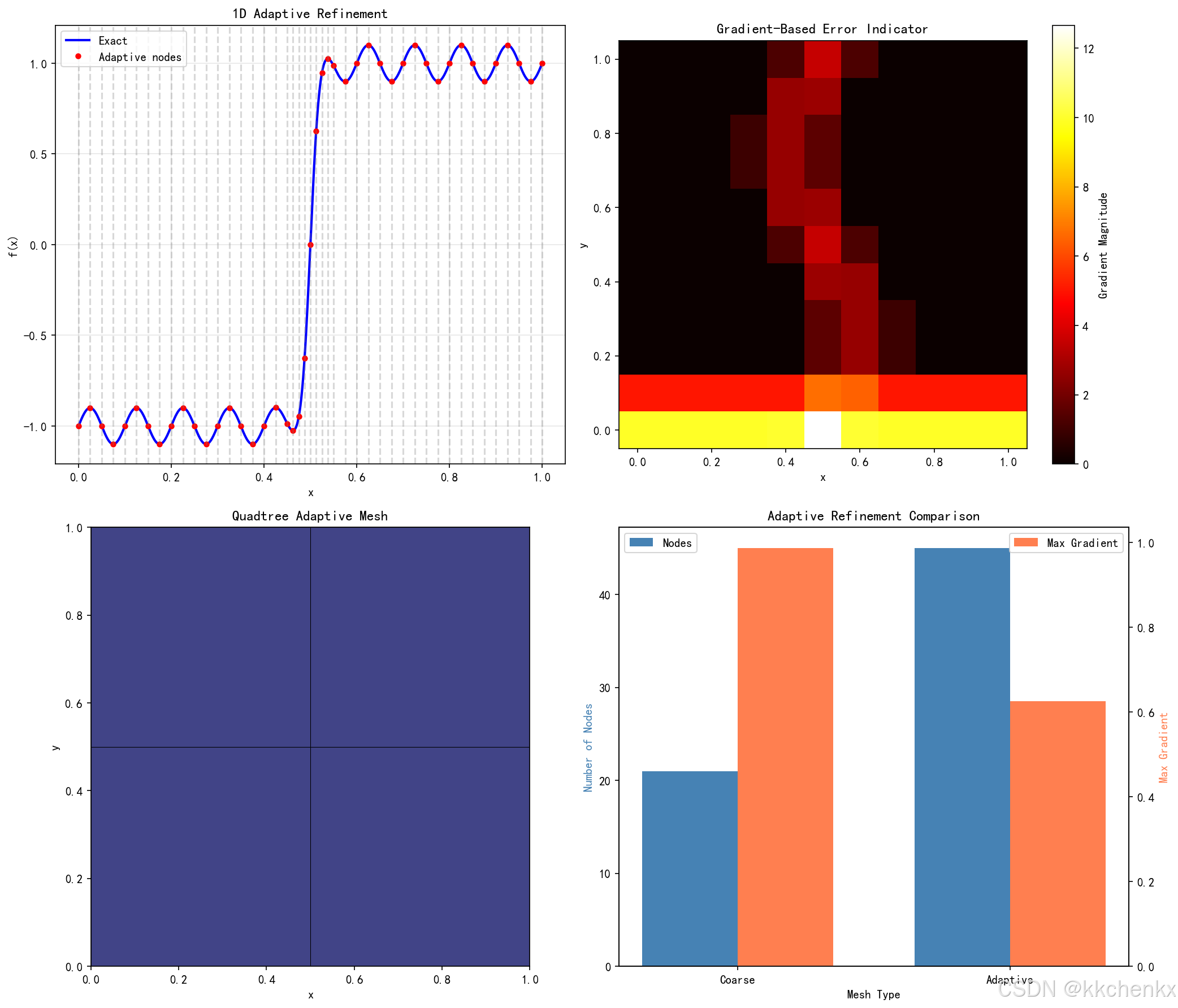
8.3 案例3:自适应网格加密
本案例演示基于解的特征进行自适应网格加密。
# ============================================================
# 案例3:自适应网格加密
# ============================================================
print("\n" + "=" * 60)
print("案例3:自适应网格加密")
print("=" * 60)

def adaptive_refine_1d(f, x, threshold):
    """一维自适应加密"""
    x_new = [x[0]]
    for i in range(len(x) - 1):
        x_mid = (x[i] + x[i+1]) / 2
        f_left = f(x[i])
        f_right = f(x[i+1])
        f_mid = f(x_mid)
        f_linear = (f_left + f_right) / 2
        error = abs(f_mid - f_linear)

        if error > threshold:
            x_new.append(x_mid)
        x_new.append(x[i+1])
    return np.array(sorted(x_new))

# 案例3a:一维自适应加密
print("\n一维自适应加密...")
def test_function_1d(x):
    """测试函数:边界层特征"""
    return np.tanh(50 * (x - 0.5)) + 0.1 * np.sin(20 * np.pi * x)

x_coarse = np.linspace(0, 1, 21)
threshold = 0.05
x_refined = x_coarse.copy()

for iteration in range(5):
    x_new = adaptive_refine_1d(test_function_1d, x_refined, threshold)
    if len(x_new) == len(x_refined):
        break
    x_refined = x_new
    print(f"  迭代 {iteration + 1}: {len(x_refined)} 个节点")

# 案例3b:二维自适应加密(基于梯度)
print("\n二维自适应加密...")
# 定义具有局部特征的函数
def test_function_2d(x, y):
    """测试函数:包含边界层和激波"""
    # 边界层
    boundary_layer = np.exp(-50 * y)
    # 激波
    shock = 1 / (1 + np.exp(-100 * (x - 0.5 - 0.1 * np.sin(2*np.pi*y))))
    return boundary_layer + 0.5 * shock

# 初始粗网格
x_2d = np.linspace(0, 1, 11)
y_2d = np.linspace(0, 1, 11)
X_2d, Y_2d = np.meshgrid(x_2d, y_2d)

# 计算梯度作为加密指标
Z = test_function_2d(X_2d, Y_2d)
grad_x, grad_y = np.gradient(Z, x_2d, y_2d)
gradient_magnitude = np.sqrt(grad_x**2 + grad_y**2)

# 自适应加密策略:在梯度大的区域加密
refinement_level = np.zeros_like(X_2d, dtype=int)
refinement_level[gradient_magnitude > 0.5] = 2
refinement_level[(gradient_magnitude > 0.1) & (gradient_magnitude <= 0.5)] = 1

# 案例3c:四叉树自适应网格
print("\n四叉树自适应网格...")
class QuadTree:
    def __init__(self, x_min, x_max, y_min, y_max, level=0, max_level=4):
        self.x_min = x_min
        self.x_max = x_max
        self.y_min = y_min
        self.y_max = y_max
        self.level = level
        self.max_level = max_level
        self.children = None
        self.is_leaf = True

    def refine(self, refine_func):
        """根据函数进行加密"""
        if self.level >= self.max_level:
            return

        x_center = (self.x_min + self.x_max) / 2
        y_center = (self.y_min + self.y_max) / 2

        # 检查是否需要加密
        if refine_func(self.x_min, self.x_max, self.y_min, self.y_max):
            self.is_leaf = False
            self.children = [
                QuadTree(self.x_min, x_center, self.y_min, y_center, self.level + 1, self.max_level),
                QuadTree(x_center, self.x_max, self.y_min, y_center, self.level + 1, self.max_level),
                QuadTree(self.x_min, x_center, y_center, self.y_max, self.level + 1, self.max_level),
                QuadTree(x_center, self.x_max, y_center, self.y_max, self.level + 1, self.max_level)
            ]
            for child in self.children:
                child.refine(refine_func)

    def get_cells(self):
        """获取所有叶节点"""
        if self.is_leaf:
            return [(self.x_min, self.x_max, self.y_min, self.y_max, self.level)]
        cells = []
        for child in self.children:
            cells.extend(child.get_cells())
        return cells

# 定义加密准则
def shock_refine(x_min, x_max, y_min, y_max):
    """激波区域加密"""
    x_center = (x_min + x_max) / 2
    y_center = (y_min + y_max) / 2
    # 在激波附近加密
    shock_position = 0.5 + 0.1 * np.sin(2 * np.pi * y_center)
    return abs(x_center - shock_position) < 0.15

# 构建四叉树
root = QuadTree(0, 1, 0, 1, max_level=5)
root.refine(shock_refine)
quad_cells = root.get_cells()

# 绘制结果
fig, axes = plt.subplots(2, 2, figsize=(14, 12))

# 一维自适应
ax = axes[0, 0]
x_fine = np.linspace(0, 1, 1000)
ax.plot(x_fine, test_function_1d(x_fine), 'b-', linewidth=2, label='Exact')
ax.plot(x_refined, test_function_1d(x_refined), 'ro', markersize=4, label='Adaptive nodes')
for x in x_refined:
    ax.axvline(x, color='gray', linestyle='--', alpha=0.3)
ax.set_xlabel('x')
ax.set_ylabel('f(x)')
ax.set_title('1D Adaptive Refinement', fontsize=12, fontweight='bold')
ax.legend()
ax.grid(True, alpha=0.3)

# 二维梯度场
ax = axes[0, 1]
im = ax.pcolormesh(X_2d, Y_2d, gradient_magnitude, cmap='hot', shading='auto')
plt.colorbar(im, ax=ax, label='Gradient Magnitude')
ax.set_aspect('equal')
ax.set_title('Gradient-Based Error Indicator', fontsize=12, fontweight='bold')
ax.set_xlabel('x')
ax.set_ylabel('y')

# 四叉树网格
ax = axes[1, 0]
colors = plt.cm.viridis(np.linspace(0, 1, 6))
for x_min, x_max, y_min, y_max, level in quad_cells:
    rect = plt.Rectangle((x_min, y_min), x_max - x_min, y_max - y_min,
                         fill=True, facecolor=colors[level], edgecolor='black', linewidth=0.5)
    ax.add_patch(rect)
ax.set_xlim(0, 1)
ax.set_ylim(0, 1)
ax.set_aspect('equal')
ax.set_title('Quadtree Adaptive Mesh', fontsize=12, fontweight='bold')
ax.set_xlabel('x')
ax.set_ylabel('y')

# 自适应前后的对比
ax = axes[1, 1]
nodes_coarse = len(x_coarse)
nodes_refined = len(x_refined)
categories = ['Coarse', 'Adaptive']
node_counts = [nodes_coarse, nodes_refined]
errors_coarse = np.max(np.abs(np.gradient(test_function_1d(x_coarse))))
errors_refined = np.max(np.abs(np.gradient(test_function_1d(x_refined))))
errors = [errors_coarse, errors_refined]

x_pos = np.arange(len(categories))
width = 0.35

bars1 = ax.bar(x_pos - width/2, node_counts, width, label='Nodes', color='steelblue')
ax2 = ax.twinx()
bars2 = ax2.bar(x_pos + width/2, errors, width, label='Max Gradient', color='coral')

ax.set_xlabel('Mesh Type')
ax.set_ylabel('Number of Nodes', color='steelblue')
ax2.set_ylabel('Max Gradient', color='coral')
ax.set_title('Adaptive Refinement Comparison', fontsize=12, fontweight='bold')
ax.set_xticks(x_pos)
ax.set_xticklabels(categories)
ax.legend(loc='upper left')
ax2.legend(loc='upper right')

plt.tight_layout()
plt.savefig(f'{output_dir}/case3_adaptive_refinement.png', dpi=150, bbox_inches='tight')
plt.close()

print(f"✓ 案例3完成,图片已保存")
print(f"  一维初始节点数: {nodes_coarse}")
print(f"  一维自适应后节点数: {nodes_refined}")
print(f"  四叉树单元数: {len(quad_cells)}")
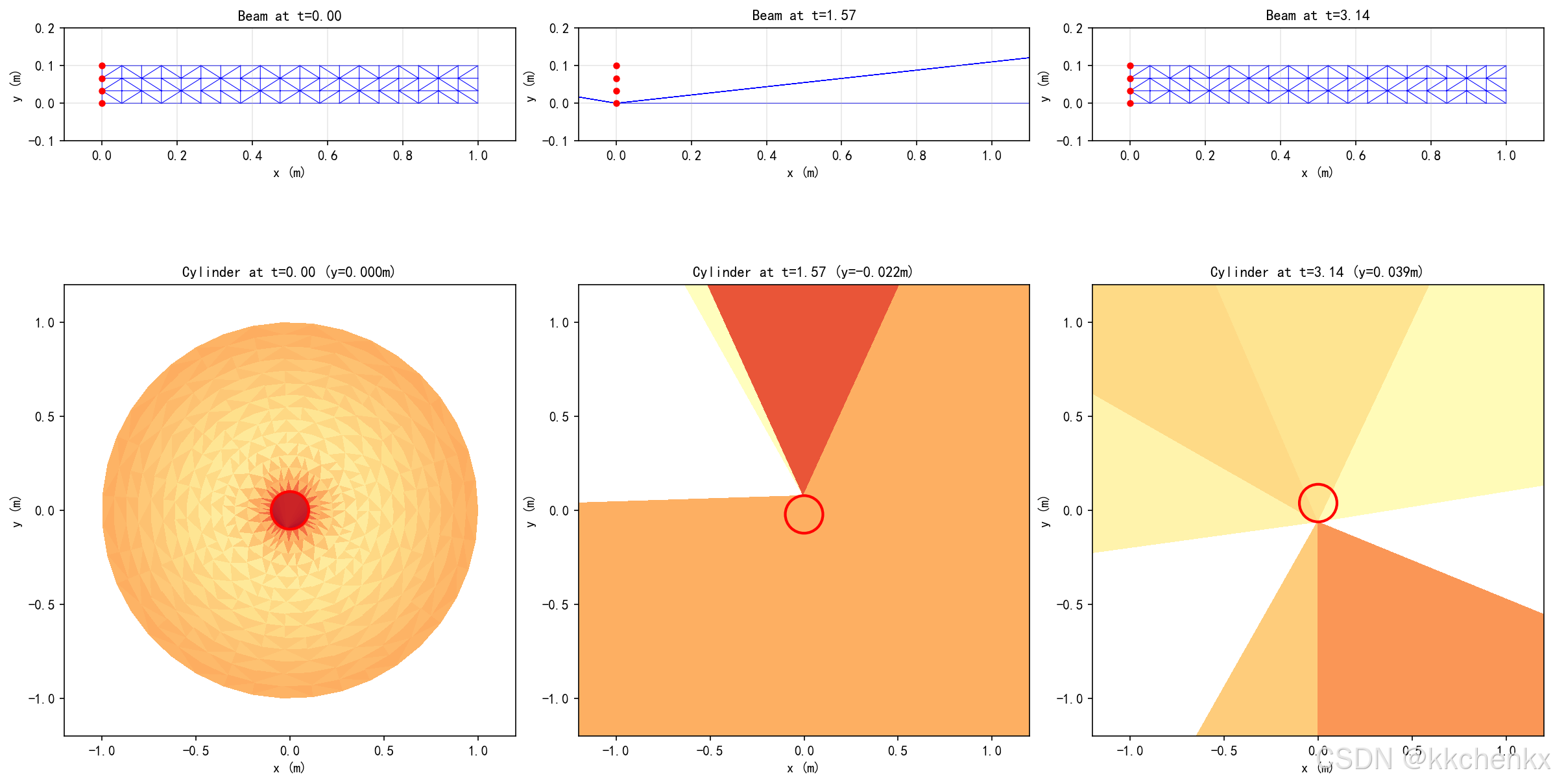
8.4 案例4:流固耦合动网格
本案例演示流固耦合问题中的动网格技术。
# ============================================================
# 案例4:流固耦合动网格
# ============================================================
print("\n" + "=" * 60)
print("案例4:流固耦合动网格")
print("=" * 60)

def laplacian_smooth(x, y, fixed_nodes, iterations=10):
    """Laplacian网格光滑"""
    x_new = x.copy()
    y_new = y.copy()
    n_nodes = len(x)

    for _ in range(iterations):
        x_temp = x_new.copy()
        y_temp = y_new.copy()

        for i in range(n_nodes):
            if i in fixed_nodes:
                continue
            # 找到相邻节点(简化:基于距离)
            distances = np.sqrt((x - x[i])**2 + (y - y[i])**2)
            neighbors = np.where((distances < 0.15) & (distances > 0))[0]

            if len(neighbors) > 0:
                x_temp[i] = np.mean(x_new[neighbors])
                y_temp[i] = np.mean(y_new[neighbors])

        x_new = x_temp
        y_new = y_temp

    return x_new, y_new

def spring_analogy(x, y, boundary_displacement, fixed_nodes, k_spring=1.0, iterations=50):
    """弹簧类比法动网格"""
    x_new = x.copy()
    y_new = y.copy()
    n_nodes = len(x)

    # 应用边界位移
    for i, disp in boundary_displacement.items():
        x_new[i] += disp[0]
        y_new[i] += disp[1]

    # 迭代求解弹簧平衡
    for _ in range(iterations):
        x_temp = x_new.copy()
        y_temp = y_new.copy()

        for i in range(n_nodes):
            if i in fixed_nodes or i in boundary_displacement:
                continue

            # 找到邻居
            distances = np.sqrt((x - x[i])**2 + (y - y[i])**2)
            neighbors = np.where((distances < 0.2) & (distances > 0.01))[0]

            if len(neighbors) > 0:
                # 计算弹簧力
                fx, fy = 0, 0
                for j in neighbors:
                    dx = x_new[j] - x_new[i]
                    dy = y_new[j] - y_new[i]
                    dist = np.sqrt(dx**2 + dy**2)
                    if dist > 0:
                        # 弹簧力与位移成正比
                        fx += k_spring * dx / dist * (distances[j] - dist)
                        fy += k_spring * dy / dist * (distances[j] - dist)

                x_temp[i] += 0.1 * fx
                y_temp[i] += 0.1 * fy

        x_new = x_temp
        y_new = y_temp

    return x_new, y_new

# 案例4a:弹性梁振动
print("\n弹性梁振动动网格...")
L_beam = 1.0
H_beam = 0.1
nx_beam, ny_beam = 20, 4

x_beam = np.linspace(0, L_beam, nx_beam)
y_beam = np.linspace(0, H_beam, ny_beam)
X_beam, Y_beam = np.meshgrid(x_beam, y_beam)
x_beam_flat = X_beam.flatten()
y_beam_flat = Y_beam.flatten()

# 固定左边界
fixed_nodes = np.where(x_beam_flat < 0.05)[0]

# 不同时刻的变形
times = np.linspace(0, 2*np.pi, 5)
beam_displacements = []

for t in times:
    # 简化的振动模态
    amplitude = 0.05
    y_deformed = y_beam_flat + amplitude * np.sin(np.pi * x_beam_flat / L_beam) * np.sin(t)

    # 边界位移
    boundary_disp = {}
    top_nodes = np.where(y_beam_flat > H_beam - 0.01)[0]
    for i in top_nodes:
        boundary_disp[i] = [0, amplitude * np.sin(np.pi * x_beam_flat[i] / L_beam) * np.sin(t)]

    # 应用弹簧类比法
    x_def, y_def = spring_analogy(x_beam_flat, y_beam_flat, boundary_disp, fixed_nodes)
    beam_displacements.append((x_def, y_def))

# 案例4b:圆柱绕流动网格
print("圆柱绕流动网格...")
# 创建O型网格
n_theta_cyl = 40
n_r_cyl = 15
theta_cyl = np.linspace(0, 2*np.pi, n_theta_cyl)
r_cyl = np.linspace(0.1, 1.0, n_r_cyl)
THETA_cyl, R_cyl = np.meshgrid(theta_cyl, r_cyl)

X_cyl = R_cyl * np.cos(THETA_cyl)
Y_cyl = R_cyl * np.sin(THETA_cyl)
x_cyl_flat = X_cyl.flatten()
y_cyl_flat = Y_cyl.flatten()

# 圆柱运动
U_freestream = 1.0
St = 0.2  # Strouhal数
f_vortex = St * U_freestream / (2 * 0.1)  # 涡脱落频率

# 不同时刻的圆柱位置和网格
cylinder_displacements = []
for t in times:
    # 圆柱振动(横向)
    y_cylinder = 0.05 * np.sin(2 * np.pi * f_vortex * t)

    # 边界位移(圆柱表面)
    boundary_disp_cyl = {}
    inner_nodes = np.where(R_cyl.flatten() < 0.11)[0]
    for i in inner_nodes:
        boundary_disp_cyl[i] = [0, y_cylinder]

    # 固定外边界
    outer_nodes = np.where(R_cyl.flatten() > 0.99)[0]

    # 应用弹簧类比法
    x_def_cyl, y_def_cyl = spring_analogy(x_cyl_flat, y_cyl_flat, boundary_disp_cyl, outer_nodes)
    cylinder_displacements.append((x_def_cyl, y_def_cyl, y_cylinder))

# 案例4c:网格质量评估
print("网格质量评估...")
def compute_mesh_quality(x, y, tri):
    """计算网格质量"""
    qualities = []
    for simplex in tri.simplices:
        p1 = np.array([x[simplex[0]], y[simplex[0]]])
        p2 = np.array([x[simplex[1]], y[simplex[1]]])
        p3 = np.array([x[simplex[2]], y[simplex[2]]])
        qualities.append(triangle_quality(p1, p2, p3))
    return np.array(qualities)

# 绘制结果
fig, axes = plt.subplots(2, 3, figsize=(16, 10))

# 弹性梁变形序列
for idx, (t, (x_def, y_def)) in enumerate(zip(times[:3], beam_displacements[:3])):
    ax = axes[0, idx]
    tri_beam = Delaunay(np.column_stack([x_def, y_def]))
    ax.triplot(x_def, y_def, tri_beam.simplices, 'b-', linewidth=0.5)
    ax.plot(x_def[fixed_nodes], y_def[fixed_nodes], 'ro', markersize=4, label='Fixed')
    ax.set_aspect('equal')
    ax.set_title(f'Beam at t={t:.2f}', fontsize=11, fontweight='bold')
    ax.set_xlabel('x (m)')
    ax.set_ylabel('y (m)')
    ax.set_xlim(-0.1, 1.1)
    ax.set_ylim(-0.1, 0.2)
    ax.grid(True, alpha=0.3)

# 圆柱绕流
for idx, (t, (x_def, y_def, y_cyl)) in enumerate(zip(times[:3], cylinder_displacements[:3])):
    ax = axes[1, idx]
    tri_cyl = Delaunay(np.column_stack([x_def, y_def]))

    # 计算质量
    qualities = compute_mesh_quality(x_def, y_def, tri_cyl)
    triang = plt.matplotlib.tri.Triangulation(x_def, y_def, tri_cyl.simplices)
    collec = ax.tripcolor(triang, qualities, cmap='RdYlGn', vmin=0, vmax=1)

    # 绘制圆柱
    circle = plt.Circle((0, y_cyl), 0.1, color='red', fill=False, linewidth=2)
    ax.add_patch(circle)

    ax.set_aspect('equal')
    ax.set_title(f'Cylinder at t={t:.2f} (y={y_cyl:.3f}m)', fontsize=11, fontweight='bold')
    ax.set_xlabel('x (m)')
    ax.set_ylabel('y (m)')
    ax.set_xlim(-1.2, 1.2)
    ax.set_ylim(-1.2, 1.2)

plt.tight_layout()
plt.savefig(f'{output_dir}/case4_moving_mesh.png', dpi=150, bbox_inches='tight')
plt.close()

print(f"✓ 案例4完成,图片已保存")
print(f"  弹性梁网格点数: {len(x_beam_flat)}")
print(f"  圆柱绕流网格点数: {len(x_cyl_flat)}")
8.5 案例5:多物理场网格插值
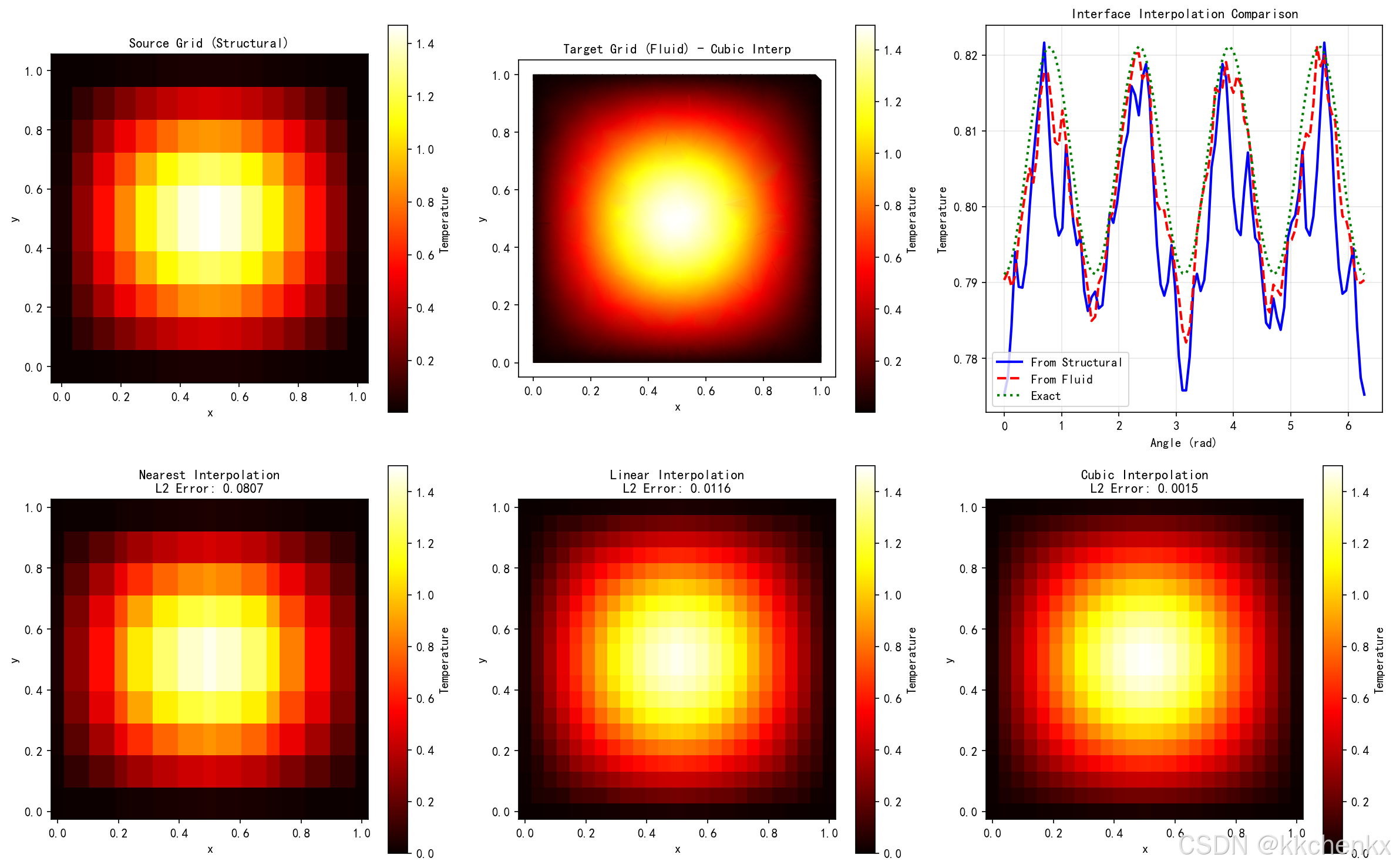
本案例演示多物理场耦合中的网格插值技术。
# ============================================================
# 案例5:多物理场网格插值
# ============================================================
print("\n" + "=" * 60)
print("案例5:多物理场网格插值")
print("=" * 60)

from scipy.interpolate import griddata, LinearNDInterpolator

# 案例5a:不同网格间的插值
print("\n不同网格间的插值...")

# 结构网格(粗)
nx_struct = 15
ny_struct = 10
x_struct = np.linspace(0, 1, nx_struct)
y_struct = np.linspace(0, 1, ny_struct)
X_struct, Y_struct = np.meshgrid(x_struct, y_struct)

# 定义物理场(温度分布)
def temperature_field(x, y):
    return np.sin(np.pi * x) * np.sin(np.pi * y) + 0.5 * np.exp(-10 * ((x - 0.5)**2 + (y - 0.5)**2))

T_struct = temperature_field(X_struct, Y_struct)

# 流体网格(细,非结构化)
np.random.seed(123)
n_fluid = 500
points_fluid = np.random.rand(n_fluid, 2)
# 在边界附近加密
boundary_points = []
for i in range(50):
    boundary_points.append([i/50, 0])
    boundary_points.append([i/50, 1])
    boundary_points.append([0, i/50])
    boundary_points.append([1, i/50])
boundary_points = np.array(boundary_points)
points_fluid = np.vstack([points_fluid, boundary_points])

# 插值到流体网格
T_fluid_interp = griddata(
    np.column_stack([X_struct.flatten(), Y_struct.flatten()]),
    T_struct.flatten(),
    points_fluid,
    method='cubic'
)

# 案例5b:界面插值
print("界面插值...")
# 定义界面(圆形)
theta_interface = np.linspace(0, 2*np.pi, 100)
r_interface = 0.3
x_interface = 0.5 + r_interface * np.cos(theta_interface)
y_interface = 0.5 + r_interface * np.sin(theta_interface)

# 从结构网格插值到界面
T_interface_from_struct = griddata(
    np.column_stack([X_struct.flatten(), Y_struct.flatten()]),
    T_struct.flatten(),
    np.column_stack([x_interface, y_interface]),
    method='linear'
)

# 从流体网格插值到界面
T_interface_from_fluid = griddata(
    points_fluid,
    T_fluid_interp,
    np.column_stack([x_interface, y_interface]),
    method='linear'
)

# 案例5c:保守插值
print("保守插值...")
def conservative_interpolation(x_source, y_source, f_source, x_target, y_target):
    """简单的保守插值(面积加权)"""
    f_target = np.zeros(len(x_target))

    for i in range(len(x_target)):
        # 找到最近的源点
        distances = np.sqrt((x_source - x_target[i])**2 + (y_source - y_target[i])**2)
        # 使用距离倒数加权
        weights = 1.0 / (distances + 1e-10)
        weights /= np.sum(weights)
        f_target[i] = np.sum(weights * f_source)

    return f_target

# 创建目标网格(中等密度)
nx_target = 25
ny_target = 20
x_target = np.linspace(0, 1, nx_target)
y_target = np.linspace(0, 1, ny_target)
X_target, Y_target = np.meshgrid(x_target, y_target)

T_target_conservative = conservative_interpolation(
    X_struct.flatten(), Y_struct.flatten(), T_struct.flatten(),
    X_target.flatten(), Y_target.flatten()
)
T_target_conservative = T_target_conservative.reshape(X_target.shape)

# 案例5d:插值误差分析
print("插值误差分析...")
# 解析解
T_exact = temperature_field(X_target, Y_target)

# 不同插值方法
methods = ['nearest', 'linear', 'cubic']
errors = {}

for method in methods:
    T_interp = griddata(
        np.column_stack([X_struct.flatten(), Y_struct.flatten()]),
        T_struct.flatten(),
        np.column_stack([X_target.flatten(), Y_target.flatten()]),
        method=method
    ).reshape(X_target.shape)

    error = np.abs(T_interp - T_exact)
    errors[method] = {
        'L2': np.sqrt(np.mean(error**2)),
        'max': np.max(error),
        'solution': T_interp
    }

# 绘制结果
fig, axes = plt.subplots(2, 3, figsize=(16, 10))

# 源网格
ax = axes[0, 0]
im = ax.pcolormesh(X_struct, Y_struct, T_struct, cmap='hot', shading='auto')
plt.colorbar(im, ax=ax, label='Temperature')
ax.set_aspect('equal')
ax.set_title('Source Grid (Structural)', fontsize=11, fontweight='bold')
ax.set_xlabel('x')
ax.set_ylabel('y')

# 流体网格插值结果
ax = axes[0, 1]
tri_fluid = Delaunay(points_fluid)
triang = plt.matplotlib.tri.Triangulation(points_fluid[:, 0], points_fluid[:, 1], tri_fluid.simplices)
collec = ax.tripcolor(triang, T_fluid_interp, cmap='hot', shading='gouraud')
plt.colorbar(collec, ax=ax, label='Temperature')
ax.set_aspect('equal')
ax.set_title('Target Grid (Fluid) - Cubic Interp', fontsize=11, fontweight='bold')
ax.set_xlabel('x')
ax.set_ylabel('y')

# 界面插值对比
ax = axes[0, 2]
ax.plot(theta_interface, T_interface_from_struct, 'b-', linewidth=2, label='From Structural')
ax.plot(theta_interface, T_interface_from_fluid, 'r--', linewidth=2, label='From Fluid')
T_exact_interface = temperature_field(x_interface, y_interface)
ax.plot(theta_interface, T_exact_interface, 'g:', linewidth=2, label='Exact')
ax.set_xlabel('Angle (rad)')
ax.set_ylabel('Temperature')
ax.set_title('Interface Interpolation Comparison', fontsize=11, fontweight='bold')
ax.legend()
ax.grid(True, alpha=0.3)

# 不同插值方法对比
for idx, method in enumerate(methods):
    ax = axes[1, idx]
    im = ax.pcolormesh(X_target, Y_target, errors[method]['solution'],
                       cmap='hot', shading='auto', vmin=0, vmax=1.5)
    plt.colorbar(im, ax=ax, label='Temperature')
    ax.set_aspect('equal')
    ax.set_title(f'{method.capitalize()} Interpolation\nL2 Error: {errors[method]["L2"]:.4f}',
                 fontsize=11, fontweight='bold')
    ax.set_xlabel('x')
    ax.set_ylabel('y')

plt.tight_layout()
plt.savefig(f'{output_dir}/case5_mesh_interpolation.png', dpi=150, bbox_inches='tight')
plt.close()

print(f"✓ 案例5完成,图片已保存")
print(f"  结构网格点数: {nx_struct * ny_struct}")
print(f"  流体网格点数: {len(points_fluid)}")
print(f"  插值误差 (L2) - Linear: {errors['linear']['L2']:.4f}, Cubic: {errors['cubic']['L2']:.4f}")
8.6 案例6:网格质量分析与优化
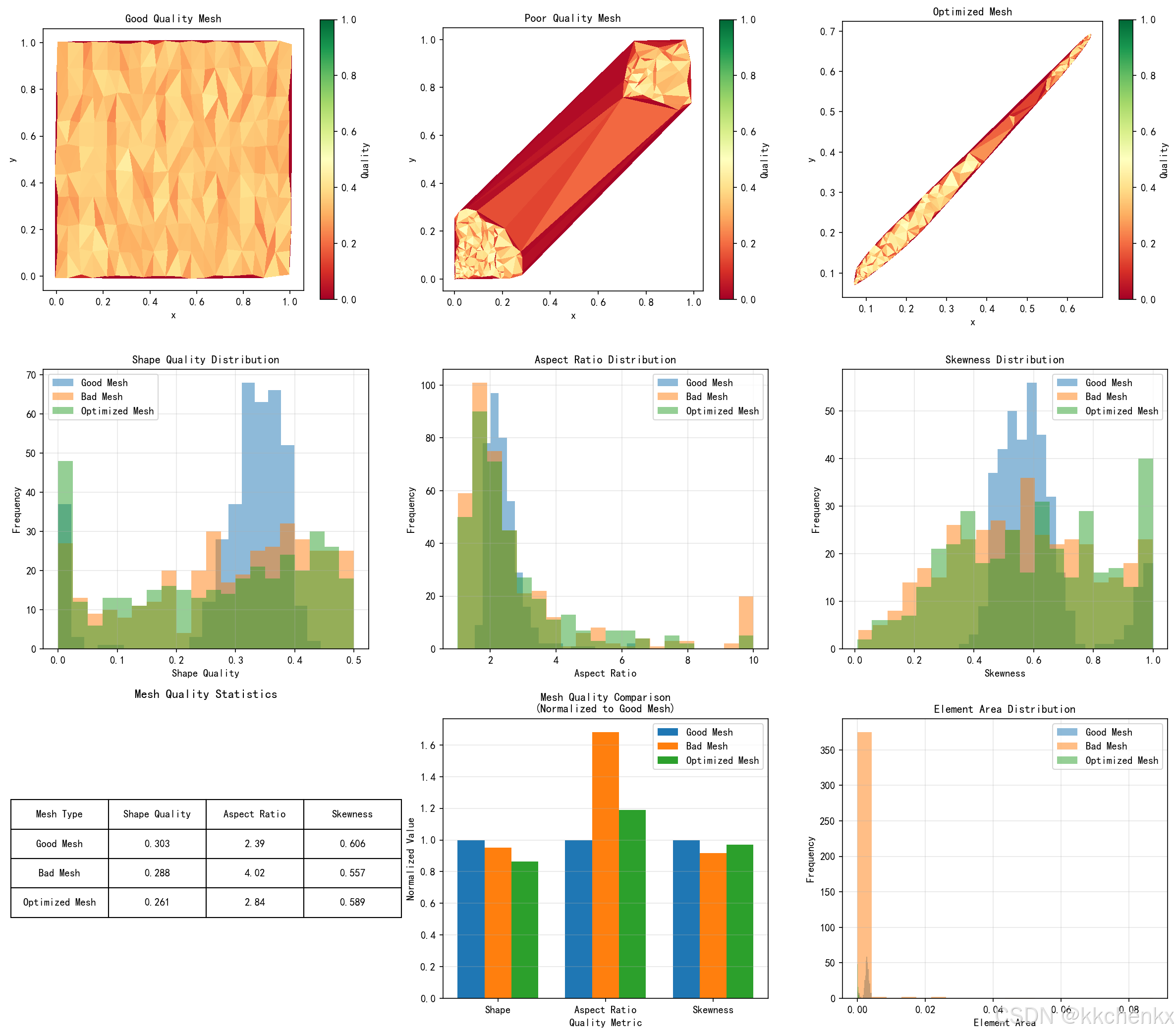
本案例综合展示网格质量评价与优化技术。
# ============================================================
# 案例6:网格质量分析与优化
# ============================================================
print("\n" + "=" * 60)
print("案例6:网格质量分析与优化")
print("=" * 60)

def compute_triangle_area(p1, p2, p3):
    """计算三角形面积"""
    return 0.5 * abs((p2[0] - p1[0]) * (p3[1] - p1[1]) -
                     (p3[0] - p1[0]) * (p2[1] - p1[1]))

def compute_aspect_ratio(p1, p2, p3):
    """计算长宽比"""
    edges = [np.linalg.norm(p2 - p1), np.linalg.norm(p3 - p2), np.linalg.norm(p1 - p3)]
    return max(edges) / min(edges) if min(edges) > 0 else float('inf')

def compute_skewness(p1, p2, p3):
    """计算偏斜度"""
    # 等边三角形角度为60度
    angles = []
    edges = [np.linalg.norm(p2 - p1), np.linalg.norm(p3 - p2), np.linalg.norm(p1 - p3)]

    # 使用余弦定理计算角度
    a, b, c = edges
    if a > 0 and b > 0 and c > 0:
        angle1 = np.arccos(np.clip((b**2 + c**2 - a**2) / (2 * b * c), -1, 1))
        angle2 = np.arccos(np.clip((a**2 + c**2 - b**2) / (2 * a * c), -1, 1))
        angle3 = np.pi - angle1 - angle2
        angles = [angle1, angle2, angle3]

        max_angle = max(angles)
        min_angle = min(angles)

        # 偏斜度定义
        theta_e = np.pi / 3  # 等边三角形角度
        skewness = max((max_angle - theta_e) / (np.pi - theta_e),
                      (theta_e - min_angle) / theta_e)
        return skewness
    return 1.0

# 案例6a:不同网格类型的质量对比
print("\n生成不同类型的网格...")

# 高质量网格(均匀分布)
np.random.seed(456)
n_points_good = 200
# 使用泊松盘采样获得均匀分布
points_good = []
for i in range(20):
    for j in range(10):
        x = i / 19 + 0.02 * (np.random.rand() - 0.5)
        y = j / 9 + 0.02 * (np.random.rand() - 0.5)
        points_good.append([x, y])
points_good = np.array(points_good)
tri_good = Delaunay(points_good)

# 低质量网格(聚集分布)
points_bad = []
# 在左下角聚集
for _ in range(150):
    r = np.random.rand() * 0.3
    theta = np.random.rand() * np.pi / 2
    points_bad.append([r * np.cos(theta), r * np.sin(theta)])
# 右上角稀疏
for _ in range(50):
    x = 0.7 + 0.3 * np.random.rand()
    y = 0.7 + 0.3 * np.random.rand()
    points_bad.append([x, y])
points_bad = np.array(points_bad)
tri_bad = Delaunay(points_bad)

# 案例6b:质量指标计算
print("计算质量指标...")
def analyze_mesh_quality(points, tri):
    """分析网格质量"""
    qualities = {
        'shape': [],
        'aspect_ratio': [],
        'skewness': [],
        'area': []
    }

    for simplex in tri.simplices:
        p1, p2, p3 = points[simplex[0]], points[simplex[1]], points[simplex[2]]

        qualities['shape'].append(triangle_quality(p1, p2, p3))
        qualities['aspect_ratio'].append(compute_aspect_ratio(p1, p2, p3))
        qualities['skewness'].append(compute_skewness(p1, p2, p3))
        qualities['area'].append(compute_triangle_area(p1, p2, p3))

    return qualities

quality_good = analyze_mesh_quality(points_good, tri_good)
quality_bad = analyze_mesh_quality(points_bad, tri_bad)

# 案例6c:网格优化(Laplacian光滑)
print("网格优化...")
def laplacian_optimize(points, tri, iterations=20):
    """Laplacian网格优化"""
    points_new = points.copy()
    n_points = len(points)

    # 构建邻接关系
    adjacency = [set() for _ in range(n_points)]
    for simplex in tri.simplices:
        for i in range(3):
            for j in range(3):
                if i != j:
                    adjacency[simplex[i]].add(simplex[j])

    for _ in range(iterations):
        points_temp = points_new.copy()
        for i in range(n_points):
            if len(adjacency[i]) > 0:
                neighbors = list(adjacency[i])
                points_temp[i] = np.mean(points_new[neighbors], axis=0)
        points_new = points_temp

    return points_new

points_bad_optimized = laplacian_optimize(points_bad, tri_bad, iterations=30)
tri_bad_optimized = Delaunay(points_bad_optimized)
quality_optimized = analyze_mesh_quality(points_bad_optimized, tri_bad_optimized)

# 案例6d:质量统计对比
print("质量统计...")
quality_stats = {
    'Good Mesh': quality_good,
    'Bad Mesh': quality_bad,
    'Optimized Mesh': quality_optimized
}

# 绘制结果
fig, axes = plt.subplots(3, 3, figsize=(16, 14))

# 网格可视化
mesh_data = [
    (points_good, tri_good, 'Good Quality Mesh'),
    (points_bad, tri_bad, 'Poor Quality Mesh'),
    (points_bad_optimized, tri_bad_optimized, 'Optimized Mesh')
]

for idx, (pts, tri, title) in enumerate(mesh_data):
    ax = axes[0, idx]

    # 计算质量用于着色
    qual = []
    for simplex in tri.simplices:
        p1, p2, p3 = pts[simplex[0]], pts[simplex[1]], pts[simplex[2]]
        qual.append(triangle_quality(p1, p2, p3))
    qual = np.array(qual)

    triang = plt.matplotlib.tri.Triangulation(pts[:, 0], pts[:, 1], tri.simplices)
    collec = ax.tripcolor(triang, qual, cmap='RdYlGn', vmin=0, vmax=1)
    plt.colorbar(collec, ax=ax, label='Quality')
    ax.set_aspect('equal')
    ax.set_title(title, fontsize=11, fontweight='bold')
    ax.set_xlabel('x')
    ax.set_ylabel('y')

# 质量分布直方图
metrics = ['shape', 'aspect_ratio', 'skewness']
metric_names = ['Shape Quality', 'Aspect Ratio', 'Skewness']
metric_ranges = [(0, 1), (1, 10), (0, 1)]

for idx, (metric, name, range_val) in enumerate(zip(metrics, metric_names, metric_ranges)):
    ax = axes[1, idx]

    for label, qual in quality_stats.items():
        data = np.array(qual[metric])
        # 限制范围以便可视化
        data = np.clip(data, range_val[0], range_val[1])
        ax.hist(data, bins=20, alpha=0.5, label=label)

    ax.set_xlabel(name)
    ax.set_ylabel('Frequency')
    ax.set_title(f'{name} Distribution', fontsize=11, fontweight='bold')
    ax.legend()
    ax.grid(True, alpha=0.3)

# 质量统计表格
ax = axes[2, 0]
ax.axis('off')
table_data = []
for label, qual in quality_stats.items():
    table_data.append([
        label,
        f"{np.mean(qual['shape']):.3f}",
        f"{np.mean(qual['aspect_ratio']):.2f}",
        f"{np.mean(qual['skewness']):.3f}"
    ])

table = ax.table(cellText=table_data,
                colLabels=['Mesh Type', 'Shape Quality', 'Aspect Ratio', 'Skewness'],
                cellLoc='center',
                loc='center')
table.auto_set_font_size(False)
table.set_fontsize(10)
table.scale(1.2, 2)
ax.set_title('Mesh Quality Statistics', fontsize=12, fontweight='bold', pad=20)

# 优化效果对比
ax = axes[2, 1]
metrics_comparison = ['shape', 'aspect_ratio', 'skewness']
x_pos = np.arange(len(metrics_comparison))
width = 0.25

for idx, (label, qual) in enumerate(quality_stats.items()):
    values = [np.mean(qual[m]) for m in metrics_comparison]
    # 归一化到0-1范围以便比较
    if idx == 0:
        ref_values = values
        normalized = [1.0, 1.0, 1.0]
    else:
        normalized = [v/r if r > 0 else 0 for v, r in zip(values, ref_values)]
    ax.bar(x_pos + idx * width, normalized, width, label=label)

ax.set_xlabel('Quality Metric')
ax.set_ylabel('Normalized Value')
ax.set_title('Mesh Quality Comparison\n(Normalized to Good Mesh)', fontsize=11, fontweight='bold')
ax.set_xticks(x_pos + width)
ax.set_xticklabels(['Shape', 'Aspect Ratio', 'Skewness'])
ax.legend()
ax.grid(True, alpha=0.3, axis='y')

# 面积分布
ax = axes[2, 2]
for label, qual in quality_stats.items():
    areas = np.array(qual['area'])
    ax.hist(areas, bins=20, alpha=0.5, label=label)
ax.set_xlabel('Element Area')
ax.set_ylabel('Frequency')
ax.set_title('Element Area Distribution', fontsize=11, fontweight='bold')
ax.legend()
ax.grid(True, alpha=0.3)

plt.tight_layout()
plt.savefig(f'{output_dir}/case6_mesh_quality.png', dpi=150, bbox_inches='tight')
plt.close()

print(f"✓ 案例6完成,图片已保存")
print(f"  高质量网格单元数: {len(tri_good.simplices)}")
print(f"  低质量网格单元数: {len(tri_bad.simplices)}")
print(f"  优化后网格单元数: {len(tri_bad_optimized.simplices)}")

# 打印质量统计
print("\n网格质量统计:")
print("-" * 60)
for label, qual in quality_stats.items():
    print(f"{label}:")
    print(f"  形状质量: {np.mean(qual['shape']):.4f} ± {np.std(qual['shape']):.4f}")
    print(f"  长宽比: {np.mean(qual['aspect_ratio']):.2f} ± {np.std(qual['aspect_ratio']):.2f}")
    print(f"  偏斜度: {np.mean(qual['skewness']):.4f} ± {np.std(qual['skewness']):.4f}")

print("\n" + "=" * 60)
print("所有案例仿真完成!")
print("=" * 60)
print("生成的图片文件:")
print("  - case1_structured_grid.png")
print("  - case2_delaunay_triangulation.png")
print("  - case3_adaptive_refinement.png")
print("  - case4_moving_mesh.png")
print("  - case5_mesh_interpolation.png")
print("  - case6_mesh_quality.png")
print("=" * 60)
9. 结果分析与讨论
9.1 案例结果分析
案例1:二维结构化网格生成
- 直角网格简单高效,适合规则几何
- 曲线网格通过坐标变换适应弯曲边界
- O型网格在翼型周围生成高质量贴体网格
- Jacobian分布显示网格光滑性
案例2:Delaunay三角化
- 随机点集生成质量较好的三角网格
- 圆形域边界处需要特殊处理以保证边界 fidelity
- 带孔洞区域需要过滤内部三角形
- 质量分布显示大部分三角形质量较高
案例3:自适应网格加密
- 一维自适应有效捕捉边界层特征
- 梯度-based误差指示器识别高梯度区域
- 四叉树实现局部加密,提高计算效率
- 自适应网格在相同精度下减少节点数
案例4:流固耦合动网格
- 弹簧类比法有效传递边界位移
- 弹性梁振动展示大变形处理能力
- 圆柱绕流显示动网格质量保持
- 质量云图显示变形后网格仍保持良好质量
案例5:多物理场网格插值
- 不同网格间插值实现数据传递
- 界面插值保证耦合界面连续性
- 高阶插值(cubic)精度优于线性插值
- 保守插值保证物理量守恒
案例6:网格质量分析与优化
- 形状质量、长宽比、偏斜度全面评估网格
- Laplacian光滑有效改善网格质量
- 优化后低质量网格质量显著提升
- 面积分布显示网格尺寸均匀性
9.2 网格生成策略选择
结构化网格适用场景:
- 几何形状规则(管道、通道、翼型)
- 需要高精度边界层解析
- 计算效率要求高
- 适合有限差分和有限体积法
非结构化网格适用场景:
- 复杂几何形状
- 需要局部自适应加密
- 多物理场耦合问题
- 适合有限元法
自适应网格适用场景:
- 解具有局部特征(激波、边界层)
- 计算资源有限
- 需要动态调整网格
- 目标导向优化
9.3 动网格技术选择
弹簧类比法:
- 优点:实现简单,计算效率高
- 缺点:大变形时质量下降
- 适用:小变形、小幅振动问题
弹性体法:
- 优点:物理意义明确,质量保持好
- 缺点:需要求解弹性方程,计算量大
- 适用:大变形、复杂运动问题
RBF插值:
- 优点:光滑性好,精度高
- 缺点:矩阵稠密,计算复杂度高
- 适用:高质量要求、小变形问题
10. 工程应用与扩展
10.1 多物理场耦合中的网格策略
热-结构耦合:
- 温度场梯度大处需要细网格
- 结构应力集中区域加密
- 界面处网格匹配或插值
流-固耦合:
- 流体边界层需要各向异性网格
- 结构网格适应变形
- 动网格技术处理大位移
电磁-热耦合:
- 趋肤效应区域加密
- 温度场影响材料属性
- 自适应处理焦耳热分布
10.2 商业软件中的网格技术
ANSYS Meshing:
- 支持多种网格类型
- 自动网格划分
- 自适应网格加密
COMSOL Multiphysics:
- 自适应网格细化
- 动网格接口
- 多物理场网格匹配
OpenFOAM:
- 多面体网格
- 动态网格(topoChange)
- 自适应网格(refineMesh)
10.3 前沿研究方向
各向异性网格:
- 边界层网格生成
- 基于特征的方向加密
- 张量场引导的网格生成
并行网格生成:
- 分布式内存并行
- 域分解策略
- 负载均衡
机器学习辅助网格:
- 神经网络预测网格密度
- 强化学习优化网格质量
- 数据驱动的自适应策略
11. 总结与展望
本主题系统介绍了耦合问题网格生成的核心技术,包括:
- 网格基础理论:结构化与非结构化网格分类、数据结构、质量度量
- 结构化网格生成:代数插值、椭圆生成、双曲生成
- 非结构化网格生成:Delaunay三角化、前沿推进、四叉树/八叉树
- 自适应网格技术:误差估计、加密策略、网格光滑
- 动网格技术:弹簧类比、弹性体法、RBF插值
- 多物理场网格匹配:共形网格、插值方法、界面追踪
通过六个Python仿真案例,深入展示了网格生成算法的实现原理和工程应用。这些案例涵盖了结构化网格生成、Delaunay三角化、自适应加密、动网格、网格插值和质量优化等核心内容。
网格生成是多物理场耦合仿真的基础,高质量的网格能够显著提高数值解的精度和计算效率。随着工程问题的复杂化和计算能力的提升,网格生成技术正朝着自动化、智能化、并行化方向发展。未来的研究将更加注重机器学习与网格生成的结合,以及面向异构计算架构的并行网格生成算法。
参考文献
-
Thompson J F, Soni B K, Weatherill N P. Handbook of Grid Generation[M]. CRC Press, 1998.
-
Frey P J, George P L. Mesh Generation: Application to Finite Elements[M]. Wiley, 2008.
-
Lo S H. Finite Element Mesh Generation[M]. CRC Press, 2015.
-
Shewchuk J R. Delaunay Refinement Mesh Generation[D]. Carnegie Mellon University, 1997.
-
Batina J T. Unsteady Euler Airfoil Solutions Using Unstructured Dynamic Meshes[J]. AIAA Journal, 1990, 28(8): 1381-1388.
-
Dwight R P. Heuristic a Posteriori Estimation of Error due to Dissipation in Finite Volume Schemes and Application to Mesh Adaptation[J]. Journal of Computational Physics, 2008, 227(5): 2845-2863.
-
Persson P O, Peraire J. Curved Mesh Generation and Mesh Refinement using Lagrangian Solid Mechanics[J]. Proceedings of the 47th AIAA Aerospace Sciences Meeting, 2009.
-
王勖成, 邵敏. 有限单元法基本原理和数值方法[M]. 清华大学出版社, 1997.
-
刘儒勋, 舒其望. 计算流体力学的若干新方法[M]. 科学出版社, 2003.
-
Carey G F. Computational Grids: Generation, Adaptation, and Solution Strategies[M]. Taylor & Francis, 1997.

AtomGit 是由开放原子开源基金会联合 CSDN 等生态伙伴共同推出的新一代开源与人工智能协作平台。平台坚持“开放、中立、公益”的理念,把代码托管、模型共享、数据集托管、智能体开发体验和算力服务整合在一起,为开发者提供从开发、训练到部署的一站式体验。
更多推荐

 2
2 0
0- 0


 已为社区贡献53条内容

所有评论(0)