大语言模型量化技术:BitsAndBytes 原理与实现【干货】
一、前言
BitsAndBytes 是 Hugging Face Transformers 库中集成的核心量化工具,由 Tim Dettmers 团队开发,旨在通过 4-bit 和 8-bit 低精度量化技术,显著降低大语言模型的显存占用与计算开销,使 LLM 能在消费级 GPU 上高效运行 。
二、核心能力与技术优势
BitsAndBytes 提供了多种先进的量化方案,均通过高度优化的 CUDA 内核实现,与 PyTorch 和 Transformers 无缝集成:
-
LLM.int8() —— 8位推理量化
- 将模型权重从 FP16/FP32 转换为 INT8,显存占用减少约 50%。
- 采用“异常值感知”(outlier-aware)策略:对激活值较大的“异常特征”保留 FP16 计算,其余使用 INT8,有效缓解精度损失 。
- 使用方式简单:只需设置
load_in_8bit=True即可自动启用 。
-
4-bit 量化(NF4/FP4)——极致压缩
- 支持 NF4(归一化浮点 4-bit)和 FP4 两种格式,专为大模型权重的正态分布设计,精度优于普通 INT4 。
- 显存占用可降至原始模型的 12.5%(FP32 → 4-bit),例如 7B 模型从 ~14GB 压缩至约 5.5GB 。
- 配合双重量化(Double Quantization)和分组校准(Group-wise Calibration),进一步降低误差 。
-
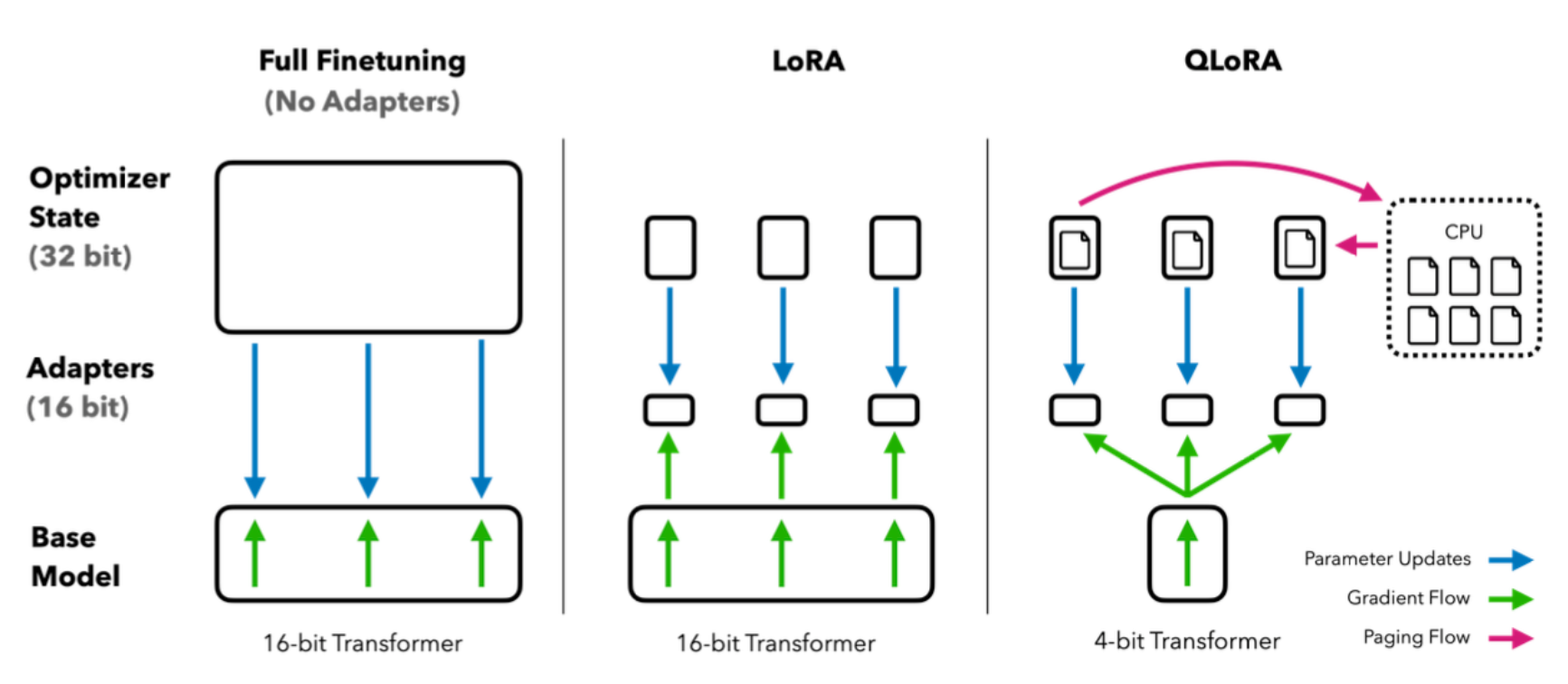
QLoRA(Quantized Low-Rank Adaptation)——高效微调
- 在 4-bit 量化模型基础上进行参数高效微调(PEFT),仅训练少量适配器参数。
- 可在单张 24GB GPU 上微调 65B 级别模型,大幅降低训练成本 。
三、实现原理与关键技术
-
块量化(Block-wise Quantization):将权重矩阵划分为小块(如 64×64),每块独立计算缩放因子(scale)和零点(zero_point),提升量化精度 。
-
混合精度计算 :量化权重以低比特存储,但计算时自动提升至
bfloat16或float16,平衡速度与精度 。 -
零样本量化(Zero-shot Quantization) :无需校准数据即可直接量化任意模型,极大简化使用流程,尤其适合快速实验 。
四、典型应用场景
| 场景 | 配置 | 效果 |
|---|---|---|
| 本地推理部署 | load_in_8bit=True | 中端 GPU(如 RTX 3060)运行 13B 模型 |
| 极低资源推理 | load_in_4bit=True + nf4 | Google Colab 免费版运行 7B 模型 |
| 低成本微调 | QLoRA + 4-bit | 单卡微调 70B 模型,显存节省 70%+ |
五、BitsAndBytes程序实现
以 facebook opt-2.7b 模型为例,实现 BitsAndBytes算法模型量化。
1.load_in_4bit 量化
使用 Transformers 库的 model.from_pretrained()方法中的load_in_8bit或load_in_4bit参数,便可以对模型进行量化。只要模型支持使用Accelerate加载并包含torch.nn.Linear层,这几乎适用于大多数模型。
from transformers import AutoModelForCausalLM

model_id = "facebook/opt-2.7b"

model_4bit = AutoModelForCausalLM.from_pretrained(model_id,
                                                  device_map="auto",
                                                  load_in_4bit=True)
print(model_4bit)
输出:
OPTForCausalLM(
  (model): OPTModel(
    (decoder): OPTDecoder(
      (embed_tokens): Embedding(50272, 2560, padding_idx=1)
      (embed_positions): OPTLearnedPositionalEmbedding(2050, 2560)
      (final_layer_norm): LayerNorm((2560,), eps=1e-05, elementwise_affine=True)
      (layers): ModuleList(
        (0-31): 32 x OPTDecoderLayer(
          (self_attn): OPTSdpaAttention(
            (k_proj): Linear4bit(in_features=2560, out_features=2560, bias=True)
            (v_proj): Linear4bit(in_features=2560, out_features=2560, bias=True)
            (q_proj): Linear4bit(in_features=2560, out_features=2560, bias=True)
            (out_proj): Linear4bit(in_features=2560, out_features=2560, bias=True)
          )
          (activation_fn): ReLU()
          (self_attn_layer_norm): LayerNorm((2560,), eps=1e-05, elementwise_affine=True)
          (fc1): Linear4bit(in_features=2560, out_features=10240, bias=True)
          (fc2): Linear4bit(in_features=10240, out_features=2560, bias=True)
          (final_layer_norm): LayerNorm((2560,), eps=1e-05, elementwise_affine=True)
        )
      )
    )
  )
  (lm_head): Linear(in_features=2560, out_features=50272, bias=False)
)
查看显存占用:
# 获取当前模型占用的 GPU显存(差值为预留给 PyTorch 的显存)
memory_footprint_bytes = model_4bit.get_memory_footprint()
memory_footprint_mib = memory_footprint_bytes / (1024 ** 2)  # 转换为 MiB

print(f"{memory_footprint_mib:.2f}MiB")
输出:
1457.52MiB
测试模型:
from transformers import AutoTokenizer

tokenizer = AutoTokenizer.from_pretrained(model_id
                                         )
text = "Merry Christmas! I'm glad to"
inputs = tokenizer(text, return_tensors="pt").to(0)

out = model_4bit.generate(**inputs, max_new_tokens=64)
print(tokenizer.decode(out[0], skip_special_tokens=True))
输出:
Merry Christmas! I'm glad to see you're still around.
I'm still around, just not posting as much. I'm still here, just not posting as much. I'm still here, just not posting as much. I'm still here, just not posting as much. I'm still here, just not posting as much. I'm
2.NF4 量化
from transformers import BitsAndBytesConfig

nf4_config = BitsAndBytesConfig(
    load_in_4bit=True,
    bnb_4bit_quant_type="nf4",
)

model_nf4 = AutoModelForCausalLM.from_pretrained(model_id, quantization_config=nf4_config)
3.双量化
from transformers import BitsAndBytesConfig

double_quant_config = BitsAndBytesConfig(
    load_in_4bit=True,
    bnb_4bit_use_double_quant=True,
)

model_double_quant = AutoModelForCausalLM.from_pretrained(model_id, quantization_config=double_quant_config)
4. QLoRA
import torch
from transformers import BitsAndBytesConfig

qlora_config = BitsAndBytesConfig(
    load_in_4bit=True,
    bnb_4bit_use_double_quant=True,
    bnb_4bit_quant_type="nf4",
    bnb_4bit_compute_dtype=torch.bfloat16
)

model_qlora = AutoModelForCausalLM.from_pretrained(model_id, quantization_config=qlora_config)
5.完整代码
import torch
from transformers import AutoModelForCausalLM
from transformers import AutoTokenizer
from transformers import BitsAndBytesConfig

# 打印模型参数
def print_memory(model_4bit):
    print(model_4bit)
    # 获取当前模型占用的 GPU显存(差值为预留给 PyTorch 的显存)
    memory_footprint_bytes = model_4bit.get_memory_footprint()
    memory_footprint_mib = memory_footprint_bytes / (1024 ** 2)  # 转换为 MiB

    print(f"{memory_footprint_mib:.2f}MiB")

# 测试模型
def test_model(model, model_path):
    # 测试模型
    tokenizer = AutoTokenizer.from_pretrained(model_path)
    text = "Merry Christmas! I'm glad to"
    inputs = tokenizer(text, return_tensors="pt").to(0)

    out = model.generate(**inputs, max_new_tokens=64)
    print(tokenizer.decode(out[0], skip_special_tokens=True))

# 模型量化
def quantization_mode(model_path, flag):
    if flag == 'load_in_4bit':
        config = BitsAndBytesConfig(load_in_4bit = True,)
    elif flag == 'nf4':
        config = BitsAndBytesConfig(load_in_4bit=True,
                                    bnb_4bit_quant_type="nf4")
    elif flag == 'double_quant':
        config = BitsAndBytesConfig(load_in_4bit=True,
                                    bnb_4bit_use_double_quant=True,)
    elif flag =='QLoRA':
        config = BitsAndBytesConfig(load_in_4bit=True,
                                    bnb_4bit_use_double_quant=True,
                                    bnb_4bit_quant_type="nf4",
                                    bnb_4bit_compute_dtype=torch.bfloat16)
    else:
        print('使用非量化的opt-2.7b模型')
        config = None

    model = AutoModelForCausalLM.from_pretrained(model_path, quantization_config=config)
    return model

model_path = "facebook/opt-2.7b"

flags = {'1':'load_in_4bit',
         '2':'nf4',
         '3':'double_quant',
         '4':'QLoRA'}

model = quantization_mode(model_path, flags['1'])

# 打印模型信息
print_memory(model)
# 测试模型
test_model(model, model_path)

AtomGit 是由开放原子开源基金会联合 CSDN 等生态伙伴共同推出的新一代开源与人工智能协作平台。平台坚持“开放、中立、公益”的理念,把代码托管、模型共享、数据集托管、智能体开发体验和算力服务整合在一起,为开发者提供从开发、训练到部署的一站式体验。
更多推荐



 4
4 0
0- 0


 已为社区贡献1条内容

所有评论(0)