MWGA - 为了复活1000亿行C#代码
026-1-15
1. 一句话介绍
MWGA是Make WinForms Great Again的缩写,它是一个工具软件,能快速地将使用了GDI+的WinForm.NET程序快速迁移到Blazor WASM平台上,将程序代码修改量控制在10%以下,从而复活全球1000亿行C#代码。
2. 项目背景
据估计,全球范围内企业级生产环境中运行着1000万至1500万个WinForms应用程序。在这些应用中,60%至80%有现代化改造需求,其中40%至60%优先选择Web化迁移,涉及的C#代码可能有数千亿行。由于可复用C#代码且具备基于浏览器的跨平台能力,Blazor WebAssembly成为热门选择。
但是有大量的WinForms使用了System.Drawing模块调用GDI+进行复杂的自定义绘图和交互,这些部分难以迁移,通常需要重写或大幅修改。为此,市场上对低改动、可复用业务逻辑和绘图代码的现代化迁移解决方案需求强烈。但长期以来一直缺乏有效工具和方法,导致许多企业面临高昂的重写成本和风险,存在巨大供需矛盾。
3. 我们的目标
MWGA就是专门帮助将WinForms应用程序迁移到Blazor WASM平台上,即使这些程序使用GDI+功能,我们也预期将对这些程序源码的修改量不超过10%。这极大的降低WinForms软件现代化的成本和风险。
我们的长期目标是复活全球1000亿行经过市场验证的C#代码,使其在现代Web前端平台上继续发挥价值。MWGA帮助开发者将一套C#代码同时编译成.exe和.wasm文件,两者运行效果保持高度一致。
从另外一个角度看,MWGA可以看成一个通用前端框架,但是采用了特有的WinForms编程模型,是WinForms技术栈在前端领域中的一个海外殖民地,这是一个重大的跨界融合,使得全球数百万个WinForms开发者无需更换技术栈即可在纯前端领域发挥作用。而且C#的强类型语言特性和GDI+严谨的编程模型也有助于减少AI编程产生的隐形BUG。
软件下载地址:https://github.com/dcsoft-yyf/MWGA
4. 使用案例一:时间轴产品,1%代码修改量
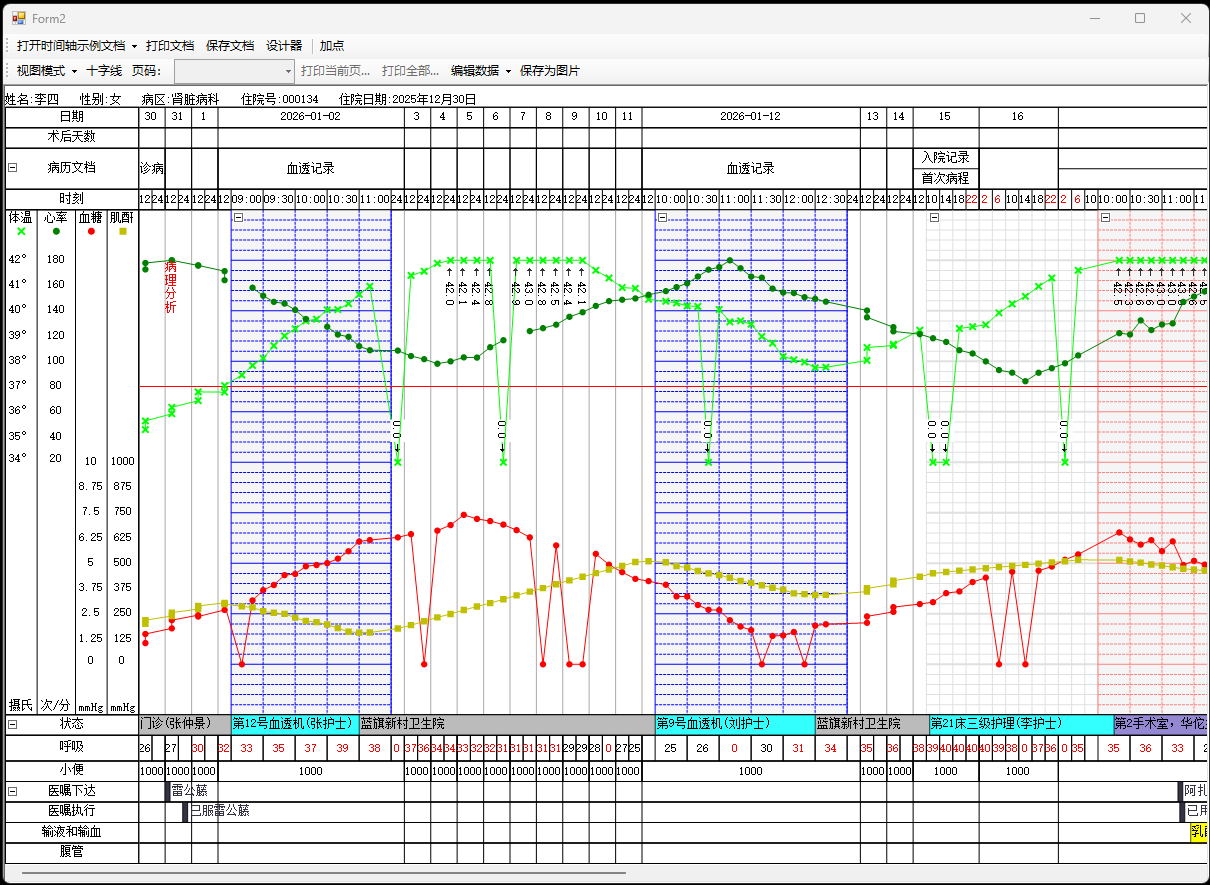
时间轴产品是南京都昌公司的一个WinForms软件产品,现已开源,这是一个面向医院的专业软件产品,可以认为是体温单软件的增强版,它包含了7万行C#代码,其中有数万行GDI+绘图相关代码,其运行界面如下图所示:
我们创建了一个Blazor WASM 9.0的程序,把时间轴的代码复制过来,并做一些改造,代码修改量不超过700行,也就是小于1%,比如:

if (e.ClickedItem.Text == "打开本地时间轴文档")
{
    using (OpenFileDialog ofd = new OpenFileDialog())
    {
        if (
#if MWGA
            await
#endif
            ofd.ShowDialog() == DialogResult.OK)
        {
            var stream =
#if MWGA
                await
#endif
                ofd.OpenFile();
            var reader = new StreamReader(stream, Encoding.UTF8, true);
            var strXml = reader.ReadToEnd();
            temperatureControl1.LoadDocumentFormString(strXml);
            reader.Close();
        }
    }
}
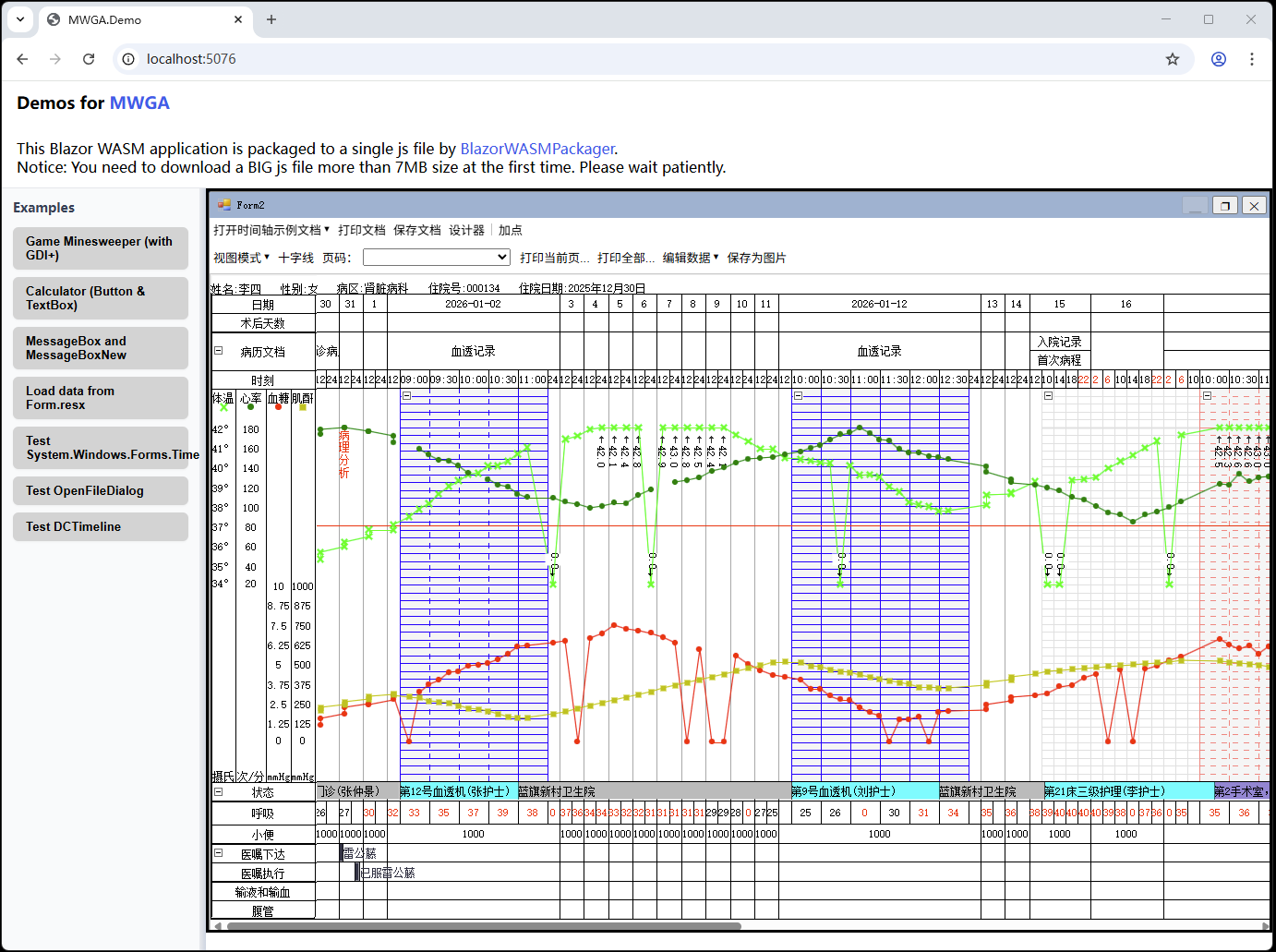
由于Blazor WASM是采用浏览器非阻断线程模式,为此我们实现了异步ShowDialog()函数,采用await语句来暂停当前代码执行,这样减少对旧代码的修改量。并使用了条件编译,使得同一份C#代码无需修改即可编译成.exe和.wasm文件。最后编译成.wasm的程序在谷歌浏览器中运行效果如下图所示:
程序中数万行内容排版和绘图代码未做修改,比如:

this.Document.InnerBehaviorMode = this.BehaviorMode;
RectangleF clipRectangle = (RectangleF)e.ClipRectangle;
clipRectangle = this.ViewTransform.TransformRectangleF(clipRectangle);
e.Graphics.PageUnit = this.Document.GraphicsUnit;
PointF lp = this.ClientToView(0, 0);
e.Graphics.TranslateTransform(-lp.X, -lp.Y);
this.Document.ViewMode = this.ViewMode;
if (this.ViewMode == DocumentViewMode.Page)
{
    // 页面视图模式
    // 绘制页面边框
    clipRectangle.Inflate(1, 1);
    if (this.Document.Config.BackColor.A != 0)
    {
        // 填充背景色
        e.Graphics.FillRectangle(
            GraphicsObjectBuffer.GetSolidBrush(this.Document.Config.BackColor),
            clipRectangle);
    }
    RectangleF pb2 = RectangleF.Intersect(this._PageViewBounds, clipRectangle);
    if (pb2.IsEmpty)
    {
        return;
    }

这个使用案例展示了MWGA处理复杂图形软件的能力,使得它距离复活1000亿行C#代码的最终目标又进了一大步。
5. 使用案例一:扫雷游戏程序,2%代码修改量
扫雷是一个经典的Windows游戏程序,我们从https://gitee.com/dingxiaowei/MineGame下载了一个基于MS .NET Framework 2.0的扫雷程序,这是一个10年前写的Winforms程序,包含约2500行C#代码以及若干图片资源文件,编译成.exe文件后运行如下图所示:
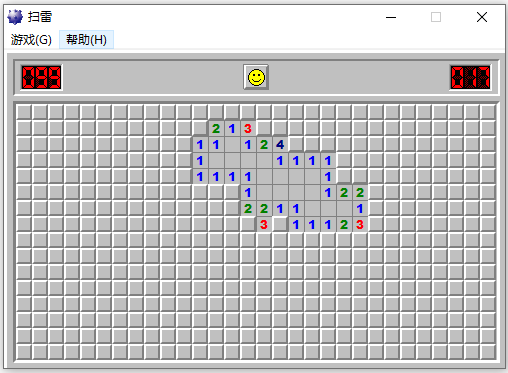
这个程序大量使用System.Drawing.Graphcis.DrawLine()/DrawImage()/FillRectangle()的接口来绘制游戏界面。此外这个程序使用了Panel、IMessageFilter、Timer、Button、MainMenu、MessageBox、ImageList等组件。
我们创建了一个Blazor WASM 9.0的程序,将扫雷程序源码文件复制过来,并做一些兼容性修改,如下所示:

#if MWGA
    public static async ValueTask<ShowSelfResult> ShowSelf(...)
#else
    public static ShowSelfResult ShowSelf(...)
#endif
{
    bool result;
    frmCustomGame cg = new frmCustomGame();
    cg.tbHeight.Text = height.ToString();
    cg.tbWidth.Text = width.ToString();
    cg.tbMineCount.Text = mineCount.ToString();
    cg.Location = location;
#if MWGA
    if (await cg.ShowDialog(parent) == DialogResult.OK)
#else
    if (cg.ShowDialog(parent) == DialogResult.OK)
#endif
    {
        // ...
    }
}

最终我们对旧代码修改了不超过50行(占比2%)就让同一套代码可以无需修改即可编译成.exe和.wasm文件。最后编译成.wasm的扫雷程序在谷歌浏览器中的运行结果如下:
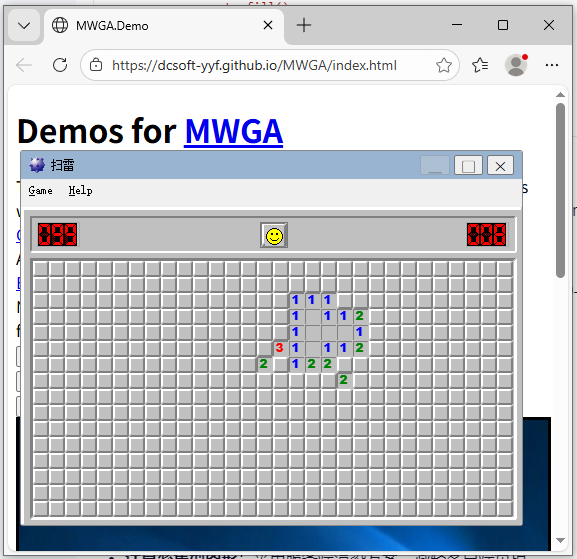
程序中的上千行图形绘制代码和游戏逻辑判断未做任何修改,如下所示:

protected override void OnPaint(PaintEventArgs e)
{
    Rectangle rect = ClientRectangle;
    Graphics g = e.Graphics;

    g.FillRectangle(grayBrush, rect);
    drawFrame(g, new Rectangle(rect.Left, rect.Top, rect.Width - 1, rect.Height - 1));
    if (Image != null)
    {
        int offset;
        if (pressed)
            offset = 1;
        else
            offset = 0;
        g.DrawImage(Image, rect.Left + 4 + offset, rect.Top + 4 + offset);
    }
}

6. 使用案例二:计算器,无代码修改
我们开发了一个Winform.NET的计算器程序,包含460行C#代码,其运行界面如图所示:
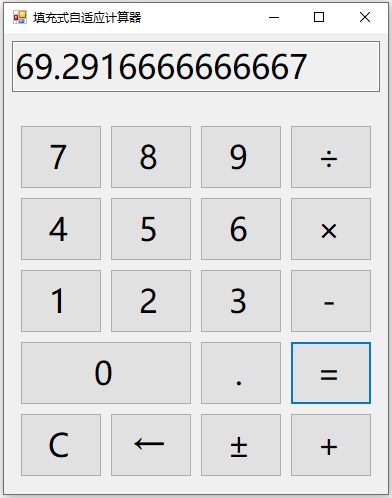
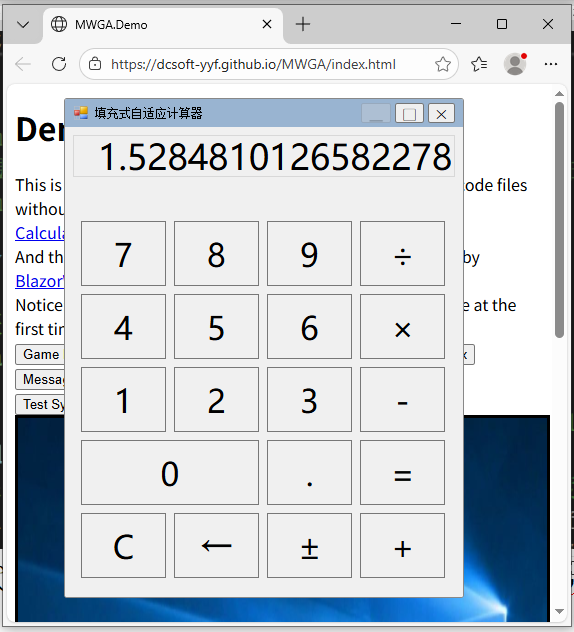
这里响应了窗体的大小改变事件,用于设置按钮和文本框的位置和大小,其代码如下:
private void CalculatorForm_Resize(object sender, EventArgs e)
{
    UpdateControlLayout();
}

/// <summary>
/// 动态更新所有控件的位置和大小(完全填充窗体,无空白)
/// </summary>
private void UpdateControlLayout()
{
    // 获取窗体客户端区域(排除边框)
    Rectangle clientRect = this.ClientRectangle;

    // 1. 处理显示屏(占顶部整行,高度占客户端区域的1/6,剩余部分给按钮)
    int displayHeight = clientRect.Height / 6;
    // 显示屏位置:左、上、右间距为fixedPadding,高度为displayHeight
    txtDisplay.Location = new Point(_fixedPadding, _fixedPadding);
    var newSize = new Size(clientRect.Width - 2 * _fixedPadding, displayHeight - 2 * _fixedPadding);
    // ...
}

这份C#代码未做任何修改,借助MWGA,它在Blazor WASM中运行界面如下所示:
7. 基本原理
MWGA基本原理是模拟System.Windows.Forms.Control类型和System.Drawing.Graphics类型来实现WinForms代码低修改量的迁移。MWGA建立了以下的功能模块映射:
| HTML功能模块 | MWGA功能模块 |
|---|---|
| <canvas> | System.Drawing.Graphics |
| <button> | System.Windows.Forms.Button |
| <img> | System.Windows.Forms.PictureBox |
| <div> | System.Windows.Forms.Form System.Windows.Forms.Panel System.Windows.Forms.Control System.Windows.Forms.Label |
| <nav> | System.Windows.Forms.MainMenu |
| <input type="text">或<textarea> | System.Windows.Forms.TextBox |
| window.alert() | System.Windows.Forms.MessageBox |
| <div> | System.Windows.Forms.MessageBoxNew |
| element.style.cursor | System.Windows.Forms.Cursor |
| window.setTimeout() | System.Windows.Forms.Timer |
| MouseEvent, KeyEvent | Win32 Message,包括WM_KEYUP、WM_KEYDOWN、WM_LBUTTONDOWN、WM_LBUTTONUP等等 |
MWGA内部还模拟实现了Win32 Message loop和消息队列,构造出了一个Winforms的底层运行框架,使得用户的基于Winforms的C#代码重新编译后即可运行在Blazor WASM上。
8. MWGA支持的关键功能点 (2026-1-28)
System.Drawing命名空间
- System.Drawing.Bitmap
- System.Drawing.Brush
- System.Drawing.Font
- System.Drawing.FontFamily
- System.Drawing.Graphics
DrawString( ), DrawImage( ), DrawLine( ), DrawRectangle( ), FillRectangle( ), DrawEllipse( ), FillEllipse(), MeasureString( ), PageUnit, Transform
- System.Drawing.Pen
- System.Drawing.SolidBrush
- System.Drawing.Drawing2D.HatchBrush
- System.Drawing.Drawing2D.LinearGradientBrush
- System.Drawing.Drawing2D.Martix
System.Windows.Forms命名空间
- System.Windows.Forms.Application
AddMessageFilter( ), Run( ), RemoveMessageFilter( )
- System.Windows.Forms.Button
- System.Windows.Forms.ContainerControl
- System.Windows.Forms.Control
BackColor, ForeColor, Width, Height, Location, Size, Anchor, Dock, Visible, Enabled, Text, Font, Invalidate( ), Refresh( )
- System.Windows.Forms.Cursor
- System.Windows.Forms.Form
async ShowDialog( ), Show( ), Close( ), FormBorderStyle, StartPosition, WindowState, Resize
Load data from Form.resx
Support Form.Designer.cs
- System.Windows.Forms.ImageList
Add( ) , Draw( )
- System.Windows.Forms.MainMenu
- System.Windows.Forms.Label
- System.Windows.Forms.MessageBox
Show() ,async ShowAsync( )
- System.Windows.Forms.OpenFileDialog
async ShowDialog(), async OpenFile()
- System.Windows.Forms.Panel
- System.Windows.Forms.PictureBox
- System.Windows.Forms.Screen
-
System.Windows.Forms.ScrollableControl
-
System.Windows.Forms.SystemInformation(采用 Win11 的设置)
- System.Windows.Forms.TextBox
- System.Windows.Forms.Timer
-
System.Windows.Forms.ToolStrip
-
System.Windows.Forms.UserControl
资源管理
- System.Resources.ResourceManager
- System.ComponentModel.ComponentResourceManager
平台支持
开发环境: Blazor Webassembly 9.0/10
浏览器: Chrome (v95 or later), Firefox (v113 or later) and other mainstream browsers
操作系统 : Windows (7 or later), Linux, Android
9. 多语言支持
MWGA支持多语言开发。MWGA内部所有的字符串都剥离出来形成一个字符串资源JS文件,其内容如图所示:

window.__DCResourceStrings = {
    AboutBoxDesc: "显示该组件的"关于"对话框",
    AccDGCollapse: "折叠",
    AccDGEdit: "编辑",
    AccDGExpand: "展开",
    AccDGNavigate: "定位",
    AccDGNavigateBack: "向后定位",
    AccDGNewRow: "(新建)",
    AccDGParentRow: "父行",
    AccDGParentRows: "父行",
    AccessibleActionCheck: "选中",
    AccessibleActionClick: "单击",
    AccessibleActionCollapse: "折叠",
    AccessibleActionExpand: "展开",
    AccessibleActionPress: "按",
    AccessibleActionUncheck: "取消选中",
    // ...
};

我们目前提供简体中文版和英文版,用户可以修改这个JS文件来使用自己的语言。
另外MWGA支持ComponentResourceManager类型,如图所示:

private void InitializeComponent()
{
    var resources = new System.ComponentModel.ComponentResourceManager(typeof(dlgMessage));
    this.panel1 = new System.Windows.Forms.Panel();
    this.pictureBox1 = new System.Windows.Forms.PictureBox();
    this.label1 = new System.Windows.Forms.Label();
    this.txtMessage = new System.Windows.Forms.TextBox();
    this.btnOK = new System.Windows.Forms.Button();
    this.btnCancel = new System.Windows.Forms.Button();
    this.panel1.SuspendLayout();
    ((System.ComponentModel.ISupportInitialize)(this.pictureBox1)).BeginInit();
    this.SuspendLayout();
    // ...
}

用户可以将程序资源设置到Form.resx文件中,编译后即可使用窗体资源文件。
10. 开发和部署
MWGA只包含一个4MB大小的DCSoft.MWGA.dll文件,就已经包含了所有的功能,不依赖任何其他第三方组件。
开发者可参考https://github.com/dcsoft-yyf/MWGA提供的演示程序来进行基于MWGA的开发。主要步骤是:
第一,创建Blazor WASM项目
创建一个Blazor WASM 9.0/10.0的程序,添加对DCSoft.MWGA.dl的程序集引用。目前不支持Blazor WASM 7.0/8.0。
第二,复制源代码
将要迁移的WinForms程序的源代码以及资源文件全部复制到项目中。
第三,添加引导程序
添加标准化的MWGA的引导程序代码,添加运行程序界面的HTML文件。
第四,兼容性修改
对用户程序代码进行必要的兼容性检查和修改,主要修改点有:

AtomGit 是由开放原子开源基金会联合 CSDN 等生态伙伴共同推出的新一代开源与人工智能协作平台。平台坚持“开放、中立、公益”的理念,把代码托管、模型共享、数据集托管、智能体开发体验和算力服务整合在一起,为开发者提供从开发、训练到部署的一站式体验。
更多推荐

 11
11 0
0- 0


 已为社区贡献2条内容

所有评论(0)