记录windows搭建RAG知识库的过程
1、🦙部署Ollama
Ollama 是一个本地大语言模型运行工具,让你可以在自己的电脑上轻松运行各种开源大模型,无需联网、无需 API 密钥、数据完全本地化。
在RAG 项目中,Ollama 扮演着核心大脑的角色,负责两件关键任务:
文本向量化(Embedding)—— 理解文档内容
问答生成(LLM)—— 回答问题
1.1、下载安装程序
从 Ollama 官网下载 OllamaSetup.exe,直接执行即可。
如果想要修改默认的Ollama安装目录, 在powershell可以这样执行
OllamaSetup.exe /DIR="D:\MyApps\Ollama"
最后执行ollama --version,如果有数据就是安装成功了。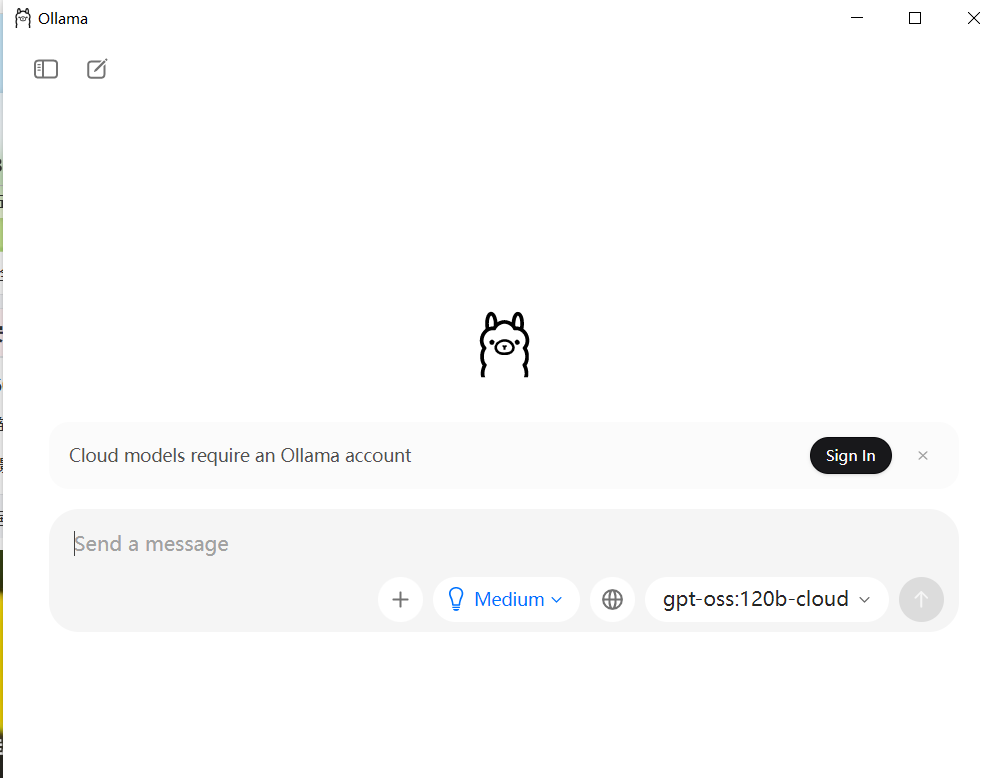
1.2、修改模型存储目录
模型文件通常体积很大(几个GB到上百GB),默认存储在 C:\Users\你的用户名.ollama\models,很容易占满C盘空间。通过设置系统环境变量 OLLAMA_MODELS 可以轻松更改此路径。
在 Windows 搜索框输入“环境变量”,选择“编辑系统环境变量”。
在弹出的“系统属性”窗口中,点击“环境变量”。
在“用户变量"中新增OLLAMA_MODELS变量,值选择自己的模型路径,比如 D:\OllamaModels。
点击“确定”保存。
重启 Ollama 服务(本人遇到了需要重启电脑才能生效的情况)。
2、下载模型
根据自己电脑配置选择合适的模型。
直接在powershell窗口执行
ollama pull qwen2.5:7b
qwen2.5:7b大概需要4-6GB显存即可。
模型下载完毕后,在ollama软件中就能看到qwen2.5:7b这个模型了。
可以试着提问: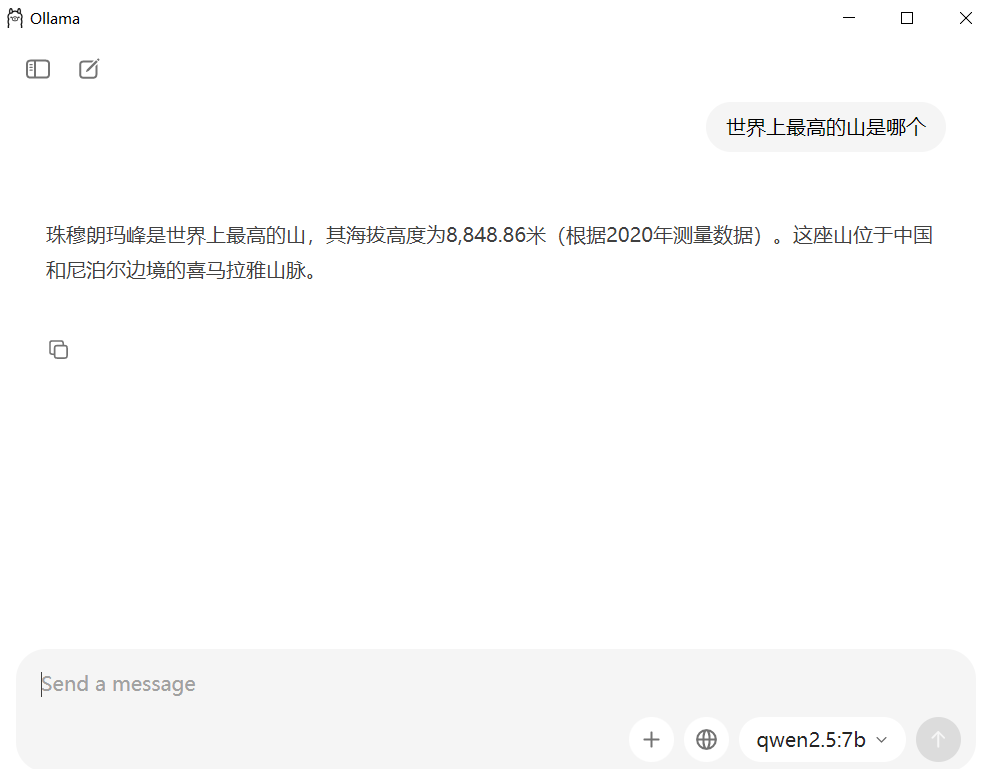
3、Chroma向量数据库
Chroma 是一个向量数据库(Vector Database),专门用来存储和检索向量数据。在 RAG 系统中,它扮演着知识库和搜索引擎的角色。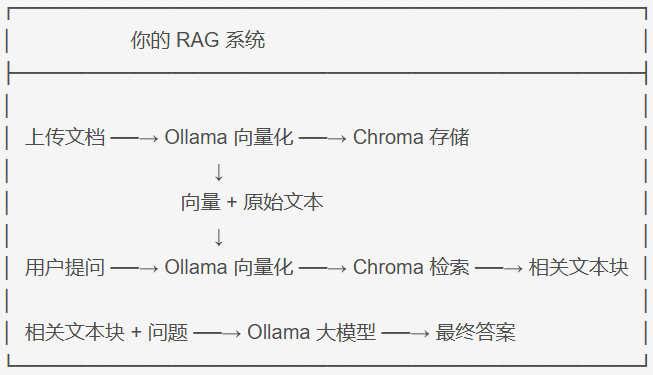
下面用一个demo跑通上述的数据逻辑链路的使用。
# 导入python依赖
pip install langchain langchain-community chromadb langchain-text-splitters gradio pypdf -i https://pypi.tuna.tsinghua.edu.cn/simple
chroma数据库测试python脚本:
# 1. 导入所需
from langchain_community.document_loaders import PyPDFLoader
from langchain_text_splitters import RecursiveCharacterTextSplitter  # 修改这里
from langchain_community.embeddings import OllamaEmbeddings
from langchain_community.vectorstores import Chroma
from langchain_community.llms import Ollama
from langchain_classic.chains import RetrievalQA

# 2. 加载文档(请将 'your_file.pdf' 替换为你自己的文件路径)
loader = PyPDFLoader("files/中国上古神话时代之始末_兼论_绝地天通.pdf")  # 也支持 .txt,可用 TextLoader
documents = loader.load()
print(f"加载了 {len(documents)} 页文档")

# 3. 切分文档
text_splitter = RecursiveCharacterTextSplitter(
    chunk_size=500,      # 每块大小,可调整
    chunk_overlap=50,    # 块间重叠,避免语义断裂
    separators=["\n\n", "\n", "。", "!", "?", ";", ",", " ", ""]
)
chunks = text_splitter.split_documents(documents)
print(f"文档被切分为 {len(chunks)} 个文本块")

# 4. 向量化并存入 Chroma(使用 Ollama 的嵌入模型)
# 注意:首次运行会从 Ollama 拉取 nomic-embed-text 嵌入模型(约 270MB),请保持网络通畅
embeddings = OllamaEmbeddings(model="nomic-embed-text")
vectorstore = Chroma.from_documents(
    documents=chunks,
    embedding=embeddings,
    persist_directory="./chroma_db"  # 本地持久化目录,下次运行可跳过此步骤
)
print("向量库已创建并保存")

# 5. 创建检索器
retriever = vectorstore.as_retriever(search_kwargs={"k": 3})  # 每次检索返回 3 个最相关块

# 6. 初始化 Ollama 大模型(使用你已下载的 qwen2.5:7b)
llm = Ollama(model="qwen2.5:7b", temperature=0.1)  # temperature 较低使回答更严谨

# 7. 构建 RetrievalQA 链
qa_chain = RetrievalQA.from_chain_type(
    llm=llm,
    chain_type="stuff",      # "stuff" 直接将检索到的文本块拼接到 prompt 中
    retriever=retriever,
    return_source_documents=True,  # 可选,便于查看引用来源
    verbose=True            # 打印运行日志,便于调试
)

# 8. 测试问答
query = "这篇文章主要讲了什么?"
result = qa_chain.invoke(query)
print(f"问题: {query}")
print(f"回答: {result['result']}")
结果如下: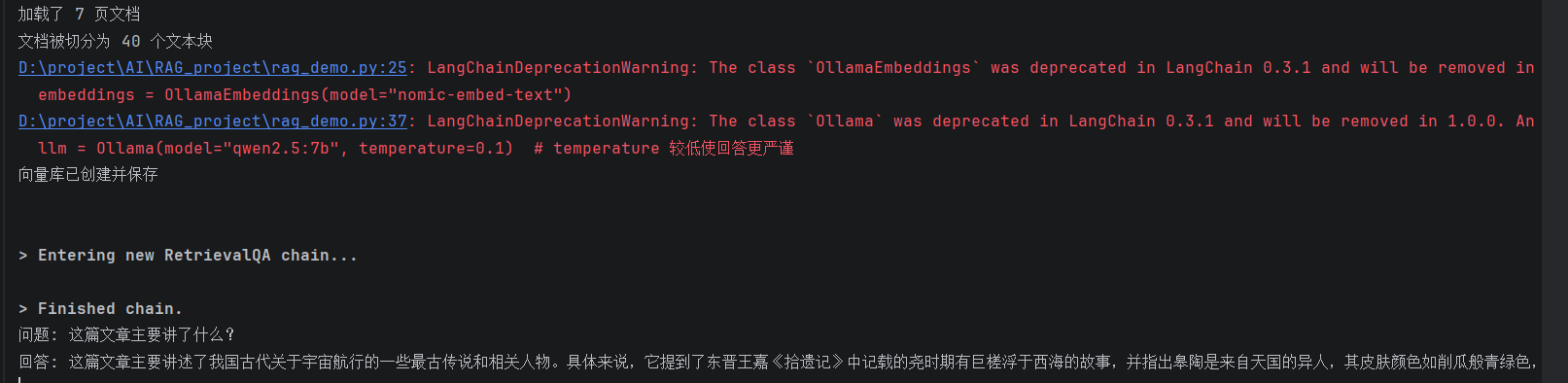
上述代码中可以看到导入的包都是langchain开头的包:
LangChain 是一个专门用于构建大语言模型应用的开发框架。你可以把它理解为“大模型时代的胶水”——它把大模型、向量数据库、文档处理、提示词管理等各种组件粘合在一起,让你能快速搭建复杂的 AI 应用。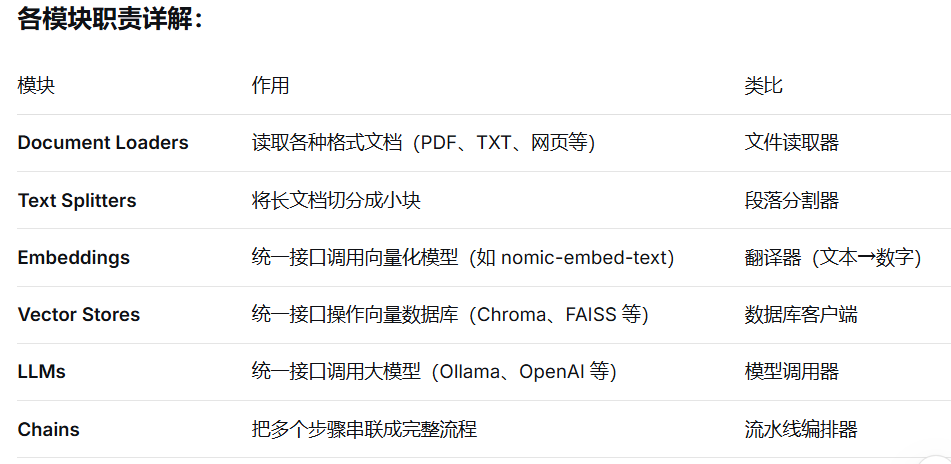
4、Gradio做UI界面
把第3步的rag功能做的更完善更好看一点,使用Gradio做一个界面,也页面上上传文件到chroma数据库,并在页面上向大模型提问。
import gradio as gr
from langchain_community.document_loaders import PyPDFLoader, TextLoader
from langchain_text_splitters import RecursiveCharacterTextSplitter
from langchain_ollama import OllamaEmbeddings, OllamaLLM
from langchain_chroma import Chroma
from langchain_classic.chains import RetrievalQA
import os
import shutil
import time
import hashlib
import json
import chardet  # 新增:用于检测编码

# 全局变量
qa_chain = None
current_vectorstore = None
persist_dir = "./chroma_db"
documents_manifest = "./documents_manifest.json"
current_doc_info = None


def detect_encoding(file_path):
    """检测文件编码"""
    try:
        with open(file_path, 'rb') as f:
            raw_data = f.read(50000)  # 读取前50000字节用于检测
            result = chardet.detect(raw_data)
            encoding = result['encoding'] if result['encoding'] else 'utf-8'
            confidence = result['confidence'] if result['confidence'] else 0
            print(f"🔍 检测到编码: {encoding} (置信度: {confidence:.2%})")
            return encoding
    except Exception as e:
        print(f"⚠️ 编码检测失败: {e},使用默认 utf-8")
        return 'utf-8'


class CustomTextLoader(TextLoader):
    """自定义文本加载器,支持多种编码"""
    def __init__(self, file_path, encoding=None, autodetect_encoding=True):
        if encoding is None and autodetect_encoding:
            encoding = detect_encoding(file_path)
            print(f"📖 使用编码: {encoding}")
        super().__init__(file_path, encoding=encoding, autodetect_encoding=False)


def load_manifest():
    """加载已处理文档清单"""
    if os.path.exists(documents_manifest):
        try:
            with open(documents_manifest, 'r', encoding='utf-8') as f:
                return json.load(f)
        except:
            return {"documents": []}
    return {"documents": []}


def save_manifest(manifest):
    """保存文档清单"""
    with open(documents_manifest, 'w', encoding='utf-8') as f:
        json.dump(manifest, f, ensure_ascii=False, indent=2)


def get_file_hash(file_path):
    """计算文件哈希值,用于判断是否重复"""
    hasher = hashlib.md5()
    with open(file_path, 'rb') as f:
        # 读取前1MB用于快速判断
        hasher.update(f.read(1024 * 1024))
    return hasher.hexdigest()


def is_document_processed(file_path):
    """检查文档是否已经处理过"""
    manifest = load_manifest()
    file_hash = get_file_hash(file_path)
    for doc in manifest["documents"]:
        if doc["hash"] == file_hash:
            return True, doc
    return False, None


def add_to_manifest(file_path, chunks_count, pages_count):
    """添加文档到清单"""
    manifest = load_manifest()
    file_hash = get_file_hash(file_path)
    file_name = os.path.basename(file_path)

    for i, doc in enumerate(manifest["documents"]):
        if doc["hash"] == file_hash:
            manifest["documents"][i] = {
                "name": file_name,
                "path": file_path,
                "hash": file_hash,
                "chunks": chunks_count,
                "pages": pages_count,
                "added_time": time.strftime("%Y-%m-%d %H:%M:%S")
            }
            save_manifest(manifest)
            return False

    manifest["documents"].append({
        "name": file_name,
        "path": file_path,
        "hash": file_hash,
        "chunks": chunks_count,
        "pages": pages_count,
        "added_time": time.strftime("%Y-%m-%d %H:%M:%S")
    })
    save_manifest(manifest)
    return True


def check_existing_db():
    """检查是否存在有效的向量数据库"""
    if os.path.exists(persist_dir) and os.path.isdir(persist_dir):
        if os.path.exists(os.path.join(persist_dir, "chroma.sqlite3")):
            return True
    return False


def load_existing_db():
    """加载已有的向量数据库"""
    global qa_chain, current_vectorstore
    try:
        print("📂 检测到已有向量数据库,正在加载...")
        embeddings = OllamaEmbeddings(model="nomic-embed-text")
        current_vectorstore = Chroma(
            persist_directory=persist_dir,
            embedding_function=embeddings
        )

        collection_count = current_vectorstore._collection.count()
        print(f"✅ 成功加载已有向量库,包含 {collection_count} 个向量")

        manifest = load_manifest()
        if manifest["documents"]:
            print(f"📚 已处理的文档列表 ({len(manifest['documents'])} 个):")
            for doc in manifest["documents"]:
                print(f"   - {doc['name']} ({doc['chunks']} 个文本块)")

        retriever = current_vectorstore.as_retriever(search_kwargs={"k": 4})
        llm = OllamaLLM(model="qwen2.5:7b", temperature=0.1)
        qa_chain = RetrievalQA.from_chain_type(
            llm=llm,
            chain_type="stuff",
            retriever=retriever,
            return_source_documents=False,
            verbose=False
        )

        return f"✅ 已加载知识库!包含 {collection_count} 个文本块,共 {len(manifest['documents'])} 个文档。"
    except Exception as e:
        print(f"❌ 加载已有数据库失败: {e}")
        return None


def process_file(file_obj):
    """增量添加文档到知识库(不删除现有数据)"""
    global qa_chain, current_vectorstore, current_doc_info
    file_path = file_obj.name
    print(f"📄 开始处理文件: {file_path}")

    try:
        # 根据扩展名选择加载器
        if file_path.endswith('.pdf'):
            loader = PyPDFLoader(file_path)
            print("📖 使用 PDF 加载器")
        elif file_path.endswith('.txt'):
            # 使用自定义加载器,自动检测编码
            loader = CustomTextLoader(file_path)
        else:
            return "不支持的文件格式,请上传 PDF 或 TXT 文件。"

        # 检查是否已处理过
        is_processed, doc_info = is_document_processed(file_path)
        if is_processed:
            return f"⚠️ 文档已存在!\n📄 文件名: {doc_info['name']}\n📅 添加时间: {doc_info['added_time']}\n📊 文本块数: {doc_info['chunks']}\n\n如需重新处理,请先使用「重置数据库」功能。"

        # 加载文档
        documents = loader.load()
        print(f"✅ 加载了 {len(documents)} 页/段")

        # 检查是否有有效内容
        total_content_length = sum(len(doc.page_content) for doc in documents)
        if total_content_length < 10:
            return f"⚠️ 文件内容过少或无法读取,请检查文件是否有效。\n文件: {os.path.basename(file_path)}"

        # 切分
        text_splitter = RecursiveCharacterTextSplitter(
            chunk_size=500,
            chunk_overlap=50,
            separators=["\n\n", "\n", "。", "!", "?", ";", ",", " ", ""]
        )
        chunks = text_splitter.split_documents(documents)
        print(f"✅ 切分为 {len(chunks)} 个文本块")

        if len(chunks) == 0:
            return "⚠️ 切分后没有文本块,请检查文件内容。"

        # 向量化并添加到数据库
        print("🔢 正在向量化...")
        embeddings = OllamaEmbeddings(model="nomic-embed-text")

        if not os.path.exists(persist_dir) or not os.path.exists(os.path.join(persist_dir, "chroma.sqlite3")):
            print("📦 创建新的向量数据库...")
            current_vectorstore = Chroma.from_documents(
                documents=chunks,
                embedding=embeddings,
                persist_directory=persist_dir
            )
        else:
            print("➕ 向现有数据库添加文档...")
            if current_vectorstore is None:
                current_vectorstore = Chroma(
                    persist_directory=persist_dir,
                    embedding_function=embeddings
                )
            current_vectorstore.add_documents(chunks)
            print(f"✅ 已添加 {len(chunks)} 个文本块")

        # 记录到清单
        add_to_manifest(file_path, len(chunks), len(documents))

        # 更新问答链
        retriever = current_vectorstore.as_retriever(search_kwargs={"k": 4})
        llm = OllamaLLM(model="qwen2.5:7b", temperature=0.1)
        qa_chain = RetrievalQA.from_chain_type(
            llm=llm,
            chain_type="stuff",
            retriever=retriever,
            return_source_documents=False,
            verbose=False
        )

        # 获取统计信息
        manifest = load_manifest()
        total_docs = len(manifest["documents"])
        total_chunks = current_vectorstore._collection.count()

        current_doc_info = {
            "file": os.path.basename(file_path),
            "chunks": len(chunks),
            "pages": len(documents),
            "total_docs": total_docs,
            "total_chunks": total_chunks
        }

        return f"✅ 文档添加成功!\n📄 新增: {os.path.basename(file_path)} ({len(chunks)} 个文本块)\n📚 总计: {total_docs} 个文档, {total_chunks} 个文本块"

    except UnicodeDecodeError as e:
        print(f"❌ 编码错误: {e}")
        return f"❌ 文件编码错误:无法读取文件。\n请尝试将文件另存为 UTF-8 编码。\n详细错误:{str(e)}"
    except Exception as e:
        import traceback
        traceback.print_exc()
        return f"❌ 处理失败:{str(e)}"


def reset_database():
    """重置数据库(删除所有文档)"""
    global qa_chain, current_vectorstore, current_doc_info

    try:
        current_vectorstore = None
        qa_chain = None
        current_doc_info = None

        if os.path.exists(persist_dir):
            shutil.rmtree(persist_dir)
            print("🗑️ 已删除数据库目录")

        if os.path.exists(documents_manifest):
            os.remove(documents_manifest)
            print("🗑️ 已删除文档清单")

        return "✅ 数据库已重置!现在可以重新上传文档。"
    except Exception as e:
        return f"❌ 重置失败:{str(e)}"


def answer_question(question):
    """根据问题返回答案"""
    if qa_chain is None:
        return "⚠️ 请先上传并处理文档,或者启动时自动加载已有知识库失败。"
    if not question.strip():
        return "⚠️ 请输入问题。"
    try:
        result = qa_chain.invoke(question)
        return result['result']
    except Exception as e:
        return f"❌ 出错了:{str(e)}"


def get_db_status():
    """获取当前数据库状态"""
    manifest = load_manifest()

    if qa_chain is not None and os.path.exists(persist_dir):
        try:
            embeddings = OllamaEmbeddings(model="nomic-embed-text")
            vectorstore = Chroma(
                persist_directory=persist_dir,
                embedding_function=embeddings
            )
            total_chunks = vectorstore._collection.count()

            status_text = f"### 📊 知识库状态\n\n"
            status_text += f"**文本块总数**: {total_chunks}\n"
            status_text += f"**文档数量**: {len(manifest['documents'])}\n\n"

            if manifest["documents"]:
                status_text += "**已添加的文档**:\n"
                for doc in manifest["documents"]:
                    status_text += f"- 📄 {doc['name']} ({doc['chunks']} 块)\n"

            return status_text
        except Exception as e:
            return f"知识库已存在,但读取失败: {e}"

    if os.path.exists(persist_dir):
        return "📊 知识库存在但未加载,请刷新或重新上传文档"

    return "❌ 未加载知识库,请上传文档"


# 构建 Gradio 界面
with gr.Blocks(title="本地 RAG Demo", theme=gr.themes.Soft()) as demo:
    gr.Markdown("# 📚 本地 RAG 问答系统")
    gr.Markdown("基于 Ollama (Qwen2.5:7b) + LangChain + Chroma | 支持增量添加多个文档 | 支持 PDF 和 TXT (自动检测编码)")

    status_bar = gr.Markdown("### 📊 状态:未加载知识库")

    with gr.Row():
        with gr.Column():
            file_input = gr.File(label="📄 上传文档 (PDF/TXT)")
            upload_btn = gr.Button("➕ 添加文档到知识库", variant="primary")
            reset_btn = gr.Button("🗑️ 重置数据库", variant="secondary")
            status = gr.Textbox(label="处理状态", lines=5, interactive=False)
        with gr.Column():
            question_input = gr.Textbox(label="💬 你的问题", lines=3, placeholder="输入你想问的问题...")
            answer_btn = gr.Button("🔍 提问", variant="primary")
            answer_output = gr.Textbox(label="✨ 回答", lines=6, interactive=False)

    refresh_btn = gr.Button("🔄 刷新状态", size="sm")

    upload_btn.click(process_file, inputs=file_input, outputs=status)
    upload_btn.click(lambda: None, None, None).then(
        lambda: get_db_status(), None, status_bar
    )

    reset_btn.click(reset_database, inputs=None, outputs=status)
    reset_btn.click(lambda: None, None, None).then(
        lambda: get_db_status(), None, status_bar
    )

    answer_btn.click(answer_question, inputs=question_input, outputs=answer_output)
    refresh_btn.click(lambda: get_db_status(), None, status_bar)

print("✅ 界面构建完成")

# 启动应用
if __name__ == "__main__":
    print("🚀 正在启动 Gradio 服务...")

    # 安装 chardet 提示
    try:
        import chardet
    except ImportError:
        print("⚠️ 未安装 chardet,正在自动安装...")
        import subprocess
        subprocess.check_call(["pip", "install", "chardet"])

    if check_existing_db():
        print("📂 发现已有向量数据库,尝试加载...")
        load_result = load_existing_db()
        if load_result:
            print("✅ 已自动加载已有知识库")
        else:
            print("⚠️ 自动加载失败,请手动上传文档")
    else:
        print("ℹ️ 未发现已有向量数据库,启动后请上传文档")

    print("💡 浏览器会自动打开,如果没有,请手动访问 http://127.0.0.1:7860")
    demo.launch(
        server_name="127.0.0.1",
        server_port=7860,
        share=False,
        inbrowser=True
    )
    print("👋 服务已停止")
运行程序后,浏览器打开页面:http://127.0.0.1:7860。最终效果如下,上传文件对文件的内容提问: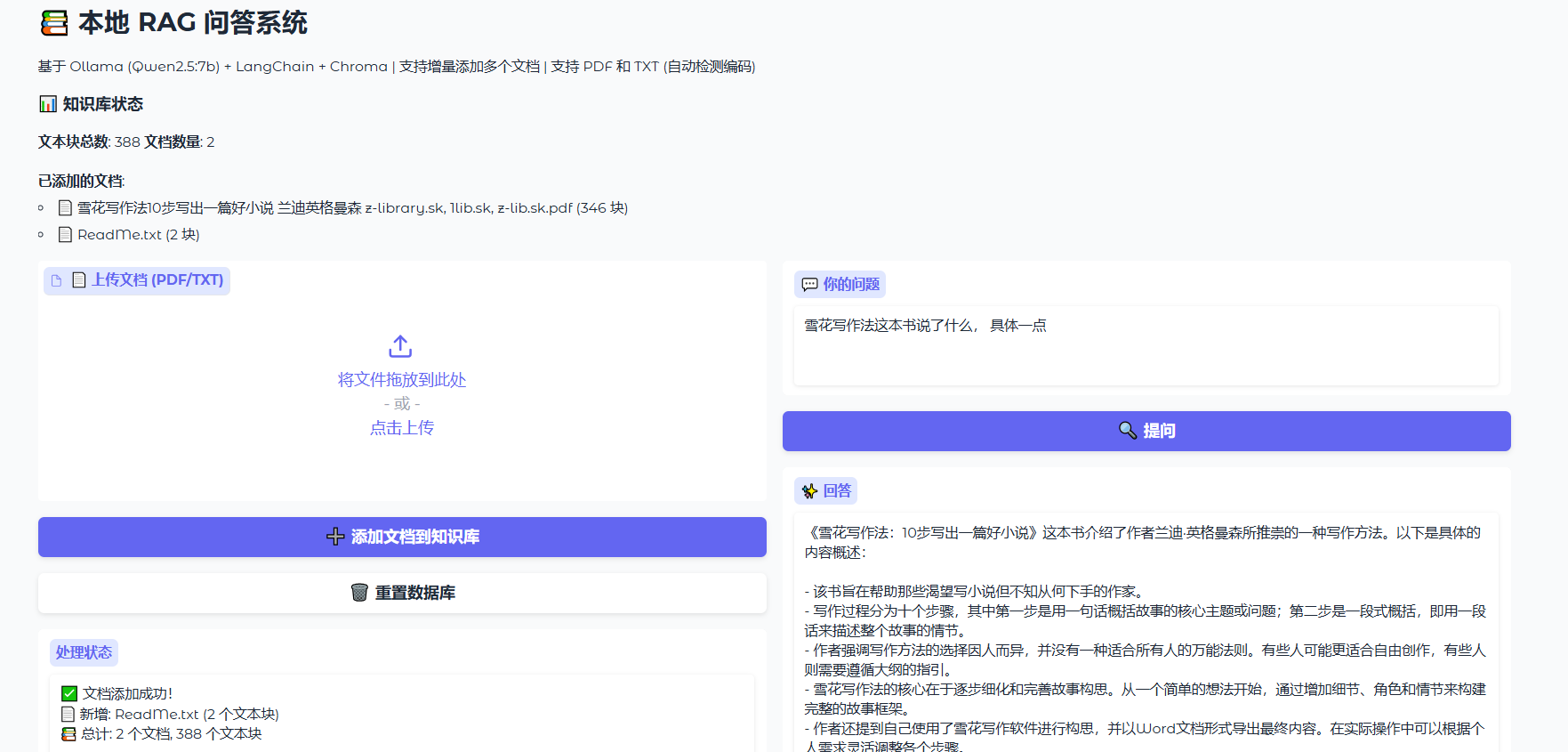
5、基于 Gradio 的本地 RAG 总结
系统架构:
数据流向详解
1. 用户上传 PDF/TXT
   ↓
2. Gradio 接收文件,调用 process_file()
   ↓
3. 检查文档是否已存在(MD5 哈希对比)
   ↓
4. 文档加载器读取文件内容
   ↓
5. 文本切分器将长文本切成 500 字的块(chunk)
   ↓
6. Ollama Embedding 模型将文本块转成向量
   ↓
7. Chroma 存储向量 + 原始文本 + 元数据
   ↓
8. 更新文档清单 manifest.json
   ↓
9. 刷新问答链(使新文档可被检索)
   ↓
10. 返回处理状态给用户
问答流程
1. 用户输入问题
   ↓
2. Gradio 调用 answer_question()
   ↓
3. Ollama Embedding 将问题转成向量
   ↓
4. Chroma 计算问题向量与所有文档向量的相似度
   ↓
5. 返回最相似的 4 个文本块(k=4)
   ↓
6. 将检索到的文本块拼接到 Prompt 中
   ↓
7. Ollama LLM 模型(Qwen2.5:7b)生成回答
   ↓
8. 返回答案给用户界面
这个系统实现了本地 RAG 应用:
1、用户通过 Gradio 界面上传文档、提出问题。
2、LangChain 协调整个流程,调用各个组件。
3、Ollama 提供模型能力,完成向量化和问答生成。
4、Chroma 作为知识库,存储文档并支持语义检索。

AtomGit 是由开放原子开源基金会联合 CSDN 等生态伙伴共同推出的新一代开源与人工智能协作平台。平台坚持“开放、中立、公益”的理念,把代码托管、模型共享、数据集托管、智能体开发体验和算力服务整合在一起,为开发者提供从开发、训练到部署的一站式体验。
更多推荐

 10
10 0
0- 0


 已为社区贡献1条内容

所有评论(0)