基于YOLOv8/YOLOv10/YOLOv11/YOLOv12与SpringBoot的手势识别检测系统(DeepSeek智能分析+web交互界面+前后端分离+YOLO数据)
摘要
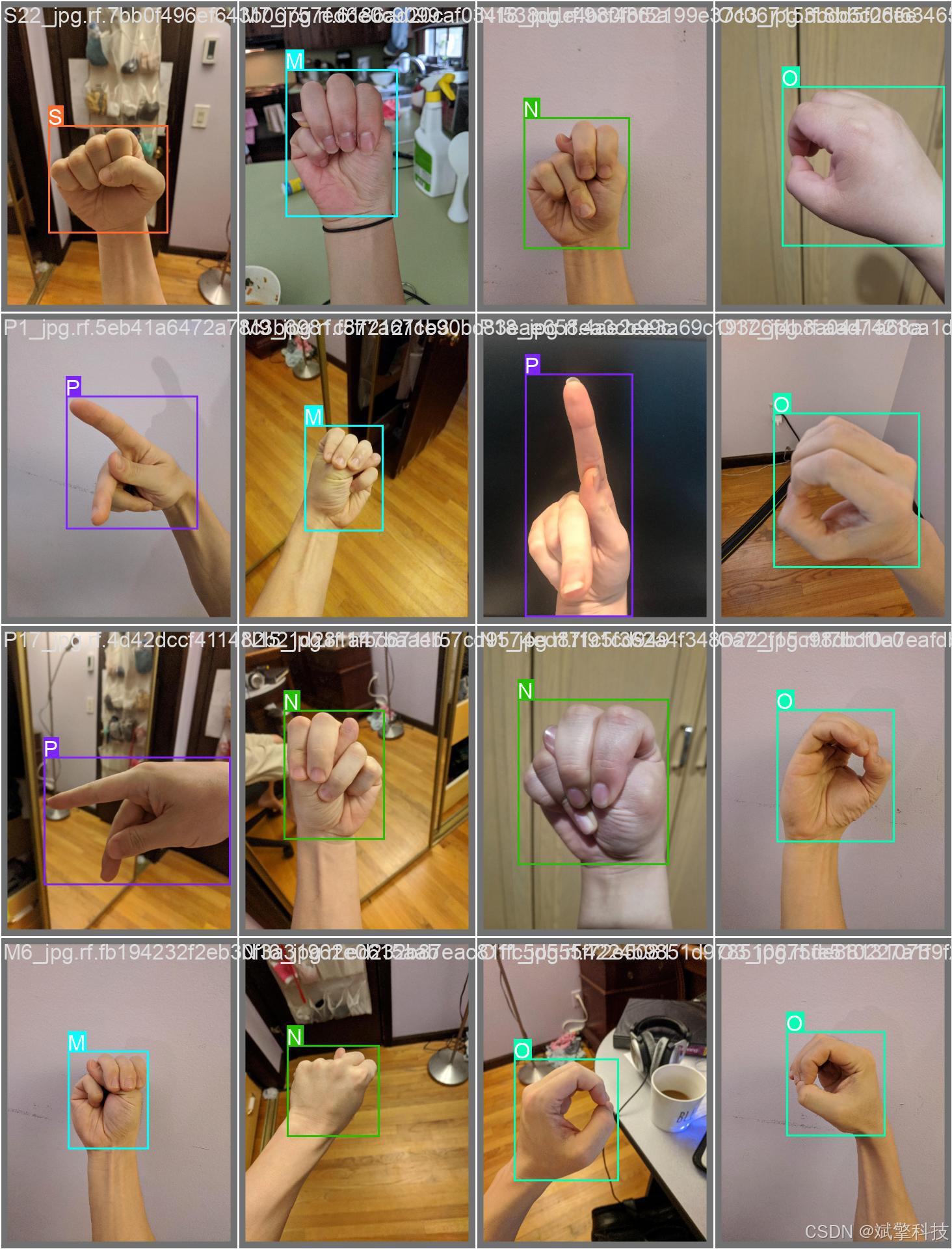
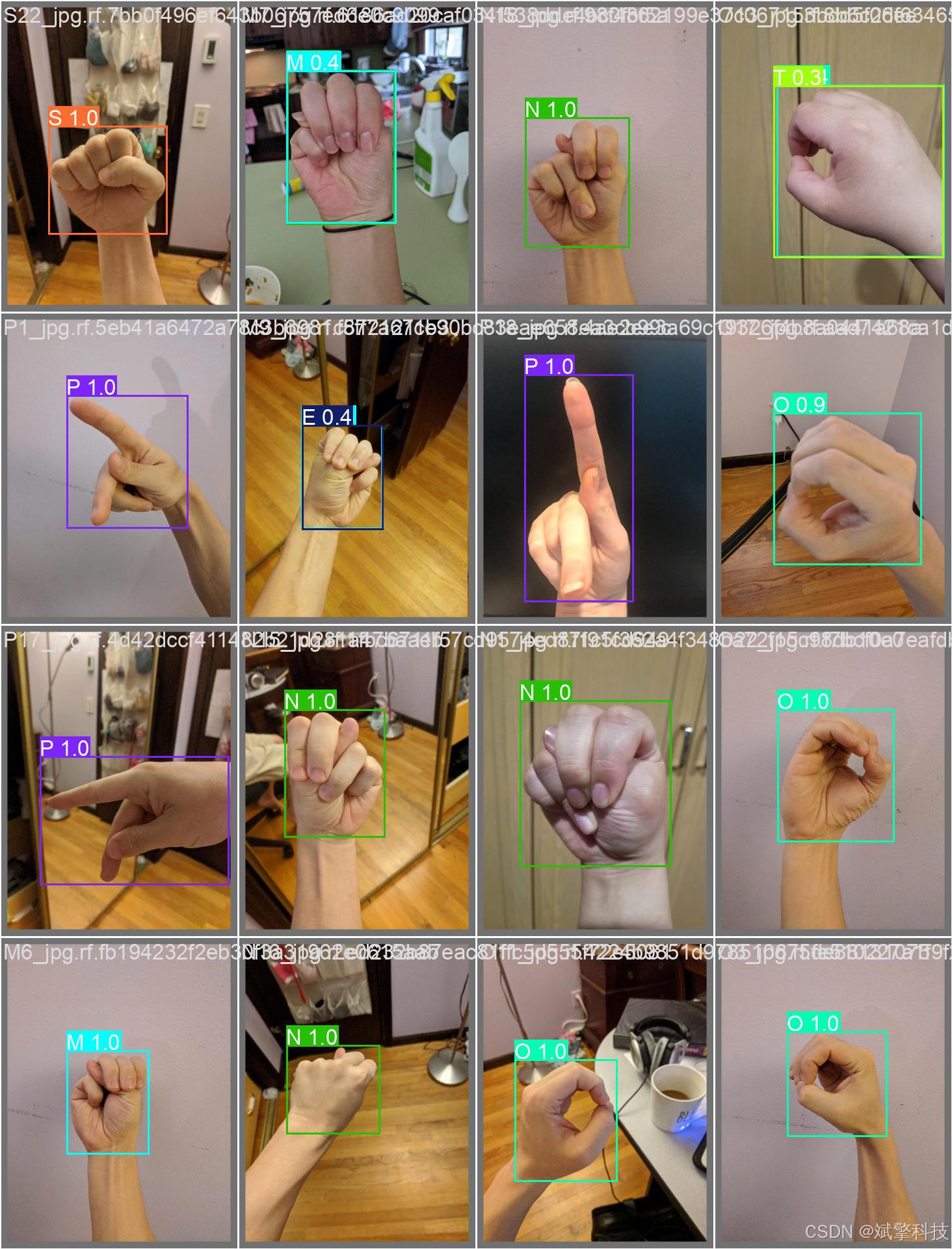
随着人机交互技术的快速发展,手势识别作为自然、直观的非接触式交互方式,在人机界面、智能控制、辅助交流等领域展现出巨大的应用潜力。本研究设计并实现了一套基于深度学习与Web架构的手势智能识别系统,专门针对26个英文字母手语手势进行高精度检测与分类。系统创新性地集成了YOLOv8、YOLOv10、YOLOv11和YOLOv12四种先进的目标检测模型,构建了可灵活切换的多模型识别引擎。通过构建包含720张高质量手势图像的专用数据集,为手语字母的准确识别提供了可靠的数据基础。后端采用SpringBoot微服务框架,结合前后端分离架构,实现了完整的用户管理体系、多模态手势检测和智能分析功能。特别引入DeepSeek大型语言模型,提供实时翻译和语义理解功能。系统支持图像、视频和实时摄像头三种检测模式,所有识别记录均持久化存储于MySQL数据库。实验结果表明,本系统在不同光照条件、手势变化和复杂背景下均能保持良好的识别性能,为人机交互、辅助交流和教育培训等领域提供了创新的技术解决方案。
关键词: 手势识别;手语识别;YOLO系列算法;SpringBoot;DeepSeek;人机交互;辅助技术;Web应用系统
目录
详细功能展示视频
基于深度学习的手势识别检测系统(最新web界面+YOLOv8/YOLOv10/YOLOv11/YOLOv12+DeepSeek智能分析 +前后端分离)_哔哩哔哩_bilibili
基于深度学习的手势识别检测系统(最新web界面+YOLOv8/YOLOv10/YOLOv11/YOLOv12+DeepSeek智能分析 +前后端分离)_哔哩哔哩_bilibili https://www.bilibili.com/video/BV1XtkLBqE4s/?spm_id_from=333.999.0.0&vd_source=549d0b4e2b8999929a61a037fcce3b0fhttps://www.bilibili.com/video/BV1XtkLBqE4s/
一、引言
1. 研究背景与意义
手势识别作为计算机视觉领域的重要研究方向,在人机交互、智能控制、虚拟现实、辅助交流等多个领域具有广泛的应用前景。特别是在手语识别方面,这项技术对于促进聋哑人士与健听人士之间的无障碍交流具有重要的社会意义。传统的手语识别方法主要依赖于穿戴设备或复杂的传感器系统,不仅成本高昂,而且使用不便。
随着深度学习技术的快速发展,基于视觉的手势识别方法取得了显著进展。然而,现有的手势识别系统大多存在识别类别有限、实时性不足、对光照和背景变化敏感等问题。特别是在识别完整的手语字母表(26个字母)时,由于不同手势之间存在较高的相似性,实现高精度的实时识别仍面临技术挑战。开发一套准确、鲁棒、易用的手势识别系统,对于推动人机交互技术的普及和应用具有重要意义。
2. 国内外研究现状
在手势识别领域,国内外研究者已经提出了多种技术方法。传统方法主要基于肤色分割、轮廓提取、特征点检测等技术,这些方法对光照变化和复杂背景的适应性较差。随着深度学习的发展,基于卷积神经网络(CNN)的方法逐渐成为主流,显著提升了识别精度和鲁棒性。
YOLO系列算法以其优异的实时性能,在动态手势识别任务中展现出独特优势。从YOLOv1到最新的YOLOv12,算法通过不断优化网络结构和训练策略,在检测精度和速度之间取得了更好的平衡。然而,针对手势识别这种具有复杂空间结构和时序特征的任务,如何选择合适的YOLO变体并进行针对性优化,仍需要深入研究。特别是在识别连续手势和动态手语时,需要结合时序建模技术来提升识别效果。
3. 本项目研究内容与创新点
本项目构建了一个集成多种先进技术的手势智能识别系统,主要创新点包括:
-
完整手语字母数据集构建:针对26个英文字母手语手势构建了包含720张高质量图像的数据集,涵盖了不同肤色、手势变化、光照条件和背景环境,为模型的充分训练提供了基础。
-
多版本YOLO模型对比优化:在同一系统中集成YOLOv8、YOLOv10、YOLOv11和YOLOv12四种先进模型,通过系统性的性能对比和优化,为手势识别这一特定任务选择最优模型架构。
-
DeepSeek增强的语义理解:创新性地将视觉识别与大语言模型相结合。
-
实时交互与反馈机制:系统设计了实时的视觉反馈界面,用户可以即时看到识别结果和语义翻译。
-
完整的人机交互系统:采用SpringBoot+Vue.js的前后端分离架构,实现了从用户管理、多模态手势识别、数据可视化到智能语义分析的完整交互流程。
二、系统概述
本项目旨在构建一个高效、准确、易用的手势智能识别平台,将最先进的深度学习算法与现代Web开发技术相结合,为人机交互和辅助交流提供全面的技术支持。
1. 核心检测能力
-
完整手语字母识别:系统能够准确识别26个英文字母的手语手势,覆盖完整的手语字母表。
-
动态手势跟踪:支持视频流和实时摄像头中的连续手势识别。
-
多手势同时识别:在部分应用场景下,支持同时识别多个手势,满足复杂的交互需求。
-
实时性能优化:针对实时交互需求,优化了模型的推理速度,确保低延迟的手势识别体验。
2. 系统功能特色
-
智能语义翻译:通过DeepSeek大模型,系统可以将识别出的手语字母实时组合翻译成自然语言,支持双向翻译功能。
-
多模态输入支持:支持静态图片分析、视频文件识别和实时摄像头输入,适应不同应用场景。
3. 技术架构优势
-
轻量级模型设计:针对实时交互需求,优化模型大小和计算复杂度,确保在普通设备上的流畅运行。
-
自适应环境处理:设计了鲁棒的预处理模块,能够适应不同的条件、环境和摄像头质量。
本系统不仅是一个技术研究和演示平台,更是一个具备实际应用价值的解决方案,能够为教育机构、辅助技术开发、人机交互研究等提供可靠的手势识别技术支持。通过持续的技术优化和功能扩展,系统有望在更多领域发挥重要作用,特别是在促进社会包容性和无障碍交流方面。
三、 系统核心特性概述
功能模块
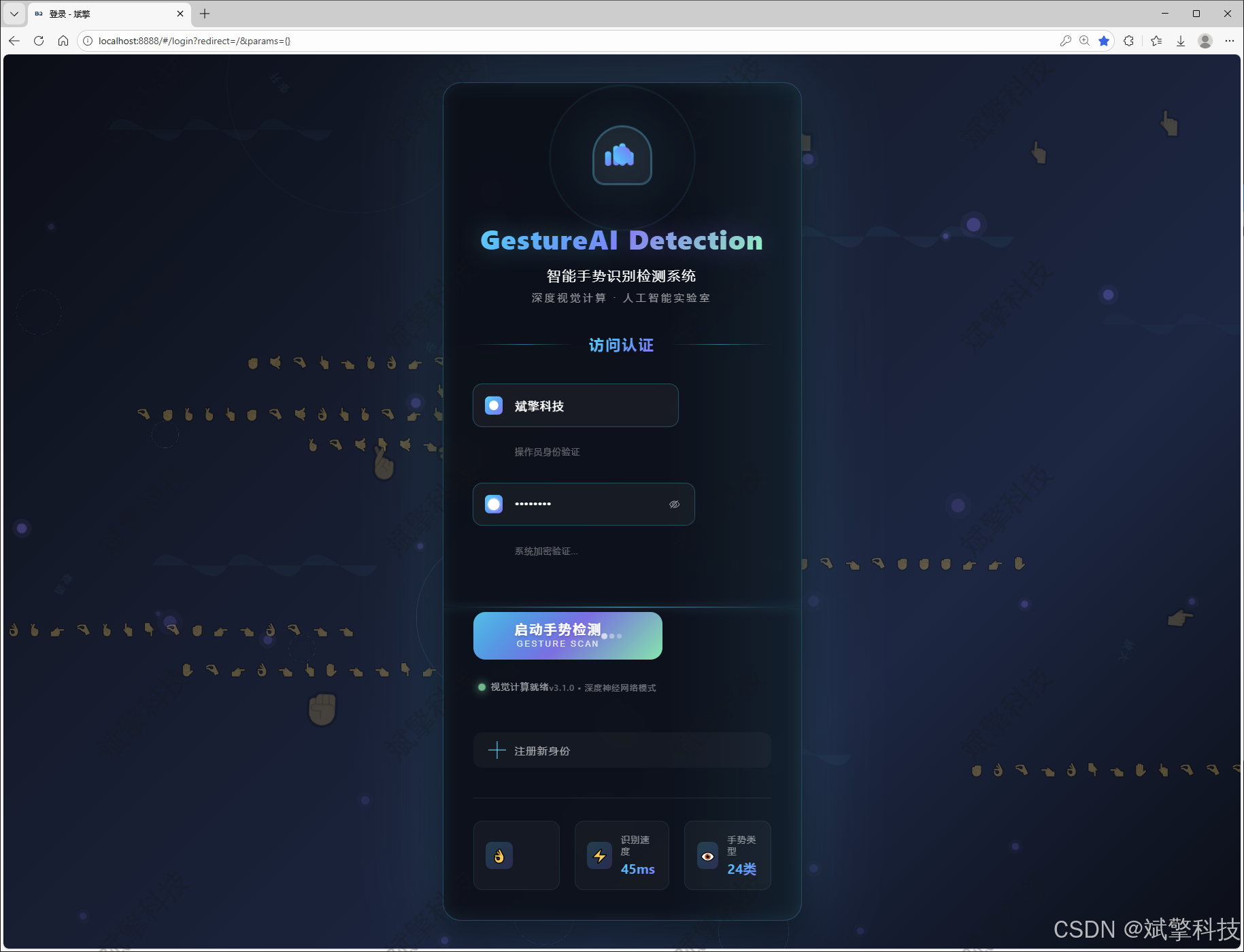
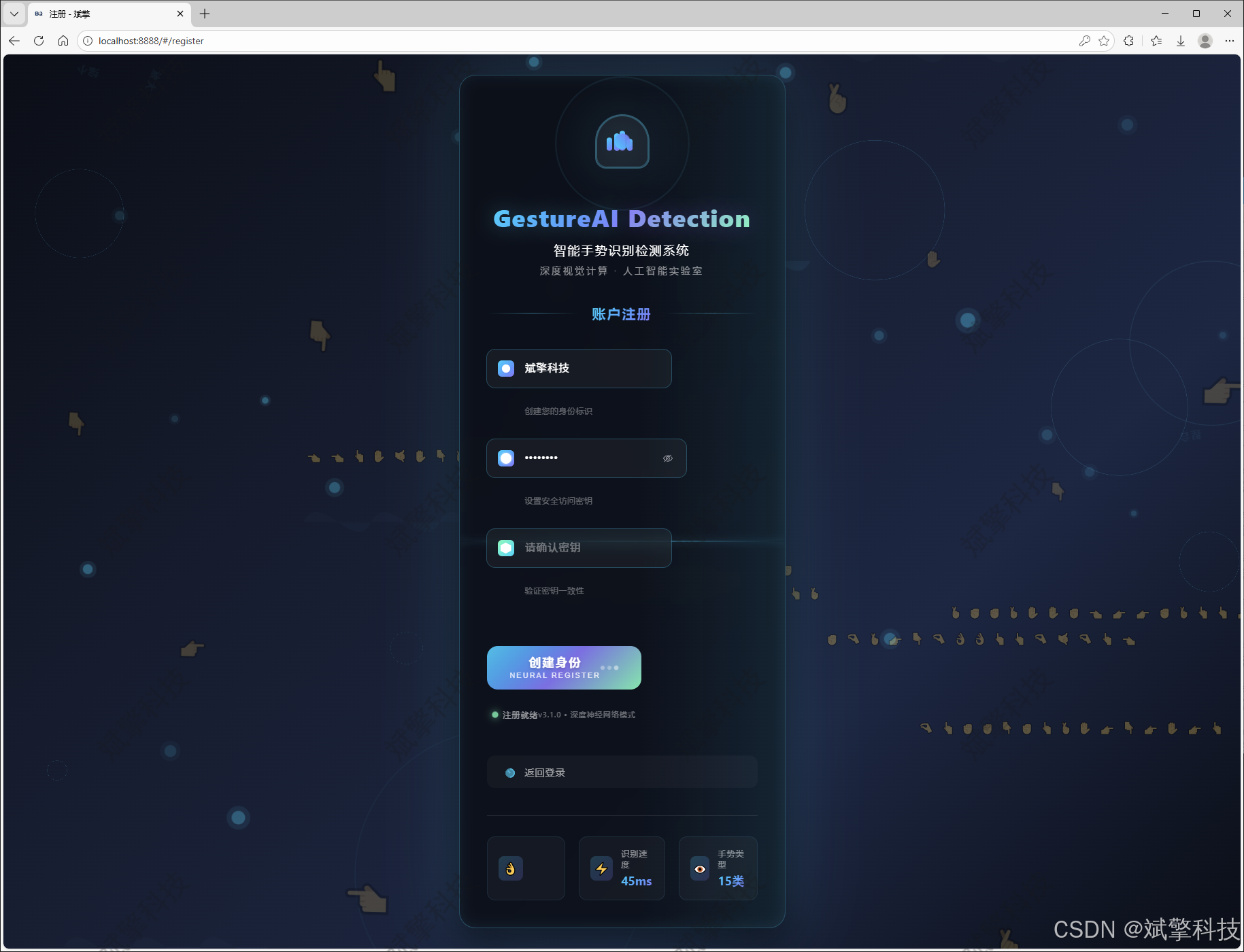
✅ 用户登录注册:支持密码检测,保存到MySQL数据库。
✅ 支持四种YOLO模型切换,YOLOv8、YOLOv10、YOLOv11、YOLOv12。
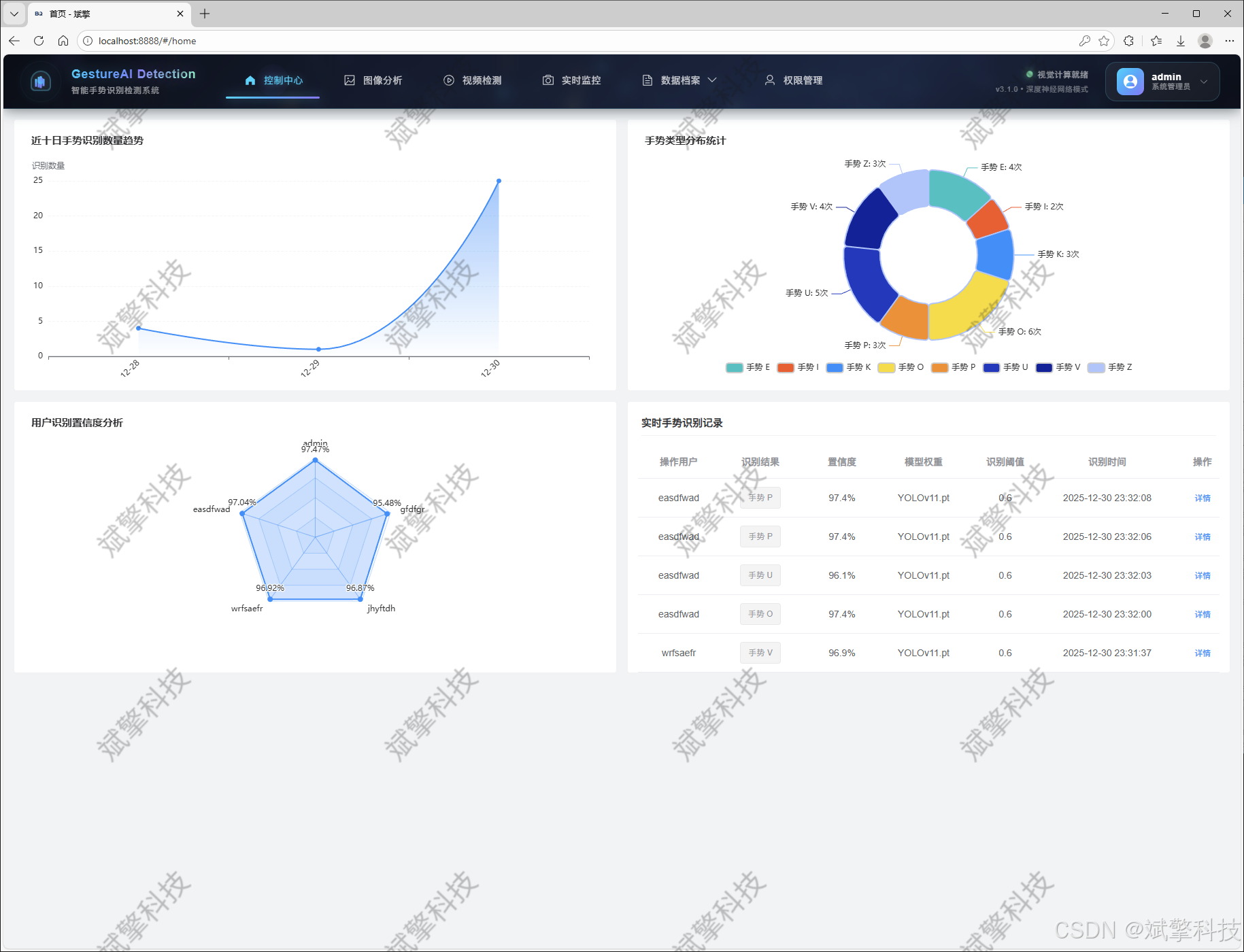
✅ 信息可视化,数据可视化。
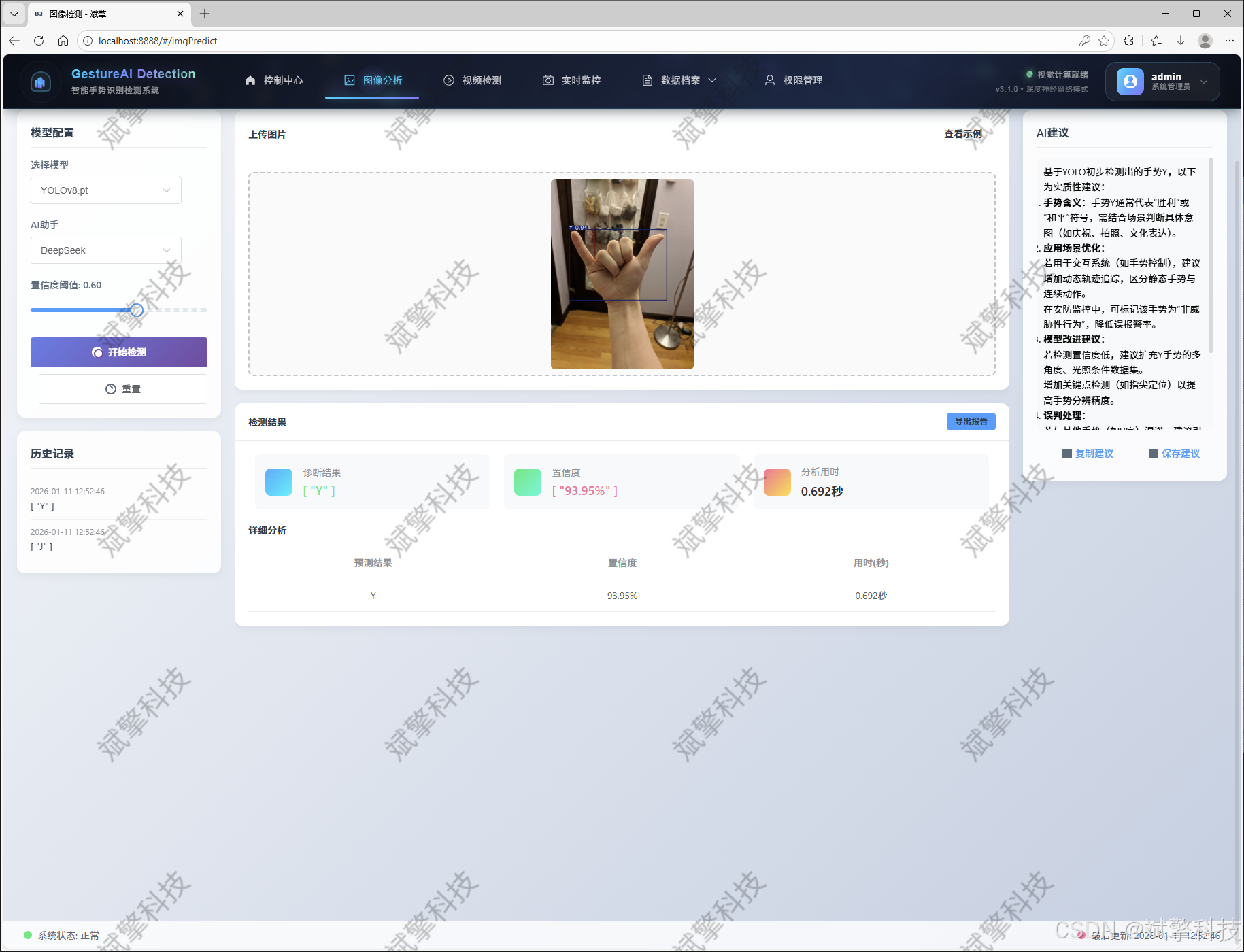
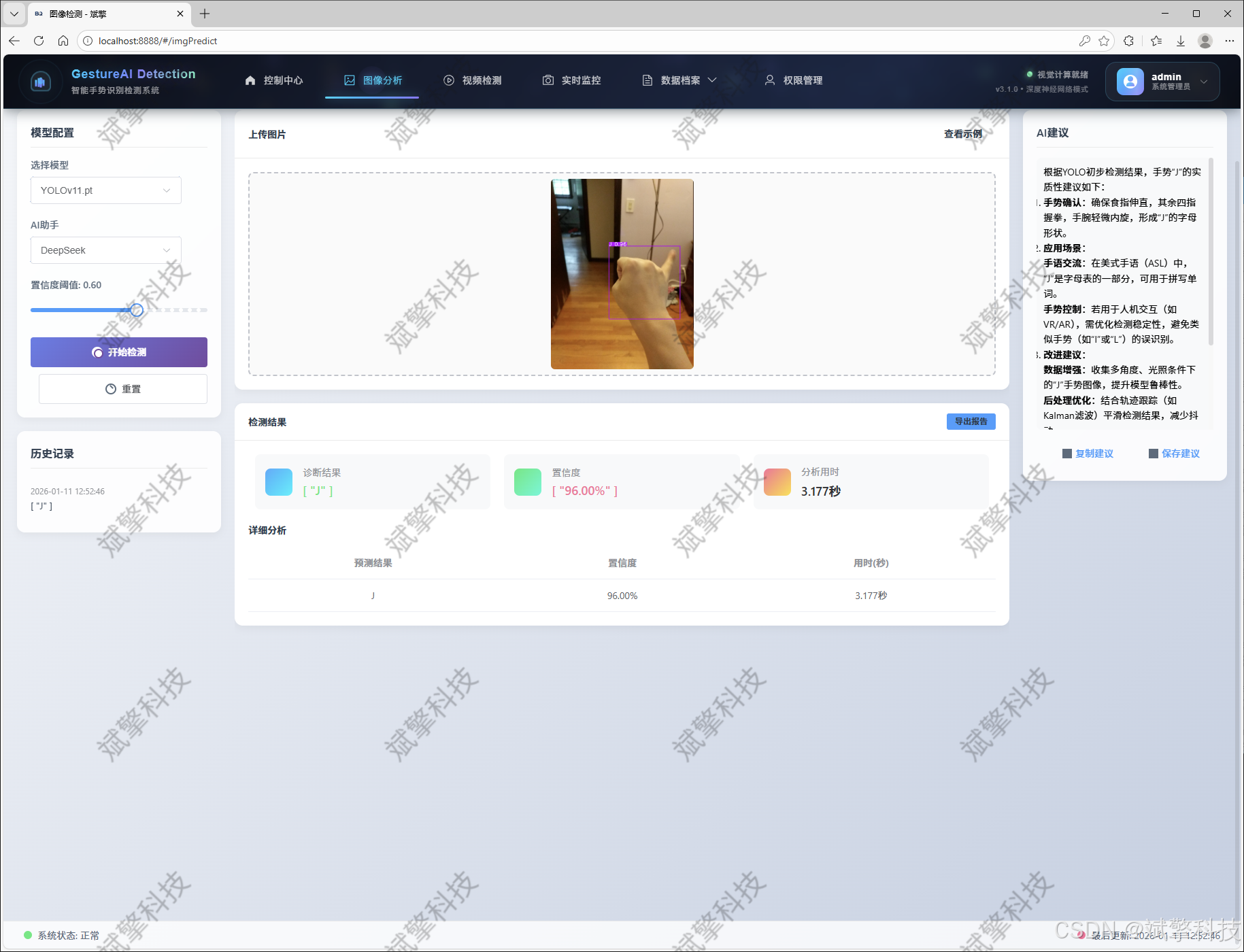
✅ 图片检测支持AI分析功能,deepseek
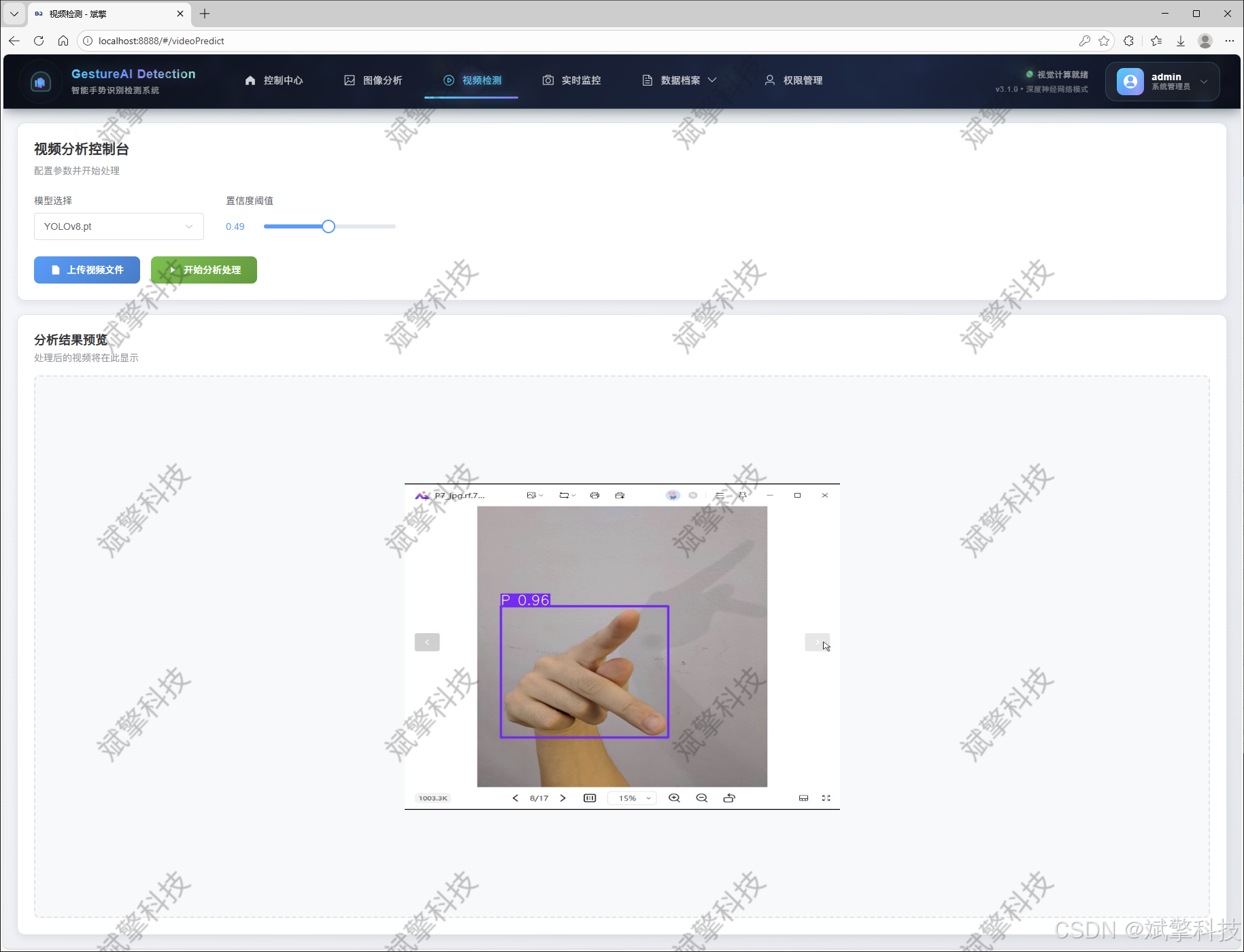
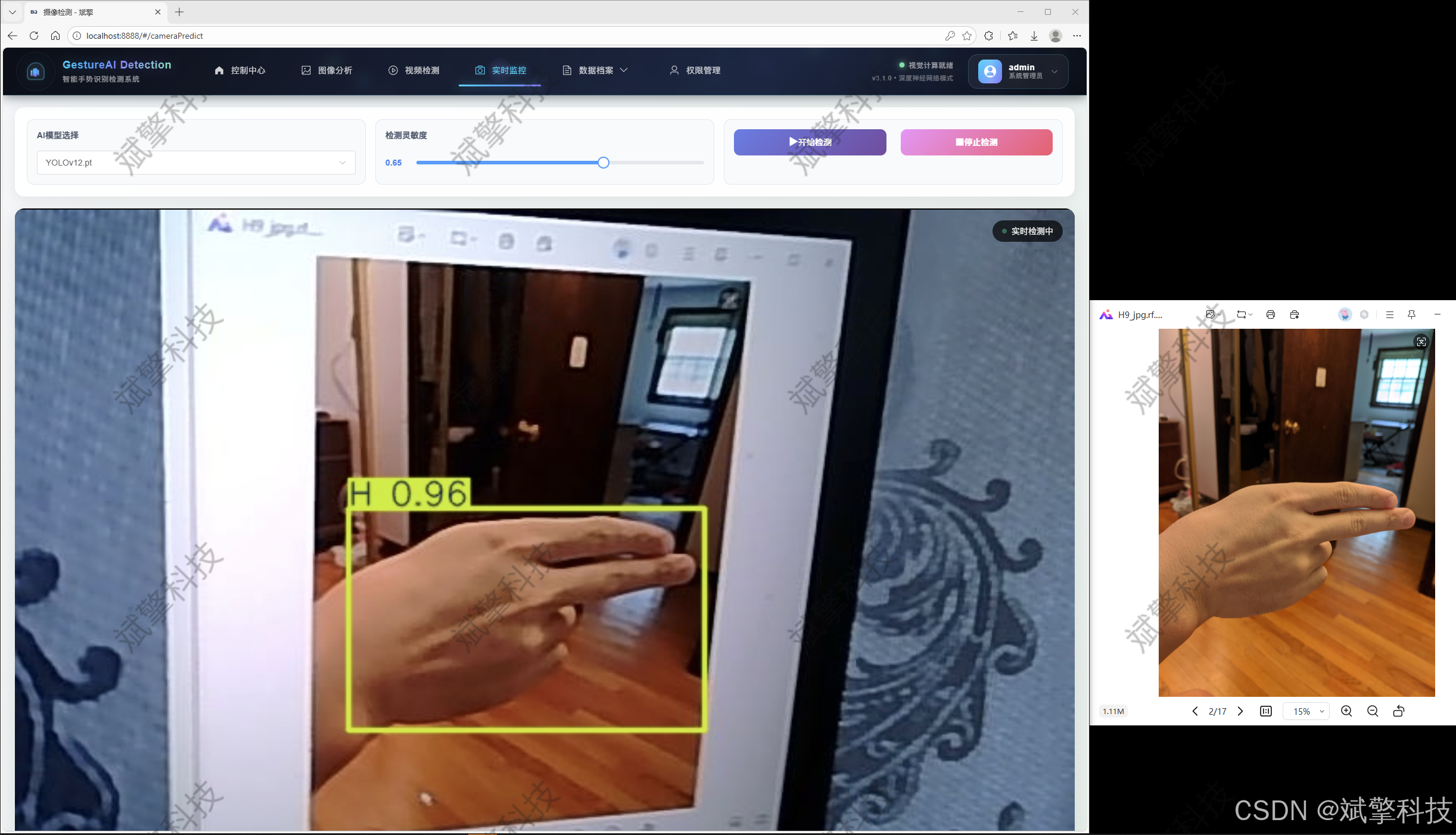
✅ 支持图像检测、视频检测和摄像头实时检测,检测结果保存到MySQL数据库。
✅ 图片识别记录管理、视频识别记录管理和摄像头识别记录管理。
✅ 用户管理模块,管理员可以对用户进行增删改查。
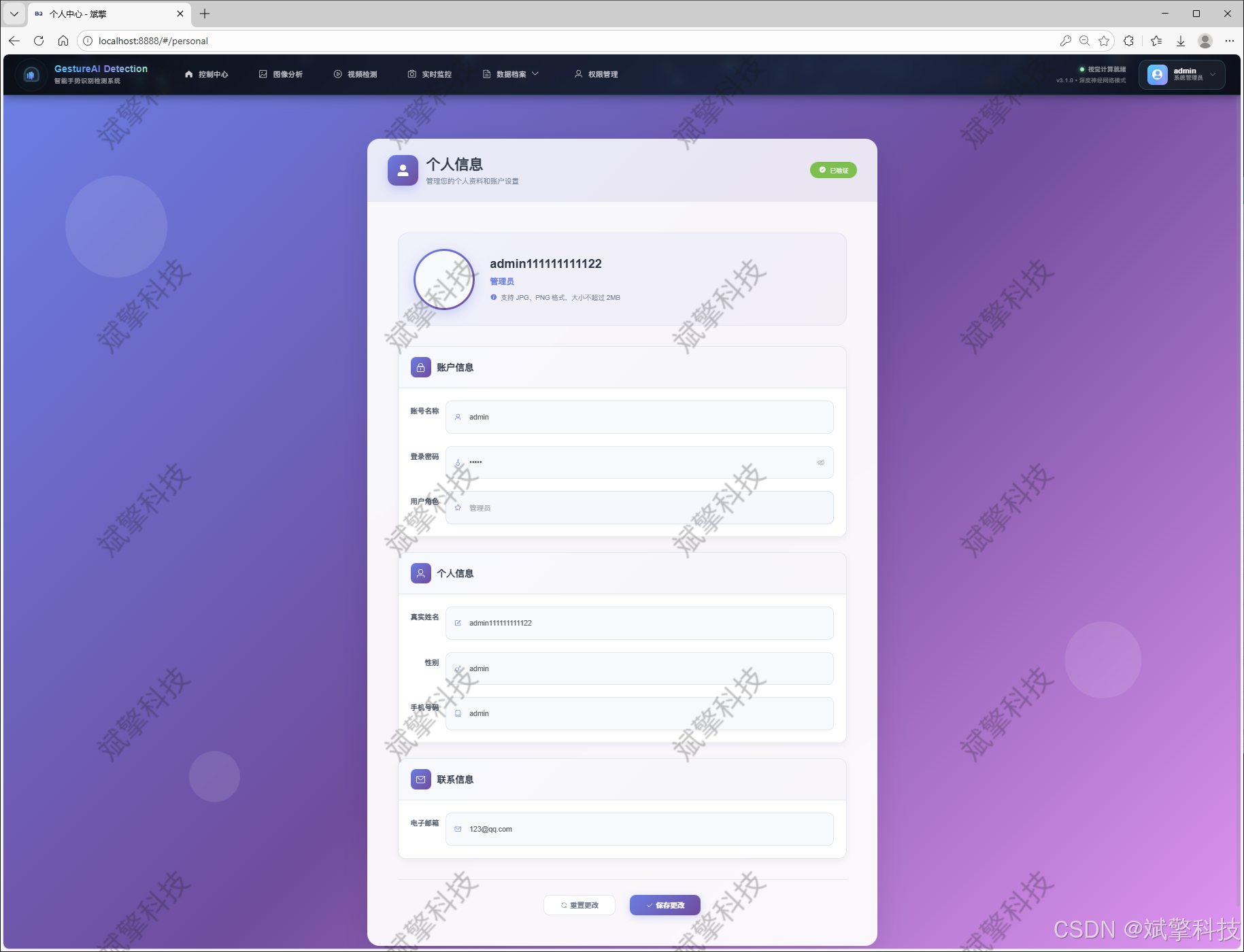
✅ 个人中心,可以修改自己的信息,密码姓名头像等等。
登录注册模块
可视化模块
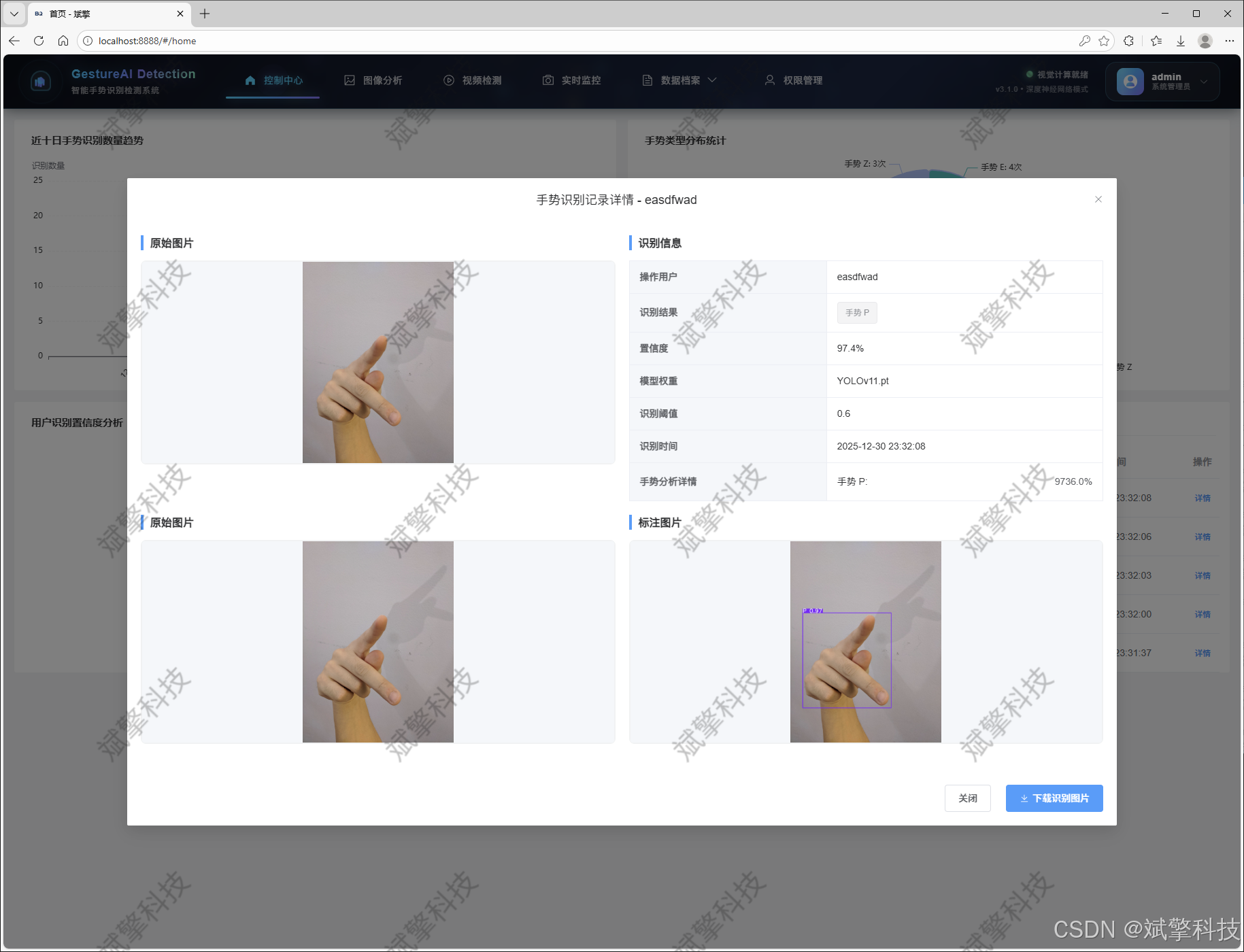
图像检测模块
-
YOLO模型集成 (v8/v10/v11/v12)
-
DeepSeek多模态分析
-
支持格式:JPG/PNG/MP4/RTSP
视频检测模块
实时检测模块
图片识别记录管理
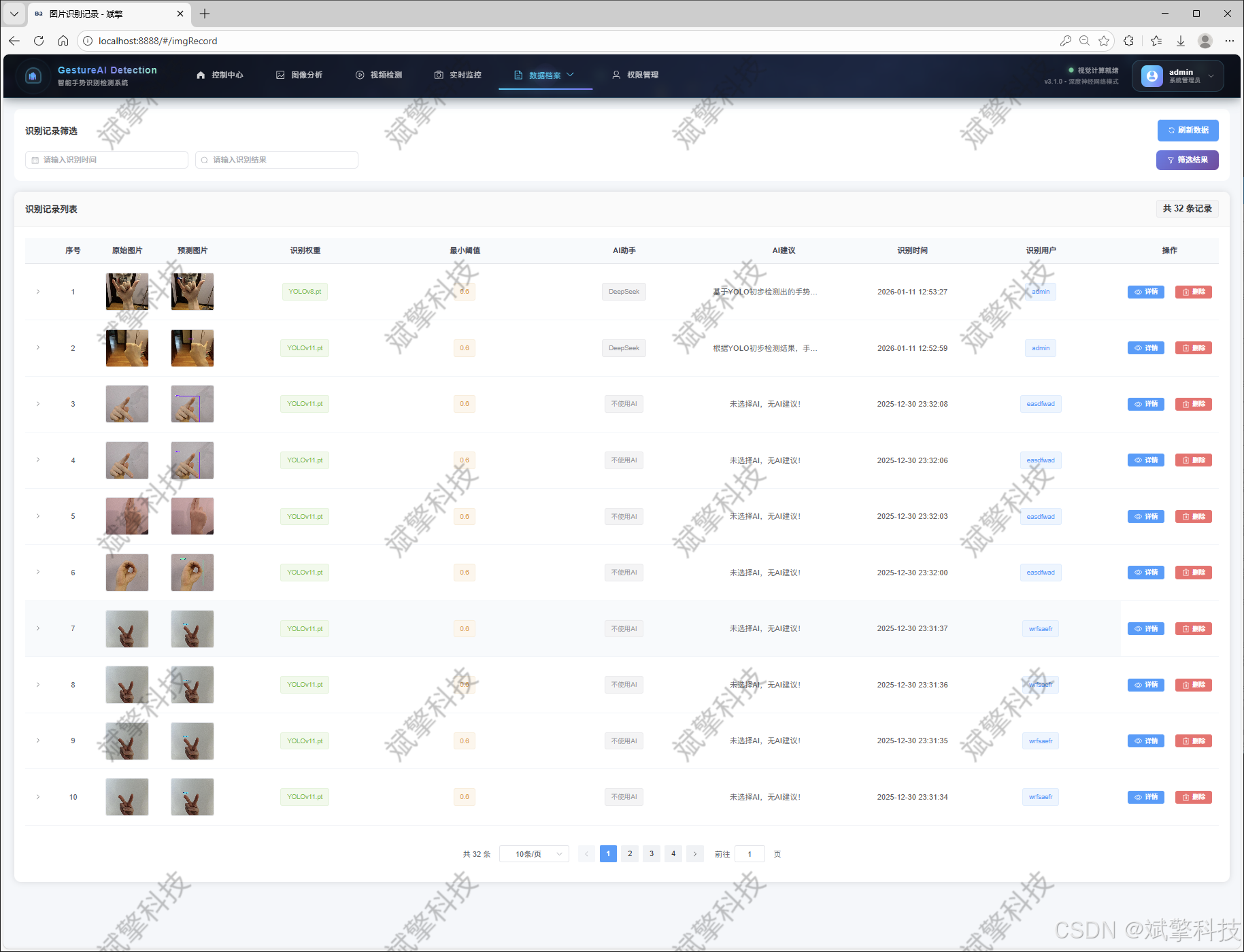
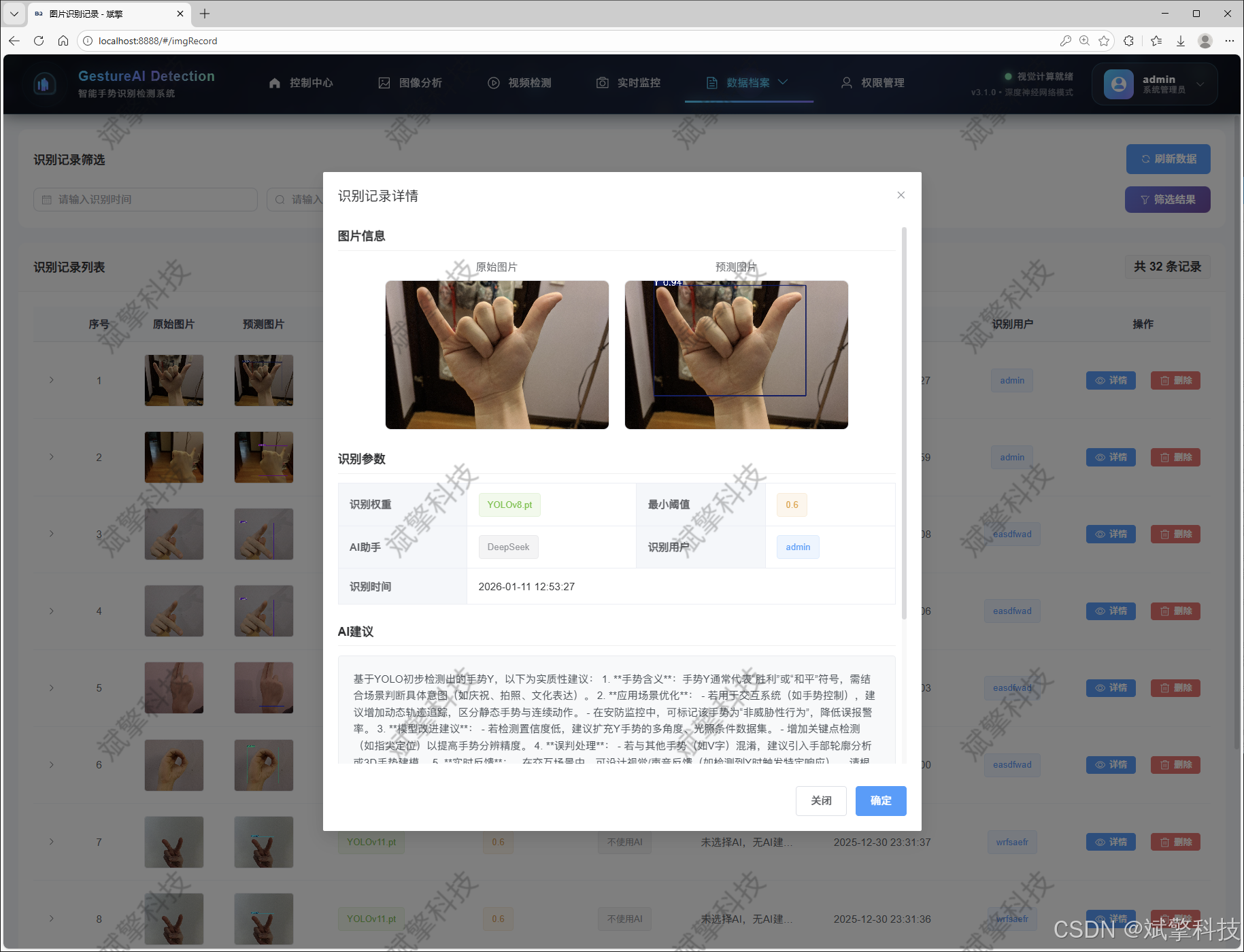
视频识别记录管理
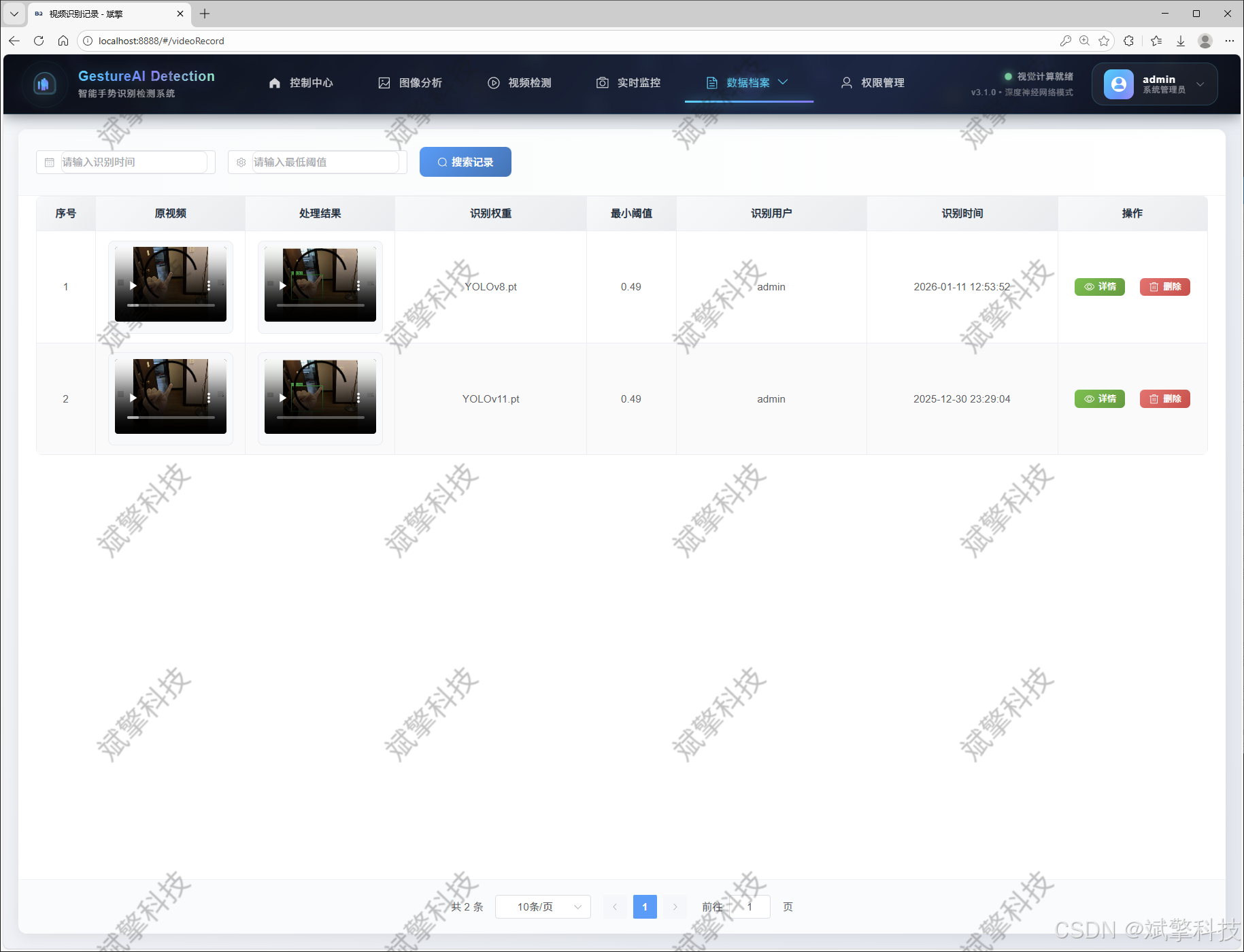
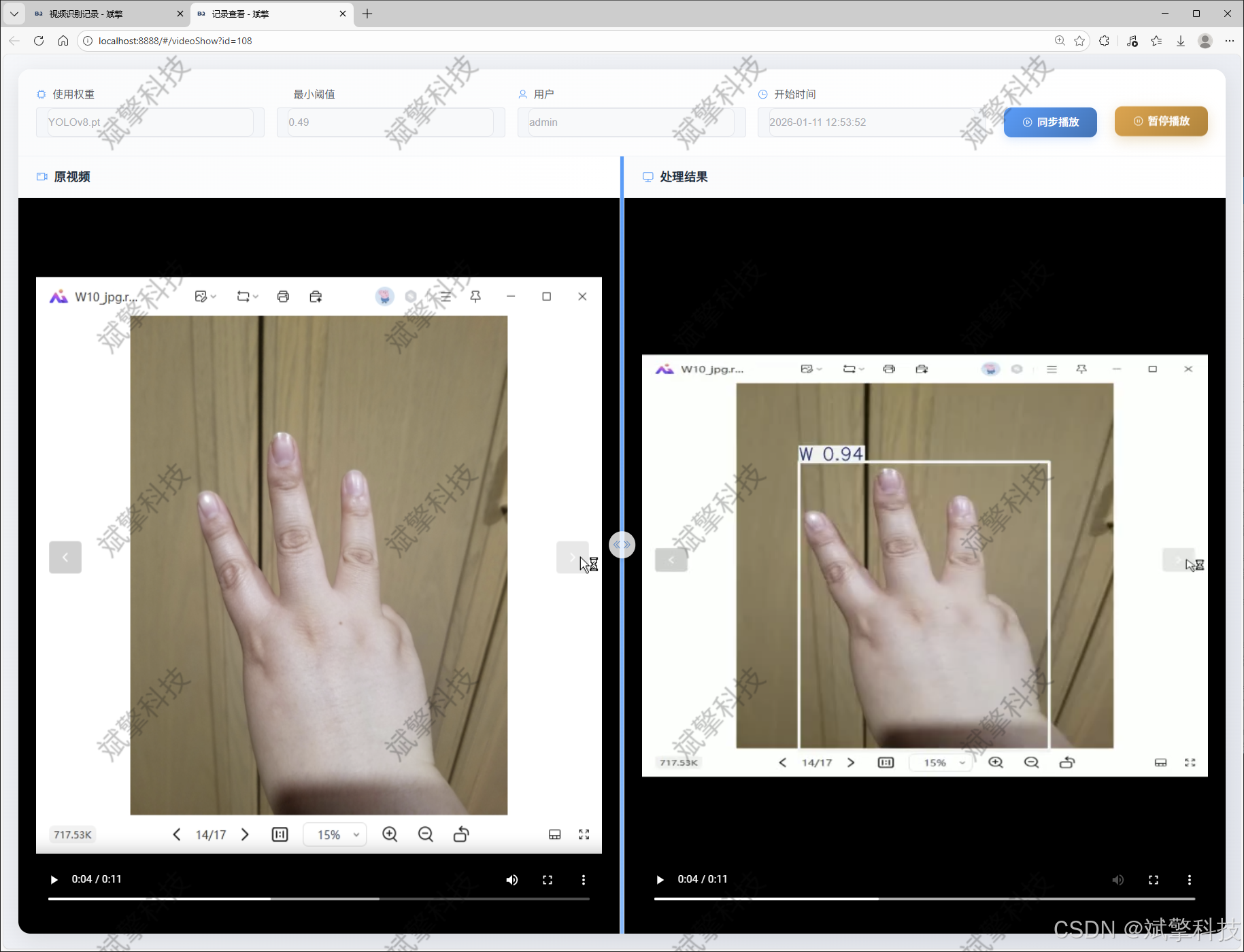
摄像头识别记录管理
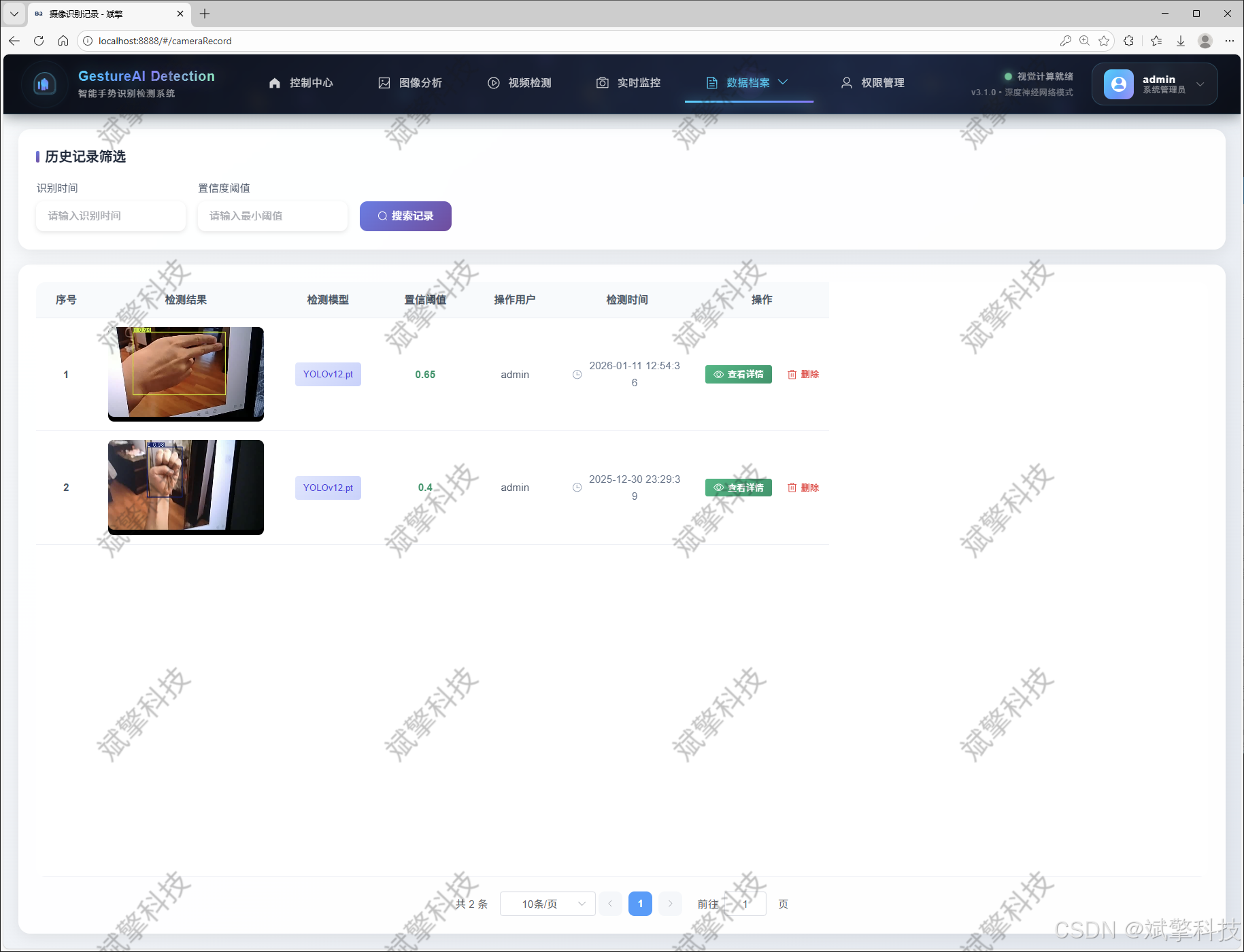
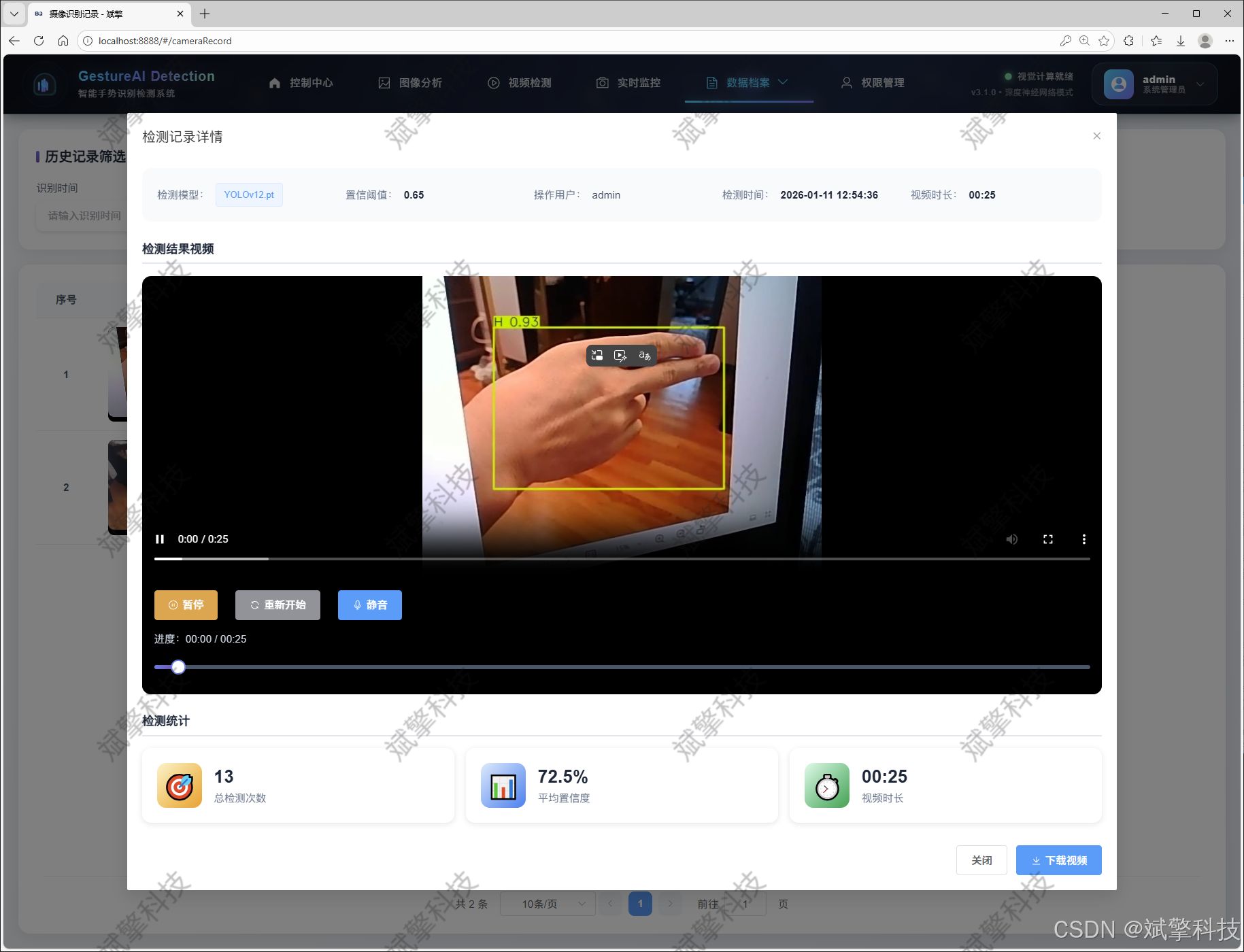
用户管理模块
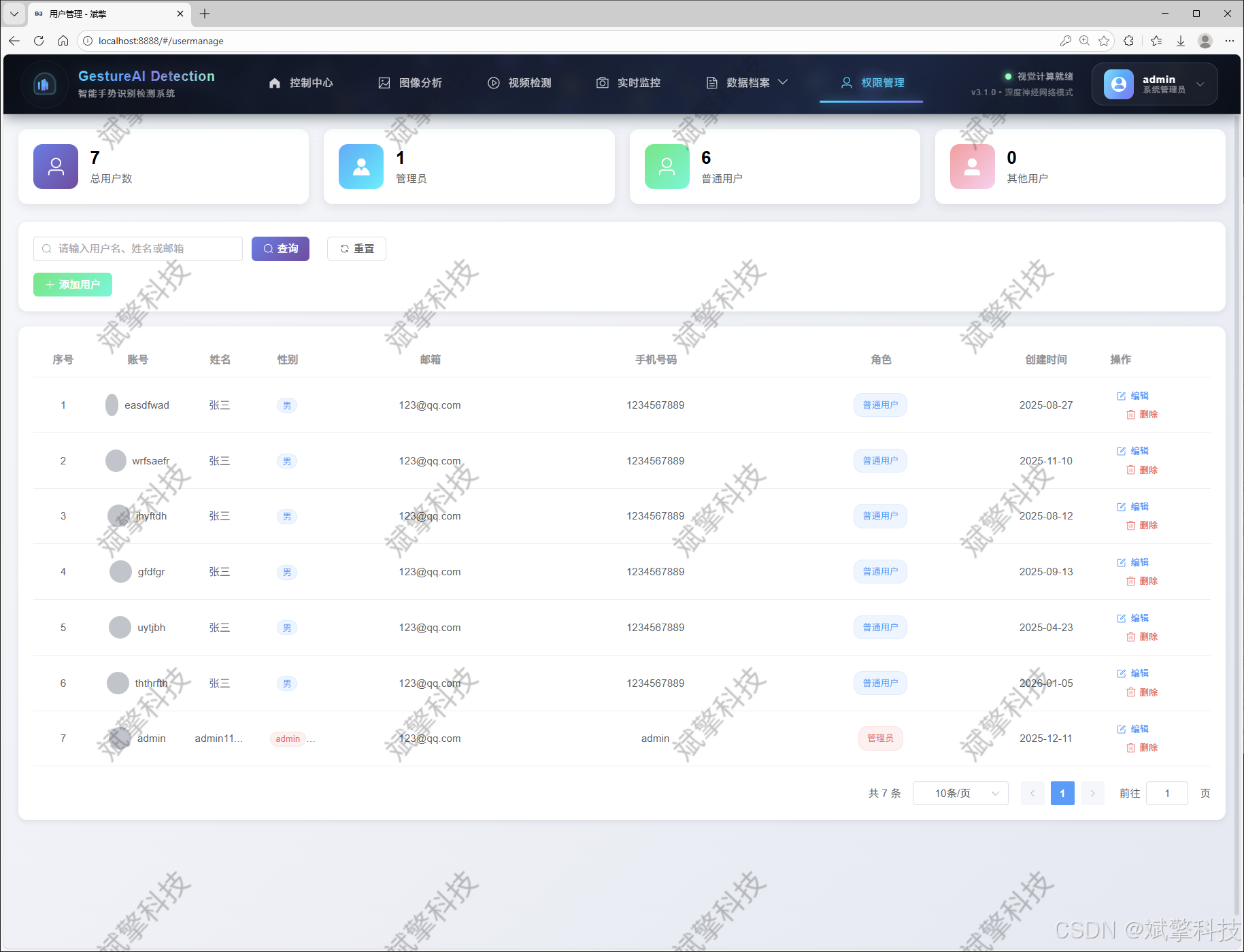
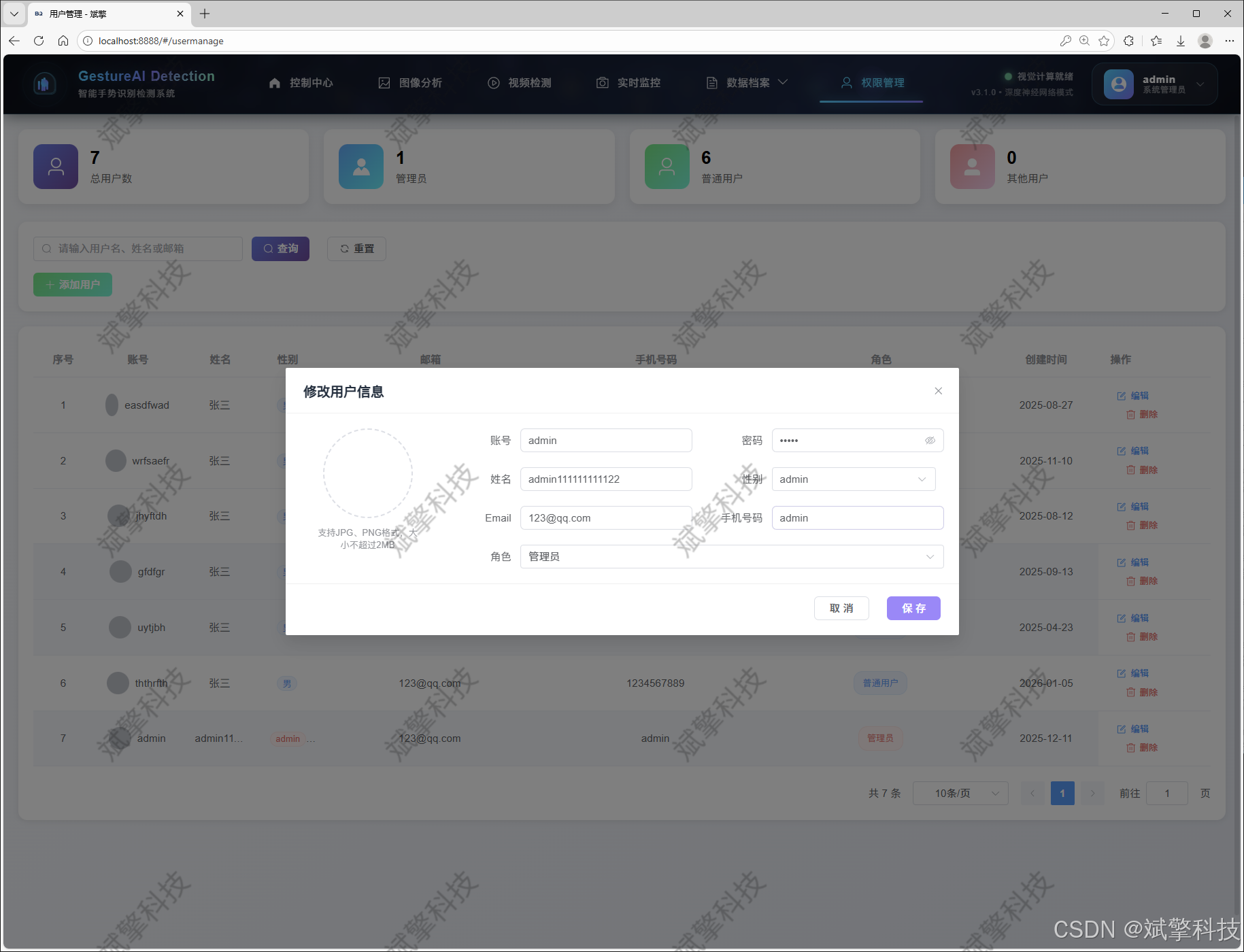
数据管理模块(MySQL表设计)
-
users- 用户信息表

-
imgrecords- 图片检测记录表
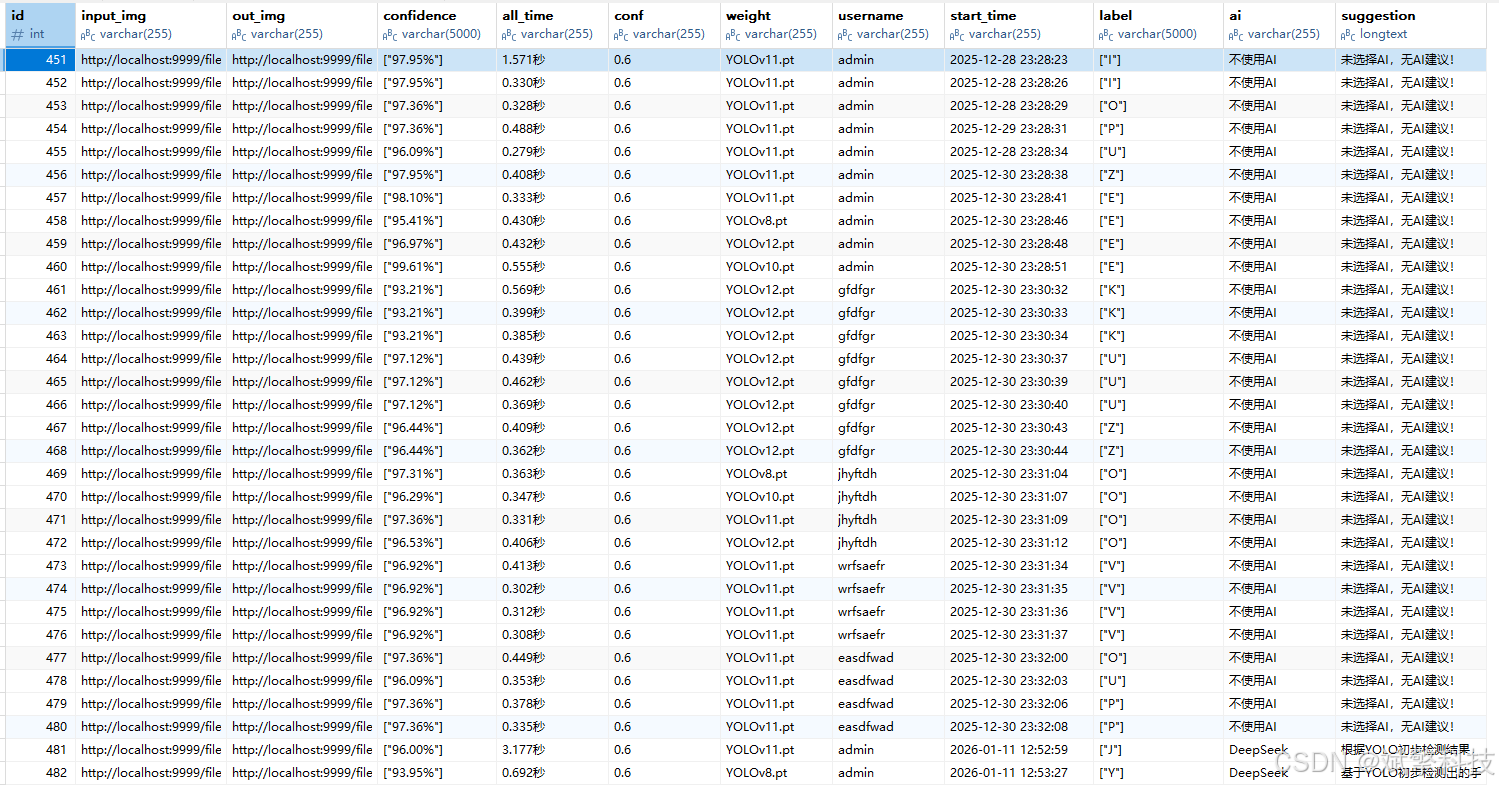
-
videorecords- 视频检测记录表

-
camerarecords- 摄像头检测记录表

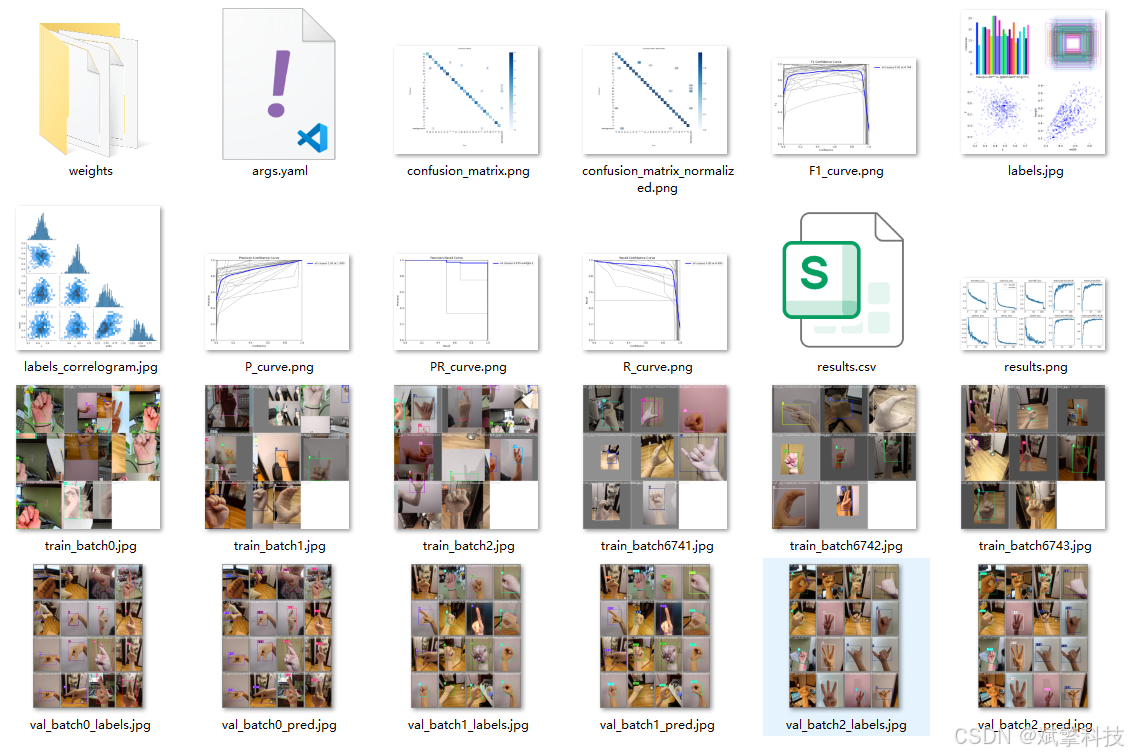
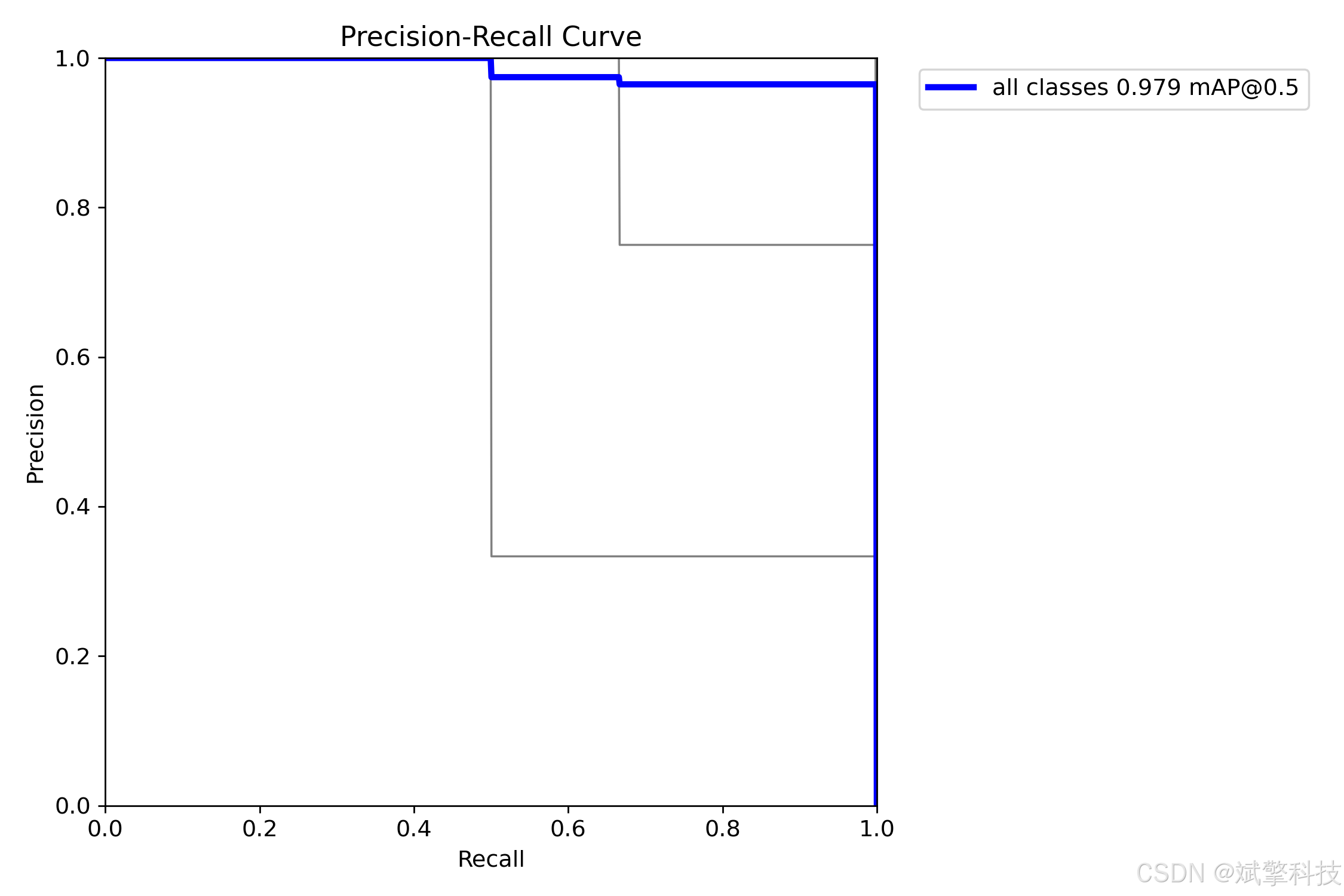
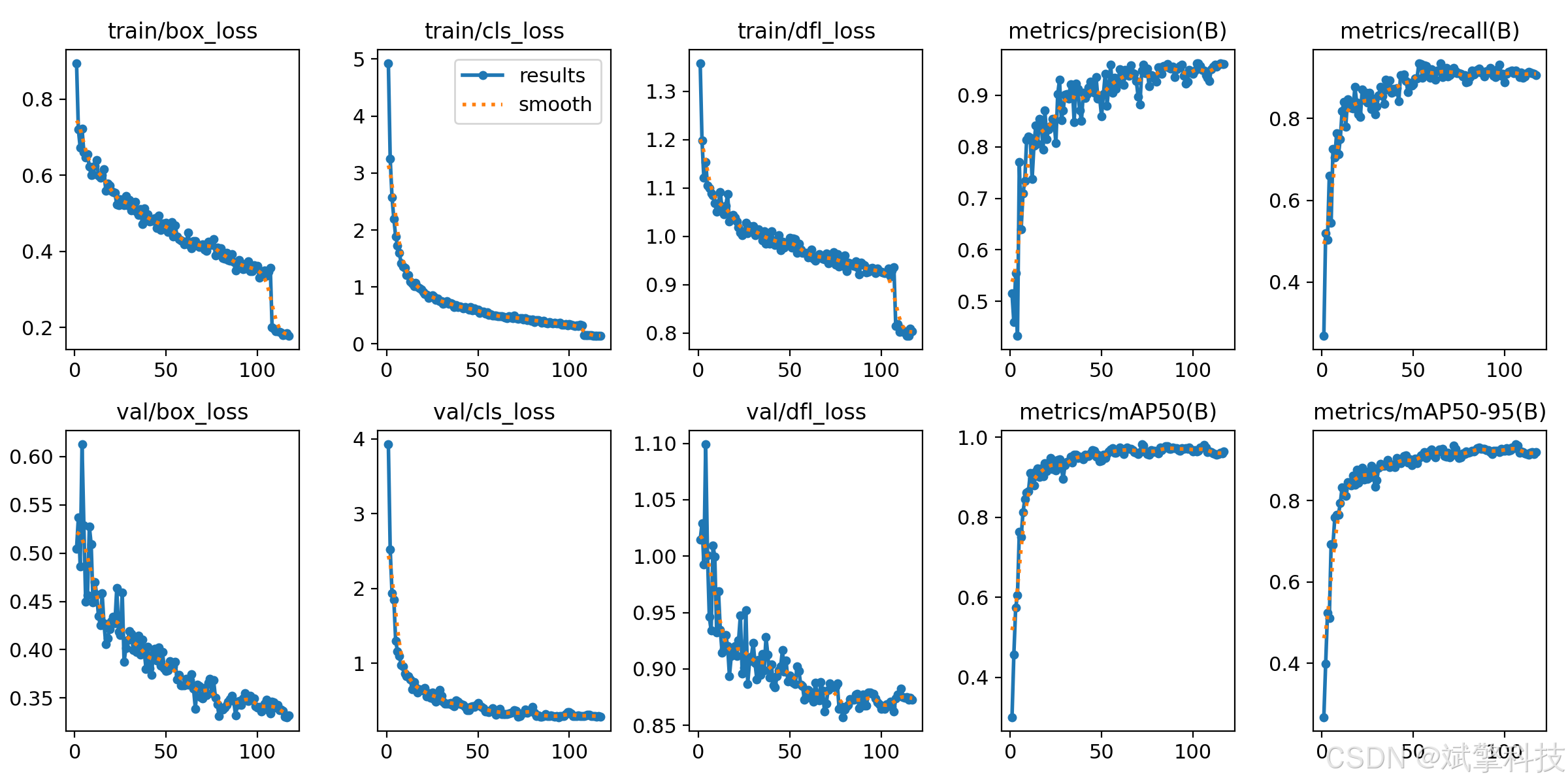
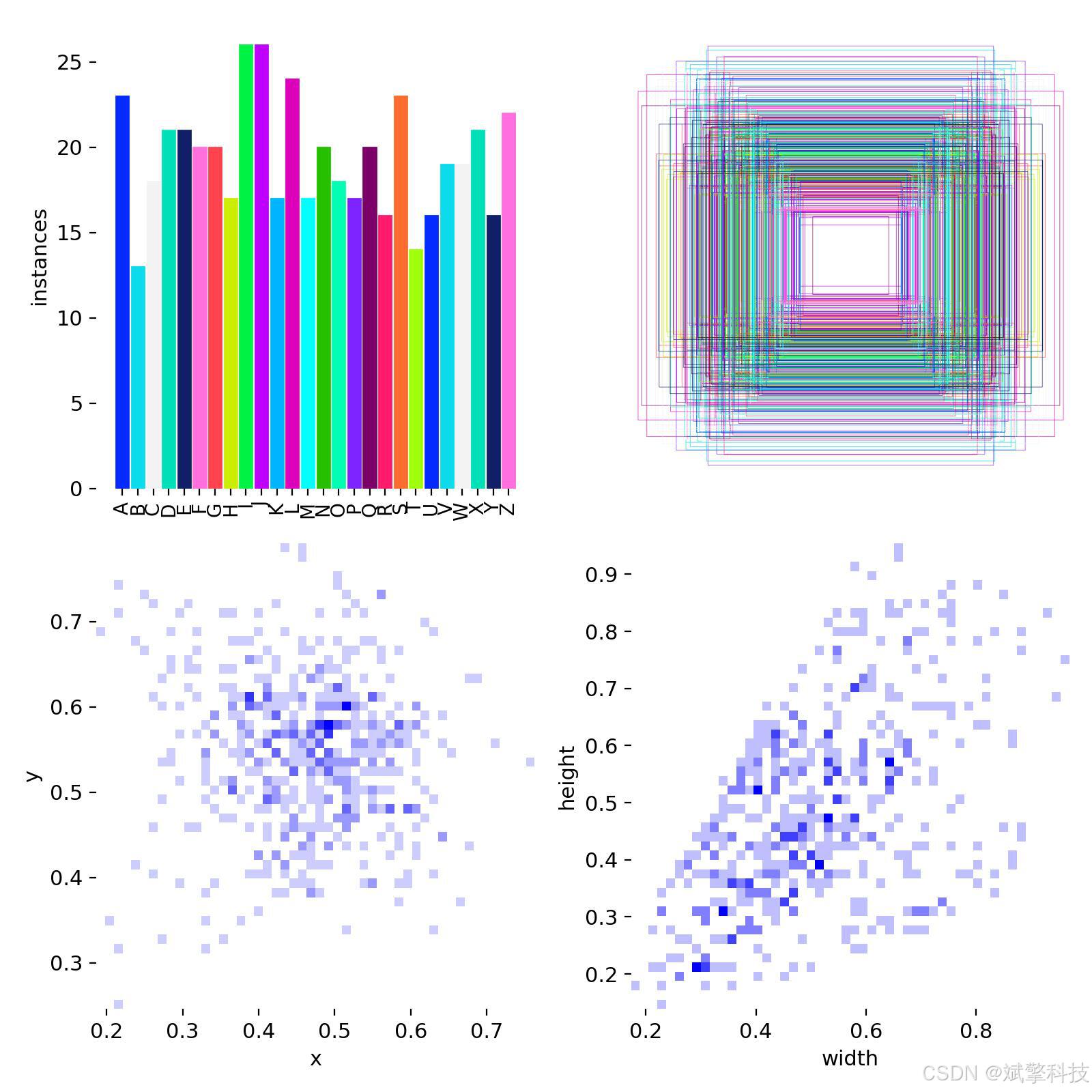
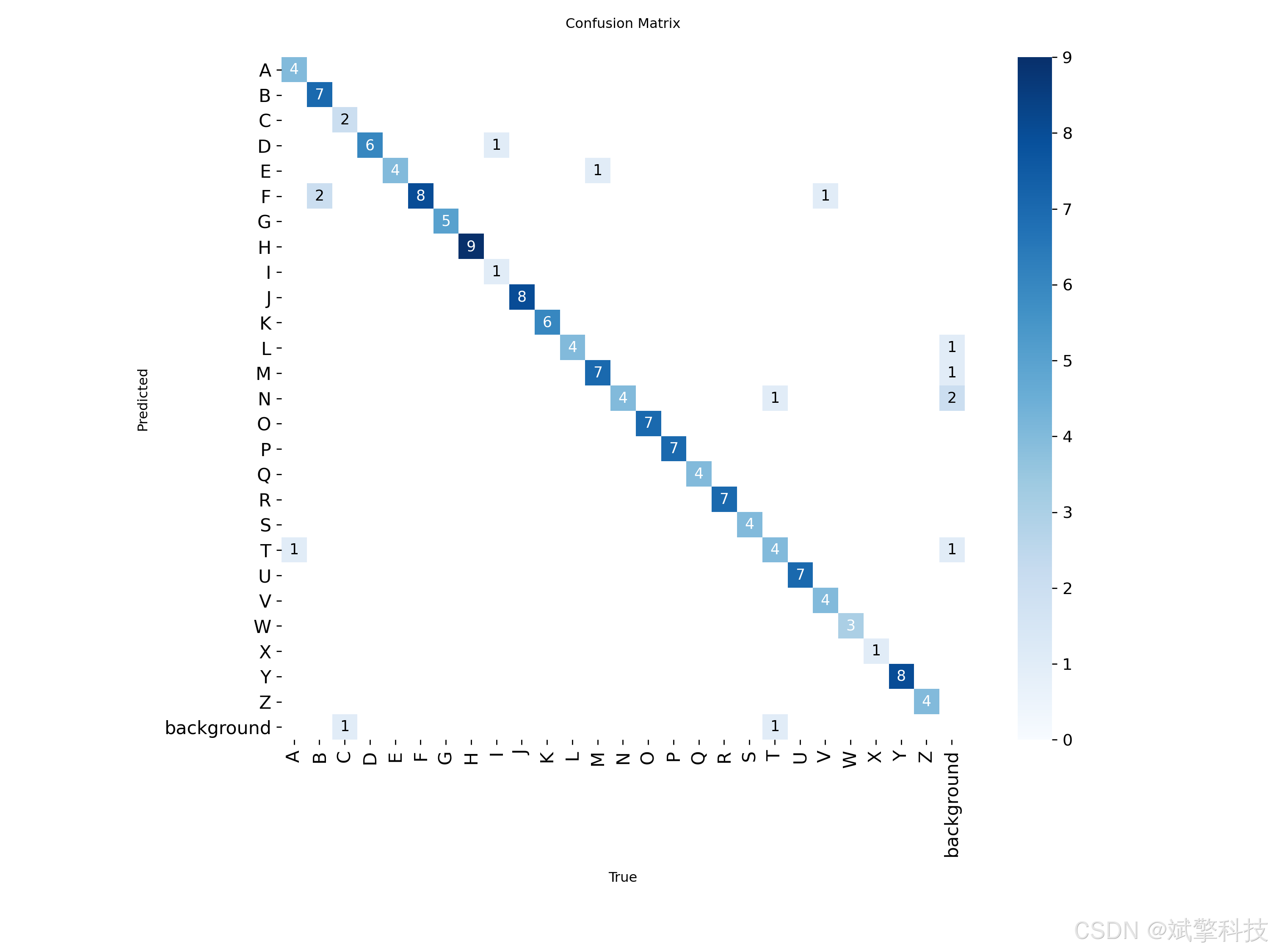
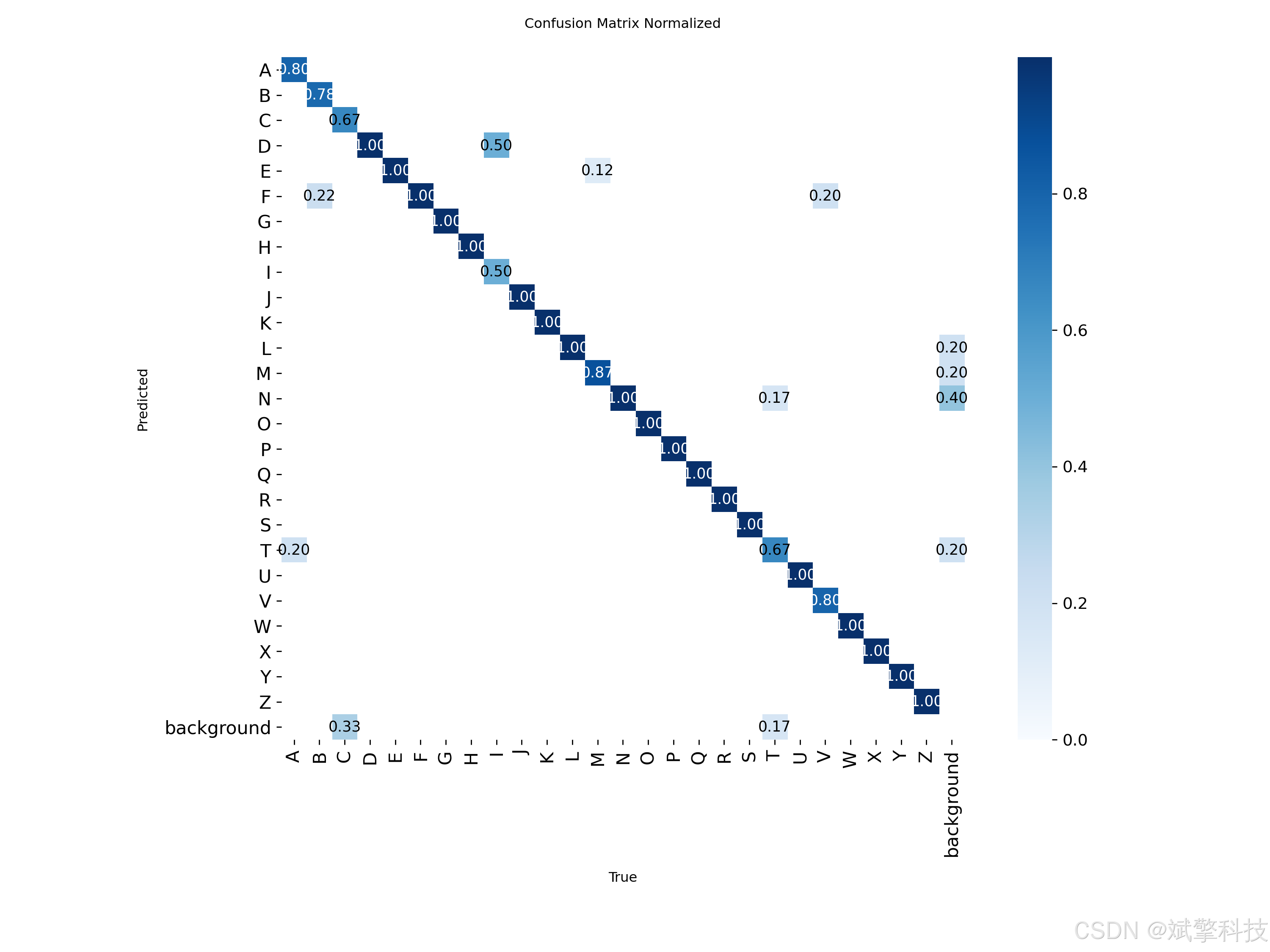
模型训练结果
#coding:utf-8
#根据实际情况更换模型
# yolon.yaml (nano):轻量化模型,适合嵌入式设备,速度快但精度略低。
# yolos.yaml (small):小模型,适合实时任务。
# yolom.yaml (medium):中等大小模型,兼顾速度和精度。
# yolob.yaml (base):基本版模型,适合大部分应用场景。
# yolol.yaml (large):大型模型,适合对精度要求高的任务。

from ultralytics import YOLO

model_path = 'pt/yolo12s.pt'
data_path = 'data.yaml'

if __name__ == '__main__':
    model = YOLO(model_path)
    results = model.train(data=data_path,
                          epochs=500,
                          batch=64,
                          device='0',
                          workers=0,
                          project='runs',
                          name='exp',
                          )
YOLO概述
YOLOv8
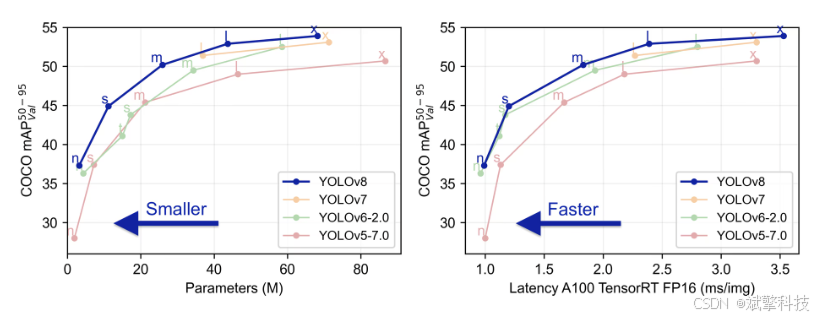
YOLOv8 由 Ultralytics 于 2023 年 1 月 10 日发布,在准确性和速度方面提供了尖端性能。基于先前 YOLO 版本的进步,YOLOv8 引入了新功能和优化,使其成为各种应用中目标检测任务的理想选择。
YOLOv8 的主要特性
- 高级骨干和颈部架构: YOLOv8 采用最先进的骨干和颈部架构,从而改进了特征提取和目标检测性能。
- 无锚点分离式 Ultralytics Head: YOLOv8 采用无锚点分离式 Ultralytics head,与基于锚点的方法相比,这有助于提高准确性并提高检测效率。
- 优化的准确性-速度权衡: YOLOv8 专注于在准确性和速度之间保持最佳平衡,适用于各种应用领域中的实时对象检测任务。
- 丰富的预训练模型: YOLOv8提供了一系列预训练模型,以满足各种任务和性能要求,使您更容易为特定用例找到合适的模型。
YOLOv10
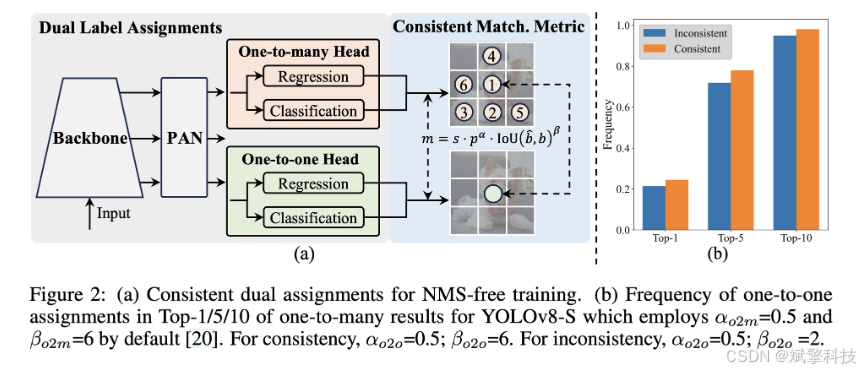
YOLOv10 由 清华大学研究人员基于 Ultralytics Python构建,引入了一种新的实时目标检测方法,解决了先前 YOLO 版本中存在的后处理和模型架构缺陷。通过消除非极大值抑制 (NMS) 并优化各种模型组件,YOLOv10 以显著降低的计算开销实现了最先进的性能。大量实验表明,它在多个模型尺度上都具有卓越的精度-延迟权衡。
概述
实时目标检测旨在以低延迟准确预测图像中的对象类别和位置。YOLO 系列因其在性能和效率之间的平衡而一直处于这项研究的前沿。然而,对 NMS 的依赖和架构效率低下阻碍了最佳性能。YOLOv10 通过引入用于无 NMS 训练的一致双重分配和整体效率-准确性驱动的模型设计策略来解决这些问题。
架构
YOLOv10 的架构建立在之前 YOLO 模型优势的基础上,同时引入了几项关键创新。该模型架构由以下组件组成:
- 骨干网络:负责特征提取,YOLOv10 中的骨干网络使用增强版的 CSPNet (Cross Stage Partial Network),以改善梯度流并减少计算冗余。
- Neck:Neck 的设计目的是聚合来自不同尺度的特征,并将它们传递到 Head。它包括 PAN(路径聚合网络)层,用于有效的多尺度特征融合。
- One-to-Many Head:在训练期间为每个对象生成多个预测,以提供丰富的监督信号并提高学习准确性。
- 一对一头部:在推理时为每个对象生成一个最佳预测,以消除对NMS的需求,从而降低延迟并提高效率。
主要功能
- 免NMS训练:利用一致的双重分配来消除对NMS的需求,从而降低推理延迟。
- 整体模型设计:从效率和准确性的角度对各种组件进行全面优化,包括轻量级分类 Head、空间通道解耦下采样和秩引导块设计。
- 增强的模型功能: 结合了大内核卷积和部分自注意力模块,以提高性能,而无需显着的计算成本。
YOLOv11
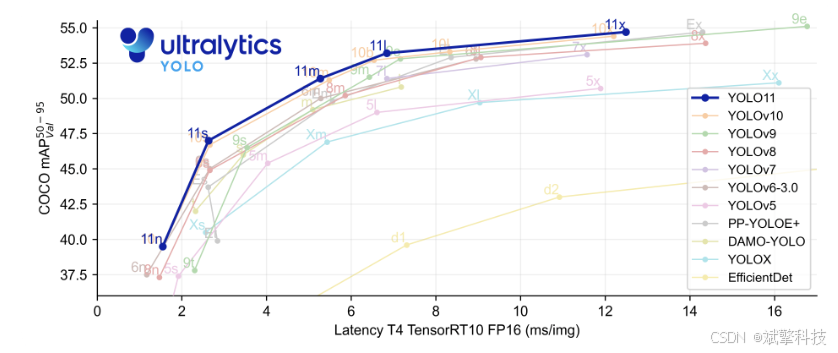
YOLO11 是 Ultralytics YOLO 系列实时目标检测器的最新迭代版本,它以前沿的精度、速度和效率重新定义了可能性。YOLO11 在之前 YOLO 版本的显著进步基础上,在架构和训练方法上进行了重大改进,使其成为各种计算机视觉任务的多功能选择。
主要功能
- 增强的特征提取: YOLO11 采用改进的 backbone 和 neck 架构,从而增强了特征提取能力,以实现更精确的目标检测和复杂的任务性能。
- 优化效率和速度: YOLO11 引入了改进的架构设计和优化的训练流程,从而提供更快的处理速度,并在精度和性能之间保持最佳平衡。
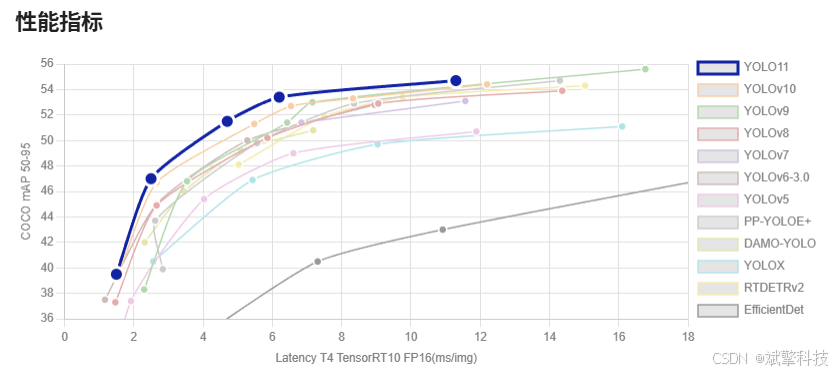
- 更高精度,更少参数: 随着模型设计的进步,YOLO11m 在 COCO 数据集上实现了更高的 平均精度均值(mAP),同时比 YOLOv8m 少用 22% 的参数,在不牺牲精度的情况下提高了计算效率。
- 跨环境的适应性: YOLO11 可以无缝部署在各种环境中,包括边缘设备、云平台和支持 NVIDIA GPU 的系统,从而确保最大的灵活性。
- 广泛支持的任务范围: 无论是目标检测、实例分割、图像分类、姿势估计还是旋转框检测 (OBB),YOLO11 都旨在满足各种计算机视觉挑战。
Ultralytics YOLO11 在其前代产品的基础上进行了多项重大改进。主要改进包括:
- 增强的特征提取: YOLO11 采用了改进的骨干网络和颈部架构,增强了特征提取能力,从而实现更精确的目标检测。
- 优化的效率和速度: 改进的架构设计和优化的训练流程提供了更快的处理速度,同时保持了准确性和性能之间的平衡。
- 更高精度,更少参数: YOLO11m 在 COCO 数据集上实现了更高的平均 精度均值 (mAP),同时比 YOLOv8m 少用 22% 的参数,在不牺牲精度的情况下提高了计算效率。
- 跨环境的适应性: YOLO11 可以部署在各种环境中,包括边缘设备、云平台和支持 NVIDIA GPU 的系统。
- 广泛支持的任务范围: YOLO11 支持各种计算机视觉任务,例如目标检测、实例分割、图像分类、姿势估计和旋转框检测 (OBB)。
YOLOv12
YOLO12引入了一种以注意力为中心的架构,它不同于之前YOLO模型中使用的传统基于CNN的方法,但仍保持了许多应用所需的实时推理速度。该模型通过在注意力机制和整体网络架构方面的新颖方法创新,实现了最先进的目标检测精度,同时保持了实时性能。尽管有这些优势,YOLO12仍然是一个社区驱动的版本,由于其沉重的注意力模块,可能表现出训练不稳定、内存消耗增加和CPU吞吐量较慢的问题,因此Ultralytics仍然建议将YOLO11用于大多数生产工作负载。
主要功能
- 区域注意力机制: 一种新的自注意力方法,可以有效地处理大型感受野。它将 特征图 分成 l 个大小相等的区域(默认为 4 个),水平或垂直,避免复杂的运算并保持较大的有效感受野。与标准自注意力相比,这大大降低了计算成本。
- 残差高效层聚合网络(R-ELAN):一种基于 ELAN 的改进的特征聚合模块,旨在解决优化挑战,尤其是在更大规模的以注意力为中心的模型中。R-ELAN 引入:
- 具有缩放的块级残差连接(类似于层缩放)。
- 一种重新设计的特征聚合方法,创建了一个类似瓶颈的结构。
- 优化的注意力机制架构:YOLO12 精简了标准注意力机制,以提高效率并与 YOLO 框架兼容。这包括:
- 使用 FlashAttention 来最大限度地减少内存访问开销。
- 移除位置编码,以获得更简洁、更快速的模型。
- 调整 MLP 比率(从典型的 4 调整到 1.2 或 2),以更好地平衡注意力和前馈层之间的计算。
- 减少堆叠块的深度以改进优化。
- 利用卷积运算(在适当的情况下)以提高其计算效率。
- 在注意力机制中添加一个7x7可分离卷积(“位置感知器”),以隐式地编码位置信息。
- 全面的任务支持: YOLO12 支持一系列核心计算机视觉任务:目标检测、实例分割、图像分类、姿势估计和旋转框检测 (OBB)。
- 增强的效率: 与许多先前的模型相比,以更少的参数实现了更高的准确率,从而证明了速度和准确率之间更好的平衡。
- 灵活部署: 专为跨各种平台部署而设计,从边缘设备到云基础设施。
主要改进
-
增强的 特征提取:
- 区域注意力: 有效处理大型感受野,降低计算成本。
- 优化平衡: 改进了注意力和前馈网络计算之间的平衡。
- R-ELAN:使用 R-ELAN 架构增强特征聚合。
-
优化创新:
- 残差连接:引入具有缩放的残差连接以稳定训练,尤其是在较大的模型中。
- 改进的特征集成:在 R-ELAN 中实现了一种改进的特征集成方法。
- FlashAttention: 整合 FlashAttention 以减少内存访问开销。
-
架构效率:
- 减少参数:与之前的许多模型相比,在保持或提高准确性的同时,实现了更低的参数计数。
- 简化的注意力机制:使用简化的注意力实现,避免了位置编码。
- 优化的 MLP 比率:调整 MLP 比率以更有效地分配计算资源。
前端代码展示
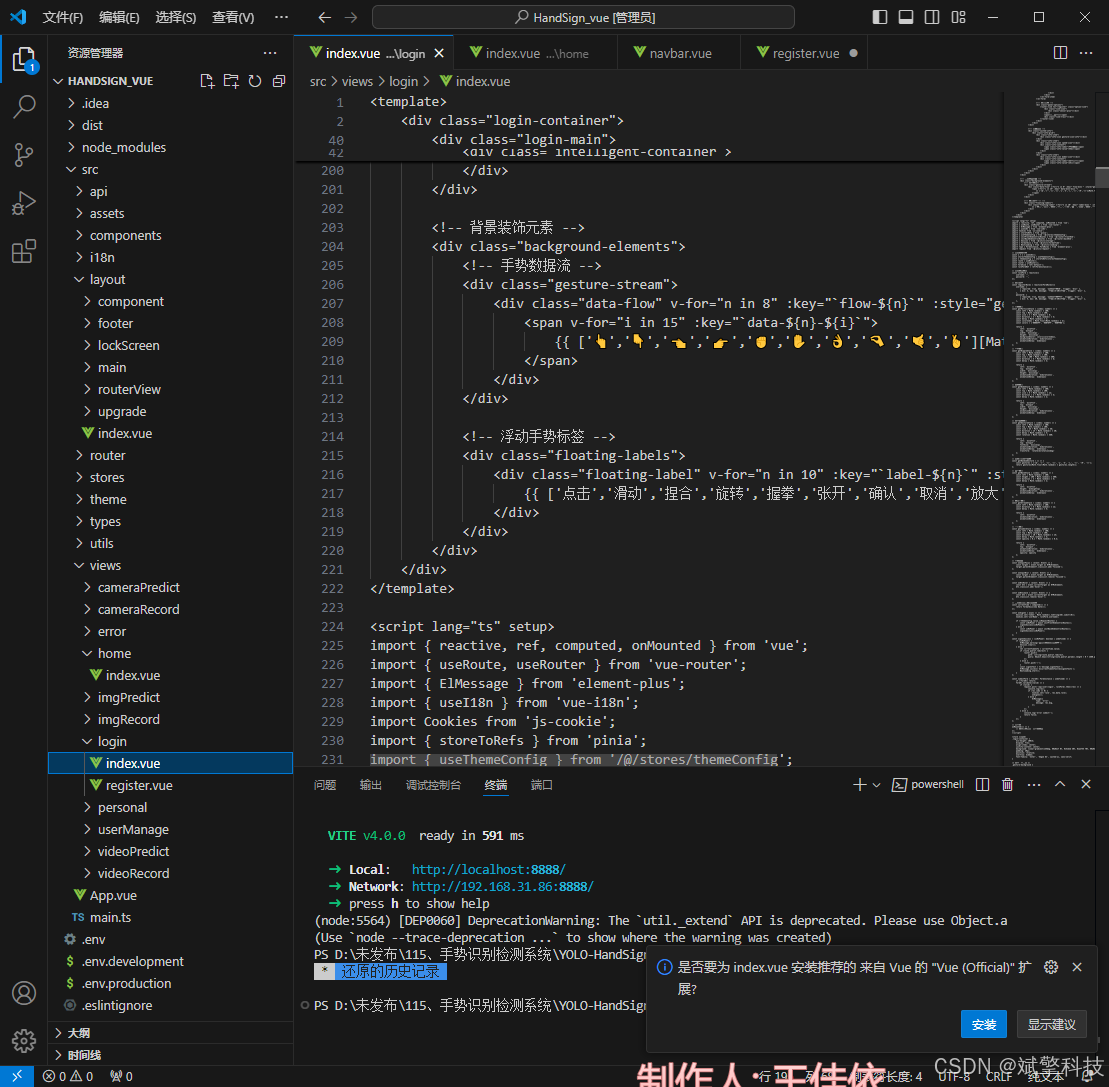
前端登录界面的一小部分代码
		<!-- 登录主容器 -->
		<div class="login-main">
			<!-- 智能界面容器 -->
			<div class="intelligent-container">
				<div class="intelligent-effect">
					<div class="signal-pulse"></div>
					<div class="sensor-connections"></div>
				</div>

				<!-- 系统标志 -->
				<div class="system-brand">
					<div class="brand-icon">
						<div class="gesture-icon-main">
							<div class="hand-structure">
								<div class="hand-outline"></div>
								<div class="finger thumb"></div>
								<div class="finger index"></div>
								<div class="finger middle"></div>
								<div class="finger ring"></div>
								<div class="finger pinky"></div>
								<div class="ai-core"></div>
							</div>
							<div class="signal-aura"></div>
						</div>
						<div class="icon-glow"></div>
					</div>
					<div class="brand-text">
						<h1 class="system-title">
							<span class="gesture-text">GestureAI</span>
							<span class="detection-text">Detection</span>
						</h1>
						<p class="system-subtitle">智能手势识别检测系统</p>
						<p class="company-tag">深度视觉计算 · 人工智能实验室</p>
					</div>
				</div>

				<!-- 登录面板 -->
				<div class="login-panel">
					<div class="panel-header">
						<div class="header-line"></div>
						<h2>访问认证</h2>
						<div class="header-line"></div>
					</div>

					<div class="panel-content">
						<el-form :model="ruleForm" :rules="registerRules" ref="ruleFormRef">
							<!-- 用户名输入 -->
							<el-form-item prop="username">
								<div class="input-field">
									<div class="field-icon">
										<div class="sensor-icon"></div>
									</div>
									<el-input
										v-model="ruleForm.username"
										placeholder="请输入访问ID"
										class="sensor-input"
										size="large"
										@focus="onInputFocus"
										@blur="onInputBlur"
									/>
									<div class="field-glow"></div>
								</div>
								<div class="input-hint">操作员身份验证</div>
							</el-form-item>

							<!-- 密码输入 -->
							<el-form-item prop="password">
								<div class="input-field">
									<div class="field-icon">
										<div class="secure-icon"></div>
									</div>
									<el-input
										v-model="ruleForm.password"
										type="password"
										placeholder="请输入访问密钥"
										show-password
										class="sensor-input"
										size="large"
										@focus="onInputFocus"
										@blur="onInputBlur"
									/>
									<div class="field-glow"></div>
								</div>
								<div class="input-hint">系统加密验证...</div>
							</el-form-item>

							<!-- 登录按钮 -->
							<el-form-item>
								<div class="login-action">
									<el-button
										type="primary"
										class="gesture-btn"
										@click="submitForm(ruleFormRef)"
										@mouseenter="onBtnHover"
										@mouseleave="onBtnLeave"
									>
										<div class="btn-content">
											<div class="btn-text">
												<span class="text-main">启动手势检测</span>
												<span class="text-sub">GESTURE SCAN</span>
											</div>
											<div class="btn-signal">
												<div class="signal-dot"></div>
												<div class="signal-dot"></div>
												<div class="signal-dot"></div>
											</div>
										</div>
										<div class="btn-energy"></div>
										<div class="btn-particles">
											<div class="particle" v-for="n in 3" :key="`btn-particle-${n}`"></div>
										</div>
									</el-button>

									<div class="system-status">
										<div class="status-indicator">
											<div class="status-dot active"></div>
											<span>视觉计算就绪</span>
										</div>
										<div class="status-info">
											<span>v3.1.0 • 深度神经网络模式</span>
										</div>
									</div>
								</div>
							</el-form-item>
						</el-form>

						<!-- 辅助选项 -->
						<div class="panel-options">
							<router-link to="/register" class="option-link">
								<div class="link-icon">
									<div class="sensor-plus"></div>
								</div>
								<span>注册新身份</span>
								<div class="link-trail"></div>
							</router-link>
						</div>
					</div>
				</div>

				<!-- 系统信息 -->
				<div class="system-info">
					<div class="info-grid">
						<div class="info-item">
							<div class="info-icon gesture-icon-info"></div>
						</div>
						<div class="info-item">
							<div class="info-icon speed-icon"></div>
							<div class="info-content">
								<span class="info-label">识别速度</span>
								<span class="info-value">45ms</span>
							</div>
						</div>
						<div class="info-item">
							<div class="info-icon model-icon"></div>
							<div class="info-content">
								<span class="info-label">手势类型</span>
								<span class="info-value">24类</span>
							</div>
						</div>
					</div>
				</div>
			</div>
		</div>

		<!-- 背景装饰元素 -->
		<div class="background-elements">
			<!-- 手势数据流 -->
			<div class="gesture-stream">
				<div class="data-flow" v-for="n in 8" :key="`flow-${n}`" :style="getStreamStyle(n)">
					<span v-for="i in 15" :key="`data-${n}-${i}`">
						{{ ['👆','👇','👈','👉','✊','✋','👌','🤏','🤙','🤞'][Math.floor(Math.random() * 10)] }}
					</span>
				</div>
			</div>

			<!-- 浮动手势标签 -->
			<div class="floating-labels">
				<div class="floating-label" v-for="n in 10" :key="`label-${n}`" :style="getLabelStyle(n)">
					{{ ['点击','滑动','捏合','旋转','握拳','张开','确认','取消','放大','缩小'][Math.floor(Math.random() * 10)] }}
				</div>
			</div>
		</div>
	</div>
</template>

<script lang="ts" setup>
import { reactive, ref, computed, onMounted } from 'vue';
import { useRoute, useRouter } from 'vue-router';
import { ElMessage } from 'element-plus';
import { useI18n } from 'vue-i18n';
import Cookies from 'js-cookie';
import { storeToRefs } from 'pinia';
import { useThemeConfig } from '/@/stores/themeConfig';
import { initFrontEndControlRoutes } from '/@/router/frontEnd';
import { initBackEndControlRoutes } from '/@/router/backEnd';
import { Session } from '/@/utils/storage';
import { formatAxis } from '/@/utils/formatTime';
import { NextLoading } from '/@/utils/loading';
import type { FormInstance, FormRules } from 'element-plus';
import request from '/@/utils/request';

// 定义变量内容
const { t } = useI18n();
const storesThemeConfig = useThemeConfig();
const { themeConfig } = storeToRefs(storesThemeConfig);
const route = useRoute();
const router = useRouter();
const formSize = ref('default');
const ruleFormRef = ref<FormInstance>();

// 定义表单数据
const ruleForm = reactive({
	username: '',
	password: '',
});

// 校验规则
const registerRules = reactive<FormRules>({
	username: [
		{ required: true, message: '请输入访问ID', trigger: 'blur' },
		{ min: 3, max: 20, message: '长度在3-20个字符', trigger: 'blur' },
	],
	password: [
		{ required: true, message: '请输入访问密钥', trigger: 'blur' },
		{ min: 5, max: 30, message: '长度在5-30个字符', trigger: 'blur' },
	],
});

// 粒子样式
const getParticleStyle = (index: number) => {
	const left = Math.random() * 100;
	const top = Math.random() * 100;
	const size = 4 + Math.random() * 8;
	const duration = 3 + Math.random() * 4;
	const delay = Math.random() * 2;
	const colorIndex = Math.floor(Math.random() * 3);
	const colors = ['#00D4FF', '#8B78FF', '#6BFFB8'];

	return {
		left: `${left}%`,
		top: `${top}%`,
		width: `${size}px`,
		height: `${size}px`,
		backgroundColor: colors[colorIndex],
		animationDuration: `${duration}s`,
		animationDelay: `${delay}s`
	};
};

// 波纹样式
const getRippleStyle = (index: number) => {
	const left = Math.random() * 100;
	const top = Math.random() * 100;
	const size = 100 + Math.random() * 300;
	const duration = 4 + Math.random() * 6;
	const delay = Math.random() * 3;

	return {
		left: `${left}%`,
		top: `${top}%`,
		width: `${size}px`,
		height: `${size}px`,
		animationDuration: `${duration}s`,
		animationDelay: `${delay}s`
	};
};

// 节点样式
const getNodeStyle = (index: number) => {
	const left = Math.random() * 100;
	const top = Math.random() * 100;
	const size = 6 + Math.random() * 12;
	const duration = 2 + Math.random() * 3;
	const delay = Math.random() * 2;

	return {
		left: `${left}%`,
		top: `${top}%`,
		width: `${size}px`,
		height: `${size}px`,
		animationDuration: `${duration}s`,
		animationDelay: `${delay}s`
	};
};

// 手势符号样式
const getGestureStyle = (index: number) => {
	const left = Math.random() * 100;
	const top = Math.random() * 100;
	const size = 24 + Math.random() * 36;
	const duration = 15 + Math.random() * 20;
	const delay = Math.random() * 5;
	const rotation = Math.random() * 360;

	return {
		left: `${left}%`,
		top: `${top}%`,
		fontSize: `${size}px`,
		animationDuration: `${duration}s`,
		animationDelay: `${delay}s`,
		transform: `rotate(${rotation}deg)`
	};
};

// 获取随机手势符号
const getRandomGesture = () => {
	const gestures = ['👆', '👇', '👈', '👉', '✊', '✋', '👌', '🤏', '🤙', '🤞'];
	return gestures[Math.floor(Math.random() * gestures.length)];
};

// 脑波样式
const getWaveStyle = (index: number) => {
	const left = Math.random() * 100;
	const height = 200 + Math.random() * 400;
	const duration = 3 + Math.random() * 5;
	const delay = Math.random() * 2;

	return {
		left: `${left}%`,
		height: `${height}px`,
		animationDuration: `${duration}s`,
		animationDelay: `${delay}s`
	};
};

// 数据流样式
const getStreamStyle = (index: number) => {
	const left = Math.random() * 100;
	const duration = 8 + Math.random() * 12;
	const delay = Math.random() * 5;

	return {
		left: `${left}%`,
		animationDuration: `${duration}s`,
		animationDelay: `${delay}s`
	};
};

// 标签样式
const getLabelStyle = (index: number) => {
	const left = Math.random() * 100;
	const top = Math.random() * 100;
	const duration = 10 + Math.random() * 15;
	const delay = Math.random() * 4;
	const opacity = 0.1 + Math.random() * 0.3;

	return {
		left: `${left}%`,
		top: `${top}%`,
		animationDuration: `${duration}s`,
		animationDelay: `${delay}s`,
		opacity: opacity
	};
};

// 事件处理
const onInputFocus = (event: Event) => {
	const target = event.target as HTMLElement;
	target.parentElement?.classList.add('focused');
};

const onInputBlur = (event: Event) => {
	const target = event.target as HTMLElement;
	target.parentElement?.classList.remove('focused');
};

const onBtnHover = (event: Event) => {
	const btn = event.currentTarget as HTMLElement;
	btn.classList.add('hover');
};

const onBtnLeave = (event: Event) => {
	const btn = event.currentTarget as HTMLElement;
	btn.classList.remove('hover');
};

// 原有的登录逻辑保持不变
const currentTime = computed(() => {
	return formatAxis(new Date());
});

const onSignIn = async () => {
	Session.set('token', Math.random().toString(36).substr(0));
	Cookies.set('userName', ruleForm.username);

	if (!themeConfig.value.isRequestRoutes) {
		const isNoPower = await initFrontEndControlRoutes();
		signInSuccess(isNoPower);
	} else {
		const isNoPower = await initBackEndControlRoutes();
		signInSuccess(isNoPower);
	}
};

const signInSuccess = (isNoPower: boolean | undefined) => {
	if (isNoPower) {
		ElMessage.warning('抱歉,您没有登录权限');
		Session.clear();
	} else {
		let currentTimeInfo = currentTime.value;
		if (route.query?.redirect) {
			router.push({
				path: <string>route.query?.redirect,
				query: Object.keys(<string>route.query?.params).length > 0 ? JSON.parse(<string>route.query?.params) : '',
			});
		} else {
			router.push('/');
		}
		const signInText = t('message.signInText');
		ElMessage.success(`${currentTimeInfo},${signInText}`);
		NextLoading.start();
	}
};

const submitForm = (formEl: FormInstance | undefined) => {
	if (!formEl) return;
	formEl.validate((valid) => {
		if (valid) {
			request.post('/api/user/login', ruleForm).then((res) => {
				console.log(res);
				if (res.code == 0) {
					Cookies.set('role', res.data.role);
					onSignIn();
				} else {
					ElMessage({
						type: 'error',
						message: res.msg,
					});
				}
			});
		} else {
			console.log('error submit!');
			return false;
		}
	});
};

// 初始化
onMounted(() => {
	// 可以在这里添加初始化代码
});
</script>

<style scoped>
.login-container {
	min-height: 100vh;
	display: flex;
	align-items: center;
	justify-content: center;
	background: linear-gradient(135deg, #0a0e17 0%, #141b2d 30%, #1a2744 70%, #0a0e17 100%);
	padding: 20px;
	position: relative;
	overflow: hidden;
	font-family: 'Inter', 'Segoe UI', system-ui, sans-serif;
}

/* 手势检测背景 */
.gesture-background {
	position: absolute;
	top: 0;
	left: 0;
	width: 100%;
	height: 100%;
	z-index: 1;
	overflow: hidden;
}

/* 手势粒子 */
.gesture-particles {
	position: absolute;
	top: 0;
	left: 0;
	width: 100%;
	height: 100%;
}

.particle {
	position: absolute;
	border-radius: 50%;
	animation: particleFloat ease-in-out infinite alternate;
	opacity: 0.6;
}

.particle-glow {
	position: absolute;
	top: 50%;
	left: 50%;
	transform: translate(-50%, -50%);
	width: 200%;
	height: 200%;
	border-radius: 50%;
	background: inherit;
	filter: blur(8px);
	opacity: 0.3;
}

@keyframes particleFloat {
	0% {
		transform: translateY(0) rotate(0deg);
	}
	100% {
		transform: translateY(-20px) rotate(180deg);
	}
}

/* 手势波纹 */
.gesture-ripples {
	position: absolute;
	top: 0;
	left: 0;
	width: 100%;
	height: 100%;
}

.ripple {
	position: absolute;
	border-radius: 50%;
	border: 1px solid rgba(0, 212, 255, 0.3);
	animation: rippleExpand linear infinite;
	transform: translate(-50%, -50%);
}

@keyframes rippleExpand {
	0% {
		transform: translate(-50%, -50%) scale(0.1);
		opacity: 0.8;
	}
	100% {
		transform: translate(-50%, -50%) scale(2);
		opacity: 0;
	}
}

/* 传感器网格 */
.sensor-grid {
	position: absolute;
	top: 0;
	left: 0;
	width: 100%;
	height: 100%;
}

.grid-node {
	position: absolute;
	border-radius: 50%;
	background: rgba(139, 120, 255, 0.4);
	animation: nodePulse ease-in-out infinite alternate;
}

.node-pulse {
	position: absolute;
	top: 50%;
	left: 50%;
	transform: translate(-50%, -50%);
	width: 100%;
	height: 100%;
	border-radius: 50%;
	background: inherit;
	animation: pulseWave 2s ease-in-out infinite;
}

@keyframes nodePulse {
	0% { opacity: 0.3; transform: scale(1); }
	100% { opacity: 0.8; transform: scale(1.2); }
}

@keyframes pulseWave {
	0%, 100% { opacity: 0.5; transform: translate(-50%, -50%) scale(1); }
	50% { opacity: 0.2; transform: translate(-50%, -50%) scale(2); }
}

/* 手势符号云 */
.gesture-cloud {
	position: absolute;
	top: 0;
	left: 0;
	width: 100%;
	height: 100%;
	pointer-events: none;
}

.gesture-icon {
	position: absolute;
	animation: gestureFloat ease-in-out infinite alternate;
	opacity: 0.2;
}

@keyframes gestureFloat {
	0% {
		transform: translateY(0) rotate(0deg);
	}
	100% {
		transform: translateY(-40px) rotate(10deg);
	}
}

/* 信号扫描线 */
.signal-scan {
	position: absolute;
	top: 0;
	left: 0;
	width: 100%;
	height: 100%;
}

.wave-line {
	position: absolute;
	width: 100%;
	height: 200px;
	animation: waveScan linear infinite;
	opacity: 0.1;
}

.wave-path {
	position: absolute;
	top: 0;
	left: 0;
	width: 100%;
	height: 100%;
	background: linear-gradient(180deg,
		transparent,
		rgba(0, 212, 255, 0.6),
		transparent
	);
	clip-path: path('M0,100 C25,50 75,150 100,100 C125,50 175,150 200,100 C225,50 275,150 300,100');
}

@keyframes waveScan {
	0% {
		top: -200px;
		opacity: 0;
	}
	10% {
		opacity: 0.1;
	}
	90% {
		opacity: 0.1;
	}
	100% {
		top: 100%;
		opacity: 0;
	}
}

/* 主登录容器 */
.login-main {
	position: relative;
	z-index: 2;
	width: 100%;
	max-width: 480px;
	margin: 0 auto;
}

/* 智能界面容器 */
.intelligent-container {
	position: relative;
	background: rgba(10, 14, 23, 0.85);
	border-radius: 24px;
	padding: 40px;
	backdrop-filter: blur(20px);
	border: 1px solid rgba(0, 212, 255, 0.3);
	box-shadow:
		0 25px 50px rgba(0, 0, 0, 0.5),
		0 0 100px rgba(0, 212, 255, 0.2),
		inset 0 0 20px rgba(0, 212, 255, 0.1);
	animation: intelligentAppear 1s ease-out;
	overflow: hidden;
}

@keyframes intelligentAppear {
	from {
		opacity: 0;
		transform: translateY(40px) scale(0.95);
	}
	to {
		opacity: 1;
		transform: translateY(0) scale(1);
	}
}

.intelligent-effect {
	position: absolute;
	top: 0;
	left: 0;
	width: 100%;
	height: 100%;
	pointer-events: none;
}

.signal-pulse {
	position: absolute;
	top: 0;
	left: -100%;
	width: 100%;
	height: 100%;
	background: linear-gradient(90deg,
		transparent,
		rgba(0, 212, 255, 0.1),
		transparent
	);
	animation: signalSweep 6s linear infinite;
}

@keyframes signalSweep {
	0% { left: -100%; }
	100% { left: 100%; }
}

.sensor-connections {
	position: absolute;
	top: 0;
	left: 0;
	width: 100%;
	height: 2px;
	background: linear-gradient(90deg,
		transparent,
		rgba(0, 212, 255, 0.5),
		transparent
	);
	box-shadow: 0 0 10px rgba(0, 212, 255, 0.3);
	animation: sensorScan 3s linear infinite;
}

@keyframes sensorScan {
	0% { top: 0; opacity: 0; }
	10% { opacity: 1; }
	90% { opacity: 1; }
	100% { top: 100%; opacity: 0; }
}

/* 系统品牌 */
.system-brand {
	text-align: center;
	margin-bottom: 40px;
}

.brand-icon {
	display: flex;
	justify-content: center;
	margin-bottom: 24px;
	position: relative;
}

.gesture-icon-main {
	width: 120px;
	height: 120px;
	position: relative;
	z-index: 2;
}

.hand-structure {
	position: absolute;
	top: 50%;
	left: 50%;
	transform: translate(-50%, -50%);
	width: 80px;
	height: 80px;
	background: rgba(255, 255, 255, 0.05);
	border-radius: 50% 50% 20% 20%;
	border: 2px solid rgba(0, 212, 255, 0.3);
	animation: handFloat 4s ease-in-out infinite alternate;
}

.hand-outline {
	position: absolute;
	top: 50%;
	left: 50%;
	transform: translate(-50%, -50%);
	width: 100%;
	height: 100%;
	border-radius: 50% 50% 20% 20%;
	border: 1px solid rgba(0, 212, 255, 0.3);
}

.finger {
	position: absolute;
	background: linear-gradient(135deg, #00D4FF, #8B78FF);
	border-radius: 6px;
	animation: fingerMove 3s ease-in-out infinite;
}

.finger.thumb {
	width: 8px;
	height: 24px;
	top: 40%;
	left: 25%;
	transform: rotate(-45deg);
}

.finger.index {
	width: 8px;
	height: 32px;
	top: 30%;
	left: 40%;
	transform: rotate(-15deg);
}

.finger.middle {
	width: 8px;
	height: 36px;
	top: 25%;
	left: 50%;
	transform: translateX(-50%);
}

.finger.ring {
	width: 8px;
	height: 28px;
	top: 32%;
	right: 40%;
	transform: rotate(15deg);
}

.finger.pinky {
	width: 8px;
	height: 22px;
	top: 42%;
	right: 25%;
	transform: rotate(45deg);
}

@keyframes fingerMove {
	0%, 100% { transform: translateX(-50%) scaleY(1); }
	50% { transform: translateX(-50%) scaleY(0.8); }
}

.ai-core {
	position: absolute;
	top: 50%;
	left: 50%;
	transform: translate(-50%, -50%);
	width: 20px;
	height: 20px;
	background: linear-gradient(45deg, #00D4FF, #8B78FF);
	border-radius: 50%;
	animation: corePulse 2s ease-in-out infinite;
}

@keyframes corePulse {
	0%, 100% { transform: translate(-50%, -50%) scale(1); opacity: 0.8; }
	50% { transform: translate(-50%, -50%) scale(1.2); opacity: 1; }
}

@keyframes handFloat {
	0% { transform: translate(-50%, -50%); }
	100% { transform: translate(-50%, -55%); }
}

.signal-aura {
	position: absolute;
	top: 50%;
	left: 50%;
	transform: translate(-50%, -50%);
	width: 150%;
	height: 150%;
	border-radius: 50%;
	border: 2px solid rgba(0, 212, 255, 0.1);
	animation: auraExpand 3s ease-in-out infinite;
}

@keyframes auraExpand {
	0%, 100% { transform: translate(-50%, -50%) scale(1); opacity: 0.5; }
	50% { transform: translate(-50%, -50%) scale(1.1); opacity: 0.8; }
}

.icon-glow {
	position: absolute;
	top: 50%;
	left: 50%;
	transform: translate(-50%, -50%);
	width: 180px;
	height: 180px;
	background: radial-gradient(circle, rgba(0, 212, 255, 0.15) 0%, transparent 70%);
	z-index: 1;
	animation: glowPulse 4s ease-in-out infinite alternate;
}

@keyframes glowPulse {
	0% { opacity: 0.3; transform: translate(-50%, -50%) scale(1); }
	100% { opacity: 0.6; transform: translate(-50%, -50%) scale(1.2); }
}

.brand-text {
	position: relative;
	z-index: 2;
}

.system-title {
	display: flex;
	align-items: center;
	justify-content: center;
	gap: 12px;
	margin-bottom: 12px;
	flex-wrap: wrap;
}

.gesture-text {
	font-size: 36px;
	font-weight: 900;
	background: linear-gradient(135deg, #00D4FF, #8B78FF);
	-webkit-background-clip: text;
	-webkit-text-fill-color: transparent;
	text-shadow: 0 0 30px rgba(0, 212, 255, 0.3);
	letter-spacing: 1px;
}

.detection-text {
	font-size: 36px;
	font-weight: 900;
	background: linear-gradient(135deg, #8B78FF, #6BFFB8);
	-webkit-background-clip: text;
	-webkit-text-fill-color: transparent;
	text-shadow: 0 0 30px rgba(139, 120, 255, 0.3);
	letter-spacing: 1px;
}

.system-subtitle {
	font-size: 18px;
	color: #ffffff;
	margin-bottom: 8px;
	font-weight: 500;
	letter-spacing: 2px;
}

.company-tag {
	font-size: 14px;
	color: rgba(255, 255, 255, 0.6);
	letter-spacing: 3px;
	font-weight: 300;
	text-transform: uppercase;
}

/* 登录面板 */
.panel-header {
	display: flex;
	align-items: center;
	justify-content: center;
	gap: 20px;
	margin-bottom: 40px;
}

.header-line {
	flex: 1;
	height: 1px;
	background: linear-gradient(90deg, transparent, rgba(0, 212, 255, 0.5), transparent);
}

.panel-header h2 {
	color: #ffffff;
	font-size: 20px;
	font-weight: 600;
	letter-spacing: 2px;
	text-transform: uppercase;
	background: linear-gradient(135deg, #00D4FF, #8B78FF);
	-webkit-background-clip: text;
	-webkit-text-fill-color: transparent;
}

/* 输入字段 */
.input-field {
	position: relative;
	margin-bottom: 8px;
}

.field-icon {
	position: absolute;
	left: 16px;
	top: 50%;
	transform: translateY(-50%);
	z-index: 2;
	width: 24px;
	height: 24px;
}

.sensor-icon, .secure-icon {
	width: 100%;
	height: 100%;
	background: linear-gradient(135deg, #00D4FF, #8B78FF);
	border-radius: 6px;
	position: relative;
}

.sensor-icon::before, .sensor-icon::after,
.secure-icon::before, .secure-icon::after {
	content: '';
	position: absolute;
	background: white;
	top: 50%;
	left: 50%;
	transform: translate(-50%, -50%);
}

.sensor-icon::before {
	width: 12px;
	height: 12px;
	border-radius: 50%;
	background: white;
}

.sensor-icon::after {
	width: 16px;
	height: 16px;
	border-radius: 50%;
	border: 2px solid white;
	transform: translate(-50%, -50%) scale(0.6);
	opacity: 0.5;
}

.secure-icon::before {
	width: 12px;
	height: 12px;
	border-radius: 50%;
	border: 2px solid white;
	box-shadow: 0 0 0 2px rgba(255, 255, 255, 0.2);
}

.secure-icon::after {
	width: 6px;
	height: 6px;
	border-radius: 50%;
	background: white;
	transform: translate(-50%, -50%) scale(0.5);
	opacity: 0.7;
}

.field-glow {
	position: absolute;
	top: 0;
	left: 0;
	width: 100%;
	height: 100%;
	border-radius: 12px;
	background: linear-gradient(135deg, rgba(0, 212, 255, 0.1), rgba(139, 120, 255, 0.1));
	opacity: 0;
	transition: opacity 0.3s ease;
	pointer-events: none;
}

:deep(.sensor-input .el-input__wrapper) {
	box-shadow: 0 0 0 1px rgba(0, 212, 255, 0.3) !important;
	border-radius: 12px !important;
	padding: 0 20px 0 56px !important;
	background: rgba(255, 255, 255, 0.05) !important;
	backdrop-filter: blur(10px);
	border: none;
	height: 56px;
	transition: all 0.3s ease;
}

:deep(.sensor-input .el-input__inner) {
	color: #ffffff !important;
	font-size: 16px !important;
	font-weight: 400;
	letter-spacing: 0.5px;
	background: transparent !important;
}

:deep(.sensor-input .el-input__inner::placeholder) {
	color: rgba(255, 255, 255, 0.4) !important;
}

:deep(.sensor-input .el-input__wrapper:hover) {
	box-shadow: 0 0 0 2px rgba(0, 212, 255, 0.5) !important;
	background: rgba(255, 255, 255, 0.08) !important;
}

:deep(.sensor-input .el-input__wrapper.is-focus) {
	box-shadow: 0 0 0 2px #00D4FF, 0 0 20px rgba(0, 212, 255, 0.4) !important;
	background: rgba(255, 255, 255, 0.1) !important;
}

:deep(.sensor-input.focused .el-input__wrapper) {
	box-shadow: 0 0 0 2px #00D4FF, 0 0 20px rgba(0, 212, 255, 0.4) !important;
	background: rgba(255, 255, 255, 0.1) !important;
}

:deep(.sensor-input.focused .field-glow) {
	opacity: 1;
}

.input-hint {
	font-size: 12px;
	color: rgba(255, 255, 255, 0.4);
	margin-top: 6px;
	margin-left: 56px;
	font-weight: 300;
	letter-spacing: 0.5px;
}

/* 手势按钮 */
.login-action {
	margin-top: 40px;
}

.gesture-btn {
	width: 100%;
	height: 64px;
	padding: 0;
	border: none;
	border-radius: 16px;
	background: linear-gradient(135deg,
		rgba(0, 212, 255, 0.9) 0%,
		rgba(139, 120, 255, 0.9) 50%,
		rgba(107, 255, 184, 0.9) 100%);
	position: relative;
	overflow: hidden;
	transition: all 0.3s ease;
	transform-style: preserve-3d;
	perspective: 1000px;
}

.btn-content {
	position: relative;
	z-index: 2;
	display: flex;
	align-items: center;
	justify-content: space-between;
	padding: 0 32px;
	height: 100%;
	transform: translateZ(20px);
}

.btn-text {
	display: flex;
	flex-direction: column;
	gap: 4px;
}

.text-main {
	color: white;
	font-size: 18px;
	font-weight: 700;
	letter-spacing: 1.5px;
	text-shadow: 0 2px 4px rgba(0, 0, 0, 0.2);
}

.text-sub {
	color: rgba(255, 255, 255, 0.8);
	font-size: 11px;
	font-weight: 500;
	letter-spacing: 2px;
	text-transform: uppercase;
}

.btn-signal {
	display: flex;
	align-items: center;
	gap: 4px;
}

.signal-dot {
	width: 6px;
	height: 6px;
	border-radius: 50%;
	background: white;
	animation: signalPulse 1.5s ease-in-out infinite;
}

.signal-dot:nth-child(2) {
	animation-delay: 0.2s;
}

.signal-dot:nth-child(3) {
	animation-delay: 0.4s;
}

@keyframes signalPulse {
	0%, 100% { opacity: 0.3; transform: scale(1); }
	50% { opacity: 1; transform: scale(1.5); }
}

.btn-energy {
	position: absolute;
	top: 0;
	left: 0;
	width: 100%;
	height: 100%;
	background: linear-gradient(90deg,
		transparent,
		rgba(255, 255, 255, 0.3),
		transparent);
	transform: translateX(-100%);
	transition: transform 0.6s ease;
}

.btn-particles {
	position: absolute;
	top: 0;
	left: 0;
	width: 100%;
	height: 100%;
	pointer-events: none;
}

.particle {
	position: absolute;
	width: 4px;
	height: 4px;
	background: white;
	border-radius: 50%;
	opacity: 0;
}

.gesture-btn:hover {
	transform: translateY(-4px);
	box-shadow:
		0 15px 35px rgba(0, 212, 255, 0.4),
		0 0 60px rgba(0, 212, 255, 0.3),
		inset 0 0 20px rgba(255, 255, 255, 0.1);
}

.gesture-btn.hover .btn-energy {
	transform: translateX(100%);
}

.gesture-btn.hover .particle:nth-child(1) {
	top: 20%; left: 10%;
	animation: particleFloatUp 1s ease-out 0.1s;
}
.gesture-btn.hover .particle:nth-child(2) {
	top: 50%; left: 30%;
	animation: particleFloatUp 1s ease-out 0.2s;
}
.gesture-btn.hover .particle:nth-child(3) {
	top: 80%; left: 70%;
	animation: particleFloatUp 1s ease-out 0.3s;
}
后端代码展示
详细功能展示视频
基于深度学习的手势识别检测系统(最新web界面+YOLOv8/YOLOv10/YOLOv11/YOLOv12+DeepSeek智能分析 +前后端分离)_哔哩哔哩_bilibili
基于深度学习的手势识别检测系统(最新web界面+YOLOv8/YOLOv10/YOLOv11/YOLOv12+DeepSeek智能分析 +前后端分离)_哔哩哔哩_bilibilihttps://www.bilibili.com/video/BV1XtkLBqE4s/?spm_id_from=333.999.0.0&vd_source=549d0b4e2b8999929a61a037fcce3b0fhttps://www.bilibili.com/video/BV1XtkLBqE4s/
项目安装教程
https://www.bilibili.com/video/BV1YLsXzJE2X/?spm_id_from=333.1387.homepage.video_card.click

AtomGit 是由开放原子开源基金会联合 CSDN 等生态伙伴共同推出的新一代开源与人工智能协作平台。平台坚持“开放、中立、公益”的理念,把代码托管、模型共享、数据集托管、智能体开发体验和算力服务整合在一起,为开发者提供从开发、训练到部署的一站式体验。
更多推荐

 3
3 0
0- 0



 已为社区贡献236条内容

所有评论(0)