Android Studio实战(二):开发简易版计算器(含源码)
摘要:本教程基于Android Studio平台,通过实际案例开发一款功能完善的计算器应用。教程内容涵盖功能设计、UI实现和Java代码解析三个主要环节,循序渐进地指导初学者掌握Android应用开发的基础技能。
目录
1.功能设计及开发准备
1.1功能介绍
这款计算器的功能是可以进行加减乘除计算,代码简单,功能实用性强,适合初学者练习
1.2开发准备
创建项目使用
- Android Studio 最新版安装与基本配置
- 创建新项目 (
CalculatorApp)- 选择
Empty Views Activity模板(页面简洁)-
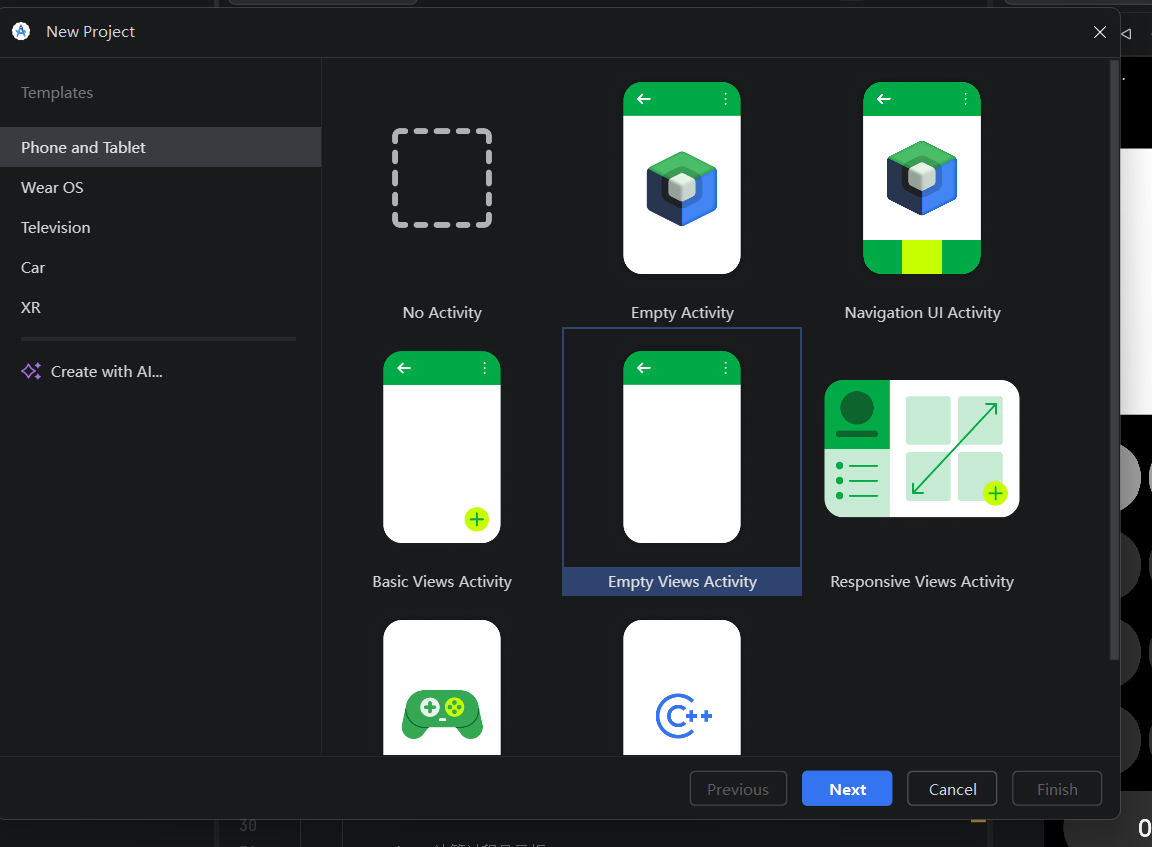
- 设置项目名称、包名、开发语言(Java/Kotlin)
- 最低 SDK 版本选择 (建议 API 21+)
-
- 选择
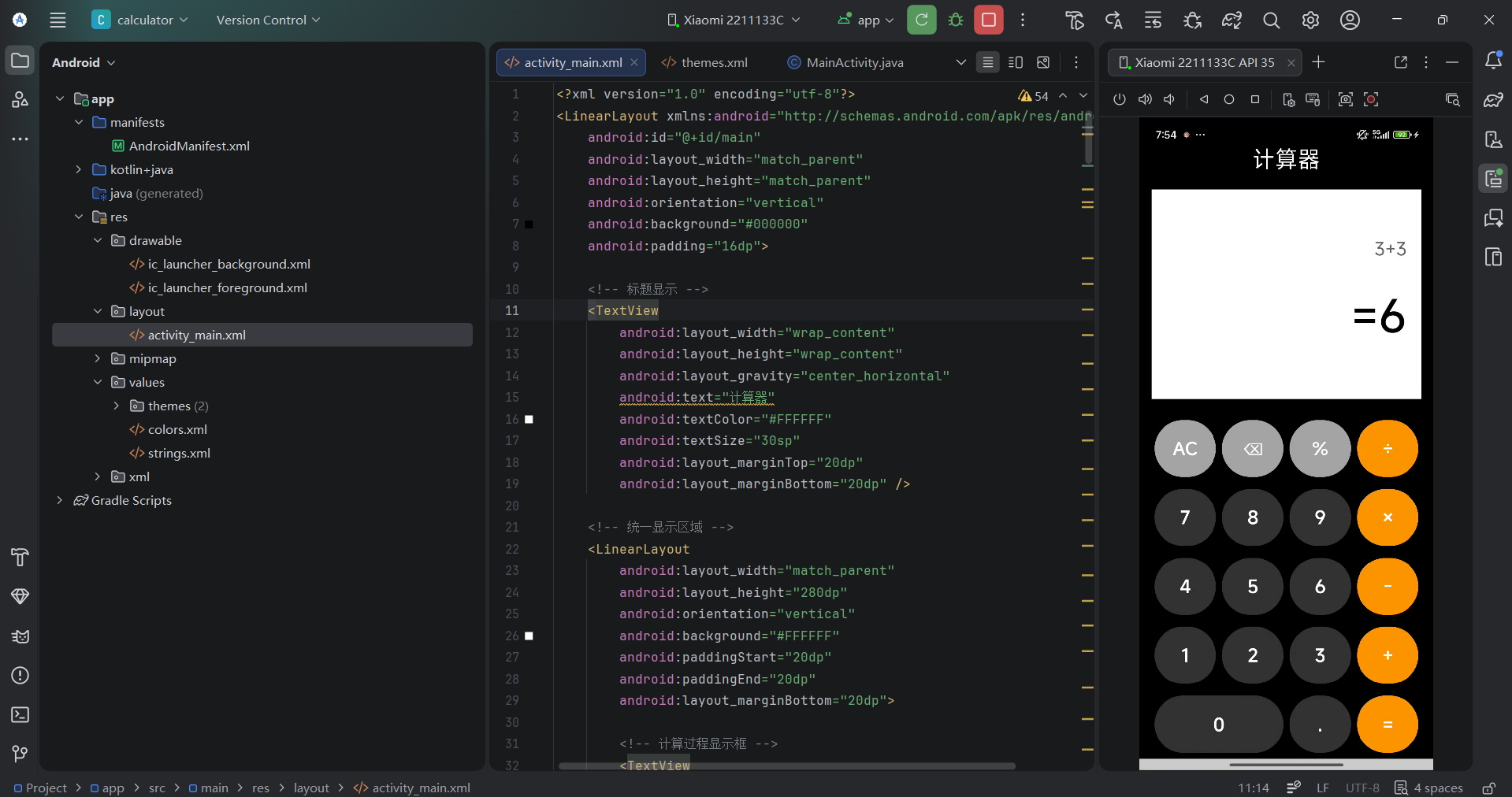
文件准备:需要用到的文件分别是:
activity_main.xml,用于设计UI
MainActivity.java,用于设计功能逻辑
themes.xml,用于设置样式
要是想要更完美,需要把文本写在strings.xml那里定义,在UI设计那里调用
2.UI实现
2.1编写代码前须知:
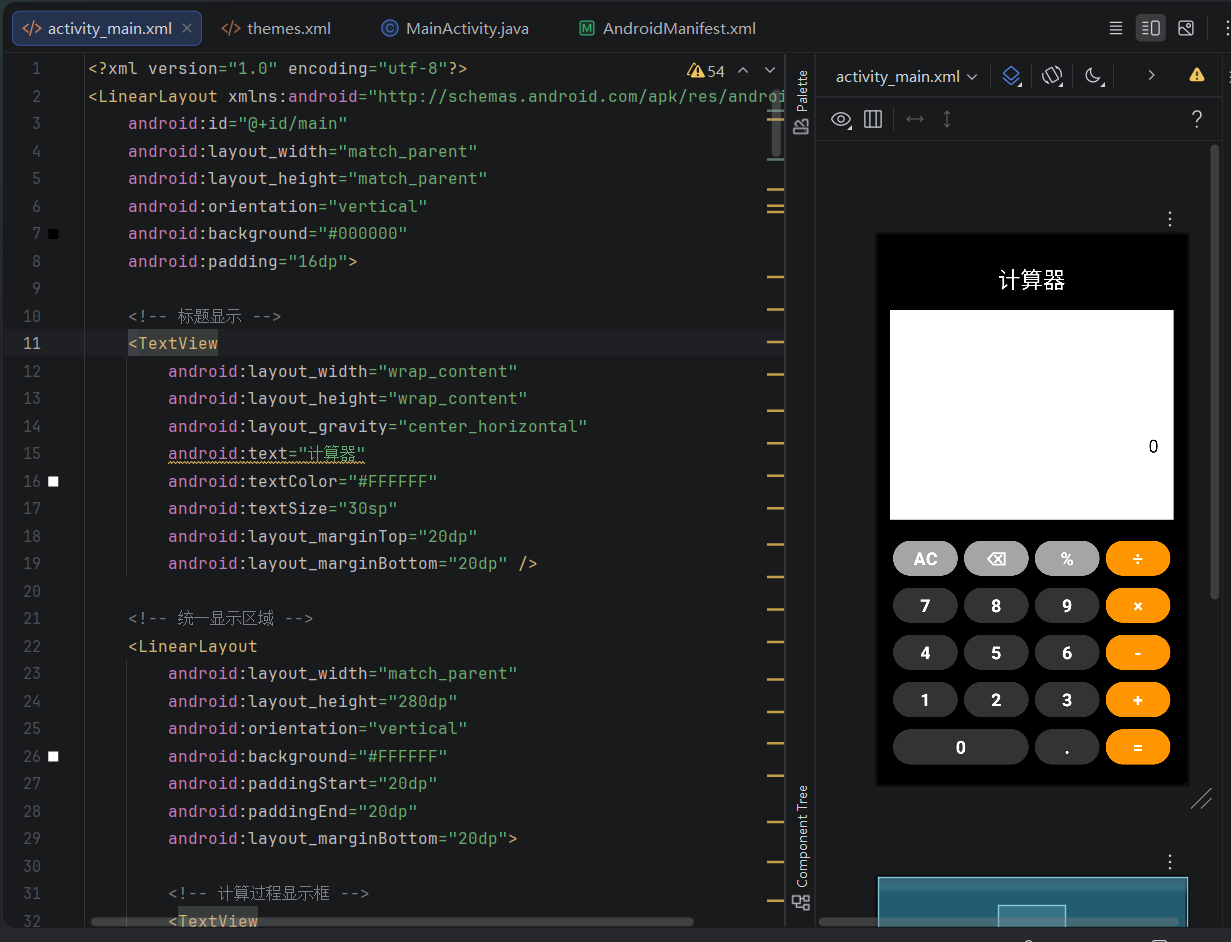
进入activity_main.xml,在右上角有三个图标,第一个图标是只显示代码,第二个图标显示代码和页面,第三个图标只显示图片,我们使用第二个,可以编写代码又可以实时查看UI设计
2.2页面布局实现
2.2.1框架设计分析
<?xml version="1.0" encoding="utf-8"?>
<LinearLayout xmlns:android="http://schemas.android.com/apk/res/android"
    android:id="@+id/main"
    android:layout_width="match_parent"
    android:layout_height="match_parent"
    android:orientation="vertical"
    android:background="#000000"
    android:padding="16dp">
</LinearLayout>
这是框架设计,一般来说新建的都会有前面的代码,下面开始讲解:
android:id="@+id/main",
-
为该
LinearLayout设置一个资源ID,名为main。 -
@+id/表示“创建”一个名为main的ID资源,之后可以在代码(如findViewById(R.id.main))或XML中被引用
如果没有这个,配置文件会报错;
layout_width:宽度属性。match_parent表示此布局的宽度将与其父容器的宽度一致(即填满父容器的宽度)。
layout_height:高度属性。同样设为match_parent,表示填满父容器的高度。
有宽必有高,不然会报错;
android:orientation="vertical",设置LinearLayout的排列方向。vertical表示其内部的子视图(如按钮、文本框等)将垂直排列,一个接一个从上到下显示。
android:background="#000000",设置整个布局的背景颜色。#000000代表黑色。白色是#FFFFFF,RGB可以看我前面文章;
android:padding="16dp",
-
设置布局内部的内边距为
16dp。 -
这意味着布局内所有子视图的内容区域会与布局的四个边界(上、下、左、右)都保持
16dp的距离。内边距是透明的,背景色会透过来。
padding设置内边距,layout_margin设置外边距,要区分。
2.2.2计算器文本
    <!-- 标题显示 -->
    <TextView
        android:layout_width="wrap_content"
        android:layout_height="wrap_content"
        android:layout_gravity="center_horizontal"
        android:text="计算器"
        android:textColor="#FFFFFF"
        android:textSize="30sp"
        android:layout_marginTop="20dp"
        android:layout_marginBottom="20dp" />
顶部是TextView组件,即文本
layout_width: 设置为wrap_content,表示TextView的宽度将根据其文本内容自动调整,刚好包裹住文字。
layout_height: 同样设置为wrap_content,表示高度也根据文本内容自动调整。
text就是显示的文本,如果多次调用,建议在strings.xml那里定义,然后使用android:text="@Strings/定义类名"来调用;
android:textColor="#FFFFFF",设置文本颜色为白色(#FFFFFF是白色的十六进制RGB值);
android:textSize="30sp"
-
设置文本大小为30sp。
-
sp是缩放像素(Scale-independent Pixels),会根据用户的系统字体大小设置进行缩放,适合用于文字大小,字体要用sp;
android:layout_marginTop="20dp",设置上外边距为20dp;
android:layout_marginBottom="20dp",设置下外边距为20dp。
2.2.3显示框
<LinearLayout
        android:layout_width="match_parent"
        android:layout_height="280dp"
        android:orientation="vertical"
        android:background="#FFFFFF"
        android:paddingStart="20dp"
        android:paddingEnd="20dp"
        android:layout_marginBottom="20dp">

        <!-- 计算过程显示框 -->
        <TextView
            android:id="@+id/history_display"
            android:layout_width="match_parent"
            android:layout_height="100dp"
            android:gravity="end|bottom"
            android:textColor="#666666"
            android:textSize="24sp"
            android:ellipsize="end"
            android:singleLine="true"
            android:paddingTop="20dp"
            android:paddingBottom="5dp" />

        <!-- 数字显示框 -->
        <EditText
            android:id="@+id/result_display"
            android:layout_width="match_parent"
            android:layout_height="0dp"
            android:layout_weight="1"
            android:background="@android:color/transparent"
            android:gravity="end|center_vertical"
            android:text="0"
            android:textSize="24sp"
            android:textColor="#000000"
            android:editable="false"
            android:focusable="false"
            android:focusableInTouchMode="false"
            android:singleLine="true"
            android:paddingBottom="20dp" />

    </LinearLayout>
这代码是设置运算显示框的,当用户使用键盘输入时,会把数据显示在上面,核心代码分析:
外层 LinearLayout:
-
创建一个白色背景的垂直布局
-
固定高度:280dp
-
左右内边距:各20dp
-
下外边距:20dp(与下方元素保持间距)
上部 TextView - 计算过程显示框:
-
ID:
history_display- 用于在代码中引用 -
尺寸: 宽度填满,高度固定100dp
-
对齐: 文字在文本框内右下角对齐 (
end|bottom) -
文字: 灰色(#666666),24sp大小
-
单行显示:
-
singleLine="true": 禁止换行 -
ellipsize="end": 文字过长时在末尾显示省略号(...)
-
-
内边距: 上20dp,下5dp
下部 EditText - 数字显示框:
-
ID:
result_display- 结果显示框 -
高度控制: 使用权重布局
-
layout_height="0dp"+layout_weight="1"= 占据剩余所有高度 -
总高度280dp - 上部TextView的100dp = 剩余180dp全部分配给EditText
-
-
外观:
-
透明背景
-
文字右对齐+垂直居中 (
end|center_vertical) -
黑色文字,24sp大小
-
默认显示"0"
-
-
禁用交互:
-
editable="false": 不可编辑 -
focusable="false": 不可获得焦点 -
focusableInTouchMode="false": 触摸模式下不可获得焦点 -
这使其看起来像TextView,但保留EditText的文本选择等功能
-
-
内边距: 下20dp
2.2.4计算器按键区域
<!-- 计算器按键区域 -->
    <GridLayout
        android:layout_width="match_parent"
        android:layout_height="0dp"
        android:layout_weight="1"
        android:rowCount="5"
        android:columnCount="4"
        android:background="#000000">

        <!-- 第一行 -->
        <Button
            android:id="@+id/btn_clear"
            android:layout_width="0dp"
            android:layout_height="0dp"
            android:layout_columnWeight="1"
            android:layout_rowWeight="1"
            android:layout_margin="4dp"
            android:backgroundTint="#A5A5A5"
            android:textColor="#FFFFFF"
            android:textSize="24sp"
            android:text="AC"
            android:textStyle="bold"
            android:ellipsize="end"
            android:singleLine="true" />
        <Button
            android:id="@+id/btn_delete"
            android:layout_width="0dp"
            android:layout_height="0dp"
            android:layout_columnWeight="1"
            android:layout_rowWeight="1"
            android:layout_margin="4dp"
            android:backgroundTint="#A5A5A5"
            android:textColor="#FFFFFF"
            android:textSize="24sp"
            android:text="⌫"
            android:textStyle="bold"
            android:ellipsize="end"
            android:singleLine="true" />
        <Button
            android:id="@+id/btn_percent"
            android:layout_width="0dp"
            android:layout_height="0dp"
            android:layout_columnWeight="1"
            android:layout_rowWeight="1"
            android:layout_margin="4dp"
            android:backgroundTint="#A5A5A5"
            android:textColor="#FFFFFF"
            android:textSize="24sp"
            android:text="%"
            android:textStyle="bold"
            android:ellipsize="end"
            android:singleLine="true" />
        <Button
            android:id="@+id/btn_divide"
            android:layout_width="0dp"
            android:layout_height="0dp"
            android:layout_columnWeight="1"
            android:layout_rowWeight="1"
            android:layout_margin="4dp"
            android:backgroundTint="#FF9500"
            android:textColor="#FFFFFF"
            android:textSize="24sp"
            android:text="÷"
            android:textStyle="bold"
            android:ellipsize="end"
            android:singleLine="true" />

        <!-- 第二行 -->
        <Button
            android:id="@+id/btn_7"
            android:layout_width="0dp"
            android:layout_height="0dp"
            android:layout_columnWeight="1"
            android:layout_rowWeight="1"
            android:layout_margin="4dp"
            android:backgroundTint="#333333"
            android:textColor="#FFFFFF"
            android:textSize="24sp"
            android:text="7"
            android:textStyle="bold"
            android:ellipsize="end"
            android:singleLine="true" />
        <Button
            android:id="@+id/btn_8"
            android:layout_width="0dp"
            android:layout_height="0dp"
            android:layout_columnWeight="1"
            android:layout_rowWeight="1"
            android:layout_margin="4dp"
            android:backgroundTint="#333333"
            android:textColor="#FFFFFF"
            android:textSize="24sp"
            android:text="8"
            android:textStyle="bold"
            android:ellipsize="end"
            android:singleLine="true" />
        <Button
            android:id="@+id/btn_9"
            android:layout_width="0dp"
            android:layout_height="0dp"
            android:layout_columnWeight="1"
            android:layout_rowWeight="1"
            android:layout_margin="4dp"
            android:backgroundTint="#333333"
            android:textColor="#FFFFFF"
            android:textSize="24sp"
            android:text="9"
            android:textStyle="bold"
            android:ellipsize="end"
            android:singleLine="true" />
        <Button
            android:id="@+id/btn_multiply"
            android:layout_width="0dp"
            android:layout_height="0dp"
            android:layout_columnWeight="1"
            android:layout_rowWeight="1"
            android:layout_margin="4dp"
            android:backgroundTint="#FF9500"
            android:textColor="#FFFFFF"
            android:textSize="24sp"
            android:text="×"
            android:textStyle="bold"
            android:ellipsize="end"
            android:singleLine="true" />

        <!-- 第三行 -->
        <Button
            android:id="@+id/btn_4"
            android:layout_width="0dp"
            android:layout_height="0dp"
            android:layout_columnWeight="1"
            android:layout_rowWeight="1"
            android:layout_margin="4dp"
            android:backgroundTint="#333333"
            android:textColor="#FFFFFF"
            android:textSize="24sp"
            android:text="4"
            android:textStyle="bold"
            android:ellipsize="end"
            android:singleLine="true" />
        <Button
            android:id="@+id/btn_5"
            android:layout_width="0dp"
            android:layout_height="0dp"
            android:layout_columnWeight="1"
            android:layout_rowWeight="1"
            android:layout_margin="4dp"
            android:backgroundTint="#333333"
            android:textColor="#FFFFFF"
            android:textSize="24sp"
            android:text="5"
            android:textStyle="bold"
            android:ellipsize="end"
            android:singleLine="true" />
        <Button
            android:id="@+id/btn_6"
            android:layout_width="0dp"
            android:layout_height="0dp"
            android:layout_columnWeight="1"
            android:layout_rowWeight="1"
            android:layout_margin="4dp"
            android:backgroundTint="#333333"
            android:textColor="#FFFFFF"
            android:textSize="24sp"
            android:text="6"
            android:textStyle="bold"
            android:ellipsize="end"
            android:singleLine="true" />
        <Button
            android:id="@+id/btn_subtract"
            android:layout_width="0dp"
            android:layout_height="0dp"
            android:layout_columnWeight="1"
            android:layout_rowWeight="1"
            android:layout_margin="4dp"
            android:backgroundTint="#FF9500"
            android:textColor="#FFFFFF"
            android:textSize="24sp"
            android:text="-"
            android:textStyle="bold"
            android:ellipsize="end"
            android:singleLine="true" />

        <!-- 第四行 -->
        <Button
            android:id="@+id/btn_1"
            android:layout_width="0dp"
            android:layout_height="0dp"
            android:layout_columnWeight="1"
            android:layout_rowWeight="1"
            android:layout_margin="4dp"
            android:backgroundTint="#333333"
            android:textColor="#FFFFFF"
            android:textSize="24sp"
            android:text="1"
            android:textStyle="bold"
            android:ellipsize="end"
            android:singleLine="true" />
        <Button
            android:id="@+id/btn_2"
            android:layout_width="0dp"
            android:layout_height="0dp"
            android:layout_columnWeight="1"
            android:layout_rowWeight="1"
            android:layout_margin="4dp"
            android:backgroundTint="#333333"
            android:textColor="#FFFFFF"
            android:textSize="24sp"
            android:text="2"
            android:textStyle="bold"
            android:ellipsize="end"
            android:singleLine="true" />
        <Button
            android:id="@+id/btn_3"
            android:layout_width="0dp"
            android:layout_height="0dp"
            android:layout_columnWeight="1"
            android:layout_rowWeight="1"
            android:layout_margin="4dp"
            android:backgroundTint="#333333"
            android:textColor="#FFFFFF"
            android:textSize="24sp"
            android:text="3"
            android:textStyle="bold"
            android:ellipsize="end"
            android:singleLine="true" />
        <Button
            android:id="@+id/btn_add"
            android:layout_width="0dp"
            android:layout_height="0dp"
            android:layout_columnWeight="1"
            android:layout_rowWeight="1"
            android:layout_margin="4dp"
            android:backgroundTint="#FF9500"
            android:textColor="#FFFFFF"
            android:textSize="24sp"
            android:text="+"
            android:textStyle="bold"
            android:ellipsize="end"
            android:singleLine="true" />

        <!-- 第五行 -->
        <Button
            android:id="@+id/btn_0"
            android:layout_width="0dp"
            android:layout_height="0dp"
            android:layout_row="4"
            android:layout_column="0"
            android:layout_columnSpan="2"
            android:layout_columnWeight="2"
            android:layout_rowWeight="1"
            android:layout_margin="4dp"
            android:layout_gravity="fill"
            android:backgroundTint="#333333"
            android:textColor="#FFFFFF"
            android:textSize="24sp"
            android:text="0"
            android:textStyle="bold"
            android:ellipsize="end"
            android:singleLine="true" />

        <Button
            android:id="@+id/btn_decimal"
            android:layout_width="0dp"
            android:layout_height="0dp"
            android:layout_row="4"
            android:layout_column="2"
            android:layout_columnWeight="1"
            android:layout_rowWeight="1"
            android:layout_margin="4dp"
            android:backgroundTint="#333333"
            android:textColor="#FFFFFF"
            android:textSize="24sp"
            android:text="."
            android:textStyle="bold"
            android:ellipsize="end"
            android:singleLine="true" />

        <Button
            android:id="@+id/btn_equals"
            android:layout_width="0dp"
            android:layout_height="0dp"
            android:layout_row="4"
            android:layout_column="3"
            android:layout_columnWeight="1"
            android:layout_rowWeight="1"
            android:layout_margin="4dp"
            android:backgroundTint="#FF9500"
            android:textColor="#FFFFFF"
            android:textSize="24sp"
            android:text="="
            android:textStyle="bold"
            android:ellipsize="end"
            android:singleLine="true" />

    </GridLayout>
这里介绍前面设置的框架和最后一行
GridLayout 容器:
-
尺寸:宽度填满父容器,高度为0dp但
layout_weight="1",与上面的显示区域平分剩余屏幕空间 -
网格结构:5行×4列,共20个格子
-
背景:黑色背景
通用按钮属性
所有按钮共享以下配置:
-
尺寸控制:
layout_width="0dp"+layout_height="0dp"+layout_columnWeight="1"+layout_rowWeight="1"-
通过权重让每个按钮均匀占据网格单元
-
-
边距:
layout_margin="4dp"- 每个按钮有4dp外边距,形成按钮间的间距 -
文字样式:白色文字,24sp大小,加粗,单行显示,过长显示省略号
-
背景色:通过
backgroundTint设置按钮颜色 -
ID:每个按钮都有唯一ID用于代码中引用
最特别一行:0按键占据一行两列
android:layout_row="4"
android:layout_column="0"
android:layout_columnSpan="2" <!-- 横跨2列 -->
android:layout_columnWeight="2" <!-- 权重为2,占两列宽度 -->
android:layout_gravity="fill" <!-- 填充整个分配区域 -->
android:text="0" />
3.Java代码
package com.example.calculator;
import android.os.Bundle;
import android.view.View;
import android.widget.Button;
import android.widget.EditText;
import android.widget.TextView;
import androidx.appcompat.app.AppCompatActivity;
public class MainActivity extends AppCompatActivity {
private EditText resultDisplay;
private TextView historyDisplay;
private String currentInput = "";
private String firstNumber = "";
private String secondNumber = "";
private String currentOperator = "";
private boolean waitingForSecondNumber = false;
private String displayOperator = "";
private boolean isEqualPressed = false; // 标记是否按了等号
@Override
protected void onCreate(Bundle savedInstanceState) {
super.onCreate(savedInstanceState);
setContentView(R.layout.activity_main);
// 初始化显示框
resultDisplay = findViewById(R.id.result_display);
historyDisplay = findViewById(R.id.history_display);
resultDisplay.setText("0");
historyDisplay.setText("");
// 初始状态:结果框字体大,历史框字体小
isEqualPressed = true; // 初始状态按等号后的样式
updateFontSizes();
// 数字按钮监听器
setupNumberButtons();
// 操作符按钮监听器
setupOperatorButtons();
// 功能按钮监听器
setupFunctionButtons();
}
private void updateFontSizes() {
if (isEqualPressed) {
// 按了等号后:历史框字体小(24sp),结果框字体大(60sp)并加粗
historyDisplay.setTextSize(24);
resultDisplay.setTextSize(60);
resultDisplay.setTypeface(null, android.graphics.Typeface.BOLD);
} else {
// 没按等号时:历史框字体大(60sp),结果框字体小(24sp)不加粗
historyDisplay.setTextSize(60);
resultDisplay.setTextSize(24);
resultDisplay.setTypeface(null, android.graphics.Typeface.NORMAL);
}
}
private void setupNumberButtons() {
// 数字0-9
int[] numberButtonIds = {
R.id.btn_0, R.id.btn_1, R.id.btn_2, R.id.btn_3,
R.id.btn_4, R.id.btn_5, R.id.btn_6, R.id.btn_7,
R.id.btn_8, R.id.btn_9
};
for (int id : numberButtonIds) {
Button button = findViewById(id);
button.setOnClickListener(new View.OnClickListener() {
@Override
public void onClick(View v) {
Button clickedButton = (Button) v;
String number = clickedButton.getText().toString();
// 修复问题:如果之前按了等号,重新开始新的计算
if (isEqualPressed && !waitingForSecondNumber) {
clearAll(); // 清空所有状态,重新开始
isEqualPressed = false; // 新的计算开始,不是等号状态
updateFontSizes();
}
if (waitingForSecondNumber) {
// 正在输入第二个数字
if (secondNumber.isEmpty() && number.equals("0")) {
// 避免以0开头
return;
}
secondNumber += number;
isEqualPressed = false; // 正在输入,不是等号状态
updateFontSizes();
// 更新历史显示
historyDisplay.setText(firstNumber + displayOperator + secondNumber);
// 计算结果并显示(带等号)
calculateAndDisplayResult();
} else {
// 输入第一个数字
if (currentInput.equals("0") || currentInput.isEmpty()) {
currentInput = number;
} else {
currentInput += number;
}
firstNumber = currentInput;
// 更新字体大小(没按等号)
isEqualPressed = false;
updateFontSizes();
historyDisplay.setText(firstNumber);
resultDisplay.setText("=" + currentInput); // 结果框显示等号+数字
}
}
});
}
// 小数点按钮
Button btnDecimal = findViewById(R.id.btn_decimal);
btnDecimal.setOnClickListener(new View.OnClickListener() {
@Override
public void onClick(View v) {
// 修复问题:如果之前按了等号,重新开始新的计算
if (isEqualPressed && !waitingForSecondNumber) {
clearAll(); // 清空所有状态,重新开始
isEqualPressed = false; // 新的计算开始,不是等号状态
updateFontSizes();
}
if (waitingForSecondNumber) {
if (!secondNumber.contains(".")) {
if (secondNumber.isEmpty()) {
secondNumber = "0.";
} else {
secondNumber += ".";
}
isEqualPressed = false;
updateFontSizes();
// 更新历史显示
historyDisplay.setText(firstNumber + displayOperator + secondNumber);
// 计算结果并显示(带等号)
calculateAndDisplayResult();
}
} else {
if (!currentInput.contains(".")) {
if (currentInput.isEmpty() || currentInput.equals("0")) {
currentInput = "0.";
} else {
currentInput += ".";
}
firstNumber = currentInput;
isEqualPressed = false;
updateFontSizes();
historyDisplay.setText(firstNumber);
resultDisplay.setText("=" + currentInput); // 结果框显示等号+数字
}
}
}
});
}
private void setupOperatorButtons() {
// 加减乘除按钮
int[] operatorButtonIds = {
R.id.btn_add, R.id.btn_subtract,
R.id.btn_multiply, R.id.btn_divide
};
for (int id : operatorButtonIds) {
Button button = findViewById(id);
button.setOnClickListener(new View.OnClickListener() {
@Override
public void onClick(View v) {
Button clickedButton = (Button) v;
String operator = clickedButton.getText().toString();
// 如果已经有操作符,先计算当前结果
if (!currentOperator.isEmpty() && !secondNumber.isEmpty()) {
calculateAndDisplayResult();
firstNumber = resultDisplay.getText().toString().replace("=", "");
secondNumber = "";
}
// 如果之前按了等号,使用当前结果作为第一个数字
if (isEqualPressed) {
String currentText = resultDisplay.getText().toString();
if (currentText.startsWith("=")) {
firstNumber = currentText.replace("=", "");
} else {
firstNumber = currentText;
}
currentInput = firstNumber;
historyDisplay.setText(firstNumber);
isEqualPressed = false;
updateFontSizes();
}
// 转换显示的操作符为实际计算的操作符
String actualOperator;
switch (operator) {
case "÷":
actualOperator = "/";
break;
case "×":
actualOperator = "*";
break;
default:
actualOperator = operator;
}
currentOperator = actualOperator;
displayOperator = operator;
waitingForSecondNumber = true;
// 如果没有第一个数字,使用当前显示结果
if (firstNumber.isEmpty()) {
String currentText = resultDisplay.getText().toString();
if (currentText.startsWith("=")) {
firstNumber = currentText.replace("=", "");
} else {
firstNumber = currentText;
}
}
// 更新字体大小(没按等号)
isEqualPressed = false;
updateFontSizes();
// 更新历史显示
historyDisplay.setText(firstNumber + displayOperator);
// 结果框显示第一个数字(没有等号)
resultDisplay.setText(firstNumber);
// 重置第二个数字
secondNumber = "";
}
});
}
// 等于按钮
Button btnEquals = findViewById(R.id.btn_equals);
btnEquals.setOnClickListener(new View.OnClickListener() {
@Override
public void onClick(View v) {
if (!currentOperator.isEmpty() && !secondNumber.isEmpty()) {
// 更新字体大小(按了等号)
isEqualPressed = true;
updateFontSizes();
// 计算并显示最终结果
calculateAndDisplayResult();
// 重置状态,准备下一次计算
firstNumber = resultDisplay.getText().toString().replace("=", "");
secondNumber = "";
currentInput = firstNumber;
waitingForSecondNumber = false;
}
}
});
}
private void setupFunctionButtons() {
// AC(清除所有)按钮
Button btnClear = findViewById(R.id.btn_clear);
btnClear.setOnClickListener(new View.OnClickListener() {
@Override
public void onClick(View v) {
clearAll();
}
});
// 删除按钮
Button btnDelete = findViewById(R.id.btn_delete);
btnDelete.setOnClickListener(new View.OnClickListener() {
@Override
public void onClick(View v) {
if (waitingForSecondNumber && !secondNumber.isEmpty()) {
if (secondNumber.length() > 1) {
secondNumber = secondNumber.substring(0, secondNumber.length() - 1);
isEqualPressed = false;
updateFontSizes();
// 更新历史显示
historyDisplay.setText(firstNumber + displayOperator + secondNumber);
// 计算结果并显示
calculateAndDisplayResult();
} else {
secondNumber = "";
currentInput = "";
isEqualPressed = false;
updateFontSizes();
historyDisplay.setText(firstNumber + displayOperator);
resultDisplay.setText(firstNumber); // 没有等号
}
} else if (!waitingForSecondNumber && !currentInput.isEmpty() && !currentInput.equals("0")) {
if (currentInput.length() > 1) {
currentInput = currentInput.substring(0, currentInput.length() - 1);
firstNumber = currentInput;
isEqualPressed = false;
updateFontSizes();
historyDisplay.setText(firstNumber);
resultDisplay.setText("=" + currentInput); // 有等号
} else {
clearAll();
}
}
}
});
// 百分号按钮
Button btnPercent = findViewById(R.id.btn_percent);
btnPercent.setOnClickListener(new View.OnClickListener() {
@Override
public void onClick(View v) {
// 如果之前按了等号,从结果开始计算百分比
if (isEqualPressed) {
String resultText = resultDisplay.getText().toString().replace("=", "");
try {
double value = Double.parseDouble(resultText);
double percentage = value / 100;
currentInput = formatResult(percentage);
firstNumber = currentInput;
isEqualPressed = false;
updateFontSizes();
historyDisplay.setText(firstNumber);
resultDisplay.setText("=" + currentInput);
return;
} catch (NumberFormatException e) {
resultDisplay.setText("错误");
}
}
if (waitingForSecondNumber && !secondNumber.isEmpty()) {
try {
double value = Double.parseDouble(secondNumber);
double percentage = value / 100;
secondNumber = formatResult(percentage);
isEqualPressed = false;
updateFontSizes();
// 更新历史显示
historyDisplay.setText(firstNumber + displayOperator + secondNumber);
// 计算结果并显示
calculateAndDisplayResult();
} catch (NumberFormatException e) {
resultDisplay.setText("错误");
}
} else if (!waitingForSecondNumber && !currentInput.isEmpty() && !currentInput.equals("0")) {
try {
double value = Double.parseDouble(currentInput);
double percentage = value / 100;
currentInput = formatResult(percentage);
firstNumber = currentInput;
isEqualPressed = false;
updateFontSizes();
historyDisplay.setText(firstNumber);
resultDisplay.setText("=" + currentInput); // 有等号
} catch (NumberFormatException e) {
resultDisplay.setText("错误");
}
}
}
});
}
private void calculateAndDisplayResult() {
if (!currentOperator.isEmpty() && !secondNumber.isEmpty() && !firstNumber.isEmpty()) {
try {
double first = Double.parseDouble(firstNumber);
double second = Double.parseDouble(secondNumber);
double result = 0;
switch (currentOperator) {
case "+":
result = first + second;
break;
case "-":
result = first - second;
break;
case "*":
result = first * second;
break;
case "/":
if (second != 0) {
result = first / second;
} else {
resultDisplay.setText("错误");
return;
}
break;
}
String formattedResult = formatResult(result);
resultDisplay.setText("=" + formattedResult);
} catch (NumberFormatException e) {
resultDisplay.setText("错误");
}
}
}
private String formatResult(double result) {
// 如果是整数,显示整数;如果是小数,最多显示10位小数
if (result == (long) result) {
return String.valueOf((long) result);
} else {
// 去除末尾的0
String resultStr = String.valueOf(result);
resultStr = resultStr.replaceAll("0*$", "");
resultStr = resultStr.replaceAll("\\.$", "");
return resultStr;
}
}
private void clearAll() {
resultDisplay.setText("0");
historyDisplay.setText("");
currentInput = "";
firstNumber = "";
secondNumber = "";
currentOperator = "";
displayOperator = "";
waitingForSecondNumber = false;
isEqualPressed = true; // 清除后恢复初始状态
updateFontSizes();
}
}这是实现功能的逻辑,代码有相关的注释,主要实现有其基本计算功能实现,还有一个特别的功能,当用户没有输入的时候显示0,0是大写,然后输入后上面的文本框字体会变大,下面字体会变小,当用户完成计算后,下面的结果会变大,上面字体变小,主要通过Java来控制输出的文本大小。
结语:本应用存在一个功能缺陷,就是只能进行单则运算,如果运算5+6×2,是先运算5+6,然后再×2,运算结果是22,而不是17。这个可以留给你们解决,源码已经上传资源绑定那里,下载导入即可,感谢大家支持(抱拳),期待你的关注

AtomGit 是由开放原子开源基金会联合 CSDN 等生态伙伴共同推出的新一代开源与人工智能协作平台。平台坚持“开放、中立、公益”的理念,把代码托管、模型共享、数据集托管、智能体开发体验和算力服务整合在一起,为开发者提供从开发、训练到部署的一站式体验。
更多推荐



 46
46 0
0- 0


 已为社区贡献6条内容

所有评论(0)