AspNetCore + EF Core实现通用仓储模式(IRepository泛型封装)
如何在AspNetCore中使用EF Core实现通用仓储模式?本文从零讲解IRepository泛型接口设计、RepositoryBase实现、DbContext配置、依赖注入注册,以及如何扩展具体仓储类处理业务逻辑,完整示例代码可直接运行。
在AspNetCore中设计通用仓储接口
对于一个项目来说,数据库的增删改查操作是必不可少的,而对于一个项目来说,数据库的增删改查操作是必不可少的,
所以一个合理的仓储接口设计是必不可少的。这里我使用的ORM框架是EF Core,所以我这里的仓储接口设计是基于EF Core的。
需要安装的包
Microsoft.EntityFrameworkCore
Microsoft.EntityFrameworkCore.SqlServer
Microsoft.EntityFrameworkCore.Tools
配置数据库连接字符串——参考之前的文章AspNetCore读取配置文件的方案四
{
  "Logging": {
    "LogLevel": {
      "Default": "Information",
      "Microsoft.AspNetCore": "Warning"
    }
  },
  "SqlServerConfig": {
    "ConnectionString": "Server = (localdb)\\mssqllocaldb;DataBase = APIEFcTYCCJK02x02Db01;Trusted_Connection = true;TrustServerCertificate = true;"
  },
  "AllowedHosts": "*"
}
为其创建配置类
namespace APIEFcTYCCJK02x02
{
    public class SqlServerConfig
    {
        public string ConnectionString { get; set; }
    }
}
在Program.cs中添加配置,这里需要注意的是,这里的配置类需要在服务容器中注册,否则无法使用IOptionsMonitor
builder.Services.AddOptions<SqlServerConfig>();
builder.Services.Configure<SqlServerConfig>(builder.Configuration.GetSection("SqlServerConfig"));
创建实体模型类
using System.ComponentModel.DataAnnotations.Schema;
using System.ComponentModel.DataAnnotations;
namespace APIEFcTYCCJK02x02
{
    public class TestDataTable01
    {
        [Key]//主键
        [DatabaseGenerated(DatabaseGeneratedOption.None)]//自定义主键
        [MaxLength(50)]
        public string Id { get; set; }
        public string Name { get; set; }
        public string Password { get; set; }
        public string Description { get; set; }
    }
}
创建数据库上下文类
using Microsoft.EntityFrameworkCore;

namespace APIEFcTYCCJK02x02
{
    public class DataContext:DbContext
    {
        public DataContext(DbContextOptions<DataContext> options) : base(options) { }
        public DbSet<TestDataTable01> TestDataTable01s { get; set; }
    }
}
在Program.cs中添加服务,这里需要注意的是,这里的数据库上下文类需要在服务容器中注册,否则无法使用IOptionsMonitor
这里需从服务容器中获取IOptionsMonitor,所以这一步必须在数据库字符串配置类的注册之后,否则会报错。
builder.Services.AddDbContext<DataContext>((serviceProvider, options) =>
{
    var sqlServerConfig = serviceProvider.GetRequiredService<IOptionsMonitor<SqlServerConfig>>().CurrentValue;
    options.UseSqlServer(sqlServerConfig.ConnectionString);
});
创建通用仓储接口IRepositoryBase
namespace APIEFcTYCCJK02x02
{
    public interface IRepositoryBase<T>
    {
        Task<IEnumerable<T>> GetAllAsync();//这个方法其实我不想写
        Task<T> GetByIdAsync(string id);
        Task AddAsync(T entity);
        Task UpdateByIdAsync(string id, T entity);
        Task DeleteByIdAsync(string id);
        Task<bool> IsEmptyAsync(string id);
        Task<bool> SaveChangesAsync();
    }
}
创建仓储实现类RepositoryBase
这里的泛型T是实体模型类,所以需要在构造函数中注入数据库上下文类DataContext,注意是DataContext,不是DbContext,
因为DbContext是抽象类,DataContext是派生类,所以需要注入DataContext,而不是DbContext。
using Microsoft.EntityFrameworkCore;
namespace APIEFcTYCCJK02x02
{
    public class RepositoryBase<T>: IRepositoryBase<T> where T : class
    {
        private readonly DataContext _context;
        public RepositoryBase(DataContext context)
        {
            _context = context;
        }

        public async Task AddAsync(T entity)
        {
            await _context.Set<T>().AddAsync(entity);
        }

        public async Task<IEnumerable<T>> GetAllAsync()
        {
            return await _context.Set<T>().ToListAsync();
        }

        public async Task<T> GetByIdAsync(string id)
        {
            return await _context.Set<T>().FindAsync(id);
        }
        public async Task<bool> SaveChangesAsync()
        {
            return (await _context.SaveChangesAsync() > 0);
        }

        public async Task UpdateByIdAsync(string id, T entity)
        {
           var entityUpdate = await _context.Set<T>().FindAsync(id);
            if (entityUpdate != null)
            {
                _context.Entry(entityUpdate).CurrentValues.SetValues(entity);
            }
        }
        public async Task DeleteByIdAsync(string id)
        {
            var entity = await _context.Set<T>().FindAsync(id);
            if (entity != null)
            {
                _context.Set<T>().Remove(entity);
            }
        }
        public async Task<bool> IsEmptyAsync(string id)
        {
            var entity = await _context.Set<T>().FindAsync(id);
            if (entity == null)
            {
                return true;
            }
            return false;
        }
    }
}
在Program.cs中添加仓储实现类
builder.Services.AddScoped(typeof(IRepositoryBase<>), typeof(RepositoryBase<>));
再为TestDataTable01创建一个具体的,不通用的仓储实现类,来解决一些特殊的,通用仓储接口无法实现的需求
如对其密码的验证,密码修改等,这种需求可以通过继承通用仓储实现类来解决。先创建具体的仓储接口,然后再创建具体的仓储实现类,
然后在具体的仓储实现类中实现具体的需求。
namespace APIEFcTYCCJK02x02
{
    public interface ITestDataTableRepository:IRepositoryBase<TestDataTable01>
    {
        Task<bool> VerifyPasswordAsync(string id, string password);
        Task<bool> ChangePasswordAsync(string id, string oldPassword, string newPassword);
        //使用MD5加密,不可逆,加密不属于通用需求,所以不放在IRepositoryBase,应该单独注册一个服务而不是接口,然后在VerifyPasswordAsync中调用
        //在VerifyPasswordAsync中直接对比加密后的密码
    }
}
- 注意在具体的仓储实现类中,需要注入数据库上下文类DataContext,因为需要使用到数据库上下文类DataContext,
- 注意是DataContext,不是DbContext,
using APIEFcTYCCJK02x02;
namespace APIEFcTYCCJK02x02
{
    public class TestDataTableRepository: RepositoryBase<TestDataTable01>,ITestDataTableRepository
    {
        public DataContext _context { get; set; }
        public TestDataTableRepository(DataContext context):base(context) { _context = context; }
        //使用MD5加密,不可逆,加密不属于通用需求,所以不放在IRepositoryBase,应该单独注册一个服务而不是接口,然后在VerifyPasswordAsync中调用
        //在VerifyPasswordAsync中直接对比加密后的密码2025.9.24
        public async Task<bool> VerifyPasswordAsync(string id, string password)
        {
        var entity = await _context.Set<TestDataTable01>().FindAsync(id);
        if (entity == null)
        {
            return false;
        }
        return entity.Password == password;
        }
        public async Task<bool> ChangePasswordAsync(string id, string oldPassword, string newPassword)
        {
        var entity = await _context.Set<TestDataTable01>().FindAsync(id);
        if (entity == null)
        {
            return false;
        }
        if (entity.Password != oldPassword)
        {
            return false;
        }
        entity.Password = newPassword;
        await _context.SaveChangesAsync();

        return true;
        }
    }
}
这个具体的仓储接口同样需要在Program.cs中注册
builder.Services.AddScoped<ITestDataTableRepository, TestDataTableRepository>();
在控制器中使用
通用仓储接口IRepositoryBase,具体的仓储接口ITestDataTableRepository,都是在Program.cs中注册的,
所以在控制器中可以直接注入,不需要再在控制器中注入具体的仓储实现类,因为具体的仓储实现类已经在Program.cs中注册了。
注意:
- 一次传多个参数使用[FromForm],一次传一个参数使用[FromBody]。
- IActionResult不包含返回值的类型信息,所以这里使用ActionResult。
using Microsoft.AspNetCore.Http;
using Microsoft.AspNetCore.Mvc;

namespace APIEFcTYCCJK02x02.Controllers
{
    [Route("[controller]/[action]")]//RPC风格的路由
    [ApiController]
    public class RepositoryBaseTestController : ControllerBase
    {
        private readonly IRepositoryBase<TestDataTable01> _repositoryBase;
        private readonly ITestDataTableRepository _testDataTableRepository;

        public RepositoryBaseTestController(IRepositoryBase<TestDataTable01> repositoryBase, ITestDataTableRepository testDataTableRepository)
        {
            _repositoryBase = repositoryBase;
            _testDataTableRepository = testDataTableRepository;
        }

        [HttpPost]
        public async Task<IEnumerable<TestDataTable01>> TestDataTable01_GetAllAsync()
        {
            return await _repositoryBase.GetAllAsync();
        }
        [HttpPost]
        public async Task<ActionResult<string>> TestDataTable01_AddAsync([FromBody] TestDataTable01 testDataTable01)
        {
            if (await _repositoryBase.IsEmptyAsync(testDataTable01.Id.ToString()) == false)
            {
                return BadRequest("ID已存在");
            }

            await _repositoryBase.AddAsync(testDataTable01);
            await _repositoryBase.SaveChangesAsync();

            return Ok("成功添加");
        }

        [HttpPost]
        public async Task<ActionResult<string>> TestDataTable01_UpdateByIdAsync([FromBody] TestDataTable01 testDataTable01)
        {
            if (await _repositoryBase.IsEmptyAsync(testDataTable01.Id.ToString()) == true)
            {
                return BadRequest("ID不存在");
            }

            if (await _testDataTableRepository.VerifyPasswordAsync(testDataTable01.Id.ToString(), testDataTable01.Password) == false)
            {
                return BadRequest("密码错误");
            }
            await _repositoryBase.UpdateByIdAsync(testDataTable01.Id.ToString(),testDataTable01);
            await _repositoryBase.SaveChangesAsync();
            return Ok("成功更新");
        }
        [HttpPost]
        public async Task<ActionResult<string>> TestDataTable01_DeleteByIdAsync([FromForm] string id,string password)
        {
            if (await _repositoryBase.IsEmptyAsync(id.ToString()) == true)
            {
                return BadRequest("ID不存在");
            }

            if (await _testDataTableRepository.VerifyPasswordAsync(id.ToString(), password) == false)
            {
                return BadRequest("密码错误");
            }

            await _repositoryBase.DeleteByIdAsync(id.ToString());
            await _repositoryBase.SaveChangesAsync();
            return Ok("成功删除");
        }
        [HttpPost]
        public async Task<ActionResult<TestDataTable01>> TestDataTable01_GetByIdAsync([FromBody] string id)
        {
            if (await _repositoryBase.IsEmptyAsync(id.ToString()) == true)
            {
                return BadRequest("ID不存在");
            }
            return Ok(await _repositoryBase.GetByIdAsync(id.ToString()));
        }
        [HttpPost]
        public async Task<ActionResult<string>> TestDataTable01_ChangePasswordAsync([FromForm] string id,string oldPassword,string newPassword)
        {
            if (await _repositoryBase.IsEmptyAsync(id.ToString()) == true)
            {
                return BadRequest("ID不存在");
            }
            if (await _testDataTableRepository.VerifyPasswordAsync(id.ToString(), oldPassword) == false)
            {
                return BadRequest("密码错误");
            }
            if (await _testDataTableRepository.ChangePasswordAsync(id.ToString(), oldPassword, newPassword) == false)
            {
                return BadRequest("修改失败");
            }
            return Ok("修改成功");
        }
    }
}
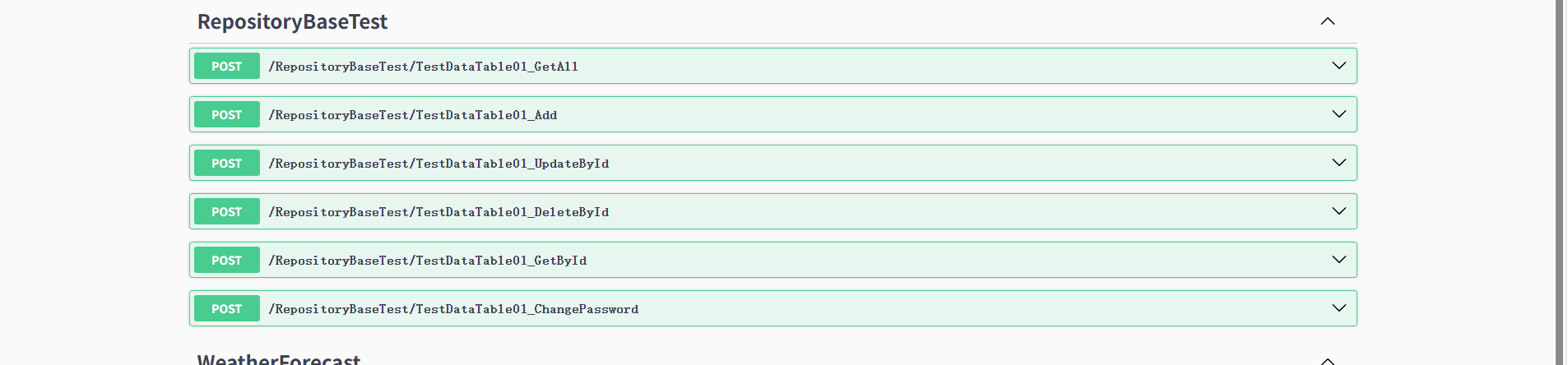
最后讲一个小知识。post与get,delete,put的区别,post不是幂等,多次调用会创建多个资源,而get,delete,put是幂等的,多次调用不会改变资源的状态。
完整的Program.cs
using APIEFcTYCCJK02x02;
using Microsoft.EntityFrameworkCore;
using Microsoft.Extensions.Options;

var builder = WebApplication.CreateBuilder(args);

// Add services to the container.

builder.Services.AddControllers();
// Learn more about configuring Swagger/OpenAPI at https://aka.ms/aspnetcore/swashbuckle
builder.Services.AddEndpointsApiExplorer();
builder.Services.AddSwaggerGen();

//使用IOptionsMonitor,2025.9.24
//弃用IOptionsSnapshot ,IOptionsSnapshot会为每个请求创建新的实例
builder.Services.AddOptions<SqlServerConfig>();
builder.Services.Configure<SqlServerConfig>(builder.Configuration.GetSection("SqlServerConfig"));

//注册DbContext,2025.9.24
builder.Services.AddDbContext<DataContext>((serviceProvider, options) =>
{   //将IOptionsMonitor从服务容器中获取,2025.9.24
    var sqlServerConfig = serviceProvider.GetRequiredService<IOptionsMonitor<SqlServerConfig>>().CurrentValue;
    options.UseSqlServer(sqlServerConfig.ConnectionString);
});

//注册仓储接口IRepositoryBase和RepositoryBase,2025.9.24
builder.Services.AddScoped(typeof(IRepositoryBase<>), typeof(RepositoryBase<>));

//注册具体的仓储接口和Repository,2025.9.24
builder.Services.AddScoped<ITestDataTableRepository, TestDataTableRepository>();

//builder.Services.AddSingleton<InformationBroadcast>();弃用

var app = builder.Build();

//使用IOptionsMonitor ,确保连接字符串是动态的,修改appsettings.json后,获得最新的连接字符串,2025.9.24
var sqlServerConfig = app.Services.GetRequiredService<IOptionsMonitor<SqlServerConfig>>().CurrentValue;
Console.WriteLine("SQLserver连接字符串: " + sqlServerConfig.ConnectionString);

// Configure the HTTP request pipeline.
//if (app.Environment.IsDevelopment())
//{
    app.UseSwagger();
    app.UseSwaggerUI();
//}

app.UseHttpsRedirection();

app.UseAuthorization();

app.MapControllers();

app.Run();


AtomGit 是由开放原子开源基金会联合 CSDN 等生态伙伴共同推出的新一代开源与人工智能协作平台。平台坚持“开放、中立、公益”的理念,把代码托管、模型共享、数据集托管、智能体开发体验和算力服务整合在一起,为开发者提供从开发、训练到部署的一站式体验。
更多推荐



 22
22 0
0- 0


 已为社区贡献5条内容

所有评论(0)