OpenClaw + Ollama 本地模型部署教程
OpenClaw + Ollama 本地模型部署教程
1️⃣ 前置条件
-
操作系统:Windows 10/11 或 Linux (Ubuntu 20.04+)
-
硬件要求:
-
GPU: 推荐 RTX 30xx 系列或以上(支持 CUDA)
-
显存: ≥16GB VRAM
-
CPU: Intel i5 / AMD Ryzen 5 或更高
-
内存: ≥32GB 推荐(大量代码上下文可能占用内存)
-
-
软件工具:
-
Python 3.11+
-
Git
-
Docker(可选,但 Ollama 本地部署推荐使用 Docker 或直接本地包)
-
2️⃣ 安装 Ollama 本地模型
2.1 下载 Ollama
-
官方地址:https://ollama.com
-
Windows 用户直接下载安装包
-
Linux 用户使用命令行安装:
curl -sSL https://ollama.com/install.sh | bash
2.2 初始化 Ollama
ollama setup
-
按提示配置 API 端口和默认模型目录
-
默认本地监听端口:
http://localhost:11434
允许本地调用
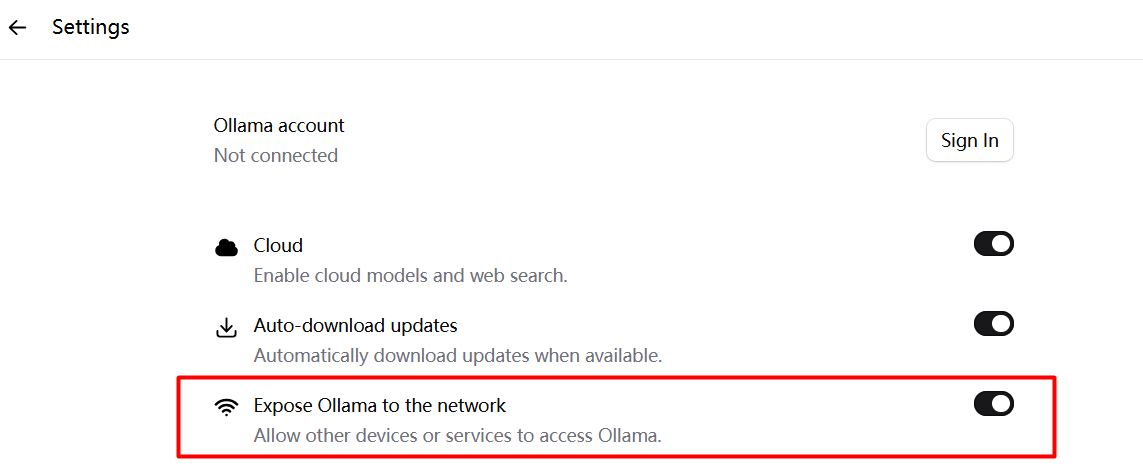
方法1: 设置其它设备可以通过网络访问Ollama
Ollama > Settings > Expose Ollama to the network
方法2: 使用管理员打开PowerShell
$env:OLLAMA_HOST="0.0.0.0"
ollama serve
2.3 下载或部署模型
Ollama 支持多种本地模型(如 deepseek-coder-v2),可以直接拉取:
ollama pull deepseek-coder-v2:16b
远程拉取 (使用管理员打开PowerShell):
Invoke-RestMethod -Uri "http://192.168.1.xx:11434/api/pull" -Method Post -Body '{"name":"deepseek-coder:latest"}' -ContentType "application/json"-
模型会被缓存在本地,后续 API 调用无需联网
-
确认模型状态:
ollama list
3️⃣ 安装 OpenClaw
OpenClaw 是一个本地 AI Review 框架,结合 Ollama API 调用模型。
3.1 克隆 OpenClaw 仓库
git clone https://github.com/okidokitech/OpenClaw.git
cd OpenClaw
3.2 安装 Python 依赖
python -m venv venv
source venv/bin/activate  # Linux / Mac
venv\Scripts\activate     # Windows
pip install -r requirements.txt
-
包含主要依赖:
-
requests(调用 Ollama API) -
rich/tqdm(可选,显示进度)
-
4️⃣ 配置 OpenClaw 调用 Ollama 本地模型
在 OpenClaw 项目中,修改配置文件或脚本:
OLLAMA_URL = "http://localhost:11434/api/generate"
MODEL = "deepseek-coder-v2:16b"
-
这里
MODEL需要和 Ollama 本地模型一致 -
确保 Ollama 已经在本地运行并监听端口
5️⃣ 测试 Ollama 本地模型
你可以用 Python 测试:
import requests

OLLAMA_URL = "http://localhost:11434/api/generate"
MODEL = "deepseek-coder-v2:16b"

prompt = "Write a simple Spring Boot REST controller in Java that returns 'Hello World'."

resp = requests.post(OLLAMA_URL, json={
    "model": MODEL,
    "prompt": prompt,
    "stream": False
})

print(resp.json()["response"])
✅ 如果返回 Java 代码,说明本地 Ollama + 模型部署成功
Windows Power Shell远程测试:
Invoke-RestMethod -Uri "http://192.168.1.xx:11434/api/generate" -Method Post -Body '{"model":"deepseek-coder:latest","prompt":"Hello world","stream":false}' -ContentType "application/json"返回:
model                : deepseek-coder:latest
created_at           : xxxx
response             : Sure! But I'm not sure what kind of assistance or information is needed here regarding "hello Wo
                       rld". If it was a programming request related specifically with the concepts in computer science
                        such as hello-world programing exercise, data structures exercises etc., please provide more de
                       tails so that we can assist you better.
                       Or if this question pertains to something completely different (such an algorithm for instance),
                        could you specify what sort of assistance or information is required? This will help me offer a
                        relevant response! Please describe the topic in detail and I'll do my best to provide appropria
                       te guidance based on computer science concepts involved.
                       I hope this helps, happy coding with Deepseek AI assistant
done                 : True
done_reason          : stop
context              : {2042, 417, 274, 20926...}
total_duration       : 1650635400
load_duration        : 1326499200
prompt_eval_count    : 71
prompt_eval_duration : 11931900
eval_count           : 143
eval_duration        : 179002800
6️⃣ OpenClaw 使用 Ollama Review Java 项目
-
配置项目路径:
PROJECT_ROOT = "/path/to/your/java/project"
SRC_PATH = f"{PROJECT_ROOT}/src/main/java"
REPORT_PATH = f"{PROJECT_ROOT}/ai_review_report.md"
PROMPT_FILE = f"{PROJECT_ROOT}/tools/ai-review/prompt/springboot_code_review_zh.txt"
-
执行 OpenClaw review 脚本(上一步你已有完整脚本):
python review_project.py
-
脚本会:
-
扫描 Controller
-
批量提取 API 方法
-
调用 Ollama 本地模型生成 Review
-
输出
report.md
-
-
可选:设置批量 Review 参数、过滤模块或类
7️⃣ Tips 与注意事项
-
显存不足:16GB VRAM 可以跑
deepseek-coder-v2:16b,若模型太大可以选择小一点的版本 -
性能优化:
-
批量 Review 时按模块分开,避免单次输入过长
-
可以只拉取必要模型文件
-
-
日志和调试:
-
Ollama 输出可通过
ollama logs查看 -
OpenClaw 可以增加
print()或tqdm显示进度
-
8️⃣ 总结流程图
Java Project
   │
   ├─ scan Controllers → extract API methods
   │
   ├─ gather related files (Service/Mapper/DO)
   │
   └─ call Ollama local model via OpenClaw
         │
         └─ generate AI Review
               │
               └─ report.md
这样你就可以在 完全本地环境下完成 AI 代码审查,不依赖远程 API,保证安全和速度。
 iwr -useb https://openclaw.ai/install.ps1 | iex

  OpenClaw Installer

[OK] Windows detected
[*] Existing OpenClaw installation detected
[OK] Node.js v22.22.1 found
[*] Installing OpenClaw (openclaw@latest)...
npm.cmd : npm error code 128
所在位置 行:474 字符: 22
+ ... npmOutput = & (Get-NpmCommandPath) install -g "$packageName@$Tag" 2>& ...
+                 ~~~~~~~~~~~~~~~~~~~~~~~~~~~~~~~~~~~~~~~~~~~~~~~~~~~~~~~~~
    + CategoryInfo          : NotSpecified: (npm error code 128:String) [], RemoteException
    + FullyQualifiedErrorId : NativeCommandError
npm cache clean --force
iwr -useb https://openclaw.ai/install.ps1 | iex
iwr -useb https://openclaw.ai/install.ps1 | iex
OpenClaw Installer
[OK] Windows detected
[OK] Node.js v22.22.1 found
[*] Installing OpenClaw (openclaw@latest)...
[OK] OpenClaw installed
OpenClaw installed successfully (OpenClaw 2026.3.13 (61d171a))!
The lobster has landed. Your terminal will never be the same.
Starting setup...
🦞 OpenClaw 2026.3.13 (61d171a) — Your personal assistant, minus the passive-aggressive calendar reminders.
Windows detected - OpenClaw runs great on WSL2!
Native Windows might be trickier.
Quick setup: wsl --install (one command, one reboot)
Guide: https://docs.openclaw.ai/windows
▄▄▄▄▄▄▄▄▄▄▄▄▄▄▄▄▄▄▄▄▄▄▄▄▄▄▄▄▄▄▄▄▄▄▄▄▄▄▄▄▄▄▄▄▄▄▄▄▄▄▄▄
██░▄▄▄░██░▄▄░██░▄▄▄██░▀██░██░▄▄▀██░████░▄▄▀██░███░██
██░███░██░▀▀░██░▄▄▄██░█░█░██░█████░████░▀▀░██░█░█░██
██░▀▀▀░██░█████░▀▀▀██░██▄░██░▀▀▄██░▀▀░█░██░██▄▀▄▀▄██
▀▀▀▀▀▀▀▀▀▀▀▀▀▀▀▀▀▀▀▀▀▀▀▀▀▀▀▀▀▀▀▀▀▀▀▀▀▀▀▀▀▀▀▀▀▀▀▀▀▀▀▀
🦞 OPENCLAW 🦞
T OpenClaw onboarding
|
o Security ---------------------------------------------------------------------------------+
| |
| Security warning — please read. |
| |
| OpenClaw is a hobby project and still in beta. Expect sharp edges. |
| By default, OpenClaw is a personal agent: one trusted operator boundary. |
| This bot can read files and run actions if tools are enabled. |
| A bad prompt can trick it into doing unsafe things. |
| |
| OpenClaw is not a hostile multi-tenant boundary by default. |
| If multiple users can message one tool-enabled agent, they share that delegated tool |
| authority. |
| |
| If you’re not comfortable with security hardening and access control, don’t run |
| OpenClaw. |
| Ask someone experienced to help before enabling tools or exposing it to the internet. |
| |
| Recommended baseline: |
| - Pairing/allowlists + mention gating. |
| - Multi-user/shared inbox: split trust boundaries (separate gateway/credentials, ideally |
| separate OS users/hosts). |
| - Sandbox + least-privilege tools. |
| - Shared inboxes: isolate DM sessions (`session.dmScope: per-channel-peer`) and keep |
| tool access minimal. |
| - Keep secrets out of the agent’s reachable filesystem. |
| - Use the strongest available model for any bot with tools or untrusted inboxes. |
| |
| Run regularly: |
| openclaw security audit --deep |
| openclaw security audit --fix |
| |
| Must read: https://docs.openclaw.ai/gateway/security |
| |
+--------------------------------------------------------------------------------------------+
|
o I understand this is personal-by-default and shared/multi-user use requires lock-down. Continue?
| Yes
|
o Onboarding mode
| QuickStart
|
o Existing config detected ---------+
| |
| workspace: ~\.openclaw\workspace |
| gateway.mode: local |
| |
+------------------------------------+
|
o Config handling
| Reset
|
o Reset scope
| Full reset (config + creds + sessions + workspace)
Failed to move to Trash (manual delete): ~\.openclaw\openclaw.json
Failed to move to Trash (manual delete): ~\.openclaw\agents\main\sessions
Failed to move to Trash (manual delete): ~\.openclaw\workspace
|
o QuickStart -------------------------+
| |
| Gateway port: 18789 |
| Gateway bind: Loopback (127.0.0.1) |
| Gateway auth: Token (default) |
| Tailscale exposure: Off |
| Direct to chat channels. |
| |
+--------------------------------------+
|
o Model/auth provider
| Custom Provider
|
o API Base URL
| http://127.0.0.1:11434/v1
|
o How do you want to provide this API key?
| Paste API key now
|
o API Key (leave blank if not required)
| ollama
|
o Endpoint compatibility
| OpenAI-compatible
|
o Model ID
| glm-4.7-flash:latest
|
o Verification successful.
|
o Endpoint ID
| custom-127-0-0-1-11434
|
o Model alias (optional)
| ollama
Configured custom provider: custom-127-0-0-1-11434/glm-4.7-flash:latest
|
o Channel status ----------------------------+
| |
| Telegram: needs token |
| WhatsApp (default): not linked |
| Discord: needs token |
| Slack: needs tokens |
| Signal: needs setup |
| signal-cli: missing (signal-cli) |
| iMessage: needs setup |
| imsg: missing (imsg) |
| IRC: not configured |
| Google Chat: not configured |
| LINE: not configured |
| Feishu: install plugin to enable |
| Google Chat: install plugin to enable |
| Nostr: install plugin to enable |
| Microsoft Teams: install plugin to enable |
| Mattermost: install plugin to enable |
| Nextcloud Talk: install plugin to enable |
| Matrix: install plugin to enable |
| BlueBubbles: install plugin to enable |
| LINE: install plugin to enable |
| Zalo: install plugin to enable |
| Zalo Personal: install plugin to enable |
| Synology Chat: install plugin to enable |
| Tlon: install plugin to enable |
| |
+---------------------------------------------+
|
o How channels work -----------------------------------------------------------------------+
| |
| DM security: default is pairing; unknown DMs get a pairing code. |
| Approve with: openclaw pairing approve <channel> <code> |
| Public DMs require dmPolicy="open" + allowFrom=["*"]. |
| Multi-user DMs: run: openclaw config set session.dmScope "per-channel-peer" (or |
| "per-account-channel-peer" for multi-account channels) to isolate sessions. |
| Docs: channels/pairing |
| |
| Telegram: simplest way to get started — register a bot with @BotFather and get going. |
| WhatsApp: works with your own number; recommend a separate phone + eSIM. |
| Discord: very well supported right now. |
| IRC: classic IRC networks with DM/channel routing and pairing controls. |
| Google Chat: Google Workspace Chat app with HTTP webhook. |
| Slack: supported (Socket Mode). |
| Signal: signal-cli linked device; more setup (David Reagans: "Hop on Discord."). |
| iMessage: this is still a work in progress. |
| LINE: LINE Messaging API webhook bot. |
| Feishu: 飞书/Lark enterprise messaging with doc/wiki/drive tools. |
| Nostr: Decentralized protocol; encrypted DMs via NIP-04. |
| Microsoft Teams: Bot Framework; enterprise support. |
| Mattermost: self-hosted Slack-style chat; install the plugin to enable. |
| Nextcloud Talk: Self-hosted chat via Nextcloud Talk webhook bots. |
| Matrix: open protocol; install the plugin to enable. |
| BlueBubbles: iMessage via the BlueBubbles mac app + REST API. |
| Zalo: Vietnam-focused messaging platform with Bot API. |
| Zalo Personal: Zalo personal account via QR code login. |
| Synology Chat: Connect your Synology NAS Chat to OpenClaw with full agent capabilities. |
| Tlon: decentralized messaging on Urbit; install the plugin to enable. |
| |
+-------------------------------------------------------------------------------------------+
|
o Select channel (QuickStart)
| Skip for now
Config overwrite: C:\Users\Neo\.openclaw\openclaw.json (sha256 f25e40a28c2ec9b0c1a1b592c6807d50b677d793c2cf23045e74be7a2fdfb9db -> 6370fdc5cb475811071770c36bb79022309d43773ca2fd360a5bec335a68525b, backup=C:\Users\Neo\.openclaw\openclaw.json.bak)
Updated ~\.openclaw\openclaw.json
Workspace OK: ~\.openclaw\workspace
Sessions OK: ~\.openclaw\agents\main\sessions
|
o Web search ----------------------------------------+
| |
| Web search lets your agent look things up online. |
| Choose a provider and paste your API key. |
| Docs: https://docs.openclaw.ai/tools/web |
| |
+-----------------------------------------------------+
|
o Search provider
| Skip for now
|
o Skills status -------------+
| |
| Eligible: 4 |
| Missing requirements: 40 |
| Unsupported on this OS: 8 |
| Blocked by allowlist: 0 |
| |
+-----------------------------+
|
o Configure skills now? (recommended)
| Yes
|
o Install missing skill dependencies
| Skip for now
|
o Set GOOGLE_PLACES_API_KEY for goplaces?
| No
|
o Set GEMINI_API_KEY for nano-banana-pro?
| No
|
o Set NOTION_API_KEY for notion?
| No
|
o Set OPENAI_API_KEY for openai-image-gen?
| No
|
o Set OPENAI_API_KEY for openai-whisper-api?
| No
|
o Set ELEVENLABS_API_KEY for sag?
| No
|
o Hooks ------------------------------------------------------------------+
| |
| Hooks let you automate actions when agent commands are issued. |
| Example: Save session context to memory when you issue /new or /reset. |
| |
| Learn more: https://docs.openclaw.ai/automation/hooks |
| |
+--------------------------------------------------------------------------+
|
o Enable hooks?
| Skip for now
Config overwrite: C:\Users\Neo\.openclaw\openclaw.json (sha256 6370fdc5cb475811071770c36bb79022309d43773ca2fd360a5bec335a68525b -> 476b4f0cb24bc772089fb5eecda5bec0b821edd0b1503c1acc55a70822df57c8, backup=C:\Users\Neo\.openclaw\openclaw.json.bak)
|
o Gateway service runtime --------------------------------------------+
| |
| QuickStart uses Node for the Gateway service (stable + supported). |
| |
+----------------------------------------------------------------------+
|
• Installing Gateway service…
Installed Scheduled Task: OpenClaw Gateway
Task script: C:\Users\Neo\.openclaw\gateway.cmd
o Gateway service installed.
|
o
Agents: main (default)
Heartbeat interval: 30m (main)
Session store (main): C:\Users\Neo\.openclaw\agents\main\sessions\sessions.json (0 entries)
|
o Optional apps ------------------------+
| |
| Add nodes for extra features: |
| - macOS app (system + notifications) |
| - iOS app (camera/canvas) |
| - Android app (camera/canvas) |
| |
+----------------------------------------+
|
o Control UI ---------------------------------------------------------------------+
| |
| Web UI: http://127.0.0.1:18789/ |
| Web UI (with token): |
| http://127.0.0.1:18789/#token=920fd2a8571f772b0be28897c5a49009f99169b366feafb8 |
| Gateway WS: ws://127.0.0.1:18789 |
| Gateway: reachable |
| Docs: https://docs.openclaw.ai/web/control-ui |
| |
+----------------------------------------------------------------------------------+
|
o Start TUI (best option!) ---------------------------------+
| |
| This is the defining action that makes your agent you. |
| Please take your time. |
| The more you tell it, the better the experience will be. |
| We will send: "Wake up, my friend!" |
| |
+------------------------------------------------------------+
|
o Token ------------------------------------------------------------------------------------+
| |
| Gateway token: shared auth for the Gateway + Control UI. |
| Stored in: ~/.openclaw/openclaw.json (gateway.auth.token) or OPENCLAW_GATEWAY_TOKEN. |
| View token: openclaw config get gateway.auth.token |
| Generate token: openclaw doctor --generate-gateway-token |
| Web UI keeps dashboard URL tokens in memory for the current tab and strips them from the |
| URL after load. |
| Open the dashboard anytime: openclaw dashboard --no-open |
| If prompted: paste the token into Control UI settings (or use the tokenized dashboard |
| URL). |
| |
+--------------------------------------------------------------------------------------------+
|
* How do you want to hatch your bot?
| > Hatch in TUI (recommended)
| Open the Web UI
| Do this later
—
AtomGit 是由开放原子开源基金会联合 CSDN 等生态伙伴共同推出的新一代开源与人工智能协作平台。平台坚持“开放、中立、公益”的理念,把代码托管、模型共享、数据集托管、智能体开发体验和算力服务整合在一起,为开发者提供从开发、训练到部署的一站式体验。
更多推荐
 5
5 0
0- 0


 已为社区贡献6条内容

所有评论(0)