openclaw 配置本地安装的大模型qwen2.5:7b,0成本竟是如此简单
在OpenClaw中配置本地的 qwen2.5:7b 模型,核心原理是利用 Ollama 启动一个兼容 OpenAI API 格式的本地服务器,然后让 OpenClaw 像调用云端接口一样去调用它。
以下是基于当前主流方案(截至2026年3月)的完整配置步骤,整合自多个实操指南,适用于 Windows、macOS 和 Linux 系统。
📋 第一步:环境准备
在开始前,请确保你的电脑满足以下条件:
- 硬件:建议 16GB 或以上内存。如果有 NVIDIA显卡(≥8GB显存) 可以加速推理,但不是必需的。
- Node.js:版本需 ≥ v18.0.0,推荐 v22 以上。你可以在终端输入
node --version检查,如果没有或版本过低,请从 nodejs.org 下载安装。
🤖 第二步:安装 Ollama 并配置 Qwen2.5 模型
Ollama 是运行本地模型最简单高效的工具。
- 安装 Ollama:访问 ollama.com 下载对应你操作系统的版本并安装。
- 拉取 Qwen2.5 模型:打开终端(Terminal 或 PowerShell),运行以下命令下载模型(大约 4.7 GB):
等待下载完成即可。ollama pull qwen2.5:7b
🦞 第三步:安装并配置 OpenClaw
现在来安装 OpenClaw 本体,并让它“认识”我们刚刚创建的本地模型。
-
安装 OpenClaw:
使用 npm 进行全局安装。在终端中执行:npm install -g openclaw安装完成后,运行
openclaw --version验证安装是否成功。 -
运行配置向导:
执行openclaw onboard命令,启动交互式配置流程。 -
填写连接本地模型的参数:
根据提示,一步步选择和输入以下信息。其他未提及的选项可以直接回车跳过或选择默认值。- Model/auth provider (模型供应商):选择
Custom Provider或OpenAI Compatible(自定义,因为 Ollama 兼容 OpenAI 的接口格式)。 - API Base URL (接口地址):输入
http://127.0.0.1:11434/v1。这是 Ollama 服务默认的地址。 - API Key:输入任意非空字符,例如
ollama或local-key。本地模型不需要真正的密钥,但 OpenClaw 的字段不能留空。 - Model ID (模型名称):输入我们刚才创建的模型名
qwen2.5:7b-32k。
- Model/auth provider (模型供应商):选择
-
处理可能出现的错误(非常重要)
如果配置完成后,启动 OpenClaw 时仍然遇到Model context window too small的错误,说明配置文件中的信息没有更新成功。需要手动修改:- 找到 OpenClaw 的配置文件,通常位于用户目录下的
.openclaw文件夹里,主要修改两个文件:C:\Users\<用户名>\.openclaw\openclaw.jsonC:\Users\<用户名>\.openclaw\agents\main\agent\models.json
- 用记事本或VS Code打开这些文件,找到
id为"qwen2.5:7b-32k"的模型配置对象,将"contextWindow"和"maxTokens"的值从4096改为32768,然后保存文件。 - 务必完全退出 OpenClaw (按
Ctrl+C),然后重新启动,修改才能生效。
- 找到 OpenClaw 的配置文件,通常位于用户目录下的
✅ 第四步:验证与测试
一切就绪后,我们来检验配置是否成功。
-
启动 OpenClaw 的文本交互界面 (TUI):
在终端中输入openclaw tui并回车。 -
开始对话测试:
如果配置成功,你会看到欢迎信息,并可以输入指令。例如,尝试让它执行一个简单的任务:“在当前工作目录下,帮我创建一个名为
hello_ai.txt的文件,并写入‘本地模型配置成功!’” -
观察日志:
如果终端上开始滚动输出文本,并且在你的文件系统中确实出现了新创建的文件,那么恭喜你,OpenClaw 已经成功接入了本地的qwen2.5:7b模型,可以开始使用了。 -
其它问题:
如果中途操作失误,在命令行重新执行这个命令即可openclaw onboard
如果想查看运行日志使用命令openclaw logs --follow
如果想重启一下openclaw gateway restart
如果在配置过程中遇到任何问题,比如模型窗口大小报错或技能无法调用,可以随时告诉我具体的错误信息,我会尽力协助你解决。
附1:一份经过openclaw onboard命令设置成功完整可用的配置
{
  wizard: {
    lastRunAt: '2026-03-11T09:30:35.229Z',
    lastRunVersion: '2026.3.8',
    lastRunCommand: 'onboard',
    lastRunMode: 'local',
  },
  models: {
    mode: 'merge',
    providers: {
      'custom-127-0-0-1-11434': {
        baseUrl: 'http://127.0.0.1:11434/v1',
        apiKey: '__OPENCLAW_REDACTED__',
        api: 'openai-completions',
        models: [
          {
            id: 'qwen2.5:7b',
            name: 'qwen2.5:7b (Custom Provider)',
            reasoning: false,
            input: [
              'text',
            ],
            cost: {
              input: 0,
              output: 0,
              cacheRead: 0,
              cacheWrite: 0,
            },
            contextWindow: 16000,
            maxTokens: 4096,
          },
        ],
      },
    },
  },
  agents: {
    defaults: {
      model: {
        primary: 'custom-127-0-0-1-11434/qwen2.5:7b',
      },
      models: {
        'custom-127-0-0-1-11434/qwen2.5:7b': {
          alias: 'local',
        },
      },
      workspace: '/Users/mac/.openclaw/workspace',
    },
  },
  tools: {
    profile: 'coding',
  },
  commands: {
    native: 'auto',
    nativeSkills: 'auto',
    restart: true,
    ownerDisplay: 'raw',
  },
  session: {
    dmScope: 'per-channel-peer',
  },
  hooks: {
    internal: {
      enabled: true,
      entries: {
        'command-logger': {
          enabled: true,
        },
      },
    },
  },
  gateway: {
    port: 18789,
    mode: 'local',
    bind: 'loopback',
    auth: {
      mode: 'token',
      token: '__OPENCLAW_REDACTED__',
    },
    tailscale: {
      mode: 'off',
      resetOnExit: false,
    },
    nodes: {
      denyCommands: [
        'camera.snap',
        'camera.clip',
        'screen.record',
        'contacts.add',
        'calendar.add',
        'reminders.add',
        'sms.send',
      ],
    },
  },
  meta: {
    lastTouchedVersion: '2026.3.8',
    lastTouchedAt: '2026-03-11T09:30:35.240Z',
  },
}
附2: 执行过程
记录执行过程中的每一步选择,最关键的一步Model/auth provider 当使用本地模型时需要选择成Custom Provider
openclaw onboard
🦞 OpenClaw 2026.3.8 (3caab92) — Give me a workspace and I'll give you fewer tabs, fewer toggles, and more oxygen.
▄▄▄▄▄▄▄▄▄▄▄▄▄▄▄▄▄▄▄▄▄▄▄▄▄▄▄▄▄▄▄▄▄▄▄▄▄▄▄▄▄▄▄▄▄▄▄▄▄▄▄▄
██░▄▄▄░██░▄▄░██░▄▄▄██░▀██░██░▄▄▀██░████░▄▄▀██░███░██
██░███░██░▀▀░██░▄▄▄██░█░█░██░█████░████░▀▀░██░█░█░██
██░▀▀▀░██░█████░▀▀▀██░██▄░██░▀▀▄██░▀▀░█░██░██▄▀▄▀▄██
▀▀▀▀▀▀▀▀▀▀▀▀▀▀▀▀▀▀▀▀▀▀▀▀▀▀▀▀▀▀▀▀▀▀▀▀▀▀▀▀▀▀▀▀▀▀▀▀▀▀▀▀
🦞 OPENCLAW 🦞
┌ OpenClaw onboarding
│
◇ Security ─────────────────────────────────────────────────────────────────────────────────╮
│ │
│ Security warning — please read. │
│ │
│ OpenClaw is a hobby project and still in beta. Expect sharp edges. │
│ By default, OpenClaw is a personal agent: one trusted operator boundary. │
│ This bot can read files and run actions if tools are enabled. │
│ A bad prompt can trick it into doing unsafe things. │
│ │
│ OpenClaw is not a hostile multi-tenant boundary by default. │
│ If multiple users can message one tool-enabled agent, they share that delegated tool │
│ authority. │
│ │
│ If you’re not comfortable with security hardening and access control, don’t run │
│ OpenClaw. │
│ Ask someone experienced to help before enabling tools or exposing it to the internet. │
│ │
│ Recommended baseline: │
│ - Pairing/allowlists + mention gating. │
│ - Multi-user/shared inbox: split trust boundaries (separate gateway/credentials, ideally │
│ separate OS users/hosts). │
│ - Sandbox + least-privilege tools. │
│ - Shared inboxes: isolate DM sessions (`session.dmScope: per-channel-peer`) and keep │
│ tool access minimal. │
│ - Keep secrets out of the agent’s reachable filesystem. │
│ - Use the strongest available model for any bot with tools or untrusted inboxes. │
│ │
│ Run regularly: │
│ openclaw security audit --deep │
│ openclaw security audit --fix │
│ │
│ Must read: https://docs.openclaw.ai/gateway/security │
│ │
├────────────────────────────────────────────────────────────────────────────────────────────╯
│
◇ I understand this is personal-by-default and shared/multi-user use requires lock-down. Continue?
│ Yes
│
◇ Onboarding mode
│ QuickStart
│
◇ Existing config detected ─────────╮
│ │
│ workspace: ~/.openclaw/workspace │
│ model: ollama/qwen2.5:7b │
│ gateway.mode: local │
│ gateway.port: 18789 │
│ gateway.bind: loopback │
│ │
├────────────────────────────────────╯
│
◇ Config handling
│ Reset
│
◇ Reset scope
│ Full reset (config + creds + sessions + workspace)
Moved to Trash: ~/.openclaw/openclaw.json
Moved to Trash: ~/.openclaw/agents/main/sessions
Moved to Trash: ~/.openclaw/workspace
│
◇ QuickStart ─────────────────────────╮
│ │
│ Gateway port: 18789 │
│ Gateway bind: Loopback (127.0.0.1) │
│ Gateway auth: Token (default) │
│ Tailscale exposure: Off │
│ Direct to chat channels. │
│ │
├──────────────────────────────────────╯
│
◇ Model/auth provider
│ Custom Provider
│
◇ API Base URL
│ http://127.0.0.1:11434/v1
│
◇ How do you want to provide this API key?
│ Paste API key now
│
◇ API Key (leave blank if not required)
│ aabbcc
│
◇ Endpoint compatibility
│ OpenAI-compatible
│
◇ Model ID
│ qwen2.5:7b
│
◇ Verification successful.
│
◇ Endpoint ID
│ custom-127-0-0-1-11434
│
◇ Model alias (optional)
│ local
Configured custom provider: custom-127-0-0-1-11434/qwen2.5:7b
│
◇ Channel status ────────────────────────────╮
│ │
│ Telegram: needs token │
│ WhatsApp (default): not linked │
│ Discord: needs token │
│ Slack: needs tokens │
│ Signal: needs setup │
│ signal-cli: missing (signal-cli) │
│ iMessage: needs setup │
│ imsg: missing (imsg) │
│ IRC: not configured │
│ Google Chat: not configured │
│ LINE: not configured │
│ Feishu: install plugin to enable │
│ Google Chat: install plugin to enable │
│ Nostr: install plugin to enable │
│ Microsoft Teams: install plugin to enable │
│ Mattermost: install plugin to enable │
│ Nextcloud Talk: install plugin to enable │
│ Matrix: install plugin to enable │
│ BlueBubbles: install plugin to enable │
│ LINE: install plugin to enable │
│ Zalo: install plugin to enable │
│ Zalo Personal: install plugin to enable │
│ Synology Chat: install plugin to enable │
│ Tlon: install plugin to enable │
│ │
├─────────────────────────────────────────────╯
│
◇ How channels work ───────────────────────────────────────────────────────────────────────╮
│ │
│ DM security: default is pairing; unknown DMs get a pairing code. │
│ Approve with: openclaw pairing approve <channel> <code> │
│ Public DMs require dmPolicy="open" + allowFrom=["*"]. │
│ Multi-user DMs: run: openclaw config set session.dmScope "per-channel-peer" (or │
│ "per-account-channel-peer" for multi-account channels) to isolate sessions. │
│ Docs: channels/pairing │
│ │
│ Telegram: simplest way to get started — register a bot with @BotFather and get going. │
│ WhatsApp: works with your own number; recommend a separate phone + eSIM. │
│ Discord: very well supported right now. │
│ IRC: classic IRC networks with DM/channel routing and pairing controls. │
│ Google Chat: Google Workspace Chat app with HTTP webhook. │
│ Slack: supported (Socket Mode). │
│ Signal: signal-cli linked device; more setup (David Reagans: "Hop on Discord."). │
│ iMessage: this is still a work in progress. │
│ LINE: LINE Messaging API webhook bot. │
│ Feishu: 飞书/Lark enterprise messaging with doc/wiki/drive tools. │
│ Nostr: Decentralized protocol; encrypted DMs via NIP-04. │
│ Microsoft Teams: Bot Framework; enterprise support. │
│ Mattermost: self-hosted Slack-style chat; install the plugin to enable. │
│ Nextcloud Talk: Self-hosted chat via Nextcloud Talk webhook bots. │
│ Matrix: open protocol; install the plugin to enable. │
│ BlueBubbles: iMessage via the BlueBubbles mac app + REST API. │
│ Zalo: Vietnam-focused messaging platform with Bot API. │
│ Zalo Personal: Zalo personal account via QR code login. │
│ Synology Chat: Connect your Synology NAS Chat to OpenClaw with full agent capabilities. │
│ Tlon: decentralized messaging on Urbit; install the plugin to enable. │
│ │
├───────────────────────────────────────────────────────────────────────────────────────────╯
│
◇ Select channel (QuickStart)
│ Skip for now
Updated ~/.openclaw/openclaw.json
Workspace OK: ~/.openclaw/workspace
Sessions OK: ~/.openclaw/agents/main/sessions
│
◇ Web search ────────────────────────────────────────╮
│ │
│ Web search lets your agent look things up online. │
│ Choose a provider and paste your API key. │
│ Docs: https://docs.openclaw.ai/tools/web │
│ │
├─────────────────────────────────────────────────────╯
│
◇ Search provider
│ Brave Search
│
◇ Brave Search API key
│ sk-fa2fb79a8d7a485a9e8c541xxxxxxxxx
│
◇ Skills status ─────────────╮
│ │
│ Eligible: 12 │
│ Missing requirements: 39 │
│ Unsupported on this OS: 0 │
│ Blocked by allowlist: 0 │
│ │
├─────────────────────────────╯
│
◇ Configure skills now? (recommended)
│ No
│
◇ Hooks ──────────────────────────────────────────────────────────────────╮
│ │
│ Hooks let you automate actions when agent commands are issued. │
│ Example: Save session context to memory when you issue /new or /reset. │
│ │
│ Learn more: https://docs.openclaw.ai/automation/hooks │
│ │
├──────────────────────────────────────────────────────────────────────────╯
│
◇ Enable hooks?
│ Skip for now
Config overwrite: /Users/mac/.openclaw/openclaw.json (sha256 e8a8432e55a8da400c64b5f3d5b4f9a0ce317cb415a4ae1683f29588ec13c406 -> bab707fae32062f3c7fa85ed8c8dd645a435373a7d3ebbea3cb30bf36d1c33e9, backup=/Users/mac/.openclaw/openclaw.json.bak)
│
◇ Gateway service runtime ────────────────────────────────────────────╮
│ │
│ QuickStart uses Node for the Gateway service (stable + supported). │
│ │
├──────────────────────────────────────────────────────────────────────╯
│
◇ Gateway service already installed
│ Restart
│
◓ Restarting Gateway service…..Restarted LaunchAgent: gui/501/ai.openclaw.gateway
◇ Gateway service restarted.
│
◇
Agents: main (default)
Heartbeat interval: 30m (main)
Session store (main): /Users/mac/.openclaw/agents/main/sessions/sessions.json (0 entries)
│
◇ Optional apps ────────────────────────╮
│ │
│ Add nodes for extra features: │
│ - macOS app (system + notifications) │
│ - iOS app (camera/canvas) │
│ - Android app (camera/canvas) │
│ │
├────────────────────────────────────────╯
│
◇ Control UI ─────────────────────────────────────────────────────────────────────╮
│ │
│ Web UI: http://127.0.0.1:18789/ │
│ Web UI (with token): │
│ http://127.0.0.1:18789/#token=7d271f5d5d5a638270badb2c8e3e7083dc6a9b30ec6aaccd │
│ Gateway WS: ws://127.0.0.1:18789 │
│ Gateway: reachable │
│ Docs: https://docs.openclaw.ai/web/control-ui │
│ │
├──────────────────────────────────────────────────────────────────────────────────╯
│
◇ Start TUI (best option!) ─────────────────────────────────╮
│ │
│ This is the defining action that makes your agent you. │
│ Please take your time. │
│ The more you tell it, the better the experience will be. │
│ We will send: "Wake up, my friend!" │
│ │
├────────────────────────────────────────────────────────────╯
│
◇ Token ────────────────────────────────────────────────────────────────────────────────────╮
│ │
│ Gateway token: shared auth for the Gateway + Control UI. │
│ Stored in: ~/.openclaw/openclaw.json (gateway.auth.token) or OPENCLAW_GATEWAY_TOKEN. │
│ View token: openclaw config get gateway.auth.token │
│ Generate token: openclaw doctor --generate-gateway-token │
│ Web UI keeps dashboard URL tokens in memory for the current tab and strips them from the │
│ URL after load. │
│ Open the dashboard anytime: openclaw dashboard --no-open │
│ If prompted: paste the token into Control UI settings (or use the tokenized dashboard │
│ URL). │
│ │
├────────────────────────────────────────────────────────────────────────────────────────────╯
│
◇ How do you want to hatch your bot?
│ Open the Web UI
│
◇ Dashboard ready ────────────────────────────────────────────────────────────────╮
│ │
│ Dashboard link (with token): │
│ http://127.0.0.1:18789/#token=7d271f5d5d5a638270badb2c8e3e7083dc6a9b30ec6aaccd │
│ Opened in your browser. Keep that tab to control OpenClaw. │
│ │
├──────────────────────────────────────────────────────────────────────────────────╯
│
◇ Workspace backup ────────────────────────────────────────╮
│ │
│ Back up your agent workspace. │
│ Docs: https://docs.openclaw.ai/concepts/agent-workspace │
│ │
├───────────────────────────────────────────────────────────╯
│
◇ Security ──────────────────────────────────────────────────────╮
│ │
│ Running agents on your computer is risky — harden your setup: │
│ https://docs.openclaw.ai/security │
│ │
├─────────────────────────────────────────────────────────────────╯
│
◇ Web search ──────────────────────────────────────────────────────────────────╮
│ │
│ Web search is enabled, so your agent can look things up online when needed. │
│ │
│ Provider: Brave Search │
│ API key: stored in config. │
│ Docs: https://docs.openclaw.ai/tools/web │
│ │
├───────────────────────────────────────────────────────────────────────────────╯
│
◇ What now ─────────────────────────────────────────────────────────────╮
│ │
│ What now: https://openclaw.ai/showcase ("What People Are Building"). │
│ │
├────────────────────────────────────────────────────────────────────────╯
│
└ Onboarding complete. Dashboard opened; keep that tab to control OpenClaw.
附3: openclaw网页端效果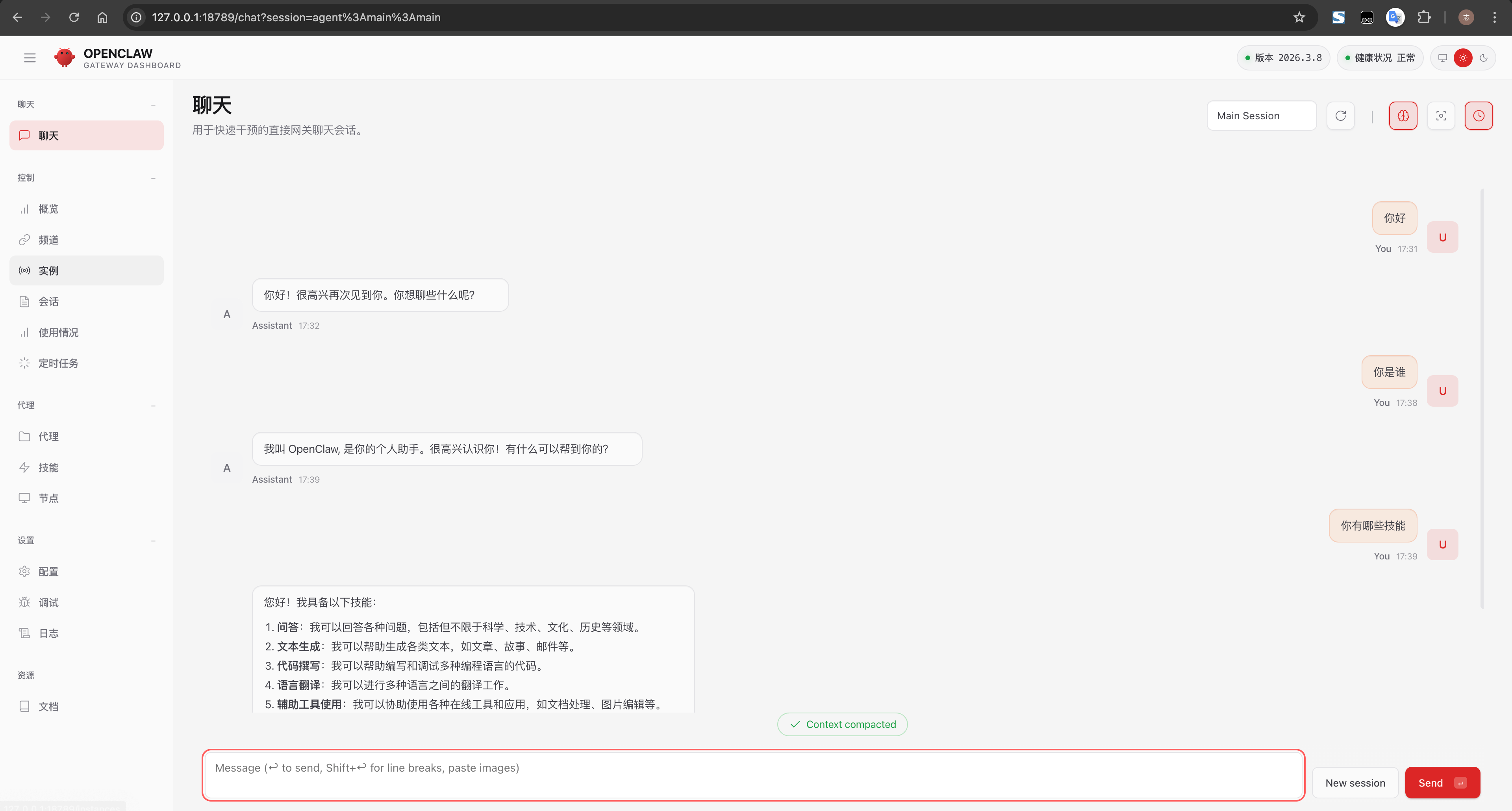

AtomGit 是由开放原子开源基金会联合 CSDN 等生态伙伴共同推出的新一代开源与人工智能协作平台。平台坚持“开放、中立、公益”的理念,把代码托管、模型共享、数据集托管、智能体开发体验和算力服务整合在一起,为开发者提供从开发、训练到部署的一站式体验。
更多推荐

 14
14 0
0- 0


 已为社区贡献10条内容

所有评论(0)