Hugging Face 使用笔记
1. HuggingFace简介
Hugging Face Hub 和 Github 类似,都是Hub(社区)。Hugging Face可以说的上是机器学习界的Github。Hugging Face为用户提供了以下主要功能:
- 模型仓库 (Model Repository):Git仓库可以让你管理代码版本、开源代码。而模型仓库可以让你管理模型版本、开源模型等。使用方式与Github类似。
- 模型 (Models):Hugging Face为不同的机器学习任务提供了许多预训练好的机器学习模型供大家使用,这些模型就存储在模型仓库中。
- 数据集 (Dataset):Hugging Face上有许多公开数据集。
Hugging Face在NLP领域最出名,其提供的模型大多都是基于Transformer的。为了易用性,Hugging Face还为用户提供了以下几个项目:
- Transformers(github,官方文档):Transformers提供了上千个预训练好的模型可以用于不同的任务,例如文本领域、音频领域和CV领域。该项目是HuggingFace的核心,可以说学习HuggingFace就是在学习该项目如何使用。
- Datasets(github,官方文档):一个轻量级的数据集框架,主要有两个功能:① 一行代码下载和预处理常用的公开数据集;② 快速、易用的数据预处理类库。
- Accelerate(github,官方文档):帮助Pytorch用户很方便的实现 multi-GPU/TPU/fp16。
- Space(链接):Space提供了许多好玩的深度学习应用,可以尝试玩一下。
2. 注册与登陆
这里不用多说,使用邮箱注册,邮箱验证,然后登陆

3. 获取token
点击头像->Settings

Access Tokens->New token


关于这个类型的定义,有如下说明:
fine-grained: tokens with this role can be used to provide fine-grained access to specific resources, such as a specific model or models in a specific organization. This type of token is useful in production environments, as you can use your own token without sharing access to all your resources.read: tokens with this role can only be used to provide read access to repositories you could read. That includes public and private repositories that you, or an organization you’re a member of, own. Use this role if you only need to read content from the Hugging Face Hub (e.g. when downloading private models or doing inference).write: tokens with this role additionally grant write access to the repositories you have write access to. Use this token if you need to create or push content to a repository (e.g., when training a model or modifying a model card).
选择一下这些权限
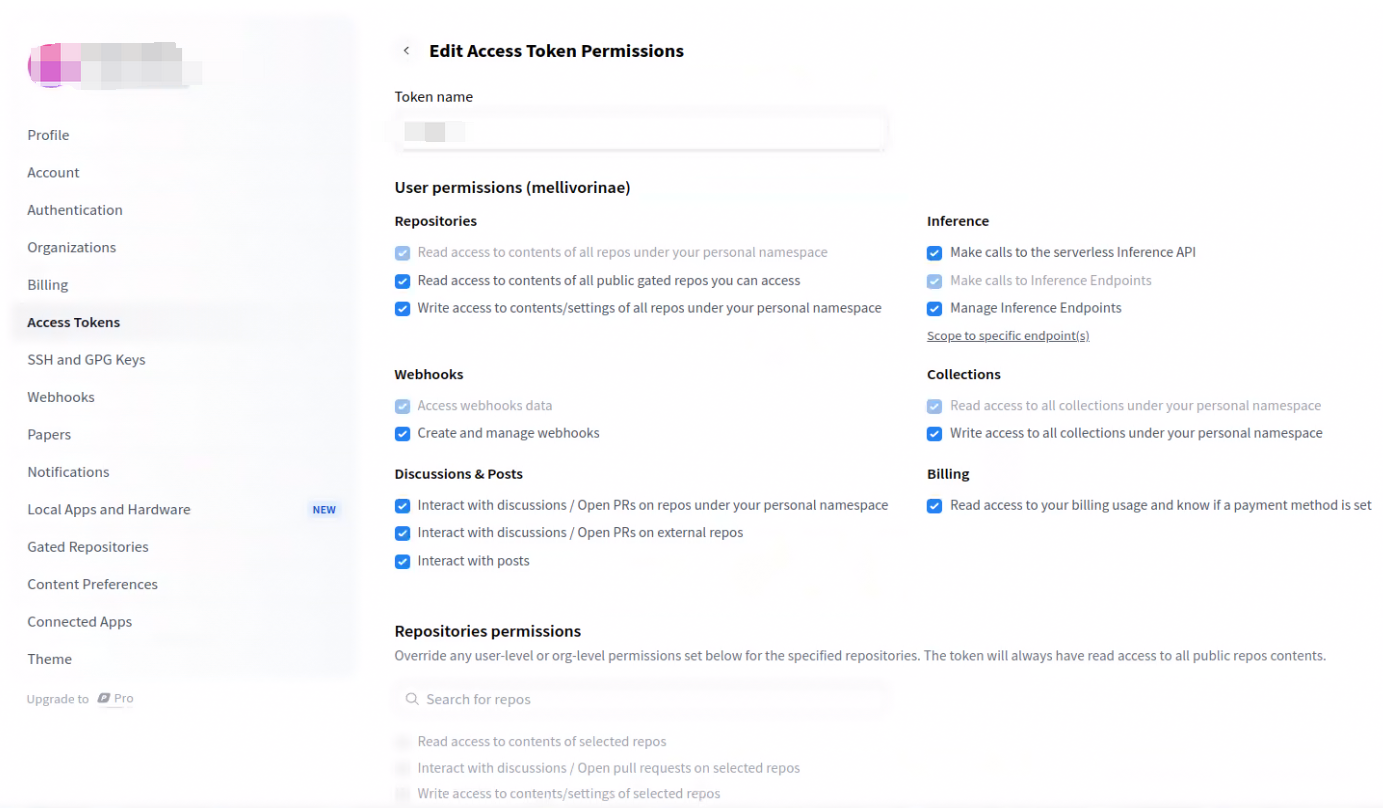
4. 配置token
有三种方法
4.1. 使用代码登陆
把下面的代码写在一个脚本中,然后运行并输入token(注意:不要以交互式的方式逐行运行)
from huggingface_hub import login

login()
这段代码会把token写入到配置文件中
4.2. 使用命令登录
huggingface-cli login这条命令会把token写入到配置文件中
4.3. 修改配置文件
把token粘贴到该文件中
~/.cache/huggingface/token
5. 下载数据
5.1. 使用命令下载

这里会给你命令,按命令执行即可

注意:有时下载时间可能很久(多达几十小时),而且没有进度条。
5.2. 使用代码下载
import os
from huggingface_hub import snapshot_download


print('downloading entire files...')
# 注意,这种方式仍然保存在cache_dir中
snapshot_download(repo_id="szymanowiczs/splatter-image-v1", repo_type="dataset",
                  local_dir="/home/xxx/Downloads",
                  local_dir_use_symlinks=False, resume_download=True,
                  token='hf_***')
6. 下载预训练模型
6.1. 使用命令下载

注意:有时下载时间可能很久(多达几十小时),而且没有进度条。
6.2. 使用代码下载
6.2.1. 使用snapshot_download下载
import os
from huggingface_hub import snapshot_download


# 使用cache_dir参数,将模型/数据集保存到指定“本地路径”
snapshot_download(repo_id="szymanowiczs/splatter-image-v1", repo_type=None,
                  cache_dir="/home/xxx/Downloads",
                  local_dir_use_symlinks=False, resume_download=True,
                  token='hf_***')
6.2.2. 使用hf_hub_download下载
from huggingface_hub import hf_hub_download


model_path = hf_hub_download(repo_id="szymanowiczs/splatter-image-multi-category-v1",
                             filename="model_latest.pth")
7. 使用问题记录
7.1. 下载失败
7.1.1. 现象
'(MaxRetryError("HTTPSConnectionPool(host='huggingface.co', port=443): Max retries exceeded with url: /bert-base-uncased/resolve/main/vocab.txt (Caused by ConnectTimeoutError(<urllib3.connection.HTTPSConnection object at 0x7f1320354880>, 'Connection to huggingface.co timed out. (connect timeout=10)'))"), '(Request ID: 625af900-631f-4614-9358-30364ecacefe)')' thrown while requesting HEAD https://huggingface.co/bert-base-uncased/resolve/main/vocab.txt
'(MaxRetryError("HTTPSConnectionPool(host='huggingface.co', port=443): Max retries exceeded with url: /bert-base-uncased/resolve/main/added_tokens.json (Caused by ConnectTimeoutError(<urllib3.connection.HTTPSConnection object at 0x7f1320354d60>, 'Connection to huggingface.co timed out. (connect timeout=10)'))"), '(Request ID: 1679a995-7441-4afe-a685-9a7bd6da9f2a)')' thrown while requesting HEAD https://huggingface.co/bert-base-uncased/resolve/main/added_tokens.json
'(MaxRetryError("HTTPSConnectionPool(host='huggingface.co', port=443): Max retries exceeded with url: /bert-base-uncased/resolve/main/special_tokens_map.json (Caused by ConnectTimeoutError(<urllib3.connection.HTTPSConnection object at 0x7f13202fb250>, 'Connection to huggingface.co timed out. (connect timeout=10)'))"), '(Request ID: 9af5b73e-5230-45d7-8886-5d37d38f09a8)')' thrown while requesting HEAD https://huggingface.co/bert-base-uncased/resolve/main/special_tokens_map.json
'(MaxRetryError("HTTPSConnectionPool(host='huggingface.co', port=443): Max retries exceeded with url: /bert-base-uncased/resolve/main/tokenizer_config.json (Caused by ConnectTimeoutError(<urllib3.connection.HTTPSConnection object at 0x7f13202fb730>, 'Connection to huggingface.co timed out. (connect timeout=10)'))"), '(Request ID: 12136040-d033-4099-821c-dcb80fb50018)')' thrown while requesting HEAD https://huggingface.co/bert-base-uncased/resolve/main/tokenizer_config.json
Traceback (most recent call last):
File "/tmp/pycharm_project_494/Zilean-Classifier/main.py", line 48, in <module>
tokenizer = BertTokenizer.from_pretrained('bert-base-uncased')
File "/root/miniconda3/envs/DL/lib/python3.8/site-packages/transformers/tokenization_utils_base.py", line 1838, in from_pretrained
raise EnvironmentError(
OSError: Can't load tokenizer for 'bert-base-uncased'. If you were trying to load it from 'https://huggingface.co/models', make sure you don't have a local directory with the same name. Otherwise, make sure 'bert-base-uncased' is the correct path to a directory containing all relevant files for a BertTokenizer tokenizer.
7.1.2. 原因分析
造成这种错误的原因主要是因为你的服务器没有办法连接huggingface的原因,你可以直接在你的服务器上尝试能否直接ping
ping huggingface.co那我的机器就是没有数据传输过来,当然前提是你自己的服务器一定要有网络连接(可以尝试ping www.baidu.com来检测自己机器是否有网络)。
7.1.3. 解决方法
使用另一台拥有网络条件的电脑下载,例如云服务器或其它操作系统的电脑
from transformers import BertModel, BertTokenizer

# 使用bert-large-uncased
model = BertModel.from_pretrained('bert-large-uncased')
tokenizer = BertTokenizer.from_pretrained('bert-large-uncased')
此时你的机器上会出现如下图片: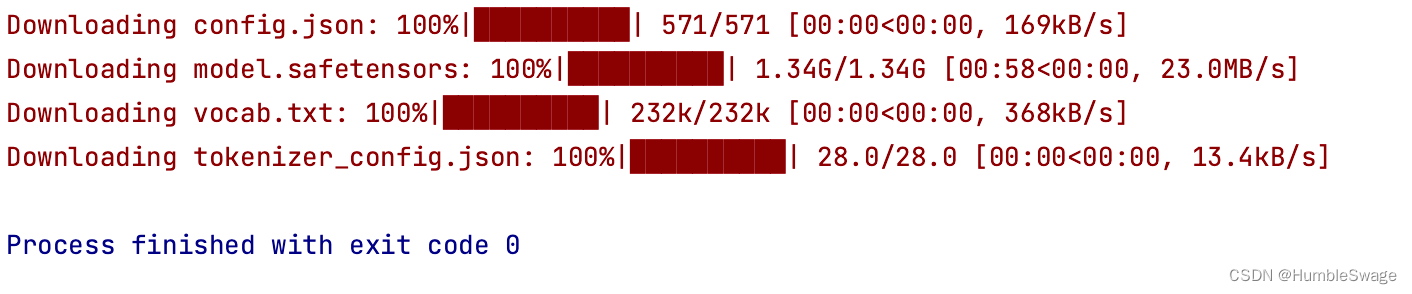
找到本地下载好的模型文件
- 如果你是Windows用户,你的用户User文件下面又有个.cache/huggingface/hub/,注意打开隐藏文件;
- 如果你是MacOS用户在下面路径中
~/.cache/huggingface/hub/models--bert-base-uncased
上传文件到服务器上
将本地文件上传到服务器的下面路径中
~/.cache/huggingface/hub/models--bert-base-uncased
就可以运行你的代码了,但是这里运行的时候有个小问题,就是你运行时候仍然会报错说无法下载这些文件,请耐心等待,你的代码会正常运行
如果你不想出现之前上面还显示出错的问题,那么修改之前的加载方法,之前的加载方法为:
config = BertConfig.from_pretrained(model_name)修改为
# 指定本地bert模型路径
bert_model_dir = "/path/to/bert/model"

config = transformers.BertConfig.from_pretrained(bert_model_dir)
参考文献
Hugging Face快速入门(重点讲解模型(Transformers)和数据集部分(Datasets))_huggingface-CSDN博客

AtomGit 是由开放原子开源基金会联合 CSDN 等生态伙伴共同推出的新一代开源与人工智能协作平台。平台坚持“开放、中立、公益”的理念,把代码托管、模型共享、数据集托管、智能体开发体验和算力服务整合在一起,为开发者提供从开发、训练到部署的一站式体验。
更多推荐

 27
27 0
0- 0


 已为社区贡献7条内容

所有评论(0)