数据统计引擎 - Flutter OpenHarmony分析工具
·
更新概述
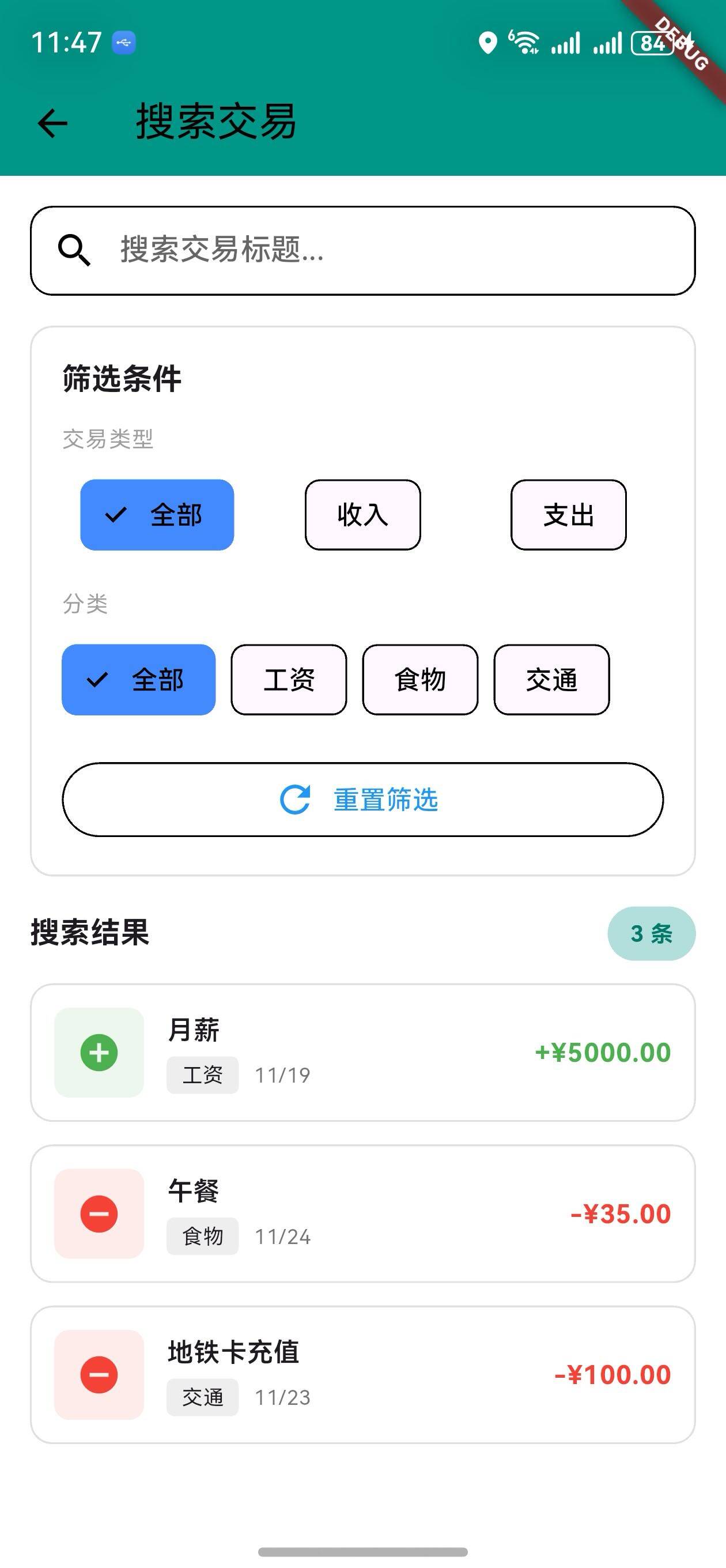
v1.14.0 版本为 OpenHarmony 钱包应用增加了强大的交易搜索和筛选功能。用户现在可以通过钱包页面的搜索按钮快速查找交易,支持按关键词、交易类型、分类等多维度筛选。这个新功能大大提高了用户查找历史交易的效率。
核心功能更新
1. 交易筛选模型
TransactionFilter 类定义
/// 交易搜索筛选模型
class TransactionFilter {
  final String? keyword;
  final String? category;
  final wallet.TransactionType? type;
  final DateTime? startDate;
  final DateTime? endDate;
  final double? minAmount;
  final double? maxAmount;

  TransactionFilter({
    this.keyword,
    this.category,
    this.type,
    this.startDate,
    this.endDate,
    this.minAmount,
    this.maxAmount,
  });

  /// 检查交易是否匹配筛选条件
  bool matches(wallet.Transaction transaction) {
    // 关键词匹配
    if (keyword != null && keyword!.isNotEmpty) {
      if (!transaction.title.toLowerCase().contains(keyword!.toLowerCase())) {
        return false;
      }
    }

    // 分类匹配
    if (category != null && category!.isNotEmpty) {
      if (transaction.category != category) {
        return false;
      }
    }

    // 类型匹配
    if (type != null && transaction.type != type) {
      return false;
    }

    // 日期范围匹配
    if (startDate != null && transaction.date.isBefore(startDate!)) {
      return false;
    }
    if (endDate != null && transaction.date.isAfter(endDate!.add(const Duration(days: 1)))) {
      return false;
    }

    // 金额范围匹配
    if (minAmount != null && transaction.amount < minAmount!) {
      return false;
    }
    if (maxAmount != null && transaction.amount > maxAmount!) {
      return false;
    }

    return true;
  }
}
说明:
- 支持关键词搜索(模糊匹配)
- 支持分类筛选
- 支持交易类型筛选(收入/支出)
- 支持日期范围筛选
- 支持金额范围筛选
筛选条件对比
| 条件 | 说明 | 示例 |
|---|---|---|
| 关键词 | 交易标题模糊匹配 | “食物”、“工资” |
| 分类 | 精确匹配分类 | “食物”、“交通” |
| 类型 | 收入或支出 | 收入、支出 |
| 日期范围 | 指定日期区间 | 2024-01-01 ~ 2024-12-31 |
| 金额范围 | 指定金额区间 | 100 ~ 1000 |
2. 交易搜索服务
TransactionSearchService 类
/// 交易搜索服务
class TransactionSearchService {
  /// 搜索交易
  static List<wallet.Transaction> search(
    List<wallet.Transaction> transactions,
    TransactionFilter filter,
  ) {
    return transactions.where((t) => filter.matches(t)).toList();
  }

  /// 获取所有分类
  static Set<String> getAllCategories(List<wallet.Transaction> transactions) {
    return transactions.map((t) => t.category).toSet();
  }

  /// 获取日期范围
  static DateTimeRange? getDateRange(List<wallet.Transaction> transactions) {
    if (transactions.isEmpty) return null;
    final sorted = transactions..sort((a, b) => a.date.compareTo(b.date));
    return DateTimeRange(start: sorted.first.date, end: sorted.last.date);
  }

  /// 获取金额范围
  static (double, double)? getAmountRange(List<wallet.Transaction> transactions) {
    if (transactions.isEmpty) return null;
    final amounts = transactions.map((t) => t.amount).toList();
    return (amounts.reduce((a, b) => a < b ? a : b), amounts.reduce((a, b) => a > b ? a : b));
  }
}
说明:
search: 根据筛选条件搜索交易getAllCategories: 获取所有分类列表getDateRange: 获取交易的日期范围getAmountRange: 获取交易的金额范围
3. 交易搜索页面
搜索栏
/// 构建搜索栏
Widget _buildSearchBar() {
  return Padding(
    padding: const EdgeInsets.symmetric(horizontal: 16),
    child: TextField(
      controller: _searchController,
      decoration: InputDecoration(
        hintText: '搜索交易标题...',
        prefixIcon: const Icon(Icons.search),
        suffixIcon: _searchController.text.isNotEmpty
            ? IconButton(
                icon: const Icon(Icons.clear),
                onPressed: () {
                  _searchController.clear();
                  setState(() {});
                },
              )
            : null,
        border: OutlineInputBorder(
          borderRadius: BorderRadius.circular(12),
        ),
        contentPadding: const EdgeInsets.symmetric(horizontal: 16, vertical: 12),
      ),
      onChanged: (value) {
        setState(() {});
      },
    ),
  );
}
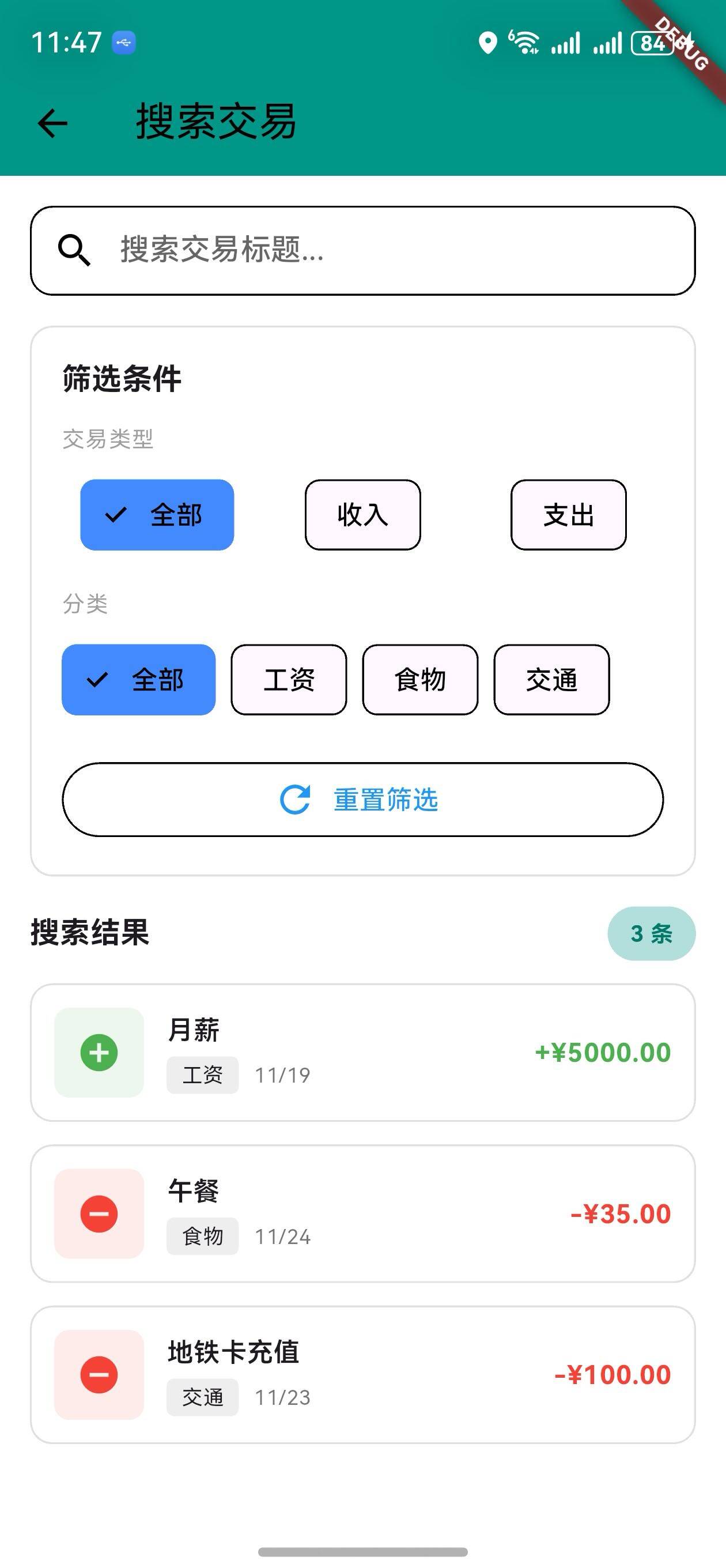
说明:
- 实时搜索,输入时立即更新结果
- 支持清空按钮快速清除搜索词
- 圆角设计,美观易用
筛选条件
/// 构建筛选部分
Widget _buildFilterSection(Set<String> categories) {
  return Padding(
    padding: const EdgeInsets.symmetric(horizontal: 16),
    child: Container(
      padding: const EdgeInsets.all(16),
      decoration: BoxDecoration(
        border: Border.all(color: Colors.grey.shade300),
        borderRadius: BorderRadius.circular(12),
      ),
      child: Column(
        crossAxisAlignment: CrossAxisAlignment.start,
        children: [
          Text(
            '筛选条件',
            style: Theme.of(context).textTheme.titleMedium?.copyWith(
                  fontWeight: FontWeight.bold,
                ),
          ),
          const SizedBox(height: 12),
          // 交易类型筛选
          Text('交易类型', style: Theme.of(context).textTheme.bodySmall),
          const SizedBox(height: 8),
          Row(
            children: [
              Expanded(
                child: ChoiceChip(
                  label: const Text('全部'),
                  selected: _selectedType == null,
                  onSelected: (selected) {
                    setState(() {
                      _selectedType = null;
                    });
                  },
                ),
              ),
              const SizedBox(width: 8),
              Expanded(
                child: ChoiceChip(
                  label: const Text('收入'),
                  selected: _selectedType == wallet.TransactionType.income,
                  onSelected: (selected) {
                    setState(() {
                      _selectedType = selected ? wallet.TransactionType.income : null;
                    });
                  },
                ),
              ),
              const SizedBox(width: 8),
              Expanded(
                child: ChoiceChip(
                  label: const Text('支出'),
                  selected: _selectedType == wallet.TransactionType.expense,
                  onSelected: (selected) {
                    setState(() {
                      _selectedType = selected ? wallet.TransactionType.expense : null;
                    });
                  },
                ),
              ),
            ],
          ),
          const SizedBox(height: 16),
          // 分类筛选
          Text('分类', style: Theme.of(context).textTheme.bodySmall),
          const SizedBox(height: 8),
          Wrap(
            spacing: 8,
            runSpacing: 8,
            children: [
              ChoiceChip(
                label: const Text('全部'),
                selected: _selectedCategory == null,
                onSelected: (selected) {
                  setState(() {
                    _selectedCategory = null;
                  });
                },
              ),
              ...categories.map((category) {
                return ChoiceChip(
                  label: Text(category),
                  selected: _selectedCategory == category,
                  onSelected: (selected) {
                    setState(() {
                      _selectedCategory = selected ? category : null;
                    });
                  },
                );
              }).toList(),
            ],
          ),
          const SizedBox(height: 16),
          // 重置按钮
          SizedBox(
            width: double.infinity,
            child: OutlinedButton.icon(
              icon: const Icon(Icons.refresh),
              label: const Text('重置筛选'),
              onPressed: () {
                setState(() {
                  _searchController.clear();
                  _selectedCategory = null;
                  _selectedType = null;
                });
              },
            ),
          ),
        ],
      ),
    ),
  );
}
说明:
- 交易类型:全部、收入、支出
- 分类:动态生成,基于实际数据
- 重置按钮:一键清除所有筛选条件
搜索结果
/// 构建结果部分
Widget _buildResultsSection(List<wallet.Transaction> results) {
  return Padding(
    padding: const EdgeInsets.symmetric(horizontal: 16),
    child: Column(
      crossAxisAlignment: CrossAxisAlignment.start,
      children: [
        Row(
          mainAxisAlignment: MainAxisAlignment.spaceBetween,
          children: [
            Text(
              '搜索结果',
              style: Theme.of(context).textTheme.titleMedium?.copyWith(
                    fontWeight: FontWeight.bold,
                  ),
            ),
            Container(
              padding: const EdgeInsets.symmetric(horizontal: 12, vertical: 6),
              decoration: BoxDecoration(
                color: Colors.teal.shade100,
                borderRadius: BorderRadius.circular(20),
              ),
              child: Text(
                '${results.length} 条',
                style: TextStyle(
                  color: Colors.teal.shade700,
                  fontWeight: FontWeight.bold,
                  fontSize: 12,
                ),
              ),
            ),
          ],
        ),
        const SizedBox(height: 12),
        if (results.isEmpty)
          Container(
            padding: const EdgeInsets.all(32),
            decoration: BoxDecoration(
              color: Colors.grey.shade100,
              borderRadius: BorderRadius.circular(12),
            ),
            child: Center(
              child: Column(
                children: [
                  Icon(Icons.search_off, size: 48, color: Colors.grey.shade400),
                  const SizedBox(height: 12),
                  Text('未找到匹配的交易'),
                ],
              ),
            ),
          )
        else
          ListView.builder(
            shrinkWrap: true,
            physics: const NeverScrollableScrollPhysics(),
            itemCount: results.length,
            itemBuilder: (context, index) {
              final transaction = results[index];
              final isIncome = transaction.type == wallet.TransactionType.income;
              final color = isIncome ? Colors.green : Colors.red;

              return Container(
                margin: const EdgeInsets.only(bottom: 12),
                padding: const EdgeInsets.all(12),
                decoration: BoxDecoration(
                  border: Border.all(color: Colors.grey.shade300),
                  borderRadius: BorderRadius.circular(12),
                ),
                child: Row(
                  children: [
                    Container(
                      width: 48,
                      height: 48,
                      decoration: BoxDecoration(
                        color: color.withOpacity(0.1),
                        borderRadius: BorderRadius.circular(8),
                      ),
                      child: Center(
                        child: Icon(
                          isIncome ? Icons.add_circle : Icons.remove_circle,
                          color: color,
                        ),
                      ),
                    ),
                    const SizedBox(width: 12),
                    Expanded(
                      child: Column(
                        crossAxisAlignment: CrossAxisAlignment.start,
                        children: [
                          Text(transaction.title, style: const TextStyle(fontWeight: FontWeight.w600)),
                          const SizedBox(height: 4),
                          Row(
                            children: [
                              Container(
                                padding: const EdgeInsets.symmetric(horizontal: 8, vertical: 2),
                                decoration: BoxDecoration(
                                  color: Colors.grey.shade200,
                                  borderRadius: BorderRadius.circular(4),
                                ),
                                child: Text(transaction.category, style: const TextStyle(fontSize: 11)),
                              ),
                              const SizedBox(width: 8),
                              Text(
                                '${transaction.date.month}/${transaction.date.day}',
                                style: TextStyle(fontSize: 11, color: Colors.grey.shade600),
                              ),
                            ],
                          ),
                        ],
                      ),
                    ),
                    Text(
                      '${isIncome ? '+' : '-'}¥${transaction.amount.toStringAsFixed(2)}',
                      style: TextStyle(fontSize: 14, fontWeight: FontWeight.bold, color: color),
                    ),
                  ],
                ),
              );
            },
          ),
      ],
    ),
  );
}
说明:
- 显示搜索结果数量
- 空状态提示
- 结果列表展示
- 每条交易显示标题、分类、日期、金额
UI 变化
交易搜索页面布局
┌─────────────────────────────────┐
│  搜索交易                        │
├─────────────────────────────────┤
│  [🔍 搜索交易标题...] [✕]       │
├─────────────────────────────────┤
│  筛选条件                        │
│  交易类型: [全部] [收入] [支出]  │
│  分类: [全部] [食物] [交通] ...  │
│  [🔄 重置筛选]                   │
├─────────────────────────────────┤
│  搜索结果 (5 条)                 │
│  ┌─────────────────────────┐   │
│  │ 🟢 工资      工作  12/24 │   │
│  │    +¥5000                │   │
│  └─────────────────────────┘   │
│  ┌─────────────────────────┐   │
│  │ 🔴 午餐      食物  12/24 │   │
│  │    -¥50                  │   │
│  └─────────────────────────┘   │
└─────────────────────────────────┘
访问方式
- 进入钱包页面
- 点击 AppBar 右侧的搜索按钮(🔍)
- 进入交易搜索页面
版本对比
| 功能 | v1.13.0 | v1.14.0 |
|---|---|---|
| 高级统计 | ✅ | ✅ |
| 趋势预测 | ✅ | ✅ |
| 财务概览 | ✅ | ✅ |
| 交易筛选模型 | ❌ | ✅ |
| 交易搜索服务 | ❌ | ✅ |
| 关键词搜索 | ❌ | ✅ |
| 多维度筛选 | ❌ | ✅ |
| 搜索结果展示 | ❌ | ✅ |
| 筛选条件重置 | ❌ | ✅ |
使用场景
场景 1:查找特定交易
- 进入钱包页面
- 点击搜索按钮
- 输入交易标题关键词(如"工资")
- 查看搜索结果
场景 2:按分类查看交易
- 进入搜索页面
- 在筛选条件中选择分类(如"食物")
- 查看该分类的所有交易
场景 3:查看收入或支出
- 进入搜索页面
- 在交易类型中选择"收入"或"支出"
- 查看对应类型的所有交易
场景 4:组合筛选
- 进入搜索页面
- 输入关键词
- 选择交易类型
- 选择分类
- 查看满足所有条件的交易
技术亮点
1. 灵活的筛选模型
- 支持多个筛选条件
- 条件可选,支持任意组合
- 易于扩展新的筛选条件
2. 高效的搜索算法
- 使用
where进行链式筛选 - 支持模糊匹配和精确匹配
- 性能优化,适合大数据量
3. 实时搜索反馈
- 输入时立即更新结果
- 显示结果数量
- 空状态提示
4. 用户友好的界面
- 直观的筛选条件
- 清晰的结果展示
- 一键重置功能
下一步计划
v1.15.0 将继续增强功能,计划增加:
- 📊 交易统计报告
- 📅 日历视图
- 🏷️ 标签快速筛选
- 💾 收藏常用筛选
感谢使用 OpenHarmony 钱包! 🎉
如有建议或问题,欢迎反馈。
欢迎加入开源鸿蒙跨平台社区:https://openharmonycrossplatform.csdn.net

AtomGit 是由开放原子开源基金会联合 CSDN 等生态伙伴共同推出的新一代开源与人工智能协作平台。平台坚持“开放、中立、公益”的理念,把代码托管、模型共享、数据集托管、智能体开发体验和算力服务整合在一起,为开发者提供从开发、训练到部署的一站式体验。
更多推荐
 4
4 0
0- 0


 已为社区贡献10条内容

所有评论(0)