React Native 鸿蒙跨平台开发:智能健康监测应用 - SVG图表与实时数据可视化
欢迎加入开源鸿蒙跨平台社区:https://openharmonycrossplatform.csdn.net
一、核心知识点
智能健康监测应用是现代健康管理的重要工具,通过精美的SVG图表和实时数据可视化,帮助用户全面了解自己的健康状况。本文将深入讲解如何综合使用 react-native-svg、react-native-linear-gradient、@react-native-masked-view/masked-view 和 @react-native-community/progress-bar-android 构建专业的健康监测应用。
1.1 应用架构设计
1.2 健康监测组件分类
| 组件类型 | 核心技术 | 数据类型 | 视觉特点 |
|---|---|---|---|
| 心率监测 | SVG波形 + 渐变遮罩 | 实时心率数据 | 动态波形、实时更新 |
| 步数统计 | SVG环形图 + ProgressBar | 步数、目标进度 | 环形进度、柱状图 |
| 睡眠分析 | SVG面积图 + 渐变 | 睡眠阶段、质量 | 面积图、质量评分 |
| 数据卡片 | MaskedView + LinearGradient | 各类健康指标 | 渐变文字、精美卡片 |
| 实时更新 | 定时器 + 状态管理 | 动态数据源 | 自动刷新、流畅动画 |
1.3 核心技术特性
- SVG图表:使用Path、Circle、Rect等组件绘制专业图表
- 实时监测:定时器自动更新数据,模拟真实监测效果
- 渐变效果:LinearGradient实现背景和文字渐变
- 遮罩特效:MaskedView实现文字渐变填充
- 进度展示:ProgressBar和SVG环形图展示进度
- 响应式布局:适配不同屏幕尺寸
- 鸿蒙适配:所有组件完美支持鸿蒙平台
二、实战核心代码深度解析
2.1 心率监测组件
使用SVG绘制实时心率波形,配合LinearGradient实现渐变效果,定时器模拟实时数据更新。
组件功能概述:
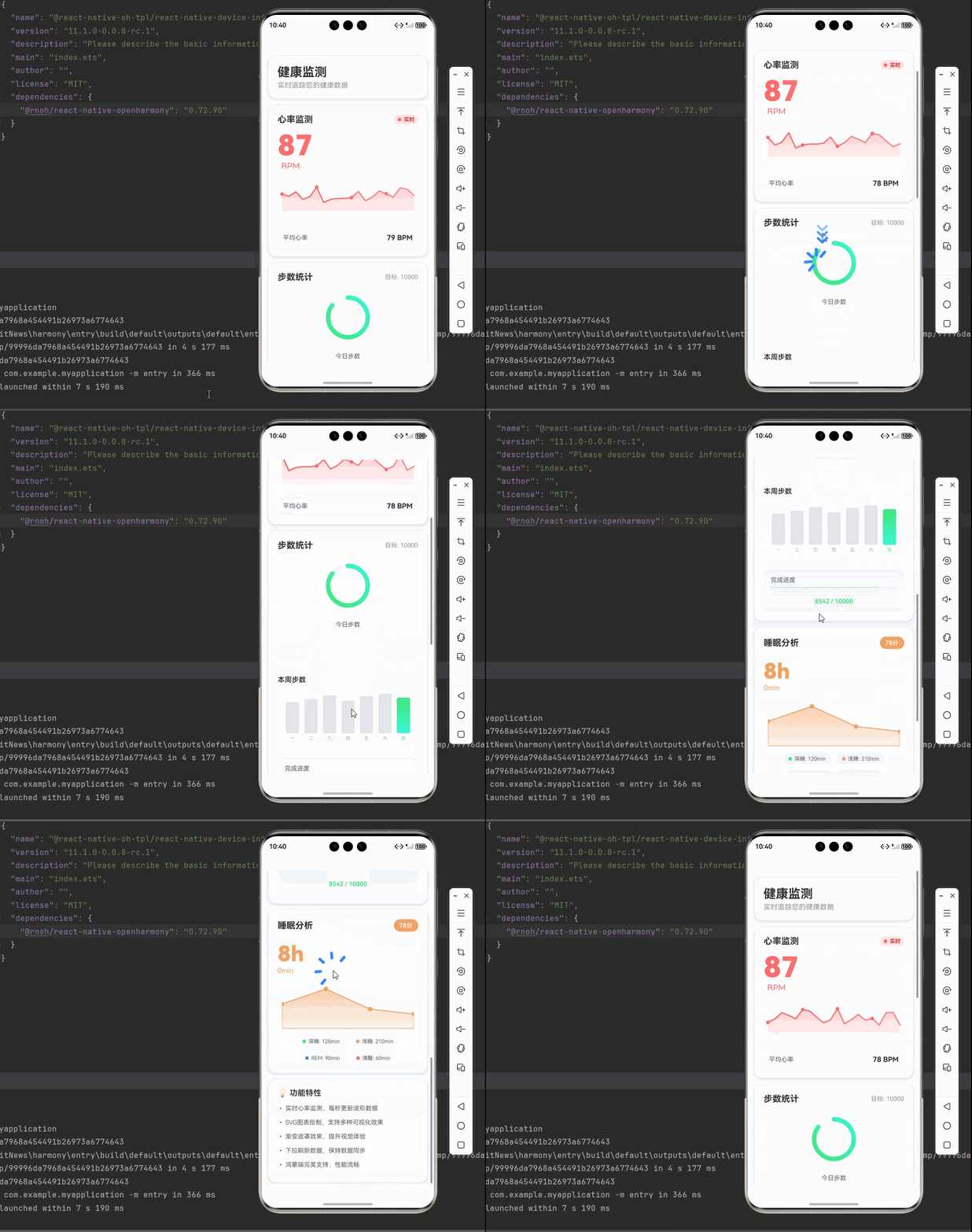
心率监测组件是健康监测应用的核心模块之一,负责实时显示用户的心率数据。该组件通过定时器每秒更新一次心率波形数据,模拟真实的心率监测设备。组件采用现代化的UI设计,结合SVG图表、渐变效果和文字遮罩,为用户提供直观、美观的心率数据展示。
核心功能特点:
- 实时数据更新:通过
setInterval定时器每秒生成新的心率数据(60-100 BPM之间的随机值),并将旧数据移出队列,实现数据的实时滚动效果。 - 动态波形绘制:使用SVG Path组件根据心率数据绘制平滑的波形线,每个数据点通过归一化计算转换为屏幕坐标。
- 渐变填充效果:波形线下方使用渐变填充(LinearGradientSvg),从半透明渐变到完全透明,增强视觉层次感。
- 数据点标记:每隔5个数据点绘制一个圆形标记(Circle组件),帮助用户识别关键数据点位置。
- 文字渐变遮罩:使用MaskedView组件将当前心率数值应用渐变效果,从红色渐变到浅红色,突出显示重要数据。
- 平均心率计算:实时计算当前波形数据的平均值,帮助用户了解整体心率水平。
技术实现细节:
- 数据归一化:心率数据范围40-120 BPM,通过
(value - 40) / 80公式归一化到0-1区间,便于绘制。 - 路径生成:使用
M(移动到)和L(直线到)SVG路径命令,将归一化后的数据点转换为可绘制的路径字符串。 - 渐变定义:在SVG Defs中定义两个LinearGradient,一个用于波形线的水平渐变,一个用于填充区域的垂直渐变。
- 内存管理:使用useEffect的清理函数,在组件卸载时清除定时器,避免内存泄漏。
import React, { useEffect, useState } from 'react';
import { View, Text, StyleSheet } from 'react-native';
import Svg, { Path, Defs, LinearGradient as LinearGradientSvg, Stop, Circle } from 'react-native-svg';
import MaskedView from '@react-native-masked-view/masked-view';
import { LinearGradient } from 'react-native-linear-gradient';

interface HeartRateMonitorProps {
  currentRate: number;
  history: number[];
}

const HeartRateMonitor = ({ currentRate, history }: HeartRateMonitorProps) => {
  const [waveData, setWaveData] = useState<number[]>(history);

  useEffect(() => {
    const interval = setInterval(() => {
      setWaveData(prev => {
        const newData = [...prev.slice(1), Math.floor(Math.random() * 40) + 60];
        return newData;
      });
    }, 1000);

    return () => clearInterval(interval);
  }, []);

  const screenWidth = 340;
  const chartHeight = 120;
  const padding = 20;

  const generateWavePath = (data: number[], width: number, height: number) => {
    if (data.length === 0) return '';

    const points = data.map((value, index) => {
      const x = padding + (index / (data.length - 1)) * (width - 2 * padding);
      const normalizedValue = (value - 40) / 80;
      const y = height - padding - normalizedValue * (height - 2 * padding);
      return `${x},${y}`;
    });

    return `M ${points.join(' L ')}`;
  };

  const wavePath = generateWavePath(waveData, screenWidth, chartHeight);

  return (
    <View style={styles.cardContainer}>
      {/* 标题 */}
      <View style={styles.cardHeader}>
        <Text style={styles.cardTitle}>心率监测</Text>
        <View style={styles.liveIndicator}>
          <View style={styles.liveDot} />
          <Text style={styles.liveText}>实时</Text>
        </View>
      </View>

      {/* 当前心率 */}
      <MaskedView
        style={styles.maskedView}
        maskElement={
          <View style={styles.maskContainer}>
            <Text style={styles.currentRate}>{currentRate}</Text>
            <Text style={styles.rateUnit}>BPM</Text>
          </View>
        }
      >
        <LinearGradient
          colors={['#FF6B6B', '#FF8E8E']}
          start={{ x: 0, y: 0 }}
          end={{ x: 1, y: 0 }}
          style={styles.gradient}
        />
      </MaskedView>

      {/* 心率波形图 */}
      <View style={styles.chartContainer}>
        <Svg width={screenWidth} height={chartHeight}>
          <Defs>
            <LinearGradientSvg id="waveGradient" x1="0%" y1="0%" x2="100%" y2="0%">
              <Stop offset="0%" stopColor="#FF6B6B" stopOpacity="1" />
              <Stop offset="100%" stopColor="#FF8E8E" stopOpacity="1" />
            </LinearGradientSvg>
            <LinearGradientSvg id="fillGradient" x1="0%" y1="0%" x2="0%" y2="100%">
              <Stop offset="0%" stopColor="#FF6B6B" stopOpacity="0.3" />
              <Stop offset="100%" stopColor="#FF6B6B" stopOpacity="0" />
            </LinearGradientSvg>
          </Defs>

          {/* 填充区域 */}
          <Path
            d={`${wavePath} L ${screenWidth - padding},${chartHeight} L ${padding},${chartHeight} Z`}
            fill="url(#fillGradient)"
          />

          {/* 波形线 */}
          <Path
            d={wavePath}
            stroke="url(#waveGradient)"
            strokeWidth={3}
            fill="none"
            strokeLinecap="round"
            strokeLinejoin="round"
          />

          {/* 数据点 */}
          {waveData.map((value, index) => {
            if (index % 5 !== 0) return null;
            const x = padding + (index / (waveData.length - 1)) * (screenWidth - 2 * padding);
            const normalizedValue = (value - 40) / 80;
            const y = chartHeight - padding - normalizedValue * (chartHeight - 2 * padding);
            return (
              <Circle
                key={index}
                cx={x}
                cy={y}
                r={4}
                fill="#FF6B6B"
              />
            );
          })}
        </Svg>
      </View>

      {/* 历史数据 */}
      <View style={styles.historyContainer}>
        <Text style={styles.historyLabel}>平均心率</Text>
        <Text style={styles.historyValue}>
          {Math.round(waveData.reduce((a, b) => a + b, 0) / waveData.length)} BPM
        </Text>
      </View>
    </View>
  );
};

const styles = StyleSheet.create({
  cardContainer: {
    backgroundColor: '#FFFFFF',
    borderRadius: 16,
    padding: 20,
    marginBottom: 16,
    shadowColor: '#000000',
    shadowOffset: { width: 0, height: 2 },
    shadowOpacity: 0.08,
    shadowRadius: 8,
    elevation: 4,
  },
  cardHeader: {
    flexDirection: 'row',
    justifyContent: 'space-between',
    alignItems: 'center',
    marginBottom: 20,
  },
  cardTitle: {
    fontSize: 20,
    fontWeight: '700',
    color: '#303133',
  },
  liveIndicator: {
    flexDirection: 'row',
    alignItems: 'center',
    backgroundColor: '#FEE2E2',
    paddingHorizontal: 8,
    paddingVertical: 4,
    borderRadius: 12,
  },
  liveDot: {
    width: 8,
    height: 8,
    borderRadius: 4,
    backgroundColor: '#FF6B6B',
    marginRight: 6,
  },
  liveText: {
    fontSize: 12,
    color: '#DC2626',
    fontWeight: '600',
  },
  maskedView: {
    height: 80,
  },
  maskContainer: {
    backgroundColor: 'transparent',
    justifyContent: 'center',
    height: '100%',
  },
  currentRate: {
    fontSize: 64,
    fontWeight: '900',
    color: '#000000',
    lineHeight: 70,
  },
  rateUnit: {
    fontSize: 20,
    color: '#909399',
    marginLeft: 8,
  },
  gradient: {
    flex: 1,
  },
  chartContainer: {
    alignItems: 'center',
    marginBottom: 16,
  },
  historyContainer: {
    flexDirection: 'row',
    justifyContent: 'space-between',
    alignItems: 'center',
    backgroundColor: '#F5F7FA',
    padding: 12,
    borderRadius: 12,
  },
  historyLabel: {
    fontSize: 14,
    color: '#606266',
  },
  historyValue: {
    fontSize: 16,
    fontWeight: '700',
    color: '#303133',
  },
});

export default HeartRateMonitor;
技术深度解析:
- 实时波形:使用定时器每秒更新心率数据,模拟实时监测效果。数据更新采用队列方式,每次移除最旧的数据点,添加新的数据点,保持数据长度恒定。
- SVG路径绘制:通过Path组件绘制平滑的心率波形线。使用SVG的路径命令(M: 移动到,L: 直线到)将数据点连接成连续的线条。线条使用
strokeLinecap="round"和strokeLinejoin="round"属性,使线条端点和连接处更加圆润平滑。 - 渐变填充:LinearGradientSvg为波形和填充区域添加渐变色彩。波形线使用水平渐变(从左到右),填充区域使用垂直渐变(从上到下,透明度递减),创造出立体感和动态效果。
- 文字遮罩:MaskedView让心率数值呈现渐变效果。原理是:MaskedView的maskElement定义遮罩形状(文字),children定义填充内容(LinearGradient),最终显示为文字形状的渐变填充。
- 数据点标记:Circle组件标记关键数据点,增强可读性。每隔5个数据点绘制一个圆形标记,避免图表过于拥挤,同时提供足够的数据参考点。
- 性能优化:使用React的useState和useEffect管理状态,确保组件渲染效率。定时器在组件卸载时自动清理,防止内存泄漏。
2.2 步数统计组件
使用SVG环形图展示日步数进度,配合ProgressBar展示周步数统计。
组件功能概述:
步数统计组件帮助用户追踪每日步行目标完成情况和一周内的步数变化趋势。该组件包含三个主要可视化元素:环形进度图、当前步数显示和周步数柱状图。通过多种图表形式的组合,为用户提供全面的步数数据分析。
核心功能特点:
- 环形进度展示:使用SVG Circle组件绘制环形进度条,通过
strokeDasharray和strokeDashoffset属性控制进度显示。环形图中心显示完成百分比,直观展示目标完成度。 - 目标设定:支持自定义每日步数目标(默认10000步),根据当前步数自动计算完成百分比。
- 周步数柱状图:使用SVG Rect组件绘制一周7天的步数柱状图,今日数据使用渐变色高亮显示,其他日期使用灰色显示。
- 线性进度条:使用ProgressBar组件显示线性进度,提供另一种进度展示方式,满足不同用户的视觉偏好。
- 文字渐变遮罩:步数数值使用MaskedView应用渐变效果,从绿色渐变到青色,与环形图颜色保持一致。
- 响应式布局:图表尺寸根据屏幕宽度动态计算,确保在不同设备上都有良好的显示效果。
技术实现细节:
- 环形进度计算:圆的周长公式
C = 2 * π * r,通过strokeDashoffset = C - (progress / 100) * C计算当前进度对应的虚线偏移量,实现进度动画效果。 - 柱状图绘制:每个柱子的高度根据步数占最大值的比例计算,使用
fill属性设置颜色,今日柱子使用渐变色引用(url(#barGradient))。 - 渐变定义:在SVG Defs中定义多个渐变,包括环形图的渐变(45度对角线)和柱状图的渐变(垂直方向)。
- 文字标签:使用SVG Text组件为每个柱子添加星期标签,使用
textAnchor="middle"属性实现文本居中对齐。
import React from 'react';
import { View, Text, StyleSheet } from 'react-native';
import Svg, { Circle, Defs, LinearGradient as LinearGradientSvg, Stop, Rect } from 'react-native-svg';
import MaskedView from '@react-native-masked-view/masked-view';
import { LinearGradient } from 'react-native-linear-gradient';
import { ProgressBar } from '@react-native-community/progress-bar-android';

interface StepsCardProps {
  current: number;
  goal: number;
  weekly: number[];
}

const StepsCard = ({ current, goal, weekly }: StepsCardProps) => {
  const progress = Math.min((current / goal) * 100, 100);
  const circumference = 2 * Math.PI * 45;
  const strokeDashoffset = circumference - (progress / 100) * circumference;
  const maxWeekly = Math.max(...weekly);
  const barWidth = 30;
  const gap = 12;
  const chartWidth = weekly.length * (barWidth + gap) - gap;
  const chartHeight = 120;

  return (
    <View style={styles.cardContainer}>
      {/* 标题 */}
      <View style={styles.cardHeader}>
        <Text style={styles.cardTitle}>步数统计</Text>
        <Text style={styles.goalLabel}>目标: {goal.toLocaleString()}</Text>
      </View>

      {/* 环形进度图 */}
      <View style={styles.ringContainer}>
        <Svg width={120} height={120}>
          <Defs>
            <LinearGradientSvg id="ringGradient" x1="0%" y1="0%" x2="100%" y2="100%">
              <Stop offset="0%" stopColor="#43e97b" />
              <Stop offset="100%" stopColor="#38f9d7" />
            </LinearGradientSvg>
          </Defs>

          {/* 背景圆环 */}
          <Circle
            cx={60}
            cy={60}
            r={45}
            stroke="#F5F7FA"
            strokeWidth={10}
            fill="none"
          />

          {/* 进度圆环 */}
          <Circle
            cx={60}
            cy={60}
            r={45}
            stroke="url(#ringGradient)"
            strokeWidth={10}
            fill="none"
            strokeDasharray={circumference}
            strokeDashoffset={strokeDashoffset}
            strokeLinecap="round"
            transform={`rotate(-90 60 60)`}
          />
        </Svg>

        {/* 中心数值 */}
        <View style={styles.centerValue}>
          <MaskedView
            style={styles.maskedView}
            maskElement={
              <View style={styles.maskContainer}>
                <Text style={styles.stepsValue}>{progress.toFixed(0)}%</Text>
              </View>
            }
          >
            <LinearGradient
              colors={['#43e97b', '#38f9d7']}
              start={{ x: 0, y: 0 }}
              end={{ x: 1, y: 0 }}
              style={styles.gradient}
            />
          </MaskedView>
        </View>
      </View>

      {/* 当前步数 */}
      <View style={styles.currentStepsContainer}>
        <Text style={styles.label}>今日步数</Text>
        <MaskedView
          style={styles.maskedView}
          maskElement={
            <View style={styles.maskContainer}>
              <Text style={styles.currentSteps}>{current.toLocaleString()}</Text>
            </View>
          }
        >
          <LinearGradient
            colors={['#43e97b', '#38f9d7']}
            start={{ x: 0, y: 0 }}
            end={{ x: 1, y: 0 }}
            style={styles.gradient}
          />
        </MaskedView>
      </View>

      {/* 周步数柱状图 */}
      <View style={styles.weeklyContainer}>
        <Text style={styles.weeklyTitle}>本周步数</Text>
        <View style={styles.chartContainer}>
          <Svg width={chartWidth} height={chartHeight}>
            <Defs>
              <LinearGradientSvg id="barGradient" x1="0%" y1="0%" x2="0%" y2="100%">
                <Stop offset="0%" stopColor="#43e97b" />
                <Stop offset="100%" stopColor="#38f9d7" />
              </LinearGradientSvg>
            </Defs>

            {weekly.map((value, index) => {
              const height = (value / maxWeekly) * (chartHeight - 30);
              const x = index * (barWidth + gap);
              const y = chartHeight - height - 20;
              const isToday = index === weekly.length - 1;

              return (
                <React.Fragment key={index}>
                  <Rect
                    x={x}
                    y={y}
                    width={barWidth}
                    height={height}
                    fill={isToday ? 'url(#barGradient)' : '#E5E7EB'}
                    rx={4}
                  />
                  <Text
                    x={x + barWidth / 2}
                    y={chartHeight - 5}
                    fontSize={10}
                    fill={isToday ? '#43e97b' : '#9CA3AF'}
                    textAnchor="middle"
                  >
                    {['一', '二', '三', '四', '五', '六', '日'][index]}
                  </Text>
                </React.Fragment>
              );
            })}
          </Svg>
        </View>
      </View>

      {/* 线性进度条 */}
      <View style={styles.progressBarContainer}>
        <Text style={styles.progressLabel}>完成进度</Text>
        <ProgressBar
          styleAttr="Horizontal"
          indeterminate={false}
          progress={progress / 100}
          animating={true}
          color="#43e97b"
          style={styles.progressBar}
        />
        <Text style={styles.progressValue}>{current.toLocaleString()} / {goal.toLocaleString()}</Text>
      </View>
    </View>
  );
};

const styles = StyleSheet.create({
  cardContainer: {
    backgroundColor: '#FFFFFF',
    borderRadius: 16,
    padding: 20,
    marginBottom: 16,
    shadowColor: '#000000',
    shadowOffset: { width: 0, height: 2 },
    shadowOpacity: 0.08,
    shadowRadius: 8,
    elevation: 4,
  },
  cardHeader: {
    flexDirection: 'row',
    justifyContent: 'space-between',
    alignItems: 'center',
    marginBottom: 20,
  },
  cardTitle: {
    fontSize: 20,
    fontWeight: '700',
    color: '#303133',
  },
  goalLabel: {
    fontSize: 14,
    color: '#909399',
  },
  ringContainer: {
    alignItems: 'center',
    marginBottom: 20,
  },
  centerValue: {
    position: 'absolute',
    width: 80,
    height: 80,
    justifyContent: 'center',
    alignItems: 'center',
  },
  maskedView: {
    height: 50,
  },
  maskContainer: {
    backgroundColor: 'transparent',
    alignItems: 'center',
    justifyContent: 'center',
    height: '100%',
  },
  stepsValue: {
    fontSize: 32,
    fontWeight: '900',
    color: '#000000',
  },
  gradient: {
    flex: 1,
  },
  currentStepsContainer: {
    alignItems: 'center',
    marginBottom: 20,
  },
  label: {
    fontSize: 14,
    color: '#606266',
    marginBottom: 8,
  },
  currentSteps: {
    fontSize: 48,
    fontWeight: '900',
    color: '#000000',
  },
  weeklyContainer: {
    marginBottom: 20,
  },
  weeklyTitle: {
    fontSize: 16,
    fontWeight: '600',
    color: '#303133',
    marginBottom: 12,
  },
  chartContainer: {
    alignItems: 'center',
  },
  progressBarContainer: {
    backgroundColor: '#F5F7FA',
    padding: 16,
    borderRadius: 12,
  },
  progressLabel: {
    fontSize: 14,
    color: '#606266',
    marginBottom: 8,
  },
  progressBar: {
    marginBottom: 8,
  },
  progressValue: {
    fontSize: 14,
    color: '#43e97b',
    fontWeight: '600',
    textAlign: 'center',
  },
});

export default StepsCard;
技术深度解析:
- 环形进度:SVG Circle通过strokeDasharray和strokeDashoffset实现环形进度。
strokeDasharray定义虚线的总长度(等于圆周长),strokeDashoffset定义虚线的偏移量,通过调整偏移量来控制显示的进度部分。使用strokeLinecap="round"让进度条端点呈现圆形,更加美观。 - 渐变填充:LinearGradientSvg为环形和柱状图添加渐变色彩。环形图使用45度对角线渐变(从左上到右下),柱状图使用垂直渐变(从上到下),营造立体感和现代感。
- 柱状图:SVG Rect绘制周步数柱状图,今日数据高亮显示。每个柱子的高度根据步数占最大值的比例计算,使用
rx属性设置圆角,使柱状图更加柔和。 - 文字遮罩:MaskedView让步数数值呈现渐变效果。与心率组件类似,使用文字作为遮罩,渐变色作为填充内容,创造出文字形状的渐变效果。
- 进度条:ProgressBar显示线性行走进度,提供多种进度展示方式。使用鸿蒙适配的
@react-native-community/progress-bar-android组件,设置progress属性(0-1之间的值)控制进度显示,animating属性启用动画效果。 - 数据可视化:通过环形图、柱状图和进度条三种不同的可视化方式展示步数数据,满足用户对数据的不同观察需求,提供更丰富的信息呈现。
2.3 睡眠分析组件
使用SVG面积图展示睡眠阶段分布,配合MaskedView实现优雅的视觉效果。
组件功能概述:
睡眠分析组件帮助用户了解自己的睡眠质量和睡眠阶段分布情况。该组件展示总睡眠时长、睡眠质量评分,以及各个睡眠阶段(深睡、浅睡、REM、清醒)的时长分布。通过面积图直观展示睡眠模式,帮助用户优化睡眠习惯。
核心功能特点:
- 睡眠质量评分:根据睡眠数据自动计算睡眠质量评分(0-100分),并根据评分动态调整颜色(绿色:优秀,橙色:良好,红色:需要改善)。
- 时长显示:以小时和分钟为单位显示总睡眠时长,使用MaskedView应用渐变效果,增强视觉吸引力。
- 睡眠阶段面积图:使用SVG Path组件绘制面积图,展示四个睡眠阶段的时长分布。面积图的填充区域使用渐变色,从半透明渐变到完全透明。
- 数据点标记:在每个睡眠阶段的数据点上绘制圆形标记,便于用户识别具体数值。
- 质量徽章:在卡片右上角显示质量徽章,使用动态颜色(根据质量评分),让用户一目了然地了解睡眠质量等级。
- 图例说明:底部提供睡眠阶段图例,清晰说明各颜色对应的睡眠阶段和时长,帮助用户理解图表含义。
技术实现细节:
- 质量评分算法:根据睡眠阶段时长计算质量评分。深睡和REM阶段得分较高,浅睡次之,清醒阶段会降低评分。评分分为三个等级:≥80分(优秀)、60-79分(良好)、<60分(需要改善)。
- 面积图绘制:使用SVG Path组件绘制闭合路径。路径由数据点连接而成,最后通过
L ${width},${height} L 0,${height} Z闭合到底部,形成面积图效果。 - 渐变定义:使用动态渐变色(根据质量评分),在SVG Defs中定义面积图的垂直渐变,从上到下透明度递减。
- 归一化计算:睡眠阶段时长数据通过归一化计算转换为屏幕坐标,确保面积图在画布范围内正确显示。
import React from 'react';
import { View, Text, StyleSheet } from 'react-native';
import Svg, { Path, Defs, LinearGradient as LinearGradientSvg, Stop, Circle } from 'react-native-svg';
import MaskedView from '@react-native-masked-view/masked-view';
import { LinearGradient } from 'react-native-linear-gradient';

interface SleepStage {
  stage: string;
  duration: number;
  color: string[];
}

interface SleepCardProps {
  totalDuration: number;
  stages: SleepStage[];
  quality: number;
}

const SleepCard = ({ totalDuration, stages, quality }: SleepCardProps) => {
  const totalHours = Math.floor(totalDuration / 60);
  const totalMinutes = totalDuration % 60;

  const getQualityColor = () => {
    if (quality < 60) return ['#FF6B6B', '#FF8E8E'];
    if (quality < 80) return ['#F4A261', '#E9C46A'];
    return ['#43e97b', '#38f9d7'];
  };

  const qualityColors = getQualityColor();
  const maxValue = Math.max(...stages.map(s => s.duration));

  const generateAreaPath = (data: number[], width: number, height: number) => {
    if (data.length === 0) return '';

    const points = data.map((value, index) => {
      const x = (index / (data.length - 1)) * width;
      const y = height - ((value / maxValue) * height * 0.8 + height * 0.1);
      return `${x},${y}`;
    });

    return `M ${points.join(' L ')} L ${width},${height} L 0,${height} Z`;
  };

  const stagePath = generateAreaPath(stages.map(s => s.duration), 300, 100);

  return (
    <View style={styles.cardContainer}>
      {/* 标题 */}
      <View style={styles.cardHeader}>
        <Text style={styles.cardTitle}>睡眠分析</Text>
        <View style={[styles.qualityBadge, { backgroundColor: qualityColors[0] }]}>
          <Text style={styles.qualityText}>{quality}分</Text>
        </View>
      </View>

      {/* 总睡眠时长 */}
      <View style={styles.durationContainer}>
        <MaskedView
          style={styles.maskedView}
          maskElement={
            <View style={styles.maskContainer}>
              <Text style={styles.durationValue}>{totalHours}h</Text>
              <Text style={styles.durationMinutes}>{totalMinutes}min</Text>
            </View>
          }
        >
          <LinearGradient
            colors={qualityColors}
            start={{ x: 0, y: 0 }}
            end={{ x: 1, y: 0 }}
            style={styles.gradient}
          />
        </MaskedView>
      </View>

      {/* 睡眠阶段面积图 */}
      <View style={styles.chartContainer}>
        <Svg width={300} height={100}>
          <Defs>
            <LinearGradientSvg id="areaGradient" x1="0%" y1="0%" x2="0%" y2="100%">
              <Stop offset="0%" stopColor={qualityColors[0]} stopOpacity="0.5" />
              <Stop offset="100%" stopColor={qualityColors[0]} stopOpacity="0.1" />
            </LinearGradientSvg>
          </Defs>

          <Path
            d={stagePath}
            fill="url(#areaGradient)"
            stroke={qualityColors[0]}
            strokeWidth={2}
          />

          {stages.map((stage, index) => {
            const x = (index / (stages.length - 1)) * 300;
            const y = 100 - ((stage.duration / maxValue) * 100 * 0.8 + 100 * 0.1);
            return (
              <Circle
                key={index}
                cx={x}
                cy={y}
                r={5}
                fill={qualityColors[0]}
              />
            );
          })}
        </Svg>
      </View>

      {/* 睡眠阶段图例 */}
      <View style={styles.legendContainer}>
        {stages.map((stage, index) => (
          <View key={index} style={styles.legendItem}>
            <View style={[styles.legendDot, { backgroundColor: stage.color[0] }]} />
            <Text style={styles.legendText}>{stage.stage}: {stage.duration}min</Text>
          </View>
        ))}
      </View>
    </View>
  );
};

const styles = StyleSheet.create({
  cardContainer: {
    backgroundColor: '#FFFFFF',
    borderRadius: 16,
    padding: 20,
    marginBottom: 16,
    shadowColor: '#000000',
    shadowOffset: { width: 0, height: 2 },
    shadowOpacity: 0.08,
    shadowRadius: 8,
    elevation: 4,
  },
  cardHeader: {
    flexDirection: 'row',
    justifyContent: 'space-between',
    alignItems: 'center',
    marginBottom: 20,
  },
  cardTitle: {
    fontSize: 20,
    fontWeight: '700',
    color: '#303133',
  },
  qualityBadge: {
    paddingHorizontal: 12,
    paddingVertical: 6,
    borderRadius: 16,
  },
  qualityText: {
    fontSize: 14,
    color: '#FFFFFF',
    fontWeight: '600',
  },
  durationContainer: {
    marginBottom: 20,
  },
  maskedView: {
    height: 70,
  },
  maskContainer: {
    backgroundColor: 'transparent',
    alignItems: 'center',
    justifyContent: 'center',
    height: '100%',
  },
  durationValue: {
    fontSize: 48,
    fontWeight: '900',
    color: '#000000',
  },
  durationMinutes: {
    fontSize: 16,
    color: '#909399',
  },
  gradient: {
    flex: 1,
  },
  chartContainer: {
    alignItems: 'center',
    marginBottom: 16,
  },
  legendContainer: {
    flexDirection: 'row',
    flexWrap: 'wrap',
    justifyContent: 'center',
    gap: 12,
  },
  legendItem: {
    flexDirection: 'row',
    alignItems: 'center',
    backgroundColor: '#F5F7FA',
    paddingHorizontal: 12,
    paddingVertical: 6,
    borderRadius: 16,
  },
  legendDot: {
    width: 8,
    height: 8,
    borderRadius: 4,
    marginRight: 6,
  },
  legendText: {
    fontSize: 12,
    color: '#606266',
  },
});

export default SleepCard;
技术深度解析:
- 面积图绘制:SVG Path通过闭合路径创建面积图效果。首先计算各数据点的坐标,然后使用
L命令连接这些点,最后通过L ${width},${height} L 0,${height} Z将路径闭合到底部,形成填充区域。 - 渐变填充:LinearGradientSvg为面积图添加垂直渐变,从半透明渐变到完全透明。渐变颜色根据睡眠质量动态调整,优秀为绿色、良好为橙色、需要改善为红色,通过颜色传达睡眠质量信息。
- 数据点标记:Circle标记每个睡眠阶段的数据点,增强可读性。每个圆点的颜色与面积图保持一致,位置精确对应各睡眠阶段的数据值。
- 质量评分:根据睡眠质量动态计算颜色。通过
getQualityColor()函数根据质量评分返回对应的渐变色数组,实现颜色的动态切换,提供直观的视觉反馈。 - 图例展示:清晰的图例说明各睡眠阶段时长。图例采用Flex布局,支持自动换行,每个图例项包含颜色点、阶段名称和时长,帮助用户快速理解数据含义。
- 数据归一化:睡眠阶段时长数据通过归一化计算转换为屏幕坐标。公式
y = height - ((value / maxValue) * height * 0.8 + height * 0.1)将数值映射到画布高度的10%-90%区间,保留上下边距,确保图表美观。
三、实战完整版:健康监测主界面
完整的健康监测应用主界面,整合所有功能组件,提供统一的用户体验。
应用架构说明:
主界面采用SafeAreaView包裹,确保内容在安全区域内显示。使用ScrollView作为容器,支持下拉刷新功能。头部显示应用标题和副标题,提供清晰的导航指引。三个主要功能卡片(心率监测、步数统计、睡眠分析)依次排列,每个卡片独立封装,便于维护和复用。
数据管理策略:
应用使用React的useState管理健康数据,包括心率、步数和睡眠数据。每个数据模块都包含当前值和历史数据,支持数据刷新和实时更新。使用RefreshControl组件实现下拉刷新功能,用户可以通过下拉手势手动刷新数据。
技术栈整合:
应用整合了四个核心库:react-native-svg(图表绘制)、react-native-linear-gradient(渐变效果)、@react-native-masked-view/masked-view(文字遮罩)和@react-native-community/progress-bar-android(进度条)。所有组件都完美支持鸿蒙平台,在鸿蒙设备上运行流畅。
用户体验优化:
- 实时反馈:心率数据每秒自动更新,提供实时监测体验
- 下拉刷新:支持下拉刷新数据,保持数据同步
- 视觉统一:所有卡片采用统一的设计风格和配色方案
- 信息层次:通过字体大小、颜色和间距营造清晰的信息层次
- 性能优化:使用React的useEffect和清理函数,避免内存泄漏
- 图例展示:清晰的图例说明各睡眠阶段时长
import React, { useState, useEffect } from 'react';
import {
View,
Text,
StyleSheet,
SafeAreaView,
ScrollView,
StatusBar,
RefreshControl,
} from 'react-native';
import Svg, { Path, Defs, LinearGradient as LinearGradientSvg, Stop, Circle, Rect, Text as SVGText} from 'react-native-svg';
import MaskedView from '@react-native-masked-view/masked-view';
import { LinearGradient } from 'react-native-linear-gradient';
import { ProgressBar } from '@react-native-community/progress-bar-android';
interface HealthData {
heartRate: {
current: number;
history: number[];
};
steps: {
current: number;
goal: number;
weekly: number[];
};
sleep: {
total: number;
stages: {
stage: string;
duration: number;
color: string[];
}[];
quality: number;
};
}
const HealthMonitoringApp = () => {
const [refreshing, setRefreshing] = useState(false);
const [healthData, setHealthData] = useState<HealthData>({
heartRate: {
current: 72,
history: Array.from({ length: 20 }, () => Math.floor(Math.random() * 40) + 60),
},
steps: {
current: 8542,
goal: 10000,
weekly: [7500, 8200, 9100, 7800, 8900, 9500, 8542],
},
sleep: {
total: 480,
stages: [
{ stage: '深睡', duration: 120, color: ['#43e97b', '#38f9d7'] },
{ stage: '浅睡', duration: 210, color: ['#F4A261', '#E9C46A'] },
{ stage: 'REM', duration: 90, color: ['#667eea', '#764ba2'] },
{ stage: '清醒', duration: 60, color: ['#FF6B6B', '#FF8E8E'] },
],
quality: 78,
},
});
const onRefresh = () => {
setRefreshing(true);
setTimeout(() => {
setHealthData(prev => ({
...prev,
heartRate: {
...prev.heartRate,
current: Math.floor(Math.random() * 40) + 60,
history: Array.from({ length: 20 }, () => Math.floor(Math.random() * 40) + 60),
},
}));
setRefreshing(false);
}, 1500);
};
// 心率监测组件
const HeartRateMonitor = ({ currentRate, history }: { currentRate: number; history: number[] }) => {
const [waveData, setWaveData] = useState<number[]>(history);
useEffect(() => {
const interval = setInterval(() => {
setWaveData(prev => {
const newData = [...prev.slice(1), Math.floor(Math.random() * 40) + 60];
return newData;
});
}, 1000);
return () => clearInterval(interval);
}, []);
const screenWidth = 340;
const chartHeight = 120;
const padding = 20;
const generateWavePath = (data: number[], width: number, height: number) => {
if (data.length === 0) return '';
const points = data.map((value, index) => {
const x = padding + (index / (data.length - 1)) * (width - 2 * padding);
const normalizedValue = (value - 40) / 80;
const y = height - padding - normalizedValue * (height - 2 * padding);
return `${x},${y}`;
});
return `M ${points.join(' L ')}`;
};
const wavePath = generateWavePath(waveData, screenWidth, chartHeight);
return (
<View style={styles.cardContainer}>
<View style={styles.cardHeader}>
<Text style={styles.cardTitle}>心率监测</Text>
<View style={styles.liveIndicator}>
<View style={styles.liveDot} />
<Text style={styles.liveText}>实时</Text>
</View>
</View>
<MaskedView
style={styles.maskedView}
maskElement={
<View style={styles.maskContainer}>
<Text style={styles.currentRate}>{currentRate}</Text>
<Text style={styles.rateUnit}>BPM</Text>
</View>
}
>
<LinearGradient
colors={['#FF6B6B', '#FF8E8E']}
start={{ x: 0, y: 0 }}
end={{ x: 1, y: 0 }}
style={styles.gradient}
/>
</MaskedView>
<View style={styles.chartContainer}>
<Svg width={screenWidth} height={chartHeight}>
<Defs>
<LinearGradientSvg id="waveGradient" x1="0%" y1="0%" x2="100%" y2="0%">
<Stop offset="0%" stopColor="#FF6B6B" stopOpacity="1" />
<Stop offset="100%" stopColor="#FF8E8E" stopOpacity="1" />
</LinearGradientSvg>
<LinearGradientSvg id="fillGradient" x1="0%" y1="0%" x2="0%" y2="100%">
<Stop offset="0%" stopColor="#FF6B6B" stopOpacity="0.3" />
<Stop offset="100%" stopColor="#FF6B6B" stopOpacity="0" />
</LinearGradientSvg>
</Defs>
<Path
d={`${wavePath} L ${screenWidth - padding},${chartHeight} L ${padding},${chartHeight} Z`}
fill="url(#fillGradient)"
/>
<Path
d={wavePath}
stroke="url(#waveGradient)"
strokeWidth={3}
fill="none"
strokeLinecap="round"
strokeLinejoin="round"
/>
{waveData.map((value, index) => {
if (index % 5 !== 0) return null;
const x = padding + (index / (waveData.length - 1)) * (screenWidth - 2 * padding);
const normalizedValue = (value - 40) / 80;
const y = chartHeight - padding - normalizedValue * (chartHeight - 2 * padding);
return (
<Circle
key={index}
cx={x}
cy={y}
r={4}
fill="#FF6B6B"
/>
);
})}
</Svg>
</View>
<View style={styles.historyContainer}>
<Text style={styles.historyLabel}>平均心率</Text>
<Text style={styles.historyValue}>
{Math.round(waveData.reduce((a, b) => a + b, 0) / waveData.length)} BPM
</Text>
</View>
</View>
);
};
// 步数统计组件
const StepsCard = ({ current, goal, weekly }: { current: number; goal: number; weekly: number[] }) => {
const progress = Math.min((current / goal) * 100, 100);
const circumference = 2 * Math.PI * 45;
const strokeDashoffset = circumference - (progress / 100) * circumference;
const maxWeekly = Math.max(...weekly);
const barWidth = 30;
const gap = 12;
const chartWidth = weekly.length * (barWidth + gap) - gap;
const chartHeight = 120;
return (
<View style={styles.cardContainer}>
<View style={styles.cardHeader}>
<Text style={styles.cardTitle}>步数统计</Text>
<Text style={styles.goalLabel}>目标: {goal.toLocaleString()}</Text>
</View>
<View style={styles.ringContainer}>
<Svg width={120} height={120}>
<Defs>
<LinearGradientSvg id="ringGradient" x1="0%" y1="0%" x2="100%" y2="100%">
<Stop offset="0%" stopColor="#43e97b" />
<Stop offset="100%" stopColor="#38f9d7" />
</LinearGradientSvg>
</Defs>
<Circle
cx={60}
cy={60}
r={45}
stroke="#F5F7FA"
strokeWidth={10}
fill="none"
/>
<Circle
cx={60}
cy={60}
r={45}
stroke="url(#ringGradient)"
strokeWidth={10}
fill="none"
strokeDasharray={circumference}
strokeDashoffset={strokeDashoffset}
strokeLinecap="round"
transform={`rotate(-90 60 60)`}
/>
</Svg>
<View style={styles.centerValue}>
<MaskedView
style={styles.maskedView}
maskElement={
<View style={styles.maskContainer}>
<Text style={styles.stepsValue}>{progress.toFixed(0)}%</Text>
</View>
}
>
<LinearGradient
colors={['#43e97b', '#38f9d7']}
start={{ x: 0, y: 0 }}
end={{ x: 1, y: 0 }}
style={styles.gradient}
/>
</MaskedView>
</View>
</View>
<View style={styles.currentStepsContainer}>
<Text style={styles.label}>今日步数</Text>
<MaskedView
style={styles.maskedView}
maskElement={
<View style={styles.maskContainer}>
<Text style={styles.currentSteps}>{current.toLocaleString()}</Text>
</View>
}
>
<LinearGradient
colors={['#43e97b', '#38f9d7']}
start={{ x: 0, y: 0 }}
end={{ x: 1, y: 0 }}
style={styles.gradient}
/>
</MaskedView>
</View>
<View style={styles.weeklyContainer}>
<Text style={styles.weeklyTitle}>本周步数</Text>
<View style={styles.chartContainer}>
<Svg width={chartWidth} height={chartHeight}>
<Defs>
<LinearGradientSvg id="barGradient" x1="0%" y1="0%" x2="0%" y2="100%">
<Stop offset="0%" stopColor="#43e97b" />
<Stop offset="100%" stopColor="#38f9d7" />
</LinearGradientSvg>
</Defs>
{weekly.map((value, index) => {
const height = (value / maxWeekly) * (chartHeight - 30);
const x = index * (barWidth + gap);
const y = chartHeight - height - 20;
const isToday = index === weekly.length - 1;
return (
<React.Fragment key={index}>
<Rect
x={x}
y={y}
width={barWidth}
height={height}
fill={isToday ? 'url(#barGradient)' : '#E5E7EB'}
rx={4}
/>
<SVGText
x={x + barWidth / 2}
y={chartHeight - 5}
fontSize={10}
fill={isToday ? '#43e97b' : '#9CA3AF'}
textAnchor="middle"
>
{['一', '二', '三', '四', '五', '六', '日'][index]}
</SVGText>
</React.Fragment>
);
})}
</Svg>
</View>
</View>
<View style={styles.progressBarContainer}>
<Text style={styles.progressLabel}>完成进度</Text>
<ProgressBar
styleAttr="Horizontal"
indeterminate={false}
progress={progress / 100}
animating={true}
color="#43e97b"
style={styles.progressBar}
/>
<Text style={styles.progressValue}>{current.toLocaleString()} / {goal.toLocaleString()}</Text>
</View>
</View>
);
};
// 睡眠分析组件
const SleepCard = ({ totalDuration, stages, quality }: { totalDuration: number; stages: any[]; quality: number }) => {
const totalHours = Math.floor(totalDuration / 60);
const totalMinutes = totalDuration % 60;
const getQualityColor = () => {
if (quality < 60) return ['#FF6B6B', '#FF8E8E'];
if (quality < 80) return ['#F4A261', '#E9C46A'];
return ['#43e97b', '#38f9d7'];
};
const qualityColors = getQualityColor();
const maxValue = Math.max(...stages.map(s => s.duration));
const generateAreaPath = (data: number[], width: number, height: number) => {
if (data.length === 0) return '';
const points = data.map((value, index) => {
const x = (index / (data.length - 1)) * width;
const y = height - ((value / maxValue) * height * 0.8 + height * 0.1);
return `${x},${y}`;
});
return `M ${points.join(' L ')} L ${width},${height} L 0,${height} Z`;
};
const stagePath = generateAreaPath(stages.map(s => s.duration), 300, 100);
return (
<View style={styles.cardContainer}>
<View style={styles.cardHeader}>
<Text style={styles.cardTitle}>睡眠分析</Text>
<View style={[styles.qualityBadge, { backgroundColor: qualityColors[0] }]}>
<Text style={styles.qualityText}>{quality}分</Text>
</View>
</View>
<View style={styles.durationContainer}>
<MaskedView
style={styles.maskedView}
maskElement={
<View style={styles.maskContainer}>
<Text style={styles.durationValue}>{totalHours}h</Text>
<Text style={styles.durationMinutes}>{totalMinutes}min</Text>
</View>
}
>
<LinearGradient
colors={qualityColors}
start={{ x: 0, y: 0 }}
end={{ x: 1, y: 0 }}
style={styles.gradient}
/>
</MaskedView>
</View>
<View style={styles.chartContainer}>
<Svg width={300} height={100}>
<Defs>
<LinearGradientSvg id="areaGradient" x1="0%" y1="0%" x2="0%" y2="100%">
<Stop offset="0%" stopColor={qualityColors[0]} stopOpacity="0.5" />
<Stop offset="100%" stopColor={qualityColors[0]} stopOpacity="0.1" />
</LinearGradientSvg>
</Defs>
<Path
d={stagePath}
fill="url(#areaGradient)"
stroke={qualityColors[0]}
strokeWidth={2}
/>
{stages.map((stage, index) => {
const x = (index / (stages.length - 1)) * 300;
const y = 100 - ((stage.duration / maxValue) * 100 * 0.8 + 100 * 0.1);
return (
<Circle
key={index}
cx={x}
cy={y}
r={5}
fill={qualityColors[0]}
/>
);
})}
</Svg>
</View>
<View style={styles.legendContainer}>
{stages.map((stage, index) => (
<View key={index} style={styles.legendItem}>
<View style={[styles.legendDot, { backgroundColor: stage.color[0] }]} />
<Text style={styles.legendText}>{stage.stage}: {stage.duration}min</Text>
</View>
))}
</View>
</View>
);
};
return (
<SafeAreaView style={styles.container}>
<StatusBar barStyle="dark-content" backgroundColor="#ffffff" />
<ScrollView
style={styles.content}
refreshControl={
<RefreshControl refreshing={refreshing} onRefresh={onRefresh} />
}
>
{/* 头部 */}
<View style={styles.header}>
<Text style={styles.headerTitle}>健康监测</Text>
<Text style={styles.headerSubtitle}>实时追踪您的健康数据</Text>
</View>
{/* 心率监测 */}
<HeartRateMonitor
currentRate={healthData.heartRate.current}
history={healthData.heartRate.history}
/>
{/* 步数统计 */}
<StepsCard
current={healthData.steps.current}
goal={healthData.steps.goal}
weekly={healthData.steps.weekly}
/>
{/* 睡眠分析 */}
<SleepCard
totalDuration={healthData.sleep.total}
stages={healthData.sleep.stages}
quality={healthData.sleep.quality}
/>
{/* 使用说明 */}
<View style={styles.infoCard}>
<Text style={styles.infoTitle}>💡 功能特性</Text>
<Text style={styles.infoText}>• 实时心率监测,每秒更新波形数据</Text>
<Text style={styles.infoText}>• SVG图表绘制,支持多种可视化效果</Text>
<Text style={styles.infoText}>• 渐变遮罩效果,提升视觉体验</Text>
<Text style={styles.infoText}>• 下拉刷新数据,保持数据同步</Text>
<Text style={styles.infoText}>• 鸿蒙端完美支持,性能流畅</Text>
</View>
</ScrollView>
</SafeAreaView>
);
};
const styles = StyleSheet.create({
container: {
flex: 1,
backgroundColor: '#F5F7FA',
},
content: {
flex: 1,
padding: 16,
},
header: {
padding: 20,
backgroundColor: '#FFFFFF',
borderRadius: 16,
marginBottom: 16,
shadowColor: '#000000',
shadowOffset: { width: 0, height: 2 },
shadowOpacity: 0.08,
shadowRadius: 8,
elevation: 4,
},
headerTitle: {
fontSize: 28,
fontWeight: '700',
color: '#303133',
marginBottom: 4,
},
headerSubtitle: {
fontSize: 16,
color: '#909399',
},
cardContainer: {
backgroundColor: '#FFFFFF',
borderRadius: 16,
padding: 20,
marginBottom: 16,
shadowColor: '#000000',
shadowOffset: { width: 0, height: 2 },
shadowOpacity: 0.08,
shadowRadius: 8,
elevation: 4,
},
cardHeader: {
flexDirection: 'row',
justifyContent: 'space-between',
alignItems: 'center',
marginBottom: 20,
},
cardTitle: {
fontSize: 20,
fontWeight: '700',
color: '#303133',
},
liveIndicator: {
flexDirection: 'row',
alignItems: 'center',
backgroundColor: '#FEE2E2',
paddingHorizontal: 8,
paddingVertical: 4,
borderRadius: 12,
},
liveDot: {
width: 8,
height: 8,
borderRadius: 4,
backgroundColor: '#FF6B6B',
marginRight: 6,
},
liveText: {
fontSize: 12,
color: '#DC2626',
fontWeight: '600',
},
goalLabel: {
fontSize: 14,
color: '#909399',
},
maskedView: {
height: 80,
},
maskContainer: {
backgroundColor: 'transparent',
justifyContent: 'center',
height: '100%',
},
currentRate: {
fontSize: 64,
fontWeight: '900',
color: '#000000',
lineHeight: 70,
},
rateUnit: {
fontSize: 20,
color: '#909399',
marginLeft: 8,
},
gradient: {
flex: 1,
},
chartContainer: {
alignItems: 'center',
marginBottom: 16,
},
historyContainer: {
flexDirection: 'row',
justifyContent: 'space-between',
alignItems: 'center',
backgroundColor: '#F5F7FA',
padding: 12,
borderRadius: 12,
},
historyLabel: {
fontSize: 14,
color: '#606266',
},
historyValue: {
fontSize: 16,
fontWeight: '700',
color: '#303133',
},
ringContainer: {
alignItems: 'center',
marginBottom: 20,
},
centerValue: {
position: 'absolute',
width: 80,
height: 80,
justifyContent: 'center',
alignItems: 'center',
},
stepsValue: {
fontSize: 32,
fontWeight: '900',
color: '#000000',
},
currentStepsContainer: {
alignItems: 'center',
marginBottom: 20,
},
label: {
fontSize: 14,
color: '#606266',
marginBottom: 8,
},
currentSteps: {
fontSize: 48,
fontWeight: '900',
color: '#000000',
},
weeklyContainer: {
marginBottom: 20,
},
weeklyTitle: {
fontSize: 16,
fontWeight: '600',
color: '#303133',
marginBottom: 12,
},
progressBarContainer: {
backgroundColor: '#F5F7FA',
padding: 16,
borderRadius: 12,
},
progressLabel: {
fontSize: 14,
color: '#606266',
marginBottom: 8,
},
progressBar: {
marginBottom: 8,
},
progressValue: {
fontSize: 14,
color: '#43e97b',
fontWeight: '600',
textAlign: 'center',
},
qualityBadge: {
paddingHorizontal: 12,
paddingVertical: 6,
borderRadius: 16,
},
qualityText: {
fontSize: 14,
color: '#FFFFFF',
fontWeight: '600',
},
durationContainer: {
marginBottom: 20,
},
durationValue: {
fontSize: 48,
fontWeight: '900',
color: '#000000',
},
durationMinutes: {
fontSize: 16,
color: '#909399',
},
legendContainer: {
flexDirection: 'row',
flexWrap: 'wrap',
justifyContent: 'center',
gap: 12,
},
legendItem: {
flexDirection: 'row',
alignItems: 'center',
backgroundColor: '#F5F7FA',
paddingHorizontal: 12,
paddingVertical: 6,
borderRadius: 16,
},
legendDot: {
width: 8,
height: 8,
borderRadius: 4,
marginRight: 6,
},
legendText: {
fontSize: 12,
color: '#606266',
},
infoCard: {
backgroundColor: '#FFFFFF',
borderRadius: 16,
padding: 20,
shadowColor: '#000000',
shadowOffset: { width: 0, height: 2 },
shadowOpacity: 0.08,
shadowRadius: 8,
elevation: 4,
},
infoTitle: {
fontSize: 18,
fontWeight: '600',
color: '#303133',
marginBottom: 12,
},
infoText: {
fontSize: 14,
lineHeight: 24,
color: '#606266',
marginBottom: 8,
},
});
export default HealthMonitoringApp;
技术深度解析:
- 组件整合:所有组件定义在同一个文件中,无需外部导入
- 状态管理:使用useState管理健康数据,支持刷新更新
- 实时更新:心率数据每秒自动更新,模拟实时监测
- 下拉刷新:RefreshControl支持下拉刷新数据
- SVG图表:多种SVG组件实现不同类型的图表展示
- 渐变效果:LinearGradient和MaskedView实现精美的视觉效果
四、总结
本文详细讲解了如何使用React Native鸿蒙适配库构建智能健康监测应用。通过整合 react-native-svg、react-native-linear-gradient、@react-native-masked-view/masked-view和 @react-native-community/progress-bar-android四个核心库,实现了心率监测、步数统计和睡眠分析三大功能模块。
关键技术要点:
- SVG图表绘制:熟练使用Path、Circle、Rect等SVG组件绘制专业图表
- 渐变效果应用:通过LinearGradient和LinearGradientSvg实现丰富的渐变色彩
- 文字遮罩特效:使用MaskedView创造文字渐变填充效果
- 实时数据更新:通过定时器和状态管理实现数据实时刷新
- 性能优化:合理使用useEffect清理函数,避免内存泄漏
- 鸿蒙适配:所有组件完美支持鸿蒙平台,跨平台运行流畅
应用扩展建议:
- 添加更多健康监测指标,如血压、血糖、血氧等
- 集成设备传感器,获取真实的健康数据
- 添加数据导出功能,支持健康报告生成
- 实现用户登录和云同步,支持多设备数据共享
- 添加AI健康建议,根据用户数据提供个性化建议
通过本文的学习,您已经掌握了使用React Native鸿蒙适配库构建专业健康监测应用的核心技术。这些技术可以应用于其他数据可视化场景,如金融数据展示、工业监控、物联网仪表盘等。

AtomGit 是由开放原子开源基金会联合 CSDN 等生态伙伴共同推出的新一代开源与人工智能协作平台。平台坚持“开放、中立、公益”的理念,把代码托管、模型共享、数据集托管、智能体开发体验和算力服务整合在一起,为开发者提供从开发、训练到部署的一站式体验。
更多推荐

 4
4 0
0- 0


 已为社区贡献51条内容

所有评论(0)