Flutter框架开发鸿蒙项目——Row和Column溢出问题完全解决指南
·
Row和Column溢出问题完全解决指南
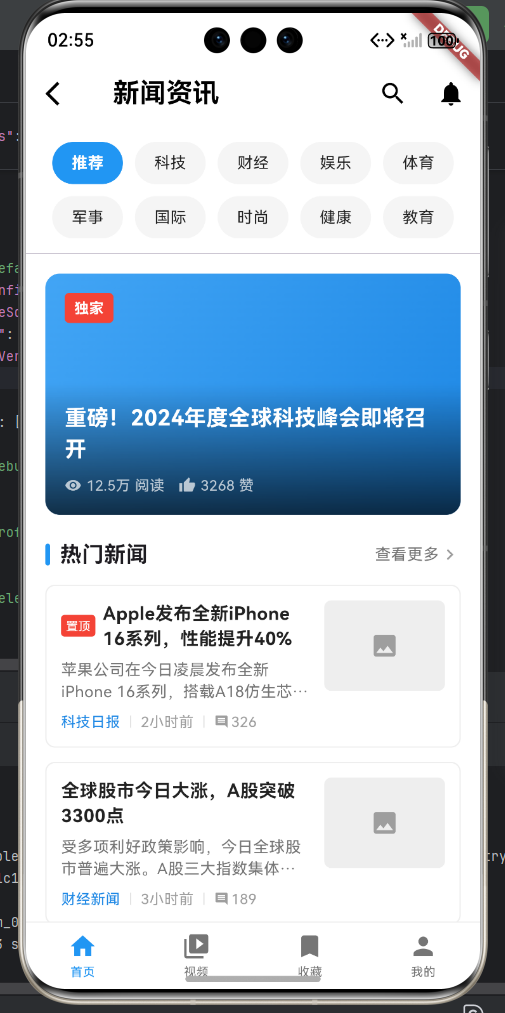
完整示例:新闻资讯应用
下面是一个完整的新闻资讯应用示例,展示了多种溢出问题的解决方案:
import 'package:flutter/material.dart';
class NewsPage extends StatelessWidget {
const NewsPage({super.key});
Widget build(BuildContext context) {
return Scaffold(
backgroundColor: Colors.white,
appBar: _buildAppBar(),
body: Column(
children: [
_buildCategories(),
const Divider(height: 1),
Expanded(
child: _buildNewsList(),
),
],
),
bottomNavigationBar: _buildBottomBar(),
);
}
AppBar _buildAppBar() {
return AppBar(
backgroundColor: Colors.white,
elevation: 0,
leading: IconButton(
icon: const Icon(Icons.arrow_back_ios, color: Colors.black),
onPressed: () {},
),
title: const Text('新闻资讯',
style: TextStyle(color: Colors.black, fontWeight: FontWeight.bold)),
actions: [
IconButton(icon: const Icon(Icons.search, color: Colors.black),
onPressed: () {}),
IconButton(icon: const Icon(Icons.notifications, color: Colors.black),
onPressed: () {}),
],
);
}
// 分类栏 - 使用 Wrap 防止溢出
Widget _buildCategories() {
return Container(
padding: const EdgeInsets.symmetric(horizontal: 16, vertical: 12),
child: Wrap(
spacing: 10,
runSpacing: 10,
children: [
_buildCategoryItem('推荐', true),
_buildCategoryItem('科技', false),
_buildCategoryItem('财经', false),
_buildCategoryItem('娱乐', false),
_buildCategoryItem('体育', false),
_buildCategoryItem('军事', false),
_buildCategoryItem('国际', false),
_buildCategoryItem('时尚', false),
_buildCategoryItem('健康', false),
_buildCategoryItem('教育', false),
],
),
);
}
Widget _buildCategoryItem(String label, bool isSelected) {
return Container(
padding: const EdgeInsets.symmetric(horizontal: 16, vertical: 8),
decoration: BoxDecoration(
color: isSelected ? Colors.blue : Colors.grey[100],
borderRadius: BorderRadius.circular(20),
),
child: Text(
label,
style: TextStyle(
color: isSelected ? Colors.white : Colors.black87,
fontSize: 13,
fontWeight: isSelected ? FontWeight.bold : FontWeight.normal,
),
),
);
}
// 新闻列表
Widget _buildNewsList() {
return ListView(
padding: const EdgeInsets.all(16),
children: [
_buildFeaturedNews(),
const SizedBox(height: 20),
_buildSectionTitle('热门新闻'),
const SizedBox(height: 12),
_buildNewsItem(
title: 'Apple发布全新iPhone 16系列,性能提升40%',
summary:
'苹果公司在今日凌晨发布全新iPhone 16系列,搭载A18仿生芯片,性能相比上一代提升40%,续航时间延长20%。',
source: '科技日报',
time: '2小时前',
comments: 326,
isTop: true,
),
const SizedBox(height: 12),
_buildNewsItem(
title: '全球股市今日大涨,A股突破3300点',
summary:
'受多项利好政策影响,今日全球股市普遍大涨。A股三大指数集体收涨,上证指数突破3300点整数关口。',
source: '财经新闻',
time: '3小时前',
comments: 189,
isTop: false,
),
],
);
}
// 精选新闻 - 使用 Expanded 防止溢出
Widget _buildFeaturedNews() {
return Container(
height: 200,
decoration: BoxDecoration(
borderRadius: BorderRadius.circular(12),
gradient: LinearGradient(
begin: Alignment.topLeft,
end: Alignment.bottomRight,
colors: [Colors.blue[400]!, Colors.blue[600]!],
),
),
child: Stack(
children: [
Positioned(
top: 16,
left: 16,
child: Container(
padding: const EdgeInsets.symmetric(horizontal: 8, vertical: 4),
decoration: BoxDecoration(
color: Colors.red,
borderRadius: BorderRadius.circular(4),
),
child: const Text(
'独家',
style: TextStyle(
color: Colors.white,
fontSize: 12,
fontWeight: FontWeight.bold),
),
),
),
Positioned(
bottom: 0,
left: 0,
right: 0,
child: Container(
padding: const EdgeInsets.all(16),
decoration: BoxDecoration(
gradient: LinearGradient(
begin: Alignment.topCenter,
end: Alignment.bottomCenter,
colors: [Colors.transparent, Colors.black.withOpacity(0.7)],
),
borderRadius: const BorderRadius.only(
bottomLeft: Radius.circular(12),
bottomRight: Radius.circular(12),
),
),
child: Column(
crossAxisAlignment: CrossAxisAlignment.start,
children: [
const Text(
'重磅!2024年度全球科技峰会即将召开',
style: TextStyle(
color: Colors.white,
fontSize: 18,
fontWeight: FontWeight.bold,
),
maxLines: 2,
overflow: TextOverflow.ellipsis,
),
const SizedBox(height: 8),
Row(
children: [
const Icon(Icons.remove_red_eye,
color: Colors.white70, size: 14),
const SizedBox(width: 4),
Text('12.5万 阅读',
style: const TextStyle(color: Colors.white70, fontSize: 12)),
const SizedBox(width: 12),
const Icon(Icons.thumb_up, color: Colors.white70, size: 14),
const SizedBox(width: 4),
Text('3268 赞',
style: TextStyle(color: Colors.white70, fontSize: 12)),
],
),
],
),
),
),
],
),
);
}
Widget _buildSectionTitle(String title) {
return Row(
children: [
Container(
width: 4,
height: 18,
decoration: BoxDecoration(
color: Colors.blue,
borderRadius: BorderRadius.circular(2),
),
),
const SizedBox(width: 8),
Text(
title,
style: const TextStyle(fontSize: 18, fontWeight: FontWeight.bold),
),
const Spacer(),
Text('查看更多', style: TextStyle(color: Colors.grey[600], fontSize: 13)),
const Icon(Icons.chevron_right, size: 18, color: Colors.grey),
],
);
}
// 新闻项 - 使用 Flexible 防止溢出
Widget _buildNewsItem({
required String title,
required String summary,
required String source,
required String time,
required int comments,
required bool isTop,
}) {
return Container(
padding: const EdgeInsets.all(12),
decoration: BoxDecoration(
color: Colors.white,
borderRadius: BorderRadius.circular(8),
border: Border.all(color: Colors.grey[200]!),
),
child: Row(
crossAxisAlignment: CrossAxisAlignment.start,
children: [
Expanded(
flex: 2,
child: Column(
crossAxisAlignment: CrossAxisAlignment.start,
children: [
Row(
children: [
if (isTop)
Container(
padding:
const EdgeInsets.symmetric(horizontal: 4, vertical: 2),
decoration: BoxDecoration(
color: Colors.red,
borderRadius: BorderRadius.circular(3),
),
child: const Text(
'置顶',
style: TextStyle(color: Colors.white, fontSize: 10),
),
),
if (isTop) const SizedBox(width: 6),
Expanded(
child: Text(
title,
style: const TextStyle(
fontSize: 15,
fontWeight: FontWeight.bold,
color: Colors.black87,
),
maxLines: 2,
overflow: TextOverflow.ellipsis,
),
),
],
),
const SizedBox(height: 6),
Text(
summary,
style: TextStyle(
fontSize: 13,
color: Colors.grey[600],
height: 1.4,
),
maxLines: 2,
overflow: TextOverflow.ellipsis,
),
const SizedBox(height: 8),
Row(
children: [
Text(
source,
style: TextStyle(color: Colors.blue[600], fontSize: 12),
),
const SizedBox(width: 8),
Container(
width: 1,
height: 10,
color: Colors.grey[300],
),
const SizedBox(width: 8),
Text(
time,
style: TextStyle(color: Colors.grey[500], fontSize: 12),
),
const SizedBox(width: 8),
Container(
width: 1,
height: 10,
color: Colors.grey[300],
),
const SizedBox(width: 8),
const Icon(Icons.comment, size: 12, color: Colors.grey),
const SizedBox(width: 2),
Text(
'$comments',
style: TextStyle(color: Colors.grey[500], fontSize: 12),
),
],
),
],
),
),
const SizedBox(width: 12),
Container(
width: 100,
height: 75,
decoration: BoxDecoration(
color: Colors.grey[200],
borderRadius: BorderRadius.circular(6),
),
child: const Icon(Icons.image, color: Colors.grey),
),
],
),
);
}
Widget _buildBottomBar() {
return Container(
height: 56,
decoration: BoxDecoration(
color: Colors.white,
border: Border(top: BorderSide(color: Colors.grey[200]!)),
),
child: Row(
children: [
Expanded(
child: Column(
mainAxisAlignment: MainAxisAlignment.center,
children: [
Icon(Icons.home, color: Colors.blue, size: 24),
const SizedBox(height: 2),
const Text('首页',
style: TextStyle(color: Colors.blue, fontSize: 10)),
],
),
),
Expanded(
child: Column(
mainAxisAlignment: MainAxisAlignment.center,
children: [
Icon(Icons.video_library, color: Colors.grey[600], size: 24),
const SizedBox(height: 2),
Text('视频',
style: TextStyle(color: Colors.grey[600], fontSize: 10)),
],
),
),
Expanded(
child: Column(
mainAxisAlignment: MainAxisAlignment.center,
children: [
Icon(Icons.bookmark, color: Colors.grey[600], size: 24),
const SizedBox(height: 2),
Text('收藏',
style: TextStyle(color: Colors.grey[600], fontSize: 10)),
],
),
),
Expanded(
child: Column(
mainAxisAlignment: MainAxisAlignment.center,
children: [
Icon(Icons.person, color: Colors.grey[600], size: 24),
const SizedBox(height: 2),
Text('我的',
style: TextStyle(color: Colors.grey[600], fontSize: 10)),
],
),
),
],
),
);
}
}
void main() {
runApp(const MaterialApp(
home: NewsPage(),
debugShowCheckedModeBanner: false,
));
}
关键点说明
-
Wrap 防止溢出:
- 用于分类标签,自动换行
spacing控制水平间距runSpacing控制垂直间距
-
Expanded 防止溢出:
- 用于水平布局中的子组件分配空间
- 按比例分配剩余空间
-
Flexible 防止溢出:
- 类似 Expanded,但可以不占满空间
- 配合
maxLines和overflow: TextOverflow.ellipsis防止文本溢出
-
TextOverflow.ellipsis:
- 文本超出时显示省略号
- 需要配合
maxLines使用
Row和Column溢出问题完全解决指南
Row和Column的溢出问题是Flutter开发中最常见的错误之一。当子组件的总尺寸超过父组件的可用空间时,就会出现溢出错误。本文将全面介绍溢出问题的各种解决方案。
一、溢出问题的表现
1.1 错误信息
════════ Exception caught by rendering library ═════════════════════
A RenderFlex overflowed by X pixels on the right.
1.2 视觉表现
- 黄黑条纹的溢出警告区域
- 部分内容被裁剪
- 布局不符合预期
1.3 典型场景
// 场景1:Row宽度溢出
Container(
  width: 200,
  child: Row(
    children: [
      Container(width: 100, color: Colors.red),
      Container(width: 100, color: Colors.green),
      Container(width: 100, color: Colors.blue),  // 溢出!
    ],
  ),
)

// 场景2:Column高度溢出
Container(
  height: 200,
  child: Column(
    children: [
      Container(height: 80, color: Colors.red),
      Container(height: 80, color: Colors.green),
      Container(height: 80, color: Colors.blue),  // 溢出!
    ],
  ),
)
二、解决方案1:Expanded
Expanded强制子组件填充父组件的剩余空间,按flex比例分配。
2.1 基本用法
Row(
  children: [
    Expanded(
      flex: 1,
      child: Container(
        color: Colors.red,
        height: 50,
        child: Center(child: Text('1/3')),
      ),
    ),
    Expanded(
      flex: 1,
      child: Container(
        color: Colors.green,
        height: 50,
        child: Center(child: Text('1/3')),
      ),
    ),
    Expanded(
      flex: 1,
      child: Container(
        color: Colors.blue,
        height: 50,
        child: Center(child: Text('1/3')),
      ),
    ),
  ],
)
// 三个容器各占1/3宽度
2.2 不同的flex比例
Row(
  children: [
    Expanded(
      flex: 1,
      child: Container(color: Colors.red, height: 50),
    ),
    Expanded(
      flex: 2,
      child: Container(color: Colors.green, height: 50),
    ),
    Expanded(
      flex: 3,
      child: Container(color: Colors.blue, height: 50),
    ),
  ],
)
// 比例:1:2:3
2.3 Expanded实战案例:导航栏
class FlexibleAppBar extends StatelessWidget {
Widget build(BuildContext context) {
return Container(
height: 56,
padding: EdgeInsets.symmetric(horizontal: 16),
decoration: BoxDecoration(
color: Colors.blue,
),
child: Row(
children: [
IconButton(
icon: Icon(Icons.menu, color: Colors.white),
onPressed: () {},
),
SizedBox(width: 8),
Expanded(
child: Text(
'应用标题',
style: TextStyle(
color: Colors.white,
fontSize: 18,
),
),
),
SizedBox(width: 8),
IconButton(
icon: Icon(Icons.search, color: Colors.white),
onPressed: () {},
),
],
),
);
}
}
三、解决方案2:Flexible
Flexible允许子组件保持自身尺寸,但可以根据需要灵活伸缩。
3.1 基本用法
Row(
  children: [
    Flexible(
      child: Container(
        width: 50,
        color: Colors.red,
        height: 50,
      ),
    ),
    Flexible(
      child: Container(
        width: 100,
        color: Colors.green,
        height: 50,
      ),
    ),
    Flexible(
      child: Container(
        width: 80,
        color: Colors.blue,
        height: 50,
      ),
    ),
  ],
)
// 保持原始比例,但可以伸缩
3.2 Expanded vs Flexible
| 特性 | Expanded | Flexible |
|---|---|---|
| 尺寸策略 | 强制填充 | 保持原尺寸 |
| flex影响 | 分配空间 | 可选分配 |
| 使用场景 | 等分布局 | 灵活布局 |
3.3 Flexible实战案例:自适应按钮组
class FlexibleButtonGroup extends StatelessWidget {
final List<String> labels;
const FlexibleButtonGroup({
required this.labels,
});
Widget build(BuildContext context) {
return Row(
children: labels.map((label) {
return Flexible(
child: Padding(
padding: EdgeInsets.symmetric(horizontal: 4),
child: ElevatedButton(
onPressed: () {},
child: Text(label),
),
),
);
}).toList(),
);
}
}
// 使用
FlexibleButtonGroup(
labels: ['短', '中等长', '很长的按钮文本'],
)
四、解决方案3:ListView
对于大量子组件,使用ListView替代Row或Column。
4.1 ListView.builder替代Row
// 不推荐:Row溢出
Row(
  children: List.generate(20, (index) {
    return Container(
      width: 80,
      margin: EdgeInsets.only(right: 8),
      color: Colors.primaries[index % Colors.primaries.length],
      height: 50,
    );
  }),
)

// 推荐:ListView
SizedBox(
  height: 80,
  child: ListView.builder(
    scrollDirection: Axis.horizontal,
    itemCount: 20,
    itemBuilder: (context, index) {
      return Container(
        width: 80,
        margin: EdgeInsets.only(right: 8),
        color: Colors.primaries[index % Colors.primaries.length],
        child: Center(
          child: Text('$index', style: TextStyle(color: Colors.white)),
        ),
      );
    },
  ),
)
4.2 ListView.builder替代Column
// 不推荐:Column溢出
Column(
  children: List.generate(100, (index) {
    return ListTile(title: Text('Item $index'));
  }),
)

// 推荐:ListView
ListView.builder(
  itemCount: 100,
  itemBuilder: (context, index) {
    return ListTile(title: Text('Item $index'));
  },
)
4.3 ListView实战案例:横向滚动列表
class HorizontalScrollList extends StatelessWidget {
final List<String> items;
const HorizontalScrollList({
required this.items,
});
Widget build(BuildContext context) {
return Container(
height: 120,
child: ListView.builder(
scrollDirection: Axis.horizontal,
padding: EdgeInsets.symmetric(horizontal: 16),
itemCount: items.length,
itemBuilder: (context, index) {
return Container(
width: 200,
margin: EdgeInsets.only(right: 12),
decoration: BoxDecoration(
color: Colors.blue[50],
borderRadius: BorderRadius.circular(12),
border: Border.all(color: Colors.blue[200]!),
),
child: Padding(
padding: EdgeInsets.all(16),
child: Column(
crossAxisAlignment: CrossAxisAlignment.start,
children: [
Icon(Icons.card_giftcard, color: Colors.blue),
SizedBox(height: 8),
Text(
items[index],
style: TextStyle(
fontSize: 16,
fontWeight: FontWeight.bold,
),
),
SizedBox(height: 4),
Text(
'这是第${index + 1}个卡片的描述',
style: TextStyle(
fontSize: 12,
color: Colors.grey[600],
),
),
],
),
),
);
},
),
);
}
}
五、解决方案4:SingleChildScrollView
使用SingleChildScrollView包裹可滚动的区域。
5.1 水平滚动
SizedBox(
  height: 80,
  child: SingleChildScrollView(
    scrollDirection: Axis.horizontal,
    child: Row(
      children: List.generate(20, (index) {
        return Container(
          width: 80,
          margin: EdgeInsets.only(right: 8),
          color: Colors.primaries[index % Colors.primaries.length],
          child: Center(
            child: Text('$index', style: TextStyle(color: Colors.white)),
          ),
        );
      }),
    ),
  ),
)
5.2 垂直滚动
Expanded(
  child: SingleChildScrollView(
    child: Column(
      children: List.generate(50, (index) {
        return ListTile(title: Text('Item $index'));
      }),
    ),
  ),
)
5.3 实战案例:标签云
class TagCloud extends StatelessWidget {
final List<String> tags;
const TagCloud({
required this.tags,
});
Widget build(BuildContext context) {
return SizedBox(
height: 100,
child: SingleChildScrollView(
scrollDirection: Axis.horizontal,
child: Row(
children: tags.map((tag) {
return Padding(
padding: EdgeInsets.only(right: 8),
child: Container(
padding: EdgeInsets.symmetric(horizontal: 12, vertical: 6),
decoration: BoxDecoration(
color: Colors.blue[50],
borderRadius: BorderRadius.circular(16),
border: Border.all(color: Colors.blue[200]!),
),
child: Text(
tag,
style: TextStyle(
fontSize: 12,
color: Colors.blue[700],
),
),
),
);
}).toList(),
),
),
);
}
}
六、解决方案5:FittedBox
FittedBox会自动缩放子组件以适应父组件尺寸。
6.1 基本用法
Container(
  width: 200,
  height: 100,
  color: Colors.grey[200],
  child: FittedBox(
    child: Row(
      children: [
        Container(width: 150, height: 80, color: Colors.red),
        Container(width: 150, height: 80, color: Colors.blue),
      ],
    ),
  ),
)
// 自动缩放以适应200宽度
6.2 FittedBox实战案例:图表标签
class ChartLabel extends StatelessWidget {
final String label;
final String value;
const ChartLabel({
required this.label,
required this.value,
});
Widget build(BuildContext context) {
return Container(
width: 120,
padding: EdgeInsets.all(12),
decoration: BoxDecoration(
color: Colors.blue[50],
borderRadius: BorderRadius.circular(8),
border: Border.all(color: Colors.blue[200]!),
),
child: FittedBox(
child: Column(
children: [
Text(
label,
style: TextStyle(
fontSize: 14,
color: Colors.grey[600],
),
),
SizedBox(height: 4),
Text(
value,
style: TextStyle(
fontSize: 24,
fontWeight: FontWeight.bold,
color: Colors.blue[700],
),
),
],
),
),
);
}
}
七、解决方案6:Wrap
Wrap会自动换行,避免溢出。
7.1 基本用法
Wrap(
  spacing: 8,
  runSpacing: 8,
  children: List.generate(20, (index) {
    return Container(
      width: 80,
      height: 40,
      color: Colors.primaries[index % Colors.primaries.length],
      child: Center(
        child: Text('$index', style: TextStyle(color: Colors.white)),
      ),
    );
  }),
)
// 自动换行
7.2 Wrap实战案例:标签列表
class TagList extends StatelessWidget {
final List<String> tags;
const TagList({
required this.tags,
});
Widget build(BuildContext context) {
return Wrap(
spacing: 8,
runSpacing: 8,
children: tags.map((tag) {
return Container(
padding: EdgeInsets.symmetric(horizontal: 12, vertical: 6),
decoration: BoxDecoration(
color: Colors.blue[50],
borderRadius: BorderRadius.circular(16),
border: Border.all(color: Colors.blue[200]!),
),
child: Text(
tag,
style: TextStyle(
fontSize: 12,
color: Colors.blue[700],
),
),
);
}).toList(),
);
}
}
八、解决方案选择流程图
九、综合实战案例:响应式卡片列表
class ResponsiveCardList extends StatelessWidget {
final List<CardItem> items;
const ResponsiveCardList({
required this.items,
});
Widget build(BuildContext context) {
return LayoutBuilder(
builder: (context, constraints) {
// 根据屏幕宽度决定列数
final crossAxisCount = constraints.maxWidth > 600 ? 2 : 1;
return ListView.builder(
itemCount: (items.length / crossAxisCount).ceil(),
itemBuilder: (context, index) {
return Padding(
padding: EdgeInsets.symmetric(vertical: 8),
child: Row(
children: List.generate(crossAxisCount, (i) {
final itemIndex = index * crossAxisCount + i;
if (itemIndex >= items.length) {
return Expanded(child: Container());
}
return Expanded(
child: Padding(
padding: EdgeInsets.symmetric(horizontal: 4),
child: _buildCard(items[itemIndex]),
),
);
}),
),
);
},
);
},
);
}
Widget _buildCard(CardItem item) {
return Card(
child: Padding(
padding: EdgeInsets.all(16),
child: Column(
crossAxisAlignment: CrossAxisAlignment.start,
children: [
Container(
height: 100,
decoration: BoxDecoration(
color: Colors.grey[200],
borderRadius: BorderRadius.circular(8),
),
child: Center(
child: Icon(Icons.image, size: 40, color: Colors.grey),
),
),
SizedBox(height: 12),
Text(
item.title,
style: TextStyle(
fontSize: 16,
fontWeight: FontWeight.bold,
),
),
SizedBox(height: 8),
Text(
item.description,
style: TextStyle(
fontSize: 12,
color: Colors.grey[600],
),
maxLines: 2,
overflow: TextOverflow.ellipsis,
),
],
),
),
);
}
}
class CardItem {
final String title;
final String description;
CardItem({
required this.title,
required this.description,
});
}
十、常见溢出场景与解决方案
| 场景 | 推荐方案 | 原因 |
|---|---|---|
| 少量子组件需要等分 | Expanded | 灵活分配空间 |
| 少量子组件保持原尺寸 | Flexible | 可选择是否伸缩 |
| 大量子组件横向排列 | ListView横向 | 按需渲染 |
| 大量子组件纵向排列 | ListView纵向 | 按需渲染 |
| 需要缩放适应 | FittedBox | 自动缩放 |
| 需要自动换行 | Wrap | 灵活布局 |
十一、性能优化建议
11.1 优先使用ListView.builder
// 不推荐
Column(
  children: List.generate(100, (index) {
    return ListTile(title: Text('Item $index'));
  }),
)

// 推荐
ListView.builder(
  itemCount: 100,
  itemBuilder: (context, index) {
    return ListTile(title: Text('Item $index'));
  },
)
11.2 避免嵌套滚动
// 不推荐
ListView(
  children: [
    ListTile(title: Text('Item 1')),
    ListView.builder(  // 嵌套ListView
      itemCount: 50,
      itemBuilder: (context, index) {
        return Text('Sub item $index');
      },
    ),
  ],
)

// 推荐:使用ExpansionTile
ListView.builder(
  itemCount: 50,
  itemBuilder: (context, index) {
    return ExpansionTile(
      title: Text('Item $index'),
      children: List.generate(5, (i) {
        return ListTile(title: Text('Sub item $i'));
      }),
    );
  },
)
11.3 使用const构造函数
Row(
  children: const [
    Expanded(child: ColoredBox(color: Colors.red)),
    SizedBox(width: 8),
    Expanded(child: ColoredBox(color: Colors.green)),
  ],
)
十二、总结
Row和Column的溢出问题有多种解决方案,根据具体场景选择合适的方法。
核心要点
- Expanded:强制填充,等分布局
- Flexible:保持尺寸,灵活伸缩
- ListView:大量子组件,按需渲染
- SingleChildScrollView:可滚动区域
- FittedBox:自动缩放
- Wrap:自动换行
选择指南
// 少量子组件(<5个)
- 等分布局:使用Expanded
- 灵活布局:使用Flexible

// 中量子组件(5-20个)
- 需要滚动:使用SingleChildScrollView
- 需要换行:使用Wrap

// 大量子组件(>20个)
- 横向排列:ListView横向
- 纵向排列:ListView纵向

// 特殊需求
- 需要缩放:使用FittedBox
- 需要换行:使用Wrap
通过掌握这些解决方案,你将能够轻松应对各种Row和Column的溢出问题,构建出稳定可靠的用户界面。
欢迎加入开源鸿蒙跨平台社区:https://openharmonycrossplatform.csdn.net

AtomGit 是由开放原子开源基金会联合 CSDN 等生态伙伴共同推出的新一代开源与人工智能协作平台。平台坚持“开放、中立、公益”的理念,把代码托管、模型共享、数据集托管、智能体开发体验和算力服务整合在一起,为开发者提供从开发、训练到部署的一站式体验。
更多推荐

 11
11 0
0- 0



 已为社区贡献16条内容

所有评论(0)