Flutter框架适配鸿蒙:Row和Column嵌套布局技巧
Row和Column嵌套布局技巧
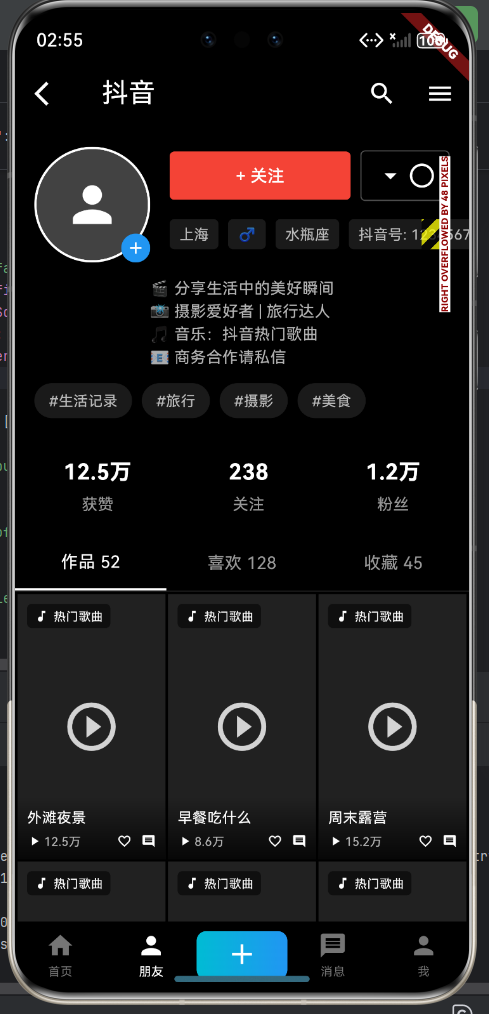
在实际开发中,单一的水平或垂直布局往往无法满足复杂的界面需求,这时就需要将Row和Column进行嵌套使用。本文将深入探讨Row和Column的嵌套技巧,帮助你构建出更加灵活和美观的界面。
一、嵌套布局的基本原则
1.1 嵌套层次控制
合理的嵌套层次是构建良好布局的关键,建议遵循以下原则:
// 推荐的嵌套层次(≤3层)
Column(
  children: [
    Row(...),           // 第2层
    Row(
      children: [
        Column(...),    // 第3层
        Column(...),    // 第3层
      ],
    ),
  ],
)

// 不推荐的嵌套层次(>3层)
Column(
  children: [
    Row(
      children: [
        Column(
          children: [
            Row(
              children: [
                Column(...),  // 第5层
              ],
            ),
          ],
        ),
      ],
    ),
  ],
)
1.2 嵌套布局的性能考量
过深的嵌套会导致以下问题:
- 渲染性能下降:Flutter需要递归地传递约束和计算布局
- 代码可读性降低:难以理解嵌套结构
- 维护成本增加:修改布局时容易遗漏嵌套层次
解决方案:将复杂的嵌套结构提取为独立的Widget组件。
// 不推荐:深层嵌套
Column(
children: [
Row(
children: [
Column(
children: [
Row(
children: [
Text('姓名'),
Text('张三'),
],
),
],
),
],
),
],
)
// 推荐:提取为独立组件
Column(
children: [
UserInfoCard(name: '张三', age: 25),
],
)
class UserInfoCard extends StatelessWidget {
final String name;
final int age;
const UserInfoCard({
required this.name,
required this.age,
});
Widget build(BuildContext context) {
return Card(
child: Padding(
padding: EdgeInsets.all(16),
child: Column(
children: [
_buildInfoRow('姓名', name),
_buildInfoRow('年龄', '$age岁'),
],
),
),
);
}
Widget _buildInfoRow(String label, String value) {
return Row(
children: [
Text('$label: '),
SizedBox(width: 8),
Text(value, style: TextStyle(fontWeight: FontWeight.bold)),
],
);
}
}
二、常见嵌套布局模式
2.1 头部+内容+底部布局
这是最常见的页面布局模式,适用于大多数应用页面:
class StandardPage extends StatelessWidget {
Widget build(BuildContext context) {
return Scaffold(
body: Column(
children: [
// 头部
_buildHeader(),
// 内容区域
Expanded(
child: _buildContent(),
),
// 底部
_buildFooter(),
],
),
);
}
Widget _buildHeader() {
return Container(
height: 56,
padding: EdgeInsets.symmetric(horizontal: 16),
decoration: BoxDecoration(
color: Colors.white,
border: Border(bottom: BorderSide(color: Colors.grey[300]!)),
),
child: Row(
children: [
Icon(Icons.menu),
SizedBox(width: 16),
Expanded(child: Text('页面标题')),
Icon(Icons.search),
],
),
);
}
Widget _buildContent() {
return ListView.builder(
itemCount: 10,
itemBuilder: (context, index) {
return ListTile(
title: Text('列表项 $index'),
subtitle: Text('这是第 $index 项的描述'),
);
},
);
}
Widget _buildFooter() {
return Container(
height: 60,
decoration: BoxDecoration(
color: Colors.white,
border: Border(top: BorderSide(color: Colors.grey[300]!)),
),
child: Row(
mainAxisAlignment: MainAxisAlignment.spaceAround,
children: [
_buildFooterIcon(Icons.home, '首页', true),
_buildFooterIcon(Icons.explore, '发现', false),
_buildFooterIcon(Icons.person, '我的', false),
],
),
);
}
Widget _buildFooterIcon(IconData icon, String label, bool isActive) {
return Column(
mainAxisAlignment: MainAxisAlignment.center,
children: [
Icon(icon, color: isActive ? Colors.blue : Colors.grey),
SizedBox(height: 4),
Text(
label,
style: TextStyle(
fontSize: 12,
color: isActive ? Colors.blue : Colors.grey,
),
),
],
);
}
}
2.2 列表项布局
列表项通常包含多个元素,需要合理的嵌套布局:
class ListItem extends StatelessWidget {
final String title;
final String subtitle;
final String time;
final int unreadCount;
const ListItem({
required this.title,
required this.subtitle,
required this.time,
this.unreadCount = 0,
});
Widget build(BuildContext context) {
return Container(
padding: EdgeInsets.symmetric(horizontal: 16, vertical: 12),
decoration: BoxDecoration(
border: Border(bottom: BorderSide(color: Colors.grey[200]!)),
),
child: Row(
crossAxisAlignment: CrossAxisAlignment.start,
children: [
// 左侧图标
_buildIcon(),
SizedBox(width: 12),
// 中间内容
Expanded(
child: Column(
crossAxisAlignment: CrossAxisAlignment.start,
children: [
Row(
mainAxisAlignment: MainAxisAlignment.spaceBetween,
children: [
Text(
title,
style: TextStyle(fontWeight: FontWeight.w600),
),
Text(
time,
style: TextStyle(
fontSize: 12,
color: Colors.grey,
),
),
],
),
SizedBox(height: 4),
Text(
subtitle,
style: TextStyle(
fontSize: 14,
color: Colors.grey[600],
),
maxLines: 2,
overflow: TextOverflow.ellipsis,
),
],
),
),
// 右侧标记
if (unreadCount > 0) _buildUnreadBadge(),
],
),
);
}
Widget _buildIcon() {
return Container(
width: 48,
height: 48,
decoration: BoxDecoration(
color: Colors.blue[100],
borderRadius: BorderRadius.circular(24),
),
child: Icon(Icons.notifications, color: Colors.blue),
);
}
Widget _buildUnreadBadge() {
return Container(
padding: EdgeInsets.symmetric(horizontal: 8, vertical: 4),
decoration: BoxDecoration(
color: Colors.red,
borderRadius: BorderRadius.circular(12),
),
child: Text(
'$unreadCount',
style: TextStyle(
color: Colors.white,
fontSize: 12,
fontWeight: FontWeight.bold,
),
),
);
}
}
2.3 卡片布局
卡片是现代UI设计的重要元素,通常包含图片、标题、描述等信息:
class ProductCard extends StatelessWidget {
final String title;
final String description;
final String price;
final String rating;
final String imageUrl;
const ProductCard({
required this.title,
required this.description,
required this.price,
required this.rating,
required this.imageUrl,
});
Widget build(BuildContext context) {
return Card(
elevation: 2,
margin: EdgeInsets.all(8),
child: Column(
crossAxisAlignment: CrossAxisAlignment.start,
children: [
// 图片区域
_buildImage(),
// 信息区域
Padding(
padding: EdgeInsets.all(12),
child: Column(
crossAxisAlignment: CrossAxisAlignment.start,
children: [
Text(
title,
style: TextStyle(
fontSize: 16,
fontWeight: FontWeight.bold,
),
),
SizedBox(height: 8),
Text(
description,
style: TextStyle(
fontSize: 12,
color: Colors.grey[600],
),
maxLines: 2,
overflow: TextOverflow.ellipsis,
),
SizedBox(height: 12),
// 价格和评分
Row(
mainAxisAlignment: MainAxisAlignment.spaceBetween,
children: [
Text(
'¥$price',
style: TextStyle(
fontSize: 20,
fontWeight: FontWeight.bold,
color: Colors.red,
),
),
Row(
children: [
Icon(Icons.star, color: Colors.amber, size: 16),
SizedBox(width: 4),
Text(rating),
],
),
],
),
],
),
),
],
),
);
}
Widget _buildImage() {
return Container(
height: 180,
width: double.infinity,
decoration: BoxDecoration(
color: Colors.grey[200],
),
child: Center(
child: Icon(Icons.image, size: 60, color: Colors.grey),
),
);
}
}
三、实战案例:个人资料卡片
下面通过一个完整的个人资料卡片示例,展示复杂的嵌套布局技巧:
class ProfileCard extends StatelessWidget {
Widget build(BuildContext context) {
return Card(
elevation: 4,
margin: EdgeInsets.all(16),
child: Padding(
padding: EdgeInsets.all(20),
child: Column(
crossAxisAlignment: CrossAxisAlignment.start,
children: [
// 第一层嵌套:头像和基本信息
Row(
children: [
_buildAvatar(),
SizedBox(width: 16),
Expanded(
child: Column(
crossAxisAlignment: CrossAxisAlignment.start,
children: [
Text(
'李明',
style: TextStyle(
fontSize: 20,
fontWeight: FontWeight.bold,
),
),
SizedBox(height: 4),
Text(
'高级软件工程师',
style: TextStyle(
fontSize: 14,
color: Colors.grey[600],
),
),
SizedBox(height: 8),
Row(
children: [
Icon(
Icons.location_on,
size: 16,
color: Colors.grey,
),
SizedBox(width: 4),
Text(
'北京市海淀区',
style: TextStyle(
fontSize: 12,
color: Colors.grey,
),
),
],
),
],
),
),
IconButton(
icon: Icon(Icons.edit),
onPressed: () {},
),
],
),
SizedBox(height: 20),
// 第二层嵌套:统计信息
Row(
mainAxisAlignment: MainAxisAlignment.spaceAround,
children: [
_buildStatItem('项目', '35'),
_buildStatItem('经验', '8年'),
_buildStatItem('评价', '4.9'),
],
),
SizedBox(height: 20),
Divider(),
SizedBox(height: 20),
// 第三层嵌套:技能标签
Column(
crossAxisAlignment: CrossAxisAlignment.start,
children: [
Text(
'专业技能',
style: TextStyle(
fontSize: 14,
fontWeight: FontWeight.w500,
),
),
SizedBox(height: 12),
Wrap(
spacing: 8,
runSpacing: 8,
children: [
_buildSkillTag('Flutter'),
_buildSkillTag('Dart'),
_buildSkillTag('HarmonyOS'),
_buildSkillTag('React Native'),
_buildSkillTag('TypeScript'),
],
),
],
),
SizedBox(height: 20),
Divider(),
SizedBox(height: 20),
// 第四层嵌套:联系方式
Column(
crossAxisAlignment: CrossAxisAlignment.start,
children: [
Text(
'联系方式',
style: TextStyle(
fontSize: 14,
fontWeight: FontWeight.w500,
),
),
SizedBox(height: 12),
_buildContactRow(Icons.phone, '138****8888'),
SizedBox(height: 8),
_buildContactRow(Icons.email, 'liming@example.com'),
SizedBox(height: 8),
_buildContactRow(Icons.web, 'www.example.com'),
],
),
],
),
),
);
}
Widget _buildAvatar() {
return Container(
width: 80,
height: 80,
decoration: BoxDecoration(
gradient: LinearGradient(
colors: [Colors.blue, Colors.purple],
),
borderRadius: BorderRadius.circular(40),
),
child: Center(
child: Text(
'李',
style: TextStyle(
color: Colors.white,
fontSize: 36,
fontWeight: FontWeight.bold,
),
),
),
);
}
Widget _buildStatItem(String label, String value) {
return Column(
children: [
Text(
value,
style: TextStyle(
fontSize: 24,
fontWeight: FontWeight.bold,
),
),
SizedBox(height: 4),
Text(
label,
style: TextStyle(
fontSize: 12,
color: Colors.grey,
),
),
],
);
}
Widget _buildSkillTag(String skill) {
return Container(
padding: EdgeInsets.symmetric(horizontal: 12, vertical: 6),
decoration: BoxDecoration(
color: Colors.blue[50],
borderRadius: BorderRadius.circular(16),
border: Border.all(color: Colors.blue[200]!),
),
child: Text(
skill,
style: TextStyle(
fontSize: 12,
color: Colors.blue[700],
),
),
);
}
Widget _buildContactRow(IconData icon, String text) {
return Row(
children: [
Icon(icon, size: 20, color: Colors.grey[600]),
SizedBox(width: 12),
Text(
text,
style: TextStyle(fontSize: 14, color: Colors.grey[800]),
),
],
);
}
}
四、实战案例:订单详情页
订单详情页是一个典型的复杂嵌套布局示例:
class OrderDetailPage extends StatelessWidget {
Widget build(BuildContext context) {
return Scaffold(
appBar: AppBar(title: Text('订单详情')),
body: SingleChildScrollView(
padding: EdgeInsets.all(16),
child: Column(
crossAxisAlignment: CrossAxisAlignment.start,
children: [
// 订单状态
_buildOrderStatus(),
SizedBox(height: 16),
// 订单信息
_buildOrderInfo(),
SizedBox(height: 16),
// 商品列表
_buildProductList(),
SizedBox(height: 16),
// 价格明细
_buildPriceDetail(),
SizedBox(height: 16),
// 订单操作
_buildOrderActions(),
],
),
),
);
}
Widget _buildOrderStatus() {
return Card(
color: Colors.green[50],
child: Padding(
padding: EdgeInsets.all(16),
child: Row(
children: [
Icon(Icons.check_circle, color: Colors.green, size: 32),
SizedBox(width: 12),
Column(
crossAxisAlignment: CrossAxisAlignment.start,
children: [
Text(
'订单已完成',
style: TextStyle(
fontSize: 18,
fontWeight: FontWeight.bold,
color: Colors.green[700],
),
),
SizedBox(height: 4),
Text(
'感谢您的购买,期待再次光临',
style: TextStyle(
fontSize: 12,
color: Colors.green[600],
),
),
],
),
],
),
),
);
}
Widget _buildOrderInfo() {
return Card(
child: Padding(
padding: EdgeInsets.all(16),
child: Column(
crossAxisAlignment: CrossAxisAlignment.start,
children: [
Text(
'订单信息',
style: TextStyle(
fontSize: 16,
fontWeight: FontWeight.bold,
),
),
SizedBox(height: 12),
_buildInfoRow('订单编号', '20240125001'),
SizedBox(height: 8),
_buildInfoRow('下单时间', '2024-01-25 10:30:45'),
SizedBox(height: 8),
_buildInfoRow('支付方式', '微信支付'),
SizedBox(height: 8),
_buildInfoRow('收货地址', '北京市海淀区中关村大街1号'),
],
),
),
);
}
Widget _buildInfoRow(String label, String value) {
return Row(
crossAxisAlignment: CrossAxisAlignment.start,
children: [
SizedBox(
width: 80,
child: Text(
'$label: ',
style: TextStyle(color: Colors.grey[600]),
),
),
Expanded(
child: Text(
value,
style: TextStyle(fontWeight: FontWeight.w500),
),
),
],
);
}
Widget _buildProductList() {
return Card(
child: Padding(
padding: EdgeInsets.all(16),
child: Column(
crossAxisAlignment: CrossAxisAlignment.start,
children: [
Text(
'商品列表',
style: TextStyle(
fontSize: 16,
fontWeight: FontWeight.bold,
),
),
SizedBox(height: 12),
_buildProductItem('商品1', '299.00', 2),
SizedBox(height: 12),
_buildProductItem('商品2', '199.00', 1),
],
),
),
);
}
Widget _buildProductItem(String name, String price, int count) {
return Row(
children: [
Container(
width: 60,
height: 60,
decoration: BoxDecoration(
color: Colors.grey[200],
borderRadius: BorderRadius.circular(8),
),
child: Icon(Icons.shopping_bag),
),
SizedBox(width: 12),
Expanded(
child: Column(
crossAxisAlignment: CrossAxisAlignment.start,
children: [
Text(
name,
style: TextStyle(fontWeight: FontWeight.w500),
),
SizedBox(height: 4),
Text(
'¥$price × $count',
style: TextStyle(
fontSize: 12,
color: Colors.grey[600],
),
),
],
),
),
Text(
'¥${(double.parse(price) * count).toStringAsFixed(2)}',
style: TextStyle(
fontSize: 16,
fontWeight: FontWeight.bold,
),
),
],
);
}
Widget _buildPriceDetail() {
return Card(
child: Padding(
padding: EdgeInsets.all(16),
child: Column(
children: [
_buildPriceRow('商品总额', '797.00'),
SizedBox(height: 8),
_buildPriceRow('运费', '0.00'),
SizedBox(height: 8),
_buildPriceRow('优惠', '-20.00', color: Colors.red),
Divider(),
SizedBox(height: 8),
_buildPriceRow('实付金额', '777.00', isTotal: true),
],
),
),
);
}
Widget _buildPriceRow(String label, String value, {Color? color, bool isTotal = false}) {
return Row(
mainAxisAlignment: MainAxisAlignment.spaceBetween,
children: [
Text(
label,
style: TextStyle(
fontSize: isTotal ? 16 : 14,
fontWeight: isTotal ? FontWeight.bold : FontWeight.normal,
),
),
Text(
'¥$value',
style: TextStyle(
fontSize: isTotal ? 18 : 14,
fontWeight: FontWeight.bold,
color: color ?? (isTotal ? Colors.red : Colors.black87),
),
),
],
);
}
Widget _buildOrderActions() {
return Row(
mainAxisAlignment: MainAxisAlignment.end,
children: [
OutlinedButton(
onPressed: () {},
child: Text('申请售后'),
),
SizedBox(width: 12),
OutlinedButton(
onPressed: () {},
child: Text('查看物流'),
),
SizedBox(width: 12),
ElevatedButton(
onPressed: () {},
child: Text('再次购买'),
),
],
);
}
}
五、嵌套布局最佳实践
5.1 提取可复用组件
将重复出现的布局模式提取为独立组件:
// 提取通用的信息行组件
class InfoRow extends StatelessWidget {
final String label;
final String value;
final Color? labelColor;
final Color? valueColor;
const InfoRow({
required this.label,
required this.value,
this.labelColor,
this.valueColor,
});
Widget build(BuildContext context) {
return Row(
crossAxisAlignment: CrossAxisAlignment.start,
children: [
SizedBox(
width: 80,
child: Text(
'$label: ',
style: TextStyle(color: labelColor ?? Colors.grey[600]),
),
),
Expanded(
child: Text(
value,
style: TextStyle(
color: valueColor ?? Colors.black87,
fontWeight: FontWeight.w500,
),
),
),
],
);
}
}
// 使用
Column(
children: [
InfoRow(label: '姓名', value: '张三'),
InfoRow(label: '年龄', value: '25'),
InfoRow(label: '城市', value: '北京'),
],
)
5.2 使用const优化性能
对于不变的子组件,使用const构造函数:
Column(
  children: const [
    SizedBox(height: 16),
    Divider(),
    SizedBox(height: 16),
  ],
)
5.3 合理使用Expanded和Flexible
Row(
  children: [
    Container(width: 100, color: Colors.red),  // 固定宽度
    Expanded(
      flex: 2,
      child: Container(color: Colors.green),  // 占据剩余空间
    ),
    Flexible(
      flex: 1,
      child: Container(color: Colors.blue),  // 可灵活伸缩
    ),
  ],
)
5.4 控制嵌套深度
// 不推荐:深层嵌套
Column(
  children: [
    Row(
      children: [
        Column(
          children: [
            Row(
              children: [
                Text('深层嵌套'),
              ],
            ),
          ],
        ),
      ],
    ),
  ],
)

// 推荐:提取组件
Column(
  children: [
    _buildNestedWidget(),
  ],
)
六、常见问题与解决方案
6.1 嵌套布局溢出
问题:多层嵌套后出现布局溢出
解决方案:
- 使用
SingleChildScrollView包裹可滚动区域 - 使用
Expanded和Flexible控制子组件尺寸 - 设置合理的约束条件
Scaffold(
  body: Column(
    children: [
      Container(height: 100, color: Colors.red),
      Expanded(
        child: SingleChildScrollView(
          child: Column(
            children: List.generate(50, (index) {
              return ListTile(title: Text('Item $index'));
            }),
          ),
        ),
      ),
      Container(height: 60, color: Colors.blue),
    ],
  ),
)
6.2 对齐方式不生效
问题:设置了mainAxisAlignment但不生效
原因:mainAxisSize为max时,占满父组件空间
解决方案:
// 方案1:使用mainAxisSize.min
Row(
  mainAxisSize: MainAxisSize.min,
  mainAxisAlignment: MainAxisAlignment.center,
  children: [
    Container(width: 100, color: Colors.red),
  ],
)

// 方案2:父组件使用Center
Center(
  child: Row(
    children: [
      Container(width: 100, color: Colors.red),
    ],
  ),
)
6.3 Expanded使用错误
问题:在Column中使用Expanded导致错误
原因:Expanded必须在Row、Column或Flex的直接子组件中使用
解决方案:
// 错误用法
Container(
  child: Expanded(
    child: Text('错误'),
  ),
)

// 正确用法
Row(
  children: [
    Expanded(
      child: Text('正确'),
    ),
  ],
)
七、性能优化建议
7.1 避免不必要的重建
将不变的子组件提取为const:
class MyWidget extends StatelessWidget {
Widget build(BuildContext context) {
return Column(
children: const [
SizedBox(height: 16),
_StaticContent(),
SizedBox(height: 16),
],
);
}
}
class _StaticContent extends StatelessWidget {
const _StaticContent();
Widget build(BuildContext context) {
return Container(
padding: EdgeInsets.all(16),
child: Text('静态内容'),
);
}
}
7.2 使用ListView.builder替代Column
对于大量子项,使用ListView.builder:
// 不推荐
Column(
  children: List.generate(100, (index) {
    return ListTile(title: Text('Item $index'));
  }),
)

// 推荐
ListView.builder(
  itemCount: 100,
  itemBuilder: (context, index) {
    return ListTile(title: Text('Item $index'));
  },
)
八、嵌套布局流程图
下图展示了一个复杂嵌套布局的构建过程:
九、嵌套布局检查清单
在构建嵌套布局时,可以参考以下检查清单:
- 嵌套深度是否控制在3层以内
- 是否提取了可复用的组件
- 是否使用了const构造函数
- 是否正确使用了Expanded和Flexible
- 是否处理了可能的溢出问题
- 是否考虑了不同屏幕尺寸的适配
- 是否使用了合理的间距和对齐方式
- 代码结构是否清晰易读
十、总结
Row和Column的嵌套使用是构建复杂界面的核心技能。通过合理的嵌套层次、组件提取和性能优化,可以构建出既美观又高效的用户界面。
记住以下要点:
- 控制嵌套深度:避免过深的嵌套,提取独立组件
- 合理使用Expanded:在需要占据剩余空间时使用
- 注意性能优化:使用const构造函数和ListView.builder
- 遵循最佳实践:保持代码清晰,提高可维护性
通过不断实践和总结经验,你将能够熟练运用Row和Column的嵌套技巧,构建出各种复杂的界面布局。
十一、完整可运行示例
下面是一个完整的可运行示例,展示了嵌套布局在抖音个人主页中的应用:
import 'package:flutter/material.dart';
void main() {
runApp(const MyApp());
}
class MyApp extends StatelessWidget {
const MyApp({super.key});
Widget build(BuildContext context) {
return MaterialApp(
title: '嵌套布局示例',
theme: ThemeData(useMaterial3: true),
home: const NestedLayoutDemo(),
);
}
}
class NestedLayoutDemo extends StatelessWidget {
const NestedLayoutDemo({super.key});
Widget build(BuildContext context) {
return Scaffold(
backgroundColor: Colors.black,
appBar: AppBar(
backgroundColor: Colors.black,
elevation: 0,
leading: IconButton(icon: const Icon(Icons.arrow_back_ios, color: Colors.white), onPressed: () => Navigator.pop(context)),
title: const Text('抖音', style: TextStyle(color: Colors.white)),
actions: [
IconButton(icon: const Icon(Icons.search, color: Colors.white), onPressed: () {}),
IconButton(icon: const Icon(Icons.menu, color: Colors.white), onPressed: () {}),
],
),
body: SingleChildScrollView(
child: Column(
crossAxisAlignment: CrossAxisAlignment.stretch,
children: [
_buildUserInfo(),
_buildStats(),
_buildTabs(),
_buildVideoGrid(),
],
),
),
bottomNavigationBar: _buildBottomBar(),
);
}
Widget _buildUserInfo() {
return Container(
padding: const EdgeInsets.all(16),
child: Column(
children: [
Row(
crossAxisAlignment: CrossAxisAlignment.start,
children: [
Stack(
children: [
Container(
width: 96,
height: 96,
decoration: BoxDecoration(
border: Border.all(color: Colors.white, width: 2),
shape: BoxShape.circle,
),
child: ClipOval(
child: Container(
color: Colors.grey[800],
child: const Icon(Icons.person, size: 48, color: Colors.white),
),
),
),
Positioned(
bottom: 0,
right: 0,
child: Container(
padding: const EdgeInsets.all(4),
decoration: const BoxDecoration(
color: Colors.blue,
shape: BoxShape.circle,
),
child: const Icon(Icons.add, color: Colors.white, size: 16),
),
),
],
),
const SizedBox(width: 16),
Expanded(
child: Column(
crossAxisAlignment: CrossAxisAlignment.start,
children: [
Row(
children: [
Expanded(
child: ElevatedButton(
onPressed: () {},
style: ElevatedButton.styleFrom(
backgroundColor: Colors.red,
foregroundColor: Colors.white,
padding: const EdgeInsets.symmetric(vertical: 8),
),
child: const Text('+ 关注', style: TextStyle(fontSize: 14)),
),
),
const SizedBox(width: 8),
Container(
padding: const EdgeInsets.symmetric(horizontal: 12, vertical: 8),
decoration: BoxDecoration(
border: Border.all(color: Colors.white30),
borderRadius: BorderRadius.circular(4),
),
child: const Row(
children: [
Icon(Icons.arrow_drop_down, color: Colors.white),
SizedBox(width: 4),
Icon(Icons.circle, color: Colors.white, size: 8),
],
),
),
],
),
const SizedBox(height: 12),
Wrap(
spacing: 8,
children: [
_buildInfoChip('上海'),
_buildInfoChip('♂'),
_buildInfoChip('水瓶座'),
],
),
],
),
),
],
),
const SizedBox(height: 12),
const Text(
'🎬 分享生活中的美好瞬间\n📸 摄影爱好者 | 旅行达人',
style: TextStyle(color: Colors.white70, fontSize: 13),
),
],
),
);
}
Widget _buildInfoChip(String text) {
return Container(
padding: const EdgeInsets.symmetric(horizontal: 8, vertical: 4),
decoration: BoxDecoration(
color: Colors.white10,
borderRadius: BorderRadius.circular(4),
),
child: Text(text, style: const TextStyle(color: Colors.white70, fontSize: 12)),
);
}
Widget _buildStats() {
return Container(
padding: const EdgeInsets.symmetric(vertical: 16),
child: Row(
mainAxisAlignment: MainAxisAlignment.spaceAround,
children: [
_buildStatItem('获赞', '12.5万'),
_buildStatItem('关注', '238'),
_buildStatItem('粉丝', '1.2万'),
],
),
);
}
Widget _buildStatItem(String label, String value) {
return Column(
children: [
Text(
value,
style: const TextStyle(color: Colors.white, fontSize: 18, fontWeight: FontWeight.bold),
),
const SizedBox(height: 4),
Text(
label,
style: const TextStyle(color: Colors.white60, fontSize: 13),
),
],
);
}
Widget _buildTabs() {
return Container(
decoration: BoxDecoration(
border: Border(bottom: BorderSide(color: Colors.white10)),
),
child: Row(
children: [
Expanded(
child: Container(
padding: const EdgeInsets.symmetric(vertical: 12),
decoration: BoxDecoration(
border: Border(bottom: BorderSide(color: Colors.white, width: 2)),
),
child: const Center(
child: Text('作品 6', style: TextStyle(color: Colors.white, fontSize: 14)),
),
),
),
Expanded(
child: Container(
padding: const EdgeInsets.symmetric(vertical: 12),
child: Center(
child: Text('喜欢 12', style: TextStyle(color: Colors.white60, fontSize: 14)),
),
),
),
Expanded(
child: Container(
padding: const EdgeInsets.symmetric(vertical: 12),
child: Center(
child: Text('收藏 5', style: TextStyle(color: Colors.white60, fontSize: 14)),
),
),
),
],
),
);
}
Widget _buildVideoGrid() {
return Padding(
padding: const EdgeInsets.all(1),
child: Column(
children: [
Row(
children: [
Expanded(child: _buildVideoItem('外滩夜景', '12.5万')),
Expanded(child: _buildVideoItem('早餐吃什么', '8.6万')),
Expanded(child: _buildVideoItem('周末露营', '15.2万')),
],
),
Row(
children: [
Expanded(child: _buildVideoItem('咖啡制作', '6.3万')),
Expanded(child: _buildVideoItem('城市漫步', '9.8万')),
Expanded(child: _buildVideoItem('深夜食堂', '11.1万')),
],
),
],
),
);
}
Widget _buildVideoItem(String title, String plays) {
return AspectRatio(
aspectRatio: 9 / 16,
child: Container(
margin: const EdgeInsets.all(1),
color: Colors.grey[900],
child: Stack(
fit: StackFit.expand,
children: [
Center(
child: Icon(Icons.play_circle_outline, size: 48, color: Colors.white.withOpacity(0.8)),
),
Positioned(
bottom: 0,
left: 0,
right: 0,
child: Container(
padding: const EdgeInsets.all(8),
decoration: BoxDecoration(
gradient: LinearGradient(
begin: Alignment.bottomCenter,
end: Alignment.topCenter,
colors: [Colors.black.withOpacity(0.8), Colors.transparent],
),
),
child: Column(
crossAxisAlignment: CrossAxisAlignment.start,
children: [
Text(
title,
style: const TextStyle(color: Colors.white, fontSize: 12),
maxLines: 1,
overflow: TextOverflow.ellipsis,
),
const SizedBox(height: 4),
Row(
children: [
const Icon(Icons.play_arrow, color: Colors.white, size: 12),
const SizedBox(width: 2),
Text(plays, style: const TextStyle(color: Colors.white70, fontSize: 10)),
const Spacer(),
const Icon(Icons.favorite_border, color: Colors.white, size: 12),
],
),
],
),
),
),
],
),
),
);
}
Widget _buildBottomBar() {
return Container(
height: 56,
color: Colors.black,
child: Row(
children: [
Expanded(
child: Column(
mainAxisAlignment: MainAxisAlignment.center,
children: [
Icon(Icons.home, size: 24, color: Colors.grey[600]),
const SizedBox(height: 2),
Text('首页', style: TextStyle(color: Colors.grey[600], fontSize: 10)),
],
),
),
Expanded(
child: Column(
mainAxisAlignment: MainAxisAlignment.center,
children: [
Icon(Icons.person, size: 24, color: Colors.white),
const SizedBox(height: 2),
const Text('朋友', style: TextStyle(color: Colors.white, fontSize: 10)),
],
),
),
Expanded(
child: Container(
margin: const EdgeInsets.symmetric(vertical: 8),
decoration: BoxDecoration(
gradient: const LinearGradient(
colors: [Colors.cyan, Colors.blue],
),
borderRadius: BorderRadius.circular(8),
),
child: const Column(
mainAxisAlignment: MainAxisAlignment.center,
children: [
Icon(Icons.add, color: Colors.white, size: 28),
SizedBox(height: 2),
],
),
),
),
Expanded(
child: Column(
mainAxisAlignment: MainAxisAlignment.center,
children: [
Icon(Icons.message, color: Colors.grey[600], size: 24),
const SizedBox(height: 2),
Text('消息', style: TextStyle(color: Colors.grey[600], fontSize: 10)),
],
),
),
Expanded(
child: Column(
mainAxisAlignment: MainAxisAlignment.center,
children: [
Icon(Icons.person, color: Colors.grey[600], size: 24),
const SizedBox(height: 2),
Text('我', style: TextStyle(color: Colors.grey[600], fontSize: 10)),
],
),
),
],
),
);
}
}
欢迎加入开源鸿蒙跨平台社区:https://openharmonycrossplatform.csdn.net

AtomGit 是由开放原子开源基金会联合 CSDN 等生态伙伴共同推出的新一代开源与人工智能协作平台。平台坚持“开放、中立、公益”的理念,把代码托管、模型共享、数据集托管、智能体开发体验和算力服务整合在一起,为开发者提供从开发、训练到部署的一站式体验。
更多推荐

 3
3 0
0- 0


 已为社区贡献18条内容

所有评论(0)