Flutter for OpenHarmony:从零搭建今日资讯App(二十二)关于我们页面的完整实现
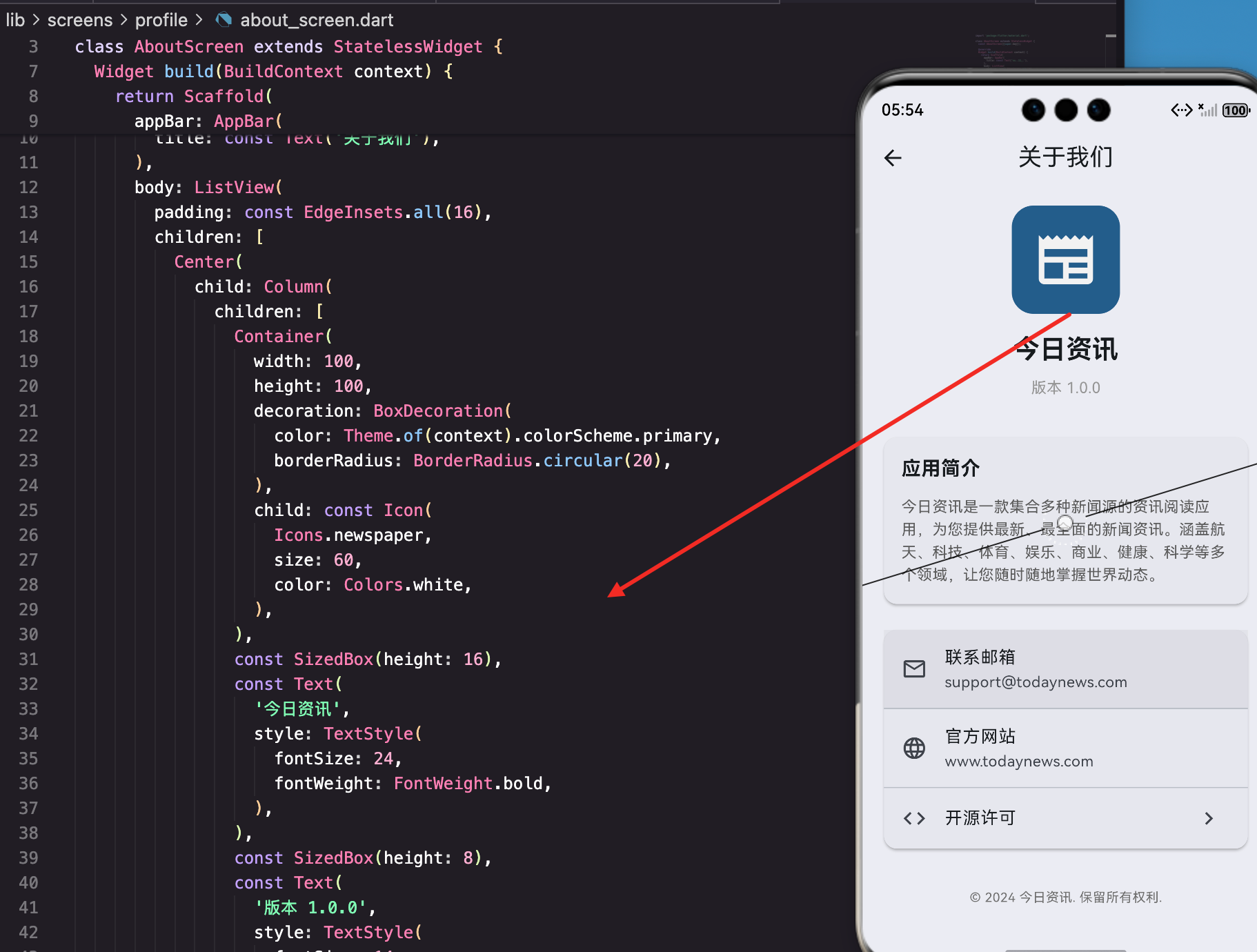
"关于我们"这个页面,很多开发者觉得没什么技术含量,随便写写就行。但实际上,这个页面是用户了解你应用的窗口,也是展示品牌形象的地方。一个精心设计的"关于我们"页面,能让用户对你的应用更有信任感。
今天这篇文章,咱们就来实现一个完整的"关于我们"页面。不只是简单地堆砌信息,还要考虑版本信息动态获取、链接跳转、开源许可展示、检查更新这些实用功能。
这个页面要展示什么
在动手写代码之前,先想清楚"关于我们"页面应该包含哪些内容。
应用标识:Logo、名称、版本号。这是最基本的,让用户知道自己用的是什么应用、什么版本。
应用简介:一两句话介绍应用是干什么的。新用户可能是从设置页面点进来的,需要一个简短的说明。
联系方式:邮箱、官网、社交媒体。用户有问题想联系你,得有渠道。
法律信息:隐私政策、用户协议、开源许可。这些是合规要求,也是对用户的尊重。
版权声明:告诉用户这个应用的版权归属。
想清楚这些,页面结构就有了。
页面的基本结构
先看看项目里"关于我们"页面的代码:
import 'package:flutter/material.dart';
class AboutScreen extends StatelessWidget {
const AboutScreen({super.key});
Widget build(BuildContext context) {
return Scaffold(
appBar: AppBar(
title: const Text('关于我们'),
),
body: ListView(
padding: const EdgeInsets.all(16),
children: [
// 应用标识
// 应用简介
// 联系方式
// 版权声明
],
),
);
}
}
用StatelessWidget是因为这个页面没有需要管理的状态,所有内容都是静态展示的。如果后面要加检查更新功能,可以改成StatefulWidget。
ListView让内容可以滚动,padding给整体加边距。
应用标识区域的实现
页面顶部展示应用的Logo、名称和版本号:
Center(
  child: Column(
    children: [
      Container(
        width: 100,
        height: 100,
        decoration: BoxDecoration(
          color: Theme.of(context).colorScheme.primary,
          borderRadius: BorderRadius.circular(20),
        ),
        child: const Icon(
          Icons.newspaper,
          size: 60,
          color: Colors.white,
        ),
      ),
      const SizedBox(height: 16),
      const Text(
        '今日资讯',
        style: TextStyle(
          fontSize: 24,
          fontWeight: FontWeight.bold,
        ),
      ),
      const SizedBox(height: 8),
      const Text(
        '版本 1.0.0',
        style: TextStyle(
          fontSize: 14,
          color: Colors.grey,
        ),
      ),
    ],
  ),
),
来拆解一下这段代码:
Container作为Logo的容器,设置了宽高100、圆角20、主题色背景。里面放一个报纸图标,代表资讯应用。
实际项目中,这里应该用应用的真实Logo图片:
Image.asset(
  'assets/images/logo.png',
  width: 100,
  height: 100,
)
应用名称用24号字加粗,是页面最醒目的文字。
版本号用14号灰色字,不抢眼但能看到。这里写死了"1.0.0",后面会讲怎么动态获取。
用Center包裹的原因
整个Column用Center包裹,让内容水平居中。如果不用Center,Column会默认左对齐,Logo和文字都靠左,不好看。
动态获取版本号
版本号不应该写死在代码里,而是从pubspec.yaml读取。这样每次发版只需要改pubspec.yaml,不用改代码。
用package_info_plus插件:
dependencies:
  package_info_plus: ^4.0.0
然后在代码里获取:
class AboutScreen extends StatefulWidget {
const AboutScreen({super.key});
State<AboutScreen> createState() => _AboutScreenState();
}
class _AboutScreenState extends State<AboutScreen> {
String _version = '';
String _buildNumber = '';
void initState() {
super.initState();
_loadPackageInfo();
}
Future<void> _loadPackageInfo() async {
final packageInfo = await PackageInfo.fromPlatform();
setState(() {
_version = packageInfo.version;
_buildNumber = packageInfo.buildNumber;
});
}
PackageInfo.fromPlatform()会读取pubspec.yaml里的version字段。version是"1.0.0"这样的版本号,buildNumber是"1"这样的构建号。
在UI里使用:
Text(
  _version.isEmpty ? '加载中...' : '版本 $_version ($_buildNumber)',
  style: const TextStyle(
    fontSize: 14,
    color: Colors.grey,
  ),
),
显示效果是"版本 1.0.0 (1)“。加载完成前显示"加载中…”,避免空白。
应用简介卡片
用Card组件展示应用简介:
Card(
  child: Padding(
    padding: const EdgeInsets.all(16),
    child: Column(
      crossAxisAlignment: CrossAxisAlignment.start,
      children: [
        const Text(
          '应用简介',
          style: TextStyle(
            fontSize: 18,
            fontWeight: FontWeight.bold,
          ),
        ),
        const SizedBox(height: 12),
        Text(
          '今日资讯是一款集合多种新闻源的资讯阅读应用,为您提供最新、最全面的新闻资讯。'
          '涵盖航天、科技、体育、娱乐、商业、健康、科学等多个领域,让您随时随地掌握世界动态。',
          style: TextStyle(
            fontSize: 14,
            color: Colors.grey[700],
            height: 1.5,
          ),
        ),
      ],
    ),
  ),
),
Card自带阴影和圆角,视觉上有层次感,把内容和背景区分开。
crossAxisAlignment: CrossAxisAlignment.start让标题和内容都左对齐。
height: 1.5设置行高,让多行文字不那么拥挤,阅读更舒服。
简介文字的写法
简介要简洁有力,一两句话说清楚应用是干什么的。避免写太长,用户没耐心看。
好的简介应该回答这几个问题:
- 这是什么类型的应用?(资讯阅读应用)
- 能提供什么价值?(最新、最全面的新闻资讯)
- 有什么特色?(涵盖多个领域)
联系方式卡片
用Card包裹多个ListTile:
Card(
  child: Column(
    children: [
      ListTile(
        leading: const Icon(Icons.email_outlined),
        title: const Text('联系邮箱'),
        subtitle: const Text('support@todaynews.com'),
        onTap: () {},
      ),
      const Divider(height: 1),
      ListTile(
        leading: const Icon(Icons.language),
        title: const Text('官方网站'),
        subtitle: const Text('www.todaynews.com'),
        onTap: () {},
      ),
      const Divider(height: 1),
      ListTile(
        leading: const Icon(Icons.code),
        title: const Text('开源许可'),
        trailing: const Icon(Icons.chevron_right),
        onTap: () {},
      ),
    ],
  ),
),
ListTile是Flutter提供的标准列表项组件,包含leading图标、title标题、subtitle副标题、trailing尾部图标。
**Divider(height: 1)**在列表项之间加分隔线,height: 1让分隔线不占用额外空间。
trailing: Icons.chevron_right表示点击后会跳转到新页面,这是通用的设计语言。
实现邮箱点击
点击邮箱应该打开邮件应用:
ListTile(
  leading: const Icon(Icons.email_outlined),
  title: const Text('联系邮箱'),
  subtitle: const Text('support@todaynews.com'),
  onTap: () async {
    final Uri emailUri = Uri(
      scheme: 'mailto',
      path: 'support@todaynews.com',
      queryParameters: {
        'subject': '今日资讯 - 用户反馈',
      },
    );

    if (await canLaunchUrl(emailUri)) {
      await launchUrl(emailUri);
    } else {
      ScaffoldMessenger.of(context).showSnackBar(
        const SnackBar(content: Text('无法打开邮件应用')),
      );
    }
  },
),
用url_launcher插件打开邮件应用。queryParameters可以预填邮件主题,方便用户。
canLaunchUrl先检查能否打开,避免在没有邮件应用的设备上崩溃。
实现网站点击
点击官网应该打开浏览器:
ListTile(
  leading: const Icon(Icons.language),
  title: const Text('官方网站'),
  subtitle: const Text('www.todaynews.com'),
  onTap: () async {
    final Uri url = Uri.parse('https://www.todaynews.com');

    if (await canLaunchUrl(url)) {
      await launchUrl(
        url,
        mode: LaunchMode.externalApplication,
      );
    }
  },
),
mode: LaunchMode.externalApplication强制用外部浏览器打开,而不是应用内WebView。
开源许可页面
Flutter提供了LicensePage组件,可以自动展示所有依赖库的许可证:
ListTile(
  leading: const Icon(Icons.code),
  title: const Text('开源许可'),
  trailing: const Icon(Icons.chevron_right),
  onTap: () {
    Navigator.push(
      context,
      MaterialPageRoute(
        builder: (_) => const LicensePage(
          applicationName: '今日资讯',
          applicationVersion: '1.0.0',
          applicationIcon: Padding(
            padding: const EdgeInsets.all(8),
            child: Icon(Icons.newspaper, size: 48),
          ),
        ),
      ),
    );
  },
),
LicensePage会自动收集pubspec.yaml里所有依赖的许可证信息,展示给用户。这是Flutter的内置功能,不用自己写。
也可以用showLicensePage函数直接显示:
onTap: () {
  showLicensePage(
    context: context,
    applicationName: '今日资讯',
    applicationVersion: _version,
    applicationLegalese: '© 2024 今日资讯',
  );
},
applicationLegalese是法律声明文字,会显示在页面底部。
版权声明
页面底部放版权声明:
Center(
  child: Text(
    '© 2024 今日资讯. 保留所有权利.',
    style: TextStyle(
      fontSize: 12,
      color: Colors.grey[600],
    ),
  ),
),
版权声明用小字灰色,放在页面最底部。年份应该动态获取:
Center(
  child: Text(
    '© ${DateTime.now().year} 今日资讯. 保留所有权利.',
    style: TextStyle(
      fontSize: 12,
      color: Colors.grey[600],
    ),
  ),
),
这样每年自动更新,不用手动改代码。
添加检查更新功能
用户想知道有没有新版本,可以加个检查更新功能:
Card(
  child: ListTile(
    leading: const Icon(Icons.system_update),
    title: const Text('检查更新'),
    subtitle: Text('当前版本 $_version'),
    trailing: _isCheckingUpdate
        ? const SizedBox(
            width: 20,
            height: 20,
            child: CircularProgressIndicator(strokeWidth: 2),
          )
        : const Icon(Icons.chevron_right),
    onTap: _isCheckingUpdate ? null : _checkUpdate,
  ),
),
_isCheckingUpdate标记是否正在检查,检查时显示加载圈,禁用点击。
bool _isCheckingUpdate = false;

Future<void> _checkUpdate() async {
  setState(() {
    _isCheckingUpdate = true;
  });

  try {
    // 调用后端接口获取最新版本
    final latestVersion = await _getLatestVersion();

    if (_compareVersion(latestVersion, _version) > 0) {
      // 有新版本
      _showUpdateDialog(latestVersion);
    } else {
      // 已是最新版本
      ScaffoldMessenger.of(context).showSnackBar(
        const SnackBar(content: Text('当前已是最新版本')),
      );
    }
  } catch (e) {
    ScaffoldMessenger.of(context).showSnackBar(
      SnackBar(content: Text('检查更新失败:$e')),
    );
  } finally {
    setState(() {
      _isCheckingUpdate = false;
    });
  }
}
版本号比较
版本号是"1.0.0"这样的格式,不能直接用字符串比较,需要拆分成数字比较:
int _compareVersion(String v1, String v2) {
  final parts1 = v1.split('.').map(int.parse).toList();
  final parts2 = v2.split('.').map(int.parse).toList();

  for (var i = 0; i < 3; i++) {
    final p1 = i < parts1.length ? parts1[i] : 0;
    final p2 = i < parts2.length ? parts2[i] : 0;

    if (p1 > p2) return 1;
    if (p1 < p2) return -1;
  }

  return 0;
}
返回1表示v1大于v2,返回-1表示v1小于v2,返回0表示相等。
更新提示对话框
void _showUpdateDialog(String latestVersion) {
  showDialog(
    context: context,
    builder: (context) => AlertDialog(
      title: const Text('发现新版本'),
      content: Column(
        mainAxisSize: MainAxisSize.min,
        crossAxisAlignment: CrossAxisAlignment.start,
        children: [
          Text('最新版本:$latestVersion'),
          Text('当前版本:$_version'),
          const SizedBox(height: 16),
          const Text('更新内容:'),
          const Text('• 修复了一些已知问题'),
          const Text('• 优化了应用性能'),
          const Text('• 新增了一些功能'),
        ],
      ),
      actions: [
        TextButton(
          onPressed: () => Navigator.pop(context),
          child: const Text('稍后更新'),
        ),
        TextButton(
          onPressed: () {
            Navigator.pop(context);
            _openAppStore();
          },
          child: const Text('立即更新'),
        ),
      ],
    ),
  );
}

void _openAppStore() async {
  // iOS跳转App Store,Android跳转应用商店
  final Uri url;
  if (Platform.isIOS) {
    url = Uri.parse('https://apps.apple.com/app/id123456789');
  } else {
    url = Uri.parse('https://play.google.com/store/apps/details?id=com.example.app');
  }

  if (await canLaunchUrl(url)) {
    await launchUrl(url, mode: LaunchMode.externalApplication);
  }
}
添加社交媒体链接
现在的应用都有社交媒体账号,可以加上:
Card(
  child: Column(
    crossAxisAlignment: CrossAxisAlignment.start,
    children: [
      const Padding(
        padding: EdgeInsets.fromLTRB(16, 16, 16, 8),
        child: Text(
          '关注我们',
          style: TextStyle(
            fontSize: 16,
            fontWeight: FontWeight.bold,
          ),
        ),
      ),
      Row(
        mainAxisAlignment: MainAxisAlignment.spaceEvenly,
        children: [
          _buildSocialButton(
            icon: Icons.wechat,
            label: '微信',
            onTap: () => _showWechatDialog(),
          ),
          _buildSocialButton(
            icon: Icons.tiktok,
            label: '微博',
            onTap: () => _openUrl('https://weibo.com/todaynews'),
          ),
          _buildSocialButton(
            icon: Icons.telegram,
            label: 'Twitter',
            onTap: () => _openUrl('https://twitter.com/todaynews'),
          ),
          _buildSocialButton(
            icon: Icons.facebook,
            label: 'GitHub',
            onTap: () => _openUrl('https://github.com/todaynews'),
          ),
        ],
      ),
      const SizedBox(height: 16),
    ],
  ),
),

Widget _buildSocialButton({
  required IconData icon,
  required String label,
  required VoidCallback onTap,
}) {
  return InkWell(
    onTap: onTap,
    borderRadius: BorderRadius.circular(8),
    child: Padding(
      padding: const EdgeInsets.all(12),
      child: Column(
        children: [
          Icon(icon, size: 32),
          const SizedBox(height: 4),
          Text(label, style: const TextStyle(fontSize: 12)),
        ],
      ),
    ),
  );
}
社交媒体按钮用图标加文字的形式,横向排列。点击微信可以显示公众号二维码,点击其他的打开对应网页。
微信公众号弹窗
void _showWechatDialog() {
  showDialog(
    context: context,
    builder: (context) => AlertDialog(
      title: const Text('关注微信公众号'),
      content: Column(
        mainAxisSize: MainAxisSize.min,
        children: [
          Container(
            width: 200,
            height: 200,
            color: Colors.grey[200],
            child: const Center(
              child: Text('二维码图片'),
              // 实际项目中用 Image.asset('assets/qrcode.png')
            ),
          ),
          const SizedBox(height: 16),
          const Text('扫描二维码关注公众号'),
          const Text(
            '获取更多资讯和福利',
            style: TextStyle(color: Colors.grey, fontSize: 12),
          ),
        ],
      ),
      actions: [
        TextButton(
          onPressed: () => Navigator.pop(context),
          child: const Text('关闭'),
        ),
      ],
    ),
  );
}
添加评分引导
引导用户去应用商店评分:
Card(
  child: ListTile(
    leading: const Icon(Icons.star_outline, color: Colors.amber),
    title: const Text('给我们评分'),
    subtitle: const Text('您的支持是我们前进的动力'),
    trailing: const Icon(Icons.chevron_right),
    onTap: _rateApp,
  ),
),

void _rateApp() async {
  final Uri url;
  if (Platform.isIOS) {
    url = Uri.parse('https://apps.apple.com/app/id123456789?action=write-review');
  } else {
    url = Uri.parse('market://details?id=com.example.app');
  }

  if (await canLaunchUrl(url)) {
    await launchUrl(url, mode: LaunchMode.externalApplication);
  }
}
iOS用App Store的评分链接,Android用market://协议打开应用商店。
添加分享应用功能
让用户可以分享应用给朋友:
Card(
  child: ListTile(
    leading: const Icon(Icons.share),
    title: const Text('分享应用'),
    subtitle: const Text('推荐给朋友'),
    trailing: const Icon(Icons.chevron_right),
    onTap: _shareApp,
  ),
),

void _shareApp() {
  Share.share(
    '我在用今日资讯App,推荐给你!下载链接:https://www.todaynews.com/download',
    subject: '推荐一个好用的资讯App',
  );
}
用share_plus插件调用系统分享功能。
添加开发者彩蛋
很多应用在"关于"页面藏了彩蛋,比如连续点击Logo多次会触发特殊效果:
int _tapCount = 0;
DateTime? _lastTapTime;

void _onLogoTap() {
  final now = DateTime.now();

  // 如果距离上次点击超过2秒,重置计数
  if (_lastTapTime != null && now.difference(_lastTapTime!).inSeconds > 2) {
    _tapCount = 0;
  }

  _lastTapTime = now;
  _tapCount++;

  if (_tapCount >= 7) {
    _tapCount = 0;
    _showEasterEgg();
  } else if (_tapCount >= 3) {
    ScaffoldMessenger.of(context).showSnackBar(
      SnackBar(
        content: Text('再点${7 - _tapCount}次有惊喜'),
        duration: const Duration(milliseconds: 500),
      ),
    );
  }
}

void _showEasterEgg() {
  showDialog(
    context: context,
    builder: (context) => AlertDialog(
      title: const Text('🎉 恭喜发现彩蛋!'),
      content: const Column(
        mainAxisSize: MainAxisSize.min,
        children: [
          Text('感谢您使用今日资讯!'),
          SizedBox(height: 16),
          Text(
            '开发团队:张三、李四、王五\n'
            '设计团队:赵六、钱七\n'
            '测试团队:孙八、周九',
            style: TextStyle(fontSize: 12, color: Colors.grey),
          ),
        ],
      ),
      actions: [
        TextButton(
          onPressed: () => Navigator.pop(context),
          child: const Text('太棒了!'),
        ),
      ],
    ),
  );
}
在Logo上加点击事件:
GestureDetector(
  onTap: _onLogoTap,
  child: Container(
    width: 100,
    height: 100,
    // ... Logo样式
  ),
),
连续点击7次触发彩蛋,点击3次后开始提示。这种小细节能给用户带来惊喜。
完整代码整合
把所有功能整合起来,完整的"关于我们"页面结构是这样的:
import 'package:flutter/material.dart';
import 'package:package_info_plus/package_info_plus.dart';
import 'package:url_launcher/url_launcher.dart';
import 'package:share_plus/share_plus.dart';
import 'dart:io';
class AboutScreen extends StatefulWidget {
const AboutScreen({super.key});
State<AboutScreen> createState() => _AboutScreenState();
}
class _AboutScreenState extends State<AboutScreen> {
String _version = '';
String _buildNumber = '';
bool _isCheckingUpdate = false;
int _tapCount = 0;
DateTime? _lastTapTime;
void initState() {
super.initState();
_loadPackageInfo();
}
Future<void> _loadPackageInfo() async {
final packageInfo = await PackageInfo.fromPlatform();
setState(() {
_version = packageInfo.version;
_buildNumber = packageInfo.buildNumber;
});
}
Widget build(BuildContext context) {
return Scaffold(
appBar: AppBar(
title: const Text('关于我们'),
),
body: ListView(
padding: const EdgeInsets.all(16),
children: [
_buildAppHeader(),
const SizedBox(height: 24),
_buildAppIntro(),
const SizedBox(height: 16),
_buildContactCard(),
const SizedBox(height: 16),
_buildActionCard(),
const SizedBox(height: 16),
_buildSocialCard(),
const SizedBox(height: 32),
_buildCopyright(),
],
),
);
}
Widget _buildAppHeader() {
return Center(
child: Column(
children: [
GestureDetector(
onTap: _onLogoTap,
child: Container(
width: 100,
height: 100,
decoration: BoxDecoration(
color: Theme.of(context).colorScheme.primary,
borderRadius: BorderRadius.circular(20),
),
child: const Icon(
Icons.newspaper,
size: 60,
color: Colors.white,
),
),
),
const SizedBox(height: 16),
const Text(
'今日资讯',
style: TextStyle(
fontSize: 24,
fontWeight: FontWeight.bold,
),
),
const SizedBox(height: 8),
Text(
_version.isEmpty
? '加载中...'
: '版本 $_version ($_buildNumber)',
style: const TextStyle(
fontSize: 14,
color: Colors.grey,
),
),
],
),
);
}
// ... 其他build方法
}
深色模式适配
"关于我们"页面也要适配深色模式。好消息是,如果你用的是Theme里的颜色,大部分情况下会自动适配。
但有些地方需要注意:
// 不好的写法:写死颜色
Text(
  '应用简介',
  style: TextStyle(color: Colors.black),  // 深色模式下看不清
)

// 好的写法:用Theme颜色
Text(
  '应用简介',
  style: TextStyle(
    color: Theme.of(context).textTheme.bodyLarge?.color,
  ),
)

// 或者用相对颜色
Text(
  '版权声明',
  style: TextStyle(
    color: Theme.of(context).colorScheme.onSurface.withOpacity(0.6),
  ),
)
Card组件会自动适配深色模式,不用特殊处理。
一些细节优化
长按复制邮箱
用户可能想复制邮箱地址:
ListTile(
  leading: const Icon(Icons.email_outlined),
  title: const Text('联系邮箱'),
  subtitle: const Text('support@todaynews.com'),
  onTap: () => _sendEmail(),
  onLongPress: () {
    Clipboard.setData(const ClipboardData(text: 'support@todaynews.com'));
    ScaffoldMessenger.of(context).showSnackBar(
      const SnackBar(content: Text('邮箱已复制')),
    );
  },
),
长按复制,点击打开邮件应用。
添加动画效果
给Logo加个简单的动画,让页面更生动:
class _AboutScreenState extends State<AboutScreen>
with SingleTickerProviderStateMixin {
late AnimationController _animationController;
late Animation<double> _scaleAnimation;
void initState() {
super.initState();
_animationController = AnimationController(
duration: const Duration(milliseconds: 1000),
vsync: this,
);
_scaleAnimation = Tween<double>(begin: 0.8, end: 1.0).animate(
CurvedAnimation(
parent: _animationController,
curve: Curves.elasticOut,
),
);
_animationController.forward();
}
void dispose() {
_animationController.dispose();
super.dispose();
}
在Logo上应用动画:
ScaleTransition(
  scale: _scaleAnimation,
  child: Container(
    // Logo内容
  ),
),
页面打开时Logo会有一个弹性放大的效果。
版本号长按显示详细信息
开发者可能想看更详细的版本信息:
GestureDetector(
  onLongPress: () {
    showDialog(
      context: context,
      builder: (context) => AlertDialog(
        title: const Text('版本详情'),
        content: Column(
          mainAxisSize: MainAxisSize.min,
          crossAxisAlignment: CrossAxisAlignment.start,
          children: [
            Text('版本号:$_version'),
            Text('构建号:$_buildNumber'),
            Text('平台:${Platform.operatingSystem}'),
            Text('系统版本:${Platform.operatingSystemVersion}'),
          ],
        ),
        actions: [
          TextButton(
            onPressed: () => Navigator.pop(context),
            child: const Text('关闭'),
          ),
        ],
      ),
    );
  },
  child: Text(
    '版本 $_version',
    // ...
  ),
),
写在最后
"关于我们"页面虽然简单,但细节很多。
从信息展示角度,要包含应用标识、简介、联系方式、法律信息、版权声明。这些是用户了解应用的基本信息。
从功能角度,可以加上检查更新、评分引导、分享应用、社交媒体链接。这些能增加用户粘性和应用曝光。
从体验角度,版本号要动态获取,链接要能点击跳转,深色模式要适配。这些细节做好了,用户会觉得应用很专业。
从趣味角度,可以藏个彩蛋,给用户一点惊喜。
最后提醒一点:联系方式一定要真实有效。如果用户发邮件没人回,打电话没人接,那还不如不放。用户的信任是一点点建立的,也是一点点消耗的。
欢迎加入开源鸿蒙跨平台社区:https://openharmonycrossplatform.csdn.net
在这里你可以找到更多Flutter开发资源,与其他开发者交流经验,共同进步。

AtomGit 是由开放原子开源基金会联合 CSDN 等生态伙伴共同推出的新一代开源与人工智能协作平台。平台坚持“开放、中立、公益”的理念,把代码托管、模型共享、数据集托管、智能体开发体验和算力服务整合在一起,为开发者提供从开发、训练到部署的一站式体验。
更多推荐


 14
14 0
0- 0


 已为社区贡献29条内容

所有评论(0)