Flutter框架跨平台鸿蒙开发——Stack响应式布局
Stack响应式布局
一、响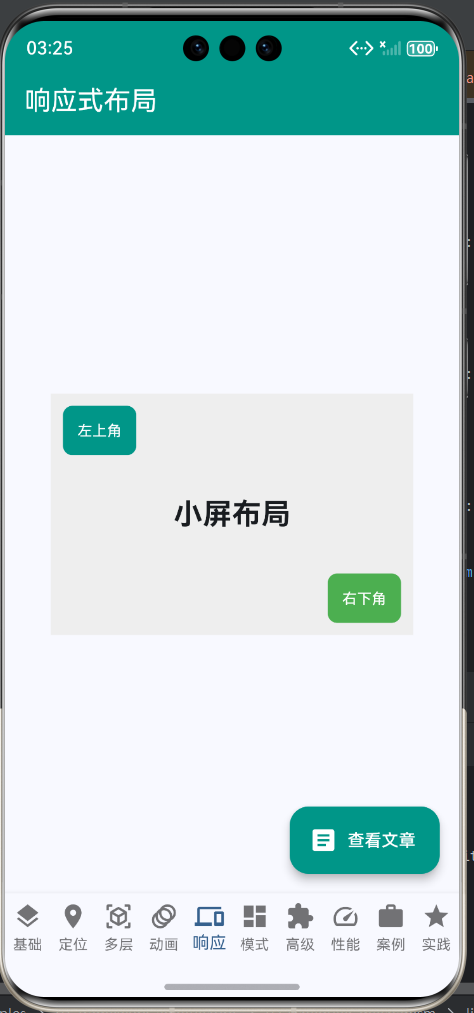
应式布局概述
响应式布局是指界面能够根据不同的屏幕尺寸、方向和设备特性自动调整布局,以提供最佳的用户体验。在移动应用开发中,响应式设计变得越来越重要,因为应用需要适配各种不同的设备,从小的手机到大的平板,甚至横竖屏切换都需要能够正常工作。
Stack作为Flutter中的层叠布局组件,本身并不提供内置的响应式能力,但通过合理的设计和使用一些辅助组件,我们可以让Stack布局也具备良好的响应式特性。在跨平台应用开发中,响应式布局尤其重要,因为Android和iOS设备的屏幕尺寸和比例差异很大,而鸿蒙平台也有自己的设备特性。
响应式布局的重要性
响应式布局不仅仅是让界面"能显示",更重要的是要在不同的设备上都能提供"良好的显示效果"。这意味着布局需要能够智能地调整大小、间距、字体尺寸等,以适应不同的屏幕环境。
响应式设计的原则
在进行Stack的响应式设计时,需要遵循一些基本原则:
| 原则 | 说明 | 实现方式 |
|---|---|---|
| 相对尺寸 | 使用相对而非绝对尺寸 | LayoutBuilder、百分比 |
| 灵活定位 | 根据屏幕调整位置 | MediaQuery、断点 |
| 适配内容 | 内容优先,容器适应 | ConstrainedBox、Flex |
| 性能考虑 | 避免过度计算 | 合理使用常量 |
| 优雅降级 | 低性能设备也能使用 | 分级适配 |
二、响应式布局的核心组件
Flutter提供了多个组件来帮助实现响应式布局,理解这些组件的作用是构建响应式Stack布局的基础。
核心组件对比表
| 组件 | 作用 | 适用场景 | 与Stack配合 |
|---|---|---|---|
| LayoutBuilder | 获取父组件约束 | 动态计算尺寸 | 计算Stack大小和子组件位置 |
| MediaQuery | 获取屏幕信息 | 全局适配 | 获取屏幕尺寸、方向 |
| AspectRatio | 保持宽高比 | 图片、视频 | 保持Stack的宽高比 |
| FractionallySizedBox | 百分比尺寸 | 相对父容器 | 设置Stack为屏幕的百分比 |
| SizedBox | 固定或扩展尺寸 | 占位或填充 | 设置Stack的基础尺寸 |
| ConstrainedBox | 约束子组件 | 控制最小最大尺寸 | 限制Stack的尺寸范围 |
| OrientationBuilder | 监听方向变化 | 横竖屏适配 | 根据方向调整布局 |
LayoutBuilder详解
LayoutBuilder是响应式布局中最常用的组件之一,它提供了父组件传递给子组件的约束信息,我们可以根据这些信息动态调整布局。
LayoutBuilder属性表:
| 属性 | 类型 | 说明 |
|---|---|---|
| builder | Widget Function(BuildContext, BoxConstraints) | 构建函数 |
BoxConstraints常用属性:
| 属性 | 类型 | 说明 |
|---|---|---|
| maxWidth | double | 最大宽度 |
| maxHeight | double | 最大高度 |
| minWidth | double | 最小宽度 |
| minHeight | double | 最小高度 |
MediaQuery详解
MediaQuery提供了关于应用程序的媒体信息,包括屏幕尺寸、设备像素比、文本缩放因子等。
MediaQuery常用属性表:
| 属性 | 类型 | 说明 | 单位 |
|---|---|---|---|
| size | Size | 屏幕尺寸 | 逻辑像素 |
| devicePixelRatio | double | 设备像素比 | - |
| orientation | Orientation | 屏幕方向 | - |
| padding | EdgeInsets | 安全区域 | 逻辑像素 |
| viewInsets | EdgeInsets | 系统UI占用 | 逻辑像素 |
| textScaleFactor | double | 文本缩放因子 | - |
| platformBrightness | Brightness | 亮度模式 | - |
三、实际案例代码
来自main.dart的_Page05Responsive类
以下是一个完整的响应式Stack布局示例,展示了如何使用LayoutBuilder实现根据屏幕尺寸调整布局:
// lib/main.dart 543-626行
class _Page05Responsive extends StatelessWidget {
const _Page05Responsive();
Widget build(BuildContext context) {
return Scaffold(
appBar: AppBar(
title: const Text('响应式布局'),
backgroundColor: Colors.teal,
foregroundColor: Colors.white,
),
body: LayoutBuilder(
builder: (context, constraints) {
final screenWidth = constraints.maxWidth;
final isSmallScreen = screenWidth < 600;
return Center(
child: SizedBox(
width: 300,
height: 200,
child: Stack(
children: [
// 背景容器
Positioned.fill(
child: Container(
color: Colors.grey[200],
child: Center(
child: Text(
isSmallScreen ? '小屏布局' : '大屏布局',
style: TextStyle(
fontSize: isSmallScreen ? 24 : 32,
fontWeight: FontWeight.bold,
),
),
),
),
),
// 响应式按钮
Positioned(
left: isSmallScreen ? 10 : 20,
top: isSmallScreen ? 10 : 20,
child: Container(
padding: const EdgeInsets.all(12),
decoration: BoxDecoration(
color: Colors.teal,
borderRadius: BorderRadius.circular(8),
),
child: Text(
'左上角',
style: TextStyle(
color: Colors.white,
fontSize: isSmallScreen ? 12 : 14,
),
),
),
),
Positioned(
right: isSmallScreen ? 10 : 20,
bottom: isSmallScreen ? 10 : 20,
child: Container(
padding: const EdgeInsets.all(12),
decoration: BoxDecoration(
color: Colors.green,
borderRadius: BorderRadius.circular(8),
),
child: Text(
'右下角',
style: TextStyle(
color: Colors.white,
fontSize: isSmallScreen ? 12 : 14,
),
),
),
),
],
),
),
);
},
),
);
}
}
案例解析
这个案例展示了响应式Stack布局的基本实现方法,根据屏幕宽度调整不同元素的尺寸和位置。
关键技术点:
-
使用LayoutBuilder获取约束
- 通过constraints.maxWidth获取可用宽度
- 使用600作为断点判断屏幕大小
- 定义isSmallScreen变量简化判断逻辑
-
响应式尺寸调整
- 字体大小: 24px(小屏)→32px(大屏)
- 按钮偏移: 10px(小屏)→20px(大屏)
- 字号调整: 12px(小屏)→14px(大屏)
-
布局结构保持不变
- Stack的基本结构不变
- 只调整具体数值
- 保证逻辑的一致性
四、断点设计策略
常用断点定义
断点是响应式设计的核心概念,它定义了不同屏幕尺寸的边界值。合理的断点设计可以让布局在不同设备上都能良好显示。
推荐断点表:
| 断点名称 | 宽度范围 | 设备类型 | 布局策略 |
|---|---|---|---|
| 手机竖屏 | < 600 | 小型手机 | 单列布局 |
| 手机横屏 | 600-900 | 大型手机 | 调整间距 |
| 平板竖屏 | 900-1200 | 小型平板 | 双列布局 |
| 平板横屏 | 1200-1600 | 大型平板 | 三列布局 |
| 桌面 | > 1600 | 桌面设备 | 四列布局 |
断点实现代码
class ResponsiveBreakpoints {
static const double mobile = 600;
static const double tablet = 900;
static const double desktop = 1200;
static bool isMobile(double width) => width < mobile;
static bool isTablet(double width) => width >= mobile && width < desktop;
static bool isDesktop(double width) => width >= desktop;
}
// 使用示例
class MyWidget extends StatelessWidget {
Widget build(BuildContext context) {
return LayoutBuilder(
builder: (context, constraints) {
final width = constraints.maxWidth;
if (ResponsiveBreakpoints.isMobile(width)) {
return MobileLayout();
} else if (ResponsiveBreakpoints.isTablet(width)) {
return TabletLayout();
} else {
return DesktopLayout();
}
},
);
}
}
断点设计流程图
五、响应式布局策略
1. 相对尺寸策略
使用相对尺寸而不是固定像素是实现响应式的基础。
| 策略 | 实现方式 | 优点 | 缺点 |
|---|---|---|---|
| 百分比 | LayoutBuilder计算 | 精确控制 | 需要计算 |
| 比例 | FractionallySizedBox | 简洁 | 依赖父容器 |
| 断点 | 根据宽度选择 | 灵活 | 代码较多 |
| 媒体查询 | MediaQuery获取 | 标准 | 性能开销 |
相对尺寸代码示例:
LayoutBuilder(
  builder: (context, constraints) {
    final width = constraints.maxWidth;

    return Stack(
      children: [
        // 使用百分比尺寸
        Positioned(
          left: width * 0.1,  // 距左边10%
          top: width * 0.1,   // 距顶部10%
          width: width * 0.8, // 宽度80%
          height: width * 0.8, // 高度80%
          child: Container(
            color: Colors.blue,
          ),
        ),
      ],
    );
  },
)
2. 字体响应式策略
字体大小也需要根据屏幕尺寸进行响应式调整。
字体响应式表:
| 设备类型 | 标题字号 | 正文字号 | 辅助字号 |
|---|---|---|---|
| 手机竖屏 | 24-28px | 14-16px | 12px |
| 手机横屏 | 28-32px | 16-18px | 14px |
| 平板竖屏 | 32-36px | 18-20px | 16px |
| 平板横屏 | 36-40px | 20-22px | 18px |
| 桌面 | 40-48px | 22-24px | 20px |
字体响应式代码示例:
class ResponsiveText {
  static double getFontSize(double screenWidth) {
    if (screenWidth < 600) return 14.0;
    if (screenWidth < 900) return 16.0;
    if (screenWidth < 1200) return 18.0;
    return 20.0;
  }

  static TextStyle getTitleStyle(double screenWidth) {
    return TextStyle(
      fontSize: getFontSize(screenWidth) * 1.5,
      fontWeight: FontWeight.bold,
    );
  }
}

// 使用示例
Text(
  '标题',
  style: ResponsiveText.getTitleStyle(screenWidth),
)
3. 间距响应式策略
间距也需要根据屏幕尺寸进行调整,以保持布局的平衡。
间距响应式表:
| 设备类型 | 小间距 | 中间距 | 大间距 |
|---|---|---|---|
| 手机竖屏 | 4-8px | 12-16px | 20-24px |
| 手机横屏 | 8-12px | 16-20px | 24-28px |
| 平板竖屏 | 12-16px | 20-24px | 28-32px |
| 平板横屏 | 16-20px | 24-28px | 32-36px |
| 桌面 | 20-24px | 28-32px | 36-40px |
间距响应式代码示例:
class ResponsiveSpacing {
  static double getSpacing(double screenWidth) {
    if (screenWidth < 600) return 8.0;
    if (screenWidth < 900) return 12.0;
    if (screenWidth < 1200) return 16.0;
    return 20.0;
  }

  static double getDoubleSpacing(double screenWidth) {
    return getSpacing(screenWidth) * 2;
  }
}

// 使用示例
Container(
  padding: EdgeInsets.all(
    ResponsiveSpacing.getSpacing(screenWidth),
  ),
  child: Text('内容'),
)
六、横竖屏适配
屏幕方向检测
使用OrientationBuilder可以检测屏幕方向的变化,并根据方向调整布局。
方向适配代码示例:
OrientationBuilder(
  builder: (context, orientation) {
    return Stack(
      children: [
        Positioned(
          left: orientation == Orientation.portrait ? 20 : 40,
          top: 20,
          child: Container(
            width: orientation == Orientation.portrait ? 100 : 150,
            height: 100,
            color: Colors.blue,
          ),
        ),
      ],
    );
  },
)
横竖屏布局策略表
| 方向 | 布局特点 | 调整建议 |
|---|---|---|
| 竖屏 | 高度大于宽度 | 上下排列,利用高度 |
| 横屏 | 宽度大于高度 | 左右排列,利用宽度 |
| 过渡 | 方向切换时 | 提供平滑过渡 |
七、复杂响应式布局
响应式卡片网格
实现一个能够根据屏幕尺寸自动调整列数的卡片网格。
class ResponsiveCardGrid extends StatelessWidget {
final List<String> items;
const ResponsiveCardGrid({required this.items});
Widget build(BuildContext context) {
return LayoutBuilder(
builder: (context, constraints) {
final screenWidth = constraints.maxWidth;
final columns = _calculateColumns(screenWidth);
return GridView.builder(
gridDelegate: SliverGridDelegateWithFixedCrossAxisCount(
crossAxisCount: columns,
crossAxisSpacing: 16,
mainAxisSpacing: 16,
childAspectRatio: 1.5,
),
itemCount: items.length,
itemBuilder: (context, index) {
return Card(
child: Center(child: Text(items[index])),
);
},
);
},
);
}
int _calculateColumns(double width) {
if (width < 600) return 2;
if (width < 900) return 3;
if (width < 1200) return 4;
return 5;
}
}
响应式Stack卡片
实现一个能够根据屏幕尺寸调整内容和布局的卡片。
class ResponsiveStackCard extends StatelessWidget {
final String title;
final String description;
const ResponsiveStackCard({
required this.title,
required this.description,
});
Widget build(BuildContext context) {
return LayoutBuilder(
builder: (context, constraints) {
final width = constraints.maxWidth;
final isSmall = width < 400;
return Card(
child: SizedBox(
width: isSmall ? 300 : 400,
height: isSmall ? 200 : 250,
child: Stack(
children: [
// 背景
Positioned.fill(
child: Container(
decoration: BoxDecoration(
gradient: LinearGradient(
colors: [Colors.blue, Colors.purple],
),
borderRadius: BorderRadius.circular(8),
),
),
),
// 内容
Positioned(
left: isSmall ? 16 : 24,
right: isSmall ? 16 : 24,
bottom: isSmall ? 16 : 24,
child: Column(
crossAxisAlignment: CrossAxisAlignment.start,
children: [
Text(
title,
style: TextStyle(
color: Colors.white,
fontSize: isSmall ? 20 : 24,
fontWeight: FontWeight.bold,
),
),
SizedBox(height: isSmall ? 8 : 12),
Text(
description,
style: TextStyle(
color: Colors.white70,
fontSize: isSmall ? 14 : 16,
),
),
],
),
),
],
),
),
);
},
);
}
}
八、响应式布局的性能优化
性能优化原则
响应式布局需要注意性能问题,避免不必要的计算和重建。
优化原则表:
| 原则 | 说明 | 实现方式 |
|---|---|---|
| 避免频繁重建 | 只在必要时重建 | const、shouldRebuild |
| 缓存计算结果 | 复用计算结果 | 变量缓存 |
| 使用断点而非连续值 | 减少计算 | 分级适配 |
| 优化布局算法 | 减少嵌套 | 扁平化布局 |
| 使用性能分析工具 | 找到瓶颈 | DevTools |
优化示例
优化前:
// 每次build都重新计算
LayoutBuilder(
  builder: (context, constraints) {
    final width = constraints.maxWidth;
    final fontSize = width / 20;  // 每次都计算
    final padding = width / 30;

    return Stack(
      children: [
        Positioned(
          left: padding,
          top: padding,
          child: Text('内容', style: TextStyle(fontSize: fontSize)),
        ),
      ],
    );
  },
)
优化后:
// 使用常量缓存
class ResponsiveConstants {
  static const double fontSizeMobile = 14.0;
  static const double fontSizeTablet = 16.0;
  static const double fontSizeDesktop = 18.0;

  static double getFontSize(double width) {
    if (width < 600) return fontSizeMobile;
    if (width < 1200) return fontSizeTablet;
    return fontSizeDesktop;
  }
}

LayoutBuilder(
  builder: (context, constraints) {
    final fontSize = ResponsiveConstants.getFontSize(constraints.maxWidth);

    return Stack(
      children: [
        Positioned(
          left: 16,
          top: 16,
          child: Text(
            '内容',
            style: TextStyle(fontSize: fontSize),
          ),
        ),
      ],
    );
  },
)
九、响应式布局的测试
测试策略
响应式布局需要在多种设备上进行测试,确保在各种情况下都能正常工作。
测试清单表:
| 测试项 | 测试设备 | 测试内容 | 通过标准 |
|---|---|---|---|
| 小屏手机 | iPhone SE, Android小屏 | 布局紧凑,内容可见 | 所有元素可见且可操作 |
| 标准手机 | iPhone 13, Pixel | 布局舒适,间距合理 | 视觉效果良好 |
| 大屏手机 | iPhone Pro Max, Plus | 布局宽松,充分利用空间 | 不浪费空间 |
| 平板竖屏 | iPad Mini, 小平板 | 多列布局,内容丰富 | 利用宽屏优势 |
| 平板横屏 | iPad Pro, 大平板 | 多列布局,信息量大 | 高效利用空间 |
| 横竖屏切换 | 支持旋转的设备 | 平滑过渡,不崩溃 | 切换流畅 |
测试流程图
十、响应式布局的最佳实践
最佳实践列表
-
使用断点而非连续计算
- 断点更易理解和维护
- 减少计算开销
- 提供一致的视觉体验
-
优先考虑小屏设备
- 从小屏开始设计
- 逐步扩展到大屏
- 确保核心功能可用
-
保持布局一致性
- 相似功能布局一致
- 遵循平台设计规范
- 维护品牌风格
-
优化性能
- 避免不必要的重建
- 使用const构造函数
- 缓存计算结果
-
充分测试
- 多设备测试
- 横竖屏测试
- 边界情况测试
常见错误及解决方案
| 错误 | 现象 | 原因 | 解决方案 |
|---|---|---|---|
| 小屏内容显示不全 | 内容被截断 | 使用了固定尺寸 | 使用相对尺寸或滚动 |
| 大屏空间浪费 | 布局过于紧凑 | 没有充分利用空间 | 增加列数或内容 |
| 横竖屏布局混乱 | 布局错乱 | 没有适配方向变化 | 使用OrientationBuilder |
| 性能问题 | 滚动卡顿 | 频繁计算和重建 | 优化计算,使用缓存 |
| 断点不合理 | 某些设备显示异常 | 断点设置不当 | 根据实际设备调整 |
十一、响应式布局的未来趋势
新兴技术
响应式布局技术在不断发展,以下是一些新兴趋势:
| 技术 | 说明 | 应用前景 |
|---|---|---|
| 自适应布局 | 根据内容自动调整 | 智能布局系统 |
| AI辅助设计 | 机器学习优化布局 | 个性化布局 |
| 跨平台统一 | 一套代码适配所有平台 | Flutter 3.x+ |
| 实时预览 | 开发时实时查看多设备 | 提升开发效率 |
| 无障碍增强 | 更好的可访问性支持 | 包容性设计 |
十二、总结
Stack的响应式布局是跨平台应用开发中的重要技能,通过LayoutBuilder、MediaQuery等组件,我们可以创建出能够适应各种设备和屏幕的灵活布局。
核心要点:
- 使用LayoutBuilder获取约束信息
- 设计合理的断点系统
- 采用相对尺寸而非固定像素
- 响应式调整字体和间距
- 适配横竖屏切换
- 优化性能,避免频繁重建
适用场景:
- 适配多种设备尺寸
- 支持横竖屏切换
- 创建通用布局组件
- 实现自适应卡片和列表
- 优化不同屏幕的显示效果
最佳实践:
- 从小屏开始设计,逐步扩展
- 使用断点而非连续计算
- 保持布局一致性
- 充分测试各种设备
- 优化性能,减少计算
技术要点:
- LayoutBuilder是响应式布局的核心
- MediaQuery提供全局屏幕信息
- 百分比和比例是实现相对尺寸的关键
- 字体和间距也需要响应式调整
- 性能优化是响应式布局的重要考虑
掌握Stack的响应式布局技术,可以帮助开发者创建出能够适应各种设备和屏幕的优秀应用,为用户提供一致而良好的使用体验。在跨平台开发中,响应式布局是确保应用在Android、iOS和鸿蒙等不同平台上都能良好显示的关键技术之一。
欢迎加入开源鸿蒙跨平台社区:https://openharmonycrossplatform.csdn.net

AtomGit 是由开放原子开源基金会联合 CSDN 等生态伙伴共同推出的新一代开源与人工智能协作平台。平台坚持“开放、中立、公益”的理念,把代码托管、模型共享、数据集托管、智能体开发体验和算力服务整合在一起,为开发者提供从开发、训练到部署的一站式体验。
更多推荐

 14
14 0
0- 0


 已为社区贡献30条内容

所有评论(0)